

User Guide
English ( 2 – 4 )
Guía del usuario
Español ( 5 – 7 )
Guide d’utilisation
Français ( 8 – 10 )
Guida per l’uso
Italiano ( 11 – 13 )
Benutzerhandbuch
Deutsch ( 14 – 16 )
Appendix
English ( 17 – 19 )
User Guide (English)
Introduction
Box Contents
CompactKit 4 User Guide
(2) Drum Sticks Safety & Warranty Manual
Power Adapter
Support
For the latest information about this product (system requirements, compatibility information,
etc.) and product registration, visit alesis.com.
For additional product support, visit alesis.com/support.
Features
Top Panel
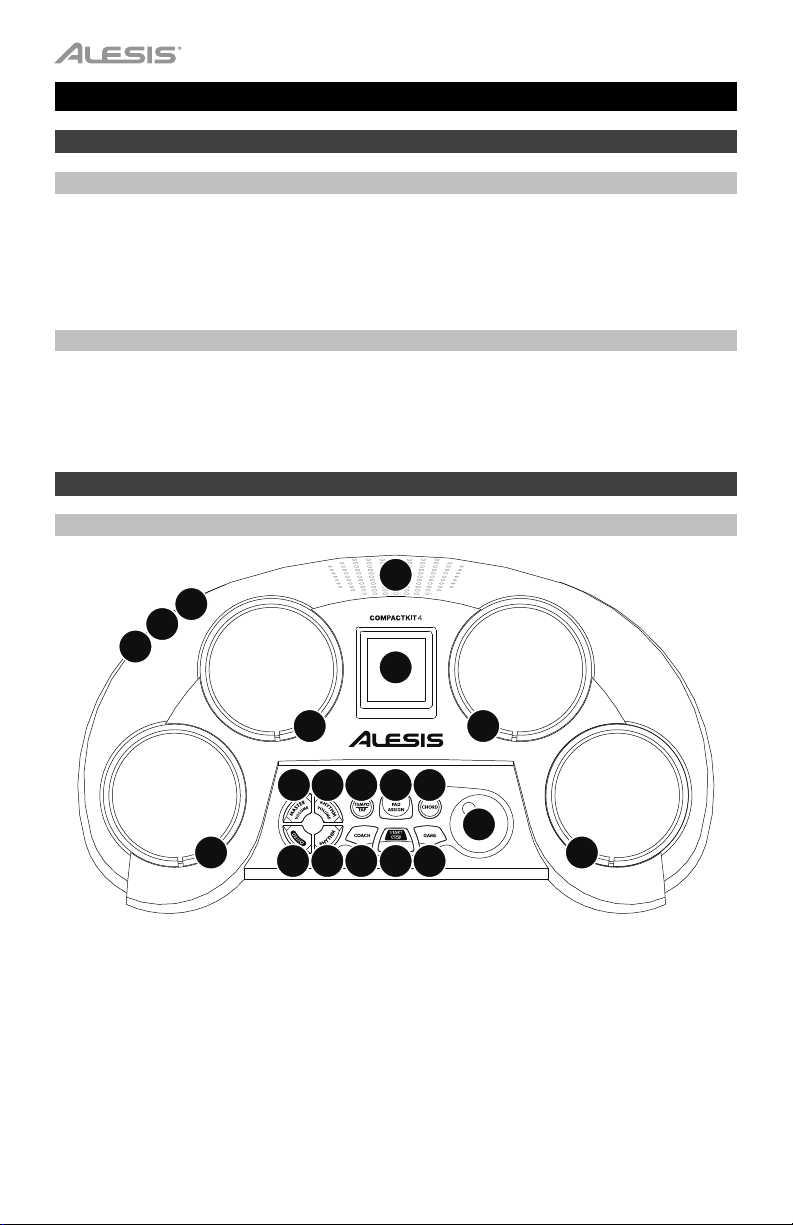
4
3
1
2
Pad 2
6
Pad 3
Pad 1
5
89
12 13 14
5
Pad 4
7
55
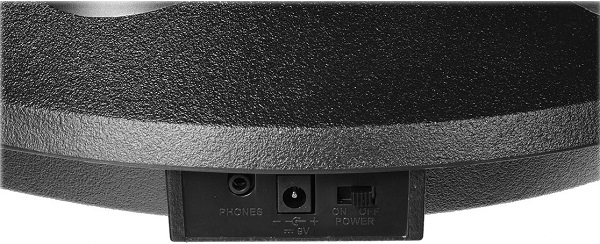
1. Power Input: Connect this input to a power outlet using the included power adapter.
2. Power Switch: Use this switch to power CompactKit 4 on or off.
3. Headphone Output: Connect 1/8” (3.5 mm) stereo headphones (optional, sold separately)
to this output. When headphones are connected, the speaker will be muted.
4. Speaker: The sound will play out of this speaker. When headphones are connected to the
headphone output, this speaker will be muted.
5. Pads: Hit these pads to play CompactKit 4.
6. Display: This LCD shows CompactKit 4’s current operation.
7. Dial: Turn this dial to adjust the setting shown in the display.
2
1011
15 16
17

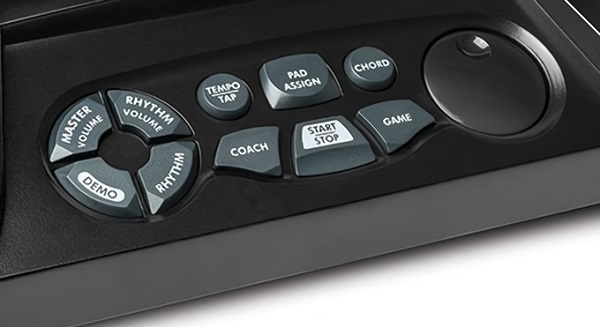
8. Master Volume: Press this button, and then turn the dial to adjust the master volume.
9. Rhythm Volume: Press this button, and then turn the dial to adjust the volume of the
accompaniment (everything but the drum sounds in a song).
10. Rhythm: Press this button, and then turn the dial to select a song.
11. Demo: Press this button to play the demo song.
12. Tempo/Tap: Press this button, and then turn the dial to adjust the tempo. Alternatively, hit
any pad 3 or 4 times (based on the current song’s time signature) at the desired tempo.
The current song will start playing at a tempo based on your last two hits.
13. Pad Assign: Press this button, and then hit a pad to change its sound. Each hit will play
and select the next sound. After you hear the sound you want to use for that pad, press
this button again.
14. Chord: Press this button to activate or deactivate the accompaniment.
15. Coach: Press this button, and then turn the dial to select a solo to play using the Coach
feature. See Operation > Coach to learn more.
16. Start/Stop: Press this button to start or stop the current song.
17. Game: Press this button, and then turn the dial to select a rhythm to play using the Game
feature. See Operation > Game to learn more.
Operation
Songs
CompactKit 4 has several songs consisting of drum parts and accompaniment (“rhythm”). You
can play the song with or without the accompaniment.
To select a song, press Rhythm and then turn the dial.
To play or stop the song, press Start/Stop.
Tip: Alternatively, press Tempo, and then hit any pad 3 or 4 times (based on the current
song’s time signature) at the desired tempo. The current song will start playing at a tempo
based on your last two hits.
To play or stop the demo song, press Demo.
To adjust the master volume, press Master Volume and then turn the dial.
To adjust the volume of the accompaniment, press Rhythm Volume and then turn the dial.
To adjust the tempo of the song, press Tempo, and then turn the dial to adjust the tempo.
Tip: Alternatively, press Tempo, and then hit any pad 3 or 4 times (based on the current
song’s time signature) at the desired tempo. The current song will start playing at a tempo
based on your last two hits.
To activate or deactivate the accompaniment, press Chord.
3
Sounds
CompactKit 4 has several different sounds that you can assign to each drum pad.
To assign a sound to a pad:
1. Press Rhythm then turn the dial to select a song.
2. Press Pad Assign.
3. Hit a pad to change its sound. Each hit will play and select the next sound. Stop after you
hear the sound you want to use for that pad.
4. Optional: To change the sound of another pad, repeat Step 3.
5. When you are finished, press Pad Assign. The sounds are now assigned to those pads.
Game
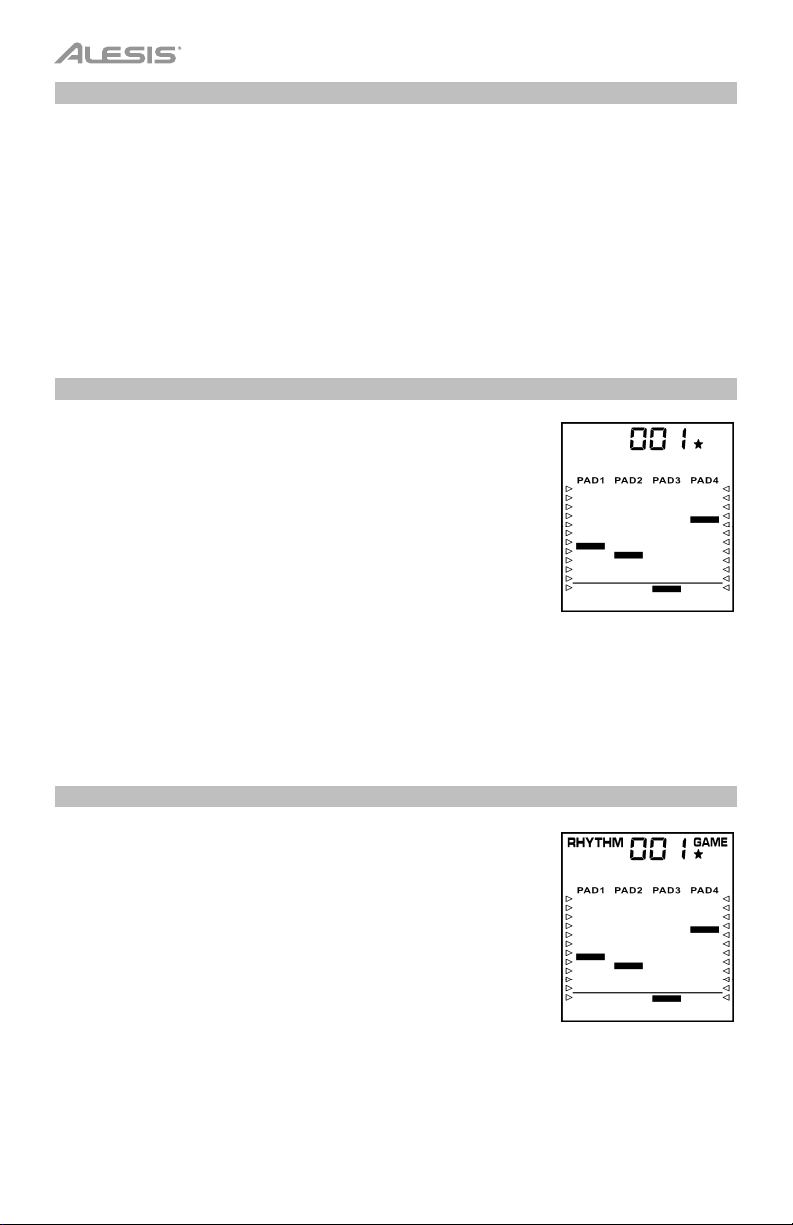
CompactKit 4 has a built-in game that can help you learn its various
drum patterns. In the display, bars will descend in each column
(representing each pad). Once a bar reaches below the line, hit the
corresponding pad.
To play the game:
1. Press Game.
2. Turn the dial to select a rhythm. The upper-right corner will
show 1, 2, or 3 stars to indicate the difficulty level: 1 is easy, 2
is normal, and 3 is hard.
3. Press Start/Stop to start playing. As each bar reaches the line
at the bottom of the display, hit the corresponding pad.
4. When the game is finished, you will see your score (000–100%).
After 3 seconds, the game will restart.
5. Press Start/Stop to stop playing.
Coach
CompactKit 4 has a built-in drum coach that can help improve your
skill at learning general drum patterns. In the display, bars will
descend in each column (representing each pad). Once a bar
reaches below the line, hit the corresponding pad.
To use the coach:
1. Press Coach.
2. Turn the dial to select a pattern. The upper-right corner will
show 1, 2, or 3 stars to indicate the difficulty level: 1 is easy, 2
is normal, and 3 is hard.
3. Press Start/Stop to start playing. As each bar reaches the line
at the bottom of the display, hit the corresponding pad.
4. When the session is finished, you will see your score (000–
100%). After 3 seconds, the coach will restart.
5. Press Start/Stop to stop playing.
4
Guía del usuario (Español)
Introducción
Contenido de la caja
CompactKit 4 Guía del usuario
(2) Baquetas Manual de seguridad y garantía
Adaptador de corriente
Soporte
Para obtener la información más reciente acerca de este producto (requisitos de sistema,
información de compatibilidad, etc.) y registrarlo, visite alesis.com.
Para obtener soporte adicional del producto, visite alesis.com/support.
Características
Panel superior
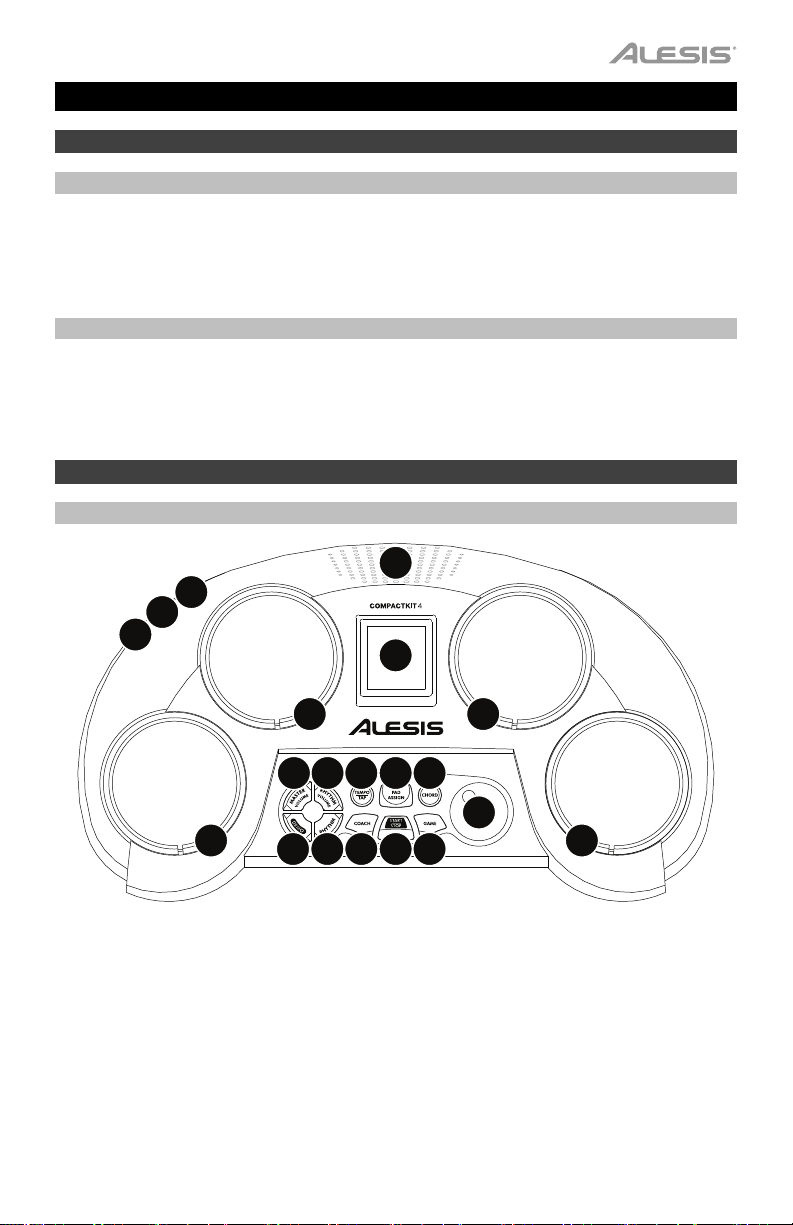
4
3
1
2
Pad 2
6
Pad 3
Pad 1
5
89
12 13 14
5
Pad 4
7
55
1. Entrada de corriente: Conecte esta entrada a un tomacorriente utilizando el adaptador de
alimentación incluido.
2. Interruptor de encendido: Utilice este interruptor para encender y apagar el CompactKit 4.
3. Salida para auriculares: Conecte auriculares estéreo de 3,5 mm (1/8 pulg.) a esta salida
(opcionales se venden por separado). Cuando se conectan auriculares, el altavoz interno
se silencia.
4. Altavoz: El sonido se emite desde este altavoz. Cuando los auriculares están conectados
a la salida para auriculares, el altavoz se silencia.
5. Pads: Golpee estos pads para tocar el CompactKit 4.
6. Pantalla: Este LCD muestra el funcionamiento actual del CompactKit 4.
7. Cuadrante: Gire este cuadrante para ajustar el ajuste que se muestra en la pantalla.
1011
15 16
17
5

8. Volumen maestro: Pulse este botón y luego gire el cuadrante para ajustar el volumen
maestro.
9. Volumen del ritmo: Pulse este botón y luego gire el cuadrante para ajustar el volumen del
acompañamiento (todo menos los sonidos de batería de una canción).
10. Ritmo: Pulse este botón y luego gire el cuadrante para seleccionar una canción.
11. Demo: Pulse este botón para reproducir la canción de muestra.
12. Tempo/Tap: Pulse este botón y luego gire el cuadrante para ajustar el tempo. Como
alternativa, golpee cualquier pad 3 o 4 veces (en base a la firma de tiempo de la canción
actual) al tempo deseado. La canción actual comenzará a reproducirse al tempo basado
en sus dos últimos golpes.
13. Asignar pad: Pulse este botón y luego golpee un pad para cambiar su sonido. Cada golpe
reproducirá y seleccionará el siguiente sonido. Tras escuchar el sonido que desea usar
para ese pad, pulse este botón nuevamente.
14. Acorde: Pulse este botón para activar o desactivar el acompañamiento.
15. Entrenador: Pulse este botón y luego gire el cuadrante para seleccionar un solo para
reproducir utilizando la característica Entrenador. Consulte Funcionamiento > Entrenador
para aprender más.
16. Iniciar/parar: Pulse este botón para iniciar o detener la canción actual.
17. Juego: Pulse este botón y luego gire el cuadrante para seleccionar un ritmo para reproducir
utilizando la característica Juego. Consulte Funcionamiento > Juego para aprender más.
Funcionamiento
Canciones
CompactKit 4 tiene diversas canciones que consisten en partes de batería y acompañamiento
(“ritmo”). Puede reproducir la canción con o sin el acompañamiento.
Para seleccionar una canción, pulse Ritmo y luego gire el cuadrante.
Para reproducir o detener la canción, pulse Start/Stop.
Consejo: Como alternativa, pulse Tempo y golpee cualquier pad 3 o 4 veces (en base a la
firma de tiempo de la canción actual) al tempo deseado. La canción actual comenzará a
reproducirse al tempo basado en sus dos últimos golpes.
Para reproducir o detener la canción de muestra, pulse Demo.
Para ajustar el volumen maestro, pulse Master Volume y luego gire el cuadrante.
Para ajustar el volumen del acompañamiento, pulse Rhythm Volume y luego gire el cuadrante.
Para ajustar el tempo de la canción, pulse Tempo y luego gire el cuadrante para ajustar el
tempo.
Consejo: Como alternativa, pulse Tempo y golpee cualquier pad 3 o 4 veces (en base a la
firma de tiempo de la canción actual) al tempo deseado. La canción actual comenzará a
reproducirse al tempo basado en sus dos últimos golpes.
Para activar o desactivar el acompañamiento, pulse Chord (Acorde).
6
Loading…
Качественные звуки
Какой бы звук вы ни искали, мы гарантируем, что у CompactKit 4 есть решение!
С впечатляющими 70 перкуссионными тембрами и 10 эффектами, а также встроенным композициям звучать как настоящая группа еще не было так просто.
Естественные ощущения
Он ощущается и реагирует так же, как традиционная ударная установка! С четырьмя чувствительными к динамике пэдами барабанов, которые обеспечивают реалистичное звучание ударных с ощущением и откликом настоящих барабанов, вы можете быть уверены, что каждый тонкий нюанс вашего исполнения запечатлен — плюс, мы даже включили барабанные палочки для еще большей аутентичности!
Встроенная функция PLAY
Изучение барабанов должно быть увлекательным, и оно не становится более увлекательным, чем CompactKit 4! Благодаря встроенной, ориентированной на учебу режиму, вы можете научиться играть на барабанах с помощью ЖК-экрана CompactKit 4, что гарантирует вам игру на главной сцене!
| Производитель | ALESIS |
| Выход на наушники | 1 x 3.5 мм |
| Блок питания (в комплекте) | 9 VDC, 800 mA |
| Вес в упаковке | 2.3 кг |
| Размер упаковки (ГxШxВ) | 483x293x178 мм |
ALESIS COMPACTKIT 4 – настольная портативная электронная барабанная установка с четырьмя высококачественными чувствительными к скорости нажатия пэдами. Эта модель выдает очень натуральный звук и прекрасно передает ощущения, возникающие при игре на настоящей акустической ударной установке. Установка ALESIS COMPACTKIT 4 очень удобна и проста в использовании, она прекрасно подойдет для начинающих барабанщиков и обучающихся игре на ударных инструментах. Модель оснащена функцией «учителя», которая позволяет отображать на светодиодном дисплее проигрываемые ноты и направлять барабанщика при игре под встроенные композиции и ритмы. Специальный игровой режим позволяет сделать процесс обучения увлекательным и интересным. Библиотека включает 70 вариантов перкуссионного звучания и 10 различных встроенных эффектов, предусмотрено 50 композиций, под аккомпанемент которых Вы можете играть. В комплекте с установкой поставляются палочки и адаптер питания. Возможна также автономная работа от батареек (6 С) – играйте в любое время и в любом месте!
Alesis Compactkit 4 – портативная настольная электронная ударная установка. Четыре чувствительные к velocity пэда обеспечивают реалистичный звук барабанов и натуральный отскок. Встроено несколько десятков встроенных песен и грувов, а также функция обучения, которая показывает информацию на ЖК-экране и учит исполнителя играть вместе со встроенным материалом.
В верхней части корпуса находится динамик. Для тихой игры предусмотрен выход на наушники. Панель управления состоит из поворотного джога и десяти кнопок, которые позволяют контролировать основную громкость и громкость сопровождения, грув, темп, назначать пэды, аккомпанемент, включать режим обучения, запускать и останавливать трек. Питание установки – от сети или от батареек C (покупаются отдельно).
Особенности Compactkit 4:
- 70 тембров на выбор;
- Пэды с естественным отскоком;
- Выход на наушники.
- Alesis
- Ударные Alesis
- Ударные установки Alesis
Файлы для скачивания
- Инструкция для Compactkit 4 (англ.) (PDF 1 Мб 114 Кб)
Идеальная компактная электронная барабанная установка для начинающих барабанщиков!
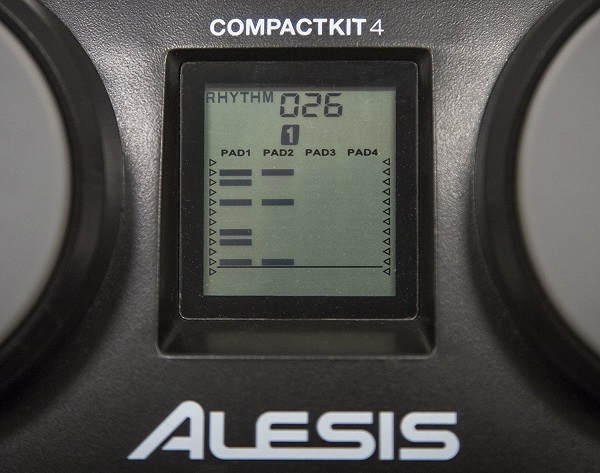
ALESIS COMPACTKIT 4 – настольная портативная электронная барабанная установка с четырьмя высококачественными чувствительными к скорости нажатия пэдами. Эта модель выдает очень натуральный звук и прекрасно передает ощущения, возникающие при игре на настоящей акустической ударной установке. Установка ALESIS COMPACTKIT 4 очень удобна и проста в использовании, она прекрасно подойдет для начинающих барабанщиков и обучающихся игре на ударных инструментах. Модель оснащена функцией «учителя», которая позволяет отображать на светодиодном дисплее проигрываемые ноты и направлять барабанщика при игре под встроенные композиции и ритмы.
Специальный игровой режим позволяет сделать процесс обучения увлекательным и интересным. Библиотека включает 70 вариантов перкуссионного звучания и 10 различных встроенных эффектов, предусмотрено 50 композиций, под аккомпанемент которых Вы можете играть. В комплекте с установкой поставляются палочки и адаптер питания. Возможна также автономная работа от батареек (6 С) – играйте в любое время и в любом месте!
Особенности
4 чувствительных к скорости пэдов обеспечивают реалистичный звук и ощущения
70 голосов перкуссии и 10 встроенных эффектов
50 композиций
Функция «учителя» показывает заметки на экране LCD и инструктирует игрока
Функция «игры» позволяет играть и учиться
Палочки и адаптер питания включены
Питание от батареек 6 С (приобретаются отдельно)
Комплект поставки
CompactKit 4
Палочки
Блок питания
Руководство пользователя
Безопасность и гарантийное руководство