
ASUS
Loading…
B
- B53F-SO151X
- B53F-SO152X
- B53F-SO198X
- B53F-SO206X
- B53J23
- B53J-A1B
- B53J-B1B
- B53J SO084X
- B53J-SO171X
- B53S30
- B53V29
- B53V-SO089P
- B53V-SO090P
- B550
- B550-E
- B550-F4
- B550M-K
- B550M-PLUS2
- B550-PLUS2
- B551LA30
- B551LG30
- B560M-K
- B560M-N
- B560M-P
- B560M-T
- B560-PLUS
- B75MA5
- B75M-PLUS6
- B80A22
- B80A-A1
- B857
- B85-A3
- B85-A R2.03
- B85-GAMER6
- B85M-D4
- B85M-D PLUS3
- B85M-E2
- B85M-E/BR4
- B85M-E-C2
- B85M-E/CSM8
- B85M-E-DASH3
- B85M-E R2.03
- B85M-F5
- B85M-F PLUS3
- B85M-G12
- B85M-GAMER4
- B85M-G PLUS5
- B85M-G PLUS/USB 3.14
- B85M-G R2.0
- B85M-HQ
- B85M-K5
- B85M-K PLUS3
- B85M-V5 PLUS
- B85M-VIEW PAKER3
- B85M-V PLUS
- B85M-V PRO
- B85-PLUS9
- B85-PLUS R2.0
- B85-PLUS/USB 3.12
- B85-PRO2
- B85-PRO GAMER
- B85-R2.0
- B9400CEA65
- B9400CEA-KC0166R6
- B9400CEA-KC0167R
- B9440FA
- B9440UA34
- B945031
- B9450FA
- B9450FA-BM0165R
- B9450FA-BM0166R3
- B9450FA-BM0341R
- B9450FA-BM0367R
- B9450FA-BM0397R
- B9450FA-BM0556R
- BA5120
- BA51903
- BC-12B1LT
- BC-12B1ST
- BC-12D2HT4
- BDS-5002
- BDS-7002
- BE2093
- BE209QLB26
- BE209TLB26
- BE2293
- BE229QLB30
- BE229QLB-G26
- BE229QLBH18
- BE2394
- BE239QLB28
- BE239QLBH25
- BE239QLBR26
- BE2493
- BE249QLB28
- BE249QLB-G26
- BE249QLBH26
- BE24A2
- BE24AQLB28
- BE24AQLB-G26
Loading…
Loading…
Nothing found
B85M-G
User Manual
75 pgs3.54 Mb0
User Manual
6 pgs2.19 Mb0
User Manual
80 pgs4.34 Mb0
User Manual
78 pgs6.28 Mb0
User Manual
76 pgs3.8 Mb0
User Manual
78 pgs3.89 Mb0
User Manual
2 pgs1.11 Mb0
User Manual
12 pgs7.2 Mb0
User Manual
76 pgs2.65 Mb0
User Manual
74 pgs2.64 Mb0
User Manual
75 pgs4.8 Mb1
User Manual
78 pgs6.36 Mb0
Table of contents
Loading…
…
ASUS User Manual
Download
Specifications and Main Features
Frequently Asked Questions
User Manual

Loading…
+ 52 hidden pages
You need points to download manuals.
1 point = 1 manual.
You can buy points or you can get point for every manual you upload.
Buy points
Upload your manuals
Asus B85M-G
View the manual for the Asus B85M-G here, for free. This manual comes under the category motherboards and has been rated by 13 people with an average of a 8.7.
This manual is available in the following languages: English. Do you have a question about the Asus B85M-G or do you need help?
Ask your question here
Index
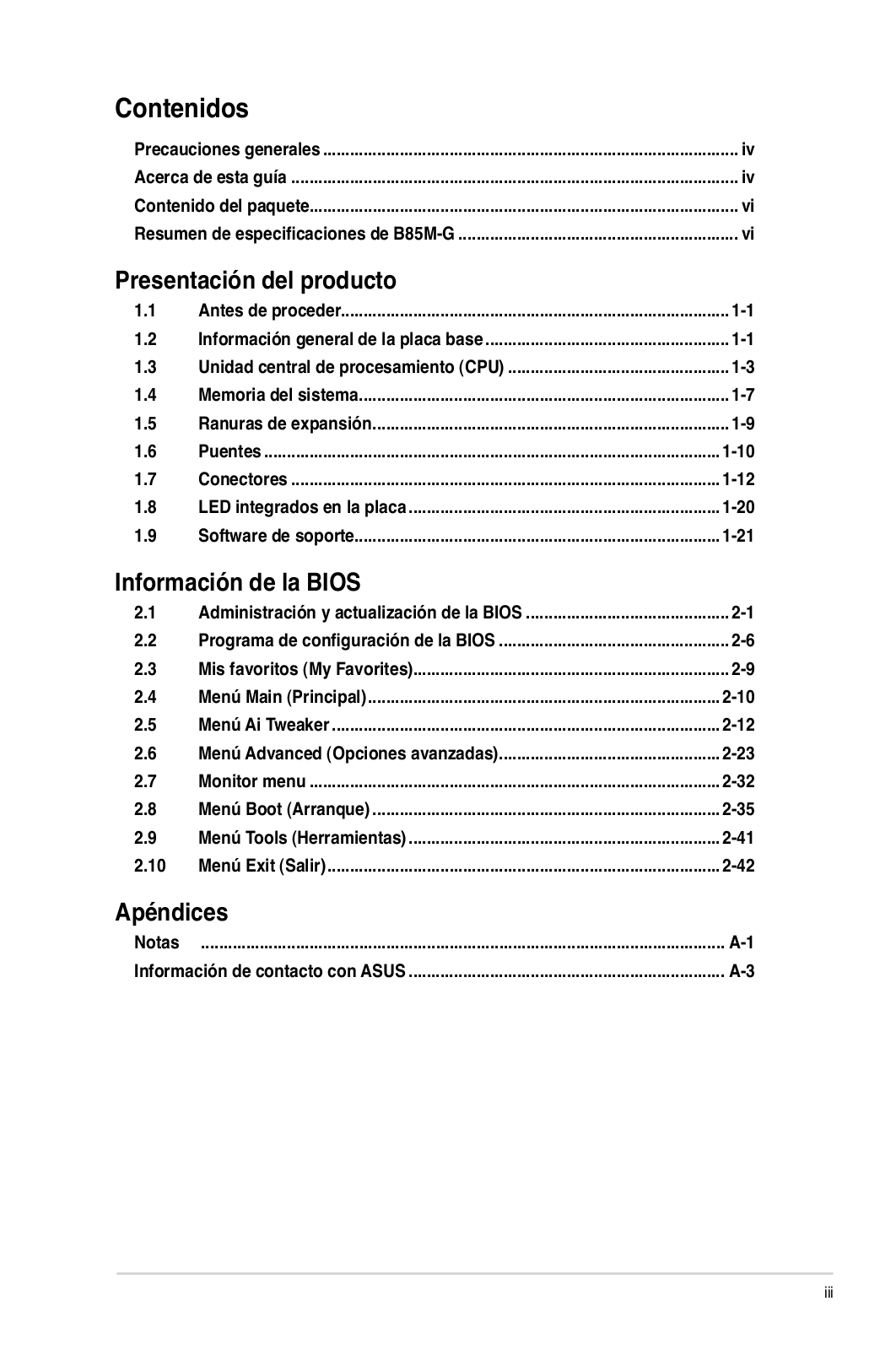
- Safety information
- Product introduction
- BIOS information
- Appendices
Product Images (7)

Asus B85M-G specifications
Below you will find the product specifications and the manual specifications of the Asus B85M-G.
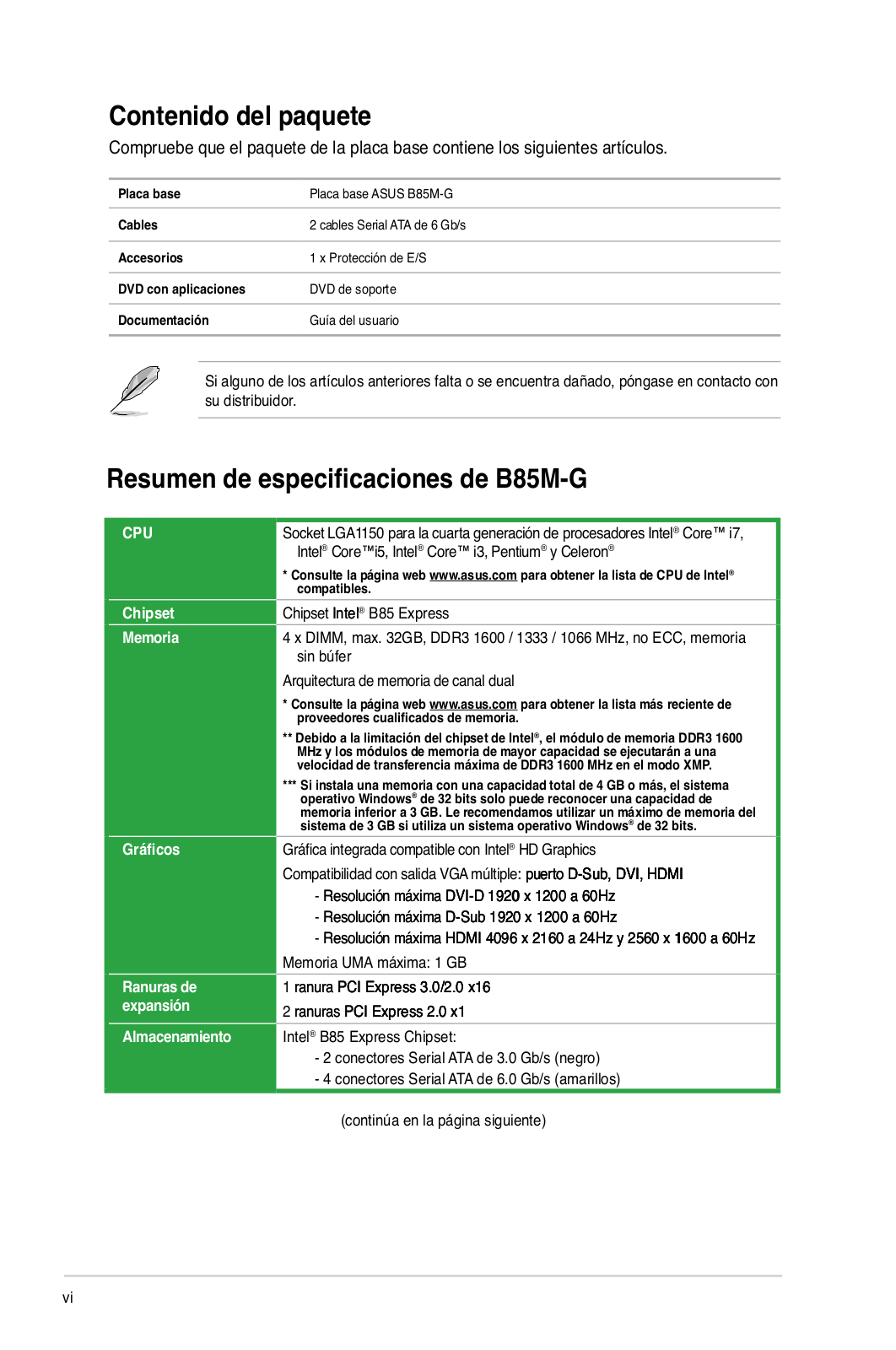
The Asus B85M-G is a motherboard that supports Intel processors, specifically the Intel Celeron and Intel Pentium series. It features an LGA 1150 (Socket H3) processor socket, allowing for compatibility with a range of processors. With four DIMM memory slots, the motherboard has a maximum internal memory capacity of 32 GB. The supported memory clock speeds are 1066, 1333, and 1600 MHz.
In terms of connectivity, the Asus B85M-G offers two USB 2.0 connectors and one USB 3.2 Gen 1 (3.1 Gen 1) connector, ensuring compatibility with various peripheral devices. It also includes six SATA connectors, facilitating the connection of multiple storage devices. The motherboard is equipped with an S/PDIF out connector for digital audio output and a CPU fan connector for efficient cooling.
Furthermore, the Asus B85M-G features one COM connector, which allows for the connection of legacy serial devices. This provides versatility and compatibility with older peripherals that still utilize COM ports.
Overall, the Asus B85M-G is a reliable and feature-rich motherboard designed for Intel processors. With its range of connectivity options, it enables users to connect multiple peripherals and storage devices. The inclusion of COM connectors demonstrates compatibility with older devices that may still require a serial connection. The motherboard’s support for up to 32 GB of internal memory ensures efficient multitasking capabilities.
Supported memory types
DDR3-SDRAM
Processor manufacturer
Intel
Supported storage drive interfaces
SATA II, SATA III
General
| Brand | Asus |
| Model | B85M-G | 90MB0G50-M0EAY0 |
| Product | motherboard |
| EAN | 4716659480068, 4716659553748, 4916659480048, 886227480067, 5053785413232, 0886227553747, 4053162745216 |
| Language | English |
| Filetype | User manual (PDF) |
Memory
| Supported memory types | DDR3-SDRAM |
| Number of memory slots | 4 |
| Memory slots type | DIMM |
| Memory channels | Dual-channel |
| Supported memory clock speeds | 1066,1333,1600 MHz |
| Maximum internal memory | 32 GB |
Processor
| Processor manufacturer | Intel |
| Compatible processor series | Intel Celeron, Intel Pentium |
| Processor socket | LGA 1150 (Socket H3) |
Internal I/O
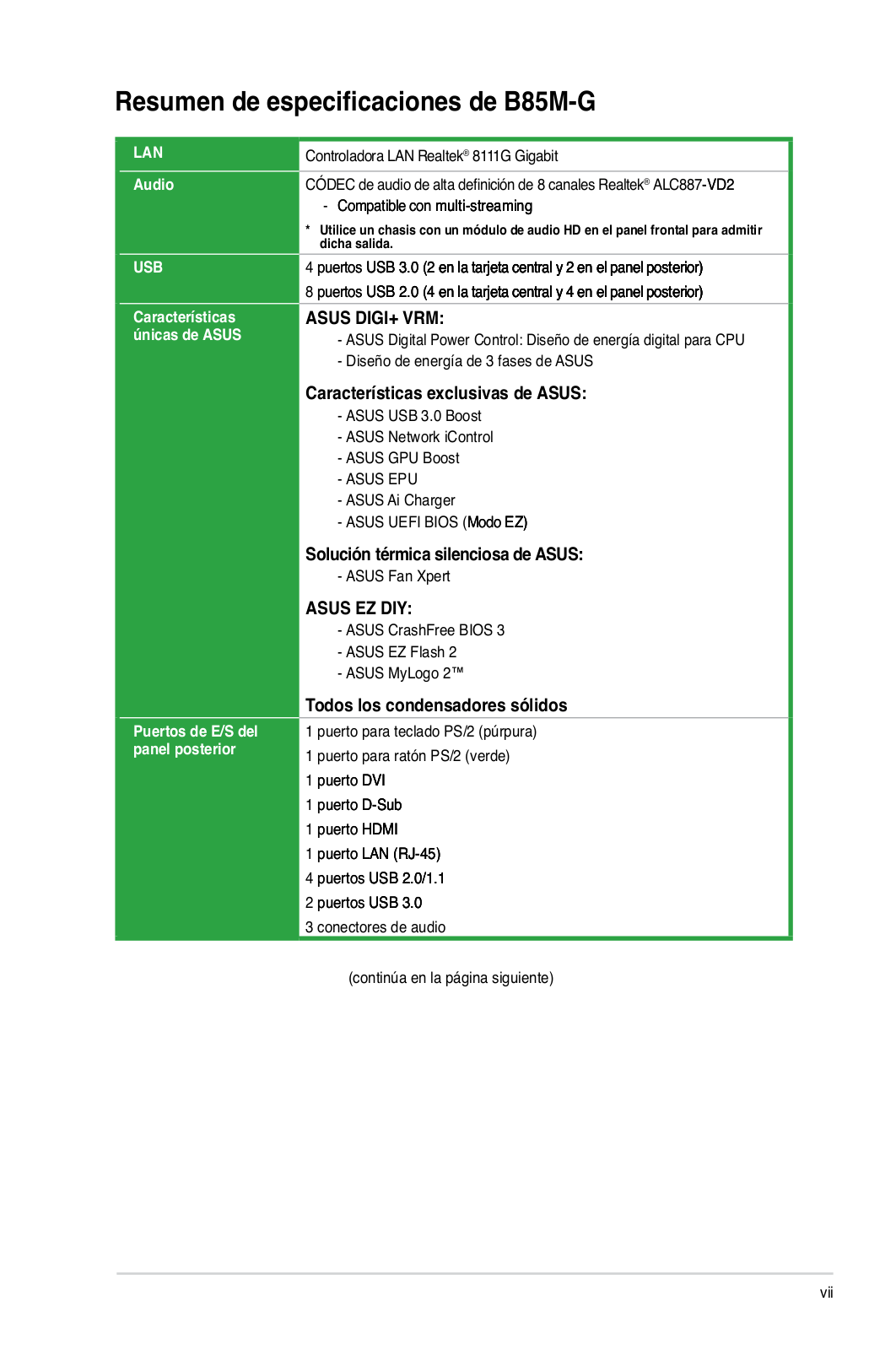
| USB 2.0 connectors | 2 |
| USB 3.2 Gen 1 (3.1 Gen 1) connectors | 1 |
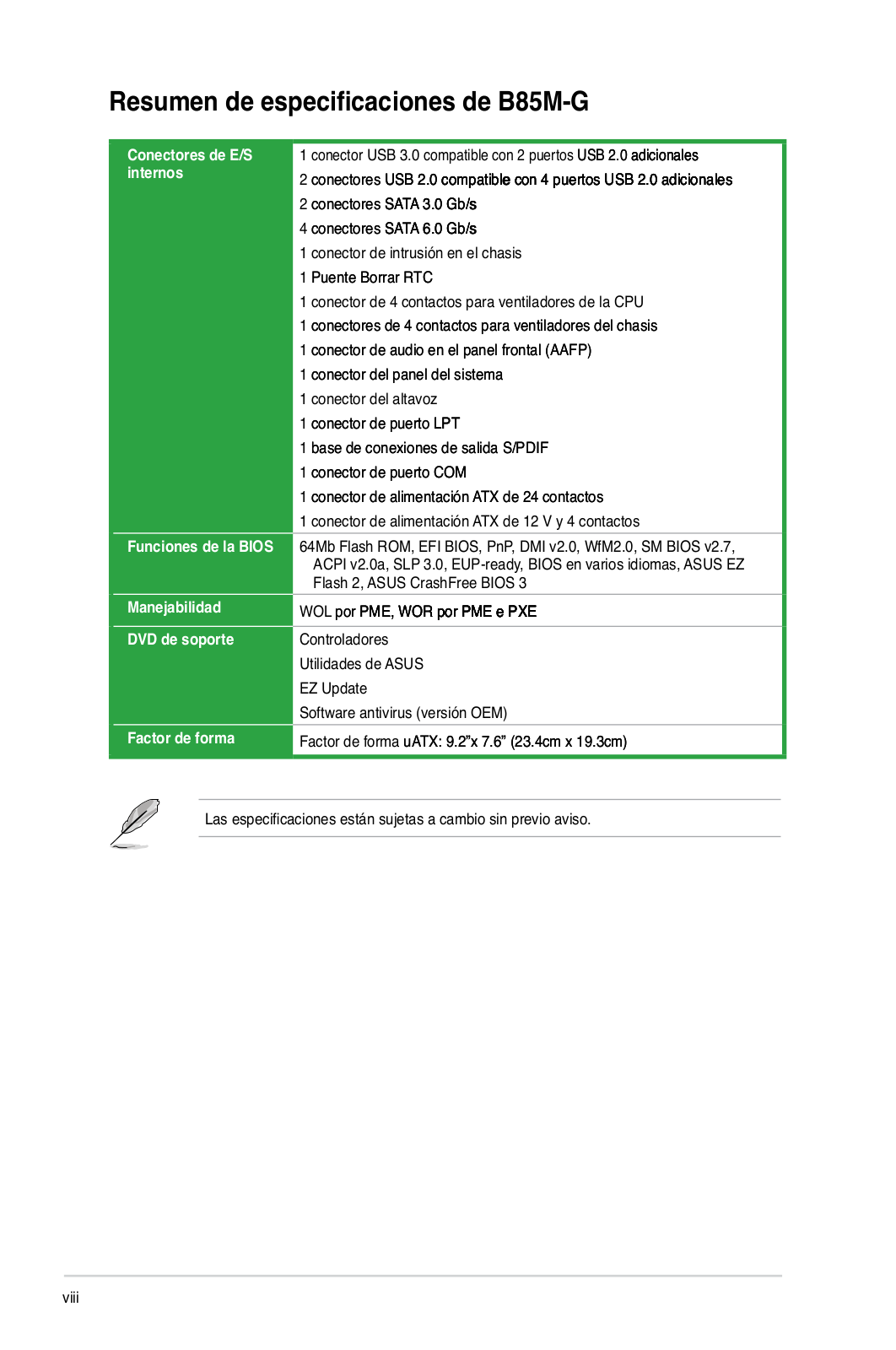
| Number of SATA connectors | 6 |
| S/PDIF out connector | Yes |
| CPU fan connector | Yes |
| Number of COM connectors | 1 |
| ATX Power connector (24-pin) | Yes |
| Number of EATX power connectors | 1 |
| Chassis intrusion connector | Yes |
| Number of chassis fan connectors | 1 |
| Number of Parallel ATA connectors | 0 |
| Front panel audio connector | Yes |
| Number of SATA II connectors | 2 |
| Number of SATA III connectors | 4 |
Rear panel I/O ports
| USB 2.0 ports quantity | 4 |
| USB 3.2 Gen 1 (3.1 Gen 1) Type-A ports quantity | 2 |
| Ethernet LAN (RJ-45) ports | 1 |
| eSATA ports quantity | 0 |
| PS/2 ports quantity | 2 |
| Firewire (IEEE 1394) ports | 0 |
| Headphone outputs | 1 |
| Microphone in | Yes |
| VGA (D-Sub) ports quantity | 1 |
| DVI-D ports quantity | 1 |
| HDMI ports quantity | 1 |
Features
| Component for | PC |
| Motherboard chipset family | Intel |
| Motherboard form factor | micro ATX |
| Audio output channels | 7.1 channels |
| Audio chip | Realtek ALC887-VD2 |
| Motherboard chipset | Intel® B85 |
| Power source type | ATX |
Storage controllers
| Supported storage drive interfaces | SATA II, SATA III |
Graphics
| Parallel processing technology support | — |
| Maximum graphics card memory | 1024 MB |
| Maximum resolution | 4096 x 2160 pixels |
Expansion slots
| PCI Express x16 slots | 1 |
| PCI Express x1 slots | 2 |
| PCI Express slots version | 2.0, 3.0 |
Weight & dimensions
Network
BIOS
| BIOS type | AMI |
| BIOS memory size | 64 Mbit |
| ACPI version | 2.0a |
| Clear CMOS jumper | Yes |
show more
Frequently Asked Questions
Can’t find the answer to your question in the manual? You may find the answer to your question in the FAQs about the Asus B85M-G below.
Why can’t my computer power on after installing the Asus B85M-G motherboard?
Ensure that the power supply cables are securely connected to the motherboard and that the power switch is properly connected to the motherboard’s front panel header.
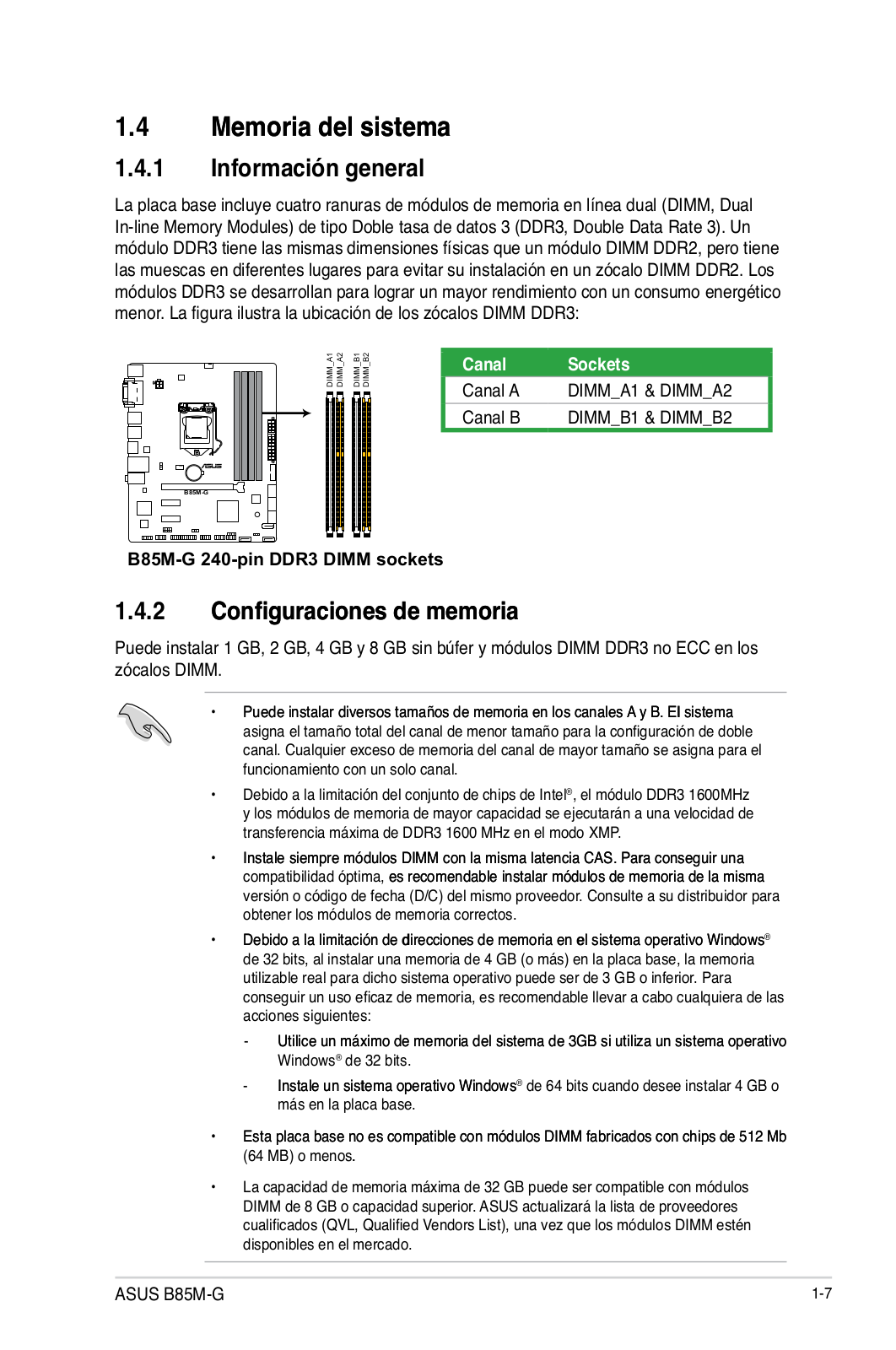
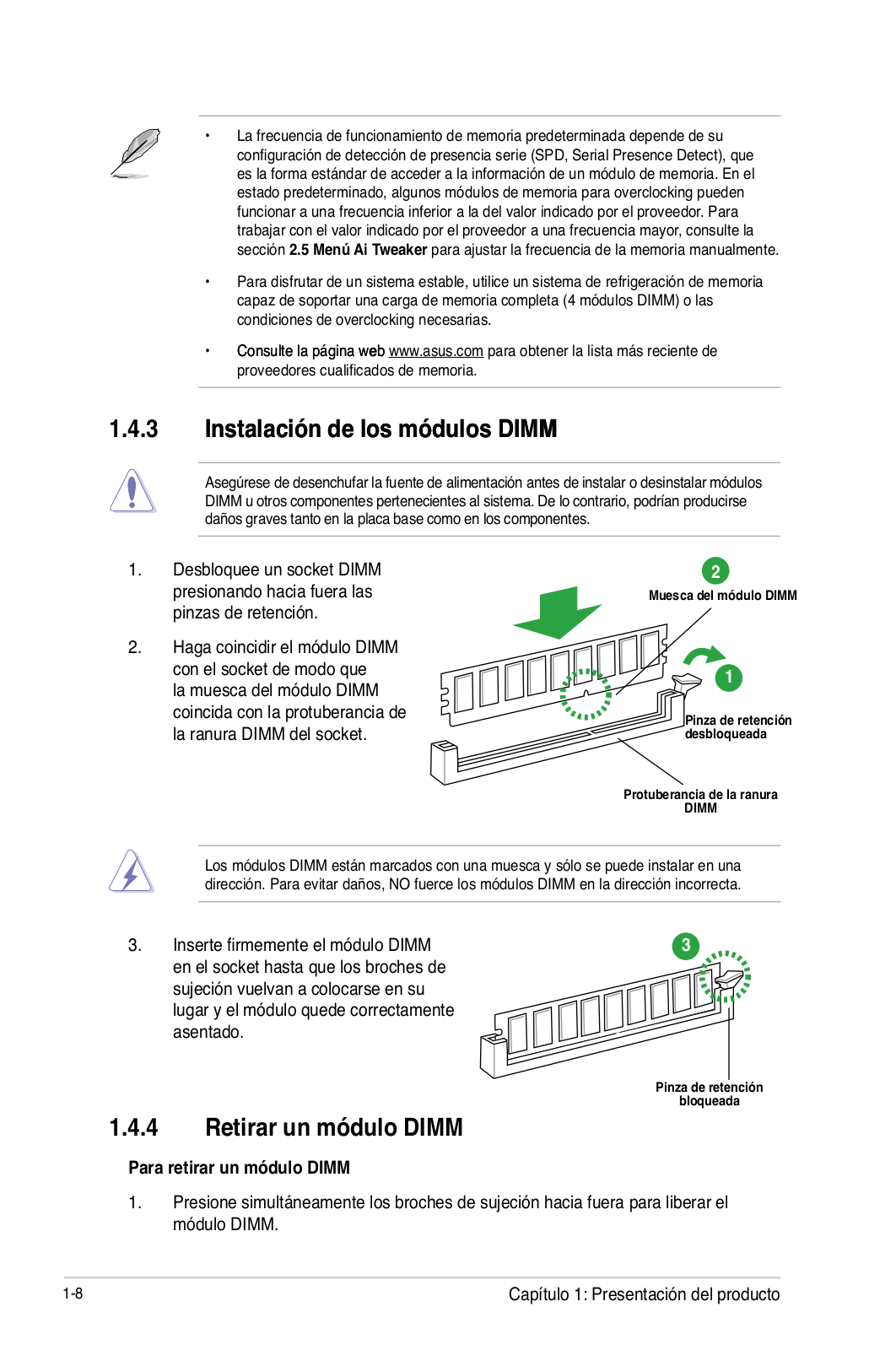
How can I install additional RAM modules on my Asus B85M-G motherboard?
Locate the DIMM slots on the motherboard and gently insert the RAM module into the appropriate slot, ensuring it is securely seated. Make sure to release the side latches to lock the module into place.
My USB devices are not working properly. How can I troubleshoot this issue with my Asus B85M-G motherboard?
Check that the USB connectors are firmly plugged into the motherboard headers. Ensure that the USB drivers are correctly installed and up to date. You may also try connecting the devices to different USB ports to rule out any port-specific issues.
How can I update the BIOS on my Asus B85M-G motherboard?
Download the latest BIOS update from the official Asus support website. Save the BIOS file to a USB flash drive. Enter the BIOS setup by pressing the designated key during the boot process. Then, use the BIOS update utility in the BIOS menu to select and update the BIOS file from the USB flash drive.
Is it possible to add a dedicated graphics card to my Asus B85M-G motherboard?
Yes, the Asus B85M-G motherboard supports PCIe x16 slots, allowing you to install a dedicated graphics card. Ensure that your power supply has sufficient wattage to support the graphics card, and connect the necessary power cables to it for proper operation.
How many memory slots does the Asus B85M-G have?
The Asus B85M-G has 4 memory slots.
What type of memory slots does the Asus B85M-G support?
The Asus B85M-G supports DIMM memory slots.
What are the supported memory clock speeds for the Asus B85M-G?
The Asus B85M-G supports memory clock speeds of 1066, 1333, and 1600 MHz.
What is the maximum internal memory supported by the Asus B85M-G?
The Asus B85M-G supports a maximum internal memory of 32 GB.
How many USB 2.0 connectors does the Asus B85M-G have?
The Asus B85M-G has 2 USB 2.0 connectors.
What is the width of the Asus B85M-G?
The Asus B85M-G has a width of 233 mm.
What is the depth of the Asus B85M-G?
The Asus B85M-G has a depth of 193 mm.
Is the manual of the Asus B85M-G available in English?
Yes, the manual of the Asus B85M-G is available in English .
Is your question not listed? Ask your question here
Manufacturer:ASUS
Category:Computers & Peripherals
Device:ASUS B85M-G
Name:New_SSD_List
Pages:1
Size:18.19 KB
Manufacturer:ASUS
Category:Computers & Peripherals
Device:ASUS B85M-G
Name:H87_Series_Memory_QVL_list_Report
Language:Multilingual
Pages:4
Size:97.88 KB
Manufacturer:ASUS
Category:Computers & Peripherals
Device:ASUS B85M-G
Name:User’s Manual(Traditional Chinese)
Language:中文(繁體)
Pages:78
Size:6.06 MB
Manufacturer:ASUS
Category:Computers & Peripherals
Device:ASUS B85M-G
Name:User’s Manual (Japanese)
Language:日本語
Pages:78
Size:3.71 MB
Manufacturer:ASUS
Category:Computers & Peripherals
Device:ASUS B85M-G
Name:User’s Manual (English)
Language:English
Pages:78
Size:5.99 MB
Manufacturer:ASUS
Category:Computers & Peripherals
Device:ASUS B85M-G
Name:User’s Manual (Japanese)
Language:日本語
Pages:76
Size:6.23 MB
Manufacturer:ASUS
Category:Computers & Peripherals
Device:ASUS B85M-G
Name:User’s Manual (Simplified Chinese)
Language:中文(简体)
Pages:80
Size:6.10 MB
Manufacturer:ASUS
Category:Computers & Peripherals
Device:ASUS B85M-G
Name:_Devices_Report_0705
Language:Multilingual
Pages:17
Size:227.06 KB
Manufacturer:ASUS
Category:Computers & Peripherals
Device:ASUS B85M-G
Name:B85-series_DRAM_QVL
Language:Multilingual
Pages:8
Size:131.73 KB
Manufacturer:ASUS
Category:Computers & Peripherals
Device:ASUS B85M-G
Name:B85 Series Memory Report
Language:Multilingual
Pages:5
Size:444.24 KB
Manufacturer:ASUS
Category:Computers & Peripherals
Device:ASUS B85M-G
Name:H87 Series Memory QVL Report
Language:Multilingual
Pages:5
Size:428.66 KB
Manufacturer:ASUS
Category:Computers & Peripherals
Device:ASUS B85M-G
Name:H87_Series_Memory_QVL_Report_150727
Language:Multilingual
Pages:5
Size:440.32 KB
Manufacturer:ASUS
Category:Computers & Peripherals
Device:ASUS B85M-G
Name:B85_DRAM_QVL_1121
Language:Multilingual
Pages:4
Size:94.98 KB
Manufacturer:ASUS
Category:Computers & Peripherals
Device:ASUS B85M-G
Name:Memory QVL update
Language:Multilingual
Pages:5
Size:114.18 KB
Manufacturer:ASUS
Category:Computers & Peripherals
Device:ASUS B85M-G
Name:HDMI insert (English)
Language:English
Pages:1
Size:91.95 KB
Manufacturer:ASUS
Category:Computers & Peripherals
Device:ASUS B85M-G
Name:User’s Manual (English)
Language:English
Version:E8522
Pages:76
Size:3.38 MB
Manufacturer:ASUS
Category:Computers & Peripherals
Device:ASUS B85M-G
Name:User’s Manual (English)
Language:English
Version:E8146
Pages:75
Size:3.38 MB
Manufacturer:ASUS
Category:Computers & Peripherals
Device:ASUS B85M-G
Name:User’s Manual (Simplified Chinese)
Language:中文(简体)
Pages:80
Size:4.13 MB
Manufacturer:ASUS
Category:Computers & Peripherals
Device:ASUS B85M-G
Name:User’s Manual(Traditional Chinese)
Language:中文(繁體)
Pages:76
Size:4.07 MB
Manufacturer:ASUS
Category:Computers & Peripherals
Device:ASUS B85M-G
Name:User’s Manual (Simplified Chinese)
Language:中文中文(简体)
Version:C8146
Pages:80
Size:4.13 MB
Manufacturer:ASUS
Category:Computers & Peripherals
Device:ASUS B85M-G
Name:User’s Manual(Traditional Chinese)
Language:中文中文(繁體)
Version:T8146
Pages:76
Size:4.07 MB
Manufacturer:ASUS
Category:Computers & Peripherals
Device:ASUS B85M-G
Name:LGA1150 CPU installation Manual
Version:—
Pages:6
Size:2.09 MB
Manufacturer:ASUS
Category:Computers & Peripherals
Device:ASUS B85M-G
Name:Quick Start Guide
Language:Multilingual
Pages:12
Size:6.87 MB
Manufacturer:ASUS
Category:Computers & Peripherals
Device:ASUS B85M-G
Name:Quick Start Guide
Version:Q8146
Pages:12
Size:6.87 MB
Manufacturer:ASUS
Category:Computers & Peripherals
Device:ASUS B85M-G
Name:User’s Manual (Spanish)
Language:Español
Version:S8146
Pages:75
Size:4.58 MB
Manufacturer:ASUS
Category:Computers & Peripherals
Device:ASUS B85M-G
Name:User’s Manual (Japanese)
Language:日本語
Version:J8146
Pages:76
Size:3.62 MB
Document Download |
‹
›
Asus B85M-G Manual Online:
4.6,
1510
votes
Asus B85M-G User Manual
Asus B85M-G User Guide
Asus B85M-G Online Manual
Text of Asus B85M-G User Guide:
More Instructions:
|
Asus B85M-G Operation & user’s manual
|
DOWNLOAD | |
|
Asus B85M-G Owner’s manual
|
DOWNLOAD | |
|
Asus B85M-G Operation & user’s manual
|
DOWNLOAD | |
|
Asus B85M-G Quick start manual
|
DOWNLOAD |
Related Products and Documents (Motherboard):
-
Asus P4C800 Deluxe Motherboard Troubleshooting manual
P4C800 Deluxe
asus/p4c800-deluxe.pdf, 142 -
Asus F1A55-M LE R2.0 Motherboard Guía de inicio rápido
F1A55-M LE R2.0
asus/f1a55-m-le-r2-0.pdf, 12 -
Asus P5WDG2 WS Professional Motherboard Operation & user’s manual
P5WDG2 WS Professional
asus/p5wdg2-ws-professional.pdf, 172 -
Asus C8HM70-I Motherboard Manual de démarrage rapide
C8HM70-I
asus/c8hm70-i.pdf, 10 -
Asus K8V-MX Motherboard Operation & user’s manual
K8V-MX
asus/k8v-mx.pdf, 72 -
Asus DSEB-DG — Motherboard — SSI EEB 3.61 Motherboard Operation & user’s manual
DSEB-DG — Motherboard — SSI EEB 3.61
asus/dseb-dg-motherboard-ssi-eeb-3-61.pdf, 202 -
Asus Motherboard P4S333-VM Motherboard Operation & user’s manual
Motherboard P4S333-VM
asus/motherboard-p4s333-vm.pdf, 112 -
Asus P5E3 WS PRO Motherboard Operation & user’s manual
P5E3 WS PRO
asus/p5e3-ws-pro.pdf, 172
Comparable Devices:
| # | Manufacturer | Model | Document Type | File | Updated | Pages | Size |
|---|---|---|---|---|---|---|---|
| 1 | Jasco | Enbrighten 35931 | Manual | jasco/enbrighten-35931-5B4.pdf | 31 Jan 2025 | 2 | |
| 2 | PSI | DRS4 | Operation & user’s manual | psi/drs4-7OB.pdf | 07 Sep 2023 | 36 | |
| 3 | Insignia | NS-R27TR | Operation & user’s manual | insignia/ns-r27tr-82J.pdf | 11 Feb 2024 | 112 | |
| 4 | Kenwood | KFC-167X | Service manual | kenwood/kfc-167x-JSL.pdf | 01 Mar 2024 | 1 | |
| 5 | Tripp Lite | N201-001-WH | Specification sheet | tripp-lite/n201-001-wh-6Z9.pdf | 05 Dec 2024 | 2 | 0.1 Mb |
| 6 | dji | SNAIL 2305 | Operation & user’s manual | dji/snail-2305-515.pdf | 08 Nov 2024 | 84 |
Similar Resources:
Motherboard Instructions:
-
MIA Mixer Mix & Cut
MIA Mixer Mix & Cut User instructions
Mix & Cut, 16
-
Takagi Water Heater T-K2
Water Heater Installation manual and owner’s manual (Takagi T-K2)
T-K2, 32
-
Vanco Adapter 280341
Vanco Product User Manual: 280341 PDF Product manual — 2UBZVI
280341, 2
-
Bullitt Engine B-219
Bullitt B-219 User Manual (Instruction manual), @DXIYK5
B-219, 9
-
LG Microwave Oven MS3948AS
User Guide: LG MS3948AS (FN8CTS, Upd.30.01.2025)
MS3948AS, 31
-
Lexus Automobile LS 600h L 2015
#FNY6A1 LS 600h L 2015: Lexus Automobile Owner Documentation
LS 600h L 2015, 620
-
Reeves Water Heater G2 series
Reeves G2 series Manual (Doc Type: Water Heater Operation & maintenance manual)
G2 series, 30
-
Sony Blu-ray Player BDP-BX18
#17S351 BDP-BX18: Sony Blu-ray Player Owner Documentation
BDP-BX18, 3
-
Vermeiren Medical Equipment Languedoc
Vermeiren Medical Equipment Languedoc Instruction manual
Languedoc, 2
-
FieldServer Storage FS-8700-41
Storage Driver manual (FieldServer FS-8700-41)
FS-8700-41, 48
-
Casio Watch 1949
Casio Watch Operation & user’s manual (File: casio-1949-operation-user-s-manual-2, 04.02.2025)
1949, 2
-
Asus Desktop Chromebox CN60
Asus Chromebox CN60 User Guide (Doc Type: Desktop Quick start manual)
Chromebox CN60, 8
Comments, Questions and Opinions:
Page
Page
Product introduction
BIOS information Appendices
Electrical safety
Operation safety How this guide is organized
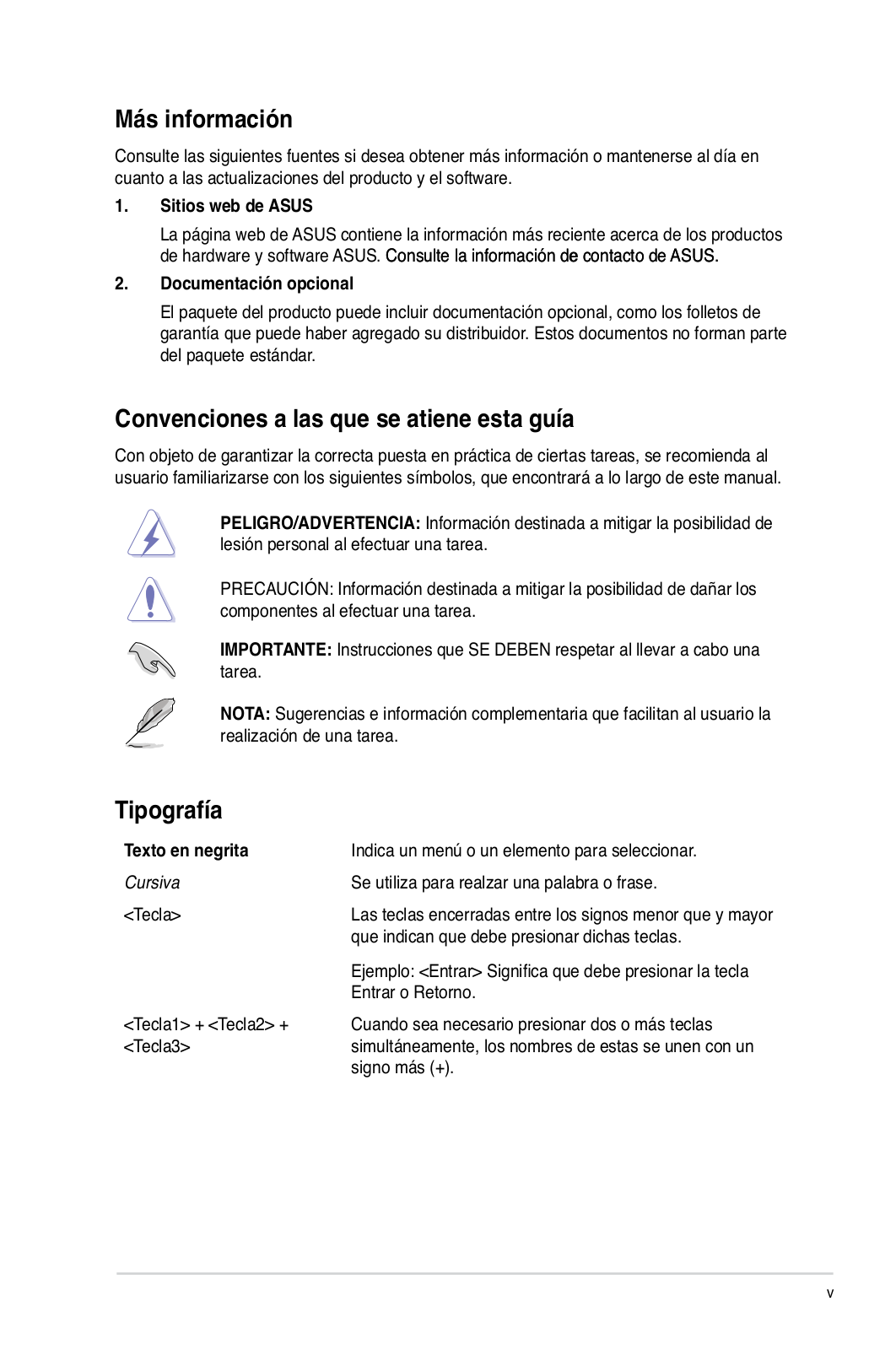
Where to find more information
Conventions used in this guide Typography
Package contents
B85M-Gspecifications summary ASUS DIGI+ VRM:
ASUS Exclusive Features: ASUS Quiet Thermal Solution:
ASUS EZ DIY: All Solid Capacitors
Page
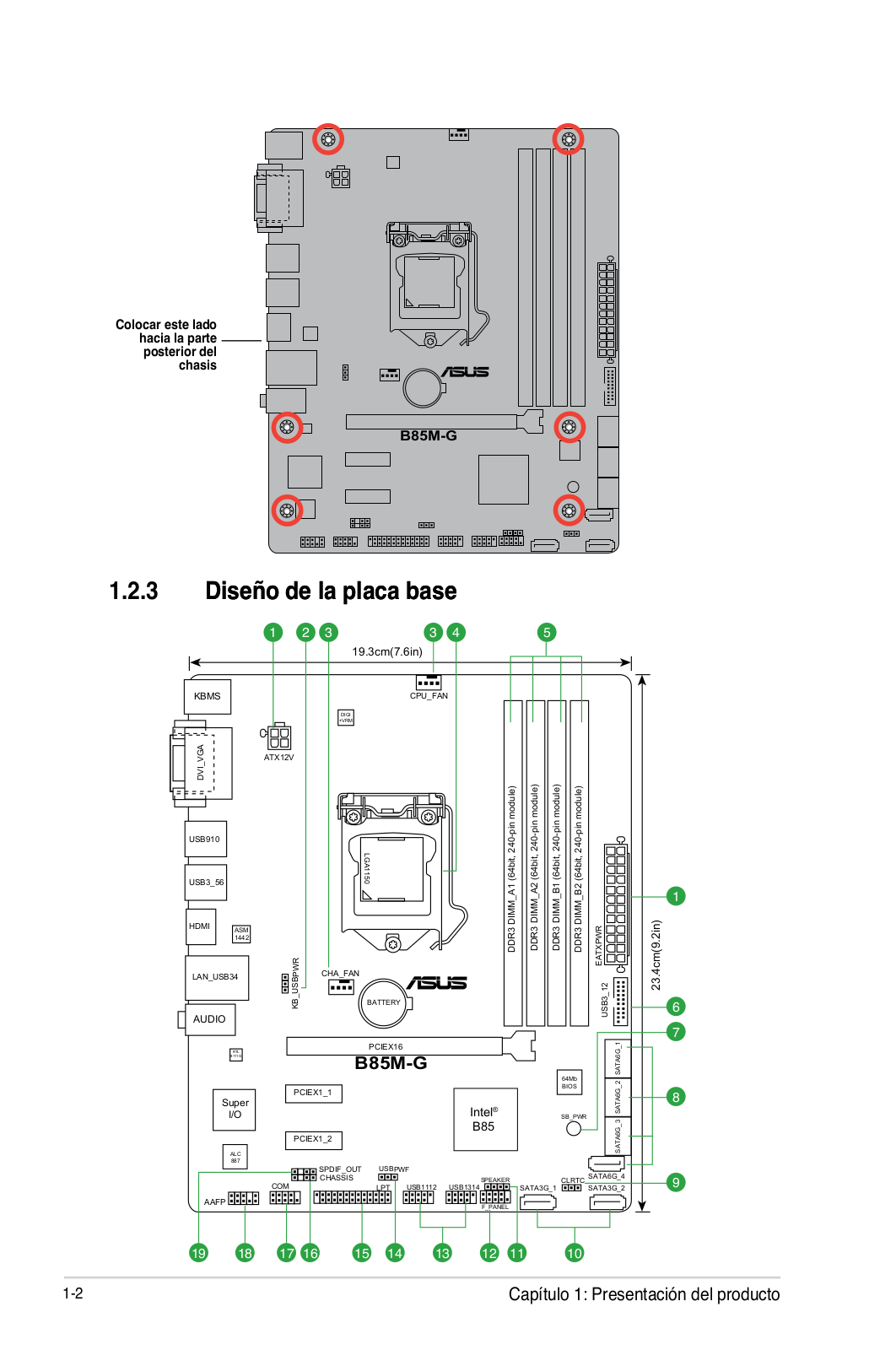
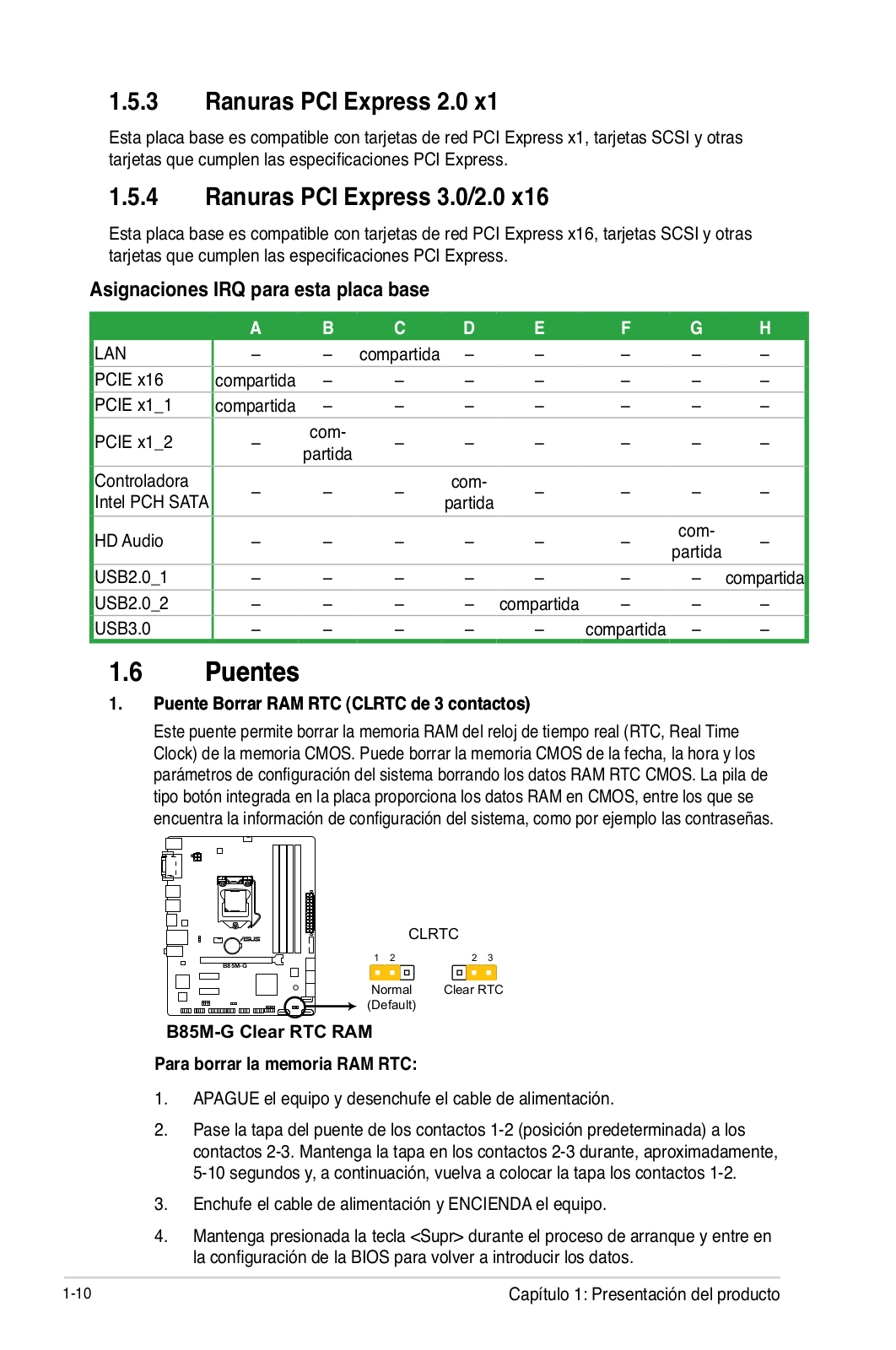
1.2.1Placement direction
1.2.2Screw holes 1.2.3Motherboard layout
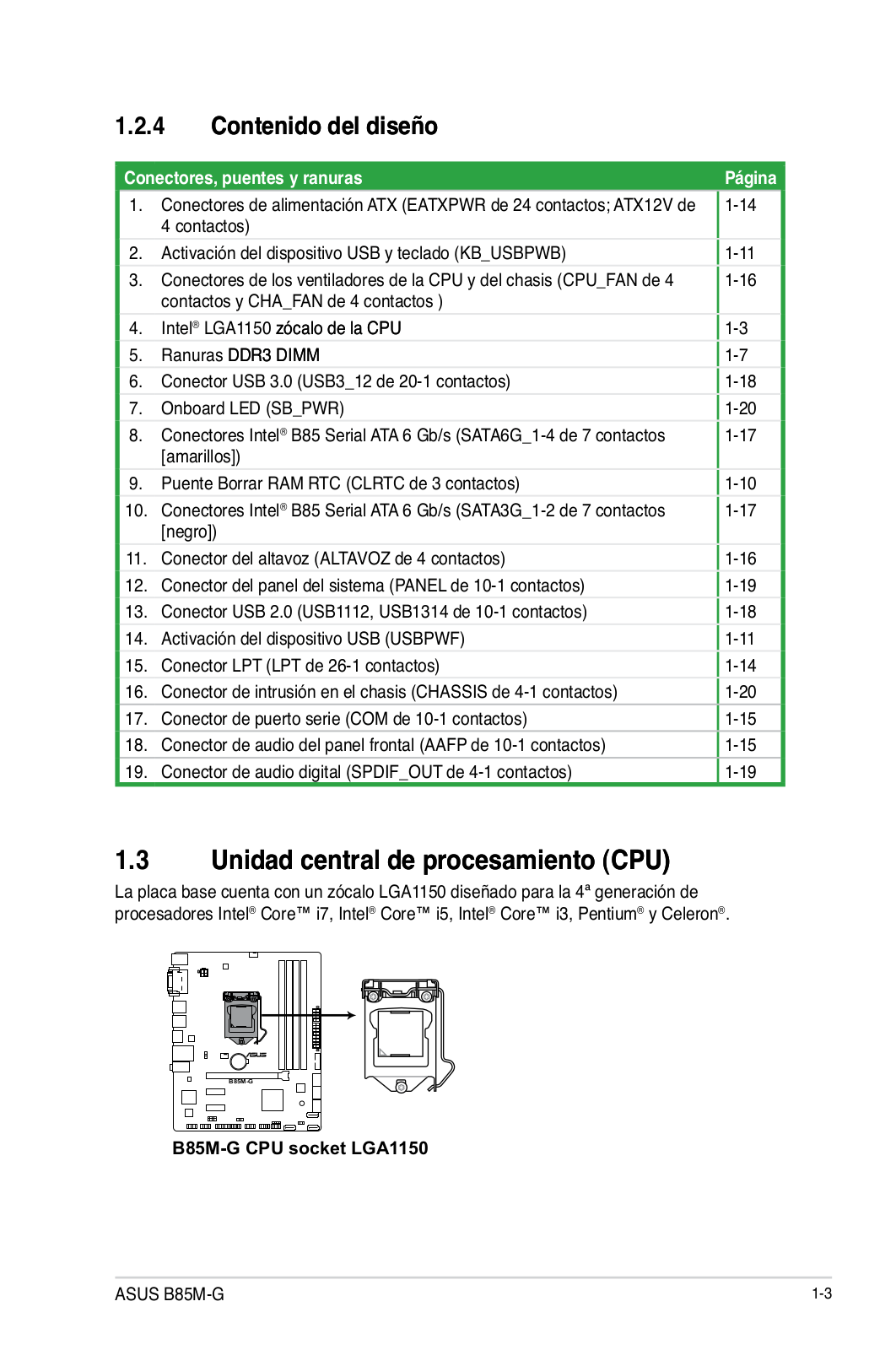
1.2.4Layout contents
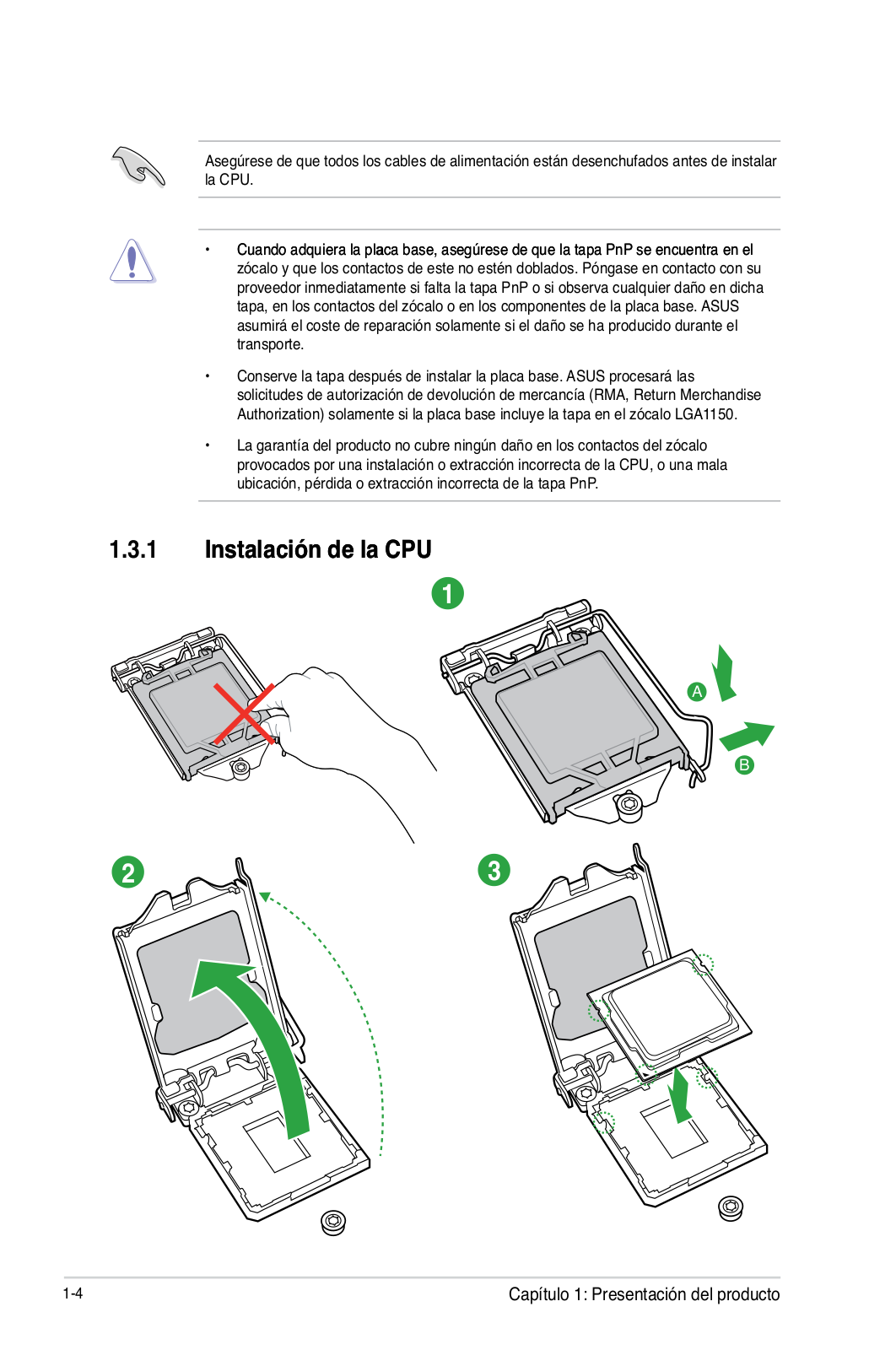
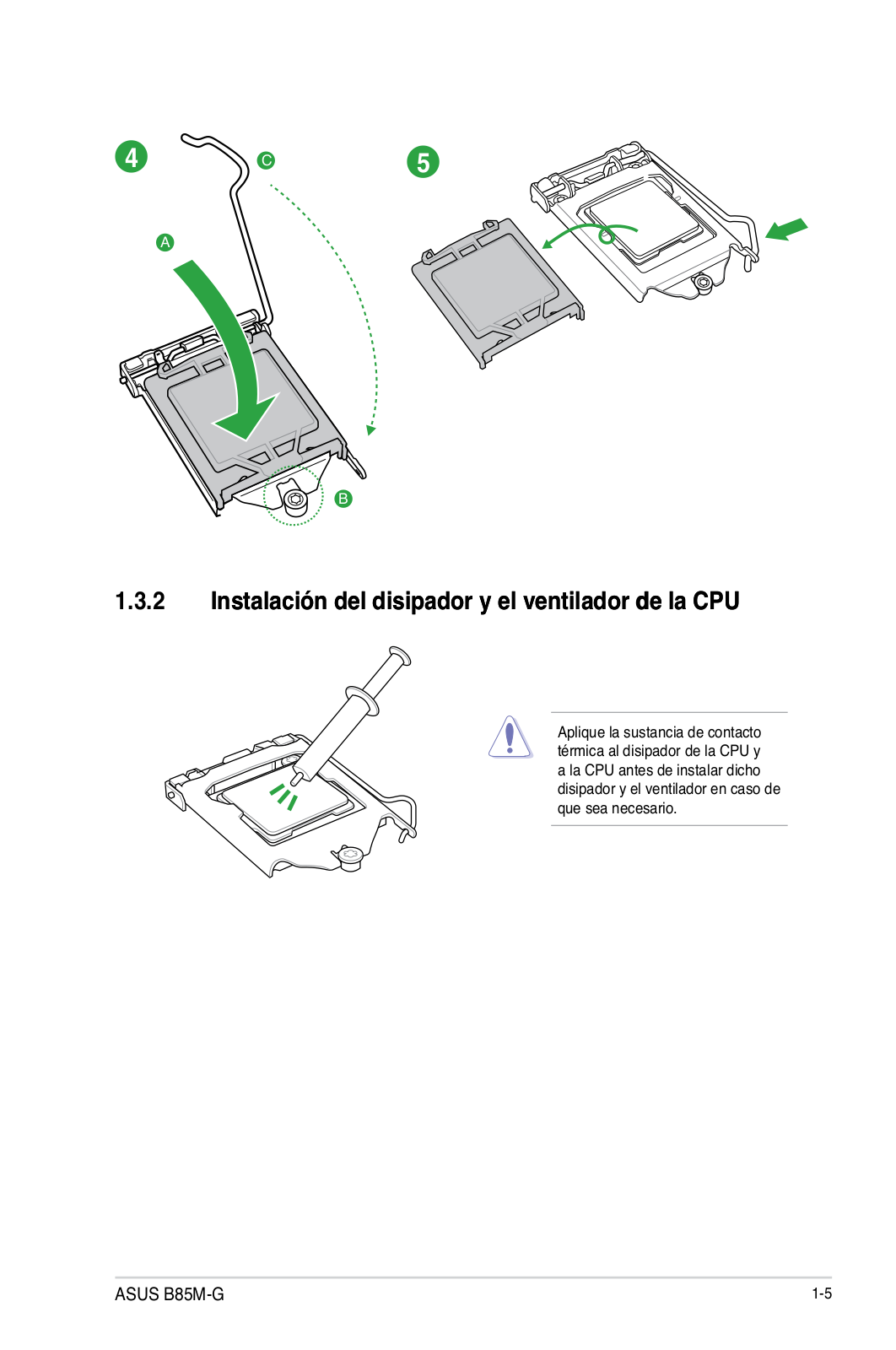
1.3.1Installing the CPU
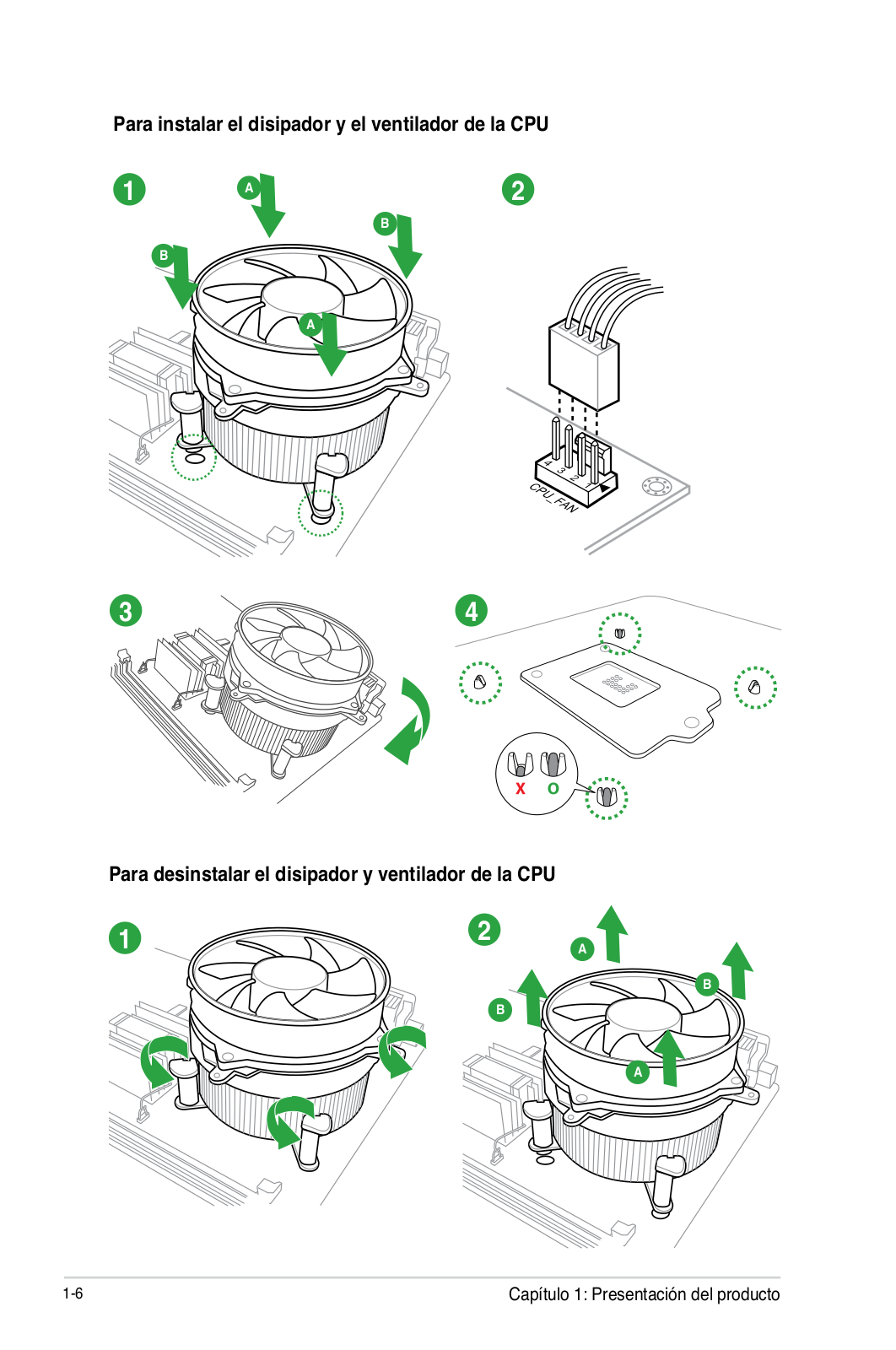
1.3.2CPU heatsink and fan assembly installation
To install the CPU heatsink and fan assembly
To uninstall the CPU heatsink and fan assembly 1.4.1Overview
1.4.2Memory configurations 1.4.3Installing a DIMM
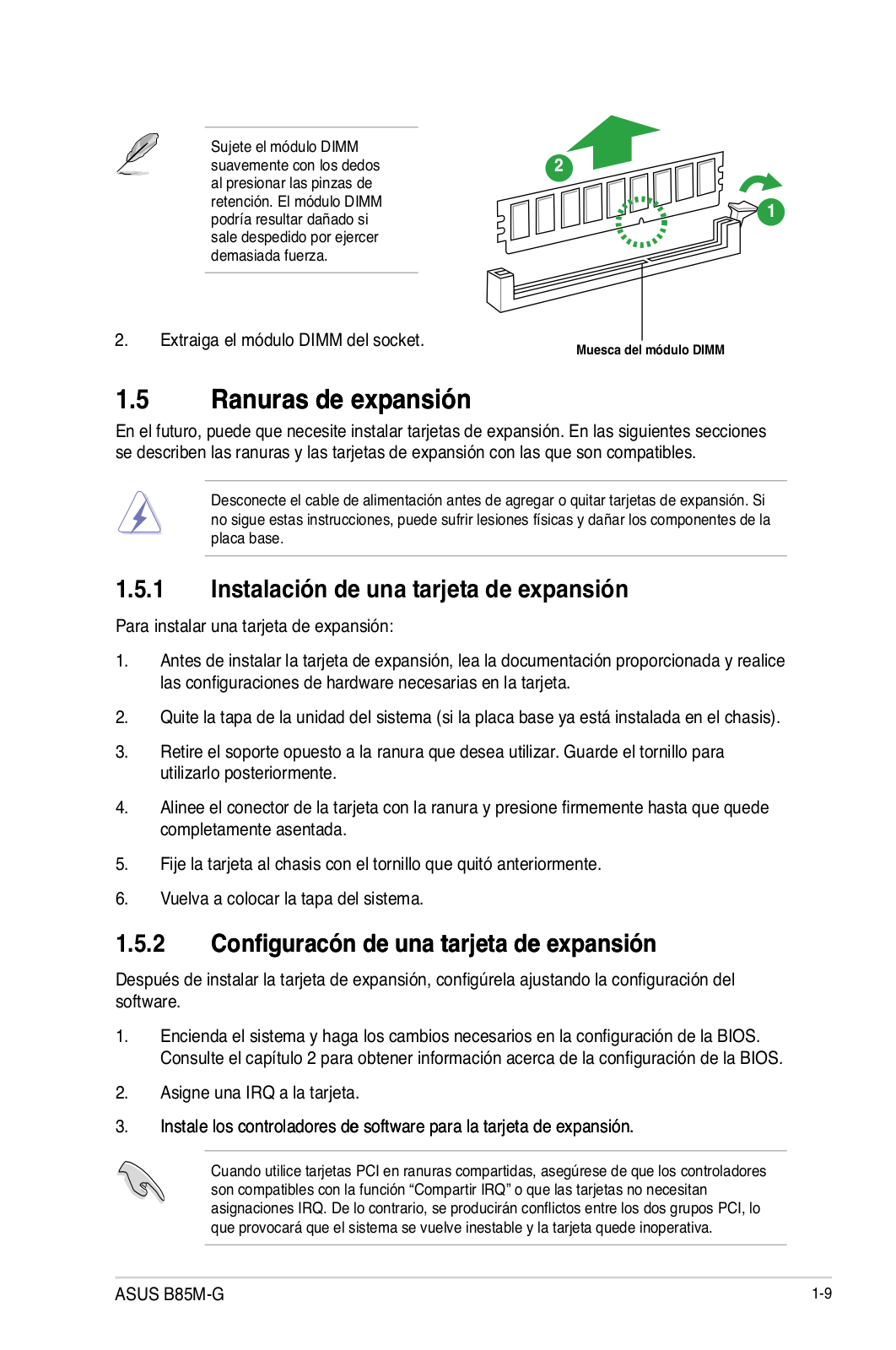
1.4.4Removing a DIMM 1.5.1Installing an expansion card
1.5.2Configuring an expansion card 1.5.3PCI Express 2.0 x1 slots
1.5.4PCI Express 3.0/2.0 x16 slot IRQ assignments for this motherboard
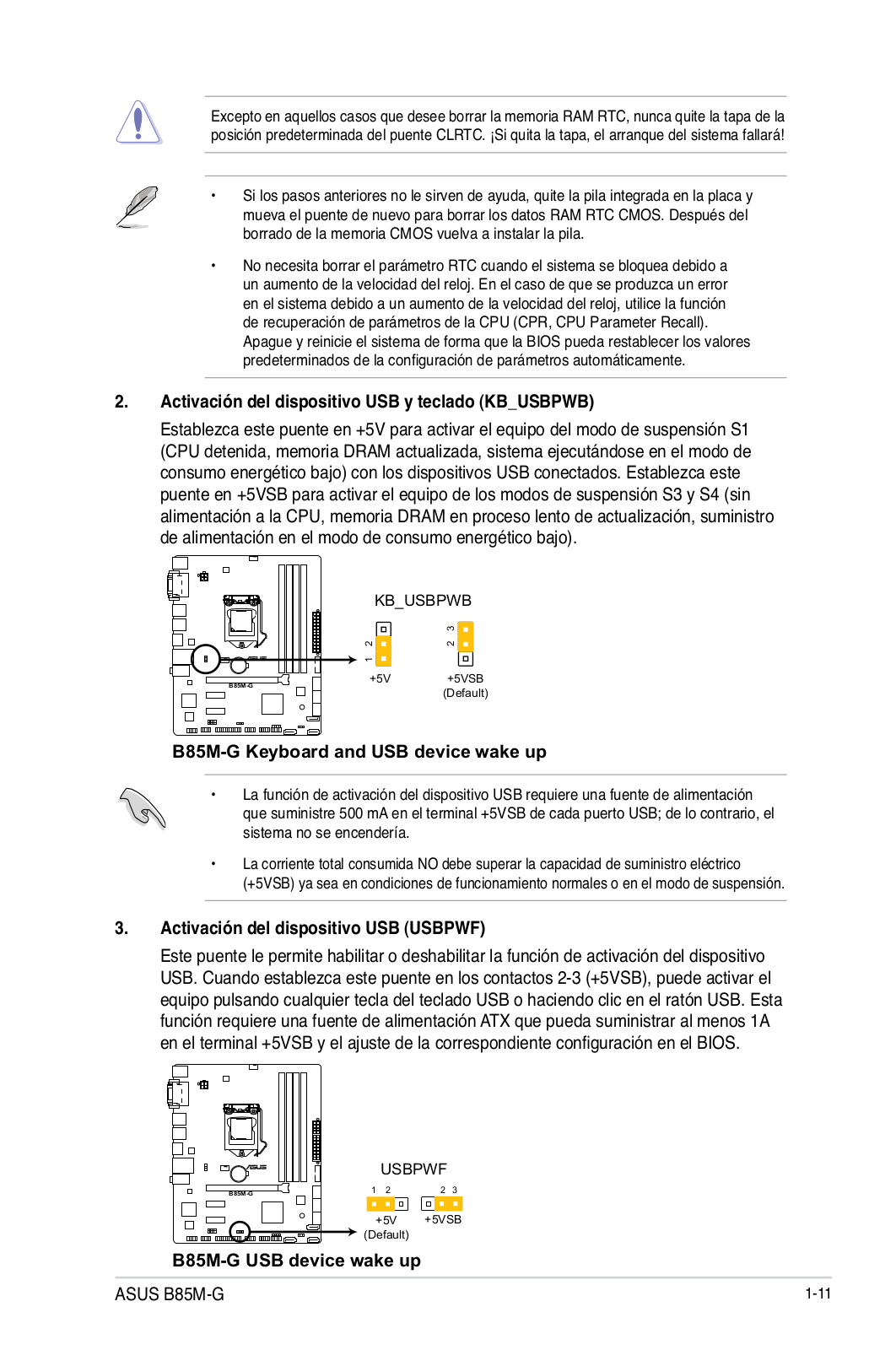
2.Keyboard and USB device wake-up(KB_USBPWB)
B85M-GKeyboard and USB device wake up 3.USB device wake-up(USBPWF)
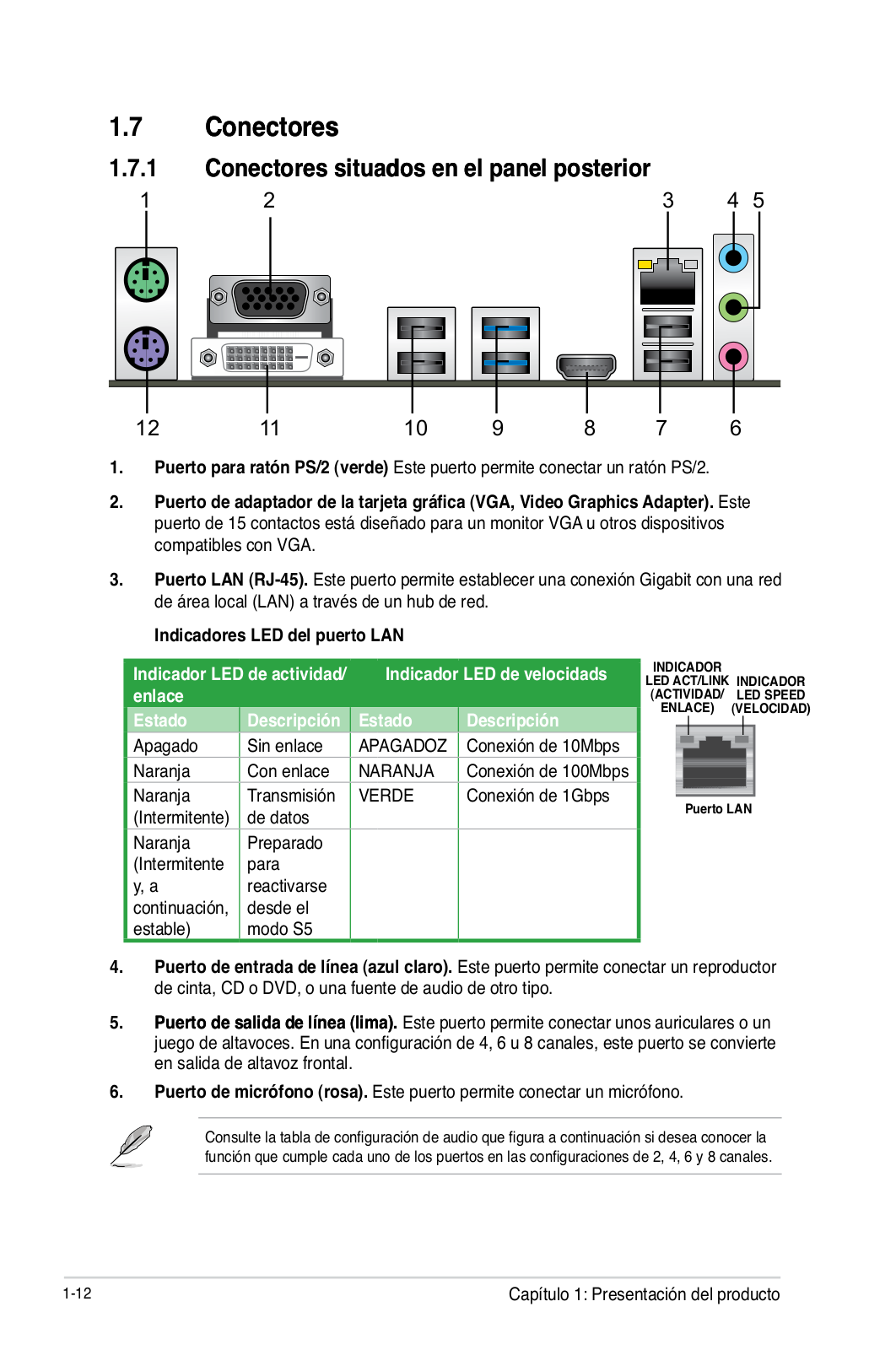
B85M-GUSB device wake up 1.7.1Rear panel connectors
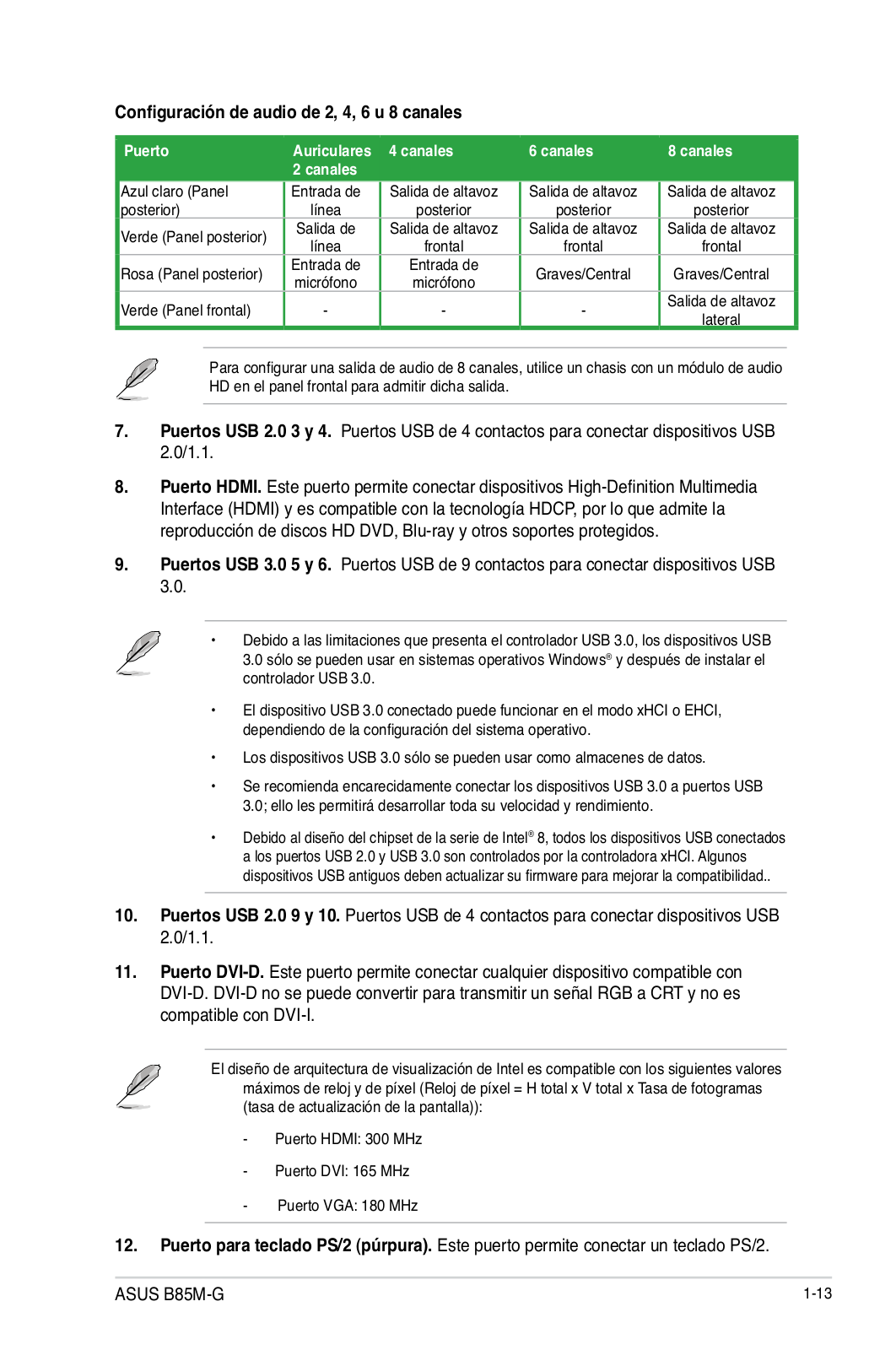
Audio 2, 4, 6, or 8-channelconfiguration
USB 2.0 ports 3 and HDMI port
USB 3.0 ports 5 and USB 2.0 ports 9 and
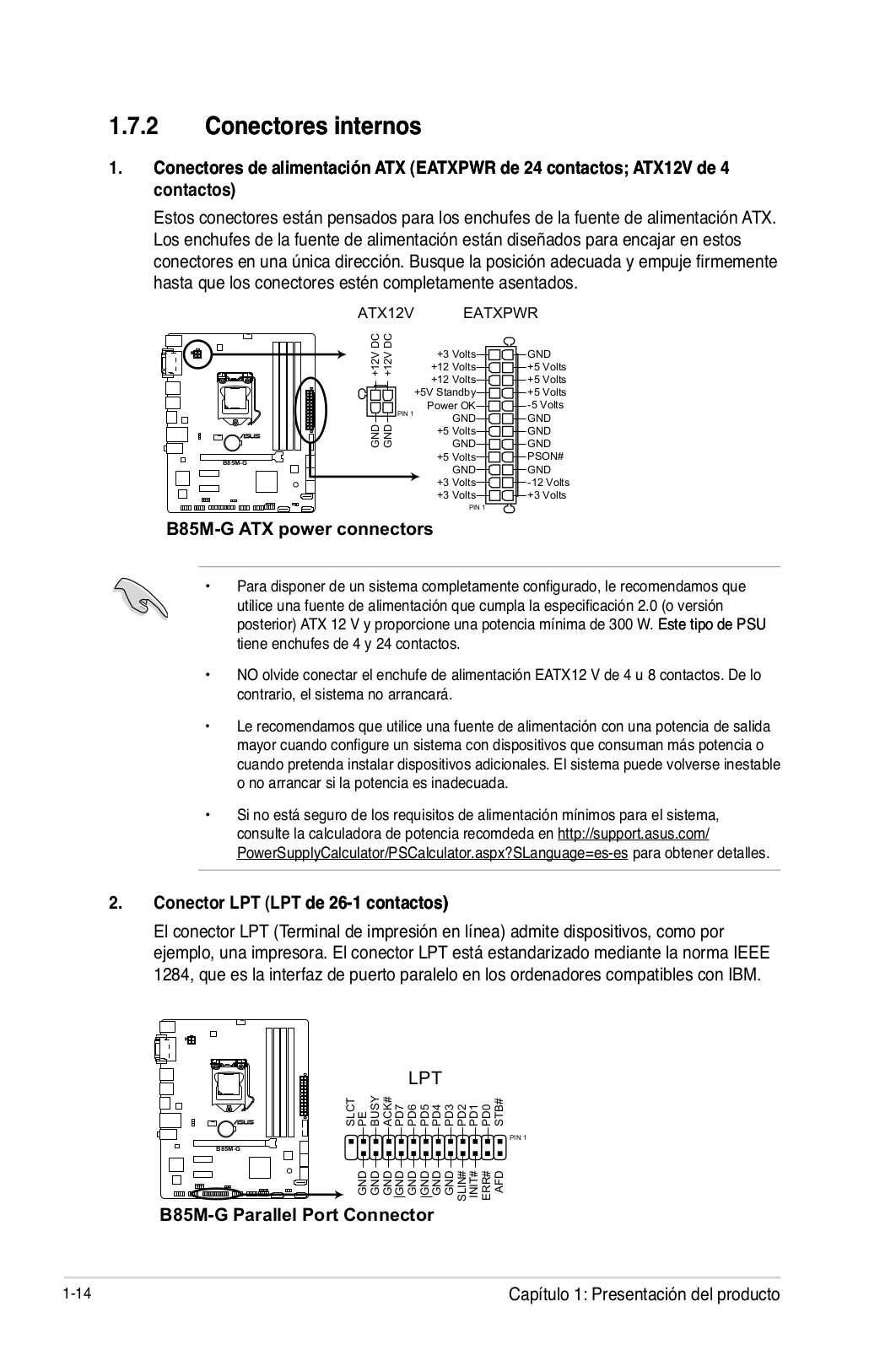
1.7.2Internal connectors
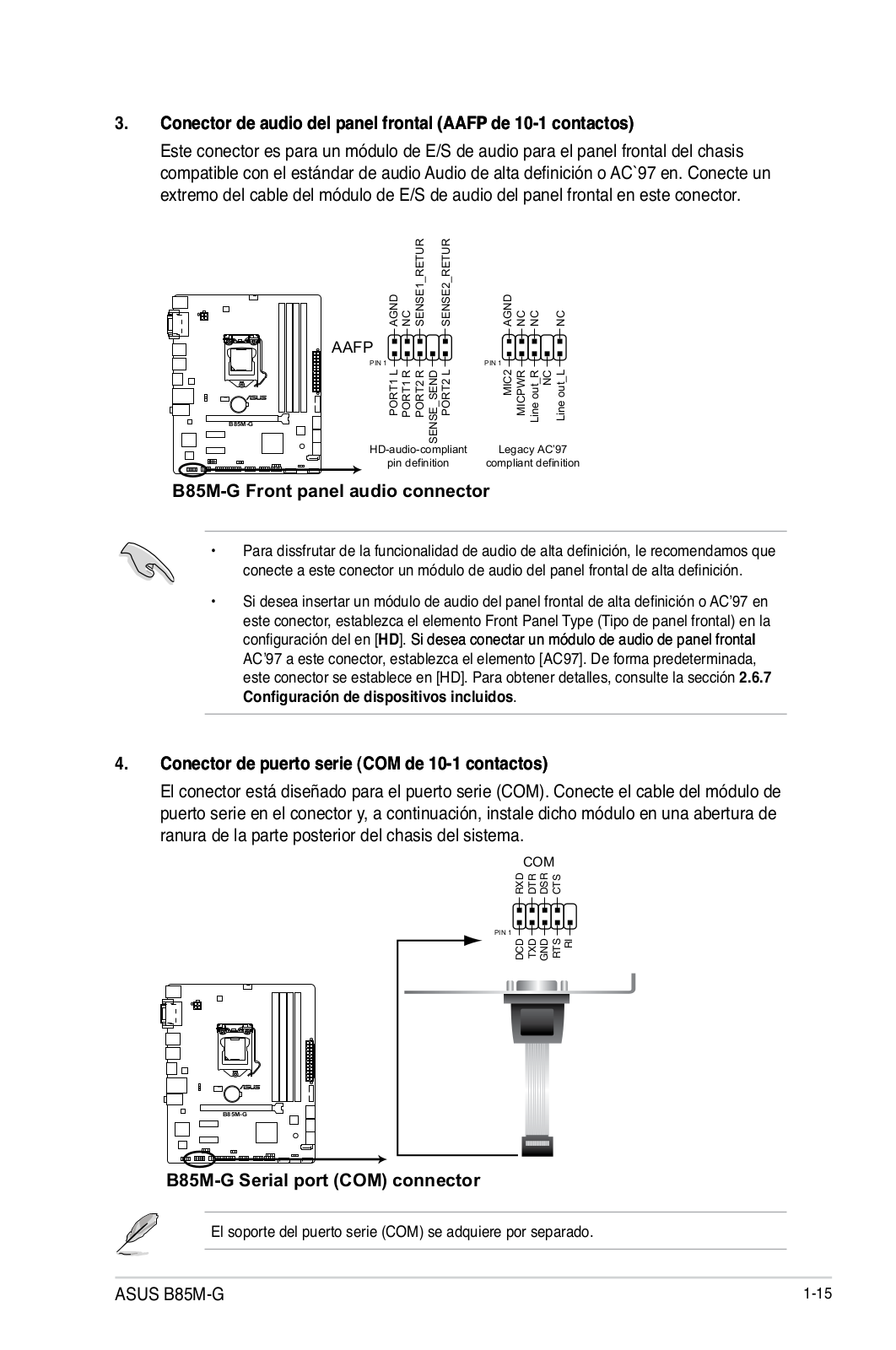
3.Front panel audio connector (10-1pin AAFP)
B85M-GFront panel audio connector 4.Serial port connector (10-1pin COM)
B85M-GSerial port (COM) connector 5.CPU and chassis fan connectors (4-pinCPU_FAN, 4-pinCHA_FAN)
B85M-GFan connectors 6.Speaker connector (4-pinSPEAKER)
B85M-GSpeaker Out Connector 7.Intel® B85 Serial ATA 3.0Gb/s connectors (7-pinSATA3G_1~2 [black])
B85M-GIntel® SATA 3.0Gb/s connectors 8.Intel® B85 Serial ATA 6.0Gb/s connector (7-pinSATA6G_1~4 [yellow])
B85M-GIntel® SATA 6.0Gb/s connectors 9.USB 3.0 connector (20-1pin USB3_12)
B85M-GUSB3.0 Front panel connector 10.USB 2.0 connectors (10-1pin USB1112, USB1314)
B85M-GUSB2.0 connectors 11.System panel connector (10-1pin PANEL)
•System power LED (2-pinPWR_LED) •Hard disk drive activity LED (2-pinHDD_LED)
•Reset button (2-pinRESET) 12.Digital audio connector (4-1pin SPDIF_OUT)
1.8Onboard LEDs
1.Standby Power LED B85M-GOnboard LED
1.9.1Installing an operating system
1.9.2Support DVD information To run the Support DVD
2.1.1EZ Update
2.1.2ASUS EZ Flash
2.1.3ASUS CrashFree BIOS 3 utility
Recovering the BIOS 2.1.4ASUS BIOS Updater
Before updating BIOS Booting the system to a DOS environment
Updating the BIOS file Page
Entering BIOS Setup at startup Entering BIOS Setup after POST
BIOS menu screen
EZ Mode Advanced Mode
Menu bar
Menu items Back button
Submenu items Pop-upwindow
Scroll bar Navigation keys
General help Configuration fields
2.4.1System Language [English]
2.4.2System Date [Day xx/xx/xxxx] 2.4.3System Time [xx:xx:xx]
2.4.4Security Administrator Password
User Password User Password
Not Installed 2.5Ai Tweaker menu
Target CPU Turbo-ModeSpeed : xxxxMHz Target DRAM Speed : xxxxMHz
Target Cache Speed : xxxxMHz Target DMI/PEG Clock : xxxxMHz
2.5.1Ai Overclock Tuner [Auto]
2.5.2ASUS MultiCore Enhancement [Enabled] 2.5.3CPU Core Ratio [Auto]
2.5.4Min CPU Cache Ratio [Auto]
2.5.5Max CPU Cache Ratio [Auto] 2.5.6CPU bus speed : DRAM speed ratio mode [Auto]
2.5.7Memory Frequency [Auto] 2.5.8CPU Graphics Max. Ratio [Auto]
2.5.11DRAM Timing Control
RTL IOL control
DRAM RTL initial Value [Auto] DRAM RTL (CHA) [Auto]
DRAM RTL (CHB) [Auto] DRAM IO-L(CHA) [Auto]
2.5.12DIGI+ VRM
CPU Load-LineCalibration [Auto] CPU Fixed Frequency [XXX]
CPU Power Phase Control [Auto] CPU Power Duty Control [T.Probe]
2.5.13CPU Power Management
Enhanced Intel® SpeedStep Technology [Enabled] Turbo Mode [Enabled]
Turbo Mode Parameters CPU Internal Power Switching Frequency
CPU Internal Power Fault Control CPU Internal Power Configuration
Power Decay Mode [Auto] Idle Power-inResponse [Auto]
2.5.14Extreme OV [Disabled]
2.5.15CPU Core Voltage [Auto] CPU Core Voltage Override [Auto]
Offset Mode Sign [+] Additional Turbo Mode CPU Core Voltage [Auto]
2.5.17CPU Graphics Voltage [Auto]
CPU Graphics Voltage Override [Auto] Additional Turbo Mode CPU Graphics Voltage [Auto]
Total Adaptive Mode CPU Graphics Voltage [Auto] 2.5.18CPU System Agent Voltage Offset Mode Sign [+]
CPU System Agent Voltage Offset [Auto] 2.5.19CPU Analog I/O Voltage Offset Mode Sign [+]
CPU Analog I/O Voltage Offset [Auto] 2.5.20CPU Digital I/O Voltage Offset Mode Sign [+]
2.5.25PCH Voltage [Auto]
2.5.26DRAM CTRL REF Voltage [Auto] 2.5.27DRAM DATA REF Voltage on CHA [Auto]
2.5.28DRAM DATA REF Voltage on CHB [Auto] 2.5.29CPU Spread Spectrum [Auto]
2.6.1CPU Configuration
Intel® Adaptive Thermal Monitor [Enabled] Hyper-threading[Enabled]
Active Processor Cores [All] Limit CPUID Maximum [Disabled]
Boot performance mode [Max Non-Tu…]
CPU Power Management Configuration 2.6.2PCH Configuration
PCI Express Configuration Intel® Rapid Start Technology
Intel® Smart Connect Technology [Disabled] 2.6.3SATA Configuration
SATA Mode Selection [AHCI] Aggressive LPM Support [Auto]
IDE Legacy / Native Mode Selection [Native] S.M.A.R.T. Status Check [Enabled]
Graphics Configuration
DMI Configuration NB PCIe Configuration
Memory Configuration 2.6.5USB Configuration
Legacy USB Support [Enabled] Intel® xHCI Mode [Smart Auto]
EHCI Hand-off[Disabled] USB Single Port Control
2.6.7Onboard Devices Configuration
HD Audio Controller [Enabled] Front Panel Type [HD]
SPDIF Out Type [SPDIF] Realtek LAN Controller [Enabled]
2.6.8APM
Restore AC Power Loss [Power Off] Power On By PS/2 Keyboard [Disabled]
Power On By PS/2 Mouse [Disabled] Power On By PCIE [Disabled]
2.6.9Network Stack
Network Stack [Disabled] Ipv4 PXE Support [Enabled]
Ipv6 PXE Support [Enabled] 2.7.1CPU Temperature [xxxºC/xxxºF]
2.7.2CPU / Chassis Fan Speed [xxxx RPM] or [Ignore] / [N/A] 2.7.3CPU Input Voltage (VCCIN), 3.3V Voltage, 5V Voltage, 12V Voltage
2.7.4CPU Q-FanControl [Enabled] CPU Fan Speed Low Limit [200 RPM]
2.7.5Chassis Q-FanControl [Enabled]
Chassis Fan Speed Low Limit [600 RPM] Chassis Fan Profile [Standard]
2.7.6Anti Surge Support [Disabled] 2.8.1Fast Boot [Enabled]
USB Support [Partial Initialization] PS/2 Keyboard and Mouse Support [Auto]
Network Stack Driver Support [Disabled] Next Boot after AC Power Loss [Normal Boot]
2.8.2Boot Logo Display [Enabled]
Boot Logo Size Control [Auto] POST Delay Time [3 sec]
Post Report [5 sec] 2.8.3Bootup NumLock State [On]
2.8.4Wait for ‘F1’ If Error [Enabled]
2.8.5Option ROM Messages [Force BIOS] 2.8.6Interrupt 19 Capture [Disabled]
2.8.7Setup Mode [EZ Mode] 2.8.8CSM (Compatibility Support Module)
2.8.9Secure Boot
OS Type [Windows UE…] Key Management
KEK Management
Delete the KEK Load KEK from File
Append KEK from file DB Management
2.8.10Boot Option Priorities
2.8.11Boot Override 2.9.1ASUS EZ Flash 2 Utility
2.9.2ASUS O.C. Profile Save to Profile
Load from Profile 2.9.3ASUS SPD Information
Load Optimized Defaults
Save Changes & Reset Discard Changes & Exit
ASUS EZ Mode Launch EFI Shell from filesystem device
Federal Communications Commission Statement
IC: Canadian Compliance Statement Canadian Department of Communications Statement
VCCI: Japan Compliance Statement VCCI Class B Statement
KC: Korea Warning Statement REACH
ASUSTeK COMPUTER INC
ASUS COMPUTER INTERNATIONAL (America) ASUS COMPUTER GmbH (Germany and Austria)
DECLARATION OF CONFORMITY
EC Declaration of Conformity