

Motherboard
TUF GAMING
B460-PLUS

ii
E16467
First Edition
March 2020
Copyright © 2020 ASUSTeK COMPUTER INC. All Rights Reserved.
No part of this manual, including the products and software described in it, may be reproduced,
transmitted, transcribed, stored in a retrieval system, or translated into any language in any form or by any
means, except documentation kept by the purchaser for backup purposes, without the express written
permission of ASUSTeK COMPUTER INC. (“ASUS”).
Product warranty or service will not be extended if: (1) the product is repaired, modied or altered, unless
such repair, modication of alteration is authorized in writing by ASUS; or (2) the serial number of the
product is defaced or missing.
ASUS PROVIDES THIS MANUAL “AS IS” WITHOUT WARRANTY OF ANY KIND, EITHER EXPRESS
OR IMPLIED, INCLUDING BUT NOT LIMITED TO THE IMPLIED WARRANTIES OR CONDITIONS OF
MERCHANTABILITY OR FITNESS FOR A PARTICULAR PURPOSE. IN NO EVENT SHALL ASUS, ITS
DIRECTORS, OFFICERS, EMPLOYEES OR AGENTS BE LIABLE FOR ANY INDIRECT, SPECIAL,
INCIDENTAL, OR CONSEQUENTIAL DAMAGES (INCLUDING DAMAGES FOR LOSS OF PROFITS,
LOSS OF BUSINESS, LOSS OF USE OR DATA, INTERRUPTION OF BUSINESS AND THE LIKE),
EVEN IF ASUS HAS BEEN ADVISED OF THE POSSIBILITY OF SUCH DAMAGES ARISING FROM ANY
DEFECT OR ERROR IN THIS MANUAL OR PRODUCT.
SPECIFICATIONS AND INFORMATION CONTAINED IN THIS MANUAL ARE FURNISHED FOR
INFORMATIONAL USE ONLY, AND ARE SUBJECT TO CHANGE AT ANY TIME WITHOUT NOTICE,
AND SHOULD NOT BE CONSTRUED AS A COMMITMENT BY ASUS. ASUS ASSUMES NO
RESPONSIBILITY OR LIABILITY FOR ANY ERRORS OR INACCURACIES THAT MAY APPEAR IN THIS
MANUAL, INCLUDING THE PRODUCTS AND SOFTWARE DESCRIBED IN IT.
Products and corporate names appearing in this manual may or may not be registered trademarks or
copyrights of their respective companies, and are used only for identication or explanation and to the
owners’ benet, without intent to infringe.
Offer to Provide Source Code of Certain Software
This product contains copyrighted software that is licensed under the General Public License (“GPL”),
under the Lesser General Public License Version (“LGPL”) and/or other Free Open Source Software
Licenses. Such software in this product is distributed without any warranty to the extent permitted by the
applicable law. Copies of these licenses are included in this product.
Where the applicable license entitles you to the source code of such software and/or other additional data,
you may obtain it for a period of three years after our last shipment of the product, either
(1) for free by downloading it from https://www.asus.com/support/
or
(2) for the cost of reproduction and shipment, which is dependent on the preferred carrier and the location
where you want to have it shipped to, by sending a request to:
ASUSTeK Computer Inc.
Legal Compliance Dept.
1F., No.15, Lide Rd.,
Beitou Dist., Taipei City 112
Taiwan
In your request please provide the name, model number and version, as stated in the About Box of the
product for which you wish to obtain the corresponding source code and your contact details so that we
can coordinate the terms and cost of shipment with you.
The source code will be distributed WITHOUT ANY WARRANTY and licensed under the same license as
the corresponding binary/object code.
This offer is valid to anyone in receipt of this information.
ASUSTeK is eager to duly provide complete source code as required under various Free Open Source
Software licenses. If however you encounter any problems in obtaining the full corresponding source
code we would be much obliged if you give us a notication to the email address gpl@asus.com, stating
the product and describing the problem (please DO NOT send large attachments such as source code
archives, etc. to this email address).

iii
Contents
Safety information ………………………………………………………………………………………… iv
About this guide ……………………………………………………………………………………………. v
Package contents …………………………………………………………………………………………. vi
TUF GAMING B460-PLUS specications summary ………………………………………… vi
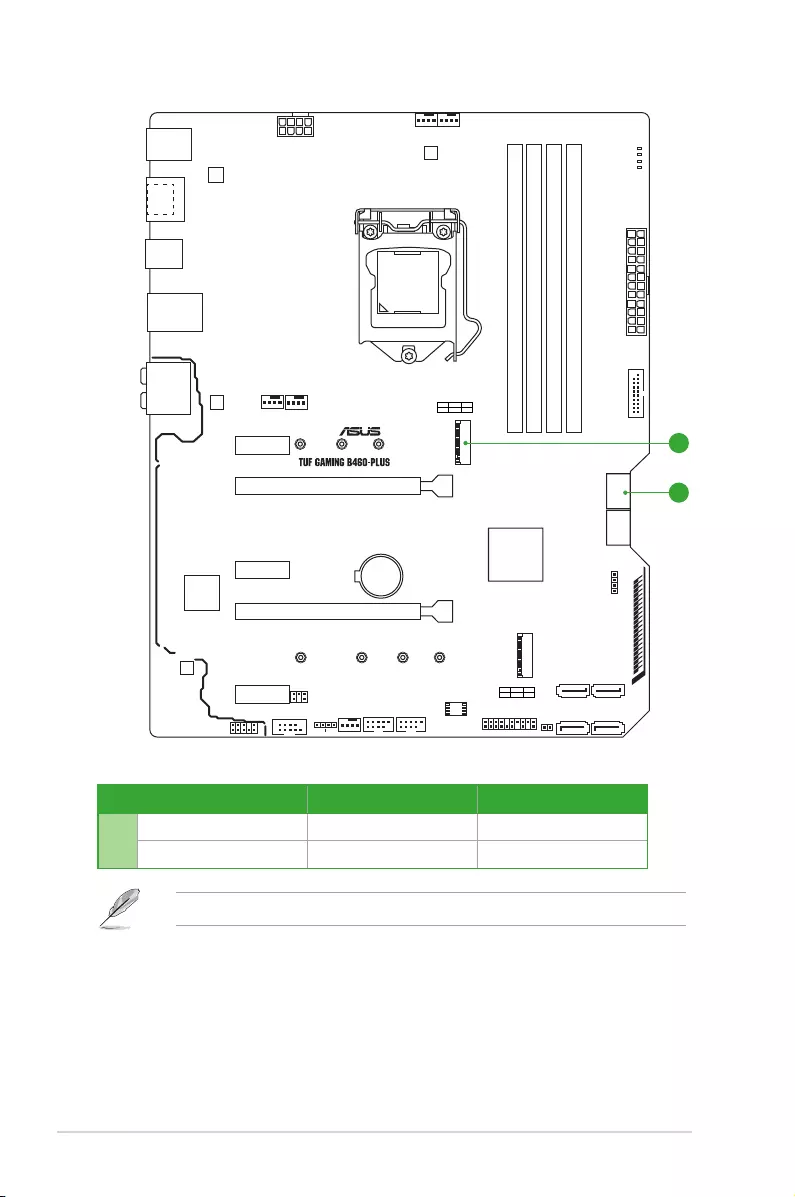
Connectors with shared bandwidth ……………………………………………………………….. x
Chapter 1 Product introduction
1.1 Before you proceed ………………………………………………………………………….. 1-1
1.2 Motherboard overview ……………………………………………………………………… 1-1
1.3 Central Processing Unit (CPU) ………………………………………………………….. 1-8
1.4 System memory ……………………………………………………………………………….. 1-9
Chapter 2 BIOS information
2.1 Knowing BIOS ………………………………………………………………………………….. 2-1
2.2 BIOS setup program …………………………………………………………………………. 2-2
2.3 ASUS EZ Flash 3 ………………………………………………………………………………. 2-3
2.4 ASUS CrashFree BIOS 3 …………………………………………………………………… 2-4
Appendix
Notices ……………………………………………………………………………………………………… A-1
ASUS contact information ………………………………………………………………………….. A-6

iv
Safety information
Electrical safety
• To prevent electrical shock hazard, disconnect the power cable from the electrical outlet
before relocating the system.
• When adding or removing devices to or from the system, ensure that the power cables
for the devices are unplugged before the signal cables are connected. If possible,
disconnect all power cables from the existing system before you add a device.
• Before connecting or removing signal cables from the motherboard, ensure that all power
cables are unplugged.
• Seek professional assistance before using an adapter or extension cord. These devices
could interrupt the grounding circuit.
• Ensure that your power supply is set to the correct voltage in your area. If you are not
sure about the voltage of the electrical outlet you are using, contact your local power
company.
• If the power supply is broken, do not try to x it by yourself. Contact a qualied service
technician or your retailer.
Operation safety
• Before installing the motherboard and adding components, carefully read all the manuals
that came with the package.
• Before using the product, ensure all cables are correctly connected and the power cables
are not damaged. If you detect any damage, contact your dealer immediately.
• To avoid short circuits, keep paper clips, screws, and staples away from connectors,
slots, sockets and circuitry.
• Avoid dust, humidity, and temperature extremes. Do not place the product in any area
where it may be exposed to moisture.
• Place the product on a stable surface.
• If you encounter technical problems with the product, contact a qualied service
technician or your retailer.
• Your motherboard should only be used in environments with ambient temperatures
between 0°C and 40°C.

v
About this guide
This user guide contains the information you need when installing and conguring the
motherboard.
How this guide is organized
This guide contains the following parts:
• Chapter 1: Product introduction
This chapter describes the features of the motherboard and the new technology it
supports. It includes descriptions of the switches, jumpers, and connectors on the
motherboard.
• Chapter 2: BIOS information
This chapter tells how to boot into the BIOS, and upgrade BIOS using the EZ Flash
Utility.
Where to nd more information
Refer to the following sources for additional information and for product and software
updates.
1. ASUS website
The ASUS website provides updated information on ASUS hardware and software
products. Refer to the ASUS contact information.
2. Optional documentation
Your product package may include optional documentation, such as warranty yers,
that may have been added by your dealer. These documents are not part of the
standard package.
Conventions used in this guide
To ensure that you perform certain tasks properly, take note of the following symbols used
throughout this manual.
CAUTION: Information to prevent damage to the components and injuries to
yourself when trying to complete a task.
IMPORTANT: Instructions that you MUST follow to complete a task.
NOTE: Tips and additional information to help you complete a task.

vi
TUF GAMING B460-PLUS specications summary
CPU
Intel® Socket LGA1200 for 10th Gen Intel® Core™, Pentium® Gold and
Celeron® Processors*
Supports Intel® 14nm CPU
Supports Intel® Turbo Boost Technology 2.0 and Intel® Turbo Boost Max
Technology 3.0**
*Refer to www.asus.com for CPU support list.
**Intel® Turbo Boost Max Technology 3.0 support depends on the CPU types.
Chipset Intel® B460 Chipset
Memory
4 x DIMM, Max. 128GB, DDR4 2933/2800/2666/2400/2133 MHz Non-ECC,
Un-buffered Memory*
Dual Channel Memory Architecture
Intel® Extreme Memory Prole (XMP)
ASUS OptiMem
* For 10th Gen Intel® processors, only Core™ i9/i7 CPUs support
2933/2800/2666/2400/2133 natively, others will run at the maximum transfer rate
of DDR4 2666MHz.
*Refer to www.asus.com for the Memory QVL (Qualied Vendors Lists).
Graphics
1 x DisplayPort 1.4*
1 x HDMITM 1.4b
*Graphics specications may vary between CPU types.
* Support DisplayPort 1.4 with max. resolution of 4096 x 2304 @60Hz. Refer to
www.intel.com for any update.
Expansion Slots
Intel® 10th Gen Processors
1 x PCIe 3.0 x16 slot (supports x16 mode)
Intel® B460 Chipset
1 x PCIe 3.0 x16 slot (max. at x4 mode)
3 x PCIe 3.0 x1 slots
Multi-GPU Support Supports AMD® 2-Way CrossFireX™ Technology
(continued on the next page)
Package contents
Check your motherboard package for the following items.
Motherboard 1 x TUF GAMING B460-PLUS motherboard
Cables 2 x SATA 6Gb/s cables
Miscellaneous
1 x I/O Shield
1 x M.2 SSD screw package (2-in-1 package)
1 x TUF Gaming sticker
Application DVD 1 x Support DVD
Documentation 1 x TUF Certication card
1 x User manual
If any of the above items is damaged or missing, contact your retailer.

vii
TUF GAMING B460-PLUS specications summary
Storage
Total supports 2 x M.2 slots and 6 x SATA 6Gb/s ports
Intel® B460 Chipset
M.2_1 slot (Key M), type 2242/2260/2280 (supports PCIe 3.0 x4 & SATA
modes*)
M.2_2 slot (Key M), type 2242/2260/2280/22110 (supports PCIe 3.0 x4
mode)
6 x SATA 6Gb/s ports
Intel® Rapid Storage Technology supports SATA Raid 0,1,5,10 and PCIE
Raid 0,1
Intel® Optane™ Memory Ready**
* M.2_1 shares bandwidth with SATA6G_1. When M.2_1 runs in SATA mode,
SATA6G_1 will be disabled.
** Only the M.2_2 socket can support Intel® Optane™ memory.
Ethernet 1 x Intel® I219V 1Gb Ethernet
ASUS Turbo LAN
USB
Rear USB (Total 6 ports)
6 x USB 3.2 Gen 1 ports (6 x Type-A)
Front USB (Total 6 ports)
1 x USB 3.2 Gen 1 header supports additional 2 USB 3.2 Gen 1 ports
2 x USB 2.0 headers support additional 4 USB 2.0 ports
Audio
Realtek ALC S1200A 7.1-Channel High Denition Audio CODEC
— Supports Jack detection, Multi-streaming, Front Panel Jack-retasking
— Supports up to 24-Bit/192 kHz playback
— Premium Japanese audio capacitors
— Audio Shielding
— Dedicated audio PCB layers
— DTS Custom for TUF GAMING Headphone
Back Panel I/O Ports
6 x USB 3.2 Gen 1 ports (6 x Type-A)
1 x DisplayPort
1 x HDMITM port
1 x Intel® I219V 1Gb Ethernet port
6 x Audio jacks
1 x PS/2 Keyboard/Mouse combo port
(continued on the next page)

viii
TUF GAMING B460-PLUS specications summary
Internal I/O
Connectors
Fan and cooling related
1 x 4-pin CPU Fan header
1 x 4-pin CPU OPT Fan header
2 x 4-pin Chassis Fan headers
1 x 4-pin AIO Pump header
Power related
1 x 24-pin Main Power connector
1 x 8-pin +12V Power connector
Storage related
2 x M.2 slots (Key M)
6 x SATA 6Gb/s ports
USB
1 x USB 3.2 Gen 1 header supports additional 2 USB 3.2 Gen 1 ports
2 x USB 2.0 headers support additional 4 USB 2.0 ports
Miscellaneous
2 x AURA RGB headers
1 x Clear CMOS header
1 x COM Port header
1 x Front Panel Audio header (AAFP)
1 x 20-3 pin System Panel header with Chassis intrude function
Special Features
ASUS TUF PROTECTION
— ASUS DIGI+ VRM
— ASUS Enhanced DRAM Overcurrent Protection
— ASUS ESD Guards
— ASUS Overvoltage Protection
— ASUS SafeSlot Core+
— ASUS Stainless-Steel Back I/O
ASUS Q-Design
— ASUS Q-DIMM
— ASUS Q-Slot
— ASUS Q-LED (CPU [red], DRAM [yellow], VGA [white], Boot Device
[yellow green])
ASUS Thermal Solution
— Aluminum heatsink design
ASUS EZ DIY
— Box Headers
AURA Sync
— Standard RGB headers
(continued on the next page)

ix
TUF GAMING B460-PLUS specications summary
Software
Features
ASUS Exclusive Software
Armoury Crate
— Aura Sync
AI Suite 3
— Performance And Power Saving Utility
EPU
Digi+ VRM
Fan Xpert 4
— EZ update
— PC Cleaner
— System Information
AI Charger
ASUS Turbo LAN
DTS Custom for GAMING Headsets
Norton Anti-virus software (Free Trial for 60 days)
DAEMON Tools
Google Chrome Browser & Google Toolbar
TUF GAMING CPU-Z
WinRAR
UEFI BIOS
ASUS EZ DIY
— ASUS CrashFree BIOS 3
— ASUS EZ Flash 3
— ASUS UEFI BIOS EZ Mode
BIOS 128 Mb Flash ROM, UEFI AMI BIOS
Manageability WOL by PME, PXE
Operating
System Windows® 10 — 64 bit
Form Factor ATX Form Factor
12 inch x 9.6 inch ( 30.5 cm x 24.4 cm )
Specications are subject to change without notice. Refer to the ASUS website for the
latest specications.
x
Connectors with shared bandwidth
DDR4 DIMM_B1 (64bit, 288-pin module)
DDR4 DIMM_B2* (64bit, 288-pin module)
DDR4 DIMM_A1 (64bit, 288-pin module)
DDR4 DIMM_A2* (64bit, 288-pin module)
DIGI+
VRM
ASM
1442K
AIO_PUMP
CHA_FAN2
COM_DEBUG
CHA_FAN1
CPU_FAN
CPU_OPT
M.2_2(SOCKET3)
M.2_1(SOCKET3)
RGB_HEADER1
RGB_HEADER2
PANEL
AAFP
SATA6G_5
CLRTC
SATA6G_6
SATA6G_3
128Mb
BIOS
SATA6G_4
SATA6G_1
BOOT_LED
VGA_LED
DRAM_LED
CPU_LED
SATA6G_2
EATX12V
LGA1200
EATXPWR
U32G1_12
Intel®
B460
Intel®
I219-V
BATTERY
LAN_U32G1_78
KBMS
_U32G1
_56
HDMI
_DP
AUDIO
Super
I/O
PCIEX1_1
2280 2260 2242
M.2_2(SOCKET3)
M.2_1(SOCKET3)
PCIE SATA IRST
X4 XV
PCIE SATA IRST
X4 VX
228022110 2260 2242
PCIEX1_2
PCIEX1_3
PCIEX16_2
PCIEX16_1
USB1112USB910
COM
U32G1_34
A
A
Realtek
S1200A
Conguration 1 2
AM.2_1 x4 (PCIe mode) V (SATA mode)
SATA6G_1 V —
M.2_1 shares bandwidth with SATA6G_1.
ASUS TUF GAMING B460-PLUS 1-1
Product introduction
1
1.1 Before you proceed
Take note of the following precautions before you install motherboard components or change
any motherboard settings.
• Unplug the power cord from the wall socket before touching any component.
• Before handling components, use a grounded wrist strap or touch a safely grounded
object or a metal object, such as the power supply case, to avoid damaging them due
to static electricity.
• Before you install or remove any component, ensure that the ATX power supply is
switched off or the power cord is detached from the power supply. Failure to do so
may cause severe damage to the motherboard, peripherals, or components.
Unplug the power cord before installing or removing the motherboard. Failure to do so can
cause you physical injury and damage motherboard components.
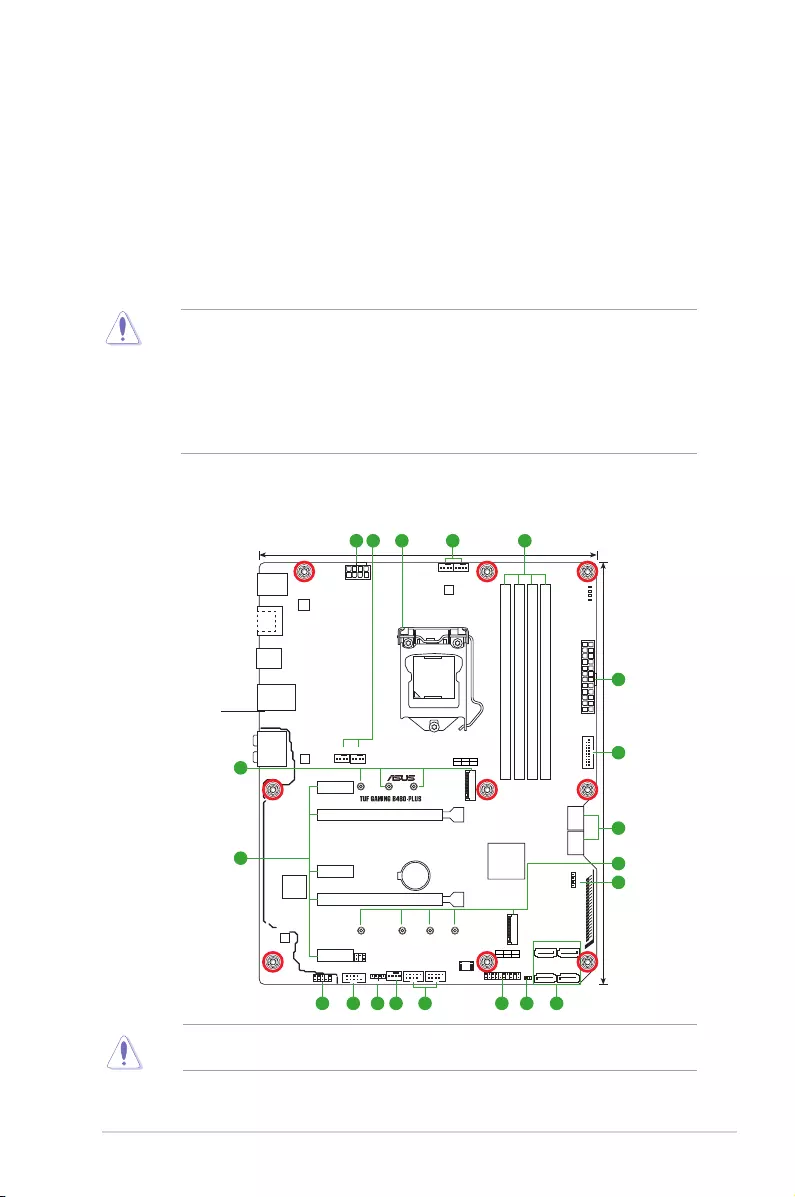
1.2 Motherboard overview
Place this
side towards
the rear of the
chassis
DDR4 DIMM_B1 (64bit, 288-pin module)
DDR4 DIMM_B2* (64bit, 288-pin module)
DDR4 DIMM_A1 (64bit, 288-pin module)
DDR4 DIMM_A2* (64bit, 288-pin module)
DIGI+
VRM
ASM
1442K
AIO_PUMP
CHA_FAN2
COM_DEBUG
CHA_FAN1
CPU_FAN
CPU_OPT
M.2_2(SOCKET3)
M.2_1(SOCKET3)
RGB_HEADER1
RGB_HEADER2
PANEL
AAFP
SATA6G_5
CLRTC
SATA6G_6
SATA6G_3
128Mb
BIOS
SATA6G_4
SATA6G_1
BOOT_LED
VGA_LED
DRAM_LED
CPU_LED
SATA6G_2
EATX12V
LGA1200
EATXPWR
U32G1_12
Intel®
B460
Intel®
I219-V
Realtek
S1200A
BATTERY
LAN_U32G1_78
KBMS
_U32G1
_56
HDMI
_DP
AUDIO
Super
I/O
PCIEX1_1
2280 2260 2242
M.2_2(SOCKET3)
M.2_1(SOCKET3)
PCIE SATA IRST
X4 XV
PCIE SATA IRST
X4 VX
228022110 2260 2242
PCIEX1_2
PCIEX1_3
PCIEX16_2
PCIEX16_1
USB1112USB910
COM
U32G1_34
24.4cm(9.6in)
30.5cm(12in)
8
7
10
6
5
12 10 413
3
5 214 4
714 119
6
1-2 Chapter 1: Product introduction
1.2.1 Layout contents
1. CPU socket
The motherboard comes with a surface mount Intel® Socket LGA1200 designed for 10th Gen
Intel® CoreTM, Pentium® Gold and Celeron® Processors.
For more details, refer to Central Processing Unit (CPU).
2. DDR4 DIMM slots
The motherboard comes with Dual Inline Memory Modules (DIMM) slots designed for DDR4
(Double Data Rate 4) memory modules.
For more details, refer to System memory.
3. Expansion slots
This motherboard supports two PCIe x16 graphics cards and three PCIe 3.0 x1 network
cards, SCSI cards and other cards that comply with the PCI Express specication.
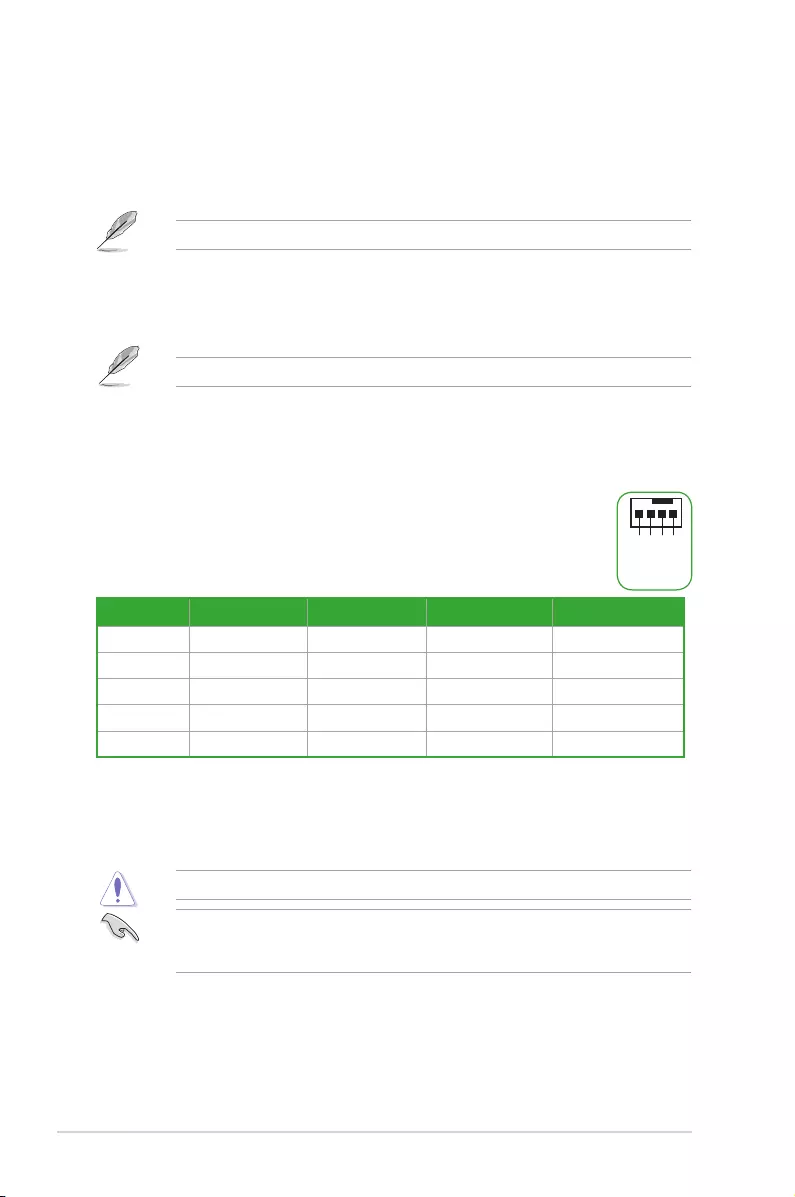
4. Fan headers
The Fan headers allow you to connect fans to cool the system.
Header Max. Current Max. Power Default Speed Shared Control
CPU_FAN 1A 12W Q-Fan Controlled A
CPU_OPT 1A 12W Q-Fan Controlled A
CHA_FAN1 1A 12W Q-Fan Controlled —
CHA_FAN2 1A 12W Q-Fan Controlled —
AIO_PUMP 1A 12W Full-Speed —
5. Power connectors
These Power connectors allow you to connect your motherboard to a power supply. The
power supply plugs are designed to t in only one orientation. Find the proper orientation and
push down rmly until the power supply plugs are fully inserted.
Ensure to connect the 8-pin power plug.
For a fully congured system, we recommend that you use a power supply unit (PSU) that
complies with ATX 12V Specication 2.0 (or later version) and provides a minimum power
of 350 W.
FAN PWM
FAN IN
FAN PWR
GND
ASUS TUF GAMING B460-PLUS 1-3
• We recommend that you use a PSU with a higher power output when conguring a
system with more power-consuming devices. The system may become unstable or
may not boot up if the power is inadequate.
• If you are uncertain about the minimum power supply requirement for your system, we
recommend you to refer to online resources for Power Supply Wattage Calculator.
• If you want to use two or more high-end PCI Express x16 cards, use a PSU with
1000W power or above to ensure the system stability.
6. M.2 Slots (Key M)
The M.2 slots allow you to install M.2 devices such as M.2 SSD modules.
• M.2_1 slot (Key M), type 2242/2260/2280 (supports PCIe 3.0 x4 & SATA modes).
• M.2_2 slot (Key M), type 2242/2260/2280/22110 (supports PCIe 3.0 x4 mode)
• Intel® Rapid Storage Technology supports SATA Raid 0,1,5,10 and PCIE Raid 0,1.
• M.2_1 shares bandwidth with SATA6G_1. When M.2_1 runs in SATA mode,
SATA6G_1 will be disabled.
• Only the M.2_2 socket can support Intel® Optane™ memory.
7. SATA 6Gb/s ports
The SATA 6Gb/s ports allow you to connect SATA devices such as optical disc drives and
hard disk drives via a SATA cable.
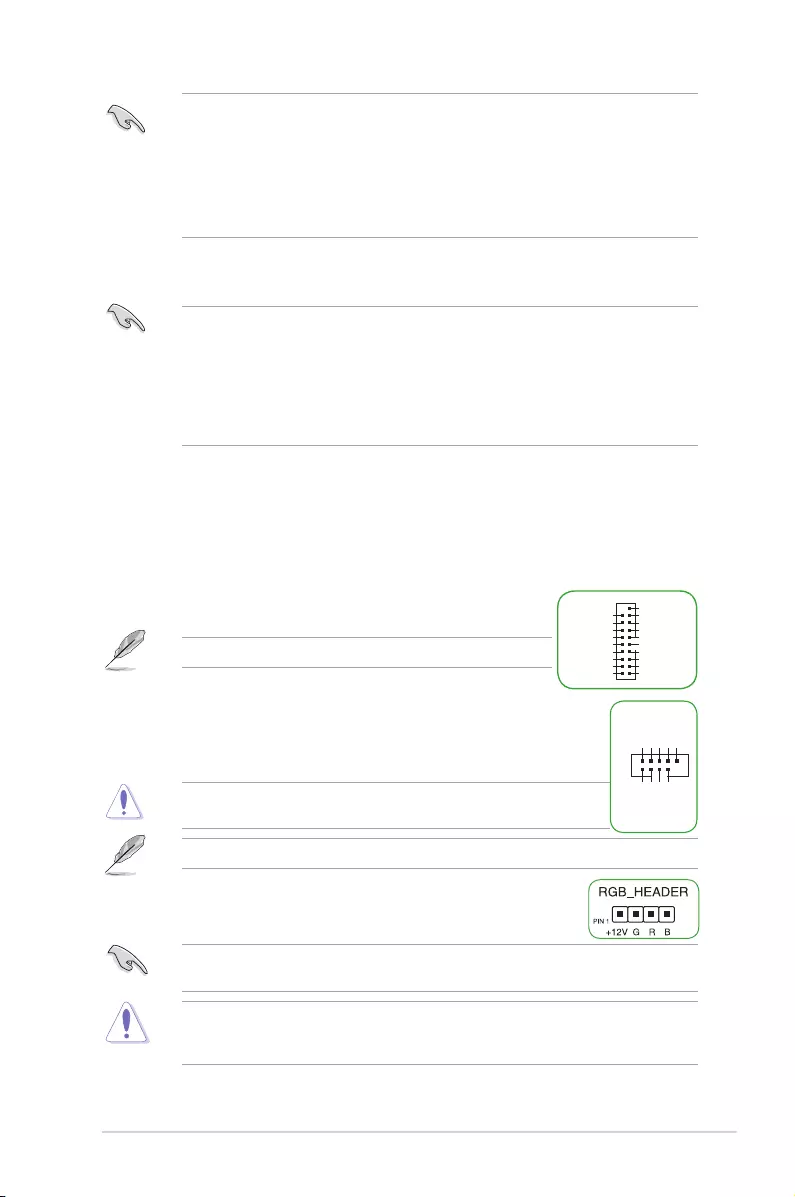
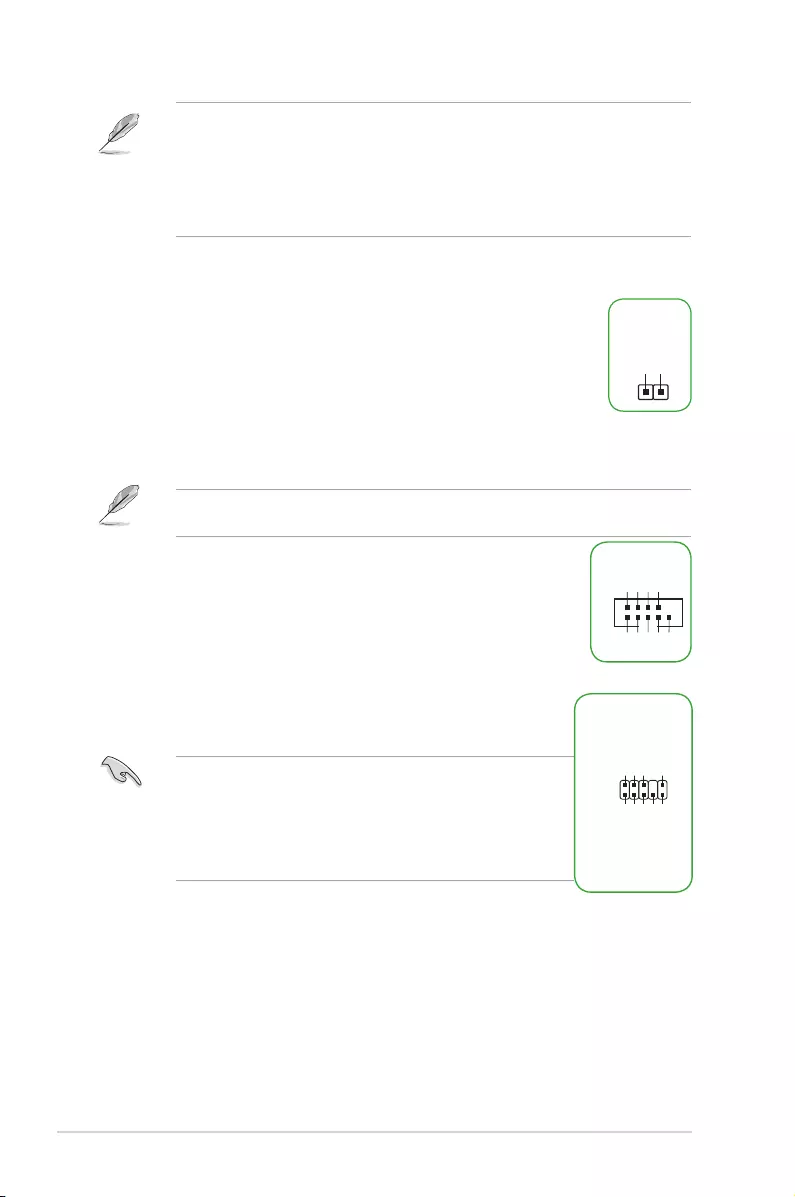
8. USB 3.2 Gen 1 header
The USB 3.2 Gen 1 header allows you to connect a USB 3.2 Gen 1 module for additional
USB 3.2 Gen 1 ports. The USB 3.2 Gen 1 header provides data
transfer speeds of up to 5 Gb/s.
The USB 3.2 Gen 1 module is purchased separately.
9. USB 2.0 headers
The USB 2.0 headers allow you to connect a USB module for additional USB
2.0 ports. The USB 2.0 headers provide data transfer speeds of up to 480 Mb/s
connection speed.
DO NOT connect a 1394 cable to the USB connectors. Doing so will
damage the motherboard!
The USB 2.0 module is purchased separately.
10. AURA RGB headers
The RGB headers allow you to connect RGB LED strips.
The RGB headers support 5050 RGB multi-color LED strips (12V/G/R/B), with a maximum
power rating of 3A (12V), and no longer than 3 m.
Before you install or remove any component, ensure that the ATX power supply is switched
off or the power cord is detached from the power supply. Failure to do so may cause severe
damage to the motherboard, peripherals, or components.
USB3+5V
IntA_P1_SSRX-
IntA_P1_SSRX+
GND
IntA_P1_SSTX-
IntA_P1_SSTX+
GND
IntA_P1_D-
IntA_P1_D+
GND
USB3+5V
IntA_P2_SSRX-
IntA_P2_SSRX+
GND
IntA_P2_SSTX-
IntA_P2_SSTX+
GND
IntA_P2_D-
IntA_P2_D+
USB+5V
USB_P9-
USB_P9+
GND
NC
USB+5V
USB_P10-
USB_P10+
GND
PIN 1
1-4 Chapter 1: Product introduction
• Actual lighting and color will vary with LED strip.
• If your LED strip does not light up, check if the RGB LED extension cable and the
RGB LED strip are connected in the correct orientation, and the 12V connector is
aligned with the 12V header on the motherboard.
• The LED strip will only light up when the system is powered on.
• The LED strip is purchased separately.
11. Clear CMOS header
This header allows you to clear the CMOS RTC RAM data of the system setup information
such as date, time, and system passwords.
To erase the RTC RAM:
1. Turn OFF the computer and unplug the power cord.
2. Use a metal object such as a screwdriver to short the two pins.
3. Plug the power cord and turn ON the computer.
4. Hold down the <Del> key during the boot process and enter BIOS setup to re-
enter data.
If the steps above do not help, remove the onboard battery and short the two pins again to
clear the CMOS RTC RAM data. After clearing the CMOS, reinstall the battery.
12. COM Port header
This header is for a serial (COM) port. Connect the serial port module cable
to this header, then install the module to a slot opening at the back of the
system chassis.
13. Front panel audio header
This header is for a chassis-mounted front panel audio I/O module that
supports HD audio standard. Connect one end of the front panel audio I/O
module cable to this header.
• We recommend that you connect a high-denition front panel
audio module to this header to avail of the motherboard’s high-
denition audio capability.
• If you want to connect a high-denition front panel audio module
to this header, set the Front Panel Type item in the BIOS setup
to [HD Audio]. By default, this header is set to [HD Audio].
CLRTC
+3V_BAT
GND
AAFP
AGND
NC
SENSE1_RETUR
SENSE2_RETUR
PORT1 L
PORT1 R
PORT2 R
SENSE_SEND
PORT2 L
HD-audio-compliant
pin definition
PIN 1
COM
DCD
TXD
GND
RTS
RI
RXD
DTR
DSR
CTS

ASUS TUF GAMING B460-PLUS 1-5
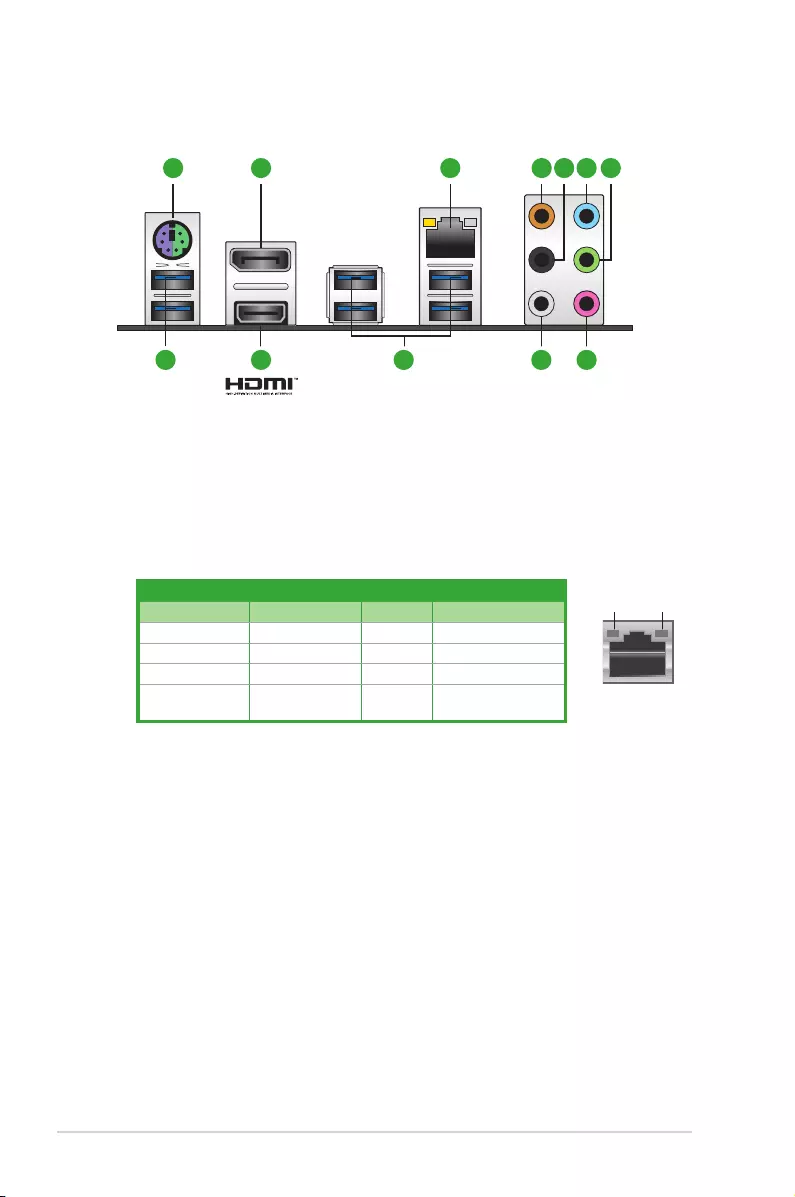
14. 20-3 pin System Panel header with Chassis intrude function
This header supports several chassis-mounted functions.
• System power LED (4-pin +PWR_LED-)
This 4-pin header is for the system power LED. Connect the
chassis power LED cable to this header. The system power
LED lights up when you turn on the system power, and blinks
when the system is in sleep mode.
• Hard disk drive activity LED (2-pin +HDD_LED-)
This 2-pin header is for the HDD Activity LED. Connect the
HDD Activity LED cable to this header. The HDD LED lights up
or ashes when data is read from or written to the HDD.
• System warning speaker (4-pin SPEAKER)
This 4-pin header is for the chassis-mounted system warning speaker. The speaker
allows you to hear system beeps and warnings.
• ATX power button/soft-off button (2-pin PWR_SW)
This header is for the system power button. Pressing the power button turns the
system on or puts the system in sleep or soft-off mode depending on the operating
system settings. Pressing the power switch for more than four seconds while the
system is ON turns the system OFF.
• Reset button (2-pin RESET)
This 2-pin header is for the chassis-mounted reset button for system reboot without
turning off the system power.
• Chassis intrusion header (2-pin CHASSIS)
This header is for a chassis-mounted intrusion detection sensor or switch. Connect one
end of the chassis intrusion sensor or switch cable to this header. The chassis intrusion
sensor or switch sends a high-level signal to this connector when a chassis component
is removed or replaced. The signal is then generated as a chassis intrusion event.
PLED+
PLED-
PWR
Ground
+5V
Ground
Ground
Speaker
CASEOPEN
HDD_LED+
HDD_LED-
GND
Reset
+5V
PLED+
PLED-
GND
PIN 1
+PWR_LED-
+PWR_LED-
SPEAKER
PANEL
+HDD_LED-
PWR_SW
RESET
* Requires an ATX power supply
CHASSIS
1-6 Chapter 1: Product introduction
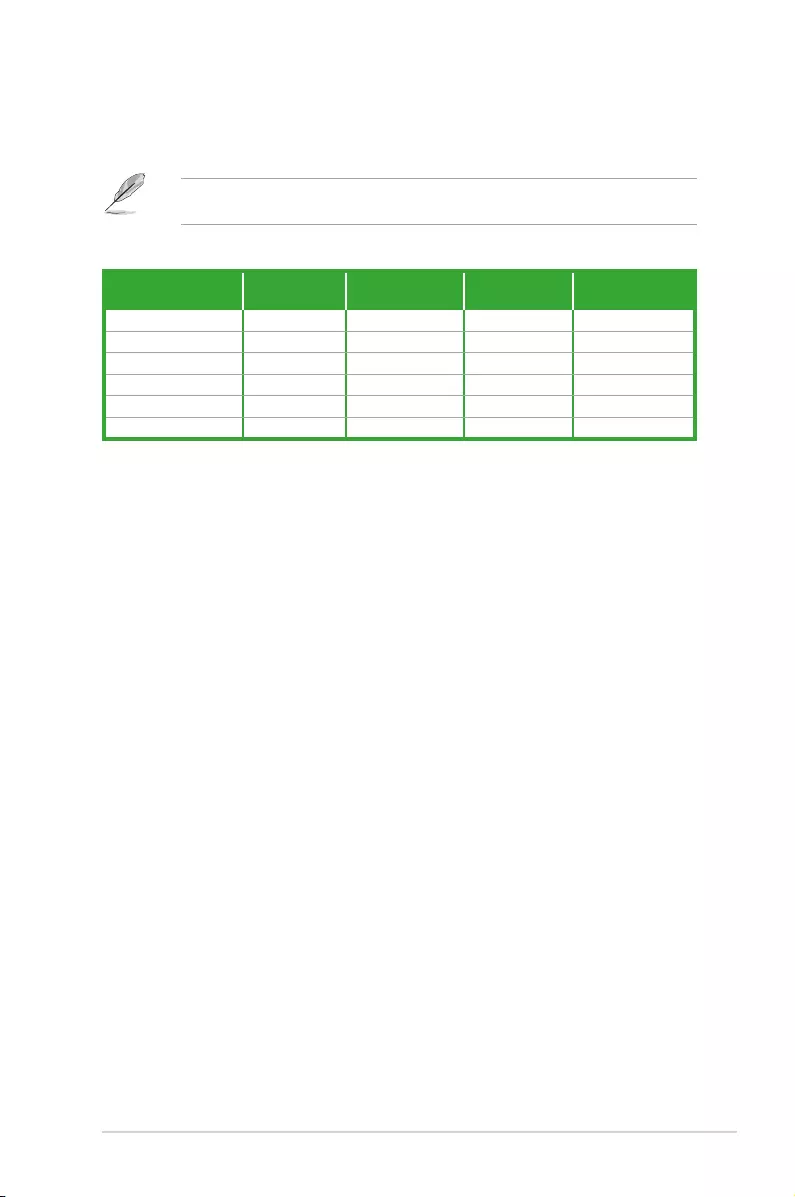
1.2.2 Rear panel connectors
Ethernet port
Speed
LED
Activity Link
LED
Activity/Link LED Speed LED
Status Description Status Description
Off No link OFF 10Mbps connection
Orange Linked ORANGE 100Mbps connection
Orange (Blinking) Data activity GREEN 1Gbps connection
Orange (Blinking
then steady)
Ready to wake
up from S5 mode
1. PS/2 keyboard/mouse combo port. This port is for a PS/2 mouse or keyboard.
2. DisplayPort. This port is for a DisplayPort-compatible device.
3. Ethernet port. This port allows Gigabit connection to a Local Area Network (LAN)
through a network hub. Refer to the table below for the Ethernet port LED indications.
Ethernet port LED indications
4. Center / Subwoofer port (orange). This port connects the center/subwoofer speakers.
5. Rear Speaker Out port (black). This port connects the rear speakers in a 4 channel,
5.1 channel, or 7.1 channel audio conguration.
6. Line In port (light blue). This port connects the tape, CD, DVD player, or other audio
sources.
7. Line Out port (lime). This port connects a headphone or a speaker. In 4-channel,
5.1-channel, and 7.1-channel congurations, the function of this port becomes Front
Speaker Out.
8. USB 3.2 Gen 1 (up to 5Gbps) ports. These 9-pin Universal Serial Bus (USB) ports
connect to USB 3.2 Gen 1 devices.
9. HDMITM port. This port is for a High-Denition Multimedia Interface (HDMITM)
connector, and is HDCP compliant allowing playback of HD DVD, Blu-ray, and other
protected content.
3 4 5 6 7
8 8 10 119
21
ASUS TUF GAMING B460-PLUS 1-7
10. Side Speaker Out port (gray). This port connects to the side speakers in an
7.1-channel audio conguration.
11. Microphone port (pink). This port connects a microphone.
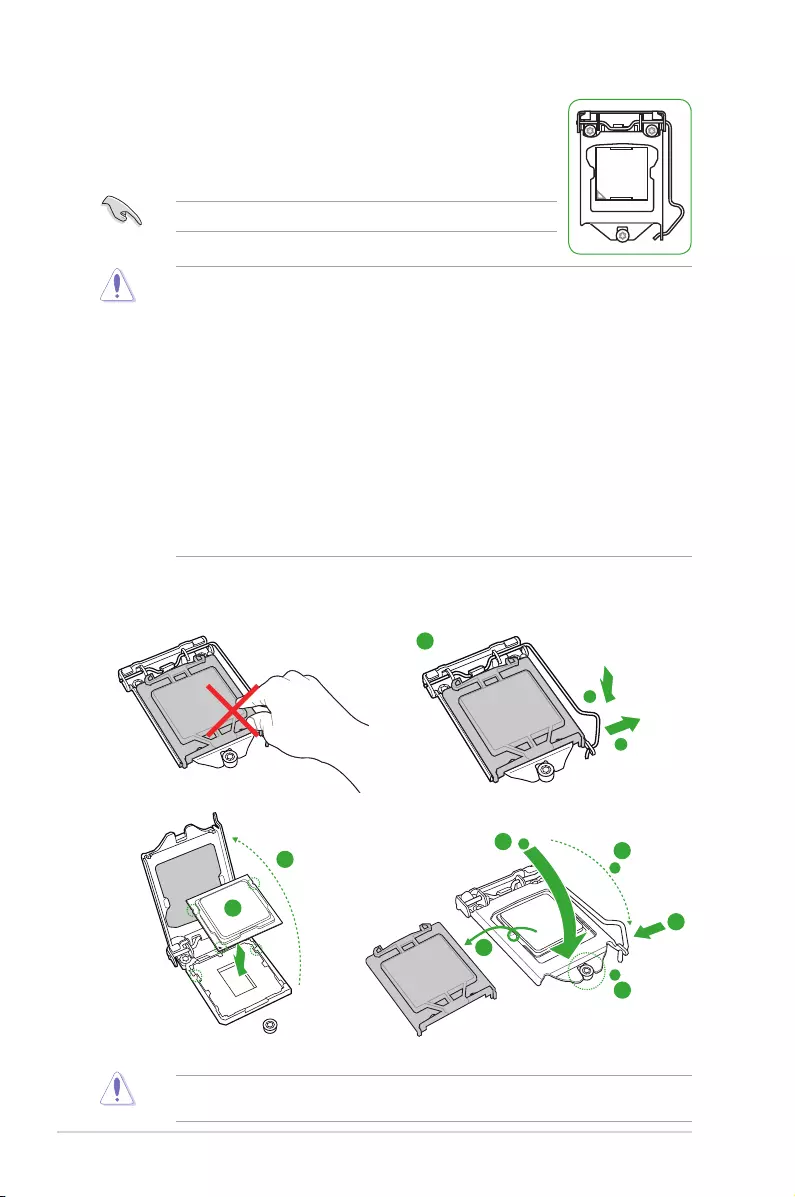
Refer to the audio conguration table on the next page for the function of the audio ports in
2, 4, 5.1, or 7.1-channel conguration.
Audio 2, 4, 5.1 or 7.1-channel conguration
Port Headset
2-channel 4-channel 5.1-channel 7.1-channel
Light Blue Line In Line In Line In Line In
Lime Line Out Front Speaker Out Front Speaker Out Front Speaker Out
Pink Mic In Mic In Mic In Mic In
Orange — — Center/Subwoofer Center/Subwoofer
Black — Rear Speaker Out Rear Speaker Out Rear Speaker Out
Gray — — — Side Speaker Out
1-8 Chapter 1: Product introduction
1.3 Central Processing Unit (CPU)
This motherboard comes with a surface mount Intel® Socket LGA1200
designed for 10th Gen Intel® Core™, Pentium® Gold and Celeron®
Processors.
Unplug all power cables before installing the CPU.
• Ensure that you install the correct CPU designed for the LGA1200 socket only. DO
NOT install a CPU designed for LGA1150, LGA1151, LGA1155 and LGA1156 sockets
on the LGA1200 socket.
• Upon purchase of the motherboard, ensure that the PnP cap is on the socket and
the socket contacts are not bent. Contact your retailer immediately if the PnP cap
is missing, or if you see any damage to the PnP cap/socket contacts/motherboard
components.
• Keep the cap after installing the motherboard. ASUS will process Return Merchandise
Authorization (RMA) requests only if the motherboard comes with the cap on the
LGA1200 socket.
• The product warranty does not cover damage to the socket contacts resulting from
incorrect CPU installation/removal, or misplacement/loss/incorrect removal of the PnP
cap.
• The CPU ts in only one correct orientation. DO NOT force the CPU into the socket to
prevent bending the connectors on the socket and damaging the CPU.
Installing the CPU
1
4
Apply the Thermal Interface Material to the CPU heatsink and CPU before you install the
heatsink and fan if necessary.
2
3
A
B
A
B
C
D
5
4
4
5
ASUS TUF GAMING B460-PLUS 1-9
1.4 System memory
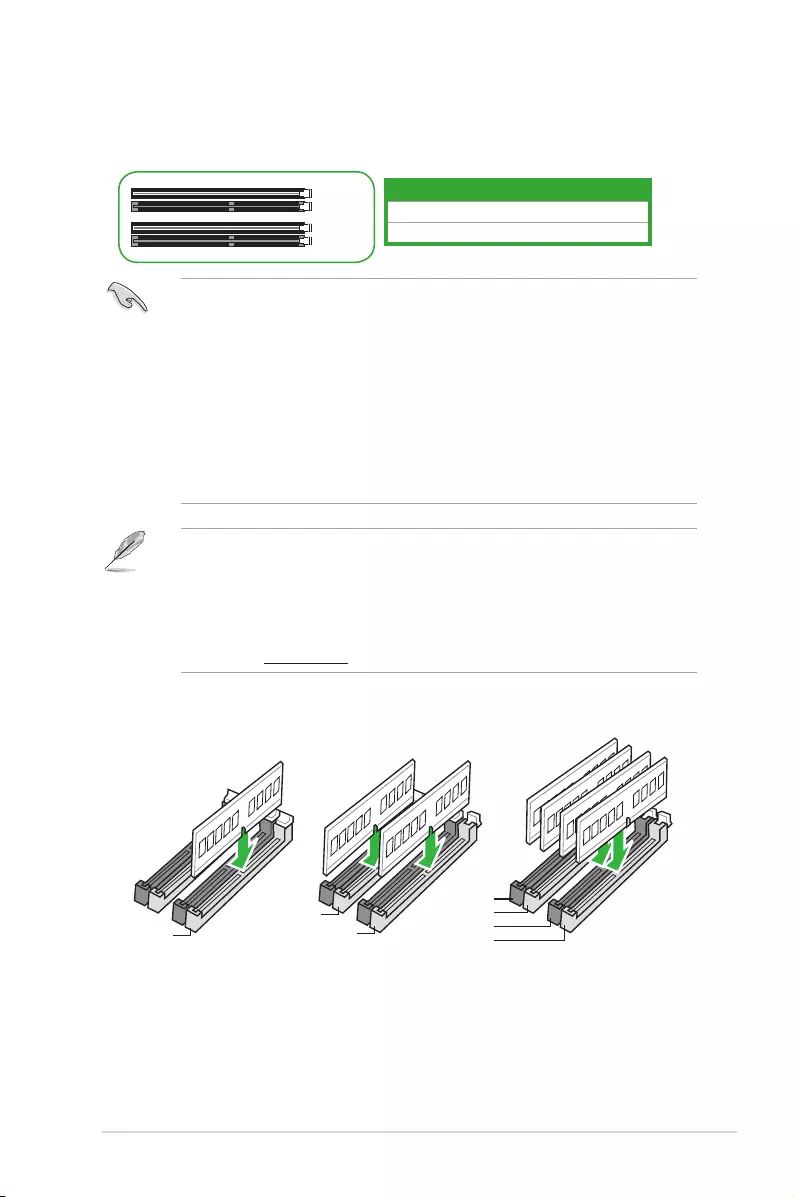
This motherboard comes with four Double Data Rate 4 (DDR4) Dual Inline Memory Module
(DIMM) sockets. The gure illustrates the location of the DDR4 DIMM sockets:
Channel Sockets
Channel A DIMM_A1 & DIMM_A2*
Channel B DIMM_B1 & DIMM_B2*
DIMM_B1
DIMM_B2*
DIMM_A1
DIMM_A2*
• You may install varying memory sizes in Channel A and Channel B. The system
maps the total size of the lower-sized channel for the dual-channel conguration. Any
excess memory from the higher-sized channel is then mapped for single-channel
operation.
• Always install DIMMs with the same CAS latency. For optimal compatibility, we
recommend that you install memory modules of the same version or date code (D/C)
from the same vendor. Check with the retailer to get the correct memory modules.
• For 10th Gen Intel® processors, only Core™ i9/i7 CPUs support
2933/2800/2666/2400/2133 natively, others will run at the maximum transfer rate of
DDR4 2666MHz.
• A DDR4 memory module is notched differently from a DDR, DDR2, or DDR3 module.
DO NOT install a DDR, DDR2, or DDR3 memory module to the DDR4 slot.
• The default memory operation frequency is dependent on its Serial Presence Detect
(SPD), which is the standard way of accessing information from a memory module.
Under the default state, some memory modules for overclocking may operate at a
lower frequency than the vendor-marked value.
• For system stability, use a more efcient memory cooling system to support a full
memory load.
• Refer to www.asus.com for the latest Memory QVL (Qualied Vendors List).
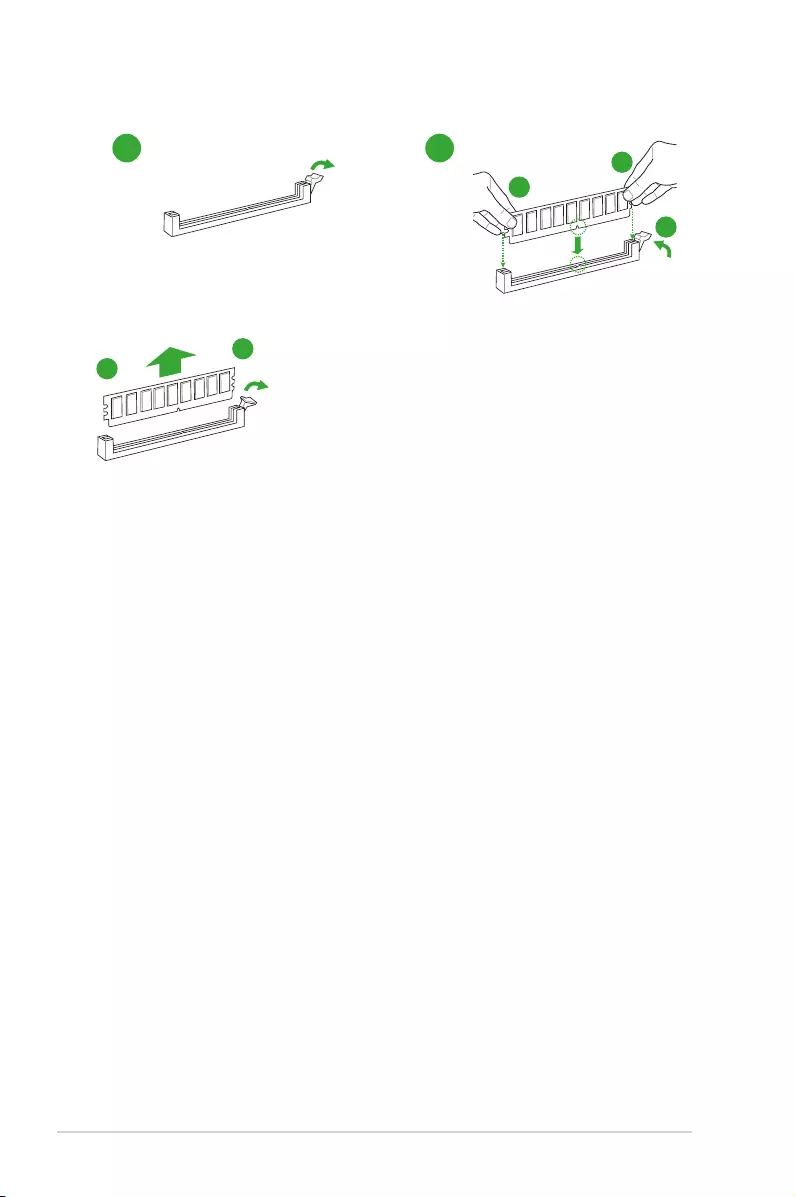
Recommended memory congurations
DIMM_A2*
DIMM_B1
DIMM_B2*
DIMM_A2*
DIMM_B2*
DIMM_A1
DIMM_A2*
1-10 Chapter 1: Product introduction
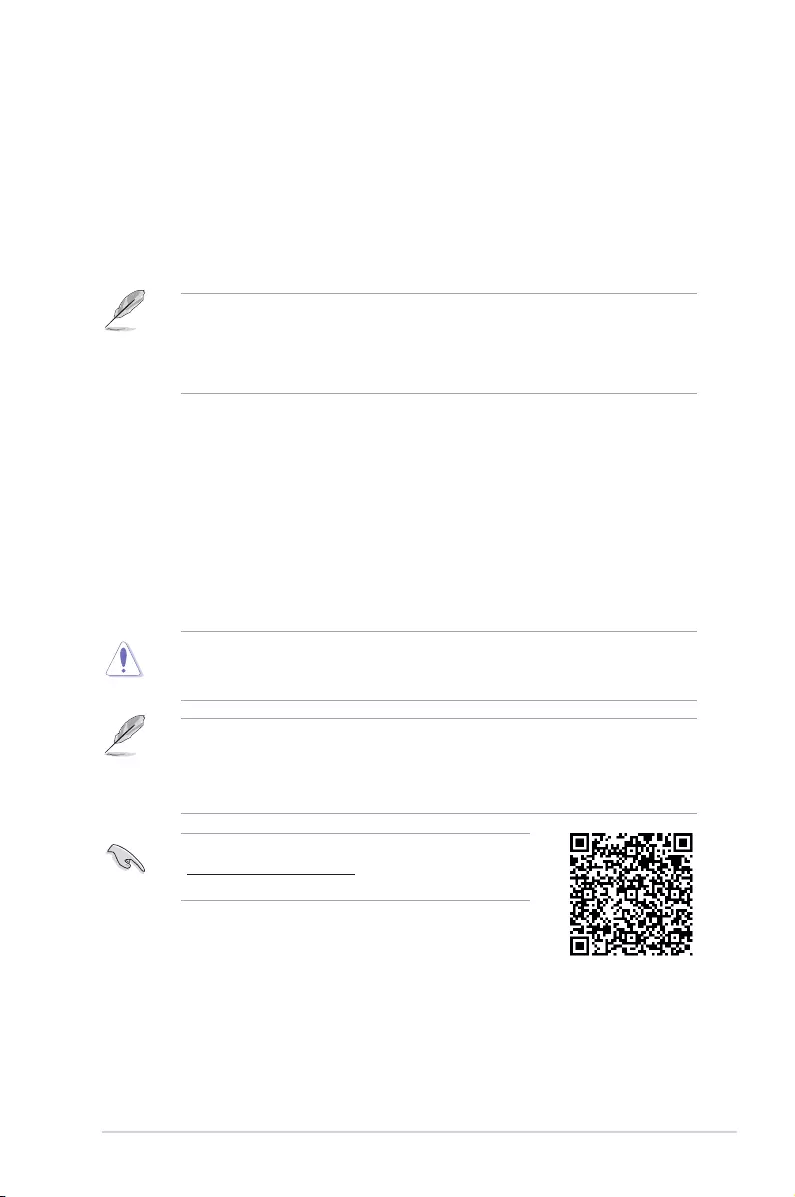
Installing a DIMM
1 2
B
A
A
To remove a DIMM
B
A
ASUS TUF GAMING B460-PLUS 2-1
BIOS information
2
2.1 Knowing BIOS
The new ASUS UEFI BIOS is a Unied Extensible Interface that complies with UEFI
architecture, offering a user-friendly interface that goes beyond the traditional keyboard-
only BIOS controls to enable a more exible and convenient mouse input. You can easily
navigate the new UEFI BIOS with the same smoothness as your operating system. The
term “BIOS” in this user manual refers to “UEFI BIOS” unless otherwise specied.
BIOS (Basic Input and Output System) stores system hardware settings such as storage
device conguration, overclocking settings, advanced power management, and boot
device conguration that are needed for system startup in the motherboard CMOS. In
normal circumstances, the default BIOS settings apply to most conditions to ensure
optimal performance. DO NOT change the default BIOS settings except in the following
circumstances:
• An error message appears on the screen during the system bootup and requests you
to run the BIOS Setup.
• You have installed a new system component that requires further BIOS settings or
update.
Inappropriate BIOS settings may result to instability or boot failure. We strongly
recommend that you change the BIOS settings only with the help of a trained service
personnel.
• When downloading or updating the BIOS le, rename it as TGB460PS.CAP for this
motherboard.
• BIOS settings and options may vary due to different BIOS release versions. Please
refer to the latest BIOS version for settings and options.
For more information on BIOS congurations, please refer to
https://www.asus.com/support, or download the BIOS manual
by scanning the QR code.

2-2 Chapter 2: BIOS information
2.2 BIOS setup program
Use the BIOS Setup to update the BIOS or congure its parameters. The BIOS screen
include navigation keys and brief onscreen help to guide you in using the BIOS Setup
program.
Entering BIOS at startup
To enter BIOS Setup at startup, press <Delete> or <F2> during the Power-On Self Test
(POST). If you do not press <Delete> or <F2>, POST continues with its routines.
Entering BIOS Setup after POST
To enter BIOS Setup after POST:
• Press <Ctrl>+<Alt>+<Delete> simultaneously.
• Press the reset button on the system chassis.
• Press the power button to turn the system off then back on. Do this option only if you
failed to enter BIOS Setup using the rst two options.
After doing either of the three options, press <Delete> key to enter BIOS.
• Ensure that a USB mouse is connected to your motherboard if you want to use the
mouse to control the BIOS setup program.
• If the system becomes unstable after changing any BIOS setting, load the default
settings to ensure system compatibility and stability. Select the Load Optimized
Defaults item under the Exit menu or press hotkey <F5>.
• If the system fails to boot after changing any BIOS setting, try to clear the CMOS and
reset the motherboard to the default value.
• The BIOS setup program does not support Bluetooth devices.
BIOS menu screen
The BIOS Setup program can be used under two modes: EZ Mode and Advanced Mode.
You can change modes from Setup Mode in Boot menu or by pressing the <F7> hotkey.

ASUS TUF GAMING B460-PLUS 2-3
2.3 ASUS EZ Flash 3
The ASUS EZ Flash 3 feature allows you to update the BIOS without using an OS-based
utility.
Ensure to load the BIOS default settings to ensure system compatibility and stability. Select
the Load Optimized Defaults item under the Exit menu or press hotkey <F5>.
To update the BIOS by USB:
• This function can support devices such as a USB ash disk with FAT 32/16 format and
single partition only.
• DO NOT shut down or reset the system while updating the BIOS to prevent system
boot failure!
1. Insert the USB ash disk that contains the latest BIOS le to the USB port.
2. Enter the Advanced Mode of the BIOS setup program. Go to the Tool menu to select
ASUS EZ Flash 3 Utility and press <Enter>.
3. Select via Storage Device(s).
4. Press <Tab> to switch to the Drive eld.
5. Press the Up/Down arrow keys to nd the USB ash disk that contains the latest BIOS,
and then press <Enter>.
6. Press <Tab> to switch to the Folder eld.
7. Press the Up/Down arrow keys to nd the BIOS le, and then press <Enter> to perform
the BIOS update process. Reboot the system when the update process is done.
2-4 Chapter 2: BIOS information
2.4 ASUS CrashFree BIOS 3
The ASUS CrashFree BIOS 3 utility is an auto recovery tool that allows you to restore the
BIOS le when it fails or gets corrupted during the updating process. You can restore a
corrupted BIOS le using the motherboard support DVD or a USB ash drive that contains
the BIOS le.
The BIOS le in the motherboard support DVD may be older than the BIOS le published
on the ASUS ofcial website. If you want to use the newer BIOS le, download the le at
https://www.asus.com/support/ and save it to a USB ash drive.
Recovering the BIOS
To recover the BIOS:
1. Turn on the system.
2. Insert the motherboard support DVD to the optical drive, or the USB ash drive
containing the BIOS le to the USB port.
3. The utility automatically checks the devices for the BIOS le. When found, the utility
reads the BIOS le and enters ASUS EZ Flash 3 automatically.
4. The system requires you to enter BIOS Setup to recover the BIOS setting. To ensure
system compatibility and stability, we recommend that you press <F5> to load default
BIOS values.
DO NOT shut down or reset the system while updating the BIOS! Doing so can cause
system boot failure!

Appendix
Notices
FCC Compliance Information
Responsible Party: Asus Computer International
Address: 48720 Kato Rd., Fremont, CA 94538, USA
Phone / Fax No: (510)739-3777 / (510)608-4555
This device complies with part 15 of the FCC Rules. Operation is subject to the following
two conditions: (1) This device may not cause harmful interference, and (2) this device must
accept any interference received, including interference that may cause undesired operation.
This equipment has been tested and found to comply with the limits for a Class B digital
device, pursuant to part 15 of the FCC Rules. These limits are designed to provide
reasonable protection against harmful interference in a residential installation. This equipment
generates, uses and can radiate radio frequency energy and, if not installed and used in
accordance with the instructions, may cause harmful interference to radio communications.
However, there is no guarantee that interference will not occur in a particular installation. If
this equipment does cause harmful interference to radio or television reception, which can be
determined by turning the equipment off and on, the user is encouraged to try to correct the
interference by one or more of the following measures:
— Reorient or relocate the receiving antenna.
— Increase the separation between the equipment and receiver.
— Connect the equipment into an outlet on a circuit different from that to which the receiver is
connected.
— Consult the dealer or an experienced radio/TV technician for help.
ASUS TUF GAMING B460-PLUS A-1
VCCI: Japan Compliance Statement
Class B ITE
KC: Korea Warning Statement
Compliance Statement of Innovation, Science and Economic
Development Canada (ISED)
This device complies with Innovation, Science and Economic Development Canada licence
exempt RSS standard(s). Operation is subject to the following two conditions: (1) this device
may not cause interference, and (2) this device must accept any interference, including
interference that may cause undesired operation of the device.
CAN ICES-3(B)/NMB-3(B)
Déclaration de conformité de Innovation, Sciences et
Développement économique Canada (ISED)
Le présent appareil est conforme aux CNR d’Innovation, Sciences et Développement
économique Canada applicables aux appareils radio exempts de licence. L’exploitation est
autorisée aux deux conditions suivantes : (1) l’appareil ne doit pas produire de brouillage,
et (2) l’utilisateur de l’appareil doit accepter tout brouillage radioélectrique subi, même si le
brouillage est susceptible d’en compromettre le fonctionnement.
CAN ICES-3(B)/NMB-3(B)
A-2 Appendices

Google™ License Terms
Copyright© 2020 Google Inc. All Rights Reserved.
Licensed under the Apache License, Version 2.0 (the “License”); you may not use this le
except in compliance with the License. You may obtain a copy of the License at:
http://www.apache.org/licenses/LICENSE-2.0
Unless required by applicable law or agreed to in writing, software distributed under the
License is distributed on an “AS IS” BASIS, WITHOUT WARRANTIES OR CONDITIONS OF
ANY KIND, either express or implied.
See the License for the specic language governing permissions and limitations under the
License.
Declaration of compliance for product environmental
regulation
ASUS follows the green design concept to design and manufacture our products, and
makes sure that each stage of the product life cycle of ASUS product is in line with global
environmental regulations. In addition, ASUS disclose the relevant information based on
regulation requirements.
Please refer to http://csr.asus.com/Compliance.htm for information disclosure based on
regulation requirements ASUS is complied with:
EU REACH and Article 33
Complying with the REACH (Registration, Evaluation, Authorisation, and Restriction of
Chemicals) regulatory framework, we published the chemical substances in our products at
ASUS REACH website at http://csr.asus.com/english/REACH.htm.
EU RoHS
This product complies with the EU RoHS Directive. For more details, see
http://csr.asus.com/english/article.aspx?id=35
India RoHS
This product complies with the “India E-Waste (Management) Rules, 2016” and prohibits
use of lead, mercury, hexavalent chromium, polybrominated biphenyls (PBBs) and
polybrominated diphenyl ethers (PBDEs) in concentrations exceeding 0.1% by weight in
homogenous materials and 0.01% by weight in homogenous materials for cadmium, except
for the exemptions listed in Schedule II of the Rule.
Vietnam RoHS
ASUS products sold in Vietnam, on or after September 23, 2011,meet the requirements of
the Vietnam Circular 30/2011/TT-BCT.
Các sản phẩm ASUS bán tại Việt Nam, vào ngày 23 tháng 9 năm2011 trở về sau, đều phải đáp ứng
các yêu cầu của Thông tư 30/2011/TT-BCT của Việt Nam.
Turkey RoHS
AEEE Yönetmeliğine Uygundur
ASUS TUF GAMING B460-PLUS A-3
ASUS Recycling/Takeback Services
ASUS recycling and takeback programs come from our commitment to the highest standards
for protecting our environment. We believe in providing solutions for you to be able to
responsibly recycle our products, batteries, other components as well as the packaging
materials. Please go to http://csr.asus.com/english/Takeback.htm for detailed recycling
information in different regions.
DO NOT throw the motherboard in municipal waste. This product has been designed to
enable proper reuse of parts and recycling. This symbol of the crossed out wheeled bin
indicates that the product (electrical and electronic equipment) should not be placed in
municipal waste. Check local regulations for disposal of electronic products.
DO NOT throw the mercury-containing button cell battery in municipal waste. This symbol
of the crossed out wheeled bin indicates that the battery should not be placed in municipal
waste.
Regional notice for California
WARNING
Cancer and Reproductive Harm —
www.P65Warnings.ca.gov
A-4 Appendices

Română ASUSTeK Computer Inc. declară că acest dispozitiv se conformează
cerinţelor esenţiale şi altor prevederi relevante ale directivelor conexe. Textul
complet al declaraţiei de conformitate a Uniunii Europene se găseşte la:
www.asus.com/support
Srpski ASUSTeK Computer Inc. ovim izjavljuje da je ovaj uređaj u saglasnosti
sa osnovnim zahtevima i drugim relevantnim odredbama povezanih Direktiva.
Pun tekst EU deklaracije o usaglašenosti je dostupan da adresi:
www.asus.com/support
Slovensky Spoločnosť ASUSTeK Computer Inc. týmto vyhlasuje, že toto
zariadenie vyhovuje základným požiadavkám a ostatým príslušným
ustanoveniam príslušných smerníc. Celý text vyhlásenia o zhode pre štáty EÚ
je dostupný na adrese: www.asus.com/support
Slovenščina ASUSTeK Computer Inc. izjavlja, da je ta naprava skladna z
bistvenimi zahtevami in drugimi ustreznimi določbami povezanih direktiv.
Celotno besedilo EU-izjave o skladnosti je na voljo na spletnem mestu:
www.asus.com/support
Español Por la presente, ASUSTeK Computer Inc. declara que este dispositivo
cumple los requisitos básicos y otras disposiciones pertinentes de las
directivas relacionadas. El texto completo de la declaración de la UE de
conformidad está disponible en: www.asus.com/support
Svenska ASUSTeK Computer Inc. förklarar härmed att denna
enhet överensstämmer med de grundläggande kraven och andra
relevanta föreskrifter i relaterade direktiv. Fulltext av EU-försäkran om
överensstämmelse nns på: www.asus.com/support
Українська ASUSTeK Computer Inc. заявляє, що цей пристрій відповідає
основним вимогам та іншим відповідним положенням відповідних
Директив. Повний текст декларації відповідності стандартам ЄС доступний
на: www.asus.com/support
Türkçe AsusTek Computer Inc., bu aygıtın temel gereksinimlerle ve ilişkili
Yönergelerin diğer ilgili koşullarıyla uyumlu olduğunu beyan eder. AB
uygunluk bildiriminin tam metni şu adreste bulunabilir:
www.asus.com/support
Bosanski ASUSTeK Computer Inc. ovim izjavljuje da je ovaj uređaj usklađen
sa bitnim zahtjevima i ostalim odgovarajućim odredbama vezanih direktiva.
Cijeli tekst EU izjave o usklađenosti dostupan je na: www.asus.com/support
English ASUSTeK Computer Inc. hereby declares that this device is in
compliance with the essential requirements and other relevant provisions of
related Directives. Full text of EU declaration of conformity is available at:
www.asus.com/support
Français AsusTek Computer Inc. déclare par la présente que cet appareil est
conforme aux critères essentiels et autres clauses pertinentes des directives
concernées. La déclaration de conformité de l’UE peut être téléchargée à
partir du site Internet suivant : www.asus.com/support
Deutsch ASUSTeK Computer Inc. erklärt hiermit, dass dieses Gerät mit
den wesentlichen Anforderungen und anderen relevanten Bestimmungen
der zugehörigen Richtlinien übereinstimmt. Der gesamte Text der EU-
Konformitätserklärung ist verfügbar unter: www.asus.com/support
Italiano ASUSTeK Computer Inc. con la presente dichiara che questo
dispositivo è conforme ai requisiti essenziali e alle altre disposizioni
pertinenti con le direttive correlate. Il testo completo della dichiarazione di
conformità UE è disponibile all’indirizzo: www.asus.com/support
Русский Компания ASUS заявляет, что это устройство соответствует
основным требованиям и другим соответствующим условиям
соответствующих директив. Подробную информацию, пожалуйста,
смотрите на www.asus.com/support
Български С настоящото ASUSTeK Computer Inc. декларира, че това
устройство е в съответствие със съществените изисквания и другите
приложими постановления на свързаните директиви. Пълният текст на
декларацията за съответствие на ЕС е достъпна на адрес:
www.asus.com/support
Hrvatski ASUSTeK Computer Inc. ovim izjavljuje da je ovaj uređaj sukladan
s bitnim zahtjevima i ostalim odgovarajućim odredbama vezanih direktiva.
Cijeli tekst EU izjave o sukladnosti dostupan je na: www.asus.com/support
Čeština Společnost ASUSTeK Computer Inc. tímto prohlašuje, že
toto zařízení splňuje základní požadavky a další příslušná ustanovení
souvisejících směrnic. Plné znění prohlášení o shodě EU je k dispozici na
adrese: www.asus.com/support
Dansk ASUSTeK Computer Inc. erklærer hermed, at denne enhed er i
overensstemmelse med hovedkravene og andre relevante bestemmelser i
de relaterede direktiver. Hele EU-overensstemmelseserklæringen kan ndes
på: www.asus.com/support
Nederlands ASUSTeK Computer Inc. verklaart hierbij dat dit apparaat
voldoet aan de essentiële vereisten en andere relevante bepalingen van
de verwante richtlijnen. De volledige tekst van de EU-verklaring van
conformiteit is beschikbaar op: www.asus.com/support
Eesti Käesolevaga kinnitab ASUSTeK Computer Inc, et see seade vastab
asjakohaste direktiivide oluliste nõuetele ja teistele asjassepuutuvatele
sätetele. EL vastavusdeklaratsiooni täielik tekst on saadaval järgmisel
aadressil: www.asus.com/support
Suomi ASUSTeK Computer Inc. ilmoittaa täten, että tämä laite on
asiaankuuluvien direktiivien olennaisten vaatimusten ja muiden tätä
koskevien säädösten mukainen. EU-yhdenmukaisuusilmoituksen koko teksti
on luettavissa osoitteessa: www.asus.com/support
Ελληνικά Με το παρόν, η AsusTek Computer Inc. δηλώνει ότι αυτή
η συσκευή συμμορφώνεται με τις θεμελιώδεις απαιτήσεις και άλλες
σχετικές διατάξεις των Οδηγιών της ΕΕ. Το πλήρες κείμενο της δήλωσης
συμβατότητας είναι διαθέσιμο στη διεύθυνση: www.asus.com/support
Magyar Az ASUSTeK Computer Inc. ezennel kijelenti, hogy ez az eszköz
megfelel a kapcsolódó Irányelvek lényeges követelményeinek és egyéb
vonatkozó rendelkezéseinek. Az EU megfelelőségi nyilatkozat teljes szövege
innen letölthető: www.asus.com/support
Latviski ASUSTeK Computer Inc. ar šo paziņo, ka šī ierīce atbilst saistīto
Direktīvu būtiskajām prasībām un citiem citiem saistošajiem nosacījumiem.
Pilns ES atbilstības paziņojuma teksts pieejams šeit: www.asus.com/support
Lietuvių „ASUSTeK Computer Inc.“ šiuo tvirtina, kad šis įrenginys atitinka
pagrindinius reikalavimus ir kitas svarbias susijusių direktyvų nuostatas. Visą
ES atitikties deklaracijos tekstą galima rasti: www.asus.com/support
Norsk ASUSTeK Computer Inc. erklærer herved at denne enheten er i
samsvar med hovedsaklige krav og andre relevante forskrifter i relaterte
direktiver. Fullstendig tekst for EU-samsvarserklæringen nnes på:
www.asus.com/support
Polski Firma ASUSTeK Computer Inc. niniejszym oświadcza, że
urządzenie to jest zgodne z zasadniczymi wymogami i innymi właściwymi
postanowieniami powiązanych dyrektyw. Pełny tekst deklaracji zgodności
UE jest dostępny pod adresem: www.asus.com/support
Português A ASUSTeK Computer Inc. declara que este dispositivo está em
conformidade com os requisitos essenciais e outras disposições relevantes
das Diretivas relacionadas. Texto integral da declaração da UE disponível em:
www.asus.com/support
ASUS TUF GAMING B460-PLUS A-5

ASUS contact information
ASUSTeK COMPUTER INC.
Address 1F., No. 15, Lide Rd., Beitou Dist., Taipei City 112, Taiwan
Telephone +886-2-2894-3447
Fax +886-2-2890-7798
Web site https://www.asus.com
Technical Support
Telephone +86-21-38429911
Online support https://qr.asus.com/techserv
ASUS COMPUTER INTERNATIONAL (America)
Address 48720 Kato Rd., Fremont, CA 94538, USA
Telephone +1-510-739-3777
Fax +1-510-608-4555
Web site https://www.asus.com/us/
Technical Support
Support fax +1-812-284-0883
Telephone +1-812-282-2787
Online support https://qr.asus.com/techserv
ASUS COMPUTER GmbH (Germany and Austria)
Address Harkortstrasse 21-23, 40880 Ratingen, Germany
Web site https://www.asus.com/de
Online contact https://www.asus.com/support/Product/ContactUs/
Services/questionform/?lang=de-de
Technical Support
Telephone (DE) +49-2102-5789557
Telephone (AT) +43-1360-2775461
Online support https://www.asus.com/de/support
A-6 Appendices
Asus TUF GAMING B460-PLUS Manual
- Asus
- Motherboard
- Manual
- asus-tuf-gaming-b460-plus-manual-30-1894461.pdf
- 30
Download Asus TUF GAMING B460-PLUS PDF Manual
Asus TUF GAMING B460-PLUS Manuals come in various types, each serving a specific purpose to help users effectively operate and maintain their devices. Each type of Asus TUF GAMING B460-PLUS instruction is designed to address specific needs, ensuring users have the necessary information to use, maintain, and repair their devices effectively.
Related Instructions for Asus TUF GAMING B460-PLUS:
ROG STRIX Z370-I GAMING, P5KPL IPC SI, B150M-A D3, A58M-E, Z10PH-D16
- Asus ROG STRIX Z370-I GAMING
- Asus P5KPL IPC SI
- Asus B150M-A D3
- Asus A58M-E
- Asus Z10PH-D16
- Asus P5B VM — AiLifestyle Series Motherboard
- Asus P5RD1-VM
- Asus ROG STRIX B450-I
- Asus TUF Z370-PLUS GAMING
- Asus PRIME H410M-E
- Asus P5VD2-VM SE
- Asus P4SP-MX SE
Motherboard Devices by Other Brands:
| Brand | Device Model | Type of Document | Pages | Size | Views | Downloads | Updated |
|---|---|---|---|---|---|---|---|
| Variscite |
VAR-SOM-MX7 |
Variscite VAR-SOM-MX7 Quick start manual |
2 | 134 | 30 | 18-11-2024 | |
| IFC |
IFC-BOXi5-7200 |
IFC IFC-BOXi5-7200 Operation & user’s manual |
7 | 1382 | 222 | 27-12-2024 | |
| ASROCK |
J5040-ITX |
ASROCK J5040-ITX Manual |
115 | 837 | 151 | 03-12-2024 | |
| EPOX |
P2-112A |
EPOX P2-112A Instructions manual |
9 | 831 | 158 | 10-02-2025 | |
| JETWAY |
R3399X-2C Series |
JETWAY R3399X-2C Series Operation & user’s manual |
24 | 554 | 128 | 20-02-2025 |
Categories:
Network Accessory
Microphone
Led projector
Telephone Accessories
Notebooks
All-in-one pcs
Asus TUF GAMING B460-PLUS Motherboard PDF User Guides and Manuals for Free Download: Found (1) Manuals for Asus TUF GAMING B460-PLUS Device Model (Manual )
Asus TUF GAMING B460-PLUS Manual
Details:
- Manufacturer: Asus
- Product Name/ID: Asus TUF GAMING B460-PLUS / #1894461
- Category: Motherboard
- File Path: asus/tuf-gaming-b460-plus_1894461.pdf
- Last Updated: 06 Apr 2025
- Description: Navigate the features of your Asus TUF GAMING B460-PLUS with ease using this manual, which offers detailed setup instructions, operational tips, and solutions for common problems to enhance your user experience.
- Document Type: User Manual
- Pages: 30
Download PDF
Read Online
As technology continues to advance, gamers are constantly on the lookout for reliable hardware that can enhance their gaming experience. The Asus TUF GAMING B460-PLUS is a motherboard designed to cater to the needs of both gaming enthusiasts and everyday users. With its robust build quality and a range of features aimed at performance, the TUF GAMING B460-PLUS offers solid value for those looking to build or upgrade a gaming rig.
One of the standout features of the Asus TUF GAMING B460-PLUS is its durability. The motherboard is constructed with military-grade components, ensuring that it can withstand the rigors of continuous use. This level of reliability is essential for gamers who require stable performance during intense gaming sessions. Additionally, the board is equipped with TUF Protection, which includes features like overvoltage protection and enhanced thermal design, helping to keep your system cool even under heavy loads.
When it comes to performance, the Asus TUF GAMING B460-PLUS does not disappoint. It is compatible with Intel’s 10th generation processors, providing users with the processing power needed for modern gaming. The motherboard supports dual-channel DDR4 memory, offering a maximum capacity of 128GB. This ensures that even the most demanding applications can run smoothly alongside your favorite games.
The gaming-focused design of the Asus TUF GAMING B460-PLUS is further demonstrated by its PCIe slots, which allow for the installation of high-speed graphics cards. The board includes multiple PCI Express 3.0 slots, enabling users to set up multi-GPU configurations for an enhanced visual experience. This feature is particularly appealing to gamers who want to future-proof their builds.
In terms of connectivity, the Asus TUF GAMING B460-PLUS offers a generous array of ports. Here’s a quick overview:
- USB 3.2 Gen 2 Type-A and Type-C ports for fast data transfer.
- Multiple USB 3.2 Gen 1 ports for additional peripheral devices.
- HDMI and DisplayPort outputs for onboard graphics.
- Realtek S1200A audio codec providing 7.1 surround sound.
- Ethernet port with TUF Gaming LAN for improved network stability.
Another noteworthy aspect is the customizable RGB lighting, which allows users to personalize their setup. The Asus TUF GAMING B460-PLUS features Aura Sync compatibility, enabling synchronization with other RGB components. This not only enhances the aesthetic appeal of your gaming rig but also adds a level of personal expression.
Setting up and managing the motherboard is straightforward, thanks to the user-friendly UEFI BIOS interface. Asus provides extensive documentation and support, making the overclocking process simpler for those who wish to push their components to the limit. The board also supports Asus’s AI Overclocking feature, which automates the tuning process and ensures optimal performance without the hassle of manual adjustments.
In conclusion, the Asus TUF GAMING B460-PLUS stands out as a well-rounded motherboard that caters to both gamers and general users alike. Its combination of durability, performance, and features makes it an appealing option for those looking to build a capable system. Whether you’re seeking a reliable motherboard for gaming, content creation, or daily tasks, the Asus TUF GAMING B460-PLUS is definitely worth considering.
View the manual for the Asus TUF Gaming B460M-PLUS here, for free. This manual comes under the category motherboards and has been rated by 1 people with an average of a 7.7. This manual is available in the following languages: English. Do you have a question about the Asus TUF Gaming B460M-PLUS or do you need help?
Ask your question here
Asus TUF Gaming B460M-PLUS specifications
Below you will find the product specifications and the manual specifications of the Asus TUF Gaming B460M-PLUS.
The asus tuf gaming b460m-plus motherboard is a micro ATX motherboard that is designed for use in a PC. It has a width and depth of 244 millimeters, making it a standard size for a micro ATX motherboard. It is compatible with Windows 10 operating systems and is part of Intel’s motherboard chipset family.
This motherboard comes with SATA cables included, making it easy to connect to other components. It supports a gigabit Ethernet interface, which allows for fast and reliable internet connection, and it is also Wake-on-LAN ready. However, it does not support Wi-Fi connectivity.
The BIOS of this motherboard is of the UEFI AMI type and has a memory size of 128 Mbit. It has a 24-pin ATX power connector and a CPU fan connector, which is essential for powering the processor and ensuring that it stays cool.
Overall, the asus tuf gaming b460m-plus is a versatile and reliable micro ATX motherboard that is ideal for PC builders who need a solid and dependable foundation for their computer. Its premium construction and design ensure durability and long-lasting performance.
Windows operating systems supported
Windows 10
ATX Power connector (24-pin)
Yes
General
| Brand | Asus |
| Model | TUF Gaming B460M-PLUS | 90MB1450-M0EAY0 |
| Product | motherboard |
| EAN | 0192876714157, 192876714157, 4718017714150 |
| Language | English |
| Filetype | User manual (PDF), Quickstart Guide (PDF) |
Packaging content
Weight & dimensions
Features
| Windows operating systems supported | Windows 10 |
| Motherboard chipset family | Intel |
| Motherboard form factor | micro ATX |
| Component for | PC |
| Audio chip | Realtek ALC S1200A |
| Audio output channels | 7.1 channels |
| Motherboard chipset | Intel B460 |
Network
| Ethernet LAN | Yes |
| Ethernet interface type | Gigabit Ethernet |
| Wake-on-LAN ready | Yes |
| Wi-Fi | No |
| LAN controller | Intel® I219-V |
BIOS
| BIOS type | UEFI AMI |
| BIOS memory size | 128 Mbit |
| Clear CMOS jumper | Yes |
Internal I/O
| ATX Power connector (24-pin) | Yes |
| CPU fan connector | Yes |
| Number of chassis fan connectors | 2 |
| RGB LED pin header | Yes |
| USB 2.0 connectors | 2 |
| USB 3.2 Gen 1 (3.1 Gen 1) connectors | 1 |
| USB 3.2 Gen 2 (3.1 Gen 2) connectors | — |
| Number of SATA II connectors | 0 |
| Number of Parallel ATA connectors | 0 |
| Number of SATA III connectors | 6 |
| 12V power connector | Yes |
| Chassis intrusion connector | Yes |
| Front panel audio connector | Yes |
| Number of COM connectors | 1 |
Expansion slots
| Number of M.2 (M) slots | 2 |
| PCI Express x16 (Gen 3.x) slots | 2 |
| PCI Express x1 (Gen 3.x) slots | 1 |
Rear panel I/O ports
| PS/2 ports quantity | 1 |
| DVI-D ports quantity | 1 |
| HDMI ports quantity | 1 |
| DisplayPorts quantity | 1 |
| USB 2.0 ports quantity | 2 |
| USB 3.2 Gen 1 (3.1 Gen 1) Type-A ports quantity | 4 |
| USB 3.2 Gen 2 (3.1 Gen 2) Type-C ports quantity | 0 |
| USB 3.2 Gen 2 (3.1 Gen 2) Type-A ports quantity | 0 |
| USB 3.2 Gen 1 (3.1 Gen 1) Type-C ports quantity | 0 |
| Ethernet LAN (RJ-45) ports | 1 |
| eSATA ports quantity | 0 |
| Firewire (IEEE 1394) ports | 0 |
| VGA (D-Sub) ports quantity | 0 |
| HDMI version | 1.4b |
| DisplayPort version | 1.4 |
Storage controllers
| Supported storage drive interfaces | SATA III |
| Supported storage drive types | HDD & SSD |
| RAID levels | 0, 1,5, 10 |
Graphics
| Parallel processing technology support | 2-Way CrossFireX |
| Maximum resolution | 4096 x 2304 pixels |
Memory
| Supported memory types | DDR4-SDRAM |
| Number of memory slots | 4 |
| Memory slots type | DIMM |
| Memory channels | Dual-channel |
| Supported memory clock speeds | 2133,2400,2666,2800,2933 MHz |
| Unbuffered memory | Yes |
| Maximum internal memory | 128 GB |
Processor
| Processor manufacturer | Intel |
| Compatible processor series | Intel Celeron, Intel Core i3, Intel Core i5, Intel Core i7, Intel Core i9, Intel Pentium |
| Maximum number of SMP processors | 1 |
Logistics data
| Harmonized System (HS) code | 84733020 |
show more
Frequently Asked Questions
Can’t find the answer to your question in the manual? You may find the answer to your question in the FAQs about the Asus TUF Gaming B460M-PLUS below.
What is the width of the Asus TUF Gaming B460M-PLUS?
The Asus TUF Gaming B460M-PLUS has a width of 244 mm.
What is the depth of the Asus TUF Gaming B460M-PLUS?
The Asus TUF Gaming B460M-PLUS has a depth of 244 mm.
Is the manual of the Asus TUF Gaming B460M-PLUS available in English?
Yes, the manual of the Asus TUF Gaming B460M-PLUS is available in English .
Is your question not listed? Ask your question here
Asus TUF GAMING B460-PLUS Manual
- Asus
- Motherboard
- Manual for Asus TUF GAMING B460-PLUS
- asus-tuf-gaming-b460-plus-manual-30_manual.pdf
- 30 |
Pages Preview:
Document Transcription:
See Details
Download