
CASIO
Loading…
W
- W214HC7AEF
- W41CA
- W51CA
- W52CA
- W-59B-1AVEF
- W59 Module No. 5903
- W62CA
- W63CA
- W-734-1A
- W-734-2A
- W-734-2AVEF
- W-734-7A
- W-735H-1A
- W-735H-1AVEF
- W-735H-2A
- W-735H-8A
- W-752D-1A
- W-753-1A
- W7532AVES
- W-753D-1A2
- W-756-2A
- W-756-4A
- W-800H-1A
- W-800HG-9A
- W-800HM-7A
- W82M2
- W86-1VQES
- W87H-1V
- W-93H-1A
- W-93H-2A
- W-94HF-2A
- W-96H-1A
- W96H-1AV
- W-96H-1AVES
- W-96H-4A
- WCLO
- W-CLO.E
- W-CLO.F
- W-CLO.H
- W-E11
- WJ-120D Plus
- WK1107
- WK-12004
- WK-13002
- WK-1350
- WK-15002
- WK16005
- WK-16307
- WK-18005
- WK-20011
- WK-2108
- WK-2205
- WK-2255
- WK-2403
- WK-2455
- WK-30008
- WK-31007
- WK-320010
- WK-330
- WK-33009
- WK35008
- WK370011
- WK-38009
- WK-50013
- WK-65009
- WK6500E1A
- WK6500E1B
- WK-66005
- WK-75007
- WK7500E1A
- WK-76006
- WK800011
- WM-320MT
- W-S200H-1A
- W-S200H-1B
- W-S200HD-1A
- W-S210H-1A2
- WS210H-1AV
- W-S210HD-1A
- W-S220-1A
- WS2201AV
- W-S220-1AVEF
- W-S220-9A
- W-S220D-1A
- WS 300
- WSA-BX1
- WSA-H1
- WSD-F106
- WSD-F202
- WSD-F20A3
- WSD-F20S
- WSD-F20SC
- WSD-F20X2
- WSD-F21 HR3
- WSD-F303
- WTP-150
- WV-200DE-1A
- WV-200DE-1AVER2
- WV-200E-1A2
- WV-54DA
Loading…
Loading…
Nothing found
WK-1200
Service Manual
47 pgs9.45 Mb0
User Manual
25 pgs2.21 Mb0
User Manual [es]
53 pgs7.68 Mb0
User Manual [ru]
25 pgs4.85 Mb0
Table of contents
Loading…
…
CASIO User Manual [ru]
Specifications and Main Features
Frequently Asked Questions
User Manual


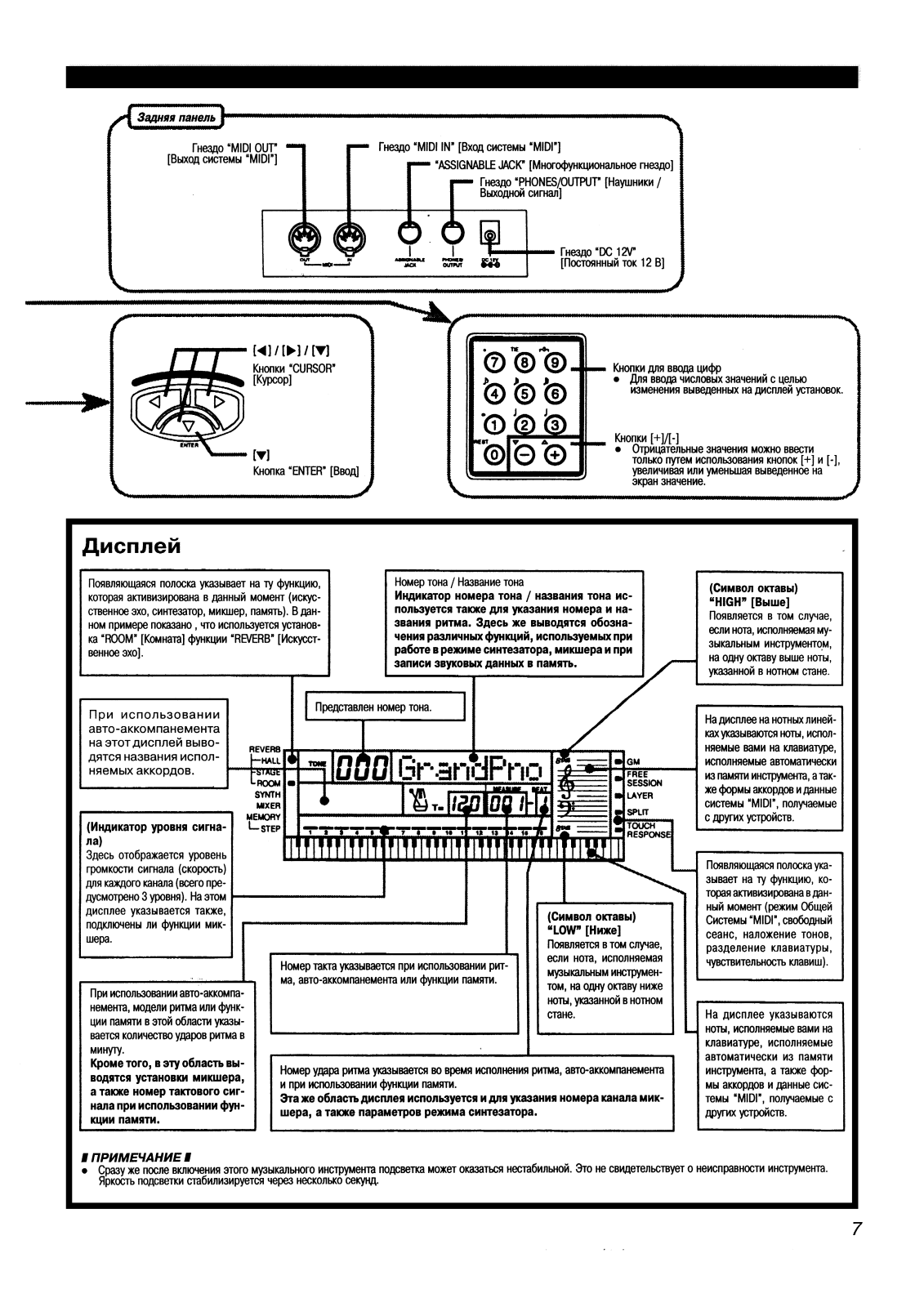
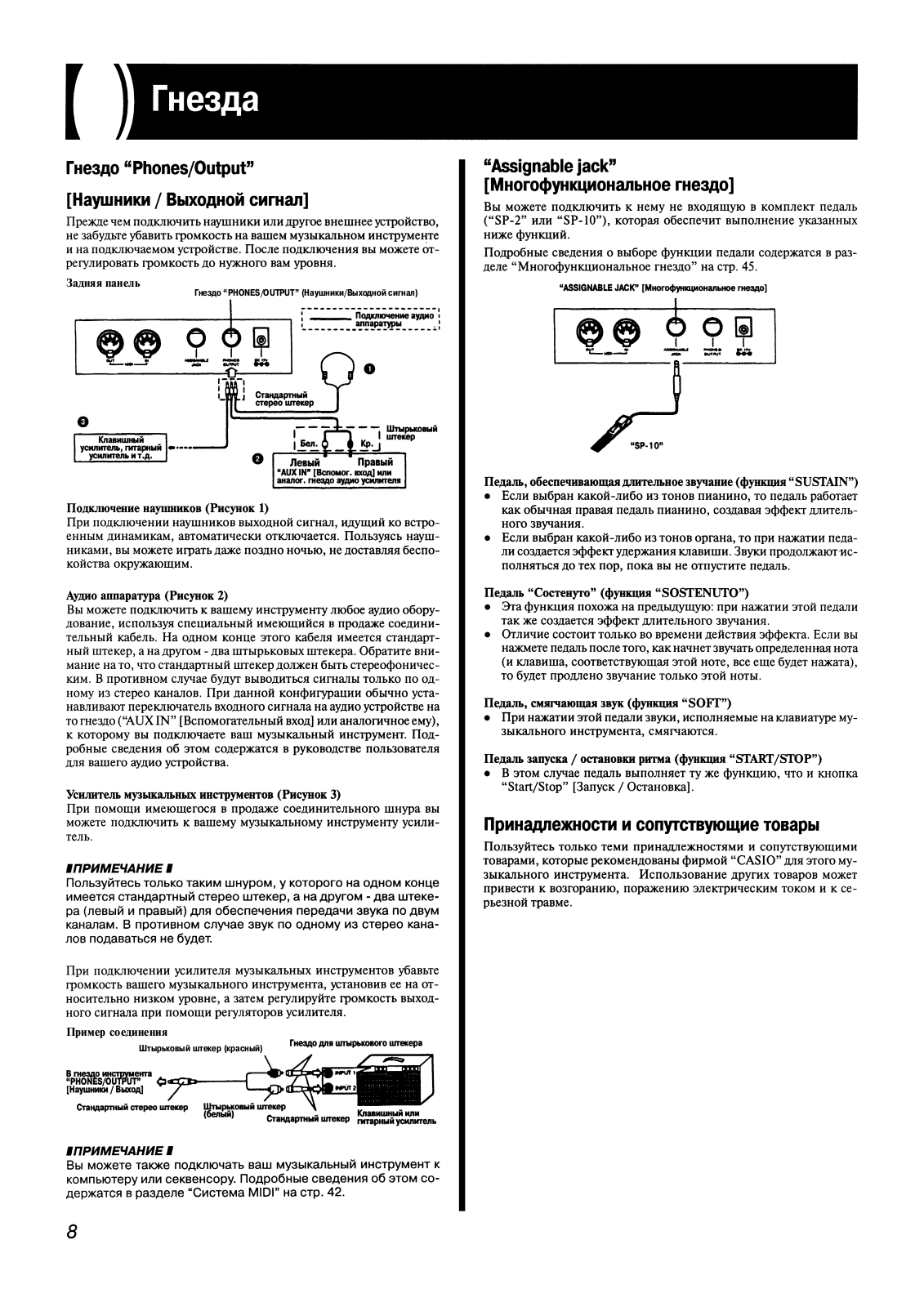
Loading…
+ 17 hidden pages
You need points to download manuals.
1 point = 1 manual.
You can buy points or you can get point for every manual you upload.
Buy points
Upload your manuals
Casio WK-1200
View the manual for the Casio WK-1200 here, for free. This manual comes under the category keyboards and has been rated by 11 people with an average of a 8.4.
This manual is available in the following languages: English. Do you have a question about the Casio WK-1200 or do you need help?
Ask your question here
Index
Product Images (1)

Casio WK-1200 specifications
Below you will find the product specifications and the manual specifications of the Casio WK-1200.
The Casio WK-1200 keyboard is a musical instrument designed for both amateur and professional musicians alike. With its 76 full-size keys and touch response feature, users can enjoy playing a wide range of musical genres. The keyboard can produce up to 32 different note polyphony, allowing for complex and layered musical arrangements.
In terms of sound quality, the Casio WK-1200 features a 2-way, 4-speaker system that produces clear and crisp audio. The keyboard also has 620 built-in tones, including synthesizer, acoustic, percussion, world, and more. It also features a range of digital effects such as reverb, chorus, and more. Users can customize their music further thanks to the pitch bend wheel and modulation button.
The Casio WK-1200 keyboard has 137 built-in rhythms that come with a one-touch auto-accompaniment feature, making it easy to create beats and basslines. It also features a song sequencer with six tracks, allowing you to record and playback your music.
The keyboard also has a range of connectivity options, including a headphone jack, audio input jack, MIDI In/Out, and USB connectivity. The keyboard can also be powered by an AC adapter or six AA batteries, making it portable and ideal for music on-the-go.
Overall, the Casio WK-1200 keyboard is a versatile and reliable instrument that is ideal for music enthusiasts and professionals alike.
General
| Brand | Casio |
| Model | WK-1200 |
| Product | keyboard |
| Language | English |
| Filetype | User manual (PDF) |
Frequently Asked Questions
Can’t find the answer to your question in the manual? You may find the answer to your question in the FAQs about the Casio WK-1200 below.
How do I change the sound settings on my Casio WK-1200 keyboard?
To change the sound settings on your Casio WK-1200, press the ‘Function’ button followed by the desired sound category button. Then, use the number buttons to select the specific sound you wish to use.
How can I record my own music on the Casio WK-1200?
To record your own music on the Casio WK-1200, press the ‘Song’ button and select ‘Record Mode.’ Then, use the number buttons to choose a song number, press ‘Start/Stop’ to begin recording, and ‘Start/Stop’ again to stop recording.
How do I connect my headphones to the Casio WK-1200?
To connect headphones to the Casio WK-1200, insert the headphone plug into the headphone jack located on the front panel of the keyboard. Adjust the volume using the dedicated headphone volume control.
Can I connect my Casio WK-1200 to an external amplifier or speaker?
Yes, you can connect your Casio WK-1200 to an external amplifier or speaker. Use a standard 1/4-inch audio cable to connect the keyboard’s headphone or line-out jack to the input of your amplifier or speaker.
How do I adjust the sensitivity of the keys on the Casio WK-1200?
To adjust the sensitivity of the keys on your Casio WK-1200, press the ‘Function’ button followed by the ‘Keyboard Sensitivity’ button. Then, select the desired sensitivity level using the number buttons.
How can I best clean my keyboard?
A slightly damp cleaning cloth or soft, dust-free cloth works best to remove fingerprints. Dust in hard-to-reach places is best removed with compressed air.
Is the manual of the Casio WK-1200 available in English?
Yes, the manual of the Casio WK-1200 is available in English .
Is your question not listed? Ask your question here
- Collection
- manuals_casio; manuals; additional_collections
- Language
- English
- Item Size
- 60.6M
Manual: WK1200 OM CASIO DE
- Addeddate
- 2021-06-23 07:11:15
- Identifier
- manual_WK1200_OM_CASIO_DE
- Identifier-ark
- ark:/13960/t74v89j10
- Ocr
- tesseract 5.0.0-alpha-20201231-10-g1236
- Ocr_detected_lang
- de
- Ocr_detected_lang_conf
- 1.0000
- Ocr_detected_script
- Latin
- Ocr_detected_script_conf
- 0.8811
- Ocr_module_version
- 0.0.13
- Ocr_parameters
- -l eng
- Page_number_confidence
- 96.23
- Pdf_module_version
- 0.0.14
plus-circle Add Review
plus-circle Add Review
comment
Reviews
There are no reviews yet. Be the first one to
write a review.
Casio WK-1200 Musical Instrument PDF User Guides and Manuals for Free Download: Found (3) Manuals for Casio WK-1200 Device Model (Operation & User’s Manual, Service Manual)
The Casio WK-1200 is a versatile and feature-rich keyboard that caters to both beginners and intermediate players. With its 76 full-sized keys, it offers a wide range of musical possibilities, allowing users to perform various styles of music. This model is particularly appealing to those who want to explore the world of music creation without breaking the bank. In this review, we’ll delve into the specifications, features, and overall performance of the Casio WK-1200.
One of the standout features of the Casio WK-1200 is its extensive collection of sounds and rhythms. The keyboard comes equipped with over 600 built-in tones, enabling users to experiment with different instrument sounds. Additionally, it has 180 rhythms ranging from pop to classical, making it easier to find the perfect beat for any musical project. The inclusion of a dance music mode adds an exciting element, especially for electronic music enthusiasts.
The user interface of the Casio WK-1200 is intuitive and easy to navigate. The clear LCD display allows musicians to change settings, select sounds, and access various features without hassle. Coupled with the handy function buttons, it ensures that players spend less time fumbling with controls and more time creating music. The built-in metronome and transpose function further enhance the usability of the keyboard.
Portability is another advantage of the Casio WK-1200. Its lightweight design makes it easy to transport, whether you’re going to a gig, a friend’s house, or just practicing in your living room. Additionally, it can be powered by batteries, which adds to its portability. This feature is especially useful for musicians who like to perform outdoors or in locations without easy access to power outlets.
When it comes to connectivity, the Casio WK-1200 does not disappoint. It has a range of ports including USB connectivity for MIDI functionality, which allows users to connect to computers and music software for recording or composition. The headphone output is practical for silent practice, making it an excellent choice for late-night jam sessions without disturbing others. Additionally, the Casio keyboard features audio in jacks, enabling users to integrate it with external devices.
Although the Casio WK-1200 is a highly capable keyboard, it’s important to note a few limitations. While the sound quality is impressive for the price, it may not match the fidelity of more expensive models targeted at professional musicians. Furthermore, the key sensitivity is generally good, but advanced players might find it lacking in expressiveness compared to higher-end keyboards. It’s also worth mentioning that while the onboard speakers are sufficient for casual use, they may not be powerful enough for larger performances.
In summary, the Casio WK-1200 is an excellent entry-level keyboard for aspiring musicians and those looking to expand their musical horizons. Its combination of ease of use, portability, and a wealth of features makes it a formidable instrument for practicing and composing. Here’s a quick recap of the main points:
- Key Features: 76 full-sized keys, over 600 tones, 180 rhythms
- Portability: Lightweight and battery-powered options
- Connectivity: USB, headphone out, and audio in jacks
- User Interface: Intuitive with a clear LCD display
Overall, the Casio WK-1200 is a great investment for those new to music making or for hobbyists looking for a reliable keyboard at an affordable price. While it has some limitations, its overall functionality and sound quality are commendable, making it a solid choice in the world of portable keyboards.
Casio WK-1200 user guide recommended for: FX-992VB, CTK-711EX, HANDHELD, CDP-130, PX-A100.
The Casio WK-1200 Electronic Keyboard manual (Casio Service manual, 25 pages) is completely safe to download (last scan date: 19/09/2024). You can rest assured of your safety when interacting with Casio WK-1200 document.
1
Disklavier E3
16
420
72
2
Polymoog
Owner’s manual Guide: Moog Polymoog (3VDN29, Upd.08/12/2024)
39
84
17
3
Disklavier Silent MPX70
Midi data format User Manual: Yamaha Disklavier Silent MPX70 (174HSR, Upd.Tue 09.2024)
13
809
154
4
PSR-70
Midi handbook Yamaha Electronic Keyboard Midi handbook (File: yamaha-psr-70-electronic-keyboard-16, Mon 09.2024)
16
566
85
5
B-6E
Playing manual B-6E (Electronic Keyboard ePDF User Manual, #7U7O67)
15
284
60
6
AP420
Specifications Casio AP420 Guide (Specifications), @C7823H
2
1223
196
9
PSR-A350
Owner’s manual Yamaha Electronic Keyboard Owner’s manual (File: yamaha-psr-a350-owner-s-manual-80, 27th Feb 2025)
80
675
149