

Congratulations. You have purchased a LifeSource
state-of-the-art blood pressure monitor, one of the most
technologically advanced yet easy to use products
available in the marketplace today. This LifeSource
monitor is designed to make your daily regimen
useful, and convenient.
Physicians agree that daily self-monitoring of blood
pressure is an important way individuals can contribute
to maintaining their cardiovascular health and preventing
the serious consequences of hypertension left
undiagnosed and untreated.
LifeSource has been manufacturing quality healthcare
products for more than 20 years. Rest assured that we
are committed to providing you and your family with
monitoring devices specifically designed for high accuracy
and ease of use. LifeSource—your source for a lifetime
of health.
1
LifeSource Health Line (Toll-Free): 1-888-726-9966

WHAT DISPLAY SYMBOLS MEAN . . . . . . . . . . . . . . . . . . . . 3
MONITOR COMPONENTS . . . . . . . . . . . . . . . . . . . . . . . . . 4
HOW 702 WORKS . . . . . . . . . . . . . . . . . . . . . . . . . . . . . . 5
BEFORE YOU START . . . . . . . . . . . . . . . . . . . . . . . . . . . . . . 5
SELECTING THE CORRECT CUFF . . . . . . . . . . . . . . . . . . . . . . 6
TAKING YOUR BLOOD PRESSURE . . . . . . . . . . . . . . . . 7 — 10
CHECK/ADJUST EXHAUST VELOCITY . . . . . . . . . . . . . 11 — 12
ABOUT BLOOD PRESSURE . . . . . . . . . . . . . . . . . . . . 13 — 15
BLOOD PRESSURE RECORD . . . . . . . . . . . . . . . . . . . . . . . . 16
IMPORTANT INFORMATION . . . . . . . . . . . . . . . . . . . . . . . 17
SPECIFICATIONS . . . . . . . . . . . . . . . . . . . . . . . . . . . . . . . 18
CONTACT INFORMATION . . . . . . . . . . . . . . . . . . . . . . . . . 19
TABLE OF CONTENTS
✓
?
❤
2
LifeSource Health Line (Toll-Free): 1-888-726-9966
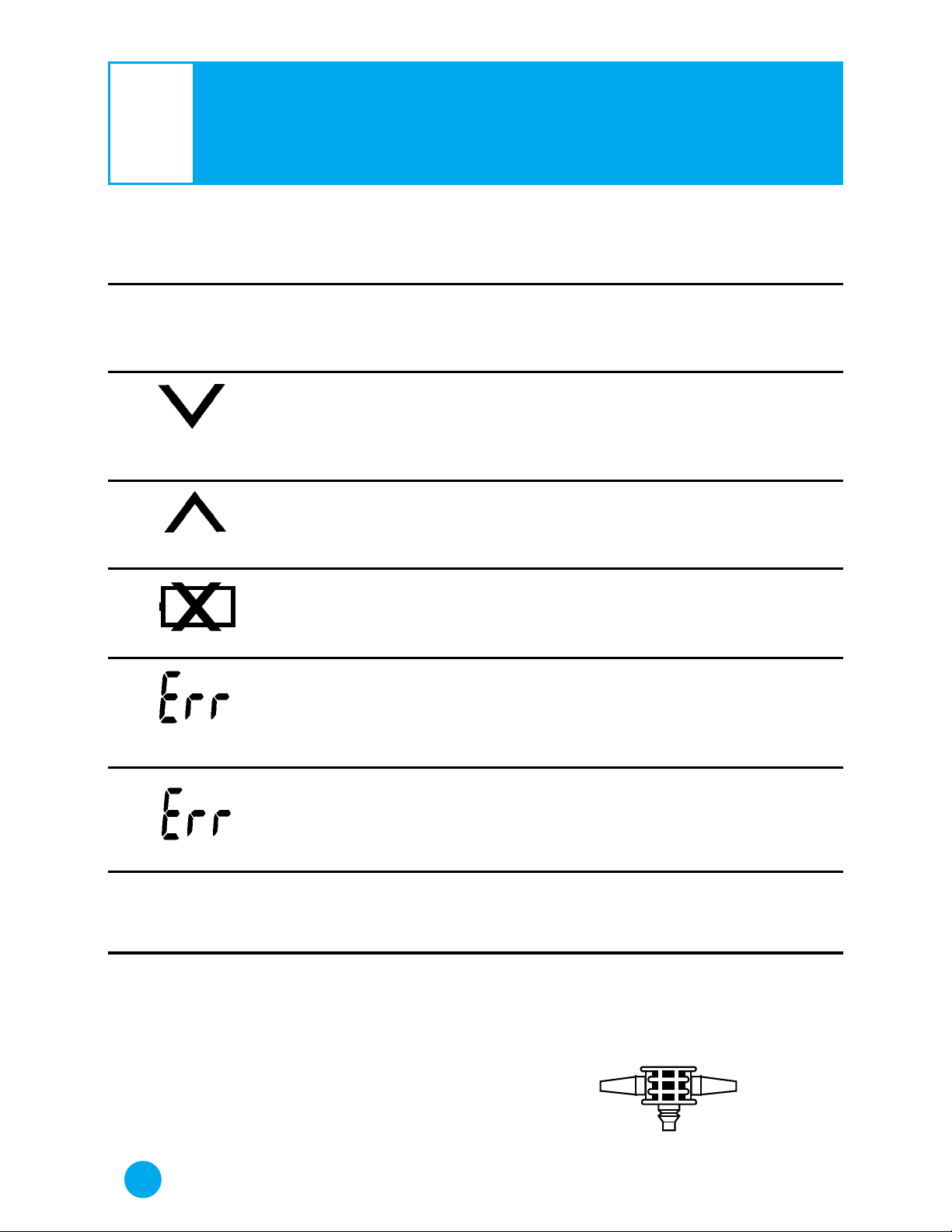
Display
Symbol
Recommended
Action
Remain still and refrain
from talking; measurement
in progress.
Press exhaust button to
release air.
Increase pressurization by
30 mmHg to 40 mmHg and
repeat measurement.
Replace all batteries
with new ones.
Exhaust air from cuff, reapply cuff properly, power up
again and repeat measurement in quiet environment.
Exhaust air from cuff,
reapply cuff properly, power
up again and repeat
measurement.
Adjust exhaust rate to 2
mmHg to 5 mmHg.
Check for correct air connector. Make sure air connector is inserted correctly
into the hoses and monitor.
Condition/
Cause
Appears during measurement; blinks and beeps
when pulse is detected.
Appears on display prior to
and during measurement.
Blinks if there is air in cuff
at power up.
Measurement begun, but
pressure is not sufficient for
reading.
Battery voltage is
too low for monitor
to work properly.
Appears when blood pressure cannot be measured
accurately due to erratic
pulse or noise interference.
Appears when pulse cannot
be measured accurately.
Occurs when exhaust
velocity rate is more than 8
mmHg.
No Display Symbol
MEASURING
LOW BATTERY
ERROR
WHAT DISPLAY SYMBOLS MEAN
?
3
?
LifeSource Health Line (Toll-Free): 1-888-726-9966
❤
ERROR
RE-MEASURE
PULSE ERROR
EXHAUST
SPEED FLASHING
CUFF HOSE
MONITOR
BULB HOSE
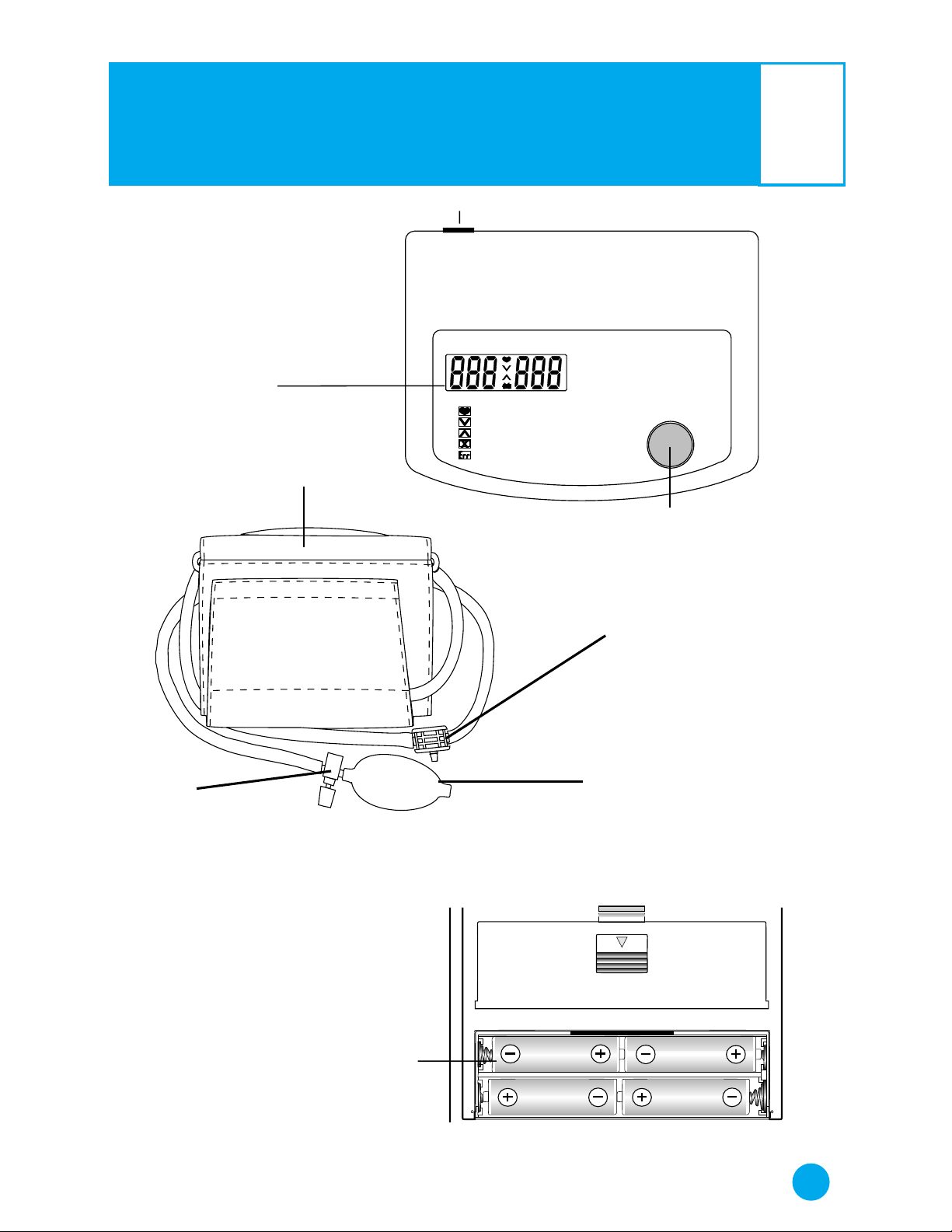
PRESSURE AND
PULSE DISPLAY
AIR SOCKET
CUFF
CUFF
BATTERY COMPARTMENT
SYSTOLIC DIASTOLIC (PULSE)
POWER
DIGITAL BLOOD PRESSURE MONITOR
MEASURING
PRESS EXHAUST
RE-MEASURE
BATTERY LOW
RE-MEASURE
UA-702
POWER BUTTON
MONITOR COMPONENTS
AIR CONNECTOR
4
?
LifeSource Health Line (Toll-Free): 1-888-726-9966
?
EXHAUST VALVE
AND ADJUSTMENT SCREW
INFLATOR BULB
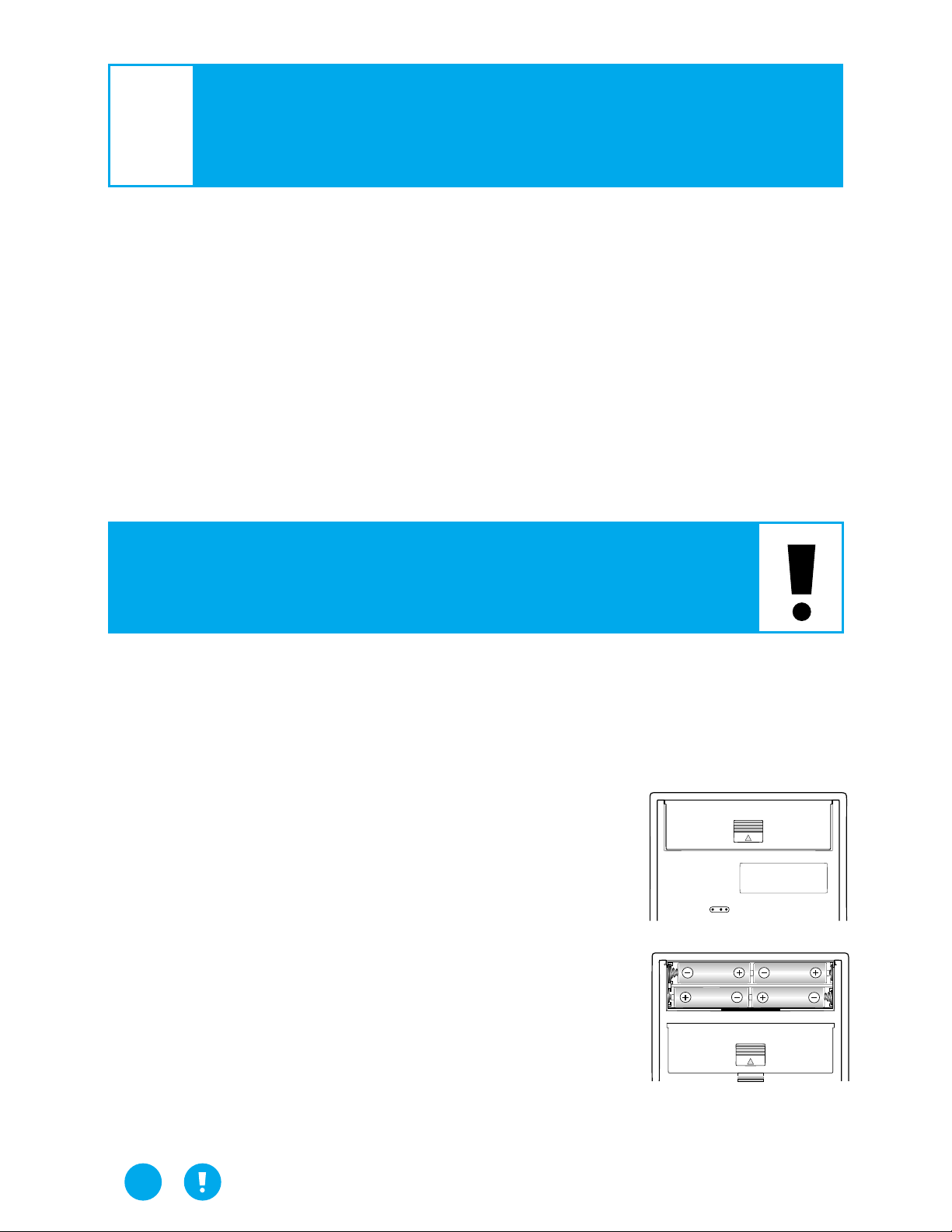
You must install 4 type AA (1.5 volt) batteries and attach the
cuff to the monitor before using it. To install batteries (or replace
them if the “Low Battery” symbol appears on display), proceed
as follows:
1. Remove battery compartment cover
by gently pushing down on arrow and
sliding cover forward.
2. Put in top row of batteries first. Place the
batteries in compartment with positive (+)
and negative (–) terminals matching those
indicated in the compartment. Be sure
batteries make contact with compartment
terminals.
3. Replace cover by sliding it into
the compartment and gently pressing
into place.
BEFORE YOU START
LifeSource Blood Pressure Monitors are easy to use, accurate
and digitally display full measurement readouts. Our technology
is based on the “oscillometric method” — a noninvasive blood
pressure determination. The term “oscillation” refers to any
measure of vibrations caused by the arterial pulse. The cuff is
first inflated until the artery is fully occluded. Then, the monitor
takes measurements while the cuff deflates. Our monitors examine the pulsatile pressure generated by the arterial wall as it
expands and contracts against the cuff with each heartbeat.
HOW 702 WORKS
?
5
?
LifeSource Health Line (Toll-Free): 1-888-726-9966
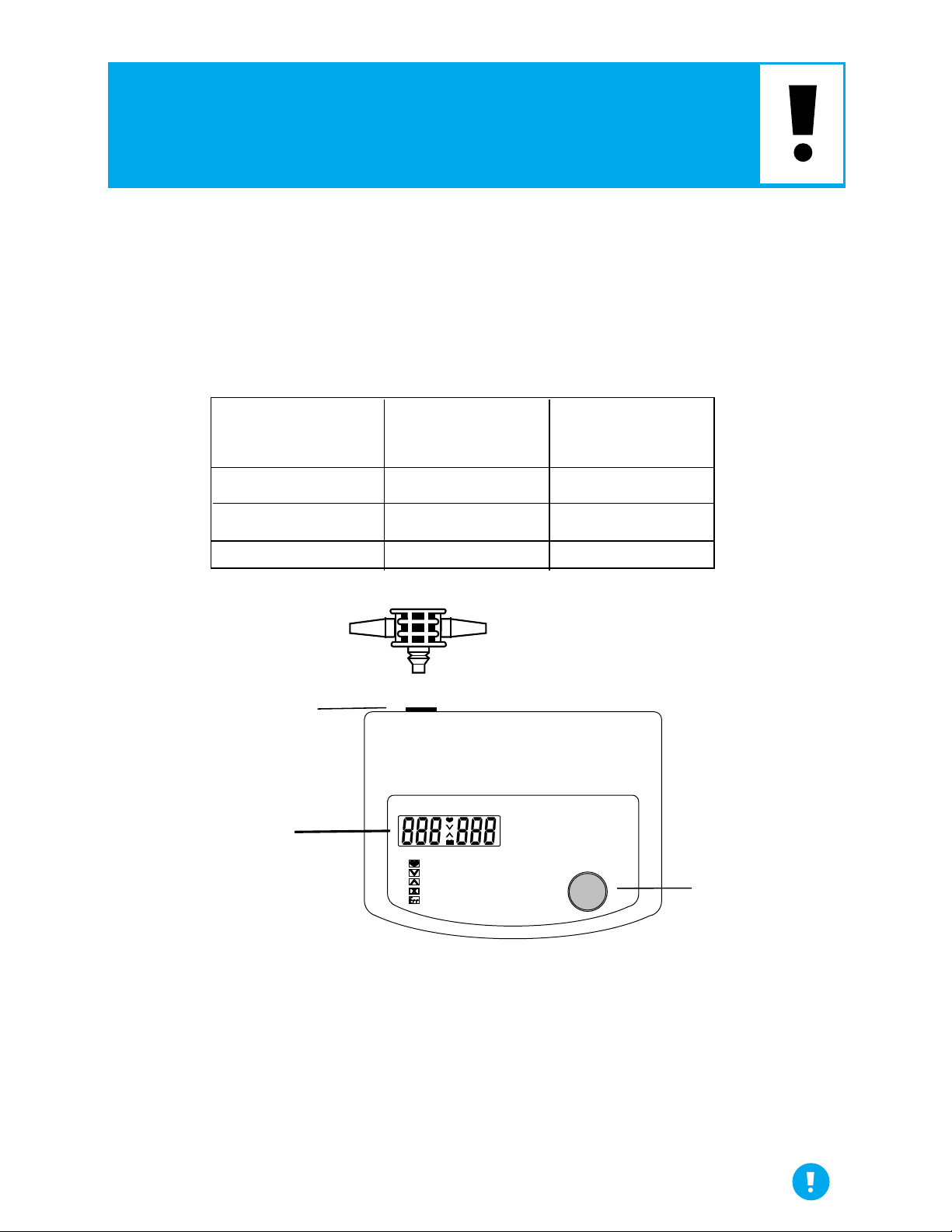
Using the correct cuff size is important for an accurate reading.
A cuff that is too large will produce a reading that is lower than
the correct blood pressure; a cuff that is too small yields a
measurement that is higher. With your arm hanging at the side
of your body, measure the circumference of your upper arm
at the midpoint between shoulder and elbow.
The air connector is attached to the cuff and inflator bulb tubing.
Attach this into the back of the monitor. When changing the cuff
size, the exhaust velocity may need to be adjusted (see page 11).
ARM SIZE
RECOMMENDED
CUFF SIZE
REPLACEMENT
CUFF MODEL#
5.1” — 7.9” (13-20cm)
7.5” — 12.2” (19-31cm)
11.8” — 17.7” (30-45cm)
Small
Medium
Large
UA-279
UA-280
UA-281
SELECTING THE CORRECT CUFF
6
LifeSource Health Line (Toll-Free): 1-888-726-9966
CUFF HOSE
MONITOR
BULB HOSE
PRESSURE AND
PULSE DISPLAY
AIR SOCKET
SYSTOLIC DIASTOLIC (PULSE)
POWER
DIGITAL BLOOD PRESSURE MONITOR
MEASURING
PRESS EXHAUST
RE-MEASURE
BATTERY LOW
RE-MEASURE
UA-702
POWER BUTTON
Loading…
A&D UA-702 Blood Pressure Monitor PDF User Guides and Manuals for Free Download: Found (1) Manuals for A&D UA-702 Device Model (Instruction Manual)
A&D UA-702 Instruction Manual
Details:
- Manufacturer: A&D
- Product Name/ID: A&D UA-702 / #1617
- Category: Blood Pressure Monitor
- File Path: a-d/ua-702_1617.pdf
- Last Updated: 07 Apr 2025
- Description: Get started with your A&D UA-702 using this detailed manual, which provides step-by-step setup instructions, operational guidance, and maintenance tips to enhance device performance.
- Document Type: User Manual
- Pages: 50
Download PDF
Read Online
The A&D UA-702 is a high-quality digital blood pressure monitor that has gained popularity for its accuracy and ease of use. As a part of A&D’s reliable lineup of health monitoring devices, the UA-702 offers users a plethora of features that make it a go-to choice for both home and professional use. This review delves into the product’s specifications, user experience, and overall effectiveness, helping you determine if it fits your health management needs.
One of the standout features of the A&D UA-702 is its precision in measuring blood pressure. It employs advanced oscillometric technology, which detects your pulse waves and displays the systolic and diastolic blood pressure readings. This method ensures that readings are not only accurate but also consistent. Whether you are tracking your blood pressure for medical reasons or simply keeping an eye on your health, this device delivers reliable results every time.
In terms of usability, the UA-702 has been designed with the user in mind. The monitor features an easy-to-read digital display that clearly shows blood pressure readings and pulse rates. Additionally, its one-touch measurement allows you to start the process without any complicated steps, making it accessible for individuals of all ages. A&D has ensured that this device prioritizes convenience without sacrificing quality.
Here are some additional features of the A&D UA-702:
- Memory Function: The UA-702 has a built-in memory that can store the latest measurements, allowing you to track your blood pressure over time.
- Compact and Lightweight: This blood pressure monitor is portable, making it easy to carry around and use anywhere.
- Systolic and Diastolic Measurements: It accurately measures both systolic and diastolic pressure, giving you a complete picture of your cardiovascular health.
- Pulse Measurement: The device also provides a pulse rate to monitor your heart’s condition along with blood pressure.
- Body Movement Indicator: It alerts users if body movement occurred during measurement, ensuring more accurate results.
When it comes to setup, the A&D UA-702 is straightforward. The device includes comprehensive instructions that guide you through the initial setup and first measurement. This is particularly helpful for those who may be unfamiliar with blood pressure monitors. The monitor is also equipped with an adjustable cuff that fits most arm sizes, ensuring a snug fit for effective readings.
In terms of results and reliability, customer feedback on the A&D UA-702 has been overwhelmingly positive. Users frequently applaud its consistency and ease of use, noting that they have experienced no discrepancies in readings compared to those taken by healthcare professionals. Moreover, the monitor’s battery life is commendable, allowing for extended use without the need for frequent replacements.
However, like any product, the UA-702 has its limitations. Some users have noted that the device may struggle with accuracy if the cuff is not correctly positioned, highlighting the importance of following the provided instructions carefully. Additionally, it does not include features such as Bluetooth connectivity for app integration, which some competitors offer, but this may not be a deal-breaker for everyone.
In conclusion, the A&D UA-702 is a solid blood pressure monitor that excels in accuracy, ease of use, and portability. Its user-friendly design, combined with essential features, makes it an excellent choice for those looking to take control of their health. Whether for personal monitoring or professional assistance, the UA-702 stands out in the crowded market of health devices, making it a worthy investment for maintaining cardiovascular health.
TM
C
ongratulations. You have purchased a LifeSource
state-of-the-art blood pressure monitor, one of the most
technologically advanced yet easy to use products
available in the marketplace today. This LifeSource
monitor is designed to make your daily regimen
useful, and convenient.
Physicians agree that daily self-monitoring of blood
pressure is an important way individuals can contribute
to maintaining their cardiovascular health and preventing
the serious consequences of hypertension left
undiagnosed and untreated.
LifeSource has been manufacturing quality healthcare
products for more than 20 years. Rest assured that we
are committed to providing you and your family with
monitoring devices specifically designed for high accuracy
and ease of use. LifeSource—your source for a lifetime
of health.
1
LifeSource Health Line (Toll-Free): 1-888-726-9966
A&D UA-702 Instruction manual
- A&D
- Blood Pressure Monitor
- Instruction manual
- a-d-ua-702-instruction-manual-50-1617.pdf
- 50
Download A&D UA-702 PDF Manual
A&D UA-702 Manuals come in various types, each serving a specific purpose to help users effectively operate and maintain their devices. Each type of A&D UA-702 instruction is designed to address specific needs, ensuring users have the necessary information to use, maintain, and repair their devices effectively.
Related Instructions for A&D UA-702:
UA-767T, UA-854, UB-351, UA-705, ULTRACONNECT UB-1100BLE
- A&D UA-767T
- A&D UA-854
- A&D UB-351
- A&D UA-705
- A&D ULTRACONNECT UB-1100BLE
- A&D UA-767F
- A&D TM-2440
- A&D UA-767F-W
- A&D UB-511
- A&D UM-101
- A&D UA-767S-W
- A&D TN-2655
Blood Pressure Monitor Devices by Other Brands:
| Brand | Device Model | Type of Document | Pages | Size | Views | Downloads | Updated |
|---|---|---|---|---|---|---|---|
| Novacor |
Diasys Integra II |
Novacor Diasys Integra II Manual |
51 | 669 | 101 | 16-01-2025 | |
| Beurer |
BM 70 |
Beurer BM 70 User manual manual |
80 | 450 | 95 | 12-09-2024 | |
| Medic Therapeutics |
MT-BPM-001 |
Medic Therapeutics MT-BPM-001 Operation & user’s manual |
15 | 665 | 153 | 11-11-2024 | |
| Little Doctor |
LD1 |
Little Doctor LD1 Instruction manual |
24 | 346 | 80 | 26-12-2024 | |
| Plusmed |
pM-NT 01 |
Plusmed pM-NT 01 Instruction manual |
64 | 1032 | 228 | 15-10-2024 |
Categories:
Recording Equipment
Modulator
Scale
Projector
Camera Accessories
Media Converter
A good user manual
The rules should oblige the seller to give the purchaser an operating instrucion of LifeSource UA-702, along with an item. The lack of an instruction or false information given to customer shall constitute grounds to apply for a complaint because of nonconformity of goods with the contract. In accordance with the law, a customer can receive an instruction in non-paper form; lately graphic and electronic forms of the manuals, as well as instructional videos have been majorly used. A necessary precondition for this is the unmistakable, legible character of an instruction.
What is an instruction?
The term originates from the Latin word „instructio”, which means organizing. Therefore, in an instruction of LifeSource UA-702 one could find a process description. An instruction’s purpose is to teach, to ease the start-up and an item’s use or performance of certain activities. An instruction is a compilation of information about an item/a service, it is a clue.
Unfortunately, only a few customers devote their time to read an instruction of LifeSource UA-702. A good user manual introduces us to a number of additional functionalities of the purchased item, and also helps us to avoid the formation of most of the defects.
What should a perfect user manual contain?
First and foremost, an user manual of LifeSource UA-702 should contain:
— informations concerning technical data of LifeSource UA-702
— name of the manufacturer and a year of construction of the LifeSource UA-702 item
— rules of operation, control and maintenance of the LifeSource UA-702 item
— safety signs and mark certificates which confirm compatibility with appropriate standards
Why don’t we read the manuals?
Usually it results from the lack of time and certainty about functionalities of purchased items. Unfortunately, networking and start-up of LifeSource UA-702 alone are not enough. An instruction contains a number of clues concerning respective functionalities, safety rules, maintenance methods (what means should be used), eventual defects of LifeSource UA-702, and methods of problem resolution. Eventually, when one still can’t find the answer to his problems, he will be directed to the LifeSource service. Lately animated manuals and instructional videos are quite popular among customers. These kinds of user manuals are effective; they assure that a customer will familiarize himself with the whole material, and won’t skip complicated, technical information of LifeSource UA-702.
Why one should read the manuals?
It is mostly in the manuals where we will find the details concerning construction and possibility of the LifeSource UA-702 item, and its use of respective accessory, as well as information concerning all the functions and facilities.
After a successful purchase of an item one should find a moment and get to know with every part of an instruction. Currently the manuals are carefully prearranged and translated, so they could be fully understood by its users. The manuals will serve as an informational aid.