
®
Vocalist
Generate live multi-part
vocal harmonies accompanied
by your keyboard or guitar.
Any song that has the same note sung
over two different chords confound
conventional harmonizers.
The Vocalist Live Pro is smarter than that.
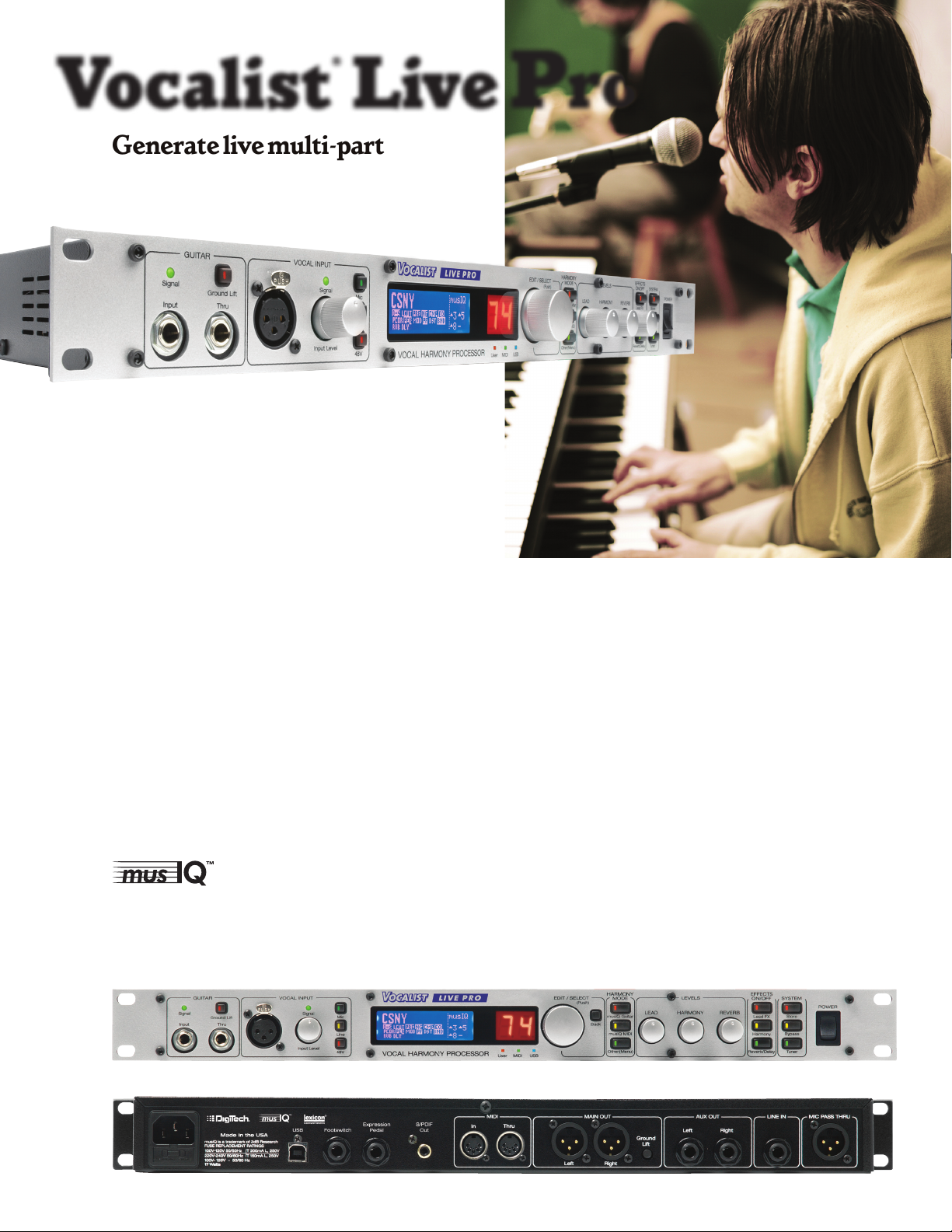
The Vocalist Live Pro is a rack processor based on the Vo-
calist Live™ 4 that includes a new MIDI interface that works
with keyboards as well as guitars. Utilizing the patent-pending
musIQ™ – technology combining new Note Detection algo-
rithms with state-of-the-art Harmony Generation – and the raw
power of AudioDNA2, the Vocalist Live Pro can create real-time
harmonies with your live voice that are in key and perfectly on
pitch. With all that processing power, we were able to pack it full
of other features as well, including world-class Lexicon® Reverbs,
Soundcraft® low-noise studio-grade mic preamp, real-time pitch
correction for each voice, individual persona and gender selection
per voice, congureable outputs, tuner, 99 user factory presets
and more. Plus, it’s available with a fully assignable optional foot
switch and expression pedal so you get real time control and kick
in the harmonies at just the right moment.
Powered by:
musIQ is a trademark of 3dB Research
Perfect harmonies — now for
keyboards — have never been easier!
Live Pro
Features:
3 or 4 part vocal harmony using the musIQ™ technology
9
with MIDI that analyzes the guitar and keyboard signal
according to chord recognition.
Selectable unison, 3rd, 5th or octave above or below
9
of lead vocal.
Pitch correction with 4 adjustable parameters
9
Lead vocal and harmony effects; Compressor, Lexicon®-
9
Licensed Reverbs and EQ, Persona models
Edit, store and recall 99 user or 99 factory presets
9
On board guitar tuner
9
XLR mic /line w/ level adjustment, studio grade preamp
9
and 48V phantom power
L/R Stereo ¼” aux outputs, L/R XLR main outputs, S/PDIF
9
out, ground lift, selectable output routings
MIDI in/thru, USB for preset editing and exchange
9
Footswitch and expression pedal jacks for remote control
9
of presets and effects
Power supply included
9
®
Vocalist
Live 4 and 2
MULTIPLY YOUR FAVORITE VOICE
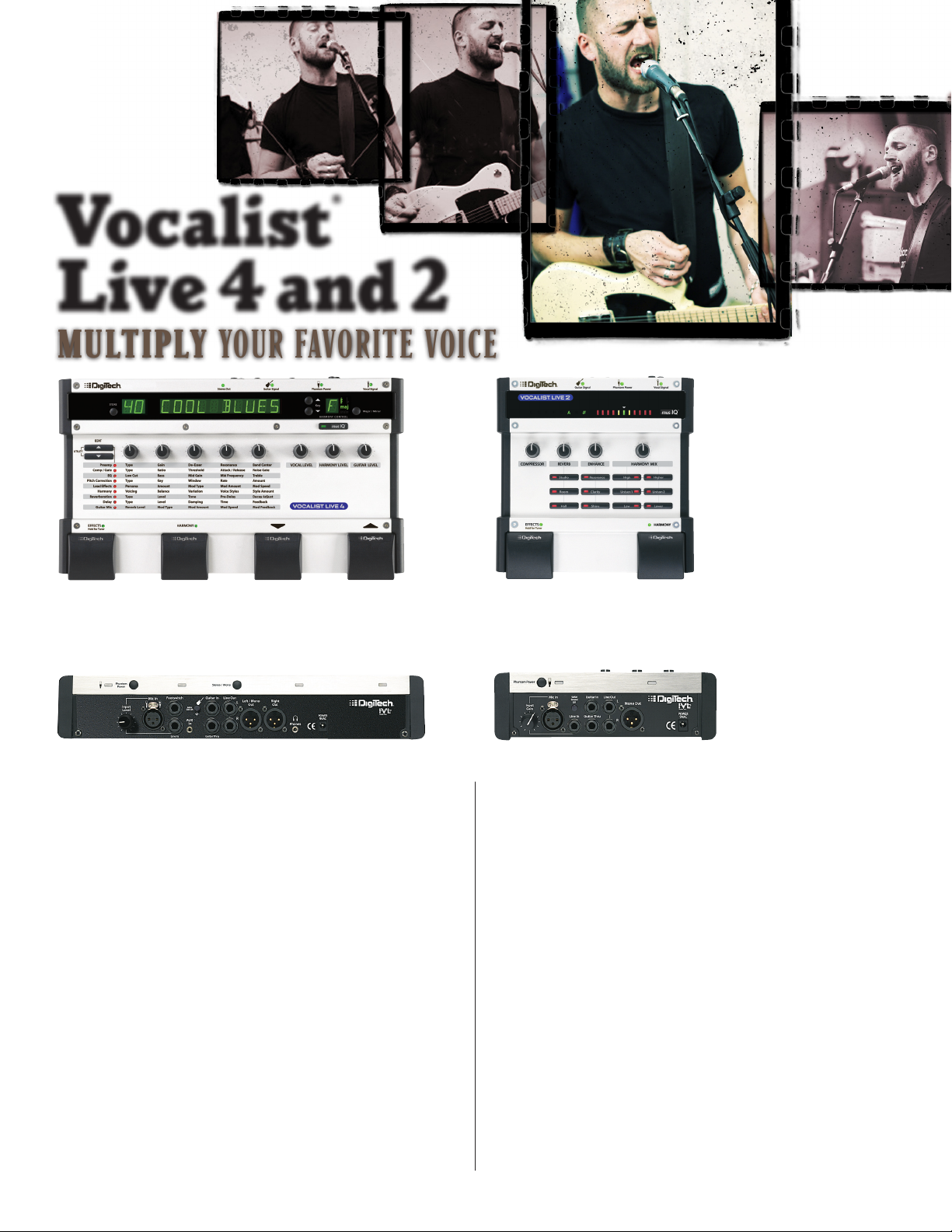
The Vocalist Live knows what chord you’re playing, what key you’re
in and creates multi-part harmonies with your real voice in real-time.
Vocalist® Live 4
Includes all the Vocalist Live 2 features plus more!
3- or 4-part vocal harmony with no programming or learning
9
curve — just play, sing and let Vocalist Live 4’s groundbreaking musIQ™ technology do the rest
Pitch correction with four adjustable parameters
9
Guitar Reverb and Chorus with four adjustable parameters
9
Store and recall up to 50 User presets; and select from 50 Fac-
9
tory presets
Built-in mixer with Vocal, Harmony and Guitar level controls
9
Vocal enhancement effects matrix lets you adjust up to ve
9
parameters of Preamp, Compressor/Gate, EQ, Lead Effects,
Harmony, Reverb, Echo Delay and Guitar effects
2+10-character LED display
9
Major/Minor and Key Change Up/Down buttons
9
with LED display
1⁄4″ line input and 1⁄8″ AUX input for CD or MP3 players
9
1⁄8″ headphone jack
9
Stereo 1⁄4″ line out and balanced stereo XLR line outs
9
Stereo/mono output selector
9
Vocalist® Live 2
2-part vocal harmony with no programming — just
9
play, sing and let Vocalist Live 2’s groundbreaking
musIQ™ technology do the rest
Selectable voicing: unison, 3rd, 5th-above or below
9
your lead vocal
Vocal enhancement effects matrix with separate Com-
9
pressor, Reverb and EQ/Enhance controls
Separate Harmony and Effects pedals
9
On-board guitar tuner
9
XLR mic /line input with level adjustment, low-noise
9
preamp and 48V phantom power
1⁄4″ guitar input, 1⁄4″ guitar pass-through and Guitar
9
Ground Lift switch
Stereo 1⁄4″ line out and mono XLR line out
9
Road-rugged, all-metal chassis
9
Power supply included
9
- About
- Blog
- Projects
- Help
-
Donate
Donate icon
An illustration of a heart shape - Contact
- Jobs
- Volunteer
- People
Bookreader Item Preview
texts
DigiTech VOCALIST LIVE PRO User manual
- Addeddate
- 2021-01-26 20:35:54
- Identifier
- manualzz-id-1160822
- Identifier-ark
- ark:/13960/t76v0r99p
- Ocr
- tesseract 4.1.1
- Ocr_autonomous
- true
- Ocr_detected_lang
- de
- Ocr_detected_lang_conf
- 1.0000
- Ocr_detected_script
-
Latin
Cyrillic
- Ocr_detected_script_conf
-
0.9959
0.0033
- Ocr_module_version
- 0.0.11
- Ocr_parameters
- -l kaz+nor+deu+kir+Cyrillic+Latin
- Page_number_confidence
- 16.18
comment
Reviews
There are no reviews yet. Be the first one to
write a review.
193
Views
DOWNLOAD OPTIONS
Temporarily Unavailable
DAISY
For users with print-disabilities
Uploaded by
chris85
on
SIMILAR ITEMS (based on metadata)
DigiTech VOCALIST LIVE PRO Other PDF User Guides and Manuals for Free Download: Found (2) Manuals for DigiTech VOCALIST LIVE PRO Device Model (Manual , Brochure)
The DigiTech VOCALIST LIVE PRO is a powerful tool for vocalists and performers seeking to enhance their live shows with sophisticated vocal harmonies and effects. This innovative unit stands out due to its blend of cutting-edge technology and user-friendly interface, making it accessible for musicians at all levels of expertise. With features that range from harmony generation to a multitude of vocal effects, the VOCALIST LIVE PRO has quickly become a staple in many musicians’ setups.
One of the most impressive aspects of the DigiTech VOCALIST LIVE PRO is its ability to generate harmonies in real-time. Using advanced algorithms and sophisticated pitch detection, the unit can analyze a performer’s vocal input and create harmonies that add depth and richness to live performances. This real-time feature allows singers to sound fuller and more polished, effortlessly enhancing the overall musical experience.
In addition to its harmony capabilities, the VOCALIST LIVE PRO is equipped with a variety of vocal effects that can elevate any performance. Some of these effects include:
- Reverb: Adds space and atmosphere to the vocal sound.
- Delay: Creates echoes that enhance vocal lines.
- Distortion: Adds grit and character to the voice.
- Pitch Correction: Helps in correcting minor vocal imperfections on-the-fly.
Together, these effects can be combined to create a signature sound that is unique to the performer. The intuitive layout of the DIGITECH VOCALIST LIVE PRO allows users to tweak parameters easily, ensuring that they can find the perfect settings for their vocal style.
The connectivity options available on the VOCALIST LIVE PRO are another highlight. It allows for both XLR and 1/4″ inputs, making it compatible with a range of microphones and instruments. Additionally, a MIDI input allows performers to control harmonies and effects through external devices, providing even greater versatility in performance settings. This flexibility makes it ideal for solo artists, bands, and even studio recording applications.
While the DigiTech VOCALIST LIVE PRO has a lot to offer, it is essential for users to understand the learning curve associated with setting up and utilizing this advanced equipment. It can take some time to become familiar with all the features and settings, but the effort is well worth it, as the results can significantly elevate a musician’s performance.
In summary, the VOCALIST LIVE PRO by DigiTech is an exceptional tool for vocalists who want to explore the world of harmonization and vocal effects. Its array of features and intuitive design provide a robust platform for creative expression. Whether for live performances or studio recordings, this unit is sure to impress both the performer and the audience. With the right approach and practice, users can unlock the full potential of this powerful device, making it an indispensable addition to any vocalist’s gear collection.
| Document’s Content and Additional Information | Share Manual |
|---|---|
|
DigiTech VOCALIST LIVE PRO Brochure
Pages Preview: Document Transcription: See Details |
|
|
DigiTech VOCALIST LIVE PRO Manual
See Details |
Other Devices:
Available Documents for DigiTech VOCALIST LIVE PRO:
More User Guides for DigiTech VOCALIST LIVE PRO:
-
DigiTech VOCALIST LIVE PRO Manual (68 pages)
FAQ: Types of Manuals and Their Contents
DigiTech VOCALIST LIVE PRO Manuals come in various types, each serving a specific purpose to help users effectively operate and maintain their devices. Here are the common types of DigiTech VOCALIST LIVE PRO User Guides and the information they typically include:
- User Manuals: Provide comprehensive instructions on how to use the device, including setup, features, and operation. They often include troubleshooting tips, safety information, and maintenance guidelines.
- Service Instructions: Designed for technicians and repair professionals, these manuals offer detailed information on diagnosing and repairing issues with the device. They include schematics, parts lists, and step-by-step repair procedures.
- Installation Guides: Focus on the installation process of the device, providing detailed instructions and diagrams for proper setup. They are essential for ensuring the device is installed correctly and safely.
- Maintenance Manuals: Provide guidance on routine maintenance tasks to keep the device in optimal condition. They cover cleaning procedures, part replacements, and regular servicing tips.
- Quick Start Guides: Offer a concise overview of the essential steps needed to get the device up and running quickly. They are ideal for users who need immediate assistance with basic setup and operation.
Each type of DigiTech VOCALIST LIVE PRO instruction is designed to address specific needs, ensuring users have the necessary information to use, maintain, and repair their devices effectively.
Related Instructions for DigiTech VOCALIST LIVE PRO:
1
AM4109
Operation & user’s manual DigiTech Transmitter Operation & user’s manual (File: digitech-am4109-operation-user-s-manual-3, 13th Jan 2025)
3
1371
220
3
The Jimi Hendrix Experience
Specification #52C48M: The Jimi Hendrix Experience Music Pedal Specification
2
1176
236
4
HARDWIRE TL-2
20
1019
194
6
Digital Telephone System
24
640
122
8
GNX3000
Owner’s manual PDF User Manual (@39V3J1), DigiTech GNX3000 Other (09th Jan 2025)
142
1116
168
9
Bass Whammy
Owner’s manual DigiTech Musical Instrument Amplifier Owner’s manual (File: digitech-bass-whammy-owner-s-manual-20, 30/01/2025)
20
181
35
10
RP1000
Setup manual PDF Guide (@6726G9), DigiTech RP1000 Switch (Sat 10.2024)
12
1222
196
Other Devices by Other Brands:
|
Santa Fe Advance2 Installation & Operation Instructions Advance2 Installation & operation instructions — P7ZZ2Q Rev 3/9/16 11 Mar 2025 | 16 |
|
|
ZIEHL UFR1001E Operating Instructions Manual Guide: ZIEHL UFR1001E (3ZUBNP, Upd.23.10.2024) ZIEHL industrie – elektronik GmbH + Co KG 23 Oct 2024 | 36 |
|
|
AUDIO TELEX ATC5488 Installation AUDIO TELEX ATC5488 User Manual (Installation), @RGXG8B ATC5488 TONE GENERATOR MODULE 09 Mar 2025 | 2 |
|
|
BENDIX AD-IS — Service Data BENDIX Dehumidifier Service data (File: bendix-ad-is-service-data-14, Sunday 09-03-2025) 1 09 Mar 2025 | 14 |
Categories:
Extender
Amplifier
DJ Equipment
Ultrasonic Jewelry Cleaner
Other
TV Accessories