
4-276-696-41(1)
DSC-W570/W570D/W580
Digital Still Camera / Instruction Manual
GB
Цифровой фотоаппарат / Инструкция по эксплуатации RU
Цифровий фотоапарат / Посібник з експлуатації
UA

GB
2
Owner’s Record
The model and serial numbers are located on the bottom. Record the serial number in the
space provided below. Refer to these numbers whenever you call your Sony dealer
regarding this product.
Model No. DSC-W570/W570D/W580
Serial No. ______________________________
To reduce fire or shock hazard, do not expose the unit to rain or
moisture.
IMPORTANT SAFETY INSTRUCTIONS
-SAVE THESE INSTRUCTIONS
DANGER
TO REDUCE THE RISK OF FIRE OR ELECTRIC
SHOCK, CAREFULLY FOLLOW THESE
INSTRUCTIONS
If the shape of the plug does not fit the power outlet, use an attachment plug adaptor of the
proper configuration for the power outlet.
[
Battery pack
If the battery pack is mishandled, the battery pack can burst, cause a fire or even chemical
burns. Observe the following cautions.
• Do not disassemble.
• Do not crush and do not expose the battery pack to any shock or force such as
hammering, dropping or stepping on it.
• Do not short circuit and do not allow metal objects to come into contact with the battery
terminals.
• Do not expose to high temperature above 60°C (140°F) such as in direct sunlight or in a
car parked in the sun.
• Do not incinerate or dispose of in fire.
• Do not handle damaged or leaking lithium ion batteries.
English
WARNING
CAUTION

GB
3
GB
• Be sure to charge the battery pack using a genuine Sony battery charger or a device that
can charge the battery pack.
• Keep the battery pack out of the reach of small children.
• Keep the battery pack dry.
• Replace only with the same or equivalent type recommended by Sony.
• Dispose of used battery packs promptly as described in the instructions.
[
Battery charger
Even if the CHARGE lamp is not lit, the battery charger is not disconnected from the AC
power source (mains) as long as it is connected to the wall outlet (wall socket). If some
trouble occurs while using the battery charger, immediately shut off the power by
disconnecting the plug from the wall outlet (wall socket).
The power cord (mains lead), if supplied, is designed specifically for use with this camera
only, and should not be used with other electrical equipment.
[
RECYCLING LITHIUM-ION BATTERIES
Lithium-Ion batteries are recyclable.
You can help preserve our environment by returning your used
rechargeable batteries to the collection and recycling location nearest
you.
For more information regarding recycling of rechargeable batteries,
call toll free
1-800-822-8837, or visit http://www.rbrc.org/
Caution: Do not handle damaged or leaking Lithium-Ion batteries.
[
Battery pack
This device complies with Part 15 of the FCC Rules. Operation is subject to the following
two conditions:
(1) This device may not cause harmful interference, and (2) this device must accept any
interference received, including interference that may cause undesired operation.
This Class B digital apparatus complies with Canadian ICES-003.
UL is an internationally recognized safety organization.
The UL Mark on the product means it has been UL Listed.
If you have any questions about this product, you may call:
Sony Customer Information Center
1-800-222-SONY (7669).
The number below is for the FCC related matters only.
For Customers in the U.S.A. and Canada
For Customers in the U.S.A.

GB
4
[
Regulatory Information
[
CAUTION
You are cautioned that any changes or modifications not expressly approved in this manual
could void your authority to operate this equipment.
Declaration of Conformity
Trade Name: SONY
Model No.: DSC-W570
Responsible Party: Sony Electronics Inc.
Address:
16530 Via Esprillo,
San Diego, CA 92127 U.S.A.
Telephone No.: 858-942-2230
This device complies with Part15 of the FCC Rules. Operation is subject to the
following two conditions: (1) This device may not cause harmful interference, and (2)
this device must accept any interference received, including interference that may cause
undesired operation.
Declaration of Conformity
Trade Name: SONY
Model No.: DSC-W570D
Responsible Party: Sony Electronics Inc.
Address:
16530 Via Esprillo,
San Diego, CA 92127 U.S.A.
Telephone No.: 858-942-2230
This device complies with Part15 of the FCC Rules. Operation is subject to the
following two conditions: (1) This device may not cause harmful interference, and (2)
this device must accept any interference received, including interference that may cause
undesired operation.
Declaration of Conformity
Trade Name: SONY
Model No.: DSC-W580
Responsible Party: Sony Electronics Inc.
Address:
16530 Via Esprillo,
San Diego, CA 92127 U.S.A.
Telephone No.: 858-942-2230
This device complies with Part15 of the FCC Rules. Operation is subject to the
following two conditions: (1) This device may not cause harmful interference, and (2)
this device must accept any interference received, including interference that may cause
undesired operation.

GB
5
GB
[
Note:
This equipment has been tested and found to comply with the limits for a Class B digital
device, pursuant to Part 15 of the FCC Rules.
These limits are designed to provide reasonable protection against harmful interference in
a residential installation. This equipment generates, uses, and can radiate radio frequency
energy and, if not installed and used in accordance with the instructions, may cause
harmful interference to radio communications. However, there is no guarantee that
interference will not occur in a particular installation. If this equipment does cause harmful
interference to radio or television reception, which can be determined by turning the
equipment off and on, the user is encouraged to try to correct the interference by one or
more of the following measures:
– Reorient or relocate the receiving antenna.
– Increase the separation between the equipment and receiver.
– Connect the equipment into an outlet on a circuit different from that to which the
receiver is connected.
– Consult the dealer or an experienced radio/TV technician for help.
The supplied interface cable must be used with the equipment in order to comply with the
limits for a digital device pursuant to Subpart B of Part 15 of FCC Rules.
[
Notice for the customers in the countries applying EU Directives
The manufacturer of this product is Sony Corporation, 1-7-1 Konan Minato-ku Tokyo,
108-0075 Japan. The Authorized Representative for EMC and product safety is Sony
Deutschland GmbH, Hedelfinger Strasse 61, 70327 Stuttgart, Germany. For any service or
guarantee matters please refer to the addresses given in separate service or guarantee
documents.
This product has been tested and found compliant with the limits set out in the EMC
Directive for using connection cables shorter than 3 meters (9.8 feet).
[
Attention
The electromagnetic fields at the specific frequencies may influence the picture and sound
of this unit.
[
Notice
If static electricity or electromagnetism causes data transfer to discontinue midway (fail),
restart the application or disconnect and connect the communication cable (USB, etc.)
again.
For Customers in Europe

GB
6
[
Disposal of Old Electrical & Electronic Equipment (Applicable in
the European Union and other European countries with separate
collection systems)
This symbol on the product or on its packaging indicates that this product
shall not be treated as household waste. Instead it shall be handed over to
the applicable collection point for the recycling of electrical and electronic
equipment. By ensuring this product is disposed of correctly, you will help
prevent potential negative consequences for the environment and human
health, which could otherwise be caused by inappropriate waste handling
of this product. The recycling of materials will help to conserve natural
resources. For more detailed information about recycling of this product,
please contact your local Civic Office, your household waste disposal service or the shop
where you purchased the product.
[
Disposal of waste batteries (applicable in the European Union
and other European countries with separate collection systems)
This symbol on the battery or on the packaging indicates that the battery
provided with this product shall not be treated as household waste.
On certain batteries this symbol might be used in combination with a
chemical symbol. The chemical symbols for mercury (Hg) or lead (Pb) are
added if the battery contains more than 0.0005% mercury or 0.004% lead.
By ensuring these batteries are disposed of correctly, you will help prevent
potentially negative consequences for the environment and human health which could
otherwise be caused by inappropriate waste handling of the battery. The recycling of the
materials will help to conserve natural resources.
In case of products that for safety, performance or data integrity reasons require a
permanent connection with an incorporated battery, this battery should be replaced by
qualified service staff only. To ensure that the battery will be treated properly, hand over
the product at end-of-life to the applicable collection point for the recycling of electrical
and electronic equipment.
For all other batteries, please view the section on how to remove the battery from the
product safely.
Hand the battery over to the applicable collection point for the recycling of waste batteries.
For more detailed information about recycling of this product or battery, please contact
your local Civic Office, your household waste disposal service or the shop where you
purchased the product.
A moulded plug complying with BS 1363 is fitted to this equipment for your safety and
convenience.
Should the fuse in the plug supplied need to be replaced, a fuse of the same rating as the
supplied one and approved by ASTA or BSI to BS 1362, (i.e., marked with an
or
mark) must be used.
If the plug supplied with this equipment has a detachable fuse cover, be sure to attach the
fuse cover after you change the fuse. Never use the plug without the fuse cover. If you
should lose the fuse cover, please contact your nearest Sony service station.
Notice for customers in the United Kingdom

GB
7
GB
For details on advanced operations, please read “Cyber-shot User Guide”
(HTML) on the CD-ROM (supplied) using a computer.
For Windows users:
1
Click [User Guide]
t [Install].
2
Start “User Guide” from the shortcut on the desktop.
For Macintosh users:
1
Select the [User Guide] and copy [eng] folder stored in [User Guide] folder
to your computer.
2
After copying is complete, double-click “index.html” in [eng] folder.
• Battery charger BC-CSN/BC-CSNB (1)
• Power cord (mains lead) (not supplied in the USA and Canada) (1)
• Rechargeable battery pack NP-BN1 (1)
• USB, A/V cable for multi-use terminal (1)
• Wrist strap (1)
• CD-ROM (1)
– Cyber-shot application software
– “Cyber-shot User Guide”
• Instruction Manual (this manual) (1)
Refer to “Cyber-shot User Guide” (HTML) on
supplied CD-ROM
Checking the accessories supplied
Insert the CD-ROM into the CD-ROM drive.

GB
8
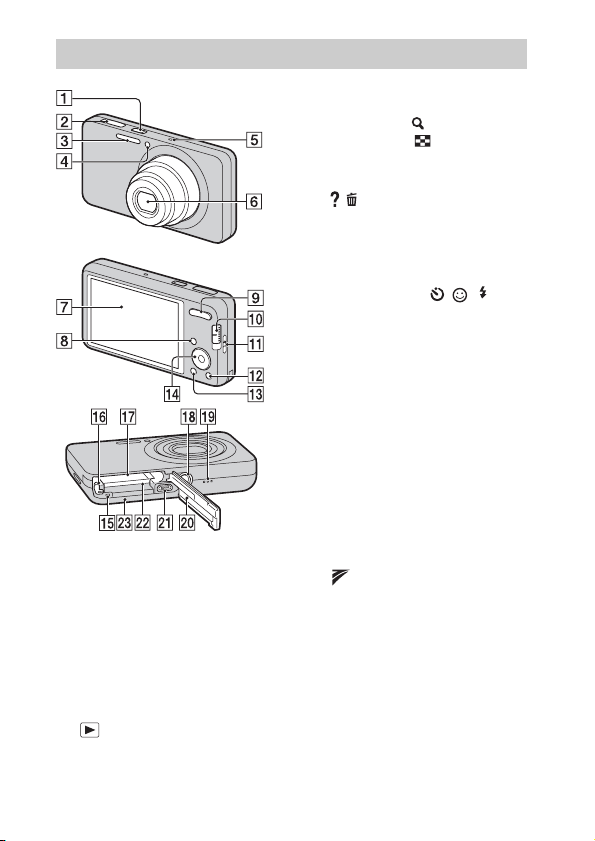
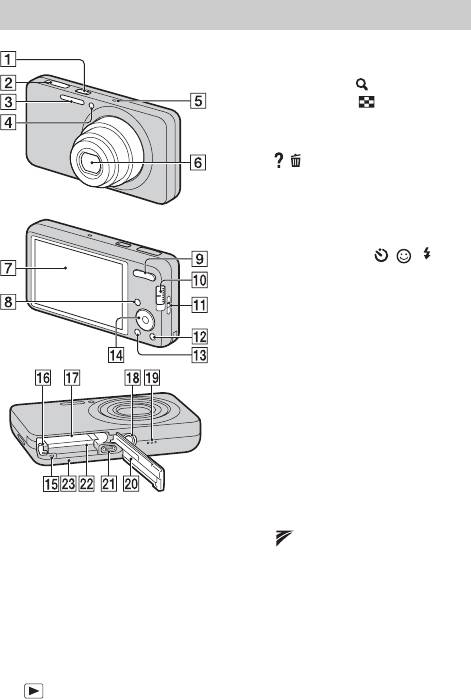
A ON/OFF (Power) button/Power
lamp
B Shutter button
C Flash
D Self-timer lamp/Smile Shutter
lamp/AF illuminator
E Microphone
F Lens
G LCD screen
H
(Playback) button
I For shooting: W/T (Zoom)
button
For viewing:
(Playback
zoom) button/
(Index) button
J Mode switch
K Hook for wrist strap
L
/
(In-Camera Guide/Delete)
button
M MENU button
N Control button
Menu on: v/V/b/B/z
Menu off: DISP/
/
/ /
Tracking focus
O Access lamp
P Battery eject lever
Q Battery insertion slot
R Tripod receptacle
• Use a tripod with a screw less
than 5.5 mm (7/32 inches) long.
Otherwise, you cannot firmly
secure the camera, and damage to
the camera may occur.
S Speaker
T Battery/memory card cover
U Multi connector (Type3a)
V Memory card slot
W
(TransferJet™) mark
Identifying parts

GB
9
GB
x
Charging time
Full charge time: approx. 245 min.
Normal charge time: approx. 185 min.
• The above charging times apply when charging a fully depleted battery pack at a
temperature of 25°C (77°F). Charging may take longer depending on conditions of
use and circumstances.
• Connect the battery charger to the nearest wall outlet (wall socket).
• When charging is finished, disconnect the power cord (mains lead) from the wall
outlet (wall socket), and remove the battery pack from the battery charger.
• Be sure to use the battery pack or the battery charger of the genuine Sony brand.
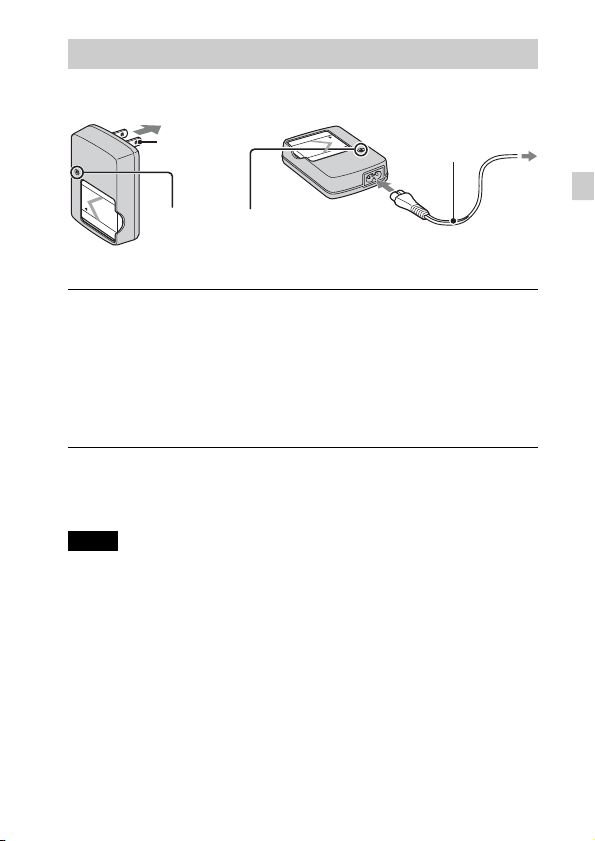
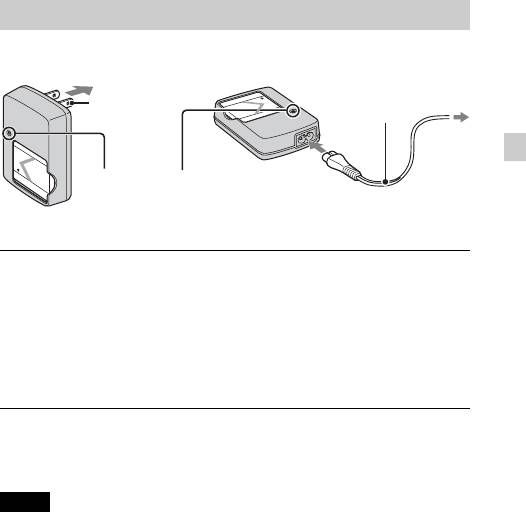
Charging the battery pack
1
Insert the battery pack into the battery charger.
• You can charge the battery even when it is partially charged.
2
Connect the battery charger to the wall outlet (wall
socket).
• If you continue charging the battery pack for about one more hour after
the CHARGE lamp turns off, the charge will last slightly longer (full
charge).
Notes
Plug
For customers in the USA
and Canada
CHARGE lamp
Power cord
(Mains lead)
For customers in countries/regions
other than the USA and Canada
Lit: Charging
Off: Charging finished (normal charge)

GB
10
x
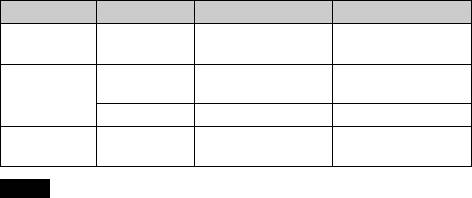
Battery life and number of images you can record/
view
• The number of images that can be recorded is an approximate number when
shooting with a fully charged battery pack. The number may be less depending on
the circumstances.
• The number of images that can be recorded is when shooting under the following
conditions:
– Using Sony “Memory Stick PRO Duo” (Mark2) media (sold separately).
– When a fully charged battery pack (supplied) is used at an ambient temperature
of 25°C (77°F).
• The number of still images that can be recorded is based on the CIPA standard,
and is for shooting under the following conditions.
(CIPA: Camera & Imaging Products Association)
– DISP (Screen Display Settings) is set to [Normal].
– Shooting once every 30 seconds.
– The zoom is switched alternately between the W and T ends.
– The flash strobes once every two times.
– The power turns on and off once every ten times.
• The battery life for movies is when shooting under the following conditions:
– Recording mode: 720 FINE
– When continuous shooting ends because of set limits (page 19), press the shutter
button down again and continue shooting. Shooting functions such as the zoom
do not operate.
Battery life (min.)
Number of images
Shooting still
images
DSC-W570/
W570D/W580
Approx. 110
Approx. 220
Viewing still
images
DSC-W570/
W570D
Approx. 290
Approx. 5800
DSC-W580
Approx. 280
Approx. 5600
Shooting
movies
DSC-W570/
W570D/W580
Approx. 100
—
Notes

03:26
Sony Cybershot DSC-W570 Digital Camera Review
03:36
Видеообзор Sony Cyber-Shot DSC-W570
03:24
Фотоаппарат Sony DSC W570
04:53
Sony Powershot W570 Review
03:24
Sony Cyber-Shot DSC W570
06:11
SONY Cyber-Shot DSC-W570 Unboxing + Overview
01:56
Sony DSC-W570. Самопроизвольное переключение режимов. Чистка переключателя
Нажмите на кнопку для помощи
4-276-696-41(1)
Digital Still Camera / Instruction Manual GB
Цифровой фотоаппарат / Инструкция по эксплуатации
Цифровий фотоапарат / Посібник з експлуатації UA
RU
DSC-W570/W570D/W580

English
Owner’s Record
The model and serial numbers are located on the bottom. Record the serial number in the
space provided below. Refer to these numbers whenever you call your Sony dealer
regarding this product.
Model No. DSC-W570/W570D/W580
Serial No. ______________________________
WARNING
To reduce fire or shock hazard, do not expose the unit to rain or
moisture.
IMPORTANT SAFETY INSTRUCTIONS
-SAVE THESE INSTRUCTIONS
DANGER
TO REDUCE THE RISK OF FIRE OR ELECTRIC
SHOCK, CAREFULLY FOLLOW THESE
INSTRUCTIONS
If the shape of the plug does not fit the power outlet, use an attachment plug adaptor of the
proper configuration for the power outlet.
CAUTION
[ Battery pack
If the battery pack is mishandled, the battery pack can burst, cause a fire or even chemical
burns. Observe the following cautions.
• Do not disassemble.
• Do not crush and do not expose the battery pack to any shock or force such as
hammering, dropping or stepping on it.
• Do not short circuit and do not allow metal objects to come into contact with the battery
terminals.
• Do not expose to high temperature above 60°C (140°F) such as in direct sunlight or in a
car parked in the sun.
• Do not incinerate or dispose of in fire.
GB
• Do not handle damaged or leaking lithium ion batteries.
2

• Be sure to charge the battery pack using a genuine Sony battery charger or a device that
can charge the battery pack.
• Keep the battery pack out of the reach of small children.
• Keep the battery pack dry.
• Replace only with the same or equivalent type recommended by Sony.
• Dispose of used battery packs promptly as described in the instructions.
[ Battery charger
Even if the CHARGE lamp is not lit, the battery charger is not disconnected from the AC
power source (mains) as long as it is connected to the wall outlet (wall socket). If some
trouble occurs while using the battery charger, immediately shut off the power by
disconnecting the plug from the wall outlet (wall socket).
The power cord (mains lead), if supplied, is designed specifically for use with this camera
only, and should not be used with other electrical equipment.
For Customers in the U.S.A. and Canada
[ RECYCLING LITHIUM-ION BATTERIES
Lithium-Ion batteries are recyclable.
You can help preserve our environment by returning your used
rechargeable batteries to the collection and recycling location nearest
you.
For more information regarding recycling of rechargeable batteries,
call toll free
1-800-822-8837, or visit http://www.rbrc.org/
Caution: Do not handle damaged or leaking Lithium-Ion batteries.
[ Battery pack
This device complies with Part 15 of the FCC Rules. Operation is subject to the following
two conditions:
(1) This device may not cause harmful interference, and (2) this device must accept any
interference received, including interference that may cause undesired operation.
This Class B digital apparatus complies with Canadian ICES-003.
For Customers in the U.S.A.
UL is an internationally recognized safety organization.
The UL Mark on the product means it has been UL Listed.
If you have any questions about this product, you may call:
Sony Customer Information Center
1-800-222-SONY (7669).
The number below is for the FCC related matters only.
GB
GB
3

[ Regulatory Information
Declaration of Conformity
Trade Name: SONY
Model No.: DSC-W570
Responsible Party: Sony Electronics Inc.
Address: 16530 Via Esprillo,
Telephone No.: 858-942-2230
This device complies with Part15 of the FCC Rules. Operation is subject to the
following two conditions: (1) This device may not cause harmful interference, and (2)
this device must accept any interference received, including interference that may cause
undesired operation.
San Diego, CA 92127 U.S.A.
Declaration of Conformity
Trade Name: SONY
Model No.: DSC-W570D
Responsible Party: Sony Electronics Inc.
Address: 16530 Via Esprillo,
Telephone No.: 858-942-2230
This device complies with Part15 of the FCC Rules. Operation is subject to the
following two conditions: (1) This device may not cause harmful interference, and (2)
this device must accept any interference received, including interference that may cause
undesired operation.
San Diego, CA 92127 U.S.A.
Declaration of Conformity
Trade Name: SONY
Model No.: DSC-W580
Responsible Party: Sony Electronics Inc.
Address: 16530 Via Esprillo,
Telephone No.: 858-942-2230
This device complies with Part15 of the FCC Rules. Operation is subject to the
following two conditions: (1) This device may not cause harmful interference, and (2)
this device must accept any interference received, including interference that may cause
undesired operation.
San Diego, CA 92127 U.S.A.
[ CAUTION
You are cautioned that any changes or modifications not expressly approved in this manual
could void your authority to operate this equipment.
GB
4

[ Note:
This equipment has been tested and found to comply with the limits for a Class B digital
device, pursuant to Part 15 of the FCC Rules.
These limits are designed to provide reasonable protection against harmful interference in
a residential installation. This equipment generates, uses, and can radiate radio frequency
energy and, if not installed and used in accordance with the instructions, may cause
harmful interference to radio communications. However, there is no guarantee that
interference will not occur in a particular installation. If this equipment does cause harmful
interference to radio or television reception, which can be determined by turning the
equipment off and on, the user is encouraged to try to correct the interference by one or
more of the following measures:
– Reorient or relocate the receiving antenna.
– Increase the separation between the equipment and receiver.
– Connect the equipment into an outlet on a circuit different from that to which the
receiver is connected.
– Consult the dealer or an experienced radio/TV technician for help.
The supplied interface cable must be used with the equipment in order to comply with the
limits for a digital device pursuant to Subpart B of Part 15 of FCC Rules.
For Customers in Europe
[ Notice for the customers in the countries applying EU Directives
The manufacturer of this product is Sony Corporation, 1-7-1 Konan Minato-ku Tokyo,
108-0075 Japan. The Authorized Representative for EMC and product safety is Sony
Deutschland GmbH, Hedelfinger Strasse 61, 70327 Stuttgart, Germany. For any service or
guarantee matters please refer to the addresses given in separate service or guarantee
documents.
This product has been tested and found compliant with the limits set out in the EMC
Directive for using connection cables shorter than 3 meters (9.8 feet).
[ Attention
The electromagnetic fields at the specific frequencies may influence the picture and sound
of this unit.
[ Notice
If static electricity or electromagnetism causes data transfer to discontinue midway (fail),
restart the application or disconnect and connect the communication cable (USB, etc.)
again.
GB
GB
5
[ Disposal of Old Electrical & Electronic Equipment (Applicable in
the European Union and other European countries with separate
collection systems)
This symbol on the product or on its packaging indicates that this product
shall not be treated as household waste. Instead it shall be handed over to
the applicable collection point for the recycling of electrical and electronic
equipment. By ensuring this product is disposed of correctly, you will help
prevent potential negative consequences for the environment and human
health, which could otherwise be caused by inappropriate waste handling
of this product. The recycling of materials will help to conserve natural
please contact your local Civic Office, your household waste disposal service or the shop
where you purchased the product.
resources. For more detailed information about recycling of this product,
[ Disposal of waste batteries (applicable in the European Union
and other European countries with separate collection systems)
This symbol on the battery or on the packaging indicates that the battery
provided with this product shall not be treated as household waste.
On certain batteries this symbol might be used in combination with a
chemical symbol. The chemical symbols for mercury (Hg) or lead (Pb) are
added if the battery contains more than 0.0005% mercury or 0.004% lead.
potentially negative consequences for the environment and human health which could
otherwise be caused by inappropriate waste handling of the battery. The recycling of the
materials will help to conserve natural resources.
In case of products that for safety, performance or data integrity reasons require a
permanent connection with an incorporated battery, this battery should be replaced by
qualified service staff only. To ensure that the battery will be treated properly, hand over
the product at end-of-life to the applicable collection point for the recycling of electrical
and electronic equipment.
For all other batteries, please view the section on how to remove the battery from the
product safely.
Hand the battery over to the applicable collection point for the recycling of waste batteries.
For more detailed information about recycling of this product or battery, please contact
your local Civic Office, your household waste disposal service or the shop where you
purchased the product.
By ensuring these batteries are disposed of correctly, you will help prevent
Notice for customers in the United Kingdom
A moulded plug complying with BS 1363 is fitted to this equipment for your safety and
convenience.
Should the fuse in the plug supplied need to be replaced, a fuse of the same rating as the
supplied one and approved by ASTA or BSI to BS 1362, (i.e., marked with an or
mark) must be used.
If the plug supplied with this equipment has a detachable fuse cover, be sure to attach the
GB
fuse cover after you change the fuse. Never use the plug without the fuse cover. If you
6
should lose the fuse cover, please contact your nearest Sony service station.

Refer to “Cyber-shot User Guide” (HTML) on
supplied CD-ROM
For details on advanced operations, please read “Cyber-shot User Guide”
(HTML) on the CD-ROM (supplied) using a computer.
Insert the CD-ROM into the CD-ROM drive.
For Windows users:
1 Click [User Guide] t [Install].
2 Start “User Guide” from the shortcut on the desktop.
For Macintosh users:
1 Select the [User Guide] and copy [eng] folder stored in [User Guide] folder
to your computer.
2 After copying is complete, double-click “index.html” in [eng] folder.
Checking the accessories supplied
• Battery charger BC-CSN/BC-CSNB (1)
• Power cord (mains lead) (not supplied in the USA and Canada) (1)
• Rechargeable battery pack NP-BN1 (1)
• USB, A/V cable for multi-use terminal (1)
• Wrist strap (1)
•CD-ROM (1)
– Cyber-shot application software
– “Cyber-shot User Guide”
• Instruction Manual (this manual) (1)
GB
GB
7
Identifying parts
A ON/OFF (Power) button/Power
lamp
B Shutter button
C Flash
D Self-timer lamp/Smile Shutter
lamp/AF illuminator
E Microphone
F Lens
G LCD screen
H (Playback) button
I For shooting: W/T (Zoom)
button
For viewing: (Playback
zoom) button/ (Index) button
J Mode switch
K Hook for wrist strap
L / (In-Camera Guide/Delete)
button
M MENU button
N Control button
Menu on: v/V/b/B/z
Menu off: DISP/ / / /
Tracking focus
O Access lamp
P Battery eject lever
Q Battery insertion slot
R Tripod receptacle
• Use a tripod with a screw less
than 5.5 mm (7/32 inches) long.
Otherwise, you cannot firmly
secure the camera, and damage to
the camera may occur.
S Speaker
T Battery/memory card cover
U Multi connector (Type3a)
V Memory card slot
W (TransferJet™) mark
GB
8
Charging the battery pack
For customers in the USA
and Canada
Plug
CHARGE lamp
Lit: Charging
Off: Charging finished (normal charge)
Insert the battery pack into the battery charger.
1
• You can charge the battery even when it is partially charged.
Connect the battery charger to the wall outlet (wall
2
socket).
• If you continue charging the battery pack for about one more hour after
the CHARGE lamp turns off, the charge will last slightly longer (full
charge).
x
Charging time
Full charge time: approx. 245 min.
Normal charge time: approx. 185 min.
Notes
• The above charging times apply when charging a fully depleted battery pack at a
temperature of 25°C (77°F). Charging may take longer depending on conditions of
use and circumstances.
• Connect the battery charger to the nearest wall outlet (wall socket).
• When charging is finished, disconnect the power cord (mains lead) from the wall
outlet (wall socket), and remove the battery pack from the battery charger.
• Be sure to use the battery pack or the battery charger of the genuine Sony brand.
For customers in countries/regions
other than the USA and Canada
Power cord
(Mains lead)
GB
GB
9
x
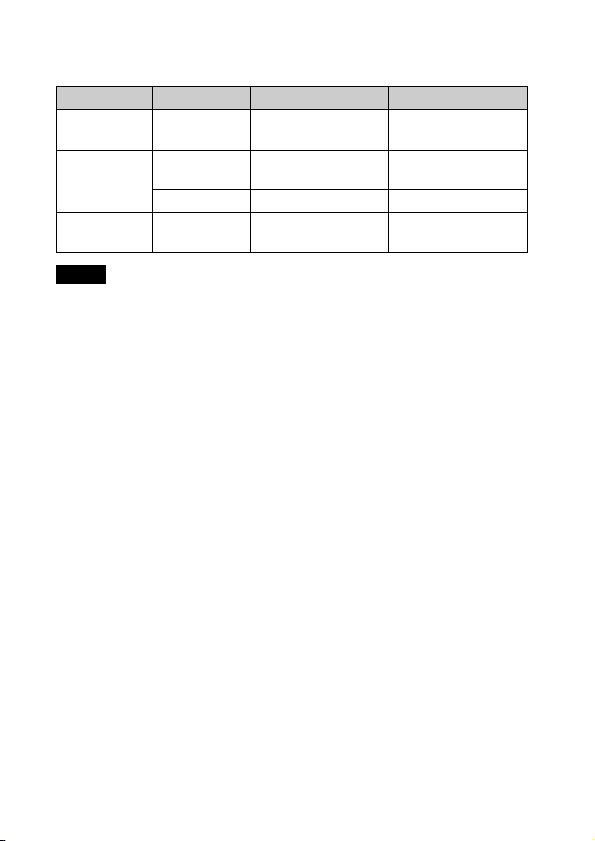
Battery life and number of images you can record/
view
Battery life (min.) Number of images
Shooting still
images
Viewing still
images
Shooting
movies
Notes
• The number of images that can be recorded is an approximate number when
shooting with a fully charged battery pack. The number may be less depending on
the circumstances.
• The number of images that can be recorded is when shooting under the following
conditions:
– Using Sony “Memory Stick PRO Duo” (Mark2) media (sold separately).
– When a fully charged battery pack (supplied) is used at an ambient temperature
of 25°C (77°F).
• The number of still images that can be recorded is based on the CIPA standard,
and is for shooting under the following conditions.
(CIPA: Camera & Imaging Products Association)
– DISP (Screen Display Settings) is set to [Normal].
– Shooting once every 30 seconds.
– The zoom is switched alternately between the W and T ends.
– The flash strobes once every two times.
– The power turns on and off once every ten times.
• The battery life for movies is when shooting under the following conditions:
– Recording mode: 720 FINE
– When continuous shooting ends because of set limits (page 19), press the shutter
button down again and continue shooting. Shooting functions such as the zoom
do not operate.
DSC-W570/
W570D/W580
DSC-W570/
W570D
DSC-W580 Approx. 280 Approx. 5600
DSC-W570/
W570D/W580
Approx. 110 Approx. 220
Approx. 290 Approx. 5800
Approx. 100 —
10
GB
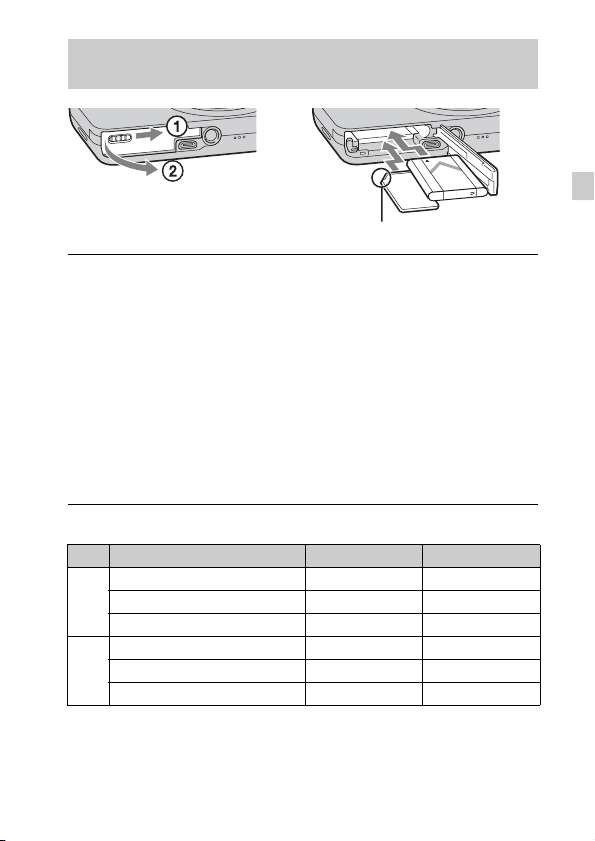
Inserting the battery pack/a memory card (sold
separately)
Ensure the notched corner faces correctly.
Open the cover.
1
Insert the memory card (sold separately).
2
• With the notched corner facing as illustrated, insert the memory card
until it clicks into place.
Insert the battery pack.
3
• While pressing the battery eject lever, insert the battery pack as
illustrated. Make sure that the battery eject lever locks after insertion.
Close the cover.
4
• Closing the cover with the battery inserted incorrectly may damage the
camera.
x
Memory cards that you can use
Memory card For still images For movies
Memory Stick PRO Duo aa
A
Memory Stick PRO-HG Duo aa
Memory Stick Duo a —
SD memory card aa
B
SDHC memory card aa
SDXC memory card aa
• In this manual, products in A are collectively referred to as “Memory Stick Duo”
media.
• In this manual, products in B are collectively referred to as SD cards.
• When recording movies, it is recommended that you use Mark2 “Memory Stick
Duo” media and Class 4 or faster SD cards.
GB
GB
11
x
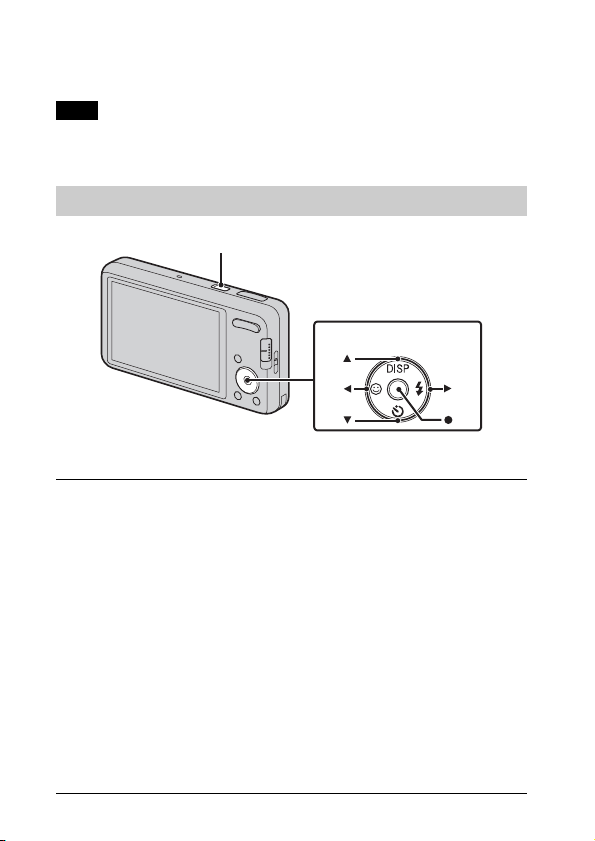
To remove the memory card/battery pack
Memory card: Push the memory card in once.
Battery pack: Slide the battery eject lever. Be sure not to drop the battery pack.
Note
• Never remove the memory card/battery pack when the access lamp (page  is lit.
This may cause damage to data in the memory card/internal memory.
Setting the clock
ON/OFF (Power)
Control button
Select items: v/V/b/B
Set: z
Press the ON/OFF (Power) button.
1
Date & Time setting is displayed when you press the ON/OFF (Power)
button for the first time.
• It may take time for the power to turn on and allow operation.
Set [Date & Time Format], [Daylight Savings] and
2
[Date & Time], then press [OK].
• Midnight is indicated as 12:00 AM, and noon as 12:00 PM.
Select the desired area following the instructions on the
3
screen, then press z t [OK].
Select the desired display color and display resolution
4
mode, following the instructions on the screen.
When an [In-Camera Guide] introductory message is
5
GB
appeared on the screen, press [OK].
12
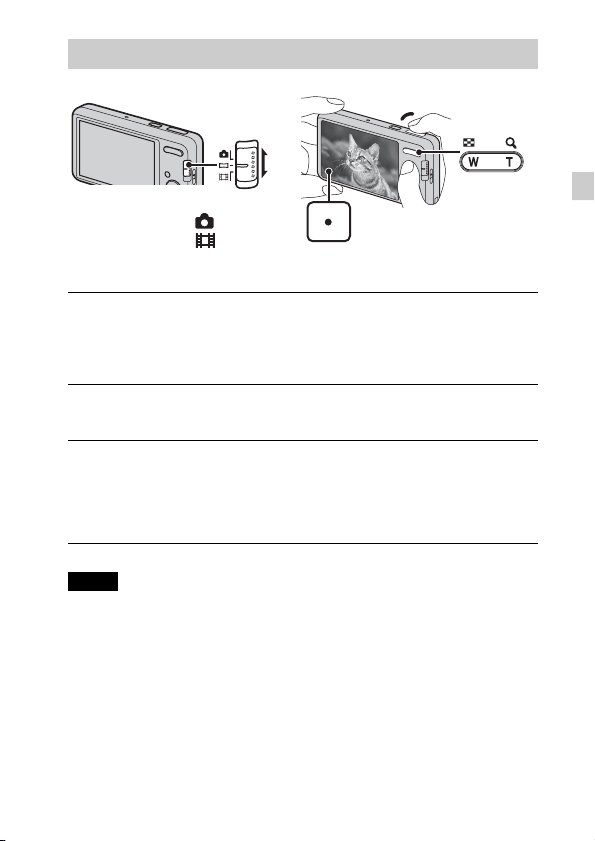
Shooting still images/movies
Shutter button
Mode switch
: Still image
: Movie
Shooting still images
Press the shutter button halfway down to focus.
1
When the image is in focus, a beep sounds and the z indicator lights.
Press the shutter button fully down.
2
Shooting movies
Press the shutter button fully down to start recording.
1
• Use the zoom button to change the zoom scale.
Press the shutter button fully down again to stop
2
recording.
Notes
• The operating sound of the lens is recorded when the zoom function operates
while shooting a movie.
• You can shoot continuously for approximately 29 minutes at a time when the
temperature is 25°C (77°F) and camera is set to the factory settings. When
shooting stops, you can press the shutter button again to restart shooting.
Depending on the temperature when shooting, recording may automatically stop
to protect the camera (page 21).
W: zoom out
T: zoom in
GB
GB
13
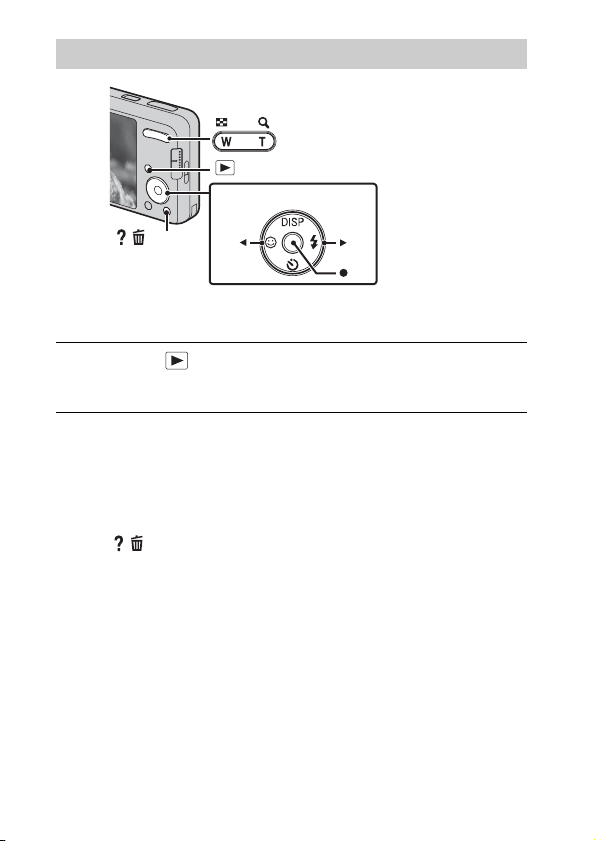
Viewing images
W: zoom out
T: zoom in
(Playback)
Control button
/ (Delete)
Select images: B (next)/b (previous)
Set: z
Press the (Playback) button.
1
• When images on a memory card recorded with other cameras are played
back on this camera, the registration screen for the data file appears.
x
Selecting next/previous image
Select an image with B (next)/b (previous) on the control button. Press z in
the center of the control button to view movies.
x
Deleting an image
1 Press / (Delete) button.
2 Select [This Image] with v on the control button, then press z.
x
Returning to shooting images
Press the shutter button halfway down.
14
GB
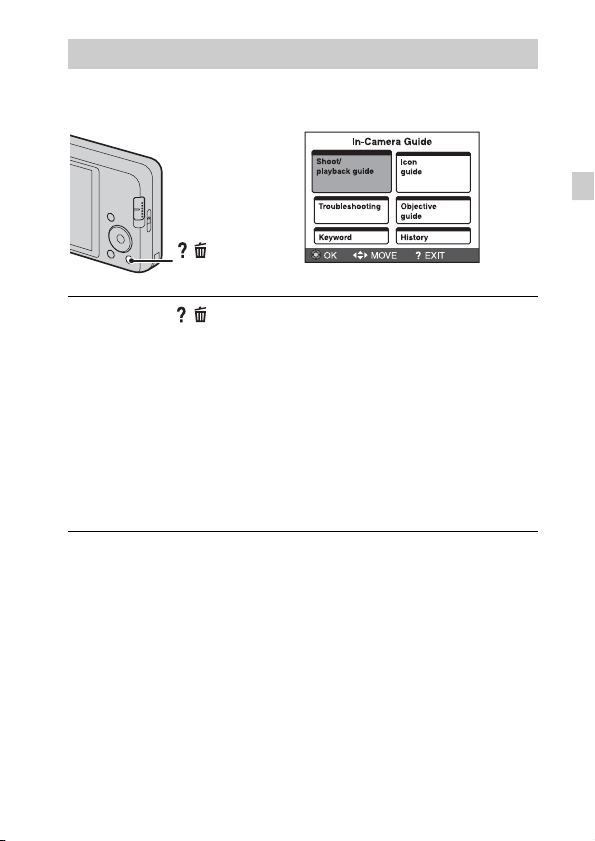
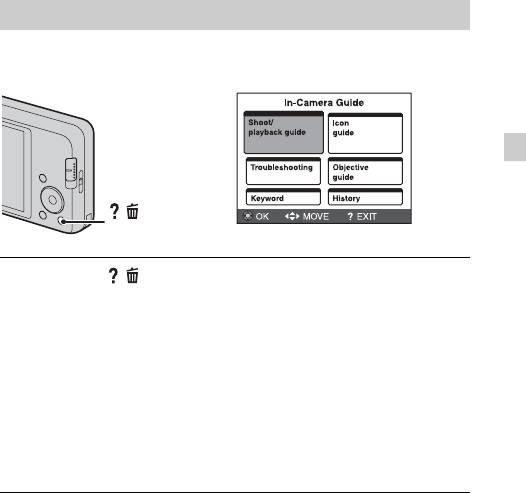
In-Camera Guide
This camera contains an internal function guide. This allows you to search the
camera’s functions according to your needs.
/
(In-Camera Guide)
Press the / (In-Camera Guide) button.
1
• When viewing images, [Delete/In-Camera Guide] is displayed. Select
[In-Camera Guide].
Select a search method from [In-Camera Guide].
2
Shoot/playback guide: Search for various operation functions in
shooting/viewing mode.
Icon guide: Search the function and meaning of displayed icons.
Troubleshooting: Search common problems and their solution.
Objective guide: Search functions according to your needs.
Keyword: Search functions by key words.
History: Display the last 12 items displayed in [In-Camera Guide].
GB
GB
15
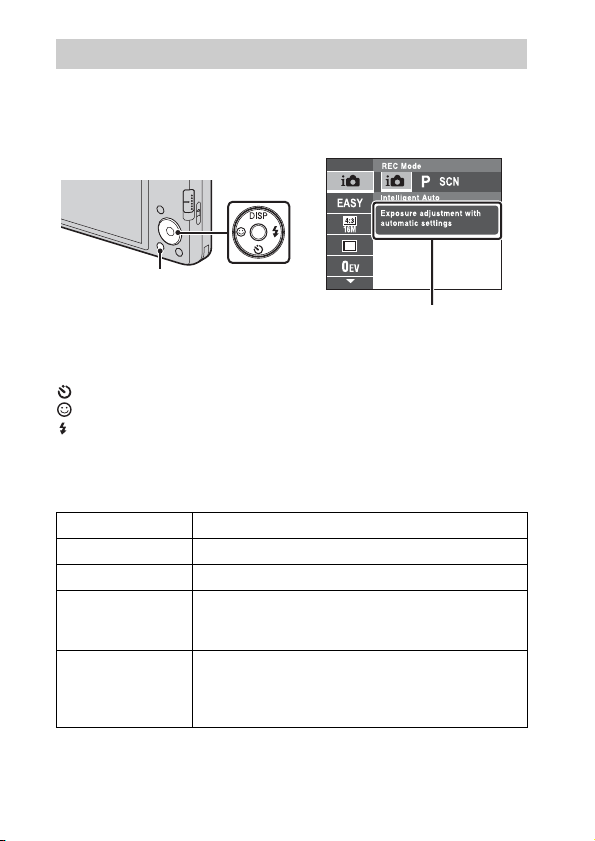
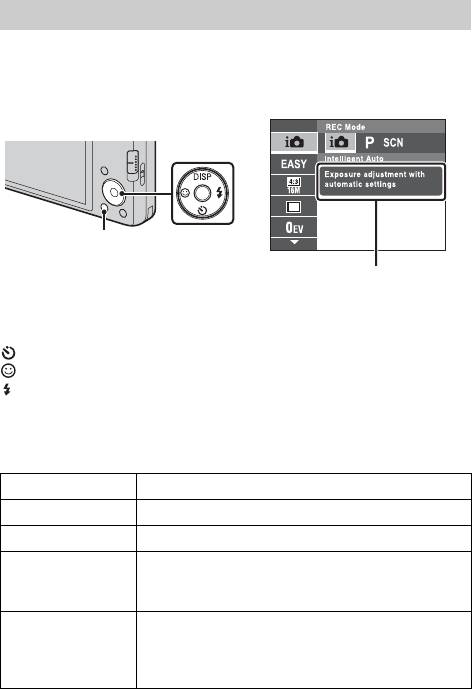
Introduction of other functions
Other functions used when shooting or playing back can be operated using the
Control button or MENU button on the camera. This camera is equipped with
a Function Guide that allows you to easily select from the functions. While
displaying the guide, try the other functions.
Control
button
MENU
Function Guide
x
Control button
DISP (Screen Display Settings): Allows you to change the screen display.
(Self-Timer): Allows you to use the self-timer.
(Smile Shutter): Allows you to use the Smile Shutter mode.
(Flash): Allows you to select a flash mode for still images.
x
Menu Items
Shooting
REC Mode Select recording mode.
Scene Selection Select pre-set settings to match various scene conditions.
Easy Mode Shoot still images using minimal functions.
Movie shooting
scene (DSC-W570/
W580 only)
Panorama
Shooting Scene
(DSC-W570/W580
only)
Select Underwater mode or Auto when shooting movies.
Select Sweep Panorama mode or Underwater Sweep
Panorama mode when shooting panoramic images.
16
GB
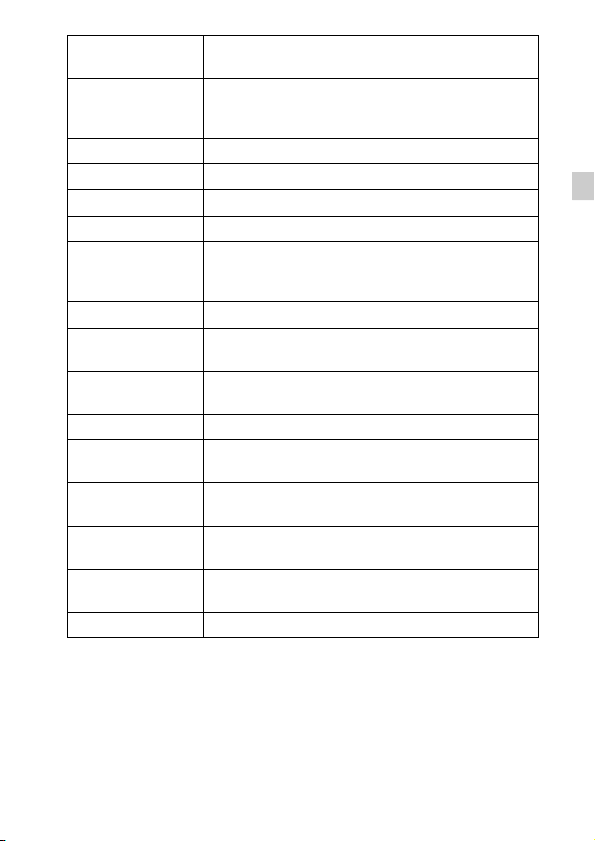
Shooting Direction
Image Size/
Panorama Image
Size
Burst Settings Select single-image mode or burst mode.
EV Adjust the exposure manually.
ISO Adjust the luminous sensitivity.
White Balance Adjust color tones of an image.
Underwater White
Balance (DSCW570/W580 only)
Focus Select the focus method.
Metering Mode
Scene Recognition
Soft Skin Effect Set the Soft Skin Effect and the effect level.
Smile Detection
Sensitivity
Face Detection
DRO
Anti Blink
In-Camera Guide Search the camera’s functions according to your needs.
Set the direction to pan the camera when shooting Sweep
Panorama images.
Select the image size for still images, panoramic images
or movie files.
Adjust the color tones of an image shot underwater.
Select the metering mode that sets which part of the
subject to measure to determine the exposure.
Set to automatically detect shooting conditions in
Intelligent Auto mode.
Set the Smile Shutter function sensitivity for detecting
smiles.
Select to detect faces and adjust various settings
automatically.
Set DRO function to correct the brightness and contrast
and improve the image quality.
Set to automatically shoot two images and select image
in which the eyes are not blinking.
GB
GB
17
Viewing
Easy Mode
Slideshow Select a method of continuous playback.
Send by
TransferJet
View Mode Select the display format for images.
Retouch Retouch an image using various effects.
Delete Delete an image.
Protect Protect the images.
DPOF Add a print order mark to a still image.
Rotate Rotate a still image to the left or right.
Select Folder
In-Camera Guide Search the camera’s functions according to your needs.
x
Setting items
Set the text-size increases and all indicators become
easier to see.
Sends images from a Memory Stick with TransferJet to
TransferJet-compatible devices.
Select a folder which contains the images you want to
play back.
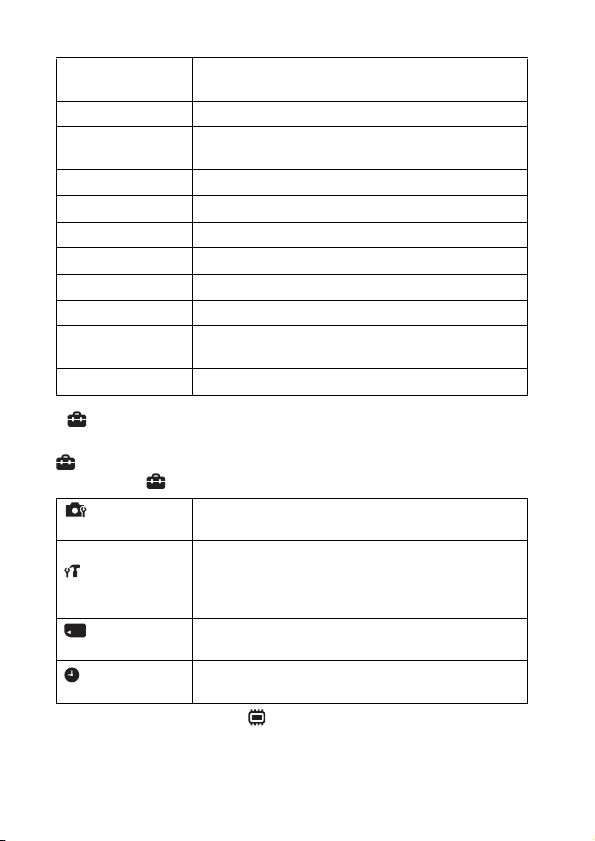
If you press the MENU button while shooting or during playback,
(Settings) is provided as a final selection. You can change the default
settings on the (Settings) screen.
Shooting Settings
Main Settings
Memory Card Tool
Clock Settings
* If a memory card is not inserted, (Internal Memory Tool) will be displayed and
only [Format] and [File Number] can be selected.
GB
AF Illuminator/Grid Line/Disp. Resolution/Digital
Zoom/Auto Orientation/Red Eye Reduction/Blink Alert
Beep/Language Setting/Function Guide/Display color/
Demo Mode/Initialize/COMPONENT/Video Out/USB
Connect/LUN Setting/Download Music/Empty Music/
Power Save/TransferJet/Eye-Fi
Format/Create REC. Folder/Change REC. Folder/Delete
*
REC. Folder/Copy/File Number
Area Setting/Date & Time Setting
18
Number of still images and recordable time of
movies
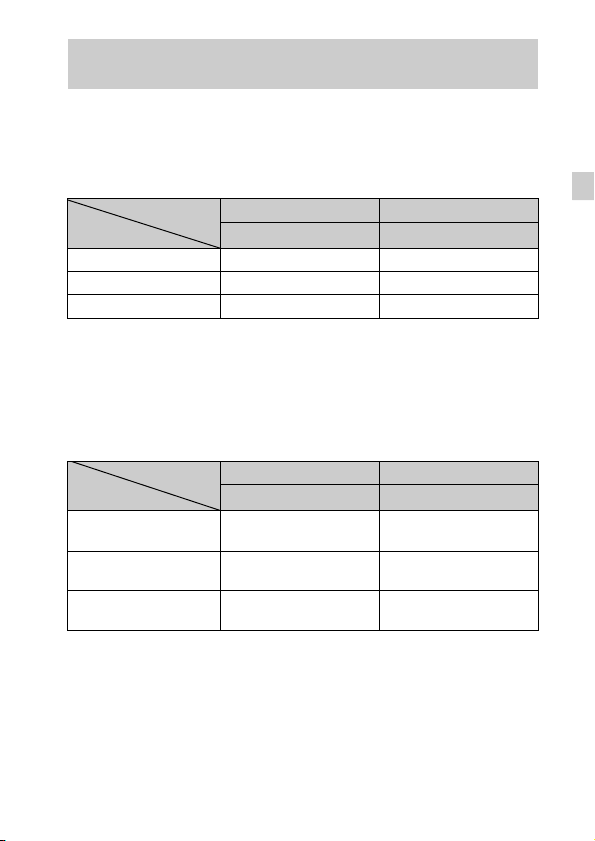
The number of still images and recordable time may vary depending on the
shooting conditions and the memory card.
x
Still images
(Units: Images)
Capacity
Size
16M 3 265
VGA 165 11500
16:9(12M) 4 325
x
Movies
The table below shows the approximate maximum recording times. These are
the total times for all movie files. Continuous shooting is possible for
approximately 29 minutes. The maximum size of a movie file is up to
approximately 2 GB.
Capacity
Size
1280×720(Fine) — 25m
1280×720(Standard) — 40m
VGA 1m
The number in ( ) is the minimum recordable time.
• The recordable time of movies varies because the camera is equipped with VBR
(Variable Bit Rate), which automatically adjusts image quality depending on the
shooting scene. When you record a fast-moving subject, the image is clearer but
the recordable time is shorter because more memory is required for recording.
The recordable time also varies depending on the shooting conditions, the subject
or the image size settings.
Internal memory Memory card
Approx. 27 MB 2 GB
(h (hour), m (minute), s (second))
Internal memory Memory card
Approx. 27 MB 2 GB
(20m)
(25m)
(45s)
1h 20m
(1h)
GB
GB
19

Notes on using the camera
Changing the language setting
To change the language setting, press MENU t (Settings) t (Main
Settings)
t [Language Setting].
On use and care
Avoid rough handling, disassembling, modifying, physical shock, or impact such as
hammering, dropping or stepping on the product. Be particularly careful of the lens.
Functions built into this camera
This manual describes each of the functions of TransferJet-compatible/incompatible
devices.
To check if your camera supports the TransferJet function, check for the following
mark on the bottom of the camera.
TransferJet-compatible device: (TransferJet)
Notes on recording/playback
• Before you start recording, make a trial recording to make sure that the camera is
working correctly.
• The camera is neither dust-proof, nor splash-proof, nor water-proof.
• Avoid exposing the camera to water. If water enters inside the camera, a
malfunction may occur. In some cases, the camera cannot be repaired.
• Do not aim the camera at the sun or other bright light. It may cause the
malfunction of the camera.
• If moisture condensation occurs, remove it before using the camera.
• Do not shake or strike the camera. It may cause a malfunction and you may not be
able to record images. Furthermore, the recording media may become unusable or
image data may be damaged.
Do not use/store the camera in the following places
• In an extremely hot, cold or humid place
In places such as in a car parked in the sun, the camera body may become
deformed and this may cause a malfunction.
• Under direct sunlight or near a heater
The camera body may become discolored or deformed, and this may cause a
malfunction.
• In a location subject to rocking vibration
• Near a location that generates strong radio waves, emits radiation or is strongly
magnetic place. Otherwise, the camera may not properly record or play back
images.
• In sandy or dusty places
Be careful not to let sand or dust get into the camera. This may cause the camera to
malfunction, and in some cases this malfunction cannot be repaired.
GB
20

On carrying
Do not sit down in a chair or other place with the camera in the back pocket of your
trousers or skirt, as this may cause malfunction or damage the camera.
Carl Zeiss lens
The camera is equipped with a Carl Zeiss lens which is capable of reproducing sharp
images with excellent contrast. The lens for the camera has been produced under a
quality assurance system certified by Carl Zeiss in accordance with the quality
standards of Carl Zeiss in Germany.
Notes on the LCD screen and lens
The LCD screen is manufactured using extremely high-precision technology so over
99.99% of the pixels are operational for effective use. However, some tiny black
and/or bright dots (white, red, blue or green) may appear on the LCD screen. These
dots are a normal result of the manufacturing process, and do not affect the
recording.
On camera’s temperature
Your camera and battery may get warm due to continuous use, but it is not a
malfunction.
On the overheat protection
Depending on the camera and battery temperature, you may be unable to record
movies or the power may turn off automatically to protect the camera.
A message will be displayed on the LCD screen before the power turns off or you
can no longer record movies.
On charging the battery
If you charge a battery that has not been used for a long time, you may be unable to
charge it to the proper capacity. This is due to the battery characteristics, and is not a
malfunction. Charge the battery again.
Warning on copyright
Television programs, films, videotapes, and other materials may be copyrighted.
Unauthorized recording of such materials may be contrary to the provisions of the
copyright laws.
No compensation for damaged content or recording failure
Sony cannot compensate for failure to record or loss or damage of recorded content
due to a malfunction of the camera or recording media, etc.
Cleaning the camera surface
Clean the camera surface with a soft cloth slightly moistened with water, then wipe
the surface with a dry cloth. To prevent damage to the finish or casing:
– Do not expose the camera to chemical products such as thinner, benzine, alcohol,
disposable cloths, insect repellent, sunscreen or insecticide.
On Illustrations
Illustrations used in this manual are of the DSC-W570 unless noted otherwise.
GB
GB
21

Specifications
Camera
[System]
Image device: 7.75 mm (1/2.3 type)
color CCD, Primary color filter
Total pixel number of camera:
Approx. 16.4 Megapixels
Effective pixel number of camera:
Approx. 16.1 Megapixels
Lens: Carl Zeiss Vario-Tessar 5× zoom
lens
f = 4.5 mm – 22.5 mm (25 mm –
125 mm (35 mm film equivalent))
F2.6 (W) – F6.3 (T)
While shooting movies (16:9):
28 mm – 140 mm
While shooting movies (4:3):
34 mm – 170 mm
SteadyShot: Optical
Exposure control:
DSC-W570/W580:
Automatic exposure, Scene
Selection (12 modes)
DSC-W570D:
Automatic exposure, Scene
Selection (11 modes)
White balance: Automatic, Daylight,
Cloudy, Fluorescent 1/2/3,
Incandescent, Flash, One Push
Underwater White Balance (DSC-
W570/W580 only): Auto,
Underwater 1/2, One Push
Recording interval for Burst mode:
Approx. 1.0 second
File format:
Still images: JPEG (DCF Ver. 2.0,
Exif Ver. 2.3, MPF Baseline)
compliant, DPOF compatible
Movies: MPEG-4 Visual
Recording media: Internal Memory
(Approx. 27 MB), “Memory Stick
Duo” media, SD cards
Flash: Flash range (ISO sensitivity
(Recommended Exposure Index)
set to Auto):
Approx. 0.2 m to 3.7 m (W)
(7 7/8 inches to 12 feet 1 3/4 inches)
Approx. 1.0 m to 1.5 m (T) (3 feet
3 3/8 inches to 4 feet 11 1/8 inches)
[Input and Output connectors]
Multi use terminal: Type3a
(AV-out (SD/HD Component)/
USB/DC-in):
Video output
Audio output (Monaural)
USB communication
USB communication:
Hi-Speed USB (USB 2.0)
[LCD screen]
LCD panel:
DSC-W570/W570D:
6.7 cm (2.7 type) TFT drive
DSC-W580:
7.5 cm (3.0 type) TFT drive
Total number of dots:
230 400 (960 × 240) dots
22
GB

[Power, general]
Power: Rechargeable battery pack
NP-BN1, 3.6 V
AC-LS5 AC Adaptor (sold
separately), 4.2 V
Power consumption (during shooting):
1.1 W
Operating temperature:
0°C to 40°C (32°F to 104°F)
Storage temperature:
–20°C to +60°C (–4°F to +140°F)
Dimensions (CIPA compliant):
DSC-W570: 91.0 mm × 51.5 mm ×
19.1 mm (3 5/8 inches ×
2 1/8 inches × 25/32 inches)
DSC-W570D (pink): 91.0 mm ×
51.5 mm × 19.4 mm (3 5/8 inches
× 2 1/8 inches × 25/32 inches)
DSC-W570D (silver): 91.0 mm ×
51.5 mm × 19.5 mm (3 5/8 inches
× 2 1/8 inches × 25/32 inches)
DSC-W580: 94.0 mm × 56.0 mm ×
19.1 mm (3 3/4 inches ×
2 1/4 inches × 25/32 inches)
(W/H/D)
Mass (CIPA compliant) (including NP-
BN1 battery pack, “Memory Stick
Duo” media):
DSC-W570:
Approx. 116 g (4.1 oz)
DSC-W570D:
Approx. 119 g (4.2 oz)
DSC-W580:
Approx. 127 g (4.5 oz)
Microphone: Monaural
Speaker: Monaural
Exif Print: Compatible
PRINT Image Matching III:
Compatible
BC-CSN/BC-CSNB battery
charger
Power requirements: AC 100 V to
240 V, 50/60 Hz, 2 W
Output voltage: DC 4.2 V, 0.25 A
Operating temperature:
0°C to 40°C (32°F to 104°F)
Storage temperature:
–20°C to +60°C (–4°F to +140°F)
Dimensions:
Approx. 55 mm × 24 mm × 83 mm
(2 1/4 inches × 31/32 inches ×
3 3/8 inches) (W/H/D)
Mass: Approx. 55 g (1.9 oz)
Rechargeable battery pack
NP-BN1
Used battery: Lithium-ion battery
Maximum voltage: DC 4.2 V
Nominal voltage: DC 3.6 V
Maximum charge voltage: DC 4.2 V
Maximum charge current: 0.9 A
Capacity:
typical: 2.3 Wh (630 mAh)
minimum: 2.2 Wh (600 mAh)
Design and specifications are subject to
change without notice.
GB
GB
23
Trademarks
• The following marks are trademarks
of Sony Corporation.
“Memory Stick PRO Duo,”
“Memory Stick PRO-HG Duo,”
“Memory Stick Duo”, TransferJet
and the TransferJet logo
• Windows is registered trademark of
Microsoft Corporation in the United
States and/or other countries.
• Macintosh is registered trademark of
Apple Inc.
• SDXC lo go is a trademark of SD-3C,
LLC.
• In addition, system and product
names used in this manual are, in
general, trademarks or registered
trademarks of their respective
developers or manufacturers.
However, the ™ or ® marks are not
used in all cases in this manual.
, “Cyber-shot,”
Additional information on this
product and answers to frequently
asked questions can be found at
our Customer Support Website.
Printed on 70% or more recycled paper
using VOC (Volatile Organic
Compound)-free vegetable oil based
ink.
24
GB
Loading…
Раздел: Видео Аудио Фото Оборудование
Тип: Цифровой Фотоаппарат
Характеристики, спецификации
Тип карты памяти:
MS Pro DUO, MS Pro-HG DUO, SDHC
Разрешение ЖК дисплея:
230400 Пикс
Интерфейс связи с ПК:
USB 2.0
Ремень на запястье:
в комплекте
Зарядное устройство в комплекте:
Да
Скорость видеосъемки:
30 кадр/сек
Материал изготовления корпуса:
пластик/ металл
Габаритные размеры (В*Ш*Г):
52*91*20 мм
Минимальная дистанция съемки:
от 5 см
Используемая оптика:
Carl Zeiss Vario-Tessar
Фокусное расстояние:
4.5 — 22.5 мм
Макс. разрешение:
4608х3456 Пикс
Разрешение матрицы:
16.4 МПикс
Технология матрицы:
Super HAD CCD
Автоматическая фокусировка:
Да
Диапазон выдержки:
1 — 1/1600 сек
Серийная съемка:
1 кадр/сек
Емкость аккумулятора:
630 мАч
Наим. аккум. в комплекте:
NP-BN1
Работа под Windows:
XP, Vista, Windows 7
Работа под Mac OS:
X 10.5 и выше
Инструкция к Цифровому Фотоаппарату Sony DSC-W570 Silver
4-276-696-41(1)
Digital Still Camera / Instruction Manual GB
Цифровой фотоаппарат / Инструкция по эксплуатации
RU
Цифровий фотоапарат / Посібник з експлуатації UA
DSC-W570/W570D/W580

English
Owner’s Record
The model and serial numbers are located on the bottom. Record the serial number in the
space provided below. Refer to these numbers whenever you call your Sony dealer
regarding this product.
Model No. DSC-W570/W570D/W580
Serial No. ______________________________
WARNING
To reduce fire or shock hazard, do not expose the unit to rain or
moisture.
IMPORTANT SAFETY INSTRUCTIONS
-SAVE THESE INSTRUCTIONS
DANGER
TO REDUCE THE RISK OF FIRE OR ELECTRIC
SHOCK, CAREFULLY FOLLOW THESE
INSTRUCTIONS
If the shape of the plug does not fit the power outlet, use an attachment plug adaptor of the
proper configuration for the power outlet.
CAUTION
[ Battery pack
If the battery pack is mishandled, the battery pack can burst, cause a fire or even chemical
burns. Observe the following cautions.
• Do not disassemble.
• Do not crush and do not expose the battery pack to any shock or force such as
hammering, dropping or stepping on it.
• Do not short circuit and do not allow metal objects to come into contact with the battery
terminals.
• Do not expose to high temperature above 60°C (140°F) such as in direct sunlight or in a
car parked in the sun.
• Do not incinerate or dispose of in fire.
GB
• Do not handle damaged or leaking lithium ion batteries.
2

• Be sure to charge the battery pack using a genuine Sony battery charger or a device that
can charge the battery pack.
• Keep the battery pack out of the reach of small children.
• Keep the battery pack dry.
• Replace only with the same or equivalent type recommended by Sony.
• Dispose of used battery packs promptly as described in the instructions.
[ Battery charger
Even if the CHARGE lamp is not lit, the battery charger is not disconnected from the AC
power source (mains) as long as it is connected to the wall outlet (wall socket). If some
GB
trouble occurs while using the battery charger, immediately shut off the power by
disconnecting the plug from the wall outlet (wall socket).
The power cord (mains lead), if supplied, is designed specifically for use with this camera
only, and should not be used with other electrical equipment.
For Customers in the U.S.A. and Canada
[ RECYCLING LITHIUM-ION BATTERIES
Lithium-Ion batteries are recyclable.
You can help preserve our environment by returning your used
rechargeable batteries to the collection and recycling location nearest
you.
For more information regarding recycling of rechargeable batteries,
call toll free
1-800-822-8837, or visit http://www.rbrc.org/
Caution: Do not handle damaged or leaking Lithium-Ion batteries.
[ Battery pack
This device complies with Part 15 of the FCC Rules. Operation is subject to the following
two conditions:
(1) This device may not cause harmful interference, and (2) this device must accept any
interference received, including interference that may cause undesired operation.
This Class B digital apparatus complies with Canadian ICES-003.
For Customers in the U.S.A.
UL is an internationally recognized safety organization.
The UL Mark on the product means it has been UL Listed.
If you have any questions about this product, you may call:
Sony Customer Information Center
1-800-222-SONY (7669).
GB
The number below is for the FCC related matters only.
3

[ Regulatory Information
Declaration of Conformity
Trade Name: SONY
Model No.: DSC-W570
Responsible Party: Sony Electronics Inc.
Address: 16530 Via Esprillo,
San Diego, CA 92127 U.S.A.
Telephone No.: 858-942-2230
This device complies with Part15 of the FCC Rules. Operation is subject to the
following two conditions: (1) This device may not cause harmful interference, and (2)
this device must accept any interference received, including interference that may cause
undesired operation.
Declaration of Conformity
Trade Name: SONY
Model No.: DSC-W570D
Responsible Party: Sony Electronics Inc.
Address: 16530 Via Esprillo,
San Diego, CA 92127 U.S.A.
Telephone No.: 858-942-2230
This device complies with Part15 of the FCC Rules. Operation is subject to the
following two conditions: (1) This device may not cause harmful interference, and (2)
this device must accept any interference received, including interference that may cause
undesired operation.
Declaration of Conformity
Trade Name: SONY
Model No.: DSC-W580
Responsible Party: Sony Electronics Inc.
Address: 16530 Via Esprillo,
San Diego, CA 92127 U.S.A.
Telephone No.: 858-942-2230
This device complies with Part15 of the FCC Rules. Operation is subject to the
following two conditions: (1) This device may not cause harmful interference, and (2)
this device must accept any interference received, including interference that may cause
undesired operation.
[ CAUTION
You are cautioned that any changes or modifications not expressly approved in this manual
could void your authority to operate this equipment.
GB
4

[ Note:
This equipment has been tested and found to comply with the limits for a Class B digital
device, pursuant to Part 15 of the FCC Rules.
These limits are designed to provide reasonable protection against harmful interference in
a residential installation. This equipment generates, uses, and can radiate radio frequency
energy and, if not installed and used in accordance with the instructions, may cause
harmful interference to radio communications. However, there is no guarantee that
interference will not occur in a particular installation. If this equipment does cause harmful
interference to radio or television reception, which can be determined by turning the
equipment off and on, the user is encouraged to try to correct the interference by one or
GB
more of the following measures:
– Reorient or relocate the receiving antenna.
– Increase the separation between the equipment and receiver.
– Connect the equipment into an outlet on a circuit different from that to which the
receiver is connected.
– Consult the dealer or an experienced radio/TV technician for help.
The supplied interface cable must be used with the equipment in order to comply with the
limits for a digital device pursuant to Subpart B of Part 15 of FCC Rules.
For Customers in Europe
[ Notice for the customers in the countries applying EU Directives
The manufacturer of this product is Sony Corporation, 1-7-1 Konan Minato-ku Tokyo,
108-0075 Japan. The Authorized Representative for EMC and product safety is Sony
Deutschland GmbH, Hedelfinger Strasse 61, 70327 Stuttgart, Germany. For any service or
guarantee matters please refer to the addresses given in separate service or guarantee
documents.
This product has been tested and found compliant with the limits set out in the EMC
Directive for using connection cables shorter than 3 meters (9.8 feet).
[ Attention
The electromagnetic fields at the specific frequencies may influence the picture and sound
of this unit.
[ Notice
If static electricity or electromagnetism causes data transfer to discontinue midway (fail),
restart the application or disconnect and connect the communication cable (USB, etc.)
again.
GB
5
[ Disposal of Old Electrical & Electronic Equipment (Applicable in
the European Union and other European countries with separate
collection systems)
This symbol on the product or on its packaging indicates that this product
shall not be treated as household waste. Instead it shall be handed over to
the applicable collection point for the recycling of electrical and electronic
equipment. By ensuring this product is disposed of correctly, you will help
prevent potential negative consequences for the environment and human
health, which could otherwise be caused by inappropriate waste handling
of this product. The recycling of materials will help to conserve natural
resources. For more detailed information about recycling of this product,
please contact your local Civic Office, your household waste disposal service or the shop
where you purchased the product.
[ Disposal of waste batteries (applicable in the European Union
and other European countries with separate collection systems)
This symbol on the battery or on the packaging indicates that the battery
provided with this product shall not be treated as household waste.
On certain batteries this symbol might be used in combination with a
chemical symbol. The chemical symbols for mercury (Hg) or lead (Pb) are
added if the battery contains more than 0.0005% mercury or 0.004% lead.
By ensuring these batteries are disposed of correctly, you will help prevent
potentially negative consequences for the environment and human health which could
otherwise be caused by inappropriate waste handling of the battery. The recycling of the
materials will help to conserve natural resources.
In case of products that for safety, performance or data integrity reasons require a
permanent connection with an incorporated battery, this battery should be replaced by
qualified service staff only. To ensure that the battery will be treated properly, hand over
the product at end-of-life to the applicable collection point for the recycling of electrical
and electronic equipment.
For all other batteries, please view the section on how to remove the battery from the
product safely.
Hand the battery over to the applicable collection point for the recycling of waste batteries.
For more detailed information about recycling of this product or battery, please contact
your local Civic Office, your household waste disposal service or the shop where you
purchased the product.
Notice for customers in the United Kingdom
A moulded plug complying with BS 1363 is fitted to this equipment for your safety and
convenience.
Should the fuse in the plug supplied need to be replaced, a fuse of the same rating as the
supplied one and approved by ASTA or BSI to BS 1362, (i.e., marked with an or
mark) must be used.
If the plug supplied with this equipment has a detachable fuse cover, be sure to attach the
GB
fuse cover after you change the fuse. Never use the plug without the fuse cover. If you
6
should lose the fuse cover, please contact your nearest Sony service station.

Refer to “Cyber-shot User Guide” (HTML) on
supplied CD-ROM
For details on advanced operations, please read “Cyber-shot User Guide”
(HTML) on the CD-ROM (supplied) using a computer.
Insert the CD-ROM into the CD-ROM drive.
GB
For Windows users:
1 Click [User Guide] t [Install].
2 Start “User Guide” from the shortcut on the desktop.
For Macintosh users:
1 Select the [User Guide] and copy [eng] folder stored in [User Guide] folder
to your computer.
2 After copying is complete, double-click “index.html” in [eng] folder.
Checking the accessories supplied
• Battery charger BC-CSN/BC-CSNB (1)
• Power cord (mains lead) (not supplied in the USA and Canada) (1)
• Rechargeable battery pack NP-BN1 (1)
• USB, A/V cable for multi-use terminal (1)
• Wrist strap (1)
•CD—ROM (1)
– Cyber-shot application software
– “Cyber-shot User Guide”
• Instruction Manual (this manual) (1)
GB
7
Identifying parts
I For shooting: W/T (Zoom)
button
For viewing: (Playback
zoom) button/ (Index) button
J Mode switch
K Hook for wrist strap
L / (In-Camera Guide/Delete)
button
M MENU button
N Control button
Menu on: v/V/b/B/z
Menu off: DISP/ / / /
Tracking focus
O Access lamp
P Battery eject lever
Q Battery insertion slot
R Tripod receptacle
• Use a tripod with a screw less
than 5.5 mm (7/32 inches) long.
Otherwise, you cannot firmly
secure the camera, and damage to
the camera may occur.
S Speaker
T Battery/memory card cover
U Multi connector (Type3a)
A ON/OFF (Power) button/Power
V Memory card slot
lamp
W (TransferJet™) mark
B Shutter button
C Flash
D Self-timer lamp/Smile Shutter
lamp/AF illuminator
E Microphone
F Lens
G LCD screen
H (Playback) button
GB
8
Charging the battery pack
For customers in the USA
For customers in countries/regions
and Canada
other than the USA and Canada
Power cord
Plug
(Mains lead)
GB
CHARGE lamp
Lit: Charging
Off: Charging finished (normal charge)
Insert the battery pack into the battery charger.
1
• You can charge the battery even when it is partially charged.
Connect the battery charger to the wall outlet (wall
2
socket).
• If you continue charging the battery pack for about one more hour after
the CHARGE lamp turns off, the charge will last slightly longer (full
charge).
x
Charging time
Full charge time: approx. 245 min.
Normal charge time: approx. 185 min.
Notes
• The above charging times apply when charging a fully depleted battery pack at a
temperature of 25°C (77°F). Charging may take longer depending on conditions of
use and circumstances.
• Connect the battery charger to the nearest wall outlet (wall socket).
• When charging is finished, disconnect the power cord (mains lead) from the wall
outlet (wall socket), and remove the battery pack from the battery charger.
• Be sure to use the battery pack or the battery charger of the genuine Sony brand.
GB
9
x
Battery life and number of images you can record/
view
Battery life (min.) Number of images
Shooting still
DSC-W570/
Approx. 110 Approx. 220
images
W570D/W580
Viewing still
DSC-W570/
Approx. 290 Approx. 5800
images
W570D
DSC-W580 Approx. 280 Approx. 5600
Shooting
DSC-W570/
Approx. 100 —
movies
W570D/W580
Notes
• The number of images that can be recorded is an approximate number when
shooting with a fully charged battery pack. The number may be less depending on
the circumstances.
• The number of images that can be recorded is when shooting under the following
conditions:
– Using Sony “Memory Stick PRO Duo” (Mark2) media (sold separately).
– When a fully charged battery pack (supplied) is used at an ambient temperature
of 25°C (77°F).
• The number of still images that can be recorded is based on the CIPA standard,
and is for shooting under the following conditions.
(CIPA: Camera & Imaging Products Association)
– DISP (Screen Display Settings) is set to [Normal].
– Shooting once every 30 seconds.
– The zoom is switched alternately between the W and T ends.
– The flash strobes once every two times.
– The power turns on and off once every ten times.
• The battery life for movies is when shooting under the following conditions:
– Recording mode: 720 FINE
– When continuous shooting ends because of set limits (page 19), press the shutter
button down again and continue shooting. Shooting functions such as the zoom
do not operate.
GB
10
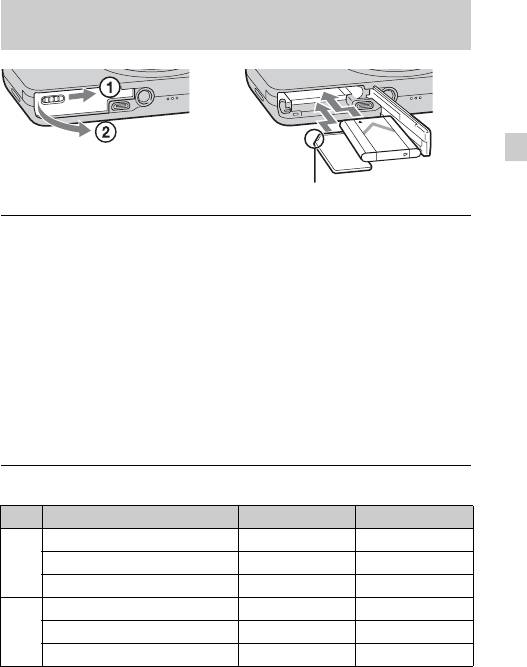
Inserting the battery pack/a memory card (sold
separately)
GB
Ensure the notched corner faces correctly.
Open the cover.
1
Insert the memory card (sold separately).
2
• With the notched corner facing as illustrated, insert the memory card
until it clicks into place.
Insert the battery pack.
3
• While pressing the battery eject lever, insert the battery pack as
illustrated. Make sure that the battery eject lever locks after insertion.
Close the cover.
4
• Closing the cover with the battery inserted incorrectly may damage the
camera.
x
Memory cards that you can use
Memory card For still images For movies
Memory Stick PRO Duo aa
A
Memory Stick PRO-HG Duo aa
Memory Stick Duo a —
SD memory card aa
B
SDHC memory card aa
SDXC memory card aa
• In this manual, products in A are collectively referred to as “Memory Stick Duo”
media.
• In this manual, products in B are collectively referred to as SD cards.
GB
• When recording movies, it is recommended that you use Mark2 “Memory Stick
Duo” media and Class 4 or faster SD cards.
11
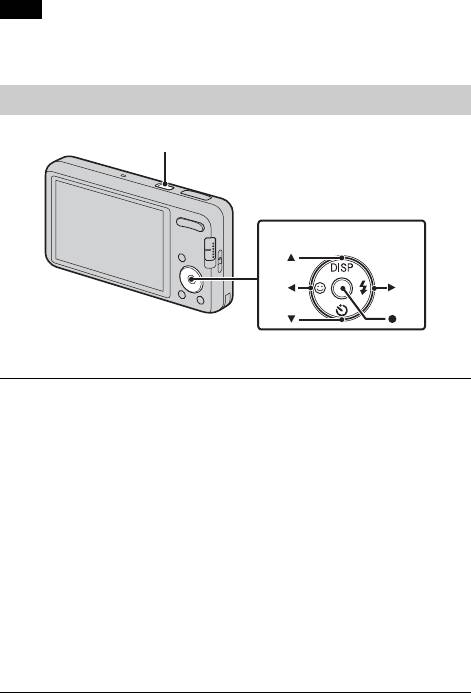
x
To remove the memory card/battery pack
Memory card: Push the memory card in once.
Battery pack: Slide the battery eject lever. Be sure not to drop the battery pack.
Note
• Never remove the memory card/battery pack when the access lamp (page is lit.
This may cause damage to data in the memory card/internal memory.
Setting the clock
ON/OFF (Power)
Control button
Select items: v/V/b/B
Set: z
Press the ON/OFF (Power) button.
1
Date & Time setting is displayed when you press the ON/OFF (Power)
button for the first time.
• It may take time for the power to turn on and allow operation.
Set [Date & Time Format], [Daylight Savings] and
2
[Date & Time], then press [OK].
• Midnight is indicated as 12:00 AM, and noon as 12:00 PM.
Select the desired area following the instructions on the
3
screen, then press z t [OK].
Select the desired display color and display resolution
4
mode, following the instructions on the screen.
When an [In-Camera Guide] introductory message is
GB
5
appeared on the screen, press [OK].
12
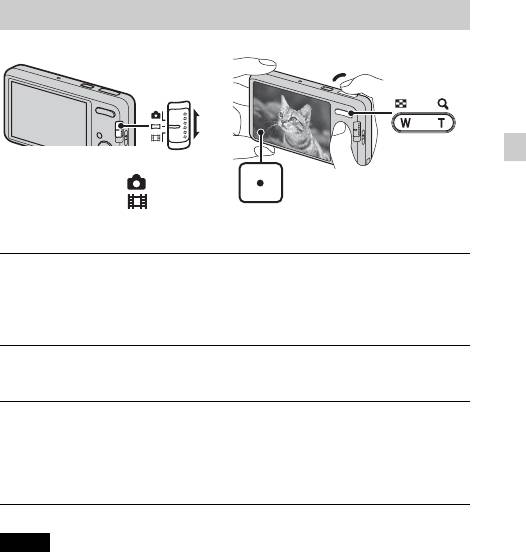
Shooting still images/movies
Shutter button
W: zoom out
GB
Mode switch
T: zoom in
: Still image
: Movie
Shooting still images
Press the shutter button halfway down to focus.
1
When the image is in focus, a beep sounds and the z indicator lights.
Press the shutter button fully down.
2
Shooting movies
Press the shutter button fully down to start recording.
1
• Use the zoom button to change the zoom scale.
Press the shutter button fully down again to stop
2
recording.
Notes
• The operating sound of the lens is recorded when the zoom function operates
while shooting a movie.
• You can shoot continuously for approximately 29 minutes at a time when the
temperature is 25°C (77°F) and camera is set to the factory settings. When
shooting stops, you can press the shutter button again to restart shooting.
Depending on the temperature when shooting, recording may automatically stop
to protect the camera (page 21).
GB
13
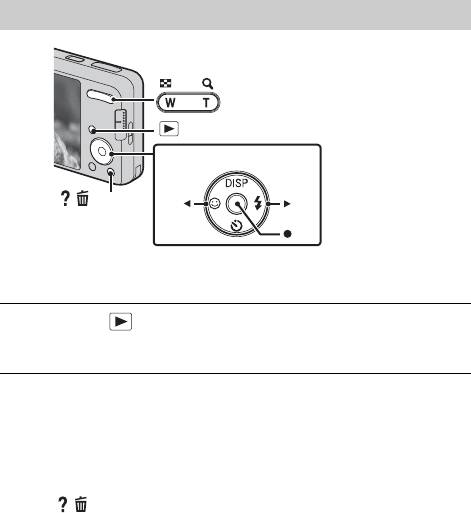
Viewing images
W: zoom out
T: zoom in
(Playback)
Control button
/ (Delete)
Select images: B (next)/b (previous)
Set: z
Press the (Playback) button.
1
• When images on a memory card recorded with other cameras are played
back on this camera, the registration screen for the data file appears.
x
Selecting next/previous image
Select an image with B (next)/b (previous) on the control button. Press z in
the center of the control button to view movies.
x
Deleting an image
1 Press / (Delete) button.
2 Select [This Image] with v on the control button, then press z.
x
Returning to shooting images
Press the shutter button halfway down.
GB
14
In-Camera Guide
This camera contains an internal function guide. This allows you to search the
camera’s functions according to your needs.
GB
/
(In-Camera Guide)
Press the / (In-Camera Guide) button.
1
• When viewing images, [Delete/In-Camera Guide] is displayed. Select
[In-Camera Guide].
Select a search method from [In-Camera Guide].
2
Shoot/playback guide: Search for various operation functions in
shooting/viewing mode.
Icon guide: Search the function and meaning of displayed icons.
Troubleshooting: Search common problems and their solution.
Objective guide: Search functions according to your needs.
Keyword: Search functions by key words.
History: Display the last 12 items displayed in [In-Camera Guide].
GB
15
Introduction of other functions
Other functions used when shooting or playing back can be operated using the
Control button or MENU button on the camera. This camera is equipped with
a Function Guide that allows you to easily select from the functions. While
displaying the guide, try the other functions.
Control
button
MENU
Function Guide
x
Control button
DISP (Screen Display Settings): Allows you to change the screen display.
(Self-Timer): Allows you to use the self-timer.
(Smile Shutter): Allows you to use the Smile Shutter mode.
(Flash): Allows you to select a flash mode for still images.
x
Menu Items
Shooting
REC Mode Select recording mode.
Scene Selection Select pre-set settings to match various scene conditions.
Easy Mode Shoot still images using minimal functions.
Movie shooting
Select Underwater mode or Auto when shooting movies.
scene (DSC-W570/
W580 only)
Panorama
Select Sweep Panorama mode or Underwater Sweep
Shooting Scene
Panorama mode when shooting panoramic images.
(DSC-W570/W580
only)
GB
16

Set the direction to pan the camera when shooting Sweep
Shooting Direction
Panorama images.
Image Size/
Select the image size for still images, panoramic images
Panorama Image
or movie files.
Size
Burst Settings Select single-image mode or burst mode.
EV Adjust the exposure manually.
GB
ISO Adjust the luminous sensitivity.
White Balance Adjust color tones of an image.
Underwater White
Adjust the color tones of an image shot underwater.
Balance (DSC-
W570/W580 only)
Focus Select the focus method.
Select the metering mode that sets which part of the
Metering Mode
subject to measure to determine the exposure.
Set to automatically detect shooting conditions in
Scene Recognition
Intelligent Auto mode.
Soft Skin Effect Set the Soft Skin Effect and the effect level.
Smile Detection
Set the Smile Shutter function sensitivity for detecting
Sensitivity
smiles.
Select to detect faces and adjust various settings
Face Detection
automatically.
Set DRO function to correct the brightness and contrast
DRO
and improve the image quality.
Set to automatically shoot two images and select image
Anti Blink
in which the eyes are not blinking.
In-Camera Guide Search the camera’s functions according to your needs.
GB
17
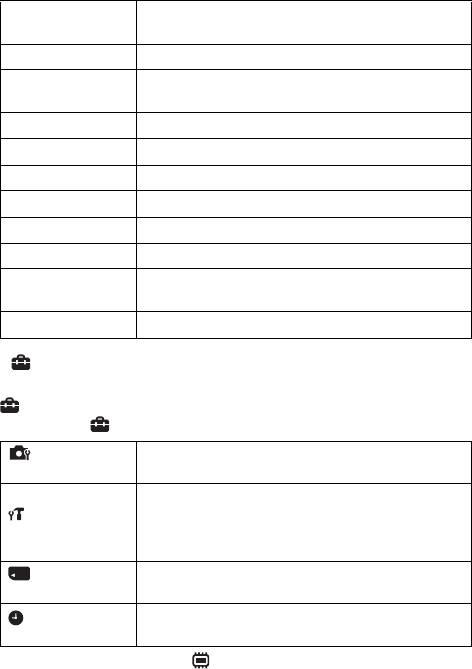
Viewing
Set the text-size increases and all indicators become
Easy Mode
easier to see.
Slideshow Select a method of continuous playback.
Send by
Sends images from a Memory Stick with TransferJet to
TransferJet
TransferJet-compatible devices.
View Mode Select the display format for images.
Retouch Retouch an image using various effects.
Delete Delete an image.
Protect Protect the images.
DPOF Add a print order mark to a still image.
Rotate Rotate a still image to the left or right.
Select a folder which contains the images you want to
Select Folder
play back.
In-Camera Guide Search the camera’s functions according to your needs.
x
Setting items
If you press the MENU button while shooting or during playback,
(Settings) is provided as a final selection. You can change the default
settings on the (Settings) screen.
AF Illuminator/Grid Line/Disp. Resolution/Digital
Shooting Settings
Zoom/Auto Orientation/Red Eye Reduction/Blink Alert
Beep/Language Setting/Function Guide/Display color/
Demo Mode/Initialize/COMPONENT/Video Out/USB
Main Settings
Connect/LUN Setting/Download Music/Empty Music/
Power Save/TransferJet/Eye-Fi
Format/Create REC. Folder/Change REC. Folder/Delete
Memory Card Tool
*
REC. Folder/Copy/File Number
Area Setting/Date & Time Setting
Clock Settings
* If a memory card is not inserted, (Internal Memory Tool) will be displayed and
only [Format] and [File Number] can be selected.
GB
18
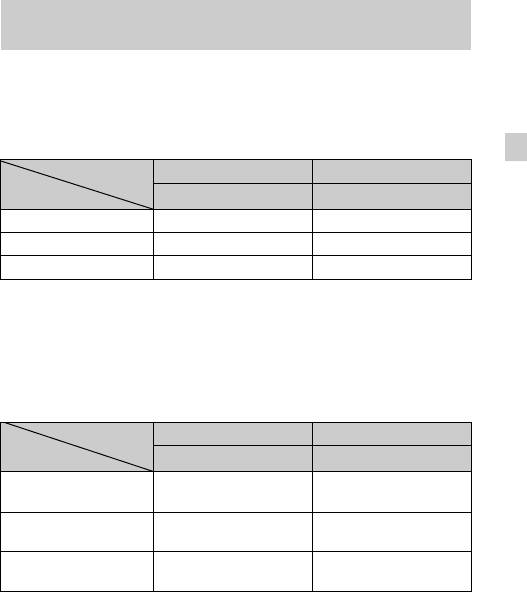
Number of still images and recordable time of
movies
The number of still images and recordable time may vary depending on the
shooting conditions and the memory card.
x
Still images
(Units: Images)
GB
Capacity
Internal memory Memory card
Size
Approx. 27 MB 2 GB
16M 3 265
VGA 165 11500
16:9(12M) 4 325
x
Movies
The table below shows the approximate maximum recording times. These are
the total times for all movie files. Continuous shooting is possible for
approximately 29 minutes. The maximum size of a movie file is up to
approximately 2 GB.
(h (hour), m (minute), s (second))
Capacity
Internal memory Memory card
Size
Approx. 27 MB 2 GB
1280×720(Fine) — 25m
(20m)
1280×720(Standard) — 40m
(25m)
VGA 1m
1h 20m
(45s)
(1h)
The number in ( ) is the minimum recordable time.
• The recordable time of movies varies because the camera is equipped with VBR
(Variable Bit Rate), which automatically adjusts image quality depending on the
shooting scene. When you record a fast-moving subject, the image is clearer but
the recordable time is shorter because more memory is required for recording.
The recordable time also varies depending on the shooting conditions, the subject
or the image size settings.
GB
19
Notes on using the camera
Changing the language setting
To change the language setting, press MENU t (Settings) t (Main
Settings)
t [Language Setting].
On use and care
Avoid rough handling, disassembling, modifying, physical shock, or impact such as
hammering, dropping or stepping on the product. Be particularly careful of the lens.
Functions built into this camera
This manual describes each of the functions of TransferJet-compatible/incompatible
devices.
To check if your camera supports the TransferJet function, check for the following
mark on the bottom of the camera.
TransferJet-compatible device: (TransferJet)
Notes on recording/playback
• Before you start recording, make a trial recording to make sure that the camera is
working correctly.
• The camera is neither dust-proof, nor splash-proof, nor water-proof.
• Avoid exposing the camera to water. If water enters inside the camera, a
malfunction may occur. In some cases, the camera cannot be repaired.
• Do not aim the camera at the sun or other bright light. It may cause the
malfunction of the camera.
• If moisture condensation occurs, remove it before using the camera.
• Do not shake or strike the camera. It may cause a malfunction and you may not be
able to record images. Furthermore, the recording media may become unusable or
image data may be damaged.
Do not use/store the camera in the following places
• In an extremely hot, cold or humid place
In places such as in a car parked in the sun, the camera body may become
deformed and this may cause a malfunction.
• Under direct sunlight or near a heater
The camera body may become discolored or deformed, and this may cause a
malfunction.
• In a location subject to rocking vibration
• Near a location that generates strong radio waves, emits radiation or is strongly
magnetic place. Otherwise, the camera may not properly record or play back
images.
• In sandy or dusty places
Be careful not to let sand or dust get into the camera. This may cause the camera to
malfunction, and in some cases this malfunction cannot be repaired.
GB
20
Оглавление
Аннотации для Цифрового Фотоаппарата Sony DSC-W570 Silver в формате PDF
Топ 10 инструкций
Другие инструкции
Инструкция
Посмотреть инструкция для Sony Cybershot DSC-W570 бесплатно. Руководство относится к категории фотокамеры, 8 человек(а) дали ему среднюю оценку 7.6. Руководство доступно на следующих языках: русский, английский. У вас есть вопрос о Sony Cybershot DSC-W570 или вам нужна помощь?
Задайте свой вопрос здесь
Часто задаваемые вопросы
Не можете найти ответ на свой вопрос в руководстве? Вы можете найти ответ на свой вопрос ниже, в разделе часто задаваемых вопросов о Sony Cybershot DSC-W570.
Какой вес Sony Cybershot DSC-W570?
Sony Cybershot DSC-W570 имеет вес 100 g.
Какая высота Sony Cybershot DSC-W570?
Sony Cybershot DSC-W570 имеет высоту 51.5 mm.
Какая ширина Sony Cybershot DSC-W570?
Sony Cybershot DSC-W570 имеет ширину 91 mm.
Какая толщина Sony Cybershot DSC-W570?
Sony Cybershot DSC-W570 имеет толщину 19.1 mm.
Какой размер экрана Sony Cybershot DSC-W570?
Размер экрана Sony Cybershot DSC-W570 составляет 2.7 «.
Инструкция Sony Cybershot DSC-W570 доступно в русский?
Да, руководствоSony Cybershot DSC-W570 доступно врусский .
Не нашли свой вопрос? Задайте свой вопрос здесь