
Инструкция, как подключить камеру IMILAB EC2 Home Security Camera к телефону
08.07.2021
Организовать полноценное видеонаблюдение за домом возможно только в том случае, если установить хорошую IP-камеру. Устройство должно обладать широким углом обзора, обеспечивать четкую и контрастную картинку, а также быть устойчивым к воздействию атмосферных факторов. Всем этим требованиям соответствует IP-камера Xiaomi IMILAB EC2 Home Security Camera, о подключении которой к

Теперь требуется выбрать точку доступа Wi-Fi 2,4 ГГц, через которую будет организовано подключение, ввести пароль и кликнуть по кнопке «Далее». Через несколько секунд появится возможность выбора места расположения шлюза и его переименования.
В плагине шлюза следует выбрать пункт Add Camera. Если такого пункта вы не находите, то кликните по значку «+», который будет находиться в верхней части экрана.
На следующем этапе вам необходимо поднести IP-камеру поближе к шлюзу и удержать кнопку включения на несколько секунд. После этого на экране поставьте галочку и нажмите на «Далее».
Вам остается немного подождать, после чего подключение IMILAB EC2 к телефону будет завершено.
IMILAB Wire-Free Home Security Camera &
IMILAB Wire-Free Camera GateWay

User Manual
Read this manual carefully before use, and retain it for future reference
Product Overview

Note: The protective film of PIR sensor is easy to be scratched, do not touch it easily. Slight wear will not affect the use.

Note: Use MicroSD cards produced by reliable manufacturers (maximum support capacity is 64G, only support FAT32 format).
It is recommended that the memory card read and write speed should be no lower than UI/Class10.
Note: Install the gateway between the router and the camera.
Packing content: IMILAB Wire-Free Home Security Camera, IMILAB Wire-Free Camera GateWay, network cable, power cord, wall mounting accessories pack (including expansion screw pack), power adapter, user manual, camera bracket.
Product Installation
Within the coverage of gateway signal, IMILAB Wire-Free Home Security Camera can be installed indoor using wall accessories or outdoor, without power socket. Place gateway nearby router, distance between camera and gateway should be 1-15 meters (no shelter or interference).
Installation on wall
- Drill two holes on the wall by using the XX of the camera as a template. It is recommended that you mark the locations of the holes with a pencil before drilling. The diameter of each hole is approximately 0.6cm, and the depth is approximately 2.5cm.

- Insert the two anchors in the holes on the wall.

- Make sure to position the gasket and then secure it in place by tightening the screws into the plastic anchors.

- Match the grooves on the bottom of the camera with the raised area on the gasket. Press down until the two surfaces a re flush, then turn the camera in either direction to lock it in position.


When mounting the security camera on a wall:
- To prevent accidental injury, the device must be securely anchored to the wall following the instructions. The wall must be able to support at least triple the product’s total weight.
- Don’t install device near any heat source such as air conditioner external unit, air outlet of both range hood and gas water heater, etc.
- Don’t place device in rainly environment to work for long time.
Note: If the device is not installed following the instructions, damage caused thereof is not covered under the warranty.
Turning the Gateway On
Gateway power on
Step one: Connect one end of the power cord into the USB port at the back of gateway and the other end into the power.

Step two: After electrified, check gateway status according to indicator status. Yellow light indicates that the gateway is starting up; flashing yellow light indicates that the gateway is waiting for connection.
Connect with Mi Home / Xiaomi Home App
This product works with Mi Home / Xiaomi Home app*.
Control your device with Mi Home / Xiaomi Home app. Scan the QR code to download and install the app. You will be directed to the connection setup page if the app is installed already. Or search «Mi Home / Xiaomi Home» in the app Store to download and install it.
Open Mi Home / Xiaomi Home app, tap «+» on the upper right, and then follow prompts to add your device.
* The app is referred to as Xiaomi Home app in Europe (except for Russia). The name of the app displayed on your device should be taken as the default.
http://home.mi.com/do/index.html?model=chuangmi.gateway.ipc011
Note: The version of the app might have been updated, please follow the instructions based on the current app version.
Note:
The diagram is for reference only. Actual displays will vary based on diPerent versions of the Mi Home platform and your smartphone model. Configure the account and password of wireless network following the instructions in the app. Blue light indicates that gateway is connected, flashing yellow light indicates that connection failed.After wireless network is configured, the gateway will automatically switch to wired connection when users connect the network cable into the interface at the back of gateway, network transmission rate and stability can be improved.
- Gateway/Camera reset
Gateway: Long press the reset button for 8 seconds, indicator flashes yellow, gateway is successfully reset. Camera: Long press the power button for 8 seconds, indicator flashes blue, camera is successfully reset. - Add camera
Click «IMILAB Wire-Free Camera GateWay» in the home page of Mi via app to enter Add Camera page, click «Add now», long press the camera power button for 2 seconds, then the camera is ready to connect, the indicator is flashing blue; click «Next», then the gateway is ready to connect, the indicator is flashing blue. Connect the camera following the steps in the App. If successfully connected, APP will prompt «Connected». When connecting and in use, keep a distance of over 1 meter between the camera and the gateway.
Note: The diagram is for reference only. Actual displays will vary based on diPerent versions of the Mi Home platform and your smartphone model.
About works with mijia
“works with mijia” signifies that the product herein is designed to connect and interact with Mi Home app or Mi Al. Please be noted that the product herein is certified by the app interaction only. Xiaomi and Mijia are not responsible for any of the product manufacturing, safety and regulatory standards, or quality supervision.
lndicator Light
- Gateway indicator status (connect with Mi via app)
| Device status | Light status |
| Power plugged in | Steady yellow on |
| Connecting | Flashing blue |
| Connected | Steady blue on |
| Waiting for connection/ Connection failed | Flashing yellow |
- Gateway indicator status (quick connect with camera)
| Device status | Light status |
| Waiting for connection/ Connecting | Blue light flash |
| Connected | Blue lig ht |
- Camera indicator status
| Device status | Light status |
| Connecting | Blue light flash |
| Connected | Steady blue on for 5 seconds then off |
| Cha rging | Steady red on |
| Charging complete | Steady green on |
- Gateway reset button
Reset: Long press for 8 seconds, if the indicator flashes yellow, that means the gateway is sucessfully reset. - Camera power button
Power on: Long press for 2 seconds, if the indicator flashes tgreen once, that means the camera is on.
Power off: Long press for 2 seconds, if the indicator flashes red once, that means the camera is off.
Reset: Long press for 8 seconds, if the indicator flashes blue, tthat means the camera is successfully reset.
Playback
Playback feature is only available after a compatible microSD card is installed in the gateway. Once a MicroSD card has been installed and the security camera is turned on, videos will be recorded automatically. In the IMILAB Wire-Free Home Security Camera control interface in the Mi via app, click «Playback» to enter the page, then select the time period you wish to view.
Real-Time Monitoring
Launch the Mi jia app and select a connected «IMILAB Wire-Free Home Security Camera»-«IMILAB Wire-Free Camera Gateway» to monitor the surroundings in real- time. Throug h the camera’s control interface, users can perform screen capture, screen record and remote communication, etc.
Note: The diagram is for reference only. Actual displays will vary based on diPerent versions of the Mi Home platform and your smartphone model.
Supporting Infrared Night Vision
The camera will be automatically switched to night vision mode by IR-CUT according to the ambient light changes that captured by the photosensor. With the incorporation of eight infrared illuminators, the security camera is able to view up to a distance of 9m and capture crystal clear images in the dark.

Infrared night vision mode sample
Note: The diagram is for reference only. Actual displays will vary based on diPerent versions of the Mi Home platform and your smartphone model.
Shared Remote Viewingt
Through the IMILAB Wire-Free Home Security Camera control interface in the Mi via app, you can set your security camera as a shared device under the General Settings menu, and invite your friends to view the camera remotely. Your friends will be required to download the Mi via app and log in with his/her Xiaomi account.

Note: The diagram is for reference only. Actual displays will vary based on different versions of the Mi Home platform and your smartphone model.
Automatic Monitorinq
- Configure this feature through the Mi jia app » IMILAB Wire- Free Camera GateWay «- » IMILAB Wire-Free Home Security Camera » -«Automatic Monitoring».
- This device is able to detect movements within its field of view. Once movements are detected, a video is recorded and you will receive a notification. Users can customize the security time and set the alarm sensitivity, time interval, etc.


Precautions
- The suitable operationg temperature range for this product is between -20OC-50°C. Don’t use the product in an environment with temperatures above or below the specified range.
- When charging, the operating tempreture range for this product is between 0°C- 45°C. Don’t charge the product in an environment with temperatures above or below the specified range.
- Using the product in a low tempreture environment or charging status will affect its stand by time. The actual standby time is related to the user’s environment and habbit.
- To improve the product’s performance, please do not place the cameralens facing or next to a reflective surface, such as glass windows/doors and white walls, which will cause the image to appear overly bright inareas close to the camera and darker in areas further away, or cause thecamera to produce white images.
- Please install the product in areas with Wi-Fi reception, and try to place the device where the Wi-Fi signal is strong. In addition, please keep the security camera away from metal structures, microwave ovens, or other locations where signal strength may be impacted.
- Don’t replace the battery in camera yourself—if not properly replaced, there is a danger of explosion.
- Battery (battery pack or batteries) must not be exposed to sunlight, fire, or similar overheating conditions.
- This product is a low power consumption camera with battery built-in. Don’t use Real-Time Monitoring feature for long time when charging, in order to avoid battery life loss.
All diagrams are for reference only. The auctual profuct may be slightly diPerent with the diagrams due to the updates and upgrades, please prevail in kind.
Specifications
Name: IMILAB Wire-Free Home Security Camera
Lens Angie: 120°
Resolution: 1080P
Power Input: 5 V 2 A
Item Dimensions: l 40.4 x 47 x 73 mm
Operating Temperature: -20 °C ∼ 50 °C
Model: CMSXj11A
Aperture: F 2.6
Net Weig ht: 270 g
Video Encoding: H.264
Name: IMILAB Wire-Free Camera GateWay
Power Input: 5 V 2 A
Item Dimensions: 75 x 75 x 27 mm
Expandable Memory: MicroSD card (up to 64 GB)
Wireless Connectivity: Wi-Fi IEEE 802.11 b/g/n 2.4 GHz
Wired Connection: A 10/100M Self-adaptive ethernet interface
Model: CMSXj11AG
Net Weight: 65 g
IMILAB Technology Company
Support: [email protected]
For further information, visit: www.imilab.net.au
Business cooperation: [email protected]
Documents / Resources
Documents — imilab – CMSXJ11A,EC2
| [pdf]
|
|
| [pdf] Instructions Инструкция по эксплуатации Imilab CMSXJ11A mi house ru asserts instructions 1147 1 2730 Xiaomi Mijia Smart Camera Xiaomi Mijia Smart Camera PIR … . , , . . , . : Xiaobai Camera / Mijia Smart Camera : CMSXJ11A : 5V/2A : 140.4 47 73 : 270 . : F/2.6 : 1920 1080 : -20 50 : H. 264 : Wi-… lang:en score:40 filesize: 441.32 K page_count: 8 document date: 2021-08-18 |
|
| [pdf] Specifications Catalog xiaomi imilab ec2 smart wireless outdoor camera LEDoutlet fi Milab EC2 a IP that requires no drilling or wiring to operate It is enough mount it e g on wall and configure SKU XIOMIEC2 ledoutlet led bildes LEDAKCIJAS CE ||| XIAOMI IMILAB EC2 SMART WIRELESS OUTDOOR CAMERA WITH GATEWAY CMSXJ11A CMSXJ11AG EAN Code EAN Code: 6971085317878 Catalog index: ZAMSPEAOMAR00108 Vendor code: CMSXJ11A CMSXJ11AG Milab EC2 — a wireless outdoor IP camera that requires no drilling or wiring to operate. It is enough to mount it e.g. on… lang:en score:39 filesize: 57.29 K page_count: 2 document date: 2021-04-21 |
|
| [pdf] User Manual Installation Guide Accessories IMILAB EC2 User Manual Xiaomi Wireless Home Security Camera Set 1080P EU 2 MP 1080p ▻ IP камера Уличная купить в GEEK MD geek md index route product lang ru id 1845 ||| IMILAB Wire-Free Home Security Camera IMILAB Wire-Free Camera GateWay User Manual Read this manu … ail in kind. Specifications Name: IMILAB Wire-Free Home Security Camera Lens Angle: 120 Model: CMSXJ11A Resolution: 1080P Aperture: F 2.6 Power Input: 5 V 2 A Net Weight: 270 g Item Dimensio… lang:en score:34 filesize: 188.72 K page_count: 20 document date: 2022-06-14 |
|
| [pdf] User Manual Installation Guide Accessories IPC011 A01 V2 2 0922 IMILAB Wire Free Home Security Camera User Manual original media s bol 7p04nEJXQy9Q ||| IMILAB Wire-Free Home Security Camera User Manual Read this manual carefully before use, and retain … r your body. Specifications Name: IMILAB Wire-Free Home Security Camera Lens Angle: 120 Model: CMSXJ11A Resolution: 1080P Aperture: F 2.6 Video Encoding: H.264 Net Weight: 270 g Power Input:… lang:en score:33 filesize: 185.57 K page_count: 1 document date: 2020-10-24 |
|
| [pdf] User Manual Installation Guide Accessories IPC011 A01 V2 2 0922 IMILAB Wire Free Home Security Camera GateWay User Manual original media s bol gnnxDpkmWEJl ||| IMILAB Wire-Free Home Security Camera IMILAB Wire-Free Camera GateWay User Manual Read this manu … ail in kind. Specifications Name: IMILAB Wire-Free Home Security Camera Lens Angle: 120 Model: CMSXJ11A Resolution: 1080P Aperture: F 2.6 Power Input: 5 V 2 A Net Weight: 270 g Item Dimensio… lang:en score:33 filesize: 174.92 K page_count: 20 document date: 2020-09-24 |
|
| [pdf] Datasheet Accessories I r ART 2783 EC2 GATEWAY lostechgp datasheet CAT Lostech Quando si monta la telecamera di sicurezza su una parete Per evitare lesioni accidentali il dispositivo deve essere saldamente ancorato alla parete Controlla tuo con Mi Home Xiaomi app Scansiona codice QR per Contenuto della confezione IMILAB Wireless ||| IMILAB EC2 Wireless Home Security Camera IMILAB EC2 Wireless Camera Gateway Manuale d uso Legge … Specifiche Nome: IMILAB EC2 Wireless Home Security Camera Angolo dell obiettivo: 120 Modello: CMSXJ11A Risoluzione: 1080p Apertura: F 2.6 = Ingresso alimentazione: 5 V 2 A Peso netto: 270 g … lang:it score:32 filesize: 1.54 M page_count: 2 document date: 2020-12-17 |
|
| [pdf] User Manual Installation Guide Accessories IPC011多国语言 小白智能摄像机电池盒 说明书 IMILAB EC2 Wireless Home Security Camera works with mijia signifies that the product herein is designed to connect and interact Mi app or AI Please be noted certified by interaction only Xiaomi Mijia are not responsible for any of manufacturing safety regulatory standards quality supervision 2021040813736 imilabhelp u file fileUpload 2021 04 08 CONTENTS English 01 22 Deutsche 23 44 Español 45 66 Italiano 67 88 Français 89 111 Pусский 112 133 ||| IMILAB EC2 Wireless Home Security Camera IMILAB EC2 Wireless Camera Gateway User Manual EN DE ES I … l in kind. Specifications Name: IMILAB EC2 Wireless Home Security Camera Lens Angle: 120 Model: CMSXJ11A Resolution: 1080P Aperture: F 2.6 Power Input: 5 V 2 A Net Weight: 270g Item Dimension… lang:en score:32 filesize: 4.22 M page_count: 136 document date: 2020-03-05 |
|
| [pdf] User Manual Installation Guide Accessories IPC011 A01小白智能摄像机电池版 说明书V2 2 0922 IMILAB Wire Free Home Security Camera User Manual Read this manual carefully before use and retain it for future reference Product Overview Lens PIR sensor MIC A1OmtRk8MyS m media amazon images I IMILAB Wire-Free Home Security Camera User Manual Read this manual carefully before use, and retain … r your body. Specifications Name: IMILAB Wire-Free Home Security Camera Lens Angle: 120 Model: CMSXJ11A Resolution: 1080P Aperture: F 2.6 Video Encoding: H.264 Net Weight: 270 g Power Input:… lang:en score:31 filesize: 1.31 M page_count: 1 document date: 2019-07-31 |
|
| [pdf]
|
|
| [pdf] User Manual Installation Guide Accessories IPC011 A01小白智能摄像机电池版 说明书V2 2 0922 Users Manual Shanghai Imilab Technology Co Ltd IPC011AG IMILAB Wire Free Camera Gateway 2APA9 2APA9IPC011AG ipc011ag IMILAB Wire-Free Home Security Camera IMILAB Wire-Free Camera GateWay User Manual Read this manua … r your body. Specifications Name: IMILAB Wire-Free Home Security Camera Lens Angle: 120 Model: CMSXJ11A Resolution: 1080P Aperture: F 2.6 Video Encoding: H.264 Net Weight: 270 g Power Input:… lang:en score:31 filesize: 1.3 M page_count: 1 document date: 2019-07-05 |
|
| [pdf] User Manual Installation Guide Accessories Catalog IPC011 A01小白智能摄像机电池版 说明书V2 2 0922 IMILAB Wire Free Camera GateWay User Manual 011ec2usermanual 61136cf02f5e0 getic lt files catalogue 3211 ||| IMILAB Wire-Free Home Security Camera IMILAB Wire-Free Camera GateWay User Manual Read this manu … ail in kind. Specifications Name: IMILAB Wire-Free Home Security Camera Lens Angle: 120 Model: CMSXJ11A Resolution: 1080P Aperture: F 2.6 Power Input: 5 V 2 A Net Weight: 270 g Item Dimensio… lang:en score:30 filesize: 1.29 M page_count: 20 document date: 2019-09-06 |
|
| [pdf]
|
|
| [pdf] User Manual Installation Guide Accessories IPC011 A01小白智能摄像机电池版 说明书V2 2 0922 IMILAB Wire-Free Home Security Camera pack power adapter user manual camera bracket USB charging port MicroSD slot Reset button Cable interface Status indicator Cooling holes Note Use cards produced by reliable manufacturers maximum support capacity is 64G only FAT32 format It recommended that the memory card read and write speed should be no lower than A1A26Q7 CuL m media-amazon images I IMILAB Wire-Free Home Security Camera IMILAB Wire-Free Camera GateWay User Manual Read this manu … ail in kind. Specifications Name: IMILAB Wire-Free Home Security Camera Lens Angle: 120 Model: CMSXJ11A Resolution: 1080P Aperture: F 2.6 Power Input: 5 V 2 A Net Weight: 270 g Item Dimensio… lang:en score:26 filesize: 1.71 M page_count: 20 document date: 2020-06-08 |
|
| [pdf]
|
|
| [pdf] User Manual Installation Guide Frequently Asked Questions Accessories Catalog IPC011 A01小白智能摄像机电池版 说明书V2 2 0922 IMILAB Wire Free Home Security Camera GateWay User Manual Ipc011 a01小白智能摄像机电池版 说明书v2 Banggood Xiaomi in the app Store to and install it Open Mi tap on upper right then follow prompts add your device * The is referred as Europe except for Russia name of displayed should be taken default Read this manual carefully before use retain future reference Product Overview Front view Lens Photosensor Loudspeaker MIC Rear PIR sensor Status indicator Power Base USB port Adjust camera 39 s field FOV by rotating Note protective film easy scratched do not touch easily Mijia are responsible any product manufacturing safety regulatory If successfully connected APP will prompt Connected When connecting keep a distance over 1 meter between gateway works with mijia signifies that herein designed pack power adapter user bracket charging MicroSD slot Reset button Cable interface r 011ec2usermanual 61136cf02f5e0 201912160123571011en XiaomiIMILABEC2Wire FreeOutdoorCamera FAQ eurodk lv files catalogue 3211 myos 3 banggood products 20191216 panmi au 2020 11 2021 01 IMILAB Wire-Free Home Security Camera IMILAB Wire-Free Camera GateWay User Manual Read this manu … ail in kind. Specifications Name: IMILAB Wire-Free Home Security Camera Lens Angle: 120 Model: CMSXJ11A Resolution: 1080P Aperture: F 2.6 Power Input: 5 V 2 A Net Weight: 270 g Item Dimensio… lang:en score:25 filesize: 1.65 M page_count: 20 document date: 2019-09-06 |
|
| [pdf] User Manual Installation Guide Accessories IPC011 A01小白智能摄像机电池版 说明书V2 2 0922 User Manual Amazon Security Camera Outdoor Wireless WiFi IMILAB EC2 1080P FHD Home System with Battery Infrared Gateway Night Vision IP66 Cloud Storage Micro SD Card A1 LC5IUy3L m media amazon images I ||| IMILAB Wire-Free Home Security Camera IMILAB Wire-Free Camera GateWay User Manual Read this manual carefully before use, and retain it for future reference Product Overview Lens PIR sensor MIC Photosensor Loudspeaker Status indicator Front view Rear view Power USB port Base Adjust the c… lang:en score:22 filesize: 1.71 M page_count: 20 document date: 2020-10-13 |
|
| [pdf]
|
|
| [pdf] User Manual Bánfi Péter HASZNÁLATI ÚTMUTATÓ Xiaomi IMILAB EC2 Home Security Camera és Gateway Manual HU v1 0 1 oldal A works with mijia jelzés garantálja hogy az adott termék 2fd82073af774681f99cba9e1856e05b xiaomi imilab ec2 manual hu mismart custom altereco image data srattached … lang:en score:20 filesize: 573.11 K page_count: 11 document date: 2021-05-13 |
|
| [pdf] User Manual IMILAB EC2 User Manual Wire Free Home Security Camera GateWay Read this manual carefully before use and retain it for future reference Product Overview Lens Users imilabonline Documents ||| … lang:en score:20 filesize: 1.2 M page_count: 20 document date: 2021-05-06 |
|
| [pdf] Test Report Microsoft Word RKSA181017001 00A FCC Part 15 247 2 4G Wi Fi baclks150 Test Report Shanghai Imilab Technology Co Ltd IPC011A IMILAB Wire Free Home Security Camera 2APA9 2APA9IPC011A ipc011a FCC PART 15.247 TEST REPORT For Shanghai Imilab Technology co.,LTD Room908,No.1,Lane399,Shengxia Rd. … 00A Applicant Tested Model Product Type Dimension Power Supply Shanghai Imilab Technology co.,LTD CMSXJ11A IMILAB Wire-Free Home Security Camera 140.4 mm L *47 mm W *73 mm H DC 5V; DC 3.63V from ba… lang:en score:19 filesize: 1.49 M page_count: 59 document date: 2019-07-31 |
|
| [pdf] Guide User Guide Amazon Security Camera Outdoor Wireless WiFi IMILAB EC2 1080P FHD Home System with Battery Infrared Gateway Night Vision IP66 Cloud Storage Micro SD Card C1JIEpnQ7RS m media amazon images I ||| … lang:en score:18 filesize: 5.81 M page_count: 1 document date: 2020-07-29 |
|
| [pdf]
|
|
| [pdf] User Manual Installation Manual Amazon Security Camera Outdoor Wireless WiFi IMILAB EC2 1080P FHD Home System with Battery Infrared Gateway Night Vision IP66 Cloud Storage Micro SD Card A1ahOMDltXL m media amazon images I ||| … lang:i-klingon score:15 filesize: 1.48 M page_count: 1 document date: 2020-07-29 |
|
| [pdf] User Manual Installation Guide admin notice Imilab EC2 Framboise 314 Untitled Read this manual carefully before use and retain it for future reference Product Overview Xiaomi Home in the app Store to install Jan 10 2021 — Loudspeaker Lens PIR sensor Status MIC indicator Front view Rear IMILAB Wireless Security Camera Gateway framboise314 fr 01 … lang:i-klingon score:14 filesize: 1.16 M page_count: 5 document date: 2021-01-07 |
|
| [pdf]
|
|
| [pdf]
|
|
| [pdf]
|
Related FCC IDs:
- 2APA9-IPC011A — Shanghai Imilab Technology Co.,Ltd. IMILAB Wire-Free Home Security Camera [-IPC011A]
- 2APA9-IPC011AG — Shanghai Imilab Technology Co.,Ltd. IMILAB Wire-Free Camera Gateway [-IPC011AG]
tags: CMSXJ11A, EC2, EC2 Wire-Free Home Security Camera, EC2 Wire-Free Home Security Camera Gateway, EC2 Wire-Free Home Security Gateway, IMILAB, Wire-Free Home Security Camera Gateway,
Данную камеру взял в подарок товарищу, который живет в частном доме, а пока тестирую у себя.
Выбирал по его предпочтениям, чтобы была компактная, минимум проводов и простота установки, а так же оповещение об обнаружении движения. Поэтому выбрал я беспроводную камеру Imilab EC2.
Доставка из России была около 5 дней.
Характеристики
Бренд IMILAB
Модель EC2
Размер 140,4*47*73 мм
Вес 517 г
Питание 5V/2A
Угол 120 °
Фокусное расстояние F2.6
Рабочая температура -20 ℃ +50 ℃
Защита от воды IP66
Способ хранения Micro sd-карты (64 Гб макс., поддержка только формата FAT32)
Стандарт сжатия H.264
Беспроводной соединение WI-FI IEEE 802,11 b/g/n 2,4 ГГц
Емкость аккумулятора 5100 мАч
Упаковка обычная
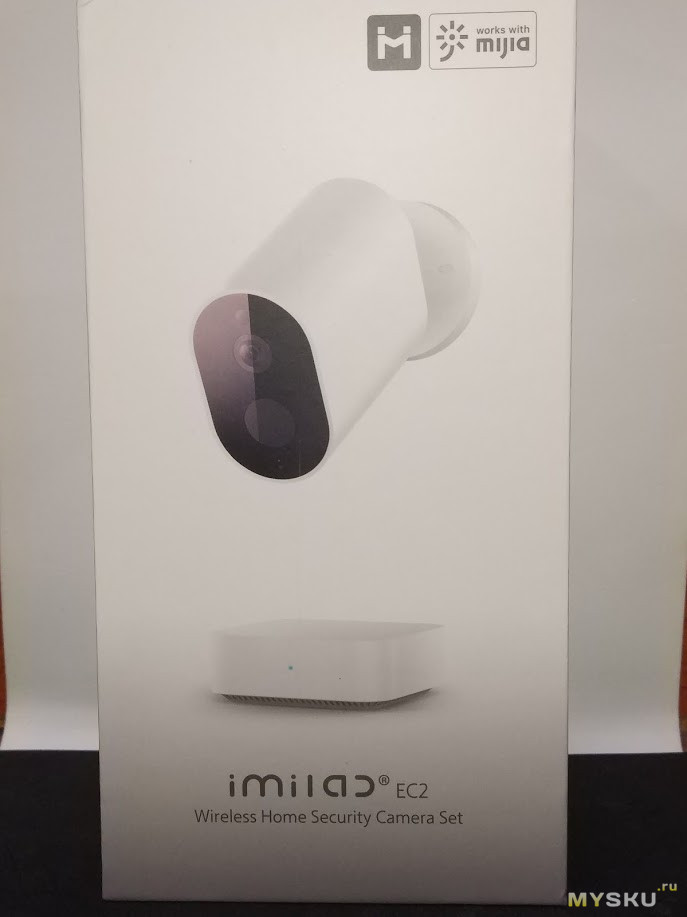
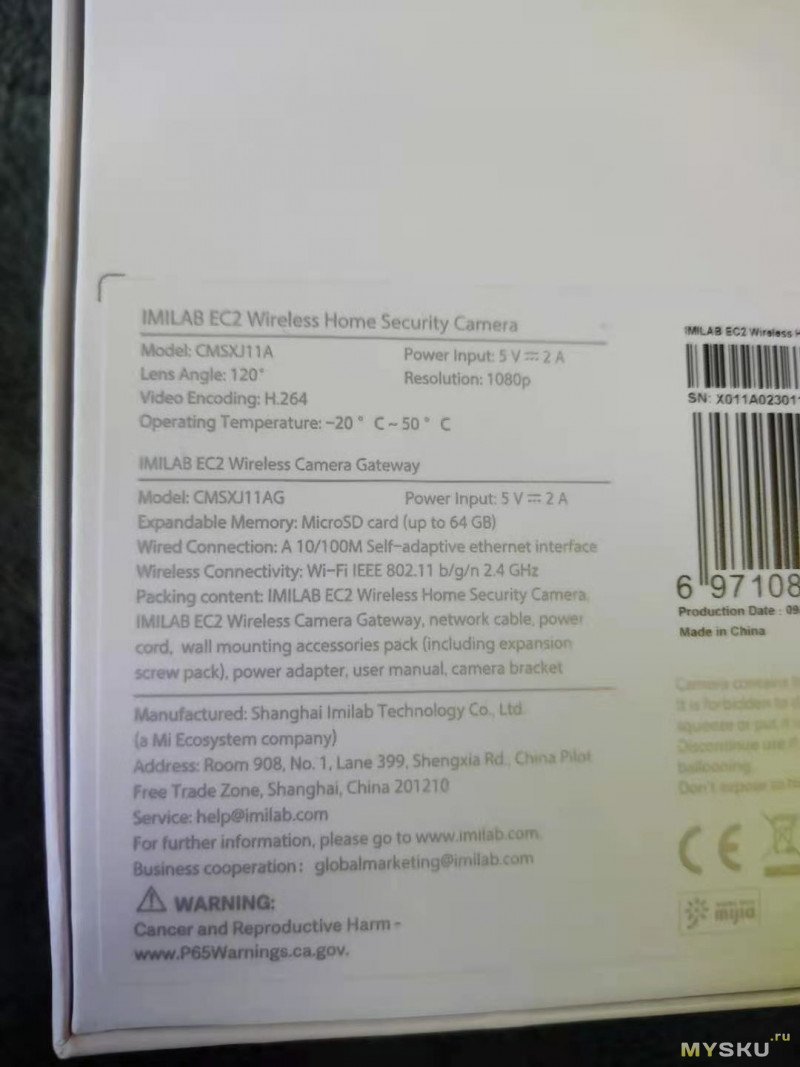
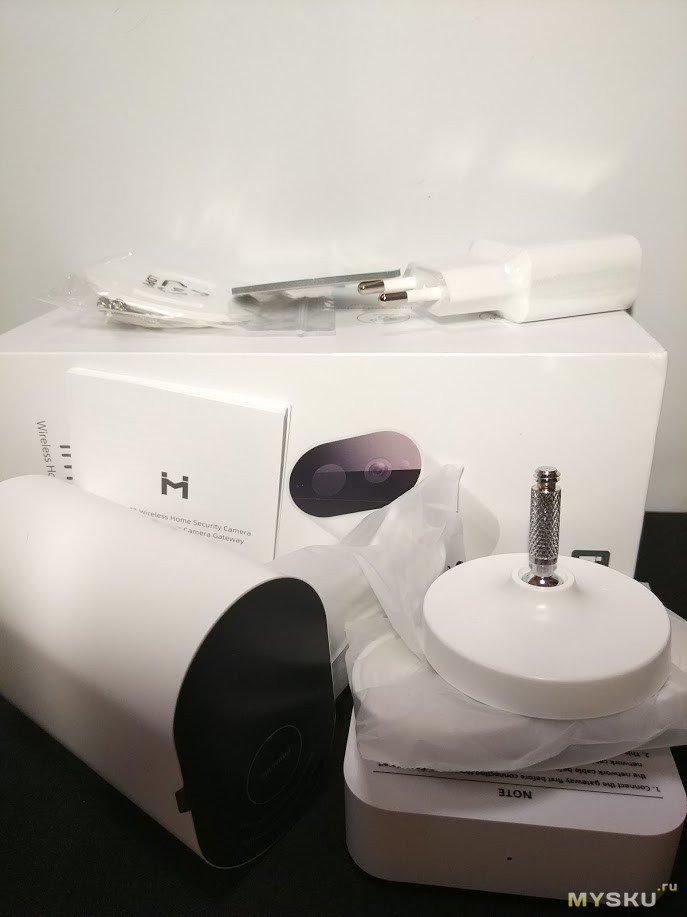
В комплекте Сама камера, шлюз, подвижное крепление, адаптер питания для шлюза европейского типа, саморезы для настенного крепления к стене, инструкция на английском.
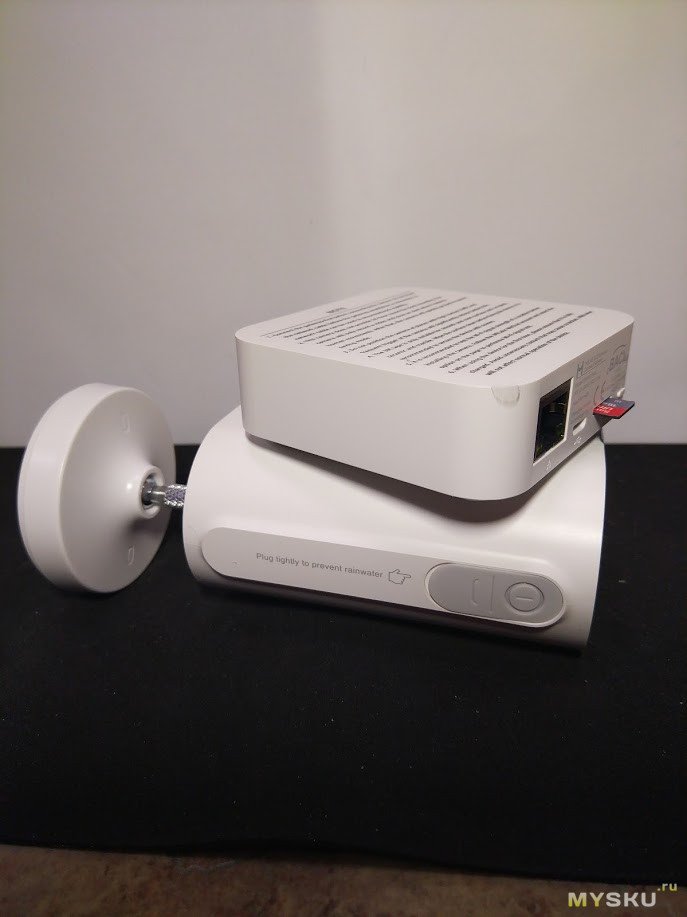
Версия глобальная, но подключал я ее к Китайскому серверу, так как у меня другие устройства от Xiaomi все подключены к нему.
Особенность глобальной версии в том, что к одному шлюзу можно подключить 4 камеры, но если использовать Китайский сервер, то подключить можно только одну камеру.
Процесс подключения простой, камера работает с приложением Mi Home, для начала нужно зарядить камеру, вставить в шлюз карту памяти Micro SD (написано поддерживается карты памяти до 64GB, но говорят, что и 128GB работает, главное чтобы система была FAT32), затем подключить шлюз к питанию и когда заморгает синий светодиод, то он появится в приложении Mi Home. WiFi должен быть только 2,4GHz
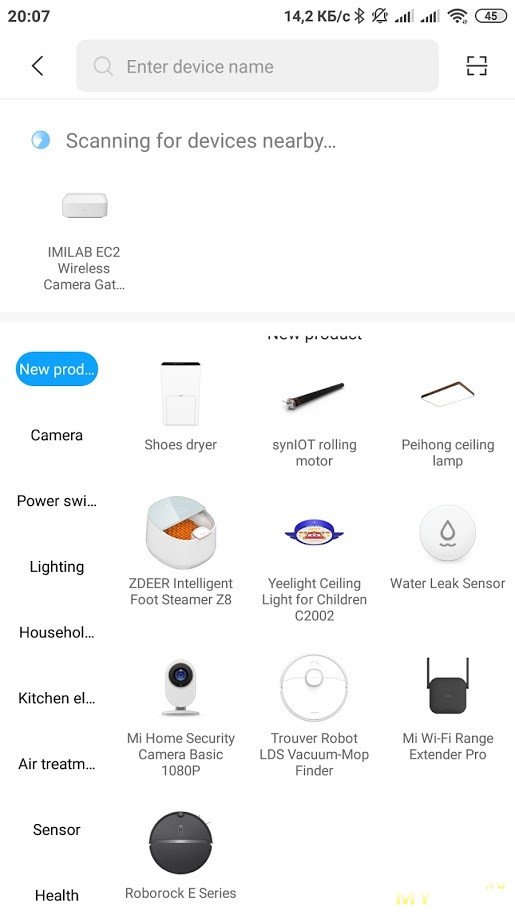
Затем нажать на камере кнопку питания на 2 секунды и подождать когда замигает синий индикатор, в приложении нажать далее и камера подключена
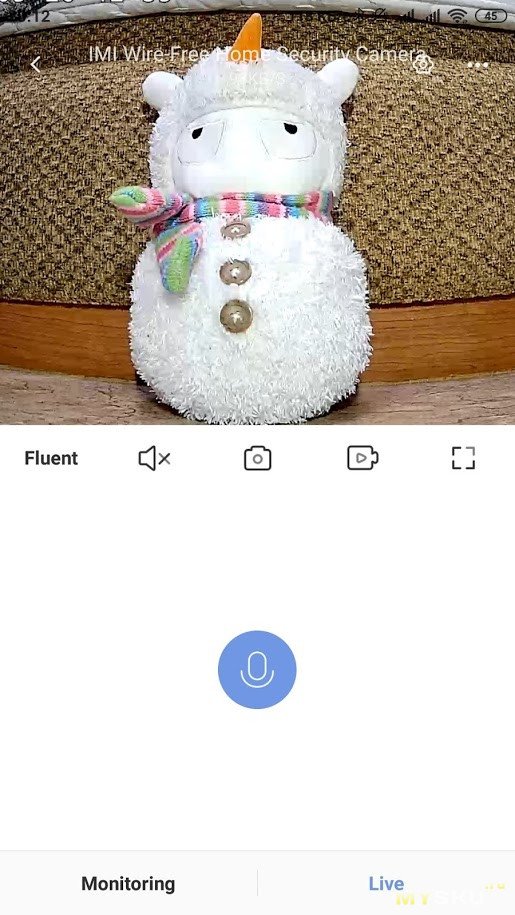
Изображение сразу выводится на экран телефона
Качество изображения хорошее, конечно можно было бы и получше, при хорошем освещении изображение лучше. В темноте камера сама переключается в режим ночного видения
При среднем, не очень хорошем освещении картинка выглядит так:
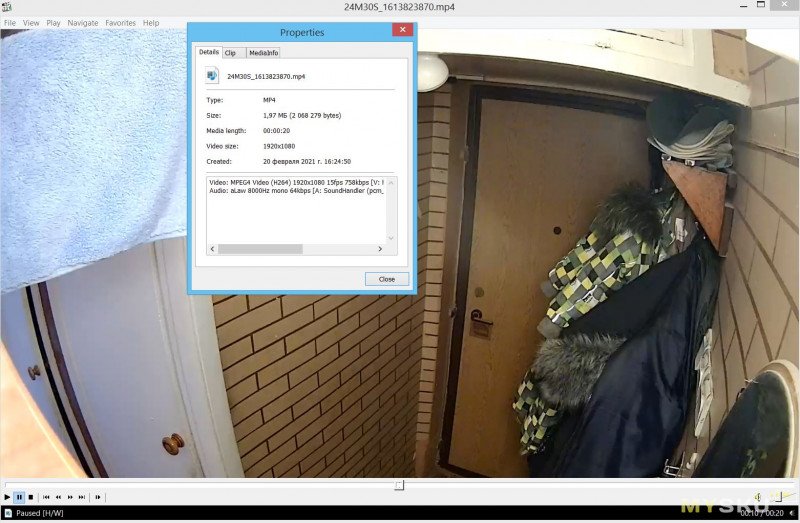
В полной темноте:
Размер файла при 20 секундном видео около 2мб, разрешение 1920х1080, В самом приложении можно выбрать запись видео от 10 до 30 секунд, с интервалом в 5 секунд. Запись начинается только при обнаружении движения, в остальное время запись не ведется, нет такой настройки. Можно выбрать в настройках, чтобы камера отправляла оповещение на телефон при обнаружении любого движения или при обнаружении только человека. При этом приходит оповещение и 10 секундное видео, которое хранится в облаке до 7 дней. Если не включать оповещение, то все видео файлы, записанные при обнаружении движения хранятся на карте памяти. При размере файла 2-3мб любой карты памяти хватит надолго.
В любой момент к камере можно подключится онлайн с телефона и посмотреть что происходит на данный момент в зоне наблюдения.
Камера имеет встроенный микрофон и динамик, так что можно даже переговариваться с помощью нее.
Как заявлено у продавца, что батареи хватает на 4 месяца, я не могу точно сказать, но за неделю у меня ушло 15% при среднем обнаружении движения.
Под водой камера естественно не может работать, но дождь и снег вполне выдержит, внизу стоит силиконовая заглушка.
Из плюсов:
компактный размер, возможность установки самой камеры абсолютно в любом месте, без проводов и сверления, довольно качественная картинка, оповещение об обнаружении движения только человека, заряда действительно должно хватить минимум на месяц, легкая зарядка даже от Power Bank, двусторонняя связь.
Из минусов:
нельзя поворачивать камеру онлайн из приложения, все же нужно использовать шлюз к камере и подключать к питанию, нет выбора непрерывной записи видео 24/7, хотя это наверное разрядило бы аккумулятор очень быстро.
Не судите строго обзор, только учусь, если есть вопросы, то постараюсь ответить пока камера у меня.
В магазине есть скидка 18 долларов сейчас по коду RUDK55
- June 6, 2024
- IMILAB
Table of Contents
- Product Overview
- Product Installation
- Turning the Gateway On
- Connect with Mi Home / Xiaomi Home App
- About works with mijia
- lndicator Light
- Playback
- Real-Time Monitoring
- Supporting Infrared Night Vision
- Shared Remote Viewingt
- Automatic Monitorinq
- Precautions
- Specifications
- Read User Manual Online (PDF format)
- Download This Manual (PDF format)
IMILAB Wire-Free Home Security Camera &
IMILAB Wire-Free Camera GateWay
User Manual
Read this manual carefully before use, and retain it for future reference
Product Overview
Note: The protective film of PIR sensor is easy to be scratched, do not touch
it easily. Slight wear will not affect the use.
Note: Use MicroSD cards produced by reliable manufacturers (maximum
support capacity is 64G, only support FAT32 format).
It is recommended that the memory card read and write speed should be no lower
than UI/Class10.
Note: Install the gateway between the router and the camera.
Packing content: IMILAB Wire-Free Home Security Camera, IMILAB Wire-Free
Camera GateWay, network cable, power cord, wall mounting accessories pack
(including expansion screw pack), power adapter, user manual, camera bracket.
Product Installation
Within the coverage of gateway signal, IMILAB Wire-Free Home Security Camera
can be installed indoor using wall accessories or outdoor, without power
socket. Place gateway nearby router, distance between camera and gateway
should be 1-15 meters (no shelter or interference).
Installation on wall
-
Drill two holes on the wall by using the XX of the camera as a template. It is recommended that you mark the locations of the holes with a pencil before drilling. The diameter of each hole is approximately 0.6cm, and the depth is approximately 2.5cm.

-
Insert the two anchors in the holes on the wall.
-
Make sure to position the gasket and then secure it in place by tightening the screws into the plastic anchors.
-
Match the grooves on the bottom of the camera with the raised area on the gasket. Press down until the two surfaces a re flush, then turn the camera in either direction to lock it in position.
When mounting the security camera on a wall:
- To prevent accidental injury, the device must be securely anchored to the wall following the instructions. The wall must be able to support at least triple the product’s total weight.
- Don’t install device near any heat source such as air conditioner external unit, air outlet of both range hood and gas water heater, etc.
- Don’t place device in rainly environment to work for long time.
Note: If the device is not installed following the instructions, damage
caused thereof is not covered under the warranty.
Turning the Gateway On
Gateway power on
Step one : Connect one end of the power cord into the USB port at the
back of gateway and the other end into the power.
Step two: After
electrified, check gateway status according to indicator status. Yellow light
indicates that the gateway is starting up; flashing yellow light indicates
that the gateway is waiting for connection.
Connect with Mi Home / Xiaomi Home App
This product works with Mi Home / Xiaomi Home app*.
Control your device with Mi Home / Xiaomi Home app. Scan the QR code to
download and install the app. You will be directed to the connection setup
page if the app is installed already. Or search “Mi Home / Xiaomi Home” in the
app Store to download and install it.
Open Mi Home / Xiaomi Home app, tap “+” on the upper right, and then follow
prompts to add your device.
- The app is referred to as Xiaomi Home app in Europe (except for Russia). The name of the app displayed on your device should be taken as the default.
http://home.mi.com/do/index.html?model=chuangmi.gateway.ipc011
Note: The version of the app might have been updated, please follow the
instructions based on the current app version.
- Add gateway
Method one: Open the home page of Mi jia app, click “+” in the upper right
corner to enter Add device page, click the button “ ” in the upper right
corner and quickly add gateway by scanning the gR code on the previous page or
the gR code on the bottom of the camera. Method two: Open the home page of Mi
jia app, click “+” in the upper right corner to enter Add device page, scan
nearby devices (Android users only ) or manually enter “IMILAB Wire-Free
Camera GateWay” into the search box to add device.

Note:
The diagram is for reference only. Actual displays will vary based on diPerent
versions of the Mi Home platform and your smartphone model. Configure the
account and password of wireless network following the instructions in the
app. Blue light indicates that gateway is connected, flashing yellow light
indicates that connection failed.After wireless network is configured, the
gateway will automatically switch to wired connection when users connect the
network cable into the interface at the back of gateway, network transmission
rate and stability can be improved.
-
Gateway/Camera reset
Gateway: Long press the reset button for 8 seconds, indicator flashes yellow,
gateway is successfully reset. Camera: Long press the power button for 8
seconds, indicator flashes blue, camera is successfully reset. -
Add camera
Click “IMILAB Wire-Free Camera GateWay” in the home page of Mi via app to
enter Add Camera page, click “Add now”, long press the camera power button for
2 seconds, then the camera is ready to connect, the indicator is flashing
blue; click “Next”, then the gateway is ready to connect, the indicator is
flashing blue. Connect the camera following the steps in the App. If
successfully connected, APP will prompt “Connected”. When connecting and in
use, keep a distance of over 1 meter between the camera and the gateway.
Note: The diagram is for reference only. Actual displays will vary based
on diPerent versions of the Mi Home platform and your smartphone model.
About works with mijia
“works with mijia” signifies that the product herein is designed to connect
and interact with Mi Home app or Mi Al. Please be noted that the product
herein is certified by the app interaction only. Xiaomi and Mijia are not
responsible for any of the product manufacturing, safety and regulatory
standards, or quality supervision.
lndicator Light
- Gateway indicator status (connect with Mi via app)
| Device status | Light status |
|---|---|
| Power plugged in | Steady yellow on |
| Connecting | Flashing blue |
| Connected | Steady blue on |
| Waiting for connection/ Connection failed | Flashing yellow |
- Gateway indicator status (quick connect with camera)
| Device status | Light status |
|---|---|
| Waiting for connection/ Connecting | Blue light flash |
| Connected | Blue lig ht |
- Camera indicator status
| Device status | Light status |
|---|---|
| Connecting | Blue light flash |
| Connected | Steady blue on for 5 seconds then off |
| Cha rging | Steady red on |
| Charging complete | Steady green on |
-
Gateway reset button
Reset: Long press for 8 seconds, if the indicator flashes yellow, that
means the gateway is sucessfully reset. -
Camera power button
Power on: Long press for 2 seconds, if the indicator flashes tgreen once,
that means the camera is on.
Power off: Long press for 2 seconds, if the indicator flashes red once,
that means the camera is off.
Reset: Long press for 8 seconds, if the indicator flashes blue, tthat
means the camera is successfully reset.
Playback
Playback feature is only available after a compatible microSD card is
installed in the gateway. Once a MicroSD card has been installed and the
security camera is turned on, videos will be recorded automatically. In the
IMILAB Wire-Free Home Security Camera control interface in the Mi via app,
click “Playback” to enter the page, then select the time period you wish to
view.
Real-Time Monitoring
Launch the Mi jia app and select a connected “IMILAB Wire-Free Home Security
Camera”-“IMILAB Wire-Free Camera Gateway” to monitor the surroundings in real-
time. Throug h the camera’s control interface, users can perform screen
capture, screen record and remote communication, etc.
Note: The diagram is for reference only. Actual displays will vary based
on diPerent versions of the Mi Home platform and your smartphone model.
Supporting Infrared Night Vision
The camera will be automatically switched to night vision mode by IR-CUT
according to the ambient light changes that captured by the photosensor. With
the incorporation of eight infrared illuminators, the security camera is able
to view up to a distance of 9m and capture crystal clear images in the
dark.
Infrared night vision mode sample
Note: The diagram is for reference only. Actual displays will vary based
on diPerent versions of the Mi Home platform and your smartphone model.
Shared Remote Viewingt
Through the IMILAB Wire-Free Home Security Camera control interface in the Mi
via app, you can set your security camera as a shared device under the General
Settings menu, and invite your friends to view the camera remotely. Your
friends will be required to download the Mi via app and log in with his/her
Xiaomi account.
Note: The diagram is for reference only. Actual displays will vary based
on different versions of the Mi Home platform and your smartphone model.
Automatic Monitorinq
- Configure this feature through the Mi jia app ” IMILAB Wire- Free Camera GateWay “- ” IMILAB Wire-Free Home Security Camera ” -“Automatic Monitoring”.
- This device is able to detect movements within its field of view. Once movements are detected, a video is recorded and you will receive a notification. Users can customize the security time and set the alarm sensitivity, time interval, etc.
Precautions
- The suitable operationg temperature range for this product is between -20OC-50°C. Don’t use the product in an environment with temperatures above or below the specified range.
- When charging, the operating tempreture range for this product is between 0°C- 45°C. Don’t charge the product in an environment with temperatures above or below the specified range.
- Using the product in a low tempreture environment or charging status will affect its stand by time. The actual standby time is related to the user’s environment and habbit.
- To improve the product’s performance, please do not place the cameralens facing or next to a reflective surface, such as glass windows/doors and white walls, which will cause the image to appear overly bright inareas close to the camera and darker in areas further away, or cause thecamera to produce white images.
- Please install the product in areas with Wi-Fi reception, and try to place the device where the Wi-Fi signal is strong. In addition, please keep the security camera away from metal structures, microwave ovens, or other locations where signal strength may be impacted.
- Don’t replace the battery in camera yourself—if not properly replaced, there is a danger of explosion.
- Battery (battery pack or batteries) must not be exposed to sunlight, fire, or similar overheating conditions.
- This product is a low power consumption camera with battery built-in. Don’t use Real-Time Monitoring feature for long time when charging, in order to avoid battery life loss.
All diagrams are for reference only. The auctual profuct may be slightly
diPerent with the diagrams due to the updates and upgrades, please prevail in
kind.
Specifications
Name: IMILAB Wire-Free Home Security Camera
Lens Angie: 120°
Resolution: 1080P
Power Input: 5 V 2 A
Item Dimensions: l 40.4 x 47 x 73 mm
Operating Temperature: -20 °C ∼ 50 °C
Model: CMSXj11A
Aperture: F 2.6
Net Weig ht: 270 g
Video Encoding: H.264
Name: IMILAB Wire-Free Camera GateWay
Power Input: 5 V 2 A
Item Dimensions: 75 x 75 x 27 mm
Expandable Memory: MicroSD card (up to 64 GB)
Wireless Connectivity: Wi-Fi IEEE 802.11 b/g/n 2.4 GHz
Wired Connection: A 10/100M Self-adaptive ethernet interface
Model: CMSXj11AG
Net Weight: 65 g
IMILAB Technology Company
Support: service@imilab..net.au
For further information, visit: www.imilab.net.au
Business cooperation: sales@imilab.net.au
Read User Manual Online (PDF format)
Read User Manual Online (PDF format) >>
Download This Manual (PDF format)
Download this manual >>
Subscribe for exclusive deals!
Get exclusive discounts for shopping on IMILAB’s official stores on Amazon and Aliexpress.
Meet IMILAB
At IMILAB, we believe that small families have unique needs for home security solutions, allowing them to care for their property and loved ones without all the fuss.
Founded in 2014, IMILAB is a smart home brand dedicated to serving small families with flexible, plug-and-play home security solutions covering both indoor and outdoor spaces.
American Express
Apple Pay
Google Pay
MastercardPayPalShop Pay
Union PayVisa
© 2025, IMILAB Global.