

MG3000 series
Онлайн-руководство
Обзор
Печать
Сканирование
Часто задаваемые вопросы
Русский (Russian)

Содержание
Использование данного онлайн-руководства. . . . . . . . . . . . . . . . . . . . . . . . . . 8
Товарные знаки и лицензии. . . . . . . . . . . . . . . . . . . . . . . . . . . . . . . . . . . . . . . . 9
Основные операции. . . . . . . . . . . . . . . . . . . . . . . . . . . . . . . . . . . . . . . . . . . . . . 18
Печать фотографий с компьютера. . . . . . . . . . . . . . . . . . . . . . . . . . . . . . . . . . . . . . . . . 19
Копирование. . . . . . . . . . . . . . . . . . . . . . . . . . . . . . . . . . . . . . . . . . . . . . . . . . . . . . . . . . . 22
Обращение с бумагой, оригиналами, картриджами FINE и т. д.. . . . . . . . . . 25
Загрузка бумаги. . . . . . . . . . . . . . . . . . . . . . . . . . . . . . . . . . . . . . . . . . . . . . . . . . . . . . . . . 26
Загрузка обычной бумаги или фотобумаги. . . . . . . . . . . . . . . . . . . . . . . . . . . . . . . . . . . . . . . . . . . . . 27
Загрузка конвертов. . . . . . . . . . . . . . . . . . . . . . . . . . . . . . . . . . . . . . . . . . . . . . . . . . . . . . . . . . . . . . . . 30
Загрузка оригиналов. . . . . . . . . . . . . . . . . . . . . . . . . . . . . . . . . . . . . . . . . . . . . . . . . . . . . 33
Загрузка оригиналов на Стекло рабочей поверхности. . . . . . . . . . . . . . . . . . . . . . . . . . . . . . . . . . . . 34
Поддерживаемые оригиналы. . . . . . . . . . . . . . . . . . . . . . . . . . . . . . . . . . . . . . . . . . . . . . . . . . . . . . . . 36
Замена картриджа FINE. . . . . . . . . . . . . . . . . . . . . . . . . . . . . . . . . . . . . . . . . . . . . . . . . . 37
Замена картриджа FINE. . . . . . . . . . . . . . . . . . . . . . . . . . . . . . . . . . . . . . . . . . . . . . . . . . . . . . . . . . . . 38
Проверка уровня чернил по индикаторам чернильницы на панели управления. . . . . . . . . . . . . . . 44
Обслуживание. . . . . . . . . . . . . . . . . . . . . . . . . . . . . . . . . . . . . . . . . . . . . . . . . . 46
Если печать стала бледной или неравномерной. . . . . . . . . . . . . . . . . . . . . . . . . . . . . . 47
Процедура обслуживания. . . . . . . . . . . . . . . . . . . . . . . . . . . . . . . . . . . . . . . . . . . . . . . . . . . . . . . . . . . 48
Печать образца для проверки сопел. . . . . . . . . . . . . . . . . . . . . . . . . . . . . . . . . . . . . . . . . . . . . . . . . . 51
Оценка образца для проверки сопел. . . . . . . . . . . . . . . . . . . . . . . . . . . . . . . . . . . . . . . . . . . . . . . . . . 52
Очистка печатающей головки. . . . . . . . . . . . . . . . . . . . . . . . . . . . . . . . . . . . . . . . . . . . . . . . . . . . . . . . 53
Глубокая очистка печатающих головок. . . . . . . . . . . . . . . . . . . . . . . . . . . . . . . . . . . . . . . . . . . . . . . . 54
Выравнивание печатающей головки. . . . . . . . . . . . . . . . . . . . . . . . . . . . . . . . . . . . . . . . . . . . . . . . . . . 55
Очистка. . . . . . . . . . . . . . . . . . . . . . . . . . . . . . . . . . . . . . . . . . . . . . . . . . . . . . . . . . . . . . . 58
Очистка подающих роликов. . . . . . . . . . . . . . . . . . . . . . . . . . . . . . . . . . . . . . . . . . . . . . . . . . . . . . . . . 59
Очистка внутренних компонентов принтера (очистка поддона). . . . . . . . . . . . . . . . . . . . . . . . . . . . . 61
Обзор. . . . . . . . . . . . . . . . . . . . . . . . . . . . . . . . . . . . . . . . . . . . . . . . . . . . . . . . . 63
Безопасность. . . . . . . . . . . . . . . . . . . . . . . . . . . . . . . . . . . . . . . . . . . . . . . . . . . . . . . . . . . 65
Меры предосторожности. . . . . . . . . . . . . . . . . . . . . . . . . . . . . . . . . . . . . . . . . . . . . . . . . . . . . . . . . . . . 66
Нормативная информация. . . . . . . . . . . . . . . . . . . . . . . . . . . . . . . . . . . . . . . . . . . . . . . . . . . . . . . . . . 68

WEEE (EU&EEA). . . . . . . . . . . . . . . . . . . . . . . . . . . . . . . . . . . . . . . . . . . . . . . . . . . . . . . . . . . . . . . . . . 69
Основные компоненты и их использование. . . . . . . . . . . . . . . . . . . . . . . . . . . . . . . . . . 70
Основные компоненты. . . . . . . . . . . . . . . . . . . . . . . . . . . . . . . . . . . . . . . . . . . . . . . . . . . . . . . . . . . . . . 71
Вид спереди. . . . . . . . . . . . . . . . . . . . . . . . . . . . . . . . . . . . . . . . . . . . . . . . . . . . . . . . . . . . . . . . . . 72
Вид сзади. . . . . . . . . . . . . . . . . . . . . . . . . . . . . . . . . . . . . . . . . . . . . . . . . . . . . . . . . . . . . . . . . . . . 74
Вид внутренних частей. . . . . . . . . . . . . . . . . . . . . . . . . . . . . . . . . . . . . . . . . . . . . . . . . . . . . . . . . 75
Панель управления. . . . . . . . . . . . . . . . . . . . . . . . . . . . . . . . . . . . . . . . . . . . . . . . . . . . . . . . . . . . 76
Электропитание. . . . . . . . . . . . . . . . . . . . . . . . . . . . . . . . . . . . . . . . . . . . . . . . . . . . . . . . . . . . . . . . . . . 78
Проверка включения питания. . . . . . . . . . . . . . . . . . . . . . . . . . . . . . . . . . . . . . . . . . . . . . . . . . . . 79
Включение и выключение Принтера. . . . . . . . . . . . . . . . . . . . . . . . . . . . . . . . . . . . . . . . . . . . . . 80
Проверка штепселя и кабеля питания. . . . . . . . . . . . . . . . . . . . . . . . . . . . . . . . . . . . . . . . . . . . . 82
Отключение принтера. . . . . . . . . . . . . . . . . . . . . . . . . . . . . . . . . . . . . . . . . . . . . . . . . . . . . . . . . . 83
Изменение параметров. . . . . . . . . . . . . . . . . . . . . . . . . . . . . . . . . . . . . . . . . . . . . . . . . . 84
Изменение параметров принтера с компьютера (Windows). . . . . . . . . . . . . . . . . . . . . . . . . . . . . . . . 85
Изменение параметров печати. . . . . . . . . . . . . . . . . . . . . . . . . . . . . . . . . . . . . . . . . . . . . . . . . . . 86
Регистрация профиля часто используемой конфигурации печати. . . . . . . . . . . . . . . . . . . . . . 88
Выбор используемого картриджа. . . . . . . . . . . . . . . . . . . . . . . . . . . . . . . . . . . . . . . . . . . . . . . . . 90
Управление питанием Принтера. . . . . . . . . . . . . . . . . . . . . . . . . . . . . . . . . . . . . . . . . . . . . . . . . . 91
Изменение режима работы Принтера. . . . . . . . . . . . . . . . . . . . . . . . . . . . . . . . . . . . . . . . . . . . . 93
Изменение параметров с помощью панели управления. . . . . . . . . . . . . . . . . . . . . . . . . . . . . . . . . . 95
Автоматическое включение и выключение принтера. . . . . . . . . . . . . . . . . . . . . . . . . . . . . . . . . 96
Инициализация параметров принтера. . . . . . . . . . . . . . . . . . . . . . . . . . . . . . . . . . . . . . . . . . . . . 98
Включение/выключение функции беспроводного соединения. . . . . . . . . . . . . . . . . . . . . . . . . 99
Сетевое подключение. . . . . . . . . . . . . . . . . . . . . . . . . . . . . . . . . . . . . . . . . . . . . . . . . . . 100
Рекомендации по сетевому подключению. . . . . . . . . . . . . . . . . . . . . . . . . . . . . . . . . . . . . . . . . . . . . 101
Параметры сети по умолчанию. . . . . . . . . . . . . . . . . . . . . . . . . . . . . . . . . . . . . . . . . . . . . . . . . . 102
Обнаружен еще один принтер с таким же именем. . . . . . . . . . . . . . . . . . . . . . . . . . . . . . . . . . 103
Подключение к другому компьютеру через локальную сеть/Изменение способа подключения с
USB на локальную сеть. . . . . . . . . . . . . . . . . . . . . . . . . . . . . . . . . . . . . . . . . . . . . . . . . . . . . . . . 104
Печать параметров сети. . . . . . . . . . . . . . . . . . . . . . . . . . . . . . . . . . . . . . . . . . . . . . . . . . . . . . . 105
Изменение способа подключения по беспроводной сети. . . . . . . . . . . . . . . . . . . . . . . . . . . . 109
Обеспечение оптимального качества печати. . . . . . . . . . . . . . . . . . . . . . . . . . . . . . . . 110
Перемещение принтера. . . . . . . . . . . . . . . . . . . . . . . . . . . . . . . . . . . . . . . . . . . . . . . . . . . . . . . . . . . . 111
Юридические ограничения на сканирование/копирование. . . . . . . . . . . . . . . . . . . . . 112

Технические характеристики. . . . . . . . . . . . . . . . . . . . . . . . . . . . . . . . . . . . . . . . . . . . . 113
Сведения о бумаге. . . . . . . . . . . . . . . . . . . . . . . . . . . . . . . . . . . . . . . . . . . . . . 117
Поддерживаемые типы носителей. . . . . . . . . . . . . . . . . . . . . . . . . . . . . . . . . . . . . . . . 118
Предел загрузки бумаги. . . . . . . . . . . . . . . . . . . . . . . . . . . . . . . . . . . . . . . . . . . . . . . . . . . . . . . . . . . . 120
Неподдерживаемые типы носителей. . . . . . . . . . . . . . . . . . . . . . . . . . . . . . . . . . . . . . 121
Обращение с бумагой. . . . . . . . . . . . . . . . . . . . . . . . . . . . . . . . . . . . . . . . . . . . . . . . . . . 122
Печать с компьютера. . . . . . . . . . . . . . . . . . . . . . . . . . . . . . . . . . . . . . . . . . . . . . . . . . . 123
Печать с помощью прикладной программы (драйвер принтера Windows). . . . . . . . . . . . . . . . . . . 124
Настройка основной печати. . . . . . . . . . . . . . . . . . . . . . . . . . . . . . . . . . . . . . . . . . . . . . . . . . . . 125
Параметры бумаги в драйвере принтера. . . . . . . . . . . . . . . . . . . . . . . . . . . . . . . . . . . . . . 128
Различные способы печати. . . . . . . . . . . . . . . . . . . . . . . . . . . . . . . . . . . . . . . . . . . . . . . . . . . . . 129
Настройка «Размер стр.» и «Ориентация». . . . . . . . . . . . . . . . . . . . . . . . . . . . . . . . . . . . . . 130
Настройка количества копий и порядка печати страниц. . . . . . . . . . . . . . . . . . . . . . . . . 132
Печать с масштабированием. . . . . . . . . . . . . . . . . . . . . . . . . . . . . . . . . . . . . . . . . . . . . . . 134
Печать на развороте. . . . . . . . . . . . . . . . . . . . . . . . . . . . . . . . . . . . . . . . . . . . . . . . . . . . . . 137
Печать в виде плитки/постера. . . . . . . . . . . . . . . . . . . . . . . . . . . . . . . . . . . . . . . . . . . . . . 139
Двухсторонняя печать. . . . . . . . . . . . . . . . . . . . . . . . . . . . . . . . . . . . . . . . . . . . . . . . . . . . . 142
Настройка печати конверта. . . . . . . . . . . . . . . . . . . . . . . . . . . . . . . . . . . . . . . . . . . . . . . . . 144
Установка уровня «Качество печати» (Другое). . . . . . . . . . . . . . . . . . . . . . . . . . . . . . . . . 146
Общие сведения о драйвере принтера. . . . . . . . . . . . . . . . . . . . . . . . . . . . . . . . . . . . . . . . . . . 148
Драйвер принтера Canon IJ. . . . . . . . . . . . . . . . . . . . . . . . . . . . . . . . . . . . . . . . . . . . . . . . 149
Инструкции по эксплуатации (Драйвер принтера). . . . . . . . . . . . . . . . . . . . . . . . . . . . . . 153
Описание драйвера принтера. . . . . . . . . . . . . . . . . . . . . . . . . . . . . . . . . . . . . . . . . . . . . . . . . . . 155
Описание вкладки «Быстрая установка». . . . . . . . . . . . . . . . . . . . . . . . . . . . . . . . . . . . . . 156
Описание вкладки «Главная». . . . . . . . . . . . . . . . . . . . . . . . . . . . . . . . . . . . . . . . . . . . . . . . 163
Описание вкладки «Страница». . . . . . . . . . . . . . . . . . . . . . . . . . . . . . . . . . . . . . . . . . . . . . 169
Описание вкладки «Обслуживание». . . . . . . . . . . . . . . . . . . . . . . . . . . . . . . . . . . . . . . . . . 182
Экран монитора состояния Canon IJ. . . . . . . . . . . . . . . . . . . . . . . . . . . . . . . . . . . . . . . . . 190
Установка MP Drivers. . . . . . . . . . . . . . . . . . . . . . . . . . . . . . . . . . . . . . . . . . . . . . . . . . . . . . 193
Печать непосредственно со смартфона или планшета. . . . . . . . . . . . . . . . . . . . . . . . . . . . . . . . . . 195
Использование принтера в режиме беспроводного прямого подключения. . . . . . . . . . . . . . 196
Создание копий на обычной бумаге. . . . . . . . . . . . . . . . . . . . . . . . . . . . . . . . . . . . . . . 199
Выбор размера страницы между A4 и Letter. . . . . . . . . . . . . . . . . . . . . . . . . . . . . . . . 201

Сканирование с компьютера (Windows). . . . . . . . . . . . . . . . . . . . . . . . . . . . . . . . . . . . 202
Использование программы IJ Scan Utility. . . . . . . . . . . . . . . . . . . . . . . . . . . . . . . . . . . . . . . . . . . . . . 203
Предназначение программы IJ Scan Utility (программное обеспечение сканера). . . . . . . . . 204
Запуск программы IJ Scan Utility. . . . . . . . . . . . . . . . . . . . . . . . . . . . . . . . . . . . . . . . . . . . . . . . . 206
Использование функции автоматического сканирования. . . . . . . . . . . . . . . . . . . . . . . . . . . . 207
Экраны программы IJ Scan Utility. . . . . . . . . . . . . . . . . . . . . . . . . . . . . . . . . . . . . . . . . . . . . . . . 209
Основной экран программы IJ Scan Utility. . . . . . . . . . . . . . . . . . . . . . . . . . . . . . . . . . . . . 210
Диалоговое окно «Параметры». . . . . . . . . . . . . . . . . . . . . . . . . . . . . . . . . . . . . . . . . . . . . 212
Сканирование с помощью приложения (ScanGear). . . . . . . . . . . . . . . . . . . . . . . . . . . . . . . . . . . . . 226
Назначение программы ScanGear (драйвера сканера). . . . . . . . . . . . . . . . . . . . . . . . . . . . . . 227
Запуск программы ScanGear (драйвер сканера). . . . . . . . . . . . . . . . . . . . . . . . . . . . . . . . . . . . 229
Сканирование в основном режиме. . . . . . . . . . . . . . . . . . . . . . . . . . . . . . . . . . . . . . . . . . . . . . . 230
Окна программы ScanGear (драйвер сканера). . . . . . . . . . . . . . . . . . . . . . . . . . . . . . . . . . . . . 233
Вкладка Основной режим. . . . . . . . . . . . . . . . . . . . . . . . . . . . . . . . . . . . . . . . . . . . . . . . . . 234
Вкладка Расш. режим. . . . . . . . . . . . . . . . . . . . . . . . . . . . . . . . . . . . . . . . . . . . . . . . . . . . . 243
Общие замечания (драйвер сканера). . . . . . . . . . . . . . . . . . . . . . . . . . . . . . . . . . . . . . . . . . . . 250
Размещение оригиналов (сканирование с компьютера). . . . . . . . . . . . . . . . . . . . . . . . . . . . . 252
Параметры сетевого сканирования. . . . . . . . . . . . . . . . . . . . . . . . . . . . . . . . . . . . . . . . . . . . . . 254
Часто задаваемые вопросы. . . . . . . . . . . . . . . . . . . . . . . . . . . . . . . . . . . . . . 257
Параметры сети и распространенные неполадки. . . . . . . . . . . . . . . . . . . . . . . . . . . . 259
Подключение принтера к компьютерной сети. . . . . . . . . . . . . . . . . . . . . . . . . . . . . . . 261
Ограничения. . . . . . . . . . . . . . . . . . . . . . . . . . . . . . . . . . . . . . . . . . . . . . . . . . . . . . . . . . 263
Проблемы сетевого взаимодействия. . . . . . . . . . . . . . . . . . . . . . . . . . . . . . . . . . . . . . 265
Не удается обнаружить принтер в сети. . . . . . . . . . . . . . . . . . . . . . . . . . . . . . . . . . . . . . . . . . . . . . . 266
Не удается обнаружить принтер на экране Проверить параметры принтера во время
настройки (Windows). . . . . . . . . . . . . . . . . . . . . . . . . . . . . . . . . . . . . . . . . . . . . . . . . . . . . . . . . . 267
Не удается обнаружить принтер на экране Проверить параметры принтера во время
настройки беспроводной сети (Windows) — проверка состояния питания. . . . . . . . . . . . 268
Не удается обнаружить принтер на экране Проверить параметры принтера во время
настройки беспроводной сети (Windows) — проверка подключения компьютера к сети. 269
Не удается обнаружить принтер на экране Проверить параметры принтера во время
настройки беспроводной сети (Windows) — проверка среды беспроводной сети. . . . . . 270
Не удается обнаружить принтер на экране Проверить параметры принтера во время
настройки беспроводной сети (Windows) — проверка параметров защитного программного
обеспечения. . . . . . . . . . . . . . . . . . . . . . . . . . . . . . . . . . . . . . . . . . . . . . . . . . . . . . . . . . . . . 272

Не удается обнаружить принтер на экране Проверить параметры принтера во время
настройки беспроводной сети (Windows) — проверка параметров маршрутизатора
беспроводной сети. . . . . . . . . . . . . . . . . . . . . . . . . . . . . . . . . . . . . . . . . . . . . . . . . . . . . . . . 274
Невозможно продолжить работу после появления экранов Подключение принтера /
Подключение кабеля. . . . . . . . . . . . . . . . . . . . . . . . . . . . . . . . . . . . . . . . . . . . . . . . . . . . . . . . . . 275
Не удается найти Принтер при использовании беспроводной локальной сети. . . . . . . . . . . 277
Проблемы сетевого подключения. . . . . . . . . . . . . . . . . . . . . . . . . . . . . . . . . . . . . . . . . . . . . . . . . . . . 280
Неожиданное прекращение работы принтера. . . . . . . . . . . . . . . . . . . . . . . . . . . . . . . . . . . . . . 281
Неизвестный ключ сети. . . . . . . . . . . . . . . . . . . . . . . . . . . . . . . . . . . . . . . . . . . . . . . . . . . . . . . . 286
Не удается использовать принтер после замены маршрутизатора беспроводной сети или
изменения его параметров. . . . . . . . . . . . . . . . . . . . . . . . . . . . . . . . . . . . . . . . . . . . . . . . . . . . . 288
Другие проблемы с сетью. . . . . . . . . . . . . . . . . . . . . . . . . . . . . . . . . . . . . . . . . . . . . . . . . . . . . . . . . . 290
Проверка сведений о сети. . . . . . . . . . . . . . . . . . . . . . . . . . . . . . . . . . . . . . . . . . . . . . . . . . . . . . 291
Восстановление заводских настроек по умолчанию. . . . . . . . . . . . . . . . . . . . . . . . . . . . . . . . . 294
Проблемы с печатью. . . . . . . . . . . . . . . . . . . . . . . . . . . . . . . . . . . . . . . . . . . . . . . . . . . 295
Печать не начинается. . . . . . . . . . . . . . . . . . . . . . . . . . . . . . . . . . . . . . . . . . . . . . . . . . . . . . . . . . . . . 296
Чернила не поступают. . . . . . . . . . . . . . . . . . . . . . . . . . . . . . . . . . . . . . . . . . . . . . . . . . . . . . . . . . . . . 298
Бумага подается неправильно, или появилось сообщение об отсутствии бумаги. . . . . . . . . . . . . 299
Неудовлетворительные результаты печати. . . . . . . . . . . . . . . . . . . . . . . . . . . . . . . . . . . . . . . . . . . . 301
Пустая бумага/Нечеткая печать/Неверные цвета/Белые полосы. . . . . . . . . . . . . . . . . . . . . . 303
Неверные цвета. . . . . . . . . . . . . . . . . . . . . . . . . . . . . . . . . . . . . . . . . . . . . . . . . . . . . . . . . . . . . . 306
Линии не выровнены. . . . . . . . . . . . . . . . . . . . . . . . . . . . . . . . . . . . . . . . . . . . . . . . . . . . . . . . . . 308
Бумага испачкана / Отпечатанная поверхность поцарапана. . . . . . . . . . . . . . . . . . . . . . . . . . 309
Проблемы при сканировании (Windows). . . . . . . . . . . . . . . . . . . . . . . . . . . . . . . . . . . . 313
Проблемы при сканировании. . . . . . . . . . . . . . . . . . . . . . . . . . . . . . . . . . . . . . . . . . . . . . . . . . . . . . . 314
Сканер не работает. . . . . . . . . . . . . . . . . . . . . . . . . . . . . . . . . . . . . . . . . . . . . . . . . . . . . . . . . . . 315
ScanGear (драйвер сканера) не запускается. . . . . . . . . . . . . . . . . . . . . . . . . . . . . . . . . . . . . . . 316
Механические неисправности. . . . . . . . . . . . . . . . . . . . . . . . . . . . . . . . . . . . . . . . . . . . 317
Питание не подается. . . . . . . . . . . . . . . . . . . . . . . . . . . . . . . . . . . . . . . . . . . . . . . . . . . . . . . . . . . . . . 318
Питание выключается автоматически. . . . . . . . . . . . . . . . . . . . . . . . . . . . . . . . . . . . . . . . . . . . . . . . 319
Проблемы подключения USB. . . . . . . . . . . . . . . . . . . . . . . . . . . . . . . . . . . . . . . . . . . . . . . . . . . . . . . 320
Не удается подключиться к принтеру по USB. . . . . . . . . . . . . . . . . . . . . . . . . . . . . . . . . . . . . . . . . . 321
Проблемы при установке и загрузке. . . . . . . . . . . . . . . . . . . . . . . . . . . . . . . . . . . . . . . 322
Не удается установить драйверы MP Drivers. . . . . . . . . . . . . . . . . . . . . . . . . . . . . . . . . . . . . . . . . . 323
Обновление MP Drivers в сетевом окружении (Windows). . . . . . . . . . . . . . . . . . . . . . . . . . . . . . . . . 325

Ошибки и сообщения. . . . . . . . . . . . . . . . . . . . . . . . . . . . . . . . . . . . . . . . . . . . . . . . . . . 326
Произошла ошибка. . . . . . . . . . . . . . . . . . . . . . . . . . . . . . . . . . . . . . . . . . . . . . . . . . . . . . . . . . . . . . . 327
Отображается сообщение. . . . . . . . . . . . . . . . . . . . . . . . . . . . . . . . . . . . . . . . . . . . . . . . . . . . . . . . . . 331
Список кодов поддержки для ошибок. . . . . . . . . . . . . . . . . . . . . . . . . . . . . . 338
Список кодов поддержки для ошибок (замятия бумаги). . . . . . . . . . . . . . . . . . . . . . . 339
1300. . . . . . . . . . . . . . . . . . . . . . . . . . . . . . . . . . . . . . . . . . . . . . . . . . . . . . . . . . . . . . . . . . . . . . . . . . . . 340
Бумага замялась внутри принтера. . . . . . . . . . . . . . . . . . . . . . . . . . . . . . . . . . . . . . . . . . . . . . . . . . . 342
1000. . . . . . . . . . . . . . . . . . . . . . . . . . . . . . . . . . . . . . . . . . . . . . . . . . . . . . . . . . . . . . . . . 345
1200. . . . . . . . . . . . . . . . . . . . . . . . . . . . . . . . . . . . . . . . . . . . . . . . . . . . . . . . . . . . . . . . . 346
1203. . . . . . . . . . . . . . . . . . . . . . . . . . . . . . . . . . . . . . . . . . . . . . . . . . . . . . . . . . . . . . . . . 347
1401. . . . . . . . . . . . . . . . . . . . . . . . . . . . . . . . . . . . . . . . . . . . . . . . . . . . . . . . . . . . . . . . . 348
1485. . . . . . . . . . . . . . . . . . . . . . . . . . . . . . . . . . . . . . . . . . . . . . . . . . . . . . . . . . . . . . . . . 349
1682. . . . . . . . . . . . . . . . . . . . . . . . . . . . . . . . . . . . . . . . . . . . . . . . . . . . . . . . . . . . . . . . . 350
1686. . . . . . . . . . . . . . . . . . . . . . . . . . . . . . . . . . . . . . . . . . . . . . . . . . . . . . . . . . . . . . . . . 351
1688. . . . . . . . . . . . . . . . . . . . . . . . . . . . . . . . . . . . . . . . . . . . . . . . . . . . . . . . . . . . . . . . . 352
168A. . . . . . . . . . . . . . . . . . . . . . . . . . . . . . . . . . . . . . . . . . . . . . . . . . . . . . . . . . . . . . . . . 353
1700. . . . . . . . . . . . . . . . . . . . . . . . . . . . . . . . . . . . . . . . . . . . . . . . . . . . . . . . . . . . . . . . . 354
1890. . . . . . . . . . . . . . . . . . . . . . . . . . . . . . . . . . . . . . . . . . . . . . . . . . . . . . . . . . . . . . . . . 355
2900. . . . . . . . . . . . . . . . . . . . . . . . . . . . . . . . . . . . . . . . . . . . . . . . . . . . . . . . . . . . . . . . . 356
2901. . . . . . . . . . . . . . . . . . . . . . . . . . . . . . . . . . . . . . . . . . . . . . . . . . . . . . . . . . . . . . . . . 357
4102. . . . . . . . . . . . . . . . . . . . . . . . . . . . . . . . . . . . . . . . . . . . . . . . . . . . . . . . . . . . . . . . . 358
4103. . . . . . . . . . . . . . . . . . . . . . . . . . . . . . . . . . . . . . . . . . . . . . . . . . . . . . . . . . . . . . . . . 359
5011. . . . . . . . . . . . . . . . . . . . . . . . . . . . . . . . . . . . . . . . . . . . . . . . . . . . . . . . . . . . . . . . . 360
5012. . . . . . . . . . . . . . . . . . . . . . . . . . . . . . . . . . . . . . . . . . . . . . . . . . . . . . . . . . . . . . . . . 361
5100. . . . . . . . . . . . . . . . . . . . . . . . . . . . . . . . . . . . . . . . . . . . . . . . . . . . . . . . . . . . . . . . . 362
5200. . . . . . . . . . . . . . . . . . . . . . . . . . . . . . . . . . . . . . . . . . . . . . . . . . . . . . . . . . . . . . . . . 363
5B00. . . . . . . . . . . . . . . . . . . . . . . . . . . . . . . . . . . . . . . . . . . . . . . . . . . . . . . . . . . . . . . . . 364
6000. . . . . . . . . . . . . . . . . . . . . . . . . . . . . . . . . . . . . . . . . . . . . . . . . . . . . . . . . . . . . . . . . 365
Использование данного онлайн-руководства
Обозначения, используемые в настоящем документе
Пользователи устройства с активированными сенсорными функциями (Windows)
Обозначения, используемые в настоящем документе
Предупреждение!
Несоблюдение этих указаний может привести к тяжелым травмам, вплоть до смертельного
исхода, вследствие неправильной эксплуатации оборудования. Обязательно следуйте этим
указаниям в целях безопасной эксплуатации.
Осторожно!
Несоблюдение этих указаний может привести к травмам или материальному ущербу
вследствие неправильной эксплуатации оборудования. Обязательно следуйте этим указаниям
в целях безопасной эксплуатации.
Внимание!
Инструкции, содержащие важные сведения. Во избежание причинения повреждений и
нанесения травмы или ненадлежащего использования изделия обязательно прочтите эти
указания.
Примечание.
Инструкции, в том числе примечания о работе устройства и дополнительные пояснения.
Основные сведения
Инструкции, разъясняющие основные операции с продуктом.
Примечание.
• Значки могут быть другими — это зависит от модели продукта.
Пользователи устройства с активированными сенсорными функциями
(Windows)
Для касаний необходимо заменить действие «щелчок правой кнопкой мыши» в этом документе на
действие, установленное в операционной системе. Например, если в операционной системе
установлено действие «нажатие и удерживание», замените «щелчок правой кнопкой мыши» на
«нажатие и удерживание».
8

Товарные знаки и лицензии
• Microsoft является охраняемым товарным знаком Microsoft Corporation.
• Windows является товарным знаком или зарегистрированным товарным знаком Microsoft
Corporation в США и других странах.
• Windows Vista является товарным знаком или зарегистрированным товарным знаком Microsoft
Corporation в США и других странах.
• Internet Explorer является товарным знаком или зарегистрированным товарным знаком Microsoft
Corporation в США и других странах.
• Mac, Mac OS, AirPort, Safari, Bonjour, iPad, iPhone и iPod touch являются товарными знаками Apple
Inc., зарегистрированными в США и других странах. App Store, AirPrint и логотип AirPrint являются
товарными знаками Apple Inc.
• IOS является товарным знаком или зарегистрированным товарным знаком компании Cisco в
США, других странах и используется по лицензии.
• Google Cloud Print, Google Chrome, Chrome OS, Chromebook, Android, Google Play, Google Drive и
Google Apps являются зарегистрированными товарными знаками или товарными знаками
компании Google Inc.
• Adobe, Flash, Photoshop, Photoshop Elements, Lightroom, Adobe RGB и Adobe RGB (1998)
являются зарегистрированными товарными знаками или товарными знаками компании Adobe
Systems Incorporated в США и/или других странах.
• Bluetooth является товарным знаком корпорации Bluetooth SIG, Inc. в США, предоставленным по
лицензии корпорации Canon Inc.
• Autodesk и AutoCAD являются зарегистрированными товарными знаками или товарными знаками
компании Autodesk, Inc. и/или ее дочерних компаний и/или филиалов в США и/или других
странах.
Примечание.
• Официальное название Windows Vista — операционная система Microsoft Windows Vista.
Copyright (c) 2003-2004, Apple Computer, Inc. All rights reserved.
Redistribution and use in source and binary forms, with or without modification, are permitted provided
that the following conditions are met:
1. Redistributions of source code must retain the above copyright notice, this list of conditions and the
following disclaimer.
2. Redistributions in binary form must reproduce the above copyright notice, this list of conditions and
the following disclaimer in the documentation and/or other materials provided with the distribution.
3. Neither the name of Apple Computer, Inc. («Apple») nor the names of its contributors may be used to
endorse or promote products derived from this software without specific prior written permission.
THIS SOFTWARE IS PROVIDED BY APPLE AND ITS CONTRIBUTORS «AS IS» AND ANY EXPRESS
OR IMPLIED WARRANTIES, INCLUDING, BUT NOT LIMITED TO, THE IMPLIED WARRANTIES OF
MERCHANTABILITY AND FITNESS FOR A PARTICULAR PURPOSE ARE DISCLAIMED. IN NO EVENT
SHALL APPLE OR ITS CONTRIBUTORS BE LIABLE FOR ANY DIRECT, INDIRECT, INCIDENTAL,
SPECIAL, EXEMPLARY, OR CONSEQUENTIAL DAMAGES (INCLUDING, BUT NOT LIMITED TO,
PROCUREMENT OF SUBSTITUTE GOODS OR SERVICES; LOSS OF USE, DATA, OR PROFITS; OR
BUSINESS INTERRUPTION) HOWEVER CAUSED AND ON ANY THEORY OF LIABILITY, WHETHER
IN CONTRACT, STRICT LIABILITY, OR TORT (INCLUDING NEGLIGENCE OR OTHERWISE) ARISING
9

IN ANY WAY OUT OF THE USE OF THIS SOFTWARE, EVEN IF ADVISED OF THE POSSIBILITY OF
SUCH DAMAGE.
Apache License
Version 2.0, January 2004
http://www.apache.org/licenses/
TERMS AND CONDITIONS FOR USE, REPRODUCTION, AND DISTRIBUTION
1. Definitions.
«License» shall mean the terms and conditions for use, reproduction, and distribution as defined by
Sections 1 through 9 of this document.
«Licensor» shall mean the copyright owner or entity authorized by the copyright owner that is granting
the License.
«Legal Entity» shall mean the union of the acting entity and all other entities that control, are controlled
by, or are under common control with that entity. For the purposes of this definition, «control» means
(i) the power, direct or indirect, to cause the direction or management of such entity, whether by
contract or otherwise, or (ii) ownership of fifty percent (50%) or more of the outstanding shares, or (iii)
beneficial ownership of such entity.
«You» (or «Your») shall mean an individual or Legal Entity exercising permissions granted by this
License.
«Source» form shall mean the preferred form for making modifications, including but not limited to
software source code, documentation source, and configuration files.
«Object» form shall mean any form resulting from mechanical transformation or translation of a Source
form, including but not limited to compiled object code, generated documentation, and conversions to
other media types.
«Work» shall mean the work of authorship, whether in Source or Object form, made available under
the License, as indicated by a copyright notice that is included in or attached to the work (an example
is provided in the Appendix below).
«Derivative Works» shall mean any work, whether in Source or Object form, that is based on (or
derived from) the Work and for which the editorial revisions, annotations, elaborations, or other
modifications represent, as a whole, an original work of authorship. For the purposes of this License,
Derivative Works shall not include works that remain separable from, or merely link (or bind by name)
to the interfaces of, the Work and Derivative Works thereof.
«Contribution» shall mean any work of authorship, including the original version of the Work and any
modifications or additions to that Work or Derivative Works thereof, that is intentionally submitted to
Licensor for inclusion in the Work by the copyright owner or by an individual or Legal Entity
authorized to submit on behalf of the copyright owner. For the purposes of this definition, «submitted»
means any form of electronic, verbal, or written communication sent to the Licensor or its
representatives, including but not limited to communication on electronic mailing lists, source code
control systems, and issue tracking systems that are managed by, or on behalf of, the Licensor for the
purpose of discussing and improving the Work, but excluding communication that is conspicuously
marked or otherwise designated in writing by the copyright owner as «Not a Contribution.»
10

«Contributor» shall mean Licensor and any individual or Legal Entity on behalf of whom a Contribution
has been received by Licensor and subsequently incorporated within the Work.
2. Grant of Copyright License. Subject to the terms and conditions of this License, each Contributor
hereby grants to You a perpetual, worldwide, non-exclusive, no-charge, royalty-free, irrevocable
copyright license to reproduce, prepare Derivative Works of, publicly display, publicly perform,
sublicense, and distribute the Work and such Derivative Works in Source or Object form.
3. Grant of Patent License. Subject to the terms and conditions of this License, each Contributor hereby
grants to You a perpetual, worldwide, non-exclusive, no-charge, royalty-free, irrevocable (except as
stated in this section) patent license to make, have made, use, offer to sell, sell, import, and otherwise
transfer the Work, where such license applies only to those patent claims licensable by such
Contributor that are necessarily infringed by their Contribution(s) alone or by combination of their
Contribution(s) with the Work to which such Contribution(s) was submitted. If You institute patent
litigation against any entity (including a cross-claim or counterclaim in a lawsuit) alleging that the
Work or a Contribution incorporated within the Work constitutes direct or contributory patent
infringement, then any patent licenses granted to You under this License for that Work shall terminate
as of the date such litigation is filed.
4. Redistribution. You may reproduce and distribute copies of the Work or Derivative Works thereof in
any medium, with or without modifications, and in Source or Object form, provided that You meet the
following conditions:
1. You must give any other recipients of the Work or Derivative Works a copy of this License; and
2. You must cause any modified files to carry prominent notices stating that You changed the files;
and
3. You must retain, in the Source form of any Derivative Works that You distribute, all copyright,
patent, trademark, and attribution notices from the Source form of the Work, excluding those
notices that do not pertain to any part of the Derivative Works; and
4. If the Work includes a «NOTICE» text file as part of its distribution, then any Derivative Works that
You distribute must include a readable copy of the attribution notices contained within such
NOTICE file, excluding those notices that do not pertain to any part of the Derivative Works, in at
least one of the following places: within a NOTICE text file distributed as part of the Derivative
Works; within the Source form or documentation, if provided along with the Derivative Works; or,
within a display generated by the Derivative Works, if and wherever such third-party notices
normally appear. The contents of the NOTICE file are for informational purposes only and do not
modify the License. You may add Your own attribution notices within Derivative Works that You
distribute, alongside or as an addendum to the NOTICE text from the Work, provided that such
additional attribution notices cannot be construed as modifying the License.
You may add Your own copyright statement to Your modifications and may provide additional or
different license terms and conditions for use, reproduction, or distribution of Your modifications,
or for any such Derivative Works as a whole, provided Your use, reproduction, and distribution of
the Work otherwise complies with the conditions stated in this License.
5. Submission of Contributions. Unless You explicitly state otherwise, any Contribution intentionally
submitted for inclusion in the Work by You to the Licensor shall be under the terms and conditions of
this License, without any additional terms or conditions. Notwithstanding the above, nothing herein
shall supersede or modify the terms of any separate license agreement you may have executed with
Licensor regarding such Contributions.
11

6. Trademarks. This License does not grant permission to use the trade names, trademarks, service
marks, or product names of the Licensor, except as required for reasonable and customary use in
describing the origin of the Work and reproducing the content of the NOTICE file.
7. Disclaimer of Warranty. Unless required by applicable law or agreed to in writing, Licensor provides
the Work (and each Contributor provides its Contributions) on an «AS IS» BASIS, WITHOUT
WARRANTIES OR CONDITIONS OF ANY KIND, either express or implied, including, without
limitation, any warranties or conditions of TITLE, NON-INFRINGEMENT, MERCHANTABILITY, or
FITNESS FOR A PARTICULAR PURPOSE. You are solely responsible for determining the
appropriateness of using or redistributing the Work and assume any risks associated with Your
exercise of permissions under this License.
8. Limitation of Liability. In no event and under no legal theory, whether in tort (including negligence),
contract, or otherwise, unless required by applicable law (such as deliberate and grossly negligent
acts) or agreed to in writing, shall any Contributor be liable to You for damages, including any direct,
indirect, special, incidental, or consequential damages of any character arising as a result of this
License or out of the use or inability to use the Work (including but not limited to damages for loss of
goodwill, work stoppage, computer failure or malfunction, or any and all other commercial damages
or losses), even if such Contributor has been advised of the possibility of such damages.
9. Accepting Warranty or Additional Liability. While redistributing the Work or Derivative Works thereof,
You may choose to offer, and charge a fee for, acceptance of support, warranty, indemnity, or other
liability obligations and/or rights consistent with this License. However, in accepting such obligations,
You may act only on Your own behalf and on Your sole responsibility, not on behalf of any other
Contributor, and only if You agree to indemnify, defend, and hold each Contributor harmless for any
liability incurred by, or claims asserted against, such Contributor by reason of your accepting any
such warranty or additional liability.
END OF TERMS AND CONDITIONS
—- Part 1: CMU/UCD copyright notice: (BSD like) ——
Copyright 1989, 1991, 1992 by Carnegie Mellon University
Derivative Work — 1996, 1998-2000
Copyright 1996, 1998-2000 The Regents of the University of California
All Rights Reserved
Permission to use, copy, modify and distribute this software and its documentation for any purpose and
without fee is hereby granted, provided that the above copyright notice appears in all copies and that both
that copyright notice and this permission notice appear in supporting documentation, and that the name of
CMU and The Regents of the University of California not be used in advertising or publicity pertaining to
distribution of the software without specific written permission.
CMU AND THE REGENTS OF THE UNIVERSITY OF CALIFORNIA DISCLAIM ALL WARRANTIES
WITH REGARD TO THIS SOFTWARE, INCLUDING ALL IMPLIED WARRANTIES OF
MERCHANTABILITY AND FITNESS. IN NO EVENT SHALL CMU OR THE REGENTS OF THE
UNIVERSITY OF CALIFORNIA BE LIABLE FOR ANY SPECIAL, INDIRECT OR CONSEQUENTIAL
DAMAGES OR ANY DAMAGES WHATSOEVER RESULTING FROM THE LOSS OF USE, DATA OR
PROFITS, WHETHER IN AN ACTION OF CONTRACT, NEGLIGENCE OR OTHER TORTIOUS ACTION,
ARISING OUT OF OR IN CONNECTION WITH THE USE OR PERFORMANCE OF THIS SOFTWARE.
12

—- Part 2: Networks Associates Technology, Inc copyright notice (BSD) ——
Copyright (c) 2001-2003, Networks Associates Technology, Inc
All rights reserved.
Redistribution and use in source and binary forms, with or without modification, are permitted provided
that the following conditions are met:
* Redistributions of source code must retain the above copyright notice, this list of conditions and the
following disclaimer.
* Redistributions in binary form must reproduce the above copyright notice, this list of conditions and the
following disclaimer in the documentation and/or other materials provided with the distribution.
* Neither the name of the Networks Associates Technology, Inc nor the names of its contributors may be
used to endorse or promote products derived from this software without specific prior written permission.
THIS SOFTWARE IS PROVIDED BY THE COPYRIGHT HOLDERS AND CONTRIBUTORS «AS IS»
AND ANY EXPRESS OR IMPLIED WARRANTIES, INCLUDING, BUT NOT LIMITED TO, THE IMPLIED
WARRANTIES OF MERCHANTABILITY AND FITNESS FOR A PARTICULAR PURPOSE ARE
DISCLAIMED. IN NO EVENT SHALL THE COPYRIGHT HOLDERS OR CONTRIBUTORS BE LIABLE
FOR ANY DIRECT, INDIRECT, INCIDENTAL, SPECIAL, EXEMPLARY, OR CONSEQUENTIAL
DAMAGES (INCLUDING, BUT NOT LIMITED TO, PROCUREMENT OF SUBSTITUTE GOODS OR
SERVICES; LOSS OF USE, DATA, OR PROFITS; OR BUSINESS INTERRUPTION) HOWEVER
CAUSED AND ON ANY THEORY OF LIABILITY, WHETHER IN CONTRACT, STRICT LIABILITY, OR
TORT (INCLUDING NEGLIGENCE OR OTHERWISE) ARISING IN ANY WAY OUT OF THE USE OF
THIS SOFTWARE, EVEN IF ADVISED OF THE POSSIBILITY OF SUCH DAMAGE.
—- Part 3: Cambridge Broadband Ltd. copyright notice (BSD) ——
Portions of this code are copyright (c) 2001-2003, Cambridge Broadband Ltd.
All rights reserved.
Redistribution and use in source and binary forms, with or without modification, are permitted provided
that the following conditions are met:
* Redistributions of source code must retain the above copyright notice, this list of conditions and the
following disclaimer.
* Redistributions in binary form must reproduce the above copyright notice, this list of conditions and the
following disclaimer in the documentation and/or other materials provided with the distribution.
* The name of Cambridge Broadband Ltd. may not be used to endorse or promote products derived from
this software without specific prior written permission.
THIS SOFTWARE IS PROVIDED BY THE COPYRIGHT HOLDER «AS IS» AND ANY EXPRESS OR
IMPLIED WARRANTIES, INCLUDING, BUT NOT LIMITED TO, THE IMPLIED WARRANTIES OF
MERCHANTABILITY AND FITNESS FOR A PARTICULAR PURPOSE ARE DISCLAIMED. IN NO EVENT
SHALL THE COPYRIGHT HOLDER BE LIABLE FOR ANY DIRECT, INDIRECT, INCIDENTAL, SPECIAL,
EXEMPLARY, OR CONSEQUENTIAL DAMAGES (INCLUDING, BUT NOT LIMITED TO,
PROCUREMENT OF SUBSTITUTE GOODS OR SERVICES; LOSS OF USE, DATA, OR PROFITS; OR
BUSINESS INTERRUPTION) HOWEVER CAUSED AND ON ANY THEORY OF LIABILITY, WHETHER
IN CONTRACT, STRICT LIABILITY, OR TORT (INCLUDING NEGLIGENCE OR OTHERWISE) ARISING
IN ANY WAY OUT OF THE USE OF THIS SOFTWARE, EVEN IF ADVISED OF THE POSSIBILITY OF
SUCH DAMAGE.
13

—- Part 4: Sun Microsystems, Inc. copyright notice (BSD) ——
Copyright c 2003 Sun Microsystems, Inc., 4150 Network Circle, Santa Clara, California 95054, U.S.A. All
rights reserved.
Use is subject to license terms below.
This distribution may include materials developed by third parties.
Sun, Sun Microsystems, the Sun logo and Solaris are trademarks or registered trademarks of Sun
Microsystems, Inc. in the U.S. and other countries.
Redistribution and use in source and binary forms, with or without modification, are permitted provided
that the following conditions are met:
* Redistributions of source code must retain the above copyright notice, this list of conditions and the
following disclaimer.
* Redistributions in binary form must reproduce the above copyright notice, this list of conditions and the
following disclaimer in the documentation and/or other materials provided with the distribution.
* Neither the name of the Sun Microsystems, Inc. nor the names of its contributors may be used to
endorse or promote products derived from this software without specific prior written permission.
THIS SOFTWARE IS PROVIDED BY THE COPYRIGHT HOLDERS AND CONTRIBUTORS «AS IS»
AND ANY EXPRESS OR IMPLIED WARRANTIES, INCLUDING, BUT NOT LIMITED TO, THE IMPLIED
WARRANTIES OF MERCHANTABILITY AND FITNESS FOR A PARTICULAR PURPOSE ARE
DISCLAIMED. IN NO EVENT SHALL THE COPYRIGHT HOLDERS OR CONTRIBUTORS BE LIABLE
FOR ANY DIRECT, INDIRECT, INCIDENTAL, SPECIAL, EXEMPLARY, OR CONSEQUENTIAL
DAMAGES (INCLUDING, BUT NOT LIMITED TO, PROCUREMENT OF SUBSTITUTE GOODS OR
SERVICES; LOSS OF USE, DATA, OR PROFITS; OR BUSINESS INTERRUPTION) HOWEVER
CAUSED AND ON ANY THEORY OF LIABILITY, WHETHER IN CONTRACT, STRICT LIABILITY, OR
TORT (INCLUDING NEGLIGENCE OR OTHERWISE) ARISING IN ANY WAY OUT OF THE USE OF
THIS SOFTWARE, EVEN IF ADVISED OF THE POSSIBILITY OF SUCH DAMAGE.
—- Part 5: Sparta, Inc copyright notice (BSD) ——
Copyright (c) 2003-2009, Sparta, Inc
All rights reserved.
Redistribution and use in source and binary forms, with or without modification, are permitted provided
that the following conditions are met:
* Redistributions of source code must retain the above copyright notice, this list of conditions and the
following disclaimer.
* Redistributions in binary form must reproduce the above copyright notice, this list of conditions and the
following disclaimer in the documentation and/or other materials provided with the distribution.
* Neither the name of Sparta, Inc nor the names of its contributors may be used to endorse or promote
products derived from this software without specific prior written permission.
THIS SOFTWARE IS PROVIDED BY THE COPYRIGHT HOLDERS AND CONTRIBUTORS «AS IS»
AND ANY EXPRESS OR IMPLIED WARRANTIES, INCLUDING, BUT NOT LIMITED TO, THE IMPLIED
WARRANTIES OF MERCHANTABILITY AND FITNESS FOR A PARTICULAR PURPOSE ARE
DISCLAIMED. IN NO EVENT SHALL THE COPYRIGHT HOLDERS OR CONTRIBUTORS BE LIABLE
FOR ANY DIRECT, INDIRECT, INCIDENTAL, SPECIAL, EXEMPLARY, OR CONSEQUENTIAL
DAMAGES (INCLUDING, BUT NOT LIMITED TO, PROCUREMENT OF SUBSTITUTE GOODS OR
14

SERVICES; LOSS OF USE, DATA, OR PROFITS; OR BUSINESS INTERRUPTION) HOWEVER
CAUSED AND ON ANY THEORY OF LIABILITY, WHETHER IN CONTRACT, STRICT LIABILITY, OR
TORT (INCLUDING NEGLIGENCE OR OTHERWISE) ARISING IN ANY WAY OUT OF THE USE OF
THIS SOFTWARE, EVEN IF ADVISED OF THE POSSIBILITY OF SUCH DAMAGE.
—- Part 6: Cisco/BUPTNIC copyright notice (BSD) ——
Copyright (c) 2004, Cisco, Inc and Information Network Center of Beijing University of Posts and
Telecommunications.
All rights reserved.
Redistribution and use in source and binary forms, with or without modification, are permitted provided
that the following conditions are met:
* Redistributions of source code must retain the above copyright notice, this list of conditions and the
following disclaimer.
* Redistributions in binary form must reproduce the above copyright notice, this list of conditions and the
following disclaimer in the documentation and/or other materials provided with the distribution.
* Neither the name of Cisco, Inc, Beijing University of Posts and Telecommunications, nor the names of
their contributors may be used to endorse or promote products derived from this software without specific
prior written permission.
THIS SOFTWARE IS PROVIDED BY THE COPYRIGHT HOLDERS AND CONTRIBUTORS «AS IS»
AND ANY EXPRESS OR IMPLIED WARRANTIES, INCLUDING, BUT NOT LIMITED TO, THE IMPLIED
WARRANTIES OF MERCHANTABILITY AND FITNESS FOR A PARTICULAR PURPOSE ARE
DISCLAIMED. IN NO EVENT SHALL THE COPYRIGHT HOLDERS OR CONTRIBUTORS BE LIABLE
FOR ANY DIRECT, INDIRECT, INCIDENTAL, SPECIAL, EXEMPLARY, OR CONSEQUENTIAL
DAMAGES (INCLUDING, BUT NOT LIMITED TO, PROCUREMENT OF SUBSTITUTE GOODS OR
SERVICES; LOSS OF USE, DATA, OR PROFITS; OR BUSINESS INTERRUPTION) HOWEVER
CAUSED AND ON ANY THEORY OF LIABILITY, WHETHER IN CONTRACT, STRICT LIABILITY, OR
TORT (INCLUDING NEGLIGENCE OR OTHERWISE) ARISING IN ANY WAY OUT OF THE USE OF
THIS SOFTWARE, EVEN IF ADVISED OF THE POSSIBILITY OF SUCH DAMAGE.
—- Part 7: Fabasoft R&D Software GmbH & Co KG copyright notice (BSD) ——
Copyright (c) Fabasoft R&D Software GmbH & Co KG, 2003 oss@fabasoft.com
Author: Bernhard Penz
Redistribution and use in source and binary forms, with or without modification, are permitted provided
that the following conditions are met:
* Redistributions of source code must retain the above copyright notice, this list of conditions and the
following disclaimer.
* Redistributions in binary form must reproduce the above copyright notice, this list of conditions and the
following disclaimer in the documentation and/or other materials provided with the distribution.
* The name of Fabasoft R&D Software GmbH & Co KG or any of its subsidiaries, brand or product names
may not be used to endorse or promote products derived from this software without specific prior written
permission.
THIS SOFTWARE IS PROVIDED BY THE COPYRIGHT HOLDER «AS IS» AND ANY EXPRESS OR
IMPLIED WARRANTIES, INCLUDING, BUT NOT LIMITED TO, THE IMPLIED WARRANTIES OF
15

MERCHANTABILITY AND FITNESS FOR A PARTICULAR PURPOSE ARE DISCLAIMED. IN NO EVENT
SHALL THE COPYRIGHT HOLDER BE LIABLE FOR ANY DIRECT, INDIRECT, INCIDENTAL, SPECIAL,
EXEMPLARY, OR CONSEQUENTIAL DAMAGES (INCLUDING, BUT NOT LIMITED TO,
PROCUREMENT OF SUBSTITUTE GOODS OR SERVICES; LOSS OF USE, DATA, OR PROFITS; OR
BUSINESS INTERRUPTION) HOWEVER CAUSED AND ON ANY THEORY OF LIABILITY, WHETHER
IN CONTRACT, STRICT LIABILITY, OR TORT (INCLUDING NEGLIGENCE OR OTHERWISE) ARISING
IN ANY WAY OUT OF THE USE OF THIS SOFTWARE, EVEN IF ADVISED OF THE POSSIBILITY OF
SUCH DAMAGE.
LEADTOOLS
Copyright (C) 1991-2009 LEAD Technologies, Inc.
CMap Resources
————————————————————
Copyright 1990-2009 Adobe Systems Incorporated.
All rights reserved.
Copyright 1990-2010 Adobe Systems Incorporated.
All rights reserved.
Redistribution and use in source and binary forms, with or
without modification, are permitted provided that the
following conditions are met:
Redistributions of source code must retain the above
copyright notice, this list of conditions and the following
disclaimer.
Redistributions in binary form must reproduce the above
copyright notice, this list of conditions and the following
disclaimer in the documentation and/or other materials
provided with the distribution.
Neither the name of Adobe Systems Incorporated nor the names
of its contributors may be used to endorse or promote
products derived from this software without specific prior
written permission.
THIS SOFTWARE IS PROVIDED BY THE COPYRIGHT HOLDERS AND
CONTRIBUTORS «AS IS» AND ANY EXPRESS OR IMPLIED WARRANTIES,
INCLUDING, BUT NOT LIMITED TO, THE IMPLIED WARRANTIES OF
MERCHANTABILITY AND FITNESS FOR A PARTICULAR PURPOSE ARE
DISCLAIMED. IN NO EVENT SHALL THE COPYRIGHT HOLDER OR
CONTRIBUTORS BE LIABLE FOR ANY DIRECT, INDIRECT, INCIDENTAL,
SPECIAL, EXEMPLARY, OR CONSEQUENTIAL DAMAGES (INCLUDING, BUT
NOT LIMITED TO, PROCUREMENT OF SUBSTITUTE GOODS OR SERVICES;
LOSS OF USE, DATA, OR PROFITS; OR BUSINESS INTERRUPTION)
HOWEVER CAUSED AND ON ANY THEORY OF LIABILITY, WHETHER IN
CONTRACT, STRICT LIABILITY, OR TORT (INCLUDING NEGLIGENCE OR
16

OTHERWISE) ARISING IN ANY WAY OUT OF THE USE OF THIS
SOFTWARE, EVEN IF ADVISED OF THE POSSIBILITY OF SUCH DAMAGE.
————————————————————
MIT License
Copyright (c) 1998, 1999, 2000 Thai Open Source Software Center Ltd
Permission is hereby granted, free of charge, to any person obtaining a copy of this software and
associated documentation files (the «Software»), to deal in the Software without restriction, including
without limitation the rights to use, copy, modify, merge, publish, distribute, sublicense, and/or sell copies
of the Software, and to permit persons to whom the Software is furnished to do so, subject to the following
conditions:
The above copyright notice and this permission notice shall be included in all copies or substantial
portions of the Software.
THE SOFTWARE IS PROVIDED «AS IS», WITHOUT WARRANTY OF ANY KIND, EXPRESS OR
IMPLIED, INCLUDING BUT NOT LIMITED TO THE WARRANTIES OF MERCHANTABILITY, FITNESS
FOR A PARTICULAR PURPOSE AND NONINFRINGEMENT. IN NO EVENT SHALL THE AUTHORS OR
COPYRIGHT HOLDERS BE LIABLE FOR ANY CLAIM, DAMAGES OR OTHER LIABILITY, WHETHER
IN AN ACTION OF CONTRACT, TORT OR OTHERWISE, ARISING FROM, OUT OF OR IN
CONNECTION WITH THE SOFTWARE OR THE USE OR OTHER DEALINGS IN THE SOFTWARE.
Следующая информация относится только к продуктам, поддерживающим Wi-Fi.
(c) 2009-2013 by Jeff Mott. All rights reserved.
Redistribution and use in source and binary forms, with or without modification, are permitted provided
that the following conditions are met:
* Redistributions of source code must retain the above copyright notice, this list of conditions, and the
following disclaimer.
* Redistributions in binary form must reproduce the above copyright notice, this list of conditions, and the
following disclaimer in the documentation or other materials provided with the distribution.
* Neither the name CryptoJS nor the names of its contributors may be used to endorse or promote
products derived from this software without specific prior written permission.
THIS SOFTWARE IS PROVIDED BY THE COPYRIGHT HOLDERS AND CONTRIBUTORS «AS IS,»
AND ANY EXPRESS OR IMPLIED WARRANTIES, INCLUDING, BUT NOT LIMITED TO, THE IMPLIED
WARRANTIES OF MERCHANTABILITY AND FITNESS FOR A PARTICULAR PURPOSE, ARE
DISCLAIMED. IN NO EVENT SHALL THE COPYRIGHT HOLDER OR CONTRIBUTORS BE LIABLE
FOR ANY DIRECT, INDIRECT, INCIDENTAL, SPECIAL, EXEMPLARY, OR CONSEQUENTIAL
DAMAGES (INCLUDING, BUT NOT LIMITED TO, PROCUREMENT OF SUBSTITUTE GOODS OR
SERVICES; LOSS OF USE, DATA, OR PROFITS; OR BUSINESS INTERRUPTION) HOWEVER
CAUSED AND ON ANY THEORY OF LIABILITY, WHETHER IN CONTRACT, STRICT LIABILITY, OR
TORT (INCLUDING NEGLIGENCE OR OTHERWISE) ARISING IN ANY WAY OUT OF THE USE OF
THIS SOFTWARE, EVEN IF ADVISED OF THE POSSIBILITY OF SUCH DAMAGE.
17

Основные операции
Печать фотографий с компьютера
Копирование
18
Печать фотографий с компьютера
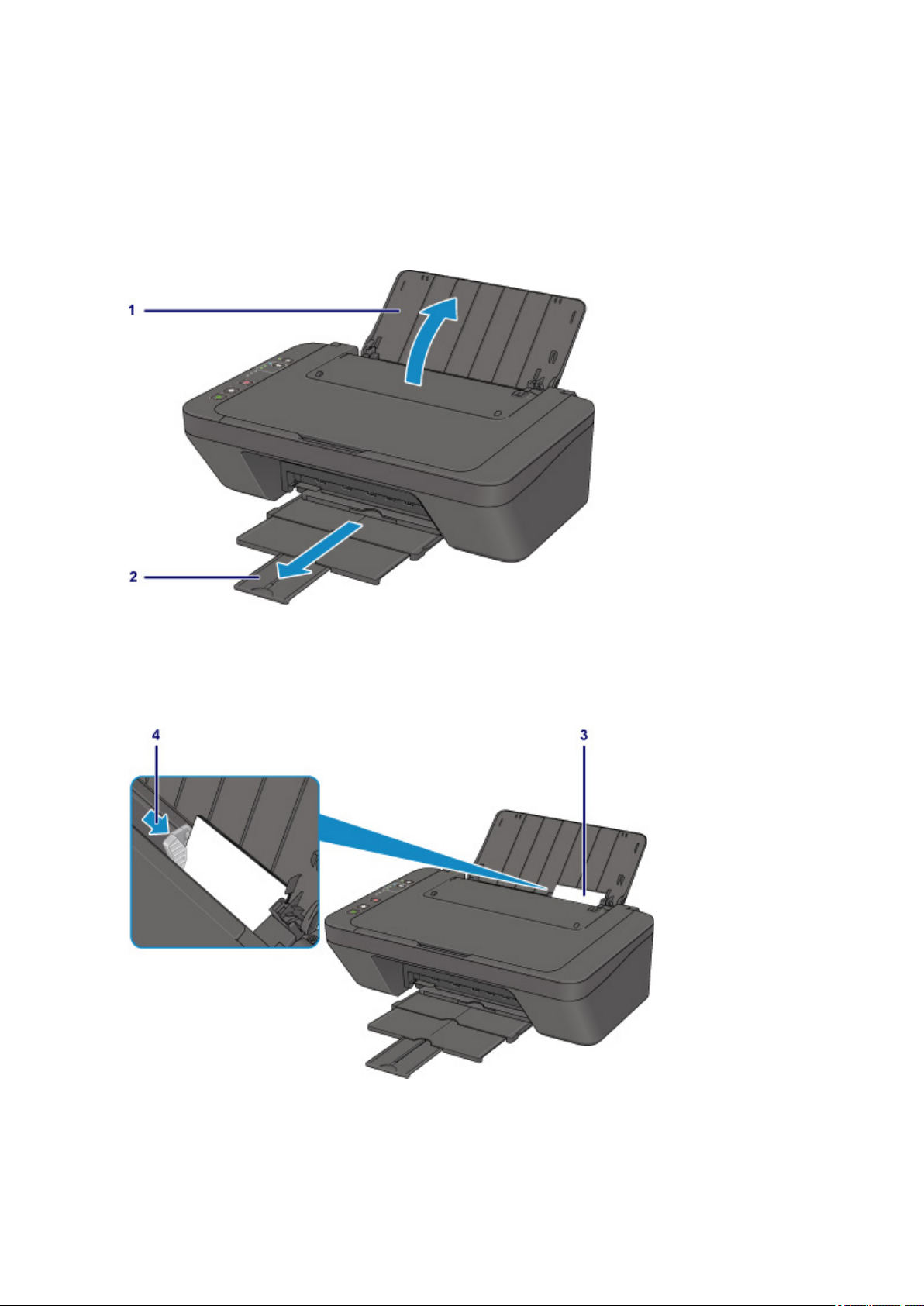
В данном разделе описано, как печатать фотографии с помощью приложения My Image Garden.
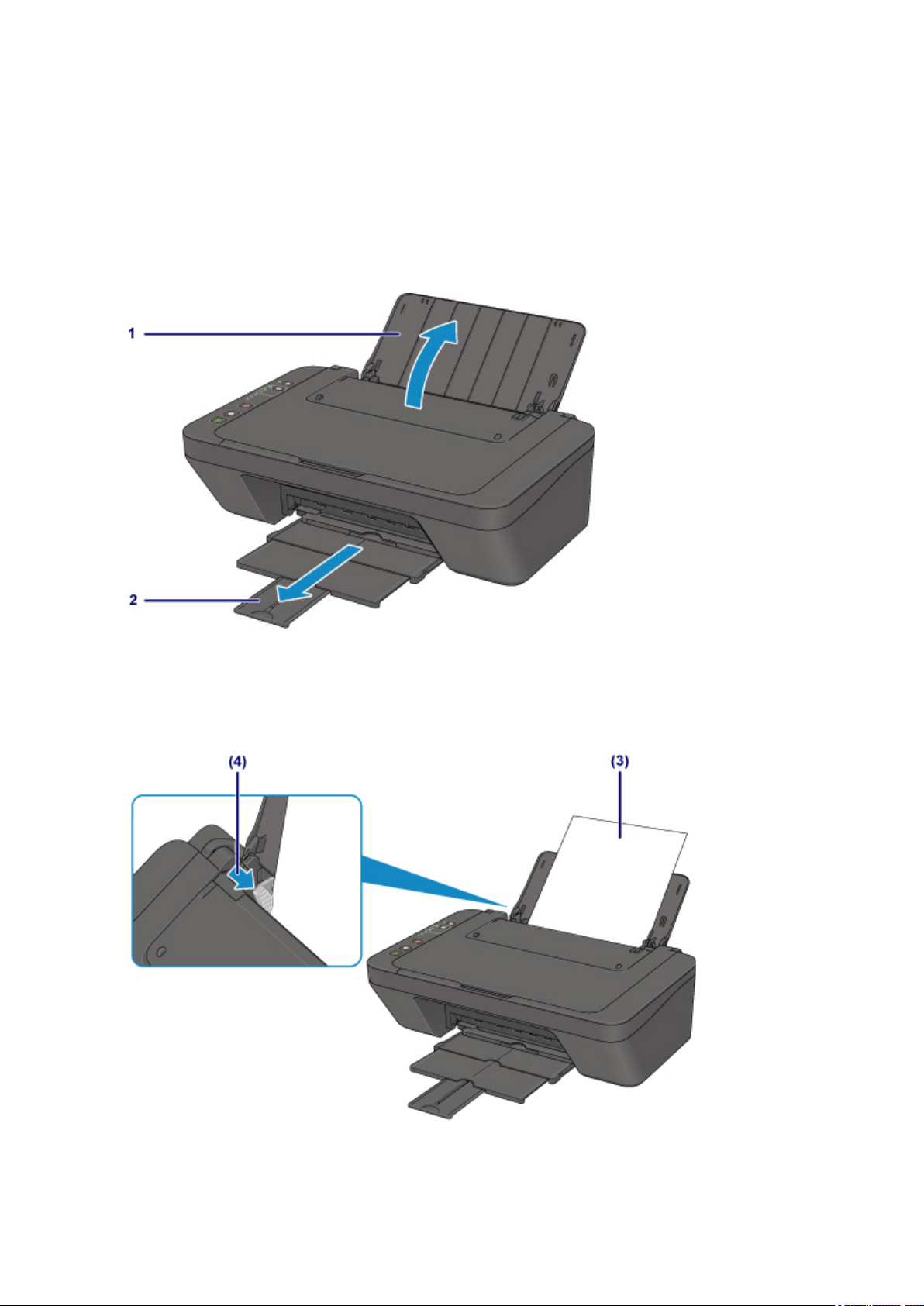
1. Откройте упор для бумаги.
2. Выдвиньте лоток приема бумаги и дополнительный лоток приема бумаги.
3.
Загрузите бумагу вертикально СТОРОНОЙ ДЛЯ ПЕЧАТИ К СЕБЕ.
4.
Установите направляющую бумаги.
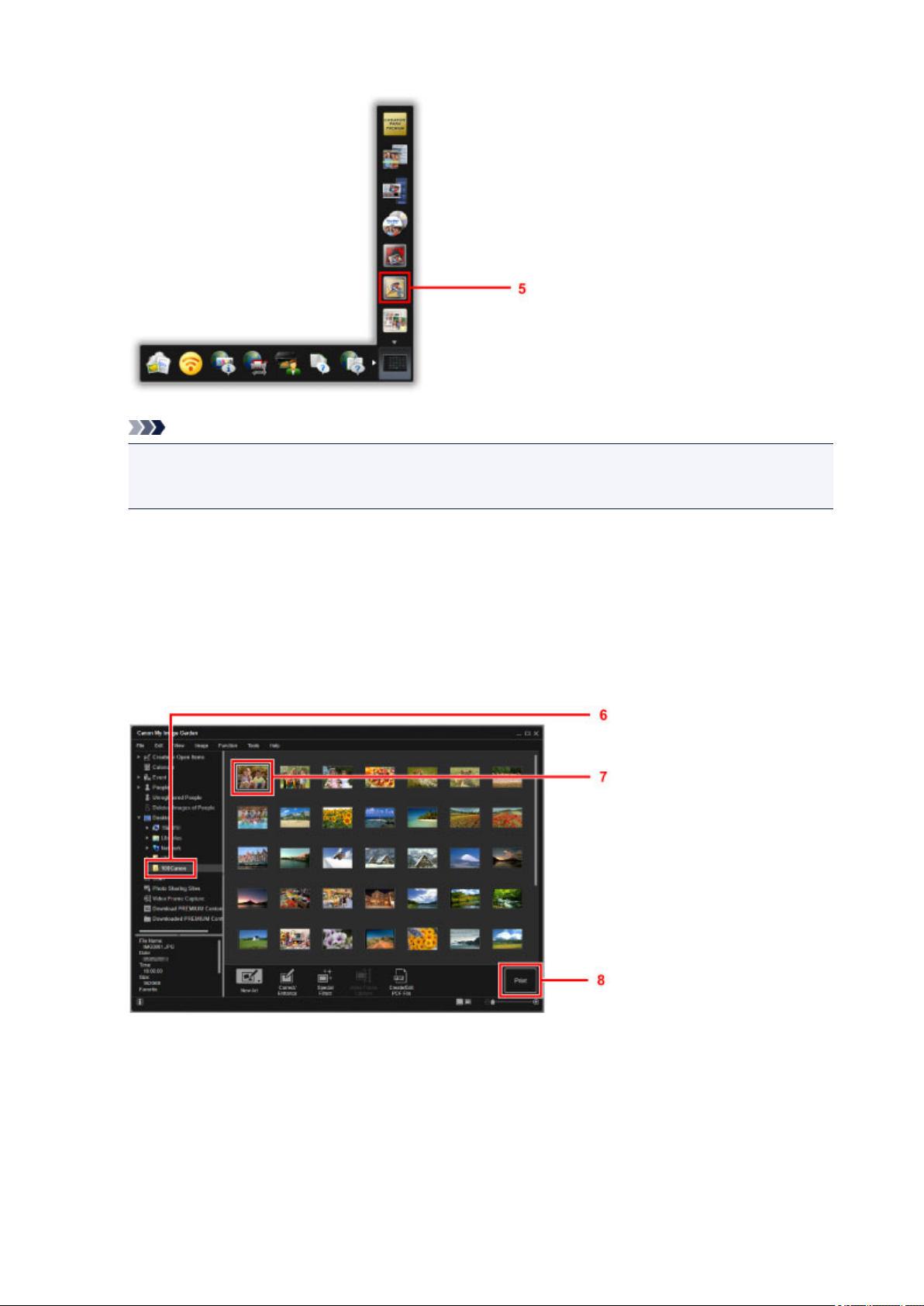
5. Щелкните значок My Image Garden в Quick Menu.
19
Примечание.
Количество и тип отображаемых значков зависят от региона, зарегистрированной модели
•
принтера/сканера и установленных приложений.
6.
Щелкните папку с фотографиями, которые нужно напечатать.
7.
Щелкните фотографии, которые нужно напечатать.
Чтобы выбрать несколько фотографий одновременно, щелкните их, удерживая клавишу Ctrl.
8.
Щелкните Печать (Print).
9. Укажите число копий, имя принтера, тип носителя и т. п.
10. Щелкните Печать (Print).
20
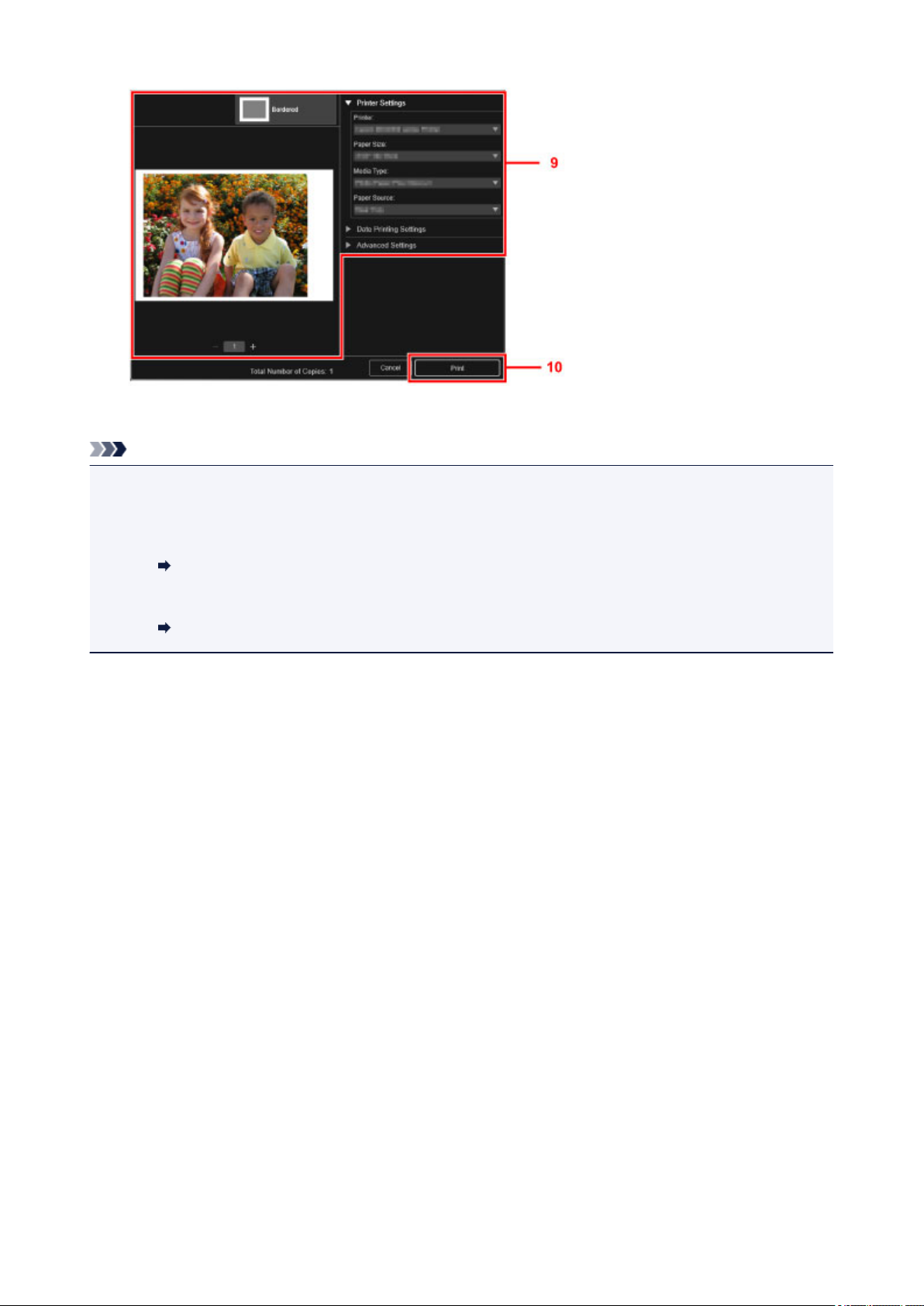
Для Mac OS щелкните OK в подтверждающем сообщении, затем щелкните Печать (Print).
Примечание.
• Программа My Image Garden позволяет по-разному использовать на компьютере изображения, в
том числе фотографии с цифрового фотоаппарата.
• Для Windows:
Руководство по My Image Garden
• Для Mac OS:
Руководство по My Image Garden
21
Копирование
В данном разделе описывается, как загружать оригиналы и выполнять копирование на обычную
бумагу.
1. Откройте упор для бумаги.
Выдвиньте лоток приема бумаги и дополнительный лоток приема бумаги.
2.
3.
Загрузите бумагу вертикально СТОРОНОЙ ДЛЯ ПЕЧАТИ К СЕБЕ.
4.
Установите направляющую бумаги.
22
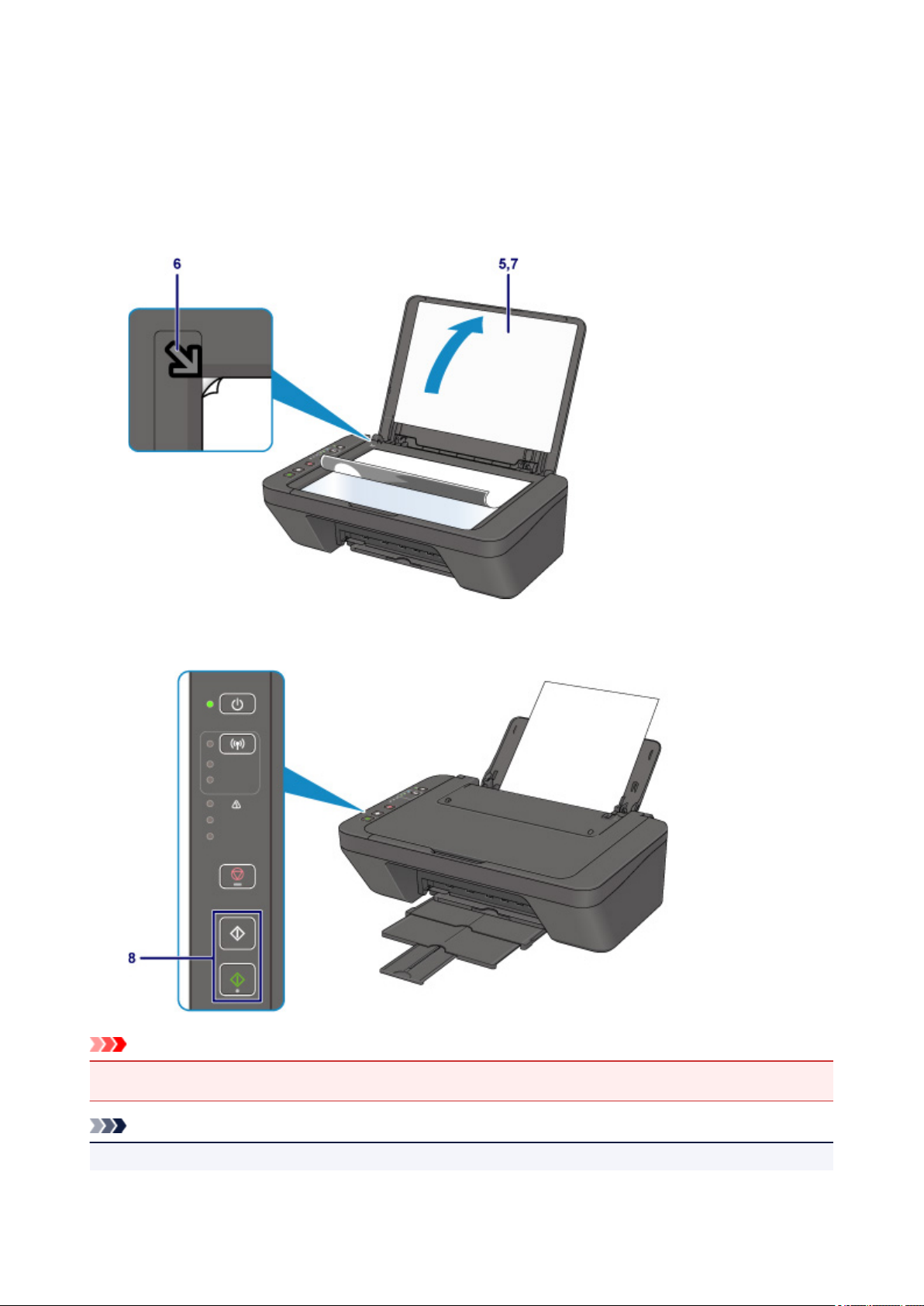
5. Откройте крышку сканера.
6. Поместите оригинал СТОРОНОЙ ДЛЯ КОПИРОВАНИЯ ВНИЗ и совместите его с
меткой выравнивания.
7. Закройте крышку сканера.
8.
Нажмите кнопку Черный (Black) или Цвет (Color).
Внимание!
• Не открывайте крышку сканера до завершения копирования.
Примечание.
• Данное устройство имеет ряд других удобных функций копирования.
23

Копирование
24

Обращение с бумагой, оригиналами, картриджами FINE и т. д.
Загрузка бумаги
Загрузка оригиналов
Замена картриджа FINE
25

Загрузка бумаги
Загрузка обычной бумаги или фотобумаги
Загрузка конвертов
26
Загрузка обычной бумаги или фотобумаги
Можно загрузить обычную бумагу или фотобумагу.
Внимание!
• Если разрезать обычную бумагу на части размером 10 x 15 см (4 x 6 дюймов) или 13 x 18 см (5 x
7 дюймов) для пробной печати, это может привести к застреванию бумаги.
Примечание.
• Рекомендуется использовать подлинную фотобумагу Canon для печати фотографий.
Подробнее об оригинальной бумаге Canon см. в разделе Поддерживаемые типы носителей.
• Можно использовать обычную бумагу для копирования.
Для получения сведений о размере и плотности бумаги, которую можно использовать в данном
принтере, см. раздел Поддерживаемые типы носителей.
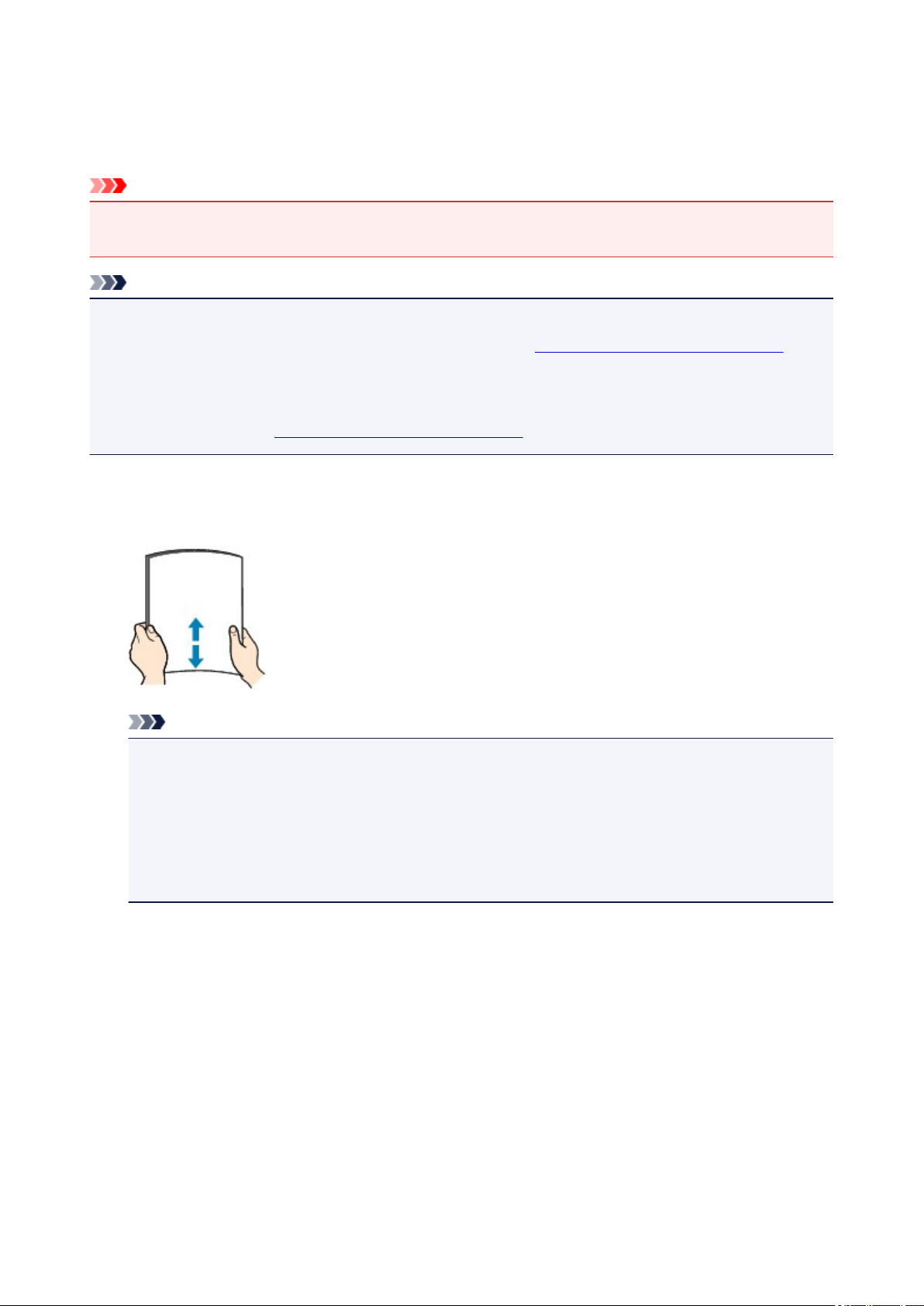
1.
Подготовьте бумагу.
Совместите края бумаги. Если бумага скручена, разгладьте ее.
Примечание.
• Аккуратно выровняйте края бумаги перед загрузкой. Загрузка бумаги без выравнивания
краев может привести к застреванию бумаги.
• Если бумага скручена, аккуратно согните ее в противоположном направлении до
выпрямления, удерживая за противоположные углы.
Дополнительные сведения о том, как расправить смявшуюся бумагу, см. в разделе Не
скручена ли бумага?.
2. Загрузите бумагу.
1. Откройте упор для бумаги.
2. Выдвиньте лоток приема бумаги и дополнительный лоток приема бумаги.
27
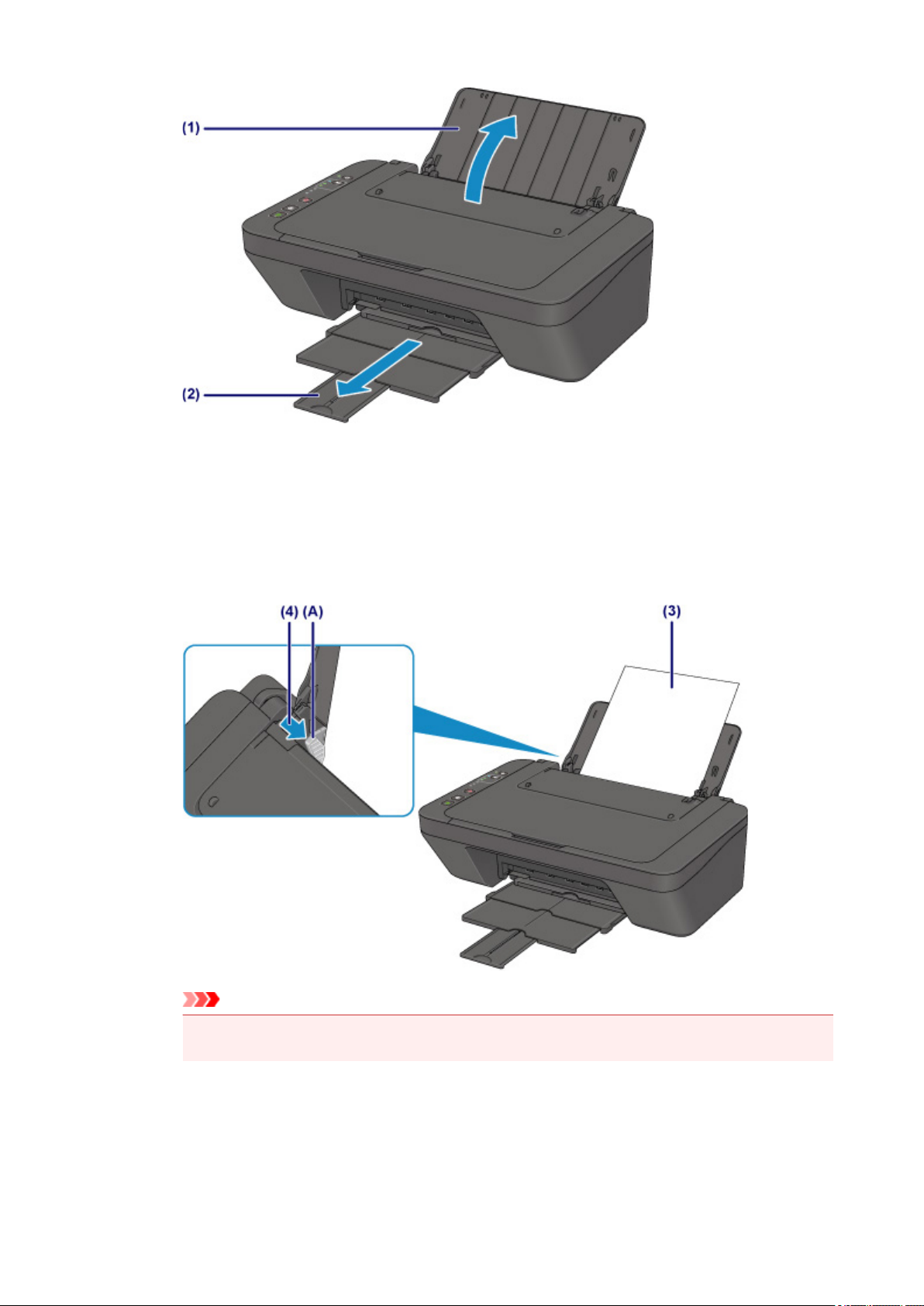
3. Передвиньте направляющую бумаги (A) влево и загрузите бумагу как можно дальше в
правую часть заднего лотка СТОРОНОЙ ДЛЯ ПЕЧАТИ К СЕБЕ.
Передвиньте направляющую бумаги (A) до совмещения со стопкой бумаги.
4.
Не следует слишком сильно прижимать направляющую бумаги к стопке. Возможны сбои при подаче
бумаги.
Внимание!
Всегда загружайте бумагу в книжной ориентации (B). Загрузка бумаги в альбомной ориентации
•
(C) может привести к ее застреванию.
28
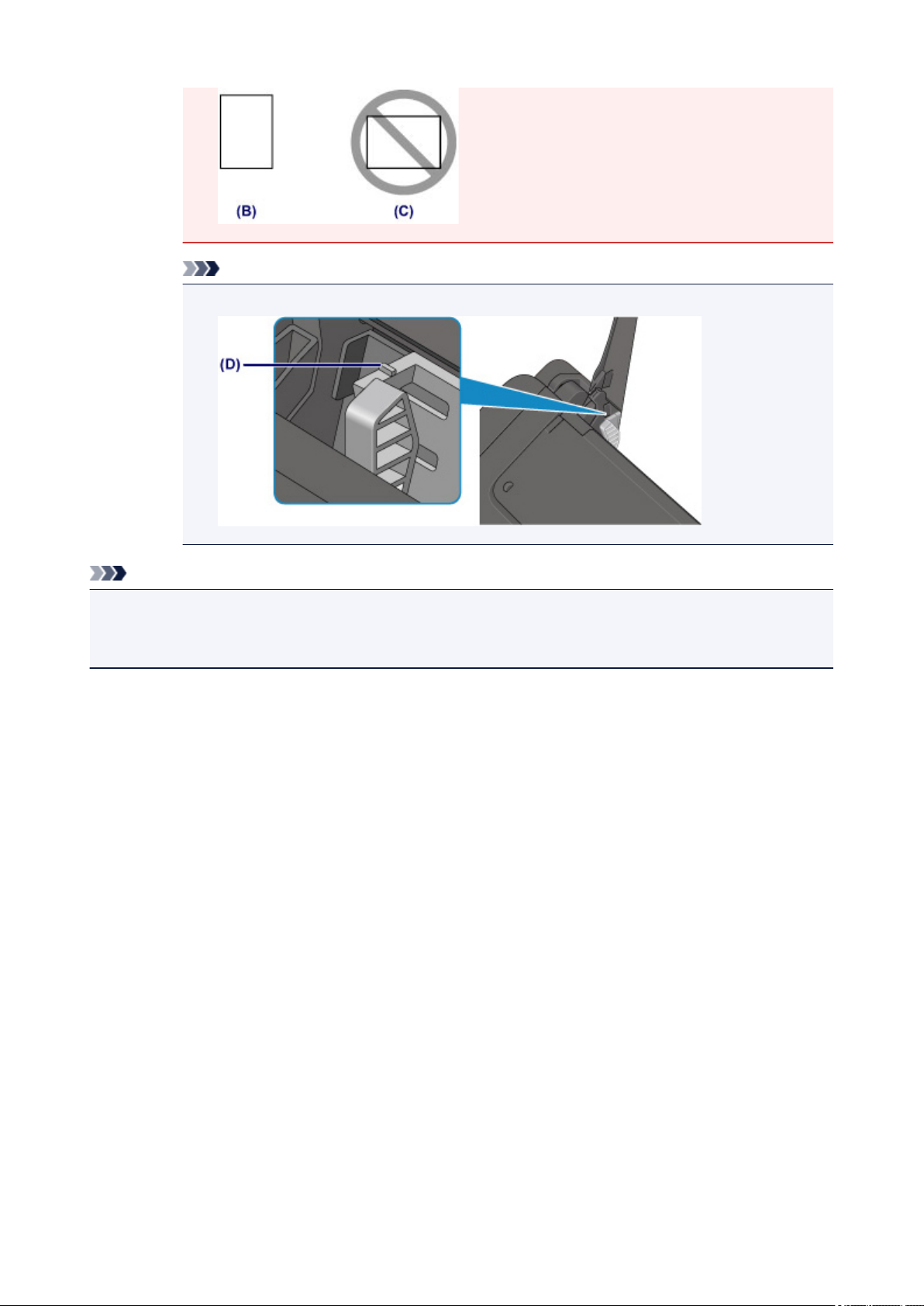
Примечание.
•
Не загружайте листы бумаги выше метки предела загрузки (D).
Примечание.
• При подаче бумаги принтер может издавать шум.
• Загрузив бумагу, выберите размер и тип загруженной бумаги на экране параметров печати
драйвера принтера.
29

Загрузка конвертов
Можно загружать конверты DL и конверты для деловой переписки №10.
Выполняется автоматический поворот адреса и его печать в соответствии с направлением конверта,
которое точно определяется драйвером принтера.
Внимание!
• Печать на конвертах с цифровой камеры не поддерживается.
• Не используйте следующие конверты. Конверты могут замяться во внутренних частях принтера
или привести к сбоям в работе принтера.
• Конверты с рельефной или специально обработанной поверхностью
• Конверты с двойным клапаном
• Конверты, клееевое покрытие которых было увлажнено и стало липким
1.
Подготовьте конверты.
Распрямите углы и стороны конвертов, нажимая на них.
•
Если конверты скручены, попытайтесь распрямить их, взявшись за противоположные углы и
•
аккуратно согнув их в противоположном направлении.
• Если угол клапана конверта согнут, распрямите его.
• Распрямите передний край конверта и сгиб, используя ручку.
На рисунках выше показан вид переднего края конверта сбоку.
Внимание!
•
Может возникнуть замятие конвертов в принтере, если конверты не выровнены или если
края не распрямлены. Убедитесь, что толщина конверта нигде не превышает 3 мм
(0,12 дюйма).
2. Загрузите конверты.
1. Откройте упор для бумаги.
30
Loading…
Раздел: Офисная Техника
Тип: Струйное МФУ
Характеристики, спецификации
Общее:
Особенности:
Wi-Fi интерфейс,
Характеристики:
Категория:
Многофункциональное устройство (принтер/сканер/копир)
Разрешение печати:
4800 x 600 dpi
Типы печатных носителей:
A4,
Плотность печатных носителей:
64 — 105 г/м2
Скорость печати:
Прибл. 4 изобр./мин (цветная),
Возможность двусторонней печати:
Есть, ручная
Лоток для бумаги:
60 листов
Ресурс струйного картриджа:
Цветной: 180 стр. (стандартный),
Поддерживаемые картриджи:
Картридж Canon (CL-446) Цветной,
Прочие характеристики:
Порты и разъемы:
1 x USB 2.0 Тип B
Потребляемая мощность:
10 Вт при работе
Дополнительно:
PIXMA Cloud Link,
Сканер:
Область сканирования:
216 x 297 мм
Оптическое разрешение сканирования:
600 x 1200 dpi
Скорость сканирования:
14 сек
Копир:
Скорость копирования:
21 сек
Количество копий за цикл:
21 копия
Габариты:
Размеры, мм:
прибл. 426 x 306 x 145 мм
Упаковка:
Размер упаковки (ВхШхД), см:
52 x 20 x 25 см, вес 4.42 кг
Ссылка на сайт производителя:
www.canon.com
Информация о производителе:
Страна производства:
Вьетнам
Инструкция к Струйному МФУ Canon pixma mg3040

MG3000 series
Онлайн-руководство
Обзор
Печать
Сканирование
Часто задаваемые вопросы
Русский (Russian)

Содержание
Использование данного онлайн-руководства. . . . . . . . . . . . . . . . . . . . . . . . . . 8
Товарные знаки и лицензии. . . . . . . . . . . . . . . . . . . . . . . . . . . . . . . . . . . . . . . . 9
Основные операции. . . . . . . . . . . . . . . . . . . . . . . . . . . . . . . . . . . . . . . . . . . . . . 18
Печать фотографий с компьютера. . . . . . . . . . . . . . . . . . . . . . . . . . . . . . . . . . . . . . . . . 19
Копирование. . . . . . . . . . . . . . . . . . . . . . . . . . . . . . . . . . . . . . . . . . . . . . . . . . . . . . . . . . . 22
Обращение с бумагой, оригиналами, картриджами FINE и т. д.. . . . . . . . . . 25
Загрузка бумаги. . . . . . . . . . . . . . . . . . . . . . . . . . . . . . . . . . . . . . . . . . . . . . . . . . . . . . . . . 26
Загрузка обычной бумаги или фотобумаги. . . . . . . . . . . . . . . . . . . . . . . . . . . . . . . . . . . . . . . . . . . . . 27
Загрузка конвертов. . . . . . . . . . . . . . . . . . . . . . . . . . . . . . . . . . . . . . . . . . . . . . . . . . . . . . . . . . . . . . . . 30
Загрузка оригиналов. . . . . . . . . . . . . . . . . . . . . . . . . . . . . . . . . . . . . . . . . . . . . . . . . . . . . 33
Загрузка оригиналов на Стекло рабочей поверхности. . . . . . . . . . . . . . . . . . . . . . . . . . . . . . . . . . . . 34
Поддерживаемые оригиналы. . . . . . . . . . . . . . . . . . . . . . . . . . . . . . . . . . . . . . . . . . . . . . . . . . . . . . . . 36
Замена картриджа FINE. . . . . . . . . . . . . . . . . . . . . . . . . . . . . . . . . . . . . . . . . . . . . . . . . . 37
Замена картриджа FINE. . . . . . . . . . . . . . . . . . . . . . . . . . . . . . . . . . . . . . . . . . . . . . . . . . . . . . . . . . . . 38
Проверка уровня чернил по индикаторам чернильницы на панели управления. . . . . . . . . . . . . . . 44
Обслуживание. . . . . . . . . . . . . . . . . . . . . . . . . . . . . . . . . . . . . . . . . . . . . . . . . . 46
Если печать стала бледной или неравномерной. . . . . . . . . . . . . . . . . . . . . . . . . . . . . . 47
Процедура обслуживания. . . . . . . . . . . . . . . . . . . . . . . . . . . . . . . . . . . . . . . . . . . . . . . . . . . . . . . . . . . 48
Печать образца для проверки сопел. . . . . . . . . . . . . . . . . . . . . . . . . . . . . . . . . . . . . . . . . . . . . . . . . . 51
Оценка образца для проверки сопел. . . . . . . . . . . . . . . . . . . . . . . . . . . . . . . . . . . . . . . . . . . . . . . . . . 52
Очистка печатающей головки. . . . . . . . . . . . . . . . . . . . . . . . . . . . . . . . . . . . . . . . . . . . . . . . . . . . . . . . 53
Глубокая очистка печатающих головок. . . . . . . . . . . . . . . . . . . . . . . . . . . . . . . . . . . . . . . . . . . . . . . . 54
Выравнивание печатающей головки. . . . . . . . . . . . . . . . . . . . . . . . . . . . . . . . . . . . . . . . . . . . . . . . . . . 55
Очистка. . . . . . . . . . . . . . . . . . . . . . . . . . . . . . . . . . . . . . . . . . . . . . . . . . . . . . . . . . . . . . . 58
Очистка подающих роликов. . . . . . . . . . . . . . . . . . . . . . . . . . . . . . . . . . . . . . . . . . . . . . . . . . . . . . . . . 59
Очистка внутренних компонентов принтера (очистка поддона). . . . . . . . . . . . . . . . . . . . . . . . . . . . . 61
Обзор. . . . . . . . . . . . . . . . . . . . . . . . . . . . . . . . . . . . . . . . . . . . . . . . . . . . . . . . . 63
Безопасность. . . . . . . . . . . . . . . . . . . . . . . . . . . . . . . . . . . . . . . . . . . . . . . . . . . . . . . . . . . 65
Меры предосторожности. . . . . . . . . . . . . . . . . . . . . . . . . . . . . . . . . . . . . . . . . . . . . . . . . . . . . . . . . . . . 66
Нормативная информация. . . . . . . . . . . . . . . . . . . . . . . . . . . . . . . . . . . . . . . . . . . . . . . . . . . . . . . . . . 68

WEEE (EU&EEA). . . . . . . . . . . . . . . . . . . . . . . . . . . . . . . . . . . . . . . . . . . . . . . . . . . . . . . . . . . . . . . . . . 69
Основные компоненты и их использование. . . . . . . . . . . . . . . . . . . . . . . . . . . . . . . . . . 70
Основные компоненты. . . . . . . . . . . . . . . . . . . . . . . . . . . . . . . . . . . . . . . . . . . . . . . . . . . . . . . . . . . . . . 71
Вид спереди. . . . . . . . . . . . . . . . . . . . . . . . . . . . . . . . . . . . . . . . . . . . . . . . . . . . . . . . . . . . . . . . . . 72
Вид сзади. . . . . . . . . . . . . . . . . . . . . . . . . . . . . . . . . . . . . . . . . . . . . . . . . . . . . . . . . . . . . . . . . . . . 74
Вид внутренних частей. . . . . . . . . . . . . . . . . . . . . . . . . . . . . . . . . . . . . . . . . . . . . . . . . . . . . . . . . 75
Панель управления. . . . . . . . . . . . . . . . . . . . . . . . . . . . . . . . . . . . . . . . . . . . . . . . . . . . . . . . . . . . 76
Электропитание. . . . . . . . . . . . . . . . . . . . . . . . . . . . . . . . . . . . . . . . . . . . . . . . . . . . . . . . . . . . . . . . . . . 78
Проверка включения питания. . . . . . . . . . . . . . . . . . . . . . . . . . . . . . . . . . . . . . . . . . . . . . . . . . . . 79
Включение и выключение Принтера. . . . . . . . . . . . . . . . . . . . . . . . . . . . . . . . . . . . . . . . . . . . . . 80
Проверка штепселя и кабеля питания. . . . . . . . . . . . . . . . . . . . . . . . . . . . . . . . . . . . . . . . . . . . . 82
Отключение принтера. . . . . . . . . . . . . . . . . . . . . . . . . . . . . . . . . . . . . . . . . . . . . . . . . . . . . . . . . . 83
Изменение параметров. . . . . . . . . . . . . . . . . . . . . . . . . . . . . . . . . . . . . . . . . . . . . . . . . . 84
Изменение параметров принтера с компьютера (Windows). . . . . . . . . . . . . . . . . . . . . . . . . . . . . . . . 85
Изменение параметров печати. . . . . . . . . . . . . . . . . . . . . . . . . . . . . . . . . . . . . . . . . . . . . . . . . . . 86
Регистрация профиля часто используемой конфигурации печати. . . . . . . . . . . . . . . . . . . . . . 88
Выбор используемого картриджа. . . . . . . . . . . . . . . . . . . . . . . . . . . . . . . . . . . . . . . . . . . . . . . . . 90
Управление питанием Принтера. . . . . . . . . . . . . . . . . . . . . . . . . . . . . . . . . . . . . . . . . . . . . . . . . . 91
Изменение режима работы Принтера. . . . . . . . . . . . . . . . . . . . . . . . . . . . . . . . . . . . . . . . . . . . . 93
Изменение параметров с помощью панели управления. . . . . . . . . . . . . . . . . . . . . . . . . . . . . . . . . . 95
Автоматическое включение и выключение принтера. . . . . . . . . . . . . . . . . . . . . . . . . . . . . . . . . 96
Инициализация параметров принтера. . . . . . . . . . . . . . . . . . . . . . . . . . . . . . . . . . . . . . . . . . . . . 98
Включение/выключение функции беспроводного соединения. . . . . . . . . . . . . . . . . . . . . . . . . 99
Сетевое подключение. . . . . . . . . . . . . . . . . . . . . . . . . . . . . . . . . . . . . . . . . . . . . . . . . . . 100
Рекомендации по сетевому подключению. . . . . . . . . . . . . . . . . . . . . . . . . . . . . . . . . . . . . . . . . . . . . 101
Параметры сети по умолчанию. . . . . . . . . . . . . . . . . . . . . . . . . . . . . . . . . . . . . . . . . . . . . . . . . . 102
Обнаружен еще один принтер с таким же именем. . . . . . . . . . . . . . . . . . . . . . . . . . . . . . . . . . 103
Подключение к другому компьютеру через локальную сеть/Изменение способа подключения с
USB на локальную сеть. . . . . . . . . . . . . . . . . . . . . . . . . . . . . . . . . . . . . . . . . . . . . . . . . . . . . . . . 104
Печать параметров сети. . . . . . . . . . . . . . . . . . . . . . . . . . . . . . . . . . . . . . . . . . . . . . . . . . . . . . . 105
Изменение способа подключения по беспроводной сети. . . . . . . . . . . . . . . . . . . . . . . . . . . . 109
Обеспечение оптимального качества печати. . . . . . . . . . . . . . . . . . . . . . . . . . . . . . . . 110
Перемещение принтера. . . . . . . . . . . . . . . . . . . . . . . . . . . . . . . . . . . . . . . . . . . . . . . . . . . . . . . . . . . . 111
Юридические ограничения на сканирование/копирование. . . . . . . . . . . . . . . . . . . . . 112

Технические характеристики. . . . . . . . . . . . . . . . . . . . . . . . . . . . . . . . . . . . . . . . . . . . . 113
Сведения о бумаге. . . . . . . . . . . . . . . . . . . . . . . . . . . . . . . . . . . . . . . . . . . . . . 117
Поддерживаемые типы носителей. . . . . . . . . . . . . . . . . . . . . . . . . . . . . . . . . . . . . . . . 118
Предел загрузки бумаги. . . . . . . . . . . . . . . . . . . . . . . . . . . . . . . . . . . . . . . . . . . . . . . . . . . . . . . . . . . . 120
Неподдерживаемые типы носителей. . . . . . . . . . . . . . . . . . . . . . . . . . . . . . . . . . . . . . 121
Обращение с бумагой. . . . . . . . . . . . . . . . . . . . . . . . . . . . . . . . . . . . . . . . . . . . . . . . . . . 122
Печать с компьютера. . . . . . . . . . . . . . . . . . . . . . . . . . . . . . . . . . . . . . . . . . . . . . . . . . . 123
Печать с помощью прикладной программы (драйвер принтера Windows). . . . . . . . . . . . . . . . . . . 124
Настройка основной печати. . . . . . . . . . . . . . . . . . . . . . . . . . . . . . . . . . . . . . . . . . . . . . . . . . . . 125
Параметры бумаги в драйвере принтера. . . . . . . . . . . . . . . . . . . . . . . . . . . . . . . . . . . . . . 128
Различные способы печати. . . . . . . . . . . . . . . . . . . . . . . . . . . . . . . . . . . . . . . . . . . . . . . . . . . . . 129
Настройка «Размер стр.» и «Ориентация». . . . . . . . . . . . . . . . . . . . . . . . . . . . . . . . . . . . . . 130
Настройка количества копий и порядка печати страниц. . . . . . . . . . . . . . . . . . . . . . . . . 132
Печать с масштабированием. . . . . . . . . . . . . . . . . . . . . . . . . . . . . . . . . . . . . . . . . . . . . . . 134
Печать на развороте. . . . . . . . . . . . . . . . . . . . . . . . . . . . . . . . . . . . . . . . . . . . . . . . . . . . . . 137
Печать в виде плитки/постера. . . . . . . . . . . . . . . . . . . . . . . . . . . . . . . . . . . . . . . . . . . . . . 139
Двухсторонняя печать. . . . . . . . . . . . . . . . . . . . . . . . . . . . . . . . . . . . . . . . . . . . . . . . . . . . . 142
Настройка печати конверта. . . . . . . . . . . . . . . . . . . . . . . . . . . . . . . . . . . . . . . . . . . . . . . . . 144
Установка уровня «Качество печати» (Другое). . . . . . . . . . . . . . . . . . . . . . . . . . . . . . . . . 146
Общие сведения о драйвере принтера. . . . . . . . . . . . . . . . . . . . . . . . . . . . . . . . . . . . . . . . . . . 148
Драйвер принтера Canon IJ. . . . . . . . . . . . . . . . . . . . . . . . . . . . . . . . . . . . . . . . . . . . . . . . 149
Инструкции по эксплуатации (Драйвер принтера). . . . . . . . . . . . . . . . . . . . . . . . . . . . . . 153
Описание драйвера принтера. . . . . . . . . . . . . . . . . . . . . . . . . . . . . . . . . . . . . . . . . . . . . . . . . . . 155
Описание вкладки «Быстрая установка». . . . . . . . . . . . . . . . . . . . . . . . . . . . . . . . . . . . . . 156
Описание вкладки «Главная». . . . . . . . . . . . . . . . . . . . . . . . . . . . . . . . . . . . . . . . . . . . . . . . 163
Описание вкладки «Страница». . . . . . . . . . . . . . . . . . . . . . . . . . . . . . . . . . . . . . . . . . . . . . 169
Описание вкладки «Обслуживание». . . . . . . . . . . . . . . . . . . . . . . . . . . . . . . . . . . . . . . . . . 182
Экран монитора состояния Canon IJ. . . . . . . . . . . . . . . . . . . . . . . . . . . . . . . . . . . . . . . . . 190
Установка MP Drivers. . . . . . . . . . . . . . . . . . . . . . . . . . . . . . . . . . . . . . . . . . . . . . . . . . . . . . 193
Печать непосредственно со смартфона или планшета. . . . . . . . . . . . . . . . . . . . . . . . . . . . . . . . . . 195
Использование принтера в режиме беспроводного прямого подключения. . . . . . . . . . . . . . 196
Создание копий на обычной бумаге. . . . . . . . . . . . . . . . . . . . . . . . . . . . . . . . . . . . . . . 199
Выбор размера страницы между A4 и Letter. . . . . . . . . . . . . . . . . . . . . . . . . . . . . . . . 201

Сканирование с компьютера (Windows). . . . . . . . . . . . . . . . . . . . . . . . . . . . . . . . . . . . 202
Использование программы IJ Scan Utility. . . . . . . . . . . . . . . . . . . . . . . . . . . . . . . . . . . . . . . . . . . . . . 203
Предназначение программы IJ Scan Utility (программное обеспечение сканера). . . . . . . . . 204
Запуск программы IJ Scan Utility. . . . . . . . . . . . . . . . . . . . . . . . . . . . . . . . . . . . . . . . . . . . . . . . . 206
Использование функции автоматического сканирования. . . . . . . . . . . . . . . . . . . . . . . . . . . . 207
Экраны программы IJ Scan Utility. . . . . . . . . . . . . . . . . . . . . . . . . . . . . . . . . . . . . . . . . . . . . . . . 209
Основной экран программы IJ Scan Utility. . . . . . . . . . . . . . . . . . . . . . . . . . . . . . . . . . . . . 210
Диалоговое окно «Параметры». . . . . . . . . . . . . . . . . . . . . . . . . . . . . . . . . . . . . . . . . . . . . 212
Сканирование с помощью приложения (ScanGear). . . . . . . . . . . . . . . . . . . . . . . . . . . . . . . . . . . . . 226
Назначение программы ScanGear (драйвера сканера). . . . . . . . . . . . . . . . . . . . . . . . . . . . . . 227
Запуск программы ScanGear (драйвер сканера). . . . . . . . . . . . . . . . . . . . . . . . . . . . . . . . . . . . 229
Сканирование в основном режиме. . . . . . . . . . . . . . . . . . . . . . . . . . . . . . . . . . . . . . . . . . . . . . . 230
Окна программы ScanGear (драйвер сканера). . . . . . . . . . . . . . . . . . . . . . . . . . . . . . . . . . . . . 233
Вкладка Основной режим. . . . . . . . . . . . . . . . . . . . . . . . . . . . . . . . . . . . . . . . . . . . . . . . . . 234
Вкладка Расш. режим. . . . . . . . . . . . . . . . . . . . . . . . . . . . . . . . . . . . . . . . . . . . . . . . . . . . . 243
Общие замечания (драйвер сканера). . . . . . . . . . . . . . . . . . . . . . . . . . . . . . . . . . . . . . . . . . . . 250
Размещение оригиналов (сканирование с компьютера). . . . . . . . . . . . . . . . . . . . . . . . . . . . . 252
Параметры сетевого сканирования. . . . . . . . . . . . . . . . . . . . . . . . . . . . . . . . . . . . . . . . . . . . . . 254
Часто задаваемые вопросы. . . . . . . . . . . . . . . . . . . . . . . . . . . . . . . . . . . . . . 257
Параметры сети и распространенные неполадки. . . . . . . . . . . . . . . . . . . . . . . . . . . . 259
Подключение принтера к компьютерной сети. . . . . . . . . . . . . . . . . . . . . . . . . . . . . . . 261
Ограничения. . . . . . . . . . . . . . . . . . . . . . . . . . . . . . . . . . . . . . . . . . . . . . . . . . . . . . . . . . 263
Проблемы сетевого взаимодействия. . . . . . . . . . . . . . . . . . . . . . . . . . . . . . . . . . . . . . 265
Не удается обнаружить принтер в сети. . . . . . . . . . . . . . . . . . . . . . . . . . . . . . . . . . . . . . . . . . . . . . . 266
Не удается обнаружить принтер на экране Проверить параметры принтера во время
настройки (Windows). . . . . . . . . . . . . . . . . . . . . . . . . . . . . . . . . . . . . . . . . . . . . . . . . . . . . . . . . . 267
Не удается обнаружить принтер на экране Проверить параметры принтера во время
настройки беспроводной сети (Windows) — проверка состояния питания. . . . . . . . . . . . 268
Не удается обнаружить принтер на экране Проверить параметры принтера во время
настройки беспроводной сети (Windows) — проверка подключения компьютера к сети. 269
Не удается обнаружить принтер на экране Проверить параметры принтера во время
настройки беспроводной сети (Windows) — проверка среды беспроводной сети. . . . . . 270
Не удается обнаружить принтер на экране Проверить параметры принтера во время
настройки беспроводной сети (Windows) — проверка параметров защитного программного
обеспечения. . . . . . . . . . . . . . . . . . . . . . . . . . . . . . . . . . . . . . . . . . . . . . . . . . . . . . . . . . . . . 272

Не удается обнаружить принтер на экране Проверить параметры принтера во время
настройки беспроводной сети (Windows) — проверка параметров маршрутизатора
беспроводной сети. . . . . . . . . . . . . . . . . . . . . . . . . . . . . . . . . . . . . . . . . . . . . . . . . . . . . . . . 274
Невозможно продолжить работу после появления экранов Подключение принтера /
Подключение кабеля. . . . . . . . . . . . . . . . . . . . . . . . . . . . . . . . . . . . . . . . . . . . . . . . . . . . . . . . . . 275
Не удается найти Принтер при использовании беспроводной локальной сети. . . . . . . . . . . 277
Проблемы сетевого подключения. . . . . . . . . . . . . . . . . . . . . . . . . . . . . . . . . . . . . . . . . . . . . . . . . . . . 280
Неожиданное прекращение работы принтера. . . . . . . . . . . . . . . . . . . . . . . . . . . . . . . . . . . . . . 281
Неизвестный ключ сети. . . . . . . . . . . . . . . . . . . . . . . . . . . . . . . . . . . . . . . . . . . . . . . . . . . . . . . . 286
Не удается использовать принтер после замены маршрутизатора беспроводной сети или
изменения его параметров. . . . . . . . . . . . . . . . . . . . . . . . . . . . . . . . . . . . . . . . . . . . . . . . . . . . . 288
Другие проблемы с сетью. . . . . . . . . . . . . . . . . . . . . . . . . . . . . . . . . . . . . . . . . . . . . . . . . . . . . . . . . . 290
Проверка сведений о сети. . . . . . . . . . . . . . . . . . . . . . . . . . . . . . . . . . . . . . . . . . . . . . . . . . . . . . 291
Восстановление заводских настроек по умолчанию. . . . . . . . . . . . . . . . . . . . . . . . . . . . . . . . . 294
Проблемы с печатью. . . . . . . . . . . . . . . . . . . . . . . . . . . . . . . . . . . . . . . . . . . . . . . . . . . 295
Печать не начинается. . . . . . . . . . . . . . . . . . . . . . . . . . . . . . . . . . . . . . . . . . . . . . . . . . . . . . . . . . . . . 296
Чернила не поступают. . . . . . . . . . . . . . . . . . . . . . . . . . . . . . . . . . . . . . . . . . . . . . . . . . . . . . . . . . . . . 298
Бумага подается неправильно, или появилось сообщение об отсутствии бумаги. . . . . . . . . . . . . 299
Неудовлетворительные результаты печати. . . . . . . . . . . . . . . . . . . . . . . . . . . . . . . . . . . . . . . . . . . . 301
Пустая бумага/Нечеткая печать/Неверные цвета/Белые полосы. . . . . . . . . . . . . . . . . . . . . . 303
Неверные цвета. . . . . . . . . . . . . . . . . . . . . . . . . . . . . . . . . . . . . . . . . . . . . . . . . . . . . . . . . . . . . . 306
Линии не выровнены. . . . . . . . . . . . . . . . . . . . . . . . . . . . . . . . . . . . . . . . . . . . . . . . . . . . . . . . . . 308
Бумага испачкана / Отпечатанная поверхность поцарапана. . . . . . . . . . . . . . . . . . . . . . . . . . 309
Проблемы при сканировании (Windows). . . . . . . . . . . . . . . . . . . . . . . . . . . . . . . . . . . . 313
Проблемы при сканировании. . . . . . . . . . . . . . . . . . . . . . . . . . . . . . . . . . . . . . . . . . . . . . . . . . . . . . . 314
Сканер не работает. . . . . . . . . . . . . . . . . . . . . . . . . . . . . . . . . . . . . . . . . . . . . . . . . . . . . . . . . . . 315
ScanGear (драйвер сканера) не запускается. . . . . . . . . . . . . . . . . . . . . . . . . . . . . . . . . . . . . . . 316
Механические неисправности. . . . . . . . . . . . . . . . . . . . . . . . . . . . . . . . . . . . . . . . . . . . 317
Питание не подается. . . . . . . . . . . . . . . . . . . . . . . . . . . . . . . . . . . . . . . . . . . . . . . . . . . . . . . . . . . . . . 318
Питание выключается автоматически. . . . . . . . . . . . . . . . . . . . . . . . . . . . . . . . . . . . . . . . . . . . . . . . 319
Проблемы подключения USB. . . . . . . . . . . . . . . . . . . . . . . . . . . . . . . . . . . . . . . . . . . . . . . . . . . . . . . 320
Не удается подключиться к принтеру по USB. . . . . . . . . . . . . . . . . . . . . . . . . . . . . . . . . . . . . . . . . . 321
Проблемы при установке и загрузке. . . . . . . . . . . . . . . . . . . . . . . . . . . . . . . . . . . . . . . 322
Не удается установить драйверы MP Drivers. . . . . . . . . . . . . . . . . . . . . . . . . . . . . . . . . . . . . . . . . . 323
Обновление MP Drivers в сетевом окружении (Windows). . . . . . . . . . . . . . . . . . . . . . . . . . . . . . . . . 325

Ошибки и сообщения. . . . . . . . . . . . . . . . . . . . . . . . . . . . . . . . . . . . . . . . . . . . . . . . . . . 326
Произошла ошибка. . . . . . . . . . . . . . . . . . . . . . . . . . . . . . . . . . . . . . . . . . . . . . . . . . . . . . . . . . . . . . . 327
Отображается сообщение. . . . . . . . . . . . . . . . . . . . . . . . . . . . . . . . . . . . . . . . . . . . . . . . . . . . . . . . . . 331
Список кодов поддержки для ошибок. . . . . . . . . . . . . . . . . . . . . . . . . . . . . . 338
Список кодов поддержки для ошибок (замятия бумаги). . . . . . . . . . . . . . . . . . . . . . . 339
1300. . . . . . . . . . . . . . . . . . . . . . . . . . . . . . . . . . . . . . . . . . . . . . . . . . . . . . . . . . . . . . . . . . . . . . . . . . . . 340
Бумага замялась внутри принтера. . . . . . . . . . . . . . . . . . . . . . . . . . . . . . . . . . . . . . . . . . . . . . . . . . . 342
1000. . . . . . . . . . . . . . . . . . . . . . . . . . . . . . . . . . . . . . . . . . . . . . . . . . . . . . . . . . . . . . . . . 345
1200. . . . . . . . . . . . . . . . . . . . . . . . . . . . . . . . . . . . . . . . . . . . . . . . . . . . . . . . . . . . . . . . . 346
1203. . . . . . . . . . . . . . . . . . . . . . . . . . . . . . . . . . . . . . . . . . . . . . . . . . . . . . . . . . . . . . . . . 347
1401. . . . . . . . . . . . . . . . . . . . . . . . . . . . . . . . . . . . . . . . . . . . . . . . . . . . . . . . . . . . . . . . . 348
1485. . . . . . . . . . . . . . . . . . . . . . . . . . . . . . . . . . . . . . . . . . . . . . . . . . . . . . . . . . . . . . . . . 349
1682. . . . . . . . . . . . . . . . . . . . . . . . . . . . . . . . . . . . . . . . . . . . . . . . . . . . . . . . . . . . . . . . . 350
1686. . . . . . . . . . . . . . . . . . . . . . . . . . . . . . . . . . . . . . . . . . . . . . . . . . . . . . . . . . . . . . . . . 351
1688. . . . . . . . . . . . . . . . . . . . . . . . . . . . . . . . . . . . . . . . . . . . . . . . . . . . . . . . . . . . . . . . . 352
168A. . . . . . . . . . . . . . . . . . . . . . . . . . . . . . . . . . . . . . . . . . . . . . . . . . . . . . . . . . . . . . . . . 353
1700. . . . . . . . . . . . . . . . . . . . . . . . . . . . . . . . . . . . . . . . . . . . . . . . . . . . . . . . . . . . . . . . . 354
1890. . . . . . . . . . . . . . . . . . . . . . . . . . . . . . . . . . . . . . . . . . . . . . . . . . . . . . . . . . . . . . . . . 355
2900. . . . . . . . . . . . . . . . . . . . . . . . . . . . . . . . . . . . . . . . . . . . . . . . . . . . . . . . . . . . . . . . . 356
2901. . . . . . . . . . . . . . . . . . . . . . . . . . . . . . . . . . . . . . . . . . . . . . . . . . . . . . . . . . . . . . . . . 357
4102. . . . . . . . . . . . . . . . . . . . . . . . . . . . . . . . . . . . . . . . . . . . . . . . . . . . . . . . . . . . . . . . . 358
4103. . . . . . . . . . . . . . . . . . . . . . . . . . . . . . . . . . . . . . . . . . . . . . . . . . . . . . . . . . . . . . . . . 359
5011. . . . . . . . . . . . . . . . . . . . . . . . . . . . . . . . . . . . . . . . . . . . . . . . . . . . . . . . . . . . . . . . . 360
5012. . . . . . . . . . . . . . . . . . . . . . . . . . . . . . . . . . . . . . . . . . . . . . . . . . . . . . . . . . . . . . . . . 361
5100. . . . . . . . . . . . . . . . . . . . . . . . . . . . . . . . . . . . . . . . . . . . . . . . . . . . . . . . . . . . . . . . . 362
5200. . . . . . . . . . . . . . . . . . . . . . . . . . . . . . . . . . . . . . . . . . . . . . . . . . . . . . . . . . . . . . . . . 363
5B00. . . . . . . . . . . . . . . . . . . . . . . . . . . . . . . . . . . . . . . . . . . . . . . . . . . . . . . . . . . . . . . . . 364
6000. . . . . . . . . . . . . . . . . . . . . . . . . . . . . . . . . . . . . . . . . . . . . . . . . . . . . . . . . . . . . . . . . 365
Использование данного онлайн-руководства
Обозначения, используемые в настоящем документе
Пользователи устройства с активированными сенсорными функциями (Windows)
Обозначения, используемые в настоящем документе
Предупреждение!
Несоблюдение этих указаний может привести к тяжелым травмам, вплоть до смертельного
исхода, вследствие неправильной эксплуатации оборудования. Обязательно следуйте этим
указаниям в целях безопасной эксплуатации.
Осторожно!
Несоблюдение этих указаний может привести к травмам или материальному ущербу
вследствие неправильной эксплуатации оборудования. Обязательно следуйте этим указаниям
в целях безопасной эксплуатации.
Внимание!
Инструкции, содержащие важные сведения. Во избежание причинения повреждений и
нанесения травмы или ненадлежащего использования изделия обязательно прочтите эти
указания.
Примечание.
Инструкции, в том числе примечания о работе устройства и дополнительные пояснения.
Основные сведения
Инструкции, разъясняющие основные операции с продуктом.
Примечание.
•
Значки могут быть другими — это зависит от модели продукта.
Пользователи устройства с активированными сенсорными функциями
(Windows)
Для касаний необходимо заменить действие «щелчок правой кнопкой мыши» в этом документе на
действие, установленное в операционной системе. Например, если в операционной системе
установлено действие «нажатие и удерживание», замените «щелчок правой кнопкой мыши» на
«нажатие и удерживание».
8

Товарные знаки и лицензии
• Microsoft является охраняемым товарным знаком Microsoft Corporation.
• Windows является товарным знаком или зарегистрированным товарным знаком Microsoft
Corporation в США и других странах.
• Windows Vista является товарным знаком или зарегистрированным товарным знаком Microsoft
Corporation в США и других странах.
•
Internet Explorer является товарным знаком или зарегистрированным товарным знаком Microsoft
Corporation в США и других странах.
•
Mac, Mac OS, AirPort, Safari, Bonjour, iPad, iPhone и iPod touch являются товарными знаками Apple
Inc., зарегистрированными в США и других странах. App Store, AirPrint и логотип AirPrint являются
товарными знаками Apple Inc.
•
IOS является товарным знаком или зарегистрированным товарным знаком компании Cisco в
США, других странах и используется по лицензии.
•
Google Cloud Print, Google Chrome, Chrome OS, Chromebook, Android, Google Play, Google Drive и
Google Apps являются зарегистрированными товарными знаками или товарными знаками
компании Google Inc.
•
Adobe, Flash, Photoshop, Photoshop Elements, Lightroom, Adobe RGB и Adobe RGB (1998)
являются зарегистрированными товарными знаками или товарными знаками компании Adobe
Systems Incorporated в США и/или других странах.
•
Bluetooth является товарным знаком корпорации Bluetooth SIG, Inc. в США, предоставленным по
лицензии корпорации Canon Inc.
•
Autodesk и AutoCAD являются зарегистрированными товарными знаками или товарными знаками
компании Autodesk, Inc. и/или ее дочерних компаний и/или филиалов в США и/или других
странах.
Примечание.
•
Официальное название Windows Vista — операционная система Microsoft Windows Vista.
Copyright (c) 2003-2004, Apple Computer, Inc. All rights reserved.
Redistribution and use in source and binary forms, with or without modification, are permitted provided
that the following conditions are met:
1.
Redistributions of source code must retain the above copyright notice, this list of conditions and the
following disclaimer.
2.
Redistributions in binary form must reproduce the above copyright notice, this list of conditions and
the following disclaimer in the documentation and/or other materials provided with the distribution.
3.
Neither the name of Apple Computer, Inc. («Apple») nor the names of its contributors may be used to
endorse or promote products derived from this software without specific prior written permission.
THIS SOFTWARE IS PROVIDED BY APPLE AND ITS CONTRIBUTORS «AS IS» AND ANY EXPRESS
OR IMPLIED WARRANTIES, INCLUDING, BUT NOT LIMITED TO, THE IMPLIED WARRANTIES OF
MERCHANTABILITY AND FITNESS FOR A PARTICULAR PURPOSE ARE DISCLAIMED. IN NO EVENT
SHALL APPLE OR ITS CONTRIBUTORS BE LIABLE FOR ANY DIRECT, INDIRECT, INCIDENTAL,
SPECIAL, EXEMPLARY, OR CONSEQUENTIAL DAMAGES (INCLUDING, BUT NOT LIMITED TO,
PROCUREMENT OF SUBSTITUTE GOODS OR SERVICES; LOSS OF USE, DATA, OR PROFITS; OR
BUSINESS INTERRUPTION) HOWEVER CAUSED AND ON ANY THEORY OF LIABILITY, WHETHER
IN CONTRACT, STRICT LIABILITY, OR TORT (INCLUDING NEGLIGENCE OR OTHERWISE) ARISING
9

IN ANY WAY OUT OF THE USE OF THIS SOFTWARE, EVEN IF ADVISED OF THE POSSIBILITY OF
SUCH DAMAGE.
Apache License
Version 2.0, January 2004
http://www.apache.org/licenses/
TERMS AND CONDITIONS FOR USE, REPRODUCTION, AND DISTRIBUTION
1.
Definitions.
«License» shall mean the terms and conditions for use, reproduction, and distribution as defined by
Sections 1 through 9 of this document.
«Licensor» shall mean the copyright owner or entity authorized by the copyright owner that is granting
the License.
«Legal Entity» shall mean the union of the acting entity and all other entities that control, are controlled
by, or are under common control with that entity. For the purposes of this definition, «control» means
(i) the power, direct or indirect, to cause the direction or management of such entity, whether by
contract or otherwise, or (ii) ownership of fifty percent (50%) or more of the outstanding shares, or (iii)
beneficial ownership of such entity.
«You» (or «Your») shall mean an individual or Legal Entity exercising permissions granted by this
License.
«Source» form shall mean the preferred form for making modifications, including but not limited to
software source code, documentation source, and configuration files.
«Object» form shall mean any form resulting from mechanical transformation or translation of a Source
form, including but not limited to compiled object code, generated documentation, and conversions to
other media types.
«Work» shall mean the work of authorship, whether in Source or Object form, made available under
the License, as indicated by a copyright notice that is included in or attached to the work (an example
is provided in the Appendix below).
«Derivative Works» shall mean any work, whether in Source or Object form, that is based on (or
derived from) the Work and for which the editorial revisions, annotations, elaborations, or other
modifications represent, as a whole, an original work of authorship. For the purposes of this License,
Derivative Works shall not include works that remain separable from, or merely link (or bind by name)
to the interfaces of, the Work and Derivative Works thereof.
«Contribution» shall mean any work of authorship, including the original version of the Work and any
modifications or additions to that Work or Derivative Works thereof, that is intentionally submitted to
Licensor for inclusion in the Work by the copyright owner or by an individual or Legal Entity
authorized to submit on behalf of the copyright owner. For the purposes of this definition, «submitted»
means any form of electronic, verbal, or written communication sent to the Licensor or its
representatives, including but not limited to communication on electronic mailing lists, source code
control systems, and issue tracking systems that are managed by, or on behalf of, the Licensor for the
purpose of discussing and improving the Work, but excluding communication that is conspicuously
marked or otherwise designated in writing by the copyright owner as «Not a Contribution.»
10

«Contributor» shall mean Licensor and any individual or Legal Entity on behalf of whom a Contribution
has been received by Licensor and subsequently incorporated within the Work.
2. Grant of Copyright License. Subject to the terms and conditions of this License, each Contributor
hereby grants to You a perpetual, worldwide, non-exclusive, no-charge, royalty-free, irrevocable
copyright license to reproduce, prepare Derivative Works of, publicly display, publicly perform,
sublicense, and distribute the Work and such Derivative Works in Source or Object form.
3.
Grant of Patent License. Subject to the terms and conditions of this License, each Contributor hereby
grants to You a perpetual, worldwide, non-exclusive, no-charge, royalty-free, irrevocable (except as
stated in this section) patent license to make, have made, use, offer to sell, sell, import, and otherwise
transfer the Work, where such license applies only to those patent claims licensable by such
Contributor that are necessarily infringed by their Contribution(s) alone or by combination of their
Contribution(s) with the Work to which such Contribution(s) was submitted. If You institute patent
litigation against any entity (including a cross-claim or counterclaim in a lawsuit) alleging that the
Work or a Contribution incorporated within the Work constitutes direct or contributory patent
infringement, then any patent licenses granted to You under this License for that Work shall terminate
as of the date such litigation is filed.
4.
Redistribution. You may reproduce and distribute copies of the Work or Derivative Works thereof in
any medium, with or without modifications, and in Source or Object form, provided that You meet the
following conditions:
1.
You must give any other recipients of the Work or Derivative Works a copy of this License; and
2.
You must cause any modified files to carry prominent notices stating that You changed the files;
and
3.
You must retain, in the Source form of any Derivative Works that You distribute, all copyright,
patent, trademark, and attribution notices from the Source form of the Work, excluding those
notices that do not pertain to any part of the Derivative Works; and
4.
If the Work includes a «NOTICE» text file as part of its distribution, then any Derivative Works that
You distribute must include a readable copy of the attribution notices contained within such
NOTICE file, excluding those notices that do not pertain to any part of the Derivative Works, in at
least one of the following places: within a NOTICE text file distributed as part of the Derivative
Works; within the Source form or documentation, if provided along with the Derivative Works; or,
within a display generated by the Derivative Works, if and wherever such third-party notices
normally appear. The contents of the NOTICE file are for informational purposes only and do not
modify the License. You may add Your own attribution notices within Derivative Works that You
distribute, alongside or as an addendum to the NOTICE text from the Work, provided that such
additional attribution notices cannot be construed as modifying the License.
You may add Your own copyright statement to Your modifications and may provide additional or
different license terms and conditions for use, reproduction, or distribution of Your modifications,
or for any such Derivative Works as a whole, provided Your use, reproduction, and distribution of
the Work otherwise complies with the conditions stated in this License.
5.
Submission of Contributions. Unless You explicitly state otherwise, any Contribution intentionally
submitted for inclusion in the Work by You to the Licensor shall be under the terms and conditions of
this License, without any additional terms or conditions. Notwithstanding the above, nothing herein
shall supersede or modify the terms of any separate license agreement you may have executed with
Licensor regarding such Contributions.
11

6. Trademarks. This License does not grant permission to use the trade names, trademarks, service
marks, or product names of the Licensor, except as required for reasonable and customary use in
describing the origin of the Work and reproducing the content of the NOTICE file.
7. Disclaimer of Warranty. Unless required by applicable law or agreed to in writing, Licensor provides
the Work (and each Contributor provides its Contributions) on an «AS IS» BASIS, WITHOUT
WARRANTIES OR CONDITIONS OF ANY KIND, either express or implied, including, without
limitation, any warranties or conditions of TITLE, NON-INFRINGEMENT, MERCHANTABILITY, or
FITNESS FOR A PARTICULAR PURPOSE. You are solely responsible for determining the
appropriateness of using or redistributing the Work and assume any risks associated with Your
exercise of permissions under this License.
8.
Limitation of Liability. In no event and under no legal theory, whether in tort (including negligence),
contract, or otherwise, unless required by applicable law (such as deliberate and grossly negligent
acts) or agreed to in writing, shall any Contributor be liable to You for damages, including any direct,
indirect, special, incidental, or consequential damages of any character arising as a result of this
License or out of the use or inability to use the Work (including but not limited to damages for loss of
goodwill, work stoppage, computer failure or malfunction, or any and all other commercial damages
or losses), even if such Contributor has been advised of the possibility of such damages.
9.
Accepting Warranty or Additional Liability. While redistributing the Work or Derivative Works thereof,
You may choose to offer, and charge a fee for, acceptance of support, warranty, indemnity, or other
liability obligations and/or rights consistent with this License. However, in accepting such obligations,
You may act only on Your own behalf and on Your sole responsibility, not on behalf of any other
Contributor, and only if You agree to indemnify, defend, and hold each Contributor harmless for any
liability incurred by, or claims asserted against, such Contributor by reason of your accepting any
such warranty or additional liability.
END OF TERMS AND CONDITIONS
—- Part 1: CMU/UCD copyright notice: (BSD like) ——
Copyright 1989, 1991, 1992 by Carnegie Mellon University
Derivative Work — 1996, 1998-2000
Copyright 1996, 1998-2000 The Regents of the University of California
All Rights Reserved
Permission to use, copy, modify and distribute this software and its documentation for any purpose and
without fee is hereby granted, provided that the above copyright notice appears in all copies and that both
that copyright notice and this permission notice appear in supporting documentation, and that the name of
CMU and The Regents of the University of California not be used in advertising or publicity pertaining to
distribution of the software without specific written permission.
CMU AND THE REGENTS OF THE UNIVERSITY OF CALIFORNIA DISCLAIM ALL WARRANTIES
WITH REGARD TO THIS SOFTWARE, INCLUDING ALL IMPLIED WARRANTIES OF
MERCHANTABILITY AND FITNESS. IN NO EVENT SHALL CMU OR THE REGENTS OF THE
UNIVERSITY OF CALIFORNIA BE LIABLE FOR ANY SPECIAL, INDIRECT OR CONSEQUENTIAL
DAMAGES OR ANY DAMAGES WHATSOEVER RESULTING FROM THE LOSS OF USE, DATA OR
PROFITS, WHETHER IN AN ACTION OF CONTRACT, NEGLIGENCE OR OTHER TORTIOUS ACTION,
ARISING OUT OF OR IN CONNECTION WITH THE USE OR PERFORMANCE OF THIS SOFTWARE.
12

—- Part 2: Networks Associates Technology, Inc copyright notice (BSD) ——
Copyright (c) 2001-2003, Networks Associates Technology, Inc
All rights reserved.
Redistribution and use in source and binary forms, with or without modification, are permitted provided
that the following conditions are met:
* Redistributions of source code must retain the above copyright notice, this list of conditions and the
following disclaimer.
* Redistributions in binary form must reproduce the above copyright notice, this list of conditions and the
following disclaimer in the documentation and/or other materials provided with the distribution.
* Neither the name of the Networks Associates Technology, Inc nor the names of its contributors may be
used to endorse or promote products derived from this software without specific prior written permission.
THIS SOFTWARE IS PROVIDED BY THE COPYRIGHT HOLDERS AND CONTRIBUTORS «AS IS»
AND ANY EXPRESS OR IMPLIED WARRANTIES, INCLUDING, BUT NOT LIMITED TO, THE IMPLIED
WARRANTIES OF MERCHANTABILITY AND FITNESS FOR A PARTICULAR PURPOSE ARE
DISCLAIMED. IN NO EVENT SHALL THE COPYRIGHT HOLDERS OR CONTRIBUTORS BE LIABLE
FOR ANY DIRECT, INDIRECT, INCIDENTAL, SPECIAL, EXEMPLARY, OR CONSEQUENTIAL
DAMAGES (INCLUDING, BUT NOT LIMITED TO, PROCUREMENT OF SUBSTITUTE GOODS OR
SERVICES; LOSS OF USE, DATA, OR PROFITS; OR BUSINESS INTERRUPTION) HOWEVER
CAUSED AND ON ANY THEORY OF LIABILITY, WHETHER IN CONTRACT, STRICT LIABILITY, OR
TORT (INCLUDING NEGLIGENCE OR OTHERWISE) ARISING IN ANY WAY OUT OF THE USE OF
THIS SOFTWARE, EVEN IF ADVISED OF THE POSSIBILITY OF SUCH DAMAGE.
—- Part 3: Cambridge Broadband Ltd. copyright notice (BSD) ——
Portions of this code are copyright (c) 2001-2003, Cambridge Broadband Ltd.
All rights reserved.
Redistribution and use in source and binary forms, with or without modification, are permitted provided
that the following conditions are met:
* Redistributions of source code must retain the above copyright notice, this list of conditions and the
following disclaimer.
* Redistributions in binary form must reproduce the above copyright notice, this list of conditions and the
following disclaimer in the documentation and/or other materials provided with the distribution.
* The name of Cambridge Broadband Ltd. may not be used to endorse or promote products derived from
this software without specific prior written permission.
THIS SOFTWARE IS PROVIDED BY THE COPYRIGHT HOLDER «AS IS» AND ANY EXPRESS OR
IMPLIED WARRANTIES, INCLUDING, BUT NOT LIMITED TO, THE IMPLIED WARRANTIES OF
MERCHANTABILITY AND FITNESS FOR A PARTICULAR PURPOSE ARE DISCLAIMED. IN NO EVENT
SHALL THE COPYRIGHT HOLDER BE LIABLE FOR ANY DIRECT, INDIRECT, INCIDENTAL, SPECIAL,
EXEMPLARY, OR CONSEQUENTIAL DAMAGES (INCLUDING, BUT NOT LIMITED TO,
PROCUREMENT OF SUBSTITUTE GOODS OR SERVICES; LOSS OF USE, DATA, OR PROFITS; OR
BUSINESS INTERRUPTION) HOWEVER CAUSED AND ON ANY THEORY OF LIABILITY, WHETHER
IN CONTRACT, STRICT LIABILITY, OR TORT (INCLUDING NEGLIGENCE OR OTHERWISE) ARISING
IN ANY WAY OUT OF THE USE OF THIS SOFTWARE, EVEN IF ADVISED OF THE POSSIBILITY OF
SUCH DAMAGE.
13

—- Part 4: Sun Microsystems, Inc. copyright notice (BSD) ——
Copyright c 2003 Sun Microsystems, Inc., 4150 Network Circle, Santa Clara, California 95054, U.S.A. All
rights reserved.
Use is subject to license terms below.
This distribution may include materials developed by third parties.
Sun, Sun Microsystems, the Sun logo and Solaris are trademarks or registered trademarks of Sun
Microsystems, Inc. in the U.S. and other countries.
Redistribution and use in source and binary forms, with or without modification, are permitted provided
that the following conditions are met:
* Redistributions of source code must retain the above copyright notice, this list of conditions and the
following disclaimer.
* Redistributions in binary form must reproduce the above copyright notice, this list of conditions and the
following disclaimer in the documentation and/or other materials provided with the distribution.
* Neither the name of the Sun Microsystems, Inc. nor the names of its contributors may be used to
endorse or promote products derived from this software without specific prior written permission.
THIS SOFTWARE IS PROVIDED BY THE COPYRIGHT HOLDERS AND CONTRIBUTORS «AS IS»
AND ANY EXPRESS OR IMPLIED WARRANTIES, INCLUDING, BUT NOT LIMITED TO, THE IMPLIED
WARRANTIES OF MERCHANTABILITY AND FITNESS FOR A PARTICULAR PURPOSE ARE
DISCLAIMED. IN NO EVENT SHALL THE COPYRIGHT HOLDERS OR CONTRIBUTORS BE LIABLE
FOR ANY DIRECT, INDIRECT, INCIDENTAL, SPECIAL, EXEMPLARY, OR CONSEQUENTIAL
DAMAGES (INCLUDING, BUT NOT LIMITED TO, PROCUREMENT OF SUBSTITUTE GOODS OR
SERVICES; LOSS OF USE, DATA, OR PROFITS; OR BUSINESS INTERRUPTION) HOWEVER
CAUSED AND ON ANY THEORY OF LIABILITY, WHETHER IN CONTRACT, STRICT LIABILITY, OR
TORT (INCLUDING NEGLIGENCE OR OTHERWISE) ARISING IN ANY WAY OUT OF THE USE OF
THIS SOFTWARE, EVEN IF ADVISED OF THE POSSIBILITY OF SUCH DAMAGE.
—- Part 5: Sparta, Inc copyright notice (BSD) ——
Copyright (c) 2003-2009, Sparta, Inc
All rights reserved.
Redistribution and use in source and binary forms, with or without modification, are permitted provided
that the following conditions are met:
* Redistributions of source code must retain the above copyright notice, this list of conditions and the
following disclaimer.
* Redistributions in binary form must reproduce the above copyright notice, this list of conditions and the
following disclaimer in the documentation and/or other materials provided with the distribution.
* Neither the name of Sparta, Inc nor the names of its contributors may be used to endorse or promote
products derived from this software without specific prior written permission.
THIS SOFTWARE IS PROVIDED BY THE COPYRIGHT HOLDERS AND CONTRIBUTORS «AS IS»
AND ANY EXPRESS OR IMPLIED WARRANTIES, INCLUDING, BUT NOT LIMITED TO, THE IMPLIED
WARRANTIES OF MERCHANTABILITY AND FITNESS FOR A PARTICULAR PURPOSE ARE
DISCLAIMED. IN NO EVENT SHALL THE COPYRIGHT HOLDERS OR CONTRIBUTORS BE LIABLE
FOR ANY DIRECT, INDIRECT, INCIDENTAL, SPECIAL, EXEMPLARY, OR CONSEQUENTIAL
DAMAGES (INCLUDING, BUT NOT LIMITED TO, PROCUREMENT OF SUBSTITUTE GOODS OR
14

SERVICES; LOSS OF USE, DATA, OR PROFITS; OR BUSINESS INTERRUPTION) HOWEVER
CAUSED AND ON ANY THEORY OF LIABILITY, WHETHER IN CONTRACT, STRICT LIABILITY, OR
TORT (INCLUDING NEGLIGENCE OR OTHERWISE) ARISING IN ANY WAY OUT OF THE USE OF
THIS SOFTWARE, EVEN IF ADVISED OF THE POSSIBILITY OF SUCH DAMAGE.
—- Part 6: Cisco/BUPTNIC copyright notice (BSD) ——
Copyright (c) 2004, Cisco, Inc and Information Network Center of Beijing University of Posts and
Telecommunications.
All rights reserved.
Redistribution and use in source and binary forms, with or without modification, are permitted provided
that the following conditions are met:
* Redistributions of source code must retain the above copyright notice, this list of conditions and the
following disclaimer.
* Redistributions in binary form must reproduce the above copyright notice, this list of conditions and the
following disclaimer in the documentation and/or other materials provided with the distribution.
* Neither the name of Cisco, Inc, Beijing University of Posts and Telecommunications, nor the names of
their contributors may be used to endorse or promote products derived from this software without specific
prior written permission.
THIS SOFTWARE IS PROVIDED BY THE COPYRIGHT HOLDERS AND CONTRIBUTORS «AS IS»
AND ANY EXPRESS OR IMPLIED WARRANTIES, INCLUDING, BUT NOT LIMITED TO, THE IMPLIED
WARRANTIES OF MERCHANTABILITY AND FITNESS FOR A PARTICULAR PURPOSE ARE
DISCLAIMED. IN NO EVENT SHALL THE COPYRIGHT HOLDERS OR CONTRIBUTORS BE LIABLE
FOR ANY DIRECT, INDIRECT, INCIDENTAL, SPECIAL, EXEMPLARY, OR CONSEQUENTIAL
DAMAGES (INCLUDING, BUT NOT LIMITED TO, PROCUREMENT OF SUBSTITUTE GOODS OR
SERVICES; LOSS OF USE, DATA, OR PROFITS; OR BUSINESS INTERRUPTION) HOWEVER
CAUSED AND ON ANY THEORY OF LIABILITY, WHETHER IN CONTRACT, STRICT LIABILITY, OR
TORT (INCLUDING NEGLIGENCE OR OTHERWISE) ARISING IN ANY WAY OUT OF THE USE OF
THIS SOFTWARE, EVEN IF ADVISED OF THE POSSIBILITY OF SUCH DAMAGE.
—- Part 7: Fabasoft R&D Software GmbH & Co KG copyright notice (BSD) ——
Copyright (c) Fabasoft R&D Software GmbH & Co KG, 2003 oss@fabasoft.com
Author: Bernhard Penz
Redistribution and use in source and binary forms, with or without modification, are permitted provided
that the following conditions are met:
* Redistributions of source code must retain the above copyright notice, this list of conditions and the
following disclaimer.
* Redistributions in binary form must reproduce the above copyright notice, this list of conditions and the
following disclaimer in the documentation and/or other materials provided with the distribution.
* The name of Fabasoft R&D Software GmbH & Co KG or any of its subsidiaries, brand or product names
may not be used to endorse or promote products derived from this software without specific prior written
permission.
THIS SOFTWARE IS PROVIDED BY THE COPYRIGHT HOLDER «AS IS» AND ANY EXPRESS OR
IMPLIED WARRANTIES, INCLUDING, BUT NOT LIMITED TO, THE IMPLIED WARRANTIES OF
15

MERCHANTABILITY AND FITNESS FOR A PARTICULAR PURPOSE ARE DISCLAIMED. IN NO EVENT
SHALL THE COPYRIGHT HOLDER BE LIABLE FOR ANY DIRECT, INDIRECT, INCIDENTAL, SPECIAL,
EXEMPLARY, OR CONSEQUENTIAL DAMAGES (INCLUDING, BUT NOT LIMITED TO,
PROCUREMENT OF SUBSTITUTE GOODS OR SERVICES; LOSS OF USE, DATA, OR PROFITS; OR
BUSINESS INTERRUPTION) HOWEVER CAUSED AND ON ANY THEORY OF LIABILITY, WHETHER
IN CONTRACT, STRICT LIABILITY, OR TORT (INCLUDING NEGLIGENCE OR OTHERWISE) ARISING
IN ANY WAY OUT OF THE USE OF THIS SOFTWARE, EVEN IF ADVISED OF THE POSSIBILITY OF
SUCH DAMAGE.
LEADTOOLS
Copyright (C) 1991-2009 LEAD Technologies, Inc.
CMap Resources
————————————————————
Copyright 1990-2009 Adobe Systems Incorporated.
All rights reserved.
Copyright 1990-2010 Adobe Systems Incorporated.
All rights reserved.
Redistribution and use in source and binary forms, with or
without modification, are permitted provided that the
following conditions are met:
Redistributions of source code must retain the above
copyright notice, this list of conditions and the following
disclaimer.
Redistributions in binary form must reproduce the above
copyright notice, this list of conditions and the following
disclaimer in the documentation and/or other materials
provided with the distribution.
Neither the name of Adobe Systems Incorporated nor the names
of its contributors may be used to endorse or promote
products derived from this software without specific prior
written permission.
THIS SOFTWARE IS PROVIDED BY THE COPYRIGHT HOLDERS AND
CONTRIBUTORS «AS IS» AND ANY EXPRESS OR IMPLIED WARRANTIES,
INCLUDING, BUT NOT LIMITED TO, THE IMPLIED WARRANTIES OF
MERCHANTABILITY AND FITNESS FOR A PARTICULAR PURPOSE ARE
DISCLAIMED. IN NO EVENT SHALL THE COPYRIGHT HOLDER OR
CONTRIBUTORS BE LIABLE FOR ANY DIRECT, INDIRECT, INCIDENTAL,
SPECIAL, EXEMPLARY, OR CONSEQUENTIAL DAMAGES (INCLUDING, BUT
NOT LIMITED TO, PROCUREMENT OF SUBSTITUTE GOODS OR SERVICES;
LOSS OF USE, DATA, OR PROFITS; OR BUSINESS INTERRUPTION)
HOWEVER CAUSED AND ON ANY THEORY OF LIABILITY, WHETHER IN
CONTRACT, STRICT LIABILITY, OR TORT (INCLUDING NEGLIGENCE OR
16

OTHERWISE) ARISING IN ANY WAY OUT OF THE USE OF THIS
SOFTWARE, EVEN IF ADVISED OF THE POSSIBILITY OF SUCH DAMAGE.
————————————————————
MIT License
Copyright (c) 1998, 1999, 2000 Thai Open Source Software Center Ltd
Permission is hereby granted, free of charge, to any person obtaining a copy of this software and
associated documentation files (the «Software»), to deal in the Software without restriction, including
without limitation the rights to use, copy, modify, merge, publish, distribute, sublicense, and/or sell copies
of the Software, and to permit persons to whom the Software is furnished to do so, subject to the following
conditions:
The above copyright notice and this permission notice shall be included in all copies or substantial
portions of the Software.
THE SOFTWARE IS PROVIDED «AS IS», WITHOUT WARRANTY OF ANY KIND, EXPRESS OR
IMPLIED, INCLUDING BUT NOT LIMITED TO THE WARRANTIES OF MERCHANTABILITY, FITNESS
FOR A PARTICULAR PURPOSE AND NONINFRINGEMENT. IN NO EVENT SHALL THE AUTHORS OR
COPYRIGHT HOLDERS BE LIABLE FOR ANY CLAIM, DAMAGES OR OTHER LIABILITY, WHETHER
IN AN ACTION OF CONTRACT, TORT OR OTHERWISE, ARISING FROM, OUT OF OR IN
CONNECTION WITH THE SOFTWARE OR THE USE OR OTHER DEALINGS IN THE SOFTWARE.
Следующая информация относится только к продуктам, поддерживающим Wi-Fi.
(c) 2009-2013 by Jeff Mott. All rights reserved.
Redistribution and use in source and binary forms, with or without modification, are permitted provided
that the following conditions are met:
* Redistributions of source code must retain the above copyright notice, this list of conditions, and the
following disclaimer.
* Redistributions in binary form must reproduce the above copyright notice, this list of conditions, and the
following disclaimer in the documentation or other materials provided with the distribution.
* Neither the name CryptoJS nor the names of its contributors may be used to endorse or promote
products derived from this software without specific prior written permission.
THIS SOFTWARE IS PROVIDED BY THE COPYRIGHT HOLDERS AND CONTRIBUTORS «AS IS,»
AND ANY EXPRESS OR IMPLIED WARRANTIES, INCLUDING, BUT NOT LIMITED TO, THE IMPLIED
WARRANTIES OF MERCHANTABILITY AND FITNESS FOR A PARTICULAR PURPOSE, ARE
DISCLAIMED. IN NO EVENT SHALL THE COPYRIGHT HOLDER OR CONTRIBUTORS BE LIABLE
FOR ANY DIRECT, INDIRECT, INCIDENTAL, SPECIAL, EXEMPLARY, OR CONSEQUENTIAL
DAMAGES (INCLUDING, BUT NOT LIMITED TO, PROCUREMENT OF SUBSTITUTE GOODS OR
SERVICES; LOSS OF USE, DATA, OR PROFITS; OR BUSINESS INTERRUPTION) HOWEVER
CAUSED AND ON ANY THEORY OF LIABILITY, WHETHER IN CONTRACT, STRICT LIABILITY, OR
TORT (INCLUDING NEGLIGENCE OR OTHERWISE) ARISING IN ANY WAY OUT OF THE USE OF
THIS SOFTWARE, EVEN IF ADVISED OF THE POSSIBILITY OF SUCH DAMAGE.
17

Основные операции
Печать фотографий с компьютера
Копирование
18
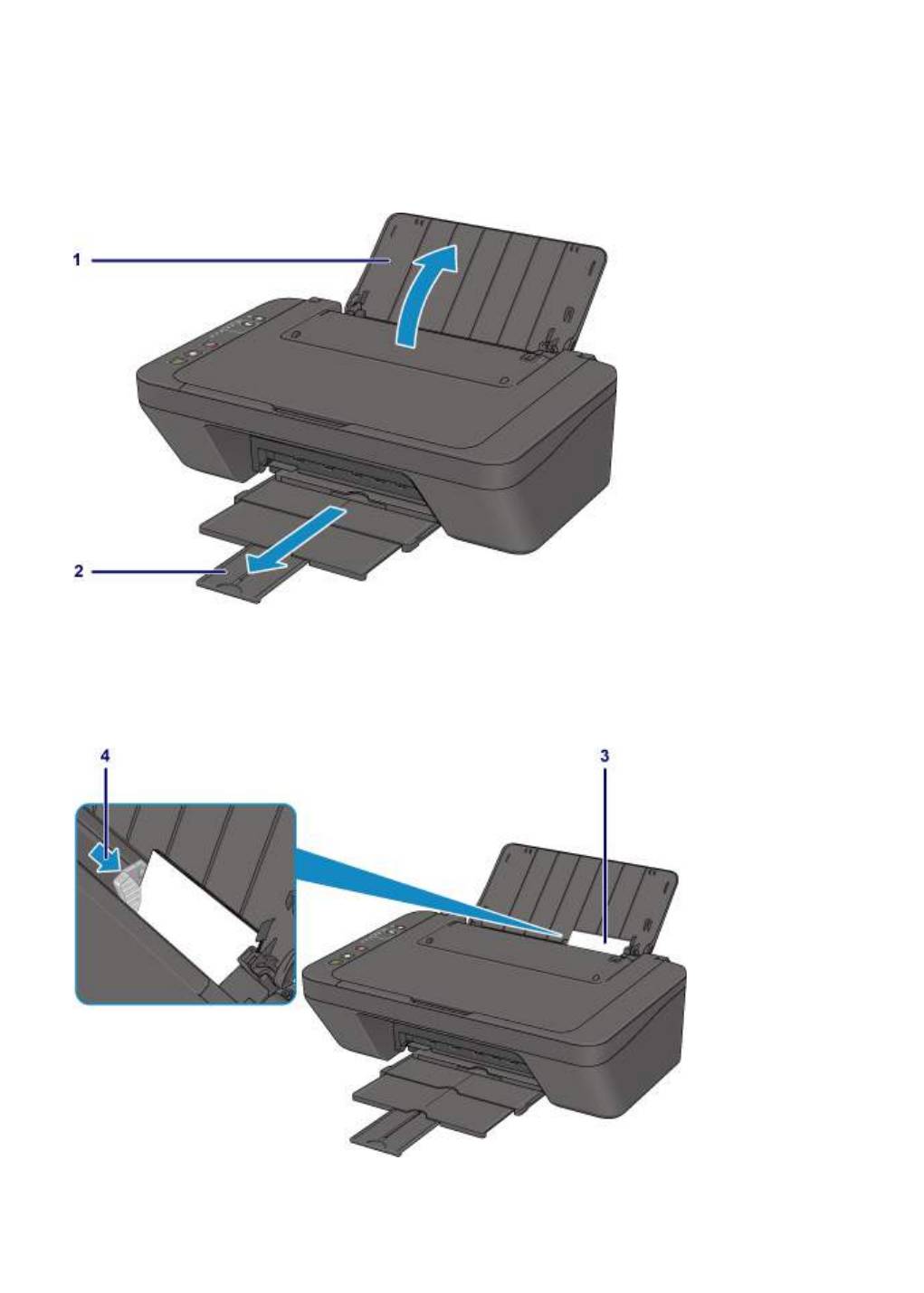
Печать фотографий с компьютера
В данном разделе описано, как печатать фотографии с помощью приложения My Image Garden.
1. Откройте упор для бумаги.
2.
Выдвиньте лоток приема бумаги и дополнительный лоток приема бумаги.
3.
Загрузите бумагу вертикально СТОРОНОЙ ДЛЯ ПЕЧАТИ К СЕБЕ.
4.
Установите направляющую бумаги.
5.
Щелкните значок My Image Garden в Quick Menu.
19
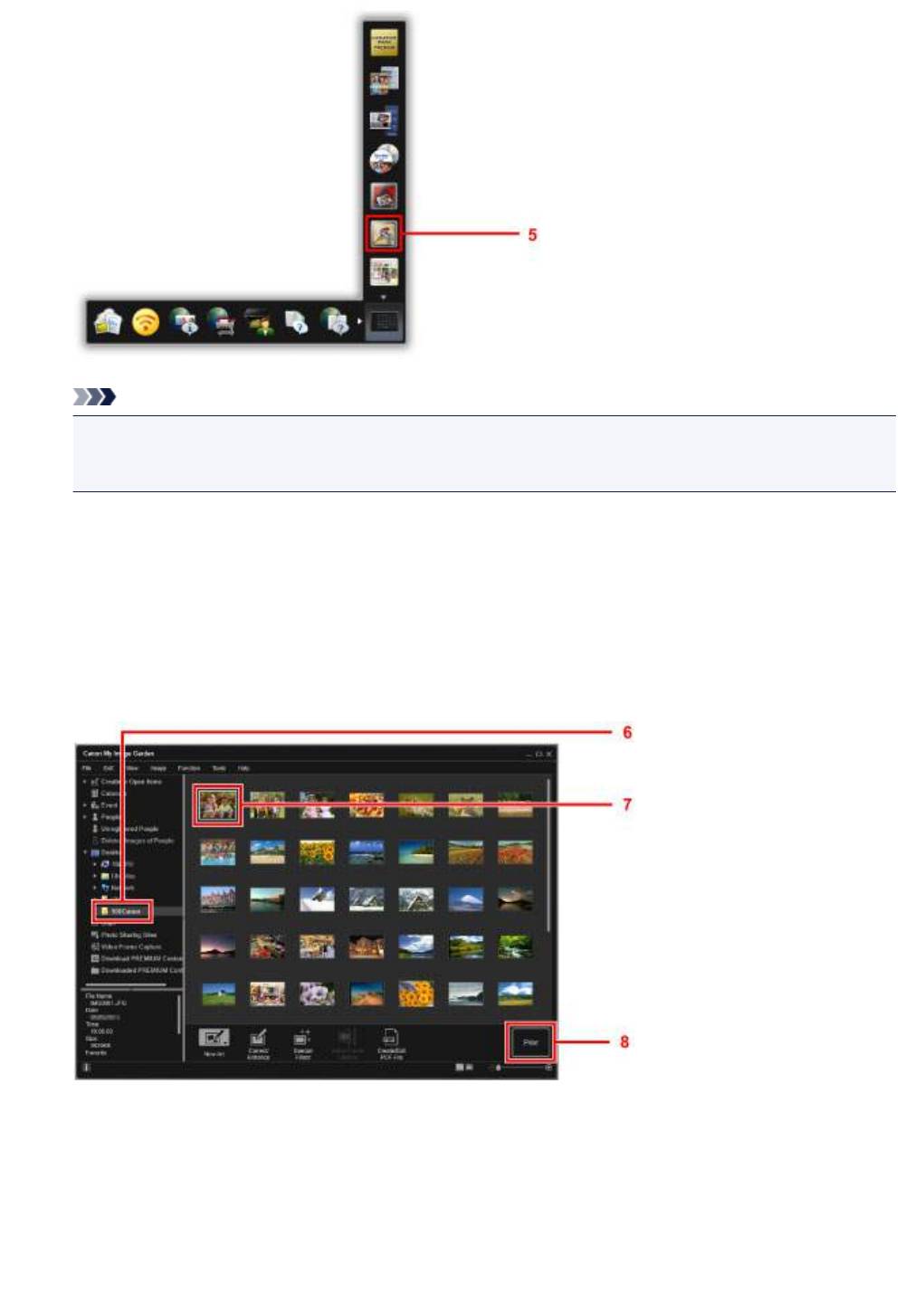
Примечание.
•
Количество и тип отображаемых значков зависят от региона, зарегистрированной модели
принтера/сканера и установленных приложений.
6.
Щелкните папку с фотографиями, которые нужно напечатать.
7.
Щелкните фотографии, которые нужно напечатать.
Чтобы выбрать несколько фотографий одновременно, щелкните их, удерживая клавишу Ctrl.
8.
Щелкните Печать (Print).
9.
Укажите число копий, имя принтера, тип носителя и т. п.
10.
Щелкните Печать (Print).
20
Оглавление
Аннотация для Струйного МФУ Canon pixma mg3040 в формате PDF
Топ 10 инструкций
Другие инструкции
-
Драйверы
5
-
Руководства по ремонту
1
-
Инструкции по эксплуатации
19
Языки:
Canon PIXMA MG3040 инструкция по эксплуатации
(253 страницы)
- Языки:Русский
-
Тип:
PDF -
Размер:
3.81 MB -
Описание:
Струйное многофункциональное устройство (МФУ)
Просмотр
Canon PIXMA MG3040 инструкция по эксплуатации
(2 страницы)
- Языки:Арабский, Русский, Украинский
-
Тип:
PDF -
Размер:
1.57 MB -
Описание:
This pdf manual is a Getting Started Guide.
Просмотр
Canon PIXMA MG3040 инструкция по эксплуатации
(2 страницы)
- Языки:Арабский, Русский, Украинский
-
Тип:
PDF -
Размер:
1.65 MB -
Описание:
This pdf manual is a Getting Started Guide.
Просмотр
Canon PIXMA MG3040 инструкция по эксплуатации
(365 страниц)
- Языки:Русский
-
Тип:
PDF -
Размер:
6.64 MB -
Описание:
Instructions on product functions and software are provided in this PDF manual. It is recommended to download this file if you prefer a hard copy (printed) manual.
Просмотр
Canon PIXMA MG3040 инструкция по эксплуатации
(303 страницы)
- Языки:Русский
-
Тип:
PDF -
Размер:
5.89 MB -
Описание:
Instructions on product functions and software are provided in this PDF manual. It is recommended to download this file if you prefer a hard copy (printed) manual.
Просмотр
Canon PIXMA MG3040 инструкция по эксплуатации
(2 страницы)
- Языки:Английский, Испанский, Португальский, Французский
-
Тип:
PDF -
Размер:
1.61 MB -
Описание:
This pdf manual is a Getting Started Guide.
Просмотр
Canon PIXMA MG3040 инструкция по эксплуатации
(2 страницы)
- Языки:Английский, Испанский, Португальский, Французский
-
Тип:
PDF -
Размер:
2.14 MB -
Описание:
This pdf manual is a Getting Started Guide.
Просмотр
Canon PIXMA MG3040 инструкция по эксплуатации
(351 страница)
- Языки:Английский
-
Тип:
PDF -
Размер:
6.49 MB -
Описание:
Instructions on product functions and software are provided in this PDF manual. It is recommended to download this file if you prefer a hard copy (printed) manual.
Просмотр
Canon PIXMA MG3040 инструкция по эксплуатации
(298 страниц)
- Языки:Английский
-
Тип:
PDF -
Размер:
5.8 MB -
Описание:
Instructions on product functions and software are provided in this PDF manual. It is recommended to download this file if you prefer a hard copy (printed) manual.
Просмотр
Canon PIXMA MG3040 инструкция по эксплуатации
(364 страницы)
- Языки:Словацкий
-
Тип:
PDF -
Размер:
6.57 MB -
Описание:
Instructions on product functions and software are provided in this PDF manual. It is recommended to download this file if you prefer a hard copy (printed) manual.
Просмотр
Canon PIXMA MG3040 инструкция по эксплуатации
(369 страниц)
- Языки:Португальский
-
Тип:
PDF -
Размер:
6.56 MB -
Описание:
Instructions on product functions and software are provided in this PDF manual. It is recommended to download this file if you prefer a hard copy (printed) manual.
Просмотр
Canon PIXMA MG3040 инструкция по эксплуатации
(308 страниц)
- Языки:Португальский
-
Тип:
PDF -
Размер:
5.85 MB -
Описание:
Instructions on product functions and software are provided in this PDF manual. It is recommended to download this file if you prefer a hard copy (printed) manual.
Просмотр
Canon PIXMA MG3040 инструкция по эксплуатации
(372 страницы)
- Языки:Польский
-
Тип:
PDF -
Размер:
6.6 MB -
Описание:
Instructions on product functions and software are provided in this PDF manual. It is recommended to download this file if you prefer a hard copy (printed) manual.
Просмотр
Canon PIXMA MG3040 инструкция по эксплуатации
(311 страниц)
- Языки:Польский
-
Тип:
PDF -
Размер:
5.87 MB -
Описание:
Instructions on product functions and software are provided in this PDF manual. It is recommended to download this file if you prefer a hard copy (printed) manual.
Просмотр
Canon PIXMA MG3040 инструкция по эксплуатации
(367 страниц)
- Языки:Венгерский
-
Тип:
PDF -
Размер:
6.59 MB -
Описание:
Instructions on product functions and software are provided in this PDF manual. It is recommended to download this file if you prefer a hard copy (printed) manual.
Просмотр
Canon PIXMA MG3040 инструкция по эксплуатации
(2 страницы)
- Языки:Греческий, Итальянский, Немецкий, Нидерландский
-
Тип:
PDF -
Размер:
1.52 MB -
Описание:
This pdf manual is a Getting Started Guide.
Просмотр
Canon PIXMA MG3040 инструкция по эксплуатации
(2 страницы)
- Языки:Греческий, Итальянский, Немецкий, Нидерландский
-
Тип:
PDF -
Размер:
2.1 MB -
Описание:
This pdf manual is a Getting Started Guide.
Просмотр
Canon PIXMA MG3040 инструкция по эксплуатации
(362 страницы)
- Языки:Чешский
-
Тип:
PDF -
Размер:
6.57 MB -
Описание:
Instructions on product functions and software are provided in this PDF manual. It is recommended to download this file if you prefer a hard copy (printed) manual.
Просмотр
Canon PIXMA MG3040 инструкция по эксплуатации
(303 страницы)
- Языки:Чешский
-
Тип:
PDF -
Размер:
5.85 MB -
Описание:
Instructions on product functions and software are provided in this PDF manual. It is recommended to download this file if you prefer a hard copy (printed) manual.
Просмотр
На NoDevice можно скачать инструкцию по эксплуатации для Canon PIXMA MG3040. Руководство пользователя необходимо для ознакомления с правилами установки и эксплуатации Canon PIXMA MG3040. Инструкции по использованию помогут правильно настроить Canon PIXMA MG3040, исправить ошибки и выявить неполадки.
View the manual for the Canon Pixma MG3040 here, for free. This user manual comes under the category printers and has been rated by 2 people with an average of a 7.1. This manual is available in the following languages: English. Do you have a question about the Canon Pixma MG3040?
Ask your question here
Frequently asked questions
Can’t find the answer to your question in the manual? You may find the answer to your question in the FAQs about the Canon Pixma MG3040 below.
What is the best way to remove jammed paper from my printer?
It is best to gently pull the paper out of the printer. Turn the printer off, and make sure that the printhead is not hanging over the paper and that no paper remains in the printer.
How come my prints are of poor quality?
There can be various reasons for poor print quality. Check if the cartridges or toners are full. If so, inkjet printers often require cleaning the printer, the cartridges have dried out, or the print head is broken. With laser printers, calibrating the laser printer is recommended.
How come my printer does not accept original cartridges?
Non-genuine cartridges may not be recognised by the printer. In that case you will receive a message that the cartridge is empty. The manual of the purchased cartridge usually contains the solution, if this does not work, it is advisable to contact the seller.
How come my inkjet printer has black stripes?
In most cases, the inkjet printer cartridge is broken and the cartridge needs to be replaced.
What is the difference between a laser printer and an inkjet printer?
A laser printer prints with a toner and an inkjet printer prints with ink.
What does DPI stand for?
DPI stands for Dots Per Inch and is the number of ink droplets (per inch) that end up on the paper when printing.
Is the manual of the Canon Pixma MG3040 available in English?
Yes, the manual of the Canon Pixma MG3040 is available in English .
Is your question not listed? Ask your question here