

EN Dear Customer,
Gigaset Communications GmbH is the legal successor to
Siemens Home and Office Communication Devices GmbH &
Co. KG (SHC), which in turn continued the Gigaset business
of Siemens AG. Any statements made by Siemens AG or
SHC that are found in the user guides should therefore be
understood as statements of Gigaset Communications
.
GmbH
We hope you enjoy your Gigaset.
DE Sehr geehrte Kundin, sehr geehrter Kunde,
FR Chère Cliente, Cher Client,
IT Gentile cliente,
NL Geachte klant,
ES Estimado cliente,
PT SCaros clientes,
die Gigaset Communications GmbH ist Rechtsnachfolgerin
der Siemens Home and Office Communication Devices
GmbH & Co. KG (SHC), die ihrerseits das Gigaset-Geschäft
der Siemens AG fortführte. Etwaige Erklärungen der
Siemens AG oder der SHC in den Bedienungsanleitungen
sind daher als Erklärungen der Gigaset Communications
GmbH zu verstehen.
Wir wünschen Ihnen viel Freude mit Ihrem Gigaset.
la société Gigaset Communications GmbH succède en droit
à Siemens Home and Office Communication Devices GmbH
& Co. KG (SHC) qui poursuivait elle-même les activités Gigaset de Siemens AG. Donc les éventuelles explications de Siemens AG ou de SHC figurant dans les modes d’emploi
doivent être comprises comme des explications de Gigaset
Communications GmbH.
Nous vous souhaitons beaucoup d’agrément avec votre
Gigaset.
la Gigaset Communications GmbH è successore della Siemens Home and Office Communication Devices GmbH &
Co. KG (SHC) che a sua volta ha proseguito l’attività della
Siemens AG. Eventuali dichiarazioni della Siemens AG o
della SHC nei manuali d’istruzione, vanno pertanto intese
come dichiarazioni della Gigaset Communications GmbH.
Le auguriamo tanta soddisfazione con il vostro Gigaset.
Gigaset Communications GmbH is de rechtsopvolger van
Siemens Home and Office Communication Devices GmbH &
Co. KG (SHC), de onderneming die de Gigaset-activiteiten
van Siemens AG heeft overgenomen. Eventuele uitspraken
of mededelingen van Siemens AG of SHC in de gebruiksaanwijzingen dienen daarom als mededelingen van Gigaset
Communications GmbH te worden gezien.
Wij wensen u veel plezier met uw Gigaset
la Gigaset Communications GmbH es derechohabiente de la
Siemens Home and Office Communication Devices GmbH &
Co. KG (SHC) que por su parte continuó el negocio Gigaset
de la Siemens AG. Las posibles declaraciones de la
Siemens AG o de la SHC en las instrucciones de uso se
deben entender por lo tanto como declaraciones de la Gigaset Communications GmbH.
Le deseamos que disfrute con su Gigaset.
Gigaset Communications GmbH é a sucessora legal da Siemens Home and Office Communication Devices GmbH &
Co. KG (SHC), que, por sua vez, deu continuidade ao sector
de negócios Gigaset, da Siemens AG. Quaisquer declarações por parte da Siemens AG ou da SHC encontradas nos
manuais de utilização deverão, portanto, ser consideradas
como declarações da Gigaset Communications GmbH.
Desejamos que tenham bons momentos com o seu Gigaset.
DA Kære Kunde,
FI Arvoisa asiakkaamme,
SV Kära kund,
NO Kjære kunde,
EL Αγ α πητή πελάτισσα, αγαπητέ πελάτη,
HR Poštovani korisnici,
.
SL Spoštovani kupec!
Gigaset Communications GmbH er retlig efterfølger til Siemens Home and Office Communication Devices GmbH &
Co. KG (SHC), som fra deres side videreførte Siemens AGs
Gigaset-forretninger. Siemens AGs eller SHCs eventuelle
forklaringer i betjeningsvejledningerne skal derfor forstås
som Gigaset Communications GmbHs forklaringer.
Vi håber, du får meget glæde af din Gigaset.
Gigaset Communications GmbH on Siemens Home and
Office Communication Devices GmbH & Co. KG (SHC)-yri-
tyksen oikeudenomistaja, joka jatkoi puolestaan Siemens
AG:n Gigaset-liiketoimintaa. Käyttöoppaissa mahdollisesti
esiintyvät Siemens AG:n tai SHC:n selosteet on tämän
vuoksi ymmärrettävä Gigaset Communications GmbH:n
selosteina.
Toivotamme Teille paljon iloa Gigaset-laitteestanne.
Gigaset Communications GmbH övertar rättigheterna från
Siemens Home and Office Communication Devices GmbH &
Co. KG (SHC), som bedrev Gigaset-verksamheten efter Siemens AG. Alla förklaringar från Siemens AG eller SHC i
användarhandboken gäller därför som förklaringar från
Gigaset Communications GmbH.
Vi önskar dig mycket nöje med din Gigaset.
Gigaset Communications GmbH er rettslig etterfølger etter
Siemens Home and Office Communication Devices GmbH &
Co. KG (SHC), som i sin tur videreførte Gigaset-geskjeften i
Siemens AG. Eventuelle meddelelser fra Siemens AG eller
SHC i bruksanvisningene er derfor å forstå som meddelelser
fra Gigaset Communications GmbH.
Vi håper du får stor glede av din Gigaset-enhet.
η Gigaset Communications GmbH είναι η νομική διάδοχος της
Siemens Home and Office Communication Devices GmbH &
Co. KG (SHC), η οποία έχει αναλάβει την εμπορική
δραστηριότητα Gigaset της Siemens AG. Οι δηλώσεις της
Siemens AG ή της SHC στις
επομένως δηλώσεις της Gigaset Communications GmbH.
Σας ευχόμαστε καλή διασκέδαση με τη συσκευή σας Gigaset.
Gigaset Communications GmbH pravni je sljednik tvrtke
Siemens Home and Office Communication Devices GmbH &
Co. KG (SHC), koji je nastavio Gigaset poslovanje tvrtke
Siemens AG. Zato sve izjave tvrtke Siemens AG ili SHC koje
se nalaze u uputama za upotrebu treba tumačiti kao izjave
tvrtke Gigaset Communications GmbH.
Nadamo se da sa zadovoljstvom koristite svoj Gigaset
uređaj.
Podjetje Gigaset Communications GmbH je pravni naslednik
podjetja Siemens Home and Office Communication Devices
GmbH & Co. KG (SHC), ki nadaljuje dejavnost znamke
Gigaset podjetja Siemens AG. Vse izjave podjetja Siemens
AG ali SHC v priročnikih za uporabnike torej veljajo kot izjave
podjetja Gigaset Communications GmbH.
Želimo vam veliko užitkov ob uporabi naprave Gigaset.
οδηγίες χρήσ
ης αποτ
ελούν
Issued by
Gigaset Communications GmbH
Schlavenhorst 66, D-46395 Bocholt
Gigaset Communications GmbH is a trademark
licensee of Siemens AG
© Gigaset Communications GmbH 2008
All rights reserved.
Subject to availability. Rights of modifications
reserved.
www.gigaset.com

CS Vážení zákazníci,
společnost Gigaset Communications GmbH je právním
nástupcem společnosti Siemens Home and Office
Communication Devices GmbH & Co. KG (SHC), která dále
přejala segment produktů Gigaset společnosti Siemens AG.
Jakékoli prohlášení společnosti Siemens AG nebo SHC, které
naleznete v uživatelských příručkách, je třeba považovat za
prohlášení společnosti Gigaset Communications GmbH.
Doufáme, že jste s produkty Gigaset spokojeni.
SK Vážený zákazník,
Spoločnosť Gigaset Communications GmbH je právnym
nástupcom spoločnosti Siemens Home and Office
Communication Devices GmbH & Co. KG (SHC), ktorá zasa
pokračovala v činnosti divízie Gigaset spoločnosti Siemens
AG. Z tohto dôvodu je potrebné všetky vyhlásenia
spoločnosti Siemens AG alebo SHC, ktoré sa nachádzajú v
používateľských príručkách, chápať ako vyhlásenia
spoločnosti Gigaset Communications GmbH.
Veríme, že budete so zariadením Gigaset spokojní.
PL Szanowny Kliencie,
Firma Gigaset Communications GmbH jest spadkobiercą
prawnym firmy Siemens Home and Office Communication
Devices GmbH & Co. KG (SHC), która z kolei przejęła
segment produktów Gigaset od firmy Siemens AG. Wszelkie
oświadczenia firm Siemens AG i SHC, które można znaleźć
w instrukcjach obsługi, należy traktować jako oświadczenia
firmy Gigaset Communications GmbH.
Życzymy wiele przyjemności z korzystania z produktów
Gigaset.
TR Sayın Müşterimiz,
Gigaset Communications GmbH, Siemens AG’nin Gigaset
işletmesini yürüten Siemens Home and Office
Communication Devices GmbH & Co. KG (SHC)’nin yasal
halefidir. Kullanma kılavuzlarında bulunan ve Siemens AG
veya SHC tarafından yapılan bildiriler Gigaset
Communications GmbH tarafından yapılmış bildiriler olarak
algılanmalıdır.
Gigaset’ten memnun kalmanızı ümit ediyoruz.
RO Stimate client,
Gigaset Communications GmbH este succesorul legal al
companiei Siemens Home and Office Communication
Devices GmbH & Co. KG (SHC), care, la rândul său, a
continuat activitatea companiei Gigaset a Siemens AG.
Orice afirmaţii efectuate de Siemens AG sau SHC şi incluse
în ghidurile de utilizare vor fi, prin urmare, considerate a
aparţine Gigaset Communications GmbH.
Sperăm ca produsele Gigaset să fie la înălţimea dorinţelor
dvs.
SR Poštovani potrošaču,
Gigaset Communications GmbH je pravni naslednik
kompanije Siemens Home and Office Communication
Devices GmbH & Co. KG (SHC), kroz koju je nastavljeno
poslovanje kompanije Gigaset kao dela Siemens AG. Stoga
sve izjave od strane Siemens AG ili SHC koje se mogu naći u
korisničkim uputstvima treba tuma
Gigaset Communications GmbH.
Nadamo se da ćete uživati u korišćenju svog Gigaset
uređaja.
BG Уважаеми потребители,
Gigaset Communications GmbH е правоприемникът на
Siemens Home and Office Communication Devices GmbH
& Co. KG (SHC), която на свой ред продължи бизнеса на
подразделението Siemens AG. По тази причина
всякакви изложения, направени от Siemens AG или
SHC, които се намират в ръководствата за
потребителя, следва да се разбират като изложения на
Gigaset Communications GmbH.
Надяваме се да ползвате с удоволствие вашия Gigaset.
izjave kompanije
čiti kao
RU Уважаемыи покупатель!
Компания Gigaset Communications GmbH является
правопреемником компании Siemens Home and Office
Communication Devices GmbH & Co. KG (SHC), которая,
ою очередь, приняла подразделение Gigaset в свое
в св
управление от компании Siemens AG. Поэтому любые
заявления, сделанные от имени компании Siemens AG
или SHC и встречающиеся в руководствах
пользователя, должны восприниматься как заявления
компании Gigaset Communications GmbH.
Мы надеемся, что продукты Gigaset удовлетворяют
вашим требованиям.
HU T
isztelt Vásárló!
A Siemens Home and Communication Devices GmbH & Co.
KG (SHC) törvényes jogutódja a Gigaset Communications
GmbH, amely a Siemens AG Gigaset üzletágának utódja.
Ebből következően a Siemens AG vagy az SHC felhasználói
kézikönyveiben található bármely kijelentést a Gigaset
Communications GmbH kijelentésének kell tekinteni.
Reméljük, megelégedéssel használja Gigaset készülékét.
Issued by
Gigaset Communications GmbH
Schlavenhorst 66, D-46395 Bocholt
Gigaset Communications GmbH is a trademark
licensee of Siemens AG
© Gigaset Communications GmbH 2008
All rights reserved.
Subject to availability. Rights of modifications
reserved.
www.gigaset.com
s
Issued by
Siemens Home and Office Communication Devices GmbH & Co. KG
Schlavenhorst 66
D-46395 Bocholt
© Siemens Home and Office Communication Devices GmbH & Co. KG 2006
All rights reserved. Subject to availability.
Rights of modification reserved.
www.siemens.com/gigaset
Gigaset S450 SIM
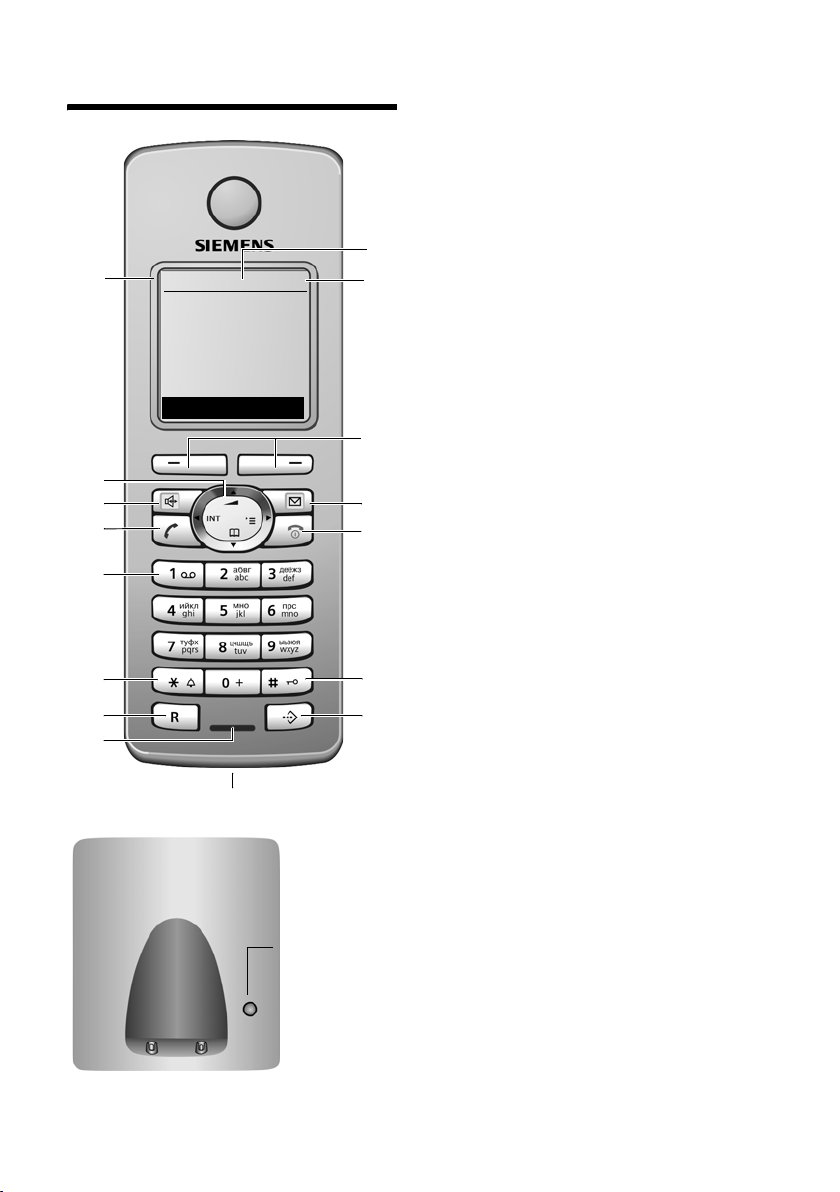
Переносной телефон
Переносной телефон
16
15
14
13
12
11
10
9
ÐV
INT 1
10.05.05 09:45
INT SMS
8
Кнопка
регистраци
и/
пейджинга
(стр.38/
стр. 39)
= e V U (разряжен — заряжен)
= мигает: аккумулятор почти разряжен
e V U мигает: аккумулятор
заряжается
3 Дисплейные клавиши (стр. 15)
4 Клавиша сообщений
доступ к спискам позвонивших и
сообщений;
мигает: новое сообщение или новый
1
2
3
4
5
6
7
вызов
5 Клавиша включение/выключение/
отбой
завершение разговора, прерывание
функции, возврат на предыдущий
уровень меню (нажмите и быстро
отпустите), возврат в режим готовности
(удерживайте нажатой), включение/
выключение переносного телефона
(удерживайте нажатой в
готовности)
6 Клавиша „решетка“
включение/выключение блокировки
клавиатуры (удерживайте нажатой),
переключение режимов ввода
прописных/строчных букв и цифр
7 Клавиша списка телефонных
компаний
вызов списка телефонных компаний
8 Разъем для подключения гарнитуры
9 Микрофон
10 Клавиша „R“
— консультация (флэш)
— пауза при наборе номера (удерживайте
нажатой)
11 Клавиша „звезда“
включение/выключение вызывного
сигнала (удерживайте нажатой),
вызов
таблицы специальных символов
12 Клавиша 1
вызов автоответчика/автоответчика
телефонной сети (удерживайте нажатой)
13 Клавиша соединения
прием вызова, вызов списка повторного
набора (нажмите и быстро отпустите),
начало набора (удерживайте нажатой)
14 Клавиша громкой связи
переключение режимов разговора через
трубку и громкой связи;
горит: включена громкая связь;
мигает: входящий вызов
15 Управл яющая клавиша (стр. 14)
16 Уровен ь
принимаемого сигнала
режиме
Ð i Ñ Ò (сильный — слабый)
| мигает: нет сигнала
1 Дисплей в режиме готовности
2 Состояние аккумулятора
1

Содержание
Содержание
Переносной телефон . . . . . . . . 1
Меры предосторожности . . . . . 4
Gigaset S450 SIM– больше, чем
просто телефон . . . . . . . . . . . . . 5
Подготовка к работе . . . . . . . . . 5
Комплект поставки . . . . . . . . . . . . . . 5
Уст ановка базового блока . . . . . . . . . 5
Подготовка переносного телефона . 6
Обзор меню . . . . . . . . . . . . . . . 10
Разговор по телефону . . . . . . 12
Внешние соединения . . . . . . . . . . . 12
Завершение разговора . . . . . . . . . . 12
Прием вызова . . . . . . . . . . . . . . . . . 12
Передача абонентского номера . . . 12
Громкая связь . . . . . . . . . . . . . . . . . 13
Отключение микрофона . . . . . . . . . 14
Управление переносным
телефоном . . . . . . . . . . . . . . . . 14
Управляющая клавиша . . . . . . . . . . 14
Дисплейные клавиши . . . . . . . . . . . 15
Возврат в режим готовности . . . . . . 15
Использование меню . . . . . . . . . . . 15
Исправление неправильного
ввода . . . . . . . . . . . . . . . . . . . . . . . . 16
Функции телефонной сети . . 17
Функции, включаемые для
следующего соединения . . . . . . . . . 17
Функции, включаемые для всех
последующих вызовов . . . . . . . . . . 17
Использование
телефонного справочника
и других списков . . . . . . . . . . . 18
Телефонный справочник и список
телефонных компаний . . . . . . . . . . 18
Копирование записей с SIM-карт . . 21
Список повторного набора . . . . . . . 23
Вызов списков с помощью
клавиши сообщений . . . . . . . . . . . . 23
Сокращение расходов на
телефонную связь . . . . . . . . . 25
Объединение номера
телефонной компании с
абонентским номером . . . . . . . . . . 25
Автоматический выбор
оператора (предварительный
набор) . . . . . . . . . . . . . . . . . . . . . . . 25
SMS (текстовые сообщения) 27
Ввод/отправка SMS . . . . . . . . . . . . 28
Прием сообщений SMS . . . . . . . . . 30
Извещения с помощью SMS . . . . . 32
Почтовые ящики SMS . . . . . . . . . . . 32
Настройка SMS-центра . . . . . . . . . 34
Функции SMS при подключении
телефона к офисной АТС . . . . . . . . 34
Включение/отключение
функции SMS . . . . . . . . . . . . . . . . . 35
Устранение неисправностей . . . . . 35
Использование автоответчика
телефонной сети . . . . . . . . . . 37
Настройка быстрого вызова для
автоответчика телефонной сети . . 37
Просмотр сообщений
автоответчика телефонной сети . . 37
Использование нескольких
переносных телефонов . . . . 38
Регистрация переносных
телефонов . . . . . . . . . . . . . . . . . . . . 38
Отмена регистрации переносных
телефонов . . . . . . . . . . . . . . . . . . . . 39
Поиск переносного телефона
(„пейджинг“) . . . . . . . . . . . . . . . . . . . 39
Смена базового бл ока . . . . . . . . . . 39
Внутренние соединения . . . . . . . . . 39
Подключение внутреннего
абонента к внешнему
соединению . . . . . . . . . . . . . . . . . . . 41
Изменение названия переносного
телефона . . . . . . . . . . . . . . . . . . . . . 41
Изменение внутреннего номера
переносного телефона . . . . . . . . . . 42
Использование переносного
телефона для акустического
контроля помещения . . . . . . . . . . . 42
2

Содержание
Настройка переносного
телефона . . . . . . . . . . . . . . . . . . 44
Выбор языка дисплейных
сообщений . . . . . . . . . . . . . . . . . . . . 44
Настройка дисплея . . . . . . . . . . . . . 44
Вывод на дисплей логотипа . . . . . . 45
Настройка подсветки дисплея . . . . 45
Включение/выключение
автоматического приема вызовов . 45
Регулировка громкости . . . . . . . . . . 46
Изменение вызывного сигнала . . . 46
Включение/отключение
подавления первого звонка . . . . . . 47
Включение/выключение
предупредительных сигналов . . . . 47
Настройка будильника . . . . . . . . . . 48
Возврат настроек переносного
телефона в состояние при
поставке . . . . . . . . . . . . . . . . . . . . . . 48
Настройка базового блока . . . 49
Защита телефона от
использования посторонними . . . . 49
Включение /отключение
мелодии при ожидании
соединения . . . . . . . . . . . . . . . . . . . 49
Поддержка ретранслятора . . . . . . . 49
Индикация абонентских номеров
(CLIP) . . . . . . . . . . . . . . . . . . . . . . . . 50
Возврат настроек базового
блока в состояние при поставке . . . 50
Подключение базового
блока к офисной АТС . . . . . . . 51
Способ набора номера и
время „флэш“ . . . . . . . . . . . . . . . . . . 51
Настройка
продолжительности пауз . . . . . . . . . 51
Временное переключение на
тональный набор . . . . . . . . . . . . . . . 52
Приложение . . . . . . . . . . . . . . . 53
Уход . . . . . . . . . . . . . . . . . . . . . . . . . 53
Контакт с жидкостью . . . . . . . . . . . 53
Вопросы и ответы . . . . . . . . . . . . . . 53
Сервисная служба . . . . . . . . . . . . . 54
Технические характеристики . . . . . 54
Используемые обозначения 55
Символы . . . . . . . . . . . . . . . . . . . . . 55
Пример использования меню . . . . 55
Пример многострочного ввода . . . 56
Ввод и редактирование текста . . . 57
Аксессуары . . . . . . . . . . . . . . . 59
Алфавитный указатель . . . . 61
3
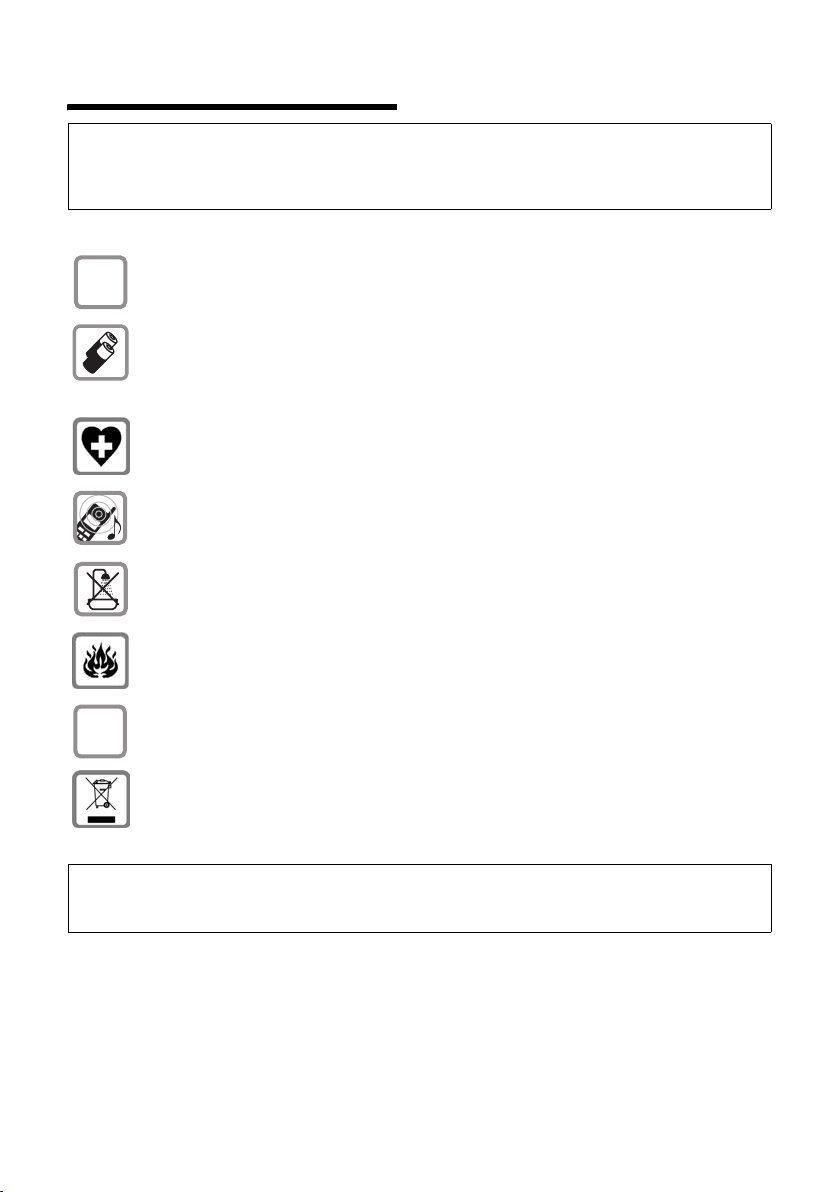
Меры предосторожности
Меры предосторожности
Внимание:
Перед использованием телефона внимательно прочитайте инструкцию по эксплуатации и
раздел „Меры предосторожности“. Объясните вашим детям их содержание и возможные
опасности при использовании телефона.
Используйте только прилагаемое зарядное устройство, как это указано на
$
нижней стороне базового блока.
Используйте только разрешенные перезаряжаемые аккумуляторы!
Никогда не используйте обычные (неперезаряжаемые) батарейки, так как
это может привести к травмам. Используйте аккумуляторы, указанные в
настоящей инструкции по эксплуатации (стр. 54).
Телефон может создавать помехи медицинскому оборудованию. Следите
за соблюдением соответствующих технических
медицинских учреждениях).
Переносной телефон может вызывать неприятное жужжание в слуховых
аппаратах.
Не устанавливайте базовый бл ок в ванной или в душе. Переносной
телефон и базовый блок не защищены от брызг (стр. 53).
требований (например, в
Не пользуйтесь телефоном в помещениях с повышенной
взрывоопасностью (например, на лакокрасочных производствах).
ƒ
Передавайте ваш телефон Gigaset другим лицам
инструкцией по эксплуатации.
Утилизация аккумуляторов и телефона должна осуществляться без
ущерба для окружающей среды.
только вместе с
Внимание:
Некоторые из описанных в настоящей инструкции по эксплуатации функций доступны не во
всех странах.
4

Gigaset S450 SIM– больше, чем просто телефон
Gigaset S450 SIM– больше,
чем просто телефон
Ваш телефон не только обеспечивает
прием передачу текстовых сообщений
SMS в сети общего пользования и
оснащен памятью на 150 номеров
(стр. 18) – ваш телефон может гораздо
больше:
u Вы можете назначить важным
номерам статус VIP – в этом случае
вы сможете отличить важный звонок
по звуку вызывного сигнала
(стр. 18).
u Вы можете сохранять в памяти
телефона дни рождения (стр.20) –
телефон вовремя напомнит вам о
них.
u Вы можете набирать часто
используемые номера одним
нажатием клавиши (стр.18).
u Также телефон сохраняет
информацию о пропущенных
вызовах (стр.24).
Желаем вам получить удовольствие
от использования нового телефона!
Подготовка к работе
Установка базового блока
Базовый блок предназначен для
использования в закрытых сухих
помещениях при температуре от +5 °C
до +45 °C..
Устанавливайте базовый блок в центре
квартир или дома.
Обратите внимание:
u Телеф он не должен подвергаться
следующим воздействиям:
источники тепла, прямой солнечный
свет, другие электрические
устройства.
u Защищайте телефон от влаги, пыли,
агрессивных жидкостей и паров.
Дальность связи и уровень сигнала
Дальность связи:
u на открытом пространстве: до 300 м
u в зданиях: до 50 м
Уровень принимаемого сигнала:
Индикатор на дисплее показывает
качество связи между базовым блоком
и переносным телефоном:
u сильный-слабый: ÐiÑÒ
u нет сигнала: мигает символ |
Комплект поставки
u базовый блок Gigaset S450 SIM,
u переносной телефон Gigaset S45,
u блок питания,
u телефонный кабель,
u два аккумулятора,
u крышка аккумуляторного отсека,
u зажим для крепления телефона на
ремне,
u инструкция по эксплуатации.
Подключение базового блока
¤ Сначала подключите сетевой блок
питания, а затем телефонный
кабель, как показано на рисунке.
Проложите кабели через канавки.
5
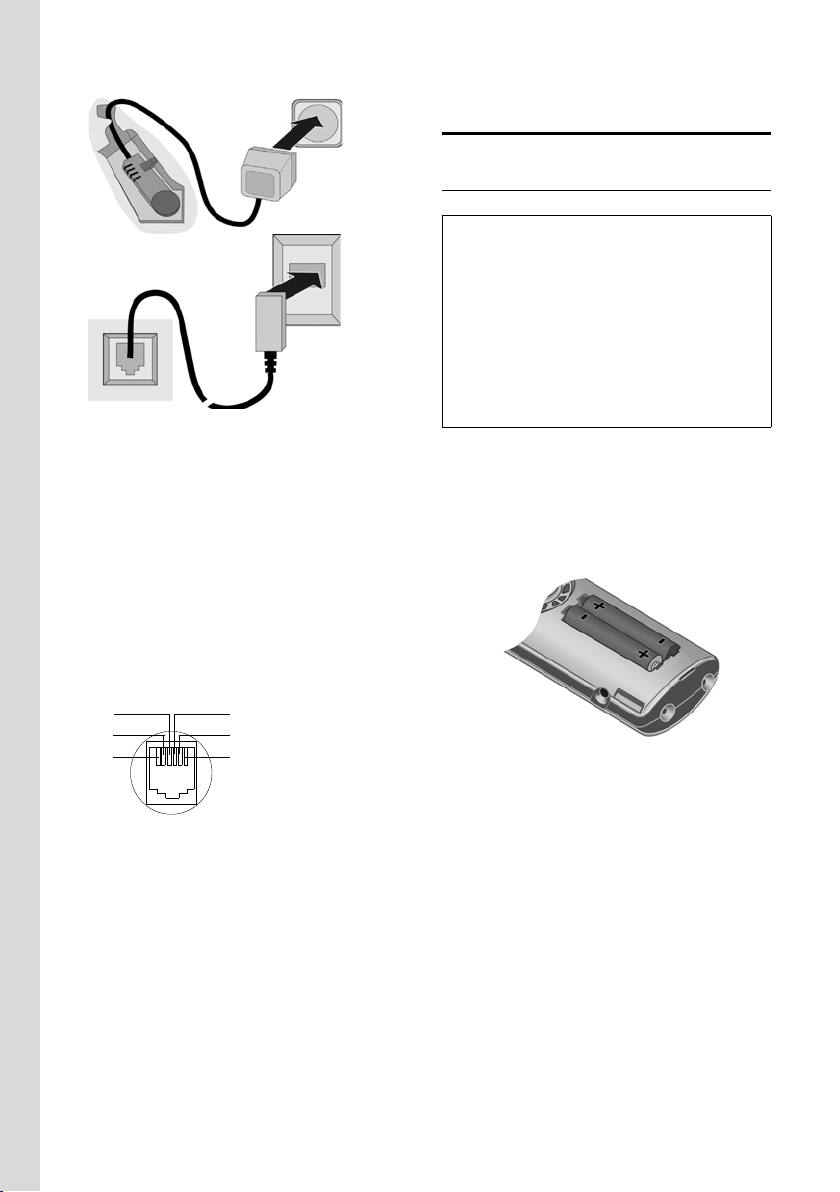
Подготовка к работе
2
1
1
3
1
1
1 Нижняя сторона базового блок а
(фрагмент)
2 Сетевой блок питания 230 В
3 Теле фон ный штекер с сетевым кабелем
Обратите внимание:
u Сетевой блок питания всегда
должен быть включен, так как
телефон не может работать без
внешнего питания.
u При покупке телефонного кабеля
обратите внимание на правильное
назначение контактов.
Контакты телефонного кабеля
1 не использ.
3
2
1
4
5
6
2 не использ.
3a
4b
5 не использ.
6 не использ.
Подготовка переносного
телефона
Установка аккумуляторов
Внимание:
Используйте только рекомендованные
фирмой Siemens (стр. 54) перезаряжаемые
аккумуляторы! Никогда не устанавливайте
обычные (неперезаряжаемые) батарейки,
так как это может привести к травмам и
причинению материального ущерба.
Например, возможно разрушение покрытия
аккумулятора и батарейки (опасно для
здоровья). Также возможно нарушение
работоспособности и порча устройства.
¤ Вставьте аккумулятор в телефон
соблюдая полярность (см.
схематический рисунок).
Символы полярности нанесены в
аккумуляторном отсеке.
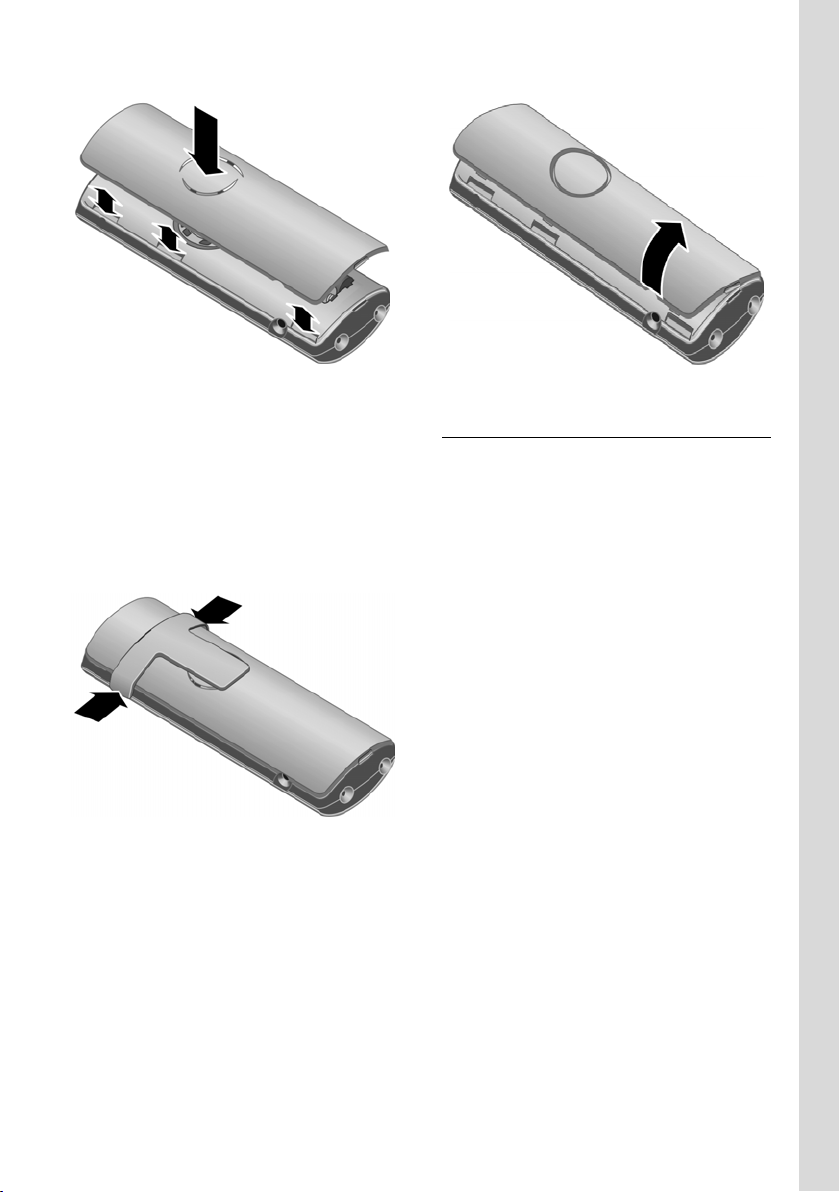
Закрывание крышки аккумуляторного
отсека
¤ Сначала установите пазы крышки к
выступам во внутренней части
корпуса.
¤ Затем нажмите на рышку. Коышка
должна зафиксироваться.
6
Подготовка к работе
Крепление зажима для ношения на
ремне
На переносном телефоне на уровне
дисплея имеются пазы для крепления
зажима для ношения на ремне.
¤ Установите зажим на заднюю
сторону телефона и надавите на
него, чтобы выступы зажима
зафиксировались в пазах.
Открывание крышки аккумуляторного
отсека
¤ Снимите зажим для ношения на
ремне, если он был установлен..
¤ Возьмитесь за крышку в районе
гнезда для подключения гарнитуры
и снимите крышку вверх.
Установка переносного телефона на
базовый блок и регистрация
¤ Установите переносной телефон на
базовый блок дисплеем вверх.
В течение приблизительно одной
минуты выполняется автоматическая
регистрация. В это время на дисплей
выводится надпись Регистрация и
мигает название базового блок а,
например, Базовый блок 1.
Переносному телефону присваивается
наименьший свободный внутренний
номер (1–6).
После успешной регистрации на
дисплей выводится внутренний номер
переносного телефона, например,
INT 1. Это означает, что переносному
телефону присвоен внутренний номер
1. Если внутренние номера 1–6 уже
заняты, то перезаписывается номер 6.
7

Подготовка к работе
Рекомендации:
– Автоматическая регистрация возможна
только в том случае, если через
базовый бл ок, на котором выполняется
регистрация, не ведется телефонный
разговор.
– При нажатии любой клавиши
автоматическая регистрация
прерывается.
– Если выполнить автоматическую
регистрацию не удалось, то переносной
телефон следует зарегистрировать
вручную (стр. 38).
– Вы можете изменить название
переносного телефона (стр.42).
Установите переносной телефон на
базовый блок для зарядки
аккумулятора.
Рекомендация:
– Если телефон выключился из-за
разряда аккумулятора, то при установке
на базовый блок он автоматически
включается.
– Устана вли ват ь переносной телефон
следует только на предназначенный для
использования с этим телефоном
базовый бл ок.
Способы устранения возможных
неисправностей — см. стр.53.
Гнездо для подключения гарнитуры
Вы можете подключать гарнитуры (с
защелкивающимся штекером) HAMA
Plantronics M40, MX100 и MX150.
и последующего полного разряда
аккумуляторов.
¤ Поэтому переносной телефон
следует оставить на базовом блоке
на десять часов для непрерывной
зарядки. Включать переносной
телефон для зарядки не нужно.
¤ После этого снимите переносной
телефон с базового бло ка. Снова
заряжать телефон следует только
после того, как аккумуляторы
полностью разрядятся.
Рекомендация:
После первой зарядки и разряда
аккумуляторов вы можете устанавливать
переносной телефон на базовый бло к
после каждого разговора.
Обратите внимание:
u Повторяйте процедуру зарядки и
полного разряда аккумулятора, если
вы вынули аккумуляторы из
телефона и установили его вновь.
u Во время зарядки аккумуляторы
можгут нагреваться — это
нормальное явление, не
представляющее опасности.
u Емкость аккумуляторов снижается
через определенное время по
техническим причинам.
¤ Введите дату и время. Это
необходимо, например, для
правильной регистрации времени
поступления входящих вызовов.
Первая зарядка и разряд
аккумуляторова
Если телефон включен, то во время
зарядки в верхнем правом углу
дисплея мигает индикатор зарядки
аккумуляторов e.
Во время работы этот символ
показывает уровень зарядки
аккумулятора (стр.1). Правильная
индикация состояния аккумуляторов
возможна только после полной зарядки
8

Ввод даты и времени
¤ Если дата и время еще не введены,
нажмите дисплейную клавишу
для вывода на дисплей полей ввода.
Для изменения времени вызовите поля
ввода с помощью меню:
¢ Ð ¢ Дата/время
v
§Время§
¤ Многострочный ввод:
Дата:
Введите день, месяц и год — 6 цифр.
Bремя:
Введите часы и минуты — 4 цифры,
например, Q M 1 5 для 7
часов 15 минут.
§Сохран.§ Нажмите дисплейную
клавишу.
Индикация в режиме готовности
Если телефон зарегистрирован и
время установлено, то дисплей в
режиме готовности выглядит, как на
рисунке (пример).
ÐV
Подготовка к работе
INT 1
10.05.05 07:15
INT SMS
Теперь телефон готов к работе!
9
Обзор меню
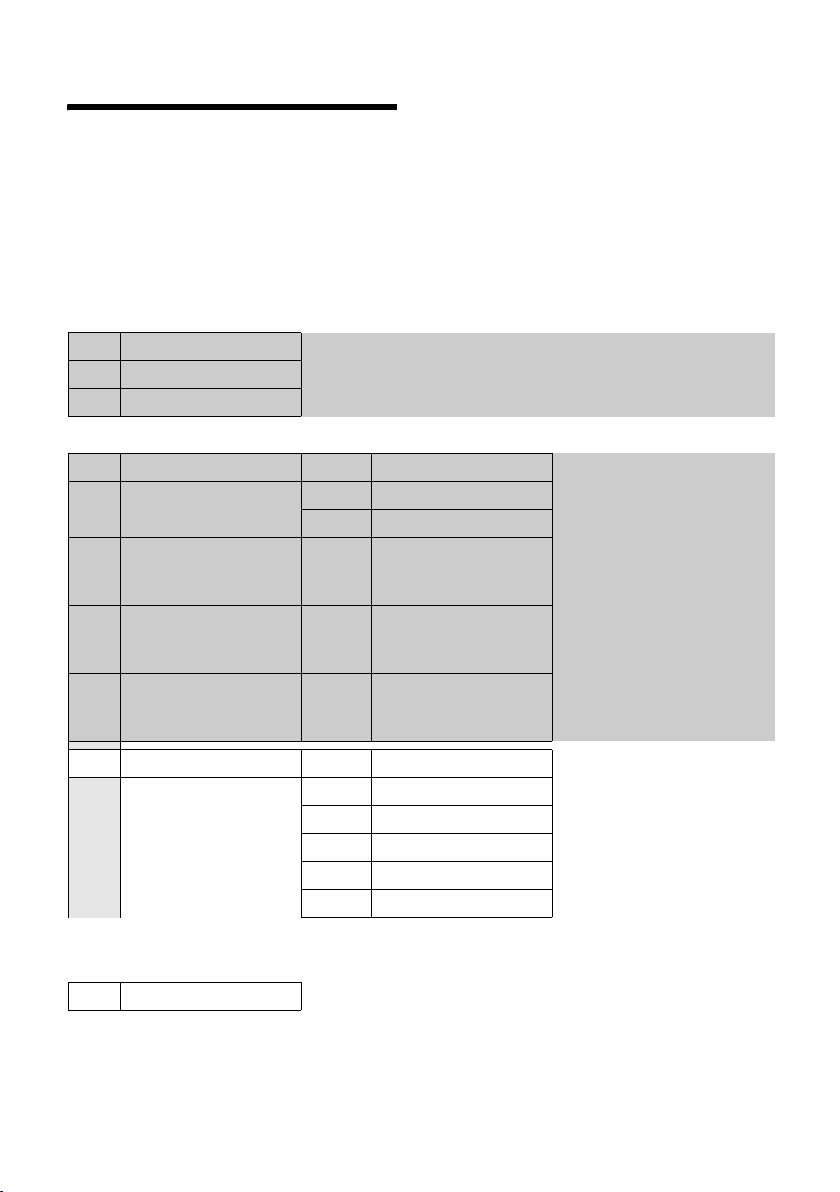
Обзор меню
Функции меню можно вызывать, не только листая меню с помощью управляющей
клавиши. Также существует быстрый вызов функций меню: нужно открыть меню и
ввести последовательность цифр (так называемую „комбинацию быстрого вызова“).
Пример: v5211 — вызов функции „изменение мелодии для внешних
вызовов“.
В режиме готовности нажмите управляющую клавишу v (вызовите меню):
1 SMS î
Вы настроили почтовый ящик SMS (общий или личный) без PIN-кода.
1-1 Bвод SMS (стр. 28)
1-2 Bходящие 0 (стр. 31)
1-3 Черновики 0 (стр. 29)
Вы настроили почтовый ящик SMS с PIN-кодом или 2-3 почтовых ящика.
1-1 Общий П. ящик 1-1-1 Bвод SMS (стр.28)
1-1-2 Bходящие 0 (стр.31)
1-1-3 Черновики 0 (стр.29)
1-2
bis
1-4
Почт. ящик A
Почт. ящик B
Почт. ящик C
1-2-1
до
1-4-1
1-2-2
до
1-4-2
1-2-3
до
1-4-3
Bвод SMS (стр.28)
Bходящие 0 (стр.31)
Черновики 0 (стр.29)
1-6 Настройки 1-6-1 SMS-центры (стр.34)
1-6-2 Ящики (стр.32)
1-6-3 Номер сообщ. (стр.32)
1-6-4 Тип сообщ. (стр.32)
1-6-5 Статус SMS (стр.29)
1-6-6 Подпис.на SMS (стр.27)
3 Будильник
4 Семья/отдых
4-3 «Нянька» (стр. 43)
ì
í
10

5 Настройки Ð
5-1 Дата/время
5-2 Aудио 5-2-1 Мелодия (стр.46)
5-2-2 Предупр.сигн. (стр.47)
5-3 Дисплей 5-3-1 Логотип (стр.45)
5-3-2 Цветов. схема (стр.44)
5-3-3 Контрастность (стр.44)
5-3-4 Яркость (стр.45)
5-4 Труб к а 5-4-1 Язык (стр.44)
5-4-2 Aвт.прием выз.(стр.45)
5-4-3 Регистр.трубки (стр.38)
5-4-4 Bыбор баз.бл. (стр.39)
5-4-5 Сброс.настр.тр.(стр.48)
5-5 Базовый блок 5-5-2 Мелодия паузы (стр.49)
5-5-3 Сист.PIN (стр.49)
5-5-4 Сбр.наст.баз.бл (стр.50)
5-5-5 Спец.функции (стр.41, стр.49, стр. 51)
5-5-6 Предв. выбор (стр.26)
5-5-7 Тип списка (стр.24)
Обзор меню
5-6 Голос . Почта 5-6-1 Назнач. клав.1 (стр.37)
11

Разговор по телефону
Разговор по телефону
Внешние соединения
Внешние соединения — это соединения
с абонентами телефонной сети общего
пользования.
~c Введите абонентский номер
и нажмите клавишу
соединения.
или:
c~ Нажмите и удерживайте
нажатой клавишу
соединения c, а затем
введите номер.
С помощью клавиши „отбой“ a вы
можете прервать набор номера.
Во время соединения на дисплей
выводится информация о его
продолжительности.
Рекомендации:
– Использование телефонного
справочника, списка телефонных
компаний (стр.1, стр. 18) или списка
позвонивших (стр. 24) позволит вам
избежать многократного набора одних и
тех же номеров и кодов телефонных
компаний.
Завершение разговора
a Нажмите клавишу „отбой“.
Прием вызова
Поступление входящего вызова
сигнализируется тремя способами:
переносной телефон звонит, на
дисплей выводится индикация и мигает
клавиша громкой связи d. Вы
можете нажать дисплейную клавишу
§АОН§, чтобы посмотреть номер или имя
вызывающего абонента (см. „Передача
абонентского номера“, стр. 12)
Вы можете принять вызов одним из
следующих способов:
¤ Нажмите клавишу соединения c.
¤ Нажмите дисплейную клавишу
§Прием§.
¤ Нажмите клавишу громкой связи
d.
Если переносной телефон находится
на базовом блок е и включена функция
Aвт.прием выз. (стр. 45), то вызов
автоматически принимается при
снятии телефона с базового блок а.
Учтите, что для индикации
абонентского номера или имени
вызывающего абонента (смотри
следующий раздел) необходимо
сначала нажать дисплейную клавишу
§АОН§.
Если вам мешает вызывной сигнал, вы
можете отключить его, нажав
дисплейную клавишу
можете принять вызов, пока он
сигнализируется на дисплее.
Передача абонентского
номера
При поступлении вызова на дисплей
выводится абонентский номер или имя
вызывающего абонента. Для работы
этой функции должны быть выполнены
следующие условия:
u Ваша телефонная компания
поддерживает функции CLIP, CLI и
CNIP.
– CLI (Calling Line Identification) — это
функция передачи абонентского
номера вызывающего абонента)
– CLIP (Calling Line Identification
Presentation) — это функция
индикации абонентского номера
вызывающего абонента.
– CNIP (Calling Name Identification
Presentation) — это функция
индикации имени вызывающего
абонента.
u Вы заказали в вашей телефонной
компании услугу передачи
абонентского номера вызывающего
§Bык.зв.§. Вы
12
абонента (CLIP) или его имени
(CNIP).
u Вызывающий абонент заказал в
своей телефонной компании услугу
передачи своего абонентского
номера (CLI).
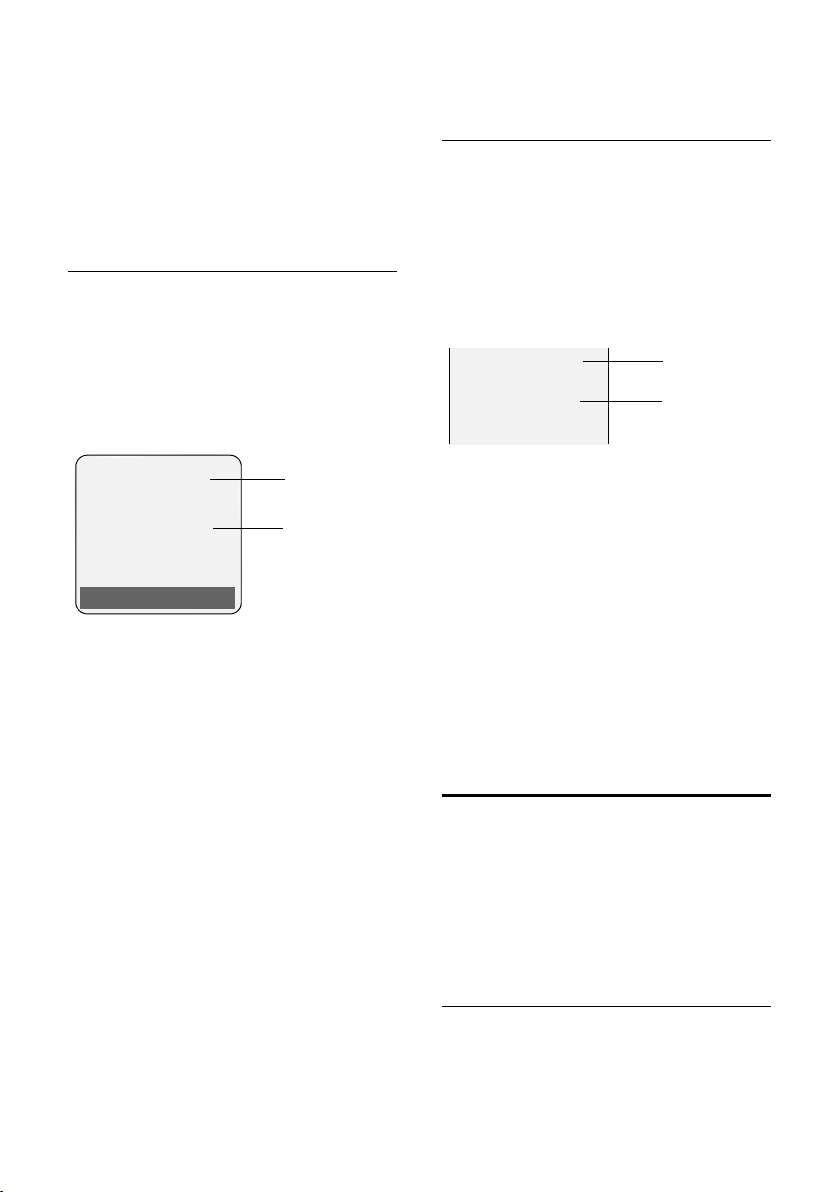
Индикация на дисплее для функций
CLIP/CLI
Если при поступлении входящего
вызова перед приемом вызова вы
нажмете дисплейную клавишу
дисплей будет выведен номер
вызывающего абонента. Если номер
вызывающего абонента сохранен в
телефонном справочнике, то на
дисплей выводится имя абонента.
Å
1234567890
Прием Bык.зв.
1 Символ входящего вызова
2 Абонентский номер или имя
Количество передаваемых цифр
абонентского номера вызывающего
абонента зависит от вашей
телефонной сети. Для правильной
индикации номера вызывающего
абонента необходимо выполнить
соответствующую настройку телефона
(стр. 50).
Вместо абонентского номера на
дисплей выводится надпись Bнешний
вызов,
u если номер не передается или вы не
нажали дисплейную клавишу
u если вызывающий абонент включил
функцию подавления передачи
абонентского номера (стр.17);
u если вызывающий абонент не
заказал услугу передачи
абонентского номера.
§АОН§, на
1
2
§АОН§;
Разговор по телефону
Индикация на дисплее для CNIP
Если вы заказали функцию CNIP, то
кроме абонентского номера, на
дисплей выводится имя (адрес)
зарегистрированное для этого номера
в телефонной компании. Если номер
абонента сохранен в вашем
телефонном справочнике, то на
дисплей выводится имя из
телефонного справочника.
1234567890
Anna Lechner,
1
2
Berlin
1 Абонентский номер
2 Имя и адрес
Также на дисплей могут выводиться
надписи:
u Bнешний вызов, если абонентский
номер не передается.
u Aнонимный, если вызывающий
абонент использует функцию
подавления передачи абонентского
номера (стр. 17).
u Неопределен, если вызывающий
абонент не заказал услугу передачи
номера.
Громкая связь
При использовании громкой связи не
держите телефон возле уха, а
положите его, например, на стол. Так в
разговоре смогут принять участие
другие находящиеся в помещении
люди.
Включение/выключение громкой
связи
Включение при наборе номера
~d Введите абонентский номер
и нажмите клавишу громкой
связи.
13
Управление переносным телефоном
¤ Перед включением громкой связи
вы должны сообщить об этом
вашему собеседнику.
Переключение режимов громкой связи
и разговора через трубку
d Нажмите клавишу громкой
связи.
Вы можете включать и отключать
громкую связь во время разговора.
Если во время разговора вы хотите
поставить телефон на базовый блок:
¤ При установке телефона следует
держать нажатой клавишу громкой
связи. Если клавиша громкой связи
d не мигает, нажмите клавишу
еще раз.
Регулировка громкости — см. стр.46.
Отключение микрофона
Во время внешнего разговора вы
можете отключить микрофон
переносного телефона. Ваш
собеседник слышит мелодию при
ожидании соединения.
u Для отключения микрофона
нажмите управляющую
клавишу с левой стороны.
” Для включения микрофона
нажмите дисплейную
клавишу.
Мелодию ожидания соединения можно
включать и отключать (стр.49).
Управление переносным
телефоном
Включение/выключение
переносного телефона
a Для включения или
выключения переносного
телефона нажмите и
удерживайте нажатой
клавишу „отбой“. Звучит
сигнал подтверждения.
Включение/выключение
блокировки клавиатуры
# Уде рживайте нажатой
клавишу „решетка“.
Звучит сигнал подтверждения. Если
включена блокировка клавиатуры, на
дисплей выводится символ Ø.
Блокировка клавиатуры автоматически
отключается при поступлении
входящего вызова. По окончании
соединения она снова автоматически
включается.
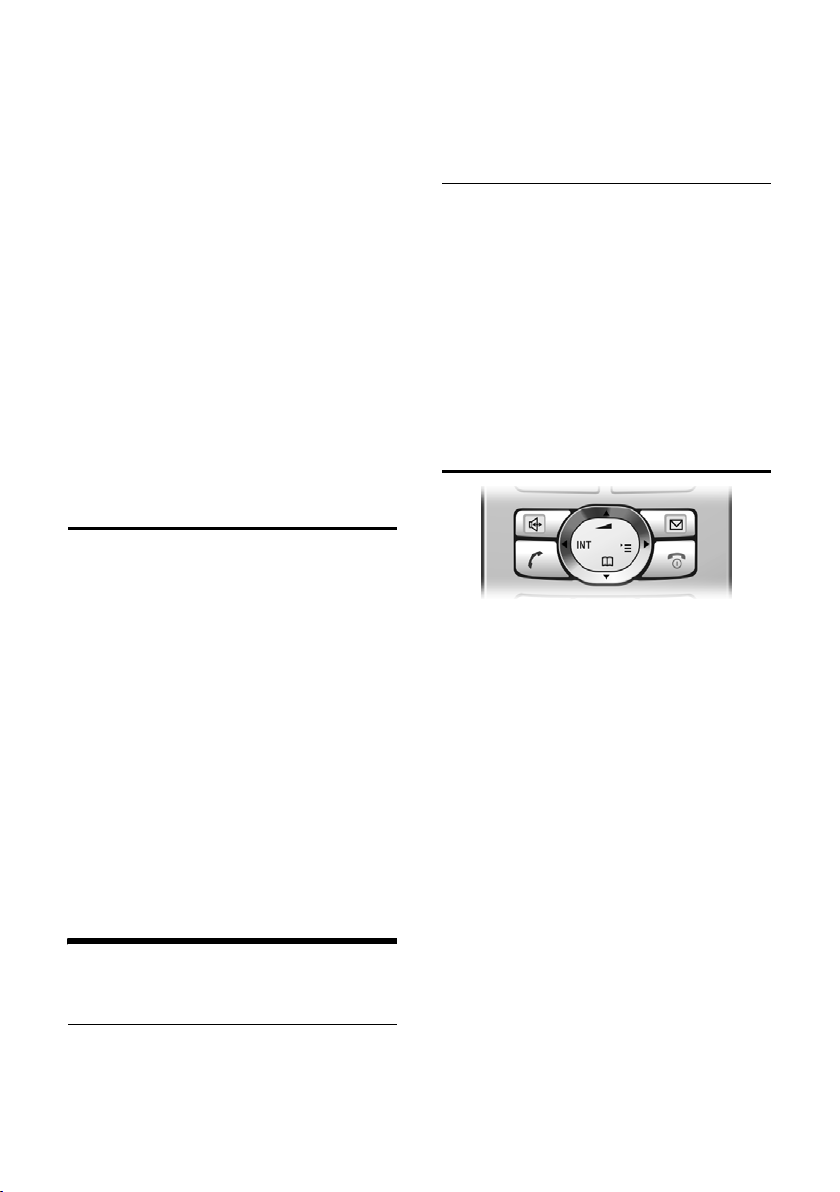
Управляющая клавиша
В инструкции по эксплуатации та
сторона управляющей клавиши
(верхняя, нижняя, левая или правая),
которую вы должны нажать, отмечена
черным цветом (например, v
означает нажатие управляющей
клавиши с правой стороны).
Функции управляющей клавиши:
В режиме готовности
s Вызов телефонного
справочника.
v Вызов главного меню.
u Вызов списка переносных
телефонов.
t Настройка вызывного
сигнала переносного
телефона (стр.46).
В главном меню и в полях ввода
Перемещение курсора вверх t, вниз
s, вправо v и влево u..
14
Управление переносным телефоном
В списках и подменю
t / s Листание вверх/вниз по
строкам.
v Вызов подменю или
подтверждение выбора.
u Возврат в предыдущее
меню или прерывание
процедуры.
Во время внешнего соединения
s Вызов телефонного
справочника.
u Внутренне соединение.
t Регулировка громкости
трубки или громкой связи.
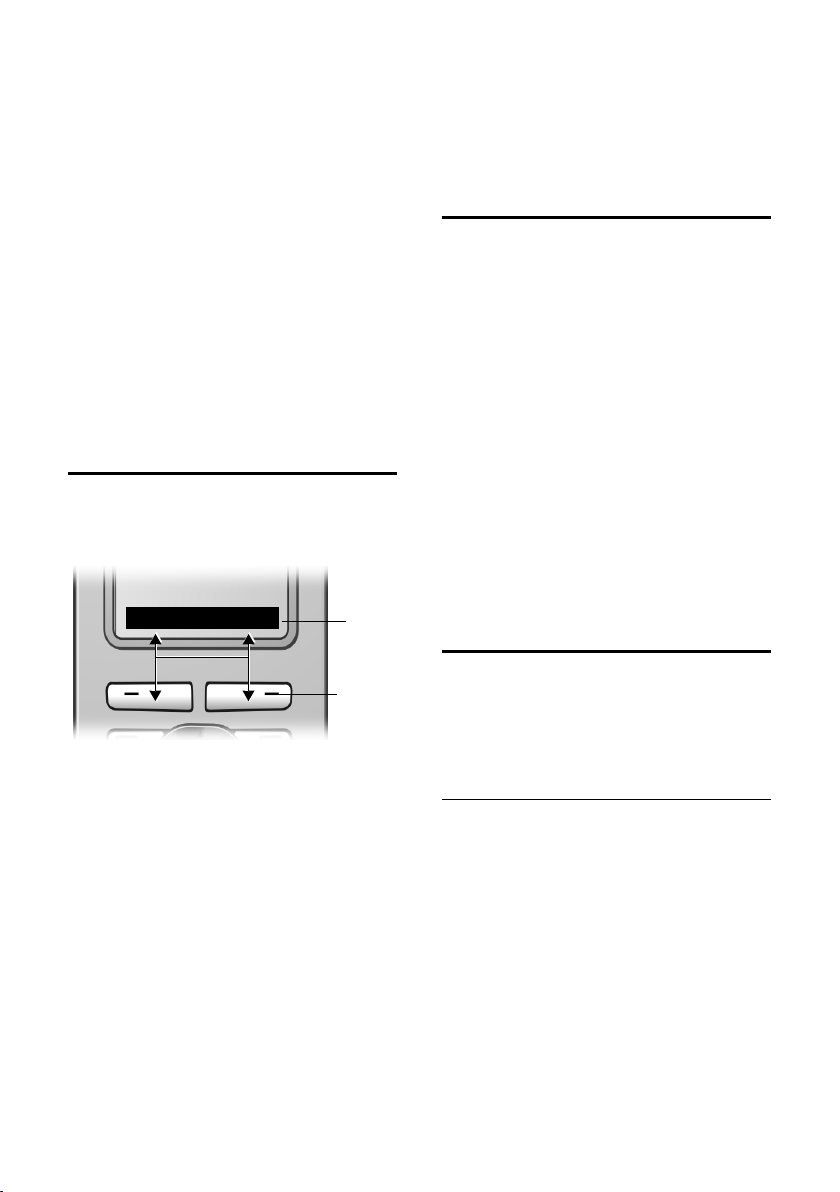
Дисплейные клавиши
Функции дисплейных клавиш
изменяются в зависимости от текущей
ситуации. Например:
INT SMS
1
Ó Копирование номера в
телефонный справочник.
• Вызов списка повторного
набора.
Возврат в режим готовности
Вы можете вернуться в режим
готовности из любого пункта меню:
¤ Нажмите и удерживайте нажатой
клавишу „отбой“ a.
или:
¤ Не нажимайте ни одну клавишу:
через 2 минуты телефон
автоматически вернется в режим
готовности.
Изменения, которые не были
подтверждены или сохранены
нажатием дисплейных клавиш
§Сохран.§, §Отправ.§ или выбором опции
Сохранить
Пример индикации на дисплее в
режиме готовности приведен на стр.9.
§ОК§ теряются.
Использование меню
§ОК§, §Да§,
1 Те кущ ие функции дисплейных клавиш
указываются в нижней строке дисплея.
2 Дисплейные клавиши.
Символы основных функций
дисплейных клавиш:
§§§§§Меню§§§§ Вызов главного меню.
§Выбор§ Вызов меню функций,
доступных в текущей
ситуации.
W Клавиша удаления:
удаление введенных
символов по одному справа
налево.
Î Возврат в предыдущее
меню или прерывание
процедуры.
2
Функции телефона вызываются с
помощью меню, которое состоит из
нескольких уровней.
Главное меню (первый уровень
меню)
¤ Для вызова главного меню нажмите
в режиме готовности управляющую
клавишу v.
Функции главного меню представлены
на дисплее в виде списка с символами
и названиями.
Вызов функции, т. е. соответствующего
подменю (следующего уровня меню):
¤ Выберите функцию с помощью
управляющей клавиши q.
Нажмите дисплейную клавишу
§ОК§.
15

Управление переносным телефоном
Подменю
Функции подменю выводятся на
дисплей в виде списка.
Вызов функции:
¤ Выберите функцию с помощью
управляющей клавиши q и
нажмите дисплейную клавишу
или:
§ОК§.
¤ Ведите соответствующую
комбинацию цифр (стр. 10).
Если один раз нажат и быстро
отпустить клавишу „отбой“ a, то
осуществляется возврат в предыдущее
меню или прерывание процедуры.
Исправление неправильного
ввода
С помощью управляющей клавиши
перейдите к неправильному символу.
После этого вы можете:
u удалить символ слева от курсора с
помощью дисплейной клавиши X,
u добавить символы слева от курсора,
u заменить мигающие символы при
вводе времени, даты и т. д.
Примеры используемых обозначений,
ввод данных с помощью меню и
многострочный ввод описаны в конце
этой инструкции по эксплуатации на
стр.55.
16

Функции телефонной сети
Функции телефонной сети — это услуги,
которые предлагает ваша телефонная
компания. Все эти функции можно
использовать только в том случае,
если вы заказали их у вашей
телефонной компании.
¤ При возникновении проблем при
использовании этих функций
обращайтесь в вашу телефонную
компанию.
Функции, включаемые для
следующего соединения
v ¢ ê ¢ Не передав. ном.
~ Введите абонентский
номер.
c Нажмите клавишу
соединения.
Функции, включаемые для
всех последующих вызовов
Функции телефонной сети
После завершения процедуры
передается код.
¤ После получения подтверждения от
телефонной сети нажмите клавишу
„отбой“ a.
17

Использование телефонного справочника и других списков
Использование
телефонного справочника
и других списков
В телефоне имеются:
u телефонный справочник,
u список телефонных компаний,
u список повторного набора,
u список SMS,
u список позвонивших.
В телефонном справочнике и списке
телефонных компаний можно
сохранить в общей сложности до 150
записей (это число зависит от размера
отдельных записей).
Телефонный справочник и список
телефонных компаний настраиваются
индивидуально для переносного
телефона. Однако вы можете
пересылать списки/отдельные записи
на другой переносной телефон
(стр. 19).
Телефонный справочник и
список телефонных компаний
Телефон ный справочник служит для
сохранения имен и номеров
абонентов.
¤ Для вызова телефонного
справочника в режиме готовности
нажмите управляющую клавишу
s.
В списке телефонных компаний
можно сохранять номера телефонных
компаний.
¤ Для вызова списка телефонных
компаний нажмите клавишу C.
Размер записи
Номер: макс. 32 цифры
Имя: макс. 16 букв
Рекомендация:
Вы можете назначать абонентские номера
из телефонного справочника или списка
телефонных компаний клавишам для
сокращенного набора.
Сохранение абонентских номеров в
телефонном справочнике
s ¢ Новая запись
¤ Многострочный ввод:
Номер :
Введите номер.
Имя :
Введите имя.
Годовщ.:
При необходимости введите
годовщину (стр. 20).
Сокр.вызов:
Выберите клавишу для
сокращенного набора.
¤ Сохраните изменения.
Сохранение абонентских номеров в
списке телефонных компаний
C ¢ Новая запись
¤ Многострочный ввод:
Номер :
Введите номер.
Имя :
Введите имя.
Выбор записи телефонного
справочника/списка телефонных
компаний
s / C Вызовите телефонный
справочник/список
телефонных компаний.
Вы можете:
u Выбрать нужную запись, листая
список с помощью управляющей
клавиши s.
18
Loading…
-
Page 1: Siemens Gigaset S450
s Gigase t S450 cyan magenta yello w black Liebreich Medienpr oduktion Siemens Aktiengesellschaft, issued by Siemens Communications Haidenauplatz 1 D-81667 Munich © Siemens AG 2005 All rights reserved. Subject to availability . Rights of modification reserved. Siemens Aktiengesellschaft www .siemens.com/gigaset BA Cover S450.qxd 21.06.2005 17:56 U[…]
-
Page 2: Siemens Gigaset S450
1 Handset at a glance Gigaset S450 / English for Gre ece / A31008-M1716-T101-1-8U19 / overview .fm / 07.09.2005 Handset at a glance 1 Display in idle status 2 Charge status of the batteries = e V U (flat to full) = flashes: batteries almost flat e V U flashes: batteries charging 3 Display keys (page 12) 4 Message key Access to calls and message lis[…]
-
Page 3: Siemens Gigaset S450
2 Contents Gigaset S450 / English for Gre ece / A31008 -M1716-T101-1 -8U19 / S450IVZ.fm / 07.09.200 5 Contents Handset at a glance . . . . . . . . . . 1 Safety precautions . . . . . . . . . . . 4 Gigaset S450 – more than just a telephone . . . . 5 First Steps . . . . . . . . . . . . . . . . . . 5 Pack contents . . . . . . . . . . . . . . . . . . […]
-
Page 4: Siemens Gigaset S450
3 Contents Gigaset S450 / English for Gre ece / A31008 -M1716-T101-1 -8U19 / S450IVZ.fm / 07.09.200 5 Base station settings . . . . . . . . 42 Protecting against unauthorised access . . . . . . . . . . . . . . . . . . . . . . . . 42 Activating/deacti vating the wait melody . . . . . . . . . . . . . . . . . . . . 42 Repeater support . . . . . . . . […]
-
Page 5: Siemens Gigaset S450
4 Safety precautions Gigaset S450 / English for Gre ece / A31008-M1716-T101-1-8U19 / security .fm / 07.09.2005 Safety precautions Caution: Read the safety precautions and the user guide before use. Explain their contents to your children, and the potent ial hazards associated with using the telephone. Only use the mains adapter su pplied, as indica[…]
-
Page 6: Siemens Gigaset S450
5 Gigaset S450 – more than just a telephone Gigaset S450 / English for Gre ece / A31008 -M1716-T101-1 -8U19 / starting.fm / 07.09 .2005 Gigaset S450 – more than just a telephone Y our phone not on ly enables you to send and receive text messages over the fixe d network and store up to 150 telephone numbers (page 17) – it can do a whole lot mo[…]
-
Page 7: Siemens Gigaset S450
6 First Steps Gigaset S450 / English for Gre ece / A31008 -M1716-T101-1 -8U19 / starting.fm / 07.09 .2005 Please note: u The mains adapter must be always connected , as the phone will not operate without mains connection. u If you buy a replacement phone cord from a store, ensure that the phone jack is connected correctly . Setting up the handset f[…]
-
Page 8: Siemens Gigaset S450
7 First Steps Gigaset S450 / English for Gre ece / A31008 -M1716-T101-1 -8U19 / starting.fm / 07.09 .2005 Placing the handset in the base station and registering ¤ Place the handset in the base with its display facing upwards . The handset registers a utomatically . Registration ta kes around 1 min ute. During this time Regstr .Procedure appears i[…]
-
Page 9: Siemens Gigaset S450
8 First Steps Gigaset S450 / English for Gre ece / A31008 -M1716-T101-1 -8U19 / starting.fm / 07.09 .2005 Please remember: u Always repeat the charging and discharging procedure if you remove the batteries from the handset and re- insert them. u The batteries may warm up a s they are charging. This is not dangerous. u After a time the charge capaci[…]
-
Page 10: Siemens Gigaset S450
9 Menu tree Gigaset S450 / English for Gre ece / A31008 -M1716-T101-1 -8U19 / menuetree .fm / 07.09.2005 Menu tree Instead of scrolling to locate a menu fu nction, you can select a menu function faster by opening the menu and keying in the digit combina tion («shortcut»). Example: v 5 2 1 1 for «Set ringtone for external calls».[…]
-
Page 11: Siemens Gigaset S450
10 Menu tree Gigaset S450 / English for Gre ece / A31008 -M1716-T101-1 -8U19 / menuetree .fm / 07.09.2005 2 Sel. Services ê 2-2 Network Mailbox (page 16) 2-6 All Calls 2-6-1 Call Divert (page 15) 2-6-3 Call W a iting (page 15) 2-6-4 Fixed Destin. Call (page 15) 3 Alarm Clock ì 4 Add. Features í 4-3 Room Monitor (page 37) 5 Settings Ð 5-1 Date/T[…]
-
Page 12: Siemens Gigaset S450
11 Making calls Gigaset S450 / English for Gre ece / A31008-M1716-T101-1 -8U19 / telefony .fm / 07.09.2005 Making calls Making an external call External calls are ca lls using the public telephone network. ~c Enter the number and press the talk key . Or: c~ Press and hold the talk key c and then enter the number . Y ou can cancel the dia lling oper[…]
-
Page 13: Siemens Gigaset S450
12 Operating the handset Gigaset S450 / English for Gre ece / A31008-M1716-T101-1 -8U19 / telefony .fm / 07.09.2005 Activating/deacti vating handsfree Activating while dialling ~d Enter the number and press the handsfree key . ¤ Y ou should info rm your caller before you use the handsfree function so that they know someone else is listening. Switc[…]
-
Page 14: Siemens Gigaset S450
13 Operating the handset Gigaset S450 / English for Gre ece / A31008-M1716-T101-1 -8U19 / telefony .fm / 07.09.2005 During an external call s Open the directory . u Initiate an internal consultation call. t Adjust loudspeaker volume for earpiece and handsfree mode. Display keys The function of the display keys changes depending on the particular op[…]
-
Page 15: Siemens Gigaset S450
14 Operating the handset Gigaset S450 / English for Gre ece / A31008-M1716-T101-1 -8U19 / telefony .fm / 07.09.2005 Correcting incorrect entries Y ou can correct incorrect characters in the text by navigating to the incorrect entry using the control key . Y ou can then: u press X to de lete the character to the left of the cursor , u insert charact[…]
-
Page 16: Siemens Gigaset S450
15 Network services Gigaset S450 / English for Gre ece / A31008-M1716-T101-1 -8U19 / TNet_Features_SAG.fm / 07.09.2005 Network services Network services are functions that your network provider ma kes available to you. Y ou have to req uest these servic es from your network provider . ¤ If you require assistan ce, please contact your netwo rk prov[…]
-
Page 17: Siemens Gigaset S450
16 Network services Gigaset S450 / English for Gre ece / A31008-M1716-T101-1 -8U19 / TNet_Features_SAG.fm / 07.09.2005 Accept call waiting §Options§ £ Accept waiting call Reject call waiting §Options§ ¢ Reject waiting call Functions after a call Activating/deactivating network mailbox v ¢ ê ¢ Network Mailbox Status: Activating/dea ctivatin[…]
-
Page 18: Siemens Gigaset S450
17 Using the directory and lists Gigaset S450 / English for Greece / A31008-M 1716-T101-1-8U19 / direct_charges.fm / 07.09.2005 Using the directory and lists The opti ons are: u Directory , u Call-by-Ca ll list, u Last number redial list, u SMS list, u Calls list. Y ou can store a maximum of 150 entries in the directory and call-by-call list (the a[…]
-
Page 19: Siemens Gigaset S450
18 Using the directory and lists Gigaset S450 / English for Greece / A31008-M 1716-T101-1-8U19 / direct_charges.fm / 07.09.2005 Using othe r functions s / C ¢ s (select entry) ¢ §Options§ (open menu) The following functions can be selected with q : Display Number Edit or add to a stored number . Then dial or call up further functions by pressin[…]
-
Page 20: Siemens Gigaset S450
19 Using the directory and lists Gigaset S450 / English for Greece / A31008-M 1716-T101-1-8U19 / direct_charges.fm / 07.09.2005 Copying a number from the directory There are many operating situations in which you can open the directory , e.g. to copy a number . Y our h andset need not be in idle status. ¤ Depending on the operating situation, open[…]
-
Page 21: Siemens Gigaset S450
20 Using the directory and lists Gigaset S450 / English for Greece / A31008-M 1716-T101-1-8U19 / direct_charges.fm / 07.09.2005 Opening lists with the message key Y ou can use the message key f to open the following lists: u SMS list If several mailboxes are set up (page 28), several lists are displayed. u Network mailbox If your network provider s[…]
-
Page 22: Siemens Gigaset S450
21 Making cost-effective calls Gigaset S450 / English for Greece / A31008-M 1716-T101-1-8U19 / direct_charges.fm / 07.09.2005 u T ype of entry: – accepted calls ( ) – missed calls Pressing the display key §Delete§ deletes the marked entry . After pressing the display key §Options§ you can select more functions with q : Copy to Directory Add[…]
-
Page 23: Siemens Gigaset S450
22 Making cost-effective calls Gigaset S450 / English for Greece / A31008-M 1716-T101-1-8U19 / direct_charges.fm / 07.09.2005 Saving/editing entries in the preselection lists Each of the two lists can contain 20 entries, ea ch with 6 digits. Numbers may be prefixed a ccording to the country in the » with prese lection » list. This means, […]
-
Page 24: Siemens Gigaset S450
23 SMS (text messages) Gigaset S450 / English for Gre ece / A31008-M1716-T101-1-8U19 / sms_BRD_neutral.fm / 07.09.2005 SMS (text messages) Y our unit is supplied ready for yo u to send text messages immediately . Requirements: u Calling Line Identification (page 1 1)is enabled for your phone connection. u Y our network provider supports SMS in the […]
-
Page 25: Siemens Gigaset S450
24 SMS (text messages ) Gigaset S450 / English for Gre ece / A31008-M1716-T101-1-8U19 / sms_BRD_neutral.fm / 07.09.2005 Sending an SMS s / C / ~ Select number with area co de (even if you are in that area) from the directory or call-by- call list or enter it directly . Fo r SMS to an SMS mailbox: put the mailbox ID at the end of the number . §Opti[…]
-
Page 26: Siemens Gigaset S450
25 SMS (text messages) Gigaset S450 / English for Gre ece / A31008-M1716-T101-1-8U19 / sms_BRD_neutral.fm / 07.09.2005 Writing/editing an SMS ¤ Y ou are reading an SMS in the draft message list. §Options§ Open menu. Y ou have the followi ng options: New SMS Write and then send a new SMS (page 24) or save. Edit Edit the text of the saved SMS and […]
-
Page 27: Siemens Gigaset S450
26 SMS (text messages ) Gigaset S450 / English for Gre ece / A31008-M1716-T101-1-8U19 / sms_BRD_neutral.fm / 07.09.2005 Incoming me ssage list The incoming message list contain s: u all received text messag es, starting with the most recent. u messages that could not be se nt on account of an error . New text messages ar e signalled on all Gigaset […]
-
Page 28: Siemens Gigaset S450
27 SMS (text messages) Gigaset S450 / English for Gre ece / A31008-M1716-T101-1-8U19 / sms_BRD_neutral.fm / 07.09.2005 Adding a number to the directory Adding the sender’s number ¤ Open incoming message list and select entry (page 26). §Options§ Press the display key . Continue see page 18. Copying/selecting numbers from an SMS text ¤ Read[…]
-
Page 29: Siemens Gigaset S450
28 SMS (text messages ) Gigaset S450 / English for Gre ece / A31008-M1716-T101-1-8U19 / sms_BRD_neutral.fm / 07.09.2005 SMS mailboxes The General Mailbox is the default setting. Anyone can access this mailbox and it cannot be prot ected by a PIN. Y ou can also set up three personal mailboxes and protect these with a PIN . Each mailbox is identified[…]
-
Page 30: Siemens Gigaset S450
29 SMS (text messages) Gigaset S450 / English for Gre ece / A31008-M1716-T101-1-8U19 / sms_BRD_neutral.fm / 07.09.2005 Setting SMS centre Entering/changing SMS centres ¤ Y ou should find o ut about the services and special functions o ffered by your service provider before you make a new application and/or before you delete pre-configur ed call nu[…]
-
Page 31: Siemens Gigaset S450
30 SMS (text messages ) Gigaset S450 / English for Gre ece / A31008-M1716-T101-1-8U19 / sms_BRD_neutral.fm / 07.09.2005 SMS to a P ABX u Y ou can only receive an SMS when the Calling Line Identificatio n is forwarded to the extens ion of the P ABX (C LIP) . The CLIP of the phone number for the SMS centre is evaluated in your Gigaset . u If required[…]
-
Page 32: Siemens Gigaset S450
31 SMS (text messages) Gigaset S450 / English for Gre ece / A31008-M1716-T101-1-8U19 / sms_BRD_neutral.fm / 07.09.2005 The message is played back. 1. The «display call number» ser vice is not activated. ¥ Have your service provider enable this service (there is a charge for this). 2. Mobile phone operator and network SMS service provider[…]
-
Page 33: Siemens Gigaset S450
32 Using the network mailbox Gigaset S450 / English for Gre ece / A31008-M1 716-T 101-1-8U19 / T -NetBox_SAG.fm / 07.09.2005 Using the network mailbox The network mailbox i s your network provider’s answering mach ine within th e network. Y ou cannot u se the network mailbox unless you have requested it from your network pr ovider . Configurin[…]
-
Page 34: Siemens Gigaset S450
33 Using several handsets Gigaset S450 / English for Gre ece / A31008-M 1716-T 101-1-8U19 / registr_sett.fm / 0 7.09.2005 Using several handsets Registering handsets Y ou can register up to a total of six handsets on your base station. A Gigaset S45 handset can be registered on up to four base stations. Automatic registration Gigaset S45 to Gigaset[…]
-
Page 35: Siemens Gigaset S450
34 Using several handsets Gigaset S450 / English for Gre ece / A31008-M 1716-T 101-1-8U19 / registr_sett.fm / 0 7.09.2005 De-registering handsets Y ou can de-register any registered handset from any registered Gig aset S45 handset. u Open list of internal users. The handset you are currently using is indicate d by < . s Select the internal user […]
-
Page 36: Siemens Gigaset S450
35 Using several handsets Gigaset S450 / English for Gre ece / A31008-M 1716-T 101-1-8U19 / registr_sett.fm / 0 7.09.2005 Then, if the internal participant does not answer or is busy , the call will automatically return to you (the display will show Recal l ). Internal cons ultation calls When you are speaking to an exte rnal participant you can si[…]
-
Page 37: Siemens Gigaset S450
36 Using several handsets Gigaset S450 / English for Gre ece / A31008-M 1716-T 101-1-8U19 / registr_sett.fm / 0 7.09.2005 Changing the name of a handset The names «INT 1», «INT 2» etc. are assigned automati cally at registration. Y ou can change these na mes. The name must be no more than 10 characters. The changed name is d isp[…]
-
Page 38: Siemens Gigaset S450
37 Using several handsets Gigaset S450 / English for Gre ece / A31008-M 1716-T 101-1-8U19 / registr_sett.fm / 0 7.09.2005 Activating the ro om monitor and entering the number to be called v ¢ í ¢ Room Monitor ¤ Change multiple line input: Room M.: Select On to activate. Call to: Press the display key §Edit§ and enter destination number . Exte[…]
-
Page 39: Siemens Gigaset S450
38 Handset settings Gigaset S450 / English for Gre ece / A31008-M 1716-T 101-1-8U19 / registr_sett.fm / 0 7.09.2005 Handset settings Y our handset is preconfigured, but you can change these settings to suit your individual requirements. Changing the display language Y ou can view the di splay texts in dif ferent languages. v ¢ Ð ¢ Handset ¢ Lan[…]
-
Page 40: Siemens Gigaset S450
39 Handset settings Gigaset S450 / English for Gre ece / A31008-M 1716-T 101-1-8U19 / registr_sett.fm / 0 7.09.2005 Setting display illumination Depending on whether or not the handset is in the base station you can set different levels of display illumination. If it is switched on, the display is permanently dimmed. v ¢ Ð ¢ Display ¢ Backlight[…]
-
Page 41: Siemens Gigaset S450
40 Handset settings Gigaset S450 / English for Gre ece / A31008-M 1716-T 101-1-8U19 / registr_sett.fm / 0 7.09.2005 Settings for all func tions to ring the same v ¢ Ð ¢ Audio Settings ¢ Ringer Settings ¢ All ¤ Set volume and ringtone (see «Settings for individual functions»). §Yes§ Press the display key to confirm the prompt. a Pr[…]
-
Page 42: Siemens Gigaset S450
41 Handset settings Gigaset S450 / English for Gre ece / A31008-M 1716-T 101-1-8U19 / registr_sett.fm / 0 7.09.2005 Y ou cannot deactivate the confirmation tone for placing the handset in the base station. Setting the alarm clock Requirement: The date and time have already been set (page 8). Activating/deactiva ting and setting the alarm clock v ¢[…]
-
Page 43: Siemens Gigaset S450
42 Base station settings Gigaset S450 / English for Gre ece / A31008-M 1716-T 101-1-8U19 / registr_sett.fm / 0 7.09.2005 Base station settings The base station settings are carried out using a registered Gigaset S45 ha ndset. Protecting against unauthorised access Protect the system settings of the base station with a PIN known only to yourself. Th[…]
-
Page 44: Siemens Gigaset S450
43 Connecting the base station to the P ABX Gigaset S450 / English for Gre ece / A31008-M1716-T101-1-8U19 / pabx.fm / 07.09.2005 Connecting the base station to the P ABX The following settings are on ly needed when your P ABX requires them. Please refer to the user guide for your P ABX. Y ou cannot send or receive SMS on P ABXs that do not support […]
-
Page 45: Siemens Gigaset S450
44 Appendix Gigaset S450 / English for Gre ece / A31008-M1716-T101-1-8U19 / appendix.fm / 07.09.2005 Appendix Care ¤ Wipe the base station and handset with a damp cloth (do not use solvent) or an antistatic cloth. Never use a dry cloth. This can cause static. Contact with liquid If the handset has come into contact with liquid: 1. Switch the hands[…]
-
Page 46: Siemens Gigaset S450
45 Appendix Gigaset S450 / English for Gre ece / A31008-M1716-T101-1-8U19 / appendix.fm / 07.09.2005 Service (Customer Care) We of fer you support that is fast and tailored to your sp ecific needs! Our Online Support on the Internet: www .siemens.com/gigasetcustomercare This site can be accessed at any time wherever you are. It provides you with 24[…]
-
Page 47: Siemens Gigaset S450
46 Appendix Gigaset S450 / English for Gre ece / A31008-M1716-T101-1-8U19 / appendix.fm / 07.09.2005 Handset operating times/charging times The operating and charging times apply only when using the recommende d batteries. Base station power consumption In standby mode: approx. 2 watt During a call: approx. 3 watt. General specifications Guarantee […]
-
Page 48: Siemens Gigaset S450
47 Notes on the operating instructions Gigaset S450 / English for Gre ece / A31008-M1716-T101-1-8U19 / appendix.fm / 07.09.2005 u This Guarantee shall apply to new devices purchased in the European Union. The Guarantee is issued by Siemens. u Any claims that differ from or extend beyond these mentioned in this manufacturer ’s warranty shall be ex[…]
-
Page 49: Siemens Gigaset S450
48 Notes on the operating instructions Gigaset S450 / English for Gre ece / A31008-M1716-T101-1-8U19 / appendix.fm / 07.09.2005 Example: menu input In the user guides, the steps you need to perform are shown in abbreviated form. This is illustrated below using the example of «Setting the con trast for the display». The things you have to […]
-
Page 50: Siemens Gigaset S450
49 Notes on the operating instructions Gigaset S450 / English for Gre ece / A31008-M1716-T101-1-8U19 / appendix.fm / 07.09.2005 Writing and editing a text message The following rules apply whe n writing a text message: u Control the cursor with u v t s . u Characters are add ed to the left of the cursor . u Press the star key * to show the table of[…]
-
Page 51: Siemens Gigaset S450
50 Notes on the operating instructions Gigaset S450 / English for Gre ece / A31008-M1716-T101-1-8U19 / appendix.fm / 07.09.2005 Deactivating/activating predictive text Requirement: Y ou are writing an SMS. §Options§ Press the display key . Predictive T ext Select and press §OK§ (= o n ) . a Press the end call key briefly to return to the text p[…]
-
Page 52: Siemens Gigaset S450
51 Accessories Gigaset S450 / English for Gre ece / A31008-M1716-T101-1-8U19 / accessories_SAG.fm / 07.09.2005 Accessories Gigaset Handsets T urn your Gigaset into a cordless teleph one system: Gigaset Handset S45 u Illuminated colour display (4 096 colours) u Illuminated keypad u Handsfree operation u Polyphonic ringe r melodies u Directory for ar[…]
-
Page 53: Siemens Gigaset S450
52 Accessories Gigaset S450 / English for Gre ece / A31008-M1716-T101-1-8U19 / accessories_SAG.fm / 07.09.2005 Gigaset handset SL55 u Illuminated graphical co lour display (65k colours) u Illuminated keypad u Handsfree operation u Polyphonic ringe r melodies u Directory for around 250 entrie s u Picture CLIP u SMS (CLIP must be enabled) u V oice di[…]
-
Page 54: Siemens Gigaset S450
53 Index Gigaset S450 / English for Gr eece / A31 008-M1716-T101-1-8U19 / S450SIX.fm / 07.09.2005 Index A Access protection . . . . . . . . . . . . . . . 42 Accessories . . . . . . . . . . . . . . . . . . . 51 Acknowledge tones . . . . . . . . . . . . . . 40 Activating advisory tones . . . . . . . . . . . . . . . . 40 auto answer . . . . . . . . . […]
-
Page 55: Siemens Gigaset S450
54 Index Gigaset S450 / English for Gr eece / A31 008-M1716-T101-1-8U19 / S450SIX.fm / 07.09.2005 Correcting incorrect input . . . . . . . . . 14 Customer Care . . . . . . . . . . . . . . . . . 45 D Deactivating advisory tones . . . . . . . . . . . . . . . . 40 auto answer . . . . . . . . . . . . . . . . . 39 handset . . . . . . . . . . . . . . . .[…]
-
Page 56: Siemens Gigaset S450
55 Index Gigaset S450 / English for Gr eece / A31 008-M1716-T101-1-8U19 / S450SIX.fm / 07.09.2005 registering on another base station . . . . . . . . . . . . . . 34 restoring to factory settings . . . . . . 41 screen picture . . . . . . . . . . . . . . . . 38 setup . . . . . . . . . . . . . . . . . . . . . . . . 6 using room moni tor . . . . . . . […]
-
Page 57: Siemens Gigaset S450
56 Index Gigaset S450 / English for Gr eece / A31 008-M1716-T101-1-8U19 / S450SIX.fm / 07.09.2005 Messages key . . . . . . . . . . . . . . . . . . . . . . . . . 1 Microphone . . . . . . . . . . . . . . . . . . . . 1 Missed call . . . . . . . . . . . . . . . . . . . . 20 Multiple line entry . . . . . . . . . . . . . . . 48 Muting . . . . . . . . . .[…]
-
Page 58: Siemens Gigaset S450
57 Index Gigaset S450 / English for Gr eece / A31 008-M1716-T101-1-8U19 / S450SIX.fm / 07.09.2005 info services . . . . . . . . . . . . . . . . . 29 input language . . . . . . . . . . . . . . . . 24 linked . . . . . . . . . . . . . . . . . . . . . . 23 mailbox ID . . . . . . . . . . . . . . . . . . . 28 mailboxes . . . . . . . . . . . . . . . . . .[…]
-
Страница 1
s Gigase t S450 cyan magenta yello w black Liebreich Medienpr oduktion Siemens Aktiengesellschaft, issued by Siemens Communications Haidenauplatz 1 D-81667 Munich © Siemens AG 2005 All rights reserved. Subject to availability . Rights of modification reserved. Siemens Aktiengesellschaft www .siemens.com/gigaset BA Cover S450.qxd 21.06.2005 17:56 U[…]
-
Страница 2
1 Handset at a glance Gigaset S450 / English for Gre ece / A31008-M1716-T101-1-8U19 / overview .fm / 07.09.2005 Handset at a glance 1 Display in idle status 2 Charge status of the batteries = e V U (flat to full) = flashes: batteries almost flat e V U flashes: batteries charging 3 Display keys (page 12) 4 Message key Access to calls and message lis[…]
-
Страница 3
2 Contents Gigaset S450 / English for Gre ece / A31008 -M1716-T101-1 -8U19 / S450IVZ.fm / 07.09.200 5 Contents Handset at a glance . . . . . . . . . . 1 Safety precautions . . . . . . . . . . . 4 Gigaset S450 – more than just a telephone . . . . 5 First Steps . . . . . . . . . . . . . . . . . . 5 Pack contents . . . . . . . . . . . . . . . . . . […]
-
Страница 4
3 Contents Gigaset S450 / English for Gre ece / A31008 -M1716-T101-1 -8U19 / S450IVZ.fm / 07.09.200 5 Base station settings . . . . . . . . 42 Protecting against unauthorised access . . . . . . . . . . . . . . . . . . . . . . . . 42 Activating/deacti vating the wait melody . . . . . . . . . . . . . . . . . . . . 42 Repeater support . . . . . . . . […]
-
Страница 5
4 Safety precautions Gigaset S450 / English for Gre ece / A31008-M1716-T101-1-8U19 / security .fm / 07.09.2005 Safety precautions Caution: Read the safety precautions and the user guide before use. Explain their contents to your children, and the potent ial hazards associated with using the telephone. Only use the mains adapter su pplied, as indica[…]
-
Страница 6
5 Gigaset S450 – more than just a telephone Gigaset S450 / English for Gre ece / A31008 -M1716-T101-1 -8U19 / starting.fm / 07.09 .2005 Gigaset S450 – more than just a telephone Y our phone not on ly enables you to send and receive text messages over the fixe d network and store up to 150 telephone numbers (page 17) – it can do a whole lot mo[…]
-
Страница 7
6 First Steps Gigaset S450 / English for Gre ece / A31008 -M1716-T101-1 -8U19 / starting.fm / 07.09 .2005 Please note: u The mains adapter must be always connected , as the phone will not operate without mains connection. u If you buy a replacement phone cord from a store, ensure that the phone jack is connected correctly . Setting up the handset f[…]
-
Страница 8
7 First Steps Gigaset S450 / English for Gre ece / A31008 -M1716-T101-1 -8U19 / starting.fm / 07.09 .2005 Placing the handset in the base station and registering ¤ Place the handset in the base with its display facing upwards . The handset registers a utomatically . Registration ta kes around 1 min ute. During this time Regstr .Procedure appears i[…]
-
Страница 9
8 First Steps Gigaset S450 / English for Gre ece / A31008 -M1716-T101-1 -8U19 / starting.fm / 07.09 .2005 Please remember: u Always repeat the charging and discharging procedure if you remove the batteries from the handset and re- insert them. u The batteries may warm up a s they are charging. This is not dangerous. u After a time the charge capaci[…]
-
Страница 10
9 Menu tree Gigaset S450 / English for Gre ece / A31008 -M1716-T101-1 -8U19 / menuetree .fm / 07.09.2005 Menu tree Instead of scrolling to locate a menu fu nction, you can select a menu function faster by opening the menu and keying in the digit combina tion («shortcut»). Example: v 5 2 1 1 for «Set ringtone for external calls».[…]
-
Страница 11
10 Menu tree Gigaset S450 / English for Gre ece / A31008 -M1716-T101-1 -8U19 / menuetree .fm / 07.09.2005 2 Sel. Services ê 2-2 Network Mailbox (page 16) 2-6 All Calls 2-6-1 Call Divert (page 15) 2-6-3 Call W a iting (page 15) 2-6-4 Fixed Destin. Call (page 15) 3 Alarm Clock ì 4 Add. Features í 4-3 Room Monitor (page 37) 5 Settings Ð 5-1 Date/T[…]
-
Страница 12
11 Making calls Gigaset S450 / English for Gre ece / A31008-M1716-T101-1 -8U19 / telefony .fm / 07.09.2005 Making calls Making an external call External calls are ca lls using the public telephone network. ~c Enter the number and press the talk key . Or: c~ Press and hold the talk key c and then enter the number . Y ou can cancel the dia lling oper[…]
-
Страница 13
12 Operating the handset Gigaset S450 / English for Gre ece / A31008-M1716-T101-1 -8U19 / telefony .fm / 07.09.2005 Activating/deacti vating handsfree Activating while dialling ~d Enter the number and press the handsfree key . ¤ Y ou should info rm your caller before you use the handsfree function so that they know someone else is listening. Switc[…]
-
Страница 14
13 Operating the handset Gigaset S450 / English for Gre ece / A31008-M1716-T101-1 -8U19 / telefony .fm / 07.09.2005 During an external call s Open the directory . u Initiate an internal consultation call. t Adjust loudspeaker volume for earpiece and handsfree mode. Display keys The function of the display keys changes depending on the particular op[…]
-
Страница 15
14 Operating the handset Gigaset S450 / English for Gre ece / A31008-M1716-T101-1 -8U19 / telefony .fm / 07.09.2005 Correcting incorrect entries Y ou can correct incorrect characters in the text by navigating to the incorrect entry using the control key . Y ou can then: u press X to de lete the character to the left of the cursor , u insert charact[…]
-
Страница 16
15 Network services Gigaset S450 / English for Gre ece / A31008-M1716-T101-1 -8U19 / TNet_Features_SAG.fm / 07.09.2005 Network services Network services are functions that your network provider ma kes available to you. Y ou have to req uest these servic es from your network provider . ¤ If you require assistan ce, please contact your netwo rk prov[…]
-
Страница 17
16 Network services Gigaset S450 / English for Gre ece / A31008-M1716-T101-1 -8U19 / TNet_Features_SAG.fm / 07.09.2005 Accept call waiting §Options§ £ Accept waiting call Reject call waiting §Options§ ¢ Reject waiting call Functions after a call Activating/deactivating network mailbox v ¢ ê ¢ Network Mailbox Status: Activating/dea ctivatin[…]
-
Страница 18
17 Using the directory and lists Gigaset S450 / English for Greece / A31008-M 1716-T101-1-8U19 / direct_charges.fm / 07.09.2005 Using the directory and lists The opti ons are: u Directory , u Call-by-Ca ll list, u Last number redial list, u SMS list, u Calls list. Y ou can store a maximum of 150 entries in the directory and call-by-call list (the a[…]
-
Страница 19
18 Using the directory and lists Gigaset S450 / English for Greece / A31008-M 1716-T101-1-8U19 / direct_charges.fm / 07.09.2005 Using othe r functions s / C ¢ s (select entry) ¢ §Options§ (open menu) The following functions can be selected with q : Display Number Edit or add to a stored number . Then dial or call up further functions by pressin[…]
-
Страница 20
19 Using the directory and lists Gigaset S450 / English for Greece / A31008-M 1716-T101-1-8U19 / direct_charges.fm / 07.09.2005 Copying a number from the directory There are many operating situations in which you can open the directory , e.g. to copy a number . Y our h andset need not be in idle status. ¤ Depending on the operating situation, open[…]
-
Страница 21
20 Using the directory and lists Gigaset S450 / English for Greece / A31008-M 1716-T101-1-8U19 / direct_charges.fm / 07.09.2005 Opening lists with the message key Y ou can use the message key f to open the following lists: u SMS list If several mailboxes are set up (page 28), several lists are displayed. u Network mailbox If your network provider s[…]
-
Страница 22
21 Making cost-effective calls Gigaset S450 / English for Greece / A31008-M 1716-T101-1-8U19 / direct_charges.fm / 07.09.2005 u T ype of entry: – accepted calls ( ) – missed calls Pressing the display key §Delete§ deletes the marked entry . After pressing the display key §Options§ you can select more functions with q : Copy to Directory Add[…]
-
Страница 23
22 Making cost-effective calls Gigaset S450 / English for Greece / A31008-M 1716-T101-1-8U19 / direct_charges.fm / 07.09.2005 Saving/editing entries in the preselection lists Each of the two lists can contain 20 entries, ea ch with 6 digits. Numbers may be prefixed a ccording to the country in the » with prese lection » list. This means, […]
-
Страница 24
23 SMS (text messages) Gigaset S450 / English for Gre ece / A31008-M1716-T101-1-8U19 / sms_BRD_neutral.fm / 07.09.2005 SMS (text messages) Y our unit is supplied ready for yo u to send text messages immediately . Requirements: u Calling Line Identification (page 1 1)is enabled for your phone connection. u Y our network provider supports SMS in the […]
-
Страница 25
24 SMS (text messages ) Gigaset S450 / English for Gre ece / A31008-M1716-T101-1-8U19 / sms_BRD_neutral.fm / 07.09.2005 Sending an SMS s / C / ~ Select number with area co de (even if you are in that area) from the directory or call-by- call list or enter it directly . Fo r SMS to an SMS mailbox: put the mailbox ID at the end of the number . §Opti[…]
-
Страница 26
25 SMS (text messages) Gigaset S450 / English for Gre ece / A31008-M1716-T101-1-8U19 / sms_BRD_neutral.fm / 07.09.2005 Writing/editing an SMS ¤ Y ou are reading an SMS in the draft message list. §Options§ Open menu. Y ou have the followi ng options: New SMS Write and then send a new SMS (page 24) or save. Edit Edit the text of the saved SMS and […]
-
Страница 27
26 SMS (text messages ) Gigaset S450 / English for Gre ece / A31008-M1716-T101-1-8U19 / sms_BRD_neutral.fm / 07.09.2005 Incoming me ssage list The incoming message list contain s: u all received text messag es, starting with the most recent. u messages that could not be se nt on account of an error . New text messages ar e signalled on all Gigaset […]
-
Страница 28
27 SMS (text messages) Gigaset S450 / English for Gre ece / A31008-M1716-T101-1-8U19 / sms_BRD_neutral.fm / 07.09.2005 Adding a number to the directory Adding the sender’s number ¤ Open incoming message list and select entry (page 26). §Options§ Press the display key . Continue see page 18. Copying/selecting numbers from an SMS text ¤ Read[…]
-
Страница 29
28 SMS (text messages ) Gigaset S450 / English for Gre ece / A31008-M1716-T101-1-8U19 / sms_BRD_neutral.fm / 07.09.2005 SMS mailboxes The General Mailbox is the default setting. Anyone can access this mailbox and it cannot be prot ected by a PIN. Y ou can also set up three personal mailboxes and protect these with a PIN . Each mailbox is identified[…]
-
Страница 30
29 SMS (text messages) Gigaset S450 / English for Gre ece / A31008-M1716-T101-1-8U19 / sms_BRD_neutral.fm / 07.09.2005 Setting SMS centre Entering/changing SMS centres ¤ Y ou should find o ut about the services and special functions o ffered by your service provider before you make a new application and/or before you delete pre-configur ed call nu[…]
-
Страница 31
30 SMS (text messages ) Gigaset S450 / English for Gre ece / A31008-M1716-T101-1-8U19 / sms_BRD_neutral.fm / 07.09.2005 SMS to a P ABX u Y ou can only receive an SMS when the Calling Line Identificatio n is forwarded to the extens ion of the P ABX (C LIP) . The CLIP of the phone number for the SMS centre is evaluated in your Gigaset . u If required[…]
-
Страница 32
31 SMS (text messages) Gigaset S450 / English for Gre ece / A31008-M1716-T101-1-8U19 / sms_BRD_neutral.fm / 07.09.2005 The message is played back. 1. The «display call number» ser vice is not activated. ¥ Have your service provider enable this service (there is a charge for this). 2. Mobile phone operator and network SMS service provider[…]
-
Страница 33
32 Using the network mailbox Gigaset S450 / English for Gre ece / A31008-M1 716-T 101-1-8U19 / T -NetBox_SAG.fm / 07.09.2005 Using the network mailbox The network mailbox i s your network provider’s answering mach ine within th e network. Y ou cannot u se the network mailbox unless you have requested it from your network pr ovider . Configurin[…]
-
Страница 34
33 Using several handsets Gigaset S450 / English for Gre ece / A31008-M 1716-T 101-1-8U19 / registr_sett.fm / 0 7.09.2005 Using several handsets Registering handsets Y ou can register up to a total of six handsets on your base station. A Gigaset S45 handset can be registered on up to four base stations. Automatic registration Gigaset S45 to Gigaset[…]
-
Страница 35
34 Using several handsets Gigaset S450 / English for Gre ece / A31008-M 1716-T 101-1-8U19 / registr_sett.fm / 0 7.09.2005 De-registering handsets Y ou can de-register any registered handset from any registered Gig aset S45 handset. u Open list of internal users. The handset you are currently using is indicate d by < . s Select the internal user […]
-
Страница 36
35 Using several handsets Gigaset S450 / English for Gre ece / A31008-M 1716-T 101-1-8U19 / registr_sett.fm / 0 7.09.2005 Then, if the internal participant does not answer or is busy , the call will automatically return to you (the display will show Recal l ). Internal cons ultation calls When you are speaking to an exte rnal participant you can si[…]
-
Страница 37
36 Using several handsets Gigaset S450 / English for Gre ece / A31008-M 1716-T 101-1-8U19 / registr_sett.fm / 0 7.09.2005 Changing the name of a handset The names «INT 1», «INT 2» etc. are assigned automati cally at registration. Y ou can change these na mes. The name must be no more than 10 characters. The changed name is d isp[…]
-
Страница 38
37 Using several handsets Gigaset S450 / English for Gre ece / A31008-M 1716-T 101-1-8U19 / registr_sett.fm / 0 7.09.2005 Activating the ro om monitor and entering the number to be called v ¢ í ¢ Room Monitor ¤ Change multiple line input: Room M.: Select On to activate. Call to: Press the display key §Edit§ and enter destination number . Exte[…]
-
Страница 39
38 Handset settings Gigaset S450 / English for Gre ece / A31008-M 1716-T 101-1-8U19 / registr_sett.fm / 0 7.09.2005 Handset settings Y our handset is preconfigured, but you can change these settings to suit your individual requirements. Changing the display language Y ou can view the di splay texts in dif ferent languages. v ¢ Ð ¢ Handset ¢ Lan[…]
-
Страница 40
39 Handset settings Gigaset S450 / English for Gre ece / A31008-M 1716-T 101-1-8U19 / registr_sett.fm / 0 7.09.2005 Setting display illumination Depending on whether or not the handset is in the base station you can set different levels of display illumination. If it is switched on, the display is permanently dimmed. v ¢ Ð ¢ Display ¢ Backlight[…]
-
Страница 41
40 Handset settings Gigaset S450 / English for Gre ece / A31008-M 1716-T 101-1-8U19 / registr_sett.fm / 0 7.09.2005 Settings for all func tions to ring the same v ¢ Ð ¢ Audio Settings ¢ Ringer Settings ¢ All ¤ Set volume and ringtone (see «Settings for individual functions»). §Yes§ Press the display key to confirm the prompt. a Pr[…]
-
Страница 42
41 Handset settings Gigaset S450 / English for Gre ece / A31008-M 1716-T 101-1-8U19 / registr_sett.fm / 0 7.09.2005 Y ou cannot deactivate the confirmation tone for placing the handset in the base station. Setting the alarm clock Requirement: The date and time have already been set (page 8). Activating/deactiva ting and setting the alarm clock v ¢[…]
-
Страница 43
42 Base station settings Gigaset S450 / English for Gre ece / A31008-M 1716-T 101-1-8U19 / registr_sett.fm / 0 7.09.2005 Base station settings The base station settings are carried out using a registered Gigaset S45 ha ndset. Protecting against unauthorised access Protect the system settings of the base station with a PIN known only to yourself. Th[…]
-
Страница 44
43 Connecting the base station to the P ABX Gigaset S450 / English for Gre ece / A31008-M1716-T101-1-8U19 / pabx.fm / 07.09.2005 Connecting the base station to the P ABX The following settings are on ly needed when your P ABX requires them. Please refer to the user guide for your P ABX. Y ou cannot send or receive SMS on P ABXs that do not support […]
-
Страница 45
44 Appendix Gigaset S450 / English for Gre ece / A31008-M1716-T101-1-8U19 / appendix.fm / 07.09.2005 Appendix Care ¤ Wipe the base station and handset with a damp cloth (do not use solvent) or an antistatic cloth. Never use a dry cloth. This can cause static. Contact with liquid If the handset has come into contact with liquid: 1. Switch the hands[…]
-
Страница 46
45 Appendix Gigaset S450 / English for Gre ece / A31008-M1716-T101-1-8U19 / appendix.fm / 07.09.2005 Service (Customer Care) We of fer you support that is fast and tailored to your sp ecific needs! Our Online Support on the Internet: www .siemens.com/gigasetcustomercare This site can be accessed at any time wherever you are. It provides you with 24[…]
-
Страница 47
46 Appendix Gigaset S450 / English for Gre ece / A31008-M1716-T101-1-8U19 / appendix.fm / 07.09.2005 Handset operating times/charging times The operating and charging times apply only when using the recommende d batteries. Base station power consumption In standby mode: approx. 2 watt During a call: approx. 3 watt. General specifications Guarantee […]
-
Страница 48
47 Notes on the operating instructions Gigaset S450 / English for Gre ece / A31008-M1716-T101-1-8U19 / appendix.fm / 07.09.2005 u This Guarantee shall apply to new devices purchased in the European Union. The Guarantee is issued by Siemens. u Any claims that differ from or extend beyond these mentioned in this manufacturer ’s warranty shall be ex[…]
-
Страница 49
48 Notes on the operating instructions Gigaset S450 / English for Gre ece / A31008-M1716-T101-1-8U19 / appendix.fm / 07.09.2005 Example: menu input In the user guides, the steps you need to perform are shown in abbreviated form. This is illustrated below using the example of «Setting the con trast for the display». The things you have to […]
-
Страница 50
49 Notes on the operating instructions Gigaset S450 / English for Gre ece / A31008-M1716-T101-1-8U19 / appendix.fm / 07.09.2005 Writing and editing a text message The following rules apply whe n writing a text message: u Control the cursor with u v t s . u Characters are add ed to the left of the cursor . u Press the star key * to show the table of[…]
-
Страница 51
50 Notes on the operating instructions Gigaset S450 / English for Gre ece / A31008-M1716-T101-1-8U19 / appendix.fm / 07.09.2005 Deactivating/activating predictive text Requirement: Y ou are writing an SMS. §Options§ Press the display key . Predictive T ext Select and press §OK§ (= o n ) . a Press the end call key briefly to return to the text p[…]
-
Страница 52
51 Accessories Gigaset S450 / English for Gre ece / A31008-M1716-T101-1-8U19 / accessories_SAG.fm / 07.09.2005 Accessories Gigaset Handsets T urn your Gigaset into a cordless teleph one system: Gigaset Handset S45 u Illuminated colour display (4 096 colours) u Illuminated keypad u Handsfree operation u Polyphonic ringe r melodies u Directory for ar[…]
-
Страница 53
52 Accessories Gigaset S450 / English for Gre ece / A31008-M1716-T101-1-8U19 / accessories_SAG.fm / 07.09.2005 Gigaset handset SL55 u Illuminated graphical co lour display (65k colours) u Illuminated keypad u Handsfree operation u Polyphonic ringe r melodies u Directory for around 250 entrie s u Picture CLIP u SMS (CLIP must be enabled) u V oice di[…]
-
Страница 54
53 Index Gigaset S450 / English for Gr eece / A31 008-M1716-T101-1-8U19 / S450SIX.fm / 07.09.2005 Index A Access protection . . . . . . . . . . . . . . . 42 Accessories . . . . . . . . . . . . . . . . . . . 51 Acknowledge tones . . . . . . . . . . . . . . 40 Activating advisory tones . . . . . . . . . . . . . . . . 40 auto answer . . . . . . . . . […]
-
Страница 55
54 Index Gigaset S450 / English for Gr eece / A31 008-M1716-T101-1-8U19 / S450SIX.fm / 07.09.2005 Correcting incorrect input . . . . . . . . . 14 Customer Care . . . . . . . . . . . . . . . . . 45 D Deactivating advisory tones . . . . . . . . . . . . . . . . 40 auto answer . . . . . . . . . . . . . . . . . 39 handset . . . . . . . . . . . . . . . .[…]
-
Страница 56
55 Index Gigaset S450 / English for Gr eece / A31 008-M1716-T101-1-8U19 / S450SIX.fm / 07.09.2005 registering on another base station . . . . . . . . . . . . . . 34 restoring to factory settings . . . . . . 41 screen picture . . . . . . . . . . . . . . . . 38 setup . . . . . . . . . . . . . . . . . . . . . . . . 6 using room moni tor . . . . . . . […]
-
Страница 57
56 Index Gigaset S450 / English for Gr eece / A31 008-M1716-T101-1-8U19 / S450SIX.fm / 07.09.2005 Messages key . . . . . . . . . . . . . . . . . . . . . . . . . 1 Microphone . . . . . . . . . . . . . . . . . . . . 1 Missed call . . . . . . . . . . . . . . . . . . . . 20 Multiple line entry . . . . . . . . . . . . . . . 48 Muting . . . . . . . . . .[…]
-
Страница 58
57 Index Gigaset S450 / English for Gr eece / A31 008-M1716-T101-1-8U19 / S450SIX.fm / 07.09.2005 info services . . . . . . . . . . . . . . . . . 29 input language . . . . . . . . . . . . . . . . 24 linked . . . . . . . . . . . . . . . . . . . . . . 23 mailbox ID . . . . . . . . . . . . . . . . . . . 28 mailboxes . . . . . . . . . . . . . . . . . .[…]
Скачать файл PDF «Siemens Gigaset S450 Инструкция по эксплуатации» (2.2 Mb)
Популярность:
5064 просмотры
Подсчет страниц:
58 страницы
Тип файла:
Размер файла:
2.2 Mb
Google Ads: