
Chevrolet Silverado 2500HD and 3500HD Owner Manual (GMNA-Localizing-
U.S./Canada-7142528) — 2014 — crc — 3/26/13
2014 Chevrolet Silverado 2500HD and 3500HD
Owner Manual M
In Brief . . . . . . . . . . . . . . . . . . . . . . . . 1-1
Instrument Panel . . . . . . . . . . . . . . 1-2
Initial Drive Information . . . . . . . . 1-7
Vehicle Features . . . . . . . . . . . . . 1-25
Performance and
Maintenance . . . . . . . . . . . . . . . . 1-32
Keys, Doors, and
Windows . . . . . . . . . . . . . . . . . . . . 2-1
Keys and Locks . . . . . . . . . . . . . . . 2-1
Doors . . . . . . . . . . . . . . . . . . . . . . . . . . 2-8
Vehicle Security. . . . . . . . . . . . . . 2-10
Exterior Mirrors . . . . . . . . . . . . . . . 2-13
Interior Mirrors . . . . . . . . . . . . . . . . 2-17
Windows . . . . . . . . . . . . . . . . . . . . . 2-18
Roof . . . . . . . . . . . . . . . . . . . . . . . . . . 2-20
Seats and Restraints . . . . . . . . . 3-1
Head Restraints . . . . . . . . . . . . . . . 3-2
Front Seats . . . . . . . . . . . . . . . . . . . . 3-3
Rear Seats . . . . . . . . . . . . . . . . . . . 3-11
Safety Belts . . . . . . . . . . . . . . . . . . 3-12
Airbag System . . . . . . . . . . . . . . . . 3-22
Child Restraints . . . . . . . . . . . . . . 3-39
Storage . . . . . . . . . . . . . . . . . . . . . . . 4-1
Storage Compartments . . . . . . . . 4-1
Instruments and Controls . . . . 5-1
Controls . . . . . . . . . . . . . . . . . . . . . . . 5-2
Warning Lights, Gauges, and
Indicators . . . . . . . . . . . . . . . . . . . 5-10
Information Displays . . . . . . . . . . 5-28
Vehicle Messages . . . . . . . . . . . . 5-37
Vehicle Personalization . . . . . . . 5-46
Universal Remote System . . . . 5-54
Lighting . . . . . . . . . . . . . . . . . . . . . . . 6-1
Exterior Lighting . . . . . . . . . . . . . . . 6-1
Interior Lighting . . . . . . . . . . . . . . . . 6-7
Lighting Features . . . . . . . . . . . . . . 6-8
Infotainment System . . . . . . . . . 7-1
Introduction . . . . . . . . . . . . . . . . . . . . 7-1
Radio . . . . . . . . . . . . . . . . . . . . . . . . . 7-10
Audio Players . . . . . . . . . . . . . . . . 7-17
Rear Seat Infotainment . . . . . . . 7-38
Phone . . . . . . . . . . . . . . . . . . . . . . . . 7-49
Trademarks and License
Agreements . . . . . . . . . . . . . . . . . 7-56
Climate Controls . . . . . . . . . . . . . 8-1
Climate Control Systems . . . . . . 8-1
Air Vents . . . . . . . . . . . . . . . . . . . . . 8-10
Driving and Operating . . . . . . . . 9-1
Driving Information . . . . . . . . . . . . . 9-2
Starting and Operating . . . . . . . 9-22
Engine Exhaust . . . . . . . . . . . . . . 9-31
Automatic Transmission . . . . . . 9-32
Manual Transmission . . . . . . . . . 9-38
Drive Systems . . . . . . . . . . . . . . . . 9-40
Brakes . . . . . . . . . . . . . . . . . . . . . . . 9-52
Ride Control Systems . . . . . . . . 9-56
Cruise Control . . . . . . . . . . . . . . . . 9-59
Object Detection Systems . . . . 9-62
Fuel . . . . . . . . . . . . . . . . . . . . . . . . . . 9-68
Towing . . . . . . . . . . . . . . . . . . . . . . . 9-73
Conversions and Add-Ons . . . 9-96
Vehicle Care . . . . . . . . . . . . . . . . . 10-1
General Information . . . . . . . . . . 10-2
Vehicle Checks . . . . . . . . . . . . . . . 10-3
Headlamp Aiming . . . . . . . . . . . 10-35
Bulb Replacement . . . . . . . . . . 10-35
Electrical System . . . . . . . . . . . . 10-39
Wheels and Tires . . . . . . . . . . . 10-47

Chevrolet Captiva Sport Owner Manual (GMNA-Localizing-U.S./Mexico-
6014141) — 2014 — crc — 8/13/13
2014 Chevrolet Captiva Sport Owner Manual M
In Brief . . . . . . . . . .. . . . . . . . . . .. . . 1-1
Instrument Panel . . . . . . . . . . . . . . 1-2
Initial Drive Information . . . . . . . .1-4
Vehicle Features. . . . . . . . . . . . .1-16
Performance and
Maintenance . . . . . . . . . . . . . . . . 1-20
Keys, Doors, and
Windows . . . . . . . . . . . . . . . . . . . . 2-1
Keys and Locks . . . . . . . . . . . . . . .2-1
Doors . . . . . . . . . . . . . .. . . . . . . . . . . . 2-8
Vehicle Security. . . . . . . . . ….. . .2-9
Exterior Mirrors . . . . . . . . . . . . . . . 2-11
Interior Mirrors . . . . . . . . . . . . … .2-13
Windows . . . . . . . . . . . . . . . . . . . . . 2-13
Roof . . . . . . . . . . . . . .. . . . . . . . . . . . 2-14
Seats and Restraints . . . . . . . . . 3-1
Head Restraints . . . . . . . . . . . . . . . 3-2
Front Seats . . . . . . . .. . . . . . . . .. . . 3-3
Rear Seats . . . . . . . . . . . . . . . . . . . . 3-8
Safety Belts . . . . . . . . . . . . . . . . . . . . 3-9
Airbag System . . . . . . . . . . . . . . ..3-17
Child Restraints . . . . . . . . . . . . . . 3-30
Storage . . . . . . . . . . . . . .. . . . . . . . . 4-1
Storage Compartments . . . . . . . . 4-1
Additional Storage Features . . . 4-2
Roof Rack System . . . . . . . .. . . . . 4-3
Instruments and Controls . . . . 5-1
Controls . . . . . . . . . . . . . . . . . . . . . . . 5-2
Warning Lights, Gauges, and
Indicators . . . . . . . . . . . . . . . . . . . . 5-8
Information Displays . . . . . . . .. . 5-24
Vehicle Messages.. . . . . . . . . . . 5-28
Vehicle Personalization.. . . . . . 5-36
Universal Remote System . . . . 5-42
Lighting . . . . . . . . . . . .. . . . . . . . . . . 6-1
Exterior Lighting . . . . . . . . . . . . . . . 6-1
Interior Lighting . . . . . . .. . . . . . .. . 6-4
Lighting Features . . . . . . . . . . . . . . 6-6
Infotainment System . . . . . . . . . 7-1
Introduction . . . . . . . . . .. . . . . . . . . . 7-1
Radio . . . . . . . . . . … . . . . . . . . . . . ..7-5
Audio Players . . . . . . . . . . . . . . . . 7-11
Phone . . . . . . . . . .. . . . . . . . . .. . . . 7-24
Climate Controls . . . . . . . . . . . . . 8-1
Climate Control Systems . . . . . . 8-1
Air Vents.. . . . . . . . . . . . . . . . . . . . . . 8-9
Maintenance . . . . . . . . . . . … . . . . . 8-9
Driving and Operating . . . . . . . . 9-1
Driving Information . . . . . . . . . . . . . 9-2
Starting and Operating . . . . . . . 9-14
Engine Exhaust . . . . . . . . . . . . . . 9-20
Automatic Transmission . . . . . .9-21
Drive Systems . . . . . . . . . . .. . . . . 9-25
Brakes . . . . . . . . . . . . . . . . . . . . . . . 9-25
Ride Control Systems . . . . . . . .9-28
Cruise Control . . . . . . . .. . . . . . . . 9-30
Driver Assistance Systems . . . 9-32
Fuel . . . . . . . . . . . . . . . . . . . . . . . . . . 9-35
Trailer Towing… . . . . . . . . . . . . . 9-40
Conversions and Add-Ons . . . 9-47
Vehicle Care . . . . . .. . . . . . . . .. . 10-1
General Information . . . . . . . . . .10-2
Vehicle Checks.. . . . . . . . . . . . . . 10-3
Headlamp Aiming . . . . . . . . . . . 10-27
Bulb Replacement . . . . . . . . . . 10-27
Electrical System . . . . . . . . . . . . 10-30
Wheels and Tires . . . . . . . . . . . 10-37

Chevrolet Captiva Sport Owner Manual (GMNA-Localizing-U.S./Mexico-
6014141) — 2014 — crc — 8/13/13
2014 Chevrolet Captiva Sport Owner Manual M
Jump Starting . . . . . . . . . . . . . . . 10-66
Towing the Vehicle…. . . . . . .10-70
Appearance Care . . . . . . . . . . .10-74
Service and Maintenance . . . 11-1
General Information . . . . . . . . . . 11-1
Maintenance Schedule . . . . . . .11-2
Special Application
Services . . . . . . . . . . . . . . . . . . . . 11-8
Additional Maintenance
and Care . . . . . . . . .. . . . . . . . . . . 11-9
Recommended Fluids . . . . . . . 11-12
Maintenance Records . . . . . . . 11-15
Technical Data . . . . . . ……… 12-1
Vehicle Identification.. . . . . . . . 12-1
Vehicle Data. . . . . . . . . . . . . . . . . . 12-2
Customer Information . . . . . . . 13-1
Customer Information . . . . . . . . 13-1
Reporting Safety Defects . . . . 13-12
Vehicle Data Recording and
Privacy . . .. . . . . . . . . . . . . . . . . 13-13
OnStar . . . . . . . . . . . . . . .. . . . . . . . 14-1
OnStar Overview.. . . . . . . . . . . . 14-1
OnStar Services . . . . . . . .. . . . . . 14-2
OnStar Additional
Information . . . . . . . . . . . . … . . . 14-5
Index . . . . . . . . . . . . . . . . . . . . . i-1
Chevrolet Captiva Sport Owner Manual (GMNA-Localizing-U.S./Mexico-
6014141) — 2014 — crc — 8/13/13
Introduction iii
Please refer to the purchase
documentation relating to your
specific vehicle to confirm each of
the features found on your vehicle.
Keep this manual in the vehicle for
quick reference.
The names, logos, emblems,
slogans, vehicle model names, and
vehicle body designs appearing in
this manual including, but not limited
to, GM, the GM logo, CHEVROLET,
the CHEVROLET Emblem, and
CAPTIVA are trademarks and/or
service marks of General Motors
LLC, its subsidiaries, affiliates,
or licensors.
This manual describes features that
may or may not be on your specific
vehicle either because they are
options that you did not purchase or
due to changes subsequent to the
printing of this owner manual.
Litho in U.S.A.
Part No. 22893931 B Second Printing
Using this Manual
To quickly locate information about
the vehicle, use the Index in the
back of the manual. It is an
alphabetical list of what is in the
manual and the page number where
it can be found.
About Driving the Vehicle
As with other vehicles of this type,
failure to operate this vehicle
correctly may result in loss of
control or an accident. Be sure to
read the driving guidelines in this
manual in the section called “Driving
and Operating” and specifically
Driver Behavior on page 9-2,
Driving Environment on page 9-2,
and Vehicle Design on page 9-2.
Danger, Warnings, and
Cautions
Danger
{
Text marked { Danger provides
information on risk of fatal injury.
Disregarding this information may
endanger life.
©
2013 General Motors LLC. All Rights Reserved.

Chevrolet Captiva Sport Owner Manual (GMNA-Localizing-U.S./Mexico-
6014141) — 2014 — crc — 8/13/13
iv Introduction
Warning
{
Text marked { Warning provides
information on risk of accident or
injury. Disregarding this
information may lead to injury.
Caution
{
Text marked { Caution provides
information that may indicate a
hazard that could result in injury
or death. It could also result in
possible damage to the vehicle.
A circle with a slash through it is a
safety symbol which means “Do
Not,” “Do not do this,” or “Do not let
this happen.”
Symbols
The vehicle has components and
labels that use symbols instead of
text. Symbols are shown along with
the text describing the operation or
information relating to a specific
component, control, message,
gauge, or indicator.
M : This symbol is shown when
you need to see your owner manual
for additional instructions or
information.
* : This symbol is shown when
you need to see a service manual
for additional instructions or
information.
Vehicle Symbol Chart
Here are some additional symbols
that may be found on the vehicle
and what they mean. For more
information on the symbol, refer to
the Index.
9 : Airbag Readiness Light
# : Air Conditioning
! : Antilock Brake System (ABS)
v +/-: Audio Steering Wheel
Controls
$ : Brake System Warning Light
» : Charging System
I : Cruise Control
B : Engine Coolant Temperature
O : Exterior Lamps
# : Fog Lamps
. : Fuel Gauge
+ : Fuses
3 : Headlamp High/Low-Beam
Changer

Chevrolet Captiva Sport Owner Manual (GMNA-Localizing-U.S./Mexico-
6014141) — 2014 — crc — 8/13/13
j : LATCH System Child
Restraints
* : Malfunction Indicator Lamp
: : Oil Pressure
} : Power
/ : Remote Vehicle Start
> : Safety Belt Reminders
7 : Tire Pressure Monitor
d : Traction Control/StabiliTrak
®
M : Windshield Washer Fluid
Introduction v

Chevrolet Captiva Sport Owner Manual (GMNA-Localizing-U.S./Mexico-
6014141) — 2014 — crc — 8/13/13
vi Introduction
2 NOTES

Chevrolet Captiva Sport Owner Manual (GMNA-Localizing-U.S./Mexico-
6014141) — 2014 — crc — 8/13/13
In Brief 1-1
In Brief
Instrument Panel
Instrument Panel Overview . . . . 1-2
Initial Drive Information
Initial Drive Information . . . . . . . . 1-4
Remote Keyless Entry (RKE)
System . . . . . . .. . . . . . . . . . . . . . . 1-4
Remote Vehicle Start . . . . . . . . . 1-4
Door Locks . . . . . . . . . . . . . . . . . . . 1-5
Liftgate . . . . . . . . . . . . . …. . . . . . . . 1-6
Windows . . . . . . . . . . . . . . . . . . . . .. 1-6
Seat Adjustment . . . . . . . . . . . . . . 1-7
Second Row Seats . . . . . . . . . . . 1-9
Heated Seats . . . . . . . . . . . . . . . . . 1-9
Head Restraint
Adjustment . . . . . . . . . . . . . . . . . 1-10
Safety Belts . . . . . . . . . . . . . . . … 1-10
Passenger Sensing
System . . . . . . . . .. . . . . . . . . . . . 1-10
Mirror Adjustment . . . . . . . . . . . . 1-11
Steering Wheel
Adjustment . . . . . . . . . . . . . . . . . 1-12
Interior Lighting . . . . . . . . . . . . . . 1-12
Exterior Lighting . . . . . . . . . . . . . 1-13
Windshield Wiper/Washer …. 1-13
Climate Controls . . . . . .. . . . . . . 1-14
Transmission . . . . . . . . . . . . . . . . 1-15
Vehicle Features
Radio(s) . . . . . .. . . . . . . . . . . . . . . 1-16
Satellite Radio . . . . . . . . . . . . . . . 1-17
Portable Audio Devices . . . . . . 1-17
Bluetooth
Steering Wheel Controls . . . . . 1-17
Cruise Control . . . . . . . . . . . . . . . 1-18
Infotainment System . . . . . . . . . 1-18
®
. . . . . . . . . . . . . . . . . . . 1-17
Driver Information
Center (DIC) . . . . . . . . . . . . . . . 1-18
Rear Vision
Camera (RVC) . . . . . . . . . . . . . 1-19
Ultrasonic Parking Assist . . . . 1-19
Power Outlets . . . . . . . . . . . . . . . 1-19
Universal Remote System . . . 1-19
Performance and Maintenance
Traction Control/Electronic
Stability Control . . . . . . . . . . . . 1-20
Tire Pressure Monitor . . . . . . . . 1-20
Engine Oil Life System . . . . . . 1-21
E85 or FlexFuel . . . . . . . . . ….. 1-21
Driving for Better Fuel
Economy …. . . . . . . . . . . . . . . . 1-21
Roadside Assistance
Program . . . . . . . . . . …. . . . . . . 1-22
®
OnStar
. . . . . . . . . . . . . . . . . . . . . 1-22
Chevrolet Captiva Sport Owner Manual (GMNA-Localizing-U.S./Mexico-
6014141) — 2014 — crc — 8/13/13
1-2 In Brief
Instrument Panel
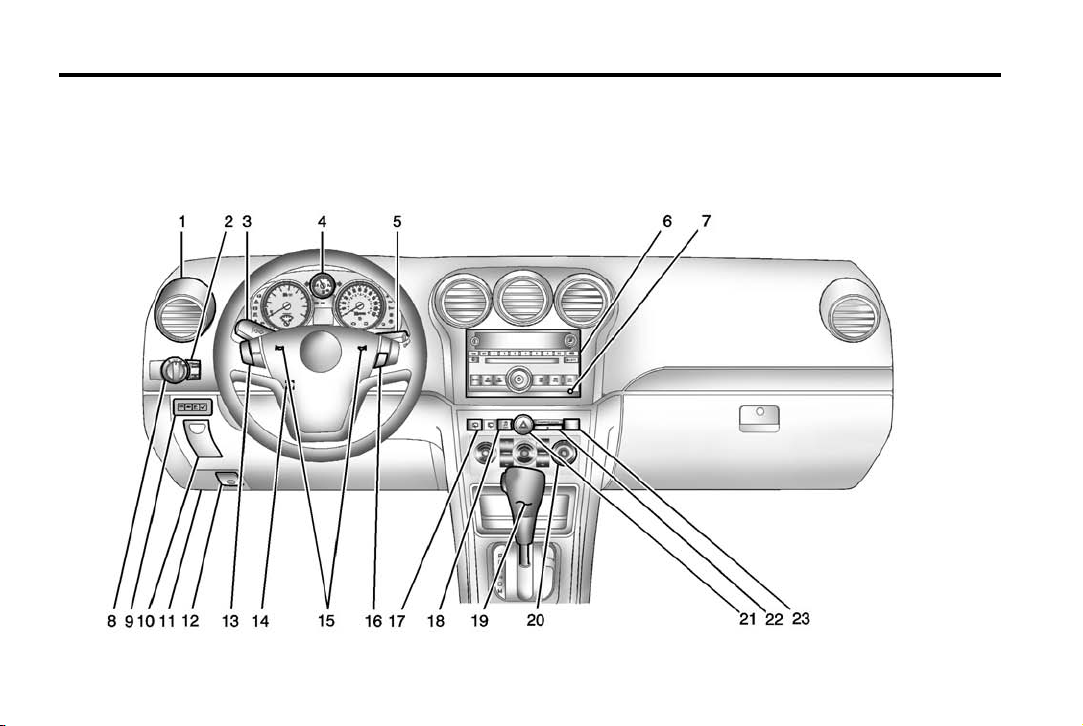
Instrument Panel Overview

Chevrolet Captiva Sport Owner Manual (GMNA-Localizing-U.S./Mexico-
6014141) — 2014 — crc — 8/13/13
In Brief 1-3
1. Air Vents on page 8-9.
2. Instrument Panel Illumination
Control on page 6-4.
3. Turn Signal Lever. See Turn and
Lane-Change Signals on
page 6-3.
4. Instrument Cluster on page 5-9.
5. Windshield Wiper/Washer on
page 5-3.
6. AM-FM Radio on page 7-5.
7. Auxiliary Input Jack (If
Equipped). See Auxiliary
Devices on page 7-20.
8. Fog Lamps on page 6-4.
Exterior Lamp Controls on
page 6-1.
9. Driver Information Center (DIC)
Buttons. See Driver Information
Center (DIC) on page 5-24.
10. Instrument Panel Storage on
page 4-1.
12. Hood Release. See Hood on
page 10-3.
13. Cruise Control on page 9-30.
14. Steering Wheel Adjustment on
page 5-2.
15. Horn on page 5-3.
16. Steering Wheel Controls on
page 5-2 (If Equipped).
17. Rear Window Wiper/Washer on
page 5-4.
18. Traction Control/Electronic
Stability Control on page 9-28.
19. Shift Lever. See Automatic
Transmission on page 9-21.
20. Climate Control Systems on
page 8-1 (If Equipped).
Automatic Climate Control
System on page 8-5 (If
Equipped).
21. Hazard Warning Flashers on
page 6-3.
11. Data Link Connector (DLC)
(Out of View). See Malfunction
Indicator Lamp on page 5-14.
22. Passenger Airbag Status
Indicator. See Passenger
Sensing System (United
States) on page 3-24.
23. Passenger Safety Belt
Reminder. See Safety Belt
Reminders on page 5-11.
Chevrolet Captiva Sport Owner Manual (GMNA-Localizing-U.S./Mexico-
6014141) — 2014 — crc — 8/13/13
1-4 In Brief
Initial Drive
Information
This section provides a brief
overview about some of the
important features that may or may
not be on your specific vehicle.
For more detailed information, refer
to each of the features which can be
found later in this owner manual.
Remote Keyless Entry
(RKE) System
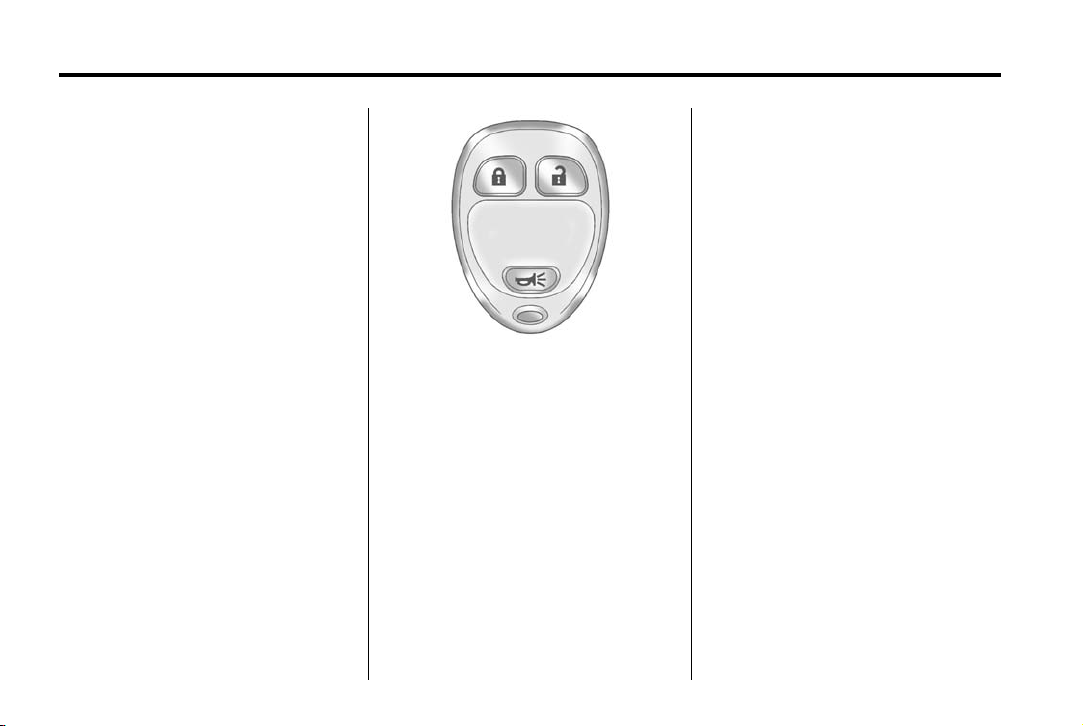
The RKE transmitter functions work
up to 20 m (65 ft) away from the
vehicle.
Without Remote Start Shown, with
Remote Start Similar
Q : Press to lock all the doors,
including the liftgate.
K : Press once to unlock the driver
door. If
five seconds, all remaining doors
unlock.
K is pressed again within
L : Press and release to locate
the vehicle. Press and hold
activate the panic alarm. Press
again to turn off the alarm.
L to
L
See Keys on page 2-1 and Remote
Keyless Entry (RKE) System
Operation on page 2-2.
Remote Vehicle Start
This vehicle may have a remote
starting feature that starts the
engine from outside of the vehicle.
Starting the Engine Using
Remote Start
To start the vehicle:
1. Aim the RKE transmitter at the
vehicle.
2. Press and release
RKE transmitter.
3. Immediately after completing
Step 2, press and hold
the parking lamps flash. If the
vehicle’s lights can not be seen,
press and hold
four seconds.
When the vehicle starts, the parking
lamps will turn on and remain on as
long as the engine is running. The
Q on the
/ until
/ for at least
Chevrolet Captiva Sport Owner Manual (GMNA-Localizing-U.S./Mexico-
6014141) — 2014 — crc — 8/13/13
In Brief 1-5
doors will be locked and the climate
control system will operate at the
same setting as when the vehicle
was last turned off.
After entering the vehicle during a
remote start, insert and turn the key
to the ON/RUN position to drive the
vehicle.
If the vehicle is left running, it
automatically shuts off after
10 minutes unless a time extension
has been done.
Shutting the Engine Off After a
Remote Start
To manually shut off a remote start:
.
Aim the RKE transmitter at the
vehicle and press
parking lamps turn off.
.
Turn on the hazard warning
flashers.
.
Turn the ignition switch on and
then off.
See Remote Vehicle Start on
page 2-4.
/ until the
Door Locks
From the outside, lock or unlock the
door using the key or the Remote
Keyless Entry (RKE) transmitter.
See Remote Keyless Entry (RKE)
System Operation on page 2-2.
From the inside, push or pull the
manual door lock on each door.
Use the power door lock switch on
the front doors.
Q : Press to lock the doors.
K : Press to unlock the doors.
See Door Locks on page 2-6 and
Power Door Locks on page 2-6.
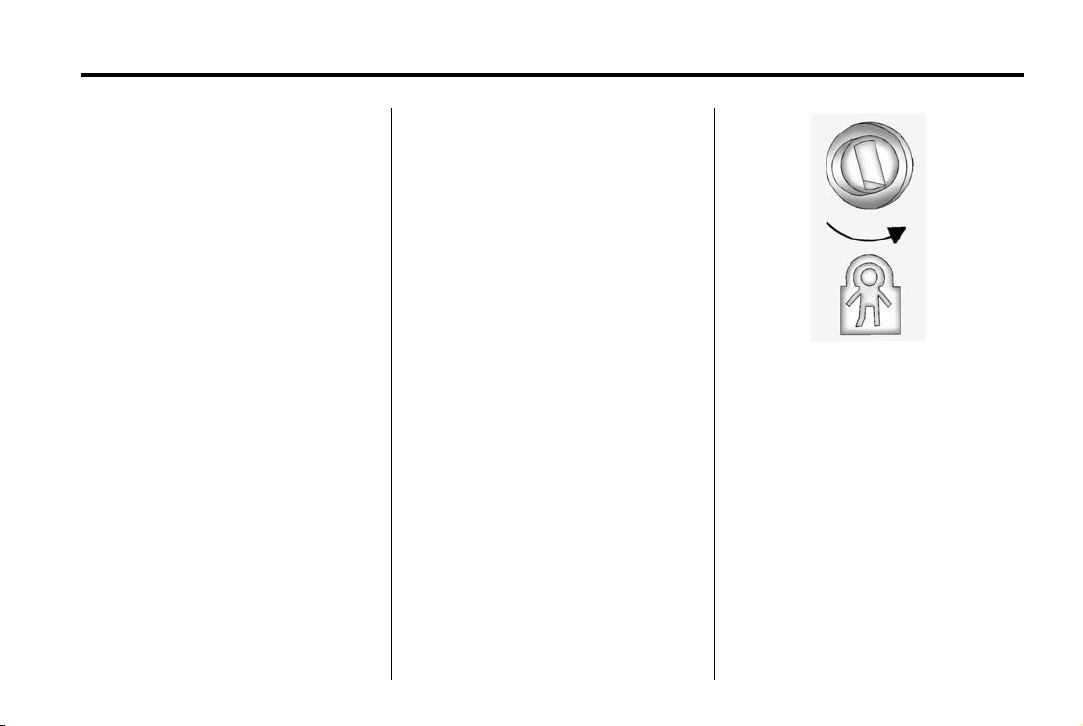
Safety Locks
The vehicle has rear door security
locks to prevent passengers from
opening the rear doors from the
inside.
Open the rear doors to access the
security locks on the inside edge of
each door.
To activate, insert a key into the slot
and turn it to the horizontal position.
The door can only be opened from
the outside.
To return the door to normal
operation, open the door and turn
the slot to the vertical position.

Chevrolet Captiva Sport Owner Manual (GMNA-Localizing-U.S./Mexico-
6014141) — 2014 — crc — 8/13/13
1-6 In Brief
Liftgate
To lock or unlock the liftgate from
outside the vehicle, press
twice on the Remote Keyless
Entry (RKE) transmitter. See
Remote Keyless Entry (RKE)
System Operation on page 2-2.
To lock or unlock the liftgate from
inside the vehicle, press
the power door lock switch.
To open the liftgate, press the touch
pad on the underside of the liftgate
handle and pull up.
To close the liftgate, pull down using
the handle and close until it latches.
See Liftgate on page 2-8.
Q or K
Q or K on
Windows
Press the front of the switch to open
the window. Pull the switch up to
close it.
The power windows operate when
the ignition is in ON/RUN or ACC/
ACCESSORY, or while in Retained
Accessory Power (RAP). See
Retained Accessory Power (RAP)
on page 9-18.
Express-Down Window
The driver window switch has an
express-down feature that lowers
the window without holding the
switch. Press the switch part way
and the window will open a small
amount. Press the switch down all
the way and release it and the
window lowers all the way.
To stop the window while it is
lowering, press and release the
switch.
See Power Windows on page 2-13.
Window Lockout
This feature prevents the rear seat
passengers from operating the
windows. Press the lockout switch
on the driver door panel to activate
the switch. Press it again to
deactivate the switch.
Chevrolet Captiva Sport Owner Manual (GMNA-Localizing-U.S./Mexico-
6014141) — 2014 — crc — 8/13/13
In Brief 1-7
Seat Adjustment
Manual Seats
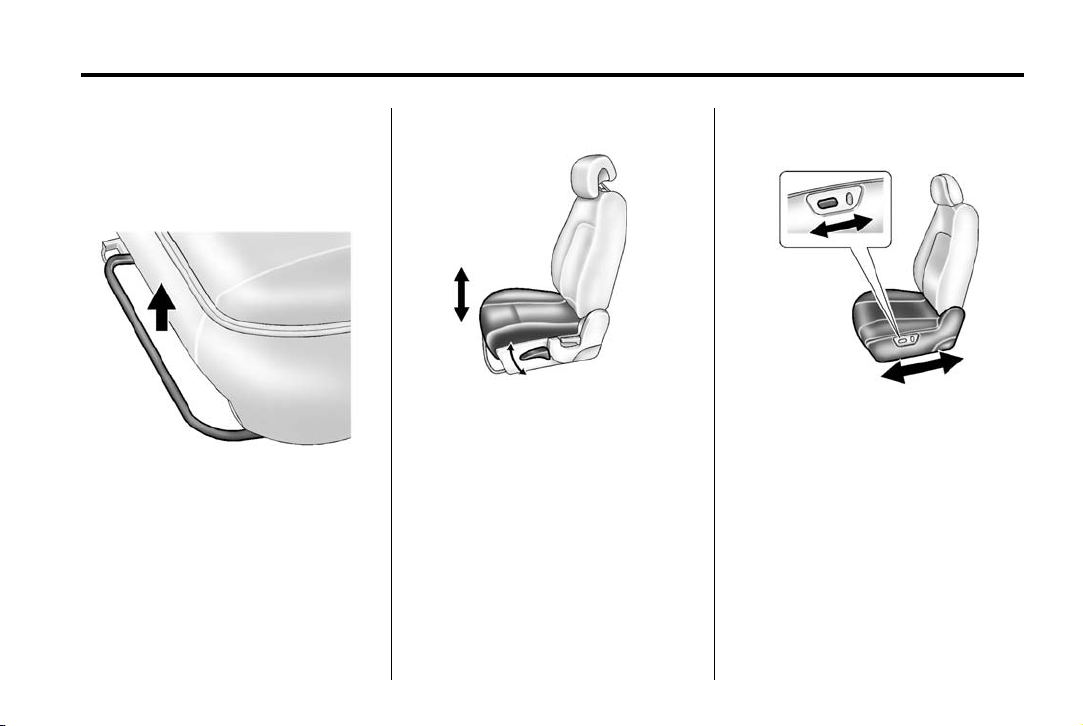
To adjust a manual seat:
1. Lift the bar to unlock the seat.
2. Slide the seat to the desired
position and release the bar.
3. Try to move the seat back and
forth to be sure the seat is
locked in place.
Seat Height Adjuster
If available, move the lever up or
down to raise or lower the seat.
See Seat Adjustment on page 3-3.
Power Seats
If available, move the control
forward or rearward to adjust the
seat position.
Chevrolet Captiva Sport Owner Manual (GMNA-Localizing-U.S./Mexico-
6014141) — 2014 — crc — 8/13/13
1-8 In Brief
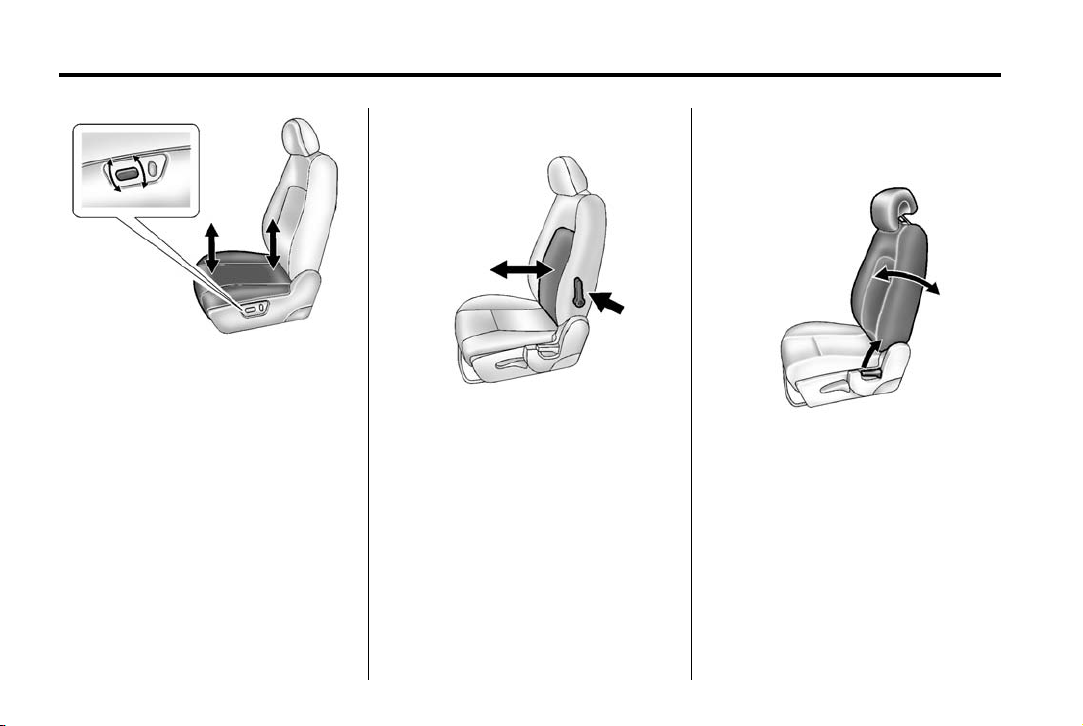
Lumbar Adjustment
To raise or lower the front or rear
part of the seat cushion, move the
front or rear of the control up
or down.
See Power Seat Adjustment on
page 3-4.
If available, move the lever forward
or rearward to increase or decrease
the lumbar support.
See Lumbar Adjustment on
page 3-4.
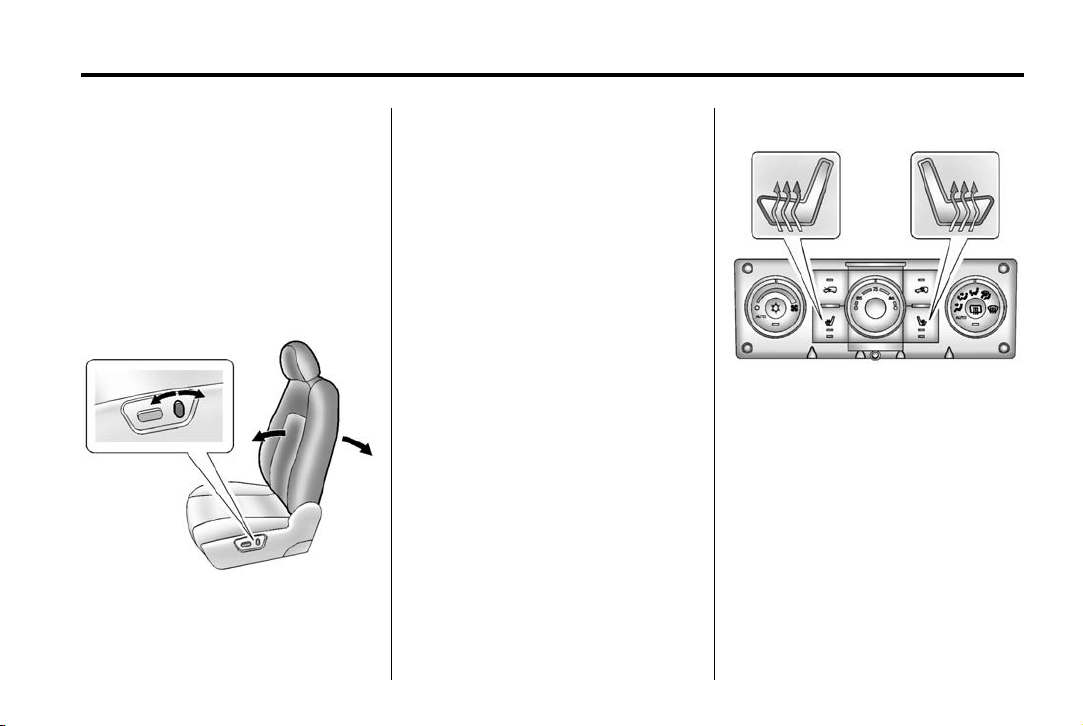
Reclining Seatbacks
Manual Reclining Seatbacks
To recline the seatback:
1. Lift the lever on the outboard
side of the seat.
2. Move the seatback to the
desired position, and then
release the lever to lock the
seatback in place.
3. Push and pull on the seatback to
make sure it is locked.
Chevrolet Captiva Sport Owner Manual (GMNA-Localizing-U.S./Mexico-
6014141) — 2014 — crc — 8/13/13
.
To return the seatback to the upright
position:
1. Lift the lever fully without
applying pressure to the
seatback, and the seatback will
return to the upright position.
2. Push and pull on the seatback to
make sure it is locked.
Power Reclining Seatbacks
To adjust a power seatback,
if equipped:
.
Tilt the top of the control
rearward to recline.
Tilt the top of the control forward
to raise.
See Reclining Seatbacks on
page 3-5.
Second Row Seats
The rear seatbacks can be folded
down to increase cargo space.
See Rear Seats on page 3-8.
In Brief 1-9
Heated Seats
Automatic Climate Control System
Shown
If available, the buttons are on the
climate control panel. To operate,
the ignition must be on.
Press
L or M to heat the driver or
passenger seat cushion and
seatback.
Press the button once for the
highest setting. With each press of
the button, the heated seat will
change to the next lower setting,
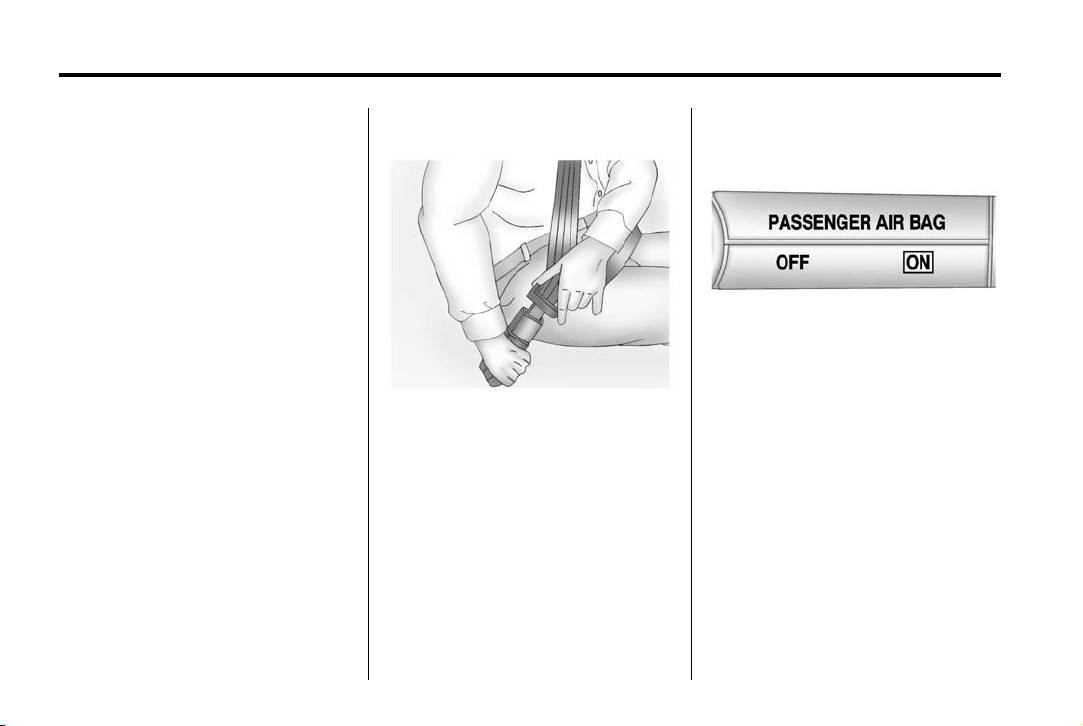
Chevrolet Captiva Sport Owner Manual (GMNA-Localizing-U.S./Mexico-
6014141) — 2014 — crc — 8/13/13
1-10 In Brief
and then to the off setting. The
lights indicate two for the highest
setting and one for the lowest.
See Heated Front Seats on
page 3-6.
Head Restraint
Adjustment
Do not drive until the head restraints
for all occupants are installed and
adjusted properly.
To achieve a comfortable seating
position, change the seatback
recline angle as little as necessary
while keeping the seat and the head
restraint height in the proper
position.
See Head Restraints on page 3-2
and Seat Adjustment on page 3-3.
Safety Belts
Refer to the following sections for
important information on how to use
safety belts properly:
.
Safety Belts on page 3-9.
.
How to Wear Safety Belts
Properly on page 3-11.
.
Lap-Shoulder Belt on page 3-12.
.
Lower Anchors and Tethers for
Children (LATCH System) on
page 3-38.
Passenger Sensing
System
The passenger sensing system will
turn off the front outboard
passenger frontal airbag under
certain conditions. No other airbag
is affected by the passenger
sensing system.
The passenger airbag status
indicator will light on the instrument
panel when the vehicle is started.
See Passenger Sensing System
(United States) on page 3-24 for
more information.
Chevrolet Captiva Sport Owner Manual (GMNA-Localizing-U.S./Mexico-
6014141) — 2014 — crc — 8/13/13
In Brief 1-11
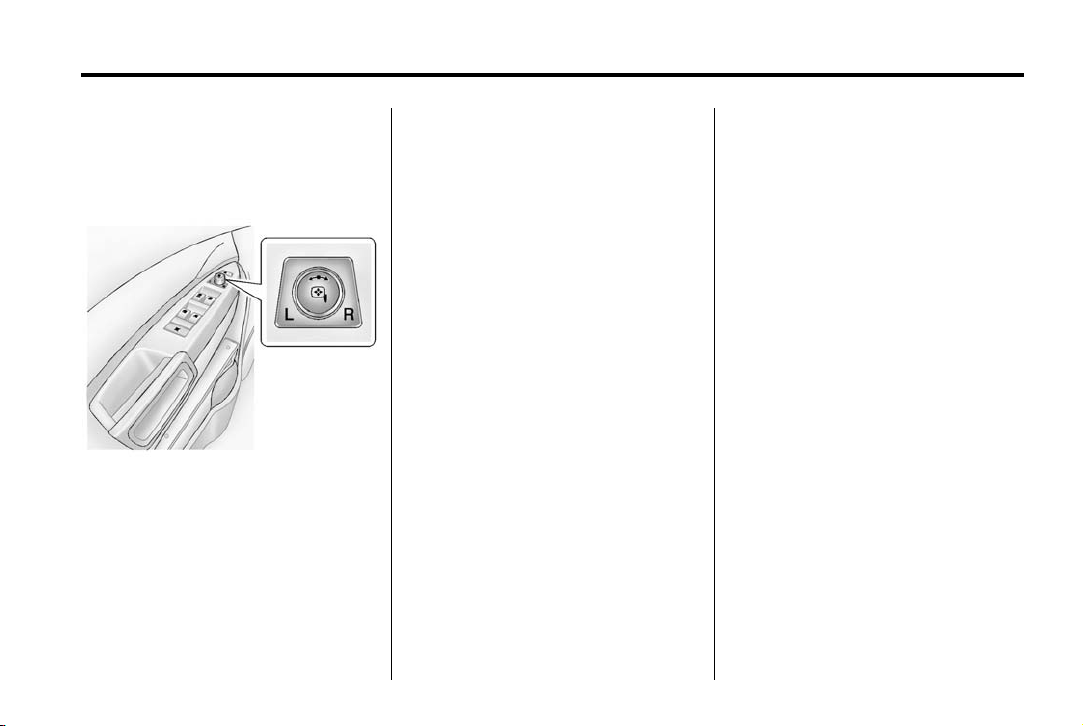
Mirror Adjustment
Exterior Mirrors
Power Outside Mirrors
To adjust the power mirrors:
1. Turn the knob to choose the
left (L) or the right (R) mirror.
2. Use the knob to move the
selected mirror so the side and
the area behind the vehicle
is seen.
3. Return the control to the center
position so the mirror cannot be
moved.
Manual Folding Mirrors
The outside mirrors can be folded
inward to prevent damage when
going through an automatic car
wash. To fold, pull the mirror toward
the vehicle. Push the mirror outward
to return it to the original position.
Automatic Dimming Feature
If equipped, the outside driver mirror
automatically dims to reduce glare
from vehicle headlamps. See
Automatic Dimming Rearview Mirror
on page 2-13.
Interior Mirrors
Adjustment
Adjust the rearview mirror for a clear
view of the area behind your
vehicle.
Manual Rearview Mirror
If equipped, push the tab forward for
daytime use and pull it for nighttime
use to avoid glare from headlamps.
See Manual Rearview Mirror on
page 2-13.
Automatic Dimming Rearview
Mirror
If equipped, automatic dimming
reduces the glare of the headlamps
from behind. This feature comes on
when the vehicle is started. See
Automatic Dimming Rearview Mirror
on page 2-13.
Chevrolet Captiva Sport Owner Manual (GMNA-Localizing-U.S./Mexico-
6014141) — 2014 — crc — 8/13/13
1-12 In Brief
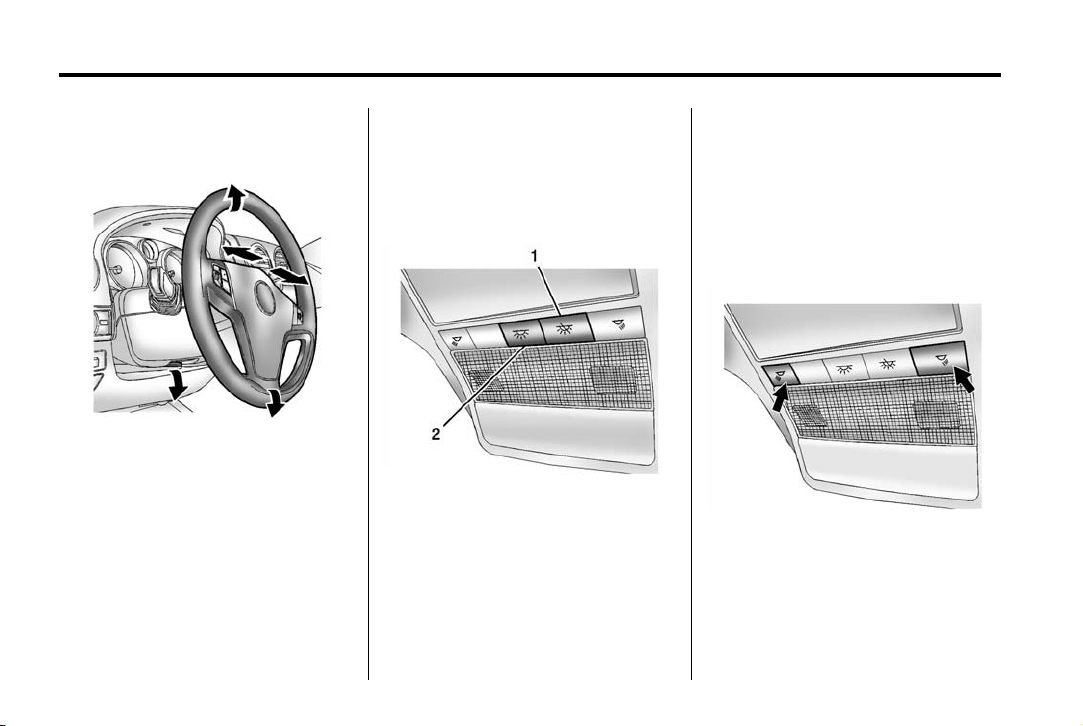
Steering Wheel
Adjustment
To adjust the steering wheel:
1. Hold the steering wheel and pull
the lever down.
2. Move the steering wheel up
or down.
3. Pull or push the steering wheel
closer or away from you.
4. Pull the lever up to lock the
steering wheel in place.
Do not adjust the steering wheel
while driving.
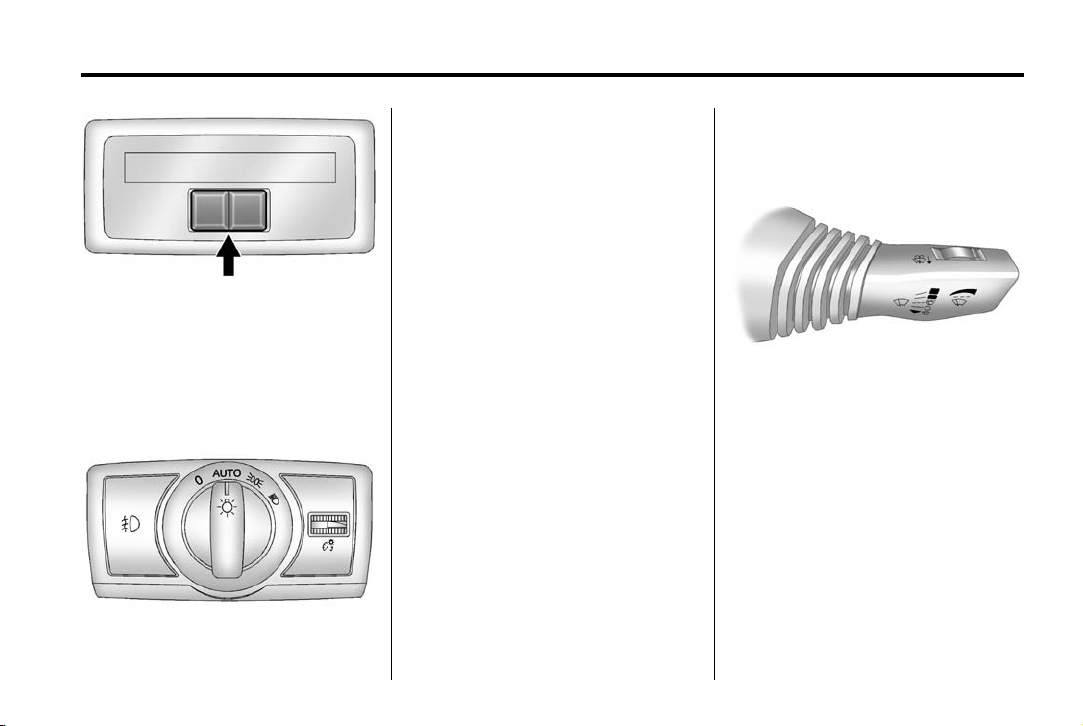
Interior Lighting
Dome Lamps
There are front and rear dome
lamps in the overhead console and
the headliner.
* : Press the button (1) on the
overhead console to keep the dome
lamps and other interior lamps
turned off while any door is open.
Press this button again to return it to
the out position and the lamps
automatically come on when any
door is opened.
+ : Press the button (2) to turn the
dome lamps on and off while the
doors are closed.
Reading Lamps
The front reading lamps are in the
overhead console.
Chevrolet Captiva Sport Owner Manual (GMNA-Localizing-U.S./Mexico-
6014141) — 2014 — crc — 8/13/13
In Brief 1-13
Turn the control to the following
positions:
9 : Turns off the exterior lamps.
The knob returns to the AUTO
position after it is released.
AUTO: Automatically turns the
exterior lamps on and off,
depending on outside lighting.
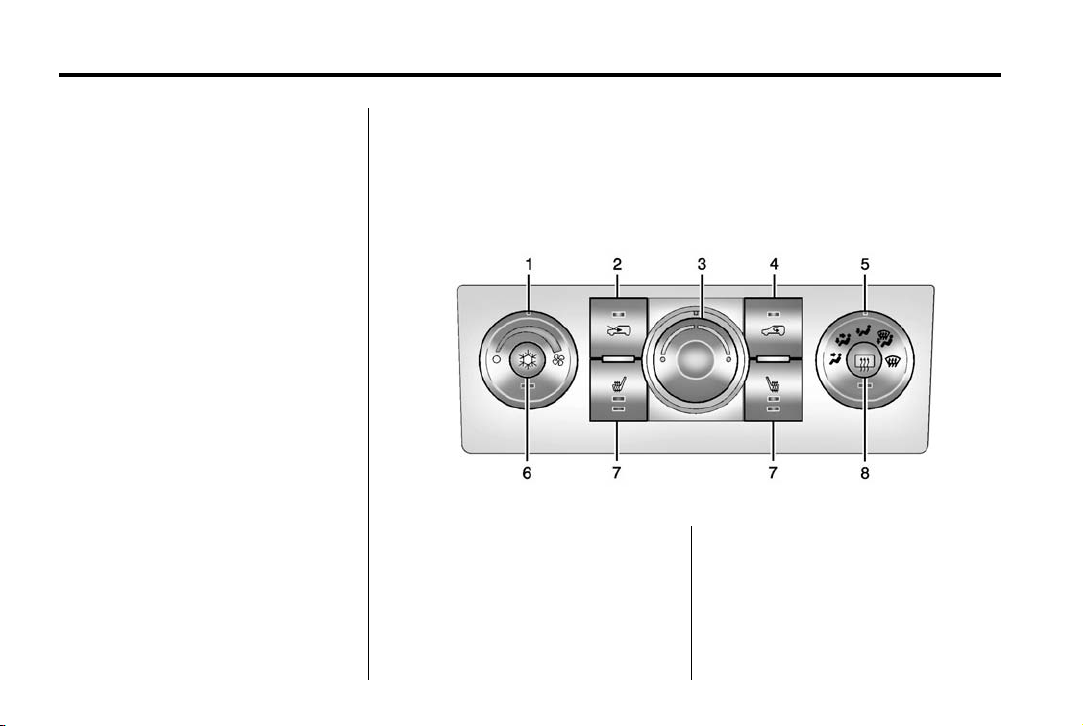
The rear reading lamps are in the
headliner.
To turn the reading lamps on or off,
press the button next to each lamp.
Exterior Lighting
The exterior lamp control is on the
instrument panel to the left of the
steering wheel.
; : Turns on the parking lamps
including all lamps, except the
headlamps.
2 : Turns on the headlamps
together with the parking lamps and
instrument panel lights.
See:
.
Exterior Lamp Controls on
page 6-1
.
Turn and Lane-Change Signals
on page 6-3
.
Headlamp High/Low-Beam
Changer on page 6-2
Windshield Wiper/Washer
The windshield wiper lever is on the
right side of the steering column.
Move the lever up or down to select
the wiper speed.
8: Single wipe, briefly move the
lever down. The lever returns to its
starting position when released. For
several wipes, hold the lever down.
9: Turns the windshield wipers off.
Chevrolet Captiva Sport Owner Manual (GMNA-Localizing-U.S./Mexico-
6014141) — 2014 — crc — 8/13/13
1-14 In Brief
3: Sets a delay between wipes.
Move the switch on top of the lever
left for less frequent wipes or right
for more frequent wipes.
a : Slow wipes.
1 : Fast wipes.
Windshield Washer
Pull the windshield wiper lever to
spray windshield washer fluid and
activate the wipers. The wipers will
continue until the lever is released
or the maximum wash time is
reached.
Rear Window Wiper/Washer
The rear wiper and rear wash button
is on the instrument panel above the
climate control system.
= : Press to wash and wipe the
rear window.
5 : Press to turn the delayed
wiping on or off.
See Windshield Wiper/Washer on
page 5-3 and Rear Window Wiper/
Washer on page 5-4.
Climate Controls
The heating, cooling, and ventilation for the vehicle can be controlled with
this system. For vehicles with the remote start feature, the climate control
system functions as part of the remote start feature. See Remote Keyless
Entry (RKE) System Operation on page 2-2.
Climate Control System
1. Fan Control
2. Outside Air
3. Temperature Control
4. Recirculation
5. Air Delivery Mode Control
6. Air Conditioning
7. Driver and Passenger Heated
Seats (If Equipped)
8. Rear Window Defogger

Chevrolet Captiva Sport Owner Manual (GMNA-Localizing-U.S./Mexico-
6014141) — 2014 — crc — 8/13/13
Automatic Climate Control System
In Brief 1-15
Transmission
Electronic Range Select
(ERS) Mode
ERS mode allows you to choose the
top-gear limit of the transmission
and the vehicle’s speed while
driving downhill or towing a trailer.
To use this feature:
1. Move the shift lever to
M (Manual).
1. Fan Control
2. Outside Air
3. Temperature Control
4. Recirculation
5. Air Delivery Mode Control
6. Air Conditioning
7. Driver and Passenger Heated
Seats (If Equipped)
8. Rear Window Defogger
See Climate Control Systems on
page 8-1 or Automatic Climate
Control System on page 8-5 (If
Equipped).

Chevrolet Captiva Sport Owner Manual (GMNA-Localizing-U.S./Mexico-
6014141) — 2014 — crc — 8/13/13
1-16 In Brief
2. Press the plus/minus button
located on the shift lever, to
increase or decrease the gear
range available.
See Manual Mode on page 9-23.
Vehicle Features
Radio(s)
: Press to turn the system on
O
and off. Turn to increase or
decrease the volume.
BAND: Press to choose between
FM, AM, or SiriusXM
f : Select radio stations.
© SEEK or ¨ SEEK: Seek or scan
stations.
4 (Information): If equipped with
XM, MP3, WMA, or RDS features,
press to display additional text
information related to the current
FM-RDS or SiriusXM station, or CD,
MP3, or WMA song. Song title
information will be displayed on the
top line of the display while the artist
information will be displayed on the
bottom line, if the information is
available during XM, CD, MP3,
or WMA playback. When
information is not available, «No
Info» displays.
®
, if equipped.
For more information about these
and other radio features, see
Operation on page 7-4.
Storing a Favorite Station
A maximum of 36 stations can be
stored as favorites using the six
softkeys below the radio station
frequency tabs and by using the
radio FAV button. Press FAV to go
through up to six pages of favorites,
each having six favorite stations
available per page. Each page of
favorites can contain any
combination of AM, FM, or SiriusXM
stations.
See Operation on page 7-4.
Setting the Clock
To set the time and date:
1. Turn the ignition key to ACC/
ACCESSORY or ON/RUN.
2. Press
3. Press
O to turn the radio on.
H and HR, MIN, MM, DD,
and YYYY (hour, minute, month,
day, and year) display.

Chevrolet Captiva Sport Owner Manual (GMNA-Localizing-U.S./Mexico-
6014141) — 2014 — crc — 8/13/13
In Brief 1-17
4. Press the softkey below the tab
to be changed.
5. Increase or decrease the time or
date by turning
counterclockwise.
See Clock on page 5-6.
f clockwise or
Satellite Radio
If equipped, SiriusXM®is a satellite
radio service based in the
48 contiguous United States and
10 Canadian provinces.
SiriusXM satellite radio has a wide
variety of programming and
commercial-free music, coast to
coast, and in digital-quality sound.
A fee is required to receive the
SiriusXM service.
For more information, refer to:
.
www.siriusxm.com or call
1-866-635-2349 (U.S.)
.
www.xmradio.ca or call
1-877-209-0079 (Canada)
See Satellite Radio on page 7-6.
Portable Audio Devices
The vehicle may have a 3.5 mm
(1/8 in) auxiliary input jack on the
audio faceplate and a USB port in
the center console. Some portable
audio devices such as iPods
players, and USB storage devices
can be connected to the vehicle
using a 3.5 mm (1/8 in) cable or a
USB cable.
See Auxiliary Devices on page 7-20.
Bluetooth
If equipped with a Bluetooth system,
it allows users with a
Bluetooth-enabled cell phone to
make and receive hands-free calls
using the vehicle’s audio system
and controls.
The Bluetooth-enabled cell phone
must be paired with the Bluetooth
system before it can be used in the
vehicle. Not all phones will support
all functions. For more information,
see www.gm.com/bluetooth and
Bluetooth on page 7-24.
®
®
, MP3
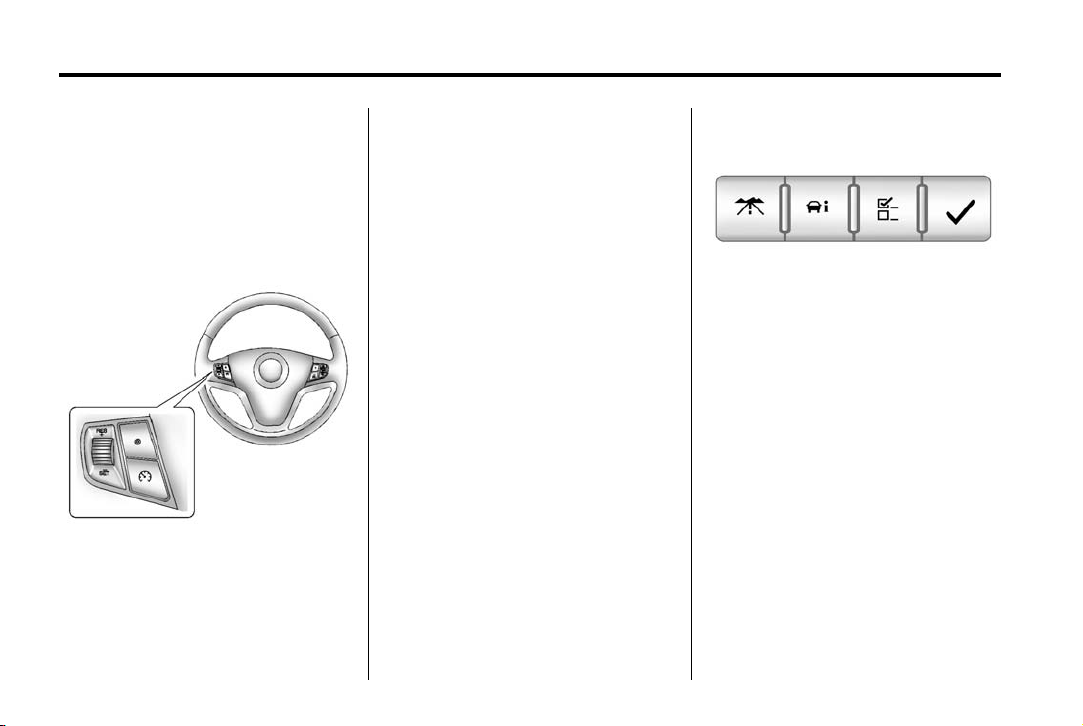
Steering Wheel Controls
For vehicles with audio steering
wheel controls, some audio controls
can be adjusted at the steering
wheel.
+ / −: Press and release to go to
the next or the previous preset radio
station or CD track.
J / 0 : For vehicles with Bluetooth
and OnStar®, press and hold to
interact with those systems. Press
and release to mute the system.
Press it again to turn the sound
back on.
®
Chevrolet Captiva Sport Owner Manual (GMNA-Localizing-U.S./Mexico-
6014141) — 2014 — crc — 8/13/13
1-18 In Brief
K : Press to reject an incoming
call, or end a current call.
v + or v −: Move the thumbwheel
up or down to increase or to
decrease the volume.
Cruise Control
upwards to accelerate. If cruise
control is already active, use to
increase vehicle speed.
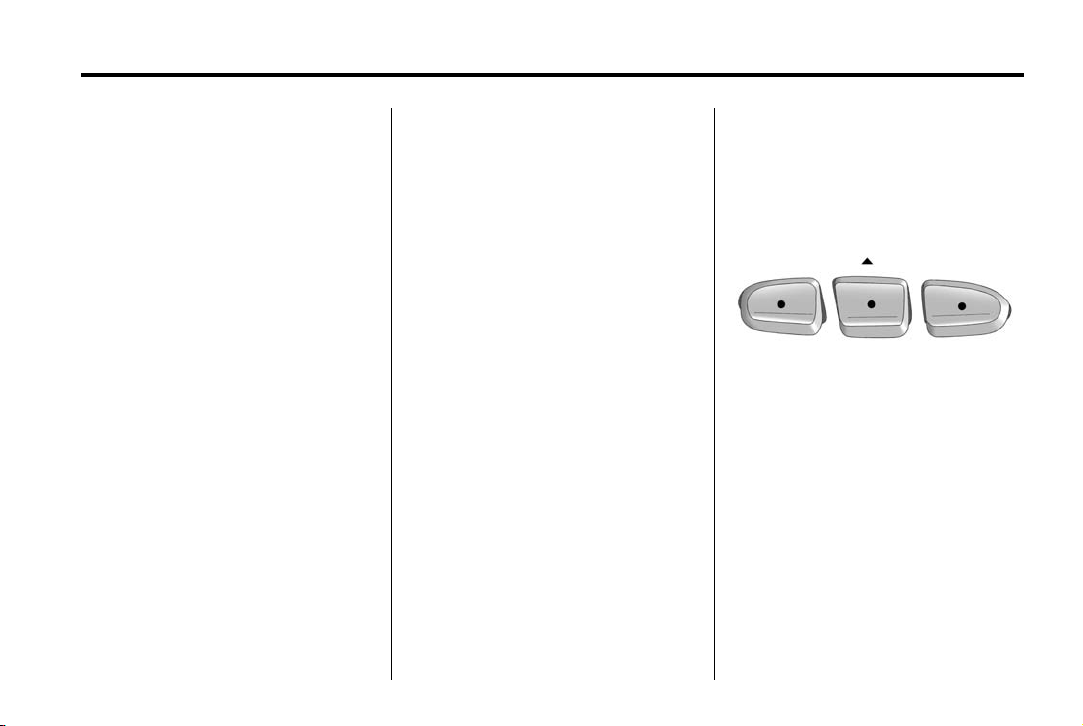
−SET: Move the thumbwheel down
briefly to set the speed and activate
cruise control. If cruise control is
already active, use to decrease
speed.
See Cruise Control on page 9-30.
Infotainment System
If the vehicle has a base radio it is
included in this manual. See the
infotainment manual for information
on the connected radios, audio
players, phone, navigation system,
settings, and voice or speech
recognition.
Driver Information
E : Press to turn the cruise control
system on and off. The indicator
light on the button turns on or off.
RES+: Move the thumbwheel up
briefly to make the vehicle resume
to a previously set speed or hold
Center (DIC)
The DIC has different displays in the
instrument cluster which can be
accessed by pressing the DIC
buttons on the instrument panel,
below the exterior lamps control.
DIC Buttons
3 : Press to display the trip and
fuel displays.
T : Press to display the vehicle
information displays.
U : Press to customize the feature
settings on the vehicle. See Vehicle
Personalization on page 5-36 for
more information.
V : Press to set or reset certain
functions and to turn off or
acknowledge messages on the DIC.
See Driver Information Center (DIC)
on page 5-24.
Chevrolet Captiva Sport Owner Manual (GMNA-Localizing-U.S./Mexico-
6014141) — 2014 — crc — 8/13/13
In Brief 1-19
Vehicle Personalization
Some vehicle features can be
programmed by using the DIC
buttons on the instrument panel to
the left of the steering wheel. These
features include:
.
Language
.
Door Lock and Unlock Settings
.
Lighting
.
Chime Volume
.
Remote Start
See Vehicle Personalization on
page 5-36.
Rear Vision
Camera (RVC)
If equipped, RVC displays a view of
the area behind the vehicle, on the
center stack display, when the
vehicle is shifted into R (Reverse).
See Rear Vision Camera (RVC) on
page 9-34.
Ultrasonic Parking Assist
If equipped, this system uses
sensors on the rear bumper to
assist with parking and avoiding
objects while in R (Reverse).
It operates at speeds less than
8 km/h (5 mph). Ultrasonic Rear
Parking Assist (URPA) uses audible
beeps to provide distance and
system information.
Keep the sensors on the vehicle’s
rear bumper clean to ensure proper
operation.
See Ultrasonic Parking Assist on
page 9-32.
Power Outlets
The accessory power outlets can be
used to plug in electrical equipment,
such as a cell phone or MP3 player.
The power outlets are located inside
the center floor console, on the rear
of the center floor console, and in
the rear cargo compartment.
Remove the cover to access and
replace when not in use.
See Power Outlets on page 5-7.
Universal Remote System
The Universal Home Remote
System allows for garage door
openers, security systems, and
home automation devices to be
programmed to work with these
buttons in the vehicle.
See Universal Remote System on
page 5-42.

Chevrolet Captiva Sport Owner Manual (GMNA-Localizing-U.S./Mexico-
6014141) — 2014 — crc — 8/13/13
1-20 In Brief
Performance and
Maintenance
Traction Control/
Electronic Stability
Control
The Traction Control System (TCS)
limits wheel spin. The system turns
on automatically every time the
vehicle is started.
The StabiliTrak system assists with
directional control of the vehicle in
difficult driving conditions. The
system also turns on automatically
every time the vehicle is started.
.
To turn off or on TCS, press and
release the TCS/StabiliTrak
button
g on the instrument
panel. The appropriate DIC
message displays.
.
To turn off both Traction Control
and StabiliTrak, press and hold
the TCS/StabiliTrak button
until the StabiliTrak Off light g
illuminates and the appropriate
DIC message displays.
.
Press the TCS/StabiliTrak
button
g again to turn on both
systems. The appropriate DIC
message displays.
See Traction Control/Electronic
Stability Control on page 9-28.
This vehicle also has a Brake Pedal
Override feature that limits engine
torque when the brake pedal is
applied. See Traction Control/
Electronic Stability Control on
page 9-28.
g
Tire Pressure Monitor
This vehicle may have a Tire
Pressure Monitor System (TPMS).
The low tire pressure warning light
alerts to a significant loss in
pressure of one of the vehicle’s
tires. If the warning light comes on,
stop as soon as possible and inflate
the tires to the recommended
pressure shown on the Tire and
Loading Information label. See
Vehicle Load Limits on page 9-10.
The warning light will remain on until
the tire pressure is corrected.
The low tire pressure warning light
may come on in cool weather when
the vehicle is first started, and then
turn off as the vehicle is driven. This
may be an early indicator that the

Chevrolet Captiva Sport Owner Manual (GMNA-Localizing-U.S./Mexico-
6014141) — 2014 — crc — 8/13/13
In Brief 1-21
tire pressures are getting low and
the tires need to be inflated to the
proper pressure.
The TPMS does not replace normal
monthly tire maintenance. Maintain
the correct tire pressures.
See Tire Pressure Monitor System
on page 10-46.
Engine Oil Life System
The engine oil life system calculates
engine oil life based on vehicle use
and displays a CHANGE ENGINE
OIL SOON message when it is time
to change the engine oil and filter.
Resetting the Oil Life System
Reset the system whenever the
engine oil is changed so that the
system can calculate the next
engine oil change. To reset the
system:
1. Display OIL LIFE REMAINING
on the DIC. See Driver
Information Center (DIC) on
page 5-24 and Engine Oil
Messages on page 5-31.
2. Press
The oil life system can also be reset
as follows:
1. Turn the ignition key to ON/RUN
2. Fully press and release the
See Engine Oil Life System on
page 10-10.
V for five seconds to
reset the oil life at 100%.
Be careful not to reset the oil life
display accidentally at any time
other than after the oil is
changed. It cannot be reset
accurately until the next oil
change.
with the engine off.
accelerator pedal three times
within five seconds.
If the OIL LIFE REMAINING
value is not 100%, the system
needs to be reset again.
E85 or FlexFuel
Vehicles with a yellow fuel cap can
use either unleaded gasoline or
ethanol fuel containing up to 85%
ethanol (E85). See E85 or FlexFuel
on page 9-37. For all other vehicles,
use only the unleaded gasoline
described under Recommended
Fuel on page 9-36.
Driving for Better Fuel
Economy
Driving habits can affect fuel
mileage. Here are some driving tips
to get the best fuel economy
possible.
.
Avoid fast starts and accelerate
smoothly.
.
Brake gradually and avoid
abrupt stops.
.
Avoid idling the engine for long
periods of time.
.
When road and weather
conditions are appropriate, use
cruise control.

Chevrolet Captiva Sport Owner Manual (GMNA-Localizing-U.S./Mexico-
6014141) — 2014 — crc — 8/13/13
1-22 In Brief
.
Always follow posted speed
limits or drive more slowly when
conditions require.
.
Keep vehicle tires properly
inflated.
.
Combine several trips into a
single trip.
.
Replace the vehicle’s tires with
the same TPC Spec number
molded into the tire’s sidewall
near the size.
.
Follow recommended scheduled
maintenance.
Roadside Assistance
Program
U.S.: 1-800-243-8872
TTY Users (U.S. Only):
1-888-889-2438
Canada: 1-800-268-6800
New Chevrolet owners are
automatically enrolled in the
Roadside Assistance Program.
See Roadside Assistance Program
on page 13-5.
OnStar
®
If equipped, this vehicle has a
comprehensive, in-vehicle system
that can connect to a live Advisor
for Emergency, Security, Navigation,
Connection, and Diagnostic
Services. See OnStar Overview on
page 14-1.

Chevrolet Captiva Sport Owner Manual (GMNA-Localizing-U.S./Mexico-
6014141) — 2014 — crc — 8/13/13
Keys, Doors, and Windows 2-1
Keys, Doors, and
Windows
Keys and Locks
Keys . . . . . . .. . . . . . . . . . .. . . . . . . . 2-1
Remote Keyless Entry (RKE)
System . . . . . . .. . . . . . . . . . . . . . . 2-2
Remote Keyless Entry (RKE)
System Operation . . . . . . . . . . . 2-2
Remote Vehicle Start . . . . . . . . . 2-4
Door Locks . . . . . . . . . . . . . . . . . . . 2-6
Power Door Locks . . . . . . . . . . . . 2-6
Delayed Locking . . . . . . . . . . . . . . 2-6
Automatic Door Locks . . . . . . . . . 2-6
Lockout Protection . . . . . . . . . . . . 2-7
Safety Locks . . . . . . . . . . . . . . . . . . 2-7
Exterior Mirrors
Convex Mirrors . . . . . . . . . . . . . . 2-11
Power Mirrors . . . . . . . . . . . ….. 2-12
Folding Mirrors . . . . . . . . . . . . . . . 2-12
Heated Mirrors . . . . . . . . … . . . . 2-12
Automatic Dimming Mirror . . . 2-12
Interior Mirrors
Interior Rearview Mirrors . . . . . 2-13
Manual Rearview Mirror . . . . . . 2-13
Automatic Dimming Rearview
Mirror . . . . . . . . . . . . . . . . . . . . . . . 2-13
Windows
Windows . . . . . . . . . . . . . . . …… 2-13
Power Windows . . . . . . . . . . . . . 2-13
Sun Visors . . . . . . . . . … . . . . . . . 2-14
Roof
Sunroof . . . . . . . . . . . . . . . . . . . . .. 2-14
Doors
Liftgate . . . . . . . . . . . . . …. . . . . . . . 2-8
Vehicle Security
Vehicle Security . . . . . . . . . . . . . .. 2-9
Vehicle Alarm System . . . . . . . . . 2-9
Immobilizer . . . . . . . . . . . . . . . . . . 2-10
Immobilizer Operation . . . . . . . 2-10
Keys and Locks
Keys
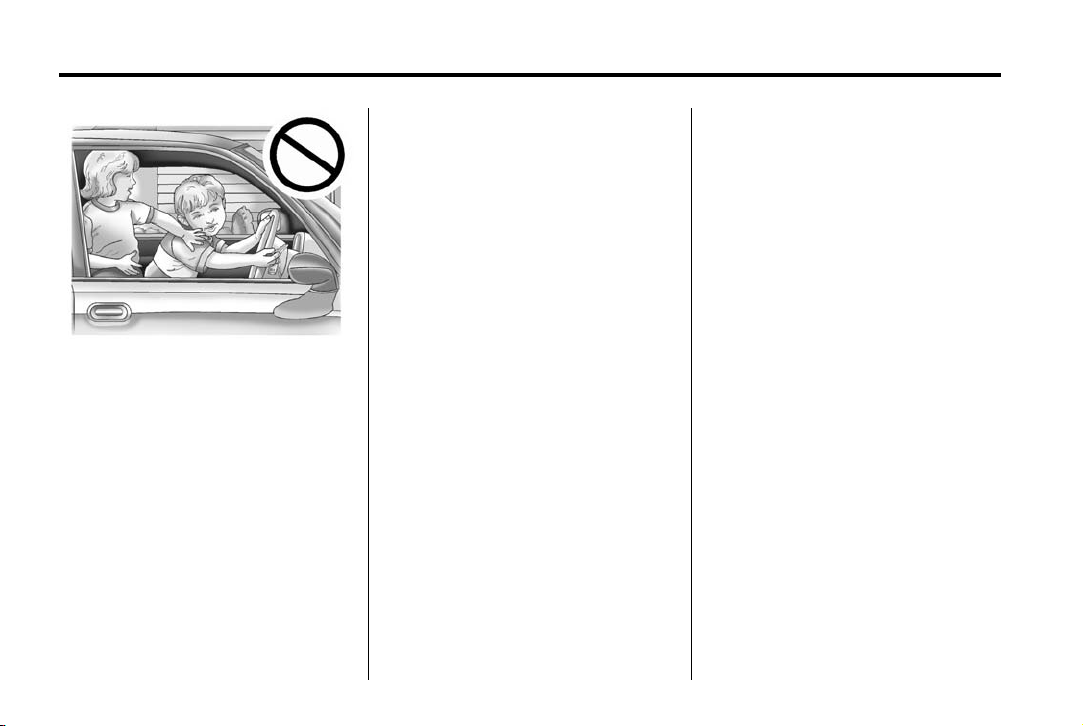
Warning
{
Leaving children in a vehicle with
the ignition key is dangerous and
children or others could be
seriously injured or killed. They
could operate the power windows
or other controls or make the
vehicle move. The windows will
function with the keys in the
ignition, and children or others
could be caught in the path of a
closing window. Do not leave
children in a vehicle with the
ignition key.
Chevrolet Captiva Sport Owner Manual (GMNA-Localizing-U.S./Mexico-
6014141) — 2014 — crc — 8/13/13
2-2 Keys, Doors, and Windows
Remote Keyless Entry
(RKE) System
See Radio Frequency Statement on
page 13-15.
If there is a decrease in the RKE
operating range:
.
Check the distance. The
transmitter may be too far from
the vehicle.
.
Check the location. Other
The two keys can be used for the
ignition and all locks.
The key code is stamped on the key
number plate and can be used to
make new keys at any dealer. Store
this information in a safe place
outside the vehicle.
If it becomes difficult to turn a key,
inspect the key blade for debris.
Periodically clean with a brush
or pick.
If equipped, with an active OnStar
subscription, an OnStar Advisor
may remotely unlock the vehicle.
See “OnStar” if equipped.
vehicles or objects may be
blocking the signal.
.
Check the transmitter’s battery.
See “Battery Replacement” later
in this section.
.
If the transmitter is still not
working correctly, see your
dealer or a qualified technician
for service.
Remote Keyless Entry
(RKE) System Operation
The Remote Keyless Entry (RKE)
transmitter functions work up to
20 m (65 ft) away from the vehicle.
Some conditions can affect the
performance of the transmitter. See
Remote Keyless Entry (RKE)
System on page 2-2.
Loading…
2014 Chevrolet Captiva Sport Owner Manual BookTOC
1
About Driving the Vehicle
3
Danger, Warnings, and Cautions
3
Instrument Panel Overview
8
Initial Drive Information
10
Remote Keyless Entry (RKE) System
10
Head Restraint Adjustment
16
Passenger Sensing System
16
Steering Wheel Adjustment
18
Windshield Wiper/Washer
19
Portable Audio Devices
23
Steering Wheel Controls
23
Driver Information Center (DIC)
24
Rear Vision Camera (RVC)
25
Ultrasonic Parking Assist
25
Universal Remote System
25
Performance and Maintenance
26
Traction Control/Electronic Stability Control
26
Engine Oil Life System
27
Driving for Better Fuel Economy
27
Roadside Assistance Program
28
Keys, Doors, and Windows
29
Remote Keyless Entry (RKE) System
30
Remote Keyless Entry (RKE) System Operation
30
Automatic Dimming Mirror
40
Interior Rearview Mirrors
41
Manual Rearview Mirror
41
Automatic Dimming Rearview Mirror
41
Active Head Restraints
47
How to Wear Safety Belts Properly
55
Safety Belt Use During Pregnancy
59
Replacing Safety Belt System Parts after a Crash
61
Where Are the Airbags?
63
When Should an Airbag Inflate?
65
What Makes an Airbag Inflate?
66
How Does an Airbag Restrain?
66
What Will You See after an Airbag Inflates?
66
Passenger Sensing System (United States)
68
Servicing the Airbag-Equipped Vehicle
72
Adding Equipment to the Airbag-Equipped Vehicle
72
Replacing Airbag System Parts after a Crash
74
Infants and Young Children
76
Child Restraint Systems
79
Where to Put the Restraint
80
Lower Anchors and Tethers for Children (LATCH System)
82
Replacing LATCH System Parts After a Crash
88
Securing Child Restraints (Rear Seat)
88
Securing Child Restraints (Front Passenger Seat)
90
Instrument Panel Storage
95
Center Console Storage
96
Additional Storage Features
96
Cargo Management System
96
Instruments and Controls
99
Steering Wheel Adjustment
100
Steering Wheel Controls
100
Windshield Wiper/Washer
101
Rear Window Wiper/Washer
102
Warning Lights, Gauges, and Indicators
106
Safety Belt Reminders
109
Airbag Readiness Light
110
Passenger Airbag Status Indicator
111
Charging System Light
111
Malfunction Indicator Lamp
112
Service Vehicle Soon Light
114
Brake System Warning Light
114
Electric Parking Brake Light
115
Antilock Brake System (ABS) Warning Light
116
All-Wheel-Drive Light
117
Power Steering Warning Light
117
StabiliTrak® Indicator Light
117
Traction Control System (TCS) Warning Light
118
Engine Coolant Temperature Warning Light
118
Low Fuel Warning Light
119
Reduced Engine Power Light
120
Low Washer Fluid Warning Light
121
Driver Information Center (DIC)
122
Brake System Messages
127
Cruise Control Messages
128
Engine Cooling System Messages
128
Engine Power Messages
130
Key and Lock Messages
130
Object Detection System Messages
131
Ride Control System Messages
131
Airbag System Messages
132
Service Vehicle Messages
132
Transmission Messages
133
Vehicle Reminder Messages
134
Vehicle Personalization
134
Universal Remote System
140
Universal Remote System Programming
140
Universal Remote System Operation
143
Exterior Lamp Controls
145
Headlamp High/Low-Beam Changer
146
Daytime Running Lamps (DRL)
146
Automatic Headlamp System
146
Hazard Warning Flashers
147
Turn and Lane-Change Signals
147
Instrument Panel Illumination Control
148
Battery Load Management
150
Battery Power Protection
150
Theft-Deterrent Feature
152
Satellite Radio Antenna
160
Climate Control Systems
183
Automatic Climate Control System
187
Passenger Compartment Air Filter
191
Driving and Operating
193
Hill and Mountain Roads
199
If the Vehicle Is Stuck
201
Starting and Operating
206
Retained Accessory Power (RAP)
210
Parking over Things That Burn
212
Running the Vehicle While Parked
213
Automatic Transmission
213
Antilock Brake System (ABS)
217
Traction Control/Electronic Stability Control
220
Driver Assistance Systems
224
Ultrasonic Parking Assist
224
Rear Vision Camera (RVC)
226
Gasoline Specifications
228
California Fuel Requirements
228
Fuels in Foreign Countries
229
Filling a Portable Fuel Container
232
General Towing Information
232
Driving Characteristics and Towing Tips
233
Conversions and Add-Ons
239
Add-On Electrical Equipment
239
Accessories and Modifications
242
Doing Your Own Service Work
243
Engine Compartment Overview
244
Engine Oil Life System
250
Automatic Transmission Fluid
251
Engine Air Cleaner/Filter
252
Automatic Transmission Shift Lock Control Function Check
264
Ignition Transmission Lock Check
265
Park Brake and P (Park) Mechanism Check
265
Wiper Blade Replacement
265
Front Turn Signal and Parking Lamps
268
Taillamps, Turn Signal, Stoplamps, and Back-Up Lamps
269
Electrical System Overload
270
Fuses and Circuit Breakers
271
Engine Compartment Fuse Block
271
Instrument Panel Fuse Block
274
Tire Sidewall Labeling
279
Tire Terminology and Definitions
282
Tire Pressure for High-Speed Operation
286
Tire Pressure Monitor System
286
Tire Pressure Monitor Operation
287
When It Is Time for New Tires
291
Different Size Tires and Wheels
294
Uniform Tire Quality Grading
294
Wheel Alignment and Tire Balance
296
Recreational Vehicle Towing
311
Service and Maintenance
323
Special Application Services
330
Additional Maintenance and Care
331
Recommended Fluids and Lubricants
334
Maintenance Replacement Parts
335
Vehicle Identification
341
Vehicle Identification Number (VIN)
341
Service Parts Identification Label
341
Capacities and Specifications
342
Engine Drive Belt Routing
344
Customer Satisfaction Procedure
345
Customer Assistance Offices
347
Customer Assistance for Text Telephone (TTY) Users
348
GM Mobility Reimbursement Program
349
Roadside Assistance Program
349
Scheduling Service Appointments
351
Courtesy Transportation Program
351
Collision Damage Repair
353
Service Publications Ordering Information
355
Reporting Safety Defects
356
Reporting Safety Defects to the United States Government
356
Reporting Safety Defects to the Canadian Government
357
Reporting Safety Defects to General Motors
357
Vehicle Data Recording and Privacy
357
Radio Frequency Identification (RFID)
359
Radio Frequency Statement
359
OnStar Additional Information
365
На этой странице вы можете совершенно бесплатно скачать Руководство по эксплуатации Chevrolet 2014 Captiva.
У документа PDF Руководство по эксплуатации 382 страниц, а его размер составляет 3.93 Mb.
Читать онлайн Автомобили Chevrolet 2014 Captiva Руководство по эксплуатации
Google Ads:
Скачать файл PDF «Chevrolet 2014 Captiva Руководство по эксплуатации» (3.93 Mb)
Популярность:
9268 просмотры
Подсчет страниц:
382 страницы
Тип файла:
Размер файла:
3.93 Mb
Google Ads:
Google Ads: