



VÄLKOMMEN!
We trust that you will enjoy many years of safe driving in your Volvo, an
automobile designed with your safety and comfort in mind. To help get
the most from your Volvo, we urge you to familiarize yourself with the
instructions and maintenance information in this owner’s manual. The
owner’s manual can also be found in a mobile app (Volvo manual) and
on Volvo Car’s support site at support.volvocars.com.
We also urge you and your passengers to wear seat belts at all times in
this (or any other) vehicle. And, of course, please do not operate a vehi-
cle if you may be affected by alcohol, medication or any impairment that
could hinder your ability to drive.
Your Volvo is designed to meet all applicable federal safety and emission standards. If you have any questions regarding your vehicle, please
contact your Volvo retailer or see the article «Contacting Volvo» for information on getting in touch with Volvo in the United States and Canada.

2
INTRODUCTION
On-board owner’s manual
12
Owner’s information
14
Contacting Volvo
15
About this manual
15
Change of ownership
19
Crash event data
19
Volvo Structural Parts Statement
20
Information on the Internet
21
Volvo ID
22
Open Source Software Notice
22
Volvo and the environment
23
Important warnings
24
Volvo On Call Roadside Assistance
25
Technician certification
25
SAFETY
Occupant safety
28
Recall information
28
Reporting safety defects
29
Seat belts – general
30
Seat belts – buckling/unbuckling
31
Seat belt reminder
32
Seat belts – pregnancy
32
Supplemental Restraint System (SRS)
33
Front airbags
34
Occupant Weight Sensor
38
Side impact protection (SIPS) airbags
41
Inflatable Curtain (IC)
42
Whiplash Protection System (WHIPS)
43
Rollover Protection System (ROPS)
45
Crash mode – general information
45
Crash mode – starting the vehicle
46
Crash mode – moving the vehicle
47
Child safety
47
Child restraints
49
Infant seats
51
Convertible seats
53
Booster cushions
55
ISOFIX/LATCH lower anchors
56
Top tether anchors
58
Integrated booster cushion – general
information
59
Integrated booster cushion – using
61
Integrated booster cushion – stowing
62
Child safety locks
63
CONTENTS

3
INSTRUMENTS AND CONTROLS
Instrument overview
66
Information displays – introduction
69
Eco Guide* and Power Meter*
72
Information displays – indicator symbols
73
Information displays – warning symbols
75
My Car – introduction
77
Information displays – ambient temperature sensor
78
Information displays – trip odometer
and clock
79
Inserting/removing remote key
79
Ignition modes
80
Front seats
81
Front seats – folding backrest*
82
Front seats – power seat
82
Key memory – power driver’s seat*
and door mirrors
84
Rear seats – head restraints
85
Rear seats – folding backrest
87
Steering wheel
89
Electrically heated* steering wheel
90
Lighting panel
90
High/low beam headlights
91
Active high beams (AHB)*
92
Tunnel detection (models with the
rain sensor* only)
93
Active Bending Lights (ABL)*
93
Auxiliary lights*
94
Instrument and «theater» lighting
94
Parking lights
95
Rear fog lights
95
Hazard warning flashers
96
Turn signals
97
Front interior lighting
97
Rear interior lighting
98
Home safe lighting
99
Approach lighting
99
Windshield wipers
99
Rain sensor*
100
Windshield washer
101
Tailgate wiper/washer
102
Power windows
102
Power door mirrors
104
Power door mirrors – automatic tilting/retraction
105
Heated windshield*, rear window and
door mirror defrosters
106
Interior rearview mirror
106
Digital compass*
107
Panoramic roof* – introduction
108
Panoramic roof* – operation
109
HomeLink® Wireless Control System* – introduction
111
HomeLink® Wireless Control System* – programming
112
Volvo Sensus
114
Information display – menu controls
115
Information display – menu overview
115
Information display – messages
116
Trip computer – introduction
117
Trip computer – functions, analog
instrument panel
118
Trip computer – functions, digital
instrument panel
121
Trip computer – Supplementary
information
123
Trip computer – Trip statistics
124

4
CLIMATE
Climate – general information
126
Climate – sensors
126
Air quality
127
Interior Air Quality System (IAQS)*
128
Climate – menu settings
128
Air distribution – general
129
Electronic climate control (ECC)
130
Heated seats
131
Temperature and blower control
132
Automatic climate control
132
Air conditioning
133
Max. defroster and electrically heated
windshield*
133
Air distribution – function
134
Air distribution – recirculation
135
Air distribution – table
136
LOADING AND STORAGE
Storage spaces
140
Tunnel console
142
Tunnel console – 12-volt sockets
142
Glove compartment
143
Vanity mirror
143
12-volt socket in the cargo area*
143
Loading – general
144
Loading – roof load carriers
144
Load anchoring eyelets
145
Grocery bag holder
146
Cargo net – mounting/removing
146
Cargo area cover
147
Steel cargo grid
148
LOCKS AND ALARM
Remote key and key blade
150
Remote key – loss
150
Key memory
151
Locking/unlocking confirmation
152
Immobilizer (start inhibitor)
152
Remote key – functions
153
Remote key – range
154
Detachable key blade – general
information
155
Detachable key blade – detaching/
reinserting
155
Detachable key blade – unlocking
156
Private locking
156
Remote key – replacing the battery
157
Keyless drive*– locking/unlocking
159
Keyless drive* – unlocking with key blade
160
Keyless drive* – key memory
160
Keyless drive* – messages
161
Keyless drive* – antenna locations
162
Locking/unlocking – from the outside
163
Manual locking
163
Locking/unlocking – from inside
164
Locking/unlocking – glove compartment
165
Locking/unlocking – tailgate
165

5
Power tailgate – automatic opening/
closing
167
Power tailgate – programming
168
Power tailgate – interruption
168
Power tailgate – manual opening/closing
168
Alarm – general information
169
Alarm indicator
169
Alarm – arming/disarming
170
Alarm signal
170
Alarm – turning off
171
Alarm-related functions
171
DRIVER SUPPORT
Active chassis* (Four C)
174
Stability system – introduction
174
Stability system – operation
175
Stability system – symbols and messages
177
Adjustable steering force*
179
Road Sign Information (RSI)* – introduction
179
Road Sign Information (RSI) – operation
180
Road Sign Information (RSI) – limitations
180
Cruise control (CC) – introduction
181
Cruise control (CC) – engaging and
setting speed
181
Toggling between ACC and CC
(standard Cruise Control)
182
Cruise control (CC) – deactivating
183
Adaptive Cruise Control – introduction
184
Adaptive Cruise Control – function
185
Adaptive Cruise Control – engaging
187
Adaptive Cruise Control – setting speed
188
Adaptive Cruise Control – setting
time interval
189
Adaptive Cruise Control – deactivating
189
Adaptive Cruise Control – passing
another vehicle
191
Adaptive Cruise Control (ACC) –
Queue Assist
191
Radar sensor
193
Adaptive Cruise Control – limitations
194
Adaptive Cruise Control – symbols
and messages
196
Adaptive Cruise Control – troubleshooting
198
Distance Alert – introduction
199
Distance Alert – operation
199
Distance Alert – limitations
200
Distance Alert – symbols and messages
202
City Safety – introduction
203
City Safety – function
204
City Safety – operation
205
City Safety – limitations
205
City Safety – troubleshooting
206
City Safety – symbols and messages
208
City Safety – Laser sensor
209
Collision warning – introduction
210
Collision warning* – function
212
Collision warning* – operation
213
Collision warning* – Cyclist detection
214
Collision warning* – Pedestrian detection
215
Collision warning* – limitations
216
The camera’s limitations
218
Collision warning – troubleshooting
219

6
Collision warning – symbols and
messages
221
Driver Alert System
223
Driver Alert Control (DAC) – introduction
223
Driver Alert Control (DAC) – operation
224
Driver Alert Control (DAC) – function
224
Driver Alert Control (DAC) – limitations
225
Driver Alert Control (DAC) – symbols
and messages
226
Lane Departure Warning (LDW) –
introduction
228
Lane Departure Warning (LDW) –
operation
228
Lane Departure Warning (LDW) limitations
230
Lane Departure Warning (LDW) –
symbols and messages
231
Park assist – introduction
233
Park assist – function
233
Park assist – operation
235
Park assist – limitations
236
Park assist – troubleshooting
237
Rear Park Assist Camera (PAC) –
introduction
237
Rear Park Assist Camera (PAC) –
function
238
Rear Park Assist Camera (PAC) –
operation
238
Rear Park Assist Camera (PAC) –
guiding and marker lines
240
Rear Park Assist Camera (PAC) –
limitations
241
BLIS* – introduction
241
BLIS* – function
242
BLIS* – operation
243
BLIS* – Cross Traffic Alert (CTA)
244
BLIS* – limitations
245
BLIS* – messages
246
STARTING AND DRIVING
Starting the engine
248
Switching off the engine
249
Engine Remote Start (ERS)* – introduction
250
Engine Remote Start (ERS)* – starting the engine
250
Engine Remote Start (ERS)* –
switching off the engine
251
Jump starting
251
Transmission – general information
252
Transmission – positions
253
Transmission – Geartronic
254
Transmission – shiftlock override
257
Start/Stop – Hill Start Assist (HSA)
257
Start/Stop – introduction
258
Start/Stop – function
258
Start/Stop – Auto-stop exceptions
259
Start/Stop – Auto-start exceptions
260
Start/Stop – settings
260
Start/Stop – symbols and messages
261
All Wheel Drive (AWD)
262
Hill Descent Control (HDC) – introduction
262
Hill Descent Control (HDC) – operation
263
Brakes – general
264
Brakes – symbols
265

7
Anti-lock braking system (ABS)
266
Brake lights
266
Emergency Brake Assistance (EBA)
266
Parking brake – general information
267
Parking brake – applying
268
Parking brake – releasing
268
Parking brake – symbols and messages
270
Driving through water
271
Engine and cooling system
271
Conserving electrical current
272
Before a long distance trip
272
Driving in cold weather
273
Refueling – fuel requirements
273
Refueling – octane rating
274
Refueling – opening/closing fuel
filler door
276
Refueling – opening/closing fuel cap
277
Emission controls
277
Economical driving
278
Towing a trailer
279
Detachable trailer hitch
281
Trailer Stability Assist (TSA)
282
Towing the vehicle
282
Towing eyelet
283
Towing by tow truck
284
WHEELS AND TIRES
Tires – general information
288
Tires – storage and age
289
Tires – tread wear indicator
290
Tires – tire economy
290
Changing a wheel – direction of rotation
291
Changing a wheel – removing wheel
291
Changing a wheel – spare wheel
294
Changing a wheel – accessing the
spare wheel
295
Changing a wheel – installing a wheel
295
Tire inflation – general information
296
Tire inflation – checking pressure
297
Tire specifications
298
Loading specifications
299
Loading specifications – load limit
300
Tire specifications – terminology
301
Tire specifications – Uniform Tire
Quality Grading
302
Snow chains
303
Snow tires/studded tires
303
Tire pressure monitoring — overview
304
Tire Monitor — introduction
305
Calibrating Tire Monitor
306
Tire Monitor status information
306
Tire Monitor – messages
307
Tire Pressure Monitoring System
(TPMS) – general information
308
Tire Pressure Monitoring System
(TPMS) – changing wheels
308
Tire Pressure Monitoring System
(TPMS) – recalibrating
309
Tire Pressure Monitoring System
(TPMS) – activating/deactivating
310
Tire Pressure Monitoring System
(TPMS) – messages
310
Self-supporting run flat tires (SST)
311
Tire sealing system* – general information
312
Tire sealing system* – overview
314
Tire sealing system* – sealing a hole
315
Tire sealing system – checking inflation pressure
317
Tire sealing system* – inflating tires
318
Tire sealing system* – sealing compound container
319

8
MAINTENANCE AND SERVICING
Maintenance – introduction
322
Maintenance – owner maintenance
323
Maintenance – hoisting
324
Onboard Diagnostic System
325
Booking service and repairs
325
Maintenance – opening/closing hood
327
Engine compartment – overview
328
Engine compartment – engine oil
329
Engine compartment – coolant
331
Engine compartment – brake fluid
332
Engine compartment – power steering fluid
333
Bulbs – introduction
334
Bulbs – headlight housing
335
Bulbs – cover
336
Bulbs – low beam, Halogen
337
Bulbs – high beam, Halogen
337
Bulbs – extra high beam
338
Bulbs – front turn signals
338
Bulbs – rear fog lights
339
Bulbs – location of taillight bulbs
339
Bulbs – brake lights and taillights
340
Bulbs – license plate lighting
340
Bulbs – cargo area lighting
340
Bulbs – vanity mirror lighting
341
Bulbs – specifications
341
Wiper blades – service position
342
Wiper blades – windshield
342
Wiper blades – tailgate
343
Engine compartment – washer fluid
344
Battery – symbols
345
Battery – handling
345
Battery – maintenance
346
Battery – changing
347
Fuses – introduction
349
Fuses – engine compartment
350
Fuses – glove compartment
353
Fuses – cargo area/trunk
356
Fuses – engine compartment cold
zone (Start/Stop only)
357
Washing the car
359
Automatic car wash
360
Polishing and waxing
361
Cleaning the interior
361
Touching up paintwork
363
SPECIFICATIONS
Label information
366
Dimensions
369
Weights
372
Engine specifications
374
Oil specifications
375
Oil volume
376
Coolant – specification and volume
377
Transmission oil – specification and
volumes
377
Brake fluid – specification and volume
377
Power steering – specification
378
Fuel tank volume – specification and
volume
378
Tire inflation – pressure table
379
Air conditioning – specification and
volume
380
Battery specifications
381
Symbols – general information
382
Warning symbols
382
Indicator symbols
383
Information symbols
384
Information symbols – ceiling console
385
Information symbols – center console
385



INTRODUCTION
12
On-board owner’s manual
The owner’s manual can be displayed on the
center console screen and you can carry out
searches for the information that you require.
To open the owner’s manual, press the MY CAR
button on the center console, press OK/MENU
and select Owner’s manual.
For basic information, see «Infotainment — operating the system.» The following sections also provide more detailed information.
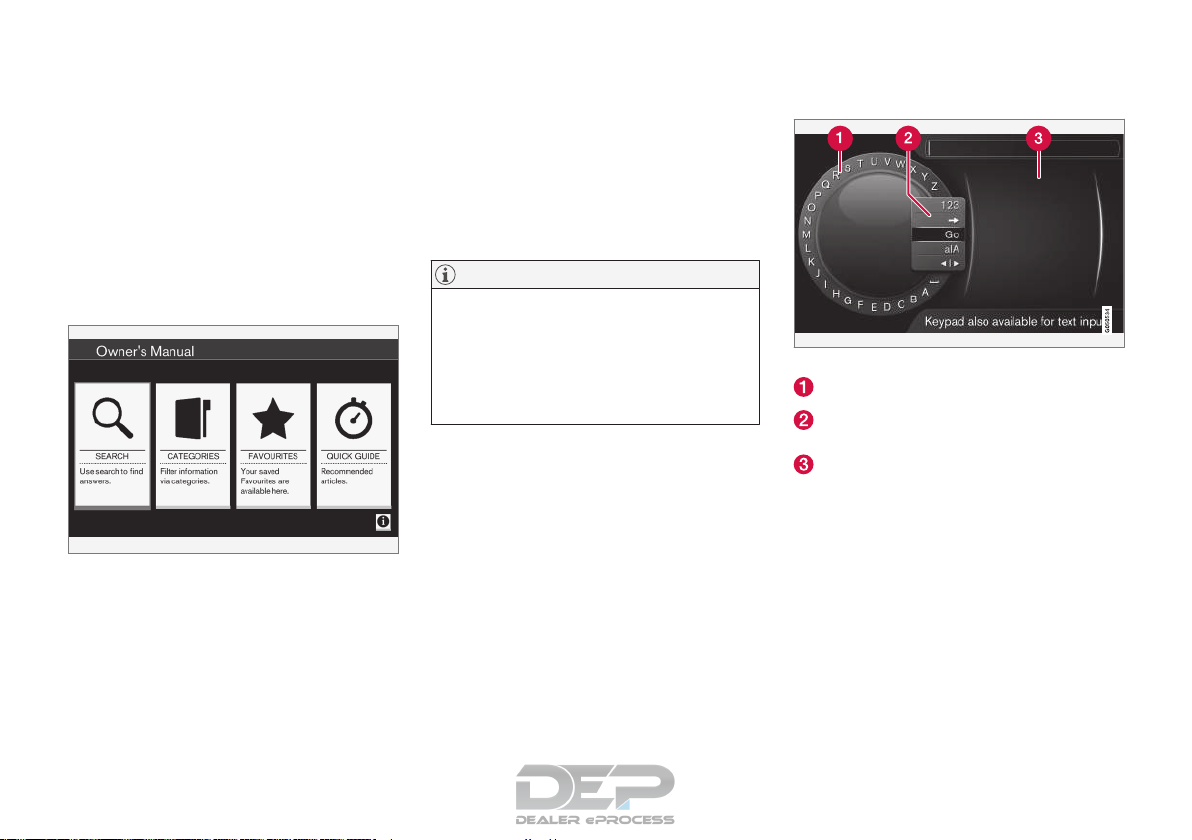
The on-board owner’s manual start page
There are four ways of finding information articles
in the on-board owner’s manual:
•
Searching: search for an article.
•
Categories: All of the articles are sorted by
category.
•
Favorites: Quick access to frequently read
articles.
•
Quick Guide: A selection of articles cover-
ing commonly used functions.
Select the symbol in the lower right-hand corner
for additional information about the on-board
owner’s manual.
NOTE
•
The on-board owner’s manual cannot be
accessed while the vehicle is moving.
•
Specifications regarding your vehicle are
not found in the on-board information.
This information is listed in the printed
owner’s manual.
Searching for information
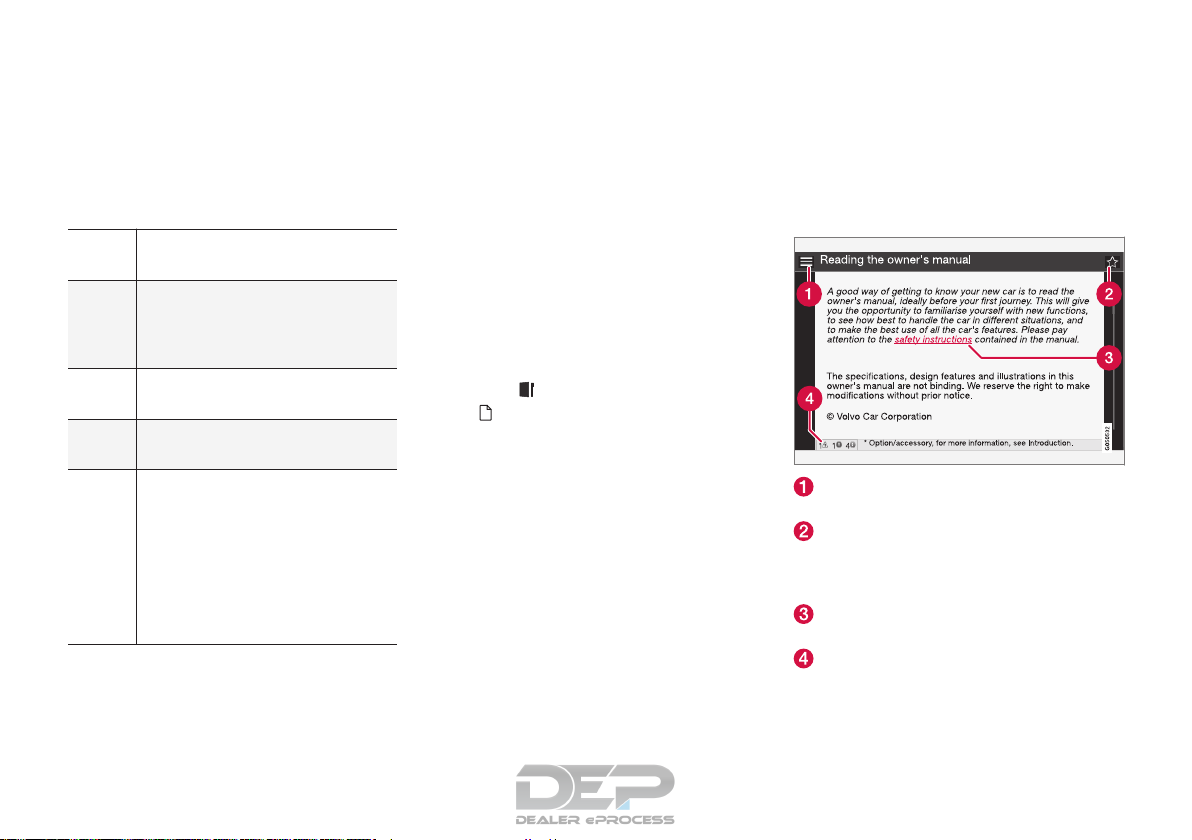
Searching using the text wheel
List of characters
Switching between character entry modes
(see the following table)
Surf history
Use the text wheel to enter a web address.
1.
Turn TUNE to the desired letter and press
OK/MENU to confirm. The number/letter
keys on the center console can also be used.
2. Continue to the next letter, etc. The results of
the search will be displayed in the phone
book.
INTRODUCTION
}}
13
3.
To switch from letter entry mode to the entry
mode for numbers or special characters, or
to go view surf history, turn TUNE to one of
the selections (see the explanation in the following table) in the list for switching character entry mode (2) and press OK/MENU.
123/A
BC
Toggle between letters and numbers by pressing OK/MENU.
=>
This leads to surf history. Turn
TUNE to select a web address and
press OK/MENU to go to the website.
Go
Go to the website by pressing OK/
MENU.
a|A
Toggle between upper and lower
case letters by pressing OK/MENU.
| | }
Switch from the text wheel to the
Address: field. Use TUNE to move
the cursor and erase characters by
pressing EXIT. Press OK/MENU to
return to the text wheel.
The number/letter keys on the center console can also be used to edit
the Address: field.
Press EXIT briefly to erase a single character.
Press and hold EXIT to erase all characters.
Pressing a number key on the center console
while the text wheel is displayed (see the previous illustration) will display a list of characters.
Press the desired key repeatedly to enter the
desired letter and continue to the next letter, etc.
To enter a number, press and hold the button.
Categories
The articles in the on-board owner’s manual are
divided into main categories and sub-categories.
The same article may be listed in several applicable categories to help make searches easier.
Turn TUNE to navigate in the category structure
and press OK/MENU to open a category (indi-
cated by the symbol) or an article (indicated
by the symbol). Press EXIT to return to the
previous view.
Favorites
Articles that have been marked as favorites can
be found here. For information about marking an
article as a favorite, see «Navigating in an article»
below.
Turn TUNE to navigate in the list of favorites and
press OK/MENU to open an article. Press EXIT
to return to the previous view.
Quick Guide
This is a selection of articles that will help you
become familiar with some of the vehicle’s most
common functions. These articles can also be
found in their respective categories but are listed
here for quick access.
Turn TUNE to navigate in the Quick Guide and
press OK/MENU to open an article. Press EXIT
to return to the previous view.
Navigating in an article
Home: Returns you to the owner’s manual
start page.
Favorites: Add/remove an article from the
list of favorites. This can also be done by
pressing the FAV button on the center console keypad.
Highlighted link: takes you to the linked
article.
Important information: if the article contains warnings, cautions or notes, symbols for
these types of information and the number of
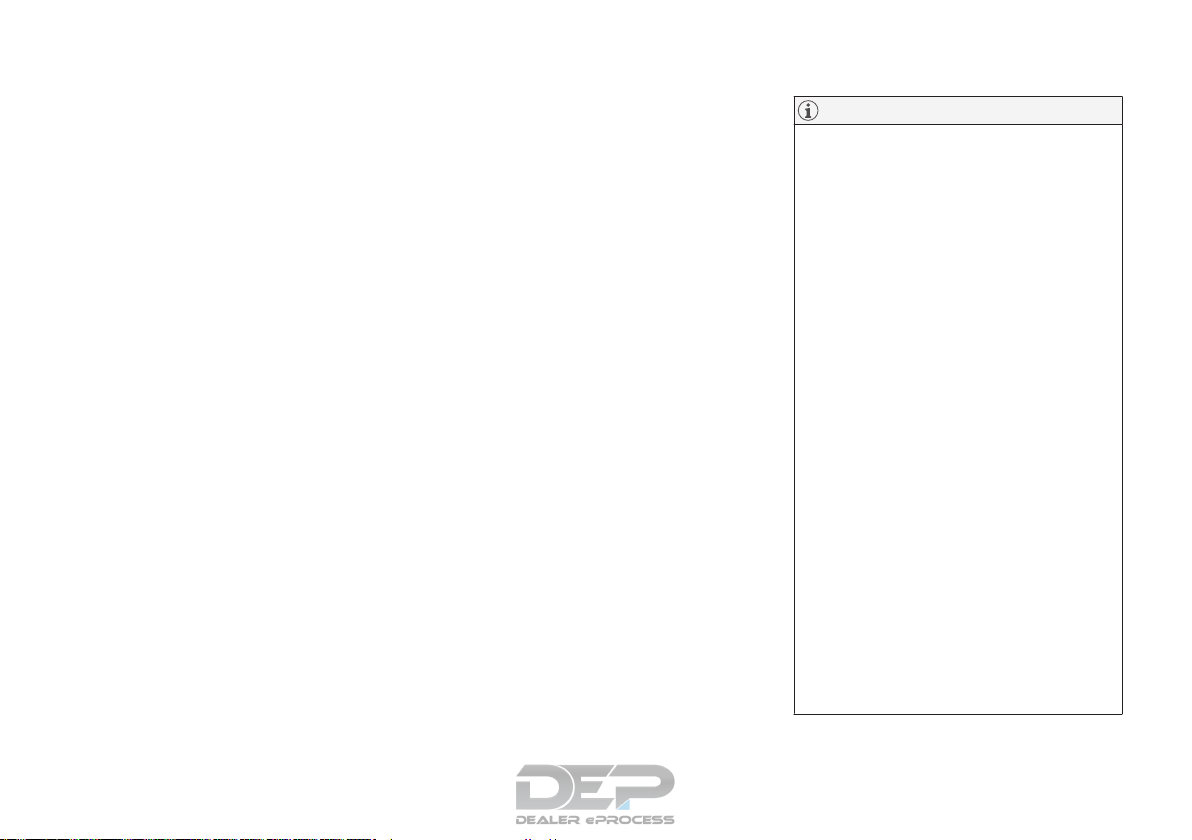
||
INTRODUCTION
14
such texts in the article will be displayed
here.
Turn TUNE to navigate among the links or scroll
in an article. When you have scrolled to the
beginning/end of an article, you can return to the
start page or a favorite by scrolling one additional
step up/down. Press OK/MENU to activate a
selection or highlighted link. Press EXIT to return
to the previous view.
Related information
•
Information on the Internet (p. 21)
Owner’s information
Your vehicle is equipped with a screen on which
you can display information about your vehicle’s
features and functions. The printed owner’s
manual supplements the on-board information
and contains important texts, the latest updates
and instructions that can be useful in situations
when it is not practical to read the information on
the screen.
Changing the language used for the on-board
information could mean that some of the information displayed may not comply with national
or local statutes and regulations.
NOTE
•
Do not export your Volvo to another
country before investigating that country’s applicable safety and exhaust emission requirements. In some cases it may
be difficult or impossible to comply with
these requirements. Modifications to the
emission control system(s) may render
your Volvo not certifiable for legal operation in the U.S., Canada and other countries.
•
All information, illustrations and specifications contained in this manual are based
on the latest product information available at the time of publication. Please note
that some vehicles may be equipped differently, depending on market-specific
adaptations or special legal requirements.
Optional equipment described in this
manual may not be available in all markets.
•
Some of the illustrations shown are
generic and are intended as examples
only, and may not depict the exact model
for which this owner’s information is
intended.
•
Volvo reserves the right to make model
and product changes at any time, or to
change specifications or design without
notice and without incurring obligation.
INTRODUCTION
}}
15
WARNING
The driver is always responsible for operating
the vehicle in a safe manner and for complying with current statutes and regulations.
It is also essential to maintain and service the
vehicle according to Volvo’s recommendations
as stated in the owner’s information and the
service and warranty booklet.
If the on-board information differs from the
printed owner’s manual, the printed information always takes precedence.
Contacting Volvo
In the USA:
Volvo Cars of North America, LLC
Customer Care Center
1 Volvo Drive,
P.O. Box 914
Rockleigh, New Jersey 07647
1-800-458-1552
www.volvocars.com/us
In Canada:
Volvo Cars of Canada
National Customer Service
9130 Leslie Street, Suite 101
Richmond Hill, Ontario L4B 0B9
1-800-663-8255
www.volvocars.com/ca
Related information
•
About this manual (p. 15)
•
Important warnings (p. 24)
•
Crash event data (p. 19)
•
Volvo Structural Parts Statement (p. 20)
About this manual
Reading your owner’s manual is a good way to
familiarize yourself with the features and systems
in your vehicle.
•
Before you operate your vehicle for the first
time, we recommend that you look through
the information found in the chapters «Your
Driving Environment» and «During Your Trip.»
•
Information contained in the balance of the
manual is extremely useful and should be
read after operating the vehicle for the first
time.
•
The manual is structured so that it can be
used for reference. For this reason, it should
be kept in the vehicle for ready access.
On-board owner’s manual
When the printed manual refers to the on-board
owner’s manual, this pertains to the information
displayed on the center console screen.
The language used on the center console screen
and instrument panel can be changed in the MY
CAR system settings menu.
NOTE
Please be aware that changing languages to
one that you do not understand may make it
difficult to change back to the original language.
||
INTRODUCTION
16
There are four ways of finding information articles
in the on-board owner’s manual:
•
Searching: search for an article.
•
Categories: All of the articles are sorted by
category.
•
Favorites: Quick access to frequently read
articles.
•
Quick Guide: A selection of articles cover-
ing commonly used functions.
Select the symbol in the lower right-hand corner
for additional information about the on-board
owner’s manual.
NOTE
•
The on-board owner’s manual cannot be
accessed while the vehicle is moving.
•
Specifications regarding your vehicle are
not found in the on-board information.
This information is listed in the printed
owner’s manual.
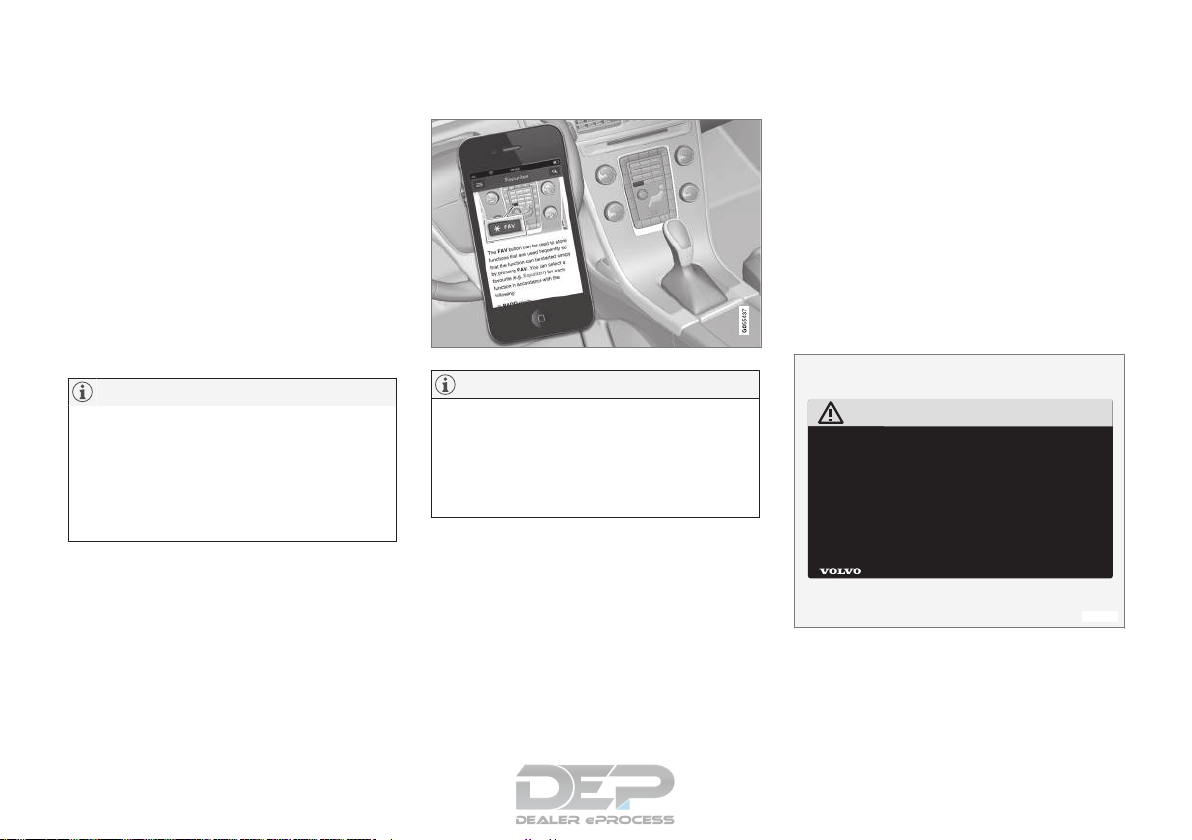
The owner’s manual in mobile devices
NOTE
The owner’s manual mobile app can be downloaded at www.volvocars.com.
The mobile app also contains videos and
searchable content, and provides easy navigation between the various articles.
Footnotes
Certain pages of this manual contain information
in the form of footnotes at the bottom of the
page. This information supplements the text that
the footnote number refers to (a letter is used if
the footnote refers to text in a table).
Display texts
There are several displays in the driver’s field of
vision that show messages generated by various
systems and functions in the vehicle. These texts
are indicated in the Owner’s Manual by being in
slightly larger type than the surrounding text and
are printed in gray, (for example:
Change doors
unlock setting).
Decals
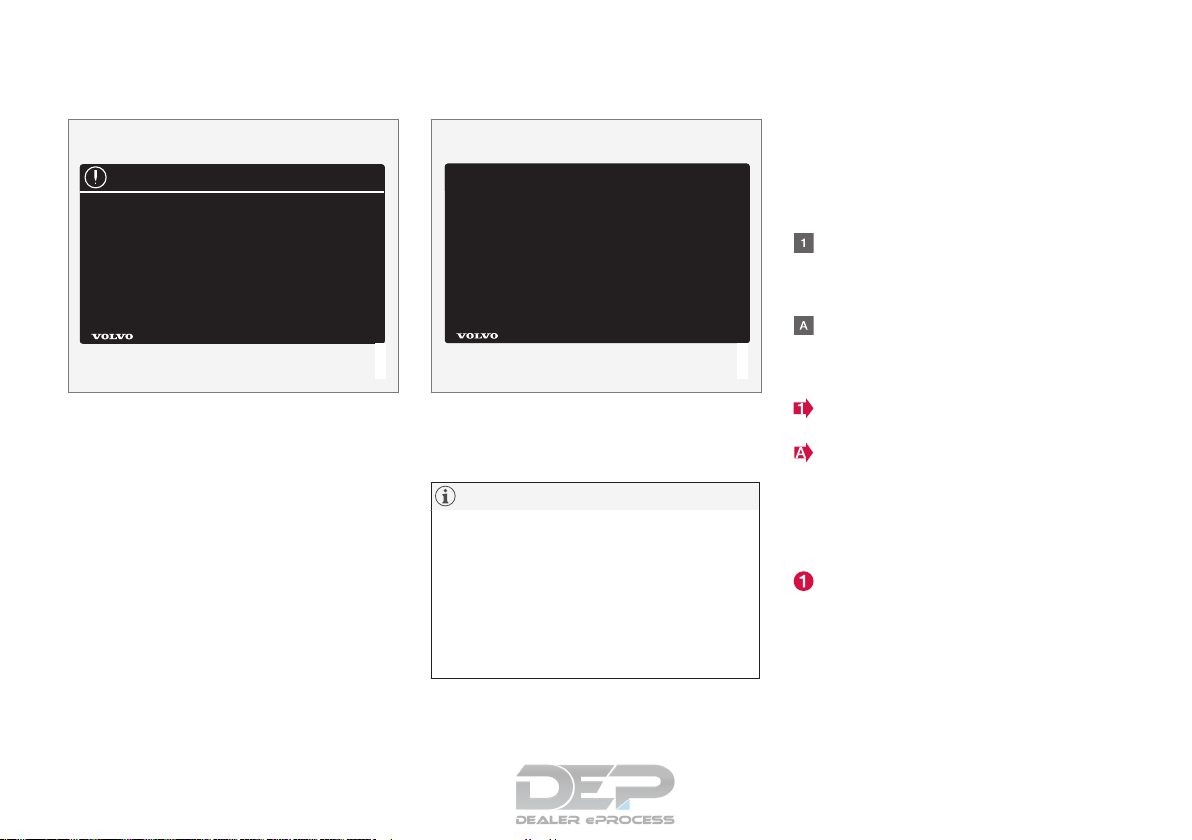
There are various types of decals in the vehicle
whose purpose is to provide important information in a clear and concise way. The importance
of these decals is explained as follows, in
descending order of importance.
Risk of injury
Black ISO symbols on a yellow warning background, white text/image on a black background.
Decals of this type are used to indicate potential
danger. Ignoring a warning of this type could
result in serious injury or death.
INTRODUCTION
}}
17
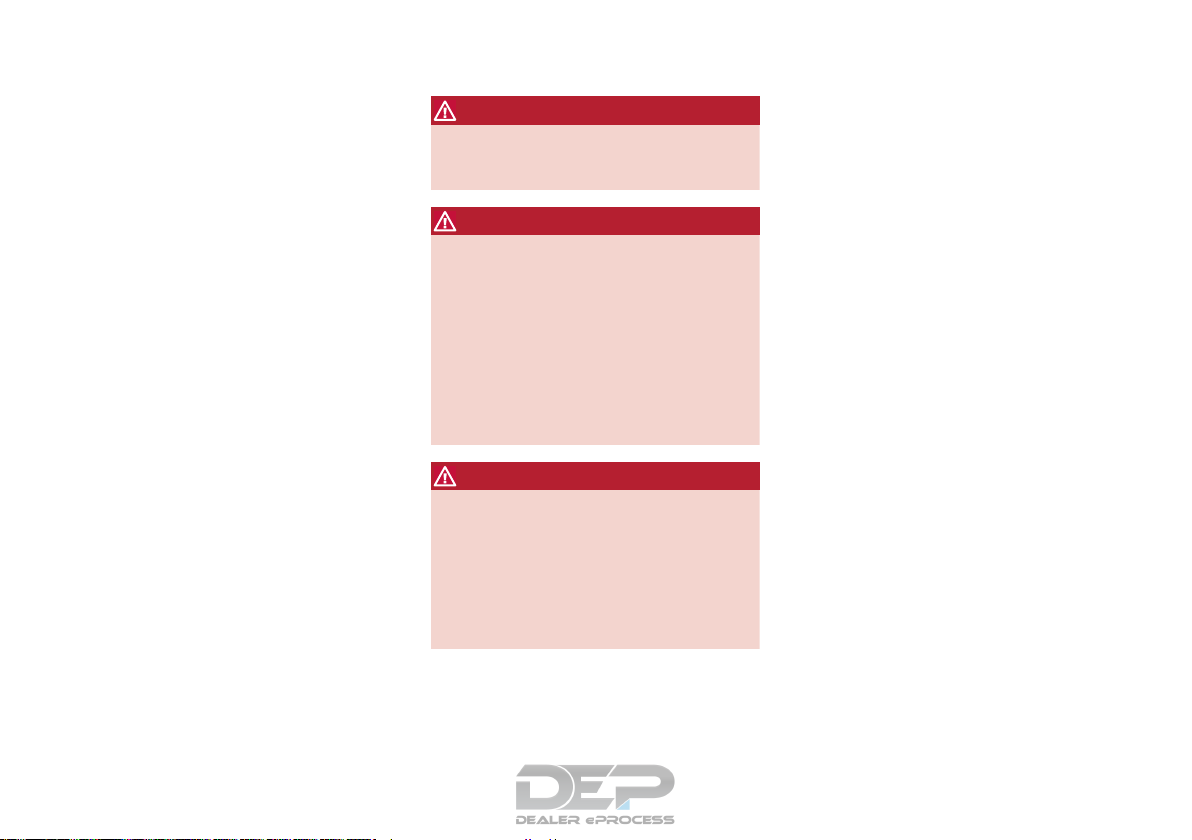
Risk of damage to the vehicle
White ISO symbols and white text/image on a
black or blue warning background and space for
a message. If the information on decals of this
type is ignored, damage to the vehicle could
result.
Information
White ISO symbols and white text/image on a
black background. These decals provide general
information.
NOTE
The decals shown in the Owner’s Manual are
examples only and are not intended to be
reproductions of the decals actually used in
the vehicle. The purpose is to give an indication of how they look and their approximate
location in the vehicle. The applicable information for your particular vehicle can be
found on the respective decals in the vehicle.
Types of lists used in the owner’s
information
Procedures
Procedures (step-by-step instructions), or actions
that must be carried out in a certain order, are
arranged in numbered lists in this manual.
If there is a series of illustrations associated
with step-by-step instructions, each step in
the procedure is numbered in the same way
as the corresponding illustration.
Lists in which letters are used can be found
with series of illustrations in cases where the
order in which the instructions are carried out
is not important.
Arrows with or without numbers are used to
indicate the direction of a movement.
Arrows containing letters are used to indicate movement.
If there are no illustrations associated with a
step-by-step list, the steps in the procedure are
indicated by ordinary numbers.
Position lists
Red circles containing a number are used in
general overview illustrations in which certain
components are pointed out. The corresponding number is also used in the position
list’s description of the various components.
||
INTRODUCTION
18
Bullet lists
Bullets are used to differentiate a number of
components/functions/points of information that
can be listed in random order.
For example:
•
Coolant
•
Engine oil
Continues on next page
} }This symbol can be found at the lower right
corner to indicate that the current topic continues
on the following page.
Continuation from previous page
|| This symbol can be found at the upper left
corner to indicate that the current topic is a continuation from the previous page.
Options and accessories
Optional or accessory equipment described in
this manual is indicated by an asterisk.
Optional or accessory equipment may not be
available in all countries or markets. Please note
that some vehicles may be equipped differently,
depending on special legal requirements.
Contact your Volvo retailer for additional information.
WARNING
If your vehicle is involved in an accident,
unseen damage may affect its drivability and
safety.
WARNING
CALIFORNIA proposition 65
Engine exhaust, some of its constituents, and
certain vehicle components contain or emit
chemicals known to the state of California to
cause cancer, and birth defects or other
reproductive harm. In addition, certain fluids
contained in vehicles and certain products of
component wear contain or emit chemicals
known to the State of California to cause cancer, and birth defects or other reproductive
harm.
WARNING
Certain components of this vehicle such as air
bag modules, seat belt pretensioners, adaptive steering columns, and button cell batteries may contain Perchlorate material. Special
handling may apply for service or vehicle end
of life disposal.
See www.dtsc.ca.gov/hazardouswaste/
perchlorate.
Shiftlock
When your vehicle is parked, the gear selector is
locked in the P (Park) position. To release the
selector from this position, the ignition must be in
mode II (p. 80) or the engine must be running.
Depress the brake pedal, press the button on the
front side of the gear selector and move the
selector from P (Park).
Anti-lock Brake System (ABS)
The ABS system performs a brief self-diagnostic
test when the engine has been started and driver
releases the brake pedal. Another automatic test
may be performed when the vehicle first reaches
a speed of approximately 6 mph (10 km/h). The
brake pedal will pulsate several times and a
sound may be audible from the ABS control
module. This is normal.
Fuel filler door
Press the button on the light switch panel (see
the illustration in Refueling – opening/closing
fuel filler door (p. 276)) when the vehicle is at a
standstill to unlock the fuel filler door. It will
relock when closed and there will be an audible
click.
Points to keep in mind
•
Do not export your Volvo to another country
before investigating that country’s applicable
safety and exhaust emission requirements. In
some cases it may be difficult or impossible
to comply with these requirements. Modifications to the emission control system(s) may
render your Volvo not certifiable for legal

INTRODUCTION
}}
19
operation in the U.S., Canada and other
countries.
•
All information, illustrations and specifications contained in this manual are based on
the latest product information available at the
time of publication. Please note that some
vehicles may be equipped differently,
depending on special legal requirements.
Optional equipment described in this manual
may not be available in all markets.
•
Some of the illustrations shown are generic
and may not depict the exact model for
which this manual is intended.
•
Volvo reserves the right to make model
changes at any time, or to change specifications or design without notice and without
incurring obligation.
Related information
•
Information on the Internet (p. 21)
•
Volvo and the environment (p. 23)
•
Important warnings (p. 24)
Change of ownership
When the vehicle changes owners, all personal
settings should be reset to the factory defaults.
To reset, press the MY CAR button in the center
console followed by OK/MENU and select
Settings
Reset to factory settings.
User data e.g., for apps, the web browser and for
personal settings in menus such as the climate
system and vehicle settings should be reset to
factory defaults.
For vehicles equipped with the optional Volvo On
Call with Sensus Connect (VOC), personal settings stored in the vehicle should be deleted, see
Changing ownership of a vehicle with Volvo On
Call.
Related information
•
Volvo ID (p. 22)
Crash event data
This vehicle is equipped with an event data
recorder (EDR). The main purpose of an EDR is
to record, in certain crash or near crash-like situations, such as an air bag deployment or hitting
a road obstacle, data that will assist in understanding how a vehicle’s systems performed.
The EDR is designed to record data related to
vehicle dynamics and safety systems for a short
period of time, typically 30 seconds or less. The
EDR in this vehicle is designed to record such
data as:
•
How various systems in your vehicle were
operating;
•
Whether or not the driver and passenger
safety belts were buckled/fastened;
•
How far (if at all) the driver was depressing
the accelerator and/or brake pedal; and,
•
How fast the vehicle was traveling.
These data can help provide a better understanding of the circumstances in which crashes and
injuries occur.
EDR data are recorded by your vehicle only if a
non-trivial crash situation occurs; no data are
recorded by the EDR under normal driving conditions and the EDR never registers who is driving
the vehicle or the location of a crash or a near
crash-like situation. However, other parties, such
as law enforcement, could combine the EDR data
with the type of personally identifying data rou-

||
INTRODUCTION
20
tinely acquired during a crash investigation. To
read data recorded by an EDR, special equipment
is required, and access to the vehicle or the EDR
is needed.
Furthermore, your vehicle is equipped with a
number of computers whose task is to continuously control and monitor the vehicle’s operation.
They can also register some of this information
during normal driving conditions, most importantly
if they detect a fault relating to the vehicle’s operation and functionality or upon activation of the
vehicle’s active safety systems (e.g. City Safety
and the auto-brake function). Some of the registered information is required by technicians when
carrying out service and maintenance to enable
them to diagnose and rectify any faults that have
occurred in the vehicle and to enable Volvo to fulfill legal and other regulatory requirements. Information thus registered in the vehicle is registered
in the vehicle’s computers until the vehicle is
serviced or repaired. In addition to the above, the
registered information may – on an aggregated
basis – be used for research and product development purposes in order to continuously
improve the safety and quality of Volvo vehicles.
For additional information, contact:
In the United States
Volvo Cars of North America, LLC
Customer Care Center
1 Volvo Drive, P.O. box 914
Rockleigh, New Jersey 07647
1-800-458-1552
www.volvocars.com/us
In Canada
Volvo Cars of Canada
National Customer Service
9130 Leslie Street
Richmond Hill, Ontario L4B 0B9
1-800-663-8255
www.volvocars.com/ca
Related information
•
Information on the Internet (p. 21)
•
Contacting Volvo (p. 15)
Volvo Structural Parts Statement
Volvo has always been and continues to be a
leader in automotive safety.
Volvo engineers and manufactures vehicles
designed to help protect vehicle occupants in the
event of a collision.
Volvos are designed to absorb the impact of a
collision. This energy absorption system including,
but not limited to, structural components such as
bumper reinforcement bars, bumper energy
absorbers, frames, rails, fender aprons, A-pillars,
B-pillars and body panels must work together to
maintain cabin integrity and protect the vehicle
occupants.
The supplemental restraint system including but
not limited to air bags, side curtain air bags, and
deployment sensors work together with the
above components to provide proper timing for
air bag deployment.
Due to the above, Volvo Cars of North America
does not support the use of aftermarket, alternative or anything other than original Volvo parts for
collision repair.
In addition Volvo does not support the use or reuse of structural components from an existing
vehicle that has been previously damaged.
Although these parts may appear equivalent, it is
difficult to tell if the parts have been previously
replaced with non-OE parts or if the part has
been damaged as a result of a prior collision. The
INTRODUCTION
* Option/accessory, for more information, see Introduction.
21
quality of these used parts may also have been
affected due to environmental exposure.
Related information
•
Important warnings (p. 24)
•
Information on the Internet (p. 21)
•
Contacting Volvo (p. 15)
Information on the Internet
Additional information regarding your vehicle can
be found at
www.volvocars.com.
Support on the Internet
Go to support.volvocars.com or use the QR code
below to visit the site, which is available in most
markets.
QR code to the support site
The information on the support site is searchable
and is grouped into different categories. It
includes support for e.g., Internet-based services
and functions, Volvo On Call (VOC), the navigation system* and apps. Video and step-by-step
instructions explain various procedures such as
how to connect the vehicle to the Internet via a
cell phone.
Downloadable information
Maps
Sensus Navigation system* maps can be downloaded from the support site.
Mobile apps
For certain model year 2014 and 2015 Volvos,
the owner’s manual is available in the form of an
app. The VOC* app can also be found here.
Owner’s manuals for earlier model Volvos
Owner’s manuals for earlier model Volvos are
available in PDF format. Quick Guides and supplements can also be found on the support site.
Select a model and a model year and download
the desired information.
Contact
Contact information for customer support and the
nearest Volvo retailer are available on the site.
Related information
•
About this manual (p. 15)
•
Contacting Volvo (p. 15)

INTRODUCTION
* Option/accessory, for more information, see Introduction.
22
Volvo ID
This is your personal ID that can be used to
access a number of services
1
Creating a Volvo ID
To create a Volvo ID, provide your personal email
address and then follow the instructions provided
in the email that you will receive from Volvo. This
can be done from:
•
From an Internet-connected vehicle: Enter
your email address in the app that requires a
Volvo ID and follow the instructions provides
or press the Internet connect ( ) button on
the center console and select Apps,
Settings and follow the instructions provi-
ded.
•
Volvo On Call (VOC*): download the latest
version of the VOC app and create a Volvo ID
on the start page.
Open Source Software Notice
The systems in your Volvo contain certain free/
open source and other software.
This product uses certain free / open source and
other software originating from third parties, that
is subject to the GNU General Public License
version 2 and 3 (GPLv2/GPLv3), GNU Lesser
General Public License version 3 (LGPLv3), The
FreeType Project License (“FreeType License”)
and other different and/or additional copyright
licenses, disclaimers and notices. The links how
to access the exact terms of GPLv2, GPLv3,
LGPLv3, and the other open source software
licenses, disclaimers, acknowledgements and
notices are provided to you below. Please refer to
the exact terms of the relevant License, regarding
your rights under said licenses. Volvo Car
Corporation (VCC) offers to provide the source
code of said free/open source software to you
for a charge covering the cost of performing such
distribution, such as the cost of media, shipping
and handling, upon written request. Please
contact your nearest Volvo retailer.
This offer is valid for a period of at least three (3)
years from the date of the distribution of this
product by VCC / or for as long as VCC offers
spare parts or customer support.
Portions of this product uses software
copyrighted © v2.4.3/2010 The FreeTypeProject
(www.freetype.org). All rights reserved.
This product includes software under
following licenses:
GPL v2 : http://www.gnu.org/licenses/oldlicenses/gpl-2.0.html
•
Linux kernel (merge between MontaVista
2.6.31 kernel and kernel from
L2.6.31_MX51_ER_1007 BSP)
•
uBoot (based on v2009.08)
•
busybox (based on version 1.13.2.)
GCC runtime library exception: http://
www.gnu.org/licenses/gcc-exception.html
•
libgcc_s.so.1
LGPL v3: http://www.gnu.org/licenses/lgpl.html
•
Libc.so.6, libpthread.so.0, Librt.so.1
The FreeType Project License: http://
www.freetype.org/FTL.TXT
•
libfreetype.so.6 (version 2.4.3)
Related information
•
About this manual (p. 15)
1
These services vary and may be subject to change. Consult your Volvo retailer.

INTRODUCTION
23
Volvo and the environment
Volvo is committed to the well being of its customers. As a natural part of this commitment, we
care about the environment in which we all live.
Concern for the environment means an everyday
involvement in reducing our environmental
impact.
Volvo’s environmental activities are based on a
holistic view, which means we consider the overall environmental impact of a product throughout
its complete life cycle. In this context, design, production, product use, and recycling are all important considerations. In production, Volvo has
partly or completely phased out several chemicals
including CFCs, lead chromates, asbestos, and
cadmium; and reduced the number of chemicals
used in our plants 50% since 1991.
Volvo was the first in the world to introduce into
production a three-way catalytic converter with a
Lambda sond, now called the heated oxygen sensor, in 1976. The current version of this highly
efficient system reduces emissions of harmful
substances (CO, HC, NOx) from the exhaust pipe
by approximately 95 – 99% and the search to
eliminate the remaining emissions continues.
Volvo is the only automobile manufacturer to
offer CFC-free retrofit kits for the air conditioning
system of all models as far back as the 1975
model 240. Advanced electronic engine controls
and cleaner fuels are bringing us closer to our
goal. In addition to continuous environmental
refinement of conventional gasoline-powered
internal combustion engines, Volvo is actively
looking at advanced technology alternative-fuel
vehicles.
When you drive a Volvo, you become our partner
in the work to lessen the car’s impact on the
environment. To reduce your vehicle’s environmental impact, you can:
•
Maintain proper air pressure in your tires.
Tests have shown decreased fuel economy
with improperly inflated tires.
•
Follow the recommended maintenance
schedule in your Warranty and Service
Records Information booklet.
•
Drive at a constant speed whenever possible.
•
See a trained and qualified Volvo service
technician as soon as possible for inspection
if the check engine (malfunction indicator)
light illuminates, or stays on after the vehicle
has started.
•
Properly dispose of any vehicle-related waste
such as used motor oil, used batteries, brake
pads, etc.
•
When cleaning your vehicle, please use genuine Volvo car care products. All Volvo car
care products are formulated to be environmentally friendly.
FSC
®
The FSC® (Forest Stewardship Council®) symbol
indicates that the wood pulp used in this publication comes from FSC® certified forests and other
responsible sources.
Related information
•
Economical driving (p. 278)
•
Tires – tire economy (p. 290)
INTRODUCTION
24
Important warnings
Please keep the following warnings in mind
when operating/servicing your vehicle.
Driver distraction
A driver has a responsibility to do everything possible to ensure his or her own safety and the
safety of passengers in the vehicle and others
sharing the roadway. Avoiding distractions is part
of that responsibility.
Driver distraction results from driver activities that
are not directly related to controlling the vehicle
in the driving environment. Your new Volvo is, or
can be, equipped with many feature-rich entertainment and communication systems. These
include hands-free cellular telephones, navigation
systems, and multipurpose audio systems. You
may also own other portable electronic devices
for your own convenience. When used properly
and safely, they enrich the driving experience.
Improperly used, any of these could cause a distraction.
For all of these systems, we want to provide the
following warning that reflects the strong Volvo
concern for your safety. Never use these devices
or any feature of your vehicle in a way that distracts you from the task of driving safely. Distraction can lead to a serious accident. In addition to
this general warning, we offer the following guidance regarding specific newer features that may
be found in your vehicle:
WARNING
•
Never use a hand-held cellular telephone
while driving. Some jurisdictions prohibit
cellular telephone use by a driver while
the vehicle is moving.
•
If your vehicle is equipped with a navigation system, set and make changes to
your travel itinerary only with the vehicle
parked.
•
Never program your audio system while
the vehicle is moving. Program radio presets with the vehicle parked, and use your
programmed presets to make radio use
quicker and simpler.
•
Never use portable computers or personal digital assistants while the vehicle
is moving.
Accessory installation
•
We strongly recommend that Volvo owners
install only genuine, Volvo-approved accessories, and that accessory installations be
performed only by a trained and qualified
Volvo service technician.
•
Genuine Volvo accessories are tested to
ensure compatibility with the performance,
safety, and emission systems in your vehicle.
Additionally, a trained and qualified Volvo
service technician knows where accessories
may and may not be safely installed in your
Volvo. In all cases, please consult a trained
and qualified Volvo service technician before
installing any accessory in or on your vehicle.
•
Accessories that have not been approved by
Volvo may or may not be specifically tested
for compatibility with your vehicle. Additionally, an inexperienced installer may not be
familiar with some of your car’s systems.
•
Any of your car’s performance and safety
systems could be adversely affected if you
install accessories that Volvo has not tested,
or if you allow accessories to be installed by
someone unfamiliar with your vehicle.
•
Damage caused by unapproved or improperly
installed accessories may not be covered by
your new vehicle warranty. See your Warranty
and Service Records Information booklet for
more warranty information. Volvo assumes no
responsibility for death, injury, or expenses
that may result from the installation of nongenuine accessories.
Related information
•
About this manual (p. 15)
•
Volvo Structural Parts Statement (p. 20)

INTRODUCTION
25
Volvo On Call Roadside Assistance
Your new Volvo comes with a four year ON
CALL roadside assistance.
Additional information, features, and benefits of
this program are described in a separate information package in your glove compartment.
If you require assistance, dial:
In the U.S. 1-800-638-6586 (1-800-63-
VOLVO)
In Canada 1-800-263-0475
NOTE
Some vehicles may be equipped with
Volvo On Call with Sensus Connect, which
will allow access to the call center and additional features directly from the vehicle. This
is in addition to the Volvo On Call Roadside
Assistance program mentioned above.
Volvo On Call with Sensus Connect will be
a customer pay subscription offer after an initial complimentary trial period.
Related information
•
Information on the Internet (p. 21)
Technician certification
In addition to Volvo factory training, Volvo supports certification by the National Institute for
Automotive Service Excellence (A.S.E.).
Certified technicians have demonstrated a high
degree of competence in specific areas. Besides
passing exams, each technician must also have
worked in the field for two or more years before a
certificate is issued. These professional technicians are best able to analyze vehicle problems
and perform the necessary maintenance procedures to keep your Volvo at peak operating condition.



SAFETY
28
Occupant safety
Safety is Volvo’s cornerstone.
Volvo’s concern for safety
Our concern for safety dates back to 1927 when
the first Volvo rolled off the production line.
Three-point seat belts (a Volvo invention), safety
cages, and energy-absorbing impact zones were
designed into Volvo vehicles long before it was
fashionable or required by government regulation.
We will not compromise our commitment to
safety. We continue to seek out new safety features and to refine those already in our vehicles.
You can help. We would appreciate hearing your
suggestions about improving automobile safety.
We also want to know if you ever have a safety
concern with your vehicle. Call us in the U.S. at:
1-800-458-1552 or in Canada at:
1-800-663-8255.
Occupant safety reminders
How safely you drive doesn’t depend on how old
you are but rather on:
•
How well you see.
•
Your ability to concentrate.
•
How quickly you make decisions under
stress to avoid an accident.
The following suggestions are intended to help
you cope with the ever changing traffic environment.
•
Never drink and drive.
•
If you are taking any medication, consult your
physician about its potential effects on your
driving abilities.
•
Take a driver-retraining course.
•
Have your eyes checked regularly.
•
Keep your windshield and headlights clean.
•
Replace wiper blades when they start to
leave streaks.
•
Take into account the traffic, road, and
weather conditions, particularly with regard to
stopping distance.
•
Never send text messages while driving.
•
Refrain from using or minimize the use of a
cell phone while driving.
Related information
•
Recall information (p. 28)
•
Reporting safety defects (p. 29)
Recall information
Information regarding recalls or other service
campaigns is available on our website at
www.volvocars.com/us/.
On our website, select the tab YOUR VOLVO and
the heading RECALL INFORMATION will be displayed at the lower left side of the screen. Enter
your Vehicle Identification Number for your vehicle (found at the base of the windshield). If your
vehicle has any open Recalls, they will be displayed on this page.
Volvo customers in Canada
For any questions regarding open recalls for your
vehicle, please contact your authorized Volvo
retailer. If your retailer is unable to answer your
questions, please contact Volvo Customer Relations at 905 695-9626, Monday through Friday,
8:30 A.M. to 5:00 P.M. EST or by e-mail at
vclcust@volvocars.com. You may also write us at:
Volvo Cars of Canada
National Customer Service
9130 Leslie Street, Suite 101
Richmond Hill, Ontario L4B 0B9
Related information
•
Occupant safety (p. 28)
•
Reporting safety defects (p. 29)
Loading…
Volvo XC60 (2017)
XC60
ОВОВО Я ВАЬЦА
View the manual for the Volvo XC60 (2017) here, for free. This manual comes under the category cars and has been rated by 6 people with an average of a 7.6.
This manual is available in the following languages: English. Do you have a question about the Volvo XC60 (2017) or do you need help?
Ask your question here
Product Images (2)


Volvo XC60 (2017) specifications
Below you will find the product specifications and the manual specifications of the Volvo XC60 (2017).
The Volvo XC60 (2017) is a compact luxury SUV that offers a stylish and sophisticated design. It features a sleek and modern exterior, with clean lines and a distinctive front grille. The XC60 offers a comfortable and spacious interior, with high-quality materials and excellent craftsmanship.
Under the hood, the XC60 comes with a range of powertrain options, including both gasoline and diesel engines. These engines provide a good balance of performance and fuel efficiency. The XC60 also offers all-wheel drive for enhanced traction and stability on various road conditions.
In terms of safety, the XC60 is equipped with a comprehensive suite of advanced features. This includes a sophisticated collision avoidance system, lane keeping assist, adaptive cruise control, and blind-spot monitoring. These safety features work together to help prevent accidents and protect occupants.
The XC60 also offers a range of technology features, including a user-friendly infotainment system with a large touchscreen display. This system provides access to various entertainment and navigation functions, making it easy for drivers to stay connected while on the road.
Overall, the Volvo XC60 (2017) is a reliable and well-built SUV that offers a blend of luxury, performance, and safety. It is a comfortable and spacious vehicle that is suitable for both daily commutes and long journeys.
General
| Brand | Volvo |
| Model | XC60 (2017) |
| Product | car |
| Language | English |
| Filetype | User manual (PDF) |
Frequently Asked Questions
Can’t find the answer to your question in the manual? You may find the answer to your question in the FAQs about the Volvo XC60 (2017) below.
What is the recommended tire pressure for the XC60?
The recommended tire pressure for the XC60 can be found on a sticker located on the driver’s side door jamb. It specifies the ideal tire pressure for both the front and rear tires. Make sure to check the tire pressure when the tires are cold and adjust as necessary using a tire pressure gauge and an air compressor.
How do I adjust the side mirrors?
To adjust the side mirrors, locate the control panel on the driver’s side door. Look for the switch with the mirror icon and use it to choose the mirror you want to adjust. Then, use the arrows or dial to position the mirror to your desired angle.
How can I pair my phone with the car’s Bluetooth system?
To pair your phone with the car’s Bluetooth system, go to the infotainment system menu and select «Phone.» Choose the option to add a new device and follow the on-screen instructions to enable Bluetooth pairing on your phone. Once the car detects your phone, select it from the list and enter the appropriate passcode if required.
How do I reset the maintenance reminder on the dashboard?
To reset the maintenance reminder on the dashboard, locate the trip computer control on the steering wheel or dashboard. Press and hold the button until the maintenance reminder disappears. Alternatively, you can navigate through the infotainment system’s menus to find the reset option under vehicle settings.
How do I activate the parking assist feature?
To activate the parking assist feature, first, engage the «P» (park) mode on the gear selector lever. Then, press the parking assist button located on the center console or near the gear shifter. This will activate the system, enabling you to follow the on-screen prompts and use the sensors to help guide you during parking maneuvers.
When does my Volvo need maintenance?
Regular maintenance is necessary for every car. How often the car needs maintenance and what exactly needs to be done can be found in the maintenance instructions.
For major periodic service, this should generally be done every 2 years or after 30,000 kilometres.
One or more doors won’t open from the inside. Now what?
The lock is most likely set to the child safety lock so it cannot be opened from the inside. How to unset the child safety lock differs per brand and type.
My car radio does not turn on, now what?
If your car radio does not turn on, it will not receive any power. Check that the red wire is connected to the contact power supply and the yellow wire to the constant power supply.
How do I convert miles into kilometres?
1 mile equals 1.609344 kilometers and 1 kilometer equals 0.62137119 miles.
Where can I find the VIN number of my Volvo?
The location of the VIN number of the car differs per brand and type of car.
The code may be stamped on the frame of the car or mounted on a plate. It is best to consult the manual of the Volvo XC60 (2017)for the exact location of the VIN number.
When should I change the brake fluid of my Volvo?
It is recommended to change the brake fluid every two years.
What is the difference between E10 and E5 petrol?
E10 petrol consists of up to ten per cent ethanol while E5 petrol will contain less than five per cent ethanol. As a result, the percentage of E10 petrol is lower than that of E5 petrol, making it less bad for the environment.
What is a VIN number?
The VIN number of a car is an identification number unique to each car. The abbreviation VIN therefore stands for Vehicle Identification Number.
Is the manual of the Volvo XC60 (2017) available in English?
Yes, the manual of the Volvo XC60 (2017) is available in English .
Is your question not listed? Ask your question here
В онлайн-магазине Clubvolvo.Ru появилась PDF книга Volvo XC60 II SPA . Руководство по ремонту, инструкция по эксплуатации. Модели с 2017 года выпуска (+обновление 2021), оборудованные бензиновыми и дизельными двигателями B420T6 / B420T2 / B4204T23 / B420T / B4204T27 / B4204T35 / D4204T23 / D4204T14 / электродвигатель

Объем двигателя: 2.0 / 2.0D л.
Мощность: 87 / 190 / 197 / 235 / 249 / 254 / 300 / 320 л. с.
ISBN:978-617-577-329-1
Издательство: Монолит
Тип бумаги: типографская
Язык: русский
Кол-во страниц 492
Цветность: черно-белая
Формат: 210 Х 297
Где я могу найти номер VIN для моего Volvo?
Положение номера VIN различается среди марок автомобилей и моделей. Он может быть отпечатан на кузове автомобиля или указан на табличке. Рекомендуется обратиться к руководству по эксплуатации Volvo XC60 (2017) для точной информации о месте нахождения номера VIN.
Как проверить давление в шинах моего Volvo XC60 (2017)?
Вы можете проверить давление в шинах вашего Volvo XC60 (2017) с помощью манометра для измерения давления в шинах. Рекомендуемое давление в шинах обычно указано на наклейке внутри двери водителя или в руководстве владельца.
Какое масло нужно моему Volvo XC60?
Тип масла, необходимого вашему Volvo XC60, зависит от типа двигателя. Обратитесь к руководству владельца для рекомендуемой вязкости и спецификации масла.
Что такое номер VIN?
Номер VIN, также известный как идентификационный номер автомобиля, служит уникальным идентификатором для каждого автомобиля. Для точного местоположения номера VIN рекомендуется обратиться к руководству по эксплуатации Volvo XC60 (2017).
Где я могу найти информацию о гарантийном покрытии моего Volvo XC60?
Информацию о гарантийном покрытии вашего Volvo XC60 (2017) можно найти в гарантийном буклете, поставляемом с автомобилем. Обычно в нем содержится информация о сроке действия и охвате различных компонентов.
Когда мне следует запланировать техобслуживание для моего Volvo XC60?
Регулярное техническое обслуживание необходимо для оптимальной производительности автомобиля. Подробности о частоте техобслуживания и конкретных задачах можно найти в инструкциях по техническому обслуживанию. Обычно крупное техобслуживание должно производиться каждые два года или после пробега 30 000 километров.
Как сбросить индикатор технического обслуживания на панели приборов моего Volvo XC60?
Чтобы сбросить индикатор технического обслуживания на панели приборов вашего Volvo XC60 (2017), следуйте инструкциям, описанным в руководстве по эксплуатации. Обычно это требует нажатия определенной комбинации кнопок в определенном режиме работы автомобиля.
С каким интервалом мне следует рассмотреть замену тормозной жидкости для моего Volvo XC60?
Рекомендуется заменять тормозную жидкость в вашем Volvo XC60 (2017) каждые два года.
Что делать, если загорается лампа контроля двигателя моего Volvo XC60?
Если загорается лампа контроля двигателя вашего Volvo XC60 (2017), это указывает на потенциальную проблему с автомобилем. Рекомендуется обратиться к квалифицированному механику для диагностики причины проблемы.
Как часто мне следует переключать шины на моем Volvo XC60?
Периодическая перестановка шин помогает обеспечить равномерный износ и продлить срок службы шин. Обычно рекомендуется переключать шины каждые 6 000-8 000 километров или по указаниям в руководстве владельца Volvo XC60 (2017).
Что делать, если разряжается аккумулятор моего Volvo?
Если разряжается аккумулятор вашего Volvo XC60, вы можете запустить автомобиль, используя провода для запуска двигателя и другой автомобиль с заряженным аккумулятором. В противном случае вы можете вызвать помощь на дороге.
Что делать, если одна или несколько дверей отказываются открываться изнутри?
Если у вас возникают проблемы с открыванием дверей изнутри, вероятно, включена детская защелка. Способ отключения детской защелки зависит от марки и модели автомобиля.
Как программировать новый ключ для моего Volvo XC60?
Для программирования нового ключа для вашего Volvo XC60 обычно требуется следовать определенным инструкциям, описанным в руководстве пользователя, или обратиться за помощью в дилерский центр или к слесарю.
Какой рекомендуемый интервал для замены воздушного фильтра в моем Volvo XC60?
Рекомендуемый интервал для замены воздушного фильтра в вашем Volvo XC60 (2017) зависит от условий езды. Обычно рекомендуется проверять воздушный фильтр каждые 12 000-15 000 километров и заменять его при необходимости.
Доступно ли руководство для Volvo XC60 (2017) на русском языке?
Нет, руководство для Volvo XC60 (2017) доступно на английском языке.
- Состояние
- Новое
- Наличие
- в наличии, склад
Книга PDF (ссылка после оплаты в вашем кабинете) — руководство по ремонту и обслуживанию Volvo XC60 SPA с 2017 года + обновление модели 2021г, регулярные проверки, регламент, подробные электросхемы
Черно-белое, 492 стр.
Язык: русский
Volvo XC60 (Вольво ХС60). Руководство по ремонту, инструкция по эксплуатации. Модели с 2017 года выпуска (+обновление 2021), оборудованные бензиновыми и дизельными двигателями
Тип двигателя: B420T6 / B420T2 / B4204T23 / B420T / B4204T27 / B4204T35 / D4204T23 / D4204T14 / электродвигатель
Объем двигателя: 2.0 / 2.0D л.
Мощность: 87 / 190 / 197 / 235 / 249 / 254 / 300 / 320 л. с.
-
kniga-volvo-xc60-2017g-monolit-600×800.jpg
50.8 KB · Просмотры: 243