

GETTING TO KNOW YOUR SOUL
Congratulations on Your New Kia Purchase!
Your new Kia vehicle has been designed, engineered and manufactured to provide you with years of comfortable and dependable
driving. Kia is committed to quality, innovation, safety and — above all — your satisfaction.
Using This Guide
The information contained in this guide is a brief overview that will help you become familiar with the operation and features of your
new Kia vehicle. The flipbook format facilitates information access, while the detailed illustrations help to ensure the instructions are
easy to follow.
This Features & Functions Guide, and the specific operational and safety information it provides, is not a substitute for your Owner’s
Manual. In the interest of your safety and that of your family, and to help you avoid risks that may result in death or serious injury,
Kia reminds you to carefully read your Owner’s Manual in order to fully familiarize yourself with the important information it contains.
While the information contained in this guide is accurate at the time of printing, Kia may change vehicle specifications without
notice in advance or after the fact, and assumes no liability in connection with such changes.
www.kia.com
Consumer — Roadside Assistance
1-800-333-4KIA (4542)
See Back Pages for Vehicle Maintenance Schedule
Always check the Owner’s Manual for co mplete operating information and safet y warnings.

ESSENTIAL FEATURES
Air Conditioning / Climate Control* . . . . . . . . . . . 26
Audio Systems – Standard Audio System* . . . . . . . 21
Audio Systems — UVO eServices System* . . . . . . . . 23
Audio Systems — UVO eSer vices/Premium Navigation System* 24
Aux/USB/iPod® Port & Power Outlets . . . . . . . . . . 25
Bluetooth® Wireless Technology . . . . . . . . . . . . 18
Cruise Control* . . . . . . . . . . . . . . . . . . . . . 17
Digital Clock. . . . . . . . . . . . . . . . . . . . . . . 25
ECO Mode (Active ECO)* . . . . . . . . . . . . . . . . 08
Folding Rear Seatback . . . . . . . . . . . . . . . . . 32
Manual Gear Shift* . . . . . . . . . . . . . . . . . . . 29
Passenger Airbag Off Indicator . . . . . . . . . . . . . 41
Smart Cruise Control (S SC)* . . . . . . . . . . . . . . 20
Tire Mobility Kit . . . . . . . . . . . . . . . . . . . . . 38
Tire Pressure Monitoring System (TPMS) . . . . . . . . 05
Windshield/Rear Wipers & Washers . . . . . . . . . . . 16
Driving while distrac ted can result in a los s of vehicle control t hat may
lead to an accid ent, severe personal injury and death. The driver’s
primary respons ibility is in the sa fe and legal operation of a vehicle,
and use of any handheld devices, ot her equipment o r vehicle systems
which take the driver’s eyes, at tention and focu s away from the safe
operation of a vehi cle or that are not permis sible by law shou ld never
be used during op eration of the vehicle.
SOUL F EATU RES & F UNC TION S GUI DE
VIDEOS & QR CODES . . . . . . . . . . . . . . 02
INSTRUMENT CLUSTER
Instrument Cluster Overview . . . . . . . . . . . . . . . 03
Indicators & Warning Lights . . . . . . . . . . . . . . . 04
Tire Pressure Monitoring System (TPMS) . . . . . . . . . 05
Fuel Economy . . . . . . . . . . . . . . . . . . . . . . 05
LCD Instrument Cluster Modes* . . . . . . . . . . . . . . 06
Trip Modes / Trip Computer* . . . . . . . . . . . . . . . 06
User Settings Mode* . . . . . . . . . . . . . . . . . . . 07
Service Mode*. . . . . . . . . . . . . . . . . . . . . . 07
Drive Mode Integrated Control System* . . . . . . . . . 08
ECO Mode (Active ECO)* . . . . . . . . . . . . . . . . . 08
DRIVER’S PANEL
Lane Departure Warning System (L DWS)* . . . . . . . . 09
Autonomous Emergency Braking (AEB)* /
Forward Collision Warning ( FCW)* . . . . . . . . . . . 09
Blind Spot Detection (BS D) System* . . . . . . . . . . . 10
Electronic Stability Control ( ESC) . . . . . . . . . . . . . 11
Hill-Start A ssist Control ( HAC) . . . . . . . . . . . . . . 11
Instrument Panel Dimmer . . . . . . . . . . . . . . . . 11
Power Windows, Window Lock & Central Door Lock . . . 12
Automatic Door Lock/ Unlock. . . . . . . . . . . . . . . 12
Power Folding Outside Mirrors* . . . . . . . . . . . . . 12
Heated Outside Mirrors* . . . . . . . . . . . . . . . . . 12
Engine Start/Stop Button* . . . . . . . . . . . . . . . . 13
STEERING WHEEL CONTROLS
Tilt/ Telescoping Steering Wheel . . . . . . . . . . . . . 14
Heated Steering Wheel Button* . . . . . . . . . . . . . 14
Headlights & High Beams . . . . . . . . . . . . . . . . 15
Turn Signals & Fog Lights* . . . . . . . . . . . . . . . . 15
Windshield Wipers & Washers . . . . . . . . . . . . . . 16
Rear Wiper & Washer* . . . . . . . . . . . . . . . . . . 16
Audio Controls. . . . . . . . . . . . . . . . . . . . . . 17
Cruise Control* . . . . . . . . . . . . . . . . . . . . . 17
Bluetooth® Wireless Technology . . . . . . . . . . . . . 18
Smart Cruise Control (S CC)* . . . . . . . . . . . . . . . 20
AUDIO SYSTEMS
Standard Audio System* . . . . . . . . . . . . . . . . . 21
UVO eS ervices / Android Auto™ / Apple CarPlay® Setup* . 22
UVO eServices System* . . . . . . . . . . . . . . . . . 23
UVO eS ervices with Premium Navigation System* . . . . 24
CENTER PANEL
Advanced (Mood) Lighting Speaker* . . . . . . . . . . 25
Aux/USB/iPod® Port & Power Outlets. . . . . . . . . . . 25
Digital Clock. . . . . . . . . . . . . . . . . . . . . . . 25
Automatic Climate Control* . . . . . . . . . . . . . . . 26
Manual Climate Control* . . . . . . . . . . . . . . . . . 27
Automatic Gear Shift with Sportmatic® Shifting* . . . . . 28
Dual Clutch Transmission (DCT)* . . . . . . . . . . . . . 28
Manual Gear Shift* . . . . . . . . . . . . . . . . . . . 29
SE ATIN G
Seat Warmers / Ventilated Seats* . . . . . . . . . . . . 30
Power Adjustable Driver’s Seat* . . . . . . . . . . . . . 30
6-Way Manual Adjustable Driver’s Seat . . . . . . . . . 31
Front Seat Headrest Adjustment . . . . . . . . . . . . . 31
Folding Rear Seatback . . . . . . . . . . . . . . . . . . 32
OTHER KEY FEATURES
Smart Key* . . . . . . . . . . . . . . . . . . . . . . . 33
Remote Keyless Entry* (Folding Key) . . . . . . . . . . . 34
Double-Turn Lock/Unlock All. . . . . . . . . . . . . . . 34
Fuel Cap Open Warning Indicator* . . . . . . . . . . . . 34
Map/Room Lamps. . . . . . . . . . . . . . . . . . . . 35
Sunvisor. . . . . . . . . . . . . . . . . . . . . . . . . 35
Panoramic Sunroof Operation* . . . . . . . . . . . . . . 36
Rear-Camera Display* . . . . . . . . . . . . . . . . . . 37
Hood Release Lever and Latch . . . . . . . . . . . . . . 38
Fuel Door Release Lever . . . . . . . . . . . . . . . . . 38
Tire Mobility Kit . . . . . . . . . . . . . . . . . . . . . 38
Liftgate Release Button . . . . . . . . . . . . . . . . . 39
Child-Protector Rear Door Locks . . . . . . . . . . . . . 39
SAFETY FEATURES
Seat Belts . . . . . . . . . . . . . . . . . . . . . . . . 40
Seat Belt Retrac tor Locks . . . . . . . . . . . . . . . . 40
Occupant Detection System (ODS) /
Passenger Airbag Off Indicator. . . . . . . . . . . . . 40
NORMAL MAINTENANCE SCHEDULE. . . 41
LEGAL DISCLAIMERS (See Back Inside Cover Page)
*IF EQUIPPED
VIDEOS & QR CODES — SMARTPHONES, TABLETS AND COMPUTERS
Kia provides a number of video resources at your disposal to assist you with becoming familiar with the features and functions
found in your Kia vehicle. You can access these resources by snapping the QR Codes with your smartphone/tablet (mobile
devices) or by visiting the following website: www.youtube.com/KiaFeatureVideos. Continue reading for a more in-depth
look at QR Codes and for instructions on how to use them.
What are QR Codes?
A QR Code is a square, 2-dimensional barcode that can be
read by mobile devices loaded with an appropriate barcode
or QR Code Reader App. The app reads the barcode image
and then launches/uploads the specific information the
code contains, such as URLs, text, photos, videos and so
much more.
How to use QR Codes
If you have a mobile device with a QR Code Reader App, you
can snap the code with your phone and you’ll be provided a
video with additional information pertaining to the topic. For
example, in the Fuel Cap section, if you would like additional
information, just snap the code with your mobile device to
view the selected Kia Features & Functions Video.
QUICK TIPS
1. If you’re having trouble scanning codes, check the following:
• The code should be centered and focused in your mobile device’s camera screen
• Consider moving your device closer to or farther away from the code
• The code should be well-lit, without significant shadow
2. After scanning, if a “connecting” message appears and then nothing happens or there’s a “connection error” message, this typically indicates that your device is having trouble
connecting to the Internet
3. When accessing videos on your mobile device, standard cellular data rates will apply
How to snap a QR Code
1. With your mobile device, download a QR Code Reader
App. With many devices, you can do this through an app
store or marketplace
2. Open the QR Code Reader App on your mobile device
3. The app will utilize your device’s camera. Center the code
in the camera viewing area:
• With some apps, as soon as the app recognizes the
code, it will launch the corresponding video
• With other apps, you will have to snap or take a
picture of the code. The app will then launch the
corresponding video
• For operation specifics, refer to the instructions that
come with the QR Code Reader App
• Avoid scanning from a significant angle
• Confirm that the device’s app supports 2D QR Code scanning
• Try another QR Code Reader App; not all apps are created equal
QR CODE
One-Click Fuel Cap Video
To view a video on your
mobile device, snap this
QR Code or visit the listed
website.
www.youtube.com/KiaFeatureVideos
REMINDER: When accessing videos
on your mobile device, standard
cellular data rates may apply.
2
SOUL FEATURES & FUNCTIONS GUIDE
*IF EQUIPPED
INSTRUMENT CLUSTER
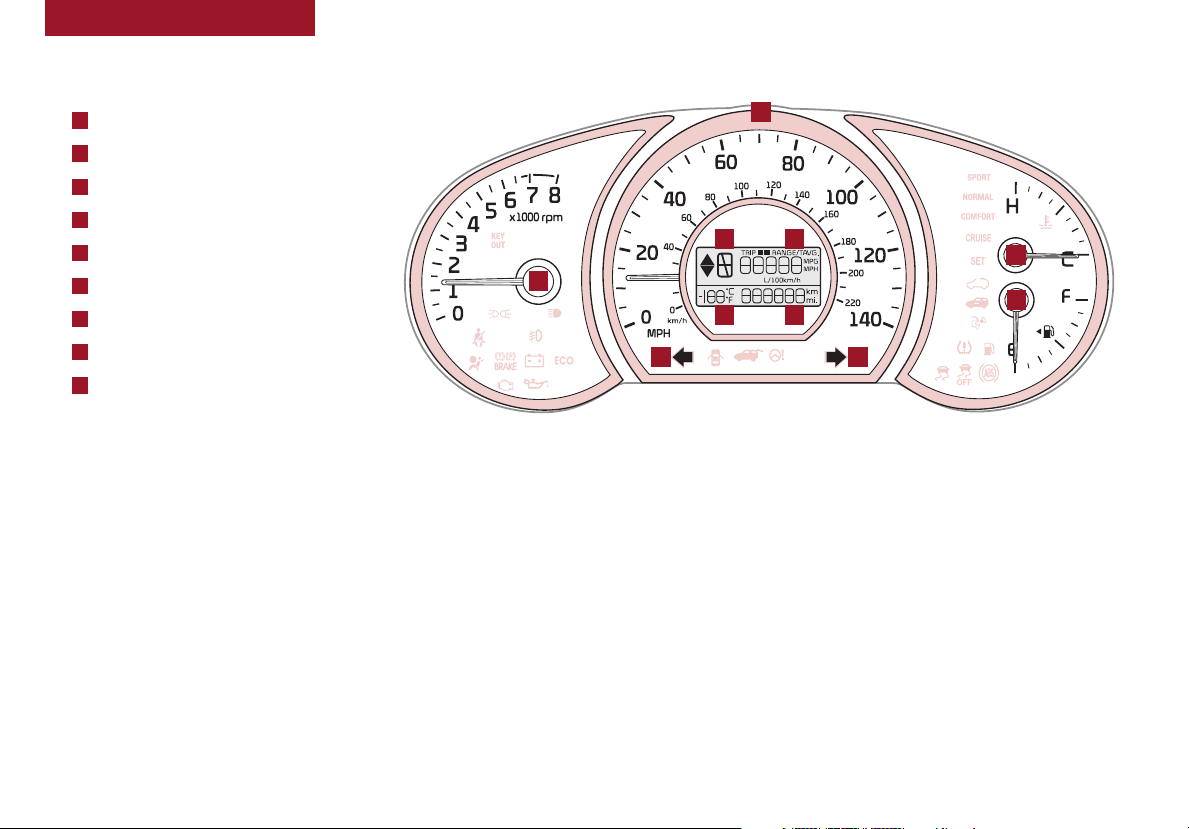
Instrument Cluster Overview
(Ty pe A)
A
Tachometer
B
Speedometer
C
Turn Signal Indicators
D
Gear Shift Position
E
Odometer
F
Trip Modes / Trip Computer*
G
Engine Temperature
H
Fuel Gauge
I
Exterior Temperature
Your vehicle’s instrument cluster & indicator light
locations may differ from those in the illustrations. For
more information on the instrument cluster, the LCD
Warning Messages and the function of all indicator and
warning lights, please refer to the Owner’s Manual.
B
D
F
G
A
I
E
H
C C
(Type A cluster)
ALWAYS CHECK THE OWNER’S M ANUAL FO R COMPLETE OPERAT ING INFOR MATION AND SAFET Y WARNINGS.
*IF EQUIPPED
3
INSTRUMENT CLUSTER
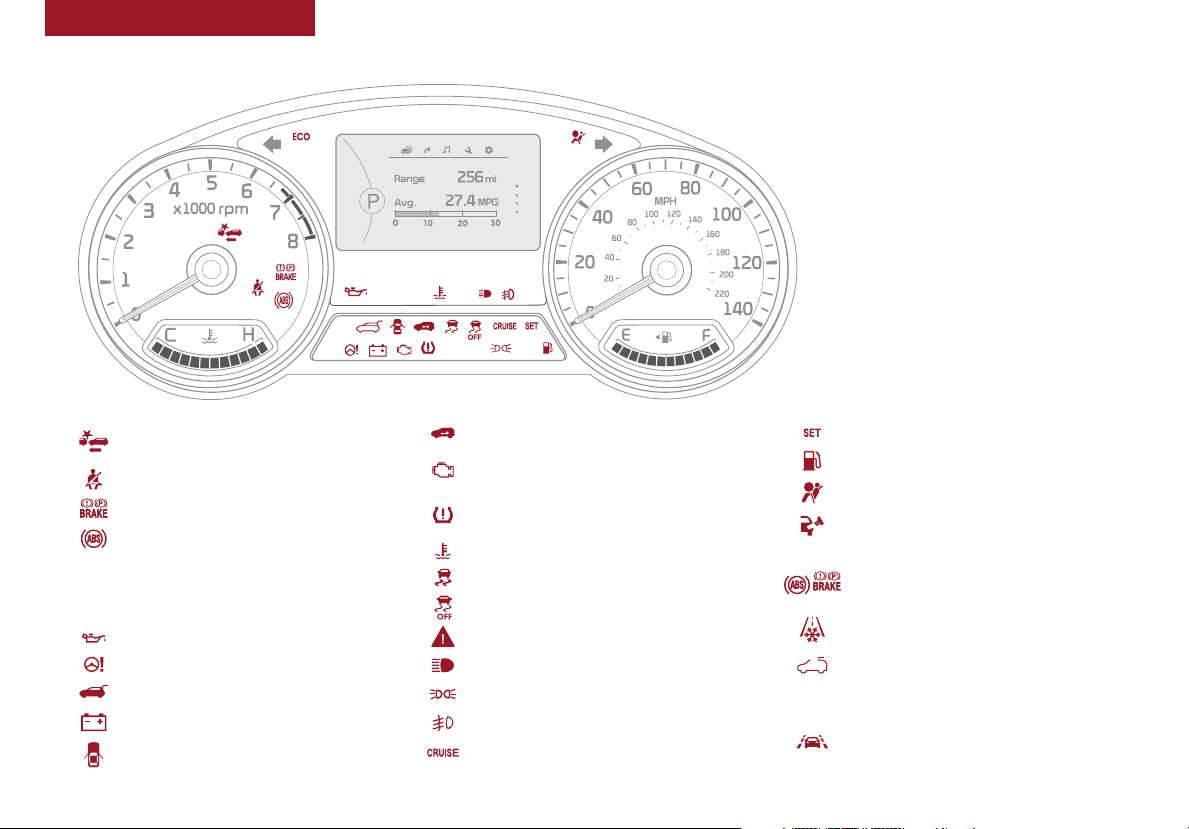
Indicators & Warning Lights
Your vehicle’s instrument cluster & indicator
light locations may differ from those in the
illustrations. For more information on the
instrument cluster, the LCD Warning Messages
and the function of all indicator and warning
lights, please refer to the Owner’s Manual.
(Type B cluster)
Forward Collision Warning System (FCWS)
OFF / Warning Indicator*
Seat Belt Warning Light
Parking Brake & Brake Fluid Warning Light
Anti-lock Braking System (AB S) Warning Light
NORMAL
SPORT
4
Drive Mode Indicators*
ECO
ECO Mode / Drive Mode Indicator
Engine Oil Pressure Warning Light
Electronic Power Steering Warning Light
Liftgate Open Warning Light
Charging System Warning Light
Door Ajar Warning Light
SOUL FEATURES & FUNCTIONS GUIDE
Immobilizer Indicator Light*
Fuel Cap / Malfunction Indicator
(Check Engine Light)
Low T ire Pressure Light / Tire Pressure
Monitoring System (TPMS) Malfunction Indicator
Engine Coolant Temperature Warning L ight
Electronic Stability Control ( ESC) Indicator
Electronic Stability Control ( ESC) OFF Indicator*
Master Warning Light
High Beam Indicator
Light ON Indicator Light
Front Fog Light Indicator*
Cruise Indicator Light*
Cruise SET Indicator Light*
Low Fuel Level Warning Light
Airbag Warning Light
Fuel Cap Open Warning Indicator ( In cluster
Type B. Displays in LCD)*
Electronic Brakeforce Distribution (EBD)
System Warning Light (Two separate indicators
on Instrument Cluster lit at same time)
Icy Road Warning Light*
Sunroof Open Warning Light*
KEY
KEY OUT Indicator Light*
OUT
Lane Departure Warning System (L DWS)
Indicator Light*
*IF EQUIPPED
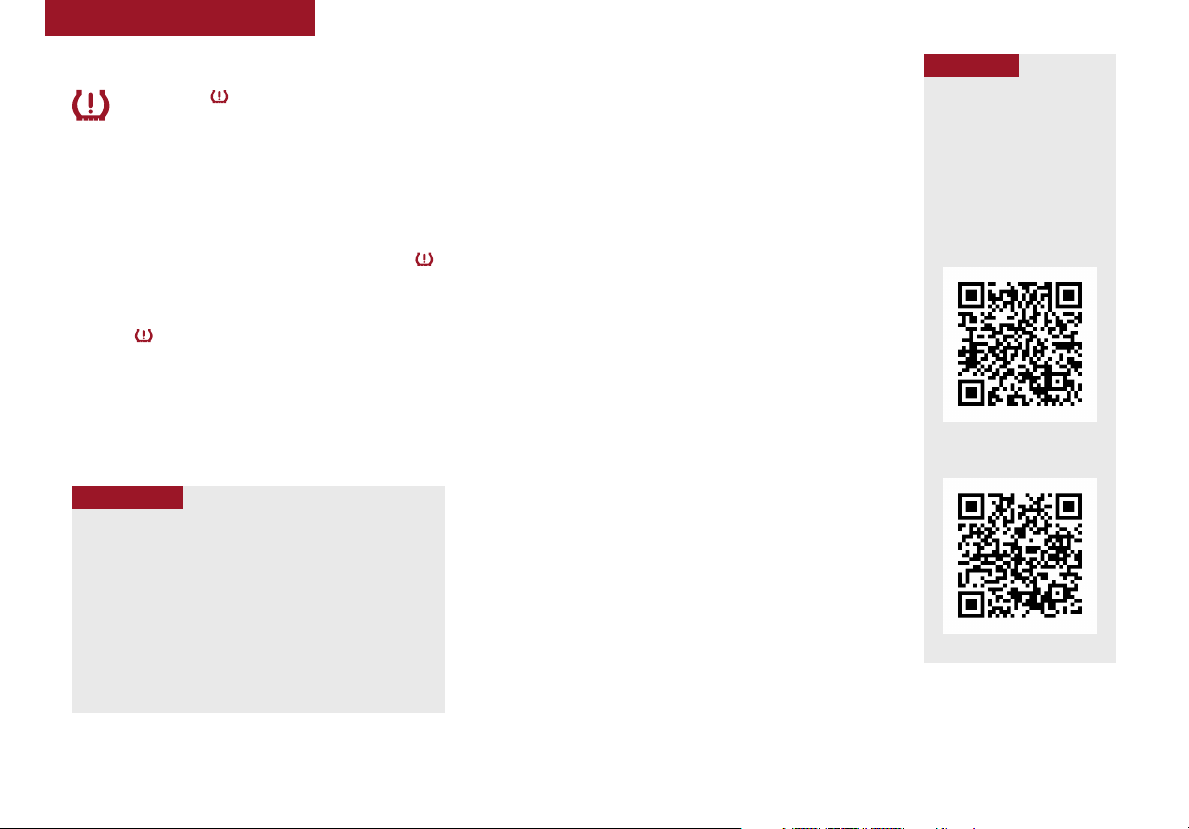
INSTRUMENT CLUSTER
Tire Pressure Monitoring System (TPMS)
The indicator functions as both Low Tire Pressure
Light and TPMS Malfunction Indicator.
The TPMS indicator illuminates if one or more tires is
significantly under inflated, the vehicle has a spare tire
installed without TPMS or the outside temperature becomes
significantly lower.
Inflate tire(s) to specifications using an accurate digital tire
pressure gauge to turn off Low Tire Pressure Light . See
front driver’s door jamb for PSI specification.
When there is a problem with the TPMS, the TPMS Malfunction
Indicator will blink for approximately one minute and then
illuminate — See dealer for service.
REMINDERS:
• Check the recommended tire pressure label located on the lef t side of driver’s
door jam, visible when the door is opened.
• Consult your dealer for service if L ow Tire Pressure Light remains illuminated
after in flating your tire(s).
QUICK TIPS
• Even with TPMS, tire pressure should be checked
manually at least once a month. Only adjust Tire
Pressure on “cold tires”
• For proper maintenance and optimal fuel economy,
maintain recommended tire inflation pressures and
stay within the load limits and weight distribution
recommended for your vehicle
• In winter or cold weather, the TPMS light may illuminate
if the tire pressure was adjusted to the recommended
tire inflation pressure during warm weather
Fuel Economy
There are several factors that contribute to your
vehicle’s fuel economy, including maintenance of
your vehicle, driving style, environmental conditions,
vehicle weight and vehicle aerodynamics. Below are
tips on how to help improve fuel economy:
• Keep your vehicle in good condition with
regular maintenance
• Don’t let the engine idle longer than necessary
• Drive at a moderate speed, accelerating smoothly
and at a moderate rate
• Keep tires inflated to the recommended pressure
• Travel lightly, without carrying unnecessary
weight in your vehicle
• Avoid placing large or heavy items on roof racks
• Avoid hilly, winding or poorly maintained roads
REMINDER: Driving range varies depending on a vehicle’s fuel
tank size, e.g., 12-gal.vs.24-gal. Even though the two vehicles,
MPG may be the same, the vehicle with the larger tank will have
the greater range.
For more information on Fuel Economy, you can snap the QR Code
above to view a video or refer to the Owner’s Manual.
QR CODE
To view these videos on
your mobile device, snap
these QR Codes or visit the
listed website.
Refer to page 2 for more
information.
Tire Pressure Monitoring
System
www.youtube.com/KiaFeatureVideos
Fuel Economy Video
www.youtube.com/KiaFeatureVideos
ALWAYS CHECK THE OWNER’S M ANUAL FO R COMPLETE OPERAT ING INFOR MATION AND SAFET Y WARNINGS.
*IF EQUIPPED
5
INSTRUMENT CLUSTER
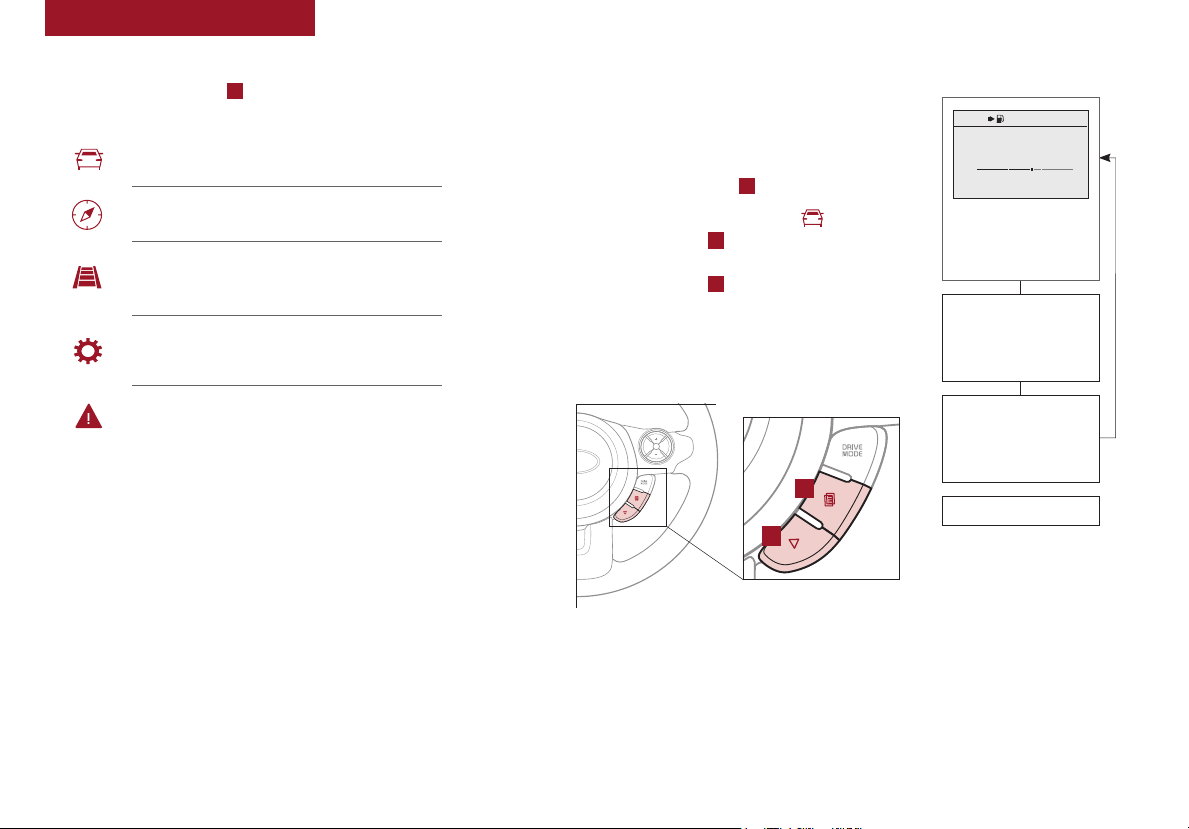
LCD Instrument Cluster Modes*
Press the Mode button A to cycle through different LCD
Instrument Cluster Modes:
Trip Computer Mode: Displays driving
information for tripmeter, fuel economy, etc.
Turn-by-Turn Mode*: Displays the state of the
Navigation system
Lane Departure Warning System (LDWS)*:
Displays the state of the LDWS
User Settings Mode: Change settings of the doors,
lights, sound, drivings assist, convenience, service
and other features
Master Warning Mode: Informs of warning
messages related to TPMS, Blind Spot Detection
(BSD) system, etc.
Trip Modes / Trip Computer*
The Trip Computer is a driver information system
that displays information related to driving on
the display when the ignition switch is ON.
To cycle through the LCD Display modes, press
the Mode/Select button A.
When in the Trip Computer mode , press the
Move/Reset button B to cycle through the screens.
When displaying the Tripmeter, press and hold the
Move/Reset button B to reset the Tripmeter to zero.
REMINDERS:
• Appearance of Tripmeter display may differ as equipped
• All stored driving information (except Odometer and Range) is
reset if the battery is disconnected
RES
CANCEL
CRUISE
SET
A
B
(For Type B c luster; Butt ons located
on Steering Wheel)
1754 mi
Average
16.8 MPG
Instant
18.4 MPG
20 30
0 10
OK : Reset
Hold
TRIP
• Average Fuel Economy
• Instant Fuel Economy
ACCUMULATE INFO
• Tripmeter
• Fuel Economy
• Timer
DRIVE INFO
• Tripmeter
• Fuel Economy
• Timer
Digital Speedometer
(Type B Cluster)
6
SOUL FEATURES & FUNCTIONS GUIDE
Your vehicle’s steering wheel buttons may differ from those in the illustrations.
*IF EQUIPPED
INSTRUMENT CLUSTER
User Settings Mode* Service Mode*
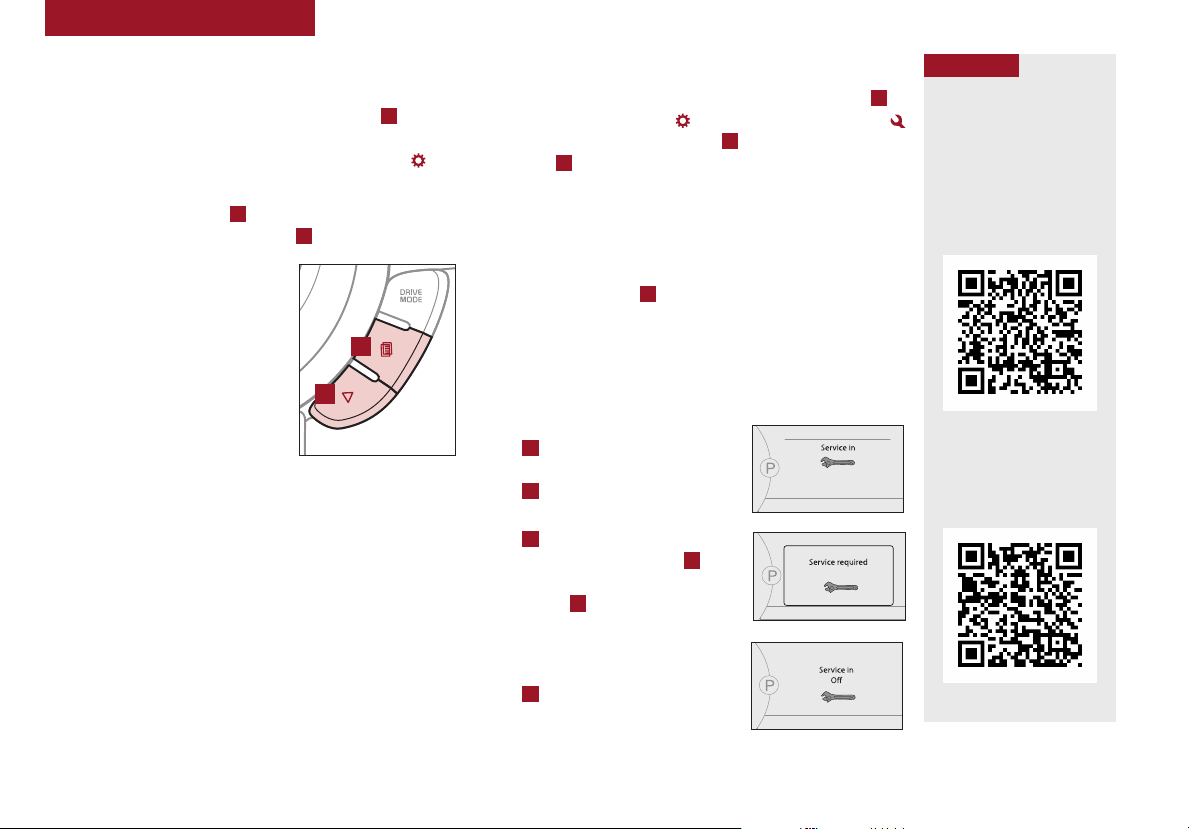
To enter the User Settings mode in the LCD Instrument
Cluster Modes, press the Mode/Select button A when the
vehicle is at a standstill and with the Engine Start /Stop*
button in the ON position and select User Settings .
You can navigate the selections on the display by pressing
the Move/Reset button B, and then selecting the item by
pressing the Mode/Select button A.
Driving Assist*:
• Rear Cross Traffic Alert*
• FCW (Forward Collision
Warning)*
• BSD (Blind Spot Detection)*
Door/Liftgate:
• Auto Door Lock
A
B
• Auto Door Unlock
• Two Press Unlock
• Horn Feedback
Lights:
• One-Touch Turn Signal*
• Headlamp Delay*
Sound:
• Park Assist System
Volume*
• Welcome Sound*
Service Interval:
(For Type B c luster; Butt ons located
on Steering Wheel)
Other Features:
• Fuel Economy
Auto Reset
• Fuel Economy Unit
• Temperature Unit
Language:
• Language Setting
• Set mileage/months
• ON/OFF
Convenience:
• Gear Position Pop-Up*
To enter Service Mode, press the Mode/Select button A
and select User Settings , then scroll to Service Mode
by pressing Move/Reset button B. Press the Mode/Select
button A to enter. System will display number of miles
remaining until next service is due, and type of service.
When service is required, the following will be displayed:
Service Required.
To reset the Service Mode system, press and hold the
Move/Reset button B for more than 1 second.
To turn Service In OFF, go to User Settings.
Service Interval Setting
To set the service interval when in User Settings mode:
• Press the Move/Reset button
B
and scroll to Service Interval.
Press the Mode/Select button
A
to enter
• Press the Move/Reset button
B
and toggle to ON, then press
the Move/Select button A.
Then press the Move/Reset
button B to scroll and select
the desired miles or months for
your next service
• Press the Mode/Select button
A
to enter
18,000mi 365days
(Inst rument cluster L CD screen
shown)
QR CODE
To view these videos on
your mobile device, snap
these QR Codes or visit the
listed website.
Refer to page 2 for more
information.
LCD Display Video
www.youtube.com/KiaFeatureVideos
LCD Display:
Maintenance Video
www.youtube.com/KiaFeatureVideos
ALWAYS CHECK THE OWNER’S M ANUAL FO R COMPLETE OPERAT ING INFOR MATION AND SAFET Y WARNINGS.
*IF EQUIPPED
7
INSTRUMENT CLUSTER
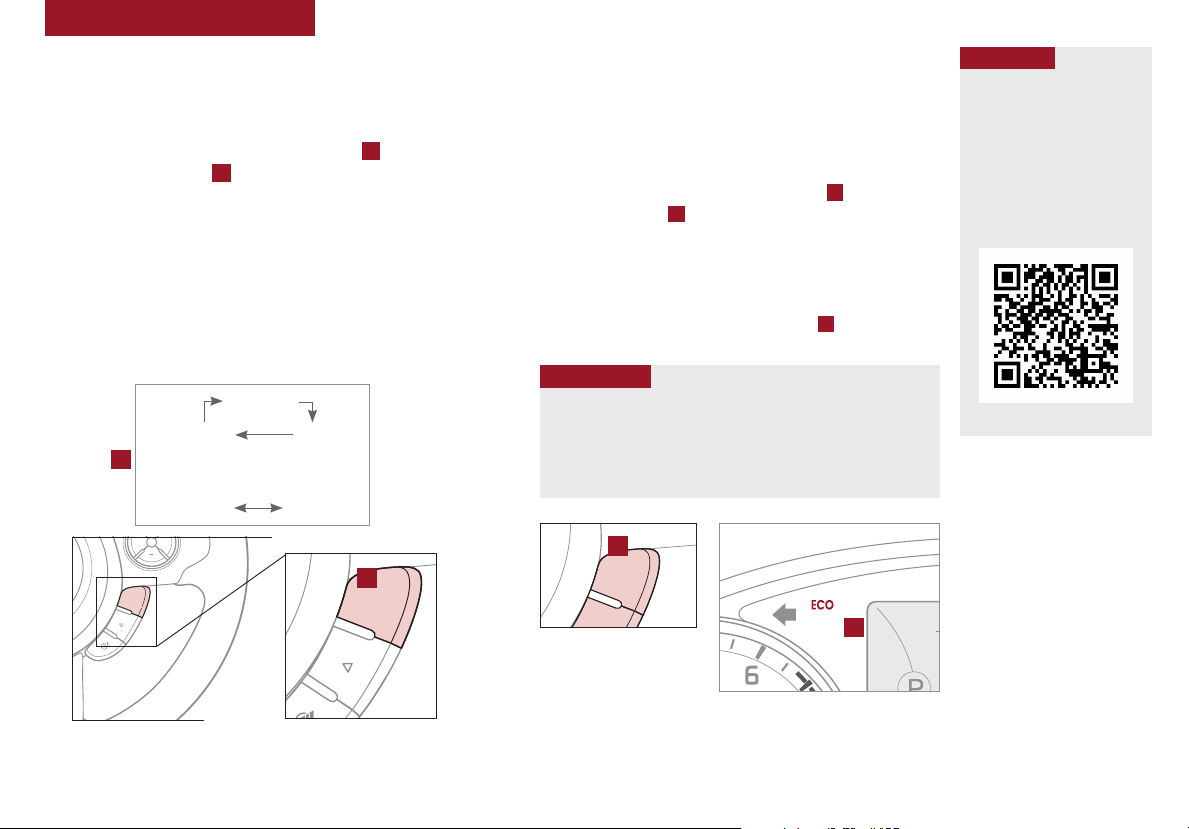
Drive Mode Integrated Control System*
The Drive Mode may be selected based on the driver’s
preferences and road conditions.
To cycle through the different Drive Modes A, press the
DRIVE MODE button B. The instrument cluster will display
SPORT or ECO when selected. When in NORMAL mode, it
will not display in the instrument cluster.
REMINDERS:
• The system is turned ON and in NORM AL mode when ignition is
in the ON position
• When ECO mode is selected, the indicator will display and system
remains on, even when ignition is cycled. Otherwise the system
will default to NORMAL .
• Steering effor t may be slightly increased in Sport mode
NORMAL
SPORT
A
Dual Clutch Transmission*
NORMAL SPORT
CANCEL
CRUISE
SET
DRIVE
MODE
ECO
B
DRIVE
MODE
ECO Mode (Active ECO)*
Active ECO helps improve fuel economy by controlling
several vehicle components. When activated, it optimizes
drivetrain operations such as engine power and
transmission to help improve fuel economy.
To turn ON, press the DRIVE MODE button A. The green
ECO indicator light B in the instrument cluster will
illuminate, indicating that Active ECO is operating.
The Active ECO System will remain on even when the
ignition is cycled.
To turn Active ECO OFF, press the button A again.
QUICK TIPS
To help improve your fuel efficiency:
• Drive at a moderate speed, accelerating smoothly and at a
moderate rate
• Keep tires inflated to the recommended pressure
• Be sure the wheels are properly aligned
A
DRIVE
MODE
(For Type B c luster; Butt on located
on Steering Wheel)
B
QR CODE
Drive Mode Video
To view a video on your
mobile device, snap this
QR Code or visit the listed
website.
Refer to page 2 for more
information.
www.youtube.com/KiaFeatureVideos
(But ton located on S teering Wheel )
Your vehicle’s steering wheel buttons may differ from those in the illustrations. See your Owner’s Manual for more details
8
SOUL FEATURES & FUNCTIONS GUIDE
(Type B cluster)
*IF EQUIPPED
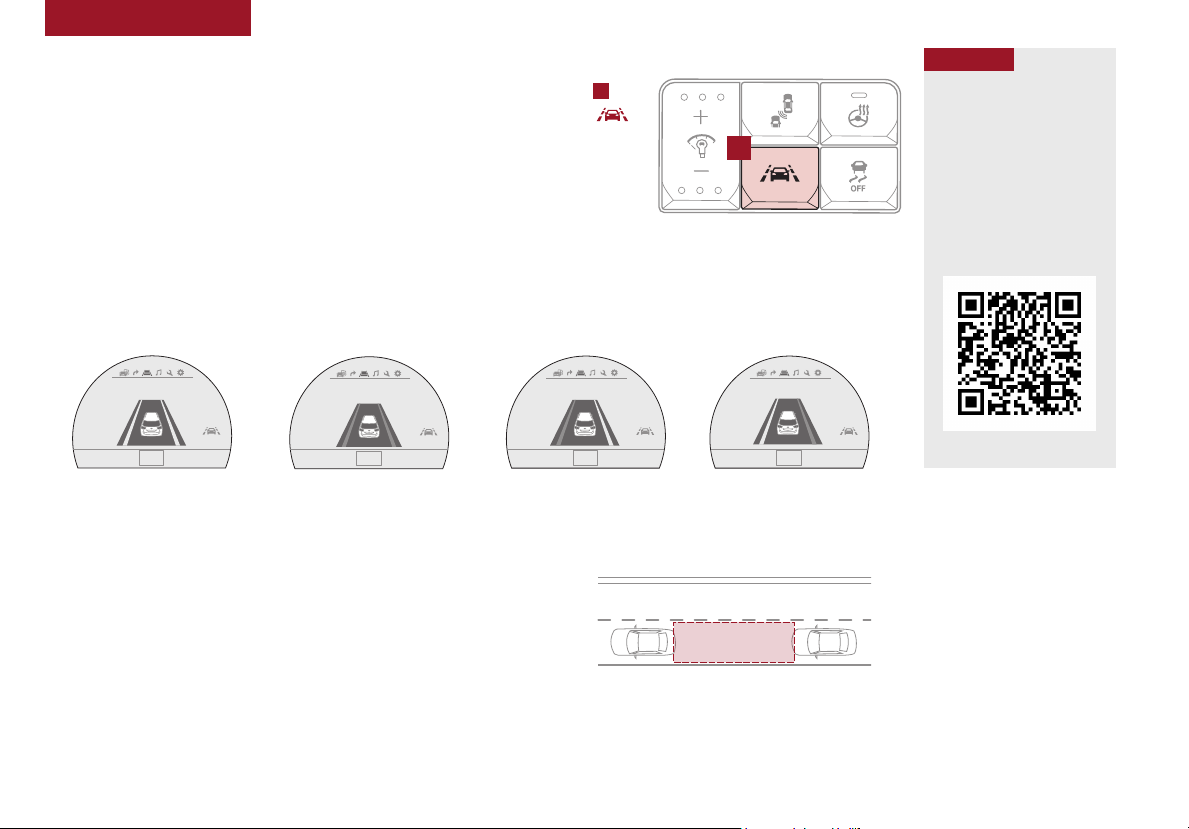
DRIVER’S PANEL
Lane Departure
Lane Departure
Lane Departure Warning System (LDWS)*
With the Engine Start /Stop button in the ON position, press the LDWS button A
(shown on previous page) to turn system ON. The instrument cluster indicator
will illuminate white.
A
If the LDWS detects that you are veering outside of your lane, the system may issue
a warning on the LCD screen and an alert may sound, under these conditions:
• The vehicle exceeds approximately 40 mph
• The LDWS system recognizes the lane the vehicle is traveling in
If LDWS button is ON/OFF and ignition is cycled, the system returns to
its previous state.
REMINDER: LDWS will not issue a warning if the turn signal or hazard lights are activated.
Lane Departure
When the LDWS sensor detects the lane
traveling in, the lane is illuminated
Lane Departure
When the L DWS sensor do es not detect the
lane traveling in the lanes is not illuminated
When the LDWS sensor detects the vehicle veering outside of the lane traveling
in, the lan e the vehicle’s crossi ng will blink (shown in b oth images above)
Lane Departure
The Lane Departure Warning System (LDWS)
is not a substitute for safe and proper driving.
Always drive safely and use caution. LDWS
may not always alert the driver if the vehicle
is driven outside of its lane.
Lane Departure
Autonomous Emergency Braking (AEB) / Forward Collision Warning (FCW)*
The AEB and FCWS help to alert the driver when rapidly approaching a
vehicle that is slowing down, braking or stopped. A warning message will
appear on the LCD screen and a chime will sound.
The FCWS will become active when the vehicle is traveling more than
10 mph. The AEB will become active when the vehicle is traveling more
than 6 mph.
Select alert settings (Early, Normal, Late) in the User Settings in the
instrument cluster LCD display. To turn the AEB/FCWS off, go to User
Settings in the LCD Instrument Cluster modes.
The Autonomous Emergency Braking (AEB) / Forward
Collision Warning (FCW)* are not substitutes for safe and
proper driving. Always drive safely and use caution. The
FCWS will be activated by default when the ignition is
cycled ON, even when previous setting to OFF.
QR CODE
Lane Departure Warning
System Video
To view a video on your
mobile device, snap this
QR Code or visit the listed
website.
Refer to page 2 for more
information.
www.youtube.com/ KiaFeatureVideos
REMINDERS:
• The F CWS and AEB will be
activated by default when vehicle
power is cycled on, even when
previous setting is off
• The F CWS will not operate when
the vehicle is traveling more than
approximately
50 mph
ALWAYS CHECK THE OWNER’S M ANUAL FO R COMPLETE OPERAT ING INFOR MATION AND SAFET Y WARNINGS.
*IF EQUIPPED
9
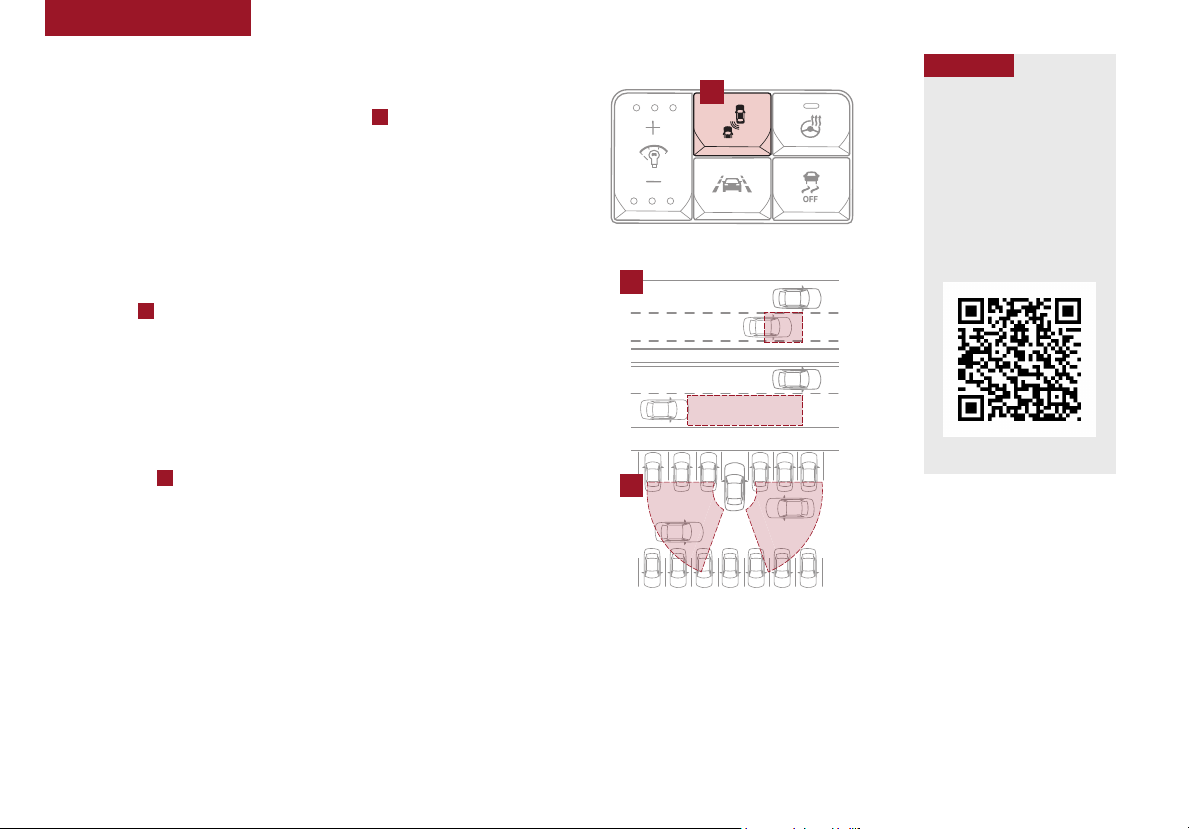
DRIVER’S PANEL
Blind Spot Detection (BSD) System*
The BSD system uses radar sensors to help alert the driver before
changing lanes. The light on the BSD button A will illuminate when
turned ON. The outside rearview mirror warning lights will also
illuminate for 3 seconds.
The system will become active when the vehicle is traveling more than
20 mph and will alert the driver if another vehicle is detected by the
radar sensor, up to 230 feet away.
Blind Spot Detection (BSD)* / Lane Change Assist (LCA)*
1st-stage alert: When another vehicle is detected within the BSD System
boundary B, a yellow indicator will illuminate on the outside rearview
mirrors.
2nd-stage alert: When 1st-stage alert is on and the driver activates a turn
signal, a flashing yellow indicator will illuminate on the outside rearview
mirrors and the system will sound an alert.
RCTA (Rear Cross Traffic Alert)
If the RCTA system sensors detect approaching vehicles from the left
or right side C, the system will sound an audible alert, the warning
indicators on the outside rearview mirror will illuminate and a message
will appear on the LCD screen, with these conditions:
• When the gear shift is in Reverse
• When the vehicle moves in reverse from a parked position
• When the vehicle is moving less than 6 mph
REMINDERS:
• When the BSD is ON and the vehicle power is cycled to OFF then ON again, the BSD system
returns to ON
• The RCTA feature can be turned OFF/ON in User Settings
• The FCWS will not operate when the vehicle is traveling more than approximately 50 mph
QR CODE
A
Blind Spot Detection
w/ RCTA Video
To view a video on your
mobile device, snap this
QR Code or visit the listed
website.
Refer to page 2 for more
information.
B
www.youtube.com/ KiaFeatureVideos
C
For more information on the BSD System, refer to your Owner’s Manual.
10
SOUL FEATURES & FUNCTIONS GUIDE
*IF EQUIPPED
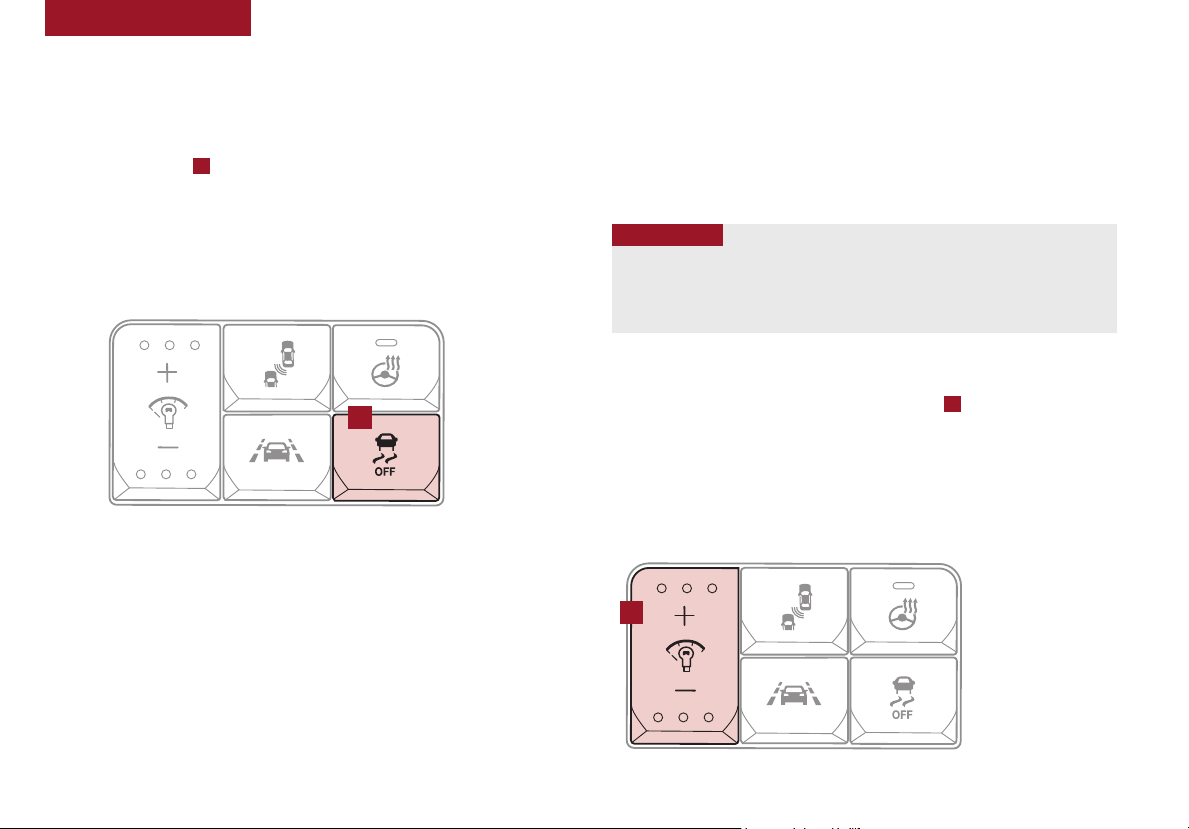
DRIVER’S PANEL
Electronic Stability Control (ESC)
The ESC system is designed to help stabilize the vehicle during cornering
maneuvers. It is a good idea to keep the ESC turned ON for daily driving
whenever possible.
Press ESC button A to turn ESC OFF/ON.
REMINDERS:
• ES C is turned ON by default at vehicle start-up. When ignition is cycled, ESC will
turn ON again
• The ESC Indicator Light in the instrument cluster will be lit momentarily whenever
the ESC is active
A
(But tons located o n left side of Driv er’s Panel)
For more information o n Electronic Stability Control ( ESC) and its specific features a nd operations,
please refer to your O wner’s Manual.
Hill-Start Assist Control (HAC)
HAC helps prevent the vehicle from rolling backward when accelerating
from a stop while on a steep incline. The HAC automatically activates
whether the ESC is OFF or ON, but does NOT activate when the ESC has
malfunctioned.
REMINDER: The HAC does not operate when the gear shift is in the P ( Park) or the N (Neutral )
position.
•
QUICK TIPS
• HAC provides a 2-second delay before the vehicle may start rolling backwards
• When HAC is active (e.g., accelerating from a stop on an incline), you may
notice that the brakes will momentarily remain engaged after you depress the
accelerator
Instrument Panel Dimmer
With parking lights / headlights ON, press switch A + or – to adjust
display brightness of the instrument panel illumination.
REMINDERS:
• Door Mood Lamp is a fixed brightness and cannot be adjusted (not to be confused with
Advanced Mood Lighting Speaker)
• The Instrument Panel Dimmer does not adjust brightness on the audio/navigation system*
screens; use the SE TUP modes to adjust brightness on the screen.
A
ALWAYS CHECK THE OWNER’S M ANUAL FO R COMPLETE OPERAT ING INFOR MATION AND SAFET Y WARNINGS.
(But tons located o n left side of Driv er’s Panel)
*IF EQUIPPED
11
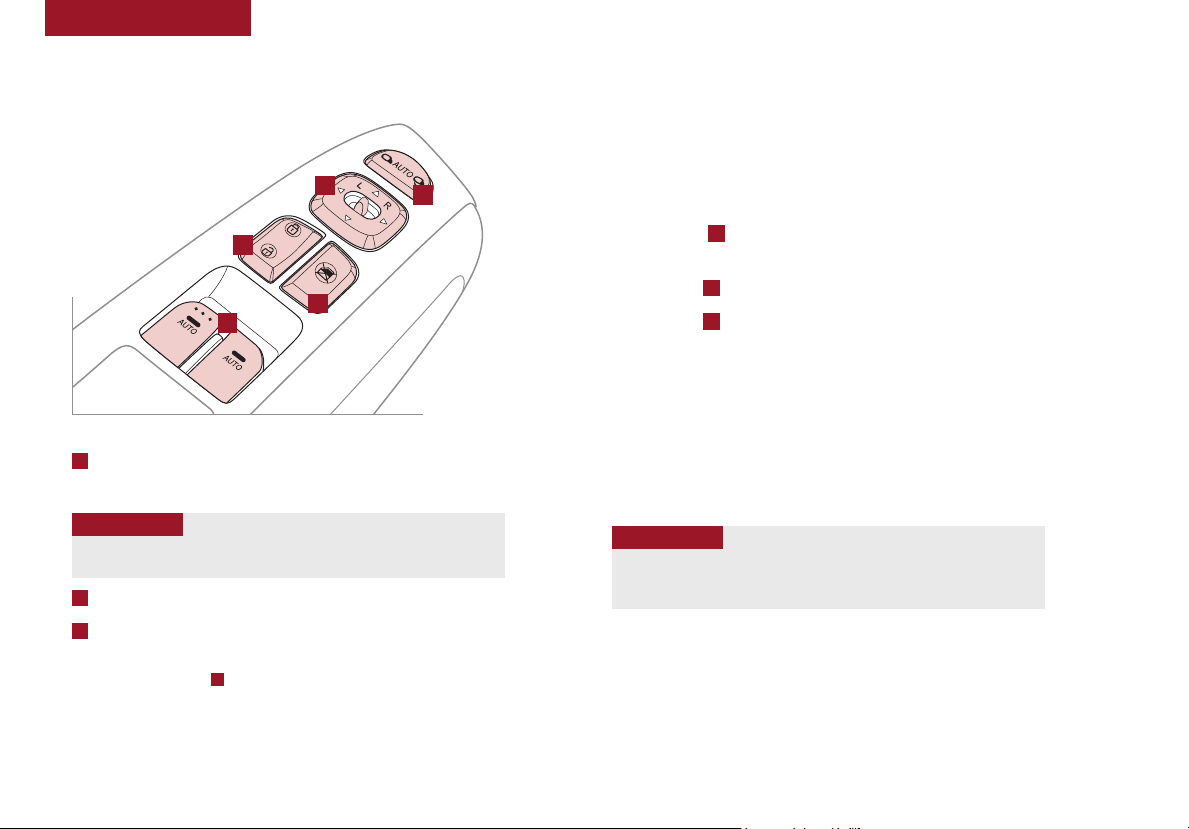
DRIVER’S PANEL
Power Windows, Window Lock
& Central Door Lock
D
B
A
A
Pull/Press to operate Driver’s and Front Passenger’s window
C
Auto Up/Down*
•
QUICK TIP
Press button again to stop Auto Up/Down function.
B
Press to Unlock/Lock All Doors
C
Press to disable Rear Passenger Windows
REMINDER: When button
Rear Passenger Windows are disabled.
C
is pressed, window controls for the
E
Automatic Door Lock/Unlock
Auto Door Lock/Unlock will engage when the gear shift
is moved in to or out of the P (Park) position. Refer to the
User Settings in the LCD Instrument Cluster modes on
how to turn Auto Door Lock/Unlock ON/OFF.
Power Folding Outside Mirrors*
Toggle switch D left or right to select mirror. Then press arrows to
adjust mirror position.
Toggle button E left /right to unfold/fold the outside rearview mirrors.
Toggle button E to center to automatically fold/unfold mirrors when:
• The Smart Key Lock/Unlock buttons are pressed
• The door outside handle button is pressed
REMINDERS:
• To automatically fold mirrors when exiting vehicle, press the LOC K button on
the Smar t Key
• To lock position of mirrors, toggle the L /R mirror switch to the neutral (center)
position
•
QUICK TIP
• The mirrors will automatically unfold when the Smart Key* is within
close proximity to the vehicle and the switch is in the AUTO position
Heated Outside Mirrors*
Mirror heaters controlled with Rear Defroster.
12
SOUL FEATURES & FUNCTIONS GUIDE
*IF EQUIPPED
DRIVER’S PANEL
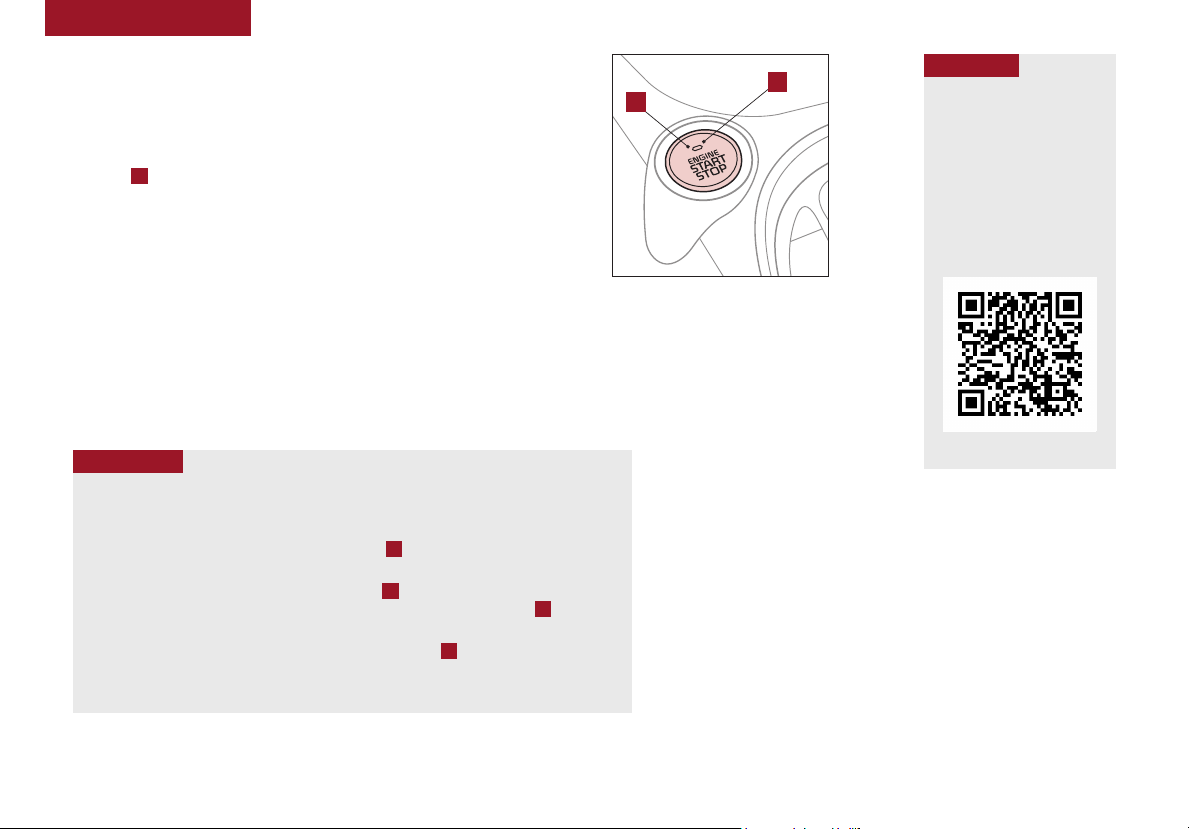
Engine Start/Stop Button*
To start the engine:
1. Depress the brake pedal
2. Press the ENGINE START/STOP button while gear shift is in P (Park)
To turn the engine OFF – Press the ENGINE START/STOP button again.
To use the ENGINE START/STOP button, you must have the Smart Key
fob on your person or inside the vehicle.
REMINDERS:
• In an emergency situation while the vehicle is in motion, you are able to turn the engine of f
• If Smart Key fob bat tery is dead, with the lock but ton facing the ENG INE START/STOP but ton,
•
B
(light
will turn green)
and to the ACC position by pressing the EN GINE START/STOP bu tton for more than 2 seconds
or 3 times successively within 3 seconds
hold the fob up against the ENGINE START/STOP button and press
QUICK TIPS
To use electrical accessories:
ACC position
• When in the OFF position (no light) and without depressing the brake pedal, press the
ENGINE START/STOP button once (amber light A )
On position
• When already in the ACC position (amber light A ) and without depressing the brake
pedal, press the ENG INE START/STOP but ton again (reddish-orange light B )
• When in the OFF position (no light) and without depressing the brake pedal, press the
ENGINE START/STOP button twice (reddish-orange light B )
Keeping the vehicle in ACC or the ON position without engine running may discharge
the vehicle’s battery.
A
(But ton located ab ove Gear Shift )
QR CODE
B
Engine Stop/Start Button &
Smart Key Video
To view a video on your
mobile device, snap this
QR Code or visit the listed
website.
Refer to page 2 for more
information.
www.youtube.com/KiaFeatureVideos
ALWAYS CHECK THE OWNER’S M ANUAL FO R COMPLETE OPERAT ING INFOR MATION AND SAFET Y WARNINGS.
*IF EQUIPPED
13
Loading…
Kia Soul 2018 Features and Functions
Features and Functions
50 pages
en
620 pages
en
Kia Soul 2018 Subcompact SUV Specification
The 2018 Kia Soul Subcompact SUV offers a versatile and stylish option in the compact crossover segment. It features a unique boxy design that maximizes interior space while maintaining a compact footprint. The 2018 model comes with three engine choices: a 1.6-liter inline-4 producing 130 horsepower, a 2.0-liter inline-4 delivering 161 horsepower, and a 1.6-liter turbocharged inline-4 generating 201 horsepower. These engines are paired with either a 6-speed manual, 6-speed automatic, or a 7-speed dual-clutch automatic transmission, depending on the trim level.
The interior of the Kia Soul emphasizes comfort and technology. It includes a user-friendly infotainment system with a 5-inch touchscreen as standard, upgradeable to a 7- or 8-inch screen with Apple CarPlay and Android Auto integration. The cabin offers ample headroom and legroom, making it comfortable for both front and rear passengers. Cargo space is generous for the subcompact class, with 24.2 cubic feet of space behind the rear seats and up to 61.3 cubic feet with the seats folded down.
Safety features for the 2018 Kia Soul include a rearview camera, available blind-spot monitoring, rear cross-traffic alert, and lane departure warning. The National Highway Traffic Safety Administration (NHTSA) awarded it a 5-star overall safety rating, underscoring its commitment to occupant protection.
Fuel efficiency varies by engine choice, with the base 1.6-liter engine achieving an EPA-estimated 25 mpg city and 30 mpg highway. The turbocharged variant offers slightly lower efficiency due to its higher performance. Overall, the 2018 Kia Soul stands out for its combination of quirky design, practical interior space, and a range of features that cater to a wide array of drivers.
Kia Soul 2018 Subcompact SUV F.A.Q.
The recommended tire pressure for the 2018 Kia Soul is typically 33 psi for both front and rear tires. However, it’s important to check the owner’s manual or the sticker on the driver’s side door jamb for precise information.
To reset the oil change light on a 2018 Kia Soul, turn the ignition to the «On» position without starting the engine. Use the steering wheel buttons to navigate to the «Service Interval» menu on the dashboard display. Hold down the «OK» button until the light resets.
The 2018 Kia Soul typically requires 5W-20 or 5W-30 full synthetic oil. Always refer to the owner’s manual to confirm the correct oil type for your specific engine.
To connect your phone to the 2018 Kia Soul’s Bluetooth system, enable Bluetooth on your phone, then go to the car’s infotainment system, select «Phone» or «Bluetooth» and follow the prompts to pair your device.
The check engine light on a 2018 Kia Soul can indicate a variety of issues, ranging from a loose gas cap to more serious engine problems. It is recommended to use an OBD-II scanner to read the error code or visit a mechanic for a detailed diagnosis.
To replace the cabin air filter on a 2018 Kia Soul, open the glove box, remove the damper arm, and press the sides inward to release the glove box. Locate the cabin air filter cover, remove it, and replace the old filter with a new one.
If your 2018 Kia Soul’s battery keeps dying, check for any lights or electronics left on, ensure the battery terminals are clean and tight, and consider having the battery and alternator tested for faults.
To change a flat tire on a 2018 Kia Soul, first park on a level surface and set the parking brake. Loosen the lug nuts slightly, jack up the vehicle, fully remove the lug nuts and the flat tire, place the spare tire on, tighten the lug nuts by hand, lower the vehicle, and then fully tighten the lug nuts.
The maintenance schedule for a 2018 Kia Soul typically includes oil changes every 7,500 miles, tire rotations every 7,500 miles, and inspections of key systems such as brakes, battery, and filters every 15,000 miles. Consult the owner’s manual for a detailed schedule.
To update the navigation system on a 2018 Kia Soul, visit the official Kia navigation update website to download the latest map software. Follow the instructions to install the update onto a USB drive, then plug it into the car’s USB port and follow the on-screen instructions.
Kia Soul (2018)
Kia, THE COMPANY
Enjoy your vehicle and Kia’s “Family-like Care” experience!
Thank you for becoming the owner of a new Kia vehicle.
As a global car manufacturer focused on building high-quality, value for
money prices, Kia Motors is dedicated to providing you with a customer
service experience that exceeds your expectations.
At all of our Kia dealerships you will be treated with warmth, hospitality
and professionalism by people who care based on our “Family-like Care”
promise.
All information contained in this Owner’s Manual was accurate at the
time of publication. However, Kia reserves the right to make changes
at any time so that our policy of continual product improvement can be
carried out.
This manual applies to all models of this vehicle and includes descrip-
tions and explanations of optional as well as standard equipment. As a
result, you may encounter material in this manual that is not applicable
to your specific Kia vehicle.
View the manual for the Kia Soul (2018) here, for free. This user manual comes under the category cars and has been rated by 5 people with an average of a 8.9. This manual is available in the following languages: English. Do you have a question about the Kia Soul (2018)?
Ask your question here
Product Images (1)

Kia Soul (2018) specifications
Below you will find the product specifications and the manual specifications of the Kia Soul (2018).
General
| Brand | Kia |
| Model | Soul (2018) |
| Product | car |
| Language | English |
| Filetype | User manual (PDF) |
Frequently asked questions
Can’t find the answer to your question in the manual? You may find the answer to your question in the FAQs about the Kia Soul (2018) below.
When does my Kia need maintenance?
Regular maintenance is necessary for every car. How often the car needs maintenance and what exactly needs to be done can be found in the maintenance instructions.
For major periodic service, this should generally be done every 2 years or after 30,000 kilometres.
One or more doors won’t open from the inside. Now what?
The lock is most likely set to the child safety lock so it cannot be opened from the inside. How to unset the child safety lock differs per brand and type.
My car radio does not turn on, now what?
If your car radio does not turn on, it will not receive any power. Check that the red wire is connected to the contact power supply and the yellow wire to the constant power supply.
How do I convert miles into kilometres?
1 mile equals 1.609344 kilometers and 1 kilometer equals 0.62137119 miles.
Where can I find the VIN number of my Kia?
The location of the VIN number of the car differs per brand and type of car.
The code may be stamped on the frame of the car or mounted on a plate. It is best to consult the manual of the Kia Soul (2018)for the exact location of the VIN number.
When should I change the brake fluid of my Kia?
It is recommended to change the brake fluid every two years.
What is the difference between E10 and E5 petrol?
E10 petrol consists of up to ten per cent ethanol while E5 petrol will contain less than five per cent ethanol. As a result, the percentage of E10 petrol is lower than that of E5 petrol, making it less bad for the environment.
What is a VIN number?
The VIN number of a car is an identification number unique to each car. The abbreviation VIN therefore stands for Vehicle Identification Number.
Is the manual of the Kia Soul (2018) available in English?
Yes, the manual of the Kia Soul (2018) is available in English .
Is your question not listed? Ask your question here
-
Kia Soul 2018 Owner’s manual (603 pages)
-
Kia Soul 2018 Owner’s manual (673 pages)
Kia Soul 2018 Manuals come in various types, each serving a specific purpose to help users effectively operate and maintain their devices. Each type of Kia Soul 2018 instruction is designed to address specific needs, ensuring users have the necessary information to use, maintain, and repair their devices effectively.
Related Instructions for Kia Soul 2018:
Niro PHEV 2019, e-niro, Borrego 2011, Sorento 2010, Soul 2013
- Kia Niro PHEV 2019
- Kia e-niro
- Kia Borrego 2011
- Kia Sorento 2010
- Kia Soul 2013
- Kia Rio 2004
- Kia CERATO 2018
- Kia Sportage
- Kia Sorenro 2004
- Kia Rio 2018
- Kia RIO 2019
- Kia Optima 2004
Automobile Devices by Other Brands:
| Brand | Device Model | Type of Document | Pages | Size | Views | Downloads | Updated |
|---|---|---|---|---|---|---|---|
| Ford |
2008 Explorer |
Ford 2008 Explorer Owner’s manual |
280 | 2.54 Mb | 570 | 132 | 07-10-2024 |
| Kia |
CEE’D |
Kia CEE’D Owner’s manual |
743 | 822 | 140 | 23-01-2025 | |
| Toyota |
2015 Sienna |
Toyota 2015 Sienna Quick reference manual |
27 | 1051 | 242 | 15-10-2024 | |
| Mercedes-Benz |
S 450 4MATIC |
Mercedes-Benz S 450 4MATIC Operator’s manual |
801 | 754 | 136 | 02-03-2025 | |
| Mazda |
CX-5 |
Mazda CX-5 Brochure |
5 | 1011 | 162 | 08-09-2024 |
Categories:
MP3 Player
Automobile
Car Video System
Car Receiver
Stereo Receiver
Electric Vehicles
Где я могу найти номер VIN для моего KIA?
Положение номера VIN различается среди марок автомобилей и моделей. Он может быть отпечатан на кузове автомобиля или указан на табличке. Рекомендуется обратиться к руководству по эксплуатации KIA Soul (2018) для точной информации о месте нахождения номера VIN.
Как проверить давление в шинах моего KIA Soul (2018)?
Вы можете проверить давление в шинах вашего KIA Soul (2018) с помощью манометра для измерения давления в шинах. Рекомендуемое давление в шинах обычно указано на наклейке внутри двери водителя или в руководстве владельца.
Какое масло нужно моему KIA Soul?
Тип масла, необходимого вашему KIA Soul, зависит от типа двигателя. Обратитесь к руководству владельца для рекомендуемой вязкости и спецификации масла.
Что такое номер VIN?
Номер VIN, также известный как идентификационный номер автомобиля, служит уникальным идентификатором для каждого автомобиля. Для точного местоположения номера VIN рекомендуется обратиться к руководству по эксплуатации KIA Soul (2018).
Где я могу найти информацию о гарантийном покрытии моего KIA Soul?
Информацию о гарантийном покрытии вашего KIA Soul (2018) можно найти в гарантийном буклете, поставляемом с автомобилем. Обычно в нем содержится информация о сроке действия и охвате различных компонентов.
Когда мне следует запланировать техобслуживание для моего KIA Soul?
Регулярное техническое обслуживание необходимо для оптимальной производительности автомобиля. Подробности о частоте техобслуживания и конкретных задачах можно найти в инструкциях по техническому обслуживанию. Обычно крупное техобслуживание должно производиться каждые два года или после пробега 30 000 километров.
Как сбросить индикатор технического обслуживания на панели приборов моего KIA Soul?
Чтобы сбросить индикатор технического обслуживания на панели приборов вашего KIA Soul (2018), следуйте инструкциям, описанным в руководстве по эксплуатации. Обычно это требует нажатия определенной комбинации кнопок в определенном режиме работы автомобиля.
С каким интервалом мне следует рассмотреть замену тормозной жидкости для моего KIA Soul?
Рекомендуется заменять тормозную жидкость в вашем KIA Soul (2018) каждые два года.
Что делать, если загорается лампа контроля двигателя моего KIA Soul?
Если загорается лампа контроля двигателя вашего KIA Soul (2018), это указывает на потенциальную проблему с автомобилем. Рекомендуется обратиться к квалифицированному механику для диагностики причины проблемы.
Как часто мне следует переключать шины на моем KIA Soul?
Периодическая перестановка шин помогает обеспечить равномерный износ и продлить срок службы шин. Обычно рекомендуется переключать шины каждые 6 000-8 000 километров или по указаниям в руководстве владельца KIA Soul (2018).
Что делать, если разряжается аккумулятор моего KIA?
Если разряжается аккумулятор вашего KIA Soul, вы можете запустить автомобиль, используя провода для запуска двигателя и другой автомобиль с заряженным аккумулятором. В противном случае вы можете вызвать помощь на дороге.
Что делать, если одна или несколько дверей отказываются открываться изнутри?
Если у вас возникают проблемы с открыванием дверей изнутри, вероятно, включена детская защелка. Способ отключения детской защелки зависит от марки и модели автомобиля.
Как программировать новый ключ для моего KIA Soul?
Для программирования нового ключа для вашего KIA Soul обычно требуется следовать определенным инструкциям, описанным в руководстве пользователя, или обратиться за помощью в дилерский центр или к слесарю.
Какой рекомендуемый интервал для замены воздушного фильтра в моем KIA Soul?
Рекомендуемый интервал для замены воздушного фильтра в вашем KIA Soul (2018) зависит от условий езды. Обычно рекомендуется проверять воздушный фильтр каждые 12 000-15 000 километров и заменять его при необходимости.
Доступно ли руководство для KIA Soul (2018) на русском языке?
Нет, руководство для KIA Soul (2018) доступно на английском языке.