
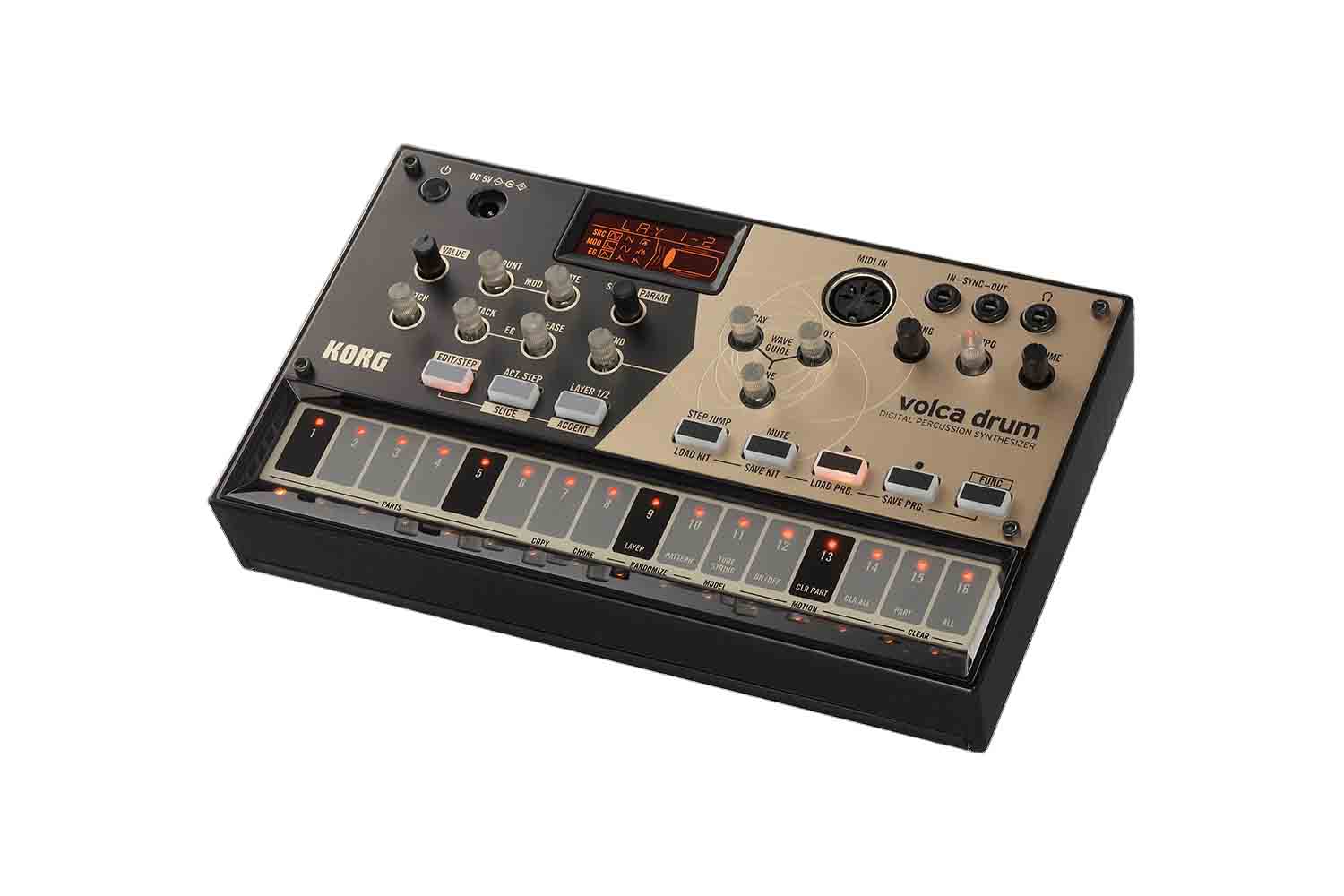
Korg Volca Drum – это цифровой перкуссионный синтезатор.
В отличие от других драм-машин, основанных на импульсно-кодово модулированных сэмплах бочки, райдов и хэтов, новое детище компании Korg использует движок от аналогово-моделирующих синтезаторов с осциллятором, создающим стандартные виды волн и шумов. Рабочая установка состоит из шести частей плюс резонансные эффекты. Пользователь может сохранить до 16 пресетов в памяти Volca (также доступно 10 заводских пресетов от звукоинженеров компании Korg). Каждая часть, в свою очередь, состоит из двух слоев, для каждого из которых пользователь должен выбрать один из пяти типов осцилляторов и последующих модуляций. Такой детальный подход к каждому звуку позволяет добиться удивительного и неповторимого звучания ритм-секции.
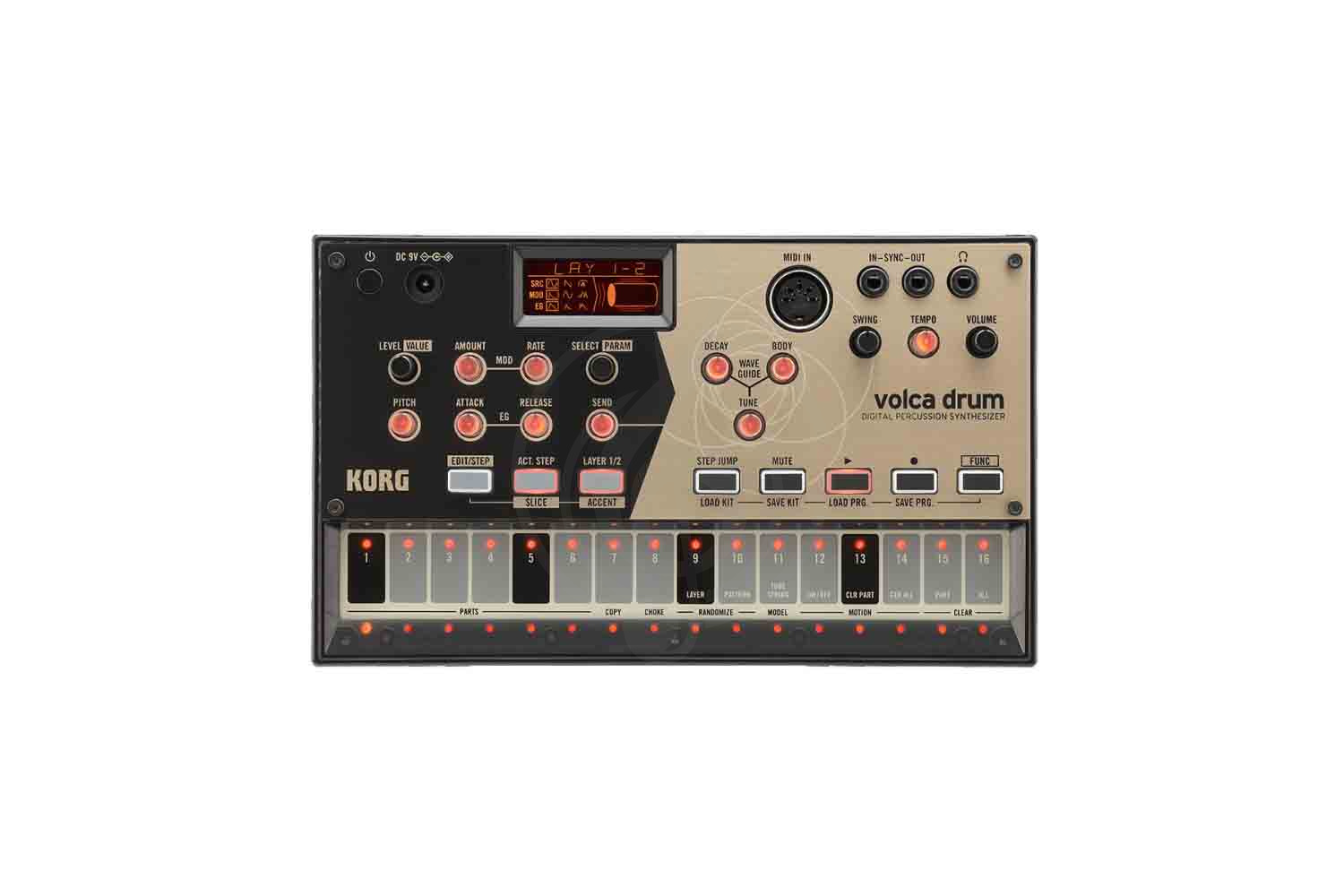
Volca Drum также оборудован 16-шаговым секвенсором, работающим как в пошаговом, так и live режиме записи, двумя рандомайзерами, позволяющими произвольно менять отдельные звуки или параметры для более живого звучания ритма и ярким дисплеем. Управление осуществляется с помощью 14 регуляторов, 8 кнопок и 16 сенсорных пэдов для работы с секвенсором.
Компактный размер драм-синтезатора, встроенный динамик и питание от аккумулятора позволяет использовать Volca Drum как в студии, так и в дороге или на концерте.
Особенности Korg Volca Drum:
- Уникальное звучание благодаря аналогово-моделирующему движку.
- Детальная настройка каждого звука.
- Возможность синхронизации с другими продуктами фирмы Korg или с цифровой рабочей студией.
- Компактный размер и алюминиевый корпус.
- 16-шаговый секвенсор.
- Korg
- Клавиши Korg
- Драм-машины Korg
Файлы для скачивания
- Инструкция для Korg Volca Drum (PDF 1 Мб 569 Кб)
1) All intellectual property contained in this library — including owner’s manuals and product literature — is the sole property of KORG Inc. Duplication of contents of owner’s manuals and/or product literature in part or in whole without the permission of the Company for the purposes of sharing, mass-producing, posting online, or personal gain of any kind is prohibited by copyright law. Users are permitted to create one (1) copy for their personal non-commercial use.
2) Materials such as owner’s manuals and related product information are intended for the use of customers who purchase and use the product (End User). The Company assumes that this material is utilized by the End User. Please be aware that the Company may not be able to respond to inquiries regarding owner’s manuals made public in this library from anyone other than customers who have purchased the products.
3) This library does not provide owner’s manuals and product information for all of the products sold by the Company. Owner’s manuals or product information may not be available for all products indefinitely or at all, and may be permanently discontinued at the Company’s discretion.
4) Contents of owner’s manuals and content as found on korg.com may differ. Information on korg.com may be updated as necessary based on changes to the product specification, operating system, included contents, and so on. Additionally, owner’s manuals may be updated to reflect these and other changes with updated production of the product.
5) Company takes no responsibility for any loss including but not limited to loss of data, financial loss, or personal loss) that might arise from the use of, or the inability to use, the manual library or the specified software.
6) Please be aware that this service may be modified or terminated at any time by the Company without specific notice.
7) Contacts for questions regarding the product, as well as other addresses, phone numbers, or email addresses listed in the owner’s manuals are current as of the date the manual was produced. For the latest contact information, please refer to the Korg.com website.
 Cautions regarding the use of the product are stated at the beginning and end of each owner’s manual. Because these cautions were based on the laws and societal understandings at the time when each manual was produced, they might not be appropriate for the present time. It is advised that End User review and strictly adhere to these Cautions.
- June 9, 2024
- KORG
Table of Contents
- Precautions
- Introduction
- Sound Controls
- Sequencer and functions
- Installing the batteries
- Battery level indicator
- Global Parameters
- Specifications
- Read User Manual Online (PDF format)
- Download This Manual (PDF format)
volca drum Digital Percussion Synthesizer
Owner’s Manual
Precautions
Location
Using the unit in the following locations can result in a malfunction.
- In direct sunlight
- Locations of extreme temperature or humidity
- Excessively dusty or dirty locations
- Locations of excessive vibration
- Close to magnetic fields
Power supply
Please connect the designated AC adapter to an AC outlet of the correct
voltage. Do not connect it to an AC outlet of voltage other than that for
which your unit is intended.
Interference with other electrical devices
Radios and televisions placed nearby may experience reception interference.
Operate this unit at a suitable distance from radios and televisions.
Handling
To avoid breakage, do not apply excessive force to the switches or controls.
Care
If the exterior becomes dirty, wipe it with a clean, dry cloth. Do not use
liquid cleaners such as benzene or thinner, or cleaning compounds or flammable
polishes.
Keep this manual
After reading this manual, please keep it for later reference.
Keeping foreign matter out of your equipment
Never set any container with liquid in it near this equipment. If liquid gets
into the equipment, it could cause a breakdown, fire, or electrical shock. Be
careful not to let metal objects get into the equipment. If something does
slip into the equipment, unplug the AC adapter from the wall outlet. Then
contact your nearest Korg dealer or the store where the equipment was
purchased.
SUPPLIER’S DECLARATION OF CONFORMITY (for USA)
Responsible Party : KORG USA INC.
Address : 316 SOUTH SERVICE ROAD, MELVILLE, NY
Telephone : 1-631-390-6500
Equipment Type : DIGITAL PERCUSSION SYNTHESIZER
Model : volca drum
This device complies with Part 15 of FCC Rules. Operation is subject to the
following two conditions:
(1) This device may not cause harmful interference, and (2) this device must
accept any interference received, including interference that may cause
undesired operation.
THE FCC REGULATION WARNING (for USA)
NOTE: This equipment has been tested and found to comply with the limits
for a Class B digital device, pursuant to Part 15 of the FCC Rules. These
limits are designed to provide reasonable protection against harmful
interference in a residential installation. This equipment generates, uses,
and can radiate radio frequency energy and, if not installed and used in
accordance with the instructions, may cause harmful interference to radio
communications. However, there is no guarantee that interference will not
occur in a particular installation. If this equipment does cause harmful
interference to radio or television reception, which can be determined by
turning the equipment off and on, the user is encouraged to try to correct the
interference by one or more of the following measures:
- Reorient or relocate the receiving antenna.
- Increase the separation between the equipment and receiver.
- Connect the equipment into an outlet on a circuit different from that to which the receiver is connected.
- Consult the dealer or an experienced radio/TV technician for help.
If items such as cables are included with this equipment, you must use those
included items.
Unauthorized changes or modification to this system can void the user’s
authority to operate this equipment.
Notice regarding disposal (EU only)
** If this symbol is shown on the product, manual, battery, or package, you
must dispose of it in the correct manner to avoid harm to human health or
damage to the environment. Contact your local administrative body for details
on the correct disposal method. If the battery contains heavy metals in excess
of the regulated amount, a chemical symbol is displayed below the symbol on
the battery or battery package.
IMPORTANT NOTICE TO CONSUMERS
This product has been manufactured according to strict specifications and
voltage requirements that are applicable in the country in which it is
intended that this product should be used. If you have purchased this product
via the internet, through mail order, and/or via a telephone sale, you must
verify that this product is intended to be used in the country in which you
reside.
WARNING:** Use of this product in any country other than that for which it
is intended could be dangerous and could invalidate the manufacturer’s or
distributor’s warranty. Please also retain your receipt as proof of purchase
otherwise your product may be disqualified from the manufacturer’s or
distributor’s warranty.
- All product names and company names are the trademarks or registered trademarks of their respective owners.
Introduction
Thank you for purchasing the Korg volca drum digital percussion synthesizer.
The volca drum is a rhythm sequencer built around a digital synthesis engine
focused on percussive sounds. Six drum parts can be tweaked at will to create
original drum kits. From pure tone impulses to gritty distorted crunches, a
wide array of sounds can be created, and further enhanced with a waveguide-
based resonator effect to create other-worldly rhythms.
Sound Controls
These knobs and buttons control the sound of the currently selected drum part
and waveguide resonator effect. As illustrated below, each part has two
identical layers and the
waveguide resonator is shared for all parts.

LAYER 1/2 button
Toggle the selected layer. The button will light up when both layers are
selected at once.
LEVEL [VALUE] knob
Set the gain level of the selected layer. When EDIT/STEP is lit, this knob
sets the value of the part parameter selected via the SELECT [PARAM] knob.
PITCH knob
Set the pitch for the selected layer.
MOD AMOUNT knob
Set the amount of pitch modulation for the selected layer.
MOD RATE knob
Set the pitch modulation rate for the selected layer.
EG ATTACK knob
Set the attack time of the amplitude envelope generator for the selected
layer.
EG RELEASE knob
Set the release time of the amplitude envelope generator for the selected
layer.
SELECT [PARAM] knob
Cycle through permutations of sound sources, pitch modulators, and
amplitude envelopes for the selected layer. Sound sources (SRC): sine wave ,
sawtooth wave , high pass filtered noise , low pass filtered noise and band
pass filtered noise . Pitch modulators (MOD): rise-fall , oscillate , and
random . Amplitude envelope generators (EG): linear attack-release ,
exponential attack-release , multi-peak attack-release . When EDIT/STEP is
lit, this encoder functions as the PARAM knob, cycling through the following
additional part parameters:
BIT: bit reduction amount
FLD: wave folder amount
DRV: overdrive gain
PAN: left-right pan
GAN: pre-mix gain adjustment
WAVEGUIDE
SEND knob
Set the waveguide resonator send amount for the selected part.
DECAY knob
Set the decay time of the waveguide resonator.
BODY knob
Set the timbral character of the waveguide resonator.
TUNE knob
Set the pitch tuning of the waveguide resonator. For low values, the tuning
goes below audible frequencies and effectively turns the waveguide resonator
into a delay-like effect.
DISPLAY

(POWER) button
Press this button to turn the volca drum on. To turn the volca drum off,
hold this button for approximately one second.
Auto power-off
The auto power-off function will automatically turn the volca drum off after
roughly four hours have passed with no sound being produced. The auto power-
off function can be disabled using the global parameters. (See Global
parameters.)
DC 9V Jack
Connect the plug end of the optional AC adapter to this jack.
Only use the specified AC adapter. Using any AC adapter other than the
specified model could damage the volca drum.
MIDI IN connector
By connecting a MIDI cable to this input, the volca drum can be played and
controlled by the MIDI output of an external device.
TIP: The MIDI implementation chart can be downloaded from the Korg
website.
Setting the MIDI channel
- While holding down the REC button, turn the volca drum on.
- Step buttons 1 to 16 correspond to the MIDI channels 1 to 16. Press the button that corresponds to the desired channel, and the LED below the step button will light up.
TIP: Tapping the step for the selected channel (LED lit up) cancels the
selection and reverts to part 1–6 assigned to channels 1–6. (factory default)
SYNC (IN, OUT) jacks
These jacks allow you to synchronize your volca drum to another Korg volca, or
other compatible equipment—including an analog sequencer or a DAW. The
polarity of the SYNC jacks can be set using the global parameters.
- SYNC OUT: A 5 V pulse of 15 ms is sent at the beginning of each step.
- SYNC IN: If this jack is connected, the internal step-clock will be ignored, and the volca drum sequencer will advance according to the pulses received here.
(Headphone) jack
Connecting your headphones to this 3.5mm stereo mini jack will mute the volca
drum’s internal speaker and allow you to create music in private.
VOLUME knob
Set the output level of the volca drum.

Sequencer and functions
TEMPO knob
Set the speed of the sequencer.
SWING knob
This knob moves even-numbered steps a maximum of 75% backward. Hold down the
FUNC button while turning this knob to move the steps in the opposite
direction.
Step buttons 1 to 16
By default, step buttons 1 to 6 are used to trigger and select parts. These
buttons also represent the 16 steps of the internal sequencer, and provide
access to various functions.
EDIT/STEP button
Enter step edit mode and enable access to the SLICE and ACCENT buttons. Press
a step button (1—16) to toggle that step on/off for the selected part. Also,
while holding a step button, the LEVEL [VALUE] knob sets the probability for
that step to be played. Press this button again to exit.
SLICE button: Enter slice edit mode. Press step buttons (1—16) to toggle
slicing of that step on/off for the selected part. Also, while holding a step
button, the LEVEL [VALUE] knob sets the number of slices for that step. Press
this button again to exit.
ACCENT button: Enter accent edit mode. Press step buttons (1—16) to
toggle accents on/off for the selected part. Also, while holding a step
button, the LEVEL [VALUE] knob sets the amount of accent for that step. Press
this button again to exit.
ACT. STEP button
Enter active step edit mode. Press step buttons (1—16) to set steps as
active/inactive for the selected part. Inactive steps will be skipped during
playback. Press this button again to exit.
TIP: Use different active step settings on each part to create phasing
polyrhythms.
STEP JUMP button
Enter step jump mode. Pressing a step button (1—16) will jump to that step.
Press again to exit.
MUTE button
While holding this button, press a step button (1—6) to mute/unmute the
corresponding part.
(PLAY) button
Start/stop sequencer playback. This button will light up during playback.
(REC) button
Record your performance on step buttons 1—6, and on the transparent sound
control knobs if motion sequencing is enabled. Pressing this button while
playback is stopped will enter record-ready mode; recording will start when
the PLAY button, or a step button (1—6) is pressed. Pressing this button
during playback will start recording from the point at which you pressed the
button.
TIP: During playback, knobs with recorded motion will light up.
TIP: When motion sequencing is enabled, record will be automatically
deactivated one cycle after the first knob motion is recorded.
FUNC (FUNCTION) button
When held down, this button enables access to various volca drum functions.
See below for possible combinations. To exit any of these modes, press the
FUNC button one more time.
FUNC + LOAD KIT: Enter load kit mode. Press a step button (1—16) to load
the corresponding kit. Locations 1 to 10 come preloaded with preset kits.
TIP: A kit consists of the sound controls for each part, and the
waveguide resonator.
FUNC + SAVE KIT: Enter save kit mode. Press a step button (1—16) to save
the current kit to the corresponding memory location.
FUNC + LOAD PRG.: Enter load program mode. Press a step button (1—16) to
load the corresponding program, and its associated kit. Locations 1—10 come
preloaded with preset programs. Also, while holding a step button, pressing a
second step button will load the corresponding sequence of programs in chain-
mode; each program will be played consequently.
TIP: A program consists of the sequencer pattern for each part, motion
sequencing data, and a kit number.
FUNC + SAVE PRG.: Enter save program mode. Press a step button (1—16) to
save the current program to the corresponding memory location.
TIP: The value of the SWING, TEMPO and VOLUME knobs will not be saved.
FUNC + PARTS (1—6): Select one of the six drum parts without triggering
it.
FUNC + COPY (7): Enter part copy mode. Press a step button (1—6), to copy
the current part’s sound controls, sequencer pattern and motion data to the
corresponding part.
FUNC + CHOKE (8): Enter choke select mode. Press step buttons (1—6) to
enable/disable choke for the corresponding part. Only one of the parts with
choke enabled will play at any given time, prioritizing the lowest part
number.
FUNC + RANDOMIZE LAYER (9): Randomize the sound controls for the selected
layer(s).
FUNC + RANDOMIZE PATTERN (10): Randomize the steps, slices, accents and
active steps for the selected part.
FUNC + MODEL (11): Toggle between the two waveguide resonator models.
FUNC + MOTION ON/OFF (12): Enable/disable knob motion sequencing. (See
also REC button)
FUNC + MOTION CLR PART (13): Clear knob motion sequencing data for the
selected part.
FUNC + MOTION CLR ALL (14): Clear all knob motion sequencing data.
FUNC + CLEAR PART (15): Clear the current part’s steps, slices, accents,
motion and resets active steps to the default value.
FUNC + CLEAR ALL (16): Clear steps, slices, accents, motion and resets
active steps to the default value. Returning all data to the factory defaults
-
While holding down the FUNC and PLAY buttons, turn on the volca drum.
“Fct rESt” will appear on the display, and the REC and PLAY buttons will
blink. -
Press the REC button to return to the factory defaults and start volca drum.
Press the PLAY button to cancel the reset operation and simply start volca
drum.
Installing the batteries
On the back panel, locate the battery compartment and slide off the cover.
Insert the batteries—being sure to observe the correct polarity—and then
replace the battery cover.
Turn the volca drum off before replacing the batteries.
Remove depleted batteries at once. Depleted batteries left in the battery
compartment may leak over time, and may cause malfunctions. Also, remove the
batteries if you will not be using the volca drum for an extended period of
time.
Do not mix partially used batteries with new ones, and do not mix batteries of
differing types.
Battery level indicator
When the volca drum is turned on, the LEDs below the step buttons indicate the
remaining amount of battery power. If all LEDs are lit up, the batteries are
completely full. Fewer lit LEDs mean that the battery level is correspondingly
lower.
When using the AC adapter, the remaining battery level will not be indicated
correctly.
TIP: Either alkaline or nickel-metal hydride batteries can be used.
In order for the remaining battery level to be detected and indicated
correctly, the type of batteries being used must be specified in the global
parameters of the volca drum.
TIP: If the batteries are running low during usage of the volca drum, the
low battery warning “bt.Lo” will appear in the display. If the batteries run
down completely, the volca drum automatically turns off.
Global Parameters
- While holding down FUNC button, turn on the volca drum.
- Use the step buttons 1—8 to set your preferences for any or all of the global parameters. (Refer to the table.)
- When you have finished, press the (REC) button. Your settings will be saved, and the volca drum will restart. To cancel without making changes, press the (PLAY) button.
| Button | LED lit | LED unlit |
|---|---|---|
| Parameter | Status | Display indication |
Display indication
1| Auto| Enabled| APO on| Disabled| APO oFF
2| Battery| Nickel-metal hydride| BAT nick| Alkaline| BAT alka
3| Sync Out polarity| Fall| SYO Low| Rise| SYO hIGh
4| Sync In polarity| Fall| SYI Low| Rise| SYI hIGh
5| Tempo range settings| Full (10-600)| TMP FuLL| Narrow (56-240)| TMP narr
6| MIDI Clock Src| Auto| MCL auto| Internal| MCL Int
7| MIDI RX ShortMessage| On| MST on| Off| MST oFF
8| Sync input/output| Once a step| 1 StP| Once every 2 steps| 2StP
*: Factory default setting
Specifications
KORG INC. 4015-2 Yanokuchi, Inagi-City, Tokyo 206-0812 JAPAN
© 2018 KORG INC.
www.korg.com
Published 4/2019
Printed In Vietnam
Read User Manual Online (PDF format)
Read User Manual Online (PDF format) >>
Download This Manual (PDF format)
Download this manual >>
Драм-машины
Код товара: 45398
Тип: Драм-машина
Артикул: VOLCA DRUM
-
Производитель:
Korg
-
Количество клавиш:
16
-
Тип:
Драм-машина
-
Цвет:
Черный
Остались вопросы?
Получите консультацию нашего специалиста
- Описание VOLCA DRUM
- Характеристики VOLCA DRUM
- Инструкции
- Отзывы VOLCA DRUM
- Похожие
- Аксессуары
Драм-машина Korg VOLCA DRUM
KORG VOLCA DRUM представляет собой перкуссионный синтезатор в котором звуки создаются при помощи аналогового моделирования на базе DSP процессора.
В отличие от других драм-машин, основанных на импульсно-кодово модулированных сэмплах бочки, райдов и хэтов, новое детище компании Korg использует движок от аналогово-моделирующих синтезаторов с осциллятором, создающим стандартные виды волн и шумов. Рабочая установка состоит из шести частей плюс резонансные эффекты. Пользователь может сохранить до 16 пресетов в памяти Volca (также доступно 10 заводских пресетов от звукоинженеров компании Korg). Каждая часть, в свою очередь, состоит из двух слоев, для каждого из которых пользователь должен выбрать один из пяти типов осцилляторов и последующих модуляций. Такой детальный подход к каждому звуку позволяет добиться удивительного и неповторимого звучания ритм-секции. Volca Drum также оборудован 16-шаговым секвенсором, работающим как в пошаговом, так и live режиме записи, двумя рандомайзерами, позволяющими произвольно менять отдельные звуки или параметры для более живого звучания ритма и ярким дисплеем. Управление осуществляется с помощью 14 регуляторов, 8 кнопок и 16 сенсорных пэдов для работы с секвенсором. Компактный размер драм-синтезатора, встроенный динамик и питание от аккумулятора позволяет использовать Volca Drum как в студии, так и в дороге или на концерте.
Характеристики драм-машины:
- Клавиатура: Мультитач Клавиатура/Секвенсор
- Тип синтезатора: Цифровой
- Максимальная полифония: 6
- Структура: 6 частей (для каждой части 2 генератора, модулятор высоты тона и усилитель EG), эффект резонатора волновод
- Секвенсор: 16 шагов
- Габариты (Ш х Г х В) 193 × 115 × 39 мм
- Вес 370 г (без батарей)
Секвенсор
- Количество частей 6
- Количество шагов 16 (имеется цепочка шаблонов)
- Количество шаблонов записи 16
Разъемы
- Аудио Выход
- Разъем для наушников (стерео мини-разъем 3,5 мм)
- Разъем Sync Sync In (монофонический мини-разъем 3,5 мм, максимальный входной уровень: 20 В)
- Гнездо Sync Out (монофонический мини-разъем 3,5 мм, максимальный уровень выходного сигнала: 5 В)
- MIDI MIDI IN
Питание:
- Срок службы батареи: Приблизительно 10 часов (при использовании щелочных батарей)
- Источник питания: щелочная батарея AA × 6, никель-металл-гидридная батарея AA × 6 или адаптер переменного тока «KA-350» (продается отдельно).
- В комплекте поставляется: щелочная батарея AA × 6, кабель синхронизации
Принадлежности (продаются отдельно)
- Адаптер переменного тока KA-350
- Жесткий чехол SEQUENZ CB-4VOLCA
- Мягкий чехол SEQUENZ CC-VOLCA
- Кабель синхронизации SQ-CABLE-6
Драм-машина Korg VOLCA DRUM характеристики товара
| Производитель | Korg |
| Количество клавиш | 16 |
| Цвет | Черный |
| Пресеты | 16 |
| Расположение разъемов | сверху |
| Питание | От батареек |
| Дисплей | Есть |
| Блок питания | В комплект не входит, приобретается отдельно |
| Страна | Япония |
Драм-машина Korg VOLCA DRUM инструкция на русском языке
На этот товар еще нет инструкций
Отзывы на Korg VOLCA DRUM
- На этот товар еще нет отзывов.
Сопутствующие товары KORG VOLCA DRUM — Драм-машина
-
Наушники
Остались вопросы?
Получите консультацию нашего специалиста
- Описание VOLCA DRUM
- Характеристики VOLCA DRUM
- Инструкции
- Отзывы VOLCA DRUM
- Похожие
Драм-машина Korg VOLCA DRUM
KORG VOLCA DRUM — Драм-машина.
Драм-машина Korg VOLCA DRUM характеристики товара
| Производитель | Korg |
| Цвет | Черный |
| Количество клавиш | 16 |
| Тип | Драм-машина |
| Расположение разъемов | сверху |
| Пресеты | 16 |
| Дисплей | Есть |
| Блок питания | В комплект не входит, приобретается отдельно |
| Питание | От батареек |
| Страна | Япония |
Драм-машина Korg VOLCA DRUM инструкция на русском языке
На этот товар еще нет инструкций
Отзывы на Korg VOLCA DRUM
Похожие товары Korg VOLCA DRUM