

Models DFC1 DFC2 DFC3
Check:
•
that it is plugged in and switched on
at the mains socket
•
the connection and fuse.
•
that the accessories are correctly
fitted on to the drive.
•
that the lids and handles are
correctly fitted.
•
when using the bowl assembly (B),
that the Liquidiser drive cover (A1)
is locked.
•
when using the Liquidiser, ensure
that the tab on the lid is correctly
locked under the handle
The accessories contained with the model that you
have just bought are shown on the label that appears
on the top of the packaging.
You can buy the following accessories or replacements by mail order from our
approved Moulinex Service Centre (at the telephone number above). They are also
available on our website.
If your appliance still does not work or if you have any product problems or queries,
please contact our Customer Relations Team first for expert help and advice:
HELPLINE:
UK 0845 602 1454 Ireland (01) 4751947
or consult our website
www.moulinex.co.uk
WHAT TO DO IF YOUR APPLIANCE DOES NOT WORK?
ACCESSORIES & REPLACEMENTS
Accessories
French fries disc (disc E)
Grating disc for coconut &
parmesan (disc G)
Coarse grating disc (disc C)
Thick slicing disc (disc H)
Fine grating disc (A)
Thin slicing disc (D)
Grinder
Mini-chopper
Accessories
Whisk
Plastic kneader blade
Citrus press
Liquidiser jug
Metal blade
Emulsifying disc
Juice extractor
Spatula
Storage basket
Recipes by Glenis Noble, produced by M4 Design Company, ©Groupe SEB Moulinex 06/05
0 891 855
Odacio 3 Food Processor
Instructions and Recipes
Environment protection first!
Your appliance contains valuable materials which an be recovered or recycled.
Leave it at a local civic waste collection point.

Models DFC7
Check:
• that it is plugged in and switched on
at the mains socket
• the connection and fuse.
• that the accessories are correctly
fitted on to the drive.
• that the lids and handles are
correctly fitted.
• when using the bowl assembly (B),
that the Liquidiser drive cover (A1)
is locked.
• when using the Liquidiser, ensure
that the tab on the lid is correctly
locked under the handle
The accessories contained with the model that you
have just bought are shown on the label that appears
on the top of the packaging.
You can buy the following accessories or replacements by mail order from our
approved Moulinex Service Centre (at the telephone number above). They are also
available on our website.
If your appliance still does not work or if you have any product problems or queries,
please contact our Customer Relations Team first for expert help and advice:
HELPLINE:
UK 0845 602 1454 Ireland (01) 4751947
or consult our website
www.moulinex.co.uk
WHAT TO DO IF YOUR APPLIANCE DOES NOT WORK?
ACCESSORIES & REPLACEMENTS
Accessories
French fries disc (disc E)
Grating disc for coconut &
parmesan (disc G)
Coarse grating disc (disc C)
Thick slicing disc (disc H)
Fine grating disc (A)
Thin slicing disc (D)
Grinder
Mini-chopper
Accessories
Whisk
Plastic kneader blade
Citrus press
Liquidiser jug
Metal blade
Emulsifying disc
Juice extractor
Spatula
Storage basket
Recipes by Glenis Noble, produced by M4 Design Company, ©Groupe SEB Moulinex 06/05
0 891 856
Odacio 3 Food Processor
Instructions and Recipes
Environment protection first!
Your appliance contains valuable materials which an be recovered or recycled.
Leave it at a local civic waste collection point.
MOULINEX
Loading…
M
- MOULINETTE3
- MOULINETTE 1.2.3 A327
- MOULINETTE 1.2.3 A327R1
- MOULINETTE AD5686
- MOULINETTE T71
- MS5525
- MSTTR77WH
- MU 4000
- Multitrio2
- MV 10006
- MV 10032
- MV 1007
- MV 100730
- MV140132
- MW2000
- MW2001
- MW2201
- MW220131
- MW2210
- MW2300
- MW531030
- MW533031
- MW700131
- MX 101701 AKU
- MX232001
- MX 23232
- MX2323012
- MX4113
- MX4117
- MX4129
- MX 4137
- MX4221
- MX4423WA
- MX4441
- MX4663
- MX4769
- MX476901
- MX 5221
- MX 5236
N
- NESCAFÉ DOLCE GUSTO
- NOIR/VERT
- NOUMEA
- noveo
- NS 1010
- NS 1020
- NS 1040
- NUTRIBREAD
O
- OCEALYS
- OCEALYS AQUAVISION
- Odacio2
- ODACIO 35
- Odacio 3 DFC12
- Odacio 3 DFC22
- Odacio 3 DFC32
- ODACIO 3 FOOD PROCESSOR DFC7
- ODACIO 5
- ODACIO 7
- ODACIO DFC456
- Odacio DFC6
- ODACIO FP723
- OLEA
- OPEN MATIC
- OPTIBLEND
- OPTICHEF
- Opticlik
- OPTICOOK AY66
- OPTICOOK AY79
- OPTICOOK AY85
- Optigril AFW2
- OPTIGRILL2
- OPTIMIX
- OPTIMO2
- Optimo 19L
- OPTIMO GRILL
- Optimo Power
- OPTIPRO
- OPTIPRO DD 904143
- OPTIQUICK
- OPTIQUICK AY62
- OPTIQUICK AY82
- OPTIQUICK ORIGINAL
- OPTIQUICK Y62
- OPTIQUICK Y82
- OUVRE BOITE EASYOPEN
- OV100000
- OV1250
- OV125001
- OV181001
- OV1850
- OV 1851
- OV185101 Principio
- OV1880
- OV2066
- OVATIO3
- Ovatio 22
- Ovatio 32
- OVATIO AT4
- OVATIO AT5
- Ovatio AT72
- OVATIO ATA
Loading…
Loading…
Nothing found
ODACIO 3
user Manual
16 pgs993.08 Kb0
User Manual [fr]
12 pgs329.39 Kb0
User Manual [fr]
9 pgs491.29 Kb0
User Manual [fr]
10 pgs1.52 Mb0
User Manual [fr]
27 pgs937.49 Kb0
Table of contents
Loading…
…
MOULINEX User Manual [fr]
Download
Specifications and Main Features
Frequently Asked Questions
User Manual
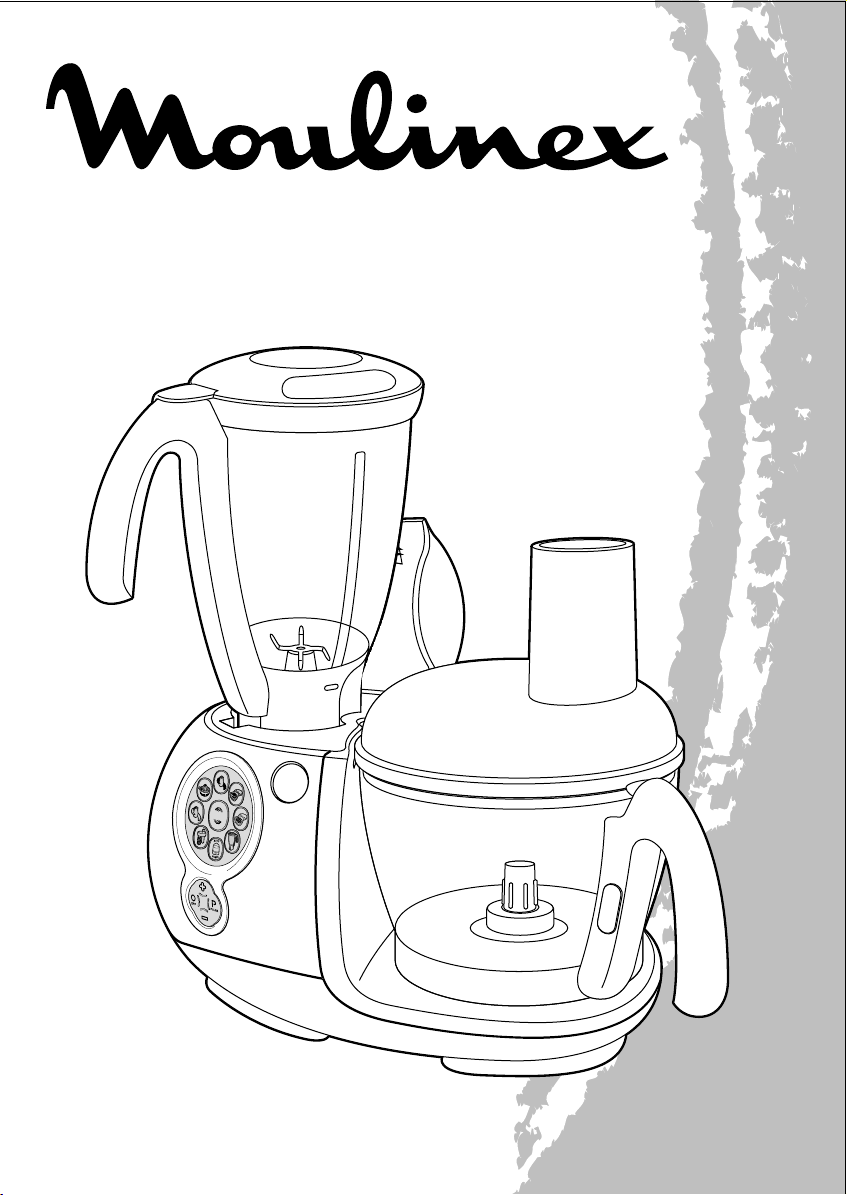
BOOSTER
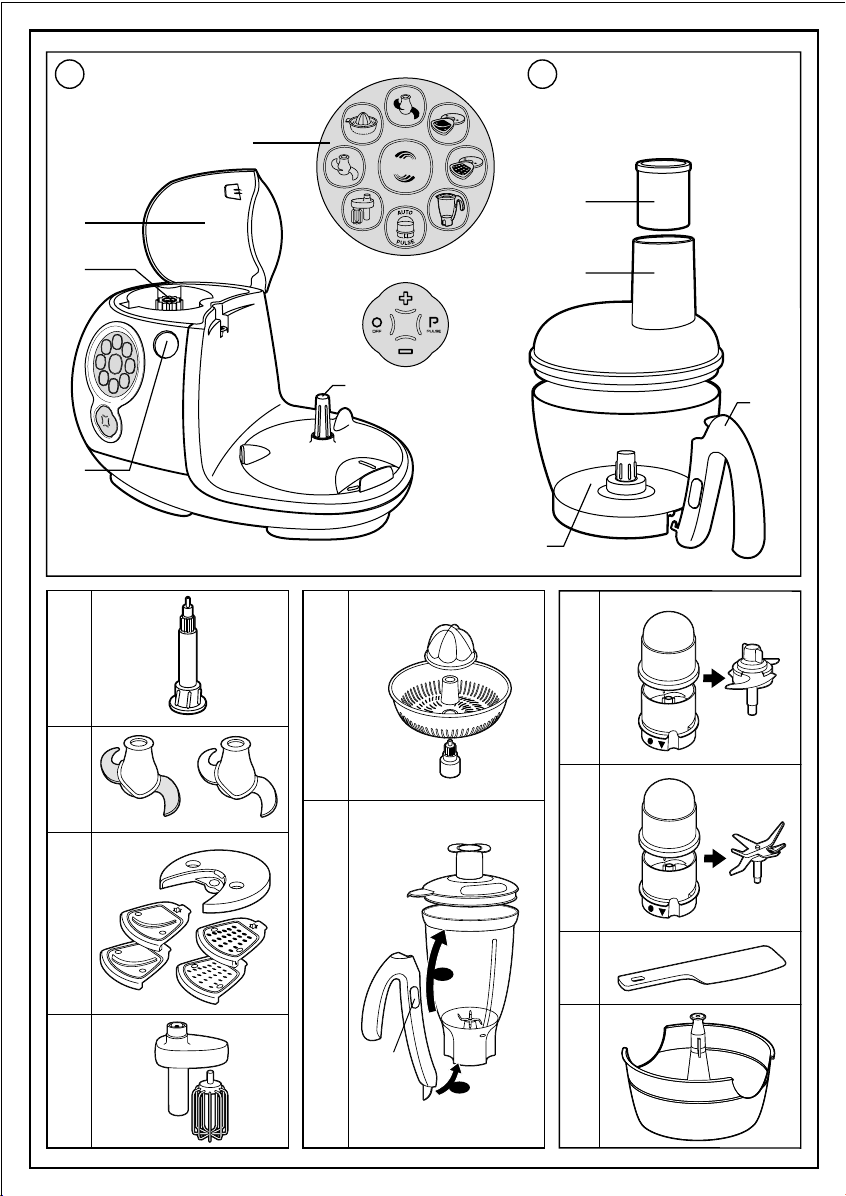
A B
A5
BOOSTER
A1
B1
C
D
A2
A4
E
E1
E2
D1
D2
B2
A3
B3
G1
G
G2
G3
H1
H2
H3
H4
H
2
I1
I
I2
J1
J
J2
K
B4
F1
F
F2
H4a
1
L
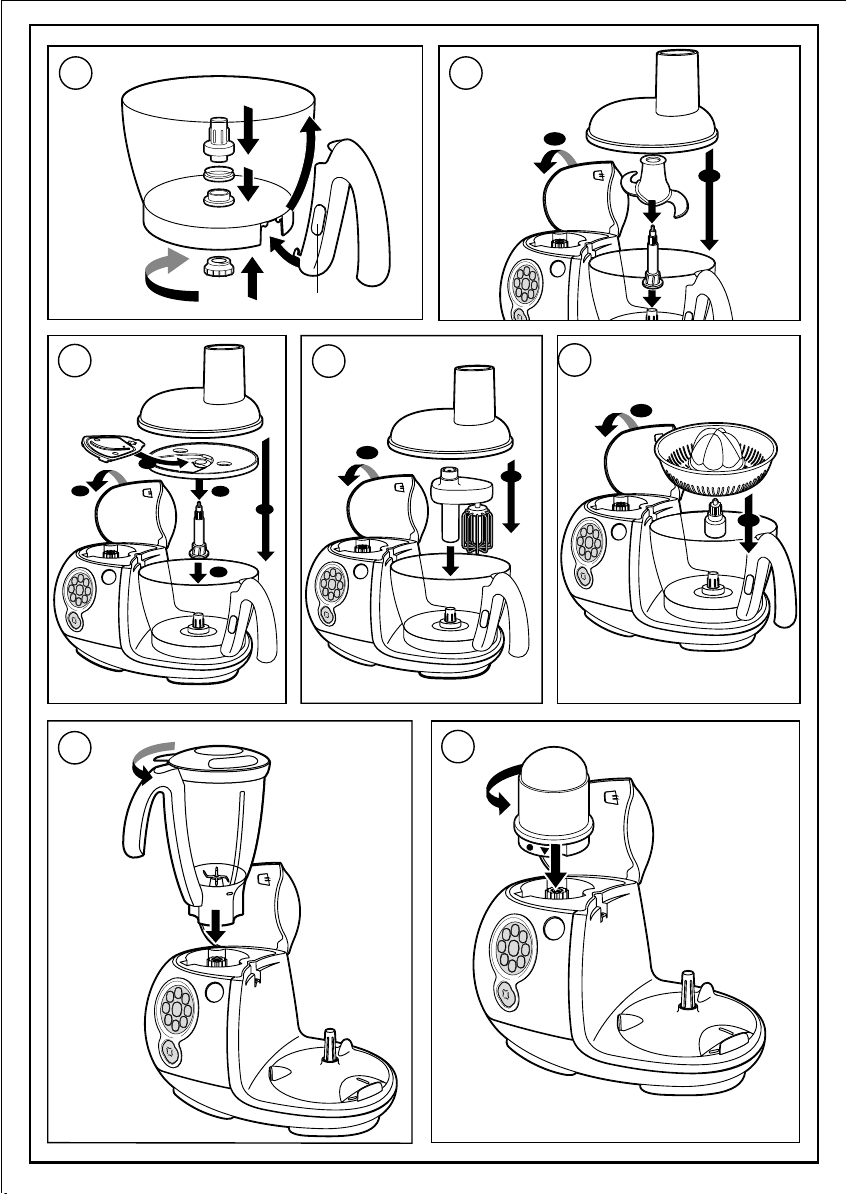
1
B3a
2
2
1
B3b
3
1
5
2
3
6
B4a
4
2
4
5
2
1
1
7
Loading…
+ 6 hidden pages
You need points to download manuals.
1 point = 1 manual.
You can buy points or you can get point for every manual you upload.
Buy points
Upload your manuals
Ask the publishers to restore access to 500,000+ books.
Internet Archive Audio
Live Music Archive
Librivox Free Audio
Featured
- All Audio
- Grateful Dead
- Netlabels
- Old Time Radio
- 78 RPMs and Cylinder Recordings
Top
- Audio Books & Poetry
- Computers, Technology and Science
- Music, Arts & Culture
- News & Public Affairs
- Spirituality & Religion
- Podcasts
- Radio News Archive
Images
Metropolitan Museum
Cleveland Museum of Art
Featured
- All Images
- Flickr Commons
- Occupy Wall Street Flickr
- Cover Art
- USGS Maps
Top
- NASA Images
- Solar System Collection
- Ames Research Center
Software
Internet Arcade
Console Living Room
Featured
- All Software
- Old School Emulation
- MS-DOS Games
- Historical Software
- Classic PC Games
- Software Library
Top
- Kodi Archive and Support File
- Vintage Software
- APK
- MS-DOS
- CD-ROM Software
- CD-ROM Software Library
- Software Sites
- Tucows Software Library
- Shareware CD-ROMs
- Software Capsules Compilation
- CD-ROM Images
- ZX Spectrum
- DOOM Level CD
Texts
Open Library
American Libraries
Featured
- All Texts
- Smithsonian Libraries
- FEDLINK (US)
- Genealogy
- Lincoln Collection
Top
- American Libraries
- Canadian Libraries
- Universal Library
- Project Gutenberg
- Children’s Library
- Biodiversity Heritage Library
- Books by Language
- Additional Collections
Video
TV News
Understanding 9/11
Featured
- All Video
- Prelinger Archives
- Democracy Now!
- Occupy Wall Street
- TV NSA Clip Library
Top
- Animation & Cartoons
- Arts & Music
- Computers & Technology
- Cultural & Academic Films
- Ephemeral Films
- Movies
- News & Public Affairs
- Spirituality & Religion
- Sports Videos
- Television
- Videogame Videos
- Vlogs
- Youth Media
Search the history of over 928 billion
web pages
on the Internet.
Search the Wayback Machine
Search icon
An illustration of a magnifying glass.
Mobile Apps
- Wayback Machine (iOS)
- Wayback Machine (Android)
Browser Extensions
- Chrome
- Firefox
- Safari
- Edge
Archive-It Subscription
- Explore the Collections
- Learn More
- Build Collections
Save Page Now
Capture a web page as it appears now for use as a trusted citation in the future.
Please enter a valid web address
- About
- Blog
- Projects
- Help
- Donate
- Contact
- Jobs
- Volunteer
- People
- About
- Blog
- Projects
- Help
-
Donate
Donate icon
An illustration of a heart shape - Contact
- Jobs
- Volunteer
- People
Bookreader Item Preview
Flag this item for
-
Graphic Violence
-
Explicit Sexual Content
-
Hate Speech
-
Misinformation/Disinformation
-
Marketing/Phishing/Advertising
-
Misleading/Inaccurate/Missing Metadata
texts
Moulinex Odacio 3 DFC1 user manual
- Topics
- manualsbase, manuals,
- Collection
- manuals_contributions; manuals; additional_collections
- Language
- English
- Item Size
- 12.6M
- Addeddate
- 2020-06-02 22:29:56
- Identifier
- manualsbase-id-21823
- Identifier-ark
- ark:/13960/t9871b719
- Ocr
- ABBYY FineReader 11.0 (Extended OCR)
- Ppi
- 300
- Scanner
- Internet Archive Python library 1.9.3
plus-circle Add Review
plus-circle Add Review
comment
Reviews
There are no reviews yet. Be the first one to
write a review.
249
Views
1
Favorite
DOWNLOAD OPTIONS
download 1 file
ABBYY GZ download
download 1 file
DAISY download
For users with print-disabilities
download 1 file
EPUB download
download 1 file
FULL TEXT download
download 1 file
ITEM TILE download
download 1 file
PAGE NUMBERS JSON download
download 1 file
PDF download
download 1 file
SINGLE PAGE PROCESSED JP2 ZIP download
download 1 file
TORRENT download
download 14 Files
download 6 Original
SHOW ALL
IN COLLECTIONS
Manuals: Contributions Inbox
The Manual Library
Additional Collections
Uploaded by
chris85
on
SIMILAR ITEMS (based on metadata)
Terms of Service (last updated 12/31/2014)
-
Home
>
-
Instructions
>
-
Food preparation
>
-
Food processor
>
User manual and frequently asked questions ODACIO 3
Reference : DFC34M
Voir les documents liés
Voir les questions les plus fr�quentes
FAQ
Before using your appliance for the first time, wash all parts of the accessories in warm soapy water (see section on cleaning in your instruction manual). Rinse and dry.
Place the motor unit on a flat, clean and dry surface.
Plug in your appliance.
Liquids should be allowed to cool to room temperature before processing. Do not put hot ingredients into the bowl as the heat from the ingredients may cause the seal to perish.
Higher speeds are used for attachments such as the liquidiser and the slicing and grating discs, however, attachments such as a citrus press or a dough tool should be used with a slower speed.
The pulse button is used when you need short bursts of power at the optimum speed. This is a more commonly used function when using the blender and is controlled by the user which means you control how long the machine runs for in this mode. It is a useful way of avoiding over-processing of ingredients. For example, it can be used to mix fruit into a cake mixture at the end of processing or blending soft fruit into yoghurt for making a smoothie.
The stainless steel blade is used for: mixing, blending, pureeing, making breadcrumbs, batters, pastry & cakes. The blender attachment is used for pureeing liquids only (ie: soups, milkshakes etc.) or pureeing soft fruits or cooked vegetables and fruit. It should not be used for mincing meat or kneading heavy dough and pastry.
In order to reduce discolouration, rub the stained areas with a cloth or a paper towel dipped in cooking oil, then clean as usual.
It is essential to clean immediately after use to avoid any staining.

Unplug the appliance.
For easier cleaning, rinse the accessories immediately after use.
Wash and dry the accessories: they can be washed in the dishwasher, in water or under the tap, with the exception of the motor unit, the mincer assembly (reducer + mincer head)*, the mixer drive unit*, and the juicer body* (* depending on model). Wipe these with a damp sponge.
Once they have been dried, coat the blade and mincer grills with cooking oil to keep them lubricated.
Pour hot water with a few drops of washing-up liquid into the mixer bowl, close the lid fitted with the feeder cap, pulse a few times, unplug the appliance and rinse the bowl.
The blades of the accessories are very sharp, handle them with care.
Many Food Processors have dishwasher safe parts, such as the bowl or blades, however it is often a product specific feature so for more information please refer to the appliance use and care instructions. The motor housing of a Food Processor should never be put in the dishwasher.
Try checking that the interlocking system is fully in place. All Food Processors need to have the bowl and the lid fitted correctly before processing will start, this is a safety feature so that the blades cannot spin while exposed. When the bowl and lid are locked into place securely, the markings on them will be aligned.
After following the instructions in the user manual for starting the appliance, make sure that your electrical socket is working by plugging another appliance. If it still does not work, do not try to dismantle or repair the appliance yourself, instead, take it to an approved repair centre
Do not use your appliance. To avoid any danger, have it replaced by an approved repair centre.
Putting hot liquid into the bowl which can distort the seals, using too much liquid, Axis seal not replaced correctly after washing.
An emulsifying disc works in a different way than a traditional style dual beater whisk. When using an emulsifying disc the mixture is revolved around the bowl and when using dual beaters, the air is incorporated into the mixture more quickly, resulting in lighter and fluffier dough or batter.
A Food Processor is an appliance that aims to do most jobs you could want to do in a kitchen when preparing food, both quicker and with less effort than it would be to do such jobs by hand. The primary functions of a Food Processor are chopping, grating and mixing. Nearly all available Food Processors also have shredding and slicing functions of some sort.
A Kitchen Machine works differently from a Food Processor as the tools used for mixing are suspended from an overhead arm into the food, whereas with a Food Processor, the mixing tools operate from underneath the ingredients. A Kitchen Machine is primarily for mixing dough and cake mixtures. A Food Processor can do these jobs but not with the efficiency of a kitchen machine. If you are planning on making cakes you should consider how much you will be doing this job. If it is going to be a common occurrence then a Kitchen Machine would be a better choice. It is worth taking note of the fact that a Food Processor is far smaller than a Kitchen Machine.
Your appliance contains valuable materials which can be recovered or recycled. Leave it at a local civic waste collection point.
If you believe that one part is missing, please call Consumer Services Center and we will help you find a suitable solution.
Please go to the “Accessories” section of the website to easily find whatever you need for your product.
Find more detailed information in the Guarantee section of this website.
See the services