


Caution:
The normal operation of this product may be affected by a strong electrostatic discharge (ESD).
In the event of this happening, simply reset the unit by removing and then replugging the USB
cable. Normal operation should return.
Trade Marks
The Novation trade mark is owned by Focusrite Audio Engineering Ltd. All other brand, product and
company names and any other registered names or trade marks mentioned in this manual belong to
their respective owners.
Disclaimer
Novation has taken all possible steps to ensure that the information given here is both correct and
complete. In no event can Novation accept any liability or responsibility for any loss or damage to the
owner of the equipment, any third party, or any equipment which may result from use of this manual
or the equipment which it describes. The information provided in this document may be modified
at any time without prior warning. Specifications and appearance may differ from those listed and
illustrated.
Copyright and Legal Notices
Novation is a registered trade mark of Focusrite Audio Engineering Limited. Launchpad Pro is a trade
mark of Focusrite Audio Engineering Plc.
2019 © Focusrite Audio Engineering Limited. All rights reserved.
Novation
Tel: +44 1494 462246
A division of Focusrite Audio Engineering Ltd.
Windsor House, Turnpike Road
Cressex Business Park , High Wycombe
Buckinghamshire , HP12 3FX
Fax: +44 1494 459920
e-mail: sales@novationmusic.com
Web: www.novationmusic.com
United Kingdom
2

Contents
1. Introduction …………………………………………………………………………………………………………..6
1.1 Launchpad Pro Key Features ……………………………………………………………………………………….6
1.2 In the Box …………………………………………………………………………………………………………………7
2. Getting Up and Running ………………………………………………………………………………………….7
2.1.1 If you’re on a Mac: ……………………………………………………………………………………………………………………………………………7
2.1.2 If you’re on Windows: ………………………………………………………………………………………………………………………………………8
2.2 Launchpad Intro ……………………………………………………………………………………………………….9
2.3 Ableton Live ……………………………………………………………………………………………………………10
2.4 Using with Other Software ………………………………………………………………………………………..10
2.5 Using Standalone …………………………………………………………………………………………………….10
2.6 Having Trouble? ………………………………………………………………………………………………………10
3. Hardware Overview………………………………………………………………………………………………11
4. Launchpad Pro Interface ………………………………………………………………………………………..12
4.1 Modes ……………………………………………………………………………………………………………………12
4.2 Shift ……………………………………………………………………………………………………………………….13
5. Session Mode ……………………………………………………………………………………………………….14
5.1 Ableton Live’s Session View ………………………………………………………………………………………14
5.2 Session Overview …………………………………………………………………………………………………….16
5.3 Clip Functions …………………………………………………………………………………………………………16
5.3.1 Select a clip or empty clip slot ………………………………………………………………………………………………………………………..16
5.3.2 Clear a clip …………………………………………………………………………………………………………………………………………………….17
5.3.5 Quantise a clip ……………………………………………………………………………………………………………………………………………….17
5.4 Track Controls ………………………………………………………………………………………………………….18
5.4.1 Record Arm ……………………………………………………………………………………………………………………………………………………19
5.4.2 Mute ……………………………………………………………………………………………………………………………………………………………..19
5.4.3 Solo ……………………………………………………………………………………………………………………………………………………………….19
5.4.4 Volume ………………………………………………………………………………………………………………………………………………………….19
5.4.5 Pan ………………………………………………………………………………………………………………………………………………………………..19
5.4.6 Send ……………………………………………………………………………………………………………………………………………………………..19
5.4.7 Device……………………………………………………………………………………………………………………………………………………………19
5.4.8 Stop Clip ……………………………………………………………………………………………………………………………………………………….19
5.4.9 Fader orientation ……………………………………………………………………………………………………………………………………………20
5.5 Record Arm & Recording ………………………………………………………………………………………….20
5.6 Production Controls …………………………………………………………………………………………………20
5.6.1 Undo ……………………………………………………………………………………………………………………………………………………………..21
5.6.2 Redo ……………………………………………………………………………………………………………………………………………………………..21
5.6.3 Tap (Tap Tempo) …………………………………………………………………………………………………………………………………………….21
5.6.4 Click (metronome) ………………………………………………………………………………………………………………………………………….21
5.7 Momentary View Switching ……………………………………………………………………………………….21
6. Note mode …………………………………………………………………………………………………………..22
6.1 Overview ………………………………………………………………………………………………………………..22
6.2 Chromatic Mode ……………………………………………………………………………………………………..22
6.3 Scale Mode …………………………………………………………………………………………………………….23
6.4 Note Mode Settings …………………………………………………………………………………………………24
6.5 Overlap…………………………………………………………………………………………………………………..25
6.6 Drum Mode …………………………………………………………………………………………………………….26
7. Chord Mode …………………………………………………………………………………………………………27

7.1 Overview ………………………………………………………………………………………………………………..27
7.2 Triads ……………………………………………………………………………………………………………………..27
7.3 The Note Area …………………………………………………………………………………………………………27
7.4 Saving Chords & Playing them back …………………………………………………………………………..28
7.5 Sustain control …………………………………………………………………………………………………………28
8. Custom Modes ……………………………………………………………………………………………………..29
8.1 Overview ………………………………………………………………………………………………………………..29
8.2 Default Custom Modes …………………………………………………………………………………………….29
8.3 Custom Mode Master MIDI Channel ………………………………………………………………………….30
8.4 Setting up a Custom Mode ……………………………………………………………………………………….31
8.5 Lighting Pads with external MIDI ……………………………………………………………………………….32
9. Sequencer ……………………………………………………………………………………………………………33
9.1 Sequencer Overview ………………………………………………………………………………………………..33
9.2 Steps View ……………………………………………………………………………………………………………..33
9.2.1 Using the Play Area ………………………………………………………………………………………………………………………………………..33
9.2.2 Assigning to steps ………………………………………………………………………………………………………………………………………….34
9.2.3 Clearing steps ……………………………………………………………………………………………………………………………………………….34
9.2.4 Duplicating steps …………………………………………………………………………………………………………………………………………..34
9.2.5 Playback ………………………………………………………………………………………………………………………………………………………..35
9.2.6 Recording into the sequencer …………………………………………………………………………………………………………………………35
9.2.7 Setting gate length ………………………………………………………………………………………………………………………………………..35
9.2.8 Using multiple sequencer tracks ……………………………………………………………………………………………………………………..36
9.2.9 Using the Sequencer with Ableton Live …………………………………………………………………………………………………………..36
9.3 Patterns View …………………………………………………………………………………………………………..37
9.3.1 Chaining Patterns ………………………………………………………………………………………………………………………………………….38
9.3.2 Queuing Patterns …………………………………………………………………………………………………………………………………………..38
9.3.3 Clearing a Pattern ………………………………………………………………………………………………………………………………………….38
9.3.4 Duplicating a Pattern ……………………………………………………………………………………………………………………………………..38
9.3.5 Instant Pattern Change …………………………………………………………………………………………………………………………………..38
9.4 Scenes ……………………………………………………………………………………………………………………39
9.4.1 Assigning to Scenes ……………………………………………………………………………………………………………………………………….39
9.4.2 Chaining Scenes …………………………………………………………………………………………………………………………………………….39
9.4.3 Queuing Scenes …………………………………………………………………………………………………………………………………………….39
9.4.4 Clearing a Scene ……………………………………………………………………………………………………………………………………………40
9.5 Pattern Settings ……………………………………………………………………………………………………….40
9.5.1 Pattern Sync Rate …………………………………………………………………………………………………………………………………………..40
9.5.2 Pattern Playback Direction ……………………………………………………………………………………………………………………………..41
9.5.3 Pattern start and end points ……………………………………………………………………………………………………………………………42
9.6 Velocity …………………………………………………………………………………………………………………..42
9.6.1 Step Velocity edit …………………………………………………………………………………………………………………………………………..42
9.6.2 Live Recording with Velocity ……………………………………………………………………………………………………………………………43
9.7 Probability ……………………………………………………………………………………………………………..43
9.7.1 Editing Step Probability ………………………………………………………………………………………………………………………………….43
9.7.2 Printing Probability …………………………………………………………………………………………………………………………………………44
9.8 Mutation …………………………………………………………………………………………………………………45
9.8.1 Editing Step Mutation …………………………………………………………………………………………………………………………………….45
9.8.2 Printing Mutation …………………………………………………………………………………………………………………………………………..45
9.9 Micro Steps …………………………………………………………………………………………………………….46
9.9.1 Editing Micro Steps ………………………………………………………………………………………………………………………………………..46
9.9.2 Clearing micro steps ……………………………………………………………………………………………………………………………………..46
9.9.3 Duplicating steps …………………………………………………………………………………………………………………………………………..46
9.10 Tempo and Swing …………………………………………………………………………………………………..47
4

9.10.1 Editing Tempo and Swing …………………………………………………………………………………………………………………………….47
9.11 Print to Clip …………………………………………………………………………………………………………..48
9.12 Projects …………………………………………………………………………………………………………………49
9.12.1 Saving your Sequencer Project ……………………………………………………………………………………………………………………..49
9.12.2 Backing up your Projects ………………………………………………………………………………………………………………………………49
9.13 Sequencer Settings ……………………………………………………………………………………………….50
9.13.1 Accessing Sequencer Settings ………………………………………………………………………………………………………………………50
9.13.2 Track Types …………………………………………………………………………………………………………………………………………………..50
9.13.3 Root Select/Scale Viewer ………………………………………………………………………………………………………………………………50
9.13.4 Selecting the Scale ……………………………………………………………………………………………………………………………………….51
9.13.5 Setting MIDI Channel ………………………………………………………………………………………………………………………………….51
10. Setup ………………………………………………………………………………………………………………..52
10.1 Setup Menu …………………………………………………………………………………………………………..52
10.2 LED Settings ………………………………………………………………………………………………………….52
10.3 Velocity Settings …………………………………………………………………………………………………….53
10.4 Aftertouch Settings ………………………………………………………………………………………………..54
10.5 MIDI Settings …………………………………………………………………………………………………………55
10.6 Fader Settings ……………………………………………………………………………………………………….56
10.7 Live and Programmer Mode ……………………………………………………………………………………57
10.8 Bootloader Menu …………………………………………………………………………………………………..58
A. Appendix …………………………………………………………………………………………………………….59
A.1 Default MIDI mappings …………………………………………………………………………………………….59
A.1.1 Custom 1 ……………………………………………………………………………………………………………………………………………………… 59
A.1.2 Custom 2 ……………………………………………………………………………………………………………………………………………………… 60
A.1.3 Custom 3 ……………………………………………………………………………………………………………………………………………………… 60
A.1.4 Custom 4 ……………………………………………………………………………………………………………………………………………………… 61
A.1.5 Custom 5 ……………………………………………………………………………………………………………………………………………………… 61
A.1.6 Custom 6 ……………………………………………………………………………………………………………………………………………………… 62
A.1.7 Custom 7 ……………………………………………………………………………………………………………………………………………………… 62
A.1.8 Custom 8 ……………………………………………………………………………………………………………………………………………………… 63
A.1.9 Programmer Mode ……………………………………………………………………………………………………………………………………….. 63
A.2 Overlap Layouts ………………………………………………………………………………………………………64
A.1.1 Overlap — 5 Finger …………………………………………………………………………………………………………………………………………. 64
A.1.2 Overlap — 4 Finger …………………………………………………………………………………………………………………………………………. 65
A.1.3 Overlap – Sequential …………………………………………………………………………………………………………………………………….. 66

1. Introduction
Launchpad Pro is our most powerful grid controller for producing: both in Ableton Live and with your
hardware. It gives you everything you need to create and perform your tracks.
Launchpad Pro is the perfect beating heart of your studio. Use the powerful 32-step sequencer to
create tracks with your hardware and software and create evolving and intricate sequences with
probability and mutation. Get complete control of your studio with Custom Modes and send MIDI to
your hardware via the two MIDI out ports.
Launchpad Pro will allow you to quickly lay down expressive beats, play intricate melodies and launch
Ableton Live clips with the 64 velocity and pressure sensitive pads. Every control is RGB backlit, so
you know exactly which clips you’re launching, which notes you’re playing, or which steps you’re
sequencing.
Launchpad Pro is a fully standalone unit that doesn’t require a computer to operate. Simply plug in
Launchpad Pro with the included wall plug directly to the USB-C port.
This manual will help you to understand every feature of your new Launchpad Pro and show you how
you can use it to push your production and performance to the next level.
1.1 Launchpad Pro Key Features
• Our deepest Ableton Live Integration: play,
record and produce your tracks, all without
touching your mouse
• 64 super-sensitive RGB pads: large velocity
and pressure sensitive pads for playing your
sounds expressively
• Powerful four-track sequencer: 32 step
patterns, scenes for arrangement, and
probability and mutation controls to keep
your tracks evolving
• Chord mode: easily explore, build, save and
• Dynamic Note and Scale modes: effortlessly
play perfectly in-key basslines, melodies,
chords and leads. Launchpad Pro even
knows when you’re drumming and shows
your drum rack on the grid
• MIDI In, Out 1, Out 2/Thru: Control anything
MIDI in your studio directly from Launchpad
Pro
• Eight Custom Modes: use Novation
Components to customise MIDI mappings
for your unique performance needs
play complex chords straight from the grid
and quickly find new harmonies
6

1.2 In the Box
• Launchpad Pro
• USB-C to USB-A cable
• USB-C to USB-C cable
• USB-A power adapter
• 3x TRS Minijack to DIN MIDI Adapter
2. Getting Up and Running
We’ve made getting up and running with Launchpad Pro as easy as possible, whether you’re a brand
new beatmaker or a seasoned producer. Our Easy Start Tool provides a step-by-step guide on getting
set up that is tailored to your needs, whether you’ve never made music before or you just want to
download your included software.
To access the Easy Start Tool, first plug in your Launchpad Pro.
2.1.1 If you’re on a Mac:
1. On your Desktop find and open the folder “LAUNCHPAD”.
2. Inside the folder, click the link: “Click Here to Get Started.html”
3. You’ll be taken to the Easy Start Tool where we’ll get you set up.
2.1.1.A – Plug in Launchpad Pro to find the LAUNCHPAD folder on your desktop
Alternatively, if you have Google Chrome open upon plugging in Launchpad Pro, a pop-up will appear
that will take you straight to the easy start tool.
2.1.1.B – Easy Start Tool pop-up upon plugging in Launchpad Pro

2.1.2 If you’re on Windows:
1. Press the Start button and type “This PC”, then press enter.
2. In This PC, find the drive: “Launchpad Pro”, and double click.
Inside the drive, click the link: “Click Here to Get Started.html” 4. You’ll be taken to the Easy Start
Tool where we’ll get you set up.
2.1.2.A – Open the Launchpad Pro drive to view its contents
2.1.2.B – Click “Click Here To Get Started” to go straight to the Easy
Start Tool
8

2.2 Launchpad Intro
If you’re brand new to Launchpads, Launchpad Intro is a great place to start. Choose from a variety
of curated packs from Ampify Music and start performing immediately. Your Launchpad Pro will match
the on-screen grid — press pads to launch loops and one-shots to build up your track.
To get there, plug your Launchpad Pro into your computer and visit intro.novationmusic.com/. Your
Launchpad Pro will be automatically detected and you’ll immediately be able to play beats using our
curated packs.
Warning: To access Launchpad Intro, you must use a WebMIDI enabled browser. We recommend
Google Chrome or Opera.
2.2.A – Launchpad Intro

2.3 Ableton Live
Ableton Live (often referred to as Live) is a unique and powerful piece of software for music creation.
Ableton Live 10 Lite is provided with your Launchpad Pro, which gives you all the tools you’ll need
to get started with making your own music. Launchpad Pro’s Session Mode is designed to control
Ableton Live’s Session View.
If you’ve never used Ableton Live before, we recommend visiting our Easy Start Tool (see 2. Getting
up and Running) which will walk you through registering your Launchpad Pro and getting your
included copy of Ableton Live 10. You’ll also find videos covering Ableton Live’s core features and
how to get started with making music using your Launchpad Pro.
When you open Live your Launchpad Pro will be automatically detected and it will enter Session
Mode.
More resources on using Ableton Live’s many functions may be found on Ableton’s site at:
www.ableton.com/en/live/learn-live/.
You may register your Launchpad Pro and obtain your Ableton Live 10 Lite license at:
customer.novationmusic.com/register.
2.4 Using with Other Software
If you’re using other music production software, visit support.novationmusic.com for more information
on how to set up your Launchpad Pro. Keep in mind that the information displayed in Session Mode
and Note Mode may vary depending on which software you are using.
2.5 Using Standalone
To use Launchpad Pro standalone, plug the unit in via the included wall-plug with the USB-A to USB-C
cable. Use the included TRS Minijack to DIN MIDI adapters, along with a MIDI cable, to connect to
your external hardware. The Sequencer, Custom Modes, Note Mode, Chord Mode and Programmer
Mode will all send out MIDI data via the MIDI Out ports.
2.6 Having Trouble?
In case you’re having any trouble getting setup, don’t hesitate to contact our support team! You can
find more information and answers to FAQs in the Novation Help Centre at support.novationmusic.
com.
10
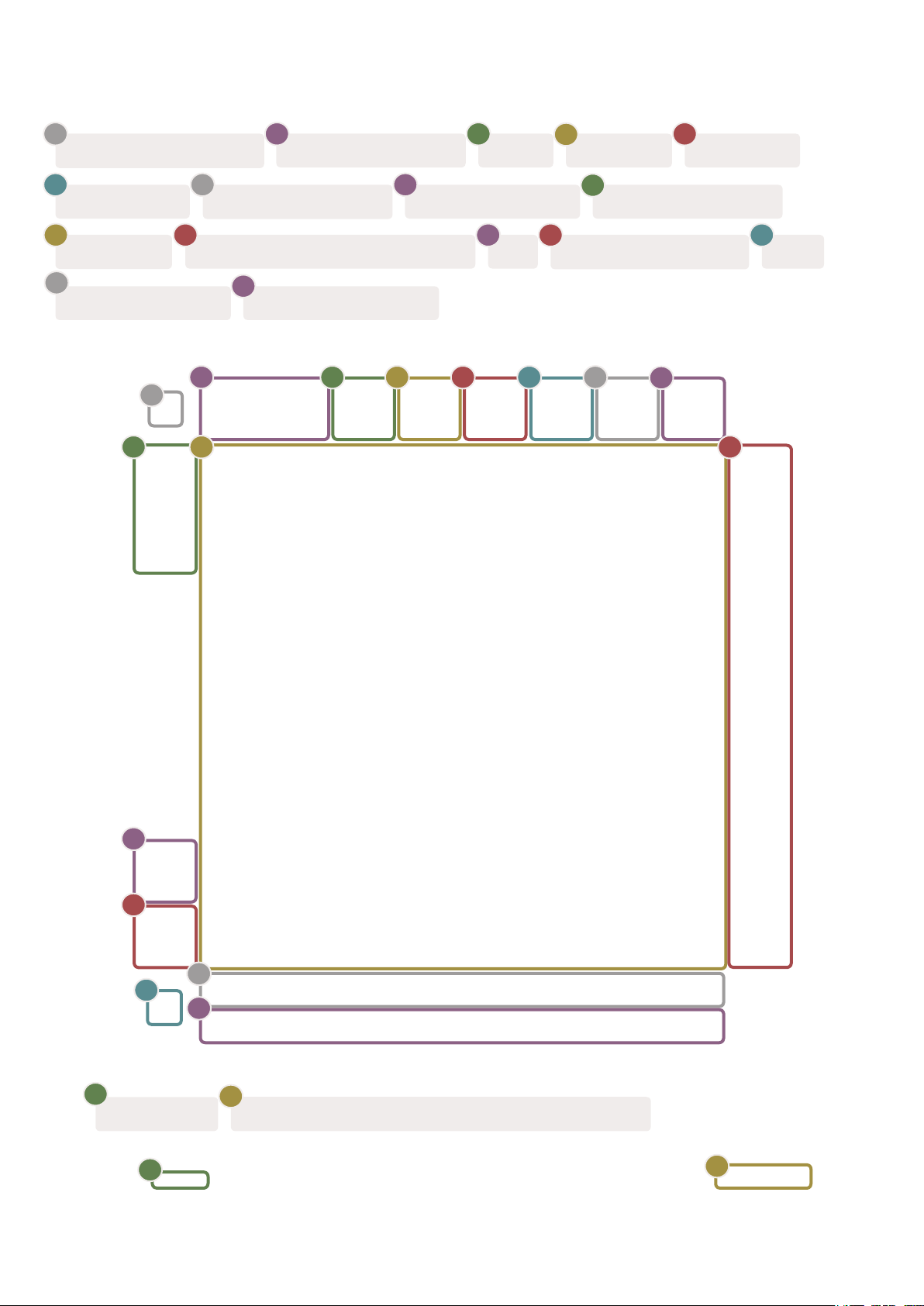
3. Hardware Overview
1
Access to Shift functions
6
Custom Mode Standalone Sequencer Sequencer Projects
10
8×8 Pad grid Scene Launch & Sequencer Buttons
15
1
9
7
11
2
10
16
2
Navigational buttons Note Mode
8
Ableton Track ControlsTrack Select Buttons
3
4
3
Session
12
5
4
9
Navigational buttons
13
Record & Capture MIDIPlay
6
7
5
Chord Mode
14
Setup
8
11
12
13
14
17
USB-C Socket
17
15
16
18
MIDI In, Out 1, Out2/Thru on standard TRS Minijack
18

4. Launchpad Pro Interface
4.1 Modes
Modes are the core of the Launchpad Pro interface. They allow you to switch between views, offering
different functionality in each.
There are five different modes available – Session, Note, Chord, Custom and Sequencer.
4.1.A – Launchpad Pro’s Mode buttons
Press a mode button (above) to enter the respective mode. The currently active mode will be lit pale
green. Currently available modes will be lit white.
Additionally, Projects gives you access to your saved sequencer projects. The Projects page is treated
as a sub-mode of Sequencer.
There are 8 Custom modes available on Launchpad Pro. Custom Modes allow you to control your
hardware and software via MIDI (see 8. Custom Modes for more information). When the Custom
button is pressed you will enter the last Custom Mode used (Custom Mode 1 by default). Access each
of the 8 Custom Modes by pressing the Track Select buttons after the Custom button is pressed. The
Custom Mode lit in pale green is selected, while available ones will be lit dim white. Using Novation
Components, you are able to edit these eight modes and customise them to your needs (see Custom
Modes).
12

4.2 Shift
Shift is a consistent control throughout Launchpad Pro [MK3]. Shift functions can be identified by
the small text on the bottom of relevant buttons – see below, where Save is the shift function for the
Projects button.
4.2.A – The Projects button has Save as its Shift function
When Shift is held, available functions will be lit gold, while unavailable functions will be unlit. Toggle
functions that are accessed with Shift (Record Quantise, Continue and Click) will be lit red when
disabled, or green when enabled.
Available functions vary by mode. For example, Save is only available to press when in Sequencer
Mode.
5. Session Mode
5.1 Ableton Live’s Session View
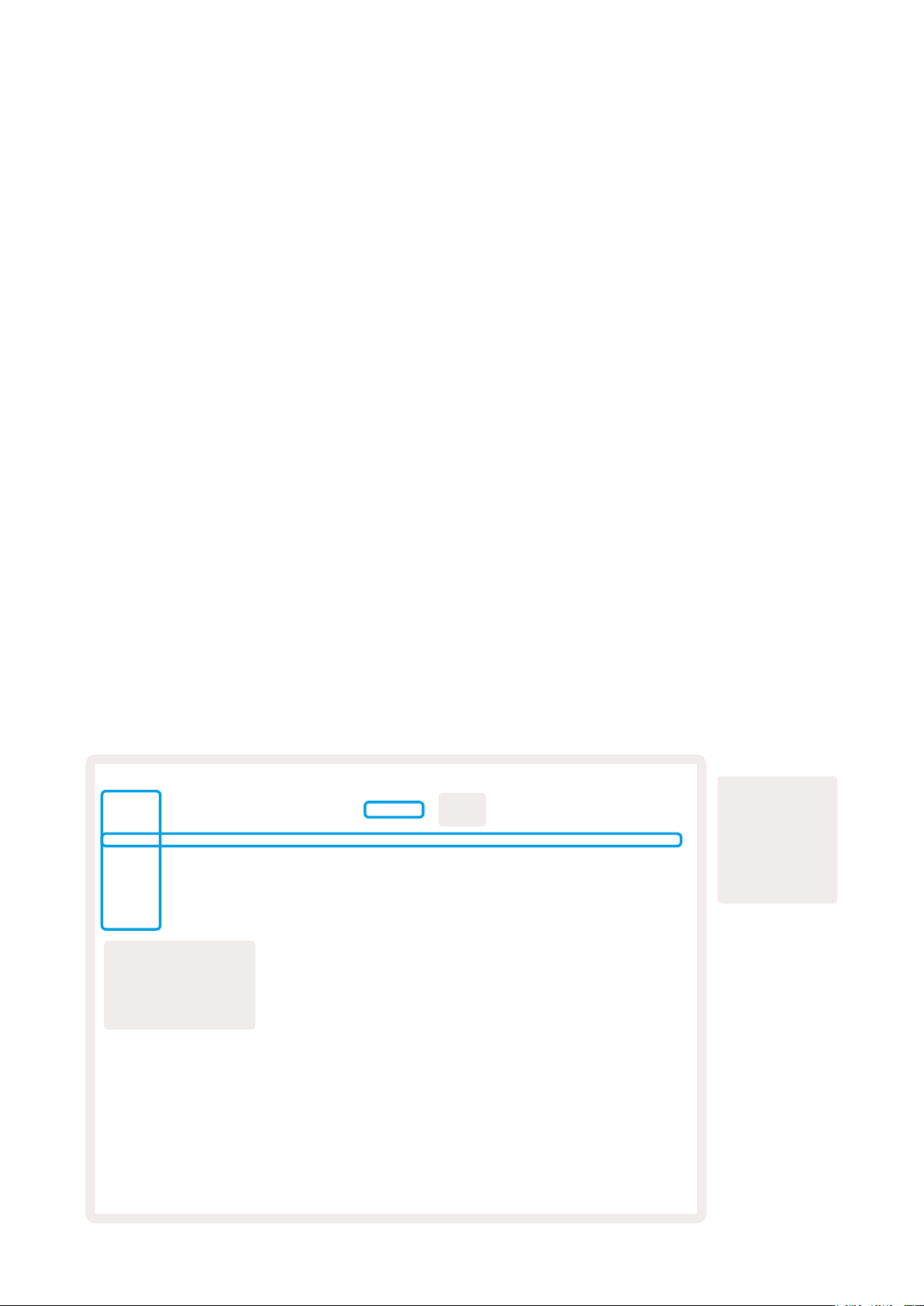
Session mode is designed to control Ableton Live’s Session view, seen below.
If you’ve never used Ableton Live before, we recommend visiting our Easy Start Tool (see page 5).
Here you’ll find your included Ableton Live 10 Lite download code (if you choose to register your
Launchpad Pro), alongside videos covering installing, the software’s basic features, and how to get
started making music with your Launchpad Pro in Ableton Live.
Session view is a grid that consists of clips, tracks (columns) and scenes (rows).
Session mode provides an 8×8 view of your clips in Session view on Launchpad Pro.
Clips are typically loops that contain MIDI notes or audio.
Tracks represent virtual instruments or audio tracks. MIDI clips placed on instrument tracks will play
back on the instrument that is assigned to that track.
Scenes are rows of clips. Launching a scene will launch all clips in that row. This means that you can
arrange clips into horizontal groups (across tracks) to form a song structure, launching scene after
scene to progress through a song.
A row
Clip
The yellow
column shows a
track, titled “1
Rhodes”
represents
a scene,
highlighted
is scene “9”
14
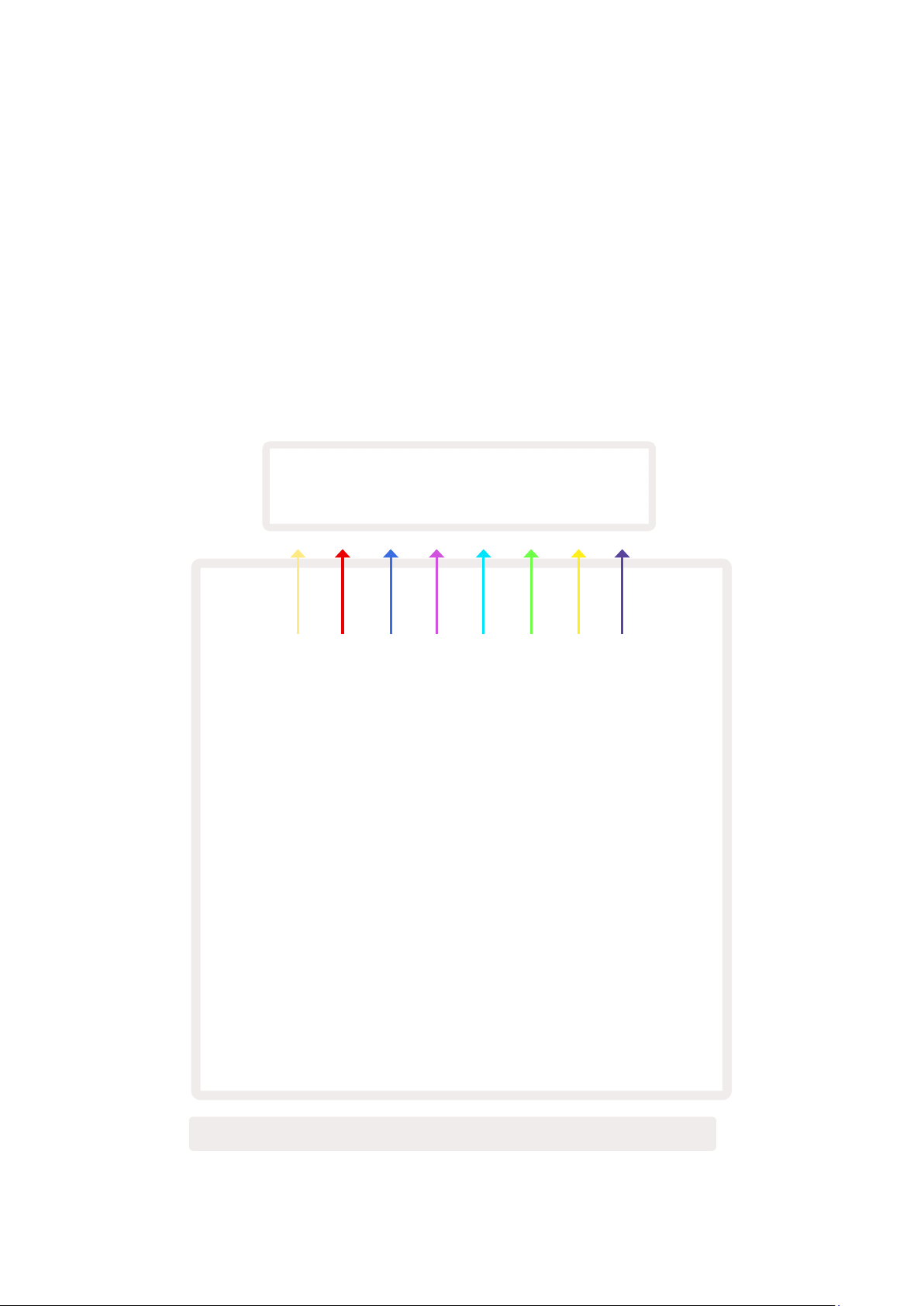
The ▲▼◄ ► buttons let you navigate session view. The outline in the Session View grid shows the
area currently visible on Launchpad Pro.
• Press a pad to play the corresponding clip in Ableton. The colour will match between the screen and
pads.
• When a pad is pressed it will flash green, indicating that the clip is queued and will soon begin to
play. When a clip is playing, the pad will pulse green.
• Only one clip may play at a time per track. Pressing an empty clip will stop the current one on that
track.
• A horizontal line of clips is called a Scene. Scenes can be triggered using the > (scene launch)
buttons on the right-hand side of Launchpad Pro.
5.1.B – Session View seen in Ableton Live and on Launchpad Pro

When a track is record armed, you may use the Session Record button [O] to enable overdub
recording of the currently playing clip.
5.1.C – The Session Record Button, which has Capture MIDI as its shift function
Press Shift and Session Record to access Ableton Live’s Capture MIDI function. Live 10 is always
listening to MIDI input on armed or input-monitored tracks andcapture MIDI lets you retrieve the
material you’ve just played on those tracks. If no clip was playing on the armed track, Ableton Live
will place the MIDI notes into a new clip. If a clip was playing, the MIDI notes will be overdubbed onto
that clip.
Press the Play button to play the currently active clips while they are stopped. Press Play during
playback and playback will stop.
5.2 Session Overview
Access Session Overview by holding Session when in Session Mode. This will display a zoomed-out
version of the Session view grid, with each pad representing an 8×8 block of clips. Pressing a pad
will navigate to that 8×8 block, providing a fast way to navigate large Live sets. Alternatively, the
navigational arrow buttons may be used to navigate the Session Overview.
The currently viewed 8×8 block will be lit light brown, while other blocks are blue. If a clip is playing in
a block that is not being viewed, the block will pulse green.
5.3 Clip Functions
Beyond launching and stopping clips, Launchpad Pro provides additional clip functionality that’s great
for production in Live.
5.3.1 Select a clip or empty clip slot
To select a clip without Launching it, hold shift and press the clip. This also works for empty clip slots.
Notice in Live that the selected clip and track will change, and it will become the focused clip. This is
useful for choosing a location to print clips to from the sequencer.
16

5.3.2 Clear a clip
Hold clear and press a clip on the 8×8 grid to clear it, deleting it from the Session View grid.
If in Note Mode, pressing Clear will instantly clear the currently selected clip.
5.3.3 Duplicate a clip
Hold duplicate and press a clip on the 8×8 grid to copy it to the clip slot below. This will overwrite
existing clips.
If in Note Mode, pressing Duplicate will instantly duplicate the currently selected clip and select the
newly created duplicate. This is useful when you want to create a new clip that is a variation on a
previous one.
5.3.4 Double a clip’s length
Double may be used to double a clip’s length. For example, a 2-bar clip becomes 4 bars.
• In Session Mode, hold Shift and Duplicate then press a pad to double the corresponding clip’s
length.
• If a clip is selected and playing in either Note or Device Mode, one press of Duplicate while holding
the Shift button will double clip length.
If in Note Mode, pressing Double will instantly double the currently selected clip. This is useful if you
want to create a variation of a loop and overdub it.
5.3.5 Quantise a clip
Hold quantise and press a clip on the 8×8 grid to quantise its contents. The MIDI notes in the clip will
be snapped to the grid to the closest 16th note interval.
5.3.6 Record Quantise
With Record Quantise enabled, any recorded MIDI will be automatically quantised to the grid with the
current quantisation setting.
Hold shift to see if Record Quantise is enabled or disabled. If the Quantise button is lit red, record
quantise is disabled. If it is lit green, Record Quantise is enabled. With shift held, press Quantise to
enabled or disable Record Quantise.
To change the quantisation setting in Live, navigate to the top bar and press Edit, then Record
Quantisation, then select from the available options.

5.3.7 Fixed Length
Fixed Length allows you to define a bar length for any new clips that are recorded. Press Fixed length
to enable or disable this behaviour. The Fixed Length button will be lit white when it is disabled and
lit blue when it is enabled.
The number of bars that will be recorded when Fixed Length is enabled can be defined. Hold
Fixed Length briefly and the Track Select buttons will begin to pulse blue. Each Track Select button
represents one bar – press a track select to determine a bar length from 1 to 8 bars. Recording will
stop automatically once the set number of bars is reached, and the recorded clip will loop.
The left-hand image shows fixed length is set to 1 bar, while the right-hand image shows that it is set
to 4 bars.
5.3.7.A – Setting the number of bars with the Track Select Buttons for Fixed Length. A fixed length
of 1 bar is seen on the left image, and 4 bars on the right.
5.4 Track Controls
Launchpad Pro’s Track Controls allow you to control various track parameters in Ableton Live 10. The
Track Controls are found on the bottom row of Launchpad Pro, beneath the Track Select buttons.
Track Select
buttons
Track
Controls
5.4.A – Track Select Buttons & Track Controls on Launchpad Pro
The Track Controls are located on the bottom row of the Launchpad Pro. These functions work in
conjunction with the row of 8 Track Select buttons just above it as well as with the 8×8 area.
18

5.4.1 Record Arm
Overlay the Track Select buttons with Record Arm track toggles. When pressed, the clip in the
corresponding track will stop playing.
5.4.2 Mute
Overlay the Track Select buttons with Mute track toggles. When pressed, the clip in the
corresponding track will stop playing.
5.4.3 Solo
Overlay the Track Select buttons with Solo track toggles. When pressed, the clip in the corresponding
track will stop playing.
5.4.4 Volume
Control the volume levels of the tracks within the currently selected 8×8 area in Session view. Volume
faders are vertical.
5.4.5 Pan
Control the stereo panning of the tracks within the currently selected 8×8 area in Session view. Pans
will show horizontally — the top pan represents the leftmost track, and the bottom represents the
rightmost.
5.4.6 Send
Control the send level of the tracks within the currently selected 8×8 area in Session view to Send A.
Send faders are vertical.
5.4.7 Device
Overlay the row of pads above the mixer function with device select (first to eighth in the track’s
chain). Once a device in the chain is selected, control the value of the 8 macro parameters controls
within the currently selected 8×8 area in Session view. Macro parameters faders are vertical.
5.4.8 Stop Clip
Overlay the Track Select buttons with Stop Clip triggers. When pressed, the clip in the corresponding
track will stop playing at the end of the phrase.

5.4.9 Fader orientation
Volume, Pan, Sends and Device are each sets of 8 faders. The faders are vertical for Volume, Sends
and Device, whereas they are horizontal for pans (see below). Press a pad to move the fader position
up and down (or left to right).
For Volume and Send faders, tracks are arranged horizontally across the pads. For Pan faders, tracks
are arranged vertically.
5.4.9.A – Faders for track pans (left) and volume (right)
5.5 Record Arm & Recording
When a track is record armed, all empty clips in a column will be dimly lit red. When a clip is pressed
it will flash red to show that it is queued to record (the record button will also flash in unison). The
pad will pulse red once recording begins, with the record button lit bright red. If the record button is
then pressed, the clip will flash red to indicate that it will soon stop recording. If the track is un-armed
during recording, the clip will immediately stop recording.
5.6 Production Controls
Launchpad Pro offers several shortcuts to aid production within Ableton Live.
20
Loading…
Software
Windows
Novation USB Driver 2.29
For Windows 11 and Windows 10 (build 1803 and later)
Windows
Novation USB Driver 2.22 — Windows
For Windows 7, Windows 8, and Windows 10 builds earlier than 1803
Release notes
Driver for Windows 7 and higher.
- Fixes an issue that could cause a crash when multiple Novation devices were connected to the same system and then disconnected.
Software Links
Documentation
Launchpad Pro [MK3] Firmware Update 1.2 User Guide
Launchpad Pro [MK3] User Guide English — EN
Launchpad Pro [MK3] 用户指南 中文(简体) — ZH
Launchpad Pro [MK3] Benutzerhandbuch Deutsche — DE
Launchpad Pro [MK3] Guía del usuario Español — ES
Launchpad Pro [MK3] Mode d’emploi Français — FR
Launchpad Pro [MK3] Guida utente Italiano — IT
Launchpad Pro [MK3] ユーザーガイド 日本語 — JA
Launchpad Pro [MK3] 사용자 설명서 한국어 — KR
Launchpad Pro [MK3] Guia de usuario Português — PT
Launchpad Pro [MK3] Programmer’s Reference Guide
Launchpad Pro MK3 User Guide v1 — CZ
Launchpad Pro MK3 User Guide v1 — FI
Launchpad Pro MK3 User Guide v1 — NL
Launchpad Pro MK3 User Guide v1 — PL
Launchpad Pro MK3 User Guide v1 — SV
Launchpad Pro MK3 User Guide v1 — DA
Launchpad Pro MK3 User Guide v1 — ET
Launchpad Pro MK3 User Guide v1 — HR
Launchpad Pro MK3 User Guide v1 — LV
Launchpad Pro MK3 User Guide v1 — LT
Launchpad Pro MK3 User Guide v1 — RO
Launchpad Pro MK3 User Guide v1 — HU
Launchpad Pro MK3 User Guide v1 — NO
Launchpad Pro MK3 User Guide v1 — SL
Launchpad Pro MK3 User Guide v1 — SK
Launchpad Pro MK3 User Guide v1 — EL
Launchpad Pro MK3 User Guide v1 — BG
Вслед за недавними релизами Novation Launchpad Mini MK3 и Launchpad X компания выпустила флагманский Launchpad Pro MK3. Новый девайс сохранил привычную раскладку Launchpad на передней панели, но получил более тонкий корпус, большие пэды, новые внешние кнопки и два выхода MIDI. Устройство получило более глубокую интеграцию с Ableton Live, пошаговый секвенсор, а также несколько новых режимов работы наряду с другими небольшими изменениями.
Pro MK3 поставляется с двумя кабелями USB, адаптером питания и тремя MIDI-переходниками Minijack-DIN Midi. Участники Novation Sound Collective при приобретении контроллера также получат копию Ableton Live 10 Lite, двухмесячную подписку Splice Sounds и плагины от таких разработчиков, как Klevgrand, XLN Audio, AAS и Softube. Для полного раскрытия потенциала девайса пользователю также потребуется редактор Novation Components, который доступен в любом MIDI-совместимом браузере или в качестве загружаемого приложения.
Pro
Может показаться, что Pro MK3 относительно других устройств серии Launchpad имеет довольно большие размеры, но стоит отметить, что это полностью портативное устройство. Радует и сборка нового девайса, он с легкостью выдержит тысячи нажатий и ударов. Пэды представлены в виде классической сетки восемь на восемь, а по периметру расположены черные кнопки, каждая из которых имеет свою особую функцию.
При подключении к компьютеру, на котором работает Ableton Live, пэды будут отображать цвета клипов в режиме Session View или цвета дорожек в режиме Note. Переключение режимов осуществляется с помощью соответствующих кнопок «Session» и «Note» на девайсе. Секция управления воспроизведением/записи теперь включают в себя MIDI-кнопку «Capture», которая отвечает за одну из самых интересных функций Ableton Live 10, позволяющей сохранить наигранную партию даже без включения записи.
Под пэдами расположены кнопки выбора дорожки, а еще ниже находятся кнопки, предоставляющие доступ к таким функциям микшера, как «Arm», «Mute», «Solo» и «Volume». Так, например, при включении «Volume», пэды преобразуются в подобие вертикального микшера. При этом большая сила нажатия на пэды приводит к более быстрым изменениям значений громкости.
Кнопка «Device» позволяет управлять параметрами или макросами установленного на дорожке инструмента или рэка. Кнопка «Chord» включает режим воспроизведения аккордов, который позволяет играть трезвучия простым нажатием на один пэд. В режиме «Note» контроллер автоматически определяет, содержит ли текущая дорожка клавишный инструмент, например, синтезатор или драм-рэк, и преобразует раскладку пэдов в фортепианную. Кнопка «Custom» обеспечивает доступ к восьми пользовательским режимам Pro MK3, которые по сути являются разными настраиваемыми вариациями раскладки «Note».
Нажми на кнопку
Pro MK3 оснащен четырехканальным 32-шаговым секвенсором с полифонией до 8-ми нот, который можно подключить к Ableton Live с помощью USB-кабеля или использовать с реальными синтезаторами, но для этого нужно обязательно обеспечить питание устройства от сети.
Ноты в последовательности можно как записывать в режиме реального времени, так и программировать на сетке секвенсора. Регулировка длины нот доступна для каждого отдельного шага. Еще одной важной особенностью нового устройства является возможность редактирования каждой ноты в последовательности. При этом Launchpad Pro MK3 сам цветом покажет вам, какой аккорд или ноту вы нажали на определенном шаге. Так вы сможете увидеть, где произошла ошибка, и исправить ее прямо на контроллере.
Кнопка «Projects» сохраняет все ваши текущие настройки секвенсора в один из 64 слотов. Это критически важная функция для по-настоящему автономного секвенсора. Таким образом, вам не нужен компьютер или какое-либо программное обеспечение для возврата к вашим предыдущим наработкам.
Для каждого проекта доступно восемь паттернов, которые могут запускаться одновременно на разных дорожках с использованием сцен. Сцены же могут быть связаны в цепочку для последовательного воспроизведения. Здесь важно отметить, что паттерны могут быть разной длины, но отдельные дорожки не могут. Также на устройстве представлены средства управления скоростью и вероятностью срабатывания клавиш, а также направлением секвенсора. Добавлена интересная функция «Mutation», которая обеспечивает дополнительный, настраиваемый пользователем уровень рандомизации основного тона. MK3 также оснащен микро-шагами, открывающими доступ к дополнительным интервалам (до шести) для каждого основного шага.
Если в процессе импровизации вы наткнулись на последовательность, которую хотели бы сохранить, просто нажмите кнопку «Print to Clip», и она будет добавлена в новый MIDI-клип в Ableton Live. В сочетании с кнопкой «Capture» данная функция позволяет легко сохранять все ваши идеи, созданные в творческом порыве.
Серия Pro MK3 позиционируется как «линейка устройство для продакшна и живого исполнения в Ableton Live», и последний Launchpad сделал эту интеграцию еще крепче. С выпуском третьего поколения Launchpad Pro становится больше секвенсором, чем просто универсальным MIDI-контроллером.
Заключение
Если у вас немного ограниченный бюджет и вы пользователь Ableton Live 10, это Launchpad Pro MK3 — хороший вариант. По-настоящему устройство раскрывается, если полностью овладеть всеми возможностями секвенсора и, помимо компьютера, подключить еще пару железных синтезаторов. В общем, мы абсолютно точно рекомендовали бы Launchpad Pro MK3 для тех, кто нуждается в новом пошаговом секвенсоре и контроллере для Ableton.
Основные характеристики:
-
MIDI-контроллер с 64 пэдами
-
42 кнопки
-
Питание по шине USB-C
-
Чувствительные к скорости нажатия пэды
-
Бесшовная интеграция с Ableton Live
-
Автономный 32-шаговый секвенсор
-
Режимы «Scale» и «Chord»
-
Восемь пользовательских режимов
-
Функция захвата MIDI (Capture MIDI)
-
Доступ к «Sound Collective»
-
Бесплатная двухмесячная подписка на Splice
-
MIDI in/out
-
MIDI out 2/thru
- Габариты: 268 мм x 268 мм x 18 мм
Приобрести Pro MK3.
Оригинальная статья.
[pdf]
User Manual Quick Start Guide Instructions Specifications Guide
Version 1 Focusrite 6 2 Box Contents • Launchkey< b> 25 37 49 or 61 USB Type-A to B cable (1 5 meters) Safety Instructions 3 Getting Started The ‘Easy Start Tool’ provides a step-by-step guide setting up your Launchkey MK3 User Guide v1 English fael-downloads-prod focusrite customer prod s3fs-public downloads [MK3] EN
Version 1.1 1 Caution: The normal operation of this product may be affected by a strong electrosta … egal Notices Novation is a registered trade mark of Focusrite Audio Engineering Limited. Launchkey MK3 is a trademark of Focusrite Audio Engineering Plc. 2021 Focusrite Audio Engineering Limited. Al…
lang:en score:38 filesize: 6.1 M page_count: 47 document date: 2021-06-07
[pdf]
Guide
launchkey mk3 user guide v6 bg 0 fael prod focusrite customer |||
Machine Translated by Google 6 1 Machine Translated by Google : , . , , , … ……. ……………………………………..54 4 Machine Translated by Google Launchkey MK3 MIDI Novation Ableton Live Cubase Steinberg. , . , Launchkey …
lang:i-klingon score:36 filesize: 4.03 M page_count: 56 document date: 2022-09-09
[pdf]
Guide
launchkey mk3 user guide v6 ko kr fael prod s3 amazonaws customer |||
6 1 Contents ………………………………………………………………………. … …………………………………………………………………….. 54 4 Launchkey MK3 Novation MIDI , Ableton Live Steinberg s Cubase . . Launchkey . Launch…
lang:i-klingon score:36 filesize: 5.38 M page_count: 55 document date: 2022-07-15
[pdf]
Guide
launchkey mini mk3 user guide 1 el fael prod s3 amazonaws customer |||
Machine Translated by Google 1.1 1 Machine Translated by Google : . , . … ………………. ………………………………………… ……….5 Launchkey Mini MK3 …………………………… ……………………………5 …………. ……………
lang:tl score:36 filesize: 4.06 M page_count: 42 document date: 2022-09-08
[pdf]
Guide
launchkey mini mk3 user guide 1 bg fael prod s3 amazonaws customer |||
Machine Translated by Google 1.1 1 Machine Translated by Google : , . , , , … …………… …………………………………………. …………5 Launchkey Mini MK3 ………………………………….. …………………………….5 …………. ……
lang:tl score:35 filesize: 4.05 M page_count: 42 document date: 2022-09-08
[pdf]
Guide
launchkey mk3 user guide v6 ja jp fael prod s3 amazonaws customer |||
6 1 Contents . ………………………………………………………………………. … ……………………………………………………………..55 4 Novations Launchkey MK3 Ableton LiveSteinberg Cubase MIDI Launchkey Capture MIDI MIDI Ableton LiveAbleton Live Launchk…
lang:i-klingon score:35 filesize: 5.35 M page_count: 56 document date: 2022-07-13
[pdf]
User Manual Specifications
Novation Launchkey Mini MK3 User Manual recordcase de media f6 16 ab
1 Caution: The normal operation of this product may be affected by a strong electrostatic discharg … ………………………………………………..5 Getting Started with your Launchkey Mini MK3 ………………………………………………………………….5 Getting Connected….
lang:en score:35 filesize: 11.83 M page_count: 38 document date: 2020-07-31
[pdf]
User Manual Specifications
Novation Launchkey 37 MK3 User Manual recordcase de media 57 55 f1
1 Caution: The normal operation of this product may be affected by a strong electrostatic discharg … egal Notices Novation is a registered trade mark of Focusrite Audio Engineering Limited. Launchkey MK3 is a trademark of Focusrite Audio Engineering Plc. 2019 Focusrite Audio Engineering Limited. Al…
lang:en score:35 filesize: 22.55 M page_count: 46 document date: 2020-08-07
[pdf]
User Manual Specifications Guide
1 Version Focusrite company names and any other registered or trade marks mentioned in this manual belong to their respective owners Disclaimer Launchkey Mini MK3 User Guide English EN fael-downloads-prod focusrite customer prod s3fs-public downloads
Version 1.1 1 Caution: The normal operation of this product may be affected by a strong electrosta … ………………………………………………..5 Getting Started with your Launchkey Mini MK3 …………………………………………………………………5 Getting Connected ….
lang:en score:35 filesize: 10.47 M page_count: 41 document date: 2021-06-07
[pdf]
Guide
ΟΔΗΓΟΣ ΧΡΗΣΤΗ launchkey mk3 user guide v6 el 0 fael prod focusrite customer |||
Machine Translated by Google 6 1 Machine Translated by Google : . , . … .. …………………………………………54 4 Machine Translated by Google Launchkey MK3 MIDI Novation Ableton Live Cubase Steinberg. . , Launchk…
lang:i-klingon score:35 filesize: 4.04 M page_count: 56 document date: 2022-09-09
[pdf]
Guide
launchkey mini mk3 user guide 1 no fael prod s3 amazonaws customer |||
Machine Translated by Google Versjon 1.1 1 Machine Translated by Google Vennligst les: Takk for at … ………………………………………… …………5 Komme i gang med din Launchkey Mini MK3 ……………………………………. …………………………….5 Koble seg til …..
lang:no score:35 filesize: 4.04 M page_count: 42 document date: 2022-09-08
[pdf]
Guide
Launchkey Mini MK3 User Guide 1 English FI fael prod focusrite customer |||
Machine Translated by Google Machine Translated by Google Ole hyv ja lue: Kiitos, ett latasit tmn … …………….. ………………………………………….. …………5 Launchkey Minin MK3 kytn aloittaminen………………………………………… …………………………..
lang:fi score:35 filesize: 4.94 M page_count: 42 document date: 2022-05-11
[pdf]
Guide
launchkey mk3 user guide v6 no 0 fael prod focusrite customer |||
Machine Translated by Google Brukerhndboken Versjon 6 1 Machine Translated by Google Vennligst les … ………………………………….54 4 Machine Translated by Google Introduksjon Launchkey MK3 er Novations intuitive og fullt integrerte MIDI-keyboardkontroller for lage spor i Ableton Liv…
lang:no score:34 filesize: 4.01 M page_count: 56 document date: 2022-09-09
[pdf]
Guide
launchkey mk3 user guide v6 it fael prod s3 amazonaws customer |||
Guida utente Versione 6 1 Contents Introduzione…………………………………………… … ……………………………………………………………58 4 Introduzione Launchkey MK3 l intuitivo controller MIDI a tastiera di Novation. Ideato per produrre tracce su Ableton Live…
lang:it score:34 filesize: 5.44 M page_count: 59 document date: 2022-07-13
[pdf]
Reference Guide Guide
Untitled Programmer s Reference Guide launchkey mk3 programmer reference guide v1 en bayviewtech au 2023 07 |||
Programmer s Reference Guide Version 1 1 Contents About this Guide……………………………………………………………………………….. 3 Bootloader ……………………………………………………………………………………….. 3 MIDI on Launchkey MK3…
lang:en score:34 filesize: 1.03 M page_count: 18 document date: 2024-05-02
[pdf]
User Manual Specifications Guide
Launchkey MK3 User Guide EN fael prod s3 amazonaws customer s3fs public |||
1 Caution: The normal operation of this product may be affected by a strong electrostatic discharg … egal Notices Novation is a registered trade mark of Focusrite Audio Engineering Limited. Launchkey MK3 is a trademark of Focusrite Audio Engineering Plc. 2019 Focusrite Audio Engineering Limited. Al…
lang:en score:34 filesize: 22.97 M page_count: 46 document date: 2020-06-18
[pdf]
Guide
Launchkey Mini MK3 User Guide 1 English SV fael prod focusrite customer |||
Machine Translated by Google Machine Translated by Google Vnligen ls: Tack fr att du laddade ner d … ………………………………………….. …………5 Komma igng med din Launchkey Mini MK3 ……………………………………. …………………………….5 Bli ansluten ……
lang:no score:34 filesize: 4.95 M page_count: 42 document date: 2022-05-11
[pdf]
Guide
Launchkey Mini MK3 User Guide 1 English CZ fael prod focusrite customer |||
Machine Translated by Google Machine Translated by Google Prosm, pectte: Dkujeme, ze jste si sthli … …………………………………………………… …………5 Zacnme s Launchkey Mini MK3 ……………………………….. …………………………….5 Pipojen …………….
lang:hr score:34 filesize: 4.95 M page_count: 42 document date: 2022-05-11
[pdf]
Guide
Launchkey Mini MK3 User Guide 1 English PL fael prod focusrite customer |||
Machine Translated by Google Machine Translated by Google Prosz przeczytaj: Dzikujemy za pobranie … . ………………………………………….. …………5 Pierwsze kroki z Launchkey Mini MK3 ……………………………………… ……………………………5 Nawizywanie po…
lang:pl score:34 filesize: 4.95 M page_count: 42 document date: 2022-05-11
[pdf]
Guide
launchkey mini mk3 user guide 1 hu fael prod s3 amazonaws customer |||
Machine Translated by Google 1.1-es verzi 1 Machine Translated by Google Krlek olvass: Ksznjk, hog … ……………. ………………………………………….. …………5 A Launchkey Mini MK3 hasznlatnak megkezdse…………………………………………… …………………….
lang:no score:34 filesize: 4.05 M page_count: 42 document date: 2022-09-08
[pdf]
Guide
launchkey mini mk3 user guide 1 lv fael prod s3 amazonaws customer |||
Machine Translated by Google Versija 1.1 1 Machine Translated by Google Ldzu lasi: Paldies, ka lej … .. ………………………………………….. …………5 Darba sksana ar Launchkey Mini MK3 ………………………………………… …………………………….5 Savienojuma…
lang:tl score:34 filesize: 4.04 M page_count: 42 document date: 2022-09-08
[pdf]
User Manual Guide
Microsoft Word Launchpad X Manual Final 1510 docx User Guide 1 Table of Contents Introduction 3 Key Novation recordcase de media f9 88 5b
Launchpad X User Guide 1 Table of Contents Introduction……………………………………. … m your Account page on the Novation site. Custom modes are fully compatible between Launchpad Mini MK3 and Launchpad X. Default Custom Modes Four custom modes are available by default on the device….
lang:en score:34 filesize: 9.82 M page_count: 36 document date: 2019-11-20
[pdf]
Guide
launchkey mini mk3 user guide 1 da fael prod s3 amazonaws customer |||
Machine Translated by Google Version 1.1 1 Machine Translated by Google Ls venligst: Tak fordi du … ………………………………… …………5 Sdan kommer du i gang med din Launchkey Mini MK3 ………………………………….. …………………………….5 Opret forbindelse …
lang:da score:34 filesize: 4.04 M page_count: 42 document date: 2022-09-08
[pdf]
Guide
launchkey mk3 user guide v6 hu fael prod s3 amazonaws customer |||
Machine Translated by Google Hasznlati tmutat 6-os verzi 1 Machine Translated by Google Krlek olva … ……………………………………54 4 Machine Translated by Google Bevezets A Launchkey MK3 a Novation intuitv s teljesen integrlt MIDI billentyzetvezrlje az Ableton Live s Steinberg s Cu…
lang:no score:34 filesize: 4.02 M page_count: 56 document date: 2022-09-09
[pdf]
Guide
launchkey mk3 user guide v6 sk fael prod s3 amazonaws customer |||
Machine Translated by Google Uzvatesk prrucka Verzia 6 1 Machine Translated by Google Prosm ctajte … …. ……………………………………..54 4 Machine Translated by Google vod Launchkey MK3 je intuitvny a plne integrovan MIDI klvesov ovldac Novation na vytvranie skladieb v Ableton Liv…
lang:es score:34 filesize: 4.01 M page_count: 56 document date: 2022-09-09
[pdf]
Guide
launchkey mk3 user guide v6 lv 0 fael prod focusrite customer |||
Machine Translated by Google Lietotja rokasgrmata 6. versija 1 Machine Translated by Google Ldzu l … ……………………………………….54 4 Machine Translated by Google Ievads Launchkey MK3 ir Novation intuitvs un pilnb integrts MIDI tastatras kontrolieris, kas paredzts ierakstu veido…
lang:es score:34 filesize: 4.01 M page_count: 56 document date: 2022-09-09
[pdf]
Guide
launchkey mk3 user guide v6 lt 0 fael prod focusrite customer |||
Machine Translated by Google Naudotojo gidas 6 versija 1 Machine Translated by Google Prasome pers … ……………………………………….54 4 Machine Translated by Google vadas Launchkey MK3 yra intuityvus ir visiskai integruotas Novation MIDI klaviatros valdiklis, skirtas kurti takeli…
lang:id score:34 filesize: 4.01 M page_count: 56 document date: 2022-09-09
[pdf]
Guide
launchkey mini mk3 user guide 1 lt fael prod s3 amazonaws customer |||
Machine Translated by Google 1.1 versija 1 Machine Translated by Google Prasome perskaityti: Dkoja … ……… ………………………………………….. …………5 Darbo su Launchkey Mini MK3 pradzia………………………………………… …………………………….5 Pri…
lang:tl score:34 filesize: 4.04 M page_count: 42 document date: 2022-09-08
[pdf]
Guide
launchkey mini mk3 user guide 1 sk fael prod s3 amazonaws customer |||
Machine Translated by Google Verzia 1.1 1 Machine Translated by Google Prosm ctajte: akujeme, ze s … ……………………………………………… …………5 Zacname s vasm Launchkey Mini MK3 ………………………………………… …………………………….5 Pripojenie …
lang:hr score:34 filesize: 4.04 M page_count: 42 document date: 2022-09-08
[pdf]
Guide
launchkey mk3 user guide v6 nl fael prod focusrite customer |||
Machine Translated by Google Gebruikershandleiding Versie 6 1 Machine Translated by Google Gelieve … …………………………………….54 4 Machine Translated by Google Invoering Launchkey MK3 is de intutieve en volledig gentegreerde MIDI-keyboardcontroller van Novation voor het maken va…
lang:nl score:34 filesize: 4.02 M page_count: 56 document date: 2023-05-26
[pdf]
Guide
Launchkey Mini MK3 User Guide 1 English NL fael prod focusrite customer |||
Machine Translated by Google Machine Translated by Google Gelieve te lezen: Bedankt voor het downl … ………………………………………….. …………5 Aan de slag met uw Launchkey Mini MK3 …………………………………. …………………………….5 Verbinding maken ….
lang:nl score:34 filesize: 4.95 M page_count: 42 document date: 2022-05-11
[pdf]
User Manual Specifications Guide
compress online ave User guide Novation Launchkey 61 MK3 MIDI Keyboard Controller for Ableton Live Amazon ca Musical Instruments Stage Studio B1psZ7j3nAS m media amazon images I |||
Version 1.1 1 Caution: The normal operation of this product may be affected by a strong electrost … ………………………………………………..5 Getting Started with your Launchkey Mini MK3 ………………………………………………………………….5 Getting Connected….
lang:en score:34 filesize: 2.38 M page_count: 41 document date: 2021-06-07
[pdf]
Guide
launchkey mk3 user guide v6 fi fael prod s3 amazonaws customer |||
Machine Translated by Google Machine Translated by Google Ole hyv ja lue: Kiitos, ett latasit tmn … …………. …………………………54 4 Machine Translated by Google Johdanto Launchkey MK3 on Novationin intuitiivinen ja tysin integroitu MIDI-nppimistohjain raitojen tekemiseen Ableton…
lang:fi score:34 filesize: 4.01 M page_count: 56 document date: 2022-05-19
[pdf]
Guide
launchkey mk3 user guide v6 sl 0 fael prod focusrite customer |||
Machine Translated by Google Navodila Razlicica 6 1 Machine Translated by Google Prosim preberi: Z … … ……………………………………..54 4 Machine Translated by Google Uvod Launchkey MK3 je Novationov intuitiven in popolnoma integriran krmilnik tipkovnice MIDI za ustvarjanje skladb…
lang:hr score:34 filesize: 4.01 M page_count: 56 document date: 2022-09-09
[pdf]
Guide
launchkey mini mk3 user guide 1 et fael prod s3 amazonaws customer |||
Machine Translated by Google Versioon 1.1 1 Machine Translated by Google Palun lugege: Tname, et l … …………….. …………………………………………… …………5 Launchkey Mini MK3 kasutamise alustamine………………………………………… ……………………….
lang:et score:34 filesize: 4.03 M page_count: 42 document date: 2022-09-08
[pdf]
Guide
launchkey mini mk3 user guide 1 hr fael prod s3 amazonaws customer |||
Machine Translated by Google Verzija 1.1 1 Machine Translated by Google Molim procitajte: Hvala st … ………………………………………… …………5 Pocetak rada s vasim Launchkey Mini MK3 ………………………………….. ……………………………5 Povezivanje ……….
lang:hr score:34 filesize: 4.04 M page_count: 42 document date: 2022-09-08
[pdf]
Guide
launchkey mk3 user guide v6 pl fael prod s3 amazonaws customer |||
Machine Translated by Google Podrcznik uytkownika Wersja 6 1 Machine Translated by Google Prosz pr … …………………………………………54 4 Machine Translated by Google Wstp Launchkey MK3 to intuicyjna iw pelni zintegrowana klawiatura MIDI firmy Novation do tworzenia cieek w program…
lang:pl score:34 filesize: 4.01 M page_count: 56 document date: 2023-05-24
[pdf]
Guide
launchpad pro mk3 user guide v1 bg fael prod s3 amazonaws customer |||
Machine Translated by Google Machine Translated by Google : , . , , , . … omponents, Custom . 12 Machine Translated by Google 4.2 Shift Launchpad Pro MK3 . -, Save . 4.2.A ,, ,, Shift, , . , Shift…
lang:tl score:34 filesize: 5.05 M page_count: 67 document date: 2022-09-08
[pdf]
Guide
launchkey mk3 user guide v6 hr 0 fael prod focusrite customer |||
Machine Translated by Google Korisnicki vodic Verzija 6 1 Machine Translated by Google Molim proci … … ……………………………………..54 4 Machine Translated by Google Uvod Launchkey MK3 je Novationov intuitivni i potpuno integrirani kontroler MIDI tipkovnice za stvaranje pjesama u…
lang:hr score:34 filesize: 4.01 M page_count: 56 document date: 2022-09-09
[pdf]
Guide
launchkey mk3 user guide v6 de fael prod s3 amazonaws customer |||
Bedienungsanleitung Version 6 1 Contents Einleitung……………………………………….. … te Betriebsarten und Components ………………………………..63 4 Einleitung Launchkey MK3 , das intuitive, voll integrierte MIDI-Controller-Keyboard von Novation zur Musikproduktion in A…
lang:de score:34 filesize: 5.7 M page_count: 64 document date: 2022-06-28
[pdf]
Guide
launchpad pro mk3 user guide v1 el fael prod s3 amazonaws customer |||
Machine Translated by Google Machine Translated by Google : . , . … Components, . 12 Machine Translated by Google 4.2 Shift Launchpad Pro MK3 . Shift — , shift . 4.2.A Shift Shift, , . …
lang:tl score:34 filesize: 5.06 M page_count: 67 document date: 2022-09-08
[pdf]
User Manual
r» Novation Launchkey Mini MK3 Manual del usuario recordcase de media 31 34 dd
a *5 Q90 :9 9 4 J , _. i a, . -,_ :1 I 4. //, / I4 /4- IJ//,1 W 1.93, … ………………………………………………………..5 Introduccin a su Launchkey Mini MK3 ……………………………………………………………………………..5 Inici…
lang:es score:34 filesize: 11.84 M page_count: 38 document date: 2020-07-31
[pdf]
User Manual Guide
launchkey mk3 user guide v6 pt fael prod s3 amazonaws customer |||
Machine Translated by Google Machine Translated by Google Por favor leia: Obrigado por baixar este … .. ………. …………………………54 4 Machine Translated by Google Introduo Launchkey MK3 o controlador de teclado MIDI intuitivo e totalmente integrado da Novation para fazer faixas n…
lang:pt score:34 filesize: 4.03 M page_count: 56 document date: 2022-05-19
[pdf]
Guide
launchpad mini mk3 user guide bg fael prod s3 amazonaws customer |||
Machine Translated by Google Machine Translated by Google : , . , , , . … ionmusic.com/ WebMIDI Google Chrome Opera . Novation. Launchpad Mini MK3 Launchpad X. 15 Machine Translated by Google Novation Components. , Launchp…
lang:tl score:34 filesize: 2.26 M page_count: 23 document date: 2022-09-08
[pdf]
Guide
launchkey mk3 user guide v6 et 0 fael prod focusrite customer |||
Machine Translated by Google Kasutusjuhend 6. versioon 1 Machine Translated by Google Palun lugege … ………………………………….54 4 Machine Translated by Google Sissejuhatus Launchkey MK3 on Novationi intuitiivne ja tielikult integreeritud MIDI-klaviatuurikontroller lugude tegemisek…
lang:fi score:34 filesize: 4 M page_count: 56 document date: 2022-09-09
[pdf]
Guide
launchpad mini mk3 user guide el fael prod s3 amazonaws customer |||
Machine Translated by Google Machine Translated by Google : . , . … nmusic.com/ WebMIDI Google Chrome Opera . , Novation. Launchpad Mini MK3 Launchpad X. 15 Machine Translated by Google Novation Components. Components …
lang:tl score:34 filesize: 2.26 M page_count: 23 document date: 2022-09-08
[pdf]
Guide
launchkey mk3 user guide v6 es fael prod s3 amazonaws customer |||
Gua de usuario Versin 6 1 ndice Introduccin………………………………………………. … ………………………………………………………….54 4 Introduccin El Launchkey MK3 es el controlador de teclado MIDI intuitivo y totalmente integrado de Novation para crear pista…
lang:es score:34 filesize: 5.37 M page_count: 60 document date: 2022-07-13
[pdf]
User Manual Guide
launchkey mini mk3 user guide 1 english pt fael prod s3 amazonaws customer |||
Machine Translated by Google Machine Translated by Google Por favor leia: Obrigado por baixar este … ….. ………………………………………….. ………… 5 Introduo ao Launchkey Mini MK3 ………………………………………… ……………………. 5 Conectandose ………
lang:pt score:34 filesize: 4.95 M page_count: 42 document date: 2022-05-11
[pdf]
Untitled Novation Launchkey 37 MK3 Manuale d istruzioni recordcase de media d4 20 4b |||
1 Attenzione: Una forte scarica elettrostatica ESD potrebbe influenzare il normale funzionamento … ht e note legali Novation un marchio registrato di Focusrite Audio Engineering Limited. Launchkey MK3 un marchio di Focusrite Audio Engineering Plc. 2019 Focusrite Audio Engineering Limited. Tutt…
lang:it score:34 filesize: 22.57 M page_count: 48 document date: 2020-08-07
[pdf]
Guide
launchkey mk3 user guide v6 pt br fael prod s3 amazonaws customer |||
Guia do Usurio Verso 6 1 Contents Introduo……………………………………………….. … ……………………………………………………………..55 4 Introduo O Launchkey MK3 o teclado controlador MIDI intuitivo e totalmente integrado para fazer trilhas no Ableton Live…
lang:es score:34 filesize: 5.27 M page_count: 56 document date: 2022-07-13
Novation Launchpad Pro MK3 — новая модель MIDI грид-контроллера с глубокой Ableton Live интеграцией. Специальные кнопки для запуска клипов и сцен, управления функциями транспорта, квантайза и дублирования позволяют обходиться без мышки. Доступ к функции MIDI Capture дает возможность никогда не терять идеи. С помощью нового встроенного автономного четырех-трекового 32-шагового секвенсора с 8-голосной полифонией треков можно управлять всеми реальными и виртуальными MIDI инструментами студии. Возможно группирование паттернов и цепочек в сцены. Функции Probability и Mutation помогают в поиске новых идей.
Предусмотрены динамический нотный (Dynamic Note), ладовый и аккордовый режимы. Аккордовый режим облегчает построение и исполнение сложных аккордов прямо с контроллера. Можно находить новые гармонии. Имеются 8 пользовательских режимов. Увеличился размер 64 чувствительных к велосити и посленажатию RGB-подсвеченных пэдов. Кнопки навигации обеспечивают доступ ко всей сессии Ableton Live. Можно управлять всеми функциями микшера. Для расширения возможностей управления добавлен второй MIDI выход. В комплект входит Ableton Live Lite, виртуальные инструменты и огромная библиотека звуков.
Особенности Launchpad Pro MK3:
- новый грид-контроллер для Ableton Live, программ и MIDI инструментов;
- 64 пэда большего размера;
- 4-трековый 32-шаговый секвенсор;
- 8-голосная полифония треков секвенсора;
- режимы Dynamic Note, Scale и Chord;
- 8 пользовательских режимов;
- функции Probability и Mutation;
- более тонкий профиль;
- 2 MIDI выхода.
- Novation
- Клавиши Novation
- MIDI-контроллеры Novation