
ENGLISH_index
www.lg.com
Copyright © 2021 LG Electronics Inc. All Rights Reserved.
Please read this manual carefully before operating
your set and retain it for future reference.
43UP7500PSF
50UP7500PSF
50UP7550PSF
55UP7500PSF
55UP7550PSF
65UP7500PSF
65UP7550PSF
70UP7500PSC
70UP7550PSC
75UP7500PSC
75UP7550PSC
43UP7700PSB
43UP7750PSB
50UP7700PSB
50UP7750PSB
55UP7700PSB
55UP7750PSB
60UP7700PSB
60UP7750PSB
65UP7700PSB
65UP7750PSB
70UP7750PSB
75UP7750PSB
43UP8050PSB
50UP8050PSB
55UP8050PSB
60UP8050PSB
65UP8050PSB
70UP8050PSB
75UP8050PSB
82UP8050PSB
86UP8050PSB
OWNER’S MANUAL
Safety and Reference
LED TV*
* LG LED TV applies LCD screen with LED backlights.
*MFL71752842*
(2101-REV00)

2
Important Safety Instruction
•Read these instructions.
•Keep these instructions.
•Heed all warnings.
•Follow all instructions.
•Do not use this apparatus near water.
•Clean only with dry cloth.
•Do not block any ventilation openings. Install in accordance with the manufacturer’s instructions.
•Do not install near any heat sources such as radiators, heat registers, stoves, or other apparatus (including amplifiers) that produce heat.
•Do not defeat the safety purpose of the polarized or grounding-type plug. A polarized plug has two blades with one wider than the other. A
grounding type plug has two blades and a third grounding prong. The wide blade or the third prong are provided for your safety. If the provided
plug does not fit into your outlet, consult an electrician for replacement of the obsolete outlet.
•Protect the power cord from being walked on or pinched particularly at plugs, convenience receptacles, and the point where they exit from the
apparatus.
•Only use attachments/accessories specified by the manufacturer.
•Use only with the cart, stand, tripod, bracket, or table specified by the manufacturer, or sold with the apparatus. When a cart is used, use caution
when moving the cart/apparatus combination to avoid injury from tip-over.
•Unplug this apparatus during lightning storms or when unused for long periods of time.
•Refer all servicing to qualified service personnel. Servicing is required when the apparatus has been damaged in any way, such as power-supply
cord or plug is damaged, liquid has been spilled or objects have fallen into the apparatus, the apparatus has been exposed to rain or moisture,
does not operate normally, or has been dropped.
3
Title
Before reading this manual
•Read this manual thoroughly before operating your TV, and keep it for future reference.
•On the website you can download the manual including installation, using, troubleshooting, specifications, license etc and view its
contents on your PC or mobile device.
User Guide For more information about this TV, read the USER GUIDE embedded in the product.
•To open the USER GUIDE → → [Support] → [User Guide]
Optional Extras
•Optional extras can be changed or modified for quality improvement without any notification. Contact your dealer for buying
these items. These devices work only with certain models. The model name or design may be changed due to the manufacturer’s
circumstances or policies.
•Magic Remote Control : MR21GA
Check whether your TV model supports Bluetooth in the Wireless Module Specification to verify whether it can be used with the Magic
Remote.
•A cable to connect antennas and external devices must be purchased separately.
Note •Product specifications or contents of this manual may be changed without prior notice due to upgrade of product
functions.
•The items supplied with your product may vary depending upon the model.
•Image shown may differ from your TV.
Warning! Safety instructions
Preparing
—Lifting and moving the TV
—Mounting on the Table
—Mounting to the Wall
—Antenna/Cable
Starting TV
—Turning on the TV
—Registering Magic Remote Control
Using Remote Control
—Using Magic Remote Control
—Using Remote Control
Connections
Troubleshooting
Specifications
—Open Source Software Notice Information
—Licenses
Regulatory
4
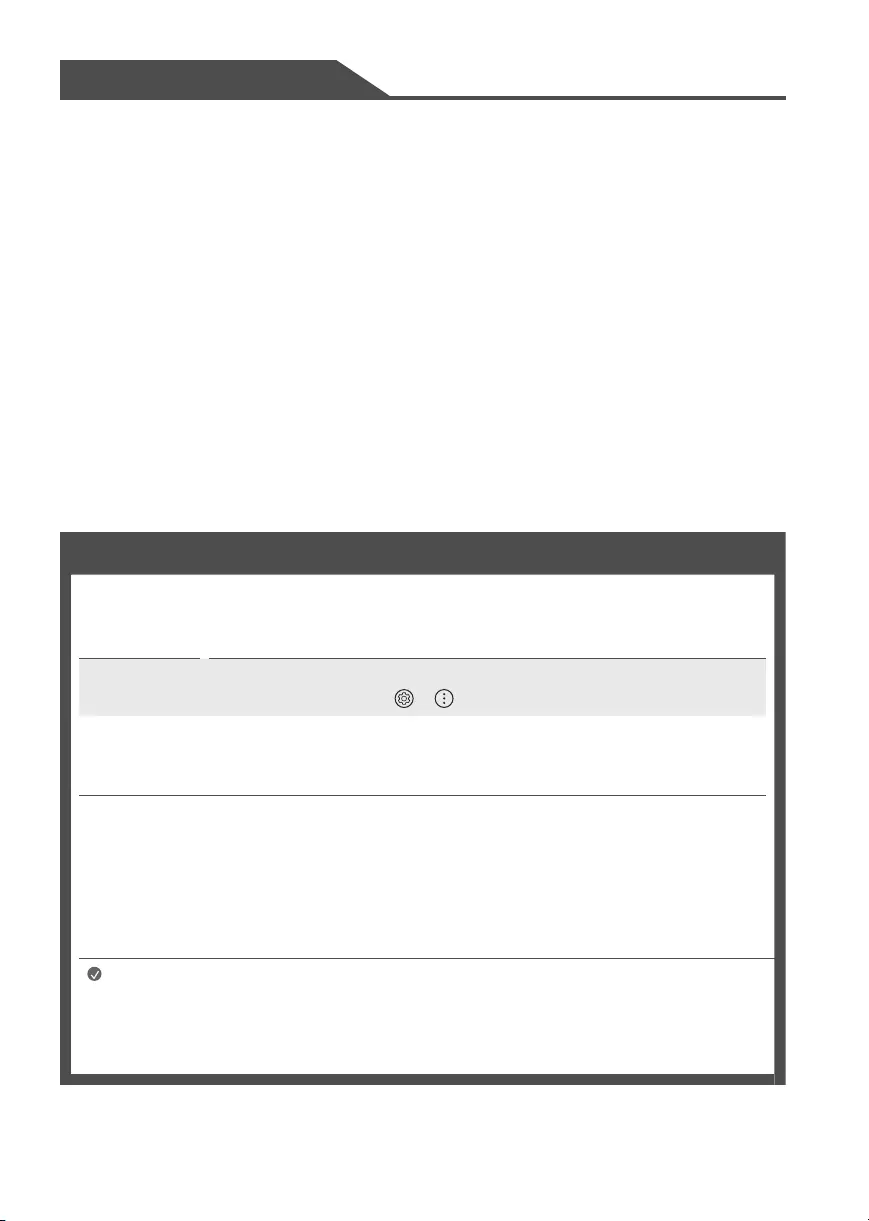
Warning! Safety instructions
CAUTION
RISK OF ELECTRIC SHOCK
DO NOT OPEN
CAUTION: TO REDUCE THE RISK OF ELECTRIC SHOCK DO NOT REMOVE COVER (OR BACK). NO USER SERVICEABLE PARTS INSIDE. REFER TO QUALIFIED
SERVICE PERSONNEL.
The symbol is intended to alert the user to the presence of uninsulated dangerous voltage within the product’s enclosure that may be of
sufficient magnitude to constitute a risk of electric shock to persons.
The symbol is intended to alert the user to the presence of important operating and maintenance (servicing) instructions in the literature
accompanying the device.
WARNING: TO REDUCE THE RISK OF FIRE AND ELECTRIC SHOCK, DO NOT EXPOSE THIS PRODUCT TO RAIN OR MOISTURE.
•TO PREVENT THE SPREAD OF FIRE, KEEP CANDLES OR OTHER
ITEMS WITH OPEN FLAMES AWAY FROM THIS PRODUCT AT
ALL TIMES.
•Do not place the TV and/or remote control in the
following environments:
—Keep the product away from direct sunlight.
—An area with high humidity such as a bathroom.
—Near any heat source such as stoves and other devices that
produce heat.
—Near kitchen counters or humidifiers where they can easily
be exposed to steam or oil.
—An area exposed to rain or wind.
—Do not expose to dripping or splashing and do not place
objects filled with liquids, such as vases, cups, etc. on or
over the apparatus (e.g., on shelves above the unit).
—Near flammable objects such as gasoline or candles, or
expose the TV to direct air conditioning.
—Do not install in excessively dusty places.
Otherwise, this may result in fire, electric shock, combustion/
explosion, malfunction or product deformation.
•Ventilation
—Install your TV where there is proper ventilation. Do not
install in a confined space such as a bookcase.
—Do not install the product on a carpet or cushion.
—Do not block or cover the product with cloth or other
materials while unit is plugged in.
•Take care not to touch the ventilation openings. When
watching the TV for a long period, the ventilation openings
may become hot.
•Protect the power cord from physical or mechanical abuse,
such as being twisted, kinked, pinched, closed in a door, or
walked upon. Pay particular attention to plugs, wall outlets,
and the point where the cord exits the device.
•Do not move the TV whilst the Power cord is plugged in.
•Do not use a damaged or loosely fitting power cord.
•Be sure to grasp the plug when unplugging the power cord.
Do not pull on the power cord to unplug the TV.
•Do not connect too many devices to the same AC power
outlet as this could result in fire or electric shock.

5
•Disconnecting the Device from the Main Power
—The power plug is the disconnecting device. In case of an
emergency, the power plug must remain readily accessible.
•Do not let your children climb or cling onto the TV. Otherwise,
the TV may fall over, which may cause serious injury.
•Outdoor Antenna Grounding (Can differ by country):
—If an outdoor antenna is installed, follow the precautions
below. An outdoor antenna system should not be located in
the vicinity of overhead power lines or other electric light
or power circuits, or where it can come in contact with such
power lines or circuits as death or serious injury can occur.
Be sure the antenna system is grounded to provide some
protection against voltage surges and built-up static
charges. Section 810 of the National Electrical Code
(NEC) in the U.S.A. provides information with respect to
proper grounding of the mast and supporting structure,
grounding of the lead-in wire to an antenna discharge
unit, size of grounding conductors, location of antenna
discharge unit, connection to grounding electrodes and
requirements for the grounding electrode.
Antenna grounding according to the National Electrical
Code, ANSI/NFPA 70
•Grounding (Except for devices which are not grounded.)
—TV with a three-prong grounded AC plug must be
connected to a three-prong grounded AC outlet. Ensure
that you connect the earth ground wire to prevent possible
electric shock.
•Never touch this apparatus or antenna during a lightning
storm. You may be electrocuted.
•Make sure the power cord is connected securely to the TV and
wall socket if not secured damage to the Plug and socket may
occur and in extreme cases a fire may break out.
•Do not insert metallic or inflammable objects into the
product. If a foreign object is dropped into the product,
unplug the power cord and contact the customer service.
•Do not touch the end of the power cord while it is plugged in.
You may be electrocuted.

6
•If any of the following occur, unplug the product
immediately and contact your local customer service.
—The product has been damaged.
—If water or another substance enters the product (like an AC
adapter, power cord, or TV).
—If you smell smoke or other odors coming from the TV.
—When lightning storms or when unused for long periods
of time.
Even the TV is turned off by remote control or button, AC
power source is connected to the unit if not unplugged in.
•Do not use high voltage electrical equipment near the TV
(e.g., a bug zapper). This may result in product malfunction.
•Do not attempt to modify this product in any way without
written authorization from LG Electronics. Accidental fire or
electric shock can occur. Contact your local customer service
for service or repair. Unauthorized modification could void the
user’s authority to operate this product.
•Use only an authorized attachments / accessories approved
by LG Electronics. Otherwise, this may result in fire, electric
shock, malfunction, or product damage.
•Never disassemble the AC adapter or power cord. This may
result in fire or electric shock.
•Handle the adapter carefully to avoid dropping or striking it.
An impact could damage the adapter.
•To reduce the risk of fire or electrical shock, do not touch
the TV with wet hands. If the power cord prongs are wet or
covered with dust, dry the power plug completely or wipe
dust off
•Batteries
—Store the accessories (battery, etc.) in a safe location out of
the reach of children.
—Do not short circuit, disassemble, or allow the batteries
to overheat. Do not dispose of batteries in a fire. Batteries
should not be exposed to excessive heat.
—Caution: Risk of fire or explosion if the battery is replaced
by an incorrect type.
•Moving
—When moving, make sure the product is turned off,
unplugged, and all cables have been removed. It may take
2 or more people to carry larger TVs. Do not press or put
stress on the front panel of the TV. Otherwise, this may
result in product damage, fire hazard or injury.
•Keep the packing anti-moisture material or vinyl packing out
of the reach of children.
•Do not allow an impact shock, any objects to fall into the
product, and do not drop anything onto the screen.
•Do not press strongly upon the panel with a hand or a sharp
object such as a nail, pencil, or pen, or make a scratch on it. It
may causedamage to screen.
•Cleaning
—When cleaning, unplug the power cord and wipe gently
with a soft/dry cloth. Do not spray water or other liquids
directly on the TV. Do not clean your TV with chemicals
including glass cleaner, any type of air freshener,
insecticide, lubricants, wax (car, industrial), abrasive,
thinner, benzene, alcohol etc., which can damage the
product and/or its panel. Otherwise, this may result in
electric shock or product damage.
7
Preparing
Lifting and moving the TV
When moving or lifting the TV, read the following to prevent the TV from being scratched or damaged and for safe transportation regardless of its
type and size.
•It is recommended to move the TV in the box or packing material that the TV originally came in.
•Before moving or lifting the TV, disconnect the power cord and all cables.
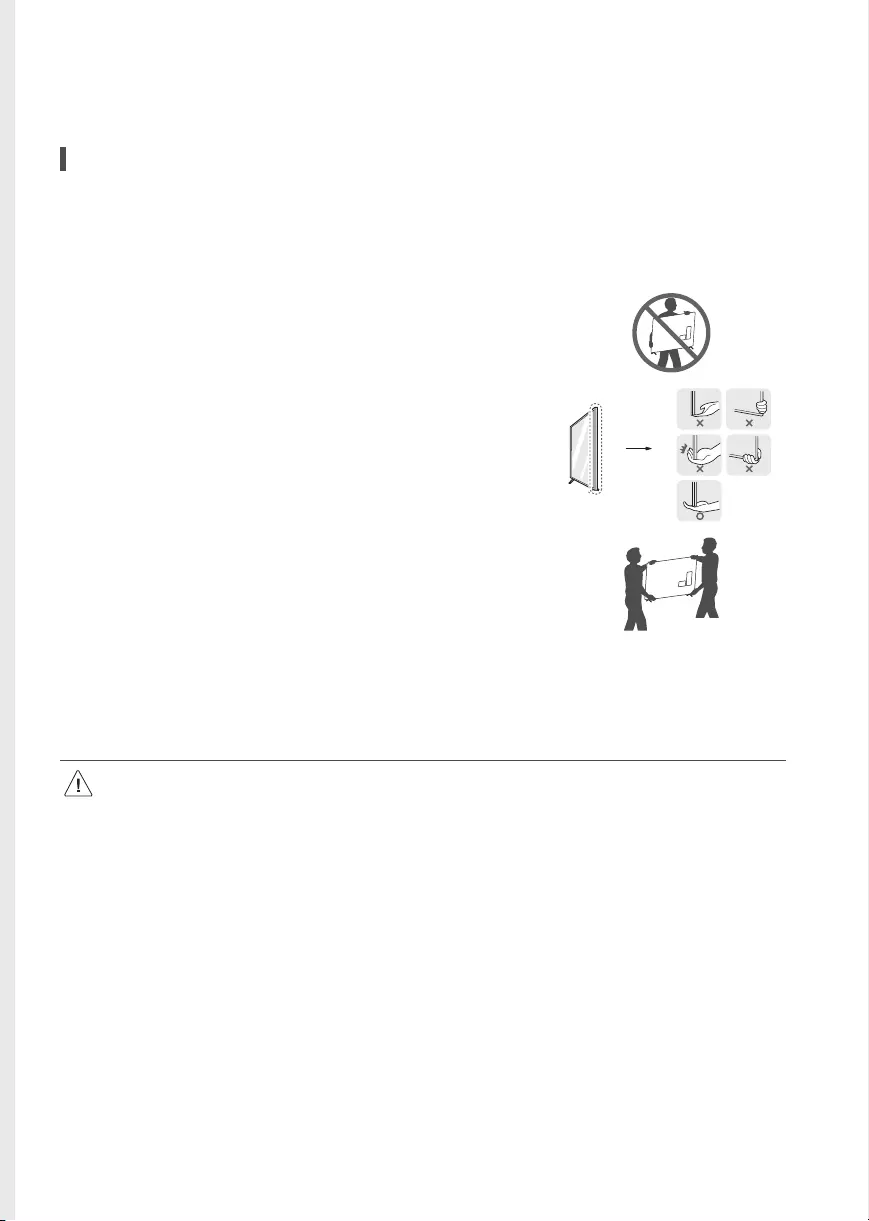
•When holding the TV, the screen should face away from you to avoid damage.
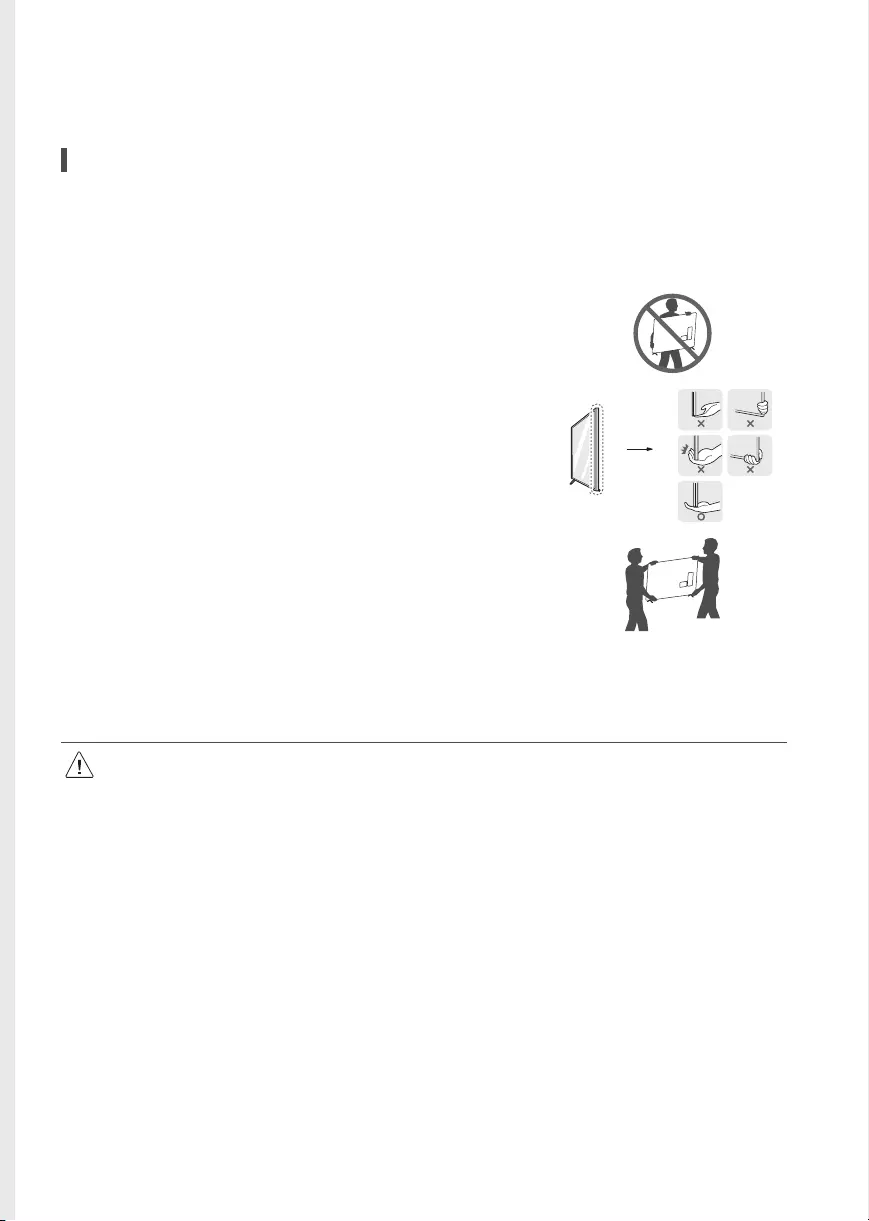
•Hold the top and bottom of the TV frame firmly. Make sure not to hold the transparent part,
speaker, or speaker grille area.
•Use at least two people to move a large TV.
•When transporting the TV by hand, hold the TV as shown in the following illustration.
•When transporting the TV, do not expose the TV to jolts or excessive vibration.
•When transporting the TV, keep the TV upright; never turn the TV on its side or tilt towards the left or right.
•When handling the TV, be careful not to damage the protruding buttons.
•Avoid touching the screen at all times, as this may result in damage to the screen.
•Do not place the product on the floor with its front facing down without padding. Failure to do so may result in damage to the
screen.
•When attaching the stand to the TV set, place the screen facing down on a cushioned table or flat surface to protect the screen from
scratches.
8
Mounting on the Table
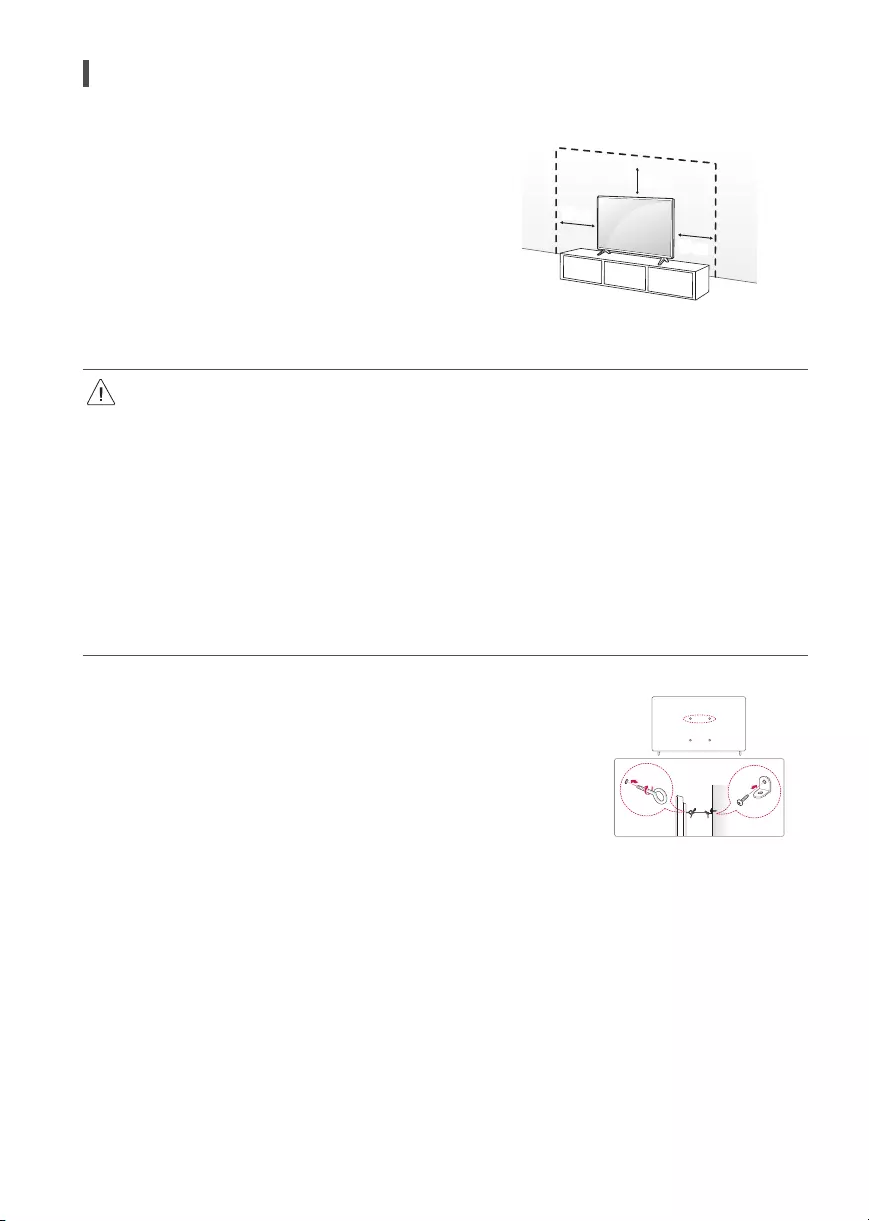
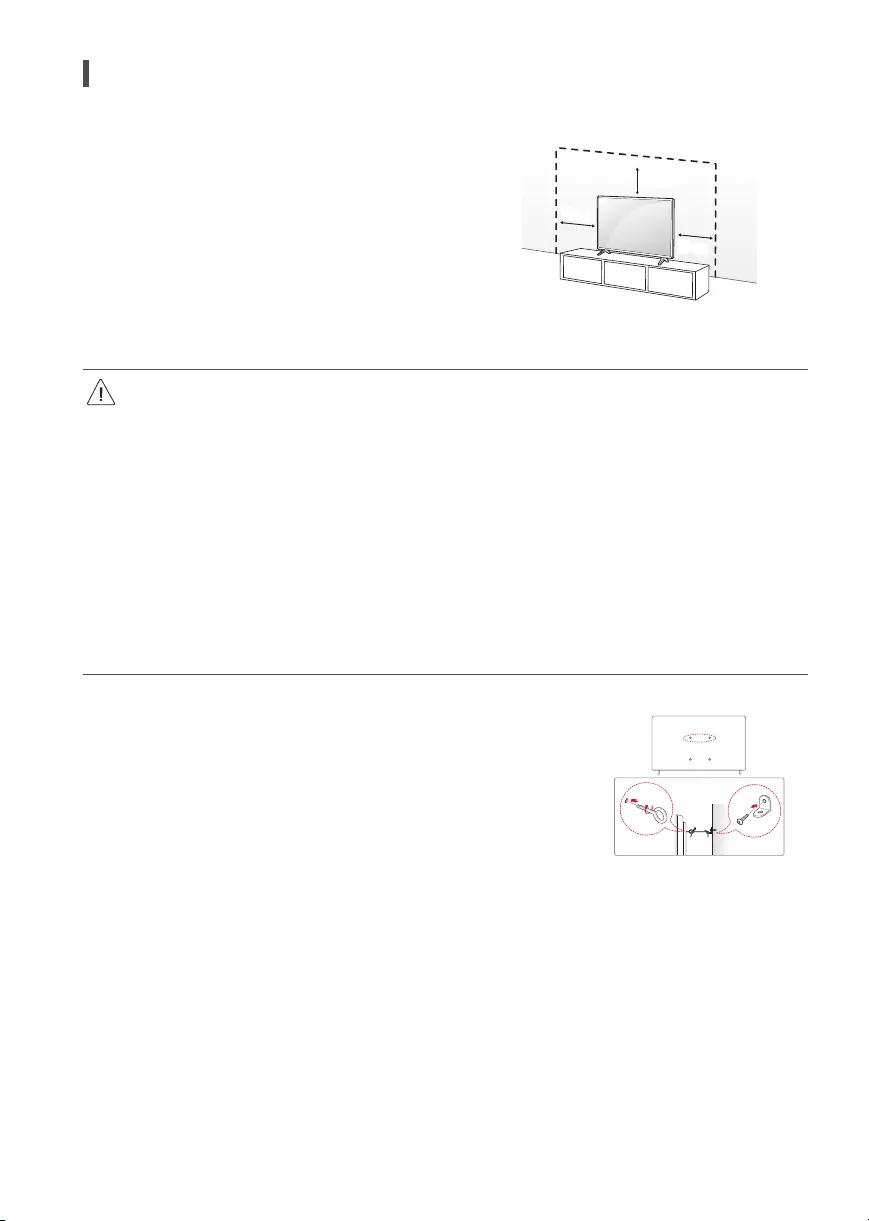
1 Lift and tilt the TV into its upright position on a table.
• Leave a minimum of 10cm space from the wall for proper ventilation.
2 Connect the power cord to a wall outlet.
10cm
10cm
10cm
(Depending upon model)
•Do not apply foreign substances (oils, lubricants, etc.) to the screw parts when assembling the product. (Doing so may damage the
product.)
•If you install the TV on a stand, you need to take actions to prevent the product from overturning. Otherwise, the product may fall over,
which may cause injury.
•Do not use any unapproved items to ensure the safety and product life span.
•Any damage or injuries caused by using unapproved items are not covered by the warranty.
•Make sure that the screws are fastened tightly. (If they are not fastened securely enough, the TV may tilt forward after being installed.)
•Do not fasten the screws with excessive force otherwise they may strip and become loose.
Securing TV to the Wall
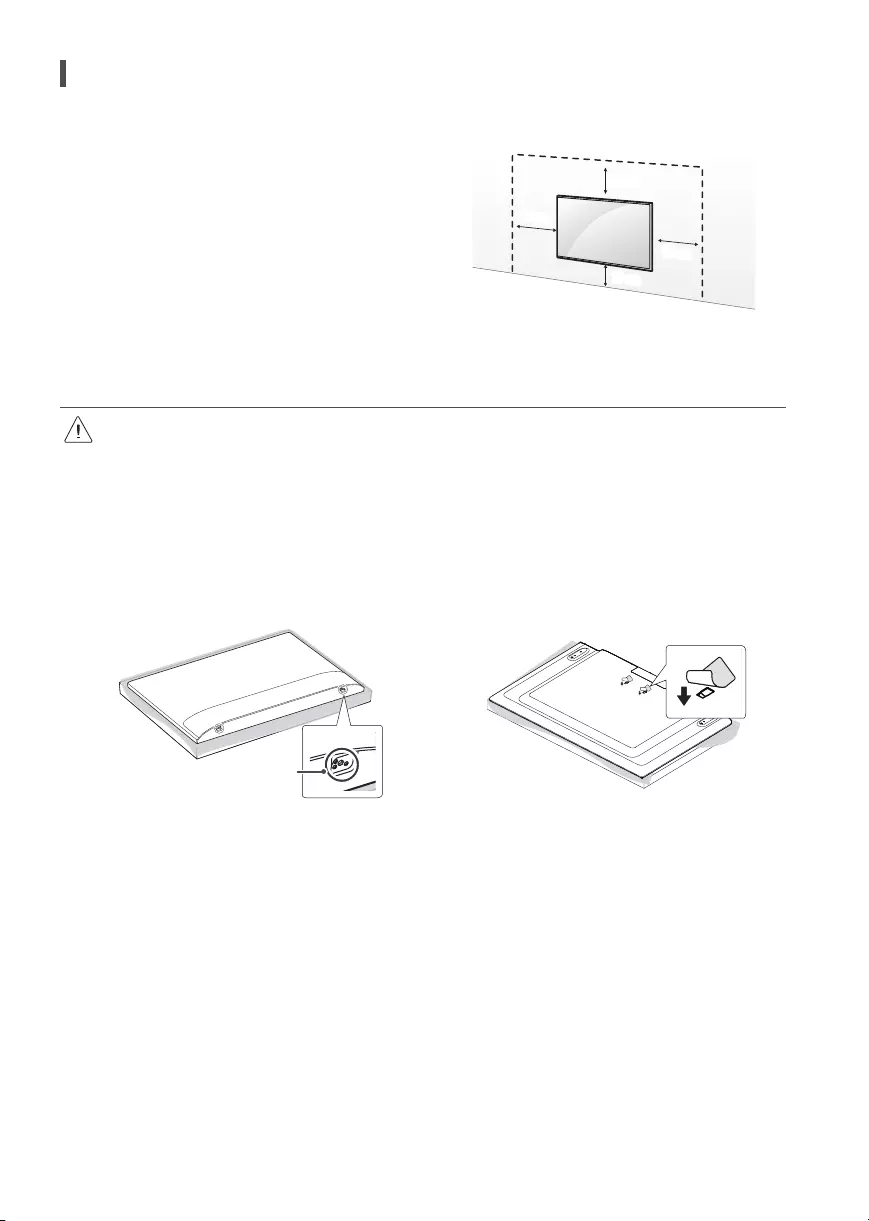
1 Insert and tighten the eye-bolts or TV brackets and bolts on the back of the TV.
•If there are bolts inserted at the eye-bolts position, remove the bolts first.
2 Mount the wall brackets with the bolts to the wall. Match the location of the wall bracket and the
eye-bolts on the rear of the TV.
3 Connect the eye-bolts and wall brackets tightly with a sturdy rope or cable. Make sure to keep
the rope parallel to the flat surface.
•Use a platform or cabinet that is strong and large enough to support the TV securely.
•Brackets, bolts, and ropes are optional. You can obtain additional accessories from your local
dealer. (Depending upon model)
9
Mounting to the Wall
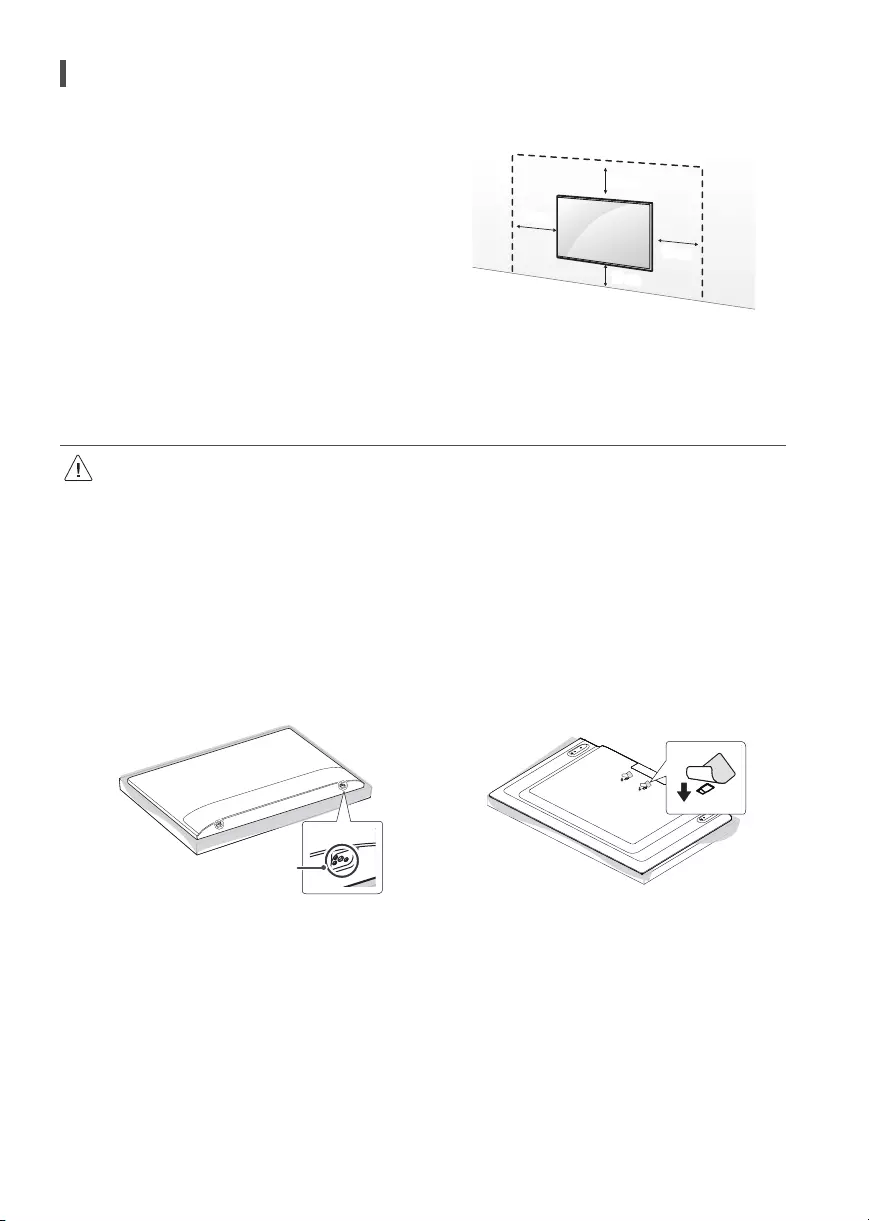
An optional wall mount can be used with your LG Television. Consult with
your local dealer for a wall mount that supports the VESA standard used
by your TV model. Carefully attach the wall mount bracket at the rear of
the TV. Install the wall mount bracket on a solid wall perpendicular to the
floor. If you are attaching the TV to other building materials, please contact
qualified personnel to install the wall mount. Detailed instructions will be
included with the wall mount. We recommend that you use an LG brand
wall mount. The LG wall mount is easy to adjust or to connect the cables.
When you do not use LG’s wall mount bracket, use a wall mount bracket
where the device is adequately secured to the wall with enough space to
allow connectivity to external devices. If you are using a non-adjustable
mount, attach the mount to the wall. Attach the cables to the TV first, then
attach the TV to the mount.
10cm
10cm
10cm
10cm
(Depending upon model)
•Remove the stand before installing the TV on a wall mount by performing the stand attachment in reverse.
•For more information of screws and wall mount bracket, refer to the Separate purchase.
•If you intend to mount the product to a wall, attach VESA standard mounting interface (optional parts) to the back of the product.
When you install the set to use the wall mounting bracket (optional parts), fix it carefully so as not to drop.
•When mounting a TV on the wall, make sure not to install the TV by hanging the power and signal cables on the back of the TV.
•Do not install this product on a wall if it could be exposed to oil or oil mist. This may damage the product and cause it to fall.
•When installing the wall mounting bracket, it is recommended to cover the stand hole using tape, in order to prevent the influx of
dust and insects, (Depending upon model).
Stand hole
(Depending on model)
10
Wall Mounting Bracket
(Depending upon model)
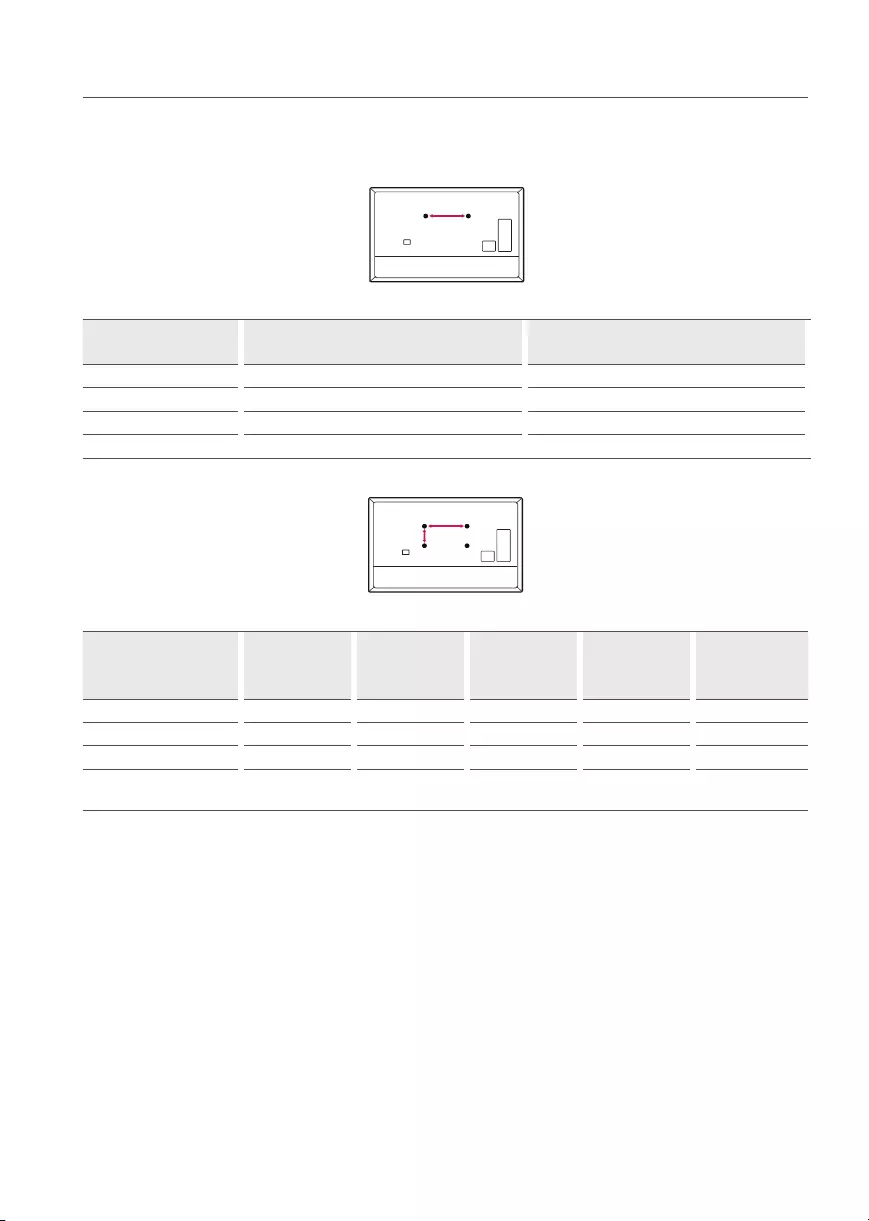
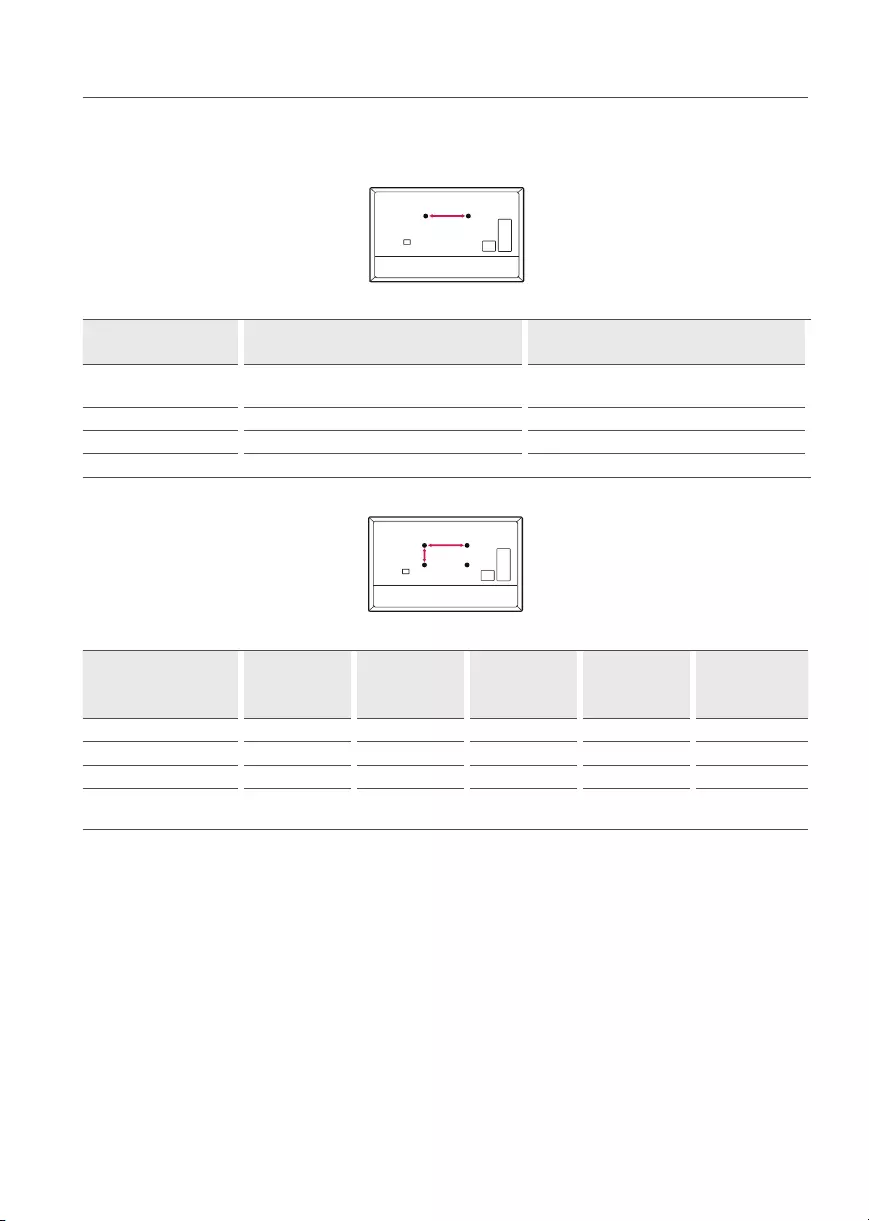
Make sure to use screws and wall mounts that meet the VESA standard. Standard dimensions for the wall mount kits are described in the following
table.
Model 43/50UP77*
43/50UP80*
55/60/65UP77*
55/60/65UP80*
Screws distance (A) (mm) 200 300
Standard screw M6 M6
Number of screws 2 2
Wall mount bracket WB21LMB WB21LMB
Model
43/50UP75*
43/50UP77*
43/50UP80*
55UP75*
55UP77*
55UP80*
65UP75*
60/65UP77*
60/65UP80*
70/75UP77*
70/75UP80*
70/75UP75*
82/86UP80*
VESA (A x B) (mm) 200 x 200 300 x 300 300x300 400x400 600x400
Standard screw M6 M6 M6 M6 M8
Number of screws 4 4 4 4 4
Wall mount bracket LSW240B
MSW240
OLW480B
MSW240 OLW480B LSW440B LSW640B

11
Antenna/Cable
Connect an antenna, cable, or cable box to watch TV while referring to the following. The illustrations may differ from the actual items and an RF
cable is optional.
•Make sure not to bend the copper wire of the RF cable.
Copper wire
•Complete all connections between devices, and then connect the power cord to the power outlet to prevent damage to your TV.
•To improve the picture quality in a poor signal area, purchase a signal amplifier.
•Use a signal splitter to use 2 TVs or more.
•If the antenna is not installed properly, contact your dealer for assistance.
•This TV cannot receive ULTRA HD (3840x2160pixels) broadcasts directly because the related standards have not been confirmed.
12
Starting TV
Turning on the TV
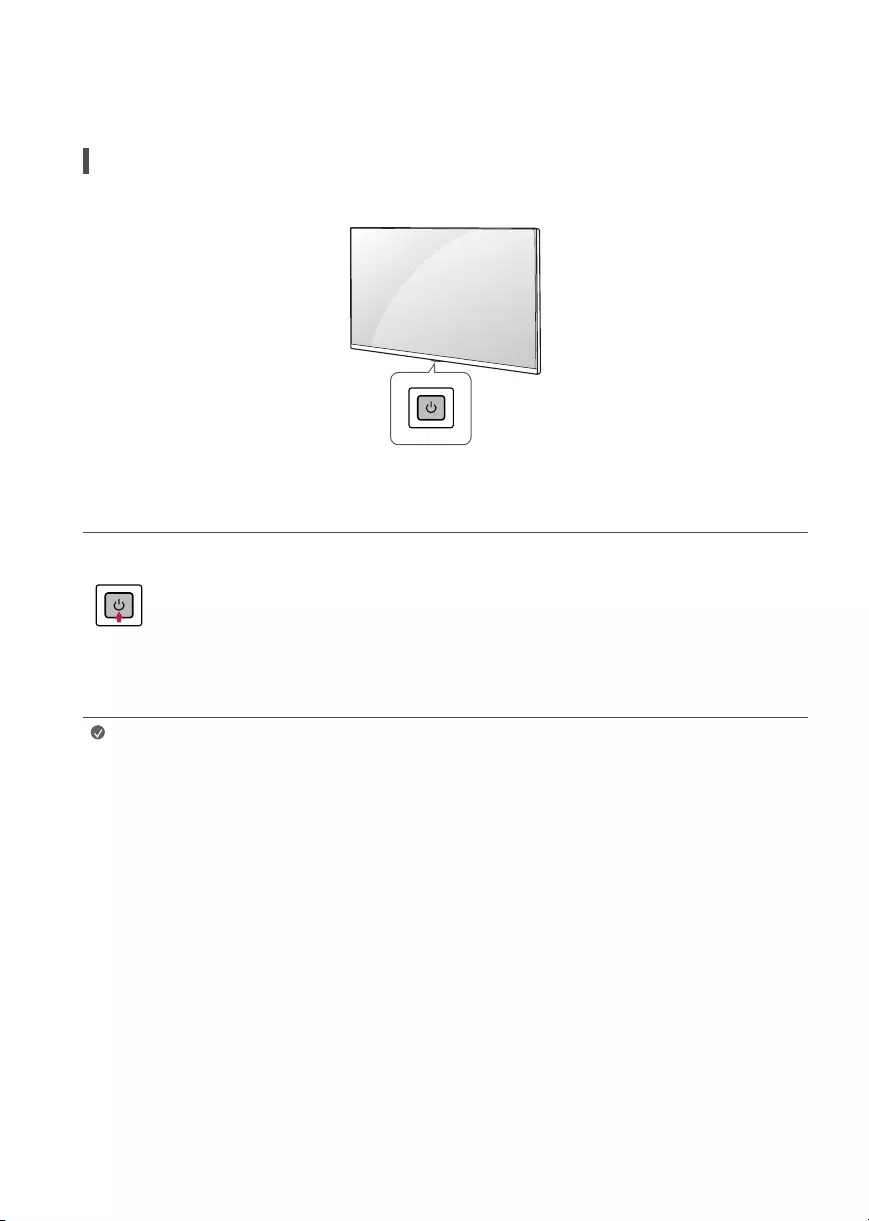
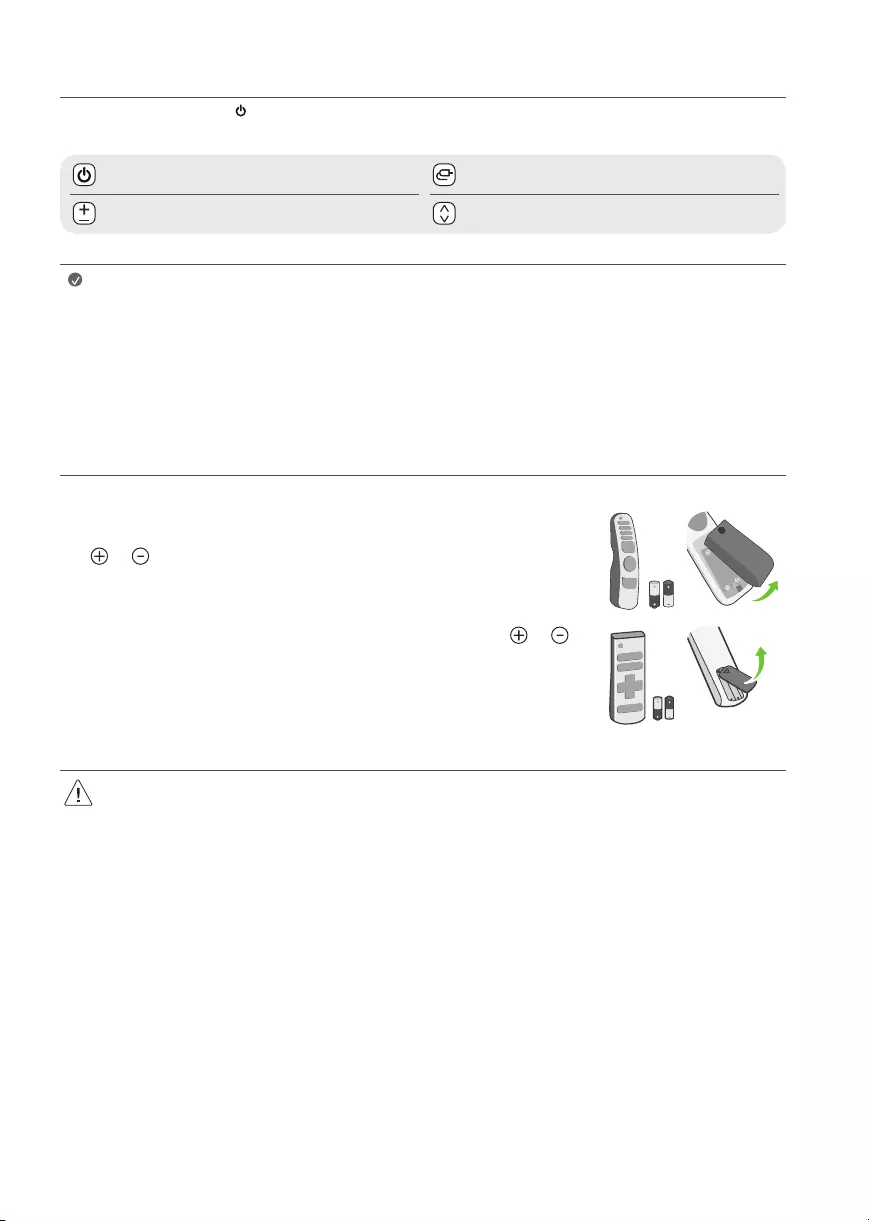
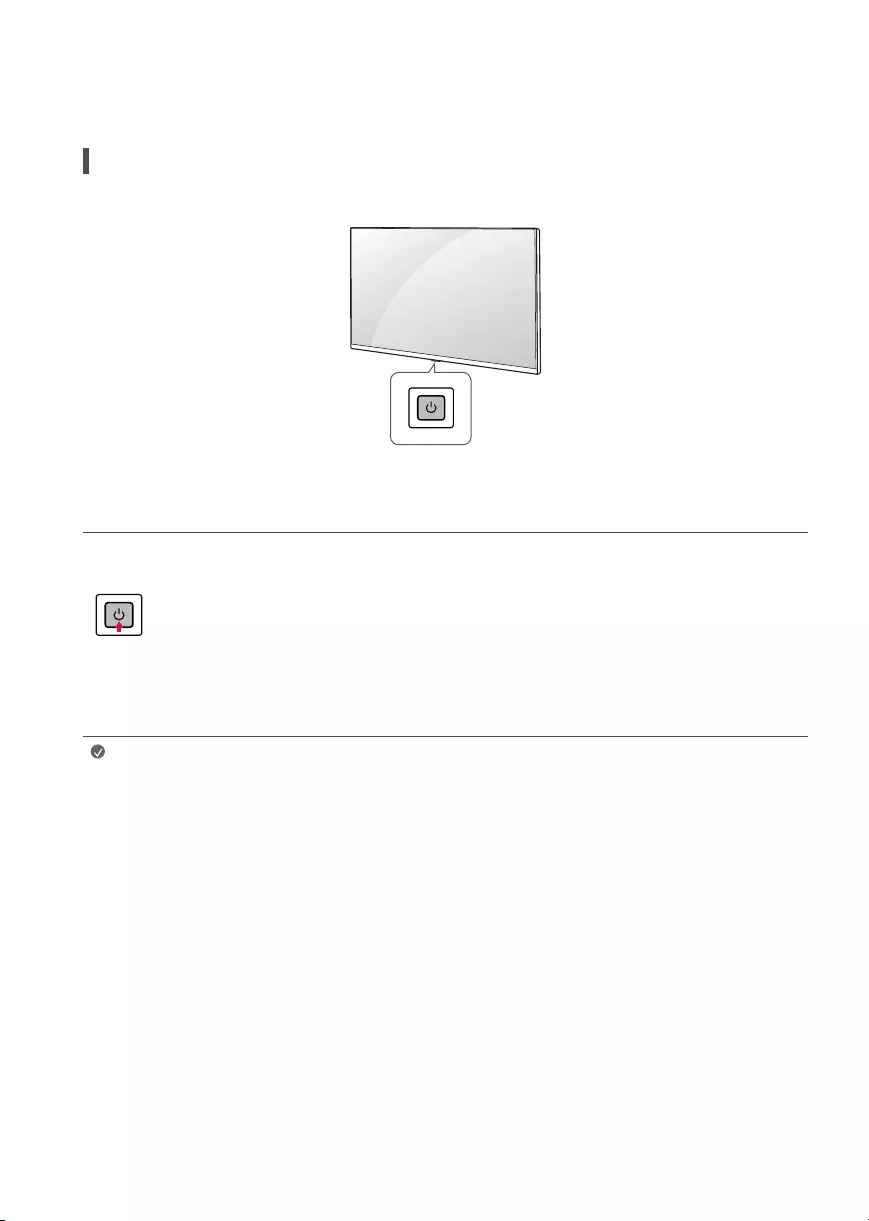
You can simply operate the TV functions, using the button.
Using button
Power On (Press)
Power Off1) (Press and Hold)
Menu Control (Press2))
Menu Selection (Press and Hold3))
1) All running apps will close, and any recording in progress will stop.
2) You can access and adjust the menu by pressing the button when TV is on.
3) You can use the function when you access menu control.
Note •When the TV is turned on for the first time after being shipped from the factory, initialization of the TV may take
approximately oneminute.
13
Adjusting the menu
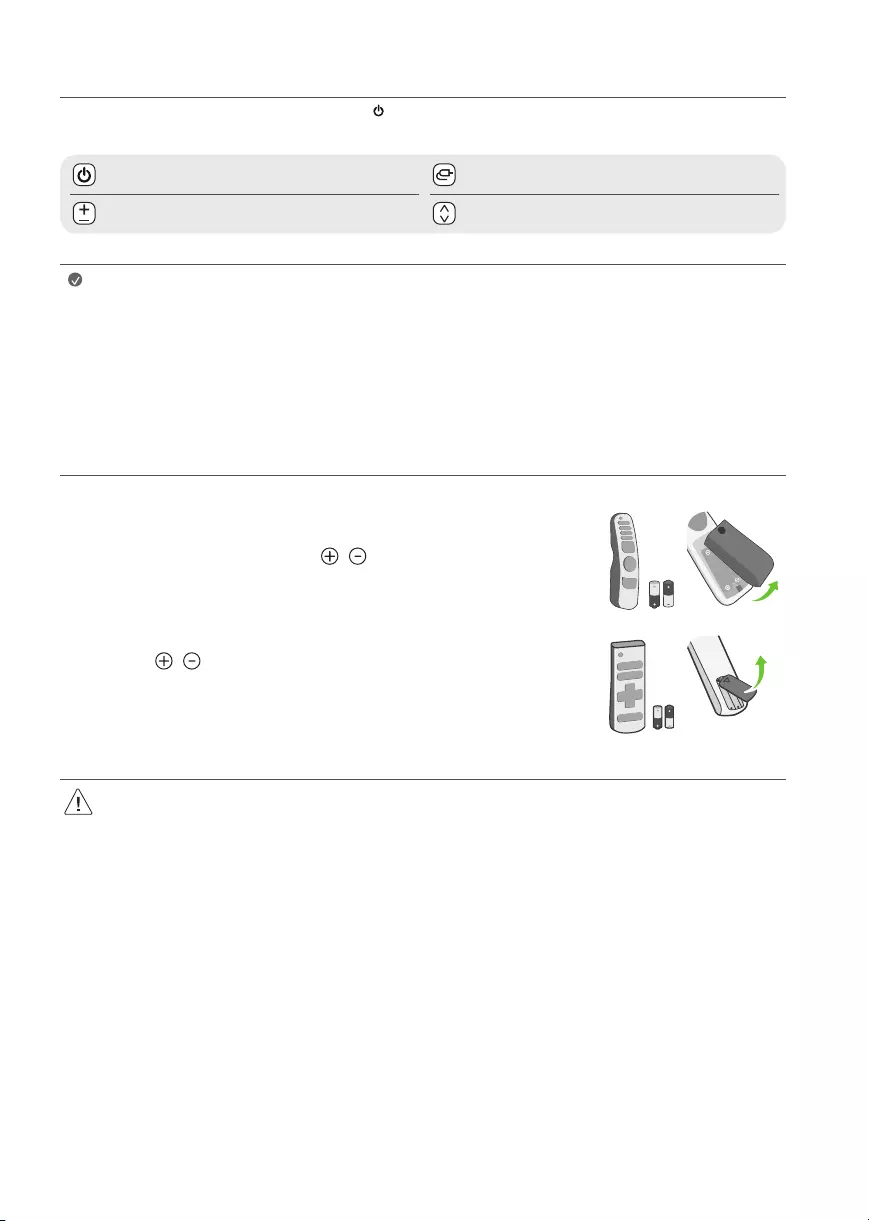
When the TV is turned on, press the button one time. You can adjust the Menu items using the button.
Turns the power off. Changes the input source.
Adjusts the volume level. Scrolls through the saved channels.
Note •Your TV’s OSD (On Screen Display) may differ slightly from that shown in this manual.
•The available menus and options may differ from the input source or product model that you are using.
•New features may be added to this TV in the future.
•The device must be easily accessed to a location outlet near the access. Some devices are not made by turning on / off
button, turning off the device and unplugging the power cord.
Inserting the battery
(Depending on model)
•When the message [Magic Remote battery is low. Please change the battery.] is displayed, replace
the batteries. To install batteries, open the battery cover, replace batteries (1.5VAA) matching the
and ends to the label inside the compartment, and close the battery cover. To remove the
batteries, perform the installation actions in reverse. This remote uses infrared light. When in use,
it should be pointed in the direction of the TV’s remote sensor.
•To install batteries, open the battery cover, replace batteries (1.5VAAA) matching the and
ends to the label inside the compartment, and close the battery cover. To remove the batteries,
perform the installation actions in reverse. This remote uses infrared light. When in use, it should
be pointed in the direction of the TV’s remote sensor.
•Do not mix new batteries with old batteries. This may cause the batteries to overheat and leak.
•Failure to match the correct polarities of the battery may cause the battery to burst or leak, resulting in fire, personal injury, or ambient
pollution.
•This apparatus uses batteries. In your community there might be regulations that require you to dispose of these batteries properly due
to environmental considerations. Please contact your local authorities for disposal or recycling information.
•Batteries inside or inside the product shall not be exposed to excessive heat such as sunshine, fire or the like.
14
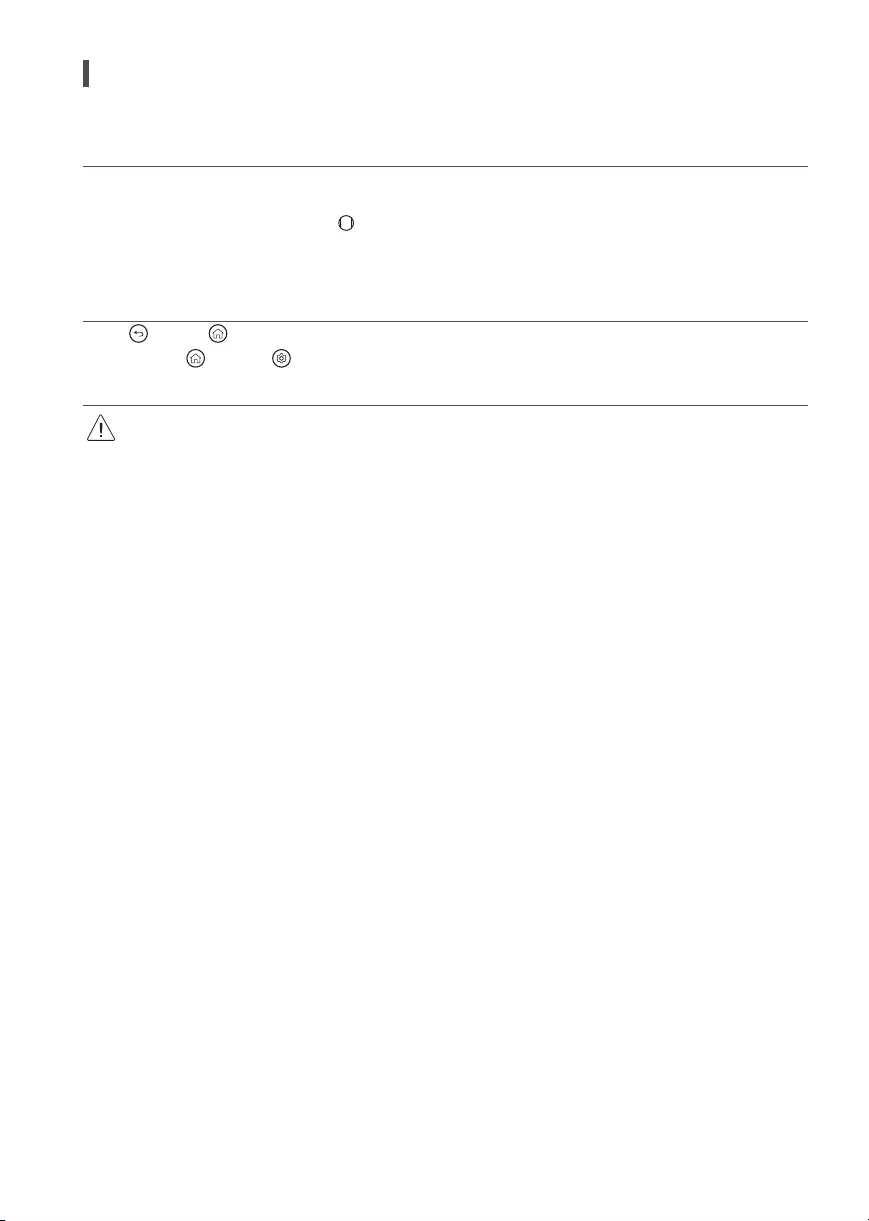
Registering Magic Remote Control
How to register the Magic Remote Control
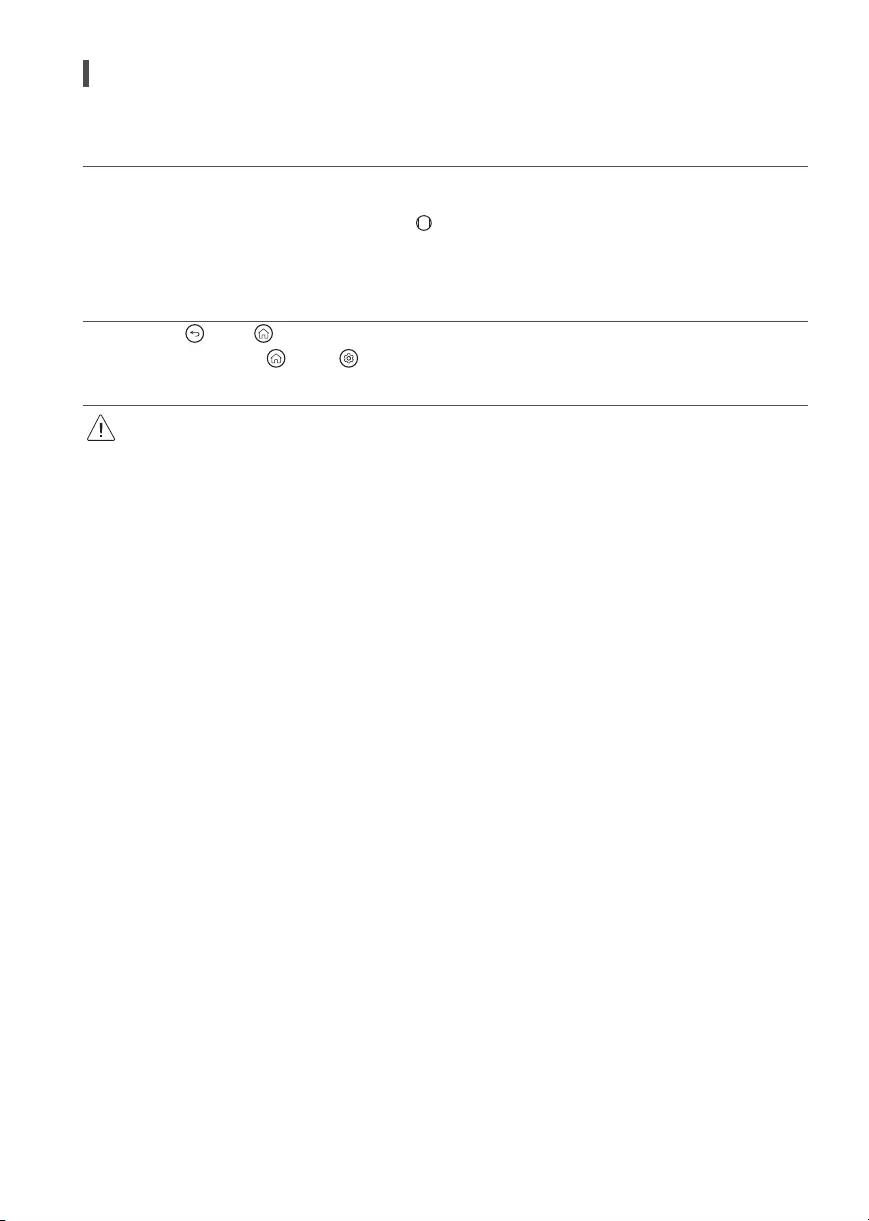
To use the Magic Remote, first pair it with your TV.
1 Put batteries into the Magic Remote and turn the TV on.
2 Point the Magic Remote at your TV and press the Wheel (OK) on the remote control.
* If the TV fails to register the Magic Remote, try again after turning the TV off and back on.
How to deregister the Magic Remote Control
Press the (Back) and (Home) buttons at the same time for five seconds, to unpair the Magic Remote with your TV.
* Press and hold the (Home) and (Q. Settings) buttons for more than 5seconds to disconnect and re-register the Magic Remote at the
same time.
•It is recommended that an Access Point (AP) be located more than 0.2 m away from the TV. If the AP is installed closer than 0.2m, the
Magic remote control may not perform as expected due to frequency interference.
15
Using Remote Control
Using Magic Remote Control
(Depending upon model)
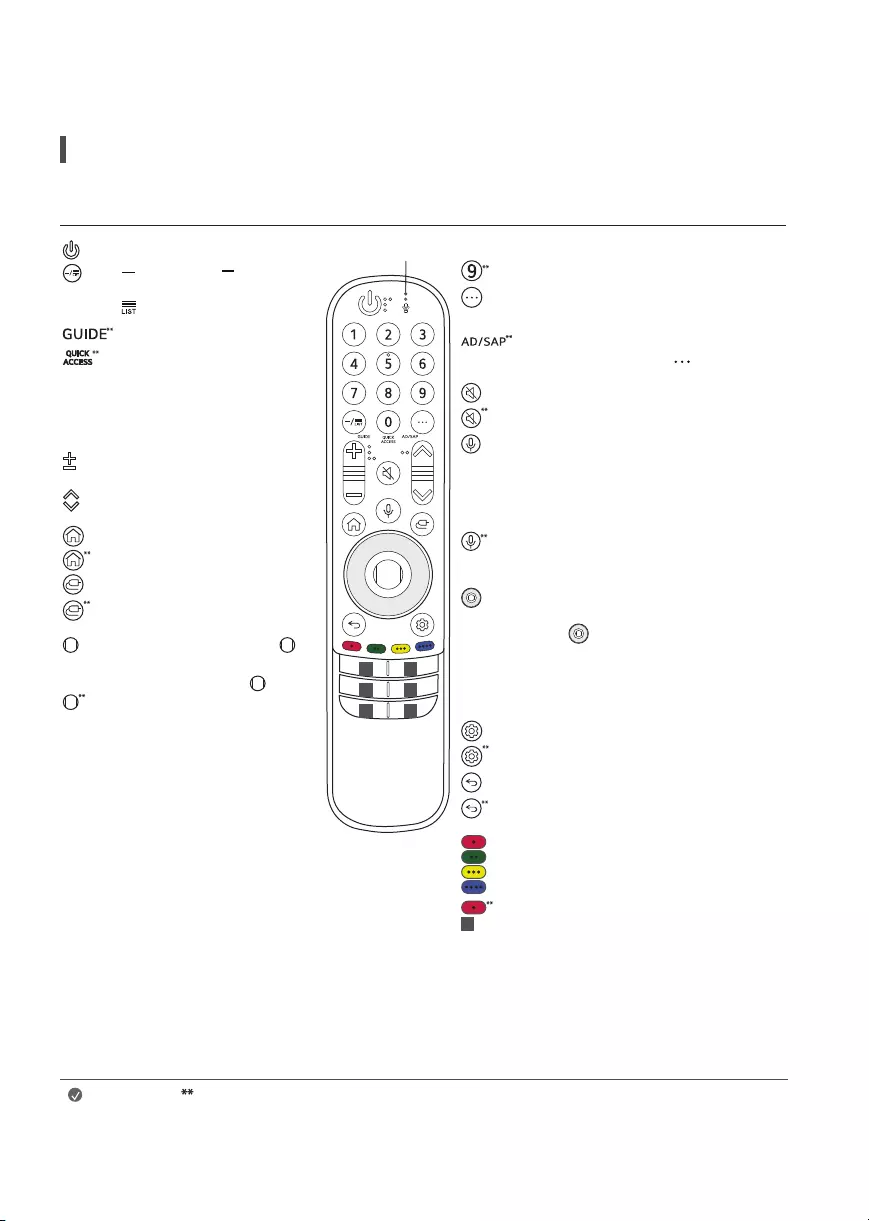
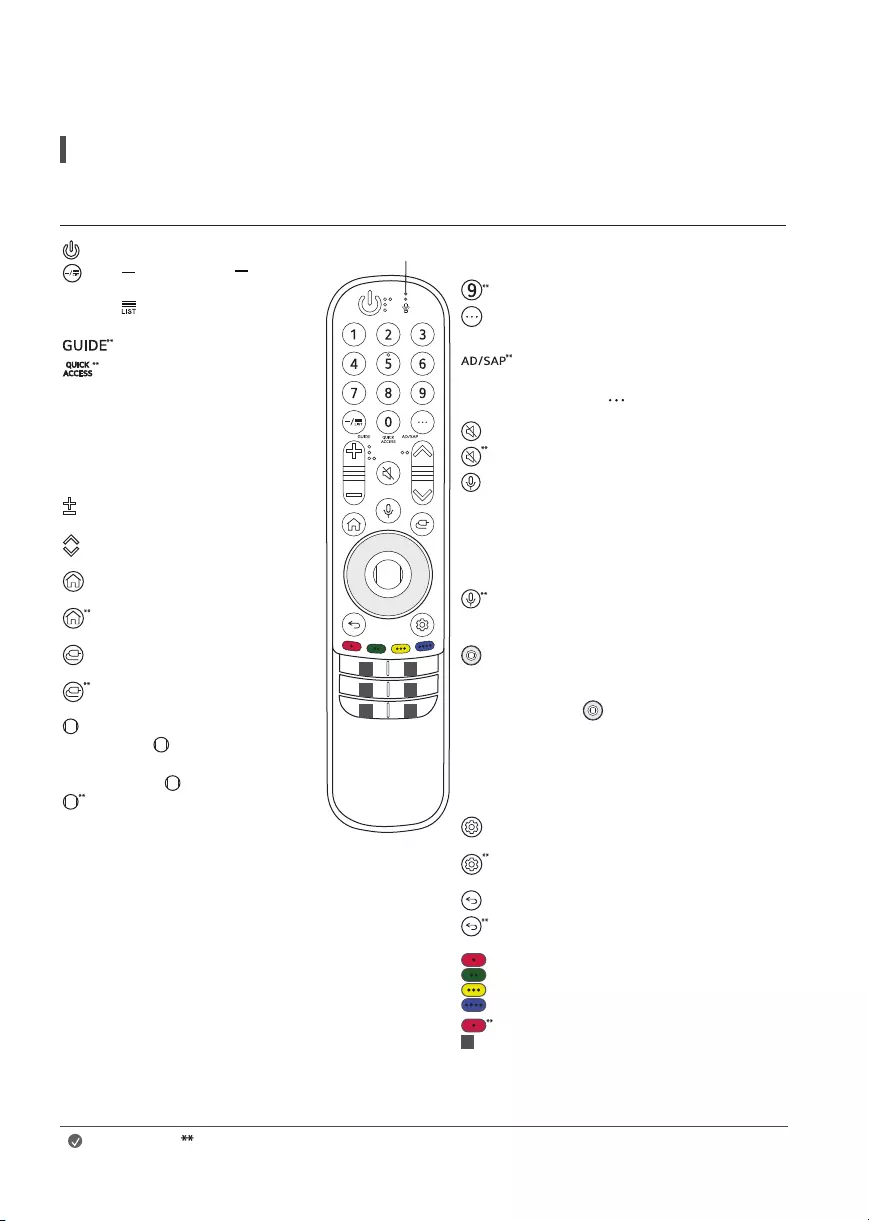
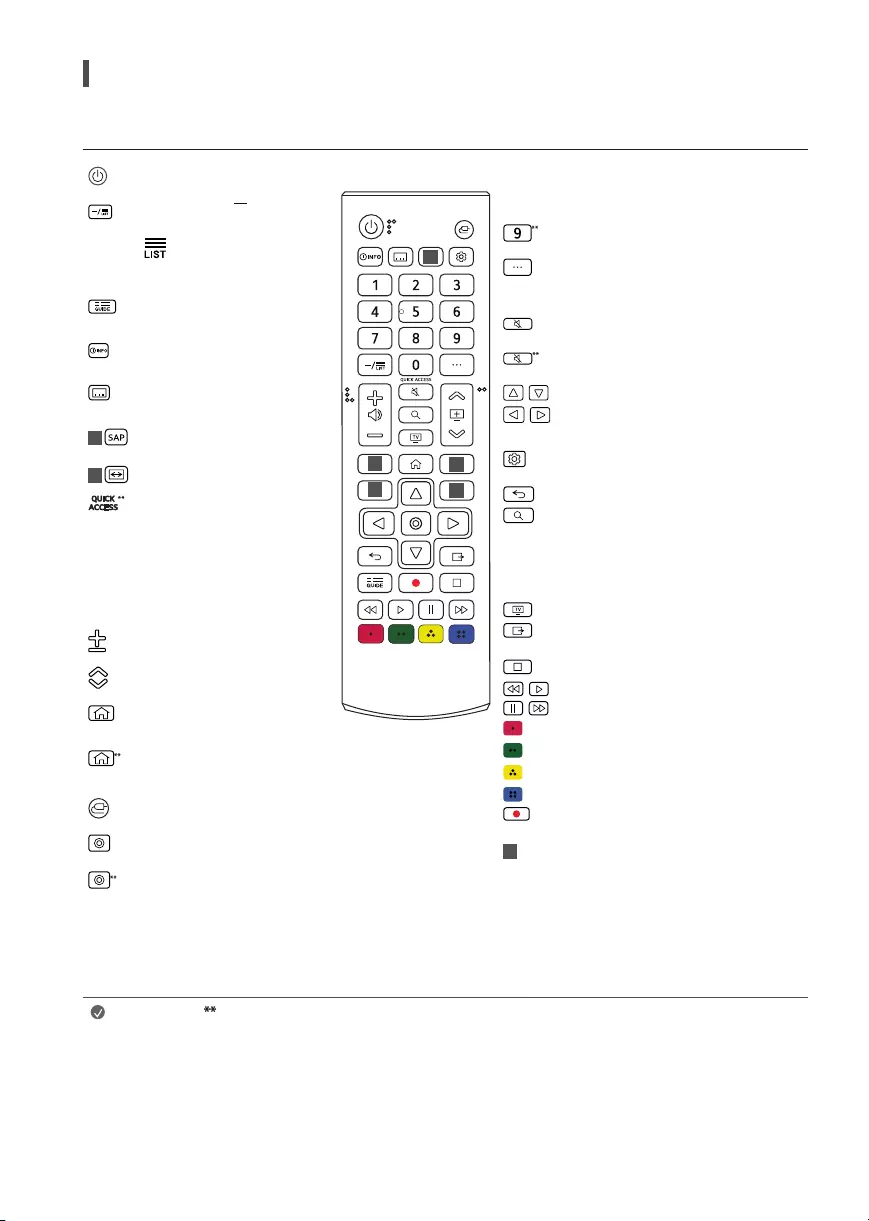
The descriptions in this manual are based on the buttons on the remote control. Please read this manual carefully and use the TV correctly.
Power Turns the TV on or off.
(Dash) Inserts a between
numbers such as 2-1 and 2-2.
Accesses the saved channel list.
Accesses the [Guide].
Accesses the [Edit Quick Access].
—[Edit Quick Access] is a feature that
allows you to enter a specified app
or Live TV directly by pressing and
holding the number buttons.
Volume buttons Adjusts the volume
level.
Channel buttons Scrolls through the
saved channels.
Home Accesses the Home menu.
Home Launches the last used apps.
Input Changes the input source.
Input Accesses the [Home
Dashboard]
Wheel (OK) Press the center of
button to select a menu. You can
change channels by using button.
Wheel (OK) Accesses the [Magic
Explorer]. You can run the [Magic
Explorer] feature when the pointer
color is changed to purple. If watching
a program, press and hold down the
pointer onto the video. When using
[TV Guide], [Settings], [Sports Alert],
or [Art Gallery], press and hold down
on the text. (Depending upon country)
Microphone
1 1
11
1 1
Number buttons Enters numbers.
Accesses the [Quick Help].
More actions Displays more remote control
functions.
SAP (Secondary Audio Program) feature can also
be enabled by pressing the button.
Mute Mutes all sounds.
Mute Accesses the [Accessibility] menu.
Voice recognition Network connection is
required to use the voice recognition function.
Check for recommended content. (Some
recommended services may not be available in
some countries.)
Voice recognition Speak while pressing and
holding the button to use the voice recognition
feature.
Up/Down/Left/Right Press the up, down,
left or right button to scroll the menu. If you
press buttons while the pointer is in use,
the pointer will disappear from the screen and
Magic Remote will operate like a general remote
control. To display the pointer on the screen
again, shake Magic Remote to the left and right.
Q. Settings Accesses the Quick Settings.
Q. Settings Displays the [All Settings] menu.
Back Returns to the previous level.
Back Clears on-screen displays and returns to
last input viewing.
These access special functions in some menus.
Red button Runs the record function.
1Streaming Service buttons Connects to the
Video Streaming Service.
(Some buttons and services may not be provided depending upon models or regions.)
Note To use the button, press and hold for more than 1 second.
16
Using Remote Control
(Depending upon model)
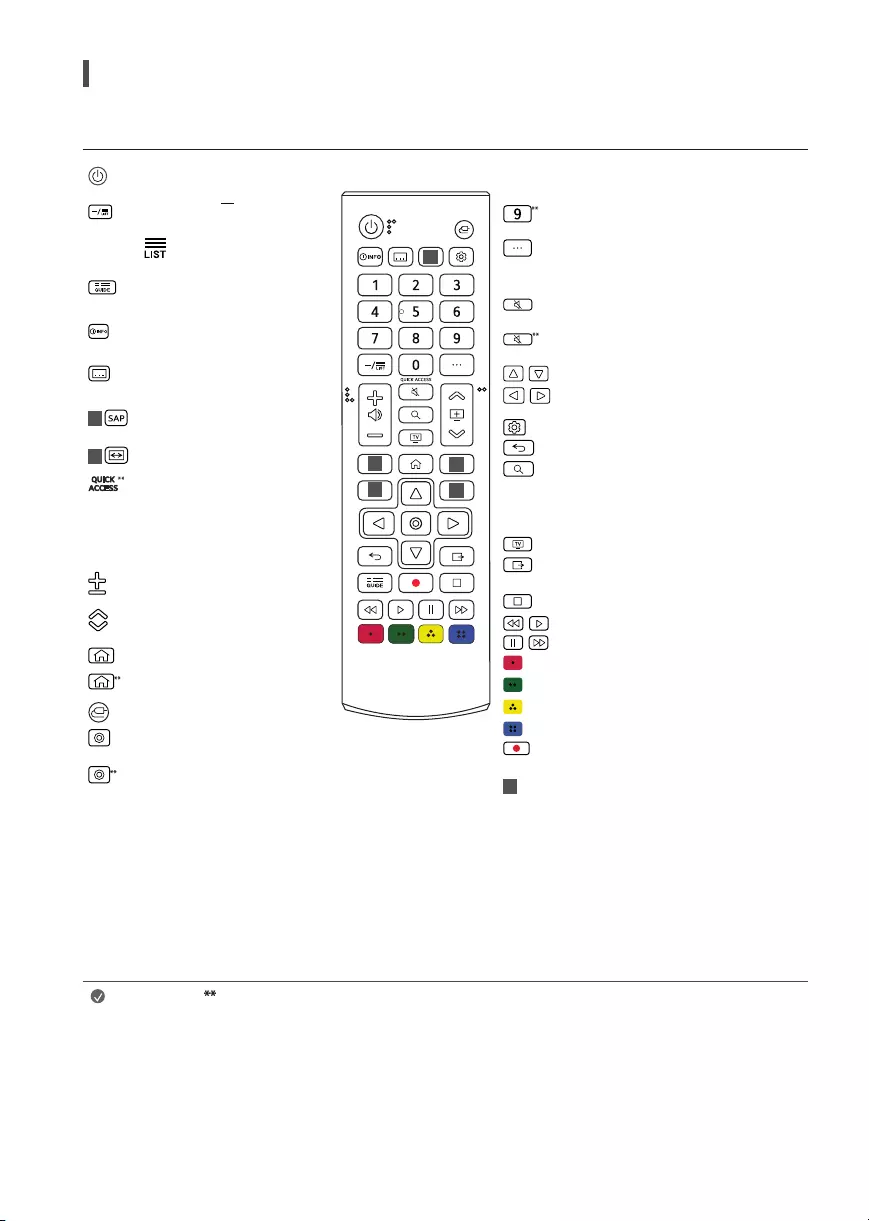
The descriptions in this manual are based on the buttons on the remote control. Please read this manual carefully and use the TV correctly.
Power Turns the TV on or off
Dash Inserts a between numbers
such as 2-1 and 2-2.
Accesses the saved channel list
Displays the program event according
to time scheduler.
Shows information on the current
program.
Recalls your preferred subtitle in
digital mode.
1 Enables SAP (Secondary Audio
Program) Feature.
1 Resizes an image.
Accesses the [Edit Quick Access].
—[Edit Quick Access] is a feature that
allows you to enter a specified app
or Live TV directly by pressing and
holding the number buttons.
Volume buttons Adjusts the volume
level.
Channel buttons Scrolls through the
saved channels.
Home Accesses the Home menu..
Home Launches the last used apps.
Input Changes the input source.
OK Selects menus or options and
confirms your input.
OK Accesses the [Magic Explorer].
When using [TV Guide], [Settings],
[Sports Alert], or [Art Gallery], press
and hold down on the text.
1
2
2
2
2
Number buttons Enters numbers.
Accesses the [Quick Help].
More actions Displays more remote control
functions.
Mute Mutes all sounds.
Mute Accesses the [Accessibility] menu.
, ,
,
Navigation button (up / down / left / right)
Scrolls through menus or options.
Q. Settings Accesses the Quick Settings
Back Returns to the previous screen
Search Check for recommended content.
(Some recommended services may not be
available in some countries.)
Shows the search mode.
You can watch TV or LG Channels.
Clears on-screen displays and returns to last
input viewing.
,
, ,
,
Control buttons Control buttons for media
contents.
These access special functions in some menus.
Starts to record. (Only Time Machine Ready
supported model)
2Streaming Service buttons Connects to the
Video Streaming Service.
(Some buttons and services may not be provided depending upon models or regions.)
Note To use the button, press and hold for more than 1 second.
17
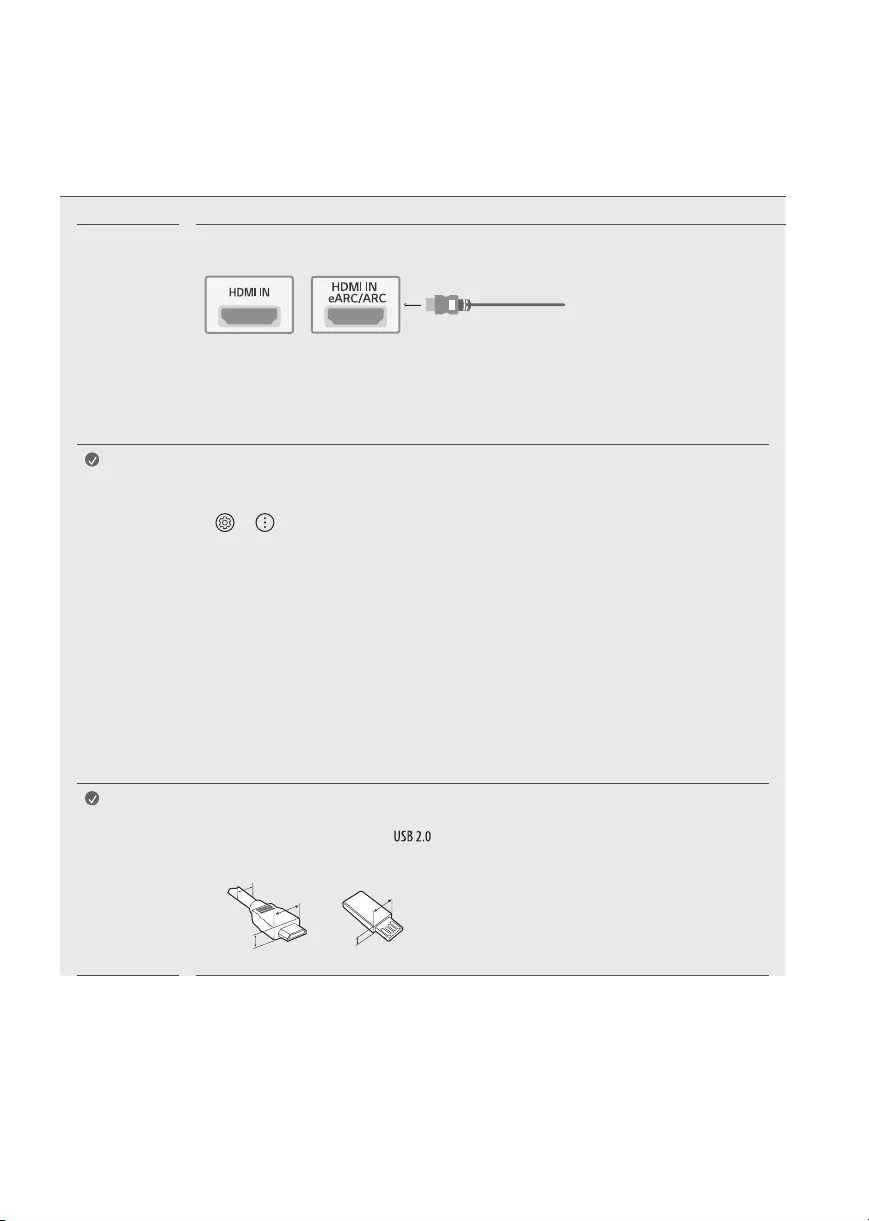
Connections
You can connect various external devices to the TV. For more information on external device’s connection, refer to the manual provided with each
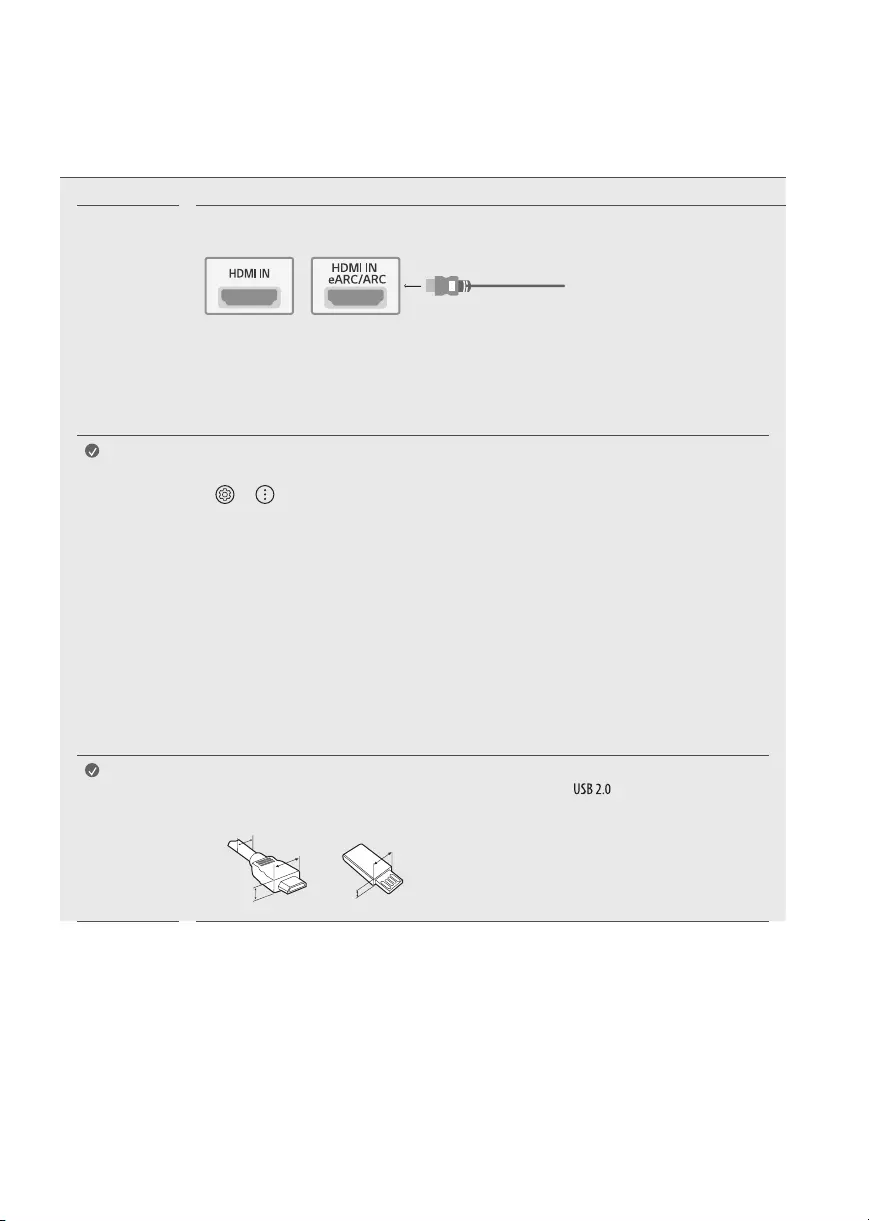
device. Connect your TV to external devices. For the best picture and audio quality, connect the external device and the TV with the HDMI cable.
HDMI •When connecting the HDMI cable, the product and external devices should be turned off and unplugged.
•Supported HDMI Audio format: (Depending upon model)
True HD (48kHz),
Dolby Digital / Dolby Digital Plus (32kHz / 44.1kHz / 48kHz),
PCM (32kHz / 44.1kHz / 48kHz / 96kHz / 192kHz)
Note If the device connected to Input Port also supports HDMI Deep Color, your picture may be clearer. However, if the
device doesn’t support it, it may not work properly. In that case, change the TV’s [HDMI Deep Color] setting to off.
•
→ → [General] → [Devices] → [HDMI Settings] → [HDMI Deep Color]
(For 82/86UP80*)
—On: Support 4K @ 50/60Hz (4:4:4, 4:2:2, 4:2:0),
<3,4 port Only> 4K @ 100/120Hz (4:4:4, 4:2:2, 4:2:0)
—Off: Support 4K @ 50/60Hz (4:2:0)
(Except for 82/86UP80*)
—On: Support 4K @ 50/60Hz (4:4:4, 4:2:2, 4:2:0)
—Off: Support 4K @ 50/60Hz (4:2:0)
•This feature is available only on certain models which support HDMI ULTRA HD Deep Color.
•Use a certified cable with the HDMI logo attached. If you do not use a certified HDMI cable, the screen may not
display or a connection error may occur.
•Recommended HDMI cable types (3m or less)
—Ultra High Speed HDMI®/™ cable
Note •For an optimal connection, HDMI cables and USB devices should have bezels less than 8mm thick, 18mm
width and 8mm a wire diameter. Use an extension cable that supports or higher if the USB cable or
USB memory stick does not fit into your TV’s USB port. (Depending on model)
A
B
A
B
* A ≦ 8mm
* B ≦ 18mm
* C ≦ 8mm
18
External
Devices
Supported external devices are: Blu-ray player, HD receivers, DVD players, VCRs, audio systems, USB storage
devices, PC, gaming devices, and other external devices.
Note •If you record a TV program on a Blu-ray/DVD recorder or VCR, make sure to connect the TV signal input cable
to the TV through a DVD recorder or VCR. For more information about recording, refer to the manual provided
with the connected device.
•The external device connections shown may differ slightly from illustrations in a manual.
•Connect external devices to the TV regardless about the order of the TV port.
•If you connect a gaming device to the TV, use the cable supplied with the gaming device.
•Refer to the external equipment’s manual for operating instructions.
•In PC mode, there may be noise associated with the resolution, vertical pattern, contrast or brightness. If
noise is present, change the PC output to another resolution, change the refresh rate to another rate or adjust
the brightness and contrast on the [Picture] menu until the picture is clear.
•Some USB Hubs may not work. If a USB device connected through a USB Hub is not detected, connect it
directly to the USB port on the TV.
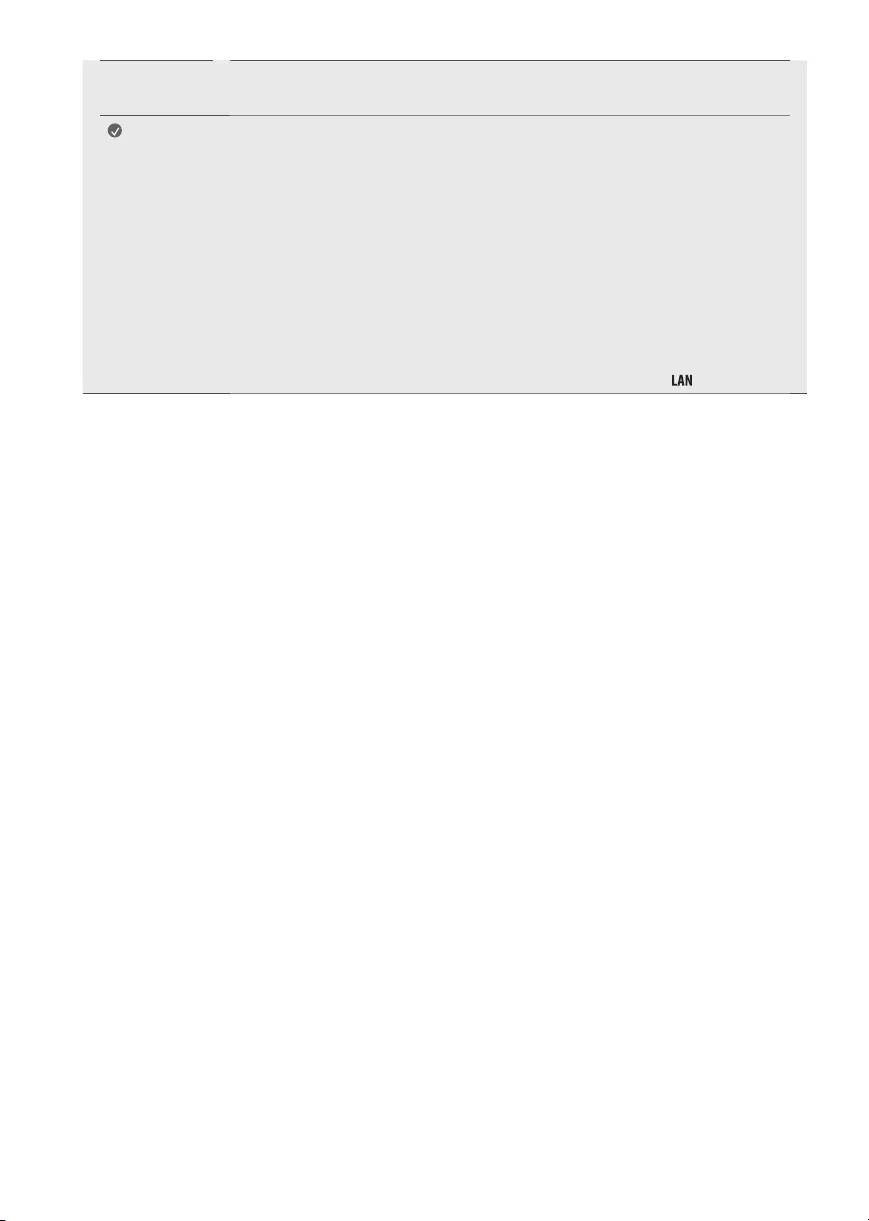
•When connecting via a wired LAN, it is recommended to use a CAT 7 cable. (Only when port is provided.)
19
Troubleshooting
Cannot control the
TV with the remote
control.
•Check if anything such as tape has been placed over the receiver.
•Check if there is any obstacle between the product and the remote control.
•Replace the batteries with new fresh ones.
No image display and
no sound is produced.
•Check if the product is turned on.
•Check if the power cord is connected to a wall outlet.
•Check if there is a problem in the wall outlet by connecting other products.
The TV turns off
suddenly.
•Check the power control settings. The power supply may be interrupted.
•Check if the auto-off function is activated in the settings menu.
•If there is no signal while the TV is on, the TV will turn off automatically after 15 minutes of inactivity.
Abnormal Display •If the TV feels cold to the touch, there may be a small flicker when it is turned on. This is normal; there
is nothing wrong with TV. Some minute dot defects may be visible on the screen, appearing as tiny red,
green, or blue spots. However, they have no adverse effect on the TV’s performance. Avoid touching the LCD
screen or holding your finger(s) against it for long periods of time. Doing so may produce some temporary
distortion effects on the screen.
•This panel is an advanced product that contains millions of pixels. In a very few cases, you could see fine
dots on the screen while you’re viewing the TV. Those dots are deactivated pixels and do not affect the
performance and reliability of the TV.
•Displaying a still image for a prolonged period of time may cause an image sticking. Avoid displaying a fixed
image on the TV screen for a extended length of time.
Generated Sound •Cracking noise A cracking noise that occurs when watching or turning off the TV is generated by plastic
thermal contraction due to temperature and humidity. This noise is common for products where thermal
deformation is required.
•Electrical circuit humming/panel buzzing A low level noise is generated from a high-speed switching circuit,
which supplies a large amount of current to operate a product. It varies depending upon the product. This
generated sound does not affect the performance and reliability of the product.
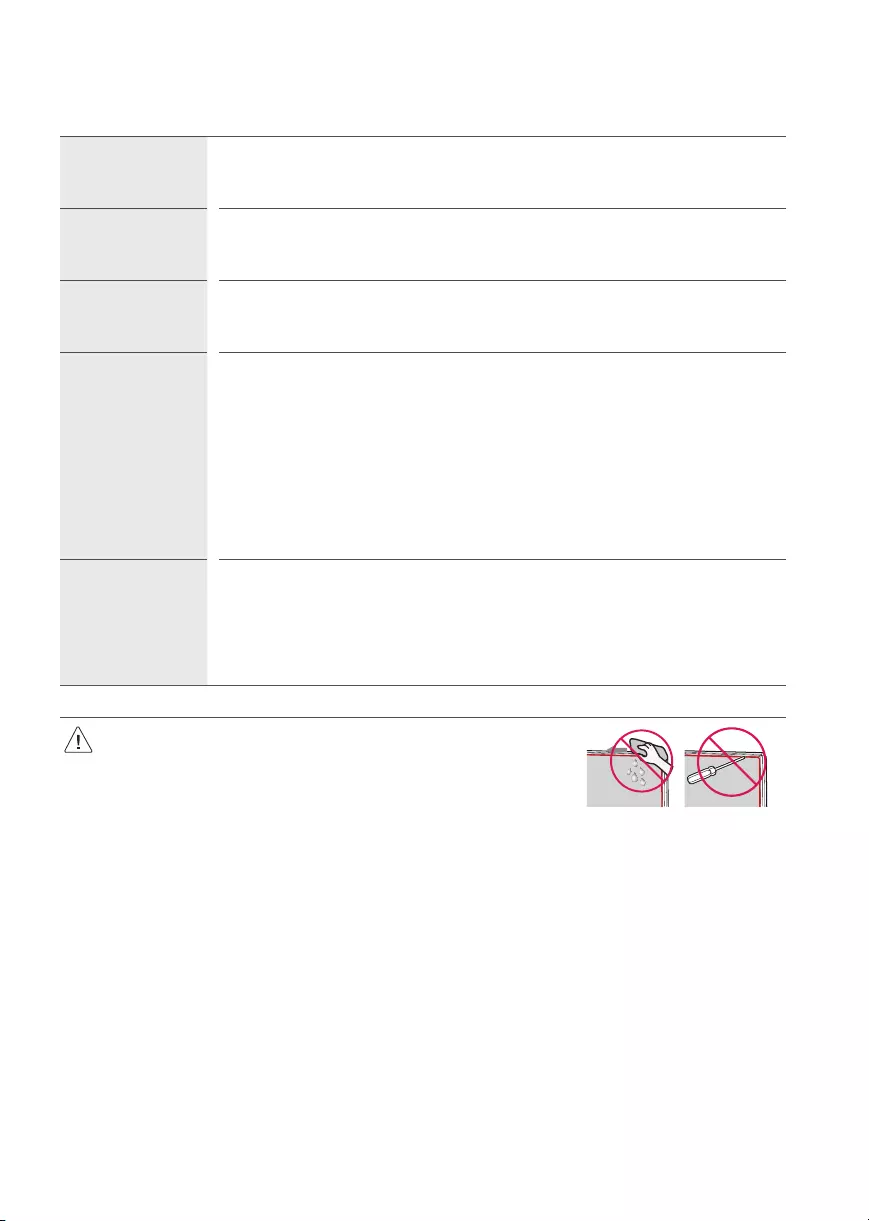
•When cleaning the product, be careful not to allow any liquid or foreign objects to enter
the gap between the upper, left or right side of the panel and the guide panel, (Depending
upon model).
•Make sure to wring any excess water or cleaner from the cloth.
•Do not spray water or cleaner directly onto the TV screen.
•Make sure to spray just enough of water or cleaner onto a dry cloth to wipe the screen.
20
Specifications
Product specifications may be changed without prior notice due to upgrade of product functions.
(Depending upon country)
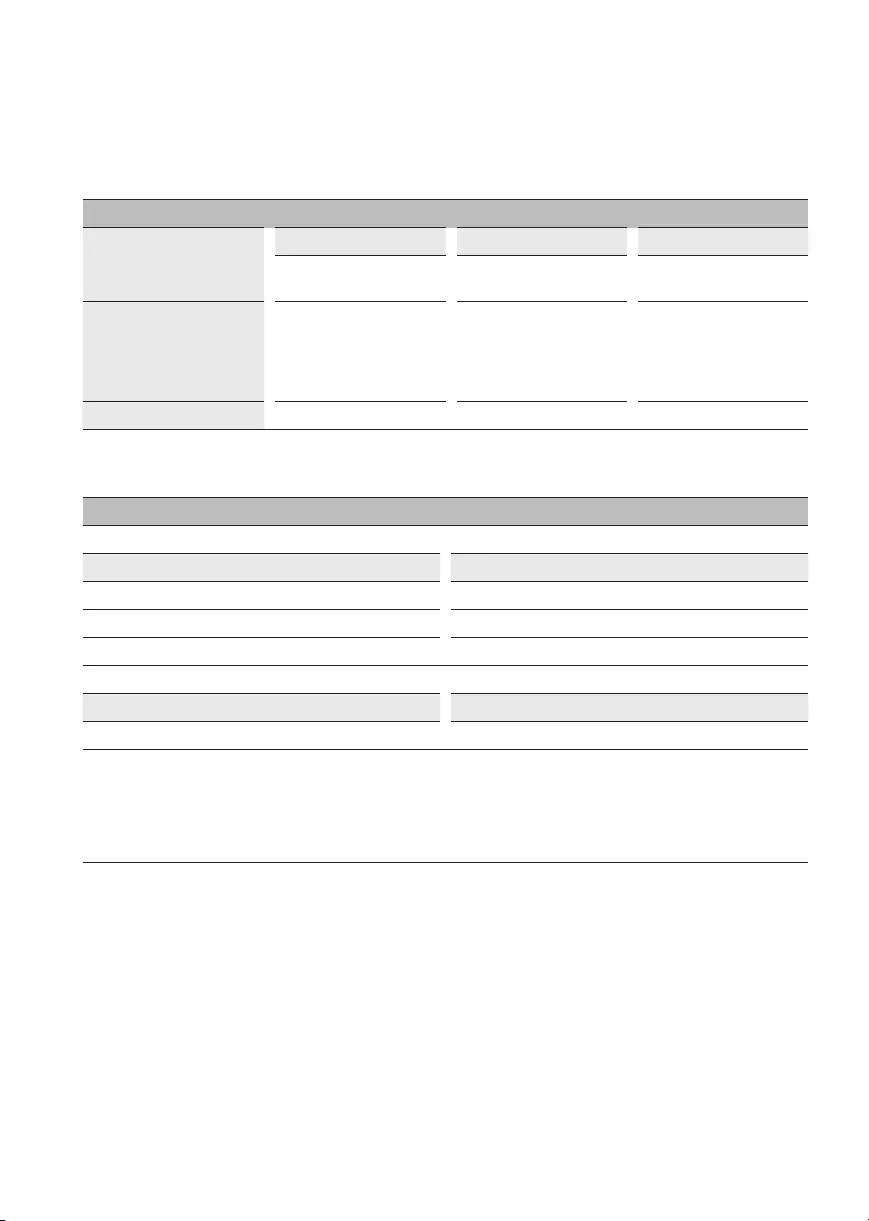
Broadcasting Specifications
Television system
Digital Analog Digital Analog Digital Analog
SBTVD NTSC-M/
PAL-N/PAL-M DVB-T/T2 NTSC-M/
PAL-N/PAL-M
ATSC / 64 &
256QAM
NTSC-M/
PAL-N/PAL-M
Program coverage
(Band)
VHF 2-13
UHF 14-69
DTV 2-69
CATV 1-135
VHF 2-13
UHF 14-69
DTV 2-69
CATV 1-125
VHF 2-13
UHF 14-69
DTV 2-69
CATV 1-135
CADTV 1-135
External antenna impedance 75Ω
(For 82/86UP80*)
Wireless module(LGSBWAC95)Specifications
Wireless LAN (IEEE 802.11a/b/g/n/ac)
Frequency range Output Power (Max.)
2400 to 2483.5MHz 18.5dBm
5150 to 5725MHz 18dBm
5725 to 5850MHz 18dBm
Bluetooth
Frequency range Output power(Max.)
2400 to 2483.5MHz 9dBm
As band channels can vary per country, the user cannot change or adjust the operating frequency. This product is configured for the regional
frequency table.
For consideration of the user, this device should be installed and operated with a minimum distance of 20cm between the device and the body.
FCC ID: BEJLGSBWAC95 / IC: 2703H-LGSBWAC95
21
(For 70/75UP75*)
Wireless module(LGSBWAC02)Specifications
Wireless LAN (IEEE 802.11a/b/g/n/ac)
Frequency range Output Power (Max.)
2400 to 2483.5MHz 18.5dBm
5150 to 5725MHz 17dBm
5725 to 5850MHz 18.5dBm
Bluetooth
Frequency range Output power(Max.)
2400 to 2483.5MHz 8.5dBm
As band channels can vary per country, the user cannot change or adjust the operating frequency. This product is configured for the regional
frequency table.
For consideration of the user, this device should be installed and operated with a minimum distance of 20cm between the device and the body.
FCC ID: BEJLGSBWAC02 / IC: 2703H-LGSBWAC02
(Except for 82/86UP80*, 70/75UP75*)
Wireless module(LGSBWAC03)Specifications
Wireless LAN (IEEE 802.11a/b/g/n/ac)
Frequency range Output Power (Max.)
2400 to 2483.5MHz 20dBm
5150 to 5725MHz 18.5dBm
5725 to 5850MHz 18dBm
Bluetooth
Frequency range Output power(Max.)
2400 to 2483.5MHz 9dBm
As band channels can vary per country, the user cannot change or adjust the operating frequency. This product is configured for the regional
frequency table.
For consideration of the user, this device should be installed and operated with a minimum distance of 20cm between the device and the body.
FCC ID: BEJLGSBWAC03 / IC: 2703H-LGSBWAC03
22
Environment condition
Operating Temperature 0°C to 40°C
Operating Humidity Less than 80%
Storage Temperature -20°C to 60°C
Storage Humidity Lessthan 85%
•The energy information provided on the product is shown in accordance with the applicable regulations of each respective country, (Depending
upon the country).
—The Energy consumption was measured in accordance with IEC 62087.
•The actual energy consumption depends on the usage environment, (Example: content watched, TV settings, etc.).
•For information of the power supply and power consumption, refer to the label attached to the product.
—The typical power consumption is measured in accordance with IEC 62087 or each country’s energy regulations.
* On some models, the label is inside the external device connection terminal cover.
* Depending upon the model or country, the typical power consumption may not be on label.
Open Source Software Notice Information
To obtain the source code under GPL, LGPL, MPL, and other open source licenses, that is contained in this product, please visit http://opensource.lge.
com.
In addition to the source code, all referred license terms, warranty disclaimers and copyright notices are available for download.
LG Electronics will also provide open source code to you on CD-ROM for a charge covering the cost of performing such distribution (such as the cost of
media, shipping, and handling) upon email request to opensource@lge.com.
This offer is valid for a period of three years after our last shipment of this product. This offer is valid to anyone in receipt of this information.
Licenses
(Magic Remote supported models only)
23
Regulatory
WARNING! (STABILITY HAZARD)
A television set may fall, causing serious personal injury or death. Many injuries, particularly to children, can be avoided by taking simple precautions
such as:
—ALWAYS use cabinets or stands or mounting methods recommended by the manufacturer of the television set.
—ALWAYS use furniture that can safely support the television set.
—ALWAYS ensure the television set is not overhanging the edge of the supporting furniture.
—ALWAYS educate children about the dangers of climbing on furniture to reach the television set or its controls.
—ALWAYS route cords and cables connected to your television so they cannot be tripped over, pulled or grabbed.
—NEVER place a television set in an unstable location.
—NEVER place the television set on tall furniture (for example, cupboards or bookcases) without anchoring both the furniture and the television
set to a suitable support.
—NEVER place the television set on cloth or other materials that may be located between the television set and supporting furniture.
—NEVER place items that might tempt children to climb, such as toys and remote controls, on the top of the television or furniture on which the
television is placed.
If the existing television set is going to be retained and relocated, the same considerations as above should be applied.
Symbols
Refers to alternating current (AC). Refers to stand-by.
Refers to direct current (DC). Refers to “ON” (power).
Refers to class II equipment. Refers to dangerous voltage.
24
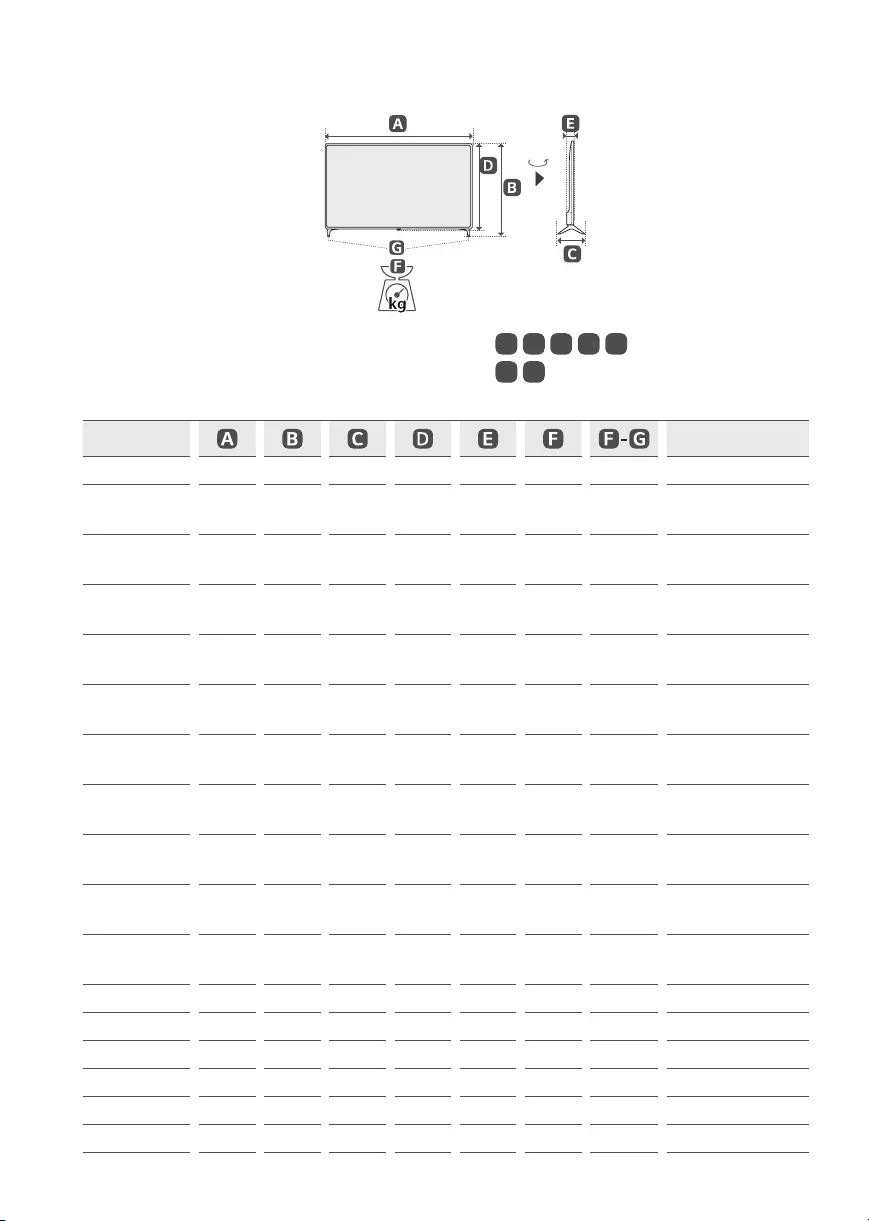
(Image shown may differ from your TV.)
90°
A, B, C, D, E: mm
F, G:kg
Model Power consumption
43UP7500PSF 973 611 187 572 85.0 8.1 8.0 110 W
50UP7500PSF
50UP7550PSF 1130 719 235 663 86.3 11.4 11.3 140 W
55UP7500PSF
55UP7550PSF 1244 783 235 726 87.1 14.4 14.3 160 W
65UP7500PSF
65UP7550PSF 1463 910 255 850 87.8 21.5 21.3 195 W
70UP7500PSC
70UP7550PSC 1578 984 299 913 91.1 31.4 30.7 225 W
75UP7500PSC
75UP7550PSC 1693 1048 345 978 88.8 35.4 34.6 240 W
43UP7700PSB
43UP7750PSB 967 622 216 564 57.1 8.7 8.6 110 W
50UP7700PSB
50UP7750PSB 1121 713 231 651 57.1 11.9 11.7 130 W
55UP7700PSB
55UP7750PSB 1235 776 231 715 57.5 14.2 14.0 135 W
60UP7700PSB
60UP7750PSB 1356 852 269 783 57.5 17.4 17.1 150 W
65UP7700PSB
65UP7750PSB 1454 906 269 838 57.7 21.8 21.5 185 W
70UP7750PSB 1562 971 362 907 59.9 29.1 28.4 210 W
75UP7750PSB 1678 1027 362 964 59.9 32.1 31.4 225 W
43UP8050PSB 967 622 216 564 57.1 8.7 8.6 110 W
50UP8050PSB 1121 708 232 651 57.1 11.9 11.7 130 W
55UP8050PSB 1235 772 232 715 57.5 14.2 14.0 160 W
60UP8050PSB 1356 845 271 783 57.5 17.4 17.1 185 W
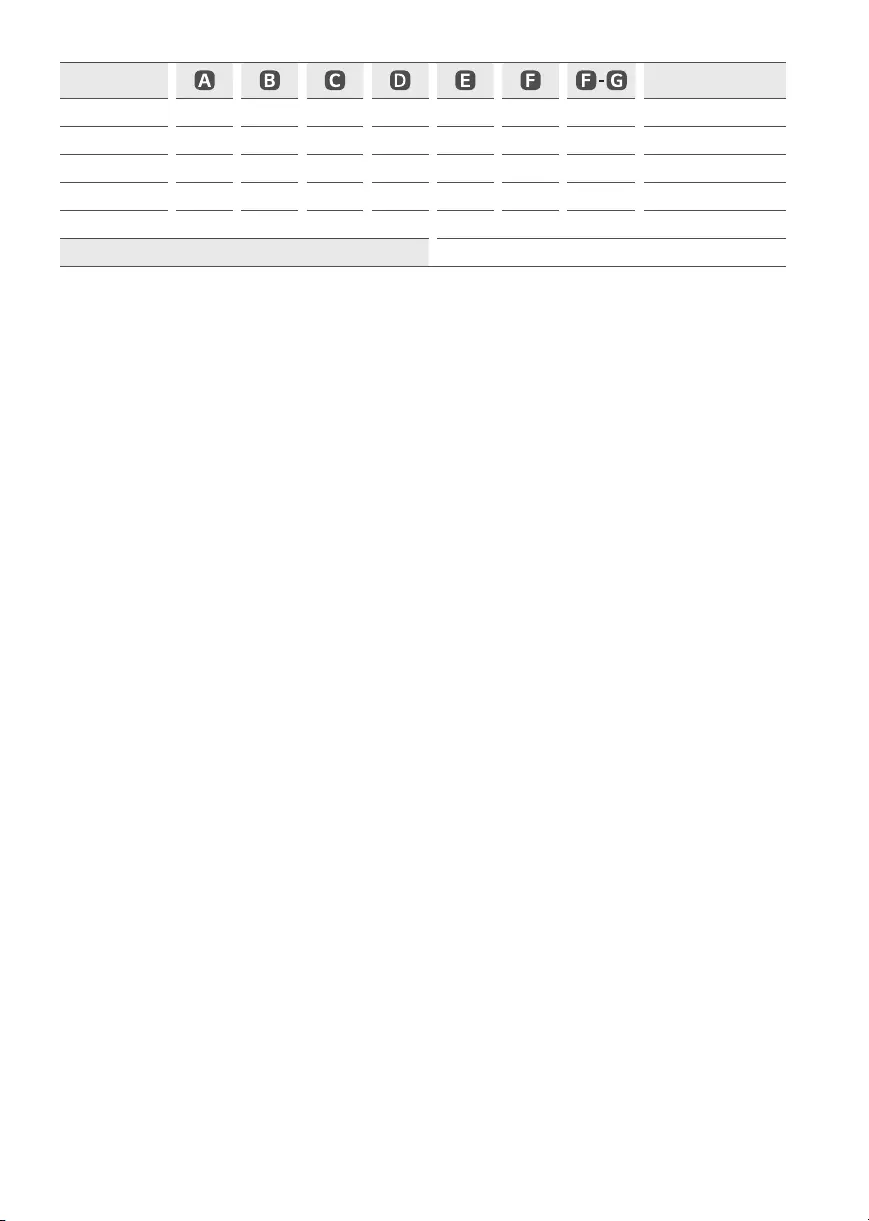
25
Model Power consumption
65UP8050PSB 1454 899 271 838 57.7 21.8 21.5 205 W
70UP8050PSB 1562 971 362 907 59.9 29.1 28.4 210 W
75UP8050PSB 1678 1027 362 964 59.9 32.1 31.4 225 W
82UP8050PSB 1835 1113 362 1052 59.9 42.1 41.4 285 W
86UP8050PSB 1927 1167 362 1104 59.9 45.9 45.2 335 W
Power consumption AC 100 — 240V~ 50 / 60Hz

26

27
The model and serial number of the product are located
on the back and on one side of the product. Record them
below in case you ever need service.
Model
Serial No.
ESPAÑOL
www.lg.com
Copyright © 2021 LG Electronics Inc. Todos los derechos reservados.
Lea atentamente este manual antes de poner en funcionamiento
el equipo y consérvelo para usar en futuras consultas.
43UP7500PSF
50UP7500PSF
50UP7550PSF
55UP7500PSF
55UP7550PSF
65UP7500PSF
65UP7550PSF
70UP7500PSC
70UP7550PSC
75UP7500PSC
75UP7550PSC
43UP7700PSB
43UP7750PSB
50UP7700PSB
50UP7750PSB
55UP7700PSB
55UP7750PSB
60UP7700PSB
60UP7750PSB
65UP7700PSB
65UP7750PSB
70UP7750PSB
75UP7750PSB
43UP8050PSB
50UP8050PSB
55UP8050PSB
60UP8050PSB
65UP8050PSB
70UP8050PSB
75UP8050PSB
82UP8050PSB
86UP8050PSB
MANUAL DEL USUARIO
Seguridad y Consultas
TELEVISOR LED*
* Los televisores con LED de LG tienen pantallas LCD con luces de fondo LED.

2
Instrucciones de Seguridad
Importantes
•Lea estas instrucciones.
•Conserve estas instrucciones.
•Preste atención a las advertencias.
•Siga todas las instrucciones.
•No use el aparato cerca del agua.
•Limpie únicamente con un paño seco.
•No tape ni bloquee las aberturas de ventilación. Realice la instalación siguiendo las instrucciones del fabricante.
•No instale el producto cerca de fuentes de calor como radiadores, rejillas de calefacción central, estufas u otro tipo de aparatos que emitan calor
(incluidos los amplificadores).
•No anule el propósito de seguridad del enchufe polarizado o del enchufe a tierra. Un enchufe polarizado tiene dos clavijas, una más ancha que
la otra. Un enchufe a tierra tiene dos clavijas y un tercer terminal de puesta a tierra. La clavija ancha o el terminal de puesta a tierra se proveen
para proteger al usuario. Si el enchufe del equipo no entra en la toma, consulte a un electricista para cambiar el tomacorriente.
•Asegúrese de que el cable de alimentación esté protegido para evitar que lo pisen o aplasten, especialmente en los enchufes, los tomacorrientes
o el punto de salida desde el aparato.
•Use únicamente los accesorios recomendados por el fabricante.
•Use el producto únicamente en mesas portátiles, pies, trípodes, soportes o mesas indicados por el fabricante o provistos con el aparato. Al
emplear una mesa portátil, tenga cuidado al moverla con el aparato encima, para evitar daños por caídas.
•Desenchufe el aparato durante tormentas eléctricas o si no planea usarlo durante un periodo prolongado.
•Consulte todas las cuestiones de servicio de mantenimiento al personal de servicio calificado. El servicio es necesario cuando el aparato sufre
algún tipo de daño, por ejemplo, cuando un cable de suministro eléctrico o un conector está dañado, se derrama líquido o se cae un objeto
dentro del aparato, el aparato se expone a la lluvia o a la humedad, no funciona en forma normal o sufre una caída.
3
Título
Antes de leer este manual
•Lea atentamente este manual antes de poner en funcionamiento el televisor y consérvelo para futuras consultas.
•En el sitio web puede descargar el manual que incluye la instalación, el uso, la resolución de problemas, especificaciones y licencias entre
otros, y ver los contenidos desde su PC o en su dispositivo móvil.
Guía del usuario Para obtener más información sobre este TV, lea la GUÍA DEL USUARIO que se adjunta al producto.
•Para abrir la GUÍA DEL USUARIO → → [Asistencia] →[Guía del usuario]
Complementos opcionales
•Los complementos opcionales se pueden cambiar o modificar para mejorar la calidad, sin necesidad de aviso previo. Para adquirir estos
elementos, comuníquese con su distribuidor. Estos dispositivos solo funcionarán en ciertos modelos. Es posible que el nombre o el
diseño del modelo hayan cambiado, debido a las circunstancias o políticas del fabricante.
•Control Remoto Mágico : MR21GA
Verifique que su modelo de televisor admita Bluetooth en las especificaciones de módulo inalámbrico para asegurarse de que puede
utilizarse con el Remoto Mágico.
•El cable para conectar las antenas y los dispositivos externos debe comprarse por separado.
Nota •Es posible que cambien las especificaciones del producto o el contenido del manual sin previo aviso, debido a las
actualizaciones de las funciones del producto.
•Los artículos suministrados con el producto adquirido pueden variar según el modelo.
•La imagen puede ser diferente a la de su televisor.
¡Advertencia! Instrucciones de
seguridad
Preparación
—Levantamiento y traslado de su TV
—Montar sobre una mesa
—Montaje en la pared
—Antena/Cable
Inicio del TV
—Encendido del TV
—Registro del Control Remoto Mágico
Uso del control remoto
—Uso del Control Remoto Mágico
—Uso del control remoto
Conexiones
Resolución de problemas
Especificaciones
—Software de código abierto
—Licencias
Regulación

4
¡Advertencia! Instrucciones de
seguridad
PRECAUCIÓN
RIESGO DE CHOQUE ELÉCTRICO
NO ABRIR
PRECAUCIÓN: PARA REDUCIR EL RIESGO DE DESCARGAS ELÉCTRICAS, NO QUITE LA CUBIERTA (O LA PARTE POSTERIOR). EL USUARIO NO PUEDE
CAMBIAR NI REPARAR LOS COMPONENTES INTERNOS. CONSULTE ÚNICAMENTE AL PERSONAL DE SERVICIO CALIFICADO.
El símbolo tiene como fin alertar al usuario sobre la presencia de voltaje peligroso sin aislamiento dentro del compartimiento del
producto que puede tener la potencia suficiente como para representar un riesgo de descargas eléctricas para los usuarios.
El símbolo tiene como fin alertar al usuario sobre la presencia de instrucciones importantes de funcionamiento y mantenimiento
(servicio) en la documentación que se incluye con el dispositivo.
ADVERTENCIA: PARA REDUCIR EL RIESGO DE INCENDIOS O DESCARGAS ELÉCTRICAS, NO EXPONGA EL PRODUCTO A LA LLUVIA O LA HUMEDAD.
•PARA EVITAR UN INCENDIO, MANTENGA LAS VELAS U OTROS
ELEMENTOS CON FUEGO LEJOS DEL PRODUCTO EN TODO
MOMENTO.
•No ubique el TV o el control remoto en ninguno de los
siguientes ambientes:
—Mantenga el aparato alejado de la luz solar directa.
—Áreas con alto nivel de humedad, como lo puede ser un
baño.
—Cerca de fuentes de calor como estufas u otros dispositivos
que emitan calor.
—Cerca del mostrador de la cocina o de humidificadores ya
que pueden estar expuestos a vapor o aceites.
—Áreas expuestas a lluvia o viento.
—No exponga el producto a ningún tipo de goteo ni
salpicaduras, y no coloque sobre o por encima del televisor
(por ejemplo, en estantes que pudieran encontrarse arriba
de la unidad) ningún tipo de objeto que contenga líquido,
como floreros, tazas, etc.
—No deje el producto cerca de objetos inflamables, como
gasolina o velas, ni exponga el televisor a un sistema de
aire acondicionado de forma directa.
—No lo instale en lugares con demasiado polvo.
No seguir estas indicaciones podría provocar un incendio,
una descarga eléctrica, una combustión o explosión, fallas o
deformaciones del producto.
•Ventilación
—Instale el televisor en un lugar con ventilación adecuada.
No lo coloque en un lugar cerrado como, por ejemplo,
un estante para libros.
—No instale el producto en alfombras o cojines.
—No bloquee o cubra el producto con paño u otros materiales
mientras esté conectado.
•Procure no tocar las aberturas de ventilación. Si se utiliza
el producto por un tiempo prolongado, las aberturas de
ventilación pueden calentarse.
•Proteja el cable de alimentación de daños físicos o mecánicos,
es decir, que no se tuerza, doble, deforme, que no quede
atrapado al cerrar una puerta y que no lo pisen.
Preste especial atención a los enchufes, tomacorrientes de la
pared y al punto de salida del cable en el aparato.
•No mueva el televisor mientras el cable de alimentación esté
conectado.
•No utilice un cable de alimentación que esté dañado o suelto.
•Al desenchufar el cable, asegúrese de hacerlo desde el
enchufe. No tire del cable de alimentación para desenchufar
el televisor.
•No conecte demasiados dispositivos al mismo tomacorriente
de ca dado que podría provocar incendios o descargas
eléctricas.

5
•Desconexión del dispositivo de la alimentación
principal
—El conector de alimentación es el dispositivo de
desconexión. En caso de emergencia, el conector de
alimentación debe ser de fácil acceso.
•No deje que los niños se trepen o se aferren al TV.
De lo contrario, el TV puede caerse y provocar lesiones graves.
•Puesta a tierra con una antena exterior (puede variar
según el país):
—Si instala una antena exterior, tome las siguientes
precauciones. El sistema de antena exterior no debe
instalarse cerca de las líneas eléctricas de trasmisión
aérea, cerca de ningún otro circuito de alimentación o
luz eléctrica, ni en ningún lugar donde pudiera entrar en
contacto con este tipo de cables eléctricos o circuitos,
dado que podría provocar daños graves o incluso la muerte.
Asegúrese de que el sistema de antena tenga una
puesta a tierra como protección contra sobretensiones
y acumulaciones de cargas estáticas. La Sección 810 del
Código Nacional de Electricidad (NEC) de los Estados Unidos
establece la forma de realizar una puesta a tierra correcta
del mástil, de la estructura de soporte, del cable de bajada
a una unidad de descarga de la antena, el tamaño de los
conductores de puesta a tierra, la ubicación de la unidad de
descarga de la antena, y la conexión y los requisitos de los
electrodos de puesta a tierra.
Puesta a tierra de la antena según el Código Nacional de
Electricidad, ANSI/NFPA 70
•Puesta a tierra (Excepto dispositivos sin conexión a tierra.)
—El televisor con un conector de ca de conexión a tierra de
tres clavijas debe conectarse a un tomacorriente de ca de
conexión a tierra de tres clavijas. Asegúrese de conectar el
cable de conexión a tierra para evitar posibles descargas
eléctricas.
•Nunca toque el aparato o la antena durante una tormenta
eléctrica. Podría electrocutarse.
•Asegúrese de que el cable de alimentación esté conectado
de manera segura al televisor y al enchufe de pared. De no
ser así, podría dañarse el enchufe y el conector y, en casos
extremos, podría producirse un incendio.
•No inserte objetos metálicos o inflamables en el producto.
Si un objeto extraño ingresa al producto, desenchufe el cable
de alimentación y póngase en contacto con el centro de
atención al cliente.
•No toque el extremo del cable de alimentación mientras esté
enchufado. Podría electrocutarse.

6
•Si ocurre lo siguiente, desenchufe el producto de
inmediato y póngase en contacto con el centro de
atención al cliente local.
—Se dañó el producto.
—Si el agua u otra sustancia entra al producto (como un
adaptador de ca cable de alimentación, o la TV).
—Si huele humo u otros olores que provienen de la TV.
—Si hay tormentas eléctricas o cuando no se utiliza por un
largo período de tiempo.
Incluso si el televisor se apaga con el control remoto o el
botón, la fuente de alimentación de ca permanece conectada
a la unidad al menos que se desenchufe.
•No utilice equipo de alto voltaje cerca del televisor
(por ejemplo, un eliminador de insectos eléctrico). Esto puede
causar que el producto funcione mal.
•No intente modificar este producto de ninguna manera
sin autorización previa por escrito de LG Electronics. Puede
provocar un incendio o una descarga eléctrica por accidente.
Póngase en contacto con el centro de atención al cliente local
para obtener servicio técnico o reparaciones. La modificación
sin autorización podría anular la autoridad del usuario para
operar este producto.
•Utilice solo accesorios/acoplamientos aprobados por LG
Electronics. No seguir estas indicaciones podría provocar
un incendio, una descarga eléctrica, fallas o daños en el
producto.
•Nunca desarme el adaptador de ca o el cable de alimentación.
Esto podría provocar un incendio o descargas eléctricas.
•Maneje el adaptador cuidadosamente para evitar dejarlo caer
o golpearlo. Un golpe podría dañar el adaptador.
•Para reducir el riesgo de incendio o descarga eléctrica, no
toque el televisor con las manos mojadas. Si las clavijas del
cable de alimentación están mojadas o cubiertas de polvo,
seque el conector de alimentación por completo o retire el
polvo
•Baterías
—Guarde los accesorios (baterías, etc.) en un lugar seguro
lejos del alcance de los niños.
—No provoque un corto circuito, desarme o permita que las
baterías se recalienten. No arroje las baterías al fuego.
No debe exponer las baterías al calor excesivo.
—Precaución: Existe riesgo de incendio o explosión si se
reemplaza la batería por un tipo incorrecto.
•Traslados
—Cuando lo traslade, asegúrese de que el aparato esté
apagado, desenchufado y que no quede ningún cable
conectado. Es posible que se necesiten 2 o más personas
para trasladar los televisores de gran tamaño. No ejerza
presión sobre el panel frontal del televisor. No seguir estas
indicaciones podría resultar en un daño al producto, peligro
de incendio o lesiones.
•Mantenga el material de embalaje contra la humedad y el
embalaje de vinilo fuera del alcance de los niños.
•No permita que se golpee el producto, que algún objeto se
caiga dentro de él y no golpee la pantalla con nada.
•No ejerza demasiada presión sobre el panel con la mano o un
objeto filoso, como un clavo, un lápiz o una lapicera, ni raye la
superficie. Puede causar daños en la pantalla.
•Limpieza
—Cuando lo limpie, desenchufe el cable de alimentación y
limpie con cuidado con un paño suave y seco. No rocíe el
televisor con agua u otros líquidos directamente.
No limpie el televisor con productos químicos como
limpiador de cristales, cualquier tipo de ambientador,
insecticida, lubricantes, cera (automóvil, industrial),
abrasivo, diluyente, benceno, alcohol, etc., que pueden
dañar el producto y / o su panel. Podría causar daños al
producto o una descarga eléctrica.
7
Preparación
Levantamiento y traslado de su TV
Si desea levantar o trasladar el televisor, lea las instrucciones a continuación para no rayar o dañar el aparato, y para transportarlo de forma segura,
independientemente del tamaño o tipo de aparato.
•Se recomienda trasladar el televisor en la caja o el material de empaque en el que lo recibió al comprarlo.
•Antes de mover o levantar el televisor, desconecte el cable de alimentación y el resto de los cables.
•Cuando sostenga la televisión, la pantalla debe estar orientada lejos de usted para evitar
algún daño.
•Sostenga con firmeza la parte superior e inferior del marco del televisor. Asegúrese de no
sostenerlo por la parte transparente, por la bocina o por el área de rejillas de las bocinas.
•Utilizar al menos dos personas para mover un televisor grande.
•Al transportar el televisor con las manos, sosténgalo como se indica en esta ilustración.
•Al transportar el televisor, no lo someta a sacudones o vibración excesiva.
•Al transportar el televisor manténgalo en posición vertical, nunca lo apoye sobre uno de los costados, ni lo incline hacia la derecha o la
izquierda.
•Cuando manipule la televisión, tenga cuidado de no dañar los botones salientes.
•No toque la pantalla. De lo contrario, podría dañarla.
•No coloque el producto en el piso con la parte frontal hacia abajo sin una almohadilla. Al hacerlo puede causar daños a la pantalla.
•Al instalar la base del televisor, ponga la pantalla hacia abajo sobre una mesa acolchada o una superficie plana para evitar rayas.
8
Montar sobre una mesa
1 Levante el televisor y déjelo en posición vertical sobre la mesa.
• Deje un espacio mínimo de 10cm entre el televisor y la pared para
asegurar una ventilación adecuada.
2 Conecte el cable de alimentación al tomacorriente de la pared.
10cm
10cm
10cm
(Según el modelo)
•No aplique sustancias extrañas (aceites, lubricantes, etc.) a las piezas de los tornillos para el montaje del producto. (Se podría dañar el
producto.)
•Si instala la televisión en un soporte, debe tomar medidas para evitar que el producto se vuelque. De lo contrario, el producto puede
caerse y provocar lesiones.
•No use ningún producto no autorizado para garantizar la seguridad y la vida útil del producto.
•La garantía no cubre daños o lesiones que pueden producirse al utilizar elementos no aprobados.
•Asegúrese de que los tornillos estén completamente ajustados. (Si no están lo suficientemente ajustados, el TV puede inclinarse hacia
delante después de instalarse.)
•No ajuste los tornillos con demasiada fuerza, de lo contrario, se pueden desgastar y aflojar.
Sujeción del televisor a la pared
1 Inserte y ajuste los tornillos de ojo del televisor en su parte posterior.
•En caso de que haya tornillos insertados, primero retírelos.
2 Utilice los tornillos para colocar los soportes correspondientes en la pared. Haga coincidir la
ubicación del soporte de pared y los cáncamos de la parte posterior de la televisión.
3 Conecte los tornillos de ojo y los soportes con un cordón fuerte y ajústelos con firmeza. Asegúrese
de mantener el cordón en posición horizontal a la superficie plana.
•Utilice una plataforma o un armario que sea lo suficientemente fuerte y grande para sostener el
televisor de manera segura.
•Los soportes, los tornillos y los cordones son opcionales. Puede solicitar otros accesorios a través
de su distribuidor local. (Según el modelo)
9
Montaje en la pared
Se puede usar un soporte de pared opcional con el televisor LG. Consulte
al distribuidor local para adquirir un soporte de pared que cumpla con
el estándar VESA que usa su modelo de TV. Cuidadosamente coloque el
soporte de pared en la parte posterior del TV. Instale el soporte de pared
en una pared sólida, perpendicular al piso. Si va a instalar el TV sobre otros
materiales de construcción, póngase en contacto con personal técnico
calificado para instalar el soporte de pared. El soporte de pared incluirá
instrucciones detalladas. Recomendamos que use un soporte de pared
de marca LG. El soporte de pared LG hace que sea fácil ajustar o conectar
los cables. Cuando no utilice el soporte de montaje de pared LG, por
favor, utilice un soporte de montaje de pared en el que el dispositivo esté
debidamente sujeto a la pared con el espacio suficiente para permitir la
conectividad con dispositivos externos. Si utiliza un soporte no ajustable,
instale el soporte en la pared. Primero, conecte los cables a la TV, luego
instale la TV en el soporte.
10cm
10cm
10cm
10cm
(Según el modelo)
•Antes de montar el televisor en la pared, retire la base, realizando la instalación de ésta en orden inverso.
•Para obtener más información sobre los tornillos y el soporte de montaje en pared, consulte la sección de compras por separado.
•Si desea montar el producto en una pared, instale la interfaz de soporte estándar VESA (piezas opcionales) en la parte posterior del
producto. Cuando instale el producto para usar la interfaz de montaje en pared (piezas opcionales), fíjelo con cuidado para que no se
caiga.
•Cuando monte la televisión en la pared, no la instale colgándola por los cables de señal y alimentación que se encuentran en su parte
posterior.
•No instale este producto en una pared si podría ser expuesto a aceite o vapor de aceite. Esto podría dañar el producto y hacer que se
caiga.
•Al instalar el soporte de pared, se recomienda tapar los orificios del soporte con cinta para evitar que ingresen insectos y polvo,
(Según el modelo).
Orificio del soporte
(Según el modelo)
10
Soporte de pared
(Según el modelo)
Asegúrese de usar tornillos y soportes de pared que cumplan con el estándar VESA. En la tabla siguiente se detallan las dimensiones de los conjuntos
de montaje de pared.
Modelo 43/50UP77*
43/50UP80*
55/60/65UP77*
55/60/65UP80*
Tornillos distancia (A)
(mm) 200 300
Tornillo estándar M6 M6
Cantidad de tornillos 2 2
Soporte de pared WB21LMB WB21LMB
Modelo
43/50UP75*
43/50UP77*
43/50UP80*
55UP75*
55UP77*
55UP80*
65UP75*
60/65UP77*
60/65UP80*
70/75UP77*
70/75UP80*
70/75UP75*
82/86UP80*
VESA (A x B) (mm) 200 x 200 300 x 300 300x300 400x400 600x400
Tornillo estándar M6 M6 M6 M6 M8
Cantidad de tornillos 4 4 4 4 4
Soporte de pared LSW240B
MSW240
OLW480B
MSW240 OLW480B LSW440B LSW640B

11
Antena/Cable
Para ver televisión, conecte una antena, un cable o una caja de cable. Las ilustraciones pueden diferir de los elementos reales y el cable RF es
opcional.
•Asegúrese de no doblar el alambre de cobre del cable de RF.
Alambre de cobre
•Primero conecte todos los dispositivos entre sí y luego conecte el cable de alimentación al tomacorriente, para que el televisor no resulte
dañado.
•Para mejorar la calidad de la imagen en una zona con poca señal, compre un amplificador de señal.
•Utilice un divisor de señal para usar 2 televisores o más.
•Si la antena no está instalada correctamente, póngase en contacto con su distribuidor para obtener ayuda.
•Esta televisión no puede recibir transmisiones ULTRA HD (3840x2160píxeles) directamente, ya que los estándares relacionados no han sido
confirmados.
12
Inicio del TV
Encendido del TV
Puede operar la televisión con el botón.
Uso del botón
Encendido (Presionar)
Apagado1) (Mantener presionado)
Control de menú (Presionar2))
Selección de menú (Mantener
presionado3))
1) Todas las aplicaciones en ejecución se cerrarán y cualquier grabación en curso se
detendrá.
2) Si presiona el botón cuando la televisión está encendida, puede acceder al menú y
ajustarlo.
3) Puede utilizar la función cuando accede al control de menú.
Nota •Cuando se enciende la TV por primera vez después de ser enviada desde la fábrica, la inicialización de la TV puede tardar
aproximadamente un minuto.
13
Ajuste del menú
Mientras la televisión está encendida, presione una vez el botón . Puede ajustar los elementos del menú con los botones.
Apagar alimentación. Cambia la fuente de entrada.
Ajusta el nivel del volumen. Permite desplazarse por los canales guardados.
Nota •El OSD (On Screen Display, Despliegue En la Pantalla) de su TV puede ser un poco diferente que este manual.
•Los menús y las opciones disponibles pueden variar según la fuente de entrada que utilice.
•Es posible que se agreguen nuevas funciones a este televisor en el futuro.
•El dispositivo debe estar cerca de un tomacorriente. Algunos dispositivos no cuentan con un botón de apagado/
encendido, para apagar el dispositivo desconecte el cable de alimentación.
Inserción de batería
(Según el modelo)
•Cuando se muestra el mensaje «[Batería del Control Remoto Mágico está baja. Por favor cambie
la batería.]», reemplace la batería. Para instalar las baterías, abra la tapa de las baterías, coloque
otras (AA 1,5Vcc) y haga coincidir los extremos y con la etiqueta que se encuentra dentro
del compartimiento. A continuación, cierre la tapa. Para retirar las baterías, realice la acción de
instalación a la inversa. Este control remoto utiliza luz infrarroja. Al usarlo, es necesario apuntarlo
en dirección al sensor remoto del TV.
•Para instalar las baterías, abra la tapa de las baterías, coloque otras (AAA 1,5Vcc) y haga coincidir
los extremos y con la etiqueta que se encuentra dentro del compartimiento.
A continuación, cierre la tapa. Para retirar las baterías, realice la acción de instalación a la inversa.
Este control remoto utiliza luz infrarroja. Al usarlo, es necesario apuntarlo en dirección al sensor
remoto del TV.
•No mezcle las baterías nuevas con las usadas. Esto podría provocar el recalentamiento y la filtración de las baterías.
•Introducir las baterías sin hacer coincidir su polaridad puede causar filtraciones o quemar la batería, lo que podría provocar un incendio,
lesiones en personas o contaminación ambiental.
•Este aparato usa baterías. Puede ser que en su comunidad existan normativas que requieren que deseche estas baterías de forma
correcta debido a las consideraciones ambientales. Póngase en contacto con la autoridad local para obtener información acerca del
desecho o reciclaje.
•Las baterías dentro del producto no deben exponerse a calor excesivo como luz solar, fuego, entre otras.
14
Registro del Control Remoto Mágico
Cómo registrar el Control Remoto Mágico
Para utilizar el Control Remoto Mágico, primero emparéjelo con su TV.
1 Coloque las baterías en el Control Remoto Mágico y encienda la TV.
2 Apunte el Control Remoto Mágico hacia la TV y presione el botón Rueda (OK) en el control remoto.
* Si no puede registrar el Control Remoto Mágico, inténtelo nuevamente después de apagar y volver a encender la TV.
Cómo cancelar el registro del Control Remoto Mágico
Presione los botones (Atrás) y (Home) al mismo tiempo, durante cinco segundos, para desemparejar el Control Remoto Mágico con su TV.
* Mantenga presionados los botones (Home) y (Configuraciones rápidas) durante más de 5segundos para desconectar y volver a
registrar el Control Remoto Mágico a la vez.
•Se recomienda ubicar el punto de acceso (AP) a más de 0,2metros de distancia del televisor. Si el punto de acceso se instala a una
distancia menor que 0,2metros, es posible que el Control Remoto Mágico no funcione como se esperaba debido a la interferencia de
las frecuencias.
15
Uso del control remoto
Uso del Control Remoto Mágico
(Según el modelo)
Las descripciones en este manual se basan en los botones en el control remoto. Lea atentamente este manual y siga las instrucciones de uso.
Encendido Enciende o apaga el TV.
(Guión) Inserta un entre los
números, por ejemplo, 2-1 y 2-2.
Acceder a la lista de canales
guardados.
Permite acceder a [GUÍA].
Permite acceder a [Editar Acceso
Rápido].
—[Editar Acceso Rápido] es una
función que le permite ingresar
a una aplicación en particular
o al Menú en vivo al mantener
presionados los botones numéricos.
Botones de volumen Ajusta el nivel
del volumen.
Botones de canales Permite
desplazarse por los canales guardados.
Home Permite acceder al menú
Home.
Home Ejecuta las últimas aplicaciones
que se usaron.
Entrada Accesar a las fuentes de
entrada.
Entrada Permite acceder a [Panel
del hogar].
Rueda (OK) Presione el centro del
botón para seleccionar un menú.
Puede cambiar los canales utilizando
el botón .
Rueda (OK) Permite acceder a
[Explorador Mágico]. Puede ejecutar
la función [Explorador Mágico]
cuando el color del puntero cambie
a morado. Si mira un programa,
mantenga presionado el puntero sobre
el video. Cuando utilice [Guía de TV],
[Configuración], [Alerta de Deportes]
o [Galería de Arte], mantenga
presionado sobre el texto. (Según
el país)
Micrófono
1 1
11
1 1
Botones Numerales Permiten introducir
números.
Permite acceder a [Ayuda rápida].
Más acciones Muestra más funciones del
control remoto.
La función SAP (Programa de audio secundario)
también se puede habilitar si se mantiene
presionada la tecla.
Silencio Silencia todos los sonidos.
Silencio accede al menú [Accesibilidad].
Reconocimiento de voz Se requiere una
conexión de red para utilizar la función de
reconocimiento de voz.
Eche un vistazo al contenido recomendado.
(algunos servicios recomendados pueden no
estar disponibles en algunos países).
Reconocimiento de voz Hable mientras
mantiene presionado el botón para usar la
función de reconocimiento de voz.
Arriba/Abajo/Izquierda/Derecha Presione
los botones arriba, abajo, izquierda o derecha
para desplazarse por el menú. Si presiona los
botones mientras el puntero está en uso,
este desaparecerá de la pantalla y el Control
Remoto Mágico funcionará como un control
remoto común. Para ver el puntero en la pantalla
nuevamente, agite el Control Remoto Mágico a
la izquierda y a la derecha.
Configuraciones rápidas Permite acceder a
Configuraciones Rápidas.
Configuraciones rápidas Muestra el menú
[Todos los ajustes].
Atrás Permite volver al nivel anterior.
Atrás Limpia la visualización en pantalla y
vuelve a la última vista de entrada.
Permiten acceder a funciones especiales en
algunos menús.
Botón rojo ejecuta la función de grabación.
1Botones para servicios de transmisión Se
conecta al servicio de transmisión de video.
(Algunos botones y servicios pueden no proporcionarse dependiendo de los modelos o regiones.)
Nota Para utilizar el botón, mantenga presionado durante más de un segundo.
16
Uso del control remoto
(Según el modelo)
Las descripciones en este manual se basan en los botones en el control remoto. Lea atentamente este manual y siga las instrucciones de uso.
Encendido Enciende o apaga el TV
Guión Inserta un entre los
números, por ejemplo, 2-1 y 2-2.
Acceder a la lista de canales
guardados
Muestra el evento del programa según
la hora programada.
Muestra información del programa
actual.
Recuerda el subtítulo preferido en el
modo digital.
1 Habilita la función SAP (Programa de
audio secundario).
1 Cambia el tamaño de una imagen.
Permite acceder a [Editar Acceso
Rápido].
—[Editar Acceso Rápido] es una
función que le permite ingresar
a una aplicación en particular
o al Menú en vivo al mantener
presionados los botones numéricos.
Botones de volumen Ajusta el nivel
del volumen.
Botones de canales Permite
desplazarse por los canales guardados.
Home Permite acceder al menú
Home.
Home Ejecuta las últimas aplicaciones
que se usaron.
Entrada Accesar a las fuentes de
entrada.
OK Permite seleccionar menús u
opciones y confirmar lo ingresado.
OK Permite acceder a [Explorador
Mágico]. Cuando utilice [Guía de TV],
[Configuración], [Alerta de Deportes]
o [Galería de Arte], mantenga
presionado sobre el texto.
1
2
2
2
2
Botones Numerales Permiten introducir
números.
Permite acceder a [Ayuda rápida].
Más acciones Muestra más funciones del
control remoto.
Silencio Silencia todos los sonidos.
Silencio accede al menú [Accesibilidad].
, ,
,
Botones de navegación (hacia arriba/abajo/
derecha/izquierda) Permiten desplazarse por
los menús o las opciones.
Configuraciones rápidas Permite acceder a
Configuraciones Rápidas
Atrás Permite volver al nivel anterior.
Búsqueda Eche un vistazo al contenido
recomendado. (algunos servicios
recomendados pueden no estar disponibles en
algunos países).
Muestra el modo de búsqueda.
Puede mirar televisión o los LG Channels.
Borra las visualizaciones en pantalla y permite
volver a ver la última entrada.
,
, ,
,
Botones de control Botones de control para
contenido de medios.
Permiten acceder a funciones especiales en
algunos menús.
Comenzar a grabar. (Solo modelos compatibles
para Time Machine Ready.)
2Botones para servicios de transmisión
Se conecta al servicio de transmisión de video.
(Algunos botones y servicios pueden no proporcionarse dependiendo de los modelos o regiones.)
Nota Para utilizar el botón, mantenga presionado durante más de un segundo.
17
Conexiones
Se pueden conectar dispositivos externos al TV. Para más información acerca de la conexión de dispositivos externos, diríjase al manual que viene con
cada dispositivo. Conecte su TV a dispositivos externos. Para tener una mejor calidad de imagen y audio, conecte el dispositivo externo y el televisor
con el cable HDMI tal como se muestra.
HDMI •Cuando conecte el cable HDMI, el producto y los dispositivos externos deben estar apagados y desenchufados.
•Formato de audio HDMI admitido : (Según el modelo)
True HD (48kHz),
Dolby Digital / Dolby Digital Plus (32kHz / 44,1kHz / 48kHz),
PCM (32kHz / 44,1kHz / 48kHz / 96kHz / 192kHz)
Nota Si el dispositivo conectado al puerto de entrada también es compatible con HDMI Deep Color, la imagen se verá
más nítida. Sin embargo, si el dispositivo no es compatible, no funcionará de manera correcta. En ese caso,
desactive la configuración [Deep Color HDMI] del televisor.
• → → [General] → [Dispositivos] → [Configuración de HDMI] → [Deep Color HDMI]
(Para 82/86UP80*)
—Encendido: Compatible con 4K a 50/60Hz (4:4:4, 4:2:2, 4:2:0),
<Solo puerto 3 y 4> 4K a 100/120Hz (4:4:4, 4:2:2, 4:2:0)
—Apagado: Compatible con 4K a 50/60Hz (4:2:0)
(Excepto para 82/86UP80*)
—Encendido: Compatible con 4K a 50/60Hz (4:4:4, 4:2:2, 4:2:0)
—Apagado: Compatible con 4K a 50/60Hz (4:2:0)
•Esta función está disponible solo en algunos modelos compatibles con HDMI ULTRA HD Deep Color.
•Utilice un cable certificado con el logotipo de HDMI adjunto. Si no utiliza un cable HDMI certificado, es posible
que la pantalla no muestre imágenes o que ocurra un error de conexión.
•Tipos de cable HDMI recomendados (3m o menos)
—Cable HDMI®/™ de velocidad ultra alta
Nota •Para que la conexión sea óptima, los cables HDMI y los dispositivos USB tienen que tener biseles que no
superen los 8mm de espesor, los 18mm de ancho y los 8mm de diámetro del cable. Utilice un cable de
extensión que sea compatible con o superior en caso de que el cable USB o la tarjeta de memoria USB
no encajen en el puerto USB del TV. (Según el modelo)
A
B
A
B* A ≦ 8mm
* B ≦ 18mm
* C ≦ 8mm
18
Dispositivos
externos
Los dispositivos externos compatibles son: Reproductores de Blu-ray, receptores de HD, reproductores
de DVD, VCR, sistemas de audio, dispositivos de almacenamiento USB, PC, dispositivos de juegos y otros
dispositivos externos.
Nota •Si graba un programa de televisión en una grabadora de Blu-ray/DVD o VCR, asegúrese de conectar el
cable de entrada de señal al TV a través de la grabadora de DVD o VCR. Para obtener más información
acerca de la grabación, consulte el manual proporcionado con el dispositivo conectado.
•Las conexiones de dispositivos externos que se muestran pueden ser levemente diferentes de las
ilustraciones en el manual.
•Conecte los dispositivos externos al televisor independientemente del orden del puerto del aparato.
•Si conecta un dispositivo de juego al televisor, utilice el cable provisto con un dispositivo de juego.
•Consulte el manual del equipo externo para ver las instrucciones de funcionamiento.
•En el modo PC, es posible que haya ruido asociado con la resolución, los patrones verticales, el contraste
o el brillo. Si se producen ruidos, cambie la resolución de la salida de la PC, cambie la frecuencia de
actualización o ajuste el brillo y el contraste en el menú [Imagen] hasta que la imagen mejore.
•Es posible que algunos concentradores USB no funcionen. Si no se detecta un dispositivo USB conectado a
través de un concentrador USB, conéctelo directamente al puerto USB de la televisión.
•Cuando se conecta a través de una red LAN por cable, se recomienda utilizar un cable CAT 7. (Solo cuando
se ofrece el puerto )
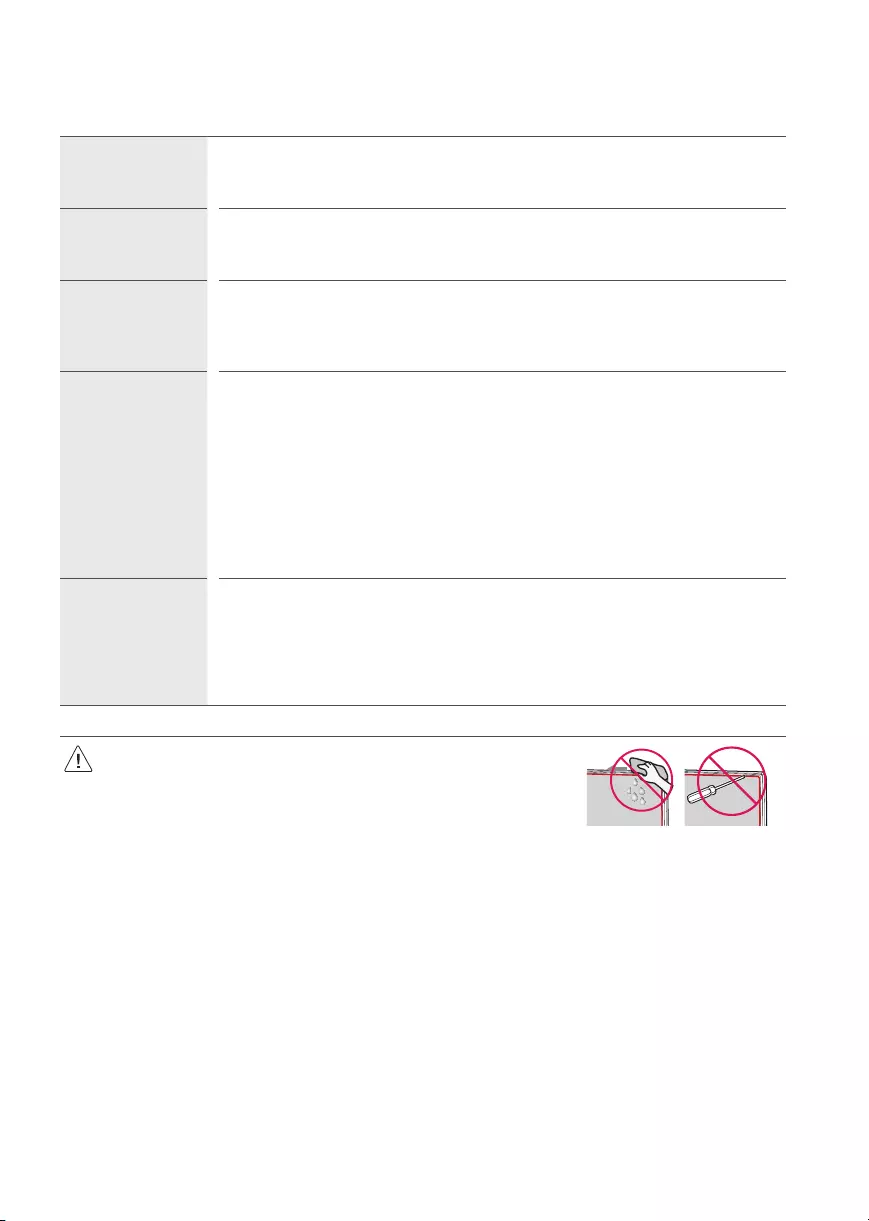
19
Resolución de problemas
No se puede controlar
el televisor con el
control remoto.
•Compruebe si puso cualquier cosa sobre el receptor, como por ejemplo cinta adhesiva.
•Compruebe que no haya ningún obstáculo entre el producto y el control remoto.
•Sustituya las baterías por unas nuevas.
No se muestra ninguna
imagen ni se emite
sonido.
•Compruebe si el producto está encendido.
•Compruebe si el cable de alimentación está conectado a la toma de la pared.
•Conecte otros productos para comprobar si hay un problema con la toma de la pared.
El televisor se apaga de
repente.
•Compruebe la configuración del control de energía. Es posible que el suministro eléctrico se interrumpa.
•Verifique si la función de apagado automático está activada en la configuración relacionada al tiempo.
•Si no hay señal mientras el televisor está encendido, este se apagará automáticamente después de 15
minutos de inactividad.
Visualización anormal •Si siente que el televisor está frío al tocarlo, es posible que ocurra un pequeño parpadeo cuando lo prenda.
Se trata de algo normal y no significa que el televisor esté dañado. También es posible que aparezcan
pequeños puntos en la pantalla, de color rojo, verde o azul. Sin embargo, no afectan el rendimiento del
televisor. No toque la pantalla LCD ni coloque los dedos sobre ella durante mucho tiempo. Esto podría
producir algunos efectos de distorsión temporales en la pantalla.
•Este panel es un producto avanzado que contiene millones de píxeles. En raras ocasiones, es posible que
note la presencia de pequeños puntos en la pantalla mientras mira televisión. Estos puntos son píxeles
desactivados y no afectan el rendimiento ni la fiabilidad del televisor.
•Emitir una imagen durante un período largo puede provocar que la imagen se fije. Evite emitir una imagen
fija en la pantalla del televisor durante un período largo.
Reproducción de ruidos •Crujidos Es posible que se produzcan crujidos cuando esté mirando televisión o al apagar el televisor; se trata
de un ruido generado por la contracción térmica del plástico debido a la temperatura y la humedad. Este
ruido es común en productos donde se requiere la deformación térmica.
•Zumbidos en el circuito eléctrico o el panel Se trata de un ruido de bajo nivel, generado por un circuito de
conmutación de alta velocidad, que suministra una gran cantidad de corriente para que un producto pueda
funcionar. Varía según cada producto. Este ruido no afecta el rendimiento ni la fiabilidad del producto.
•Cuando limpie el producto, sea cuidadoso de no permitir que ningún líquido u objeto
extraño ingrese en la separación que existe entre el lado superior, izquierdo o derecho del
panel, y el panel guía. (Según el modelo).
•Asegúrese de estrujar el exceso de agua o limpiador del paño.
•No rocíe agua o limpiador directamente en la pantalla de la televisión.
•Asegúrese de rociar suficiente agua o limpiador en un paño seco para limpiar la pantalla.
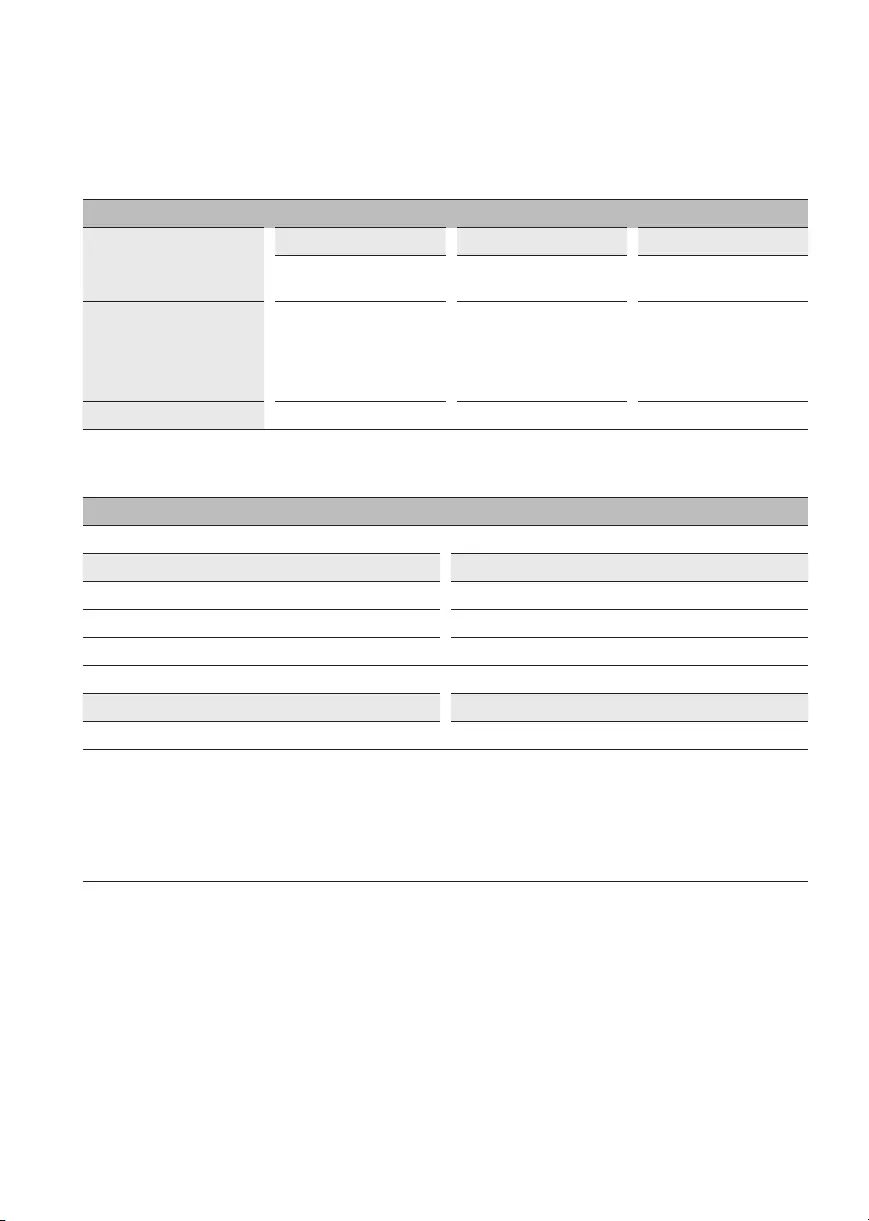
20
Especificaciones
Las especificaciones del producto pueden cambiar sin previo aviso debido a las actualizaciones de las funciones de los productos.
(Según el país)
Especificaciones de transmisión
Sistema de televisión
Digital Analógica Digital Analógica Digital Analógica
SBTVD NTSC-M/
PAL-N/PAL-M DVB-T/T2 NTSC-M/
PAL-N/PAL-M
ATSC / 64 &
256QAM
NTSC-M/
PAL-N/PAL-M
Cobertura de programas
(Banda)
VHF 2-13
UHF 14-69
DTV 2-69
CATV 1-135
VHF 2-13
UHF 14-69
DTV 2-69
CATV 1-125
VHF 2-13
UHF 14-69
DTV 2-69
CATV 1-135
CADTV 1-135
Impedancia de la antena externa 75Ω
(Para 82/86UP80*)
Módulo inalámbrico LG (LGSBWAC95) Especificación
Inalámbrico LAN (IEEE 802.11a/b/g/n/ac)
Rango de frecuencias Potencia de salida (máxima)
2400 a 2483,5MHz 18,5 dBm
5150 a 5725MHz 18 dBm
5725 a 5850MHz 18 dBm
Bluetooth
Rango de frecuencias Potencia de salida (máxima)
2400 a 2483,5MHz 9 dBm
Debido a que las bandas de canales pueden variar según el país, el usuario no puede cambiar o ajustar la frecuencia operativa. Este producto está
configurado para la tabla de frecuencias regional.
Para que el usuario tenga en cuenta, este dispositivo solo se debe instalar y utilizar a una distancia mínima de 20cm entre el dispositivo y el
cuerpo.
FCC ID: BEJLGSBWAC95 / IC: 2703H-LGSBWAC95
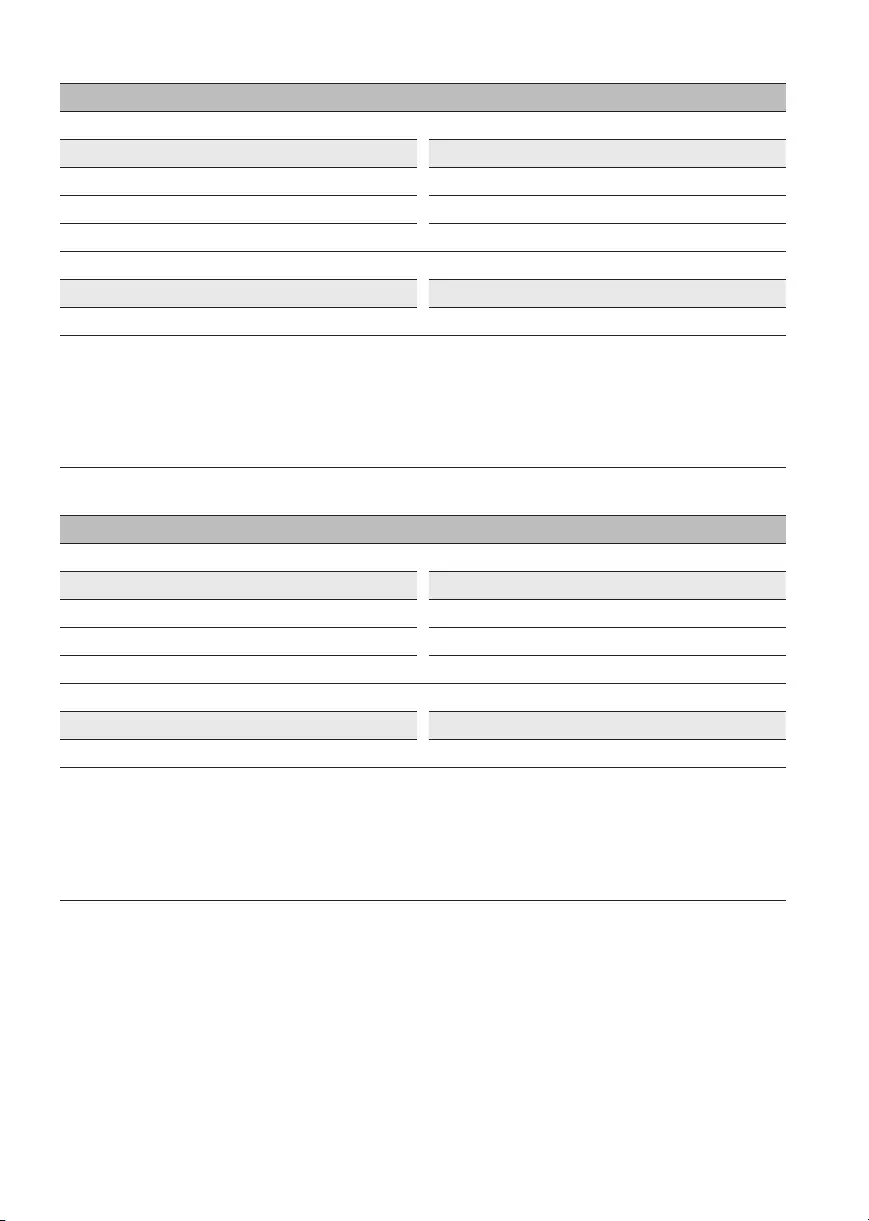
21
(Para 70/75UP75*)
Módulo inalámbrico LG (LGSBWAC02) Especificación
Inalámbrico LAN (IEEE 802.11a/b/g/n/ac)
Rango de frecuencias Potencia de salida (máxima)
2400 a 2483,5MHz 18,5 dBm
5150 a 5725MHz 17 dBm
5725 a 5850MHz 18,5 dBm
Bluetooth
Rango de frecuencias Potencia de salida (máxima)
2400 a 2483,5MHz 8,5 dBm
Debido a que las bandas de canales pueden variar según el país, el usuario no puede cambiar o ajustar la frecuencia operativa. Este producto está
configurado para la tabla de frecuencias regional.
Para que el usuario tenga en cuenta, este dispositivo solo se debe instalar y utilizar a una distancia mínima de 20cm entre el dispositivo y el
cuerpo.
FCC ID: BEJLGSBWAC02 / IC: 2703H-LGSBWAC02
(Excepto para 82/86UP80*, 70/75UP75*)
Módulo inalámbrico LG (LGSBWAC03) Especificación
Inalámbrico LAN (IEEE 802.11a/b/g/n/ac)
Rango de frecuencias Potencia de salida (máxima)
2400 a 2483,5MHz 20 dBm
5150 a 5725MHz 18,5 dBm
5725 a 5850MHz 18 dBm
Bluetooth
Rango de frecuencias Potencia de salida (máxima)
2400 a 2483,5MHz 9 dBm
Debido a que las bandas de canales pueden variar según el país, el usuario no puede cambiar o ajustar la frecuencia operativa. Este producto está
configurado para la tabla de frecuencias regional.
Para que el usuario tenga en cuenta, este dispositivo solo se debe instalar y utilizar a una distancia mínima de 20cm entre el dispositivo y el
cuerpo.
FCC ID: BEJLGSBWAC03 / IC: 2703H-LGSBWAC03
22
Condición de ambiente
Temperatura de funcionamiento 0°C a 40°C
Humedad de funcionamiento Menos de 80%
Temperatura de almacenamiento -20°C a 60°C
Humedad de almacenamiento Menos de 85%
•La información de energía proporcionada en el producto se muestra de acuerdo con la regulación aplicable en cada respectivo país,
(Dependiendo del país).
—El consumo de energía se midió de acuerdo con la norma IEC 62087.
•El consumo de energía real depende del entorno de uso (ejemplo: El contenido que se visualiza, la configuración del televisor, etc.).
•Para obtener más información sobre la fuente de alimentación y el consumo de energía, consulte la etiqueta adherida al producto.
—El consumo de energía típico se mide de acuerdo con la norma IEC 62087 o con las regulaciones de energía de cada país.
* En algunos modelos, la etiqueta está dentro de la tapa de los terminales de conexión de dispositivos externos.
* Según el modelo o el país, es posible que no se muestre el consumo de energía típico en la etiqueta.
* Chile: El consumo de energía típico = Potencia Modo activo/ Potencia típica
Software de código abierto
Para obtener el código fuente bajo GPL, LGPL, MPL y otras licencias de código abierto que contiene este producto, visite http://opensource.lge.com.
Además del código fuente, se pueden descargar los términos de la licencia, las anulaciones de la garantía y los avisos de derechos de autor.
LG Electronics también le proporcionará el código abierto en un CD-ROM por un costo que cubra los gastos de dicha distribución (como el costo del
medio, del envío y de la manipulación) una vez realizado el pedido por correo electrónico a la dirección opensource@lge.com.
Esta oferta es válida solo durante un período de tres años después de que se envíe el último cargamento de este producto. Esta oferta es válida para
todo aquel que reciba esta información.
Licencias
(Únicamente el modelo compatible de Magic Remote)
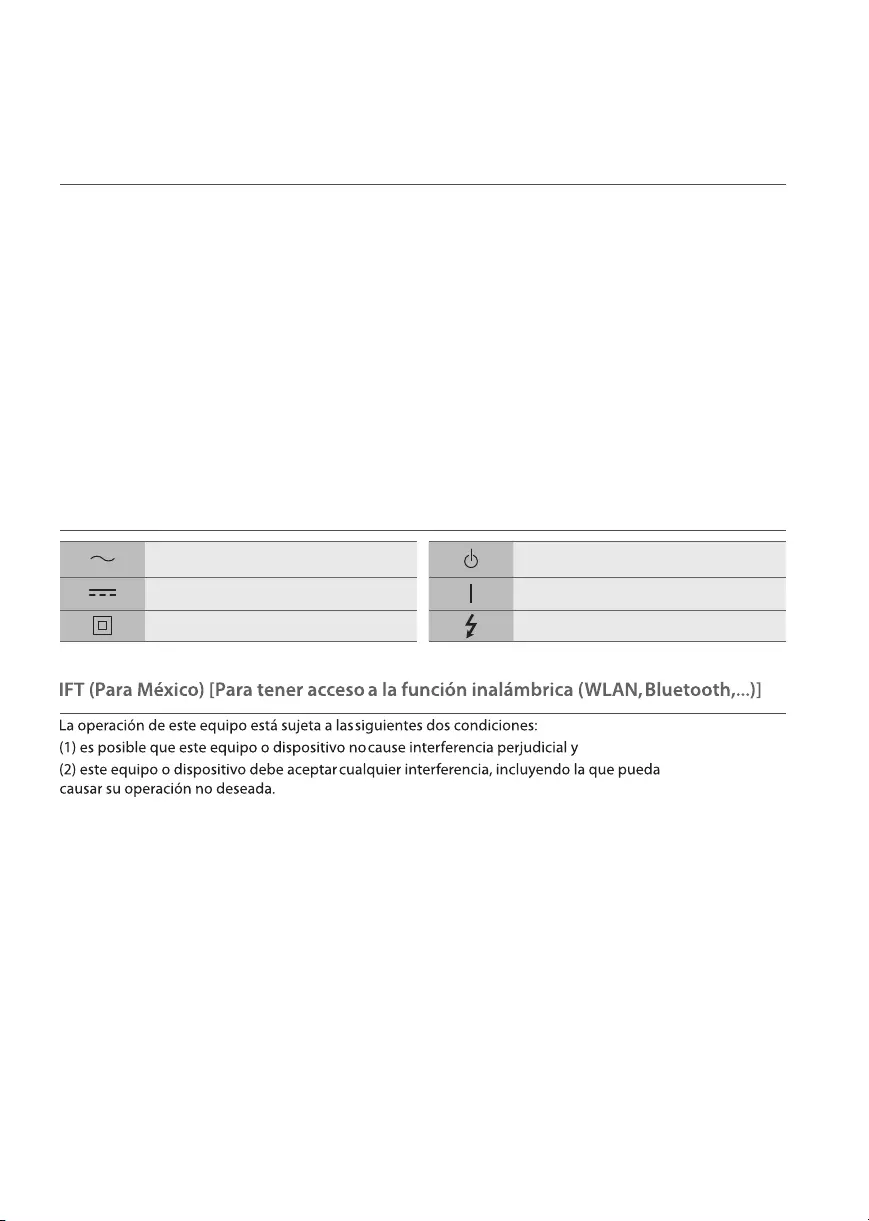
23
Regulación
¡ADVERTENCIA! (RIESGO DE ESTABILIDAD)
Se puede caer y provocar lesiones graves o la muerte. Puede evitar muchas lesiones, especialmente en niños, con tan solo tomar simples
precauciones, como:
—SIEMPRE se deben usar los gabinetes, los soportes o los métodos de montaje que recomienda el fabricante de la televisión.
—SIEMPRE se debe apoyar la televisión sobre muebles que soporten su peso.
—SIEMPRE se debe asegurar que la televisión no sobresalga del borde del mueble que la sostiene.
—SIEMPRE se debe enseñar a los niños acerca de los peligros de escalar el mueble para alcanzar la televisión o los controles.
—SIEMPRE se deben acomodar las cuerdas y los cables conectados al televisor, de forma que no se pueda tropezar con ellos, jalarlos o agarrarlos.
—NUNCA se debe colocar una televisión en un lugar inestable.
—NUNCA se debe colocar la televisión sobre un mueble alto (por ejemplo, despensas o estantes) sin anclar tanto el televisor como el mueble a
un soporte adecuado.
—NUNCA se deben colocar telas u otros materiales entre la televisión y el mueble que la sostiene.
—NUNCA se deben colocar elementos, como juguetes o controles remotos, sobre la televisión o el mueble que la sostiene, ya que puedan incitar
a los niños a escalar el mueble.
Si se va a conservar y a reubicar la televisión existente, se deben tener en cuenta las mismas consideraciones anteriores.
Símbolos
Se refiere a la corriente alterna (ca). Se refiere al modo de espera.
Se refiere a la corriente continua (cc). Se refiere a «ENCENDIDO» (alimentación).
Se refiere a los equipos clase II. Se refiere a voltaje peligroso.
24
(En Argentina)
CERTIFICADO
DE GARANTÍA
Televisor ( El Producto)
Modelo : Consulte el modelo en la portada del manual.
Este certicado de garantía es válido únicamente para
equipos comercializados, distribuidos y/o adquiridos
en la República Argentina por LG Electronics Argentina
S.A. o por distribuidor autorizado.
Para más información sobre la garantía y atención al cliente, por favor llame o visite
nuestro sitio web:
www.lg.com
Centro de Atención al Cliente
C.A.B.A. y Gran Bs. As. 0800-888-5454
Interior del país 0810-555-5454
Carlos M. Della Paolera 265 Piso 26 – Torre Boston
(C1001ADA) Ciudad Autónoma de Buenos Aires, Argentina
LG ELECTRONICS ARGENTINA S.A. (DE AHORA EN ADELANTE DENOMINADO “LG ”) OTORGA ESTA GARANTÍA CONFORME LOS
TÉRMINOS Y CONDICIONES QUE SE ESTABLECEN A CONTINUACION.
REQUISITOS DE GARANTÍA
Si durante el período de garantía que se detalla en este certicado de garantía y en condiciones normales de uso el Producto presenta un desperfecto
o falla en su funcionamiento derivado de un defecto de fabricación, LG garantiza la reparación del Producto sin cargo a través de los Servicios Técnicos
autorizados por LG a tal efecto y, en caso de que la reparación no fuera posible, su reemplazo por otro Producto de las mismas características.Para ello
es imprescindible que:
1) Este certicado de garantía no se encuentre alterado de ningún modo, en ninguna de sus partes.
2) El comprador del Producto acredite su calidad de tal exhibiendo la factura de compra original, con la fecha de compra legible.
3) El desperfecto o falla en el funcionamiento del Producto no tenga causa en ninguna de las circunstancias que se detallan bajo el título
“QUÉ NO CUBRE ESTA GARANTÍA” de este certicado de garantía.
IMPORTANTE
1) Las condiciones de uso, instalación y mantenimiento necesarias para el correcto funcionamiento del Producto están indicadas en el Manual
(manual de usuario, manual de instalacion), que forma parte de este certicado de garantía y se entrega conjuntamente con él.
2) Este certicado de garantía es válido únicamente si el Producto fue comercializado por LG o sus distribuidores autorizados y adquirido en la
República Argentina por el comprador que reclama la garantía.
3) La instalación del Producto deberá realizarse respetando las especicaciones técnicas indicadas en el MANUAL DE INSTALACIÓN o MANUAL DE
USUARIO
4) LG prestará la garantía a través de su red de Servicios Técnicos Autorizados. A n de requerir la cobertura el comprador deberá seguir el
procedimiento establecido bajo el título “COMO SOLICITAR LA ASISTENCIA DEL SERVICIO TÉCNICO” de este certicado de garantía.
ADVERTENCIA
1) LG sólo otorga la garantía que se detalla en este certicado y no se responsabiliza por la/s garantía/s que terceros otorguen respecto del Producto.
2) La falta de presentación, alteración o adulteración de la factura de compra del Producto o de este certicado de garantía o del número de serie que
se informa en la etiqueta del Producto invalida la validez de la garantía.
3) El Producto ha sido diseñado para uso doméstico.
PERÍODO DE GARANTÍA DEL PRODUCTO
Validez de la garantía de acuerdo al producto
Productos Periodo de Garantia*
Televisor, Monitor, Proyector 1 Año
* Computado desde la fecha de compra del Producto
25
QUÉ CUBRE ESTA GARANTÍA
LG garantiza la reparación sin cargo del Producto que, dentro del período de garantía, presente desperfectos o fallas en su funcionamiento derivados
exclusivamente de defectos o fallas de fabricación.
El reemplazo de todo o parte del producto procederá sólo en caso de que el Servicio Técnico autorizado determine que el producto o cierta parte de él
resultan irreparables.
COMO SOLICITAR LA ASISTENCIA DEL SERVICIO TÉCNICO
En caso de que el Producto presente una falla o desperfecto en su funcionamiento, deberá comunicarse con el Servicio de Atención al Cliente de LG
(0800-888-5454 desde CABA y GBA y 0810-555-5454 desde el interior del país), quien le informará los datos del Servicio Técnico autorizado más
cercano a su domicilio y/o le asignara un numero de servicio segun corresponda.
Cuando el Servicio Técnico concurra a inspeccionar el Producto, el comprador deberá exhibir la factura de compra original y este certicado de
garantía y detallar el motivo de la solicitud de asistencia del Servicio Técnico.
QUÉ NO CUBRE ESTA GARANTÍA
No están cubiertos por la garantía los desperfectos o fallas en el funcionamiento del Producto derivados de:
a) Uso del Producto impropio o distinto al uso doméstico.
b) Exceso o caída de tensión eléctrica.
c) Intervención del Producto por personal no autorizado por LG.
d) Instalación del Producto sin respetar las especicaciones técnicas informadas en el MANUAL DE INSTALACIÓN
e) Roturas, golpes, ralladuras, caídas o accidentes de cualquier índole.
f) Mojaduras, inundaciones, incendios, terremotos, tormentas eléctricas, catástrofes naturales.
g) Transporte del Producto por terceros ajenos a LG o a los Servicios Técnicos autorizados.
h) Conexión del Producto a redes eléctricas o a otros dispositivos electrónicos no aptos a tal efecto.
i) Conexión de otros artefactos eléctricos al Producto.
INFORMACIÓN DEL COMPRADOR
NOMBRE DEL COMPRADOR
DOMICILIO
TELEFONO
CORREO ELECTRONICO
CIUDAD PROVINCIA
CÓDIGO POSTAL
INFORMACIÓN DEL PRODUCTO
MODELO
Nº DE SERIE
FECHA DE COMPRA
Nº DE FACTURA
SELLO COMERCIO VENDEDOR sello del
comercio
INFORMACIÓN DEL COMERCIO
NOMBRE DEL COMERCIO
DOMICILIO
CORREO ELECTRONICO
CIUDAD PROVINCIA
CÓDIGO POSTAL
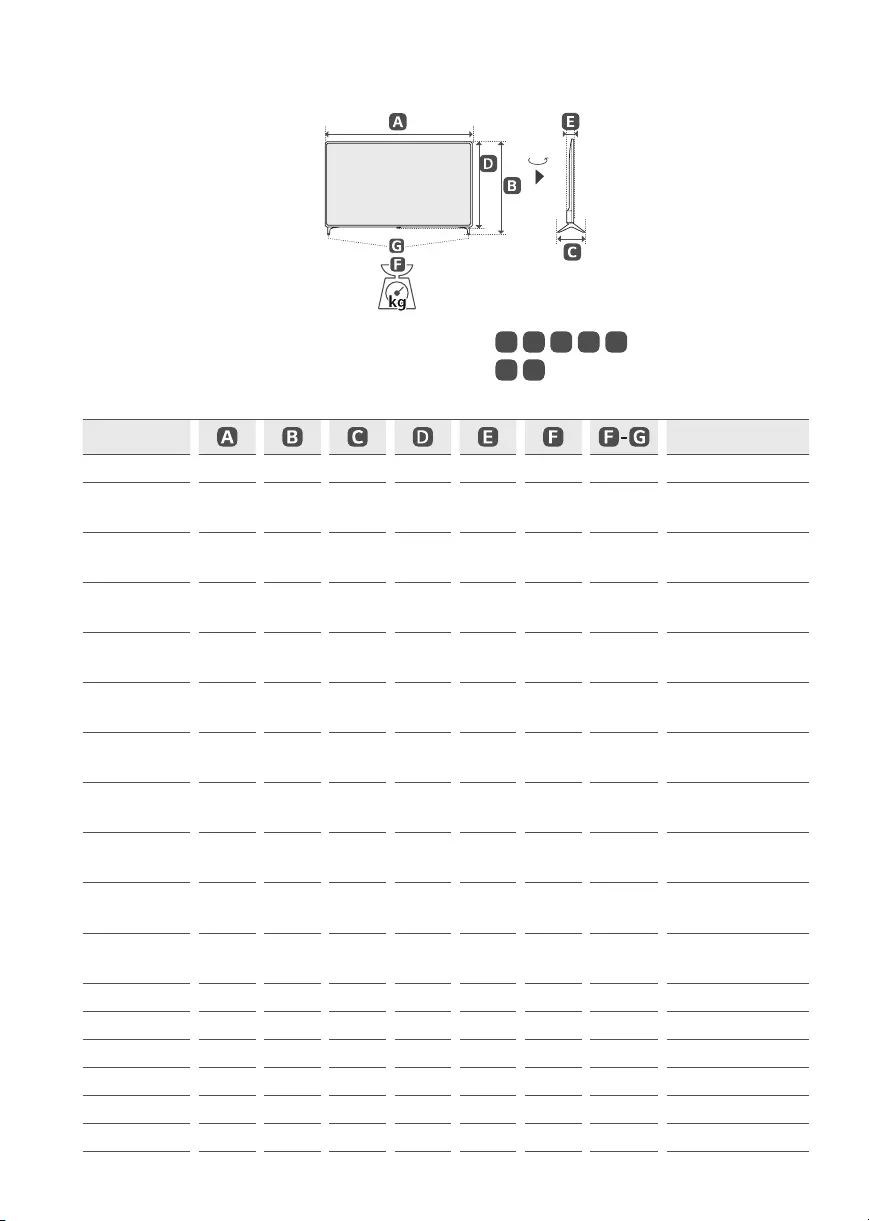
26
(La imagen puede ser diferente a la de su televisor.)
90°
A, B, C, D, E: mm
F, G:kg
Modelo Consumo de energía
43UP7500PSF 973 611 187 572 85,0 8,1 8,0 110 W
50UP7500PSF
50UP7550PSF 1130 719 235 663 86,3 11,4 11,3 140 W
55UP7500PSF
55UP7550PSF 1244 783 235 726 87,1 14,4 14,3 160 W
65UP7500PSF
65UP7550PSF 1463 910 255 850 87,8 21,5 21,3 195 W
70UP7500PSC
70UP7550PSC 1578 984 299 913 91,1 31,4 30,7 225 W
75UP7500PSC
75UP7550PSC 1693 1048 345 978 88,8 35,4 34,6 240 W
43UP7700PSB
43UP7750PSB 967 622 216 564 57,1 8,7 8,6 110 W
50UP7700PSB
50UP7750PSB 1121 713 231 651 57,1 11,9 11,7 130 W
55UP7700PSB
55UP7750PSB 1235 776 231 715 57,5 14,2 14,0 135 W
60UP7700PSB
60UP7750PSB 1356 852 269 783 57,5 17,4 17,1 150 W
65UP7700PSB
65UP7750PSB 1454 906 269 838 57,7 21,8 21,5 185 W
70UP7750PSB 1562 971 362 907 59,9 29,1 28,4 210 W
75UP7750PSB 1678 1027 362 964 59,9 32,1 31,4 225 W
43UP8050PSB 967 622 216 564 57,1 8,7 8,6 110 W
50UP8050PSB 1121 708 232 651 57,1 11,9 11,7 130 W
55UP8050PSB 1235 772 232 715 57,5 14,2 14,0 160 W
60UP8050PSB 1356 845 271 783 57,5 17,4 17,1 185 W

27
Modelo Consumo de energía
65UP8050PSB 1454 899 271 838 57,7 21,8 21,5 205 W
70UP8050PSB 1562 971 362 907 59,9 29,1 28,4 210 W
75UP8050PSB 1678 1027 362 964 59,9 32,1 31,4 225 W
82UP8050PSB 1835 1113 362 1052 59,9 42,1 41,4 285 W
86UP8050PSB 1927 1167 362 1104 59,9 45,9 45,2 335 W
Alimentación requerida ca 100 — 240V ~ 50 / 60Hz
Los números de modelo y de serie del producto se
encuentran ubicados en su parte posterior. Regístrelos en
el siguiente espacio por si alguna vez necesita recurrir al
servicio técnico.
Modelo
N.º de serie
Шаг 1.Выбор вашего продукта
РедактироватьРедактировать
Введите номер модели
Где найти номер модели?
или выберите по категории продукта
или выберите по категории продукта
Категория обязательна.
Какой у вас продукт?
Продукт требуется.
Выберите категорию типа продукта
Тип продукта не требуется.
Выберите номер модели продукта
Требуется номер модели.
Введите номер модели или выберите по Категории продукта*Обязательное поле
Если вы обнаружили ошибки в руководстве (битая кодировка, несоответствие заявленного языка и т.п.), пожалуйста, свяжитесь с нами, с указанием модели техники и кратким описанием ошибки
Если у вас нет программы просмотра, сначала загрузите ее.
Acrobat Reader
- June 10, 2024
- LG
Table of Contents
- LG 43UQ75006LF 4K UHD AI ThinQ Smart TV
- Before reading this manual
- Separate Purchase
- Warning! Safety instructions
- Installation
- Mounting on the Table
- Starting TV
- Connections
- Specifications
- Product Information
- Troubleshooting
- Using Magic Remote Control
- Connecting Smart Devices using NFC Tagging
- Specifications
- Using Remote Control
- FAQ’s
- Read User Manual Online (PDF format)
- Download This Manual (PDF format)
LG 43UQ75006LF 4K UHD AI ThinQ Smart TV

Before reading this manual
- Read this manual thoroughly before operating your TV, and keep it for future reference.
- On the website, you can download the manual including installation, use, troubleshooting, specifications, license, etc, and view its contents on your PC or mobile device.
User Guide: For more information about this TV, read the USER GUIDE
embedded in the product. (Depending on the model)
- To open the USER GUIDE → → [Support] → [User Guide]
Separate Purchase
- Separate purchase items can be changed or modified for quality improvement without any notification. Contact your dealer to buy these items. These devices only work with certain models.
- The model name or design may be changed depending on the upgrade of product functions, the manufacturer’s circumstances, or policies.
- A cable to connect antennas and external devices must be purchased separately.
Note
- Product specifications or contents of this manual may be changed without prior notice due to the upgrade of product functions.
- The items supplied with your product may vary depending on the model.
- The image shown may differ from your TV.
Warning! Safety instructions
CAUTION
RISK OF ELECTRIC SHOCK DO NOT OPEN
- TO REDUCE THE RISK OF ELECTRIC SHOCK, DO NOT REMOVE THE COVER (OR BACK).
- NO USER-SERVICEABLE PARTS INSIDE. REFER TO QUALIFIED SERVICE PERSONNEL.
This symbol is intended to alert the user to the presence of uninsulated
“dangerous voltage” within the product’s enclosure that may be of sufficient
magnitude to constitute a risk of electric shock to persons. This symbol is
intended to alert the user to the presence of important operating and
maintenance (servicing) instructions in the literature accompanying the
appliance.
WARNING : TO REDUCE THE RISK OF FIRE AND ELECTRIC SHOCK, DO NOT EXPOSE
THIS PRODUCT TO RAIN OR MOISTURE.
-
TO PREVENT THE SPREAD OF FIRE, KEEP CANDLES OR OTHER ITEMS WITH OPEN FLAMES AWAY FROM THIS PRODUCT AT ALL TIMES.
-
Do not place the TV and/or remote control in the following environments:
- Keep the product away from direct sunlight.
- An area with high humidity such as a bathroom.
- Near any heat source such as stoves and other devices that produce heat.
- Near kitchen counters or humidifiers where they can easily be exposed to steam or oil.
- An area exposed to rain or wind.
- Do not expose to dripping or splashing and do not place objects filled with liquids, such as vases, cups, etc. on or over the apparatus (e.g., on shelves above the unit).
- Near flammable objects such as gasoline or candles, or expose the TV to direct air conditioning.
- Do not install in excessively dusty places.
Otherwise, this may result in fire, electric shock, combustion/ explosion,
malfunction, or product deformation.
-
Ventilation
- Install your TV where there is proper ventilation. Do not install it in a confined space such as a bookcase.
- Do not install the product on a carpet or cushion.
- Do not block or cover the product with cloth or other materials while the unit is plugged in.
-
Take care not to touch the ventilation openings. When watching the TV for a long period, the ventilation openings may become hot.
-
Protect the power cord from physical or mechanical abuse, such as being twisted, kinked, pinched, closed in a door, or walked upon. Pay particular attention to plugs, wall outlets, and the point where the cord exits the device.
-
Do not move the TV whilst the Power cord is plugged in.
-
Do not use a damaged or loosely fitting power cord.
-
Be sure to grasp the plug when unplugging the power cord.
Do not pull on the power cord to unplug the TV. -
Do not connect too many devices to the same AC power outlet as this could result in fire or electric shock.
-
Disconnecting the Device from the Main Power
- The power plug is the disconnecting device. In case of an emergency, the power plug must remain readily accessible.
-
Do not let your children climb or cling to the TV. Otherwise, the TV may fall over, which may cause serious injury.
-
Outdoor Antenna Grounding (Can differ by country):
- If an outdoor antenna is installed, follow the precautions below.
An outdoor antenna system should not be located in the vicinity of overhead
power lines or other electric light or power circuits, or where it can come in
contact with such power lines or circuits as death or serious injury can
occur.
- If an outdoor antenna is installed, follow the precautions below.
-
Grounding (Except for devices that are not grounded.)
- TV with a three-prong grounded AC plug must be connected to a three-prong grounded AC outlet. Ensure that you connect the earth’s ground wire to prevent possible electric shock.
-
Never touch this apparatus or antenna during a lightning storm. You may be electrocuted.
-
Make sure the power cord is connected securely to the TV and wall socket if not secured damage to the Plug and socket may occur and in extreme cases a fire may break out.
-
Do not insert metallic or inflammable objects into the product. If a foreign object is dropped into the product, unplug the power cord and contact customer service.
-
Do not touch the end of the power cord while it is plugged in.
You may be electrocuted. -
If any of the following occur, unplug the product immediately and contact your local customer service.
- The product has been damaged.
- If water or another substance enters the product (like an AC adapter, power cord, or TV).
- If you smell smoke or other odors coming from the TV.
- When lightning storms or when unused for long periods of time.
Even if the TV is turned off by remote control or button, the AC power source
is connected to the unit if not unplugged in.
-
Do not use high-voltage electrical equipment near the TV (e.g., a bug zapper). This may result in product malfunction.
-
Do not attempt to modify this product in any way without written authorization from LG Electronics. Accidental fire or electric shock can occur. Contact your local customer service for service or repair. Unauthorized modification could void the user’s authority to operate this product.
-
Use only authorized attachments/accessories approved by LG Electronics. Otherwise, this may result in fire, electric shock, malfunction, or product damage.
-
Never disassemble the AC adapter or power cord. This may result in fire or electric shock.
-
Handle the adapter carefully to avoid dropping or striking it. An impact could damage the adapter.
-
To reduce the risk of fire or electrical shock, do not touch the TV with wet hands. If the power cord prongs are wet or covered with dust, dry the power plug completely or wipe the dust off.
-
Batteries
- Store the accessories (battery, etc.) in a safe location out of the reach of children.
- Do not short-circuit, disassemble, or allow the batteries to overheat. Do not dispose of batteries in a fire. Batteries should not be exposed to excessive heat.
- Caution: Risk of fire or explosion if the battery is replaced by an incorrect type.
-
Moving
- When moving, make sure the product is turned off, and unplugged, and all cables have been removed. It may take 2 or more people to carry larger TVs. Do not press or put stress on the front panel of the TV. Otherwise, this may result in product damage, fire hazard, or injury.
-
Keep the packing anti-moisture material or vinyl packing out of the reach of children.
-
Do not allow an impact shock or any objects to fall into the product, and do not drop anything onto the screen.
-
Do not press strongly upon the panel with a hand or a sharp object such as a nail, pencil, or pen, or make a scratch on it. It may cause damage to the screen.
-
Cleaning
- When cleaning, unplug the power cord and wipe gently with a soft/dry cloth. Do not spray water or other liquids directly on the TV. Do not clean your TV with chemicals including glass cleaner, any type of air freshener, insecticide, lubricants, wax (car, industrial), abrasive, thinner, benzene, alcohol, etc., which can damage the product and/or its panel. Otherwise, this may result in electric shock or product damage.
Installation
Lifting and moving the TV
Please note the following advice to prevent the TV from being scratched or
damaged and for safe transportation regardless of its type and size.
- It is recommended to move the TV to the box or packing material that the TV originally came in.
- Before moving or lifting the TV, disconnect the power cord and all cables.
- When holding the TV, the screen should face away from you to avoid damage.
- Hold the top and bottom of the TV frame firmly. Make sure not to hold the transparent part, speaker, or speaker grill area.
- When transporting a large TV, there should be at least 2 people.
- When transporting the TV by hand, hold the TV as shown in the following illustration.
- When transporting the TV, do not expose the TV to jolts or excessive vibration.
- When transporting the TV, keep the TV upright, never turn the TV on its side or tilt it towards the left or right.
- Do not apply excessive pressure to cause flexing/bending of the frame chassis as it may damage the screen.
- When handling the TV, be careful not to damage the protruding buttons.
- Avoid touching the screen at all times, as this may result in damage to the screen.
- When attaching the stand to the TV set, place the screen facing down on a cushioned table or flat surface to protect the screen from scratches.
Mounting on the Table
- Insert and tighten the eye bolts, or TV brackets and bolts on the back of the TV.
- If there are bolts inserted at the eye-bolts position, remove the bolts first.
Securing the TV to the Wall
- Insert and tighten the eye bolts, or TV brackets and bolts on the back of the TV.
- If there are bolts inserted at the eye-bolts position, remove the bolts first.
- Mount the wall brackets with the bolts to the wall. Match the location of the wall bracket and the eye bolts on the rear of the TV.
- Connect the eye bolts and wall brackets tightly with a sturdy rope. Make sure to keep the rope horizontal with a flat surface.
- Use a platform or cabinet that is strong and large enough to support the TV securely.
- Brackets, bolts, and ropes are not provided. You can obtain additional accessories from your local dealer.
Mounting to the Wall
Attach an optional wall mount bracket at the rear of the TV carefully and
install the wall mount bracket on a solid wall perpendicular to the floor.
When you attach the TV to other building materials, please contact qualified
personnel. LG recommends that wall mounting be performed by a qualified
professional installer. We recommend the use of LG’s wall mount bracket. LG’s
wall mount bracket is easy to move with cables connected. When you do not use
LG’s wall mount bracket, please use a wall mount bracket where the device is
adequately secured to the wall with enough space to allow connectivity to
external devices. It is advised to connect all the cables before installing
fixed wall mounts.
- **** Remove the stand before installing the TV on a wall mount by performing the stand attachment in reverse.
- For more information on screws and wall mount brackets, refer to the Separate Purchase.
- If you intend to mount the product to a wall, attach VESA standard mounting interface (optional parts) to the back of the product. When you install the set use the wall mounting bracket (optional parts) and fix it carefully so as not to drop.
- When mounting a TV on the wall, make sure not to install the TV by hanging the power and signal cables on the back of the TV.
- Do not install this product on a wall if it could be exposed to oil or oil mist. This may damage the product and cause it to fall.
- Do not use a sharp object when you detached the cable cover. This could damage the cable or the cabinet. It may also cause personal harm. (Depending on the model)
Antenna/Cable
Connect the TV to a wall antenna socket with an RF cable (75 Ω).
- Use a signal splitter to use more than 2 TVs.
- If the image quality is poor, install a signal amplifier properly to improve the image quality.
- If the image quality is poor with an antenna connected, try to realign the antenna in the correct direction.
- An antenna cable and converter are not supplied.
- For a location that is not supported with Ultra HD broadcasting, this TV cannot receive Ultra HD broadcasts directly. (Depending on the model)
Satellite dish
Connect the TV to a satellite dish to a satellite socket with a satellite RF
cable (75 Ω). (Depending on the model)
Starting TV
Turning on the TV
You can simply operate the TV functions, using the button.
- Power On (Press)
- Power Off1) (Press and Hold)
- Menu Control (Press2))
- Menu Selection (Press and Hold3))
- All running apps will close, and any recording in progress will stop. (Depending on the country)
- You can access and adjust the menu by pressing the button when the TV is on.
- You can use the function when you access the menu control.
Note
- If the TV is turned on for the first time after it was shipped from the factory, initialization of the TV may take a few minutes.
- Your TV’s OSD (On Screen Display) may differ slightly from that shown in this manual.
- The device must be easily accessed to a location outlet near the access. Some devices are not made by turning the on/off buttons, turning off the device, and unplugging the power cord.
Connections
Connect various external devices to the TV and switch input modes to select an
external device. For more information on external device connection, refer to
the manual provided with each device.
- When connecting the HDMI cable, the product, and external devices should be turned off and unplugged.
- Supported HDMI Audio format (Depending on model): True HD (48 kHz), Dolby Digital / Dolby Digital Plus (32 kHz / 44.1 kHz / 48 kHz), PCM (32 kHz / 44.1 kHz / 48 kHz / 96 kHz / 192 kHz)
Note
-
If the device connected to Input Port also supports HDMI Deep Colour, your picture may be clearer.
However, if the device doesn’t support it, it may not work properly. In that
case, change the TV’s [HDMI Deep Colour] setting to off. -
→ → [General] → [Devices] → [HDMI Settings] → [HDMI Deep Colour]
- 8K: Support 8K @ 50/60 Hz (4:4:4, 4:2:2, 4:2:0)
- 4K: Support 4K @ 50/60 Hz (4:4:4, 4:2:2, 4:2:0), 4K @ 100/120 Hz (4:4:4, 4:2:2, 4:2:0)
- Off: Support 4K @ 50/60 Hz (4:2:0)
-
Use a certified cable with the HDMI logo attached.
-
If you do not use a certified HDMI cable, the screen may not display or a connection error may occur.
-
Recommended HDMI Cable Types
- Ultra High-Speed HDMI®/™ cable (3 m or less)
USB
Some USB Hubs may not work. If a USB device connected using a USB Hub is not
detected, connect it to the USB port on the TV directly.
Note
- For an optimal connection, HDMI cables and USB devices should have bezels less than 10 mm thick, 18 mm wide, and 8 mm wire diameter. Use an extension cable that supports USB 2.0 if the USB cable or USB memory stick does not fit into your TV’s USB port. (Depending on the model)
IR Blaster
Control the set-top box (cable/satellite/IP/OTT), Blu-ray/DVD player,
soundbar, game consoles, etc., using the IR Blaster. (Depending on the
country)
Note
- Connect the IR Blaster cable to the TV’s IR Blaster port.
- Use universal control settings to control the device.
- Secure the IR Blaster with the 3M tape provided.
External Devices
Available external devices are Blu-ray players, HD receivers, DVD players,
VCRs, audio systems, USB storage devices, PC, gaming devices, and other
external devices.
Note
- The external device connection may differ from the model.
- In PC mode, there may be noise associated with the resolution, vertical pattern, contrast, or brightness. If noise is present, change the PC output to another resolution, change the refresh rate to another rate, or adjust the brightness and contrast on the [Picture] menu until the picture is clear.
- In PC mode, some resolution settings may not work properly depending on the graphics card.
- If Ultra HD content is played on your PC, video or audio may become disrupted intermittently depending on your PC’s performance. (Depending on the model)
- When connecting to a wired LAN, use a CAT 7 cable with high-speed Internet transmission. (Only when LAN the port is provided.)
Specifications
(Depending on the country)
Broadcasting Specifications
Digital TV (Depending on the country)| Analogue TV (Depending on the country)
Television system| DVB-S/S2 DVB-T/T2 DVB-C| PAL/SECAM B/G, D/K, I SECAM L
Program coverage| DVB-S/S21)| DVB-C1)| DVB-T/T21)| 46 ~ 862 MHz
950 ~ 2,150 MHz| 46 ~ 890 MHz| VHF III : 174 ~ 230 MHz UHF IV : 470 ~ 606 MHz
UHF V : 606 ~ 862 MHz
S Band II : 230 ~ 300 MHz
S-Band III : 300 ~ 470 MHz
Maximum number of storable programs| 6,000| 3,000
External antenna impedance| 75 Ω
CI Module (W x H x D)| 100.0 mm x 55.0 mm x 5.0 mm
- Certain 8K input/decoding standards may not be supported. An additional device may be necessary to support certain 8K standards. Upscaled and enhanced 8K images will vary depending on the source content.
Environment condition
Operating Temperature| | 0 °C to 40 °C
Operating Humidity| | Less than 80 %
Storage Temperature| | -20 °C to 60 °C
Storage Humidity| | Less than 85 %
- For information on the power supply and power consumption, refer to the label attached to the product.
- The typical power consumption is measured in accordance with IEC 62087 or each country’s energy regulations.
- On some models, the label is inside the external device connection terminal cover.
- Depending on the model or country, the typical power consumption may not be on the label.
Product Information
Open Source Software Notice Information
To obtain the source code that is contained in this product, under GPL, LGPL,
MPL, and other open source licenses that have the obligation to disclose
source code, and to access all referred license terms, copyright notices, and
other relevant documents please visit https://opensource.lge.com. LG
Electronics will also provide an open source code to you on CD-ROM for a
charge covering the cost of performing such distribution (such as the cost of
media, shipping, and handling) upon email request to
opensource@lge.com. This offer is valid to anyone in
receipt of this information for a period of three years after our last
shipment of this product
Troubleshooting
Cannot control the TV with the remote control.|
- Check the remote control sensor on the product and try again.
- Check if there is any obstacle between the product and the remote control.
- Check if the batteries are still working and properly installed ( to , to ).
—|—
No image display and no sound is produced.|
- Check if the product is turned on.
- Check if the power cord is connected to a wall outlet.
- Check if there is a problem in the wall outlet by connecting other products.
The TV turns off suddenly.|
- Check the power control settings. The power supply may be interrupted.
- Check if the auto-off function is activated on the settings related time.
- If there is no signal while the TV is on, the TV will turn off automatically after 15 minutes of inactivity.
When connecting to the PC (HDMI), no signal is detected.|
- Turn the TV off/on using the remote control.
- Reconnect the HDMI cable.
- Restart the PC with the TV on.
Abnormal Display|
-
If the product feels cold to the touch, there may be a small “flicker” when it is turned on. This is normal, there is nothing wrong with product.
-
This panel is an advanced product that contains millions of pixels. You may see tiny black dots and/ or brightly coloured dots (red, blue or green) at a size of 1 ppm on the panel. This does not indicate a malfunction and does not affect the performance and reliability of the product. This phenomenon also occurs in third-party products and is not subject to exchange or refund.
-
You may find different brightness and colour of the panel depending on your viewing position(left/right/ top/down).
This phenomenon occurs due to the characteristic of the panel.
It is not related with the product performance, and it is not malfunction. -
Displaying a still image for a prolonged period of time may cause image sticking. Avoid displaying a fixed image on the TV screen for a long period of time.
Generated Sound|
-
“Cracking” noise: A cracking noise that occurs when watching or turning off the TV is generated by plastic thermal contraction due to temperature and humidity. This noise is common for products where thermal deformation is required.
-
Electrical circuit humming/panel buzzing: A low-level noise is generated from a high-speed switching circuit, which supplies a large amount of current to operate a product. It varies depending on the product. This generated sound does not affect the performance and reliability of the product.
-
When cleaning the product, be careful not to allow any liquid or foreign objects to enter the gap between the upper, left, or right side of the panel and the
guide panel. (Depending on the model) -
Make sure to wring any excess water or cleaner from the cloth.
-
Do not spray water or cleaner directly onto the TV screen.
-
Make sure to spray just enough water or cleaner onto a dry cloth to wipe the screen.
Using Magic Remote Control

The descriptions in this manual are based on the buttons on the remote
control. Please read this manual carefully and use the TV correctly.
How to register the Magic Remote Control
To use the Magic Remote, first, pair it with your TV.
- Put batteries into the Magic Remote and turn the TV on.
- Point the Magic Remote at your TV and press the Wheel (OK) on the remote control.
- If the TV fails to register the Magic Remote, try again after turning the TV off and back on.
How to deregister the Magic Remote Control
Press the (Back) and (Home) buttons at the same time, for five
seconds, to unpair the Magic Remote with your TV.
Press and hold the (Home ) and (Q. Settings) buttons for more than 5
seconds to disconnect and re-register the Magic Remote at the same time.
It is recommended that an Access Point (AP) be located more than 0.2 m away
from the TV. If the AP is installed closer than 0.2 m, the Magic remote
control may not perform as expected due to frequency interference.
Using Always Ready
(Depending upon the model)
You can operate the TV and connect to Bluetooth with direct voice recognition
while the power is off.
- → → [General] → [Always Ready], setting [Enable the function] to on.
- Pressing the button while watching TV switches the screen to [Always Ready] which is turned on, and pressing the button once more turns the screen to [Always Ready] which is turned off.
- Press the (Home) button or the (Back) button to watch TV when the screen is in [Always Ready] and is turned on.
- Press the Wheel (OK) button to display the wallpaper when the screen is in [Always Ready] that is turned off, and press the button to watch TV.
Note
- Using Always Ready may increase energy consumption.
- For more information about the feature, refer to the → → [Support] → [User Guide] → [Troubleshooting] → [Learn More About Always Ready].
Connecting Smart Devices using NFC Tagging
NFC is a technology that uses Near Field Communication (13.56 MHz), allowing
you to conveniently send and receive information without separate settings. By
bringing a smart device near the NFC-enabled remote control, you can install
the LG ThinQ app and connect the device to the TV.
- Turn on NFC in the smart device’s settings. To use NFC with Android devices, set the NFC option to enable ‘read/write tags’ in the smart device’s settings. The NFC settings may vary depending on the device.
- Bring the smart device near the (NFC) on the remote control. The required distance for NFC tagging is about 1 cm.
- Follow the instructions to install the LG ThinQ app on your smart device.
- Retagging the smart device to the remote control allows you to conveniently access various features on the connected TV through the LG ThinQ app.
Note
- This feature is available for NFC-enabled smart devices only.
- This feature is only available if the remote control has an NFC logo.
Specifications
Specifications (MR22GN, MR22GA)
Bluetooth
NFC*
Only MR22GN
| Frequency range
2,400 to 2,483.5 MHz
13.553 to 13.567 MHz
| | Output Power (Max.)
7 dBm
-13.27 dBuA/m @ 10 m
Using Remote Control

Note: To use the button, press and hold for more than 1 second.
The descriptions in this manual are based on the buttons on the remote
control. Please read this manual carefully and use the TV correctly. (Some
buttons and services may not be provided depending on models or regions.)
(Depending on the model)
FAQ’s
What is the screen size of the LG 43UQ75006LF 4K UHD AI ThinQ Smart TV?
The screen size of the LG 43UQ75006LF is 43 inches.
Does the LG 43UQ75006LF support 4K Ultra HD resolution?
Yes, the LG 43UQ75006LF is a 4K UHD TV, which means it supports a resolution
of 3840 x 2160 pixels.
Does the LG 43UQ75006LF have HDR (High Dynamic Range) support?
Yes, the LG 43UQ75006LF supports HDR10 and HLG (Hybrid Log Gamma) formats,
allowing for enhanced contrast and vibrant colors.
Is the LG 43UQ75006LF a Smart TV?
Yes, the LG 43UQ75006LF is a Smart TV that comes with built-in Wi-Fi and the
LG AI ThinQ platform for accessing online streaming services and other smart
features.
What is LG AI ThinQ?
LG AI ThinQ is LG’s artificial intelligence platform that enables voice
control and smart functionality on LG TVs. It allows you to control your TV
using voice commands and interact with other compatible smart home devices.
What voice control options are available on the LG 43UQ75006LF?
The LG 43UQ75006LF supports voice control through LG’s AI ThinQ platform. It
is compatible with Google Assistant and Amazon Alexa for voice commands and
smart home integration.
What are the connectivity options on the LG 43UQ75006LF?
The LG 43UQ75006LF offers multiple connectivity options, including HDMI ports,
USB ports, Ethernet, RF input, and built-in Wi-Fi for wireless connectivity.
Can I stream content from popular streaming services on the LG
43UQ75006LF?
Yes, the LG 43UQ75006LF supports popular streaming services like Netflix,
Amazon Prime Video, and YouTube. You can access these services directly from
the TV’s smart interface.
Does the LG 43UQ75006LF have a web browser?
Yes, the LG 43UQ75006LF has a web browser that allows you to browse the
internet directly on the TV.
Does the LG 43UQ75006LF come with a Magic Remote?
The inclusion of a Magic Remote may vary depending on the region and retailer.
Please check with the specific retailer or LG for the availability of a Magic
Remote with the TV.
Can I connect external devices such as gaming consoles or sound systems to
the LG 43UQ75006LF?
Yes, the LG 43UQ75006LF provides HDMI and USB ports, allowing you to connect
external devices such as gaming consoles, Blu-ray players, sound systems, and
more.
Does the LG 43UQ75006LF support Bluetooth connectivity?
Yes, the LG 43UQ75006LF supports Bluetooth connectivity, allowing you to
connect wireless headphones, speakers, or other compatible devices.
Is the LG 43UQ75006LF wall-mountable?
Yes, the LG 43UQ75006LF is wall-mountable. It is compatible with VESA wall-
mount standards, but you may need to purchase a separate wall-mount bracket.
Does the LG 43UQ75006LF have built-in digital tuners for free-to-air TV
channels?
Yes, the LG 43UQ75006LF comes with built-in digital tuners, including
DVB-T2/C/S2, allowing you to access and watch free-to-air TV channels without
an additional set-top box.
What is the warranty period for the LG 43UQ75006LF?
The warranty period for the LG 43UQ75006LF may vary depending on the region
and retailer. It is best to check with LG or the retailer for the specific
warranty duration and terms.
Download The PDF Link:LG 43UQ75006LF 4K UHD AI ThinQ Smart TV Owner’s
Manual
Read User Manual Online (PDF format)
Read User Manual Online (PDF format) >>
Download This Manual (PDF format)
Download this manual >>
[pdf]
Instructions
LG OLED 4K HDR AI TV Instructions C8PUA Series 637c5db3bd036f98cdcf3655 manualfiles yappe in manuals |||
HOME ENTERTAINMENT LG OLED TV OLED C8PUA Series 55 65 76 98 OLED 4K HDR AI TV 77 65 55 * Class size: See below for details. 9 Intelligent Processor LG ThinQ AI 4K Cinema HDR Dolby Atmos Ultra-Thin Cinema Screen DESCRIPTION The Best TV Ever just got even better with the new LG OLED…
lang:en score:60 filesize: 113.52 K page_count: 2 document date: 2021-07-13
[pdf]
User Manual Quick Start Guide Guide Warranty Accessories
AI TV ARTIFICIAL INTELLIGENCE cloudfront net Remote Control Battery Yes Power Cable Quick Start Guide E Manual Limited Warranty 1 Year Parts Labor ACCESSORIES INCLUDED 2019 11 12 21 13 49 dzrf1tezfwb3j CEDocuments 97845
PICTURE PANEL Display Type Display Resolution Wide Viewing Angle Dimming Technology OLED 4K Ultra … cer, Ultra Luminance Pro Quad Step Noise Reduction, Frequency Based Sharpness Enhancer 4K Upscaler AI TV ARTIFICIAL INTELLIGENCE LG ThinQ AI Google Assistant Alexa Built-In Google Home Compatible Y…
lang:en score:43 filesize: 82.29 K page_count: 4 document date: 2019-11-12
[pdf]
User Manual Quick Start Guide Specifications Guide Accessories
ACCESSORIES INCLUDED AI TV ARTIFICIAL Quick Start Guide Yes Remote Magic w NFC Control Battery AA x 2EA Stand SR G3WU8377 Wall Mount 18eb59044427737fed5fdfb4e55fbfa63c69433d OLED83G3SET Specifications Sheet media binglee au 1 8 e b |||
ACCESSORIES INCLUDED E-Manual Power Cable Quick Start Guide Remote Remote Control Battery Stand Wall Mount Yes Yes Attached Yes Magic Remote w/ NFC Yes AA x 2EA SR-G3WU8377 Flush Mount Included Stand sold separately AI TV ARTIFICIAL INTELLIGENCE Amazon Alexa Compatible Yes Built-in App…
lang:en score:36 filesize: 101.71 K page_count: 5 document date: 2023-04-13
[pdf]
User Manual Owner’s Manual Specifications Decleration of Conformity
Owners Manual LG OLED48A2PUA 48 A2 4K OLED with Think AI TV O retailspecs files attachment 89986 |||
OWNER S MANUAL Safety and Reference Please read this manual carefully before operating your set and retain it for future reference. OLED48A2AUA OLED48A2PUA OLED55A2AUA OLED55A2PUA OLED65A2AUA OLED65A2PUA OLED77A2AUA OLED77A2PUA OLED55B2AUA OLED55B2PUA OLED65B2AUA OLED65B2PUA OLED77B2AUA OLED77B2PU…
lang:en score:34 filesize: 3.82 M page_count: 54 document date: 2022-11-28
[pdf]
Instructions Specifications Decleration of Conformity
UQ8000 AUB series LED 4K UHD LG 43 Inch Class Smart webOS 22 w ThinQ AI TV lg 43uq8000 4k uhd tv 5 imimg data5 SELLER Doc 2022 8 NH IB KH 16582653 |||
8/31/22, 2:07 PM LG 43 Inch Class UQ8000 AUB series LED 4K UHD Smart webOS 22 w/ ThinQ AI TV 43UQ8000AUB LG USA HOME / TV/Video / TVs / 4K Ultra HD TVs / 43UQ8000AUB 43UQ8000AUB LG 43 Inch Class UQ8000 AUB series LED 4K UHD Smart webOS 22 w/ ThinQ AI TV 1/7 Find a Retailer Add to Wishli…
lang:en score:33 filesize: 175.71 K page_count: 3 document date: 2022-08-31
[pdf]
User Manual
Rajaraman Dhanu Viewing Angle m media-amazon < b> (Refer to manual< b>) AI TV(ARTIFICIAL INTELLIGENCE) LG ThinQ Yes Intelligent Voice Recognition Speech Text Search Google Assistant This feature is not available in Republic of Ireland Amazon Alexa Compatible 4 26 2021< 9:22:14 AM 812tFf2hoqL m images I
DISPLAY Viewing Angle Wide Viewing Angle BLU Type Direct TruMotion / Refresh Rate TM100 Refresh Ra … udio Codec AC4, AC3 Dolby Digital , EAC3, HE-AAC, AAC, MP2, MP3, PCM, WMA, apt-X Refer to manual AI TV ARTIFICIAL INTELLIGENCE LG AI ThinQ Yes Intelligent Voice Recognition Yes Speech to Text …
lang:en score:32 filesize: 471.24 K page_count: 7 document date: 2021-04-26
[pdf]
User Manual Specifications
Rajaraman Dhanu SPECS: BLU Type VIDEO m media-amazon < b> (Refer to manual< b>) AI TV(ARTIFICIAL INTELLIGENCE) LG ThinQ Ready Intelligent Voice Recognition Speech Text Search Google Assistant This feature is not available in Republic of Ireland 4 25 2021< 4:08:13 PM 81p R8t5-aL m images I
SPECS: BLU Type Direct TruMotion / Refresh Rate TM100 Refresh Rate 50Hz VIDEO Picture Master Pro … udio Codec AC4, AC3 Dolby Digital , EAC3, HE-AAC, AAC, MP2, MP3, PCM, WMA, apt-X Refer to manual AI TV ARTIFICIAL INTELLIGENCE LG ThinQ AI Ready Intelligent Voice Recognition Ready Speech to T…
lang:en score:32 filesize: 474.05 K page_count: 7 document date: 2021-04-25
[pdf]
User Manual Quick Start Guide Specifications Guide Warranty
UM6900PUA Series Yes Google Home device sold separately LG Content Store App E Manual WARRANTY Limited Warranty 1 Year Parts Labor d4d1615b 607e 48e8 a64c 3467c5e7a2a8 files bbystatic oWIuRqZ5egQyYHs U4Ep0A Resolution Upscaler AI TV ARTIFICIAL INTELLIGENCE Compatible Amazon Alexa SMART Operating System Magic Remote Control Full Web Browser AUDIO Speaker Output Power Quick Start Guide SPECIFICATIONS Created Date 6 13 2019 2 44 46 PM 11 21 36 00 dzrf1tezfwb3j cloudfront net CEDocuments movie night right with the UHD UM6900 4K screen that provides four
HOME ENTERTAINMENT LG 4K UHD TV UM6900PUA Series 4K HDR Smart LED TV 65 60 * Class size: See b … OCESSING Picture Processor Refresh Rate HDR High Dynamic Range Clarity Color Resolution Upscaler AI TV ARTIFICIAL INTELLIGENCE Google Home Compatible Amazon Alexa Compatible SMART TV Operating Sy…
lang:en score:32 filesize: 714.81 K page_count: 2 document date: 2019-06-13
[pdf]
kinga ladna REGULAMIN AKCJI PROMOCYJNEJ „Zwrot za LG AI TV 1 POSTANOWIENIA OGÓLNE Niniejszy Regulamin określa warunki przeprow CASHBACK 2024 Audio Color Warszawa sklep audiocolor pl 06 |||
REGULAMIN AKCJI PROMOCYJNEJ ,,Zwrot za LG AI TV 1. POSTANOWIENIA OGLNE 1.1. Niniejszy Regulamin okrela warunki przeprowadzenia akcji promocyjnej pod nazw ,,Zwrot za LG AI TV dalej zwanej ,,Promocj . 1.2. Organizatorem Promocji jest LG Electronics Polska Sp. z o.o. z siedzib w Warszawie, ul. W…
lang:pl score:32 filesize: 279.1 K page_count: 9 document date: 2024-06-11
[pdf]
User Manual
LG 86UM8070 Manual gibbyselectronicsupermarket ca 2019 03 |||
86UM8070AUB 86 UM80 LG UHD TV IPS 4K Display 7 Gen 2 Intelligent Processor webOSTM 4.5 LG ThinQ … nd personalized content recommendations on LG s award-winning interface.* LG ThinQ AI LG UHD ThinQ AI TV listens, thinks and answers to provide the ultimate personalized entertainment and control ove…
lang:en score:31 filesize: 1.92 M page_count: 2 document date: 2019-03-25
[pdf]
User Manual
gibbyselectronicsupermarket ca 2019 03 LG 43UM7300PUA Manual Lg 43um7300pua Owners |||
43UM7300AUE 43 UM73 LG UHD TV IPS 4K Display webOSTM 4.5 LG ThinQ AI Bluetooth Premium Design … ndations on LG s award-winning interface.* *Internet connection required. LG ThinQ AI LG UHD ThinQ AI TV listens, thinks and answers to provide the ultimate personalized entertainment and control ove…
lang:en score:31 filesize: 1.81 M page_count: 2 document date: 2019-03-25
[pdf]
User Manual
gibbyselectronicsupermarket ca 2019 03 LG 75UM7570 Manual 75um7570aue |||
75UM7570AUE 75 UM75 LG UHD TV IPS 4K Display webOSTM 4.5 LG ThinQ AI Bluetooth Premium Design … ndations on LG s award-winning interface.* *Internet connection required. LG ThinQ AI LG UHD ThinQ AI TV listens, thinks and answers to provide the ultimate personalized entertainment and control ove…
lang:en score:31 filesize: 1.93 M page_count: 2 document date: 2019-03-25
[pdf]
User Manual
70UM7370AUB LG 70UM7370 User Manual gibbyselectronicsupermarket ca 2019 03
70UM7370AUB 70 UM73 LG UHD TV 4K Active HDR webOSTM 4.5 LG ThinQ AI Bluetooth Premium Design … dations on LG s award-winning interface.* *Internet connection required. LG ThinQ AI LG UHD ThinQ AI TV listens, thinks and answers to provide the ultimate personalized entertainment and control ove…
lang:en score:31 filesize: 1.75 M page_count: 2 document date: 2019-03-25
[pdf]
User Manual Owner’s Manual Installation Guide Instructions Specifications
Owners Manual LG OLED88Z2PUA 88 OLED 8K Signature with ThinQ AI TV O retailspecs files attachment 88839 |||
ENGLISH www.lg.com Copyright 2022 LG Electronics Inc. All Rights Reserved. Safety and Reference Please read this manual carefully before operating your set and retain it for future reference. OLED88Z2PUA *MFL718513332202REV00* Printed in Korea Important Safety Instruction Read these instruct…
lang:en score:31 filesize: 3.14 M page_count: 14 document date: 2022-07-01
[pdf]
User Manual Quick Start Guide Specifications Guide Accessories
ACCESSORIES INCLUDED AI TV ARTIFICIAL INTELLIGENCE d8276f15cb9b0e95695558a6233c4f411e6f8045 OLED55G3PSA Specifications Sheet media binglee au d 8 2 7 |||
ACCESSORIES INCLUDED E-Manual Power Cable Quick Start Guide Remote Remote Control Battery Stand Wall Mount Yes Yes Attached Yes Magic Remote w/ NFC Yes AA x 2EA SR-G3WU55 Flush Mount Included Stand sold separately AI TV ARTIFICIAL INTELLIGENCE Amazon Alexa Compatible Yes Built-in Apple…
lang:en score:30 filesize: 101.62 K page_count: 5 document date: 2023-04-13
[pdf]
User Manual
Gibbys Electronic Supermarket LG 49UM7300PUA Manual gibbyselectronicsupermarket ca 2019 03 |||
49UM7300AUE 49 UM73 LG UHD TV IPS 4K Display webOSTM 4.5 LG ThinQ AI Bluetooth Premium Design … ndations on LG s award-winning interface.* *Internet connection required. LG ThinQ AI LG UHD ThinQ AI TV listens, thinks and answers to provide the ultimate personalized entertainment and control ove…
lang:en score:30 filesize: 1.89 M page_count: 2 document date: 2019-03-25
[pdf]
Guide Label
65UR9000PUA Energy Guide by LG 65 Inch Class UR9000 series LED 4K UHD Smart webOS 23 w ThinQ AI TV Dominic s Appliance rdrttgnjokuk images webfronts cache |||
Federal law prohibits removal of this label before consumer purchase. Estimated Yearly Energy Cost 19 Television 10 51 LG Electronics Inc. 65UR9000PUA Cost Range of Similar Models 65 69 Based on 12 cents per kWh and 5 hours use per day Estimated yearly electricity use of this model: 1…
lang:en score:29 filesize: 69.79 K page_count: 1 document date: 2018-10-31
[pdf]
Guide Label
55UR9000PUA Energy Guide by LG 55 Inch Class UR9000 series LED 4K UHD Smart webOS 23 w ThinQ AI TV Dominic s Appliance rdfiplyomokq images webfronts cache |||
Federal law prohibits removal of this label before consumer purchase. Estimated Yearly Energy Cost 16 Television 8 34 LG Electronics Inc. 55UR9000PUA Cost Range of Similar Models 55 59 Based on 12 cents per kWh and 5 hours use per day Estimated yearly electricity use of this model: 13…
lang:en score:29 filesize: 69.64 K page_count: 1 document date: 2018-10-31
[pdf]
Guide Label
86QNED80URA Energy Guide by LG 86 Inch Class QNED80 URA Series 4K UHD Smart webOS 23 w ThinQ AI TV Dominic s Appliance rdmeqvueyfiw images webfronts cache |||
Federal law prohibits removal of this label before consumer purchase. Estimated Yearly Energy Cost 34 Television LG Electronics Inc. 86QNED80URA 15 97 Cost Range of Similar Models 69.5 or greater Based on 12 cents per kWh and 5 hours use per day Estimated yearly electricity use of this …
lang:en score:29 filesize: 70.41 K page_count: 1 document date: 2018-10-31
[pdf]
Guide Label
MEZ68982518 OLED65B2AUA FTC Download Energy Guide by LG 65 Inch Class B2 OLED 4K UHD Smart webOS 22 w ThinQ AI TV Watertown Appliance frkqyovesnmp images webfronts cache |||
Federal law prohibits removal of this label before consumer purchase. Estimated Yearly Energy Cost 27 Television 10 51 LG Electronics Inc. OLED65B2AUA Cost Range of Similar Models 65 69 Based on 12 cents per kWh and 5 hours use per day Estimated yearly electricity use of this model: 2…
lang:en score:29 filesize: 332.97 K page_count: 1 document date: 2018-10-31
[pdf]
Guide Label
MEZ68982510 32LQ630BAUA Download Energy Guide by LG 32 Inch Class LQ630B AUA series LED HD Smart webOS 22 w ThinQ AI TV Watertown Appliance frxesvvnlqmd images webfronts cache |||
Federal law prohibits removal of this label before consumer purchase. Estimated Yearly Energy Cost 6 Television 6 13 LG Electronics Inc. 32LQ630BAUA Cost Range of Similar Models 30 34 Based on 12 cents per kWh and 5 hours use per day Estimated yearly electricity use of this model: 50 …
lang:en score:29 filesize: 333.3 K page_count: 1 document date: 2018-10-31
[pdf]
Guide Label
65QNED75URA FTC Energy Guide by LG 65 Inch Class QNED75 series LED 4K UHD Smart webOS 23 w ThinQ AI TV Dominic s Appliance rdacjrvnsjuj images webfronts cache |||
Federal law prohibits removal of this label before consumer purchase. Estimated Yearly Energy Cost 20 Television 10 51 LG Electronics Inc. 65QNED75URA Cost Range of Similar Models 65 69 Based on 12 cents per kWh and 5 hours use per day Estimated yearly electricity use of this model: 1…
lang:en score:29 filesize: 333.29 K page_count: 1 document date: 2018-10-31
[pdf]
kinga ladna REGULAMIN AKCJI PROMOCYJNEJ „Zwrot za LG AI TV 1 Jun 5 2024 — Sprzedaż Produktów uprawniających do udziału w Promocji trwa okresie od 6 06 r godz 0 00 31 07 23 59 lub wyczerpania puli 9 pages Regulamin Zwrot 20240605 lg content dam channel wcms pl |||
REGULAMIN AKCJI PROMOCYJNEJ ,,Zwrot za LG AI TV 1. POSTANOWIENIA OGLNE 1.1. Niniejszy Regulamin okrela warunki przeprowadzenia akcji promocyjnej pod nazw ,,Zwrot za LG AI TV dalej zwanej ,,Promocj . 1.2. Organizatorem Promocji jest LG Electronics Polska Sp. z o.o. z siedzib w Warszawie, ul. W…
lang:pl score:29 filesize: 736.04 K page_count: 9 document date: 2024-06-05
[pdf]
Guide Label
MEZ68978927 50NANO80AQA Download Energy Guide by LG 50 Inch Class NANO80 AQA series LED 4K UHD Smart webOS 22 w ThinQ AI TV Watertown Appliance frwinpjtxdbp images webfronts cache |||
Federal law prohibits removal of this label before consumer purchase. Estimated Yearly Energy Cost 12 Television 8 34 LG Electronics Inc. 50NANO80AQA Cost Range of Similar Models 50 54 Based on 12 cents per kWh and 5 hours use per day Estimated yearly electricity use of this model: 10…
lang:pl score:29 filesize: 333.23 K page_count: 1 document date: 2018-10-31
[pdf]
Guide Label
86QNED85AQA FTC Download Energy Guide by LG 86 Inch Class QNED85 AQA series MiniLED 4K UHD Smart webOS 22 w ThinQ AI TV Watertown Appliance fryjypwuxuag images webfronts cache |||
Federal law prohibits removal of this label before consumer purchase. Estimated Yearly Energy Cost 37 Television LG Electronics Inc. 86QNED85AQA 15 97 Cost Range of Similar Models 69.5 or greater Based on 12 cents per kWh and 5 hours use per day Estimated yearly electricity use of this …
lang:pl score:29 filesize: 332.93 K page_count: 1 document date: 2018-10-31
[pdf]
Guide Label
MEZ68982504 50QNED80AQA Download Energy Guide by LG 50 Inch Class QNED80 AQA series LED 4K UHD Smart webOS 22 w ThinQ AI TV Watertown Appliance frhsgkqboxpf images webfronts cache |||
Federal law prohibits removal of this label before consumer purchase. Estimated Yearly Energy Cost 15 Television 8 34 LG Electronics Inc. 50QNED80AQA Cost Range of Similar Models 50 54 Based on 12 cents per kWh and 5 hours use per day Estimated yearly electricity use of this model: 12…
lang:pl score:29 filesize: 333.8 K page_count: 1 document date: 2018-10-31
[pdf]
Guide Label
OLED77B2PUA FTC Download Energy Guide in by LG Stamford CT 77 Inch Class B2 PUA series OLED 4K UHD Smart webOS 22 w ThinQ AI TV frdfcdynbqin images webfronts cache |||
Federal law prohibits removal of this label before consumer purchase. Estimated Yearly Energy Cost 35 Television LG Electronics Inc. OLED77B2PUA 15 97 Cost Range of Similar Models 69.5 or greater Based on 12 cents per kWh and 5 hours use per day Estimated yearly electricity use of this …
lang:pl score:29 filesize: 331.95 K page_count: 1 document date: 2018-10-31
[pdf]
Guide Label
75NANO75UQA FTC Download Energy Guide in by LG Stamford CT 75 Inch Class NANO75 UQA series LED 4K UHD Smart webOS 22 w ThinQ AI TV frosxstynlsv images webfronts cache |||
Federal law prohibits removal of this label before consumer purchase. Estimated Yearly Energy Cost 25 Television LG Electronics Inc. 75NANO75UQA 15 97 Cost Range of Similar Models 69.5 or greater Based on 12 cents per kWh and 5 hours use per day Estimated yearly electricity use of this …
lang:pl score:29 filesize: 332.63 K page_count: 1 document date: 2018-10-31
[pdf]
Guide Label
86QNED85UQA FTC Download Energy Guide in by LG Stamford CT 86 Inch Class QNED85 UQA series MiniLED 4K UHD Smart webOS 22 w ThinQ AI TV frwjakplwyhk images webfronts cache |||
Federal law prohibits removal of this label before consumer purchase. Estimated Yearly Energy Cost 37 Television LG Electronics Inc. 86QNED85UQA 15 97 Cost Range of Similar Models 69.5 or greater Based on 12 cents per kWh and 5 hours use per day Estimated yearly electricity use of this …
lang:pl score:29 filesize: 333.14 K page_count: 1 document date: 2018-10-31
[pdf]
Guide Label
OLED55B2PUA FTC Download Energy Guide in by LG Stamford CT 55 Inch Class B2 PUA series OLED 4K UHD Smart webOS 22 w ThinQ AI TV frgiruwgftqo images webfronts cache |||
Federal law prohibits removal of this label before consumer purchase. Estimated Yearly Energy Cost 22 Television 8 34 LG Electronics Inc. OLED55B2PUA Cost Range of Similar Models 55 59 Based on 12 cents per kWh and 5 hours use per day Estimated yearly electricity use of this model: 18…
lang:pl score:29 filesize: 333.7 K page_count: 1 document date: 2018-10-31
[pdf]
Guide Label
MEZ68978928 50QNED80UQA Download Energy Guide in by LG Stamford CT 50 Inch Class QNED80 UQA series LED 4K UHD Smart webOS 22 w ThinQ AI TV frqolqxfbbhr images webfronts cache |||
Federal law prohibits removal of this label before consumer purchase. Estimated Yearly Energy Cost 15 Television 8 34 LG Electronics Inc. 50QNED80UQA Cost Range of Similar Models 50 54 Based on 12 cents per kWh and 5 hours use per day Estimated yearly electricity use of this model: 12…
lang:pl score:29 filesize: 333.71 K page_count: 1 document date: 2018-10-31
[pdf]
Guide Label
MEZ68982513 OLED77Z2PUA FTC Download Energy Guide in by LG Stamford CT 77 Inch Class Z2 PUA series 8K UHD OLED webOS 22 w ThinQ AI TV frjcegkkongm images webfronts cache |||
Federal law prohibits removal of this label before consumer purchase. Estimated Yearly Energy Cost 57 Television LG Electronics Inc. OLED77Z2PUA 15 97 Cost Range of Similar Models 69.5 or greater Based on 12 cents per kWh and 5 hours use per day Estimated yearly electricity use of this …
lang:pl score:29 filesize: 332.65 K page_count: 1 document date: 2018-10-31
[pdf]
Guide Label
OLED65B2PUA FTC Download Energy Guide in by LG Stamford CT 65 Inch Class B2 PUA series OLED 4K UHD Smart webOS 22 w ThinQ AI TV frpgisjnblpx images webfronts cache |||
Federal law prohibits removal of this label before consumer purchase. Estimated Yearly Energy Cost 27 Television 10 51 LG Electronics Inc. OLED65B2PUA Cost Range of Similar Models 65 69 Based on 12 cents per kWh and 5 hours use per day Estimated yearly electricity use of this model: 2…
lang:pl score:29 filesize: 333.2 K page_count: 1 document date: 2018-10-31
[pdf]
Guide Label
55QNED85UQA FTC Download Energy Guide in by LG Stamford CT 55 Inch Class QNED85 UQA series MiniLED 4K UHD Smart webOS 22 w ThinQ AI TV frrojeovbmbn images webfronts cache |||
Federal law prohibits removal of this label before consumer purchase. Estimated Yearly Energy Cost 19 Television 8 34 LG Electronics Inc. 55QNED85UQA Cost Range of Similar Models 55 59 Based on 12 cents per kWh and 5 hours use per day Estimated yearly electricity use of this model: 16…
lang:pl score:29 filesize: 333.62 K page_count: 1 document date: 2018-10-31
[pdf]
Guide Label
MEZ68978918 65NANO75UQA Download Energy Guide in by LG Stamford CT 65 Inch Class NANO75 UQA series LED 4K UHD Smart webOS 22 w ThinQ AI TV frohjitmwntp images webfronts cache |||
Federal law prohibits removal of this label before consumer purchase. Estimated Yearly Energy Cost 21 Television 10 51 LG Electronics Inc. 65NANO75UQA Cost Range of Similar Models 65 69 Based on 12 cents per kWh and 5 hours use per day Estimated yearly electricity use of this model: 1…
lang:pl score:29 filesize: 333.33 K page_count: 1 document date: 2018-10-31
[pdf]
Guide Label
OLED65A2AUA FTC Download Energy Guide by LG 65 Inch Class A2 AUA series OLED 4K UHD Smart webOS 22 w ThinQ AI TV Watertown Appliance frpijgggqckm images webfronts cache |||
Federal law prohibits removal of this label before consumer purchase. Estimated Yearly Energy Cost 25 Television 10 51 LG Electronics Inc. OLED65A2AUA Cost Range of Similar Models 65 69 Based on 12 cents per kWh and 5 hours use per day Estimated yearly electricity use of this model: 2…
lang:pl score:29 filesize: 332.46 K page_count: 1 document date: 2018-10-31
[pdf]
Guide Label
43UQ8000AUB FTC Download Energy Guide by LG 43 Inch Class UQ8000 AUB series LED 4K UHD Smart webOS 22 w ThinQ AI TV Watertown Appliance frcjooxygtmb images webfronts cache |||
Federal law prohibits removal of this label before consumer purchase. Estimated Yearly Energy Cost 12 Television 5 21 LG Electronics Inc. 43UQ8000AUB Cost Range of Similar Models 40 44 Based on 12 cents per kWh and 5 hours use per day Estimated yearly electricity use of this model: 10…
lang:pl score:29 filesize: 332.9 K page_count: 1 document date: 2018-10-31
[pdf]
Guide Label
OLED55A2AUA FTC Download Energy Guide by LG 55 Inch Class A2 AUA series OLED 4K UHD Smart webOS 22 w ThinQ AI TV Watertown Appliance frxlvcljpgkn images webfronts cache |||
Federal law prohibits removal of this label before consumer purchase. Estimated Yearly Energy Cost 21 Television 8 34 LG Electronics Inc. OLED55A2AUA Cost Range of Similar Models 55 59 Based on 12 cents per kWh and 5 hours use per day Estimated yearly electricity use of this model: 17…
lang:pl score:29 filesize: 332.68 K page_count: 1 document date: 2018-10-31
[pdf]
Guide Label
MEZ68978941 55UQ8000AUB FTC Download Energy Guide in by LG McCook NE 55 Inch Class UQ8000 AUB series LED 4K UHD Smart webOS 22 w ThinQ AI TV frjuqubfdlxj images webfronts cache |||
Federal law prohibits removal of this label before consumer purchase. Estimated Yearly Energy Cost 15 Television 8 34 LG Electronics Inc. 55UQ8000AUB Cost Range of Similar Models 55 59 Based on 12 cents per kWh and 5 hours use per day Estimated yearly electricity use of this model: 12…
lang:pl score:28 filesize: 333.79 K page_count: 1 document date: 2018-10-31
[pdf]
Guide Label
MEZ68978934 70UQ9000PUD FTC Download Energy Guide in by LG Stamford CT 70 Inch Class UQ9000 PUD series LED 4K UHD Smart webOS 22 w ThinQ AI TV frudprdaufxn images webfronts cache |||
Federal law prohibits removal of this label before consumer purchase. Estimated Yearly Energy Cost 22 Television LG Electronics Inc. 70UQ9000PUD 15 97 Cost Range of Similar Models 69.5 or greater Based on 12 cents per kWh and 5 hours use per day Estimated yearly electricity use of this …
lang:pl score:28 filesize: 332.28 K page_count: 1 document date: 2018-10-31
[pdf]
Guide Label
MEZ68982514 OLED88Z2PUA FTC Download Energy Guide in by LG Stamford CT SIGNATURE 88 Inch Class Z2 PUA series 8K UHD OLED webOS 22 w ThinQ AI TV frfldvcbyhdv images webfronts cache |||
Federal law prohibits removal of this label before consumer purchase. Estimated Yearly Energy Cost 68 Television LG Electronics Inc. OLED88Z2PUA 15 97 Cost Range of Similar Models 69.5 or greater Based on 12 cents per kWh and 5 hours use per day Estimated yearly electricity use of this …
lang:pl score:28 filesize: 332.91 K page_count: 1 document date: 2018-10-31
[pdf]
Guide Label
MEZ68978942 65UQ8000AUB FTC Download Energy Guide by LG 65 Inch Class UQ8000 AUB series LED 4K UHD Smart webOS 22 w ThinQ AI TV Watertown Appliance frkrgexwxgud images webfronts cache |||
Federal law prohibits removal of this label before consumer purchase. Estimated Yearly Energy Cost 19 Television 10 51 LG Electronics Inc. 65UQ8000AUB Cost Range of Similar Models 65 69 Based on 12 cents per kWh and 5 hours use per day Estimated yearly electricity use of this model: 1…
lang:pl score:28 filesize: 333.43 K page_count: 1 document date: 2018-10-31
[pdf]
Guide Label
MEZ68982509 86QNED80AQA FTC Download Energy Guide by LG 86 Inch Class QNED80 AQA series LED 4K UHD Smart webOS 22 w ThinQ AI TV Watertown Appliance froqyptujcjp images webfronts cache |||
Federal law prohibits removal of this label before consumer purchase. Estimated Yearly Energy Cost 34 Television LG Electronics Inc. 86QNED80AQA 15 97 Cost Range of Similar Models 69.5 or greater Based on 12 cents per kWh and 5 hours use per day Estimated yearly electricity use of this …
lang:pl score:28 filesize: 331.99 K page_count: 1 document date: 2018-10-31
[pdf]
Guide Label
MEZ68982519 OLED77B2AUA FTC Download Energy Guide by LG 77 Inch Class B2 PUA series OLED 4K UHD Smart webOS 22 w ThinQ AI TV Watertown Appliance frloqcpjddov images webfronts cache |||
Federal law prohibits removal of this label before consumer purchase. Estimated Yearly Energy Cost 35 Television LG Electronics Inc. OLED77B2AUA 15 97 Cost Range of Similar Models 69.5 or greater Based on 12 cents per kWh and 5 hours use per day Estimated yearly electricity use of this …
lang:pl score:28 filesize: 333.38 K page_count: 1 document date: 2018-10-31
[pdf]
Guide Label
MEZ68978940 50UQ8000AUB FTC Download Energy Guide by LG 50 Inch Class UQ8000 AUB series LED 4K UHD Smart webOS 22 w ThinQ AI TV Watertown Appliance frsoxjpoukth images webfronts cache |||
Federal law prohibits removal of this label before consumer purchase. Estimated Yearly Energy Cost 13 Television 8 34 LG Electronics Inc. 50UQ8000AUB Cost Range of Similar Models 50 54 Based on 12 cents per kWh and 5 hours use per day Estimated yearly electricity use of this model: 10…
lang:pl score:28 filesize: 333.47 K page_count: 1 document date: 2018-10-31
[pdf]
Guide Label
OLED77C2AUA FTC Download Energy Guide by LG 77 Inch Class C2 AUA series OLED evo 4K UHD Smart webOS 22 w ThinQ AI TV Watertown Appliance fryciqgdrdyn images webfronts cache |||
Federal law prohibits removal of this label before consumer purchase. Estimated Yearly Energy Cost 33 Television LG Electronics Inc. OLED77C2AUA 15 97 Cost Range of Similar Models 69.5 or greater Based on 12 cents per kWh and 5 hours use per day Estimated yearly electricity use of this …
lang:pl score:28 filesize: 331.81 K page_count: 1 document date: 2018-10-31
[pdf]
Guide Label
MEZ68982517 OLED55B2AUA FTC Download Energy Guide by LG 55 Inch Class B2 PUA series OLED 4K UHD Smart webOS 22 w ThinQ AI TV Watertown Appliance frmdicxjwdrt images webfronts cache |||
Federal law prohibits removal of this label before consumer purchase. Estimated Yearly Energy Cost 22 Television 8 34 LG Electronics Inc. OLED55B2AUA Cost Range of Similar Models 55 59 Based on 12 cents per kWh and 5 hours use per day Estimated yearly electricity use of this model: 18…
lang:pl score:28 filesize: 338.17 K page_count: 1 document date: 2018-10-31
[pdf]
Guide Label
MEZ68978932 70UQ8000AUB FTC Download Energy Guide by LG 70 Inch Class UQ8000 AUB series LED 4K UHD Smart webOS 22 w ThinQ AI TV Watertown Appliance frsdxxndajee images webfronts cache |||
Federal law prohibits removal of this label before consumer purchase. Estimated Yearly Energy Cost 22 Television LG Electronics Inc. 70UQ8000AUB 15 97 Cost Range of Similar Models 69.5 or greater Based on 12 cents per kWh and 5 hours use per day Estimated yearly electricity use of this …
lang:pl score:28 filesize: 332.63 K page_count: 1 document date: 2018-10-31
[pdf]
Guide Label
MEZ68978964 86UQ8000AUB FTC Download Energy Guide by LG 86 Inch Class UQ8000 AUB series LED 4K UHD Smart webOS 22 w ThinQ AI TV Watertown Appliance frtdawbgyoey images webfronts cache |||
Federal law prohibits removal of this label before consumer purchase. Estimated Yearly Energy Cost 37 Television LG Electronics Inc. 86UQ8000AUB 15 97 Cost Range of Similar Models 69.5 or greater Based on 12 cents per kWh and 5 hours use per day Estimated yearly electricity use of this …
lang:pl score:28 filesize: 333.38 K page_count: 1 document date: 2018-10-31
[pdf]
Guide Label
OLED48C2AUA FTC Download Energy Guide by LG 48 Inch Class C2 AUA series OLED evo 4K UHD Smart webOS 22 w ThinQ AI TV Watertown Appliance fremicpyafox images webfronts cache |||
Federal law prohibits removal of this label before consumer purchase. Estimated Yearly Energy Cost 18 Television 6 24 LG Electronics Inc. OLED48C2AUA Cost Range of Similar Models 45 49 Based on 12 cents per kWh and 5 hours use per day Estimated yearly electricity use of this model: 14…
lang:pl score:28 filesize: 332.49 K page_count: 1 document date: 2018-10-31
- Techno Pride. Бытовая техника
- Документация
- Телевизоры
- LG
LG
- Все бренды
- Hisense
- LG
- Samsung
Телевизоры
- Все категории
- Холодильники
- Стиральные машины
- Сушильные машины
- Микроволновые печи
- Телевизоры
Инструкция для телевизора LG 24TQ510S-WZ 2,21 мб.
Инструкция для телевизора LG 24TQ520S-PZ 0,60 мб.
Инструкция для телевизора LG 28TQ525S-PZ 0,60 мб.
Инструкция для телевизора LG 32LM577BPLA 5,95 мб.
Инструкция для телевизора LG 32LM6370PLA 3,14 мб.
Инструкция для телевизора LG 32LM6370PLA 5,95 мб.
Инструкция для телевизора LG 32LM637BPLB 6,43 мб.
Инструкция для телевизора LG 32LP500B6LA 5,59 мб.
Инструкция для телевизора LG 32LQ630B6LA 6,47 мб.
Инструкция для телевизора LG 43LM5500 0,83 мб.
Инструкция для телевизора LG 43LM5772PLA 5,95 мб.
Инструкция для телевизора LG 43LM5777PLC 6,43 мб.
Инструкция для телевизора LG 43NANO756PA 1,18 мб.
Инструкция для телевизора LG 43UN68006LA 6,34 мб.
Инструкция для телевизора LG 43UP75006LF 6,04 мб.
Инструкция для телевизора LG 43UP78006LC 6,03 мб.
Инструкция для телевизора LG 43UP81006LA 6,04 мб.
Инструкция для телевизора LG 43UQ76003LD 1,15 мб.
Инструкция для телевизора LG 43UQ76009LC 4,97 мб.
Инструкция для телевизора LG 43UQ76009LC 2,37 мб.
1
2
3
4
5
Бесплатная доставка
Большинство товаров доставляем бесплатно по России
Бесплатная установка
Отмеченные товары устанавливаем бесплатно на готовые коммуникации
Простой возврат или обмен
Защищаем интересы покупателей, соблюдаем законодательство РФ
Фирменная гарантия
Фирменная гарантия производителей. Официальный дилер большинства брендов
Акции и скидки
Участвуем во всех официальных акциях