
Руководства пользователя
- Руководства пользователя
- Декларация соответствия
Версия E10276
91.95 KB
2015/03/31
HDMI insert (English)
Версия T8017
4.05 MB
2013/03/19
M5A78L-M/USB3 User’s Manual(Traditional Chinese)
Версия C8017
4.01 MB
2013/03/19
M5A78L-M/USB3 User’s Manual (Simplified Chinese)
Версия E8017
3.53 MB
2013/01/31
M5A78L-M/USB3 User’s Manual (English)
Версия F6594
3.02 MB
2011/07/04
M5A78L-M/USB3 user’s manual(French)
Версия C6594
2.74 MB
2011/06/14
M5A78L-M-USB3 User’s Manual (Simplified Chinese)
Версия T6594
2.71 MB
2011/06/14
M5A78L-M-USB3 User’s Manual (Traditional Chinese)
Версия G6594
2.3 MB
2011/05/30
M5A78L-M USB3 USER’S MANUAL(German)
Версия E6594
2.36 MB
2011/05/20
M5A78L-M USB3 USER’S MANUAL(ENGLISH)
Скачать файл PDF «ASUS M5A78L-M/USB3 E8017 Инструкция по эксплуатации» (3.53 Mb)
Популярность:
8099 просмотры
Подсчет страниц:
64 страницы
Тип файла:
Размер файла:
3.53 Mb
Google Ads:
- Инструкции и руководства
- Бренды
- ASUS
- M5A78L/USB3
- Справочник Пользователя
-
Драйверы
45
-
Инструкции по эксплуатации
8
Языки:
ASUS M5A78L-M/USB3 инструкция по эксплуатации
(64 страницы)
- Языки:Английский
-
Тип:
PDF -
Размер:
2.46 MB -
Описание:
M5A78L-M USB3 USER’S MANUAL(ENGLISH)
Просмотр
ASUS M5A78L-M/USB3 инструкция по эксплуатации
(64 страницы)
- Языки:Английский
-
Тип:
PDF -
Размер:
3.53 MB -
Описание:
M5A78L-M/USB3 User’s Manual (English)
Просмотр
ASUS M5A78L-M/USB3 инструкция по эксплуатации
(62 страницы)
- Языки:Китайский
-
Тип:
PDF -
Размер:
2.81 MB -
Описание:
M5A78L-M-USB3 User’s Manual (Traditional Chinese)
Просмотр
ASUS M5A78L-M/USB3 инструкция по эксплуатации
(64 страницы)
- Языки:Немецкий
-
Тип:
PDF -
Размер:
2.39 MB -
Описание:
M5A78L-M USB3 USER’S MANUAL(German)
Просмотр
ASUS M5A78L-M/USB3 инструкция по эксплуатации
(64 страницы)
- Языки:Китайский
-
Тип:
PDF -
Размер:
2.84 MB -
Описание:
M5A78L-M-USB3 User’s Manual (Simplified Chinese)
Просмотр
ASUS M5A78L-M/USB3 инструкция по эксплуатации
(62 страницы)
- Языки:Французский
-
Тип:
PDF -
Размер:
3.12 MB -
Описание:
M5A78L-M/USB3 user’s manual(French)
Просмотр
ASUS M5A78L-M/USB3 инструкция по эксплуатации
(64 страницы)
- Языки:Китайский
-
Тип:
PDF -
Размер:
4.05 MB -
Описание:
M5A78L-M/USB3 User’s Manual(Traditional Chinese)
Просмотр
ASUS M5A78L-M/USB3 инструкция по эксплуатации
(66 страниц)
- Языки:Китайский
-
Тип:
PDF -
Размер:
4.01 MB -
Описание:
M5A78L-M/USB3 User’s Manual (Simplified Chinese)
Просмотр
На NoDevice можно скачать инструкцию по эксплуатации для ASUS M5A78L-M/USB3. Руководство пользователя необходимо для ознакомления с правилами установки и эксплуатации ASUS M5A78L-M/USB3. Инструкции по использованию помогут правильно настроить ASUS M5A78L-M/USB3, исправить ошибки и выявить неполадки.

Motherboard
M5A78L-M PLUS/
USB3

ii
E11584
First Edition
April 2016
Copyright © 2016 ASUSTeK COMPUTER INC. All Rights Reserved.
No part of this manual, including the products and software described in it, may be reproduced,
transmitted, transcribed, stored in a retrieval system, or translated into any language in any form or by any
means, except documentation kept by the purchaser for backup purposes, without the express written
permission of ASUSTeK COMPUTER INC. (“ASUS”).
Product warranty or service will not be extended if: (1) the product is repaired, modied or altered, unless
such repair, modication of alteration is authorized in writing by ASUS; or (2) the serial number of the
product is defaced or missing.
ASUS PROVIDES THIS MANUAL “AS IS” WITHOUT WARRANTY OF ANY KIND, EITHER EXPRESS
OR IMPLIED, INCLUDING BUT NOT LIMITED TO THE IMPLIED WARRANTIES OR CONDITIONS OF
MERCHANTABILITY OR FITNESS FOR A PARTICULAR PURPOSE. IN NO EVENT SHALL ASUS, ITS
DIRECTORS, OFFICERS, EMPLOYEES OR AGENTS BE LIABLE FOR ANY INDIRECT, SPECIAL,
INCIDENTAL, OR CONSEQUENTIAL DAMAGES (INCLUDING DAMAGES FOR LOSS OF PROFITS,
LOSS OF BUSINESS, LOSS OF USE OR DATA, INTERRUPTION OF BUSINESS AND THE LIKE),
EVEN IF ASUS HAS BEEN ADVISED OF THE POSSIBILITY OF SUCH DAMAGES ARISING FROM ANY
DEFECT OR ERROR IN THIS MANUAL OR PRODUCT.
SPECIFICATIONS AND INFORMATION CONTAINED IN THIS MANUAL ARE FURNISHED FOR
INFORMATIONAL USE ONLY, AND ARE SUBJECT TO CHANGE AT ANY TIME WITHOUT NOTICE,
AND SHOULD NOT BE CONSTRUED AS A COMMITMENT BY ASUS. ASUS ASSUMES NO
RESPONSIBILITY OR LIABILITY FOR ANY ERRORS OR INACCURACIES THAT MAY APPEAR IN THIS
MANUAL, INCLUDING THE PRODUCTS AND SOFTWARE DESCRIBED IN IT.
Products and corporate names appearing in this manual may or may not be registered trademarks or
copyrights of their respective companies, and are used only for identication or explanation and to the
owners’ benet, without intent to infringe.
Offer to Provide Source Code of Certain Software
This product contains copyrighted software that is licensed under the General Public License (“GPL”),
under the Lesser General Public License Version (“LGPL”) and/or other Free Open Source Software
Licenses. Such software in this product is distributed without any warranty to the extent permitted by the
applicable law. Copies of these licenses are included in this product.
Where the applicable license entitles you to the source code of such software and/or other additional data,
you may obtain it for a period of three years after our last shipment of the product, either
(1) for free by downloading it from http://support.asus.com/download
or
(2) for the cost of reproduction and shipment, which is dependent on the preferred carrier and the location
where you want to have it shipped to, by sending a request to:
ASUSTeK Computer Inc.
Legal Compliance Dept.
15 Li Te Rd.,
Beitou, Taipei 112
Taiwan
In your request please provide the name, model number and version, as stated in the About Box of the
product for which you wish to obtain the corresponding source code and your contact details so that we
can coordinate the terms and cost of shipment with you.
The source code will be distributed WITHOUT ANY WARRANTY and licensed under the same license as
the corresponding binary/object code.
This offer is valid to anyone in receipt of this information.
ASUSTeK is eager to duly provide complete source code as required under various Free Open Source
Software licenses. If however you encounter any problems in obtaining the full corresponding source
code we would be much obliged if you give us a notication to the email address gpl@asus.com, stating
the product and describing the problem (please DO NOT send large attachments such as source code
archives, etc. to this email address).

iii
Contents
Safety information ………………………………………………………………………….. iv
About this guide …………………………………………………………………………….. iv
Package contents …………………………………………………………………………… vi
M5A78L-M PLUS/USB3 specications summary ………………………………. vi
Chapter 1 Product introduction
Motherboard overview ………………………………………………………………….. 1-1
Central Processing Unit (CPU) ………………………………………………………. 1-7
System memory ……………………………………………………………………………. 1-8
Chapter 2 BIOS information
BIOS setup program ……………………………………………………………………… 2-1
BIOS menu screen ………………………………………………………………………… 2-2
Exit menu ……………………………………………………………………………………… 2-4
Appendix
Notices ………………………………………………………………………………………….A-1
ASUS contact information ……………………………………………………………..A-5

iv
Safety information
Electrical safety
• To prevent electrical shock hazard, disconnect the power cable from the electrical outlet
before relocating the system.
• When adding or removing devices to or from the system, ensure that the power cables
for the devices are unplugged before the signal cables are connected. If possible,
disconnect all power cables from the existing system before you add a device.
• Before connecting or removing signal cables from the motherboard, ensure that all
power cables are unplugged.
• Seek professional assistance before using an adapter or extension cord. These devices
could interrupt the grounding circuit.
• Ensure that your power supply is set to the correct voltage in your area. If you are not
sure about the voltage of the electrical outlet you are using, contact your local power
company.
• If the power supply is broken, do not try to x it by yourself. Contact a qualied service
technician or your retailer.
Operation safety
• Before installing the motherboard and adding components, carefully read all the manuals
that came with the package.
• Before using the product, ensure all cables are correctly connected and the power
cables are not damaged. If you detect any damage, contact your dealer immediately.
• To avoid short circuits, keep paper clips, screws, and staples away from connectors,
slots, sockets and circuitry.
• Avoid dust, humidity, and temperature extremes. Do not place the product in any area
where it may be exposed to moisture.
• Place the product on a stable surface.
• If you encounter technical problems with the product, contact a qualied service
technician or your retailer.
About this guide
This user guide contains the information you need when installing and conguring the
motherboard.
How this guide is organized
This guide contains the following parts:
• Chapter 1: Product introduction
This chapter describes the features of the motherboard and the new technology it
supports. It includes descriptions of the switches, jumpers, and connectors on the
motherboard.
• Chapter 2: BIOS information
This chapter discusses changing system settings through the BIOS Setup menus.
Detailed descriptions for the BIOS parameters are also provided.
v
Where to nd more information
Refer to the following sources for additional information and for product and software
updates.
1. ASUS websites
The ASUS website provides updated information on ASUS hardware and software
products. Refer to the ASUS contact information.
2. Optional documentation
Your product package may include optional documentation, such as warranty yers,
that may have been added by your dealer. These documents are not part of the
standard package.
Conventions used in this guide
To ensure that you perform certain tasks properly, take note of the following symbols used
throughout this manual.
DANGER/WARNING: Information to prevent injury to yourself when
completing a task.
CAUTION: Information to prevent damage to the components when
completing a task
IMPORTANT: Instructions that you MUST follow to complete a task.
NOTE: Tips and additional information to help you complete a task.
Typography
Bold text Indicates a menu or an item to select.
Italics
Used to emphasize a word or a phrase.
<Key> Keys enclosed in the less-than and greater-than sign
means that you must press the enclosed key.
Example: <Enter> means that you must press the Enter or
Return key.
<Key1> + <Key2> + <Key3> If you must press two or more keys simultaneously, the key
names are linked with a plus sign (+).
vi
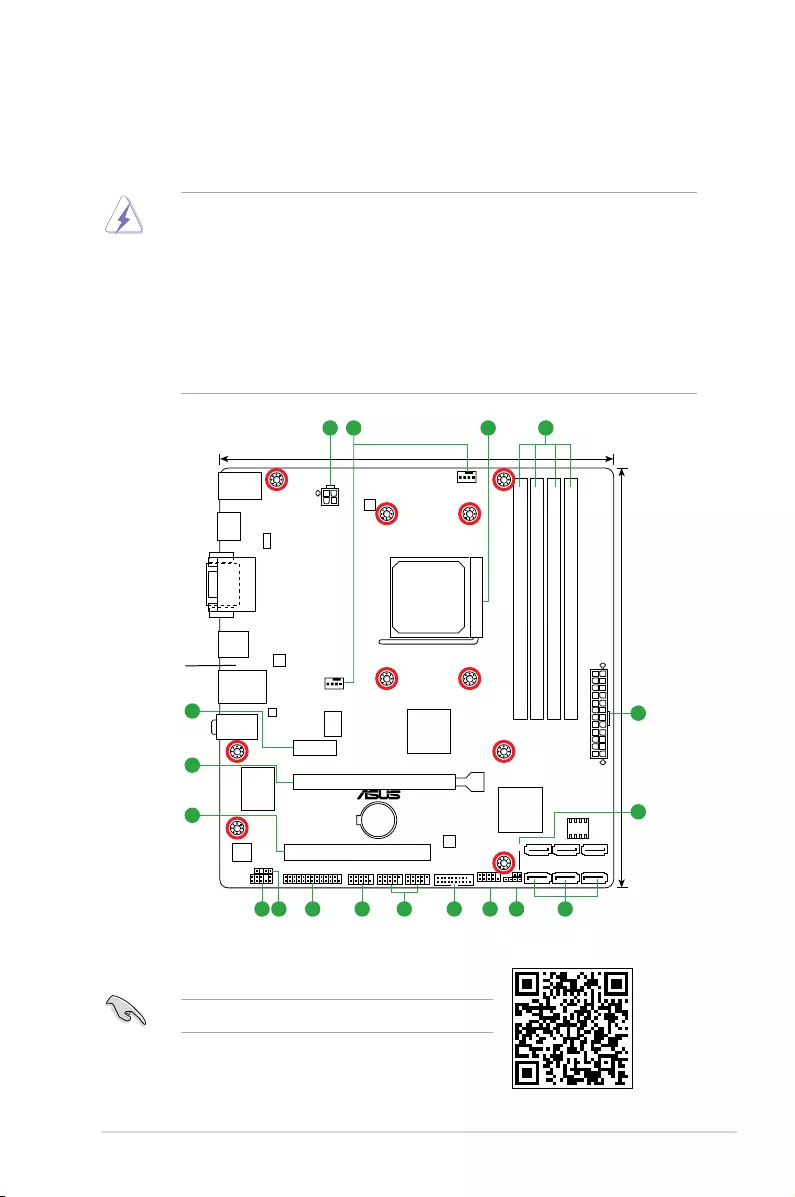
M5A78L-M PLUS/USB3 specications summary
(continued on the next page)
Package contents
Check your motherboard package for the following items.
Motherboard ASUS M5A78L-M PLUS/USB3 motherboard
Cables 2 x Serial ATA 3.0 Gb/s cables
Accessories 1 x I/O Shield
Application DVD 1 x Support DVD
Documentation 1 x User Manual
If any of the above items is damaged or missing, contact your retailer.
CPU
AMD® Socket AM3+ for AMD® FX™ / Phenom™ II / Athlon™ II / Sempron™ 100
series processors
AMD® Cool ‘n’ Quiet™ Technology
Supports CPU up to 125W
* Refer to www.asus.com for AMD® CPU support list.
Chipset AMD® 760G(780L) / SB710
Memory
Dual-channel memory architecture
4 x DIMM slots support maximum 32GB unbuffered ECC and non-ECC DDR3 2000(O.
C.)/1866(O.C.)/1800(O.C.)/1600(O.C.)/1333/1066 MHz memory modules
* Due to OS limitation, when installing total memory of 4GB capacity or more, Windows®
32-bit operation system may only recognize less than 3GB. Hence, a total installed memory
of less than 3GB is recommended.
** AMD® FX™ Series CPU on this motherboard supports up to DDR3 1866MHz as its
standard memory frequency.
*** AMD® AM3 100 and 200 series CPU support up to DDR3 1066MHz.
****Refer to www.asus.com or the user manual for the latest Memory QVL (Qualied Vendors
List).
Graphics
Integrated ATI Radeon 3000
— Supports HDMI™ Technology with maximum resolution of 1920 x 1200 (1080P)
@60Hz
— Supports DVI-D with HDCP compliant with maximum resolution of 2560 x 1600
@60Hz
— Supports RGB with maximum resolution of 2560 x 1440 @75Hz
Maximum shared memory of 1GB
Hybrid CrossFireX™ Support
*Refer to www.amd.com for the Hybrid CrossFireX™ selected GPUs.
Expansion
slots
1 x PCIe 2.0 x16 slot
1 x PCIe 2.0 x1 slot
1 x PCI slot
LAN Realtek® 8111H Gigabit LAN Controller
Storage 6x Serial ATA 3Gb/s connectors support RAID 0, RAID 1,RAID 10 and JBOD

vii
M5A78L-M PLUS/USB3 specications summary
(continued on the next page)
Audio
Realtek®ALC 887 Audio CODEC
— Audio Shielding: Ensures precision analog/digital separation and greatly reduces
multi-lateral interference
— Dedicated audio PCB layers: Separate layers for left and right channels to guard
the quality of the sensitive audio signals
— Premium Japanese-made audio capacitors: Provide warm, natural and
immersive sound with exceptional clarity and delity
USB — 4 x USB 3.0 / 2.0 ports (2 ports at mid-board; 2 ports at the rear panel)
— 8 x USB 2.0 / 1.1 ports (4 ports at mid-board; 4 ports at the rear panel)
ASUS unique
features
— ASUS MyLogo 2
— ASUS EZ Flash 2
— ASUS CrashFree BIOS 3
— ASUS FAN Xpert
— ASUS Anti-Surge
— ASUS EPU
— ASUS AI charger
— Turbo Key
Rear panel
I/O ports
1 x PS/2 Keyboard/Mouse combo port
1 x HDMI port
1 x DVI-D port
1 x D-Sub port
1 x LAN (RJ-45) port
2 x USB 3.0/2.0 ports
4 x USB 2.0/1.1 ports
3 x Audio jacks support 8-channel audio output
Internal
connectors
2 x USB 2.0 / 1.1 connectors support additional 4 USB 2.0/ 1.1 ports
1 x USB 3.0 / 2.0 connector supports additional 2 USB 3.0/ 2.0 ports
6 x SATA 3.0 Gb/s connectors
1 x Front panel audio connector (AAFP)
1 x Printer connector
1 x COM connector
1 x S/PDIF Out connector
1 x System panel connector
1 x 4-pin CPU fan connector
1 x 4-pin Chassis Fan connector
1 x 24-pin EATX power connector
1 x 4-pin ATX 12V power connector
1 x Clear CMOS header
1 x Speaker connector
BIOS
features 16 Mb Flash ROM, AMI BIOS, PnP, DMI v2.0, WfM2.0, SM BIOS V2.5, ACPI V2.0a

viii
M5A78L-M PLUS/USB3 specications summary
Support DVD
Drivers
ASUS utilities
EZ Update
Anti-virus software (OEM version)
OS support Windows® XP (32-bit / 64-bit),
Windows® 7 (32-bit / 64-bit)
Form factor uATX form factor: 9.0 in. x 9.6 in. (22.9 cm x 24.4 cm)
Specications are subject to change without notice.
ASUS M5A78L-M PLUS/USB3 1-1
Product introduction
1
Motherboard overview
• Unplugthepowercordfromthewallsocketbeforetouchinganycomponent.
• Beforehandlingcomponents,useagroundedwriststraportouchasafelygrounded
objectorametalobject,suchasthepowersupplycase,toavoiddamagingthemdue
tostaticelectricity.
• Beforeyouinstallorremoveanycomponent,ensurethattheATXpowersupplyis
switchedofforthepowercordisdetachedfromthepowersupply.Failuretodoso
maycauseseveredamagetothemotherboard,peripherals,orcomponents.
• Unplugthepowercordbeforeinstallingorremovingthemotherboard.Failuretodoso
cancauseyouphysicalinjuryanddamagetomotherboardcomponents.
Place this
side towards
the rear of the
chassis
ScantheQRcodetogetthedetailedpindenitions.
M5A78L-M PLUS/USB3
PCIEX16
PCIEX1_1
PCI1
AAFP F_PANEL
USB3_E34
ATX12V
EATXPWR
CPU_FAN
Super
I/O
ALC
887-VD
Realtek
8111H
ICS
483B
KBMS_USB34
HDMI
CLRTC
SPEAKER
22.9cm(9.0in)
24.4cm(9.6in)
AMD®
760G
AMD®
SB710
DDR3 DIMM_B1 (64bit, 240-pin module)
SOCKET AM3+
DDR3 DIMM_B2 (64bit, 240-pin module)
DDR3 DIMM_A1 (64bit, 240-pin module)
DDR3 DIMM_A2 (64bit, 240-pin module)
SATA3G_4 SATA3G_5 SATA3G_6
SATA3G_1 SATA3G_2 SATA3G_3
AUDIO
LAN_USB12
USB3_E12
CHA_FAN
SPDIF_OUT
LPT
DVI
VGA
16Mb
BIOS
BATTERY
ASM
1042A
ASM
1042A
ASM
1445
EPU
USB56COM USB78
1 2 4
10 69 8 71114
15
13 12
3
1
5
16
17
1-2 Chapter 1: Product introduction
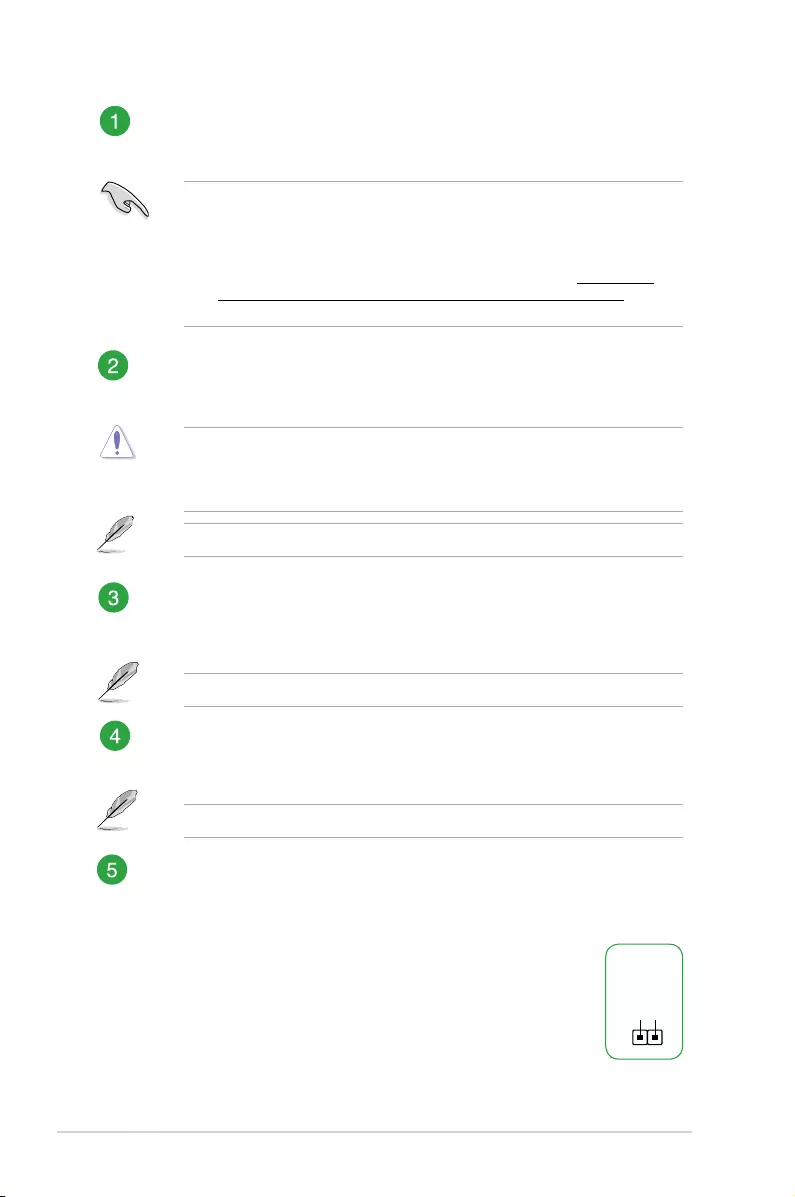
ATX power connectors (24-pin EATXPWR, 4-pin ATX12V)
CorrectlyorienttheATXpowersupplyplugsintotheseconnectorsandpushdown
rmlyuntiltheconnectorscompletelyt.
•
Forafullyconguredsystem,werecommendthatyouuseapowersupplyunit
(PSU)thatcomplieswithATX12VSpecication2.0(orlaterversion)andprovides
aminimumpowerof300W.
•
Ifyouareuncertainabouttheminimumpowersupplyrequirementforyoursystem,
refertotheRecommendedPowerSupplyWattageCalculatorathttp://support.
asus.com/PowerSupplyCalculator/PSCalculator.aspx?SLanguage=en-usfor
details.
CPU and chassis fan connectors (4-pin CPU_FAN, 4-pin CHA_FAN)
Connectthefancablestothefanconnectorsonthemotherboard,ensuringthatthe
blackwireofeachcablematchesthegroundpinoftheconnector.
Donotforgettoconnectthefancablestothefanconnectors.Insufcientairowinside
thesystemmaydamagethemotherboardcomponents.Thesearenotjumpers!Donot
placejumpercapsonthefanconnectors!TheCPU_FANconnectorsupportsaCPUfan
ofmaximum2A(24W)fanpower.
Onlythe4-pinCPUfansupportstheASUSFanXpertfeature.
AMD® AM3+ CPU socket
InstallAMD®CPUintothissurfacemountAM3+socket,whichisdesignedforAMD®FX™
Series/Phenom™II/Athlon™II/Sempron™100Series.
Formoredetails,refertoCentral Processing Unit (CPU).
DDR3 DIMM slots
Install1GB,2GB,4GB,and8GB,unbufferedECCandnon-ECCDDR3DIMMs
intotheseDIMMsockets.
Formoredetails,refertoSystem memory.
Clear RTC RAM (2-pin CLRTC)
ThisheaderallowsyoutocleartheCMOSRTCRAMdataofthesystemsetup
informationsuchasdate,time,andsystempasswords.
To erase the RTC RAM:
1. TurnOFFthecomputerandunplugthepowercord.
2. Useametalobjectsuchasascrewdrivertoshortthetwopins.
3. PlugthepowercordandturnONthecomputer.
4. Holddownthe<Del>keyduringthebootprocessandenter
BIOSsetuptore-enterdata.
CLRTC
+3V_BAT
GND
PIN 1

ASUS M5A78L-M PLUS/USB3 1-3
Ifthestepsabovedonothelp,removetheonboardbatteryandshortthetwopinsagain
tocleartheCMOSRTCRAMdata.AfterclearingtheCMOS,reinstallthebattery.
Serial ATA 3.0Gb/s connectors (7-pin SATA3G_1~6)
TheseconnectorsconnecttoSerialATA3.0Gb/sharddiskdrivesviaSerialATA
3.0Gb/ssignalcables.IfyouinstallSerialATAharddiskdrives,youcancreatea
RAID0,RAID1,RAID10andJBODcongurationthroughtheonboardcontroller
• TheseconnectorsaresettoIDEmodebydefault.IfyouintendtocreateaSerial
ATARAIDsetusingtheseconnectors,setthetypeoftheSATAconnectorsinthe
BIOSto[RAID].
• YoumustinstallWindows®XPServicePack3orlaterversionbeforeusingSerial
ATAharddiskdrives.TheSerialATARAIDfeatureisavailableonlyifyouare
usingWindows®XPSP3orlaterversion.
• Whenusinghot-plugandNCQ,setthetypeoftheSATAconnectorsintheBIOSto
[AHCI].
Speaker connector (4-pin SPEAKER)
This4-pinconnectorisforthechassis-mountedsystemwarningspeaker.The
speakerallowsyoutohearsystembeepsandwarnings.
System panel connector (10-1 pin F_PANEL)
Thisconnectorsupportsseveralchassis-mountedfunctions.
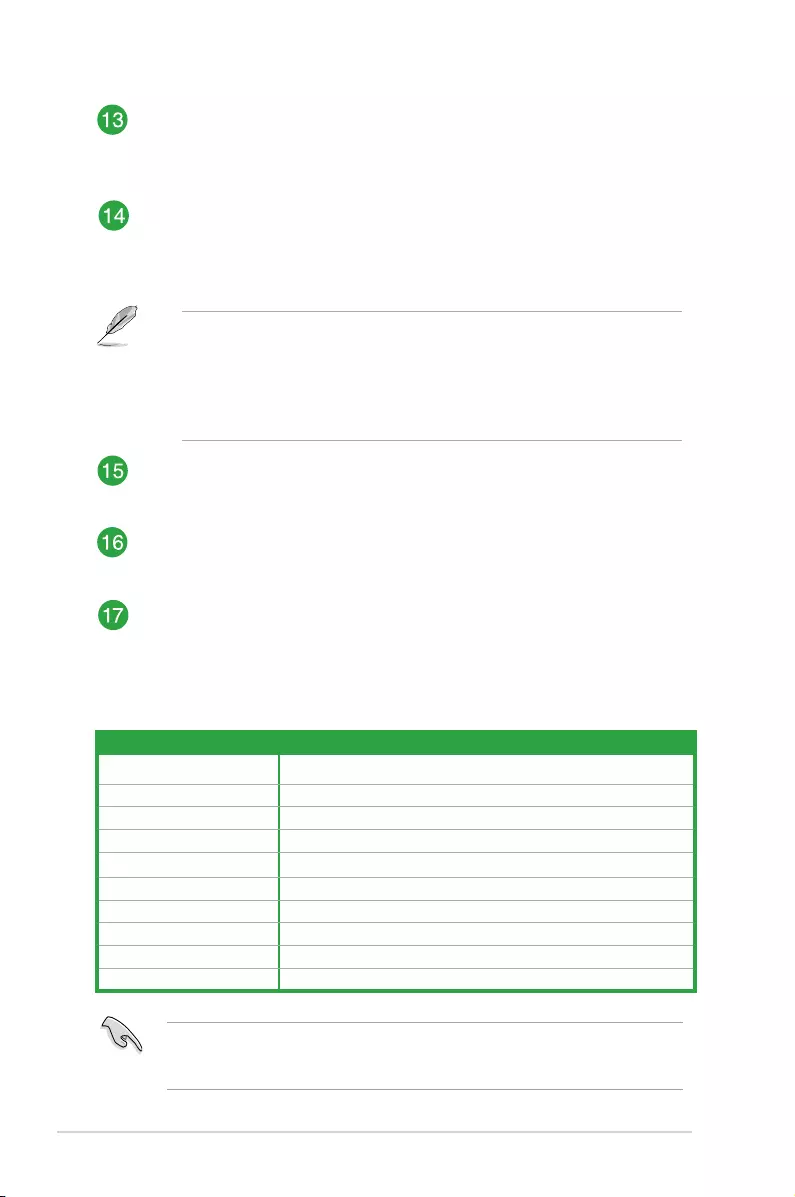
USB 3.0 connector (20-1 pin USB3_E34)
ConnectaUSB3.0moduletothisconnectorforadditionalUSB3.0frontorrear
panelports.ThisconnectorcomplieswithUSB3.0specicationsandprovides
fasterdatatransferspeedsofupto5Gbps,fasterchargingtimeforUSB-
chargeabledevices,optimizedpowerefciency,andbackwardcompatibilitywith
USB2.0.
USB 2.0 connectors (10-1 pin USB56, USB78)
ConnecttheUSBmodulecabletoanyoftheseconnectors,theninstallthemodule
toaslotopeningatthebackofthesystemchassis.TheseUSBconnectorscomply
withUSB2.0specicationsandsupportupto480Mbpsconnectionspeed.
Serial port connector (10-1 pin COM)
Thisconnectorisforaserial(COM)port.Connecttheserialportmodulecableto
thisconnector,theninstallthemoduletoaslotopeningatthebackofthesystem
chassis.
LPT connector (26-1 pin LPT)
TheLPT(LinePrintingTerminal)connectorsupportsdevicessuchasaprinter.
LPTstandardizesasIEEE1284,whichistheparallelportinterfaceonIBMPC-
compatiblecomputers.
1-4 Chapter 1: Product introduction
Digital audio connector (4-1 pin SPDIF_OUT)
ThisconnectorisforanadditionalSony/PhilipsDigitalInterface(S/PDIF)port.
ConnecttheS/PDIFOutmodulecabletothisconnector,theninstallthemoduleto
aslotopeningatthebackofthesystemchassis.
Front panel audio connector (10-1 pin AAFP)
Thisconnectorisforachassis-mountedfrontpanelaudioI/Omodulethatsupports
eitherHDAudioorlegacyAC`97audiostandard.Connectoneendofthefront
panelaudioI/Omodulecabletothisconnector.
• Werecommendthatyouconnectahigh-denitionfrontpanelaudiomoduletothis
connectortoavailofthemotherboard’shigh-denitionaudiocapability.
• Ifyouwanttoconnectahigh-denitionfrontpanelaudiomoduletothisconnector,
settheAzalia Front PanelitemintheBIOSsetupto[HDAudio].Ifyouwantto
connectanAC’97frontpanelaudiomoduletothisconnector,settheitemto
[AC97].Bydefault,thisconnectorissetto[HDAudio].
PCI Express slot
ThePCIslotsupportscardssuchasaLANcard,SCSIcard,USBcard,andother
cardsthatcomplywithPCIspecications.
PCI Express 2.0 x16 slot
ThismotherboardsupportsPCIExpressx16networkcards,SCSIcards,andother
cardsthatcomplywiththePCIExpressspecications.
PCI Express 2.0 x1 slot
ThismotherboardsupportsPCIExpress2.0x1networkcards,SCSIcards,and
othercardsthatcomplywiththePCIExpressspecications
WhenusingPCIcardsonsharedslots,ensurethatthedriverssupport“ShareIRQ”orthat
thecardsdonotneedIRQassignments.Otherwise,conictswillarisebetweenthetwoPCI
groups,makingthesystemunstableandthecardinoperable.
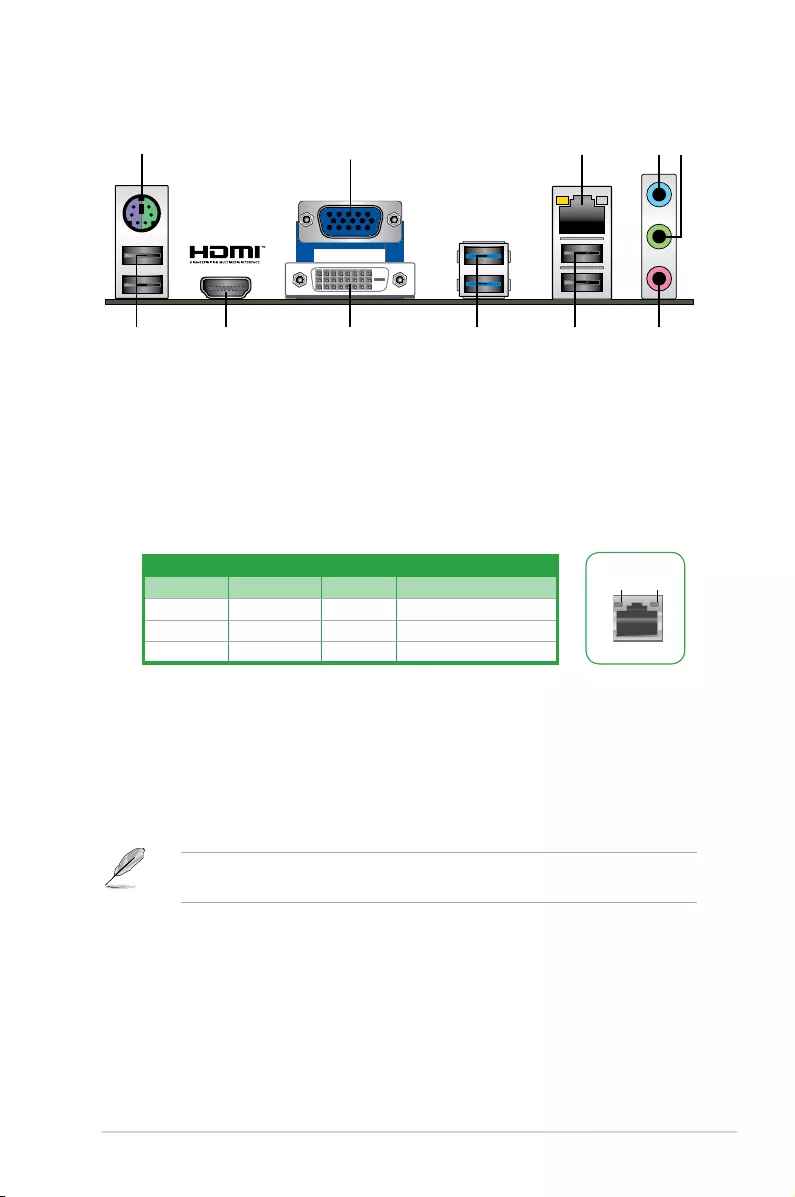
IRQ assignments for this motherboard
A B C D E F G H
PCIEx16_1 – – shared – – – – –
PCIEx1_1 shared – – – – – – –
PCIslot – – – – shared – – –
RealtekLANcontroller – – shared – – – – –
HDaudio shared – – – – – – –
OnChipSATA – – – – – – shared –
OnChipOHCI1 shared – – – – – – –
OnChipOHCI2 – – shared – – – – –
ASM1042A1 – – – shared – – – –
ASM1042A2 –shared – – – – – –
ASUS M5A78L-M PLUS/USB3 1-5
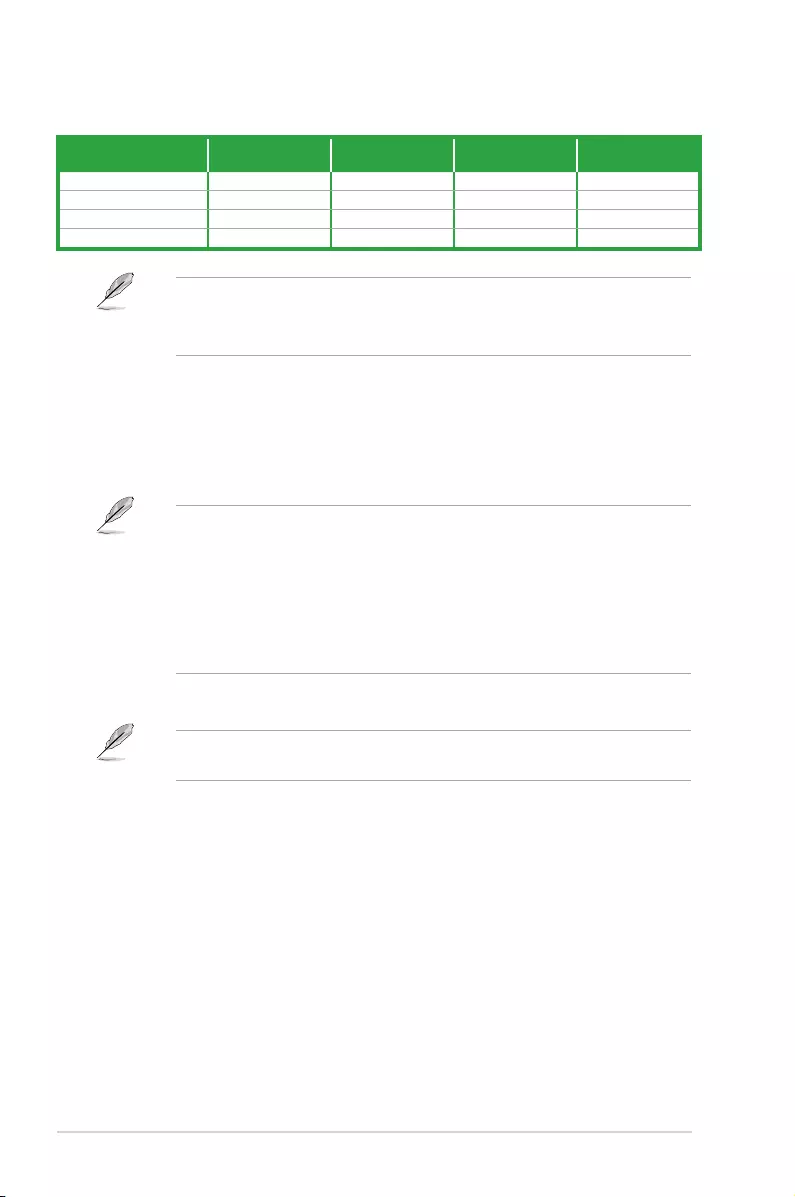
1. PS/2 keyboard/mouse combo port.ThisportisforaPS/2keyboard/mouse.
2. Video Graphics Adapter (VGA) port.This15-pinportisforaVGAmonitororother
VGA-compatibledevices.
3. LAN (RJ-45) port.ThisportallowsGigabitconnectiontoaLocalAreaNetwork(LAN)
throughanetworkhub.
Rear panel connectors
24 53
6
7810
1
11 9
4. Line In port (light blue).Thisportconnectstothetape,CD,DVDplayer,orother
audiosources.
5. Line Out port (lime).Thisportconnectstoaheadphoneoraspeaker.Inthe2.1,4.1,
5.1and7.1-channelcongurations,thefunctionofthisportbecomesFrontSpeaker
Out.
6. Microphone port (pink).Thisportconnectstoamicrophone.
Refertotheaudiocongurationtableforthefunctionoftheaudioportsin2.1,4.1,5.1,or
7.1-channelconguration.
LAN port
Speed
LED
Activity Link
LED
LAN port LED indications
Activity/Link LED Speed LED
Status Description Status Description
OFF Nolink OFF 10Mbpsconnection
ORANGE Linked ORANGE 100Mbpsconnection
BLINKING Dataactivity GREEN 1Gbpsconnection
1-6 Chapter 1: Product introduction
Audio 2.1, 4.1, 5.1, or 7.1-channel conguration
Port Headset
2.1-channel 4.1-channel 5.1-channel 7.1-channel
LightBlue(Rearpanel) LineIn RearSpeakerOut RearSpeakerOut RearSpeakerOut
Lime(Rearpanel) LineOut FrontSpeakerOut FrontSpeakerOut FrontSpeakerOut
Pink(Rearpanel) MicIn MicIn Bass/Center Bass/Center
Lime(Frontpanel) —SideSpeakerOut
To congure a 7.1-channel audio output:
UseachassiswithHDaudiomoduleinthefrontpaneltosupporta7.1-channelaudio
output.
7. USB 2.0 ports.These4-pinUniversalSerialBus(USB)portsareforUSB2.0/1.1
devices.
8. USB 3.0 ports.These9-pinUniversalSerialBus(USB)portsareforUSB3.0/2.0
devices.
• DuetoUSB3.0controllerlimitations,USB3.0devicescanonlybeusedundera
Windows®OSenvironmentandafterUSB3.0driverinstallation.
• ThepluggedUSB3.0devicemayrunonxHCIorEHCImode,dependingonthe
operatingsystem’ssetting.
• USB3.0devicescanonlybeusedfordatastorage.
• WestronglyrecommendthatyouconnectUSB3.0devicestoUSB3.0portsforfaster
andbetterperformancefromyourUSB3.0devices.
9.DVI-D port.ThisportisforanyDVI-Dcompatibledevice.
DVI-DcannotbeconvertedtooutputfromRGBSignaltoCRTandisnotcompatiblewith
DVI-I.
10. HDMI port. ThisportisforaHigh-DenitionMultimediaInterface(HDMI)connector,
andisHDCPcompliantallowingplaybackofHDDVD,Blu-Ray,andotherprotected
content.
11. USB 2.0 ports.These4-pinUniversalSerialBus(USB)portsareforUSB2.0/1.1
devices.
ASUS M5A78L-M PLUS/USB3 1-7
Central Processing Unit (CPU)
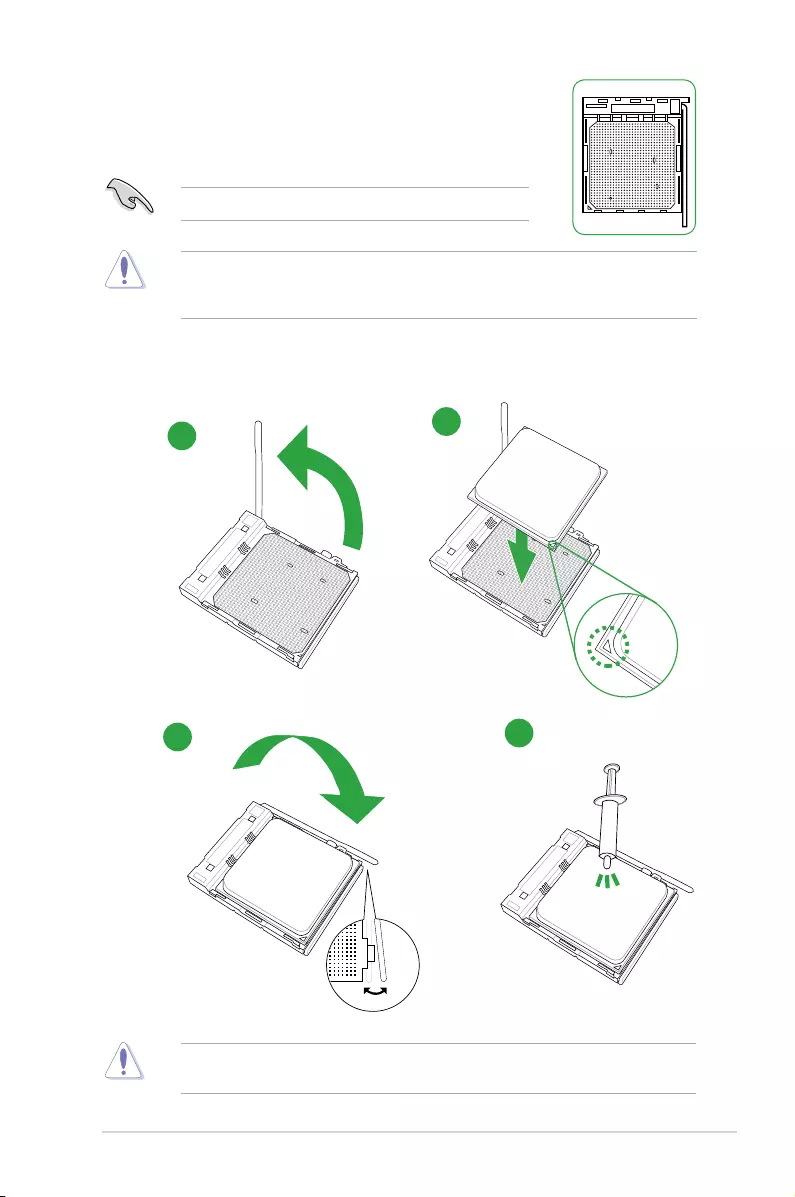
ThemotherboardcomeswithanAM3+socketdesignedforAMD®FX™
Series/Phenom™II/Athlon™II/Sempron™100SeriesProcessors.
TheAM3+sockethasadifferentpinoutfromtheAM2+/AM2socket.Ensurethatyouusea
CPUdesignedfortheAM3+socket.TheCPUtsinonlyonecorrectorientation.DONOT
forcetheCPUintothesockettopreventbendingthepinsanddamagingtheCPU!
Installing the CPU
UnplugallpowercablesbeforeinstallingtheCPU.
ApplytheThermalInterfaceMaterialtotheCPUheatsinkandCPUbeforeyouinstallthe
heatsinkandfanifnecessary.
1
3
2
4
1-8 Chapter 1: Product introduction
System memory
Overview
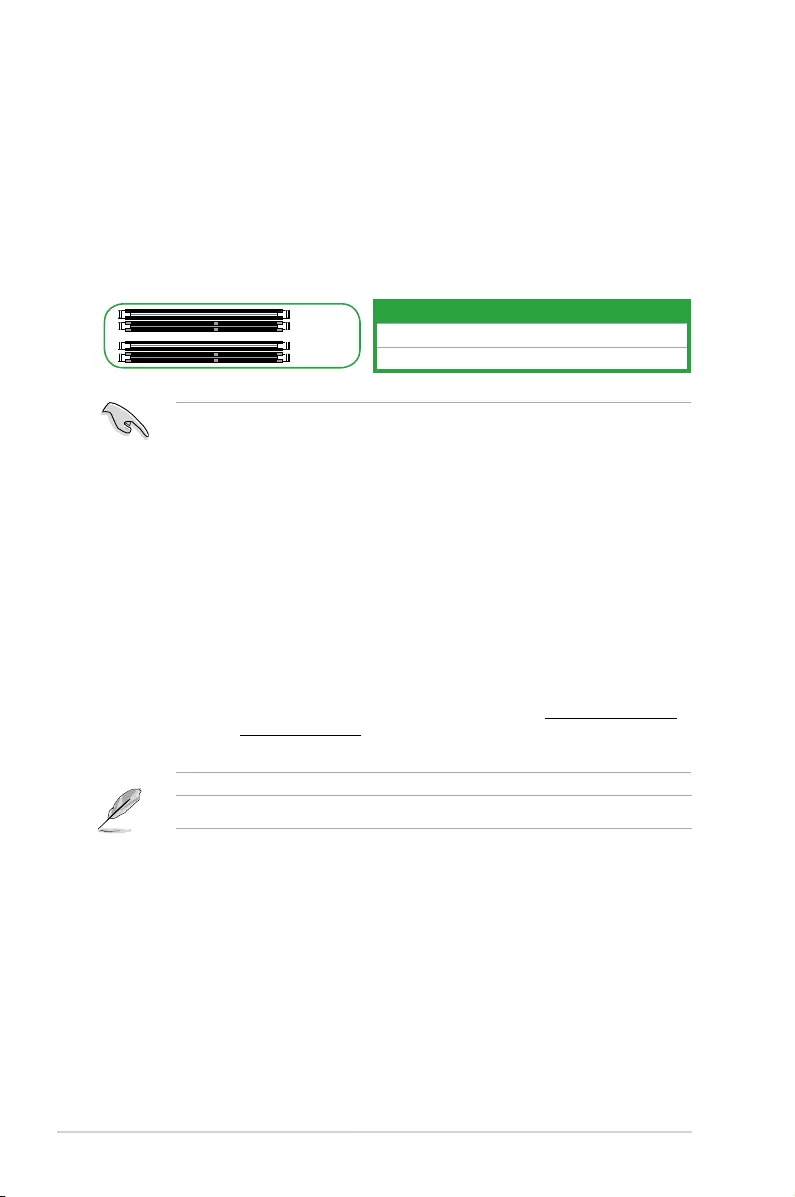
ThismotherboardcomeswithfourDoubleDataRate3(DDR3)DualInlineMemoryModules
(DIMM)sockets.
ADDR3modulehasthesamephysicaldimensionsasaDDR2DIMMbutisnotched
differentlytopreventinstallationonaDDR2DIMMsocket.DDR3modulesaredevelopedfor
betterperformancewithlesspowerconsumption.
ThegureillustratesthelocationoftheDDR3DIMMsockets:
Channel Sockets
ChannelA DIMM_A1&DIMM_A2
ChannelB DIMM_B1&DIMM_B2
DIMM_A1
DIMM_A2
DIMM_B1
DIMM_B2
• YoumayinstallvaryingmemorysizesinChannelAandChannelB.Thesystem
mapsthetotalsizeofthelower-sizedchannelforthedual-channelconguration.Any
excessmemoryfromthehigher-sizedchannelisthenmappedforsingle-channel
operation.
• AlwaysinstalltheDIMMSwiththesameCASLatency.Foranoptimumcompatibility,
werecommendthatyouinstallmemorymodulesofthesameversionordatacode
(D/C)fromthesamevendor.Checkwiththevendortogetthecorrectmemory
modules.
• Duetothememoryaddresslimitationon32-bitWindows®OS,whenyouinstall4GB
ormorememoryonthemotherboard,theactualusablememoryfortheOScanbe
about3GBorless.Foreffectiveuseofmemory,werecommendthatyoudoanyofthe
following:
- Useamaximumof3GBsystemmemoryifyouareusinga32-bitWindows®OS.
- Installa64-bitWindows®OSifyouwanttoinstall4GBormoreonthe
motherboard.
- Formoredetails,refertotheMicrosoft®supportsiteathttp://support.microsoft.
com/kb/929605/en-us.
• ThismotherboarddoesnotsupportDIMMsmadeupof512Mb(64MB)chipsorless.
VisittheASUSwebsiteatwww.asus.comforthelatestQVL.
ASUS M5A78L-M PLUS/USB3 1-9
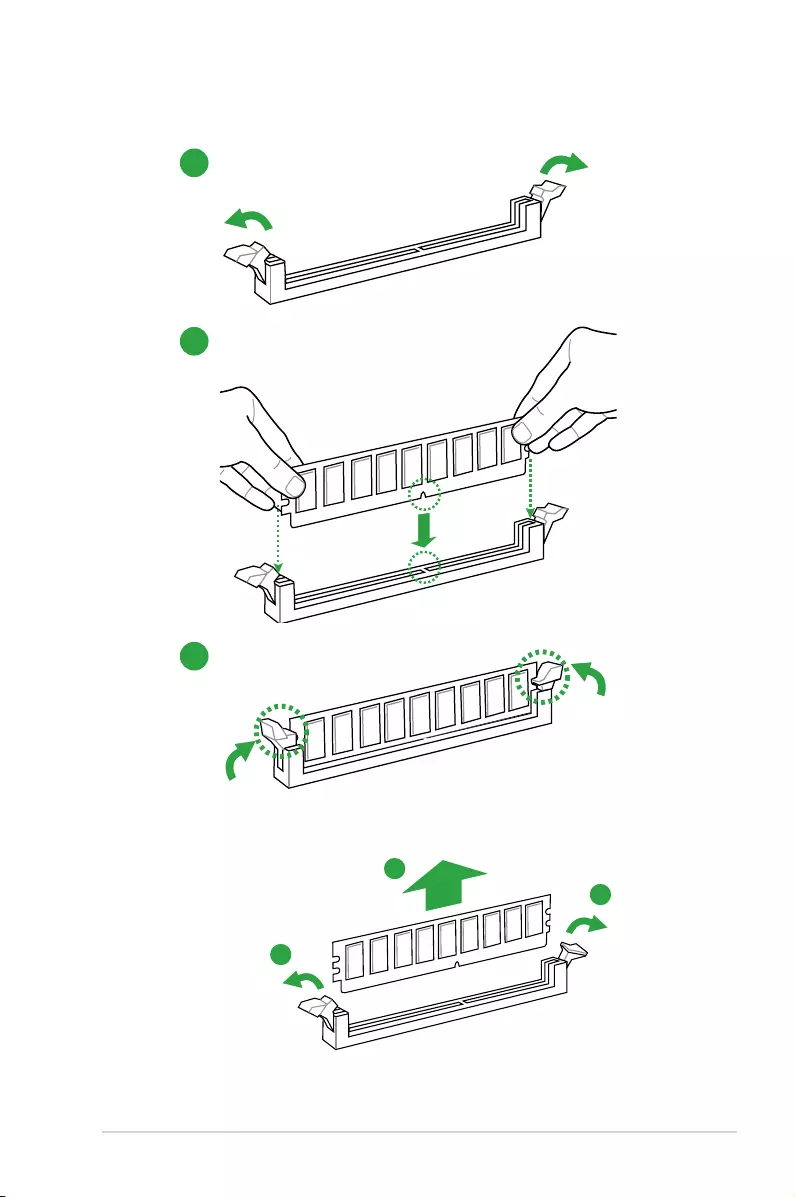
Installing a DIMM
1
2
3
To remove a DIMM
B
A
A
BIOS information
2
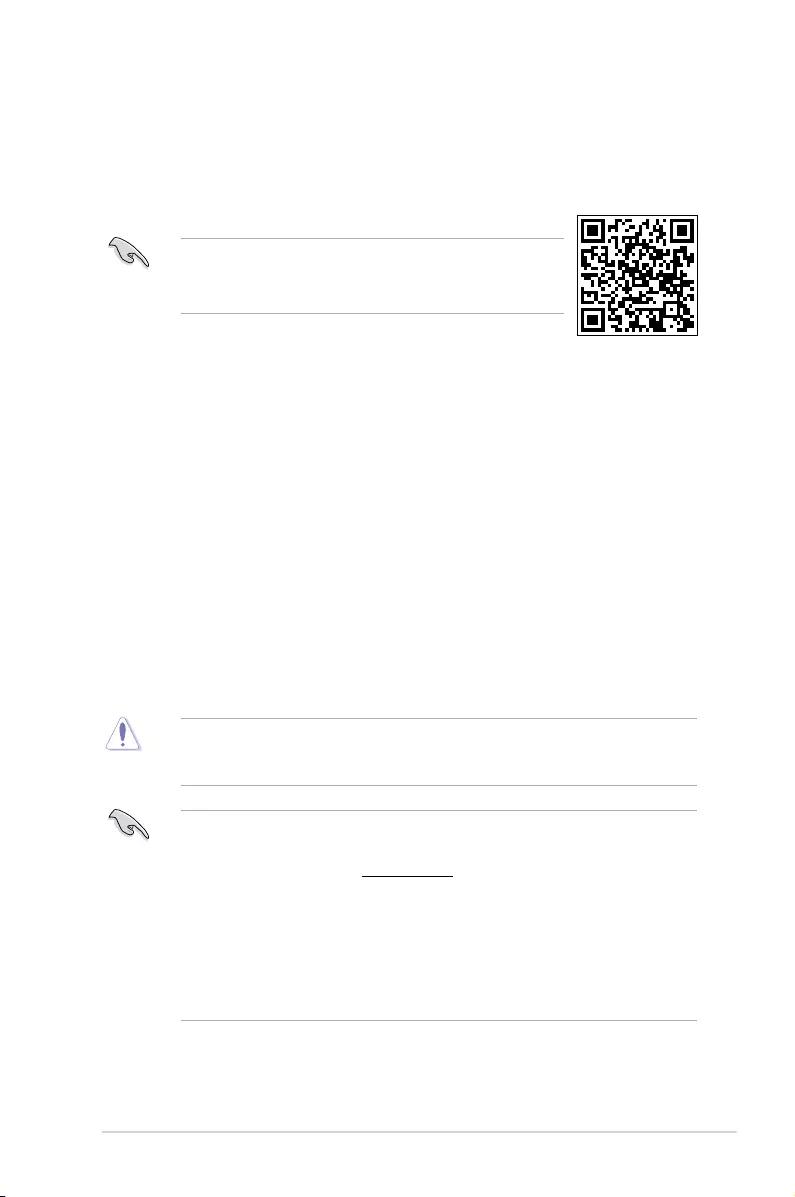
• ScantheQRcodetoviewtheBIOSupdateguide.
• BeforeusingtheASUSCrashFreeBIOS3utility,renamethe
BIOSleintheremovabledeviceintoM78LMPU3.ROM.
BIOS setup program
UsetheBIOSSetupprogramtoupdatetheBIOSorcongureitsparameters.TheBIOS
screensincludenavigationkeysandbriefonlinehelptoguideyouinusingtheBIOSSetup
program.
Entering BIOS Setup at startup
To enter BIOS Setup at startup:
Press<Delete>duringthePower-OnSelfTest(POST).Ifyoudonotpress<Delete>,POST
continueswithitsroutines.
Entering BIOS Setup after POST
To enter BIOS Setup after POST:
• Press<Ctrl>+<Alt>+<Del>simultaneously.
• Presstheresetbuttononthesystemchassis.
• Pressthepowerbuttontoturnthesystemoffthenbackon.Dothisoptiononlyifyou
failedtoenterBIOSSetupusingthersttwooptions.
Usingthepowerbutton,resetbutton,orthe<Ctrl>+<Alt>+<Del>keystoforceresetfroma
runningoperatingsystemcancausedamagetoyourdataorsystem.Werecommendyou
alwaysshutdownthesystemproperlyfromtheoperatingsystem.
• TheBIOSsetupscreensshowninthissectionareforreferencepurposesonly,and
maynotexactlymatchwhatyouseeonyourscreen.
• VisittheASUSwebsiteatwww.asus.comtodownloadthelatestBIOSleforthis
motherboard.
• IfthesystembecomesunstableafterchanginganyBIOSsetting,loadthedefault
settingstoensuresystemcompatibilityandstability.SelecttheLoad Optimized
DefaultsitemundertheExitmenuorpresshotkeyF5.
• IfthesystemfailstobootafterchanginganyBIOSsetting,trytocleartheCMOSand
resetthemotherboardtothedefaultvalue.SeesectionMotherboard overviewfor
informationonhowtoerasetheRTCRAM.
ASUS M5A78L-M PLUS/USB3
2-1
BIOS menu screen
Select Screen
Select Item
+- Change Option
F1 General Help
F10 Save and Exit
ESC Exit
v02.61 (C)Copyright 1985-2016, American, American Megatrends, Inc.
M5A78L-M PLUS/USB3 BIOS Setup
Main Advanced Power Boot Tools Exit
Suspend Mode [Auto]
ACPI 2.0 Support [Enabled]
ACPI APIC support [Enabled]
APM Conguration
HW Monitor Conguration
Anti Surge Support [Enabled]
Select the ACPI state
used for System
Suspend.
Pop-up window
Version 0202
Power Settings
Options
S1 (POS) only
S3 only
Auto
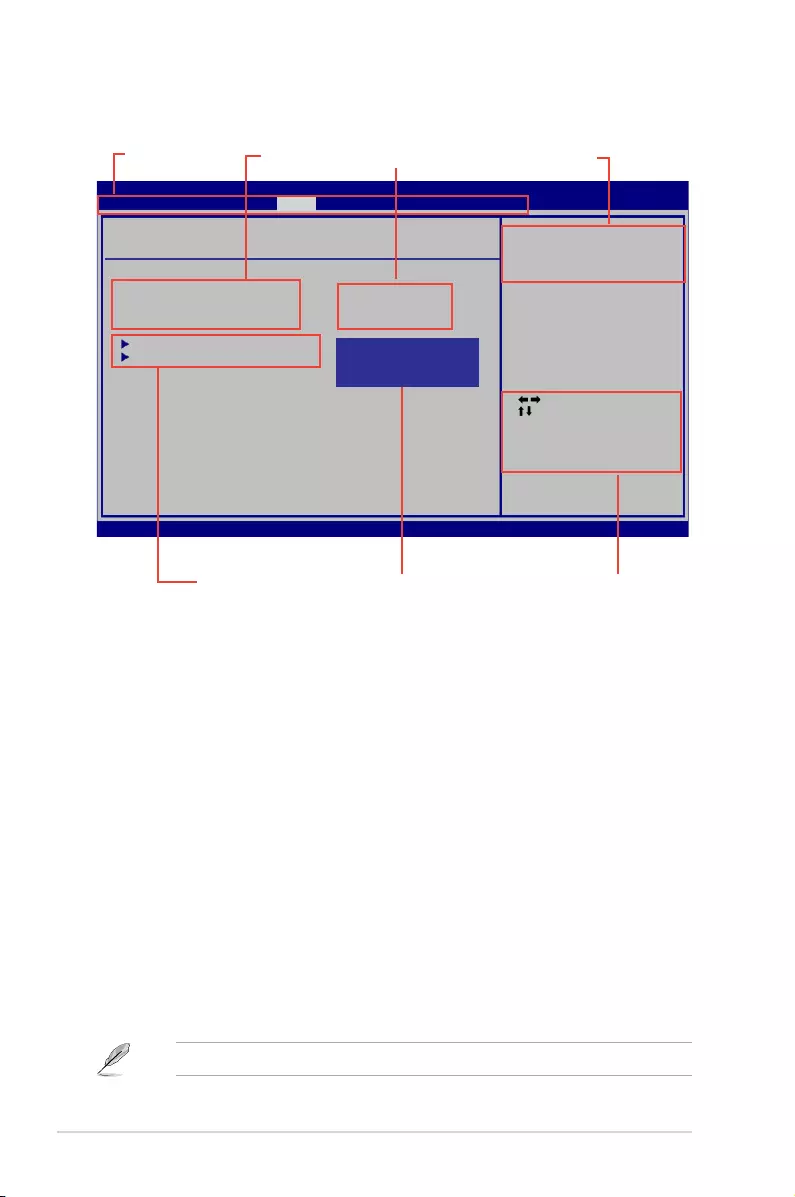
Menu bar
Sub-menu items Navigation Keys
Menu items Conguration elds General help
Menu bar
Themenubarontopofthescreenhasthefollowingmainitems:
Main Forchangingthebasicsystemconguration
Advanced Forchangingtheadvancedsystemsettings
Power Forchangingtheadvancedpowermanagement(APM)conguration
Boot Forchangingthesystembootconguration
Tools Forconguringoptionsforspecialfunctions
Exit Forselectingtheexitoptionsandloadingdefaultsettings.
Toselectanitemonthemenubar,presstherightorleftarrowkeyonthekeyboarduntilthe
desireditemishighlighted.
Navigation keys
Atthebottomrightcornerofamenuscreenarethenavigationkeysforthatparticularmenu.
Usethenavigationkeystoselectitemsinthemenuandchangethesettings.
Someofthenavigationkeysdifferfromonescreentoanother.
2-2
Chapter 2: BIOS information

Menu items
Thehighlighteditemonthemenubardisplaysthespecicitemsforthatmenu.Forexample,
selectingMainshowstheMainmenuitems.
Theotheritems(Advanced,Power,Boot,Tools,andExit)onthemenubarhavetheir
respectivemenuitems.
Submenu items
Asolidtrianglebeforeeachitemonamenuscreenmeansthattheitemhasasubmenu.To
displaythesubmenu,selecttheitemandpress<Enter>.
Conguration elds
Theseeldsshowthevaluesforthemenuitems.Ifanitemisuser-congurable,youcan
changethevalueoftheeldoppositetheitem.Youcannotselectanitemthatisnot
user-congurable.
Acongurableeldisenclosedinbrackets,andishighlightedwhenselected.Tochangethe
valueofaeld,selectitthenpress<Enter>todisplayalistofoptions.
Pop-up window
Selectamenuitemthenpress<Enter>todisplayapop-upwindowwiththeconguration
optionsforthatitem.
General help
Atthetoprightcornerofthemenuscreenisabriefdescriptionoftheselecteditem.
ASUS M5A78L-M PLUS/USB3
2-3
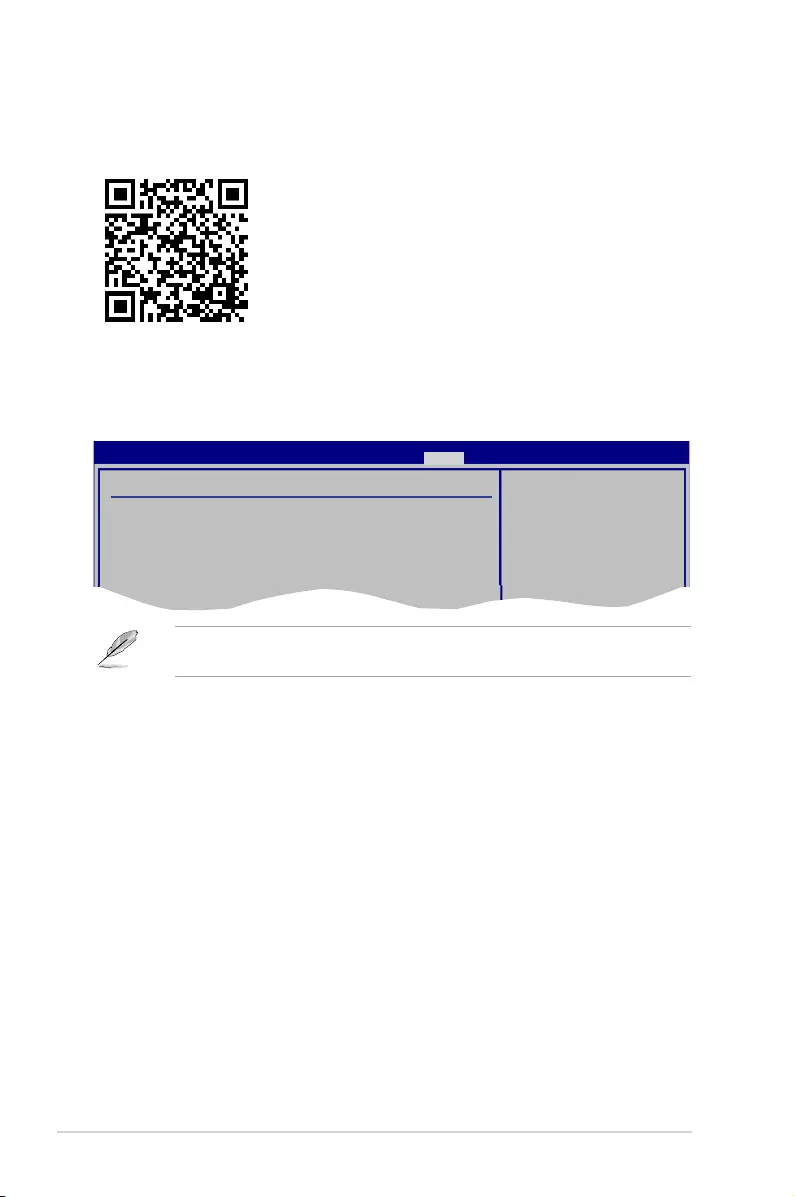
Exit menu
TheExitmenuitemsallowyoutoloadtheoptimaldefaultvaluesfortheBIOSitems,and
saveordiscardyourchangestotheBIOSitems.
Search on FAQ
MoveyourmouseoverthisbuttontoshowaQRcode.ScanthisQRcodewithyourmobile
devicetoconnecttotheASUSBIOSFAQwebpage.YoucanalsoscantheQRcodebelow.
Exit Options
Exit & Save Changes
Exit & Discard Changes
Discard Changes
Load Setup Defaults
Exit system setup
after saving the
cahnges.
F10 key can be used
for this operation.
M5A78L-M PLUS/USB3 BIOS Setup
Main Advanced Power Boot Tools Exit Version 0202
Exit & Discard Changes
SelectthisoptiononlyifyoudonotwanttosavethechangesthatyoumadetotheSetup
program.IfyoumadechangestoeldsotherthanSystemDate,SystemTime,and
Password,theBIOSasksforaconrmationbeforeexiting.
Discard Changes
Thisoptionallowsyoutodiscardtheselectionsyoumadeandrestorethepreviouslysaved
values.Afterselectingthisoption,aconrmationappears.SelectOKtodiscardanychanges
andloadthepreviouslysavedvalues.
Load Setup Defaults
ThisoptionallowsyoutoloadthedefaultvaluesforeachoftheparametersontheSetup
menus.Whenyouselectthisoptionorifyoupress<F5>,aconrmationwindowappears.
SelectOKtoloaddefaultvalues.SelectExit & Save Changesormakeotherchanges
beforesavingthevaluestothenon-volatileRAM.
Exit & Save Changes
Onceyouarenishedmakingyourselections,choosethisoptionfromtheExitmenuto
ensurethevaluesyouselectedaresavedtotheCMOSRAM.Anonboardbackupbattery
sustainstheCMOSRAMsoitstaysonevenwhenthePCisturnedoff.Whenyouselectthis
option,aconrmationwindowappears.SelectOKtosavechangesandexit.
Pressing<Esc>doesnotimmediatelyexitthismenu.Selectoneoftheoptionsfromthis
menuor<F10>fromthelegendbartoexit.
2-4
Chapter 2: BIOS information
ASUS M5A78L-M PLUS/USB3
A-1
Appendix
Notices
Federal Communications Commission Statement
This device complies with Part 15 of the FCC Rules. Operation is subject to the following two
conditions:
• This device may not cause harmful interference.
• This device must accept any interference received including interference that may cause
undesired operation.
This equipment has been tested and found to comply with the limits for a Class B digital
device, pursuant to Part 15 of the FCC Rules. These limits are designed to provide
reasonable protection against harmful interference in a residential installation. This
equipment generates, uses and can radiate radio frequency energy and, if not installed
and used in accordance with manufacturer’s instructions, may cause harmful interference
to radio communications. However, there is no guarantee that interference will not occur
in a particular installation. If this equipment does cause harmful interference to radio or
television reception, which can be determined by turning the equipment off and on, the user
is encouraged to try to correct the interference by one or more of the following measures:
• Reorient or relocate the receiving antenna.
• Increase the separation between the equipment and receiver.
• Connect the equipment to an outlet on a circuit different from that to which the receiver is
connected.
• Consult the dealer or an experienced radio/TV technician for help.
The use of shielded cables for connection of the monitor to the graphics card is required
toassurecompliancewithFCCregulations.Changesormodicationstothisunitnot
expressly approved by the party responsible for compliance could void the user’s authority
to operate this equipment.
Appendix
A-2
Appendix
IC: Canadian Compliance Statement
ComplieswiththeCanadianICES-003ClassBspecications.ThisdevicecomplieswithRSS
210 of Industry Canada. This Class B device meets all the requirements of the Canadian
interference-causing equipment regulations.
This device complies with Industry Canada license exempt RSS standard(s). Operation is
subject to the following two conditions: (1) this device may not cause interference, and (2)
this device must accept any interference, including interference that may cause undesired
operation of the device.
Cut appareil numérique de la Classe B est conforme à la norme NMB-003 du Canada.
Cet appareil numérique de la Classe B respecte toutes les exigences du Règlement sur le
matériel brouilleur du Canada.
Cet appareil est conforme aux normes CNR exemptes de licence d’Industrie Canada. Le
fonctionnement est soumis aux deux conditions suivantes :
(1) cet appareil ne doit pas provoquer d’interférences et
(2) cet appareil doit accepter toute interférence, y compris celles susceptibles de provoquer
un fonctionnement non souhaité de l’appareil.
Canadian Department of Communications Statement
This digital apparatus does not exceed the Class B limits for radio noise emissions from
digital apparatus set out in the Radio Interference Regulations of the Canadian Department
of Communications.
This class B digital apparatus complies with Canadian ICES-003.
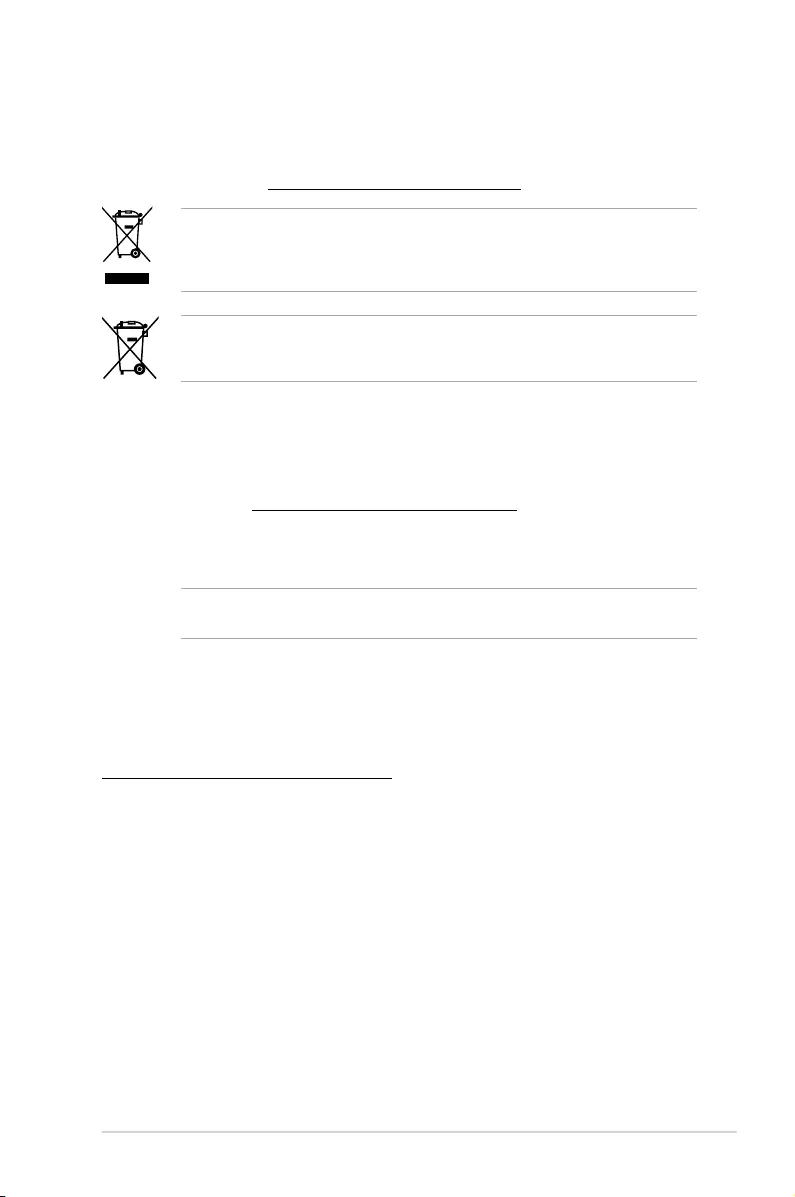
VCCI: Japan Compliance Statement
Class B ITE
KC: Korea Warning Statement
ASUS M5A78L-M PLUS/USB3
A-3
REACH
Complying with the REACH (Registration, Evaluation, Authorisation, and Restriction of
Chemicals) regulatory framework, we published the chemical substances in our products at
ASUS REACH website at http://csr.asus.com/english/REACH.htm.
DO NOT throw the motherboard in municipal waste. This product has been designed to
enable proper reuse of parts and recycling. This symbol of the crossed out wheeled bin
indicates that the product (electrical and electronic equipment) should not be placed in
municipal waste. Check local regulations for disposal of electronic products.
DO NOT throw the mercury-containing button cell battery in municipal waste. This symbol
of the crossed out wheeled bin indicates that the battery should not be placed in municipal
waste.
ASUS Recycling/Takeback Services
ASUS recycling and takeback programs come from our commitment to the highest standards
for protecting our environment. We believe in providing solutions for you to be able to
responsibly recycle our products, batteries, other components as well as the packaging
materials. Please go to http://csr.asus.com/english/Takeback.htm for detailed recycling
information in different regions.
Regional notice for California
WARNING: This product may contain chemicals known to the State of California to cause
cancer, birth defects or other reproductive harm. Wash hands after handling.
Google™ License Terms
Copyright© 2016 Google Inc. All Rights Reserved.
LicensedundertheApacheLicense,Version2.0(the“License”);youmaynotusethisle
except in compliance with the License. You may obtain a copy of the License at:
http://www.apache.org/licenses/LICENSE-2.0
Unless required by applicable law or agreed to in writing, software distributed under the
License is distributed on an “AS IS” BASIS, WITHOUT WARRANTIES OR CONDITIONS OF
ANY KIND, either express or implied.
SeetheLicenseforthespeciclanguagegoverningpermissionsandlimitationsunderthe
License.

A-4
Appendix
Română ASUSTeK Computer Inc. declară că acest dispozitiv se conformează
cerinţelor esenţiale şi altor prevederi relevante ale directivelor conexe. Textul
complet al declaraţiei de conformitate a Uniunii Europene se găseşte la:
www.asus.com/support
Srpski ASUSTeK Computer Inc. ovim izjavljuje da je ovaj uređaj u saglasnosti
sa osnovnim zahtevima i drugim relevantnim odredbama povezanih
Direktiva. Pun tekst EU deklaracije o usaglašenosti je dostupan da adresi:
www.asus.com/support
Slovensky Spoločnosť ASUSTeK Computer Inc. týmto vyhlasuje, že toto
zariadenie vyhovuje základným požiadavkám a ostatým príslušným
ustanoveniam príslušných smerníc. Celý text vyhlásenia o zhode pre štáty EÚ
je dostupný na adrese: www.asus.com/support
Slovenščina ASUSTeK Computer Inc. izjavlja, da je ta naprava skladna z
bistvenimi zahtevami in drugimi ustreznimi določbami povezanih direktiv.
Celotno besedilo EU-izjave o skladnosti je na voljo na spletnem mestu:
www.asus.com/support
Español Por la presente, ASUSTeK Computer Inc. declara que este dispositivo
cumple los requisitos básicos y otras disposiciones pertinentes de las
directivas relacionadas. El texto completo de la declaración de la UE de
conformidad está disponible en: www.asus.com/support
Svenska ASUSTeK Computer Inc. förklarar härmed att denna
enhet överensstämmer med de grundläggande kraven och andra
relevanta föreskrifter i relaterade direktiv. Fulltext av EU-försäkran om
överensstämmelse finns på: www.asus.com/support
Українська ASUSTeK Computer Inc. заявляє, що цей пристрій відповідає
основним вимогам та іншим відповідним положенням відповідних
Директив. Повний текст декларації відповідності стандартам ЄС
доступний на: www.asus.com/support
Türkçe AsusTek Computer Inc., bu aygıtın temel gereksinimlerle ve ilişkili
Yönergelerin diğer ilgili koşullarıyla uyumlu olduğunu beyan eder. AB
uygunluk bildiriminin tam metni şu adreste bulunabilir:
www.asus.com/support
Bosanski ASUSTeK Computer Inc. ovim izjavljuje da je ovaj uređaj usklađen
sa bitnim zahtjevima i ostalim odgovarajućim odredbama vezanih direktiva.
Cijeli tekst EU izjave o usklađenosti dostupan je na: www.asus.com/support
English ASUSTeK Computer Inc. hereby declares that this device is in
compliance with the essential requirements and other relevant provisions of
related Directives. Full text of EU declaration of conformity available at:
www.asus.com/support
Français AsusTek Computer Inc. déclare par la présente que cet appareil est
conforme aux critères essentiels et autres clauses pertinentes des directives
concernées. La déclaration de conformité de l’UE peut être téléchargée à
partir du site Internet suivant : www.asus.com/support.
Deutsch ASUSTeK Computer Inc. erklärt hiermit, dass dieses Gerät mit
den wesentlichen Anforderungen und anderen relevanten Bestimmungen
der zugehörigen Richtlinien übereinstimmt. Der gesamte Text der EU-
Konformitätserklärung ist verfügbar unter: www.asus.com/support
Italiano ASUSTeK Computer Inc. con la presente dichiara che questo
dispositivo è conforme ai requisiti essenziali e alle altre disposizioni pertinenti
con le direttive correlate. Il testo completo della dichiarazione di conformità
UE è disponibile all’indirizzo: www.asus.com/support
Русский Компания ASUS заявляет, что это устройство соответствует
основным требованиям и другим соответствующим условиям
соответствующих директив. Подробную информацию, пожалуйста,
смотрите на www.asus.com/support
Български С настоящото ASUSTeK Computer Inc. декларира, че това
устройство е в съответствие със съществените изисквания и другите
приложими постановления на свързаните директиви. Пълният текст на
декларацията за съответствие на ЕС е достъпна на адрес:
www.asus.com/support
Hrvatski ASUSTeK Computer Inc. ovim izjavljuje da je ovaj uređaj sukladan
s bitnim zahtjevima i ostalim odgovarajućim odredbama vezanih direktiva.
Cijeli tekst EU izjave o sukladnosti dostupan je na: www.asus.com/support
Čeština Společnost ASUSTeK Computer Inc. tímto prohlašuje, že toto
zařízení splňuje základní požadavky a další příslušná ustanovení souvisejících
směrnic. Plné znění prohlášení o shodě EU je k dispozici na adrese:
www.asus.com/support
Dansk ASUSTeK Computer Inc. erklærer hermed, at denne enhed er i
overensstemmelse med hovedkravene og andre relevante bestemmelser i de
relaterede direktiver. Hele EU-overensstemmelseserklæringen kan findes på:
www.asus.com/support
Nederlands ASUSTeK Computer Inc. verklaart hierbij dat dit apparaat
voldoet aan de essentiële vereisten en andere relevante bepalingen van
de verwante richtlijnen. De volledige tekst van de EU-verklaring van
conformiteit is beschikbaar op: www.asus.com/support
Eesti Käesolevaga kinnitab ASUSTeK Computer Inc, et see seade vastab
asjakohaste direktiivide oluliste nõuetele ja teistele asjassepuutuvatele
sätetele. EL vastavusdeklaratsiooni täielik tekst on saadaval järgmisel
aadressil: www.asus.com/support
Suomi ASUSTeK Computer Inc. ilmoittaa täten, että tämä laite on
asiaankuuluvien direktiivien olennaisten vaatimusten ja muiden tätä
koskevien säädösten mukainen. EU-yhdenmukaisuusilmoituksen koko teksti
on luettavissa osoitteessa: www.asus.com/support
Ελληνικά Με το παρόν, η AsusTek Computer Inc. δηλώνει ότι αυτή η
συσκευή συμμορφώνεται με τις θεμελιώδεις απαιτήσεις και άλλες σχετικές
διατάξεις των Οδηγιών της ΕΕ. Το πλήρες κείμενο της δήλωσης συμβατότητας
είναι διαθέσιμο στη διεύθυνση: www.asus.com/support
Magyar Az ASUSTeK Computer Inc. ezennel kijelenti, hogy ez az eszköz
megfelel a kapcsolódó Irányelvek lényeges követelményeinek és egyéb
vonatkozó rendelkezéseinek. Az EU megfelelőségi nyilatkozat teljes szövege
innen letölthető: www.asus.com/support
Latviski ASUSTeK Computer Inc. ar šo paziņo, ka šī ierīce atbilst saistīto
Direktīvu būtiskajām prasībām un citiem citiem saistošajiem nosacījumiem.
Pilns ES atbilstības paziņojuma teksts pieejams šeit: www.asus.com/support
Lietuvių „ASUSTeK Computer Inc.“ šiuo tvirtina, kad šis įrenginys atitinka
pagrindinius reikalavimus ir kitas svarbias susijusių direktyvų nuostatas. Visą
ES atitikties deklaracijos tekstą galima rasti: www.asus.com/support
Norsk ASUSTeK Computer Inc. erklærer herved at denne enheten er i
samsvar med hovedsaklige krav og andre relevante forskrifter i relaterte
direktiver. Fullstendig tekst for EU-samsvarserklæringen finnes på:
www.asus.com/support
Polski Firma ASUSTeK Computer Inc. niniejszym oświadcza, że
urządzenie to jest zgodne z zasadniczymi wymogami i innymi właściwymi
postanowieniami powiązanych dyrektyw. Pełny tekst deklaracji zgodności UE
jest dostępny pod adresem: www.asus.com/support
Português A ASUSTeK Computer Inc. declara que este dispositivo está em
conformidade com os requisitos essenciais e outras disposições relevantes
das Diretivas relacionadas. Texto integral da declaração da UE disponível em:
www.asus.com/support

ASUS M5A78L-M PLUS/USB3
A-5
ASUS contact information
ASUSTeK COMPUTER INC.
Address 4F, No. 150, Li-Te Road, Peitou, Taipei 112, Taiwan
Telephone +886-2-2894-3447
Fax +886-2-2890-7798
Web site www.asus.com
Technical Support
Telephone +86-21-38429911
Fax +86-21-5866-8722, ext. 9101#
Online support http://qr.asus.com/techserv
ASUS COMPUTER INTERNATIONAL (America)
Address 800 Corporate Way, Fremont, CA 94539, USA
Telephone +1-510-739-3777
Fax +1-510-608-4555
Web site http://www.asus.com/us/
Technical Support
Support fax +1-812-284-0883
Telephone +1-812-282-2787
Online support http://qr.asus.com/techserv
ASUS COMPUTER GmbH (Germany and Austria)
Address Harkort Str. 21-23, 40880 Ratingen, Germany
Fax +49-2102-959931
Web site http://www.asus.com/de
Online contact http://eu-rma.asus.com/sales
Technical Support
Telephone +49-2102-5789555
Support Fax +49-2102-959911
Online support http://qr.asus.com/techserv
A-6
Appendix
DECLARATION OF CONFORMITY
Per FCC Part 2 Section 2. 1077(a)
Responsible Party Name: Asus Computer International
Address: 800 Corporate Way, Fremont, CA 94539.
Phone/Fax No: (510)739-3777/(510)608-4555
hereby declares that the product
Product Name : Motherboard
Model Number : M5A78L-M PLUS/USB3
Conforms to the following specifications:
FCC Part 15, Subpart B, Unintentional Radiators
Supplementary Information:
This device complies with part 15 of the FCC Rules. Operation is subject to the
following two conditions: (1) This device may not cause harmful interference,
and (2) this device must accept any interference received, including interference
that may cause undesired operation.
Representative Person’s Name : Steve Chang / President
Signature :
Ver. 140331