
Manuals.eu
- Manuals.eu
- MSI (Microstar)
- Computers & Peripherals
- Mainboards
- H87-G41 PC Mate
- Manual
×
1
2
3
4
5
6
7
8
9
10
11
12
13
14
15
16
17
18
19
20
21
22
23
24
25
26
27
28
29
30
31
32
33
34
35
36
37
38
39
40
41
42
43
44
45
46
47
48
49
50
51
52
53
54
55
56
57
58
59
60
61
62
63
64
65
66
67
68
69
70
71
72
73
74
75
76
77
78
79
80
81
82
83
84
85
86
87
88
89
90
91
92
93
94
95
96
97
98
99
100
101
102
103
104
⟨
⟩
Copyright © Manuals.eu
Agreement
Privacy Policy
Contact us

Preface
Z87-G41 PC Mate
H87-G41 PC Mate
B85-G41 PC Mate
Motherboard
G52-78501X1
Preface
Copyright Notice
The material in this document is the intellectual property of MICRO-STAR
INTERNATIONAL. We take every care in the preparation of this document, but no
guarantee is given as to the correctness of its contents. Our products are under
continual improvement and we reserve the right to make changes without notice.
Trademarks
All trademarks in this manual are properties of their respective owners.
MSI® is registered trademark of Micro-Star Int’l Co.,Ltd.
■
NVIDIA® is registered trademark of NVIDIA Corporation.
■
ATI® is registered trademark of AMD Corporation.
■
AMD® is registered trademarks of AMD Corporation.
■
Intel® is registered trademarks of Intel Corporation.
■
Windows® is registered trademarks of Microsoft Corporation.
■
AMI® is registered trademark of American Megatrends Inc.
■
Award® is a registered trademark of Phoenix Technologies Ltd.
■
Sound Blaster® is registered trademark of Creative Technology Ltd.
■
Realtek® is registered trademark of Realtek Semiconductor Corporation.
■
JMicron® is registered trademark of JMicron Technology Corporation.
■
Netware® is registered trademark of Novell, Inc.
■
Lucid® is trademark of LucidLogix Technologies, Ltd.
■
VIA® is registered trademark of VIA Technologies, Inc.
■
ASMedia® is registered trademark of ASMedia Technology Inc.
■
iPad, iPhone, and iPod are trademarks of Apple Inc.
■
Qualcomm Atheros and Killer are trademarks of Qualcomm Atheros Inc.
■
Revision History
Revision Revision History Date
V1.0 First release 2013/04
xviPreface
Smartphone Application
MSI+ is a smart web gadget that works as a shopping navigator and
provides specs comparison for IT buyers. With a simple tap of the
smartphone, you’ll eciently locate your ideal products from a wide
variety of choices and, if product details are required, you may easily
download user manuals within minutes. Better yet, the power calculator
provides accurate estimates of power unit capacity for DIY users.
Technical Support
If a problem arises with your system and no solution can be obtained from the user’s
manual, please contact your place of purchase or local distributor. Alternatively,
please try the following help resources for further guidance.
Preface
Visit the MSI website for technical guide, BIOS
updates, driver updates, and other information:
http://www.msi.com/service/download/
Contact our technical sta at:
http://support.msi.com
xvii Preface
Preface
Safety Instructions
Always read the safety instructions carefully.
■
Keep this User’s Manual for future reference.
■
Keep this equipment away from humidity.
■
Lay this equipment on a reliable at surface before setting it up.
■
The openings on the enclosure are for air convection hence protects the equipment
■
from overheating. DO NOT COVER THE OPENINGS.
Make sure the voltage of the power source is at 110/220V before connecting the
■
equipment to the power inlet.
Place the power cord such a way that people can not step on it. Do not place
■
anything over the power cord.
Always Unplug the Power Cord before inserting any add-on card or module.
■
All cautions and warnings on the equipment should be noted.
■
Never pour any liquid into the opening that can cause damage or cause electrical
■
shock.
If any of the following situations arises, get the equipment checked by service
■
personnel:
The power cord or plug is damaged.
◯
Liquid has penetrated into the equipment.
◯
The equipment has been exposed to moisture.
◯
The equipment does not work well or you can not get it work according to
◯
User’s Manual.
The equipment has been dropped and damaged.
◯
The equipment has obvious sign of breakage.
◯
DO NOT LEAVE THIS EQUIPMENT IN AN ENVIRONMENT ABOVE 60oC (140oF),
■
IT MAY DAMAGE THE EQUIPMENT.
xviiiPreface
FCC-B Radio Frequency Interference Statement
This equipment has been tested and found to comply with the limits for a Class B
digital device, pursuant to Part 15 of the FCC Rules. These limits are designed to
provide reasonable protection against harmful interference in a residential installation.
This equipment generates, uses and can radiate radio frequency energy and, if not
installed and used in accordance with the instructions, may cause harmful interference
to radio communications. However, there is no guarantee that interference will not
occur in a particular installation. If this equipment does cause harmful interference to
radio or television reception, which can be determined by turning the equipment o
and on, the user is encouraged to try to correct the interference by one or more of the
measures listed below.
Reorient or relocate the receiving antenna.
◯
Increase the separation between the equipment and receiver.
◯
Connect the equipment into an outlet on a circuit dierent from that to which
◯
the receiver is connected.
Consult the dealer or an experienced radio/television technician for help.
◯
Notice 1
The changes or modications not expressly approved by the party responsible for
compliance could void the user’s authority to operate the equipment.
Notice 2
Shielded interface cables and A.C. power cord, if any, must be used in order to comply
with the emission limits.
VOIR LA NOTICE D’INSTALLATION AVANT DE RACCORDER AU RESEAU.
Micro-Star International
MS-7850
Preface
This device complies with Part 15 of the FCC Rules. Operation is subject to the
following two conditions:
this device may not cause harmful interference, and
1)
this device must accept any interference received, including interference that may
2)
cause undesired operation.
CE Conformity
Hereby, Micro-Star International CO., LTD declares that this device is
in compliance with the essential safety requirements and other relevant
provisions set out in the European Directive.
xix Preface
Preface
Radiation Exposure Statement
This equipment complies with FCC radiation exposure limits set forth for an
uncontrolled environment. This equipment and its antenna should be installed and
operated with minimum distance 20 cm between the radiator and your body. This
equipment and its antenna must not be co-located or operating in conjunction with any
other antenna or transmitter.
European Community Compliance Statement
The equipment complies with the RF Exposure Requirement 1999/519/EC, Council
Recommendation of 12 July 1999 on the limitation of exposure of the general public
to electromagnetic elds (0–300GHz). This wireless device complies with the R&TTE
Directive.
Taiwan Wireless Statements
無線設備警告聲明
經型式認證合格之低功率射頻電機,非經許可,公司、商號或使用者均不得擅自變更頻
率、加大功率或變更原設計之特性及功能。
低功率射頻電機之使用不得影響飛航安全及干擾合法通信;經發現有干擾現象時,應立
即停用,並改善至無干擾時方得繼續使用。前項合法通信,指依電信法規定作業之無線
電通信。低功率射頻電機須忍受合法通信或工業、科學及醫療用電波輻射性電機設備之
干擾。
警告使用者:這是甲類資訊產品,在居住的環境中使用時,可能會造成無線電干擾,在
這種情況下,使用者會被要求採取某些適當的對策。
Japan VCCI Class B Statement
クラス B 情報技術装置
この装置は、情報技術装置等電波障害自主規制協議会(VCCI)の基準に基づくクラ
スB情報技術装置です。この装置が家庭内でラジオやテレビジョン受信機に近接して
使われると、受信障害を引き起こすことがあります。取扱説明書にしたがって正しい
取り扱いをしてください。
Korea Warning Statements
당해 무선설비는 운용중 전파혼신 가능성이 있음
xxPreface
Battery Information
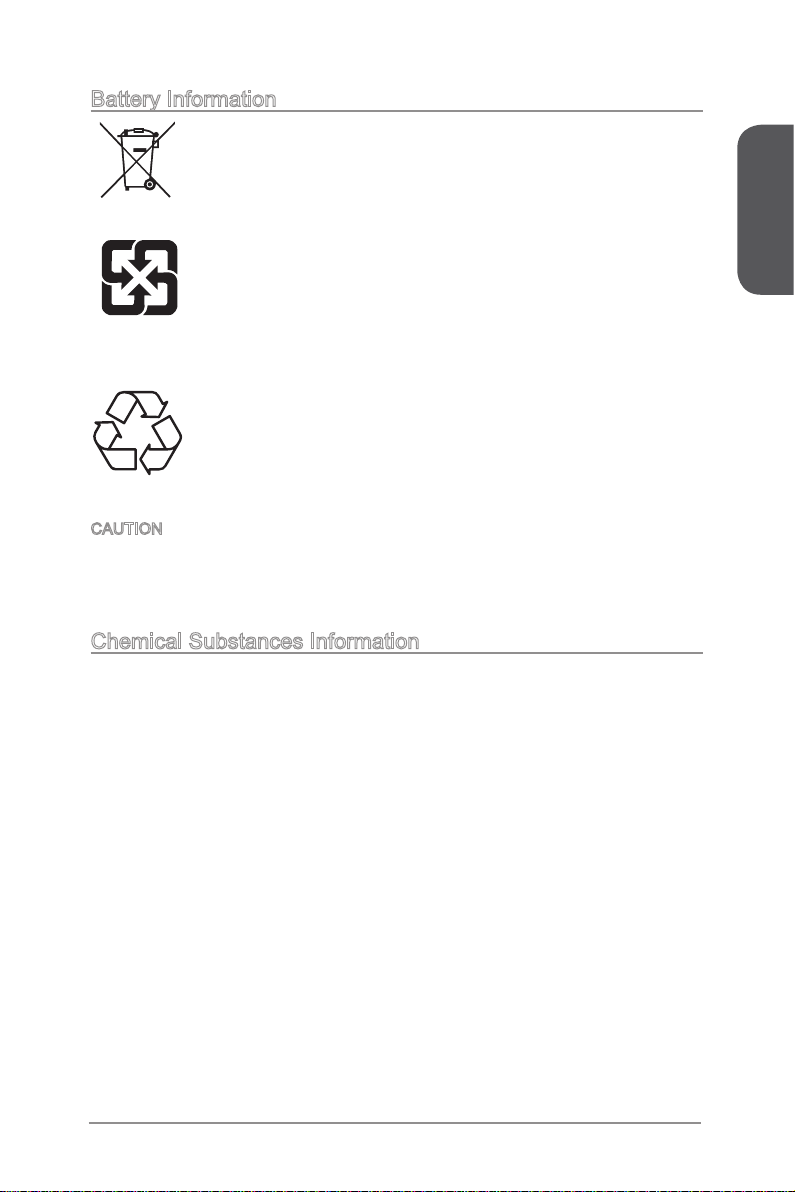
European Union:
Batteries, battery packs, and accumulators should not be disposed of
as unsorted household waste. Please use the public collection system
to return, recycle, or treat them in compliance with the local regulations.
Taiwan:
For better environmental protection, waste batteries should be collected
separately for recycling or special disposal.
廢電池請回收
California, USA:
The button cell battery may contain perchlorate material and requires
special handling when recycled or disposed of in California.
For further information please visit:
http://www.dtsc.ca.gov/hazardouswaste/perchlorate/
CAUTION: There is a risk of explosion, if battery is incorrectly replaced.
Replace only with the same or equivalent type recommended by the manufacturer.
Chemical Substances Information
In compliance with chemical substances regulations, such as the EU REACH
Regulation (Regulation EC No. 1907/2006 of the European Parliament and the
Council), MSI provides the information of chemical substances in products at:
http://www.msi.com/html/popup/csr/evmtprtt_pcm.html
Preface
xxi Preface
WEEE (Waste Electrical and Electronic Equipment) Statement
Preface
ENGLISH
To protect the global environment and as an environmentalist, MSI must
remind you that…
Under the European Union (“EU”) Directive on Waste Electrical and
Electronic Equipment, Directive 2002/96/EC, which takes eect on August
13, 2005, products of “electrical and electronic equipment” cannot be
discarded as municipal wastes anymore, and manufacturers of covered
electronic equipment will be obligated to take back such products at the end of their
useful life. MSI will comply with the product take back requirements at the end of life
of MSI-branded products that are sold into the EU. You can return these products to
local collection points.
DEUTSCH
Hinweis von MSI zur Erhaltung und Schutz unserer Umwelt
Gemäß der Richtlinie 2002/96/EG über Elektro- und Elektronik-Altgeräte dürfen
Elektro- und Elektronik-Altgeräte nicht mehr als kommunale Abfälle entsorgt werden.
MSI hat europaweit verschiedene Sammel- und Recyclingunternehmen beauftragt,
die in die Europäische Union in Verkehr gebrachten Produkte, am Ende seines
Lebenszyklus zurückzunehmen. Bitte entsorgen Sie dieses Produkt zum gegebenen
Zeitpunkt ausschliesslich an einer lokalen Altgerätesammelstelle in Ihrer Nähe.
FRANÇAIS
En tant qu’écologiste et an de protéger l’environnement, MSI tient à rappeler ceci…
Au sujet de la directive européenne (EU) relative aux déchets des équipement
électriques et électroniques, directive 2002/96/EC, prenant eet le 13 août 2005,
que les produits électriques et électroniques ne peuvent être déposés dans les
décharges ou tout simplement mis à la poubelle. Les fabricants de ces équipements
seront obligés de récupérer certains produits en n de vie. MSI prendra en compte
cette exigence relative au retour des produits en n de vie au sein de la communauté
européenne. Par conséquent vous pouvez retourner localement ces matériels dans
les points de collecte.
РУССКИЙ
Компания MSI предпринимает активные действия по защите окружающей среды,
поэтому напоминаем вам, что….
В соответствии с директивой Европейского Союза (ЕС) по предотвращению
загрязнения окружающей среды использованным электрическим и электронным
оборудованием (директива WEEE 2002/96/EC), вступающей в силу 13
августа 2005 года, изделия, относящиеся к электрическому и электронному
оборудованию, не могут рассматриваться как бытовой мусор, поэтому
производители вышеперечисленного электронного оборудования обязаны
принимать его для переработки по окончании срока службы. MSI обязуется
соблюдать требования по приему продукции, проданной под маркой MSI на
территории EC, в переработку по окончании срока службы. Вы можете вернуть
эти изделия в специализированные пункты приема.
xxiiPreface
ESPAÑOL
MSI como empresa comprometida con la protección del medio ambiente, recomienda:
Bajo la directiva 2002/96/EC de la Unión Europea en materia de desechos y/o
equipos electrónicos, con fecha de rigor desde el 13 de agosto de 2005, los productos
clasicados como “eléctricos y equipos electrónicos” no pueden ser depositados en
los contenedores habituales de su municipio, los fabricantes de equipos electrónicos,
están obligados a hacerse cargo de dichos productos al termino de su período de
vida. MSI estará comprometido con los términos de recogida de sus productos
vendidos en la Unión Europea al nal de su periodo de vida. Usted debe depositar
estos productos en el punto limpio establecido por el ayuntamiento de su localidad o
entregar a una empresa autorizada para la recogida de estos residuos.
NEDERLANDS
Om het milieu te beschermen, wil MSI u eraan herinneren dat….
De richtlijn van de Europese Unie (EU) met betrekking tot Vervuiling van Electrische
en Electronische producten (2002/96/EC), die op 13 Augustus 2005 in zal gaan
kunnen niet meer beschouwd worden als vervuiling. Fabrikanten van dit soort
producten worden verplicht om producten retour te nemen aan het eind van hun
levenscyclus. MSI zal overeenkomstig de richtlijn handelen voor de producten
die de merknaam MSI dragen en verkocht zijn in de EU. Deze goederen kunnen
geretourneerd worden op lokale inzamelingspunten.
SRPSKI
Da bi zaštitili prirodnu sredinu, i kao preduzeće koje vodi računa o okolini i prirodnoj
sredini, MSI mora da vas podesti da…
Po Direktivi Evropske unije (“EU”) o odbačenoj ekektronskoj i električnoj opremi,
Direktiva 2002/96/EC, koja stupa na snagu od 13. Avgusta 2005, proizvodi koji
spadaju pod “elektronsku i električnu opremu” ne mogu više biti odbačeni kao običan
otpad i proizvođači ove opreme biće prinuđeni da uzmu natrag ove proizvode na kraju
njihovog uobičajenog veka trajanja. MSI će poštovati zahtev o preuzimanju ovakvih
proizvoda kojima je istekao vek trajanja, koji imaju MSI oznaku i koji su prodati u EU.
Ove proizvode možete vratiti na lokalnim mestima za prikupljanje.
Preface
POLSKI
Aby chronić nasze środowisko naturalne oraz jako rma dbająca o ekologię, MSI
przypomina, że…
Zgodnie z Dyrektywą Unii Europejskiej (“UE”) dotyczącą odpadów produktów
elektrycznych i elektronicznych (Dyrektywa 2002/96/EC), która wchodzi w życie 13
sierpnia 2005, tzw. “produkty oraz wyposażenie elektryczne i elektroniczne “ nie
mogą być traktowane jako śmieci komunalne, tak więc producenci tych produktów
będą zobowiązani do odbierania ich w momencie gdy produkt jest wycofywany z
użycia. MSI wypełni wymagania UE, przyjmując produkty (sprzedawane na terenie
Unii Europejskiej) wycofywane z użycia. Produkty MSI będzie można zwracać w
wyznaczonych punktach zbiorczych.
xxiii Preface
Preface
TÜRKÇE
Çevreci özelliğiyle bilinen MSI dünyada çevreyi korumak için hatırlatır:
Avrupa Birliği (AB) Kararnamesi Elektrik ve Elektronik Malzeme Atığı, 2002/96/EC
Kararnamesi altında 13 Ağustos 2005 tarihinden itibaren geçerli olmak üzere,
elektrikli ve elektronik malzemeler diğer atıklar gibi çöpe atılamayacak ve bu elektonik
cihazların üreticileri, cihazların kullanım süreleri bittikten sonra ürünleri geri toplamakla
yükümlü olacaktır. Avrupa Birliği’ne satılan MSI markalı ürünlerin kullanım süreleri
bittiğinde MSI ürünlerin geri alınması isteği ile işbirliği içerisinde olacaktır. Ürünlerinizi
yerel toplama noktalarına bırakabilirsiniz.
ČESKY
Záleží nám na ochraně životního prostředí — společnost MSI upozorňuje…
Podle směrnice Evropské unie (“EU”) o likvidaci elektrických a elektronických výrobků
2002/96/EC platné od 13. srpna 2005 je zakázáno likvidovat “elektrické a elektronické
výrobky” v běžném komunálním odpadu a výrobci elektronických výrobků, na které
se tato směrnice vztahuje, budou povinni odebírat takové výrobky zpět po skončení
jejich životnosti. Společnost MSI splní požadavky na odebírání výrobků značky
MSI, prodávaných v zemích EU, po skončení jejich životnosti. Tyto výrobky můžete
odevzdat v místních sběrnách.
MAGYAR
Annak érdekében, hogy környezetünket megvédjük, illetve környezetvédőként fellépve
az MSI emlékezteti Önt, hogy …
Az Európai Unió („EU”) 2005. augusztus 13-án hatályba lépő, az elektromos
és elektronikus berendezések hulladékairól szóló 2002/96/EK irányelve szerint
az elektromos és elektronikus berendezések többé nem kezelhetőek lakossági
hulladékként, és az ilyen elektronikus berendezések gyártói kötelessé válnak az
ilyen termékek visszavételére azok hasznos élettartama végén. Az MSI betartja a
termékvisszavétellel kapcsolatos követelményeket az MSI márkanév alatt az EU-n
belül értékesített termékek esetében, azok élettartamának végén. Az ilyen termékeket
a legközelebbi gyűjtőhelyre viheti.
ITALIANO
Per proteggere l’ambiente, MSI, da sempre amica della natura, ti ricorda che….
In base alla Direttiva dell’Unione Europea (EU) sullo Smaltimento dei Materiali Elettrici
ed Elettronici, Direttiva 2002/96/EC in vigore dal 13 Agosto 2005, prodotti appartenenti
alla categoria dei Materiali Elettrici ed Elettronici non possono più essere eliminati
come riuti municipali: i produttori di detti materiali saranno obbligati a ritirare ogni
prodotto alla ne del suo ciclo di vita. MSI si adeguerà a tale Direttiva ritirando tutti i
prodotti marchiati MSI che sono stati venduti all’interno dell’Unione Europea alla ne
del loro ciclo di vita. È possibile portare i prodotti nel più vicino punto di raccolta
xxivPreface
CONTENTS
▍
Preface ………………………………………………………………………………………………i
Copyright Notice …………………………………………………………………………………………ii
Trademarks ………………………………………………………………………………………………..ii
Revision History …………………………………………………………………………………………ii
Smartphone Application ………………………………………………………………………………iii
Technical Support ……………………………………………………………………………………..iii
Safety Instructions ……………………………………………………………………………………..iv
FCC-B Radio Frequency Interference Statement …………………………………………… v
CE Conformity …………………………………………………………………………………………… v
Radiation Exposure Statement …………………………………………………………………….vi
European Community Compliance Statement ………………………………………………..vi
Taiwan Wireless Statements ………………………………………………………………………..vi
Japan VCCI Class B Statement ……………………………………………………………………vi
Korea Warning Statements ………………………………………………………………………….vi
Battery Information …………………………………………………………………………………….vii
Chemical Substances Information ……………………………………………………………….vii
WEEE (Waste Electrical and Electronic Equipment) Statement ………………………viii
Chapter 1 Getting Started………………………………………………………………….1-1
Packing Contents …………………………………………………………………………………….1-2
Optional Accessories ……………………………………………………………………………….1-2
Assembly Precautions ………………………………………………………………………………1-3
Motherboard Specications ……………………………………………………………………….1-4
Connectors Quick Guide …………………………………………………………………………..1-7
Back Panel Quick Guide …………………………………………………………………………..1-9
CPU (Central Processing Unit) ………………………………………………………………..1-11
Introduction to the LGA 1150 CPU ……………………………………………………..1-11
CPU & Heatsink Installation ……………………………………………………………….1-12
Memory ………………………………………………………………………………………………..1-15
Dual-Channel mode Population Rule ………………………………………………….1-15
Mounting Screw Holes ……………………………………………………………………………1-16
Power Supply ………………………………………………………………………………………..1-17
JPWR1~2: ATX Power Connectors …………………………………………………….1-17
Expansion Slots …………………………………………………………………………………….1-18
PCI_E1~4: PCIe Expansion Slots ………………………………………………………. 1-18
Video/ Graphics Cards …………………………………………………………………………..1-19
Single Video Card Installation …………………………………………………………….1-19
AMD CrossFire™ (Multi-GPU) Technology ………………………………………….1-20
Internal Connectors ……………………………………………………………………………….. 1-22
SATA1~6: SATA Connectors ……………………………………………………………1-22
Preface
xxv Preface
Preface
CPUFAN1~2,SYSFAN1~3: Fan Power Connectors ………………………………1-23
JFP1, JFP2: System Panel Connectors ………………………………………………1-24
JUSB1~2: USB 2.0 Expansion Connectors ………………………………………….1-25
JCI1: Chassis Intrusion Connector ……………………………………………………..1-26
JTPM1: TPM Module Connector ……………………………………………………….1-27
JLPT1: Parallel Port Connector ………………………………………………………….1-28
Jumpers ……………………………………………………………………………………………….1-29
JBAT1: Clear CMOS Jumper ……………………………………………………………..1-29
Drivers and Utilities ………………………………………………………………………………..1-30
Total Installer …………………………………………………………………………………..1-30
Chapter 2 Quick Installation ………………………………………………………………2-1
CPU Installation ………………………………………………………………………………………2-2
Memory Installation ………………………………………………………………………………….2-4
Motherboard Installation ……………………………………………………………………………2-5
Power Connectors Installation …………………………………………………………………..2-7
SATA HDD Installation …………………………………………………………………………….. 2-9
mSATA SSD Installation …………………………………………………………………………2-10
Front Panel Connector Installation …………………………………………………………… 2-11
JFP1 Connecotr Installation ……………………………………………………………….2-11
Front Panel Audio Connector Installation …………………………………………….2-11
Peripheral Connector Installation ……………………………………………………………..2-12
USB2.0 Connector Installation ……………………………………………………………2-12
USB3.0 Connector Installation ……………………………………………………………2-12
Graphics Card Installation ………………………………………………………………………. 2-13
Chapter 3 BIOS Setup ………………………………………………………………………3-1
Entering Setup ………………………………………………………………………………………..3-2
Entering BIOS Setup ………………………………………………………………………….3-2
Overview ………………………………………………………………………………………………..3-3
Operation ……………………………………………………………………………………………….3-5
SETTINGS ……………………………………………………………………………………………..3-6
System Status ……………………………………………………………………………………3-6
Advanced …………………………………………………………………………………………. 3-7
Boot ……………………………………………………………………………………………….3-15
Security ………………………………………………………………………………………….. 3-15
Save & Exit ……………………………………………………………………………………..3-16
OC ………………………………………………………………………………………………………. 3-17
M-FLASH ……………………………………………………………………………………………..3-25
OC PROFILE ………………………………………………………………………………………..3-26
HARDWARE MONITOR …………………………………………………………………………3-27
xxviPreface
Appendix A Intel SBA (optional) ……………………………………………………….. A-1
Prerequisites …………………………………………………………………………………………..A-2
Installing Intel SBA …………………………………………………………………………………..A-3
Software Conguration ……………………………………………………………………………..A-3
Software panel overview ……………………………………………………………………..A-3
Password settings ………………………………………………………………………………A-4
Help Button …………………………………………………………………………………………….A-4
Appendix B Intel RAID (optional) ………………………………………………………. B-1
Introduction …………………………………………………………………………………………….B-2
Using Intel Rapid Storage Technology Option ROM……………………………………..B-3
Degraded RAID Array …………………………………………………………………………….B-10
System Acceleration (optional) ………………………………………………………………..B-12
RST Synchronization (optional) ……………………………………………………………….B-14
Preface
xxvii Preface

Chapter 1
Getting Started
Thank you for choosing the Z87-G41 PC Mate/ H87-G41 PC Mate/ B85-G41
PC Mate Series (MS-7850 v1.X) ATX motherboard. The Z87-G41 PC Mate/
H87-G41 PC Mate/ B85-G41 PC Mate Series motherboards are based on
Intel® Z87/ H87/ B85 chipset for optimal system eciency. Designed to t the
advanced Intel® LGA1150 processor, the Z87-G41 PC Mate/ H87-G41 PC
Mate/ B85-G41 PC Mate Series motherboards deliver a high performance
and professional desktop platform solution.
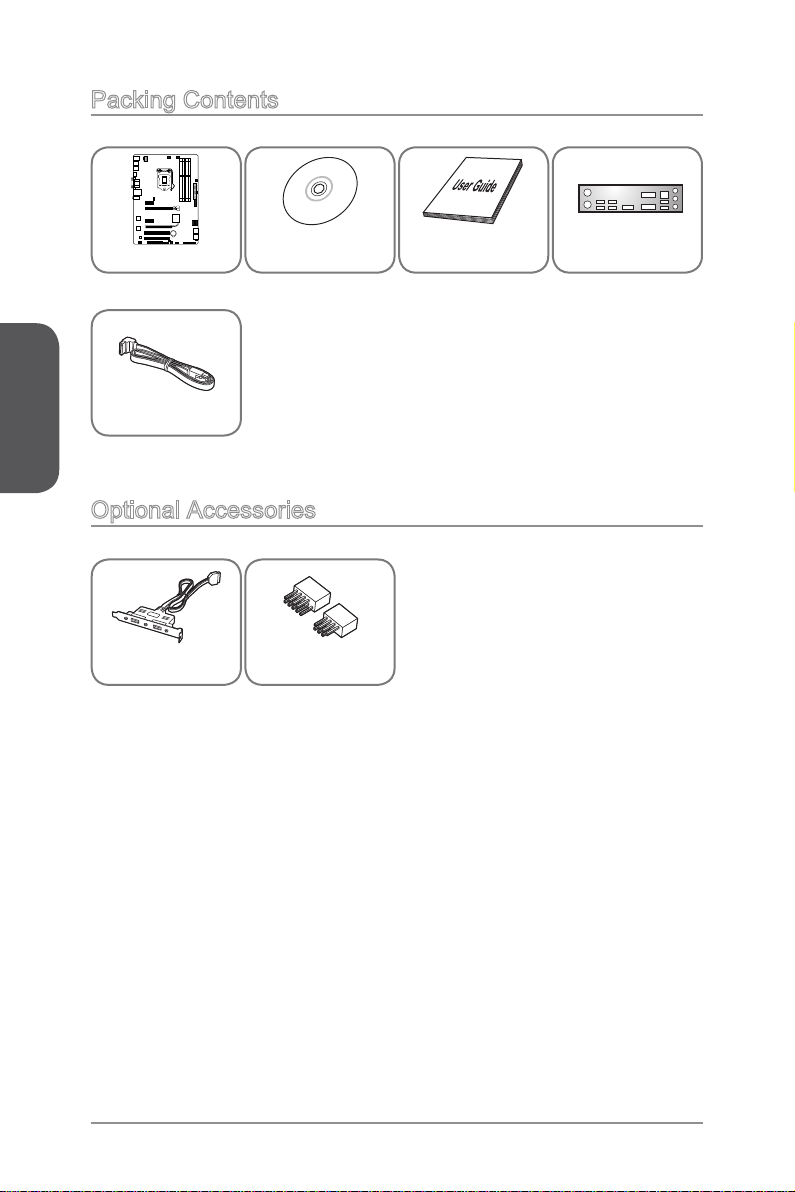
Packing Contents
Chapter 1
Optional Accessories
USB 3.0 Bracket
* These pictures are for reference only and may vary without notice.
* The packing contents may vary according to the model you purchased.
* If you need to purchase the optional accessories or request part numbers, please
visit the MSI website at http://www.msi.com/index.php or consult the dealer.
Motherboard
SATA Cable
Drivers & Utilities
Disc
M-Connector
Motherboard
User Guide
I/O Shield
1-2Getting Started
Assembly Precautions
The components included in this package are prone to damage from electrostatic
■
discharge (ESD). Please adhere to the following instructions to ensure successful
computer assembly.
Always turn o the power supply and unplug the power cord from the power outlet
■
before installing or removing any computer component.
Ensure that all components are securely connected. Loose connections may cause
■
the computer to not recognize a component or fail to start.
Hold the motherboard by the edges to avoid touching sensitive components.
■
It is recommended to wear an electrostatic discharge (ESD) wrist strap when
■
handling the motherboard to prevent electrostatic damage. If an ESD wrist strap is
not available, discharge yourself of static electricity by touching another metal object
before handling the motherboard.
Store the motherboard in an electrostatic shielding container or on an antistatic pad
■
whenever the motherboard is not installed.
Before turning on the computer, ensure that there are no loose screws or metal
■
components on the motherboard or anywhere within the computer case.
Do not use the computer in a high-temperature environment.
■
Do not boot the computer before installation is completed. This could cause
■
permanent damage to the components as well as injury to the user.
If you need help during any installation step, please consult a certied computer
■
technician.
Important
A screwdriver (not included) may be required for computer assembly.
Chapter 1
1-3 Getting Started
Motherboard Specications
CPU
Support
Chipset Intel® Z87/ H87/ B85 Express Chipset■
Memory
Support
Chapter 1
Expansion
Slots
Onboard
Graphics
Multi-GPU
Support
Storage Z87-G41 PC Mate/ H87-G41 PC Mate
USB Intel Z87/ H87/ B85 Express Chipset
Audio Realtek® ALC887 Codec■
LAN Realtek® RTL8111G Gigabit LAN controller■
4th Generation Intel® Core™ i7 / Core™ i5 / Core™ i3 / Pentium® /
■
Celeron® processors for LGA 1150 socket
4x DDR3 memory slots supporting up to 32GB
■
Z87-G41 PC Mate supports DDR3 3000(OC)/ 2800(OC)/ 2666(OC)/
■
2600(OC)/ 2400(OC)/ 2200(OC)/ 2133(OC)/ 2000(OC)/ 1866(OC)/
1600/ 1333/ 1066 MHz
H87-G41 PC Mate and B85-G41 PC Mate supports DDR3 1600/
■
1333/ 1066 MHz
Dual channel memory architecture
■
Supports non-ECC, un-buered memory
■
Supports Intel® Extreme Memory Prole (XMP)
■
2x PCIe x16 slots
■
PCI_E2 supports PCIe 3.0
PCI_E4 supports PCIe 2.0
Support x16, x4/x4 modes
—
2x PCIe 2.0 x1 slots
■
2x PCI slots
■
1x VGA port, supporting a maximum resolution of 1920×1200 @
■
60Hz, 24bpp
1x DVI-D port, supporting a maximum resolution of 1920×1200 @
■
60Hz, 24bpp
1x HDMI port, supporting a maximum resolution of
■
4096×2160@24Hz, 24bpp/ 2560×1600@60Hz, 24bpp/
1920×1080@60Hz, 36bpp
Supports AMD CrossFireTM Technology■
■
Intel Z87/ H87 Express Chipset
6x SATA 6Gb/s ports (SATA1~6)
Supports RAID 0, RAID1, RAID 5 and RAID 10
Supports Intel Smart Response Technology, Intel Rapid Start
Technology and Intel Smart Connect Technology*
B85-G41 PC Mate
■
Intel B85 Express Chipset
4x SATA 6Gb/s ports (SATA1, SATA2, SATA3, SATA4)
2x SATA 3Gb/s ports (SATA5, SATA6)
Supports Intel Smart Connect Technology*
—
* Supports Intel Core processors on Windows 7 and Windows 8.
■
4x USB 3.0 ports (2 ports on the back panel, 2 ports available
through the internal USB connectors)
8x USB 2.0 ports (4 ports on the back panel, 4 ports available
through the internal USB connectors)
1-4Getting Started
Back Panel
Connectors
Internal
Connectors
I/O
Controller
Hardware
Monitor
BIOS
Features
Special
Features
1x PS/2 mouse port
■
1x PS/2 keyboard port
■
4x USB 2.0 ports
■
2x USB 3.0 ports
■
1x HDMI port
■
1x VGA port
■
1x DVI-D port
■
1x LAN (RJ45) port
■
3x audio jacks
■
1x 24-pin ATX main power connector
■
1x 8-pin ATX 12V power connector
■
6x SATA connectors
■
2x USB 2.0 connectors (supports additional 4 USB 2.0 ports)
■
1x USB 3.0 connector (supports additional 2 USB 3.0 ports)
■
2x 4-pin CPU fan connectors
■
1x 4-pin system fan connector
■
2x 3-pin system fan connectors
■
1x Clear CMOS jumper
■
1x Front panel audio connector
■
2x System panel connectors
■
1x Chassis Intrusion connector
■
1x TPM module connector
■
1x Serial port connector
■
1x Parallel Port connector
■
NUVOTON NCT6779 Controller Chip■
CPU/System temperature detection
■
CPU/System fan speed detection
■
CPU/System fan speed control
■
64 Mb ash (for Z87-G41 PC Mate)
■
128 Mb ash (for H87-G41 PC Mate/ B85-G41 PC Mate)
■
UEFI AMI BIOS
■
ACPI 5.0, PnP 1.0a, SM BIOS 2.7, DMI 2.0
■
Multi-language
■
Military Class 4
■
OC Genie 4
■
Click BIOS 4
■
AMD CrossFire
■
Sound Blaster Cinema (for Z87-G41 PC Mate)
■
Clear CMOS Button
■
Total Fan Control
■
Super RAID
■
Command Center
■
Chapter 1
1-5 Getting Started
Software Drivers
Chapter 1
Form
Factor
■
MSI
■
Command Center
Super Charger
Super RAID
Live Update 5
Fast Boot
—
7-ZIP
■
Intel Extreme Tuning Utility
■
Norton Internet Security Solution
■
Trend Micro SafeSync
■
Sound Blaster Cinema (for Z87-G41 PC Mate)
■
Network genie
■
Small Business Advantage (for H87-G41 PC Mate/ B85-G41 PC
■
Mate)
ATX Form Factor
■
12 in. x 8.7 in. (30.5 cm x 22 cm)
■
For the latest information about CPU, please visit
http://www.msi.com/service/cpu-support/
For more information on compatible components, please visit
http://www.msi.com/service/test-report/
1-6Getting Started
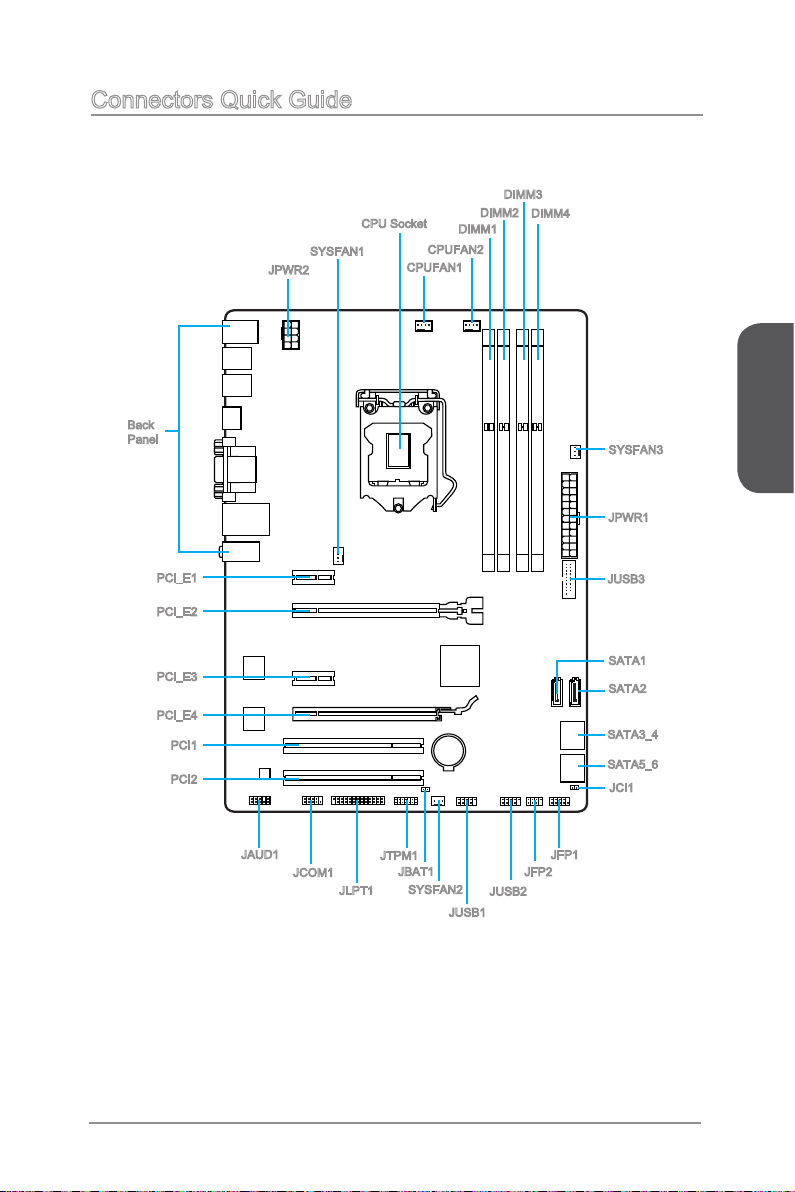
Connectors Quick Guide
SYSFAN1
JPWR2
Back
Panel
CPU Socket
CPUFAN1
DIMM1
CPUFAN2
DIMM2
DIMM3
DIMM4
SYSFAN3
JPWR1
Chapter 1
PCI_E1
PCI_E2
PCI_E3
PCI_E4
PCI1
PCI2
JAUD1
JCOM1
JFP1
JFP2
JLPT1
JTPM1
JBAT1
SYSFAN2
JUSB2
JUSB1
1-7 Getting Started
JUSB3
SATA1
SATA2
SATA3_4
SATA5_6
JCI1
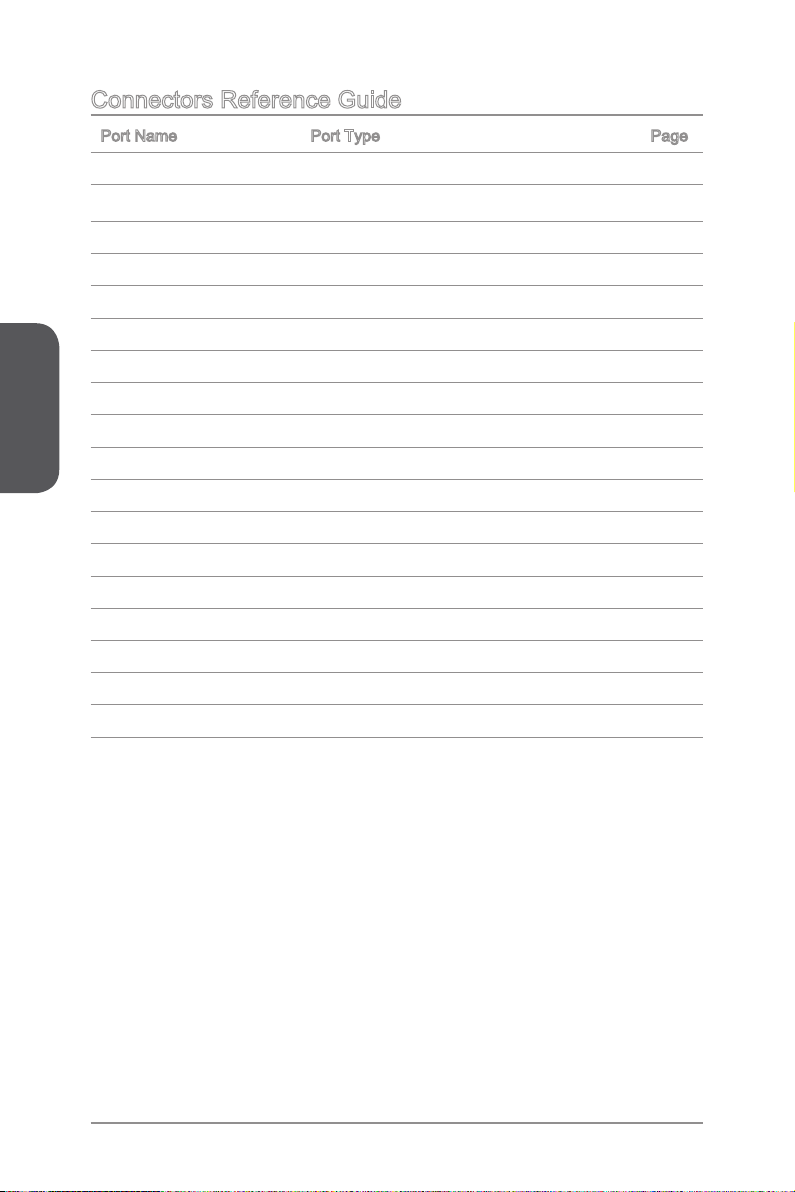
Connectors Reference Guide
Port Name Port Type Page
Back Panel 1-9
CPU LGA1150 CPU Socket 1-1
CPUFAN1~2,SYSFAN1~3 Fan Power Connectors 1-2
DIMM1~4 DDR3 Memory Slots 1-1
JAUD1 Front Panel Audio Connector 1-2
Chapter 1
JBAT1 Clear CMOS Jumper 1-3
JCI1 Chassis Intrusion Connector 1-2
JCOM1 Serial Port Connector 1-2
JFP1, JFP2 System Panel Connectors 1-2
JLPT1 Parallel Port Connector 1-3
JPWR1~2 ATX Power Connectors 1-1
JTPM1 TPM Module Connector 1-2
JUSB1~2 USB 2.0 Expansion Connector 1-2
JUSB3 USB 3.0 Expansion Connector 1-2
PCI_E2,4 PCIe x16 Expansion Slots 1-1
PCI_E1,3 PCIe x1 Expansion Slots 1-1
PCI1~2 PCI Expansion Slots 1-1
SATA1~6 SATA Connectors 1-2
1
5
5
8
1
8
9
6
0
7
9
7
7
8
8
8
4
1-8Getting Started
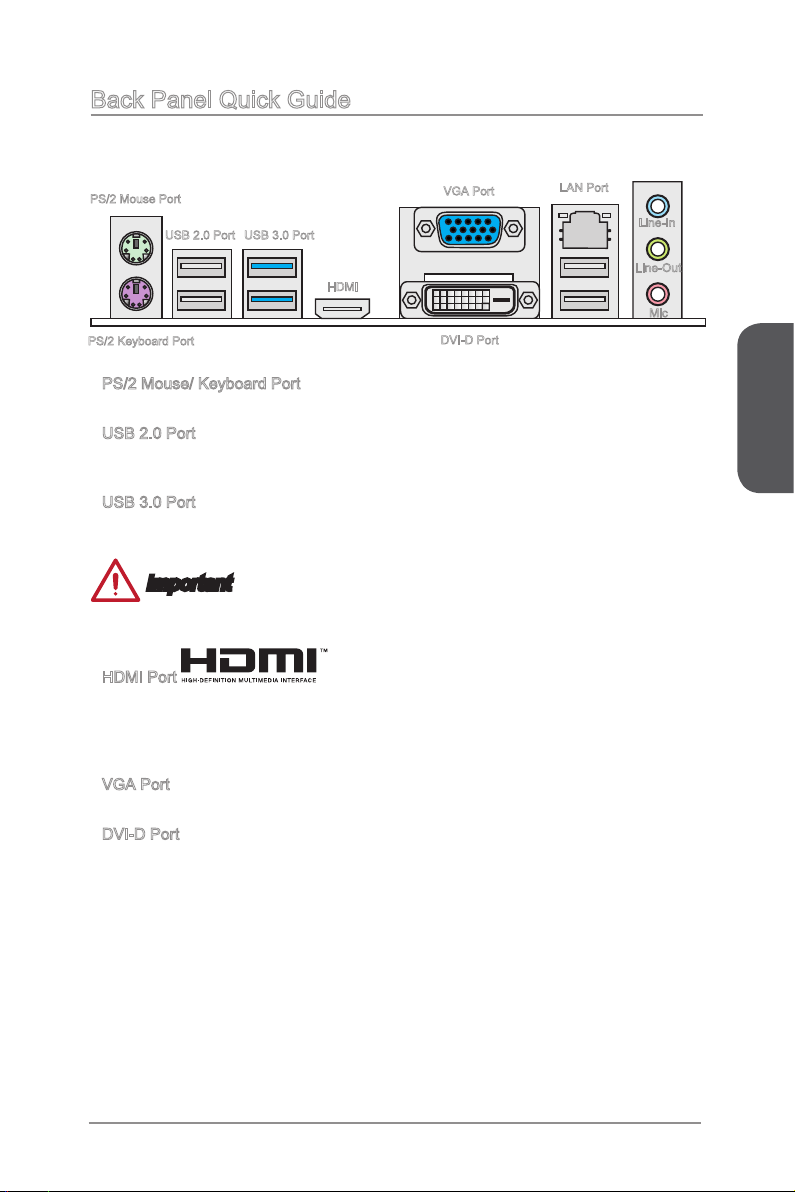
Back Panel Quick Guide
PS/2 Mouse Port
USB 2.0 Port
PS/2 Keyboard Port
PS/2 Mouse/ Keyboard Port
▶
USB 3.0 Port
VGA Port
HDMI
DVI-D Port
LAN Port
Line-In
Line-Out
Mic
PS/2® mouse/ keyboard DIN connector for a PS/2® mouse/ keyboard.
USB 2.0 Port
▶
The USB 2.0 port is for attaching USB 2.0 devices such as keyboard, mouse, or other
USB 2.0-compatible devices.
USB 3.0 Port
▶
USB 3.0 port is backward-compatible with USB 2.0 devices. It supports data transfer
rate up to 5 Gbit/s (SuperSpeed).
Important
In order to use USB 3.0 devices, you must connect to a USB 3.0 port. If a USB cable
is used, it must be USB 3.0 compliant.
HDMI Port
▶
The High-Denition Multimedia Interface (HDMI) is an all-digital audio-video interface
that is capable of transmitting uncompressed streams. HDMI supports all types of TV
formats, including standard, enhanced, or high-denition video, plus multi-channel
digital audio on a single cable.
VGA Port
▶
The DB15-pin female connector is provided for monitor.
DVI-D Port
▶
The DVI-D (Digital Visual Interface- Digital) connector can be connected to a LCD
monitor, or a CRT monitor with an adapter. To connect a monitor, please refer to the
monitor’s manual for more information.
Chapter 1
1-9 Getting Started
This platform supports dual-display and triple-display function.
(Extend the desktop to the second
(Monitors have the same screen)
LAN Port
▶
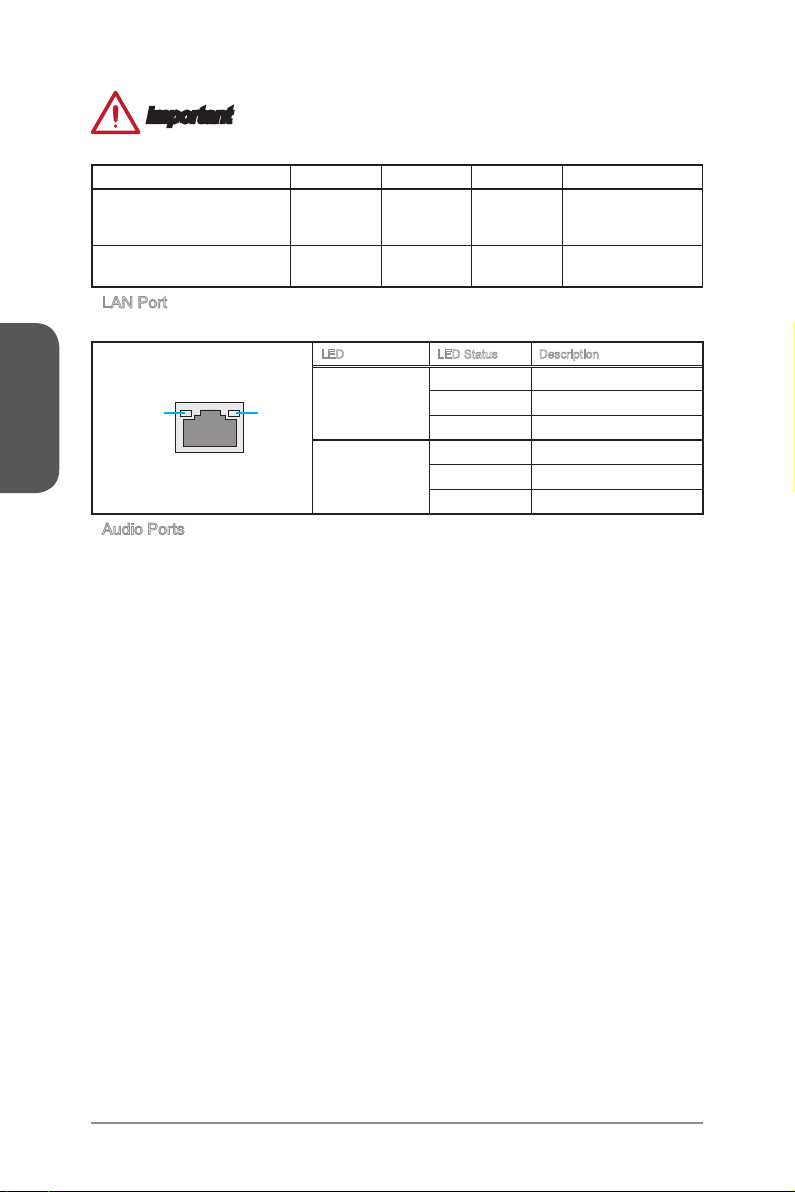
The standard RJ-45 LAN jack is for connecting to a Local Area Network (LAN).
Chapter 1
LINK/ACT
Audio Ports
▶
These connectors are used for audio devices. The color of the jack refers to the
function of the connector.
Important
HDMI+VGA HDMI+DVI VGA+DVI HDMI+VGA+DVI
Extend mode
and thired monitor)
Clone mode
LED
Blue-Line in: Used for connecting external audio outputting devices.
■
Green- Line out: Used as a connector for speakers or headphone.
■
Pink- Mic: Used as a connector for a microphone.
■
SPEED
LED
◯ ◯ ◯ ◯
◯ ◯ ◯ ◯
LED LED Status Description
O No link
Link/ Activity LED
Speed LED
Yellow Linked
Blinking Data activity
O 10 Mbps connection
Green 100 Mbps connection
Orange 1 Gbps connection
1-10Getting Started
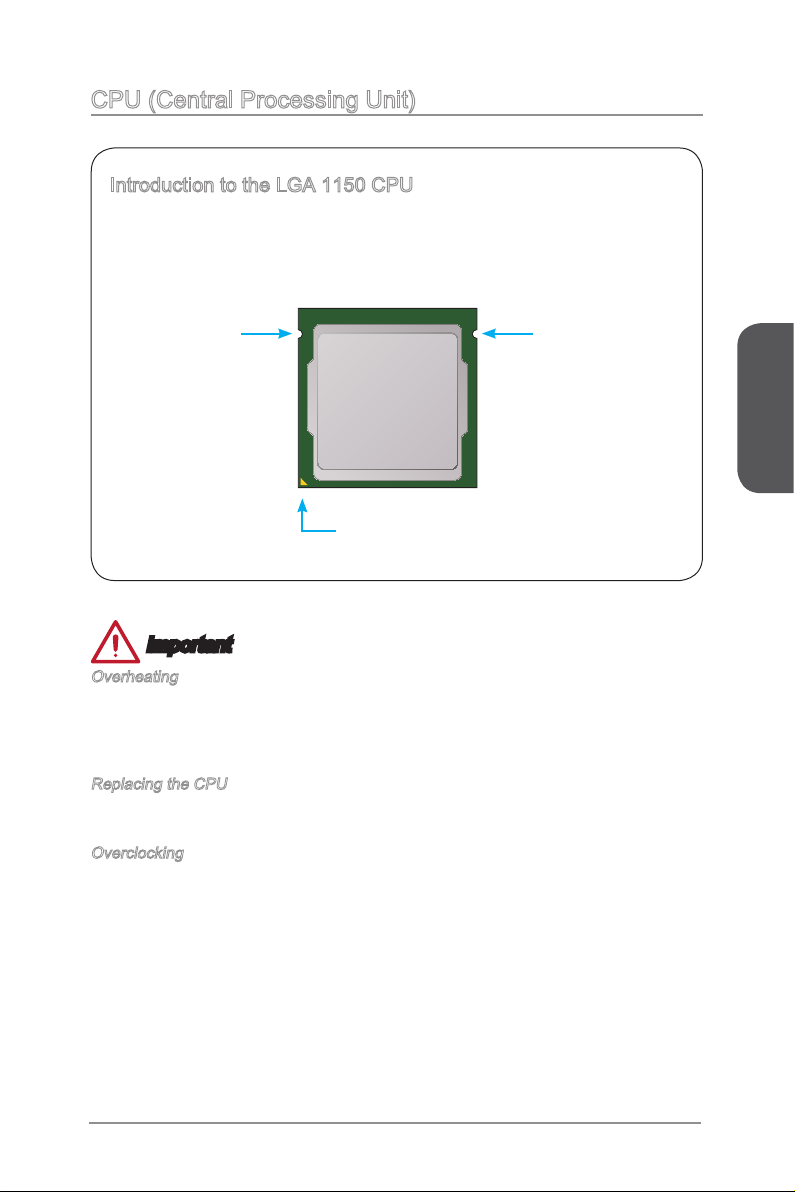
CPU (Central Processing Unit)
Introduction to the LGA 1150 CPU
The surface of the LGA 1150 CPU has two notches and a golden triangle to
assist in correctly lining up the CPU for motherboard placement. The golden
triangle is the Pin 1 indicator.
Notch
Golden triangle is the Pin 1 indicator
Notch
Important
Overheating
Overheating can seriously damage the CPU and motherboard. Always make sure the
cooling fans work properly to protect the CPU from overheating. Be sure to apply an
even layer of thermal paste (or thermal tape) between the CPU and the heatsink to
enhance heat dissipation.
Replacing the CPU
When replacing the CPU, always turn o the system’s power supply and unplug the
power supply’s power cord to ensure the safety of the CPU.
Overclocking
This motherboard is designed to support overclocking. Before attempting to overclock,
please make sure that all other system components can tolerate overclocking. Any
attempt to operate beyond product specications is not recommend. MSI does not
guarantee the damages or risks caused by inadequate operation beyond product
specications.
Chapter 1
1-11 Getting Started
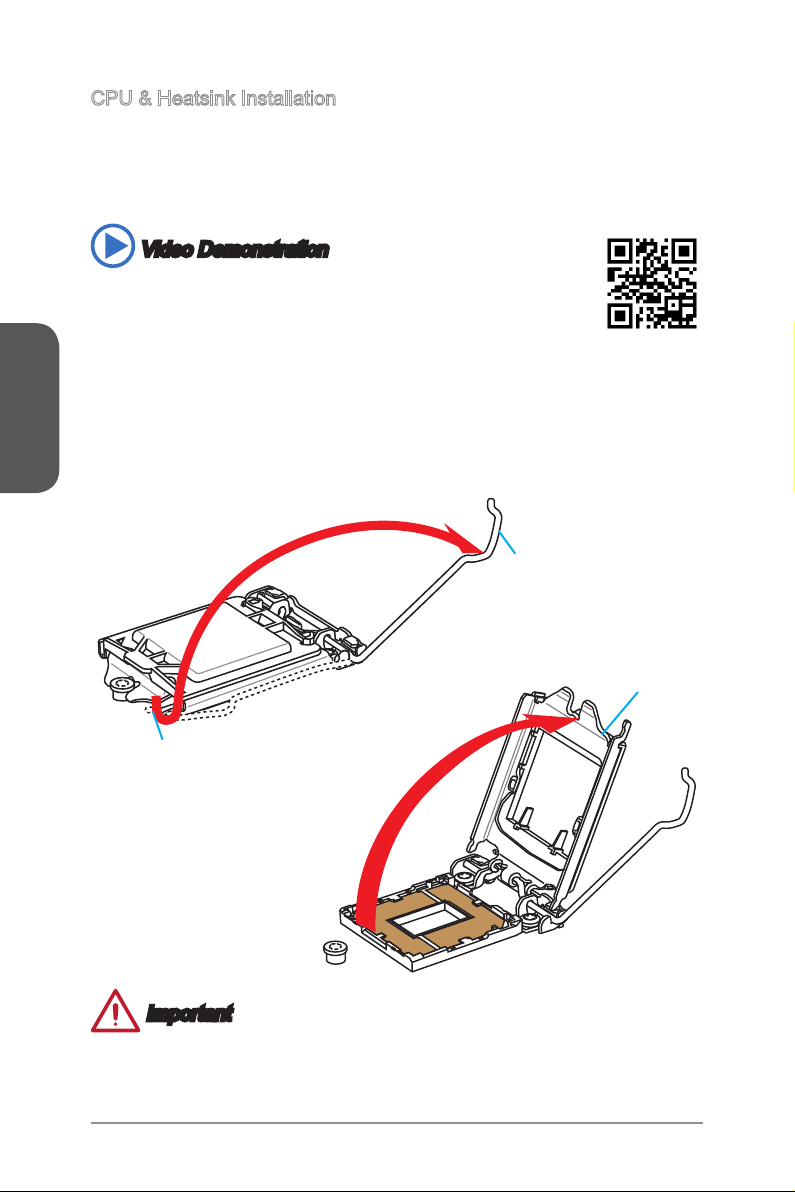
CPU & Heatsink Installation
When installing a CPU, always remember to install a CPU heatsink. A CPU heatsink
is necessary to prevent overheating and maintain system stability. Follow the steps
below to ensure correct CPU and heatsink installation. Wrong installation can damage
both the CPU and the motherboard.
Watch the video to learn how to install CPU & heatsink. at the address
below.
http://youtu.be/bf5La099urI
Chapter 1
1. Push the load lever down to unclip it and lift to the fully open position.
2. The load plate will automatically lift up as the load lever is pushed to the fully open
Video Demonstration
position.
Load lever
Load plate
Retention tab
Important
Do not touch the socket contacts or the bottom of the CPU.
1-12Getting Started
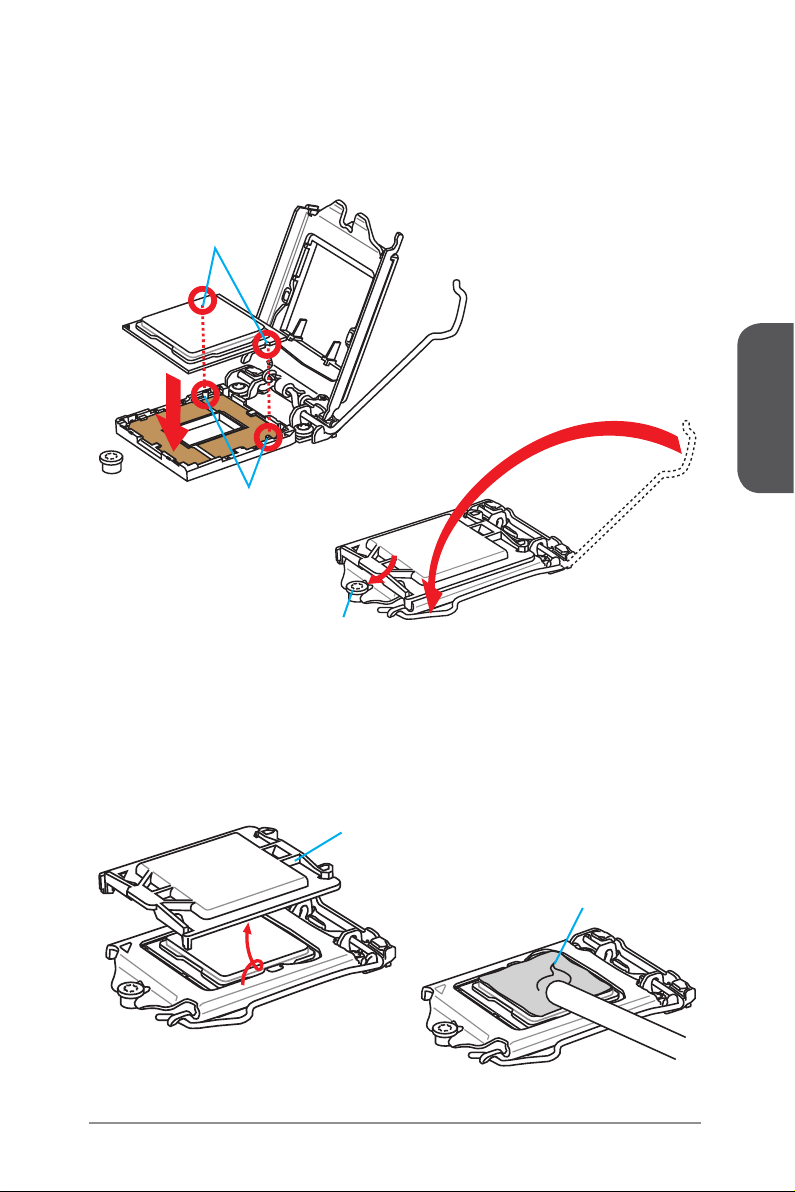
3. Align the notches with the socket alignment keys. Lower the CPU straight down,
without tilting or sliding the CPU in the socket. Inspect the CPU to check if it is
properly seated in the socket.
4. Close and slide the load plate under the retention knob. Close and engage the
load lever.
CPU notches
Alignment Key
Retention knob
Chapter 1
5. When you press down the load lever the PnP cap will automatically pop up from
the CPU socket. Do not discard the PnP cap. Always replace the PnP cap if the
CPU is removed from the socket.
6. Evenly spread a thin layer of thermal paste (or thermal tape) on the top of the
CPU. This will help in heat dissipation and prevent CPU overheating.
PnP cap
Thermal paste
1-13 Getting Started
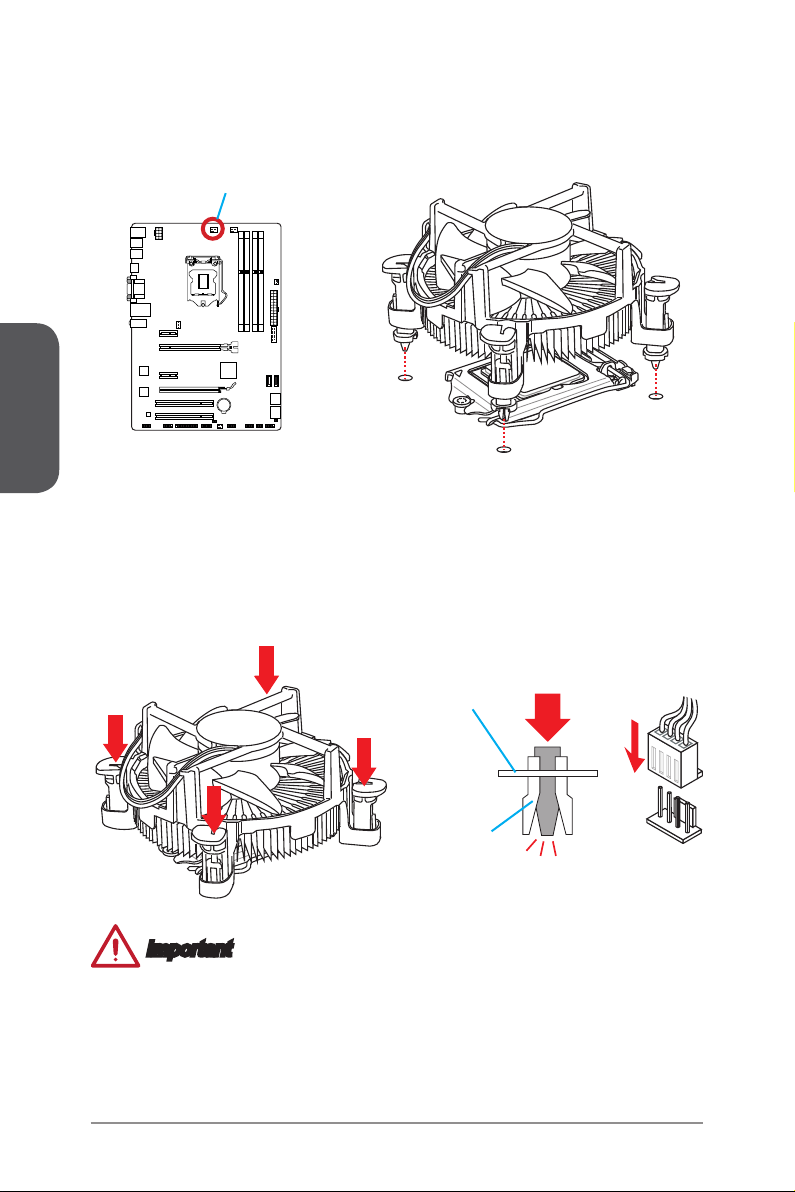
7. Locate the CPU fan connector on the motherboard.
8. Place the heatsink on the motherboard with the fan’s cable facing towards the fan
Chapter 1
9. Push down the heatsink until the four fasteners get wedged into the holes on
10. Inspect the motherboard to ensure that the fastener-ends have been properly
11. Finally, attach the CPU fan cable to the CPU fan connector on the motherboard.
connector and the fasteners matching the holes on the motherboard.
CPU fan connector
the motherboard. Press the four fasteners down to fasten the heatsink. As each
fastener locks into position a click should be heard.
locked in place.
Motherboard
Fastener-end
Important
Conrm that the CPU heatsink has formed a tight seal with the CPU before booting
•
your system.
Whenever the CPU is not installed, always protect the CPU socket pins by covering
•
the socket with the plastic cap.
If you purchased a separate CPU and heatsink/ cooler, Please refer to the
•
documentation in the heatsink/ cooler package for more details about installation.
1-14Getting Started
Memory
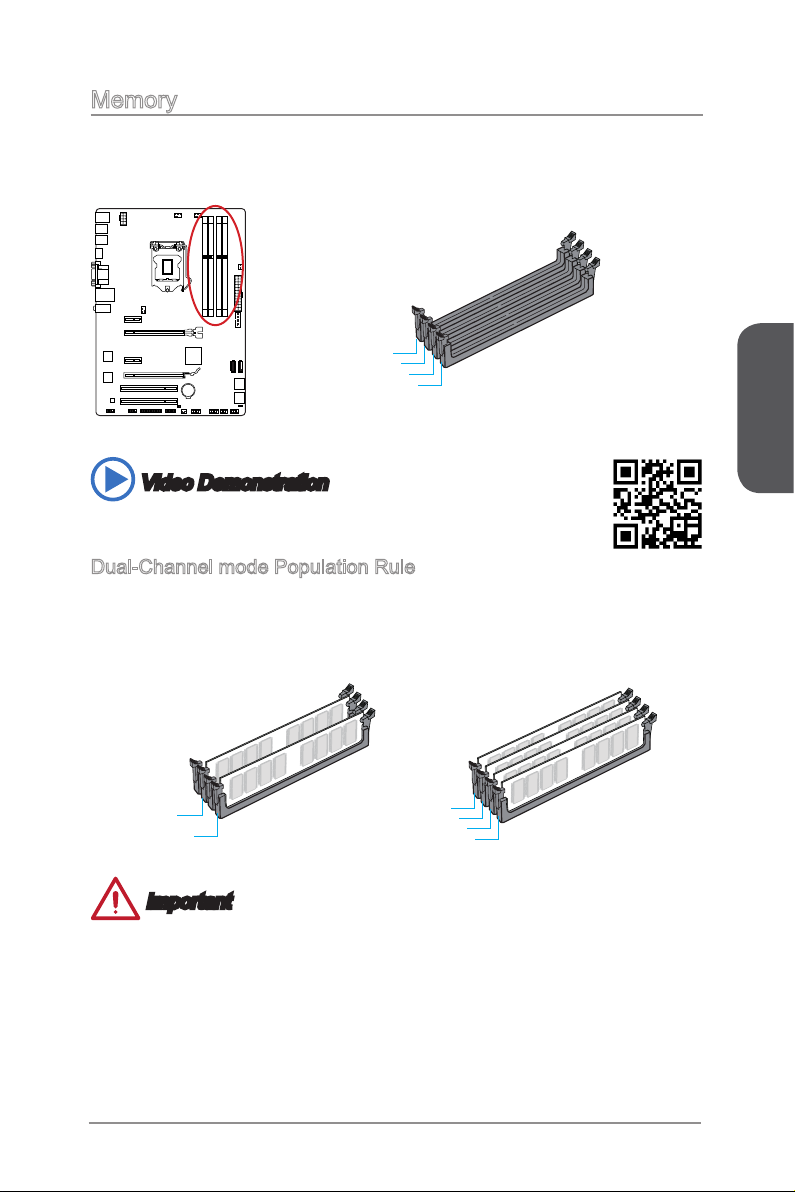
These DIMM slots are used for installing memory modules. For more information on
compatible components, please visit http://www.msi.com/service/test-report/
DIMM1
DIMM2
DIMM3
DIMM4
Video Demonstration
Watch the video to learn how to install memories at the address below.
Dual-Channel mode Population Rule
In Dual-Channel mode, the memory modules can transmit and receive data with two
data bus channels simultaneously. Enabling Dual-Channel mode can enhance system
performance. The following illustrations explain the population rules for Dual-Channel
mode.
Chapter 1
DIMM2
DIMM4
DIMM1
DIMM2
DIMM3
DIMM4
Important
DDR3 memory modules are not interchangeable with DDR2, and the DDR3
•
standard is not backward compatible. Always install DDR3 memory modules in
DDR3 DIMM slots.
To ensure system stability, memory modules must be of the same type and density
•
in Dual-Channel mode.
Due to chipset resource usage, the system will only detect up to 31+ GB of memory
•
(not full 32 GB) when all DIMM slots have 8GB memory modules installed.
1-15 Getting Started
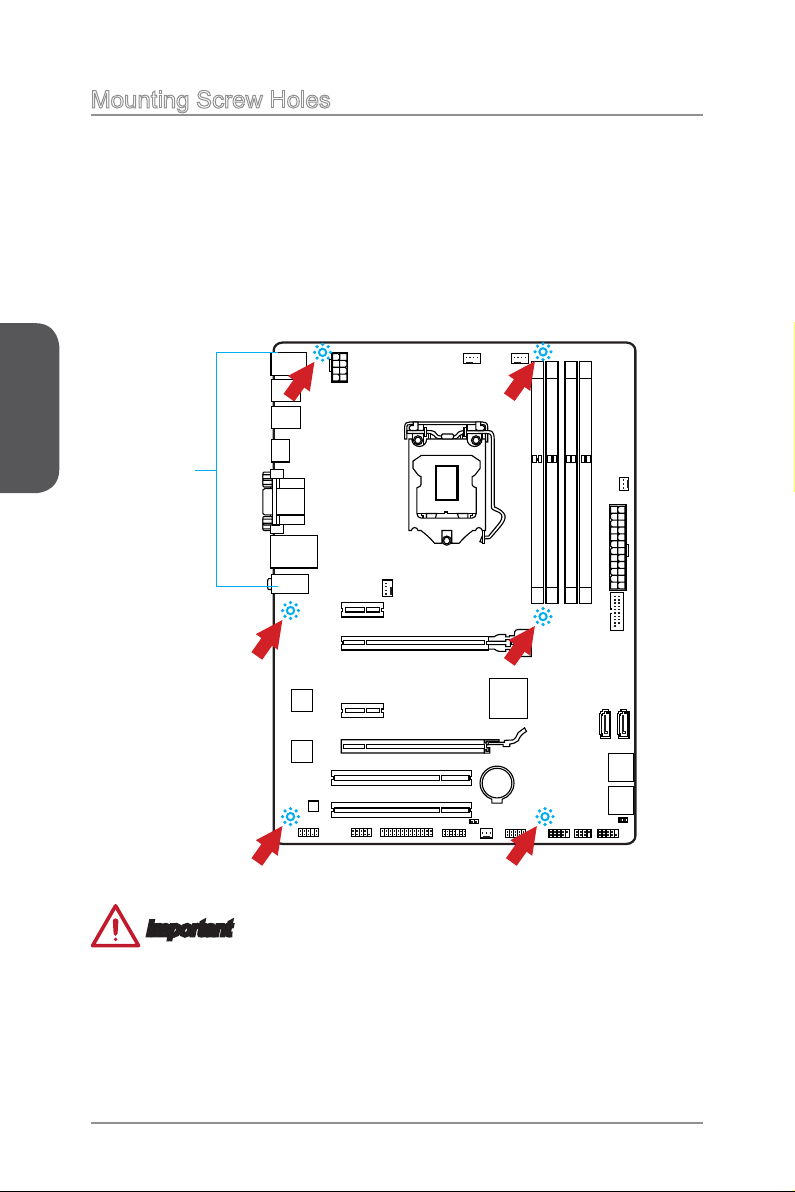
Mounting Screw Holes
When installing the motherboard, rst install the necessary mounting stands required
for an motherboard on the mounting plate in your computer case. If there is an
I/O back plate that came with the computer case, please replace it with the I/O
backplate that came with the motherboard package. The I/O backplate should snap
easily into the computer case without the need for any screws. Align the mounting
plate’s mounting stands with the screw holes on the motherboard and secure the
motherboard with the screws provided with your computer case. The locations of the
screw holes on the motherboard are shown below. For more information, please refer
to the manual that came with the computer case.
Chapter 1
The I/O ports should be facing
toward the rear of the computer
case. They should line up with the
holes on the I/O backplate.
Important
Install the motherboard on a at surface free from unnecessary debris.
•
To prevent damage to the motherboard, any contact between the motherboard
•
circuitry and the computer case, except for the mounting stands, is prohibited.
Please make sure there are no loose metal components on the motherboard or
•
within the computer case that may cause a short circuit of the motherboard.
1-16Getting Started
Loading…
The information herein is for personal use and informational purposes only. These documentations are only intended for a qualified person who is aware of the respective safety regulations and hazards. Manual-Hub.com cannot be held responsible for the accuracy or relevance of product information. Products names, logos, brands and other trademarks are the property of their respective trademark holders in the USA and other countries.
sitemap.xml | sitemap.txt
Disclaimer | Privacy Policy | Terms and Conditions
Copyright © 2011-2025 | Manual-Hub.com | All Rights Reserved.
Have a look at the manual MSI H87-g41 Manual online for free. It’s possible to download the document as PDF or print. UserManuals.tech offer 62 MSI manuals and user’s guides for free. Share the user manual or guide on Facebook, Twitter or Google+.
Z87-G41 PC Mate H87-G41 PC Mate B85-G41 PC Mate Motherboard G52-78501X1 Preface
xviPreface
Preface

Copyright  Notice
The material in this document is the intellectual property of MICRO-STAR INTERNATIONAL. We take every care in the preparation of this document, but no guarantee is given as to the correctness of its contents. Our products are under continual improvement and we reserve the right to make changes without notice.
Trademarks
All trademarks in this manual are properties of their respective owners.
MSI® is registered trademark of Micro-Star Int’l Co.,Ltd.
NVIDIA® is registered trademark of NVIDIA Corporation.
ATI® is registered trademark of AMD Corporation.
AMD® is registered trademarks of AMD Corporation.
Intel® is registered trademarks of Intel Corporation.
Windows® is registered trademarks of Microsoft Corporation.
AMI® is registered trademark of American Megatrends Inc.
Award® is a registered trademark of Phoenix Technologies Ltd.
Sound Blaster® is registered trademark of Creative Technology Ltd.
Realtek® is registered trademark of Realtek Semiconductor Corporation.
JMicron® is registered trademark of JMicron Technology Corporation.
Netware® is registered trademark of Novell, Inc.
Lucid® is trademark of LucidLogix Technologies, Ltd.
VIA® is registered trademark of VIA Technologies, Inc.
ASMedia® is registered trademark of ASMedia Technology Inc.
iPad, iPhone, and iPod are trademarks of Apple Inc.
Qualcomm Atheros and Killer are trademarks of Qualcomm Atheros Inc.
Revision  History
Revision Revision  HistoryDate
V1.0First release2013/04
■
■
■
■
■
■
■
■
■
■
■
■
■
■
■
■
■
Preface
xviiPreface

Smartphone Application
MSI+ is a smart web gadget that works as a shopping navigator and provides specs comparison for IT buyers. With a simple tap of the smartphone, you'll efficiently locate your ideal products from a wide variety of choices and, if product details are required, you may easily download user manuals within minutes. Better yet, the power calculator provides accurate estimates of power unit capacity for DIY users.
Technical  Support
If a problem arises with your system and no solution can be obtained from the user’s manual, please contact your place of purchase or local distributor. Alternatively, please try the following help resources for further guidance.

Visit the MSI website for technical guide, BIOS updates, driver updates, and other information:
http://www.msi.com/service/download/
Contact our technical staff at:
http://support.msi.com
xviiiPreface
Preface

Safety  Instructions
Always read the safety instructions carefully.
Keep this User’s Manual for future reference.
Keep this equipment away from humidity.
Lay this equipment on a reliable flat surface before setting it up.
The openings on the enclosure are for air convection hence protects the equipment from overheating. DO NOT COVER THE OPENINGS.
Make  sure  the  voltage  of  the  power  source  is  at  110/220V  before  connecting  the equipment to the power inlet.
Place  the  power  cord  such  a  way  that  people  can  not  step  on  it.  Do  not  place anything over the power cord.
Always Unplug the Power Cord before inserting any add-on card or module.
All cautions and warnings on the equipment should be noted.
Never pour any liquid into the opening that can cause damage or cause electrical shock.
If  any  of  the  following  situations  arises,  get  the  equipment  checked  by  service personnel:
The power cord or plug is damaged.
Liquid has penetrated into the equipment.
The equipment has been exposed to moisture.
The equipment does not work well or you can not get it work according to User’s Manual.
The equipment has been dropped and damaged.
The equipment has obvious sign of breakage.
DO NOT LEAVE THIS EQUIPMENT IN AN ENVIRONMENT ABOVE 60oC (140oF), IT MAY DAMAGE THE EQUIPMENT.
■
■
■
■
■
■
■
■
■
■
■
◯
◯
◯
◯
◯
◯
■
Preface
xixPreface

CE Conformity
Hereby, Micro-Star International CO., LTD declares that this device is in compliance with the essential safety requirements and other relevant provisions set out in the European Directive.
FCC-B Radio Frequency Interference Statement
This equipment has been tested and found to comply with the limits for a Class B digital device, pursuant to Part 15 of the FCC Rules. These limits are designed to provide reasonable protection against harmful interference in a residential installation. This equipment generates, uses and can radiate radio frequency energy and, if not installed and used in accordance with the instructions, may cause harmful interference to radio communications. However, there is no guarantee that interference will not occur in a particular installation. If this equipment does cause harmful interference to radio or television reception, which can be determined by turning the equipment off and on, the user is encouraged to try to correct the interference by one or more of the measures listed below.
Reorient or relocate the receiving antenna.
Increase the separation between the equipment and receiver.
Connect the equipment into an outlet on a circuit different from that to which the receiver is connected.
Consult the dealer or an experienced radio/television technician for help.
Notice 1
The changes or modifications not expressly approved by the party responsible for compliance could void the user’s authority to operate the equipment.
Notice 2
Shielded interface cables and A.C. power cord, if any, must be used in order to comply with the emission limits.
VOIR LA NOTICE D’INSTALLATION AVANT DE RACCORDER AU RESEAU.
◯
◯
◯
◯
This device complies with Part 15 of the FCC Rules. Operation is subject to the following two conditions:
this device may not cause harmful interference, and
this device must accept any interference received, including interference that may cause undesired operation.
1)
2)
Micro-Star International
MS-7850
xxPreface
Preface

Radiation Exposure Statement
This equipment complies with FCC radiation exposure limits set forth for an uncontrolled environment. This equipment and its antenna should be installed and operated with minimum distance 20 cm between the radiator and your body. This equipment and its antenna must not be co-located or operating in conjunction with any other antenna or transmitter.
European Community Compliance Statement
The equipment complies with the RF Exposure Requirement 1999/519/EC, Council Recommendation of 12 July 1999 on the limitation of exposure of the general public to electromagnetic fields (0–300GHz). This wireless device complies with the R&TTE Directive.
Taiwan Wireless Statements
無線設備警告聲明
經型式認證合格之低功率射頻電機,非經許可,公司、商號或使用者均不得擅自變更頻率、加大功率或變更原設計之特性及功能。
低功率射頻電機之使用不得影響飛航安全及干擾合法通信;經發現有干擾現象時,應立即停用,並改善至無干擾時方得繼續使用。前項合法通信,指依電信法規定作業之無線電通信。低功率射頻電機須忍受合法通信或工業、科學及醫療用電波輻射性電機設備之干擾。
警告使用者:這是甲類資訊產品,在居住的環境中使用時,可能會造成無線電干擾,在這種情況下,使用者會被要求採取某些適當的對策。
Japan VCCI Class B Statement
クラス B 情報技術装置
この装置は、情報技術装置等電波障害自主規制協議会(VCCI)の基準に基づくクラスB情報技術装置です。この装置が家庭内でラジオやテレビジョン受信機に近接して使われると、受信障害を引き起こすことがあります。取扱説明書にしたがって正しい取り扱いをしてください。
Korea Warning Statements
당해 무선설비는 운용중 전파혼신 가능성이 있음
Preface
xxiPreface

California, USA:
The button cell battery may contain perchlorate material and requires special handling when recycled or disposed of in California.
For further information please visit:
http://www.dtsc.ca.gov/hazardouswaste/perchlorate/
Taiwan:
For better environmental protection, waste batteries should be collected separately for recycling or special disposal.
廢電池請回收
European Union:
Batteries, battery packs, and accumulators should not be disposed of as unsorted household waste. Please use the public collection system to return, recycle, or treat them in compliance with the local regulations.
Battery Information
Chemical Substances Information
In compliance with chemical substances regulations, such as the EU REACH Regulation (Regulation EC No. 1907/2006 of the European Parliament and the Council), MSI provides the information of chemical substances in products at:
http://www.msi.com/html/popup/csr/evmtprtt_pcm.html
CAUTION: There is a risk of explosion, if battery is incorrectly replaced.
Replace only with the same or equivalent type recommended by the manufacturer.
xxiiPreface
Preface

WEEE (Waste Electrical and Electronic Equipment) Statement
ENGLISH
To protect the global environment and as an environmentalist, MSI must remind you that...
Under the European Union (“EU”) Directive on Waste Electrical and Electronic Equipment, Directive 2002/96/EC, which takes effect on August 13, 2005, products of “electrical and electronic equipment” cannot be discarded as municipal wastes anymore, and manufacturers of covered electronic equipment will be obligated to take back such products at the end of their useful life. MSI will comply with the product take back requirements at the end of life of MSI-branded products that are sold into the EU. You can return these products to local collection points.
DEUTSCH
Hinweis von MSI zur Erhaltung und Schutz unserer Umwelt
Gemäß der Richtlinie 2002/96/EG über Elektro- und Elektronik-Altgeräte dürfen Elektro- und Elektronik-Altgeräte nicht mehr als kommunale Abfälle entsorgt werden. MSI hat europaweit verschiedene Sammel- und Recyclingunternehmen beauftragt, die in die Europäische Union in Verkehr gebrachten Produkte, am Ende seines Lebenszyklus zurückzunehmen. Bitte entsorgen Sie dieses Produkt zum gegebenen Zeitpunkt ausschliesslich an einer lokalen Altgerätesammelstelle in Ihrer Nähe.
FRANÇAIS
En tant qu’écologiste et afin de protéger l’environnement, MSI tient à rappeler ceci...
Au sujet de la directive européenne (EU) relative aux déchets des équipement électriques et électroniques, directive 2002/96/EC, prenant effet le 13 août 2005, que  les produits électriques et électroniques ne peuvent être déposés dans les décharges ou tout simplement mis à la poubelle. Les fabricants de ces équipements seront obligés de récupérer certains produits en fin de vie. MSI prendra en compte cette exigence relative au retour des produits en fin de vie au sein de la communauté européenne. Par conséquent vous pouvez retourner localement ces matériels dans les points de collecte.
РУССКИЙ
Компания MSI предпринимает активные действия по защите окружающей среды, поэтому напоминаем вам, что....
В соответствии с директивой Европейского Союза (ЕС) по предотвращению загрязнения окружающей среды использованным электрическим и электронным оборудованием (директива WEEE 2002/96/EC), вступающей в силу 13 августа 2005 года, изделия, относящиеся к электрическому и электронному оборудованию, не могут рассматриваться как бытовой мусор, поэтому производители вышеперечисленного электронного оборудования обязаны принимать его для переработки по окончании срока службы. MSI обязуется соблюдать требования по приему продукции, проданной под маркой MSI на территории EC, в переработку по окончании срока службы. Вы можете вернуть эти изделия в специализированные пункты приема.
Preface
xxiiiPreface

ESPAÑOL
MSI como empresa comprometida con la protección del medio ambiente, recomienda:
Bajo la directiva 2002/96/EC de la Unión Europea en materia de desechos y/o equipos electrónicos, con fecha de rigor desde el 13 de agosto de 2005, los productos clasificados como “eléctricos y equipos electrónicos” no pueden ser depositados en los contenedores habituales de su municipio, los fabricantes de equipos electrónicos, están obligados a hacerse cargo de dichos productos al termino de su período de vida. MSI estará comprometido con los términos de recogida de sus productos vendidos en la Unión Europea al final de su periodo de vida. Usted debe depositar estos productos en el punto limpio establecido por el ayuntamiento de su localidad o entregar a una empresa autorizada para la recogida de estos residuos.
NEDERLANDS
Om het milieu te beschermen, wil MSI u eraan herinneren dat….
De richtlijn van de Europese Unie (EU) met betrekking tot Vervuiling van Electrische en Electronische producten (2002/96/EC), die op 13 Augustus 2005 in zal gaan kunnen niet meer beschouwd worden als vervuiling. Fabrikanten van dit soort producten worden verplicht om producten retour te nemen aan het eind van hun levenscyclus. MSI zal overeenkomstig de richtlijn handelen voor de producten die de merknaam MSI dragen en verkocht zijn in de EU. Deze goederen kunnen geretourneerd worden op lokale inzamelingspunten.
SRPSKI
Da bi zaštitili prirodnu sredinu, i kao preduzeće koje vodi računa o okolini i prirodnoj sredini, MSI mora da vas podesti da…
Po Direktivi Evropske unije (“EU”) o odbačenoj ekektronskoj i električnoj opremi, Direktiva 2002/96/EC, koja stupa na snagu od 13. Avgusta 2005, proizvodi koji spadaju pod “elektronsku i električnu opremu” ne mogu više biti odbačeni kao običan otpad i proizvođači ove opreme biće prinuđeni da uzmu natrag ove proizvode na kraju njihovog uobičajenog veka trajanja. MSI će poštovati zahtev o preuzimanju ovakvih proizvoda kojima je istekao vek trajanja, koji imaju MSI oznaku i koji su prodati u EU. Ove proizvode možete vratiti na lokalnim mestima za prikupljanje.
POLSKI
Aby chronić nasze środowisko naturalne oraz jako firma dbająca o ekologię, MSI przypomina, że...
Zgodnie z Dyrektywą Unii Europejskiej (“UE”) dotyczącą odpadów produktów elektrycznych i elektronicznych (Dyrektywa 2002/96/EC), która wchodzi w życie 13 sierpnia 2005, tzw. “produkty oraz wyposażenie elektryczne i elektroniczne “ nie mogą być traktowane jako śmieci komunalne, tak więc producenci tych produktów będą zobowiązani do odbierania ich w momencie gdy produkt jest wycofywany z użycia. MSI wypełni wymagania UE, przyjmując produkty (sprzedawane na terenie Unii Europejskiej) wycofywane z użycia. Produkty MSI będzie można zwracać w wyznaczonych punktach zbiorczych.
xxivPreface
Preface

TÜRKÇE
Çevreci özelliğiyle bilinen MSI dünyada çevreyi korumak için hatırlatır:
Avrupa Birliği (AB) Kararnamesi Elektrik ve Elektronik Malzeme Atığı, 2002/96/EC Kararnamesi altında 13 Ağustos 2005 tarihinden itibaren geçerli olmak üzere, elektrikli ve elektronik malzemeler diğer atıklar gibi çöpe atılamayacak ve bu elektonik cihazların üreticileri, cihazların kullanım süreleri bittikten sonra ürünleri geri toplamakla yükümlü olacaktır. Avrupa Birliği’ne satılan MSI markalı ürünlerin kullanım süreleri bittiğinde MSI ürünlerin geri alınması isteği ile işbirliği içerisinde olacaktır. Ürünlerinizi yerel toplama noktalarına bırakabilirsiniz.
ČESKY
Záleží nám na ochraně životního prostředí - společnost MSI upozorňuje...
Podle směrnice Evropské unie (“EU”) o likvidaci elektrických a elektronických výrobků 2002/96/EC platné od 13. srpna 2005 je zakázáno likvidovat “elektrické a elektronické výrobky” v běžném komunálním odpadu a výrobci elektronických výrobků, na které se tato směrnice vztahuje, budou povinni odebírat takové výrobky zpět po skončení jejich životnosti.  Společnost MSI splní požadavky na odebírání výrobků značky MSI, prodávaných v zemích EU, po skončení jejich životnosti. Tyto výrobky můžete odevzdat v místních sběrnách.
MAGYAR
Annak érdekében, hogy környezetünket megvédjük, illetve környezetvédőként fellépve az MSI emlékezteti Önt, hogy ...
Az Európai Unió („EU”) 2005. augusztus 13-án hatályba lépő, az elektromos és elektronikus berendezések hulladékairól szóló 2002/96/EK irányelve szerint az elektromos és elektronikus berendezések többé nem kezelhetőek lakossági hulladékként, és az ilyen elektronikus berendezések gyártói kötelessé válnak az ilyen termékek visszavételére azok hasznos élettartama végén.  Az MSI betartja a termékvisszavétellel kapcsolatos követelményeket az MSI márkanév alatt az EU-n belül értékesített termékek esetében, azok élettartamának végén. Az ilyen termékeket a legközelebbi gyűjtőhelyre viheti.
ITALIANO
Per proteggere l’ambiente, MSI, da sempre amica della natura, ti ricorda che….
In base alla Direttiva dell’Unione Europea (EU) sullo Smaltimento dei Materiali Elettrici ed Elettronici, Direttiva 2002/96/EC in vigore dal 13 Agosto 2005, prodotti appartenenti alla categoria dei Materiali Elettrici ed Elettronici non possono più essere eliminati come rifiuti municipali: i produttori di detti materiali saranno obbligati a ritirare ogni prodotto alla fine del suo ciclo di vita. MSI si adeguerà a tale Direttiva ritirando tutti i prodotti marchiati MSI che sono stati venduti all’interno dell’Unione Europea alla fine del loro ciclo di vita. È possibile portare i prodotti nel più vicino punto di raccolta
All MSI manuals
Comments (0)
Related Manuals for MSI H87-g41 Manual

Chapter 1
1-24
Getting Started
JFP1, JFP2: System Panel Connectors
These connectors connect to the front panel switches and LEDs. The JFP1 connector
is compliant with the Intel
®
Front Panel I/O Connectivity Design Guide. When
installing the front panel connectors, please use the optional M-Connector to simplify
installation. Plug all the wires from the computer case into the M-Connector and then
plug the M-Connector into the motherboard.
Video Demonstration
Watch the video to learn how to Install front panel connectors.
1.+
3.-
10.N
o Pin
5.-
Rese
t Sw
itch
HDD
LED
Pow
er Sw
itch
Pow
er LE
D
7.+
9.Re
serve
d
8.-
6.+
4.-
2.+
JFP1
1.Gro
und
3.Su
spen
d LE
D
5.Po
wer L
ED
7.No
Pin
8.+
6.-
4.+
2.-
Buzz
er
Spea
ker
JFP2
Important
On the connectors coming from the case, pins marked by small triangles are
positive wires. Please use the diagrams above and the writing on the optional M-
Connectors to determine correct connector orientation and placement.
The majority of the computer case’s front panel connectors will primarily be plugged
into JFP1.
•
•