
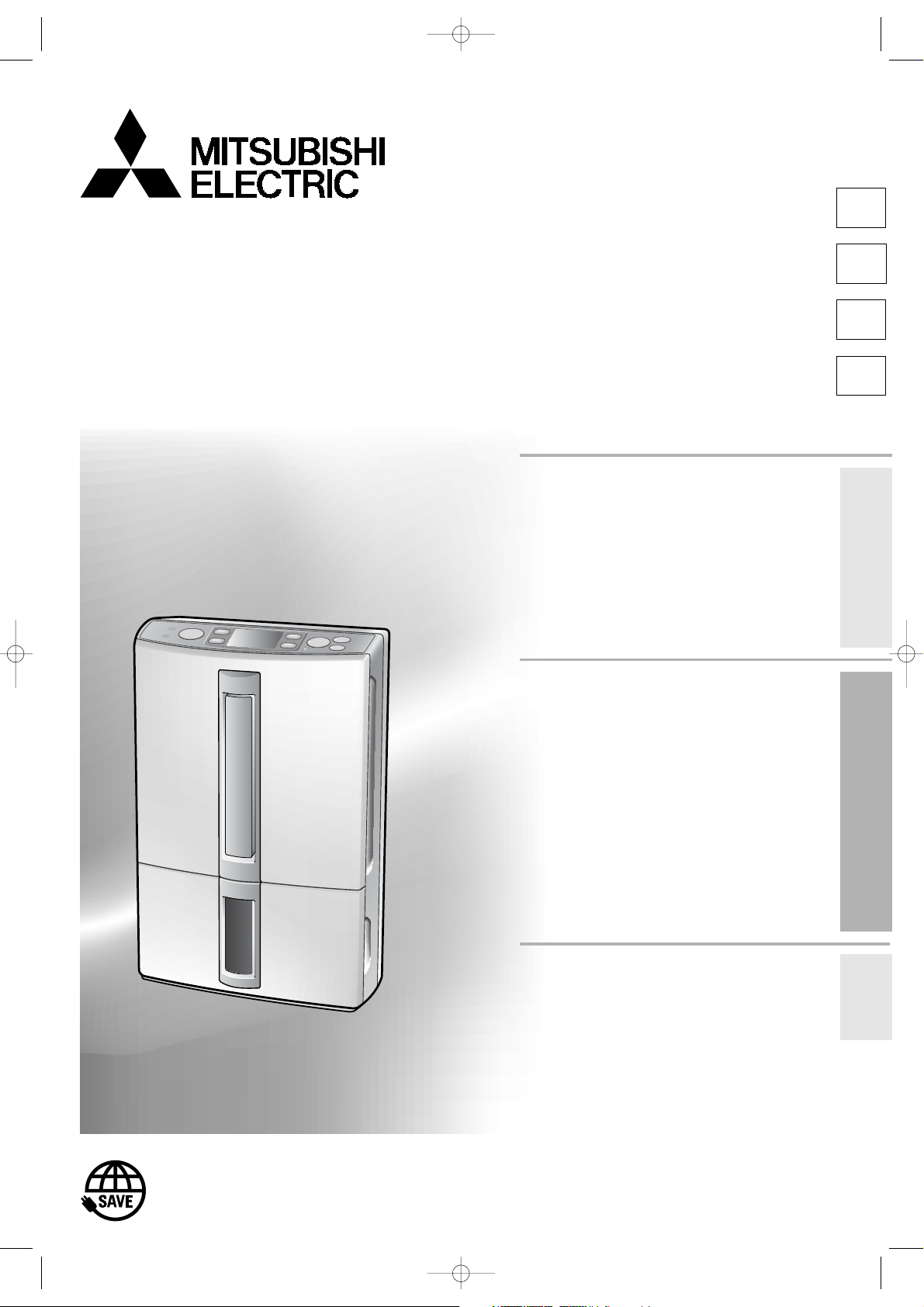
DEHUMIDIFIER
English
E
MODEL
MJ-E16VX-S1
INSTRUCTION MANUAL
Features
●Drying inside
●Air Filter and Washable
Photocatalytic Filter
●Easy Dehumidifying/Laundry
Italiano
Svenska
Deutsch
Table of Contents page
¡Recommended ways of using the unit
depending on purpose …………………….2
¡Frequently Asked Questions ……………3
¡Precautions……………………………………..4
¡Warnings…………………………………………6
¡Tips on dehumidifying……………………..6
¡Names and Functions of Parts …………7
Unit-Control Panel-LCD Panel
(Low Temperature/Defrost/High humidity)
¡Things to be aware of…………………….10
¡Before using your dehumidifier………10
¡Turning the Unit ON and OFF …………12
To turn ON/To turn OFF
Reading the humidity display/Tank full lamp
¡Easy Operation………………………………13
EASY DEHUMIDIFYING/LAUNDRY
¡Setting modes ……………………………….14
LOW, MILDEW GUARD and LOW TEMP/
AUTO/AIR PURIFIER
¡Swing louvre function ……………………16
¡Drying inside …………………………………17
¡Using the Timer ……………………………..18
OFF timer operation/ON timer operation
¡Using the Child Lock ……………………..20
¡Carrying the Unit……………………………20
¡Removing Water from the Tank……….21
¡Continuous Drainage……………………..22
I
SV
DE
Before using the unit
Operating
Protect our environment and enrich our lives by
saving energy
¡Maintenance ………………………………….23
¡Replacing the
¡Storage and Disposal …………………….25
¡Troubleshooting …………………………….26
¡Specifications………………………………..28
¡In order to ensure correct usage, please read
this instruction manual carefully and retain it for
future reference.
¡Before accepting the Warranty at the time of
purchase, please make sure that the date of
purchase, place of purchase and other items
are correctly filled in the form.
Filter and Cartridge
…….25
Troubleshooting
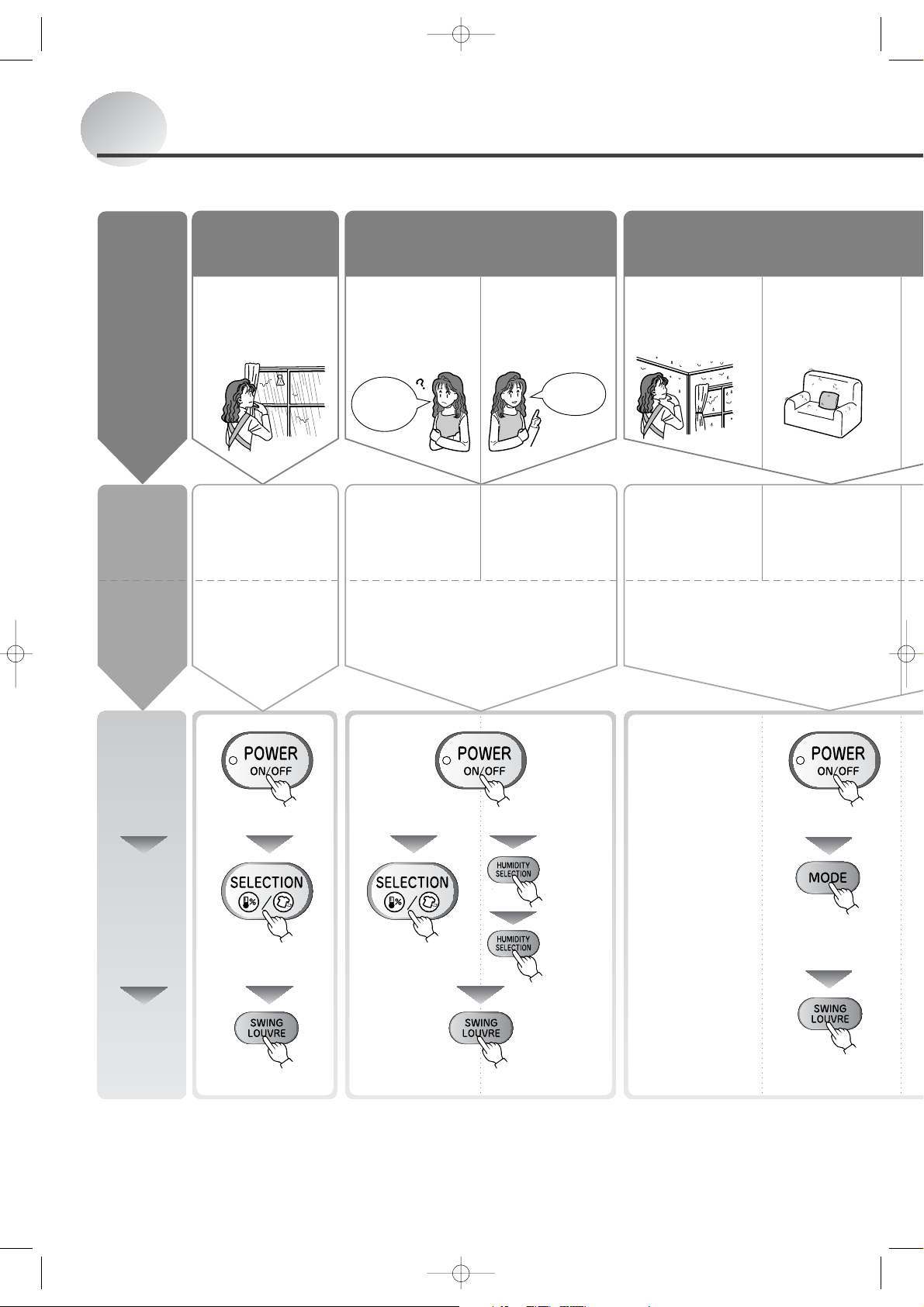
Recommended ways of using the unit depending
Combine operating mode and swing louvre function to get optimum results.
When you don’t
want to hang the
Objective
clothes outside or
it is raining…
LAUNDRY
Recommended
operating
mode
Recommended
swing setting
The unit operates for 12
hours and automatically
switches off.
UPWARD
Aim toward clothes.
Drying
laundry
Lowering room humidity Preventing mold/
When you don’t
know what
humidity level to
set the unit to…
What
should I
set it to?
EASY
DEHUMIDIFYING
The unit operates
until the air is
comfortable.
Any swing setting Any swing setting
When you want to
set the humidity
level…
I want to
set it to
60%
AUTO
The unit maintains
the set humidity.
When
condensation
occurs indoors…
LOW TEMP
The unit changes the
airflow according to
room temperature.
To prevent
mildew…
MILDEW
GUARD
The unit operates
in mildew suppression mode.
Procedure
Press the
power button
(the unit turns on)
Page 12
Select the
mode
Page 13-15
Select the
louvre swing
range
Page 16
Turn the power on
Turn the power on
Turn the
power on
Switch to
HUMIDITY
SELECTION
Select
MILDEW
GUARD
Select
LAUNDRY
Select EASY
DEHUMIDIFYING
Set the
humidity
Select
LOW TEMP
Select UPWARD Select any swing setting Select any swing setting
2
on purpose
Frequently Asked Questions
he
on
condensation
To keep the inside
of closets and
shoeboxes dry…
LOW
The dehumidifier
operates regardless
of the humidity level.
REAR
Direct the
air flow
To clean
the air
There is no need for
dehumidification, but you
wish to remove pollen and
dust from the air.
AIR PURIFIER
The unit operates the air
purifier only.
Any swing setting
Turn the power on
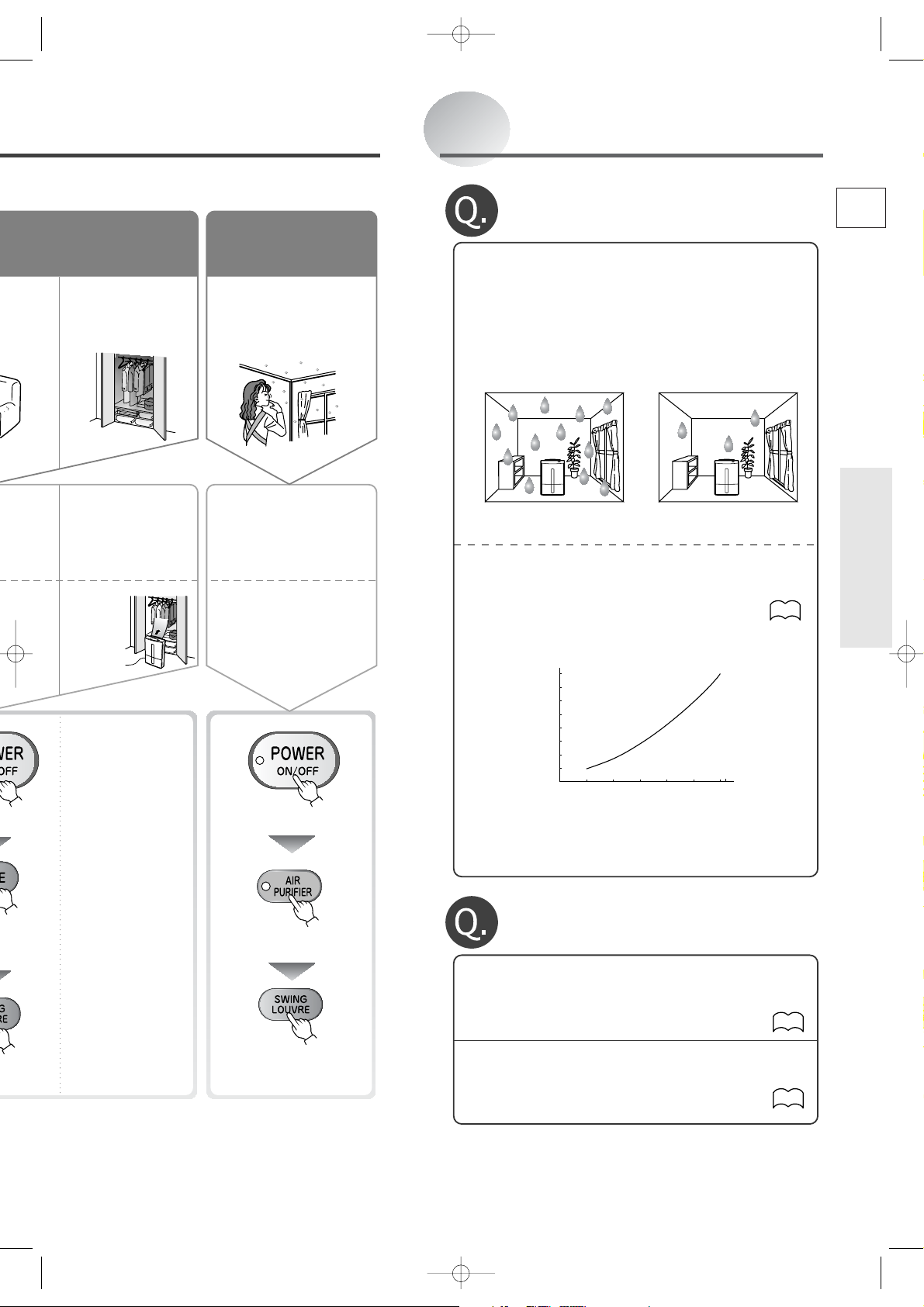
Why does the dehumidifier seem
to collect less water in winter?
A.When the temperature and humidity are
low, the amount of water collected is
decreased.
In winter, because the temperature is lower than in
summer, the effects of the dehumidifier decrease
dramatically as shown in the graph below.
Although less water collects in the tank, this is not
a malfunction.
Summer (humidity) Winter (dampness)
* If the temperature is low, but the humidity is high
due to snow or rain, operating the unit in LOW
TEMP mode will yield better results than in LOW
mode.
Values for LOW dehumidifying
operation.
16
14
12
10
8
6
4
2
Dehumidification capacity (L/day)
0
5 10152025
¡ The values shown on the graph were measured at
constant temperature and humidity and do not
reflect values obtained in actual usage conditions.
30
Room temperature (°C)
14
E
E
Before using the unit
ct
W
D
Select LOW
Select REAR
Switch to AIR PURIFIER
Select any
swing setting
•
Why doesn’t the dehumidifier operate?
•
Why does the unit stop operating suddenly?
A.The unit might be in LAUNDRY mode.
The unit operates for 12 hours and automatically
switches off.
A.
The unit might be in EASY DEHUMIDIFYING,
13
MILDEW GUARD, or AUTO mode.
The unit automatically switches between
dehumidifying, airflow only, and non-operation.
13~15
3
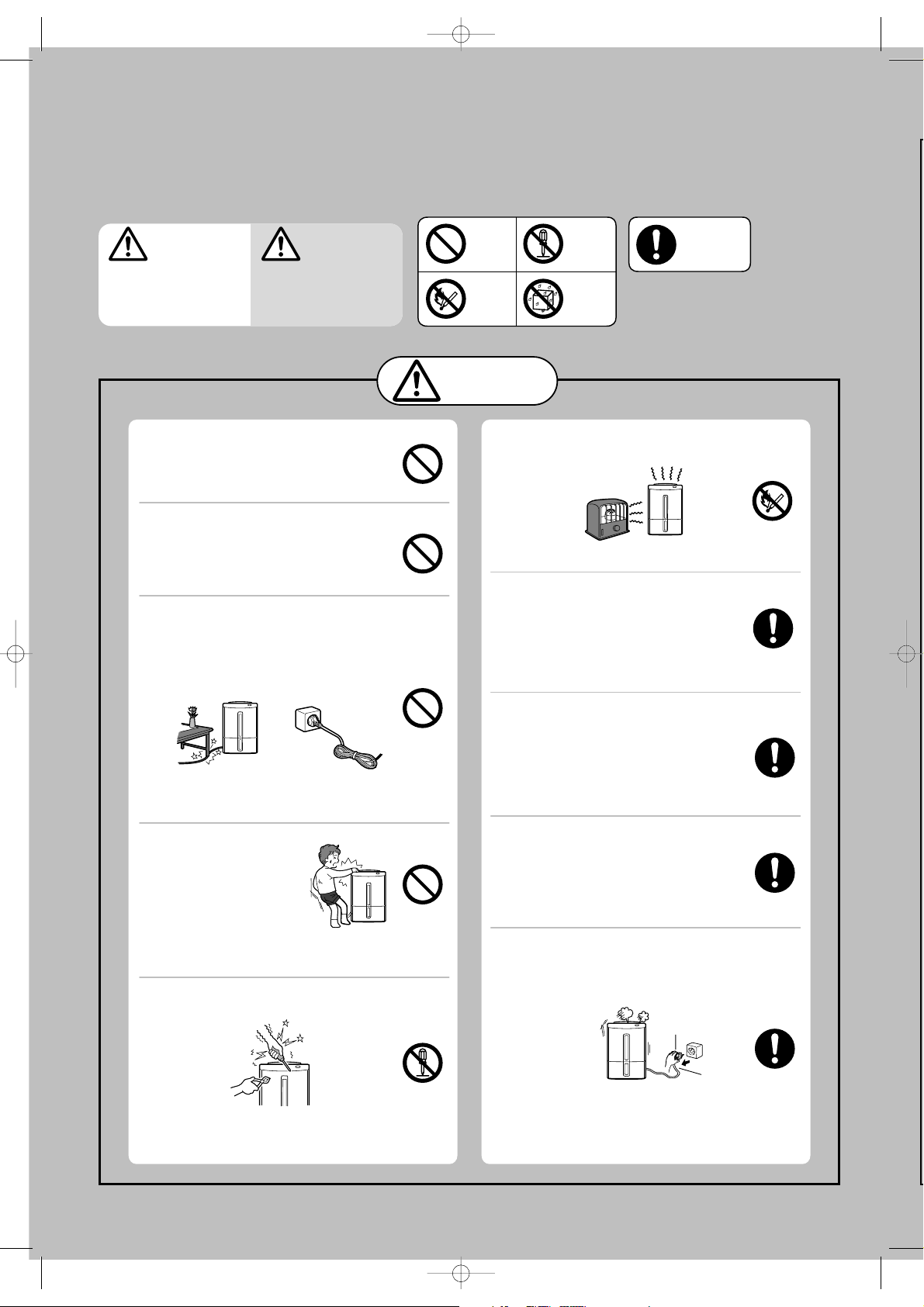
Precautions
The following diagrams indicate
circumstances where danger can result from
mishandling the unit.
WARNING
Mishandling may
result in fatal or
serious injuries.
Mishandling may result in
injuries or damage to your
home or property, etc.
CAUTION
Meanings of the graphic symbols used in this manual and
on the unit are explained below.
Always
follow the
instructions
Forbidden
Keep
away
from fire
Do not
disassemble
Do not
subject to
water
WARNING
Do not start/stop the unit by
plugging/unplugging the power
cord.
This may result in fire and/or electric shock.
Do not use extension cords or
multiple head adapters.
This may result in fire, electric shock or
malfunctions.
Do not damage or modify the
power cord or plug.
Do not modify, bundle, twist, bend or heat the
power cord. Do not place under objects or
use with the end close to the plug bent.
The cord may be damaged resulting in fire or
electric shock. (Keep pets from biting the
cord.)
Do not put your fingers
or any long object, into
the air intake/outlet. Do
not touch the swing
louvre.
The internal fan rotates at high speeds, and
such actions may result in injury or
malfunctions.
Do not attempt to repair,
disassemble, or modify the unit.
Do not put the unit near heatgenerating devices (such as stoves,
fan heaters, etc.).
The plastic parts may melt causing fire.
Wipe dust off the power plug and
insert the plug firmly.
If the plug is not fully inserted into the
socket, dust may gather on the
connectors which may cause fire and/or
electric shock.
Use 220-240V AC power sockets.
Connecting to power sockets other than 220240V AC may result in fire and/or electric
shock.
Remove water that has collected
in the tank.
Accidentally drinking the water or using it for
other purposes may cause illness and/or
unforeseen accidents.
Should abnormal symptoms occur (a
burning smell, etc.), switch off the unit
and unplug it from the socket.
4
This may result in fire and/or electric shock.
See the last page for service contact details.
Continuing to operate the unit may result in
fire, electric shock, or malfunctions.
See the last page for service contact details.
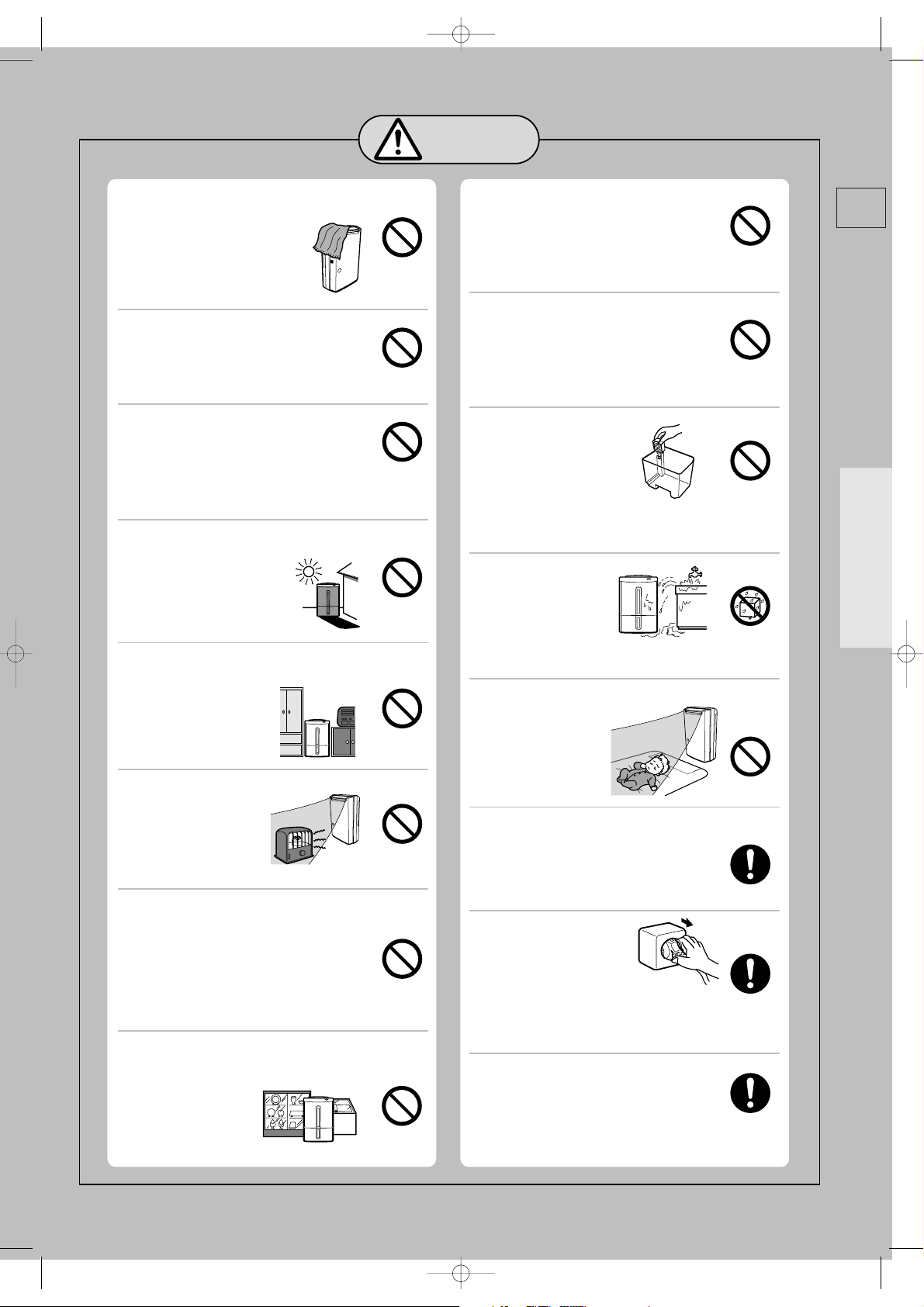
CAUTION
Do not cover the front or side air
intakes or the air outlet with cloth,
curtain, etc.
This results in poor ventilation and
may cause heat generation/fire.
Do not stand on, sit on or lean
against the unit.
The unit may tip over causing injury.
Do not put vases or any other
objects filled with water on the unit.
Water may leak into the unit adversely affecting
electric insulation and cause electric shock
and/or fire by short-circuiting.
Do not use the unit where it may be
exposed to direct sunlight or other weather
conditions. (This unit is for
indoor use only.)
This may cause overheating,
electric shock and/or fire
caused by an electric leak.
Do not use the unit in narrow,
enclosed places such as inside
closets, between
pieces of furniture, etc.
This results in poor
ventilation and may cause
heat generation and/or fire.
Do not use combustion appliances
in the path of the
air outlet.
This may cause
incomplete combustion
in the appliance.
Do not use the unit in places
where chemicals are used (such
as hospitals, factories,
laboratories or beauty salons).
Chemicals and solvents evaporated in the
air may harm the unit and cause water in the
tank to leak, resulting in damage to
property.
Do not use the unit for special
purposes, such as preservation of
food, art or scientific works.
This may negatively affect
the quality of the items stored.
Do not drain water continuously if there
is a possibility that temperature around
the hose could drop to freezing point.
Water inside the hose may freeze and prevent
the water in the tank from flowing out.
The water may leak from the unit and damage
surrounding objects.
Do not use the unit in places
that may be subject to oil or
flammable gas leakage.
Such a leak around the unit may cause
combustion and fire.
Do not remove the
Styrofoam from the
floating element.
The floating element will not
be able to detect a full tank
resulting in water leakage, which may
damage surrounding objects or cause
electric shock and/or an electric leak.
Do not wash the unit
with water. Do not
use the unit where it
is likely to come in
contact with water.
Exposure to water may result in fire or
electric shock caused by an electric leak .
Do not point air-flow from the unit
directly at the body.
If air-flow is directed at
the body for long
periods, it may harm
one’s physical
condition and lead to
dehydration.
Install the unit in a location where
the floor is flat and stable.
If the unit falls over, the water collected in the
water tank may leak damaging surrounding
objects and in turn result in fire or electric
shock caused by an electrical leak.
Grasp the plug and
remove from the
power socket.
When removing the plug from
the power socket, do not pull on it diagonally
or by the cord as this may cause the
projections/wiring to be damaged resulting in
a short circuit, electric shock or fire.
Before moving the unit always
switch it off, unplug it and remove
water from the water tank.
Moving the unit with water in its tank may
cause the water to leak and damage the
surrounding objects and in turn result in
electric shock and/or an electric leak.
E
Before using the unit
5
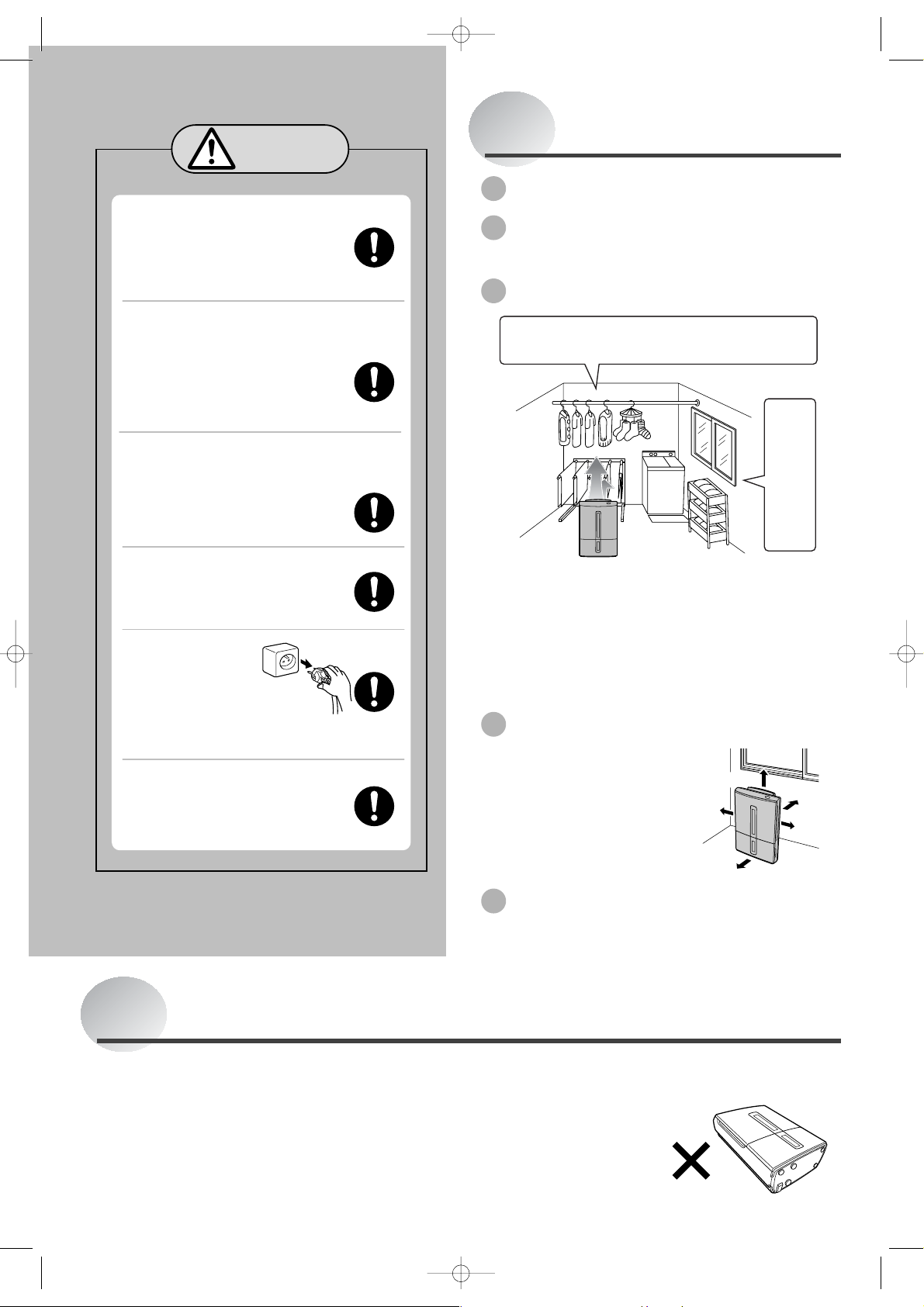
Precautions (cont.)
CAUTION
After emptying the tank,
transport the unit by grasping
the handle firmly.
Losing your footing while carrying the
unit may cause personal injury or
damage to the floor.
When using the continuous
drainage outlet, make sure to
position the hose so that the
water drains without
obstruction.
The water in the tank may leak and
damage surrounding objects.
When draining water continuously
or left unattended for long periods,
inspect the unit every two weeks.
Do not allow debris to clog the
filter/hose as this may cause over-
heating/leakage.
Use the unit with caution in rooms
where the walls, furniture and art
work are vulnerable to dry air, as it
may cause cracks and warping.
Switch the unit off
and unplug from
the power source
when cleaning it.
When the unit is on, the internal
fan rotates at high speeds and may
cause injury.
Unplug the unit from the power
source when not using the unit
for an extended period of time.
Otherwise it may cause fire and/or electric
shock caused by an electric leak.
Tips on dehumidifying
Drain the water tank before use
Refrain from opening
doors/windows during operation
Drying laundry indoors
¡Direct the louvres at the laundry.
¡Space laundry to improve airflow.
Use the dehumidifier in
a small, enclosed room.
Maintain room temperature above 16°C
with a heater.
¡ Drying times will vary depending on the nature of the
laundry and the room temperature. In low
temperatures, drying takes about twice as long as
normal. In low temperatures (10°C), drying takes
about twice as long as when normal (20°C+).
¡ The airflow is strongest to the top right of the unit.
Installing your dehumidifier
Make sure to leave some
space around the unit.
<For use in close proximity to
a wall>
Stop the louvre in the
vertical position. Blowing
air at the wall may cause
staining.
At least 50 cm
At least
20 cm
At least 20 cm
At least
2 cm
At least
20 cm
Warnings
●
Keep the unit always in an upright position.
Inclining the unit may cause water in the tank
to leak into the unit, resulting in malfunction.
Should this happen contact service number
on the last page for advice.
● Damage to the dehumidifier caused by
atmospheric conditions (ie. Salt or Sulphur)
will not be covered under warranty.
6
Operating noise
Place the unit on top of a mat. This reduces
vibration and noise. It also prevents leaving
depressions on carpets.
● Do not carry the unit horizontally.
This may result in malfunctions.
Such malfunctions
are NOT covered
under warranty.
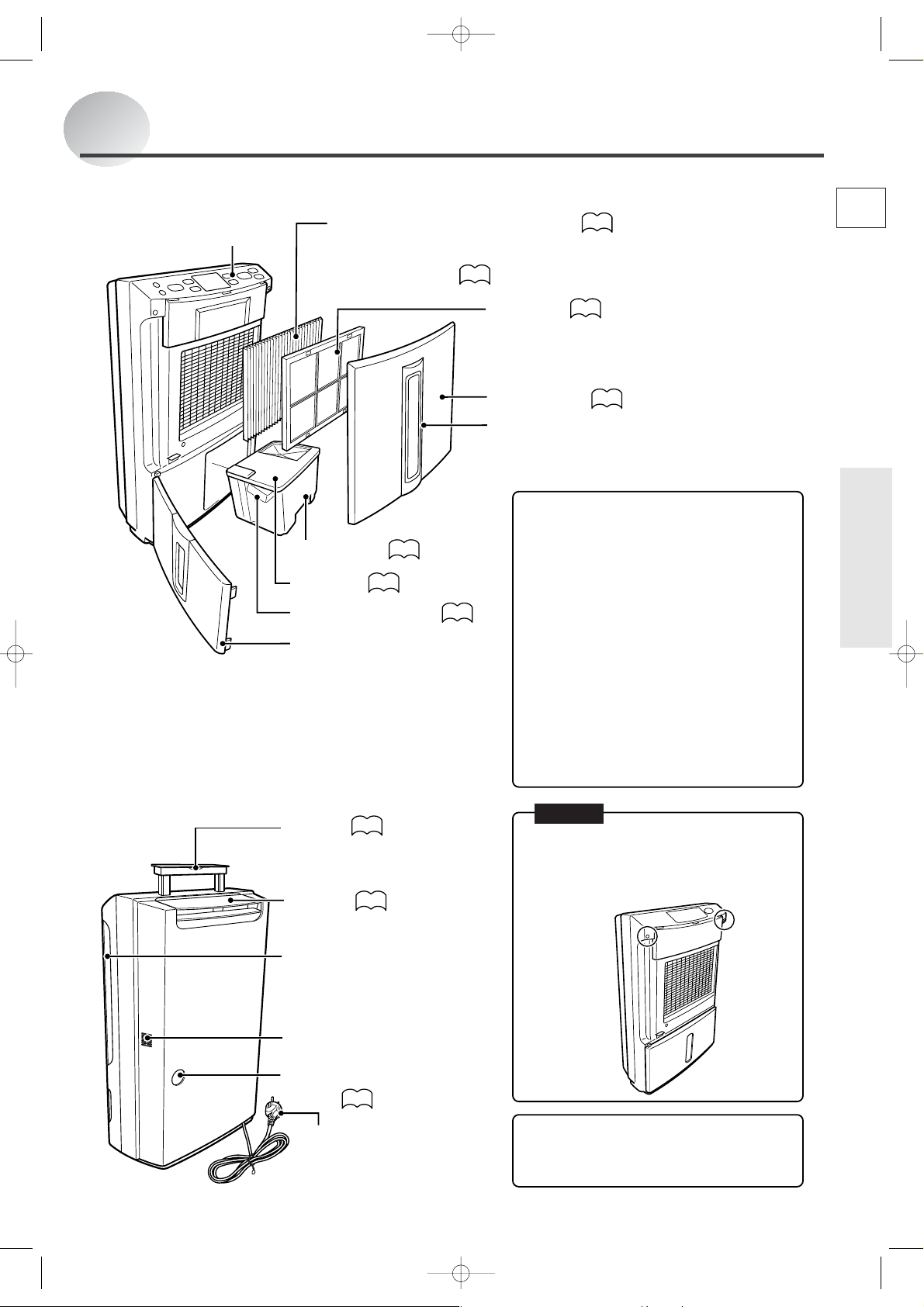
Names and Functions of Parts
Front
Back
Control panel
Washable photocatalytic filter
24~25
(hereafter: photocatalytic filter) (see box below for discussion)
Supplied with unit.
Fit before use.
10
Pre-filter
Air filter performance testing facility
Japan Spinners Inspecting Foundation (tested
under JIS L 1902 standards)
Front panel
23
10
Front Air Intake
Do not block.
What is a washable photocatalytic filter?
The washable photocatalytic filter is made from
two layers: a white particle filter and a blue airfreshener filter.
Water tank
Tank lid
11•21
11•21
Floating element
Front door
21
<
Particle filter
The particle filter removes pollen* and dust
particles.
<
Air-freshener Filter
The special air-freshening agent contained in
the fibres absorbs odorants such as ammonia.
The odorants are broken down by
photocatalysis constantly renewing the air-
freshening properties.
As the filter’s particle and air-freshening
properties are renewed by simply soaking and
leaving it to dry in the sun, the filter can be used
continuously over a long time.
Cigarette smoke and toxins found in smoke,
such as carbon monoxide, cannot be removed
with this filter.
>
>
* Diameter of pollen: approx. 10–100µm
E
Before using the unit
Handle
Raise handle to transport.
Louvre
20
16
Side air intakes (left/right)
Do not block.
Sensor
Do not cover.
Continuous drainage
outlet
22
Power plug
NOTE
It is impossible to remove the back panel
because the two spots shown are fastened with
two special screws.
If the unit malfunctions, contact your Mitsubishi
dealer:
The water tank may contain water residue at
time of purchase. This is from final product
testing at the factory and is not due to a defect.
7
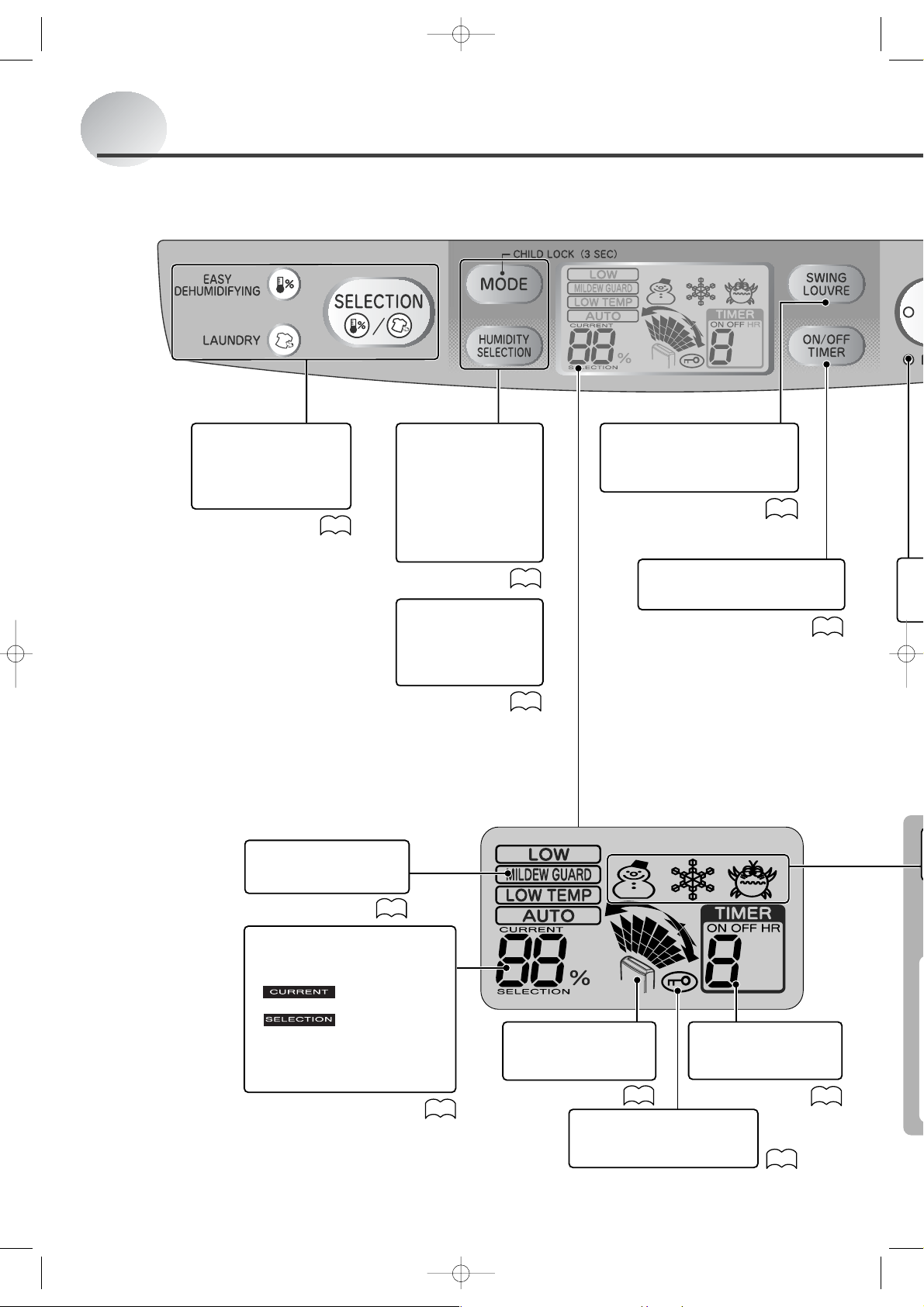
Names and Functions of Parts (cont.)
Control Panel
¡Lamp
Current mode lights.
¡Selection button
Switches modes.
13
¡Mode button
For switching from
one operating mode
to another.
¡Humidity
Selection
This is used to set the
target humidity.
¡Child lock
To set child lock,
press the mode
button for three
seconds.
LCD Panel
All indicators on the LCD panel shown below.
¡Mode Indicator
Indicates the current
operating mode.
14~15
14~15
20
¡Swing louvre button
Sets swing louvre direction
or locks it into position.
16
¡Timer ON/OFF
Sets timer.
18~19
8
¡Humidity Indicator
This indicates the approximate
humidity.
indicates the
current humidity
indicates the
humidity setting in
AUTO mode
The current humidity is
displayed in a range from 30 to
80%.
12
¡Swing monitor
Indicates the direction
of the swing louvre.
¡
Child lock indicator
Displayed while child lock
is active.
16
¡Timer display
Displays the time set
for the ON/OFF timer.
18~19
20
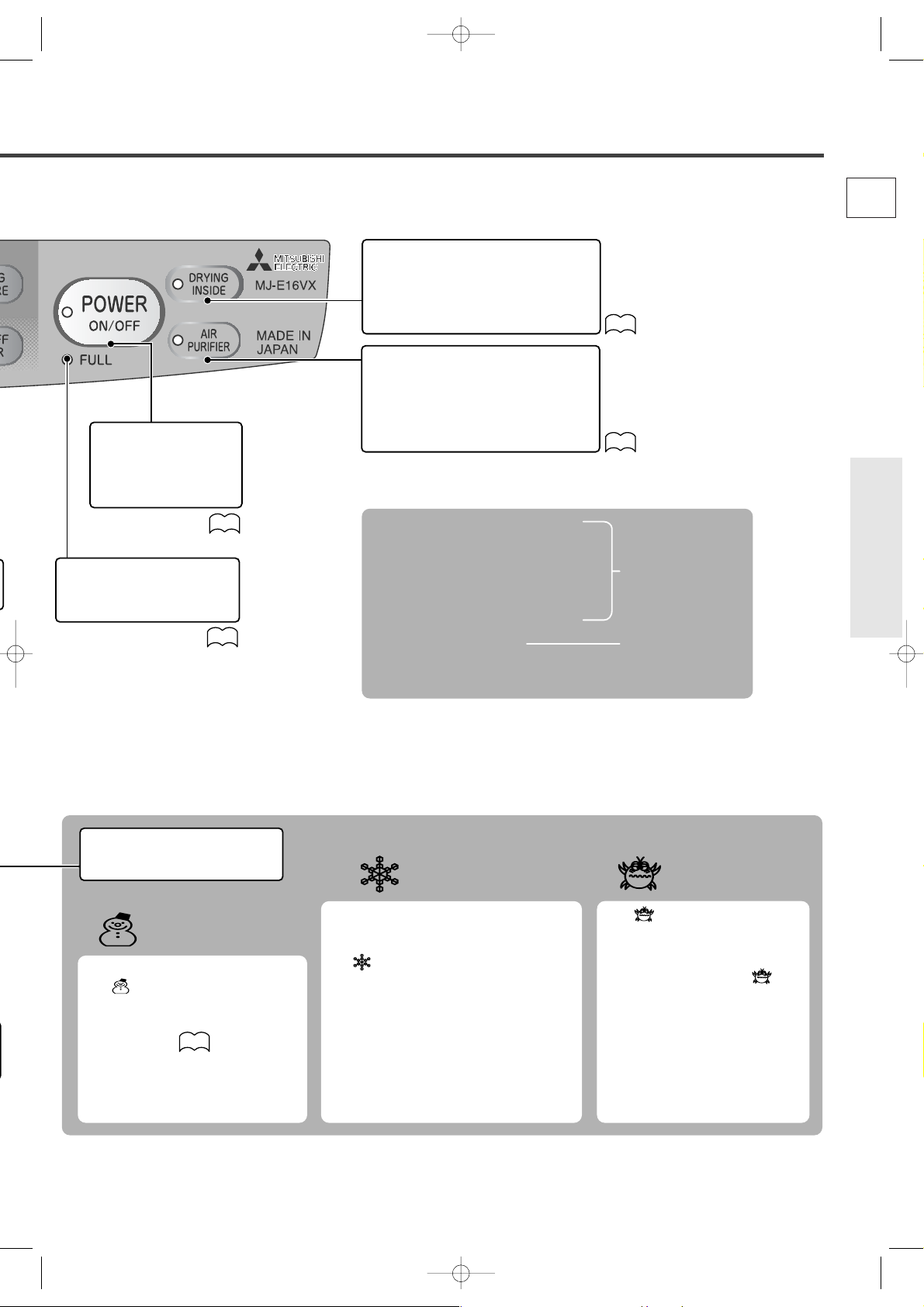
¡Power lamp
Lights when unit is ON.
¡Power button
Use this to switch the
unit ON and OFF.
¡Tank full light
This lights up to warn that
the water tank is full.
12
12
¡Drying inside lamp
Flashes when drying inside in
progress.
¡Drying inside button
Activates/deactivates drying inside.
17
¡Air purifier lamp
Lights during air purifier-only
operation.
¡Air purifier button
Switches to air purifier-only
operation.
15
You can select from 7 operating modes.
¡EASY DEHUMIDIFYING
¡LAUNDRY
¡LOW
¡MILDEW GUARD
¡LOW TEMP
¡AUTO
¡AIR PURIFIER
E
All modes include
dehumidifier and air
purifier functions.
Before using the unit
Air purifier only
operation. The
dehumidifier
function is disabled.
¡Information display
Indicates room and unit
condition.
Low Temperature
Indicator
The indicator comes on if the
room temperature drops below 15°C.
Activating Low Temp mode is
recommended.
14
DEFROST Indicator
Airflow (dehumidifying) will stop and the
frost that has accumulated inside will be
melted and dropped into the tank when
the indicator is on.
Please wait a moment as operation will
resume in around 5 minutes.
While in DEFROST mode, airflow
(dehumidifying) and the louvre will stop.
The sounds coming from the unit will
also change.
DEFROST will start automatically when room
temperature drops below 15°C (This may be
as often as once every 40 minutes).
High humidity
warning
The indicator flashes when
the unit is OFF and the humidity in
the room exceeds 75%.
Activating the dehumidifier is
recommended when the
indicator is flashing.
If the High humidity warning is not
used, remove the power plug from
the power socket.
9
Loading…
Обзор бытового осушителя воздуха Mitsubishi Electric MJ-E16VX
Мощный бытовой осушитель Mitsubishi Electric MJ-E16VX наиболее оптимален для помещений с очень высокой влажностью, таких как сушилки, ванные комнаты, душевые кабинки. Осушительное устройство MJ-E16VX легко транспортируется на нужный объект, за счет малого веса и компактно. Основными показателями данного оборудования являются: встроенный фильтр для очистки воздуха, 6-литровый бак для конденсата, указатель уровня жидкости, производительность до 16 л воды в день, гигростат, автоматическое размораживание. В приборе предусмотрен таймер, с помощью которого можно устанавливать временные рамки работы прибора в интервале от 1 до 9 часов осушения. Система поддерживает режим установки уровня влажности 50%, 60% и 70%, а также имеется функцию автоматического отключения при переполнении тары для конденсата.
Принцип действия
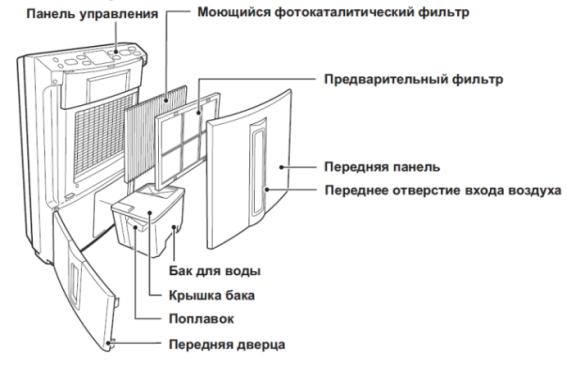
Осушитель всасывает воздух из помещения, охлаждает его, пропуская через охлаждающий теплообменник, на котором и происходит конденсация влаги. Образовавшийся конденсат стекает в накопительный бак или удаляется через дренажную систему. Осушенный воздух подогревается на нагревающем теплообменнике и возвращается в помещение.
Применение
Осушители воздуха MITSUBISHI ELECTRIC MA-E16VX быстро и эффективно, поможет высушить ваше белье. Как известно, во многих городских квартирах нет возможности развесить белье для сушки. В этих случаях Вам не обойтись без осушителя MITSUBISHI ELECTRIC MA-E16VX.
Особенности бытового осушителя воздуха Mitsubishi Electric MA-E16VX
- Диапазон рабочих температур от +1 °С до +35 °С
- Авторазмораживание
- Функция блокировки от детей
- Индикация заполнения бака
- Индикация высокой влажности
- Подсветка дисплея
- Воздушный фильтр
- 3 режима работы
- Встроенный таймер
- Встроенный гигростат
- Широкий угол раздачи воздуха
- Автосвинг
- Автоотключение при переполнении бака
- Индикатор влажности
- Возможность подключения к дренажной системе
- Встроенный воздушный фильтр
Осушитель воздуха Mitsubishi Electric MJ-E16VX — купить в СПб
В нашем фирменном интернет-магазине «Мистер Климат» (mrklimat.ru) цена на осушитель воздуха Mitsubishi Electric MJ-E16VX составляет 67 220 руб. Для того, чтобы купить осушитель воздуха Mitsubishi Electric MJ-E16VX в СПб, вам достаточно оставить заявку на сайте либо по телефону. Оплатить товар можно любым удобным для вас способом: наличными или карточкой при получении, либо заранее на сайте или банковским платежом.
Доставка осуществляется собственной курьерской службой в течение 1–2 дней с момента заказа. С товаром вы получите гарантийный талон, инструкцию по эксплуатации, товарный и кассовый чек. С подробной информацией об условиях доставки можно ознакомиться в разделе «Доставка» либо уточнить все вопросы у технического консультанта по телефону.
Описание товара носит информационный характер. Производитель оставляет за собой право изменять характеристики, комплектацию, инструкцию по эксплуатации и внешний вид товара без предварительного уведомления.
Operating
Before using the unit
Troubleshooting
DEHUMIDIFIER
MODEL
MJ-E16VX-S1
INSTRUCTION MANUAL
Features
●Drying inside
●Air Filter and Washable
Photocatalytic Filter
●Easy Dehumidifying/Laundry
Table of Contents page
¡Recommended ways of using the unit
depending on purpose …………………….2
¡Frequently Asked Questions ……………3
¡Precautions……………………………………..4
¡Warnings …………………………………………6
¡Tips on dehumidifying……………………..6
¡Names and Functions of Parts …………7
Unit-Control Panel-LCD Panel
(Low Temperature/Defrost/High humidity)
¡Things to be aware of…………………….10
¡Before using your dehumidifier………10
¡Turning the Unit ON and OFF …………12
To t ur n ON/To turn OFF
Reading the humidity display/Tank full lamp
¡Easy Operation………………………………13
EASY DEHUMIDIFYING/LAUNDRY
¡Setting modes ……………………………….14
LOW, MILDEW GUARD and LOW TEMP/
AUTO/AIR PURIFIER
¡Swing louvre function ……………………16
¡Drying inside …………………………………17
¡Using the Timer ……………………………..18
OFF timer operation/ON timer operation
¡Using the Child Lock ……………………..20
¡Carrying the Unit……………………………20
¡Removing Water from the Tank……….21
¡Continuous Drainage……………………..22
¡Maintenance ………………………………….23
¡Replacing the
Filter and Cartridge
…….25
¡Storage and Disposal …………………….25
¡Troubleshooting …………………………….26
¡Specifications………………………………..28
¡In order to ensure correct usage, please read
this instruction manual carefully and retain it for
future reference.
¡Before accepting the Warranty at the time of
purchase, please make sure that the date of
purchase, place of purchase and other items
are correctly filled in the form.
Protect our environment and enrich our lives by
saving energy
I
Italiano
SV
Svenska
DE
Deutsch
E
English
Names and Functions of Parts (cont.)
¡Lamp
Current mode lights.
¡Selection button
Switches modes.
LCD Panel
All indicators on the LCD panel shown below.
8
¡Mode button
For switching from
one operating mode
to another.
¡Humidity
Selection
13
This is used to set the
target humidity.
¡Child lock
To set child lock,
press the mode
button for three
seconds.
¡Mode Indicator
Indicates the current
operating mode.
14~15
¡Humidity Indicator
This indicates the approximate
humidity.
indicates the
current humidity
indicates the
humidity setting in
AUTO mode
The current humidity is
displayed in a range from 30 to
80%.
¡Swing louvre button
14~15
20
¡Swing monitor
Indicates the direction
of the swing louvre.
12
¡Child lock indicator
Displayed while child lock
is active.
Sets swing louvre direction
or locks it into position.
16
¡Timer ON/OFF
Sets timer.
¡Timer display
Displays the time set
for the ON/OFF timer.
16
20
18~19
18~19