
|
Khanja 0 / 0 / 0 Регистрация: 15.09.2023 Сообщений: 6 |
||||||||||||||||
|
16.09.2023, 12:20. Показов 4620. Ответов 11 Метки recovery (Все метки) Здравствуйте. Помогите, пожалуйста, разобраться. При старте службы Агент SQL Server в его журнале ошибок наблюдается такие записи:
Как видим, пишет, что системная база msdb ожидает восстановления. И вот здесь пошли странности. Сам агент успешно запускается, но планы обслуживания не выполняет. Планы можно добавлять, редактировать и все, что угодно душе с ними делать. В логах самого сервера SQL тоже ничего нет ни при запуске агента, ни при запуске сервера. Смотрю состояние:
Базу уже пробовал восстанавливать из архива, переводя в single режим. Пробовал файл mdf и log подменять из шаблона установки. Брал вообще с другого сервера. Пробовал создавать заново msdb. Удалял все журналы. Пересоздавал планы обслуживания и их расписания. Менял пользователя, под которым запускается агент. Танцевал с бубном в полнолуние. В отчаянье уже деинсталировал весь MS SQL 2016 и установил заново. И первое, что я там посмотрел и увидел в логах опять эту ошибку и отсутствие реакции агента на планы задач. Скажите, куда еще можно копать и что смотреть кроме переустановки операционки?
0 |
|
5637 / 4481 / 1087 Регистрация: 29.08.2013 Сообщений: 27,958 Записей в блоге: 3 |
|
|
16.09.2023, 13:57 |
|
|
а после переустановки сервера в чем проблема?
0 |
|
0 / 0 / 0 Регистрация: 15.09.2023 Сообщений: 6 |
|
|
16.09.2023, 14:06 [ТС] |
|
|
Такая же ошибка в логах и также агент не выполняет задания по расписанию. Делал дополнительно тестовые задания, указывая конкретное время и дату, что бы проверить выполнение — тишина.
0 |
|
qwertehok 5637 / 4481 / 1087 Регистрация: 29.08.2013 Сообщений: 27,958 Записей в блоге: 3 |
||||
|
16.09.2023, 14:16 |
||||
|
сомневаюсь что проблема в строке
если бы система не восстановила — она бы написала Сообщение от Khanja Такая же ошибка в логах и также агент не выполняет задания по расписанию. у вас 16 версия сервера?
0 |
|
0 / 0 / 0 Регистрация: 15.09.2023 Сообщений: 6 |
|
|
16.09.2023, 14:59 [ТС] |
|
|
Спасибо, вечером попробую и отпишусь по результатам.
0 |
|
Khanja 0 / 0 / 0 Регистрация: 15.09.2023 Сообщений: 6 |
||||
|
17.09.2023, 00:13 [ТС] |
||||
|
Обновление не помогло. В логах все тоже, только версия теперь посвежее. При чем, опять снес SQL, поставил и на свежую накатил это обновление.
0 |
|
5637 / 4481 / 1087 Регистрация: 29.08.2013 Сообщений: 27,958 Записей в блоге: 3 |
|
|
17.09.2023, 07:56 |
|
|
выполните @@version и скиньте сюда
0 |
|
3613 / 2134 / 756 Регистрация: 02.06.2013 Сообщений: 5,164 |
|
|
17.09.2023, 10:12 |
|
|
Сообщение от Khanja увидел в логах опять эту ошибку Это не ошибка. Сообщение от Khanja Скажите, куда еще можно копать и что смотреть Логи джоба, запускающего план обслуживания ЗЫ: Учетка, под которой работает SQL Server Agent должна входить в роль sysadmin
1 |
|
0 / 0 / 0 Регистрация: 15.09.2023 Сообщений: 6 |
|
|
17.09.2023, 13:59 [ТС] |
|
|
Сообщение от qwertehok выполните @@version и скиньте сюда Microsoft SQL Server 2016 (SP3) (KB5003279) — 13.0.6300.2 (X64) Aug 7 2021 01:20:37 Copyright (c) Microsoft Corporation Standard Edition (64-bit) on Windows Server 2019 Standard 10.0 <X64> (Build 17763: )
0 |
|
5637 / 4481 / 1087 Регистрация: 29.08.2013 Сообщений: 27,958 Записей в блоге: 3 |
|
|
17.09.2023, 16:15 |
|
|
Khanja, попробуйте что-то совсем простое в планировщике сделать — строку вставить например
0 |
|
Khanja 0 / 0 / 0 Регистрация: 15.09.2023 Сообщений: 6 |
||||
|
17.09.2023, 17:15 [ТС] |
||||
|
Сообщение от invm Логи джоба, запускающего план обслуживания Вот кажется мне что я сильно тупанул, пытаясь посмотреть логи задач в журнале ошибок агента. Как только уважаемый invm направил на путь истинный, сразу до меня дошло, что не там смотрю. И действительно, в логах джоба есть результаты, которые я так стремился увидеть. Огромное спасибо и респект!
Но вопрос, что означают эти записи у агента?
0 |
|
3613 / 2134 / 756 Регистрация: 02.06.2013 Сообщений: 5,164 |
|
|
17.09.2023, 18:13 |
|
|
0 |
Problem
The other day we found that SQL Server Agent was stopped with the following message in SSMS “SQL Server Agent (Agent XPs disabled)” for one of our SQL Server instances, but the service was running according to the services console. I tried to start the service from SQL Server Management Studio, but this did not work. What is the issue and how do I fix this?
Solution
The other day I changed an implementation on one of our SQL Server instances. After the change, I started all of the SQL Server services from the services.msc console and everything started successfully. But when I launched SQL Server Management Studio, SQL Server Agent showed that is was not running with ‘Agent XPs disabled’ message as shown below. I tried to restart the service from SSMS, but it did not work. The interesting thing was that the service showed as ‘started’ when I was looking at it in the services.msc console.
As SQL Server Agent was not running in SSMS, we were not able to access any of the contents like jobs, error logs, etc…
It appears, that this issue appears when ‘Agent XPs’ advance configuration option is disabled and set to 0 for the SQL Server configuration..
Agent XPs is an advanced configuration option which enables the SQL Server Agent extended stored procedures on the server. When this is not enable SQL Server Agent will not be active in SSMS. Most of the time when you start the SQL Server services it automatically enables ‘Agent XPs’, but sometime it fails to enable or sets the value to 0 and then this issue will appear.
To fix this issue we should first set the ‘Agent XPs’ to 1 and then run RECONFIGURE to bring it into effect.
Step 1.
Run sp_configure to check ‘Agent XPs’ value.
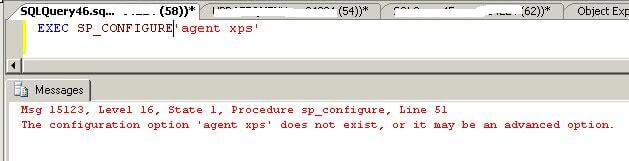
EXEC SP_CONFIGURE ‘Agent XPs’
Step 2
The above screenshot shows that advanced options is not enabled on this instance, so we must first enable advanced option to see all of the advanced configuration values.
EXEC SP_CONFIGURE ‘show advanced options’,1

GO

RECONFIGURE

GO

EXEC SP_CONFIGURE ‘show advanced options’

You can see ‘show advanced options’ is set to 1 this means that advanced options are enabled and we can see and change the values.
Step 3
Run sp_configure again to check the value for Agent XPs. Here we can see the run value is set to 0.
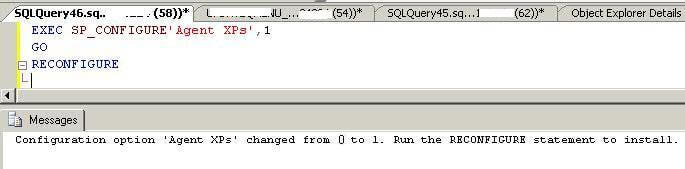
Now we need to change this setting from 0 to 1 to run SQL Server Agent in SQL Server Management Studio.
EXEC SP_CONFIGURE ‘Agent XPs’,1

GO

RECONFIGURE
Step 4
Now restart your SQL Server Agent service from SQL Server Configuration Manager. This time the service should come up and we can successfully access all of the content for SQL Server Agent.
Next Steps
- Always use SQL Server Configuration Manager to start SQL Server services
- If you get this message in SQL Server, check the configuration settings to enable the Agent XPs
- Read the additional articles on SQL Server Agent
If you encounter error Msg 15123, Level 16, reading “The configuration option ‘Agent XPs’ does not exist“, you were probably trying to execute EXEC SP_CONFIGURE 'Agent XPs' while advanced options are hidden.
This error is easily fixed.
Example of the Error
Here’s an example of code that causes this error.
EXEC SP_CONFIGURE 'Agent XPs';Result:
Msg 15123, Level 16, State 1, Procedure SP_CONFIGURE, Line 62
The configuration option 'Agent XPs' does not exist, or it may be an advanced option.
As mentioned, this means that show advanced options are set to 0.
Solution
We can fix the above error by running the following code:
EXEC sp_configure 'show advanced options', 1;
GO
RECONFIGURE;
GO
Result:
Started executing query at Line 18
Configuration option 'show advanced options' changed from 0 to 1. Run the RECONFIGURE statement to install.

Started executing query at Line 20
Commands completed successfully.
Total execution time: 00:00:00.126
After the first line ran, it advised us to run RECONFIGURE, which we did.
Now when we run the previous code, we no longer get an error.
EXEC SP_CONFIGURE 'Agent XPs';Result:
 +-----------+-----------+-----------+----------------+-------------+
 | name      | minimum   | maximum   | config_value   | run_value   |
 |-----------+-----------+-----------+----------------+-------------|
 | Agent XPs | 0         | 1         | 0              | 0           |
 +-----------+-----------+-----------+----------------+-------------+
Change a Setting
Probably the reason you were trying to do this in the first place, was that you wanted to change an advanced option (such as to enable the Agent XPs).
Here’s an example of enabling the Agent XPs.
EXEC SP_CONFIGURE 'Agent XPs', 1;
GO
RECONFIGURE;
GO
Result:
Started executing query at Line 23
Configuration option 'Agent XPs' changed from 0 to 1. Run the RECONFIGURE statement to install.

Started executing query at Line 25
Commands completed successfully.
Total execution time: 00:00:00.142
Now we can check the setting again.
EXEC SP_CONFIGURE 'Agent XPs';Result:
 +-----------+-----------+-----------+----------------+-------------+
 | name      | minimum   | maximum   | config_value   | run_value   |
 |-----------+-----------+-----------+----------------+-------------|
 | Agent XPs | 0         | 1         | 1              | 1           |
 +-----------+-----------+-----------+----------------+-------------+
Hide Advanced Options
Once finished whatever it is you need to do, it’s a good idea to hide advanced options again.
EXEC sp_configure 'show advanced options', 0;
GO
RECONFIGURE;
GO
Recently, one of my clients encountered an error while trying to create a maintenance plan in SQL Server. They received the following error message:
‘Agent XPs’ component is turned off as part of the security configuration for this server. A system administrator can enable the use of ‘Agent XPs’ by using sp_configure. For more information about enabling ‘Agent XPs’, see “Surface Area Configuration” in SQL Server Books Online.
This error occurs when the SQL Server Agent service is not running or when the ‘Agent XPs’ component is disabled. In order to fix this error, there are two possible solutions:
Solution 1: Start SQL Server Agent Service
The first solution is to start the SQL Server Agent service. This can be done using the SQL Server Configuration Manager or by running the following command in the SQL Server Management Studio query window:
EXEC sp_configure 'show advanced options', 1;
RECONFIGURE WITH OVERRIDE;
EXEC sp_configure 'Agent XPs', 1;
RECONFIGURE WITH OVERRIDE;
By executing these commands, you will enable the ‘Agent XPs’ component and allow the creation of maintenance plans.
Solution 2: Enable Agent XPs using sp_configure
If you prefer not to start the SQL Server Agent service, you can enable the ‘Agent XPs’ component directly using the sp_configure command. Run the following commands in the SQL Server Management Studio query window:
EXEC sp_configure 'show advanced options', 1;
RECONFIGURE WITH OVERRIDE;
EXEC sp_configure 'Agent XPs', 1;
RECONFIGURE WITH OVERRIDE;
Enabling ‘Agent XPs’ using this method allows you to create maintenance plans without starting the SQL Server Agent service. This can be useful if you want to avoid running scheduled jobs that may be affected by starting the service.
It’s important to note that if you encounter any issues starting the SQL Server Agent service, you should check the SQLAgent.out and event log for further troubleshooting. These logs can provide valuable information to help resolve the problem.
Have you ever encountered the ‘Agent XPs Component is Turned Off’ error in your SQL Server environments? If so, please share your experience in the comments below.
One of my clients has installed a new instance of SQL Server and then wanted to create maintenance plan. They were complaining about getting some error and we’re looking forward for my help to solve the same. As soon as he did right click on a Maintenance Plan under “Management” node and selected “New Maintenance Plan Wizard” using SQL Server Management Studio as shown below. Let us learn how to fix Agent XPs Component is Turned Off as Part of the Security Configuration for this Server error.
It gave below error.

Here is the text of the message.
TITLE: Microsoft SQL Server Management Studio
——————————
Cannot show requested dialog.
——————————
ADDITIONAL INFORMATION:
Unable to execute requested command.
——————————
‘Agent XPs’ component is turned off as part of the security configuration for this server. A system administrator can enable the use of ‘Agent XPs’ by using sp_configure. For more information about enabling ‘Agent XPs’, see “Surface Area Configuration” in SQL Server Books Online. (Microsoft.SqlServer.Management.MaintenancePlanWizard)
——————————
BUTTONS:
OK
——————————
There are two ways to fix the problem.
- Start SQL Server Agent Service.

You can also start SQL Server Agent service by using the SQL Server Configuration Manager on start>run>services.msc applet.

- Enable Agent XPs under sp_configure using below command in SQL Server Management Studio query window.
SP_CONFIGURE 'SHOW ADVANCE',1
GO
RECONFIGURE WITH OVERRIDE
GO
SP_CONFIGURE 'AGENT XPs',1
GO
RECONFIGURE WITH OVERRIDE
GO
Here is the output
Configuration option ‘show advanced options’ changed from 0 to 1. Run the RECONFIGURE statement to install.
Configuration option ‘Agent XPs’ changed from 0 to 1. Run the RECONFIGURE statement to install.
Once any of the above is followed, you should be able to create maintenance plan. You might ask, why someone would need use # 2 instead of # 1. It is important to remember that if you want to create maintenance plan without starting SQL Agent service (as it might cause jobs to run which are scheduled) then you would choose option 2. A very uncommon but possible scenario.
If you are not able to start SQL Server Agent service, then you may want to look at below blog
SQL SERVER – Unable to start SQL Server Agent – Failed to Initialize SQL Agent log
There might be some other error but SQLAgent.out and event log is a good place to start troubleshooting the issue. Do let me know if you encountered this error ever in your environments. Do leave a comment.
Reference: Pinal Dave (https://blog.sqlauthority.com)