

Powerware 9125 Two-in-One
®
Extended Battery Module (EBM)
User’s Guide
For use with the Powerware 9125 Two-in-One
700–2000 VA UPS Models
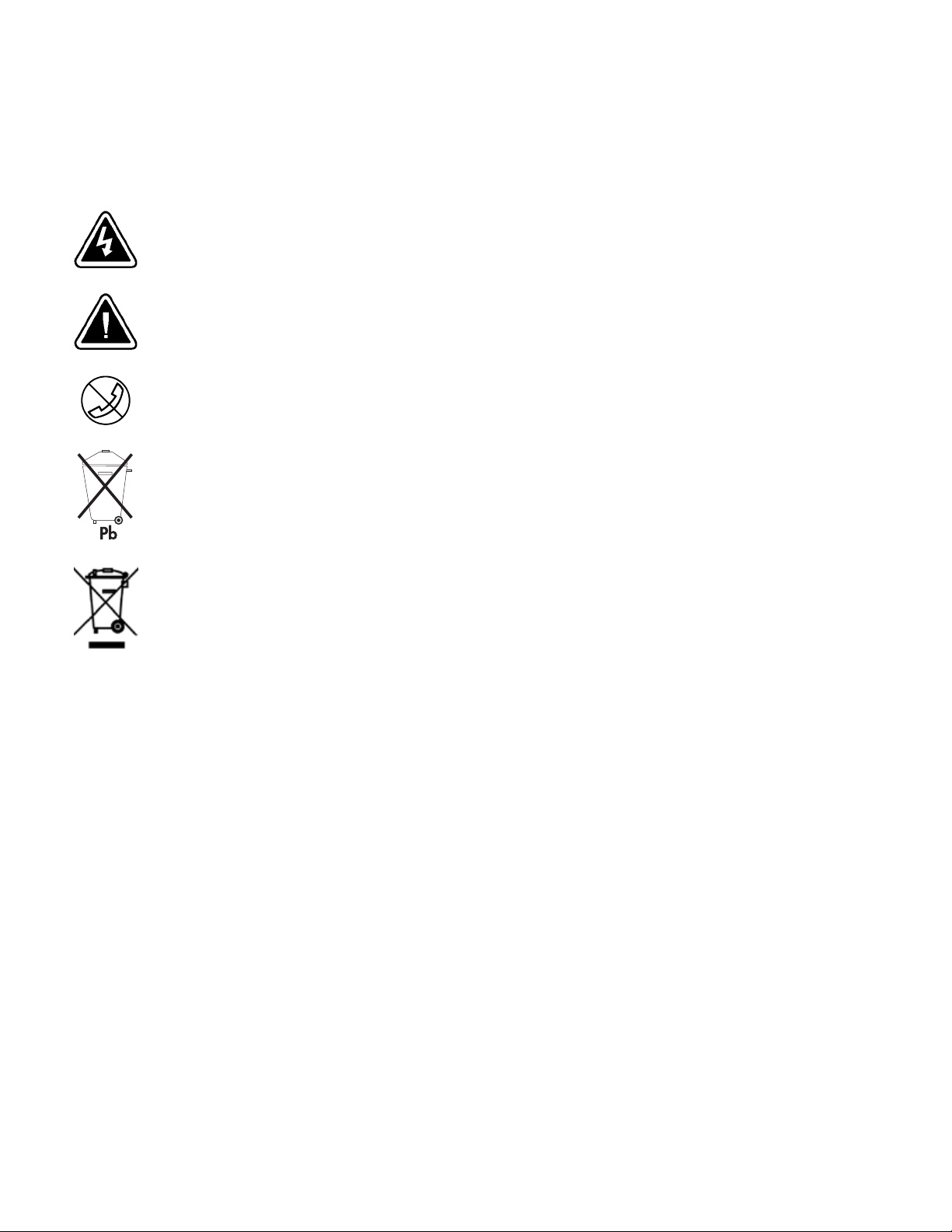
Special Symbols
The following are examples of symbols used on the UPS or accessories to alert you to important
information:
RISK OF ELECTRIC SHOCK — Indicates that a risk of electric shock is present and the
associated warning should be observed.
CAUTION: REFER TO OPERATOR’S MANUAL — Refer to your operator’s manual for
additional information, such as important operating and maintenance
instructions.
RJ-45 RECEPTACLE — For 230V models only: this receptacle provides network
interface connections. Do not plug telephone or telecommunications equipment
into this receptacle.
This symbol indicates that you should not discard the UPS or the UPS batteries
in the trash. This product contains sealed, lead-acid batteries and must be
disposed of properly. For more information, contact your local recycling/reuse or
hazardous waste center.
This symbol indicates that you should not discard waste electrical or electronic
equipment (WEEE) in the trash. For proper disposal, contact your local
recycling/reuse or hazardous waste center.
Powerware is a registered trademark of Eaton Electrical Inc.
ECopyright 2003–2006 Eaton Corporation, Raleigh, NC, USA. All rights reserved. No part of this document may be
reproduced in any way without the express written approval of Eaton Corporation.

Table of Contents
1 Introduction 1…………………………………………………
Safety Warnings 2…………………………………………………………….
2 Installation 15………………………………………………….
Inspecting the Equipment 15……………………………………………………….
EBM Installation 15…………………………………………………………….
Rack-Mount Installation 16……………………………………………………..
Tower Installation 18…………………………………………………………
3 EBM Maintenance 21…………………………………………….
UPS and Battery Care 21…………………………………………………………
Storing the UPS and Batteries 21……………………………………………………
When to Replace Batteries 22………………………………………………………
How to Replace Extended Battery Modules 22……………………………………………
Recycling the Used Battery or UPS 24…………………………………………………
4 Service and Support 25…………………………………………..
EATON Powerware®9125 Two-in-One EBM (700–2000 VA) User’s Guide S 05146489 Rev D www.powerware.com
i

TABLE OF CONTENTS
ii
EATON Powerware®9125 Two-in-One EBM (700–2000 VA) User’s Guide S 05146489 Rev D www.powerware.com

Chapter 1 Introduction
The Extended Battery Module (EBM) can be added to the 700–2000 VA
®
Powerware
9125 uninterruptible power system (UPS) to extend the
available battery time (see Table 1). Up to four EBMs can be installed
with the Powerware 9125 UPS.
Table 1. Battery Runtimes (in Minutes)
700–1000 VA Models
Load
200 VA/140W 37 271 546
400 VA/280W 19 142 278
700 VA/490W 9 72 156
850 VA/595W* 6 59 124
1000 VA/700W* 5 48 104
* Runtimes do not apply for 700 VA models.
Load
400 VA/280W 46 177 331 501 682
700 VA/490W 25 96 180 272 370
UPS Internal
Batteries
UPS Internal
Batteries
+1 EBM +2 EBMs +3 EBMs +4 EBMs
1250–2000 VA Models
+1 EBM +2 EBMs +3 EBMs +4 EBMs
850 VA/595W 21 76 142 214 292
1000 VA/700W 16 61 115 174 237
1250 VA/875W 11 46 87 131 179
1500 VA/1050W** 8 37 70 106 144
1800 VA/1260W*** 6 30 57 85 116
2000 VA/1400W*** 5 26 49 74 100
** Runtimes do not apply for 1250 VA models.
*** Runtimes do not apply for 1250 VA and 1500 VA models.
NOTE Battery times are approximate and vary depending on the load configuration and battery charge.
EATON Powerware®9125 Two-in-One EBM (700–2000 VA) User’s Guide S 05146489 Rev D www.powerware.com
1

INTRODUCTION
Safety Warnings
IMPORTANT SAFETY INSTRUCTIONS
SAVE THESE INSTRUCTIONS
This manual contains important instructions that you should follow during installation and
maintenance of the EBM. Please read all instructions before operating the equipment and
save this manual for future reference.
WARNING
This UPS contains its own energy source (batteries). The UPS output receptacles may carry
live voltage even when the UPS is not connected to an AC supply.
CAUTION
S Batteries can present a risk of electrical shock or burn from high short-circuit current.
Observe proper precautions. Servicing should be performed by qualified service
personnel knowledgeable of batteries and required precautions. Keep unauthorized
personnel away from batteries.
S Proper disposal of batteries is required. Refer to your local codes for disposal
requirements.
S Never dispose of batteries in a fire. Batteries may explode when exposed to flame.
2
EATON Powerware®9125 Two-in-One EBM (700–2000 VA) User’s Guide S 05146489 Rev D www.powerware.com

Sikkerhedsanvisninger
Denne manual indeholder vigtige instruktioner, som skal følges under installation og
betjening af EBM-enheden. Læs venligst alle instruktioner inden betjening af udstyret og
gem denne manual mhp. fremtidige opslag.
Denne UPS indeholder sin egen energikilde (batterier). Udgangsstikkene kan endog være
strømførende, når UPS’en ikke er koblet til en vekselstrømsforsyning.
S Batterierne kan give risiko for elektrisk stød eller brandsår forårsaget af høj
kortslutningsstrøm. Overhold gældende forsigtighedsregler. Servicering skal udføres af
kvalificeret servicepersonale med kendskab til batterier og gældende forsigtighedsregler.
Hold uautoriseret personale væk fra batterierne.
S Korrekt bortskaffelse af batterier er påkrævet. Overhold gældende lokale regler for
bortskaffelsesprocedurer.
S Skaf dig aldrig af med batterierne ved at brænde dem. Batterierne kan eksplodere ved
åben ild.
INTRODUCTION
VIGTIGE SIKKERHEDSANVISNINGER
GEM DISSE ANVISNINGER
ADVARSEL!
ADVARSEL
EATON Powerware®9125 Two-in-One EBM (700–2000 VA) User’s Guide S 05146489 Rev D www.powerware.com
3

INTRODUCTION
Belangrijke Veiligheidsinstructies
BELANGRIJKE VEILIGHEIDSINSTRUCTIES
BEWAAR DEZE INSTRUCTIES
Deze handleiding bevat belangrijke instructies die u dient te volgen tijdens de installatie en
het gebruik van EBM. Lees alle instructies voordat u de apparatuur in bedrijf neemt en
bewaar deze handleiding als naslagwerk.
Deze UPS bevat een eigen energiebron (batterijen). De uitgangscontactdoos kan onder
spanning staan, zelfs wanneer de UPS niet is aangesloten op de netspanning.
S Batterijen leveren gevaar op voor elektrische schokken en kunnen brandwonden
veroorzaken door een grote kortsluitstroom. Neem de juiste voorzorgsmaatregelen in
acht. Het onderhoud moet worden uitgevoerd door bevoegde onderhoudsmonteurs die
verstand hebben van accu’s en op de hoogte zijn van de vereiste voorzorgsmaatregelen.
Houd onbevoegden uit de buurt van de accu’s.
S De batterijen moeten op de juiste wijze worden opgeruimd. Raadpleeg hiervoor uw
plaatselijke voorschriften.
S Nooit batterijen in het vuur gooien. De batterijen kunnen ontploffen.
WAARSCHUWING
OPGELET
4
EATON Powerware®9125 Two-in-One EBM (700–2000 VA) User’s Guide S 05146489 Rev D www.powerware.com

Tarkeita Turvaohjeita
Tämä käyttöohje sisältää tärkeitä ohjeita, joita on noudatettava EBM-yksikön asennuksen ja
käytön yhteydessä. Lue kaikki ohjeet ennen laitteiston käyttöä ja säilytä ohje myöhempää
tarvetta varten.
Tässä UPS-virtalähteessä on oma energianlähde (akut). Lähtövastakkeissa voi olla jännite,
vaikka UPS-virtalähdettä ei ole kytketty verkkovirtaan.
S Akut voivat aiheuttaa sähköiskun tai palovammojen vaaran johtuen suuresta
S Akusto täytyy hävittää säädösten mukaisella tavalla. Noudata paikallisia määräyksiä.
S Älä koskaan heitä akkuja tuleen. Ne voivat räjähtää.
INTRODUCTION
TÄRKEITÄ TURVAOHJEITA — SUOMI
SÄILYTÄ NÄMÄ OHJEET
VAROITUS
VARO
oikosulkuvirrasta. Noudata kaikkia asianmukaisia varotoimia. Laitteen saa huoltaa vain
ammattitaitoinen huoltohenkilökunta, joka tuntee akut ja niihin liittyvät varotoimet. Älä
päästä valtuuttamatonta henkilöstöä lähelle akkuja.
EATON Powerware®9125 Two-in-One EBM (700–2000 VA) User’s Guide S 05146489 Rev D www.powerware.com
5
Loading…
Скачать файл PDF «Huffy POWERWARE 9125 7002000 Инструкция по эксплуатации» (595 Kb)
Популярность:
1473 просмотры
Подсчет страниц:
15 страницы
Тип файла:
Размер файла:
595 Kb
Google Ads:
-
Page 1: Powerware Powerware 9125 Two-in-One UPS 5000
Powerware 9125 Two-in-One UPS 5000/6000 VA User’s Guide ®[…]
-
Page 2: Powerware Powerware 9125 Two-in-One UPS 5000
Class A EMC Statements FCC Part 15 NOTE This equipment has been tested and found to comply with th e limits for a Class A digital device, pursuant to part 15 of the FCC Rules. These limits are designed to provide reasonable protection against harmful interference when the equipment is operated in a commercial environm ent. This equipment generates,[…]
-
Page 3: Powerware Powerware 9125 Two-in-One UPS 5000
Requesting a Declaration of Conformity Units that are labeled with a CE mark comply with the following harmonized standa rds and EU directives: S Harmonized Standards: EN 50091 — 1 — 1 and EN 50091-2; IEC 60950 Third Edition S EU Directives: 73/23/EEC, Council Di rective on equipment designed for use within certain voltage limits 93/68/EEC, Amendin[…]
-
Page 4: Powerware Powerware 9125 Two-in-One UPS 5000
Special Symbols The following are examples of symbols used on the UPS or accessories to alert you to important information: RISK OF ELECTRIC SHOCK — Indicates that a risk of electric shock is present and the associated warning should be observed. CAUTION: REFER TO OPERATOR’S MANUAL — Refer to your operator’s manual for additional information, s[…]
-
Page 5: Powerware Powerware 9125 Two-in-One UPS 5000
EATON Powerware ® 9125 Two-in-One UPS (5000/6000 VA) User’s Guide S 164201513 Rev B www.powerware.com i Table of Contents 1 Introduction 1 ………………………………………………… 2 Safety Warnings 3 …………………………………………….. 3 Installation 15 ………………………………………………….[…]
-
Page 6: Powerware Powerware 9125 Two-in-One UPS 5000
TABLE OF CONTENTS EATON Powerware ® 9125 Two-in-One UPS (5000/6000 VA) User’s Guide S 164201513 Rev B www.powerware.com ii Replacing Batteries 42 ………………………………………………………….. How to Replace Extended Battery Modules 42 ………………………………………… How to Replace Internal Batteries 44 …[…]
-
Page 7: Powerware Powerware 9125 Two-in-One UPS 5000
EATON Powerware ® 9125 Two-in-One UPS (5000/6000 VA) User’s Guide S 164201513 Rev B www.powerware.com 1 Chapter 1 Introduction The Powerware ® 9125 uninterruptible power system (UPS) protects your sensitive electronic equipment from the most common power problems including power failures, power sags, power surges, brownouts, line noise, high vo[…]
-
Page 8: Powerware Powerware 9125 Two-in-One UPS 5000
INTRODUCTION EATON Powerware ® 9125 Two-in-One UPS (5000/6000 VA) User’s Guide S 164201513 Rev B www.powerware.com 2 Providing outstanding performance and reliability, the Powerware 9125’s unique benefits include the following: S Online UPS design with pure sine wave output. The UPS filters and regulates incoming AC power and provides consiste[…]
-
Page 9: Powerware Powerware 9125 Two-in-One UPS 5000
EATON Powerware ® 9125 Two-in-One UPS (5000/6000 VA) User’s Guide S 164201513 Rev B www.powerware.com 3 Chapter 2 Safety Warnings IMPORTANT SAFETY INSTRUCTIONS SAVE THESE INSTRUCTIONS This manual contains important instructions t hat you should follow during installation and maintenance of the UPS and batteries. Pleas e read all instructions bef[…]
-
Page 10: Powerware Powerware 9125 Two-in-One UPS 5000
SAFETY WARNINGS EATON Powerware ® 9125 Two-in-One UPS (5000/6000 VA) User’s Guide S 164201513 Rev B www.powerware.com 4 CAUTION S Batteries can present a risk of electrical s hock or burn from high short-circuit current. Observe proper precautions. Servicing should be performed by qualified service personnel knowledgeable of batteries and requir[…]
-
Page 11: Powerware Powerware 9125 Two-in-One UPS 5000
SAFETY WARNINGS EATON Powerware ® 9125 Two-in-One UPS (5000/6000 VA) User’s Guide S 164201513 Rev B www.powerware.com 5 ADVARSEL S Batterier kan udgøre en fare for elektrisk stød eller forbrændinger forårsaget af høj kortslutningsspænding. De korrekt e forholdsregler bør overholdes. S Korrekt bortskaffelse af batterier er påkrævet. Over[…]
-
Page 12: Powerware Powerware 9125 Two-in-One UPS 5000
SAFETY WARNINGS EATON Powerware ® 9125 Two-in-One UPS (5000/6000 VA) User’s Guide S 164201513 Rev B www.powerware.com 6 OPGELET S Batterijen kunnen gevaar voor elektrische sc hok of brandwonden veroorzaken als gevolg van un hoge kortsluitstroom. Vol g de desbetreffende aanwijzingen op. S De batterijen moeten op de juiste wijz e worden opgeruimd.[…]
-
Page 13: Powerware Powerware 9125 Two-in-One UPS 5000
SAFETY WARNINGS EATON Powerware ® 9125 Two-in-One UPS (5000/6000 VA) User’s Guide S 164201513 Rev B www.powerware.com 7 Consignes de sécurité CONSIGNES DE SÉCURITÉ IMPORTANTES CONSERVER CES INSTRUCTIONS CE MANUEL CONTIENT DES CONSIGNES DE SÉCURITÉ IMPORTANTES DANGER! Cet onduleur contient des TENSIONS MORTE LLES. Toute opération d’entre[…]
-
Page 14: Powerware Powerware 9125 Two-in-One UPS 5000
SAFETY WARNINGS EATON Powerware ® 9125 Two-in-One UPS (5000/6000 VA) User’s Guide S 164201513 Rev B www.powerware.com 8 Sicherheitswarnungen WICHTIGE SICHERHEITSANWEISUNGEN AUFBEWAHREN. DIESES HANDBUCH ENTHÄLT WICHTIGE SICHERHEITSANWEISUNGEN. WARNUNG Die USV führt lebensgefährliche Spannungen. A lle Reparatur- und Wartungsarbeiten sollten nur[…]
-
Page 15: Powerware Powerware 9125 Two-in-One UPS 5000
SAFETY WARNINGS EATON Powerware ® 9125 Two-in-One UPS (5000/6000 VA) User’s Guide S 164201513 Rev B www.powerware.com 9 Avvisi di sicurezza IMPORTANTI ISTRUZIONI DI SICUREZZA CONSERVARE QUESTE ISTRUZIONI QUESTO MANUALE CONTIENE IMPORTANTI ISTRUZIONI DI SICUREZZA PERICOLO la TENSIONE contenuta in questo gruppo statico d i continuità è LETALE. T[…]
-
Page 16: Powerware Powerware 9125 Two-in-One UPS 5000
SAFETY WARNINGS EATON Powerware ® 9125 Two-in-One UPS (5000/6000 VA) User’s Guide S 164201513 Rev B www.powerware.com 10 Viktig Sikkerhetsinformasion FARLIG Denne UPS’en inneholder LIVSFARLIGE SPENNI NG ER. All reparasjon og service må kun utføres av AUTORISERT SERVICEPERSONA LE. BRUKERE KAN IKKE UTFØRE SERVICE PÅ NOEN AV DELENE i UPS’en[…]
-
Page 17: Powerware Powerware 9125 Two-in-One UPS 5000
SAFETY WARNINGS EATON Powerware ® 9125 Two-in-One UPS (5000/6000 VA) User’s Guide S 164201513 Rev B www.powerware.com 11 Regulamentos de Segurança INSTRUÇÕES DE SEGURANÇA IMPORTANTES GUARDE ESTAS INSTRUÇÕES ESTE MANUAL CONTÉM INSTRUÇÕES DE SEGURANÇA IMPORTANTES CUIDADO A UPS contém VOLTAGEM MORTAL. Todos os reparos e assistência téc[…]
-
Page 18: Powerware Powerware 9125 Two-in-One UPS 5000
SAFETY WARNINGS EATON Powerware ® 9125 Two-in-One UPS (5000/6000 VA) User’s Guide S 164201513 Rev B www.powerware.com 12 Предупреждения по мерам безопасности ВАЖНЫЕ УКАЗАНИЯ ПО МЕРАМ БЕЗОПАСНОСТИ СОХРАНИТЕ ЭТИ УКАЗАНИЯ ДАННОЕ РУКОВОДСТВО СОД[…]
-
Page 19: Powerware Powerware 9125 Two-in-One UPS 5000
SAFETY WARNINGS EATON Powerware ® 9125 Two-in-One UPS (5000/6000 VA) User’s Guide S 164201513 Rev B www.powerware.com 13 Advertencias de Seguridad INSTRUCCIONES DE SEGURIDAD IMPORTANTES GUARDE ESTAS INSTRUCCIONES ESTE MANUAL CONTIENE INSTRUCCIONES DE SEGURIDAD IMPORTANTES PELIGRO Este SIE contiene VOLTAJES MORTALES. Todas las reparaciones y el s[…]
-
Page 20: Powerware Powerware 9125 Two-in-One UPS 5000
SAFETY WARNINGS EATON Powerware ® 9125 Two-in-One UPS (5000/6000 VA) User’s Guide S 164201513 Rev B www.powerware.com 14 Säkerhetsföreskrifter VIKTIGA SÄKERHETSFÖRESKRIFTER SPARA DESSA FÖRESKRIFTER DENNA BRUKSANVISNING INNEHÅLLER VIKTIGA SÄKERHETSFÖRESKRIFTER FARA Denna UPS-enhet innehåller LIVSFARLIG SPÄNNING . ENDAST AUKTORISERAD SER[…]
-
Page 21: Powerware Powerware 9125 Two-in-One UPS 5000
EATON Powerware ® 9125 Two-in-One UPS (5000/6000 VA) User’s Guide S 164201513 Rev B www.powerware.com 15 Chapter 3 Installation This section explains: S Equipment inspection S UPS setup and installation S Extended Battery Module (EBM) installation S Remote emergency power — off (REPO) installation Inspecting the Equipment If any equipment has be[…]
-
Page 22: Powerware Powerware 9125 Two-in-One UPS 5000
INSTALLATION EATON Powerware ® 9125 Two-in-One UPS (5000/6000 VA) User’s Guide S 164201513 Rev B www.powerware.com 16 Installing the UPS Internal Batteries CAUTION The UPS battery trays are heavy (28.1 kg/62 lb). A minimum of two people are required to lift the battery trays into the UPS chassis. NOTE For rack — mounted installations, follow t h[…]
-
Page 23: Powerware Powerware 9125 Two-in-One UPS 5000
INSTALLATION EATON Powerware ® 9125 Two-in-One UPS (5000/6000 VA) User’s Guide S 164201513 Rev B www.powerware.com 17 5. If you are installing the UPS in a tower configuration, continue to the following section, “Tower Setup.” If the UPS is in a rack and you are installing an optional EBM, continue to “EBM Installation” on page 19; other[…]
-
Page 24: Powerware Powerware 9125 Two-in-One UPS 5000
INSTALLATION EATON Powerware ® 9125 Two-in-One UPS (5000/6000 VA) User’s Guide S 164201513 Rev B www.powerware.com 18 Figure 6. UPS Cabinet with Pedestals 5. Carefully position the cabinets upright (see Figure 7). NOTE The EBM(s) must be installed to the right of the UPS as shown in Figure 7. Joining brackets are required for installations with […]
-
Page 25: Powerware Powerware 9125 Two-in-One UPS 5000
INSTALLATION EATON Powerware ® 9125 Two-in-One UPS (5000/6000 VA) User’s Guide S 164201513 Rev B www.powerware.com 19 6. Align each joining bracket with the adjacent cabinet screw holes and secure with the supplied screws (see Figure 8). 7. If installing additional cabinets, repeat Step 6 for each cabinet. Joining Bracket EBM UPS Joining Bracket[…]
-
Page 26: Powerware Powerware 9125 Two-in-One UPS 5000
INSTALLATION EATON Powerware ® 9125 Two-in-One UPS (5000/6000 VA) User’s Guide S 164201513 Rev B www.powerware.com 20 3. Continue to the following section, “Plug — Receptacle UPS Installation,” or “Hardwired UPS Installation” on page 24. UPS Battery Connector EBM Cable EBM Battery Connectors Battery Circuit Breakers Battery Circuit Break[…]
-
Page 27: Powerware Powerware 9125 Two-in-One UPS 5000
INSTALLATION EATON Powerware ® 9125 Two-in-One UPS (5000/6000 VA) User’s Guide S 164201513 Rev B www.powerware.com 21 Plug-Receptacle UPS Installation NOTE Do not make unauthorized changes to the UPS; otherwise, damage may occur to your equipment and void your warranty. To install the UPS: 1. If you are installing power management software, conn[…]
-
Page 28: Powerware Powerware 9125 Two-in-One UPS 5000
INSTALLATION EATON Powerware ® 9125 Two-in-One UPS (5000/6000 VA) User’s Guide S 164201513 Rev B www.powerware.com 22 7. Plug the UPS power cord into an L6 — 30R power outlet. The μ indicator flashes, indicating the UPS is in Standby mode with the equipment offline. 8. Press the On b u t t o n( s e eF i g u r e1 4o np a g e3 1 ) . The μ indica[…]
-
Page 29: Powerware Powerware 9125 Two-in-One UPS 5000
INSTALLATION EATON Powerware ® 9125 Two-in-One UPS (5000/6000 VA) User’s Guide S 164201513 Rev B www.powerware.com 23 WARNING The REPO circuit is an IEC 60950 safety extra low v oltage (SELV) circuit. This circuit must be separated from any hazardous voltage ci rcuits by reinforced insulation. CAUTION To ensure the UPS stops supplying power to t[…]
-
Page 30: Powerware Powerware 9125 Two-in-One UPS 5000
INSTALLATION EATON Powerware ® 9125 Two-in-One UPS (5000/6000 VA) User’s Guide S 164201513 Rev B www.powerware.com 24 Hardwired UPS Installation WARNING Only qualified service personnel (such as a licensed electrician) shall pe rform the electrical installation. Risk of electrical shock. CAUTION S For UPS models with hardwired outputs, overcurre[…]
-
Page 31: Powerware Powerware 9125 Two-in-One UPS 5000
INSTALLATION EATON Powerware ® 9125 Two-in-One UPS (5000/6000 VA) User’s Guide S 164201513 Rev B www.powerware.com 25 To hardwire the UPS: 1. If you are installing power management software, connect your computer to the USB port or UPS communication port (see page 37). For the communication port, use only the serial cable supplied in the accesso[…]
-
Page 32: Powerware Powerware 9125 Two-in-One UPS 5000
INSTALLATION EATON Powerware ® 9125 Two-in-One UPS (5000/6000 VA) User’s Guide S 164201513 Rev B www.powerware.com 26 6. Connect the input and ground wires to the UPS terminal block according to Figure 13 and Table 1. 7. Connect the output and ground wires to the UPS terminal block according to Figure 13 and Table 1. L1 Out Output Ground L1 In L[…]
-
Page 33: Powerware Powerware 9125 Two-in-One UPS 5000
INSTALLATION EATON Powerware ® 9125 Two-in-One UPS (5000/6000 VA) User’s Guide S 164201513 Rev B www.powerware.com 27 8. Replace the wiring access cover and the conduit landing plate. 9. Remove the breaker tie from all battery circuit breakers. 10. Switch all battery circuit breakers to the ON ( | ) position. 11. If an emergency power — off (dis[…]
-
Page 34: Powerware Powerware 9125 Two-in-One UPS 5000
INSTALLATION EATON Powerware ® 9125 Two-in-One UPS (5000/6000 VA) User’s Guide S 164201513 Rev B www.powerware.com 28[…]
-
Page 35: Powerware Powerware 9125 Two-in-One UPS 5000
EATON Powerware ® 9125 Two-in-One UPS (5000/6000 VA) User’s Guide S 164201513 Rev B www.powerware.com 29 Chapter 4 Operation This section describes: S Turning the UPS on and off S Starting the UPS on battery S Initiating the battery test S Transferring the UPS to Bypass mode S Operating modes Turning the UPS On After the UPS is connected to util[…]
-
Page 36: Powerware Powerware 9125 Two-in-One UPS 5000
OPERATION EATON Powerware ® 9125 Two-in-One UPS (5000/6000 VA) User’s Guide S 164201513 Rev B www.powerware.com 30 Turning the UPS Off NOTE Pressing the Off button while the UPS is in Battery mode causes the UPS to shut down immediately. To turn off the UPS: 1. Prepare your equipment for shutdown. 2. Press and hold the Off button for approximate[…]
-
Page 37: Powerware Powerware 9125 Two-in-One UPS 5000
OPERATION EATON Powerware ® 9125 Two-in-One UPS (5000/6000 VA) User’s Guide S 164201513 Rev B www.powerware.com 31 Transferring the UPS to Bypass Mode NOTE When the UPS is in Bypass mode, Battery mode is not available and the UPS does not protect against power out ages; however, the utility power continues to be passively filtered by the UPS. Pr[…]
-
Page 38: Powerware Powerware 9125 Two-in-One UPS 5000
OPERATION EATON Powerware ® 9125 Two-in-One UPS (5000/6000 VA) User’s Guide S 164201513 Rev B www.powerware.com 32 Normal Mode During Normal mode, the μ indicator illuminates and the front panel displays the percentage of UPS load capacity being used by the protected equipment (see Figure 15). The UPS monitors and charges the batteries as neede[…]
-
Page 39: Powerware Powerware 9125 Two-in-One UPS 5000
OPERATION EATON Powerware ® 9125 Two-in-One UPS (5000/6000 VA) User’s Guide S 164201513 Rev B www.powerware.com 33 Battery Mode When the UPS is operating during a power outage, the alarm beeps once per second and the + — indicator illuminates. The front panel displays the approximate percentage of battery capacity remaining (see Figure 16). Wh[…]
-
Page 40: Powerware Powerware 9125 Two-in-One UPS 5000
OPERATION EATON Powerware ® 9125 Two-in-One UPS (5000/6000 VA) User’s Guide S 164201513 Rev B www.powerware.com 34 Bypass Mode In the event of a UPS overload or internal failure, the UPS transfers your equipment to utility power. Battery mode is not available; however, the utility power continues to be passively filtered by the UPS. The indicato[…]
-
Page 41: Powerware Powerware 9125 Two-in-One UPS 5000
EATON Powerware ® 9125 Two-in-One UPS (5000/6000 VA) User’s Guide S 164201513 Rev B www.powerware.com 35 Chapter 5 Configuration When the UPS is in Configuration mode, the bar graph indicators represent the configuration options. Use the control buttons (On button and button) to modify the UPS configuration. Figure 17 shows the LEDs and Table 2 […]
-
Page 42: Powerware Powerware 9125 Two-in-One UPS 5000
CONFIGURATION EATON Powerware ® 9125 Two-in-One UPS (5000/6000 VA) User’s Guide S 164201513 Rev B www.powerware.com 36 1 Press and hold the On and Test/Alarm Reset buttons simultaneously for three seconds to toggle between Configuration and Operation modes. & 4 Press the Test/Alarm Reset button ONCE to select the option. 3 Press the On butto[…]
-
Page 43: Powerware Powerware 9125 Two-in-One UPS 5000
EATON Powerware ® 9125 Two-in-One UPS (5000/6000 VA) User’s Guide S 164201513 Rev B www.powerware.com 37 Chapter 6 Communication The Powerware 9125 UPS is equipped with a USB port, a DB-9 communication port, and an X — Slot communication bay (see Figure 18). Either the USB port or the DB — 9 communication port may be used to monitor the UPS; how[…]
-
Page 44: Powerware Powerware 9125 Two-in-One UPS 5000
COMMUNICATION EATON Powerware ® 9125 Two-in-One UPS (5000/6000 VA) User’s Guide S 164201513 Rev B www.powerware.com 38 DB-9 Communication Port To establish communication between the UPS and a computer, connect your computer to the UPS communication port using the supplied communication cable (see Figure 18). When the communication cable is insta[…]
-
Page 45: Powerware Powerware 9125 Two-in-One UPS 5000
COMMUNICATION EATON Powerware ® 9125 Two-in-One UPS (5000/6000 VA) User’s Guide S 164201513 Rev B www.powerware.com 39 X-Slot Cards X — Slot cards allow the UPS to communicate in a variety of networking environments and with different types of devices. The Powerware 9125 has an available communication bay for one of the following X — Slot cards:[…]
-
Page 46: Powerware Powerware 9125 Two-in-One UPS 5000
COMMUNICATION EATON Powerware ® 9125 Two-in-One UPS (5000/6000 VA) User’s Guide S 164201513 Rev B www.powerware.com 40[…]
-
Page 47: Powerware Powerware 9125 Two-in-One UPS 5000
EATON Powerware ® 9125 Two-in-One UPS (5000/6000 VA) User’s Guide S 164201513 Rev B www.powerware.com 41 Chapter 7 UPS Maintenance This section explains how to: S Care for the UPS and batteries S Replace the batteries S Test new batteries S Recycle used batteries or UPS UPS and Battery Care For the best preventive maintenance, keep the area arou[…]
-
Page 48: Powerware Powerware 9125 Two-in-One UPS 5000
UPS MAINTENANCE EATON Powerware ® 9125 Two-in-One UPS (5000/6000 VA) User’s Guide S 164201513 Rev B www.powerware.com 42 Replacing Batteries NOTE DO NOT DISCONNECT the batteries while the U PS is in Battery mode. With the hot — swappable battery feature, UPS batteries can be replaced easily without turning the UPS off or disconnecting the load. […]
-
Page 49: Powerware Powerware 9125 Two-in-One UPS 5000
UPS MAINTENANCE EATON Powerware ® 9125 Two-in-One UPS (5000/6000 VA) User’s Guide S 164201513 Rev B www.powerware.com 43 5. Replace the EBM. See “Recycling the Used Battery or UPS” on page 46 for proper disposal. 6. Reinstall the joining brackets if removed in Step 3. 7. Plug the new EBM into the UPS as shown in Figure 21. For additional EBM[…]
-
Page 50: Powerware Powerware 9125 Two-in-One UPS 5000
UPS MAINTENANCE EATON Powerware ® 9125 Two-in-One UPS (5000/6000 VA) User’s Guide S 164201513 Rev B www.powerware.com 44 How to Replace Internal Batteries CAUTION S The UPS battery trays are heavy (28.1 k g/62 lb). A minimum of two people are required to lift the battery trays into the UPS chassis. S Pull the battery trays out onto a flat, stabl[…]
-
Page 51: Powerware Powerware 9125 Two-in-One UPS 5000
UPS MAINTENANCE EATON Powerware ® 9125 Two-in-One UPS (5000/6000 VA) User’s Guide S 164201513 Rev B www.powerware.com 45 5. Slide the new battery trays into the chassis. 6. Reinstall the battery retaining bracket. 7. Replace the lower UPS front cover. Testing New Batteries NOTE The batteries must be fully charged and the UPS must not be in Batte[…]
-
Page 52: Powerware Powerware 9125 Two-in-One UPS 5000
UPS MAINTENANCE EATON Powerware ® 9125 Two-in-One UPS (5000/6000 VA) User’s Guide S 164201513 Rev B www.powerware.com 46 Recycling the Used Battery or UPS Contact your local recycling or hazardous waste center for information on proper disposal of the used battery or UPS. WARNING S Do not dispose of the battery or batteries in a fire. Batteries […]
-
Page 53: Powerware Powerware 9125 Two-in-One UPS 5000
EATON Powerware ® 9125 Two-in-One UPS (5000/6000 VA) User’s Guide S 164201513 Rev B www.powerware.com 47 Chapter 8 Specifications This section provides the following specifications: S Model list S Electrical input and output S Environmental and safety S Weights and dimensions S Battery Table 4. Model List Model Number Power Levels (Rated at Nomi[…]
-
Page 54: Powerware Powerware 9125 Two-in-One UPS 5000
SPECIFICATIONS EATON Powerware ® 9125 Two-in-One UPS (5000/6000 VA) User’s Guide S 164201513 Rev B www.powerware.com 48 Table 6. Electrical Output Regulation (Normal Mode) Nominal output voltage ±3% Regulation (Battery Mode) Nominal output voltage ±3% Voltage Waveform Normal mode: Sine wave; <3% THD with linear or PFC load; <6% with nonl[…]
-
Page 55: Powerware Powerware 9125 Two-in-One UPS 5000
SPECIFICATIONS EATON Powerware ® 9125 Two-in-One UPS (5000/6000 VA) User’s Guide S 164201513 Rev B www.powerware.com 49 Table 8. Weights and Dimensions UPS Extended Battery Module (EBM) Dimensions (WxDxH) 44.2 x 68.3 x 21.8 cm 17.4” x 26.9” x 8.6” (5U) 4 4 . 2×6 8 . 3×1 3c m 17.4” x 26.9” x 5.1” (3U) Weights UPS Chassis: 35 kg (77 lb[…]
-
Page 56: Powerware Powerware 9125 Two-in-One UPS 5000
SPECIFICATIONS EATON Powerware ® 9125 Two-in-One UPS (5000/6000 VA) User’s Guide S 164201513 Rev B www.powerware.com 50[…]
-
Page 57: Powerware Powerware 9125 Two-in-One UPS 5000
EATON Powerware ® 9125 Two-in-One UPS (5000/6000 VA) User’s Guide S 164201513 Rev B www.powerware.com 51 Chapter 9 Troubleshooting This section explains: S UPS alarms and conditions S H o wt os i l e n c ea na l a r m S Service and support Audible Alarms and UPS Conditions The UPS has an audible alarm feature to alert you of potential power prob[…]
-
Page 58: Powerware Powerware 9125 Two-in-One UPS 5000
TROUBLESHOOTING EATON Powerware ® 9125 Two-in-One UPS (5000/6000 VA) User’s Guide S 164201513 Rev B www.powerware.com 52 Table 11. Troubleshooting Guide Alarm or Condition Possible Cause Action The indicator is not on; the UPS does not start. μ The power cord is not connected correctly. Check the power cord connections. The wall outlet is fault[…]
-
Page 59: Powerware Powerware 9125 Two-in-One UPS 5000
TROUBLESHOOTING EATON Powerware ® 9125 Two-in-One UPS (5000/6000 VA) User’s Guide S 164201513 Rev B www.powerware.com 53 Action Possible Cause Alarm or Condition Bypass UPS is in Bypass mode. The equipment is transferred to utility power; however, the utility power continues to be passively filtered by the UPS. Check for one of the following ala[…]
-
Page 60: Powerware Powerware 9125 Two-in-One UPS 5000
TROUBLESHOOTING EATON Powerware ® 9125 Two-in-One UPS (5000/6000 VA) User’s Guide S 164201513 Rev B www.powerware.com 54 Service and Support If you have any questions or problems with the UPS, call your Local Distributor or the Help Desk at one of the following telephone numbers and ask for a UPS technical representative. United States: 1-800-35[…]
-
Page 61: Powerware Powerware 9125 Two-in-One UPS 5000
EATON Powerware ® 9125 Two-in-One UPS (5000/6000 VA) User’s Guide S 164201513 Rev B www.powerware.com 55 Chapter 10 Warranty Two-Year Limited Warranty (US and Canada) Powerware UPS Models: 3105, 3110, 3115, 9104, 9120, 9125, and FERRUPS ® up to 3.1 kVA WARRANTOR: The warrantor for the limited warranties set forth herein is Eaton Power Quality C[…]
-
Page 62: Powerware Powerware 9125 Two-in-One UPS 5000
WARRANTY EATON Powerware ® 9125 Two-in-One UPS (5000/6000 VA) User’s Guide S 164201513 Rev B www.powerware.com 56 WHAT THIS LIMITED WARRANTY DOES NOT COVER: This Warranty does not cover any defects or damages caused by: (a) failure to properly store the Product before installation, including the charge of batteries no later than the date indicat[…]
-
Page 63: Powerware Powerware 9125 Two-in-One UPS 5000
WARRANTY EATON Powerware ® 9125 Two-in-One UPS (5000/6000 VA) User’s Guide S 164201513 Rev B www.powerware.com 57 COSTS NOT RELATED TO WARRANTY: The End-User shall be invoiced for, and shall pay for, all services not expressly provided for by the terms of this Warranty, incl uding without limitation, site calls involving an inspection that deter[…]
-
Page 64: Powerware Powerware 9125 Two-in-One UPS 5000
WARRANTY EATON Powerware ® 9125 Two-in-One UPS (5000/6000 VA) User’s Guide S 164201513 Rev B www.powerware.com 58 WHAT THIS LIMITED WARRANTY DOES NOT COVER: This Warranty does not cover any defects or damages caused by: (a) failure to properly store the Product before installation, including the charge of batteries no later than the date indicat[…]
-
Page 65: Powerware Powerware 9125 Two-in-One UPS 5000
WARRANTY EATON Powerware ® 9125 Two-in-One UPS (5000/6000 VA) User’s Guide S 164201513 Rev B www.powerware.com 59 OTHER LIMITATIONS: Company’s obligations under this Warranty are expressly conditioned upon receipt by Company of all payments due to it (including interest charges, if any). During such time as Company has not received payment of […]
-
Page 66: Powerware Powerware 9125 Two-in-One UPS 5000
WARRANTY EATON Powerware ® 9125 Two-in-One UPS (5000/6000 VA) User’s Guide S 164201513 Rev B www.powerware.com 60 WHAT THIS GUARANTY DOES NOT COVER: Any reimbursement or repair to End — User’s equipment does not include reimbursement for or restoration of any data l oss. This Guaranty does not cover any defects or damages caused by: (a) failur[…]
В связи с постоянно возрастающей зависимостью любого бизнеса от работоспособности технологического оборудования и соответствующих компьютерных систем,первостепенной задачей становится обеспечение их надежной и бесперебойной работы. ИБП Powerware 9125 стоечного исполнения разработан для применений, нуждающихся в наивысшей степени защиты электропитания, обеспечиваемой технологией двойного преобразования напряжения – критическое оборудование в сфере информационных технологий, промышленности, медицине, области телекоммуникаций.
Подробнее…
1 Показано 1 — 12 (всего позиций: 12)
- Eaton Powerware 9125 1000 ВА (05146011-5501)
- Мощность: 1000 ВА (700 Вт); Входное напряжение: 220,230,240 В; Время работы: 5 мин. (100%)…
- Eaton Powerware 9125 1500 ВА (05146006-5501)
- Мощность: 1500 ВА (1050 Вт); Входное напряжение: 220,230,240 В; Время работы: 8 мин. (100%)…
- Eaton Powerware 9125 2000 ВА (05146003-5501)
- Мощность: 2000 ВА (1400 Вт); Входное напряжение: 220,230,240 В; Время работы: 5 мин. (100%)…
- Eaton Powerware 9125 3000 ВА (103002723-5501)
- Мощность: 3000 ВА (2100 Вт); Входное напряжение: 220,230,240 В; Время работы: 5 мин. (100%)…
- Eaton Powerware 9125 5000 ВА (103003623-5501)
- Мощность: 5000 ВА (3500 Вт); Входное напряжение: 220,230,240 В; Время работы: 13 мин. (100%)…
- Eaton Powerware 9125 6000 ВА (103003625-5501)
- Мощность: 6000 ВА (4200 Вт); Входное напряжение: 220,230,240 В; Время работы: 10 мин. (100%)…
- Eaton Powerware 9125 1000 ВА black (05146011-6501)
- Мощность: 1000 ВА (700 Вт); Входное напряжение: 220,230,240 В; Время работы: 5 мин. (100%)…
- Eaton Powerware 9125 1500 ВА black (05146006-6501)
- Мощность: 1500 ВА (1050 Вт); Входное напряжение: 220,230,240 В; Время работы: 8 мин. (100%)…
- Eaton Powerware 9125 2000 ВА black (05146003-6501)
- Мощность: 2000 ВА (1400 Вт); Входное напряжение: 220,230,240 В; Время работы: 5 мин. (100%)…
- Eaton Powerware 9125 3000 ВА black (103002723-6501)
- Мощность: 3000 ВА (2100 Вт); Входное напряжение: 220,230,240 В; Время работы: 5 мин. (100%)…
- Eaton Powerware 9125 5000 ВА black (103003623-6501)
- Мощность: 5000 ВА (3500 Вт); Входное напряжение: 220,230,240 В; Время работы: 13 мин. (100%)…
- Eaton Powerware 9125 6000 ВА black (103003625-6501)
- Мощность: 6000 ВА (4200 Вт); Входное напряжение: 220,230,240 В; Время работы: 10 мин. (100%)…
1 Показано 1 — 12 (всего позиций: 12)
Справочник Пользователя (English)Справочник Пользователя (English)Справочник Пользователя (English)Справочник Пользователя (English)Справочник Пользователя (English)Справочник Пользователя (English)Справочник Пользователя (English)Справочник Пользователя (English)