MEGANE
DRIVER’S HANDBOOK
RENAULT recommends ELF
ELF has developed a complete range of lubricants for RENAULT:
f engine oils
f manual and automatic gearbox oils
Warning: to ensure the engine operates optimally, the use
of a lubricant may be restricted to certain vehicles. Please
refer to your maintenance document.
Benefiting from the research applied to Formula 1,
lubricants are very high-tech products.
Updated with the help of RENAULT’s technical
teams, this range is perfectly compatible with the
specific features of the brand’s vehicles.
f ELF lubricants enhance
your vehicle’s performance significantly.
RENAULT recommends approved ELF lubricants for oil changes and top-ups.
Contact your RENAULT Dealer or visit www.lubrifiants.elf.com
Photo credit: Total/DPPI Imacom group
Une marque de
Welcome to your new vehicle
This Driver’s Handbook contains the information necessary:
– for you to familiarise yourself with your vehicle, to use it to its best advantage and to benefit fully from the all the functions and
the technical developments it incorporates.
– to ensure that it always gives the best performance by following the simple, but comprehensive advice concerning regular main-
tenance.
– to enable you to deal quickly with minor faults not requiring specialist attention.
It is well worth taking a few minutes to read this handbook to familiarise yourself with the information and guidelines it contains
about the vehicle and its functions and new features. If certain points are still unclear, our Network technicians will be only too
pleased to provide you with any additional information.
The following symbol will help you when reading this handbook:
To indicate a hazard, danger or safety recommendation.
The descriptions of the models given in this handbook are based on the technical specifications at the time of writing. This handbook covers all items of equipment (both standard and optional) available for these models but whether or not these are
fitted to the vehicle depends on the version, options selected and the country where the vehicle is sold.
This handbook may also contain information about items of equipment to be introduced later in the model year.
Throughout the manual, the “approved Dealer” is your RENAULT Dealer.
Enjoy driving your new vehicle.
Translated from French. Copying or translation, in part or in full, is forbidden unless prior written permission has been obtained from the vehicle manu-
facturer.
0.1

0.2
C O N T E N T S
Sections
Getting to know your vehicle ………………………….
Driving ………………………………………………………….
Your comfort …………………………………………………
Maintenance …………………………………………………
Practical advice …………………………………………….
Technical specifications ………………………………..
Alphabetical index ………………………………………..
1
2
3
4
5
6
7
0.3

0.4

Section 1: Getting to know your vehicle
RENAULT cards: general information, use, deadlocking . . . . . . . . . . . . . . . . . . . . . . . . . . . . . . . . . 1.2
Doors . . . . . . . . . . . . . . . . . . . . . . . . . . . . . . . . . . . . . . . . . . . . . . . . . . . . . . . . . . . . . . . . . . . . . . . . . 1.10
Automatic locking of opening elements when driving . . . . . . . . . . . . . . . . . . . . . . . . . . . . . . . . . . . . 1.14
Headrests — Seats . . . . . . . . . . . . . . . . . . . . . . . . . . . . . . . . . . . . . . . . . . . . . . . . . . . . . . . . . . . . . . . 1.15
Seats . . . . . . . . . . . . . . . . . . . . . . . . . . . . . . . . . . . . . . . . . . . . . . . . . . . . . . . . . . . . . . . . . . . . . . . . . 1.17
Seat belts. . . . . . . . . . . . . . . . . . . . . . . . . . . . . . . . . . . . . . . . . . . . . . . . . . . . . . . . . . . . . . . . . . . . . . 1.22
Additional methods of restraint: . . . . . . . . . . . . . . . . . . . . . . . . . . . . . . . . . . . . . . . . . . . . . . . . . . . . . 1.25
to the front seat belts . . . . . . . . . . . . . . . . . . . . . . . . . . . . . . . . . . . . . . . . . . . . . . . . . . . . . . . 1.25
to the rear seat belts . . . . . . . . . . . . . . . . . . . . . . . . . . . . . . . . . . . . . . . . . . . . . . . . . . . . . . . 1.29
side protection . . . . . . . . . . . . . . . . . . . . . . . . . . . . . . . . . . . . . . . . . . . . . . . . . . . . . . . . . . . . 1.30
Child safety: general information . . . . . . . . . . . . . . . . . . . . . . . . . . . . . . . . . . . . . . . . . . . . . . . . . . . . 1.32
choosing a child seat mounting . . . . . . . . . . . . . . . . . . . . . . . . . . . . . . . . . . . . . . . . . . . . . . . 1.35
Fitting a child seat . . . . . . . . . . . . . . . . . . . . . . . . . . . . . . . . . . . . . . . . . . . . . . . . . . . . . . . . . 1.37
deactivating, activating the front passenger air bag . . . . . . . . . . . . . . . . . . . . . . . . . . . . . . . . 1.43
Driving position . . . . . . . . . . . . . . . . . . . . . . . . . . . . . . . . . . . . . . . . . . . . . . . . . . . . . . . . . . . . . . . . . 1.46
Control instruments . . . . . . . . . . . . . . . . . . . . . . . . . . . . . . . . . . . . . . . . . . . . . . . . . . . . . . . . . . . . . . 1.50
trip computer . . . . . . . . . . . . . . . . . . . . . . . . . . . . . . . . . . . . . . . . . . . . . . . . . . . . . . . . . . . . . 1.56
vehicle settings customisation menu . . . . . . . . . . . . . . . . . . . . . . . . . . . . . . . . . . . . . . . . . . . 1.66
Steering wheel . . . . . . . . . . . . . . . . . . . . . . . . . . . . . . . . . . . . . . . . . . . . . . . . . . . . . . . . . . . . . . . . . . 1.67
Power-assisted steering . . . . . . . . . . . . . . . . . . . . . . . . . . . . . . . . . . . . . . . . . . . . . . . . . . . . . . . . . . 1.67
Clock and exterior temperature . . . . . . . . . . . . . . . . . . . . . . . . . . . . . . . . . . . . . . . . . . . . . . . . . . . . . 1.68
Rear-view mirrors . . . . . . . . . . . . . . . . . . . . . . . . . . . . . . . . . . . . . . . . . . . . . . . . . . . . . . . . . . . . . . . 1.69
Audible and visual signals . . . . . . . . . . . . . . . . . . . . . . . . . . . . . . . . . . . . . . . . . . . . . . . . . . . . . . . . . 1.70
Exterior lighting and signals. . . . . . . . . . . . . . . . . . . . . . . . . . . . . . . . . . . . . . . . . . . . . . . . . . . . . . . . 1.71
Headlight beam adjustment . . . . . . . . . . . . . . . . . . . . . . . . . . . . . . . . . . . . . . . . . . . . . . . . . . . . . . . . 1.74
Wash/Wipe . . . . . . . . . . . . . . . . . . . . . . . . . . . . . . . . . . . . . . . . . . . . . . . . . . . . . . . . . . . . . . . . . . . . 1.75
Fuel tank (filling with fuel) . . . . . . . . . . . . . . . . . . . . . . . . . . . . . . . . . . . . . . . . . . . . . . . . . . . . . . . . . 1.78
1.1
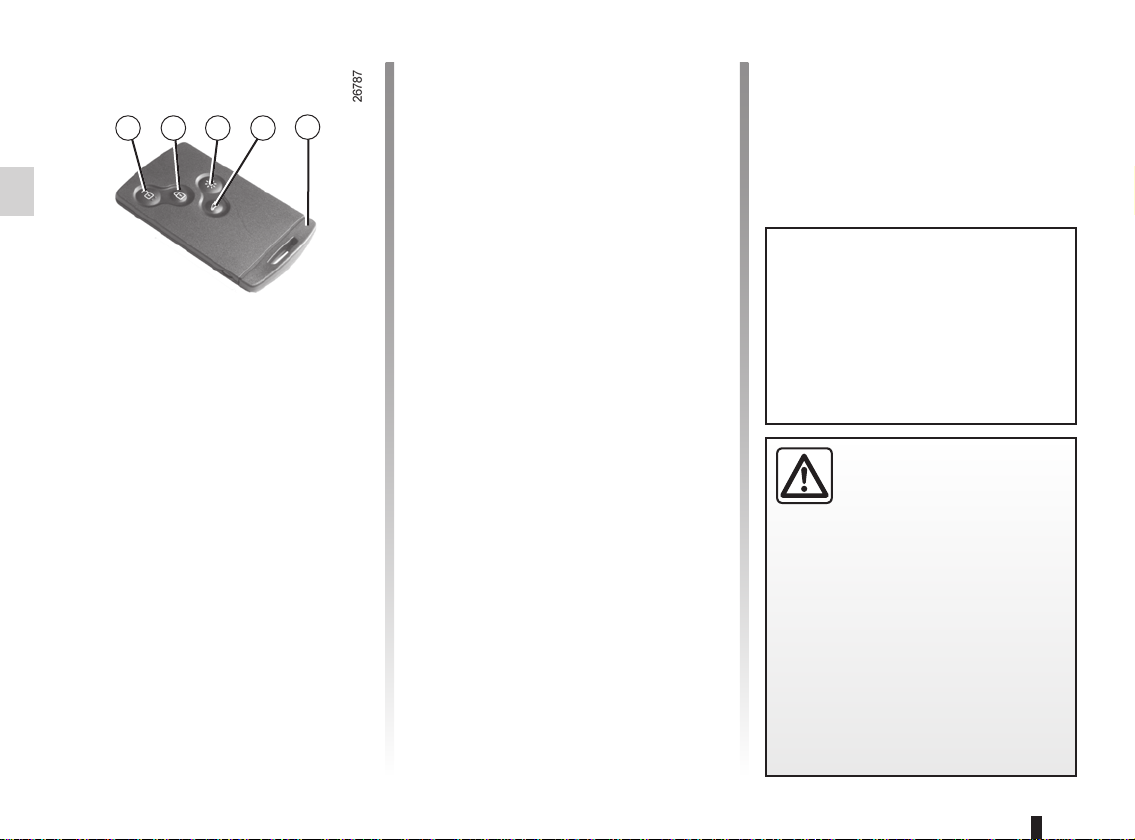
RENAULT CARDS: general information (1/2)
5
1 2 3
1 Unlocking the doors and tailgate.
2 Locking all doors and tailgate.
3 Switching on the lighting remotely.
4 Unlocking/locking the tailgate
5 Integrated key.
Special note
The RENAULT “SERVICE” card, on
equipped vehicles, can be identified
by the word “SERVICE” engraved on
the card. Refer to the information on
the RENAULT “SERVICE” card in section 1.
4
The RENAULT card is used
for:
– locking/unlocking the doors and tail-
gate (doors, tailgate) and the fuel
filler flap (see the following pages);
– switching on the vehicle lighting re-
motely (refer to the following pages);
– depending on the vehicle, automati-
cally closing the electric windows
and sunroof remotely (see the information on “Electric windows/Electric
sunroof” in Section 3);
– starting the engine; refer to the in-
formation on “Starting the engine” in
Section 2.
Battery life
Make sure that the correct battery type
is being used, and that the battery is in
good condition and inserted correctly.
Its service life is approximately two
years: replace it when the message
“Keycard battery low” appears on the
instrument panel (refer to the information on the “RENAULT card: battery» in
section 5).
Range of the RENAULT card
This varies according to the surroundings. It is important to make sure when
handling the RENAULT card that you
do not lock or unlock the doors by inadvertently pressing the buttons.
When the battery is flat, you can
still lock/unlock and start your vehicle. Refer to the information on
“Locking/unlocking the doors” in
Section 1 and “Starting the engine”
in Section 2.
Driver’s responsibility
Never leave your vehicle
with the RENAULT card
inside and never leave a
child (or a pet) unsupervised, even
for a short while.
They may pose a risk to themselves
or to others by starting the engine,
activating equipment such as the
electric windows or by locking the
doors.
Risk of serious injury.
1.2
RENAULT CARDS: general information (2/2)
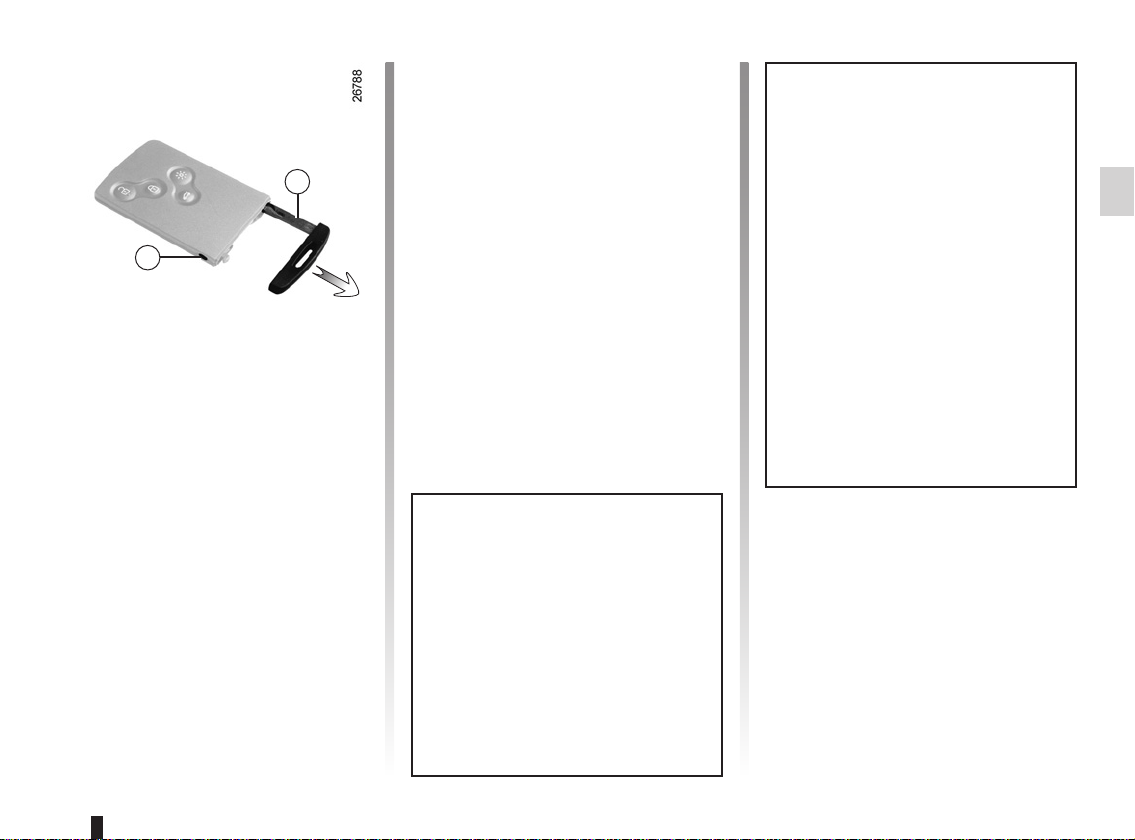
Access to key 5
Press button 6 and pull on key 5 then
release the button.
5
6
Integrated key 5
The integrated key is used to lock or
unlock the front left-hand door if the
RENAULT card does not work:
– when the RENAULT card battery is
drained, flat battery, etc.
– use of devices using the same fre-
quency as the card;
– if the vehicle is located in a zone of
high electromagnetic radiation;
Using the key
Refer to the information on “Locking/
unlocking the doors”.
Once you have accessed the vehicle
using the integrated key, replace it
in its housing in the RENAULT card,
then insert the RENAULT card into
the card reader to start the vehicle.
Advice
Avoid leaving the card in hot, cold or
humid areas.
Do not keep the RENAULT card in
a place where it could be bent or
damaged accidentally, such as in a
back pocket of a garment.
Replacement: need for an
additional RENAULT Card
If you lose your RENAULT card or
require another, you can obtain one
from an approved dealer.
If a RENAULT card is replaced, it
will be necessary to take the vehicle and all of its RENAULT cards
to an approved dealer to initialise
the system.
You may use up to four RENAULT
cards per vehicle.
1.3
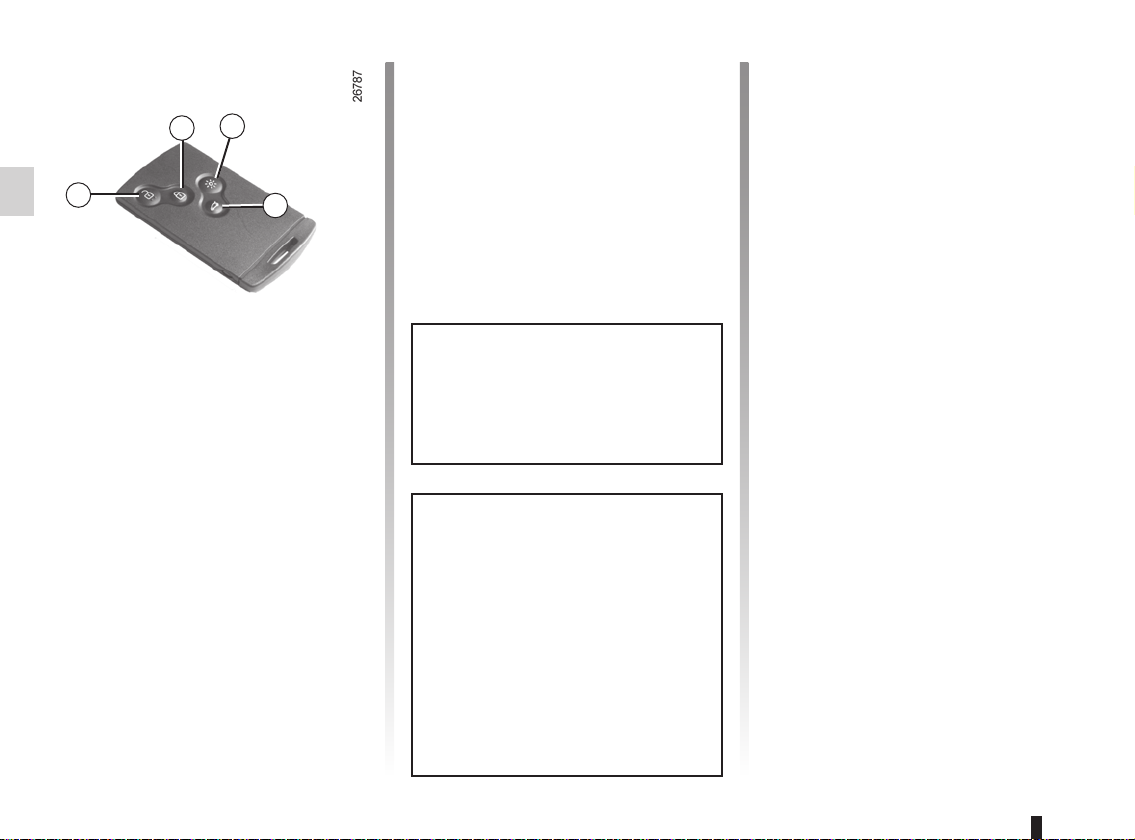
REMOTE CONTROL RENAULT CARD: use
3
2
1
4
Unlocking the doors and
tailgate
Press button 1.
The hazard warning lights flash once
to indicate that the doors have been unlocked.
When unlocking is only active for the
driver’s door, (refer to the information
on the “vehicle settings customisation
menu” in Section 1):
– pressing button 1 unlocks only the
driver’s door and the fuel filler flap;
– pressing button 1 twice unlocks all
the doors and the tailgate.
Locking the doors and
luggage compartment
Press the locking button 2. The hazard
warning lights flash twice to indicate
that the doors have locked. If a door
or the luggage compartment is open
or not properly shut, or if a RENAULT
card is still in the reader, the doors and
luggage compartment lock then quickly
unlock and the hazard warning lights
do not flash.
If the vehicle has been unlocked
but neither the doors or tailgate are
open, it locks again automatically
after two minutes.
The card buttons are deactivated
when the engine is running.
The flashing status of the hazard
warning lights informs you of the vehicle status:
– one flash indicates that the vehi-
cle is completely unlocked;
– two flashes indicate that the ve-
hicle is completely locked.
Unlocking/locking the
luggage compartment only
Press button 4 to unlock/lock the luggage compartment.
RENAULT card not detected
alarm
If a door is opened when the engine
is running and the card is not in the
reader, the message “Keycard not detected” and a beep will warn you of this.
The warning disappears when the card
is inserted in the reader again.
Distance lighting function
The dipped beam headlights, indicator
lights and interior lights come on for approximately 30 seconds when button 3
is pressed. This can be used, for example, to identify the vehicle from a distance when parked in a car park.
Note: pressing button 3 again switches
off the lighting.
1.4
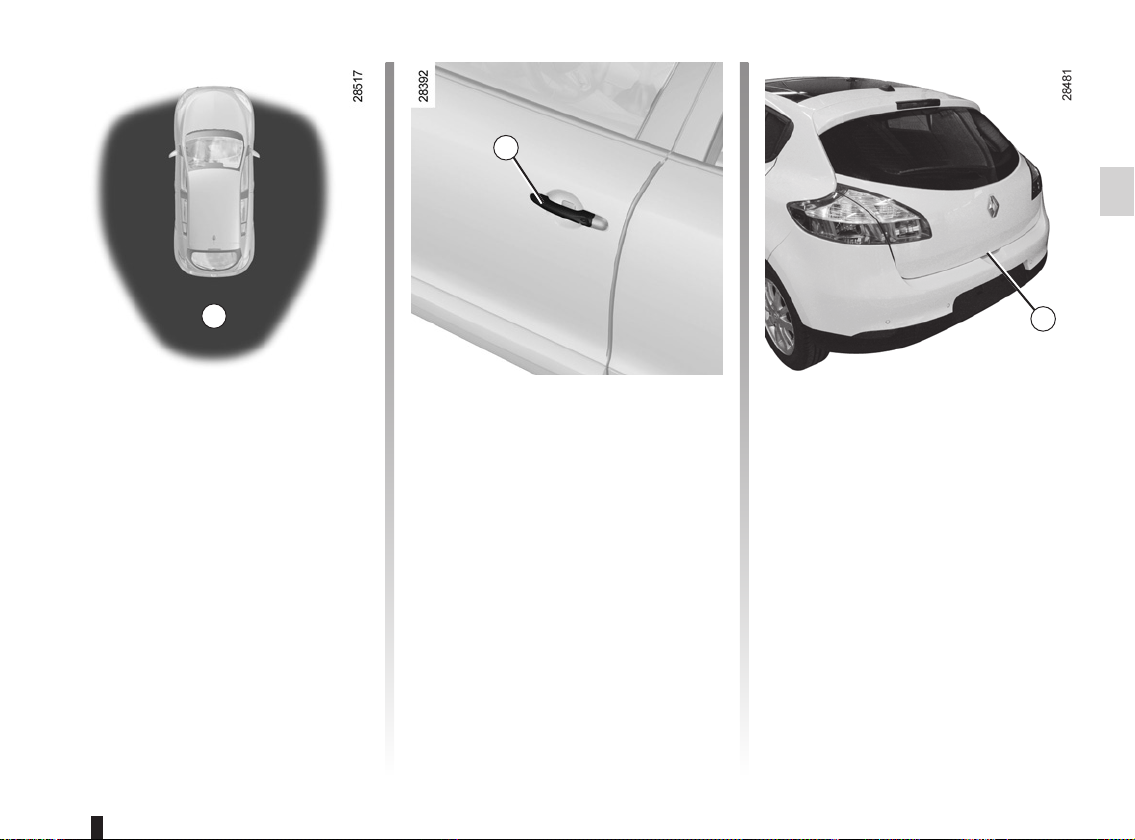
HANDS-FREE RENAULT CARD: use (1/3)
2
1
Use
On equipped vehicles, in addition to
the functions of the remote control
RENAULT card, it can be used to lock/
unlock without using the RENAULT
card, when it is in access zone 1.
Note: ensure that the RENAULT card
is not in contact with other electronic
equipment (computer, PDA, phone,
etc.) as this could hinder its operation.
3
Unlocking the vehicle
With the RENAULT card in zone 1,
place your hand on a door handle 2: the
vehicle will unlock (in some cases, you
may need to pull door handle 2 twice to
unlock the vehicle and open the door).
Pressing the button 3 also unlocks all
the doors and the tailgate.
The hazard warning lights flash once
to indicate that the doors have been unlocked.
1.5
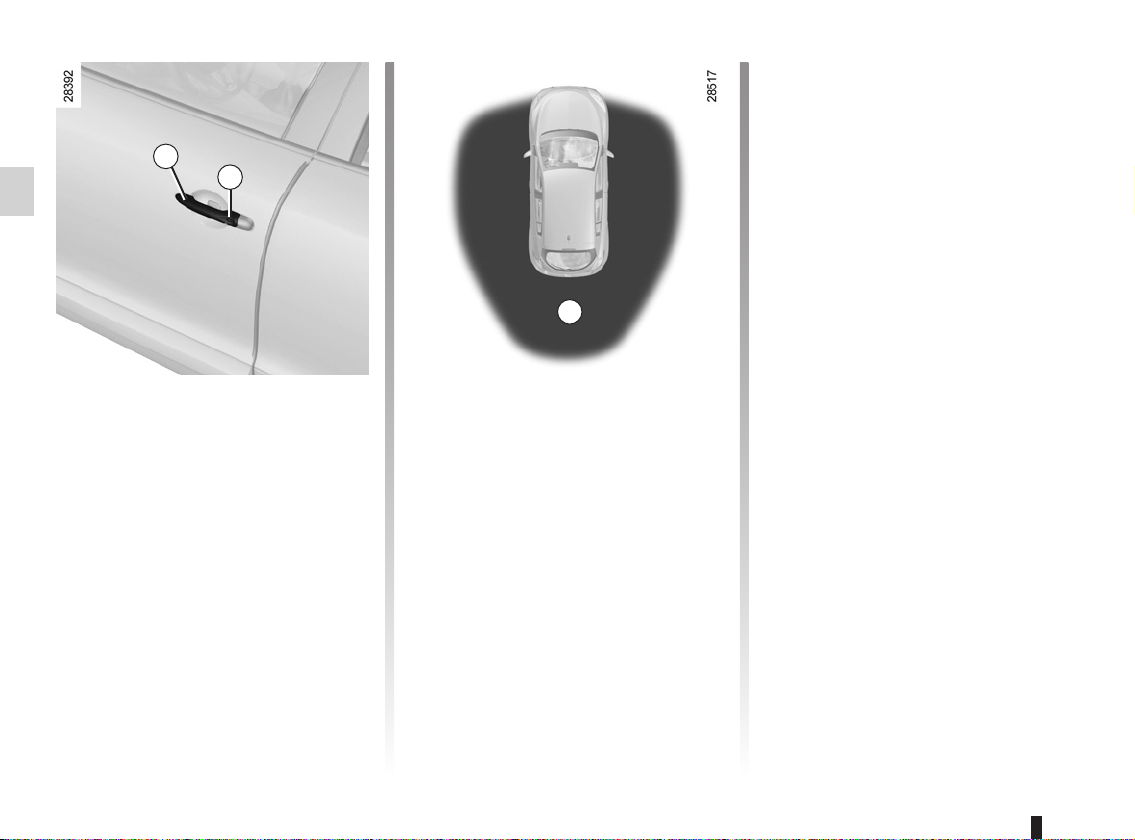
HANDS-FREE RENAULT CARD: use (2/3)
2
4
Locking the vehicle
There are three ways to lock the vehicle: remotely, using button 4, or using
the RENAULT card.
Remote locking
With the RENAULT card on you, and
doors and tailgate closed, move away
from the vehicle: it will lock automatically once you have left zone 1.
Note: the distance at which the vehicle
locks depends on the surroundings.
The hazard warning lights flash twice
and a beep sounds to indicate that the
doors have locked.
The beep may be switched off. Consult
an approved Dealer.
If a door or the tailgate is open or not
properly shut, or a card is in the passenger compartment (or the card reader)
the vehicle will not lock. In this situation, no beep sounds and the hazard
warning lights do not flash.
Locking using button 4
With the doors and luggage compartment closed, press button 4 on the driver’s door handle. The vehicle will lock.
If a door or the tailgate is open or not
closed properly, the vehicle will quickly
lock/unlock.
Note: a RENAULT card must be within
the vehicle’s access zone (zone 1) to
be able to lock the vehicle using the
button.
1
Special note:
If you wish to check that the doors are
locked after locking using button 4, you
have approximately three seconds to
try the door handles without unlocking
them.
After this delay, the hands-free mode
is activated once again and any movement of a handle will unlock the vehicle.
1.6
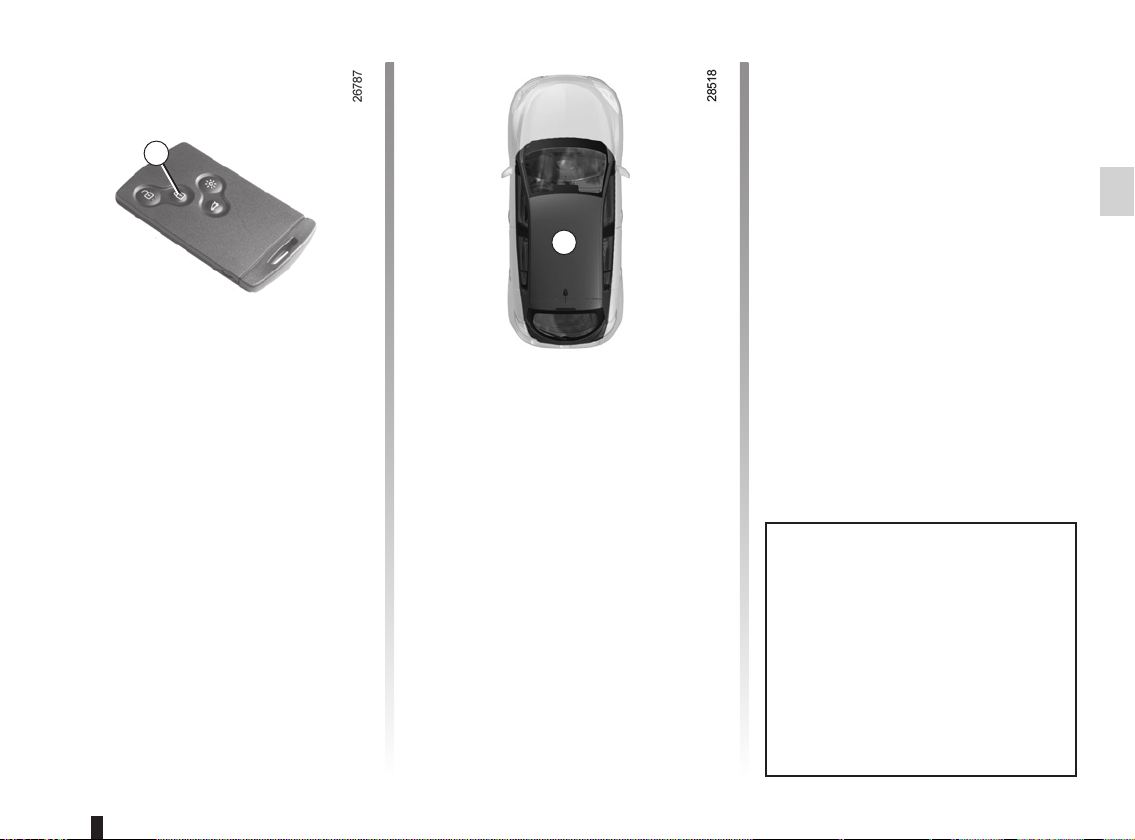
HANDS-FREE RENAULT CARD: use (3/3)
5
With the engine running, if after
having opened and closed a door the
card is no longer in the passenger compartment, the message Keycard not detected (accompanied by a beep when
the speed exceeds a certain level)
warns you that the card is no longer
in the vehicle. This avoids you driving
6
away after having dropped off a passenger who has the card, for example.
The warning disappears when the card
is detected again.
Locking the vehicle
(continued)
Locking using the RENAULT card
With the doors and luggage compartment closed, press button 5: the vehicle will lock.
The hazard warning lights flash twice
to indicate that the doors have locked.
Note: the maximum distance at which
the vehicle locks depends on the surroundings.
Special note:
The vehicle will not lock if:
– a door or the tailgate is open or not
properly closed;
– a card is still in zone 6 (or in the card
reader) and no other card is in the
external detection zone.
After locking/unlocking the vehicle
or the luggage compartment only
using the buttons on the RENAULT
card, remote locking and unlocking
in hands-free mode are deactivated.
To reactivate the “hands-free” mode:
restart the vehicle.
1.7
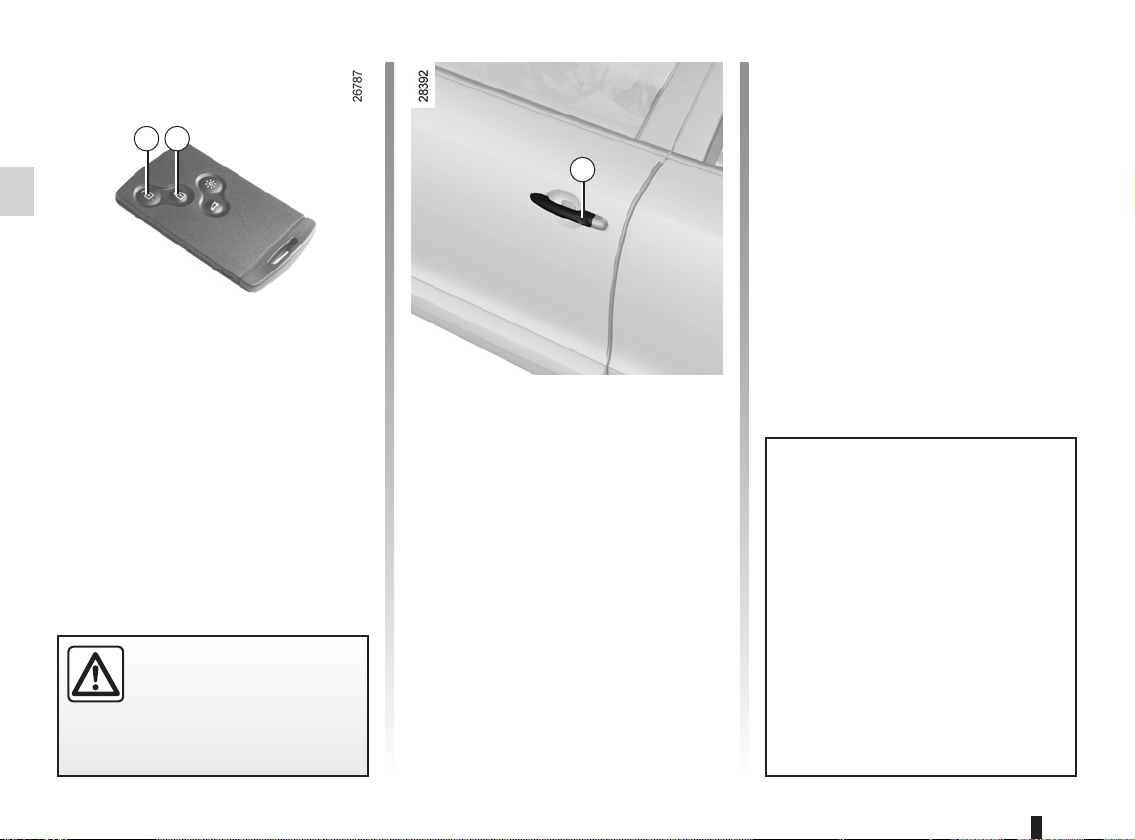
RENAULT CARD: deadlocking
2
1
To deactivate deadlocking
Unlock the vehicle using button 1 on
the RENAULT card.
The hazard warning lights flash once to
3
indicate that the doors have been unlocked.
If the vehicle is equipped with a deadlocking function, this allows you to lock
the opening elements and to prevent
the doors from being unlocked using
the interior handles (for example, by
breaking the window and then trying to
open the door from the inside).
Never use deadlocking if
someone is still inside the
vehicle.
1.8
To activate deadlocking
You can choose between two deadlocking activation modes:
– press button 2 twice in quick succes-
sion;
– or, press the button on the driver’s
door handle 3 twice in quick succession.
The hazard warning lights flash five
times to indicate locking.
Activating deadlocking also remotely closes the windows and/or
the electric sunroof, on equipped
vehicles.
After activating the deadlocking
function using button 2, remote
locking and unlocking in hands-free
mode are deactivated.
To reactivate the “hands-free” mode:
restart the vehicle.
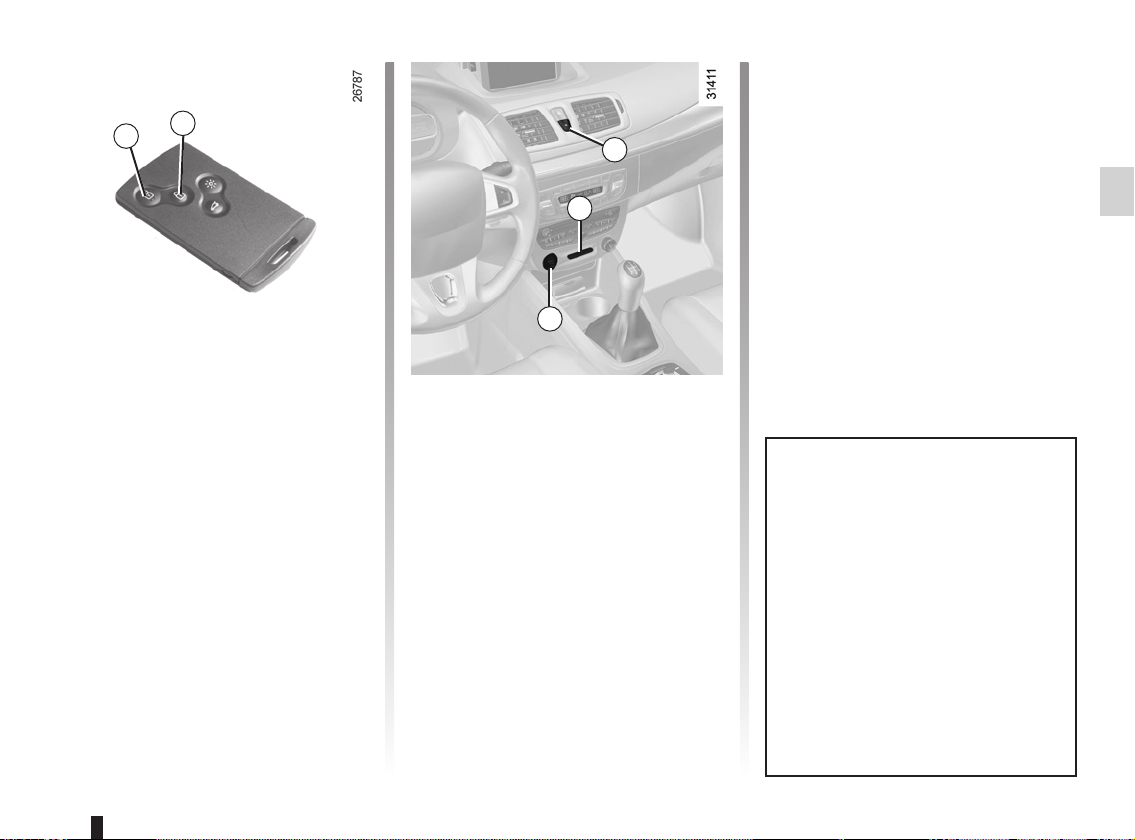
RENAULT CARD “SERVICE”
2
1
Deactivation of the
“SERVICE” mode
There are two possibilities:
3
4
– Press a button on the RENAULT
card (not the RENAULT “SERVICE”
card);
– start the engine with a RENAULT
card (not the RENAULT “SERVICE”
card). With the card in reader 4,
press button 5.
5
If the vehicle is equipped with this
card, it can be identified by the word
“SERVICE” engraved on the card.
In certain situations, you may wish to
entrust your vehicle to a third party
(parking valet, mechanic, etc.) whilst
restricting its operation.
The RENAULT “SERVICE” card enables the vehicle to be locked but only
allows the driver’s door to be unlocked
and the engine to be started.
Activation of the “SERVICE”
mode.
Insert the RENAULT “SERVICE” card
into the card reader 4. All the vehicle
opening elements lock (except the driver’s door).
If they do not, with the engine
switched off, press button 1 (all the
doors and the tailgate lock, with the exception of the driver’s door) or 2 (the
entire vehicle locks) on the RENAULT
“SERVICE” card.
The interior locking/unlocking
switch 3 is deactivated while the vehicle is in use with the RENAULT
“SERVICE” card.
Each vehicle only has one
RENAULT “SERVICE” card.
When using a RENAULT “SERVICE”
card, the other cards retain all their
functions.
1.9

OPENING AND CLOSING THE DOORS (1/2)
1
Opening the doors from the
outside
With the doors unlocked or the “handsfree” RENAULT card in your possession, hold handle 1 and pull it towards
you.
In some cases, it may be necessary to
pull the handle twice to open the door.
Opening from the inside
Pull on the handle 2.
Lights-on reminder buzzer
If you have switched off the ignition
and left the lights switched on, a reminder buzzer will sound when a door
is opened.
Card reminder buzzer
When the driver’s door is opened and
the card is still in the reader, the mes-
2
sage “Please remove keycard” appears
on the instrument panel, accompanied
by a beep.
Door/tailgate open buzzer
If a door or the luggage compartment is
open or not properly closed, once the
vehicle reaches 6 mph (10 km/h), the
message “Boot open” or “Door open”
(depending on the door) appears on
the instrument panel, accompanied by
a warning light.
Special note
After switching off the engine, the lights
and any accessories that are in operation (radio, etc.) will continue to operate.
They stop as soon as the driver’s door
is opened.
1.10
As a safety precaution,
the doors should only be
opened or closed when the
vehicle is stationary.
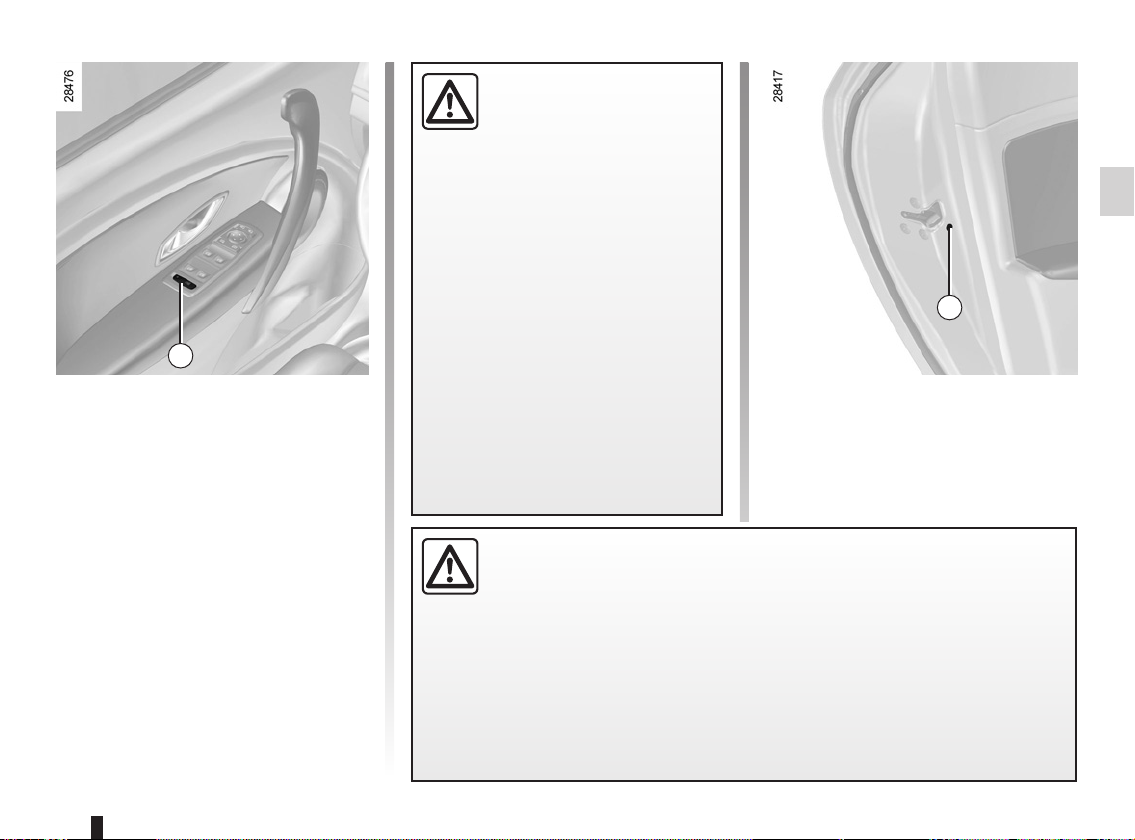
OPENING AND CLOSING THE DOORS (2/2)
Safety of rear occupants
The driver can authorise
operation of the rear doors
and, depending on the ve-
strument panel;
light up.
Driver’s responsibility when parking or stopping the vehicle
Never leave an animal, child or adult who is not self-sufficient alone on
your vehicle, even for a short time.
They may pose a risk to themselves or to others by starting the engine,
1
Child safety
Ç
opening of the rear doors. If the vehicle
is equipped with electric rear windows,
this action will also authorise their use.
The indicator light in the switch lights up
to confirm that the locks have been activated.
Note: if there is a system fault, the
message “Check child safety device” is
displayed on the instrument panel: contact an approved Dealer.
Vehicle with switch 1
Press switch 1 to authorise
hicle, the electric windows by pressing switch 1 on the side with the illustration.
Depending on the vehicle, in the
event of a fault:
– a beep sounds;
– a message is displayed on the in-
– the integrated indicator does not
If the battery has been disconnected, press switch 1 on the side
with the symbol, to lock the rear
doors.
activating equipment such as the electric windows or by locking the doors.
Also, in hot and/or sunny weather, please remember that the temperature inside
the passenger compartment increases very quickly.
RISK OF DEATH OR SERIOUS INJURY.
2
Vehicle with manual door locking
Move lever 2 and check from the inside
that the doors are securely locked, to
prevent the rear doors being opened
from the inside.
1.11
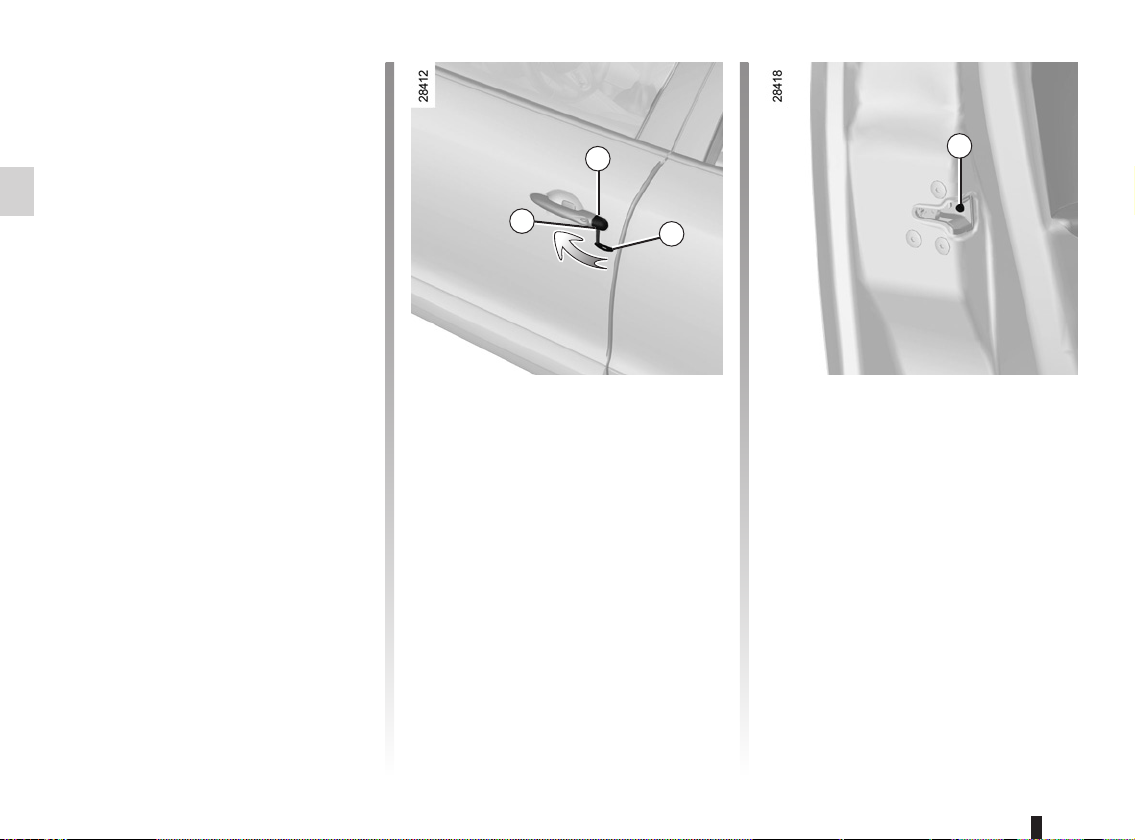
LOCKING/UNLOCKING THE DOORS (1/2)
Locking/Unlocking the doors
from the outside
This is done using the RENAULT Card;
see the “RENAULT Card” information in
Section 1.
In certain cases, the RENAULT card
may not work:
– if the RENAULT card battery is weak,
flat, etc.
– if equipment operating on the same
frequency as the card (mobile
phones, etc.) is used;
– vehicle located in a high electromag-
netic radiation zone.
It is then possible:
– to use the key integrated into the
card to unlock the front left-hand
door;
– to lock each of the doors manually;
– to use the interior door locking/un-
locking control (refer to the following
pages).
Using the key integrated in
the RENAULT card
– Remove cover A from the left-hand
door (using the end of key 2) in
notch 1;
– move it upwards to remove cover A;
– insert the key 2 into the lock of the
front left-hand door and lock or
unlock.
A
1
2
3
Locking the doors manually
Turn screw 3 with the door open (using
the end of the key) and close the door.
This means that the doors are then
locked from the outside.
The doors may then only be opened
from the inside or by using the key in
the front left-hand door.
1.12
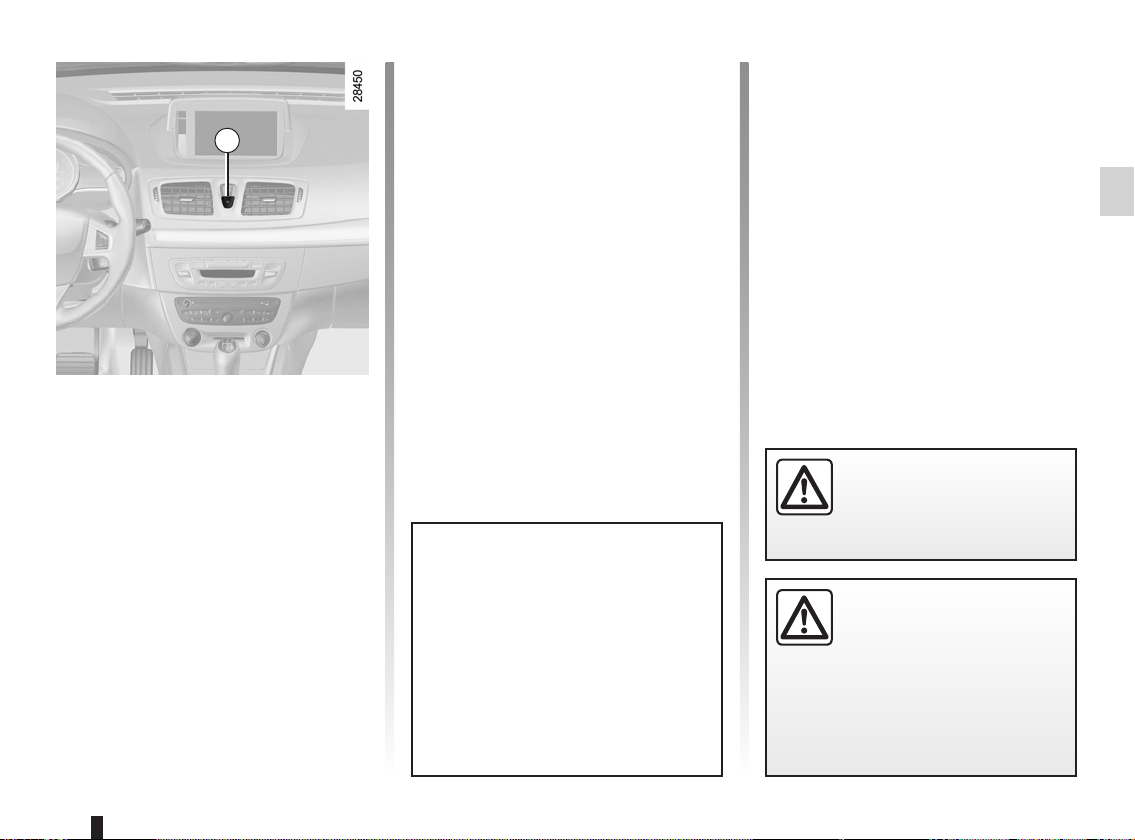
LOCKING/UNLOCKING THE DOORS (2/2)
4
Interior locking/unlocking
door control
Switch 4 controls the doors, tailgate
and, depending on the vehicle, the fuel
filler flap simultaneously.
If a door or the tailgate is open or not
closed properly, the doors and tailgate
lock/unlock quickly.
If transporting an object with the tailgate open, you can still lock the doors:
with the engine stopped, press and
hold switch 4 for more than five seconds to lock the other doors.
Locking the doors without
the RENAULT card
For example, in the event of a discharged battery or the RENAULT card
temporarily not working, etc.
With the engine switched off and a
door or tailgate open, press and hold
switch 4 for more than five seconds.
When the door is closed, all the doors
and the tailgate will be locked.
Unlocking the vehicle from the outside
is only possible with the RENAULT card
in the vehicle’s access zone or using
the key integrated in the RENAULT
card.
After locking/unlocking the vehicle
or the tailgate only using the buttons on the RENAULT card, remote
locking and unlocking in hands-free
mode are deactivated.
To reactivate the “hands-free” mode:
restart the vehicle.
Door and tailgate status
indicator
When the ignition is on, the indicator
light integrated in switch 4 informs you
of the status of the doors and tailgate:
– indicator light on, the doors and tail-
gate are locked,
– indicator light off, the doors and tail-
gate are unlocked.
When you lock the doors, the indicator
light remains lit and then goes out.
Never leave your vehicle
with the RENAULT card
inside.
Driver’s responsibility
If you decide to keep the
doors locked when you are
driving, remember that it
may be more difficult for those assisting you to gain access to the
passenger compartment in the
event of an emergency.
1.13
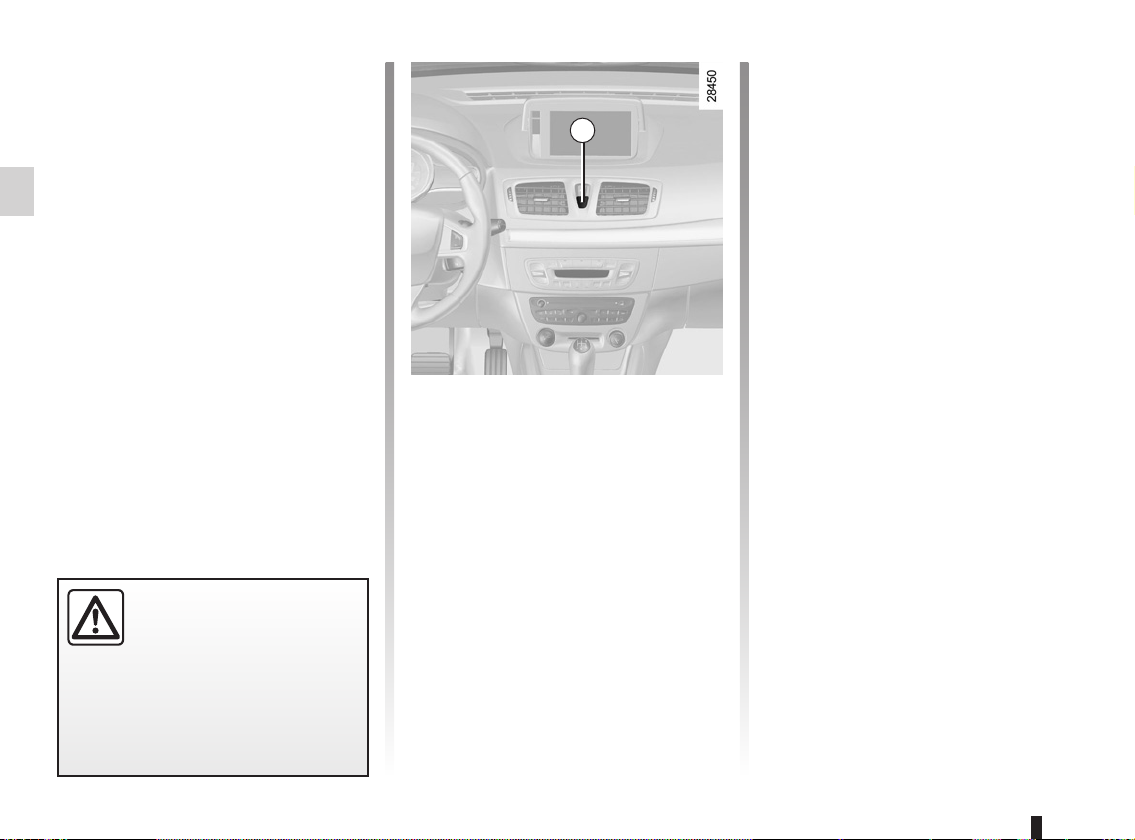
AUTOMATIC LOCKING WHEN DRIVING
You can decide whether you want to
activate this function.
Operating principle
After the vehicle is started, the system
automatically locks the doors when you
are driving at approximately 6 mph (10
km/h) and over.
The door can be unlocked:
– by pressing the door unlocking
button 1.
– by opening a front door (vehicle sta-
tionary).
Note: if a door is opened or closed,
it will automatically lock again when
the vehicle reaches a speed of 6 mph
(10 km/h).
Driver’s responsibility
If you decide to keep the
doors locked when you are
driving, remember that it
may be more difficult for those assisting you to gain access to the
passenger compartment in the
event of an emergency.
1
Activating/deactivating the
function
Refer to the information on the “Vehicle
settings customisation menu” in
Section 1, regarding the “Auto door
locking while driving” function:
= function activated
< function deactivated.
Operating faults
If you experience an operating fault (no
automatic locking, the indicator light incorporated in button 1 does not light up
when trying to lock the doors and tailgate, etc.), firstly check that the doors
and tailgate are properly closed. If they
are closed correctly, contact an approved dealer.
1.14
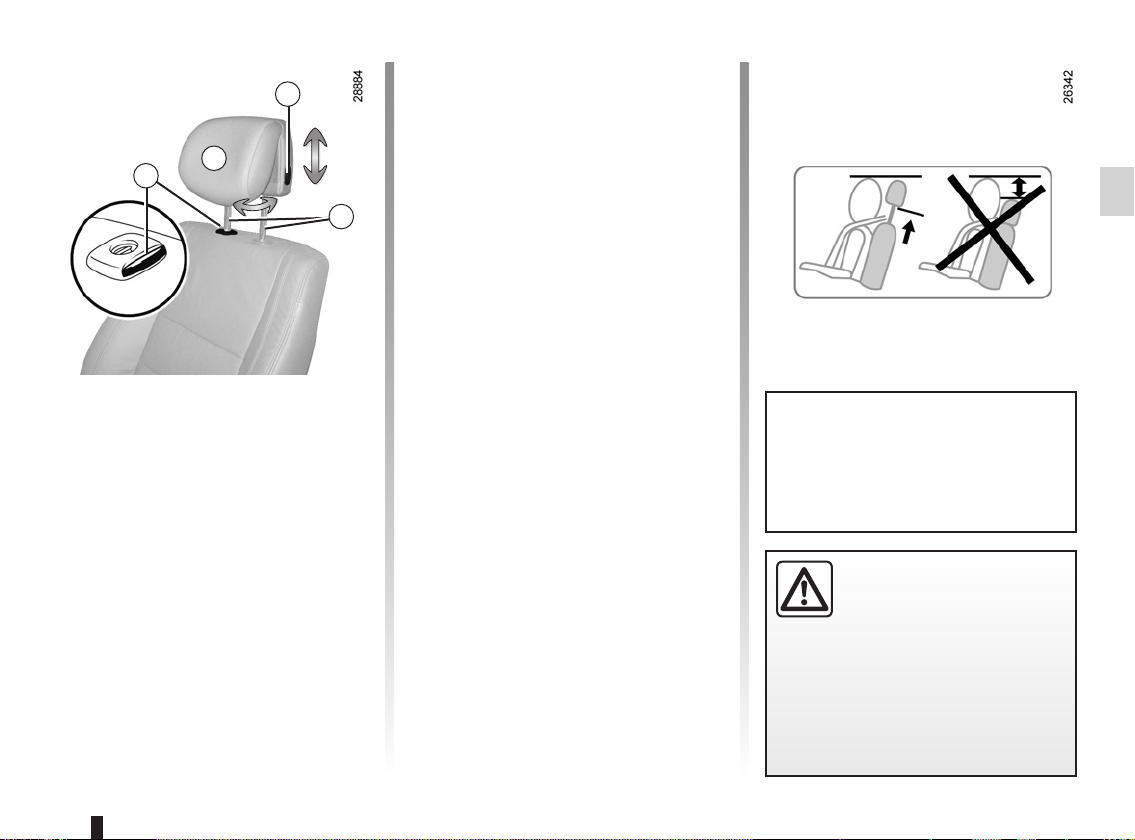
FRONT HEADRESTS
A
1
To adjust the angle of the
2
headrest
Depending on the vehicle, tilt section A
towards or away from you to the required position.
3
To raise the headrest
Pull the headrest upwards to the desired height.
To lower the headrest
Press button 2 and guide the headrest
down to the desired height.
To remove the headrest
Raise the headrest to its highest position (tilt the seatback backwards if
necessary). Press button 1 and lift the
headrest to release it.
To refit the headrest
Pull out the headrest rods 3 as far as
possible by pulling from the top. Take
care to ensure they are clean and correctly aligned and, if there are any problems, check that the notches are facing
forwards.
Insert the headrest rods into the holes
(tilt the seatback backwards if necessary).
Lower the headrest until it locks, press
button 1 and lower the headrest as far
as possible.
Check that each headrest rod 3 is securely locked in the seatback by trying
to pull them up or push them down.
The three upper positions can
be manipulated without pressing
button 2. However, it is preferable to
press this button to lower the headrest.
The headrest is an important safety component:
ensure that it is in place and
in the correct position. The
distance between your head and the
headrest and the distance between
the head and section A should be
as small as possible.
1.15
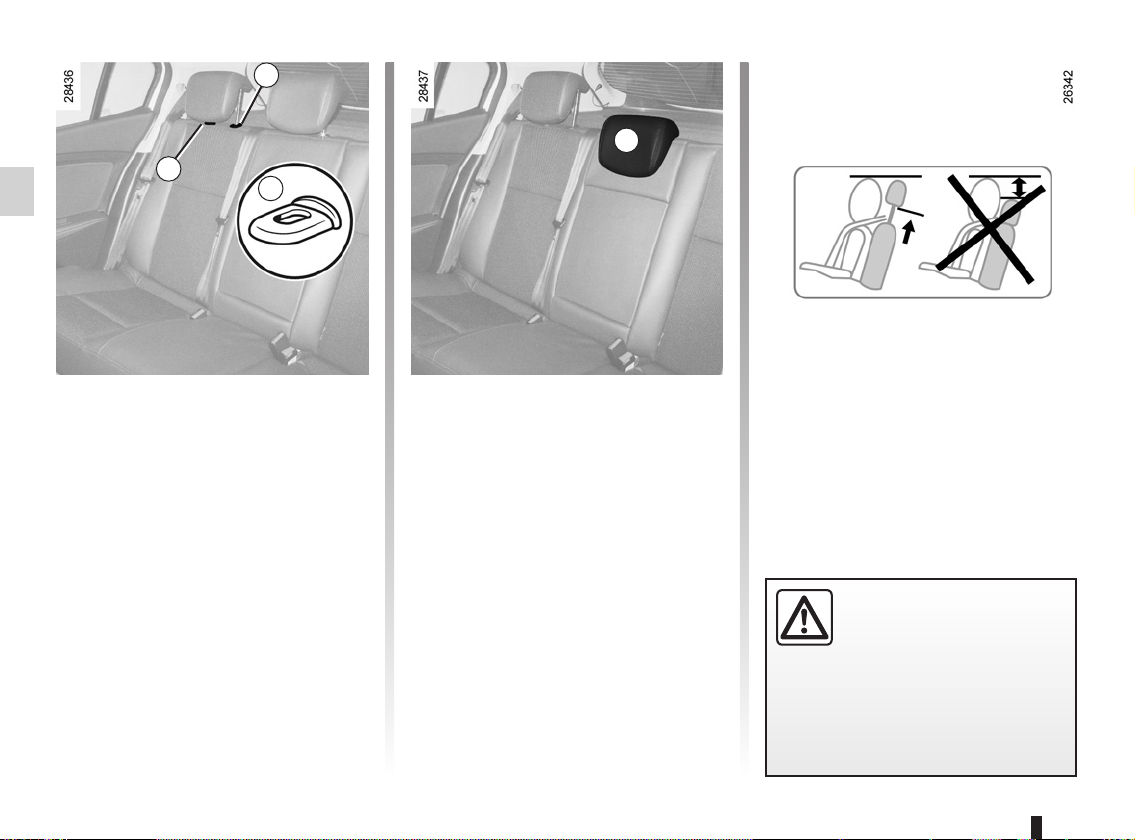
REAR HEADRESTS
2
1
A
B
Position for use
Raise or lower the headrest while pulling it towards the front of the vehicle.
To remove the headrest
Press tabs A of rods 1 and 2 simultaneously and remove the headrest.
Note: on the three door version, first
lower the bench seatback (refer to the
information on the “Rear seat functions”
in Section 3).
1.16
To refit the headrest
Insert the headrest rods into the
sleeves, and lower the headrest to the
first notch.
Storage position
Lower the headrest as far as possible, then press tab 2 and lower it completely.
When the headrest is set at the
lowest position (position B) this is
for storage only: it should not be in
this position when a seat is occupied.
The headrest is a safety
component. Ensure that it is
fitted and in the correct po-
sition: the top of your head
should be in line with the top of the
headrest.
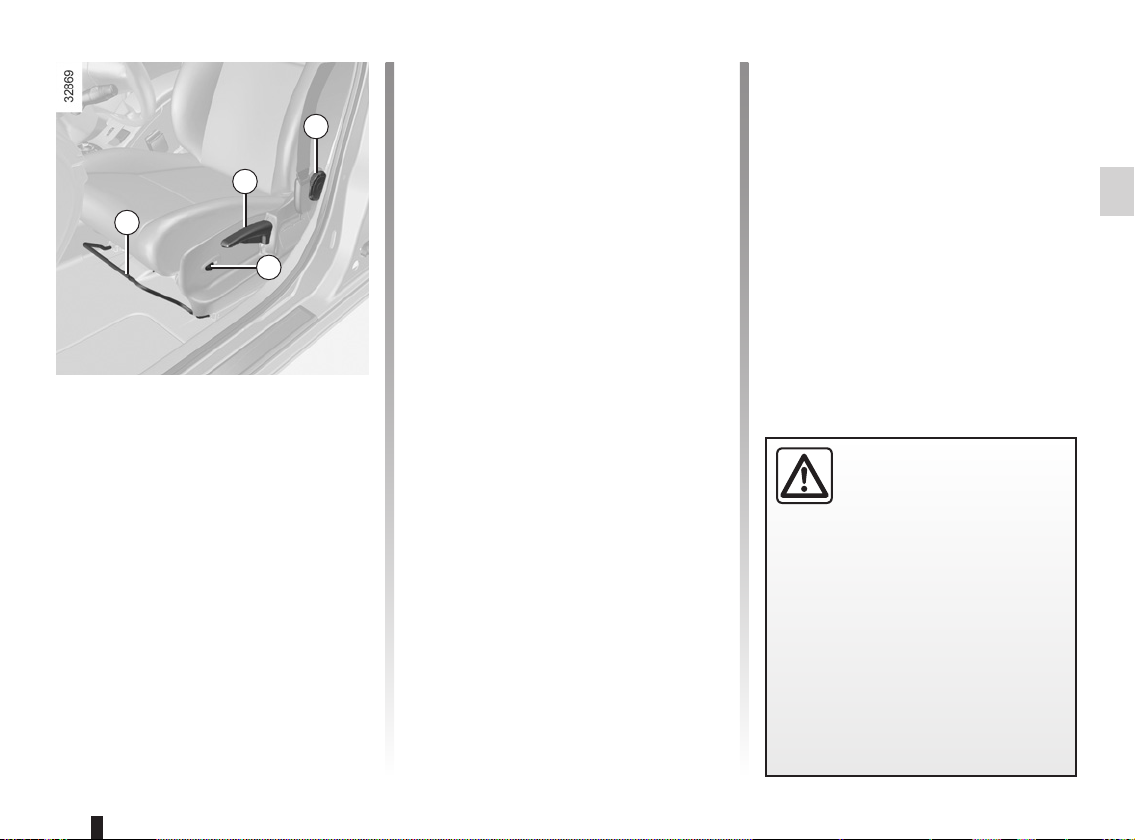
FRONT SEATS WITH MANUAL CONTROL (1/2)
To tilt the seatback
Turn control knob 3 to the required po-
3
sition.
2
1
4
To move the seat forwards or
back
Lift handle 1 to release. Release the
handle once the seat is in the correct
position and ensure that the seat is fully
locked into position.
To raise or lower the seat
base
Move lever 2 as many times as necessary upwards or downwards.
Heated seats
(depending on vehicle)
With the engine running, turn control 4
to either position I, II or III (depending
on the temperature required). An indicator light on the instrument panel
lights up once the front seat heating
system is operating.
The system, which has a thermostat,
decides whether or not the heating is
needed, according to the position selected.
For safety reasons, carry
out any adjustments when
the vehicle is not being
driven.
We would advise you not to recline
the seatbacks too far to ensure that
the effectiveness of the seat belts is
not reduced.
Nothing should be placed on the
floor (area in front of driver) as such
objects may slide under the pedal
during braking manoeuvres, thus
obstructing its use.
1.17
FRONT SEATS WITH MANUAL CONTROL (2/2)
5
6
To adjust the lumbar support
on the driver’s seat
Lower handle 5 to increase the support
and lift to decrease it.
1.18
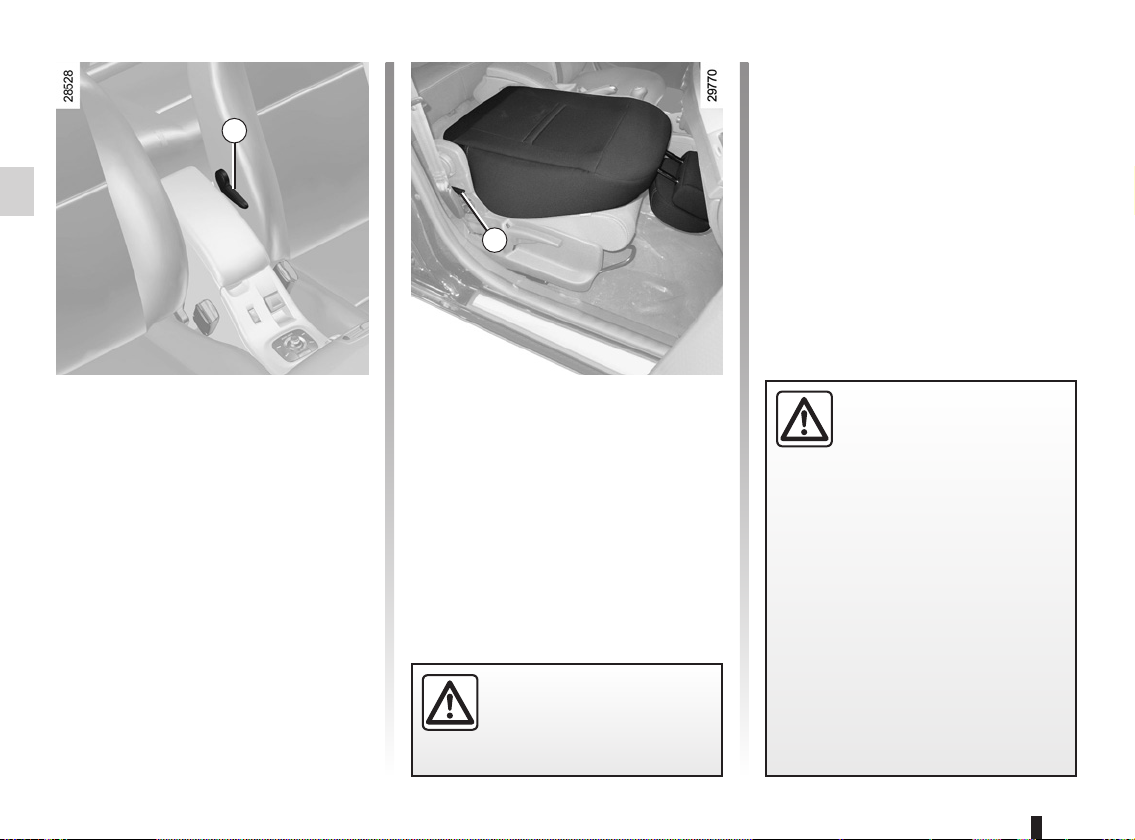
Table function
Depending on the vehicle, the passenger seatback may be folded down onto
the seat base to create a table.
Lower the headrest, move the seat
back, tilt handle 6 and completely lower
the seatback.
For your safety, attach any
transported objects when
the seat is in the table position.
When the front seat is in
table position, the front pas-
senger air bag must be dis-
abled (see information on
“Child safety: activating/deactivating the front passenger air bag” in
Section 1).
Risk of serious injury caused by
items resting on the seatback table
which may be dislodged when the
air bag is deployed.
The label (on the dashboard) and
the markings (on the windscreen)
remind you of these instructions.
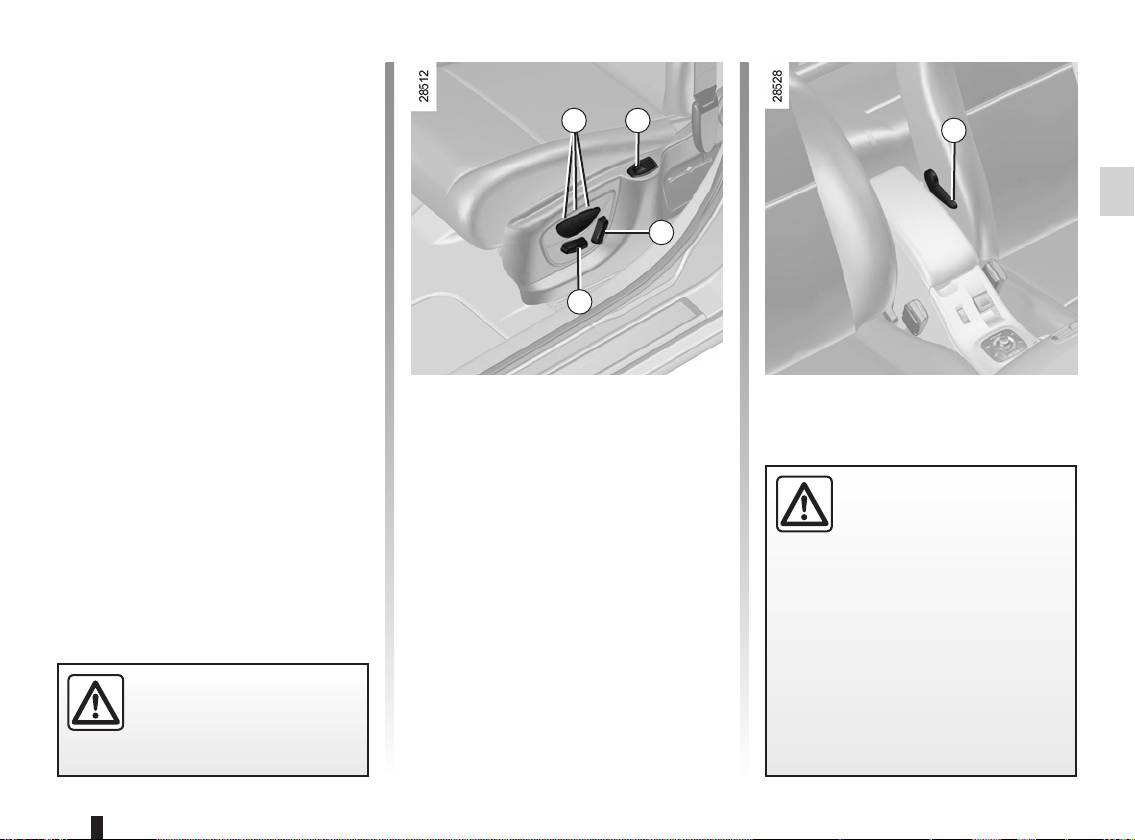
FRONT SEATS WITH ELECTRIC CONTROL
Switch 3 is used for adjusting the seatback and switch 4 is used for adjusting
the seat squab.
On equipped vehicles, buttons 1 are
used to store the chosen driving position (refer to the following page).
1
2
5
Adjusting the seat squab:
– To move the seat forwards or back
Move switch 4 forwards or back-
wards.
– To raise or lower the seat base
Move the switch 4 upwards or down-
wards.
Adjusting the lumbar support
on the driver’s seat:
Lower handle 5 to increase the support
and lift to decrease it.
For safety reasons, carry
out any adjustments when
the vehicle is not being
driven.
3
4
Adjusting the seatback:
To tilt the seatback, move the top of
switch 3 forwards or backwards.
Heated seats
(depending on vehicle)
With the engine running, turn control 2
to either position 1, 2 or 3 (depending
on the temperature required). An indicator light on the instrument panel
lights up once the front seat heating
system is operating.
The system, which has a thermostat,
decides whether or not the heating is
needed, according to the position selected.
We would advise you not
to recline the seatbacks too
far to ensure that the effec-
tiveness of the seat belts is
not reduced.
Nothing should be placed on the
floor (area in front of driver) as such
objects may slide under the pedal
during braking manoeuvres, thus
obstructing its use.
1.19
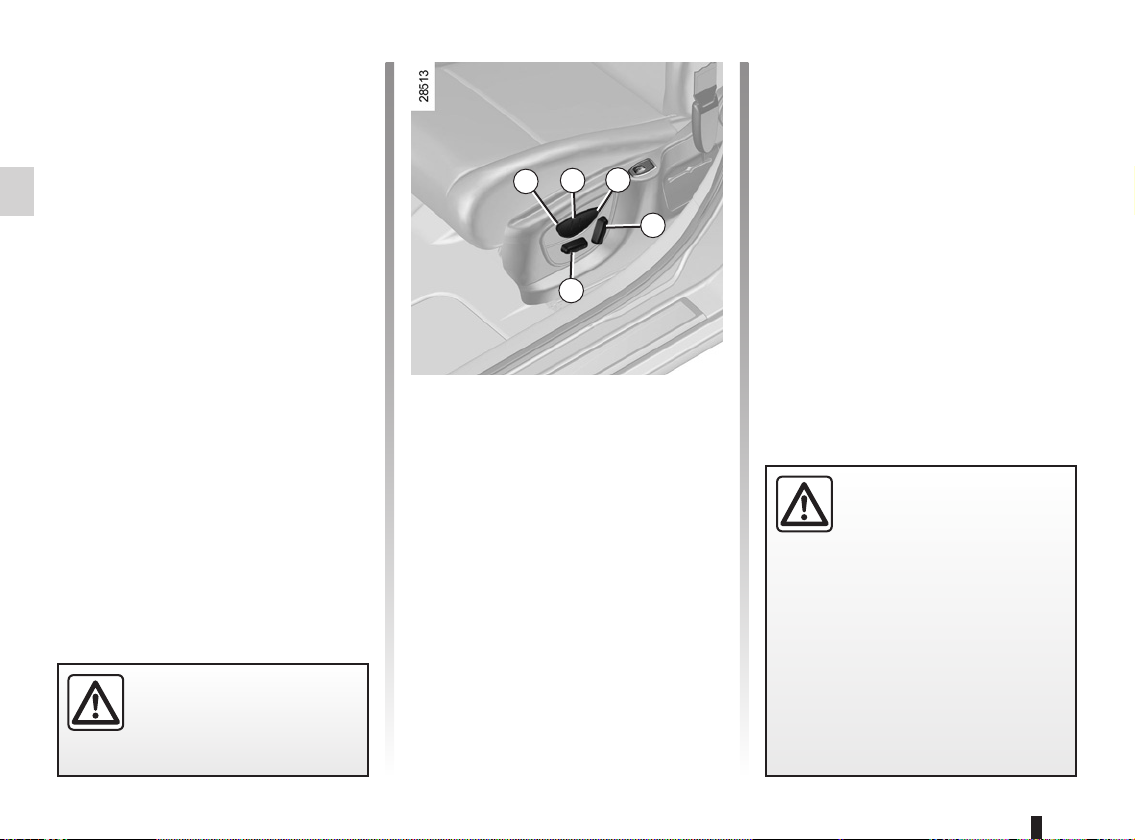
FRONT SEATS WITH ELECTRIC CONTROL WITH STORAGE OF SETTINGS
It is possible to store three driving positions.
A driving position includes the settings
for the seat base and seatback of the
driver’s seat.
The system operates:
– with the “hands-free” card de-
tected or, depending on the vehicle,
RENAULT card in the card reader;
– when the driver’s door is opened.
For safety reasons, carry
out any adjustments when
the vehicle is not being
driven.
3
2
1
4
5
Storing your driving position
– Adjust the seat using switches 4
and 5 (see previous page);
– press one of buttons 1, 2 or 3 until a
beep is heard: the driving position is
stored;
– to store other driving positions
repeat this procedure with the other
buttons.
Recalling a stored driving
position
With the vehicle stationary, briefly
press button 1, 2 or 3 depending on the
required stored driving position.
Note: recall of the stored driving position is interrupted if one of the seat
adjustment buttons is pressed during
recall.
When driving, it is not possible to
recall a driving position.
We would advise you not
to recline the seatbacks too
far to ensure that the effec-
tiveness of the seat belts is
not reduced.
Nothing should be placed on the
floor (area in front of driver) as such
objects may slide under the pedal
during braking manoeuvres, thus
obstructing its use.
1.20
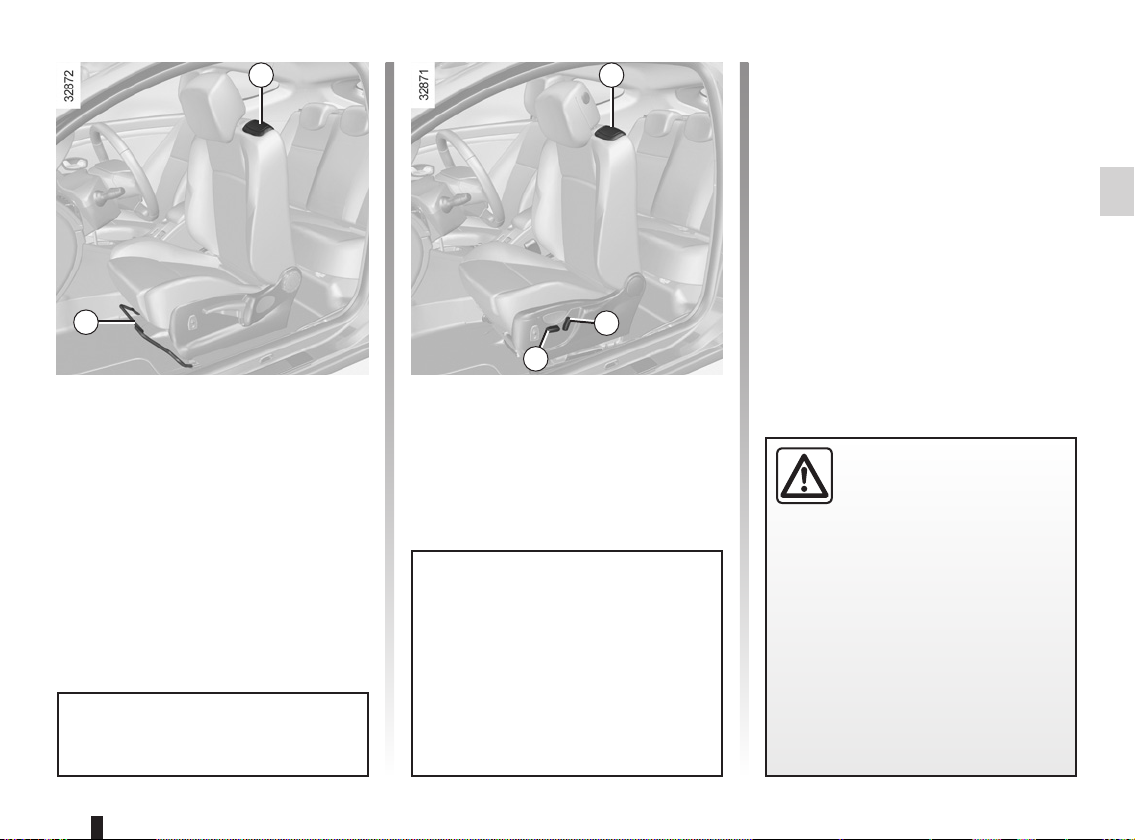
ACCESS TO REAR SEATS, THREE-DOOR VERSION
1
2
Manually controlled seats
Lift handle 1 and slide the seat forward.
To return the seat to its original position,
bring the seatback back into position.
Do not move handle 1 and handle 2
or switch 4 at the same time.
1
3
4
Electrically controlled seats
Lift handle 1 and tilt the seatback completely: the seat moves forward.
To return the seat to its original position,
bring the seatback back up. The seat
returns to its original position.
Special note: if the seatback is
tilted over the rear bench seat, only
use control 3 to return it to the driving position.
Never use handle 1 as it is not designed for this purpose: there is a
risk of damage to the mechanism.
Locking the seats
When a person, an object or a child
seat prevents the front seats from locking, perform the following operations:
– ask all of the passengers to leave
the vehicle and remove any bulky
objects from the rear seats;
– lock the seat(s) in the initial position
again;
– move the seat(s) forwards in order to
create sufficient space;
– ask the passengers to get back into
the vehicle, and refit the child seat or
objects on the rear seats.
Check that no object or
person prevents the front
seat from locking. If so,
remove any obstacles
behind the front seats. Adjust the
seat to allow sufficient room in the
rear. The rear occupants/objects
should then return to the vehicle.
Repeat the above until the seat is
locked correctly.
Risk of seat moving on its runners
during vehicle acceleration or braking.
1.21
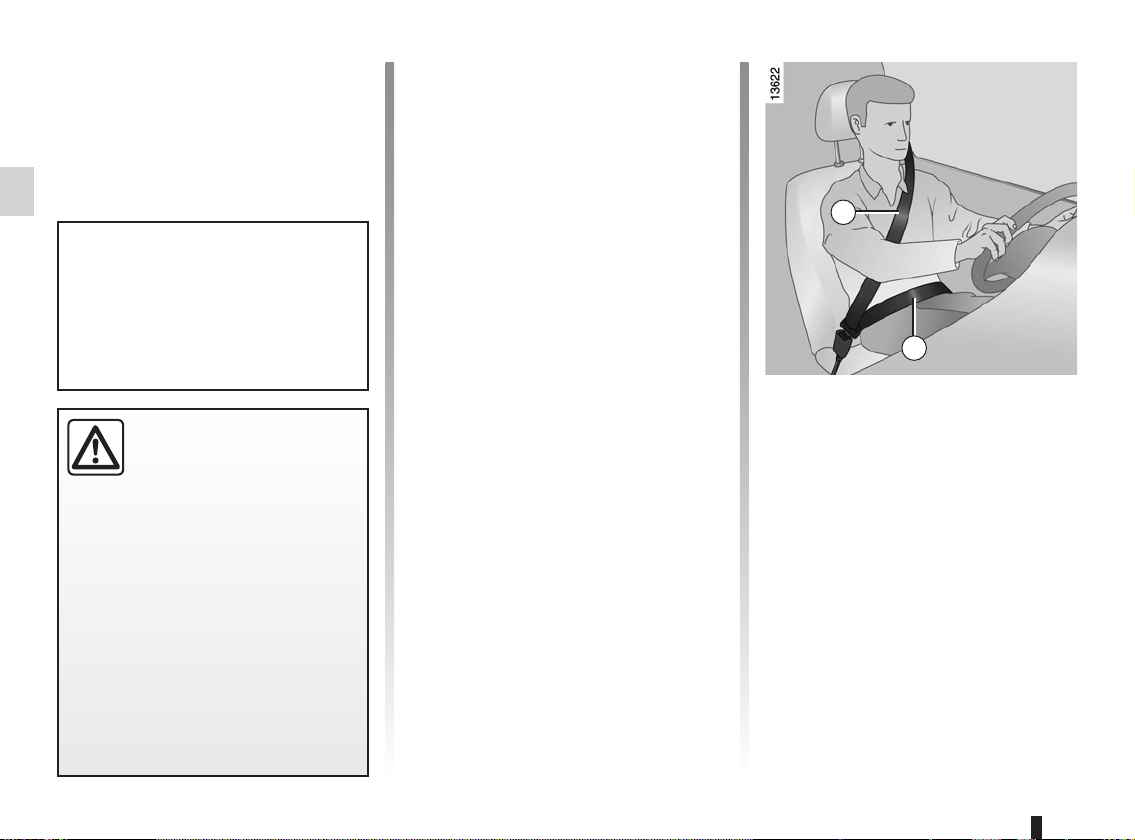
SEAT BELTS (1/3)
Always wear your seat belt when travelling in your vehicle. You must also
comply with the legislation of the particular country you are in.
Make sure that the rear bench seat
is locked in position correctly so that
the rear seat belts will operate efficiently. Refer to the information on
the “Rear bench seat” in Section 3.
Incorrectly adjusted or
twisted seat belts may
cause injuries in the event
of an accident.
Use one seat belt per person,
whether child or adult.
Even pregnant women should wear
a seat belt. In this case, ensure that
the lap belt is not exerting too much
pressure on the abdomen, but do
not allow any slack.
Before starting, first adjust your driving position, then ask all occupants
to adjust their seat belts to ensure
optimum protection.
Adjusting your driving
position
– Sit well back in your seat (having
first removed your coat or jacket).
This is essential to ensure your back
is positioned correctly;
– adjust the distance between the
seat and the pedals. Your seat
should be as far back as possible
while still allowing you to depress
the clutch pedal fully. The seatback
should be adjusted so that your arms
are slightly bent when you hold the
steering wheel;
– adjust the position of your head-
rest. For maximum safety, your head
must be as close as possible to the
headrest;
– adjust the height of the seat. This
adjustment allows you to select the
seat position which offers you the
best possible view;
– adjust the position of the steering
wheel.
1
2
Adjusting the seat belts
Sit with your back firmly against the
seatback.
Shoulder strap 1 should be as close as
possible to the base of the neck but not
on it.
Lap belt 2 should be worn flat over the
thighs and against the pelvis.
The belt should be worn so that it is
as close as possible to your body, i.e.:
avoid wearing heavy clothing or keeping bulky objects under the belts, etc.
1.22
SEAT BELTS (2/3)
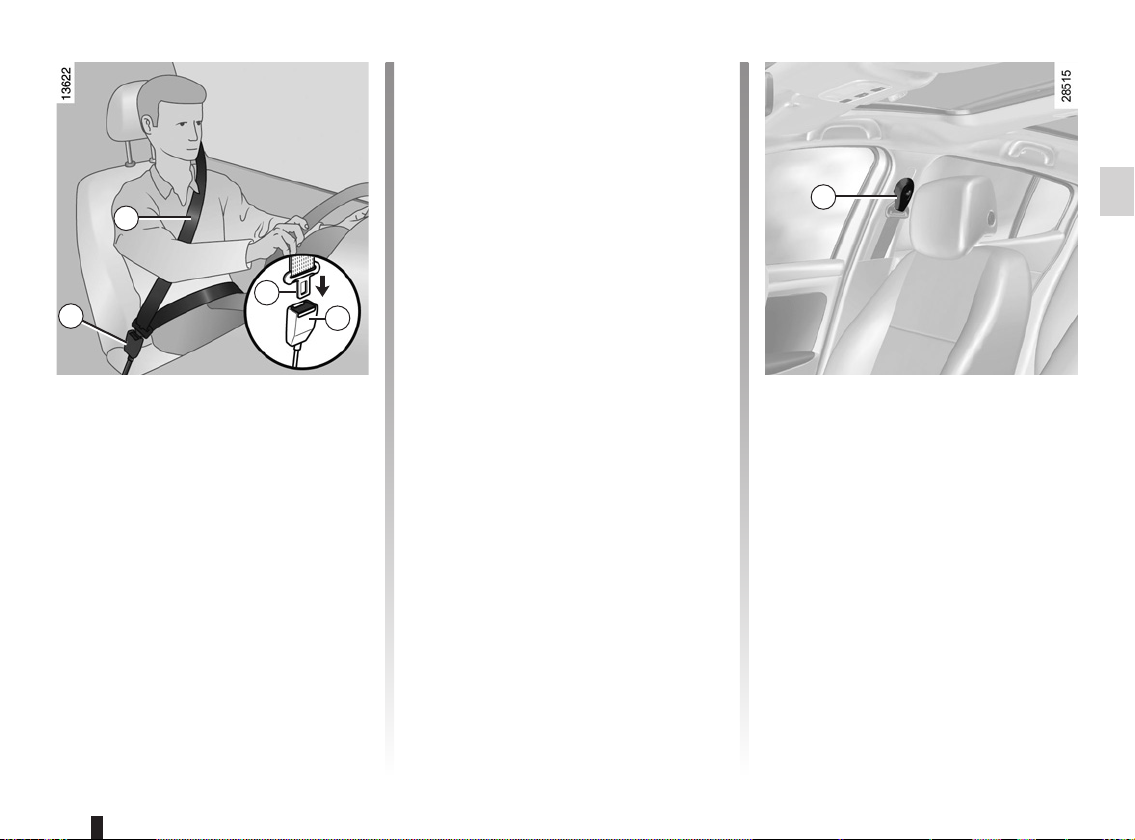
1
3
4
4
Locking
Unwind the belt slowly and smoothly
and ensure that buckle 3 locks into
catch 4 (check that it is locked by pulling on buckle 3). If the belt jams, allow
it to return slightly before attempting to
unwind it again.
If your seat belt is completely jammed,
pull slowly, but firmly, so that just over
3 cm unwinds. Allow it to return slightly
before attempting to unwind it again.
If there is still a problem, contact an approved dealer.
ß
This lights up on the central display
when the engine is started then, if the
driver’s or front passenger’s seat belt
(if this seat is occupied) is not fastened
and the vehicle has reached approximately 12 mph (20 km/h), it flashes and
a bleep sounds for around 2 minutes.
Note: an object placed on the passenger seat base may activate the warning
light in some cases.
Rear seat belt reminder (depending
on vehicle)
the
tral display lights up accompanied by a
message on the instrument panel indicating the number of seat belts buckled for approximately 30 seconds each
time:
– the vehicle is started;
– a door is opened;
– a rear seat belt is fastened or unfas-
Check that the rear passengers are
wearing seat belts and that the number
of seat belt shown as fastened corresponds to the number of rear bench
seat places occupied.
Front seat belt reminder
warning light
ß warning light on the cen-
tened.
5
Adjusting the front seat belt
height
(depending on vehicle)
Press button 5 to adjust the seat belt
height so that shoulder strap 1 is worn
as shown previously:
– to lower the seat belt, press button 5
and lower the seat belt at the same
time;
– to raise the seat belt, press button 5
and raise the seat belt at the same
time.
Make sure that the seat belt is locked
in position correctly after you have adjusted it.
1.23
SEAT BELTS (3/3)
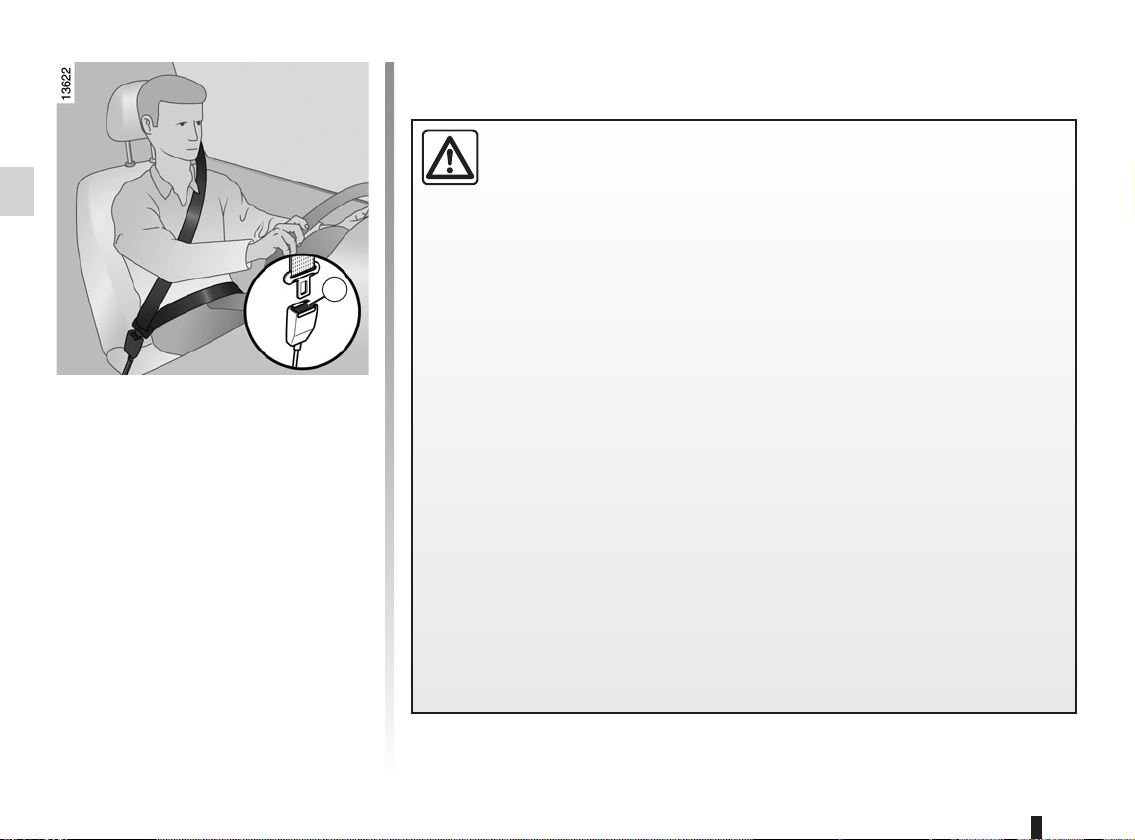
6
Unfastening
Press button 6 and the seat belt will be
rewound by the inertia reel. Guide the
belt.
Note: when driving, if a rear seat belt
is unbuckled, the message “Rear seat
belt unbuckled” appears on the instrument panel.
The following information applies to the vehicle’s front and rear seat belts.
– No modification may be made to the component parts of the restraint
system (belts and seats and their mountings) fitted originally. For special operations (e.g. fitting child seats) contact an approved dealer.
– Do not use devices which allow any slack in the belts (e.g. clothes
pegs, clips, etc.): a seat belt which is worn too loosely may cause injury in the
event of an accident.
– Never wear the shoulder strap under your arm or behind your back.
– Never use the same belt for more than one person and never hold a baby or
child on your lap with your seat belt around them.
– The belt should never be twisted.
– Following an accident, have the seat belts checked and replaced if necessary.
Always replace your seat belts as soon as they show any signs of wear.
– Make sure that the buckle is inserted into the appropriate catch.
– Ensure that no objects are placed in the area around the seat belt catch as
they could prevent it from being properly secured.
– When putting back the rear bench seat, take care that the seat belts are cor-
rectly positioned so that they can be used properly.
1.24
Loading…
Официальное руководство по эксплуатации, устройству и техническому обслуживанию автомобилей Renault Megane 3, выдается каждому покупателю автомобиля, вместе с основными документами.
В руководстве описана конструкция автомобиля, информация по правильной эксплуатации, как автомобиля в целом, так и его узлов.
Настоящее руководство по эксплуатации и обслуживанию автомобиля содержит информацию, которая позволит Вам:
– ознакомиться с автомобилем, правильно его эксплуатировать и максимально использовать его возможности.
– поддерживать его оптимальную работу посредством простого, но четкого соблюдения советов по техобслуживанию.
– быстро устранить мелкие неисправности, не требующие вмешательства специалиста.
То небольшое время, которое Вы потратите на чтение данного руководства, с лихвой окупится приобретенными сведениями, а также знаниями функциональных возможностей и технических новшеств, которые использованы в конструкции Вашего автомобиля.
Глава 1. Знакомство с автомобилем
Карты RENAULT: общие сведения, использование, режим полной блокировки
Открытие и закрытие дверей
Автоматическое запирание открывающихся элементов кузова при движении
Подголовники / Сиденья
Сиденья
Ремни безопасности
Система пассивной безопасности:
а. водителя и переднего пассажира
б. задних пассажиров
в. боковые устройства безопасности
Система обеспечения безопасности детей: общие сведения
а. выбор крепления детского сиденья
б. установка детского сиденья
в. выключение, включение подушки безопасности переднего пассажира
Рулевое колесо
Усилитель рулевого управления
Место водителя
Контрольно-измерительные приборы
а. сигнальные лампы
б. бортовой компьютер
в. меню индивидуальных настроек автомобиля
Показания времени и температуры наружного воздуха
Зеркала заднего вида
Звуковая и световая сигнализация
Приборы наружного освещения и сигнализации
Регулировка света фар
Стеклоочистители, стеклоомыватели
Топливный бак (заправка топливом)
Идентификационная маркировка
Глава 2. Вождение автомобиля (рекомендации по экономичной и экологически безопасной эксплуатации автомобиля)
Обкатка автомобиля
Запуск, остановка двигателя
Функция Stop and Start
Особенности автомобилей с бензиновым двигателем
Особенности автомобилей с дизельным двигателем
Рычаг коробки передач
Стояночный тормоз
Электрический стояночный тормоз
Рекомендации: снижение токсичности отработавших газов и экономия топлива
Охрана окружающей среды
Система контроля давления в шинах
Системы коррекции и помощи при вождении
Сигнал пересечения линии дорожной разметки
Система ограничения скорости
Система поддержания скорости
Система помощи при парковке
Камера заднего вида
Автоматическая коробка передач
Глава 3: Комфорт
Вентиляционные решетки
Кондиционер с ручным управлением
Автоматическая система кондиционирования воздуха
Система кондиционирования воздуха: информация и советы по эксплуатации
Электрические стеклоподъемники, люк крыши с электроприводом
Механические стеклоподъемники
Освещение салона
Солнцезащитный козырек
Вещевые отделения, оборудование салона
Розетка питания дополнительного оборудования
Пепельница. Прикуриватель
Заднее многоместное сиденье
Багажное отделение
Задняя вещевая полка
Полка багажного отделения: автомобили с кузовом «универсал»
Вещевые ящики, оборудование багажного отделения
Перевозка грузов:
ф. в багажнике
б. тягово-сцепное устройство
Разделительная багажная сетка
Поперечины багажника крыши
Мультимедийное оборудование
Глава 4. Уход за автомобилем
Капот
Уровень масла в двигателе:
а. общие сведения
б. долив масла, заправка
Замена масла в двигателе
Уровни эксплуатационных жидкостей
а. охлаждающая жидкость
б. тормозная жидкость
в. бачок стеклоомывателя/омывателя фар
Фильтры
Давление воздуха в шинах
Аккумуляторная батарея
Уход за кузовом автомобиля
Уход за салоном автомобиля
Глава 5. Практические советы
Прокол шины
Запасное колесо
Комплект для накачивания шин
Набор инструментов (колесный ключ/домкрат и т. д.)
Декоративный колесный колпак
Замена колеса
Шины (условия безопасности при эксплуатации шин, колес, зимняя эксплуатация)
Фары (замена ламп)
Задние
Освещение салона (замена ламп)
Плавкие предохранители
Аккумуляторная батарея
Карта RENAULT: элемент питания
Место под установку автомагнитолы
Дополнительное оборудование
Щетки стеклоочистителей
Буксировка при неисправности
Нарушения работы
Глава 6. Технические характеристики
Идентификационные таблички автомобиля
Идентификационные таблички двигателя
Габариты автомобиля
Характеристики двигателей
Характеристики массы
Масса буксируемого прицепа
Запасные части и ремонтные работы
Подтверждающие документы технического обслуживания
Проверка антикоррозионного покрытия
- Артикул: 4642 — назовите при заказе по телефону
- Издательство: Автонавигатор
- ISBN: 978-5-75650-027-1
- Число страниц: 400
- Формат: А4
- Переплет: Мягкий
- Год выпуска: 2008-/12
- V бенз дв: 1.6; 2.0
Цена в интернет-магазине: 1 860 руб.
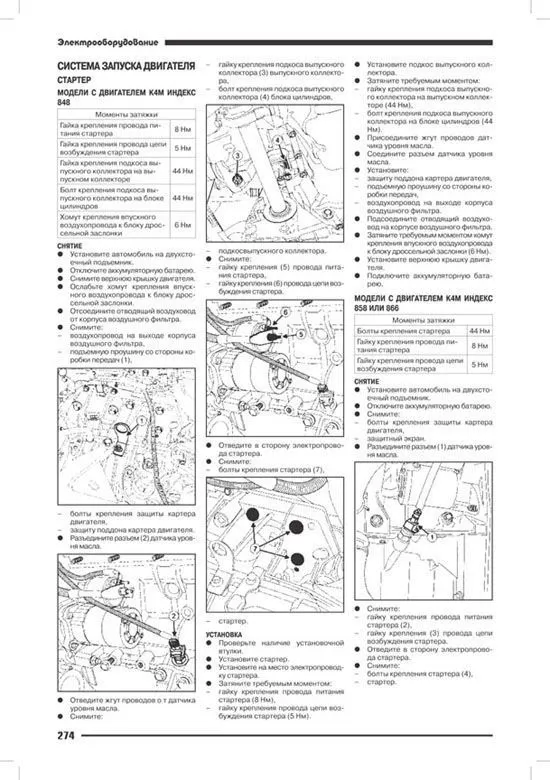
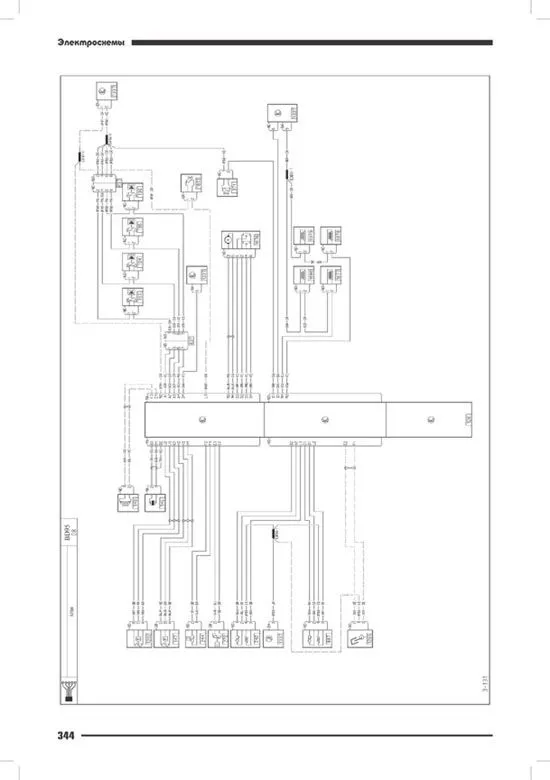
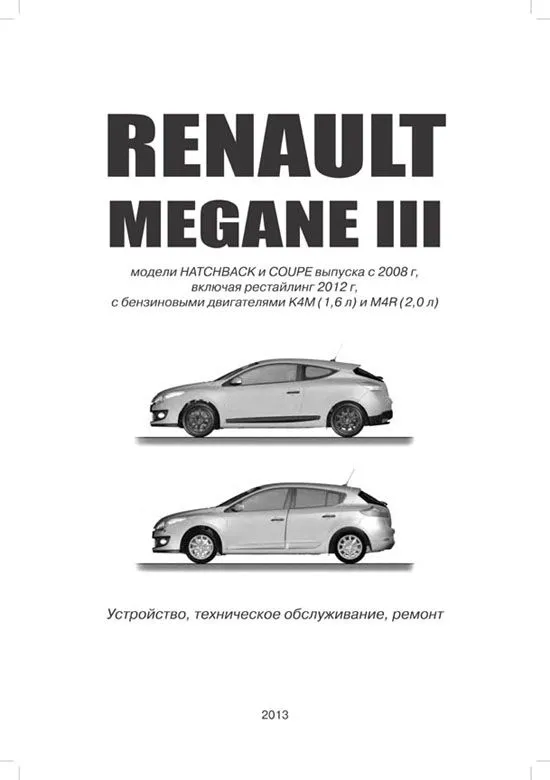
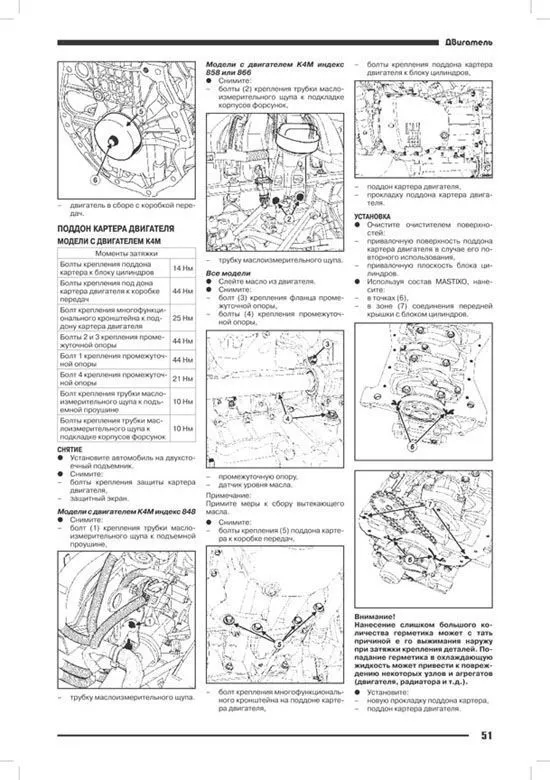
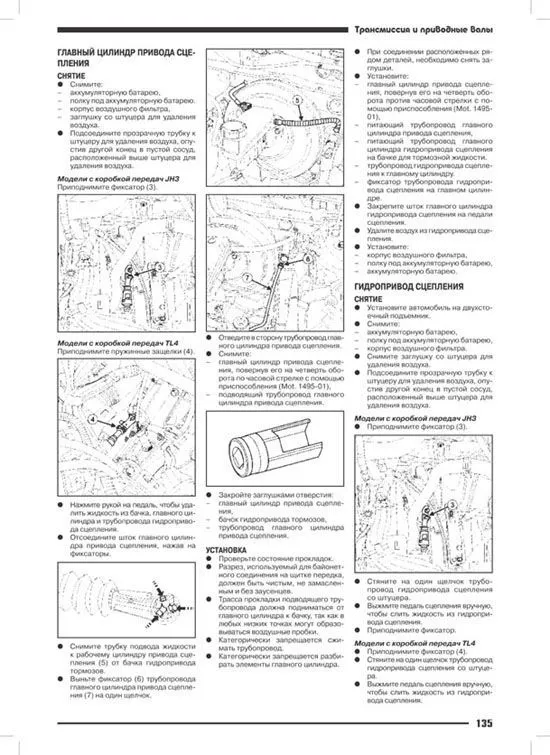
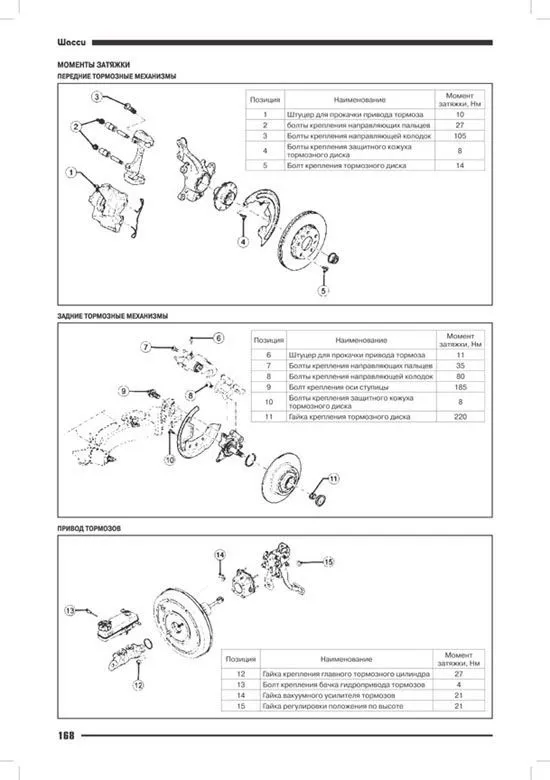
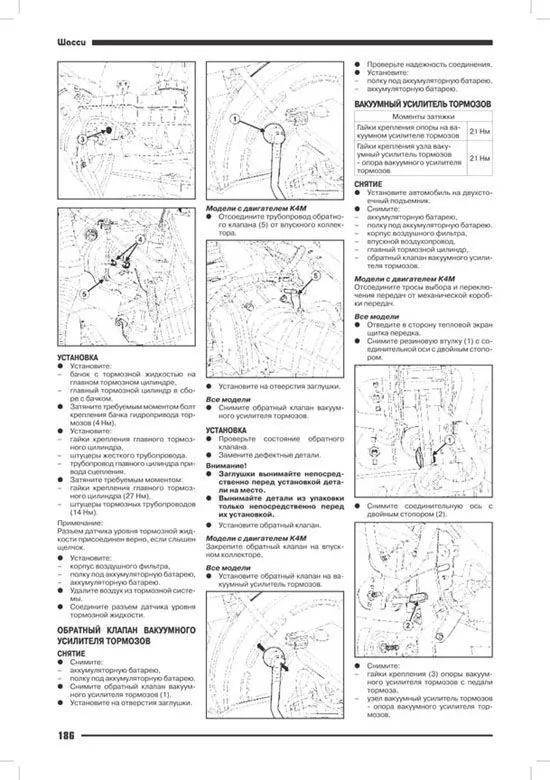
Книга Рено Маган 3. Модели хэтчбек и купе c 2008 с бензиновыми двигателями K4M 1.6 и M4R 2.0. Включая рестайлинг c 2012. Электросхемы. Руководство по ремонту, устройству и техническому обслуживанию автомобиля.
В издании представлено руководство по техническому обслуживанию и ремонту автомобилей Renault Megane выпуска с 2008 г, включая рестайлинг с 2012 г, с бензиновыми двигателями К4М (1,6 л, 16 клапанов) и M4R (2,0 л, 16 клапанов).
Рассмотрены работы по снятию/установке, разборке/сборке различных узлов и механизмов автомобиля.
Детально расписаны методы по регулировке и ремонту двигателей, систем управления двигателями, 5/6-ступенчатой механической коробки передач, 4-ступенчатой автоматической коробки передач, тормозной системы (включая антиблокировочную систему тормозов ABS), рулевого управления, подвески, кузова, и т.д.
Включены подробное описание бортового электрооборудования и электрические схемы.
Книга предназначена для персонала СТО, ремонтных мастерских и автовладельцев.
Скачать бесплатно PDF страницы книги по ремонту и обслуживанию Renault Megane 3 с 2008, рестайлинг с 2012 бензин
Купить книгу по ремонту и эксплуатации автомобиля Renault Megane 3 с 2008 с бензиновыми двигателями K4M 1.6 и M4R 2.0, рестайлинг c 2012, электросхемы Вы можете в нашем интернет-магазине с доставкой Почтой России или курьером по Москве.
Рекомендуем
Похожие товары
Интернет-портал Легион-Автодата создан для удобных покупок: автолитературы, программ для диагностики автомобиля, диагностических приборов, адаптеров elm327, автоаксессуаров и инструментов для авторемонта. Купить книги и приборы для диагностики и ремонта автомобиля Вы можете в нашем интернет магазине.
Удобно оплатить руководства по ремонту и эксплуатации выбранных Вами марок авто любой из платежных систем.
Заказать доставку автокниги почтой без предоплаты, курьером по Москве, регионам и в более 200 пунктов самовывоза по всей России.
Новости
-
Обновление MotorData Professional (Автоэлектрика) (март 2024)
Обновление MotorData Professional (Автоэлектрика)
(март 2025) -
Мастер-класс «Диагностика электромобиля Nissan Leaf»
в Московском автомобильно-дорожном колледже
им. А.А. Николаева
Статьи
-
Mazda MPV 2001 двигатель V6 2.5. DTC P1345, P1170, P1173
Учитывая, как на этом авто все сделано,
тут может быть что угодно, и гадать.. -
Toyota Vitz 2006 1NZ-FE. Странности с оборотами, датчик TPS
MAF с рабочей машины валил показания при
нажатии на педаль газа. Потом..
Руководство по ремонту Renault Megane 3, а также книга по техническому обслуживанию Renault Megane 3 и книга по эксплуатации Renault Megane 3, устройство Renault Megane 3 с 2008 года выпуска и моделей, подвергнутых рестайлингу в 2012 году. Рено Меган 3 оснащается бензиновыми агрегатами литражом 1,4, 1,6, 2,0 и дизелями, рабочий объем которых составляет 1,5, 1,6, 1,9, 2,0 л. Мощность моторов 85, 105, 110, 130, 140, 150, 160 л.с.
Как и любая другая книга популярнейшей Золотой серии от издательства технико-ремонтной литературы Монолит, данное издание содержит многочисленные сведения и справочные данные об устройстве легковых автомобилей Рено Меган III и более поздних модификаций этой модели, приводится описание и дан перечень возможных неисправностей и наиболее распространенных неполадок этого автомобиля, рассмотрены различные варианты и способы диагностики таких повреждений (как обычно в этой работе поможет скоро разобраться уникальная монолитовская система, позволяющая быстро и безошибочно находить неисправности) и последующего качественного и тотального ремонта любых узлов, комплектующих и агрегатов Renault Megane 3. Подробное внимание уделено заменам вышедших из строя деталей и компонентов Renault Megane III. Особое внимание в пособии уделяется ремонту двигателя Рено Меган 3, трансмиссии, системам ходовой части машины, ее рулевого управления, а также тормозной системы, составным частям подвески, элементам кузова, системы электрооборудования Рено Меган 3.
Подобного рода информация призвана систематизировать и существенно упростить любые работы, связанные с регулярным техобслуживанием или ремонтом при форс-мажорной ситуации. Мануал окажется исключительно полезен как при осмотре техники в гараже, так и в экстремальных ситуациях, когда проблемы с машиной происходят в таких местах, где рассчитывать на то, что хоть кто-то сможет выручить, не приходится. В этих случаях руководство можно охарактеризовать как незаменимый артефакт, который предоставит пользователю все необходимые данные по всестороннему ремонту автомобиля.
В отдельно отведенные авторами пособия главы руководства включены инструкция по эксплуатации Renault Megane 3, развернутые рекомендации от профессионалов по самостоятельному техобслуживанию этой модели и подробно выполненные схемы элеткрооборудования (электросхемы) Renault Megane 3. Кроме того материалы данной книги помогут потребителю четко разобраться в том, какие ему именно необходимы запчасти Рено Меган 3.
Составители этого технического издания адресуют его для всех владельцев французских хетчбеков Рено Меган III, а также пособие поможет разобраться в рабочих операциях работникам СТО, специалистам из технических центров и ремонтникам из автосервисов.
Мягкий переплет 378 стр.
ISBN 978-617-537-124-4
2. Эксплуатация автомобиля
1. Тахометр. 2. Подрулевой переключатель.
1. При запуске двигателя на дисплее 3 загорается сигнальная лампа в случае, если достигнут максимальный уровень масла.
2. При первом загорании сигнальной лампы ее можно отключить, нажав на одну из кнопок рычага подрулевого переключателя 2.
3. Следующие сигнальные лампы автоматически погаснут по истечении 30 секунд.
4. Под номером 5 обозначен указатель уровня топлива. Если уровень минимален, загорается сигнальная лампа 6 и раздается короткий звуковой сигнал. Необходимо срочно долить в бак топливо. С момента первого загорания сигнальной лампы можно проехать еще 50 км.
5. В нормальных условиях эксплуатации указатель температуры охлаждающей жидкости 4 должен находиться перед зоной а. В условиях интенсивной эксплуатации указатель может приблизиться к этой зоне. Тревогу должно вызвать только включение сигнальной лампы одновременно с появлением сообщения на щитке приборов и звуковым сигналом.
6. Под цифрой 7 обозначен спидометр (км или мили в час).
7. В зависимости от комплектации автомобиля и страны реализации при превышении скорости 120 км/час каждые 40 секунд раздается звуковой сигнал длительностью примерно 10 секунд.
8. Если показания выводятся в милях: — при включенном зажигании нажать на одну из кнопок 9 или 10 на торце рычага 2 и на кнопку запуска двигателя 8;
— указатель единиц измерения скорости мигает в течение десяти секунд, затем появляется новая единица измерения: отпустить кнопку 9 или 10, как только единица измерения перестанет мигать.
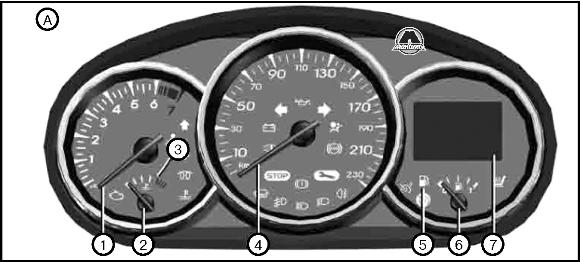
1. Тахометр. 2. Указатель температуры охлаждающей жидкости. 4. Спидометр. 5. Сигнальная лампа минимального уровня топлива. 6. Указатель уровня топлива. 7. Многофункциональный дисплей.
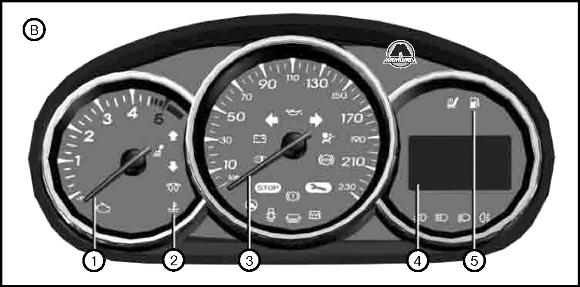
1. Тахометр. 2. Сигнализатор температуры охлаждающей жидкости. 3. Спидометр. 4. Многофункциональный дисплей. 5. Сигнальная лампа минимального уровня топлива. 6. Указатель температуры охлаждающей жидкости. 7. Указатель уровня топлива.
6. Указатель температуры охлаждающей жидкости. 7. Указатель уровня топлива.
В зависимости от комплектации автомобиля, бортовой компьютер 1 отображает следующие показания:
— пройденный путь;
— данные о поездке;
— информационные сообщения;
— сообщения о неисправностях (одновременно с включением сигнальной лампы);
— предупреждающие сообщения (одновременно с включением сигнальной лампы);
— меню индивидуальных настроек автомобиля.
Подробное описание перечисленных функций см. далее.
Можно прокрутить следующую информацию последовательными короткими нажатиями на кнопки: вверх (кнопка 2) или вниз (кнопка 3).
Индикация зависит от оборудования автомобиля и страны.
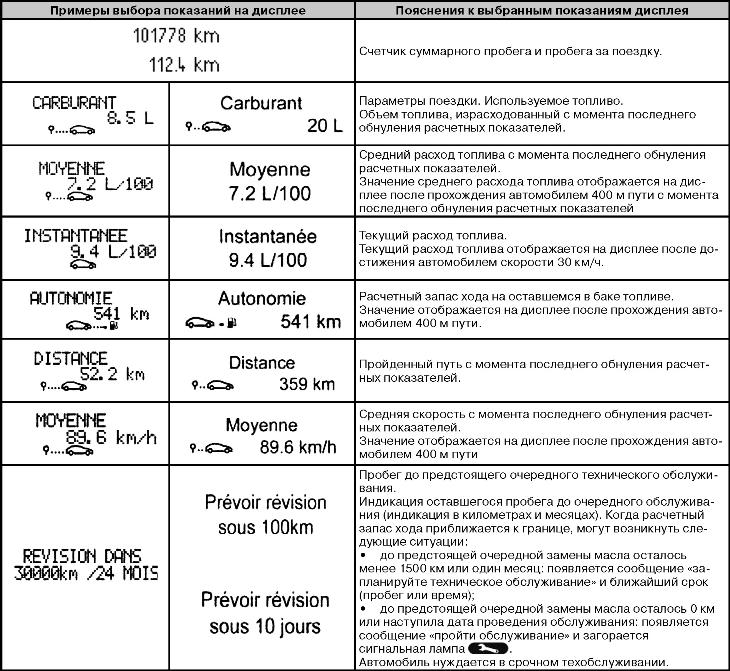
1. Счетчик общего пробега и пробега за поездку.
2. Данные о поездке:
— используемое топливо;
— средний расход топлива;
— текущий расход топлива;
— предполагаемый запас хода;
— средняя скорость.
3. Пробег до предстоящего очередного технического обслуживания.
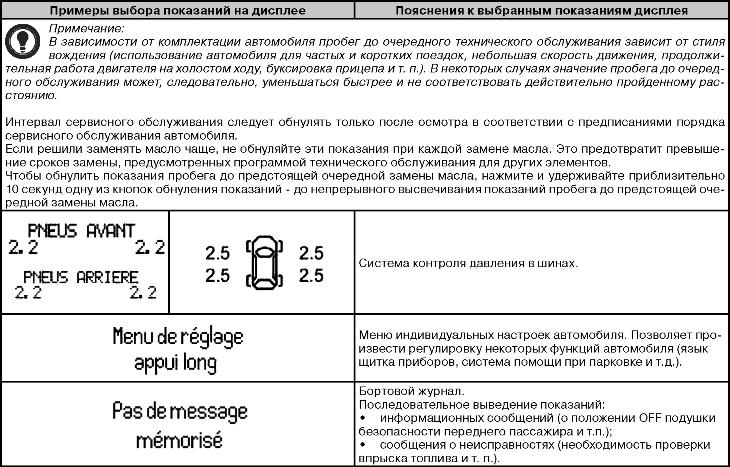
4. Меню индивидуальных настроек автомобиля.
5. Бортовой журнал, последовательный вывод информационных сообщений и сообщений о неисправностях.
Обнуление счетчика пробега за поездку
Включив индикацию «счетчик пробега за поездку», удерживать нажатой одну из кнопок 2 или 3 до обнуления показаний.
Обнуление данных о поездке (кнопка обнуления показаний)
Включив индикацию одного из параметров поездки, удерживать нажатой одну из кнопок 2 или 3 до обнуления показаний.
Объяснение некоторых данных, отображаемых на дисплее после обнуления расчетных показателей
1. Чем больше расстояние, пройденное с момента последней операции обнуления, тем стабильнее и достовернее будут показания средней скорости, среднего расхода топлива и запаса хода на оставшемся в баке топливе.
2. Средний расход топлива может уменьшаться в следующих случаях:
— автомобиль закончил разгон;
— температура двигателя достигла нормы (а обнуление расчетных показателей было произведено при холодном двигателе);
— выезд из города на автостраду.
Автоматическое обнуление данных о поездке
При превышении емкости памяти одного из запоминающих устройств обнуление происходит автоматически.
Примечание:
Индикация нижеперечисленной информации на щитке приборов зависит от комплектации автомобиля и страны поставки.