
«IMPORTANT SAFETY INSTRUCTIONS»
When using this machine, basic safety precautions should always be taken ,
including the following:
«Read all instructions before using.»
DANGER –
To reduce the risk of electric shock:
1. The machine should never be left unattended when plugged in. Always unplug this machine from the electrical outlet
immediately after using and before cleaning.
2. Always unplug before changing the light bulb.
Replace bulb with same type rated 15 watts.
WARNING –
To reduce the risk of burns, fire, electric shock, or injury to persons:
1.
Do not allow this machine to be used as a toy. Close attention is necessary when the machine is used by or near children.
2.
Use this machine only for its intended use as described in this manual. Use only accessories recommended by the
manufacturer as contained in this manual.
3.
Never operate this machine if it has a damaged cord or plug, if it is not working properly, if it has been dropped or damaged,
or dropped into water. Return the machine to the nearest authorized dealer or service center for examination, repair,
electrical or mechanical adjustment.
4.
Never operate the machine with any air openings blocked. Keep ventilation openings of the machine and foot control free
from the accumulation of lint, dust, and loose cloth.
5.
Never drop or insert any object into any opening.
6.
Do not use outdoors.
7.
Do not operate where aerosol (spray) products are being used or where oxygen is being administered.
8.
To disconnect, turn the main switch to the symbol “O” position which represents off, then remove plug from outlet.
9.
Do not unplug by pulling on cord. To unplug, grasp the plug, not the cord.
10. Keep fingers away from all moving parts. Special care is required around the machine needle.
11. Always use the proper needle plate. The wrong plate can cause the needle to break.
12. Do not use bent needles.
13. Do not pull or push fabric while stitching. It may deflect the needle causing it to break.
14. Switch the machine to the symbol “O” position when making any adjustments in the needle area, such as threading
needle, changing needle, threading bobbin, or changing the presser foot, and the like.
15. Always unplug the machine from the electrical outlet when removing covers, lubricating, or when making any of the user
service adjustments mentioned in the instruction manual.
16. The machine is not intended for use by young children or infirm persons without supervision.
17. Young children should be supervised to ensure that do not play with this machine.
«SAVE THESE INSTRUCTIONS»
«This machine is intended for household use.»
Embroidery Machine
PR-1000
Operation Manual
Product Code: 884-T10

Trademarks
FlashFX® is a registered trademark of Datalight, Inc.
®
FlashFX
Copyright 1998-2007 Datalight, Inc.
U.S.Patent Office 5,860,082/6,260,156
®
FlashFX
Datalight
Pro™ is a trademark of Datalight, Inc.
®
is a registered trademark of Datalight, Inc.
Copyright 1989-2007 Datalight, Inc., All Rights Reserved
Video powered by Mobiclip™ encoding and playback technology.
IMPORTANT:
READ BEFORE DOWNLOADING, COPYING, INSTALLING OR USING.
By downloading, copying, installing or using the software you agree to this license. If
you do not agree to this license, do not download, install, copy or use the software.
Intel License Agreement For Open Source Computer Vision Library
Copyright © 2000, Intel Corporation, all rights reserved. Third party copyrights are property of their respective owners.
Redistribution and use in source and binary forms, with or without modification, are permitted
provided that the following conditions are met:
• Redistribution’s of source code must retain the above copyright notice, this list of conditions
and the following disclaimer.
• Redistribution’s in binary form must reproduce the above copyright notice, this list of
conditions and the following disclaimer in the documentation and/or other materials
provided with the distribution.
• The name of Intel Corporation may not be used to endorse or promote products derived from
this software without specific prior written permission.
This software is provided by the copyright holders and contributors “as is” and any express or
implied warranties, including, but not limited to, the implied warranties of merchantability and
fitness for a particular purpose are disclaimed. In no event shall Intel or contributors be liable for
any direct, indirect, incidental, special, exemplary, or consequential damages (including, but
not limited to, procurement of substitute goods or services; loss of use, data, or profits; or
business interruption) however caused and on any theory of liability, whether in contract, strict
liability, or tort (including negligence or otherwise) arising in any way out of the use of this
software, even if advised of the possibility of such damage.
All information provided related to future Intel products and plans is preliminary and subject to change at any time,
without notice.
Secure Digital (SD) Card is a registered trademark or a trademark of SD Card Association.
CompactFlash is a registered trademark or a trademark of Sandisk Corporation.
Memory Stick is a registered trademark or a trademark of Sony Corporation.
SmartMedia is a registered trademark or a trademark of Toshiba Corporation.
MultiMediaCard (MMC) is a registered trademark or a trademark of Infineon Technologies AG.
xD-Picture Card is a registered trademark or a trademark of Fuji Photo Film Co. Ltd.
IBM is a registered trademark or a trademark of International Business Machines Corporation.
Microsoft, Windows and Windows Vista are registered trademarks or trademarks of Microsoft
Corporation.
Each company whose software title is mentioned in this manual has a Software License Agreement specific to its
proprietary programs.
All other brands and product names mentioned in this manual are registered trademarks of their respective companies.
However, the explanations for markings such as ® and ™ are not clearly described within the text.

———————————————————————————————————————————————————————————————————————————————————
Introduction
Thank you for purchasing this embroidery machine. Before using this machine, carefully read the
“Important Safety Instructions”, and then study this manual for the correct operation of the
various functions.
In addition, after you have finished reading this manual, store it where it can quickly be accessed
for future reference.
IMPORTANT SAFETY INSTRUCTIONS
Please read these safety instructions before attempting to use the machine.
DANGER — To reduce the risk of electric shock:
1Always unplug the machine from the electrical outlet immediately after using, when cleaning,
when making any user servicing adjustments mentioned in this manual, or if you are leaving
the machine unattended.
WARNING — To reduce the risk of burns, fire, electric shock, or injury to persons:
2Always unplug the machine from the electrical outlet when lubricating it or when making any
other user servicing adjustments mentioned in the operation manual.
• To unplug the machine, switch the machine to the symbol “O” position to turn it off, then
grasp the plug and pull it out of the electrical outlet. Do not pull on the cord.
• Plug the machine directly into the electrical outlet. Do not use an extension cord.
• Always unplug your machine if the power is cut.
3Never operate this machine if it has a damaged cord or plug, if it is not working properly, if it
has been dropped or damaged, or water is spilled on the unit. Return the machine to the
nearest authorized dealer or service center for examination, repair, electrical or mechanical
adjustment.
• To avoid electric shock or fire; do not use a damaged power supply plug or loose electrical
outlet, and ensure that the power supply plug is fully inserted and secure.
• While the machine is stored or in use if you notice anything unusual, such as an odor, heat,
discoloration or deformation, stop using the machine immediately and unplug the power
cord.
• When transporting the machine, be sure to lift it from the bottom positions. Lifting the
machine by any other part may damage the machine or result in the machine falling, which
could cause injuries.
• When lifting the machine, be careful not to make any sudden or careless movements,
otherwise you may injure your back or knees.
• While the machine is being transported, be careful not to touch the operation panel, thread
guides or any other part, otherwise injuries may result.
Introduction 1

—————————————————————————————————————————————————————————————————————————————————
4Always keep your work area clear:
• Never operate the machine with any air openings blocked. Keep ventilation openings of the
machine free from the build up of lint, dust, and loose cloth.
• Do not use extension cords. Plug the machine directly into the electrical outlet.
• Never drop or insert any object into any opening.
• Keep fingers out of all machine openings, such as near the carriage, otherwise injuries may
result.
• Do not operate where aerosol (spray) products are being used or where oxygen is being
administered.
• Do not use the machine near a heat source, such as a stove or iron; otherwise, the machine,
power cord or garment being sewn may ignite, resulting in fire or an electric shock.
• Do not use this machine near an open flame; the movement of the embroidery frame could
cause the garment being sewn to catch fire.
• Do not place this machine on an unstable surface, such as an unsteady or slanted table,
otherwise the machine may fall, resulting in injuries.
• While attaching or detaching an embroidery frame or other included accessory or while
maintaining the machine, be careful not to hit the machine with your body or any other part
of it.
5Special care is required when sewing:
• Always pay close attention to the needle. Do not use bent or damaged needles.
• Keep fingers away from all moving parts. Special care is required around the machine needle.
• While the machine is in operation, keep your hands away from the needle bar case and all
moving parts near the needle bar case, otherwise injuries may result.
• Switch the machine to the symbol “O” position to turn it off when making any adjustments in
the needle area, such as changing the needle.
• Do not use a damaged or incorrect needle plate, as it could cause the needle to break.
6This machine is not a toy:
• Your close attention is necessary when the machine is used by or near children.
• This machine is not intended for use by young children or infirm persons without supervision.
• Young children should be supervised to ensure that they do not play with this machine.
• Do not use the included scissors or seam ripper in any other way than how they are intended.
In addition, when opening a hole with the seam ripper, do not place your hands or fingers in
the cutting path, otherwise injuries may result if the seam ripper slips.
• The plastic bag that this machine was supplied in should be kept out of the reach of children
or disposed of. Never allow children to play with the bag due to the danger of suffocation.
• Do not use outdoors.
2

———————————————————————————————————————————————————————————————————————————————————
7For a longer service life:
• When storing this machine, avoid direct sunlight and high humidity locations. Do not use or
store the machine near a space heater, iron, halogen lamp, or other hot objects.
• Use only neutral soaps or detergents to clean the case. Benzene, thinner, and scouring
powders can damage the case and machine, and should never be used.
• Always consult the operation manual when replacing or installing any assemblies, needle, or
other parts to assure correct installation.
8For repair or adjustment:
• Do not try to disassemble, repair or alter this machine in any way, otherwise a fire, electric
shock or injuries may result.
• If the light unit is damaged, it must be replaced by an authorized dealer.
• In the event a malfunction occurs or adjustment is required, first follow the troubleshooting
table in the back of the operation manual to inspect and adjust the machine yourself. If the
problem persists, please consult your local authorized Brother dealer.
Use this machine only for its intended use as described in the manual.
Use accessories recommended by the manufacturer as contained in this manual.
Use only the interface cable (USB cable) included with this machine.
Use only a mouse designed specifically for this machine.
The contents of this manual and specifications of this product are subject to change
without notice.
For additional product information and updates, visit our website at www.brother.com
SAVE THESE INSTRUCTIONS
This machine is intended for household use.
IMPORTANT SAFETY INSTRUCTIONS 3

—————————————————————————————————————————————————————————————————————————————————
FOR USERS IN THE UK, EIRE, MALTA
AND CYPRUS ONLY
IMPORTANT
• In the event of replacing the plug fuse, use a fuse approved by ASTA to BS 1362, i.e. carrying
the mark, rating as marked on plug.
• Always replace the fuse cover. Never use plugs with the fuse cover omitted.
• If the available electrical outlet is not suitable for the plug supplied with this equipment, you
should contact your authorized dealer to obtain the correct lead.
FOR USERS IN AC INPUT 220-240V
COUNTRIES AND MEXICO
This appliance is not intended for use by persons (including children) with reduced physical,
sensory or mental capabilities, or lack of experience and knowledge, unless they have been given
supervision or instruction concerning use of the appliance by a person responsible for their safety.
Children should be supervised to ensure that they do not play with the appliance.
4

———————————————————————————————————————————————————————————————————————————————————
Federal Communications Commission (FCC) Declaration of
Conformity (For USA Only)
Responsible Party: Brother International Corporation
100 Somerset Corporate Boulevard
Bridgewater, NJ 08807-0911 USA
TEL : (908) 704-1700
declares that the product
Product Name: Brother Embroidery Machine
Model Number: PR-1000
complies with Part 15 of the FCC Rules. Operation is subject to the following two conditions: (1)
this device may not cause harmful interference, and (2) this device must accept any interference
received, including interference that may cause undesired operation.
This equipment has been tested and found to comply with the limits for a Class B digital device,
pursuant to Part 15 of the FCC Rules. These limits are designed to provide reasonable protection
against harmful interference in a residential installation. This equipment generates, uses, and can
radiate radio frequency energy and, if not installed and used in accordance with the instructions,
may cause harmful interference to radio communications. However, there is no guarantee that
interference will not occur in a particular installation. If this equipment does cause harmful
interference to radio or television reception, which can be determined by turning the equipment
off and on, the user is encouraged to try to correct the interference by one or more of the
following measures:
• Reorient or relocate the receiving antenna.
• Increase the separation between the equipment and receiver.
• Connect the equipment into an outlet on a circuit different from that to which the receiver is
connected.
• Consult the dealer or an experienced radio/TV technician for help.
• The included interface cable should be used in order to ensure compliance with the limits for
a Class B digital device.
• Changes or modifications not expressly approved by Brother Corporation could void the
user’s authority to operate the equipment.
IMPORTANT SAFETY INSTRUCTIONS 5

—————————————————————————————————————————————————————————————————————————————————
License Agreement
The enclosed machine includes data, software and/or documentation (collectively “CONTENT”)
that are proprietary products of Brother Industries, Ltd. (“BROTHER”). BY USING THE
CONTENT, THE CUSTOMER ACCEPTS THE TERMS AND CONDITIONS OF THIS AGREEMENT.
BROTHER retains ownership of all rights to CONTENT and to the copies of the CONTENT
included in this package. The CONTENT are licensed (not sold) to you (“CUSTOMER”) under the
terms and conditions of this Agreement.
CUSTOMER is licensed to:
• Use the CONTENT in combination with an embroidery machine to create embroidery.
• Use the CONTENT in combination with an embroidery machine that CUSTOMER owns or
uses, provided that the CONTENT is not used on more than one embroidery machine at a
time.
Except as otherwise provided herein, CUSTOMER may not:
• Allow more than one copy of the CONTENT to be available for use at any one time.
• Reproduce, modify, publish, distribute, sell, rent, sublicense or otherwise make available to
others CONTENT.
• Distribute, rent, sublicense, lease, sell, transfer or assign the media card or CONTENT.
• Decompile, disassemble or otherwise reverse engineer the CONTENT or assist others to do
the same.
• Alter, translate, modify or adapt the CONTENT or any part thereof for business, commercial
or industrial purposes.
• Sell or otherwise distribute the EMBROIDERY created by use of the CONTENT, WHICH
ORIGINALLY BEARS CERTAIN COPYRIGHT NOTICE UNDER THE NAME OF ANY THIRD
PARTIES OTHER THAN BROTHER (e.g. “©DISNEY”).
BROTHER retains all rights not expressly granted to CUSTOMER herein.
Nothing in this agreement constitutes a waiver of the rights of BROTHER under any law. This
agreement shall be governed by the laws of Japan.
Please direct all inquiries concerning this Agreement in writing by regular mail, to Brother
Industries, Ltd., 1-1-1 Kawagishi, Mizuho-ku, Nagoya 467-8562, Japan, Attention: P&H company
Sales and Marketing Dept.
6
———————————————————————————————————————————————————————————————————————————————————
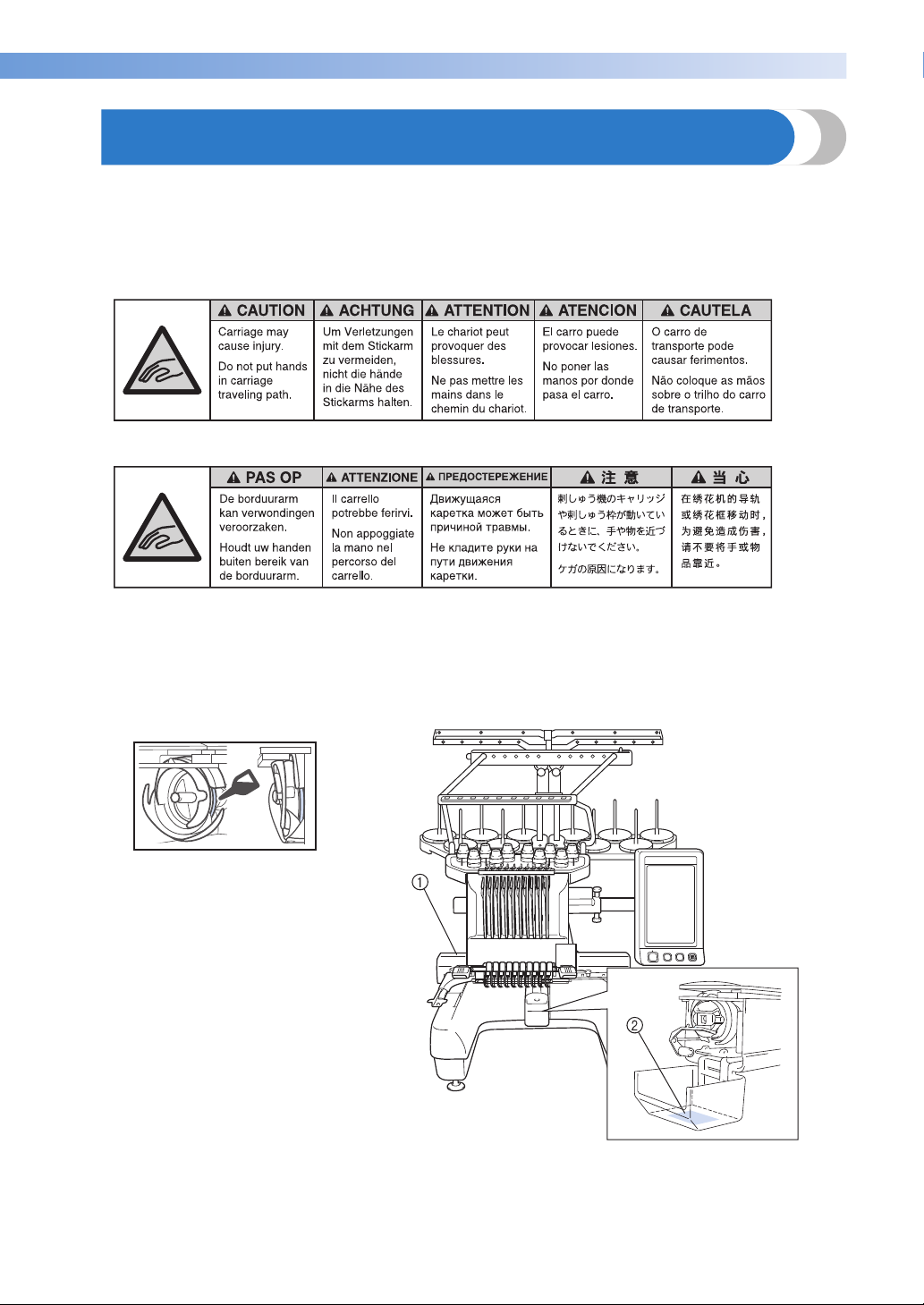
Warning Labels
The following warning labels are on the machine.
Be sure to observe the precautions described in the labels.
1
2
Please put a drop of oil onto the hook
once a day before use.
Label locations
Warning Labels 7
—————————————————————————————————————————————————————————————————————————————————
Machine Structure and Features
Ten-needle machine
embroidering
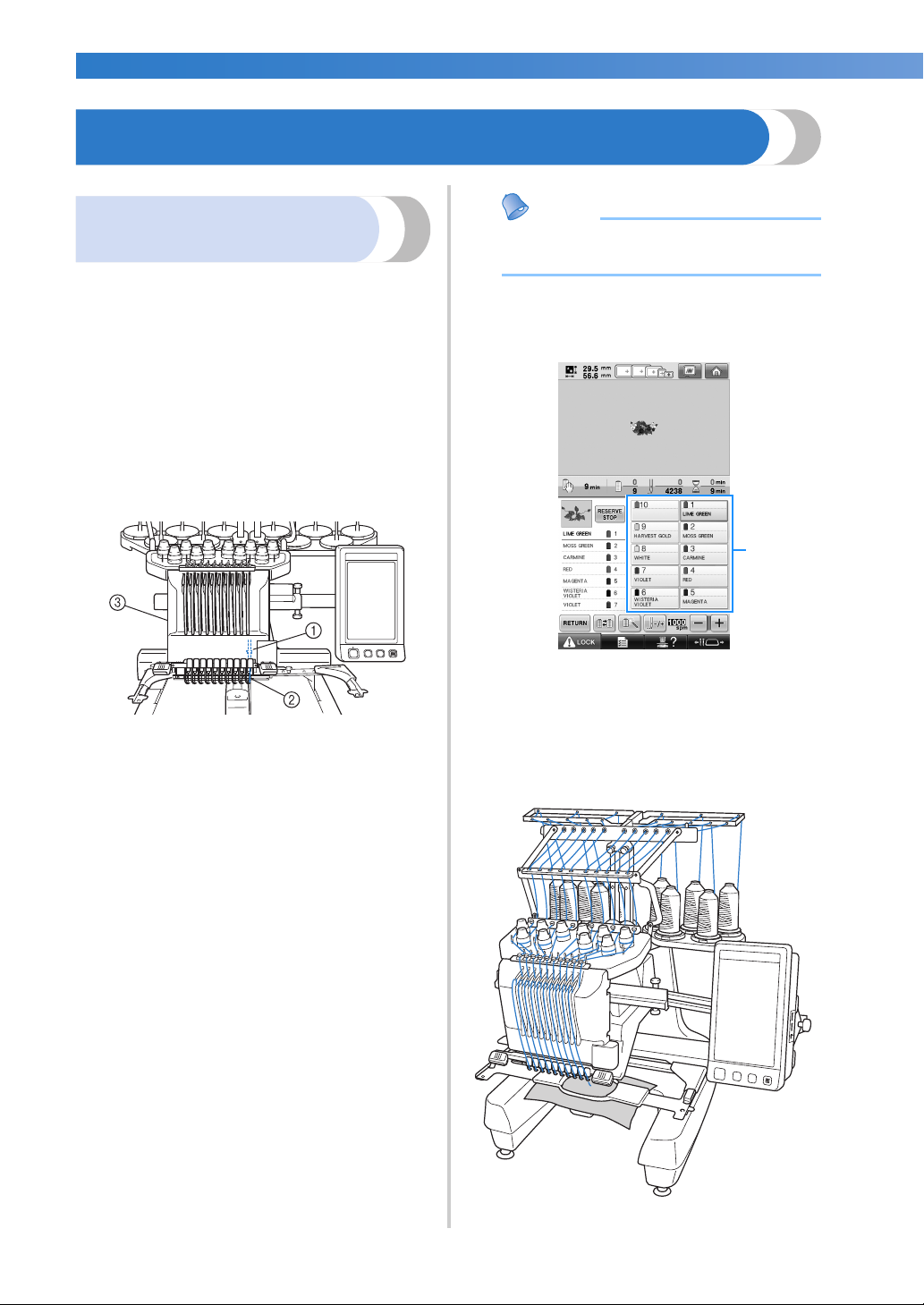
Your machine has ten needles, each threaded with
a different color of thread. It can sew embroidery
patterns that contain several colors by
automatically selecting the appropriate needle for
each color.
The mechanism that moves the needles up and
down is called the needle bar, and the needle bars
are in the needle bar case. The needle bars are
named from right to left: needle bar 1, needle bar 2,
needle bar 3, needle bar 4, needle bar 5, needle
bar 6, needle bar 7, needle bar 8, needle bar 9 and
needle bar 10.
1 Needle bar 1
2 Needle 1
3 Needle bar case
The machine automatically assigns a thread color
to each needle. There are two methods for
assigning the thread colors. With the automatic
method (default method when the machine is
purchased), needles that are already threaded with
a color that will be used in the next pattern are
assigned to the same thread color based on the
needle bar assignments from the previous pattern in
order to reduce the number of thread spool
changes.
For more professional embroidering, using a
manual color sequence allows the needle bar
assignments to easily be specified manually.
Thread color and needle bar combinations can be
selected manually to create a menu so that the
needle bar assignments can be based on the thread
color numbers. (Refer to “Selecting/Managing
Thread Colors for Each Needle Bar (Manual Color
Sequence)” on page 132.)
● Sewing is not necessarily performed in the
order of the needle bar numbers.
The thread colors assigned to the needle bars are
listed on the screen. Thread the needle bars as
indicated.
1 The threads threaded on the needle bars are
indicated as shown here.
The spool pins, thread tension knobs, thread takeup levers and thread paths, mentioned when
threading the upper thread, are different according
to their corresponding needle bar number.
8
———————————————————————————————————————————————————————————————————————————————————
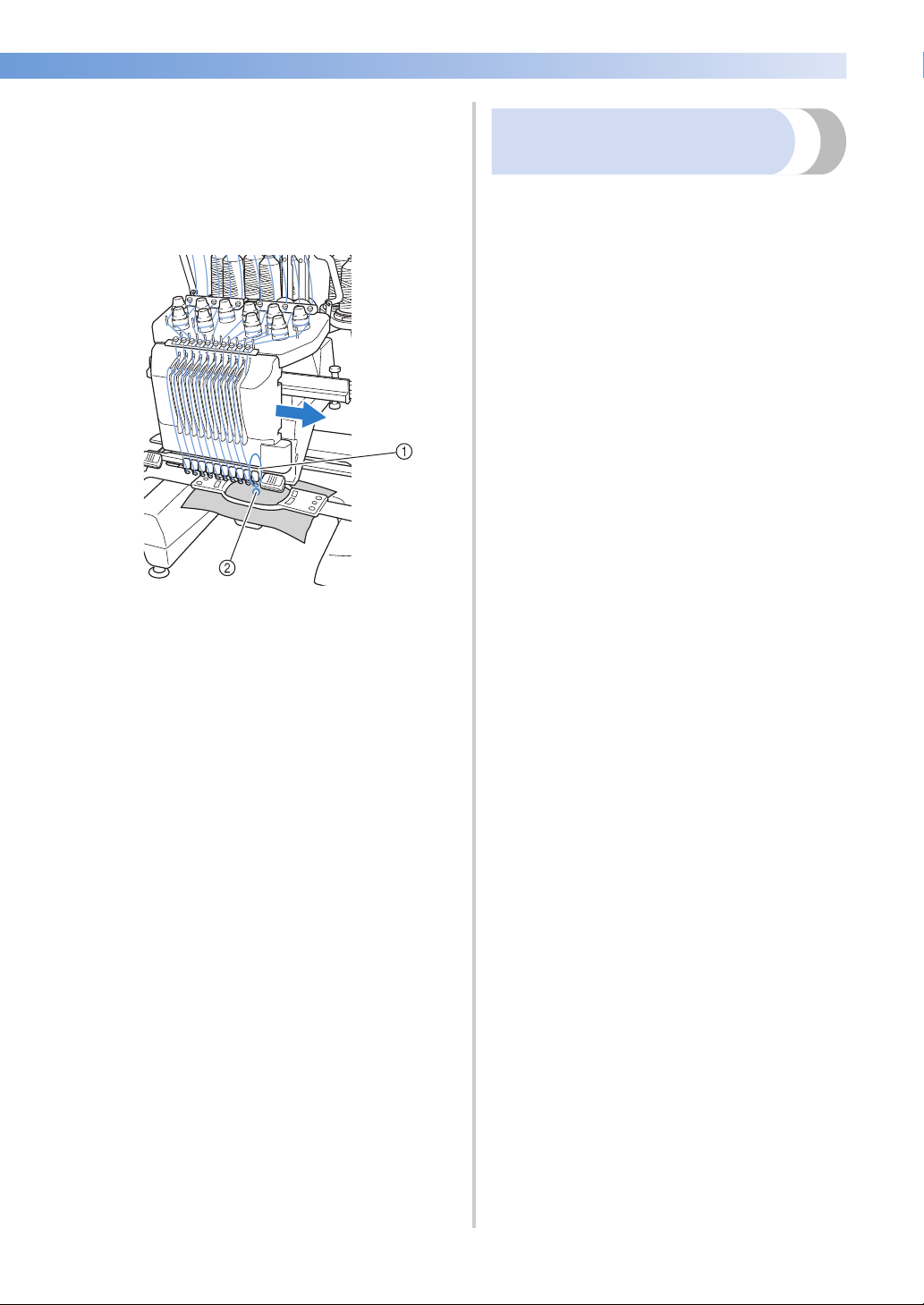
Not all ten needles can be used to sew at the same
time. Only one needle is moved to the
embroidering position at a time. According to the
sewing order, the needle bar case is moved to the
left and right so that the needle bar and needle
thread with the required color can be moved to the
embroidering position.
1 Needle at the embroidering position
The needle is positioned over the hole in the
needle plate 2.
When starting the machine, the presser foot is
automatically lowered. The embroidery is sewn
and thread is pulled away from the material when
thread trimming and when changing thread colors
(moving to the different needles to be sewn within
the embroidery). When sewing is finished, the
machine stops. If the pattern uses eleven or more
thread colors, the machine will stop when it is
necessary for the thread spools to be changed, and
the corresponding instructions appear on the LCD.
(However, when “Manual needle bar sequences” is
set to “ON”, the machine does not automatically
stop when a thread spool must be changed. For
details, refer to “Selecting/Managing Thread Colors
for Each Needle Bar (Manual Color Sequence)” on
page 132.)
Differences from single-needle
machines
■ Can sew embroidery patterns using ten or less
colors without the need to replace the thread
spools
With single-needle machines, the thread spool
must be changed and the machine must be
threaded each time a different thread color is
used. With this machine, it is not necessary to
change the thread spool or rethread the machine
with embroidery patterns containing ten or less
colors. If total colors are less than ten colors, and
if total color change is more than eleven times,
machine will come back to the needle that the
machine is already used and sew the same color
again automatically.
■ Automatic sewing reduces sewing time
Except to change the thread spools with patterns
containing eleven or more colors, once the
machine is started, it continues to operate
automatically, from lowering the presser foot to
performing the specified operations at the
starting and end positions in addition to
changing the thread colors. Since the machine
can change threads and finish stitching, sewing
time is reduced.
■ Automatically pulls and holds the thread tails to
the under side of fabric at the beginning and
end of stitching
Since the machine automatically pulls the upper
thread under the fabric at the beginning of a
color, and pulls the upper thread from the fabric
at the time of thread trimming, you don’t need to
deal with the upper thread tail at all.
■ Automatically moves the embroidery frame to
the embroidering position
With a single-needle machine, in most cases,
the embroidery pattern is centered in the frame
and the fabric must be correctly positioned
within the embroidery frame with the center of
the desired embroidering position aligned with
the center of the embroidery frame. However,
with 10 needle embroidery machine, the
embroidery frame is moved to determine the
embroidering position, making it easier to sew
the pattern at any place in the frame. In addition,
the embroidering position can be freely
determined manually as well as with the camera
positioning function after the fabric is hooped
and the embroidery frame is attached to the
machine, regardless of how the fabric is
positioned in the embroidery frame.
Machine Structure and Features 9
—————————————————————————————————————————————————————————————————————————————————
■ Easy-to-read and easy-to-
Other features
use LCD
Equipped with a large
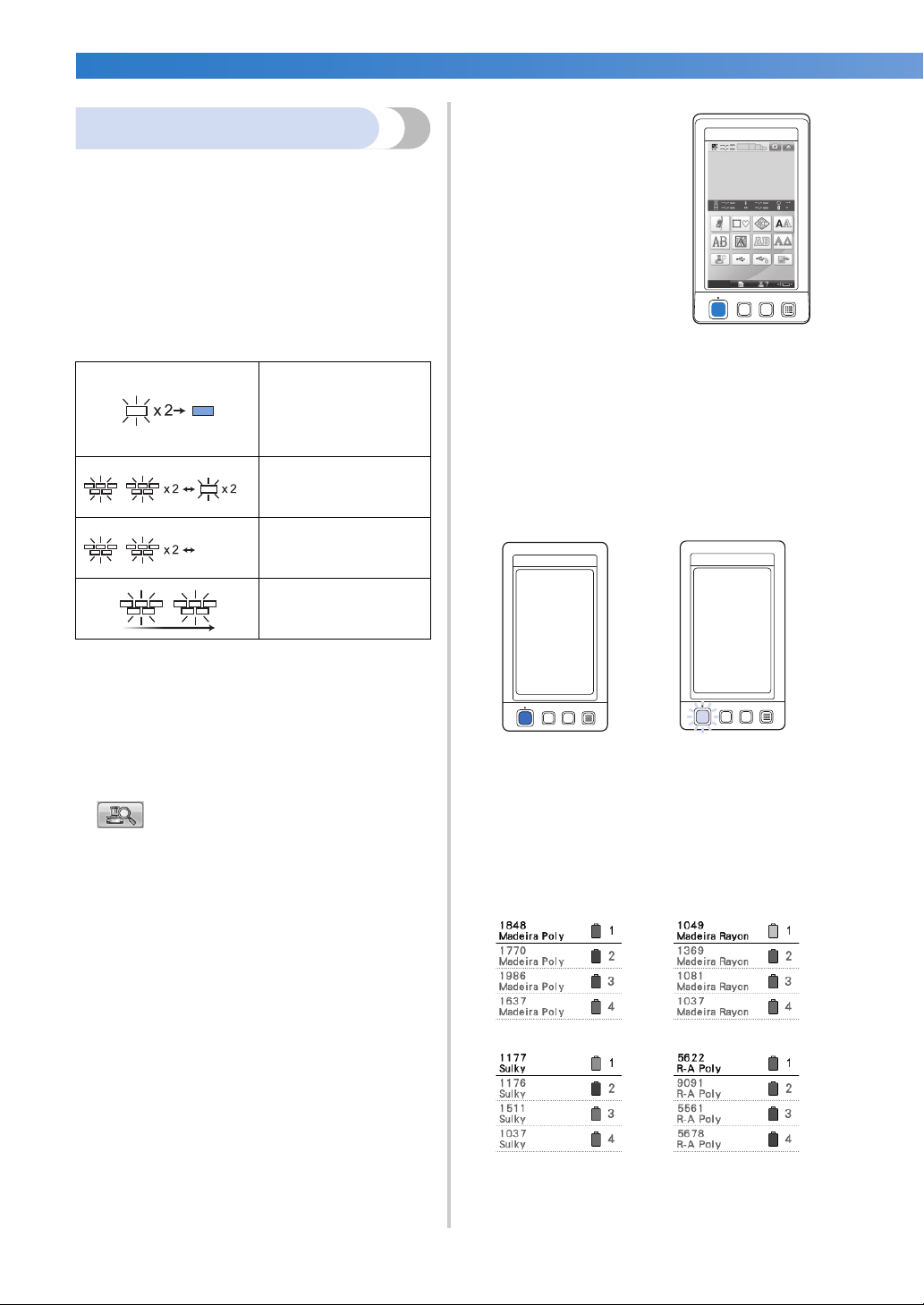
■ Colorful LED lights enhance the embroidery
process
The LED spool stands, light up individually to
transmit sewing information; when the machine
is turned on; similar color of the thread for a
specific spool, thread breakage on a specific
spool, etc. Unique flashing LED lights bring
immediate attention to a spool in question
eliminating the need to consult the LCD
machine screen regularly.
indicates the spool that
needs changing
(Appropriate thread color
is indicated. For black
thread color, LED light
turns off.)
indicates the spool that
activates thread breakage
error
color LCD, the colors of
an embroidery pattern can
be previewed in a nearly
realistic image. In
addition, since the LCD is
a touch panel, the keys
that are displayed can be
touched to easily perform
operations.
■ Safety mechanism
The machine is equipped with a locking
mechanism that helps prevent injuries from
accidental operation. The machine can only be
started after the machine is unlocked. The color
of the start/stop button changes to inform you of
whether or not the machine is locked.
Lit in red Flashing in green
OFF
* Confirm the actual thread color number on
the LCD screen. The LED lights indicate the
approximate thread color to be used on that
particular spool.
sewing error
finished sewing
■ Get a clear image of the needle area with the
needle-drop point function
A built-in camera above the needle plate gives a
bird’s eye view of the needle area. Touch
to display the camera view on the LCD
screen. It will be much easier to get the accurate
needle-drop point.
Furthermore, the machine automatically finds
the embroidering position by using the included
embroidering positioning sticker. (Refer to
“Using the built-in camera” on page 103.)
■ For your embroidery business -Link function-
You can send embroidery patterns edited in
embroidery editing software provided with the
Link function, such as PE-DESIGN NEXT or later,
from a computer to an embroidery machine.
You can connect 4 machines to a computer at a
same time. (Refer to “Sending Embroidery
Patterns From a Computer to the Machine (Link
Function)” on page 176.)
The machine is locked.
The machine can be
started.
■ Wide selection of built-in thread color
information
The thread color information for manufacturers’
threads is available, making it easy to choose the
appropriate thread color.
10
———————————————————————————————————————————————————————————————————————————————————
■ Expanded thread color display feature enables
colors to be displayed as realistic true color
The colors and thread color numbers are stored
in the machine’s memory. From this thread color
library, you can select colors to create your own
color thread table. If the pattern colors are
changed using this table, the pattern can be
displayed with only the thread colors that you
have. In addition, the embroidery pattern can be
displayed as it would appear after it is
embroidered.
■ Automatic needle-threading mechanism
Using the automatic needle-threading
mechanism, each needle can easily be threaded.
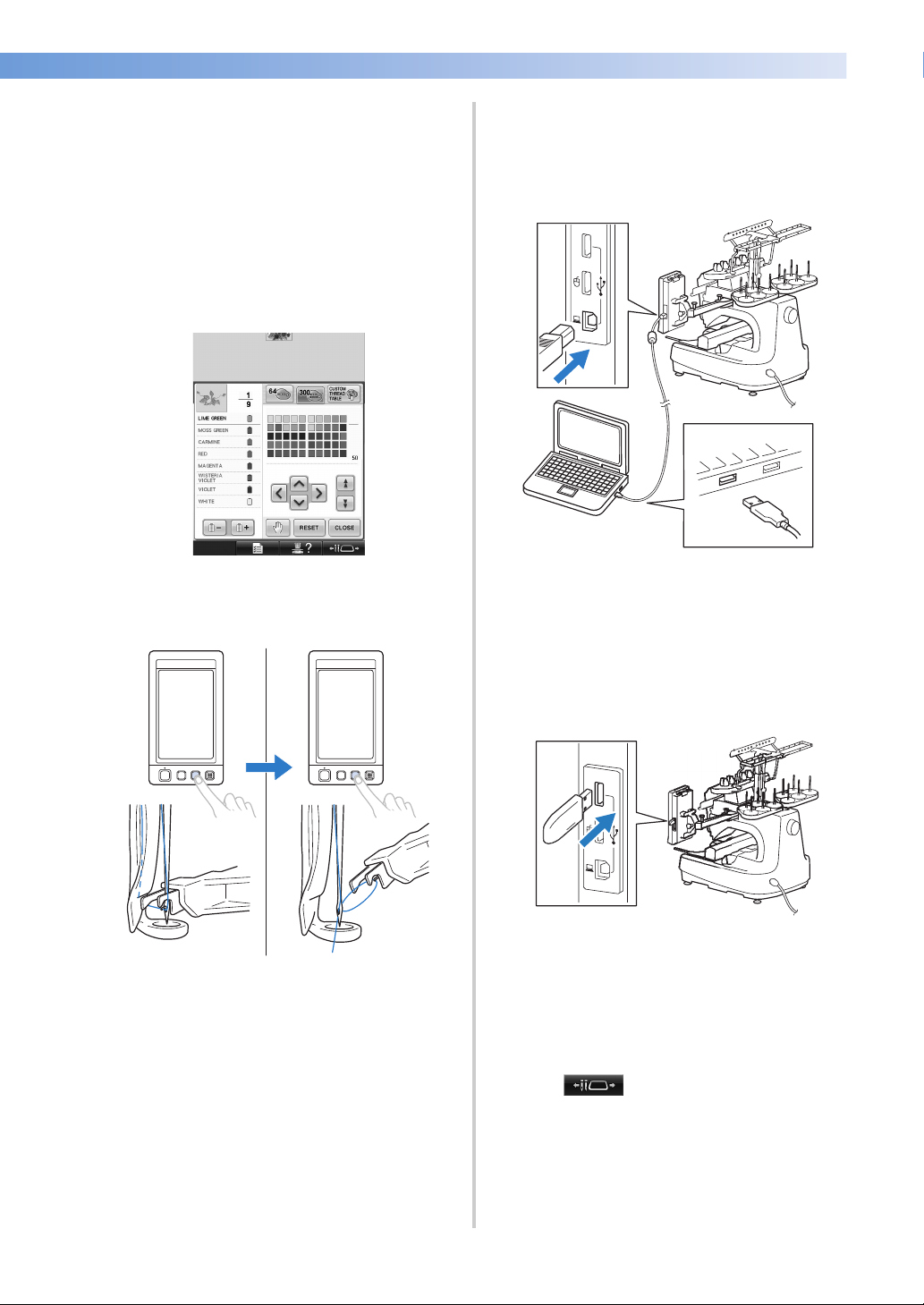
■ USB port available as standard equipment
By connecting a computer to the machine using
the included USB cable, embroidery patterns
can be transferred from the computer. (Refer to
“Computer (USB)” on page 168.)
If the machine is positioned at a distance that
prevents the USB cable from reaching the
computer, embroidery patterns can be
transferred from the computer by temporarily
saving them on USB media, which is then
connected to the machine. (Refer to “USB
media” on page 173.)
■ Moving or threading a selected needle bar at
any time
When selecting, editing or embroidering a
pattern, any one of the needle bars can be
selected at any time to be threaded or moved to
the embroidering position.
Touch to open the needle move
screen, then select the needle bar number that
you want to move or thread. (Refer to “Moving
and threading a selected needle bar” on
page 62.)
Machine Structure and Features 11

—————————————————————————————————————————————————————————————————————————————————
■ Embroidery pattern editing
Available features
Designs with a maximum size of 200 mm (H) ×
360 mm (W) (7-7/8 inches (H) × 14 inches (W)) can
be embroidered. If the optional cap frame is used,
embroidery can be sewn on caps.
■ Manual color sequence — More professional use
of this machine
If you specify the thread colors used with this
machine, or if you use DST files frequently, it
would be convenient to use the manual color
sequence.
(Refer to “Selecting/Managing Thread Colors for
Each Needle Bar (Manual Color Sequence)” on
page 132.)
■ Availability of various accessories
In addition to the 4 embroidery frames included
with the machine, there are 3 optional frames
(quilt, border and jumbo) that can be used with
the included embroidery frame holder B. An
optional cap frame is available for caps. The
optional cap frame driver is required for the cap
hoop. When a round frame is preferred, there is
an optional round frame holder C for the
optional round frame.
For details on embroidery frames and
embroidery frame holders, refer to page 91.
■ Various built-in patterns
Many built-in character patterns, embroidery
patterns and frame patterns enable you to start
embroidering right after purchasing this
machine.
Lettering and embroidery patterns can be
combined or a text arrangement can be
specified to arrange the patterns.
The machine can also be set to repeatedly sew
the same pattern.
12

———————————————————————————————————————————————————————————————————————————————————
Manual Structure
This manual is constructed as described below. Before using the machine, check the procedures described
with the numbered titles in the title list on the first page of chapter 2. This shows the sequence of these basic
operations.
Read before use
Chapter 1: Getting Ready
The setup of the embroidery machine and the
various preparations required before starting to sew
are described in this chapter.
Chapter 2: Embroidering Tutorial
This chapter describes the basic embroidering
operations in order—from turning on the machine
and sewing a pattern to finishing sewing. Follow
the steps of the tutorial to embroider a pattern and
master the operation of this embroidery machine.
Chapter 3: Other Basic Procedures
This chapter provides explanations on operations
other than those described in chapter 2, such as
sewing a pattern with eleven or more colors, and
other necessary operations, for example, changing
the needle.
Read when additional
information is required
Chapter 4: Embroidering Settings
This chapter contains descriptions on the various
embroidering settings, which make editing patterns
simple.
Chapter 5: Selecting/Editing/Saving Patterns
This chapter provides details on selecting, editing
and saving embroidery patterns.
Chapter 6: Basic Settings and Help Feature
This chapter contains descriptions on the use of the
settings key, the machine operations key and the
help key. Details on changing the basic embroidery
machine settings and viewing operations on the
LCD will be provided.
Chapter 7: Appendix
This chapter provides descriptions of techniques for
various embroidering operations, pointers for
creating beautiful embroidery, and details on
maintenance procedures and corrective measures
that should be taken when a problem occurs.
Searching for information
■ Searching the manual
By title
Check the descriptions at the left for the contents
of each chapter, and then check the table of
contents.
For basic operations, refer to the list of titles on
the first page of chapter 2. Find the appropriate
page by using the thumbtabs on the right edge of
the pages.
By keyword
Search the index at the end of this manual. Look
for the desired keyword, and then refer to the
page that is indicated.
By screen
Descriptions of the keys and other information
that appear in the main LCD screens are
provided in the tables on pages 71 to 80. For
details, refer to the page that is indicated.
By condition
Various possible conditions and the
corresponding operations are described on
page 81. For details, refer to the page that is
indicated.
■ Searching the machine
This machine is equipped with a help feature.
Learning how to perform an operation
Touch the machine operations guide key, and
then check for the desired information. (Refer to
“Using the Machine Operations Guide Key” on
page 232.)
Manual Structure 13

—————————————————————————————————————————————————————————————————————————————————
Contents
Introduction ………………………………………………………………………………………………………1
IMPORTANT SAFETY INSTRUCTIONS ………………………………………………………………….1
License Agreement ……………………………………………………………………………………………..6
Warning Labels…………………………………………………………………………………………………..7
Machine Structure and Features…………………………………………………………………………… 8
Ten-needle machine embroidering…………………………………………………………………………………………………. 8
Differences from single-needle machines ………………………………………………………………………………………… 9
Other features ……………………………………………………………………………………………………………………………10
Available features……………………………………………………………………………………………………………………….12
Manual Structure……………………………………………………………………………………………… 13
Read before use …………………………………………………………………………………………………………………………13
Read when additional information is required………………………………………………………………………………… 13
Searching for information……………………………………………………………………………………………………………. 13
GETTING READY 19
Names of Machine Parts and Their Functions ……………………………………………………….20
Front view………………………………………………………………………………………………………………………………… 20
Right-side/rear view …………………………………………………………………………………………………………………… 21
Operation panel…………………………………………………………………………………………………………………………21
Accessories ………………………………………………………………………………………………………22
Included accessories …………………………………………………………………………………………………………………..22
Optional accessories…………………………………………………………………………………………………………………..24
Setting Up the Machine ……………………………………………………………………………………..26
Setup and transporting precautions ……………………………………………………………………………………………….26
Setup location…………………………………………………………………………………………………………………………… 27
Setting up the machine……………………………………………………………………………………………………………….. 28
Remove the fixing plates ……………………………………………………………………………………………………………..29
Adjusting the operation panel position………………………………………………………………………………………….. 29
Preparing the thread guide assembly …………………………………………………………………………………………….. 30
Preparing the spool stand ……………………………………………………………………………………………………………. 31
Attaching the embroidery frame holder…………………………………………………………………………………………. 32
EMBROIDERING TUTORIAL 33
Operating Precautions……………………………………………………………………………………….34
Power supply precautions ……………………………………………………………………………………………………………34
Needle precautions…………………………………………………………………………………………………………………….35
Checking the needle ………………………………………………………………………………………………………………….. 35
Bobbin precautions …………………………………………………………………………………………………………………….35
Upper thread recommendations…………………………………………………………………………………………………… 36
Fabric recommendations…………………………………………………………………………………………………………….. 36
Display recommendations…………………………………………………………………………………………………………… 36
Basic Procedures ………………………………………………………………………………………………37
Installing the Bobbin …………………………………………………………………………………………38
Removing the bobbin case ………………………………………………………………………………………………………….. 38
Installing the bobbin ………………………………………………………………………………………………………………….. 38
Installing the bobbin case……………………………………………………………………………………………………………. 39
Turning ON the Machine …………………………………………………………………………………..40
Understanding the screens …………………………………………………………………………………………………………..41
Screen overview………………………………………………………………………………………………………………………… 42
Selecting an Embroidery Pattern …………………………………………………………………………44
Selecting an embroidery pattern……………………………………………………………………………………………………45
Editing the Embroidery Pattern……………………………………………………………………………46
Continuing to the embroidering settings screen………………………………………………………………………………. 46
Specifying Embroidering Setting ………………………………………………………………………….47
Previewing the Image ……………………………………………………………………………………….. 48
Checking a preview image………………………………………………………………………………………………………….. 48
14

———————————————————————————————————————————————————————————————————————————————————
Hooping the Fabric in the Embroidery Frame……………………………………………………….. 49
Hooping the fabric in the embroidery frame ………………………………………………………………………………….. 49
Attaching the Embroidery Frame to the Machine …………………………………………………..51
Attaching the embroidery frame…………………………………………………………………………………………………… 51
Checking the Embroidery Area…………………………………………………………………………… 53
Temporarily stopping to check the area ………………………………………………………………………………………… 53
Continuing to the embroidering screen …………………………………………………………………………………………. 53
Upper Threading ………………………………………………………………………………………………54
Checking the needle bars and thread colors…………………………………………………………………………………… 54
Upper threading ……………………………………………………………………………………………………………………….. 56
Threading the needle …………………………………………………………………………………………………………………. 60
Sewing the Embroidery……………………………………………………………………………………… 64
Starting embroidering ………………………………………………………………………………………………………………… 64
Stopping embroidering ………………………………………………………………………………………………………………. 66
Checking the Thread Tension ……………………………………………………………………………..68
Removing the Embroidery Frame and Fabric…………………………………………………………69
Removing the embroidery frame………………………………………………………………………………………………….. 69
Removing the fabric…………………………………………………………………………………………………………………… 69
Turning OFF the Machine………………………………………………………………………………….. 70
Screen Quick Reference Guide ………………………………………………………………………….. 71
Key displays……………………………………………………………………………………………………………………………… 71
Common screen controls ……………………………………………………………………………………………………………. 71
Understanding the pattern type selection screen…………………………………………………………………………….. 72
Understanding the pattern list screen……………………………………………………………………………………………. 73
Understanding the pattern editing screen………………………………………………………………………………………. 74
Understanding the embroidering settings screen …………………………………………………………………………….. 76
Understanding the embroidering screen ……………………………………………………………………………………….. 79
When You Have a Question, This May Help You …………………………………………………..81
TECHNICAL TERMS: …………………………………………………………………………………………………………………. 81
PATTERNS:………………………………………………………………………………………………………………………………. 81
EMBROIDERING:……………………………………………………………………………………………………………………… 81
USB connectivity ………………………………………………………………………………………………………………………. 82
USB mouse operation ………………………………………………………………………………………………………………… 84
OTHER BASIC PROCEDURES 87
Changing the Needle …………………………………………………………………………………………88
Replacing the needle …………………………………………………………………………………………………………………. 88
Correctly Using the Embroidery Frames………………………………………………………………. 90
Embroidery frame holders…………………………………………………………………………………………………………… 90
When difficult to replace the embroidery frame……………………………………………………………………………… 90
Types of embroidery frames/frame holders and their applications ……………………………………………………… 91
Attaching Iron-On Stabilizer (Backing) to Fabric ………………………………………………….. 93
Hooping the Fabric…………………………………………………………………………………………… 94
Hooping the fabric in the extra-large and large embroidery frames……………………………………………………. 94
Using the embroidery sheet ………………………………………………………………………………………………………… 95
Large/small pieces of fabric…………………………………………………………………………………………………………. 96
Embroidery Frame Position and Movement………………………………………………………….. 97
Changing the Embroidering Position …………………………………………………………………… 99
Adjusting the angle………………………………………………………………………………………………………………….. 100
Aligning the Embroidering Position ……………………………………………………………………103
Using the built-in camera …………………………………………………………………………………………………………. 103
Using the included embroidery positioning sticker ……………………………………………………………………….. 105
Switching the Thread Colors on the Screen………………………………………………………… 108
Embroidering a Pattern Containing Eleven or More Colors ………………………………….. 110
Checking if thread spool changes are necessary……………………………………………………………………………. 111
Changing the Thread Spools with Designs of Eleven or More Colors …………………….. 113
Change thread spools message and spool thread indicators ……………………………………………………………. 113
Easily changing the thread spools ………………………………………………………………………………………………. 114
If the Thread Breaks or the Bobbin Thread Runs Out While Embroidering …………….. 115
If the upper thread breaks …………………………………………………………………………………………………………. 115
Contents 15

—————————————————————————————————————————————————————————————————————————————————
If the bobbin thread breaks or runs out…………………………………………………………………………………………117
Embroidering From the Beginning or Middle of the Pattern …………………………………. 118
Resume Embroidering After Turning Off the Machine………………………………………….. 120
Adjusting the Thread Tension …………………………………………………………………………… 122
Adjusting the tension of the bobbin thread …………………………………………………………………………………… 122
Adjusting the tension of the upper thread ……………………………………………………………………………………..123
EMBROIDERING SETTINGS 125
Basting Embroidery …………………………………………………………………………………………126
Creating an Appliqué Piece ………………………………………………………………………………127
Creating an appliqué piece ………………………………………………………………………………………………………..127
Using a frame pattern for the outline …………………………………………………………………………………………… 130
Selecting/Managing Thread Colors for Each Needle Bar (Manual Color Sequence) …. 132
Convenience of the manual color sequence…………………………………………………………………………………. 132
Specifying the manual color sequence ………………………………………………………………………………………… 132
Using the manual color sequence ………………………………………………………………………………………………. 133
Precautions on the manual color sequence …………………………………………………………………………………..133
Automatic Lock Stitch Setting …………………………………………………………………………..134
Starting/Ending Position Settings ……………………………………………………………………….135
Repeatedly sewing a pattern along a diagonal……………………………………………………………………………….136
Embroidering linked characters…………………………………………………………………………………………………..137
Maximum Sewing Speed Setting………………………………………………………………………..139
Setting the Machine to Stop at Color Changes …………………………………………………….140
Stopping the machine at the next color change …………………………………………………………………………….. 140
Specifying pause locations before embroidering……………………………………………………………………………. 140
Temporary Needle Bar Setting ………………………………………………………………………….142
Uninterrupted embroidering (monochrome) …………………………………………………………………………………. 143
Reserved Needle Bar and Sewing Speed Settings…………………………………………………. 145
SELECTING/EDITING/SAVING PATTERNS 149
Precautions……………………………………………………………………………………………………. 150
Concerning embroidery data………………………………………………………………………………………………………150
Concerning optional embroidery cards ………………………………………………………………………………………..152
Concerning USB media……………………………………………………………………………………………………………..152
Selecting an Embroidery Pattern ……………………………………………………………………….153
General pattern selection …………………………………………………………………………………………………………..153
Embroidery patterns………………………………………………………………………………………………………………….154
Frame patterns …………………………………………………………………………………………………………………………154
Monogram and frame designs ……………………………………………………………………………………………………. 155
Alphabet patterns…………………………………………………………………………………………………………………….. 159
Floral alphabet patterns……………………………………………………………………………………………………………..162
Renaissance alphabet patterns……………………………………………………………………………………………………. 163
Appliqué alphabet……………………………………………………………………………………………………………………. 164
Greek alphabet patterns …………………………………………………………………………………………………………….165
Embroidery patterns stored in the machine memory………………………………………………………………………. 165
Embroidery cards (optional) ……………………………………………………………………………………………………….166
Computer (USB)………………………………………………………………………………………………………………………. 168
Connecting the USB using the included USB cord clamps ……………………………………………………………… 171
USB media……………………………………………………………………………………………………………………………… 173
Sending Embroidery Patterns From a Computer to the Machine (Link Function) …….. 176
Operations available with the Link function………………………………………………………………………………….176
Embroidering using the Link function………………………………………………………………………………………….. 177
Disabling the Link function ……………………………………………………………………………………………………….. 180
Editing the Embroidery Pattern (Pattern Editing Screen) ………………………………………. 181
Enlarge the pattern image on the screen……………………………………………………………………………………….181
Combining patterns…………………………………………………………………………………………………………………..181
Selecting the pattern to be edited ……………………………………………………………………………………………….. 182
Moving a pattern………………………………………………………………………………………………………………………183
Flipping a pattern horizontally ……………………………………………………………………………………………………184
Changing the size of a pattern …………………………………………………………………………………………………….184
16

———————————————————————————————————————————————————————————————————————————————————
Rotating a pattern ……………………………………………………………………………………………………………………. 185
Changing the text arrangement of a character………………………………………………………………………………. 186
Changing the character spacing…………………………………………………………………………………………………. 187
Separating combined character patterns ……………………………………………………………………………………… 188
Trimming the threads between characters……………………………………………………………………………………. 189
Changing the thread density (only for selected character and frame patterns)…………………………………….. 189
Specifying multi-color text………………………………………………………………………………………………………… 190
Changing the colors of the pattern ……………………………………………………………………………………………… 190
Designing repeated patterns………………………………………………………………………………………………………. 192
Creating a custom thread table ………………………………………………………………………………………………….. 200
Choosing a color from the custom thread table …………………………………………………………………………….. 202
Duplicating a pattern ……………………………………………………………………………………………………………….. 203
Editing patterns as a group………………………………………………………………………………………………………… 204
Deleting a pattern……………………………………………………………………………………………………………………. 204
Editing the Embroidery Pattern (Embroidering Settings Screen) ……………………………. 205
Rotating the entire pattern…………………………………………………………………………………………………………. 205
Editing a Combined Pattern……………………………………………………………………………… 206
Saving Embroidery Patterns………………………………………………………………………………211
Machine’s memory………………………………………………………………………………………………………………….. 211
If the embroidery pattern cannot be saved …………………………………………………………………………………… 211
USB media …………………………………………………………………………………………………………………………….. 213
Computer (USB)………………………………………………………………………………………………………………………. 214
BASIC SETTINGS AND HELP FEATURE 217
Using the Settings Key ……………………………………………………………………………………..218
Understanding the settings screen………………………………………………………………………………………………. 218
Changing the display guides ……………………………………………………………………………………………………… 220
Changing the thread color information ……………………………………………………………………………………….. 222
Selecting the thread color information for “PES” format data…………………………………………………………… 223
Specifying the thumbnail size ……………………………………………………………………………………………………. 224
Changing the background colors of the embroidery patterns or thumbnails ………………………………………. 224
Specifying jumpstitch trimming / “DST” jump codes for trimming……………………………………………………. 225
Deleting short stitches………………………………………………………………………………………………………………. 226
Specifying the remaining length of thread……………………………………………………………………………………. 227
Changing the screen saver settings……………………………………………………………………………………………… 227
Adjusting the brightness of the sewing light …………………………………………………………………………………. 229
Changing the speaker volume……………………………………………………………………………………………………. 229
Specifying the spool stand LED setting ………………………………………………………………………………………… 230
Specifying thread sensor …………………………………………………………………………………………………………… 230
Changing the pointer shape when a USB mouse is used ………………………………………………………………… 231
Changing the units of measurements…………………………………………………………………………………………… 231
Changing the language …………………………………………………………………………………………………………….. 231
Using the Machine Operations Guide Key …………………………………………………………. 232
APPENDIX 235
Appliqué Sewing…………………………………………………………………………………………….. 236
Sewing appliqué patterns………………………………………………………………………………………………………….. 236
Using a frame pattern to create appliqués (1)……………………………………………………………………………….. 237
Using a frame pattern to create appliqués (2)……………………………………………………………………………….. 238
Sewing Large-size (Split) Embroidery Patterns…………………………………………………….. 240
Helpful Tips for the Operation of the Machine …………………………………………………… 243
Checking the thread tension of built-in patterns ……………………………………………………………………………. 243
Sewing a pattern aligned with a mark on the fabric……………………………………………………………………….. 244
Color thread table……………………………………………………………………………………………………………………. 246
Colors of Tajima (.dst) embroidery data ………………………………………………………………………………………. 246
Creating Beautiful Embroidery …………………………………………………………………………. 247
Threads………………………………………………………………………………………………………………………………….. 247
Stabilizers (backing)…………………………………………………………………………………………………………………. 247
Hooping techniques ………………………………………………………………………………………………………………… 249
Fabric/stabilizer compatibility chart……………………………………………………………………………………………. 250
Installing the Included Table …………………………………………………………………………….251
Contents 17

—————————————————————————————————————————————————————————————————————————————————
Removing the table………………………………………………………………………………………………………………….. 253
OPTIONAL ACCESSORIES 254
Embroidery Patterns for the Optional Jumbo Frame……………………………………………..254
Using the Optional Cap Frame …………………………………………………………………………. 258
Cap frame and its accessories……………………………………………………………………………………………………..258
Types of caps …………………………………………………………………………………………………………………………..259
Fabric precautions……………………………………………………………………………………………………………………. 260
Preparing to use the cap frame…………………………………………………………………………………………………… 260
Attaching the cap frame ……………………………………………………………………………………………………………. 266
Installing the embroidery frame holder………………………………………………………………………………………… 274
Additional digitizing information………………………………………………………………………………………………… 275
Using the Optional Bobbin Winder ……………………………………………………………………277
Precautions ……………………………………………………………………………………………………………………………..277
Optional bobbin winder and its accessories …………………………………………………………………………………. 277
Setting up the optional bobbin winder …………………………………………………………………………………………278
Connecting the AC adapter ……………………………………………………………………………………………………….. 278
Winding the bobbin ………………………………………………………………………………………………………………….279
Maintenance………………………………………………………………………………………………….. 282
Cleaning the LCD…………………………………………………………………………………………………………………….. 282
Cleaning the machine surface …………………………………………………………………………………………………….282
Cleaning the hook …………………………………………………………………………………………………………………….282
Cleaning around the needle plate……………………………………………………………………………………………….. 283
Cleaning the bobbin case ………………………………………………………………………………………………………….. 284
Cleaning the thread paths of the upper threads……………………………………………………………………………… 285
Oiling the machine …………………………………………………………………………………………………………………..287
About the maintenance message ………………………………………………………………………………………………… 288
Troubleshooting ……………………………………………………………………………………………..289
On-screen troubleshooting ………………………………………………………………………………………………………… 289
Troubleshooting ……………………………………………………………………………………………………………………….290
Error messages …………………………………………………………………………………………………………………………298
If the machine does not respond when a key is pressed………………………………………………………………….. 307
Specifications …………………………………………………………………………………………………308
Embroidery machine specifications…………………………………………………………………………………………….. 308
Upgrading Your Machine’s Software …………………………………………………………………. 309
Upgrade procedure using USB media …………………………………………………………………………………………. 309
Upgrade procedure using computer ……………………………………………………………………………………………. 310
Index …………………………………………………………………………………………………………….311
18

1
GETTING READY
After unpacking the machine, first refer to “Accessories” on page 22, and check that
all listed accessories are included. After checking that all accessories are included, the
embroidery machine can be set up.
The setup of the machine and the various preparations required before starting to sew
are described in this chapter.
Names of Machine Parts and Their Functions …………………………………………………20
Front view …………………………………………………………………………………………….. 20
Right-side/rear view ………………………………………………………………………………… 21
Operation panel …………………………………………………………………………………….. 21
Accessories……………………………………………………………………………………………….. 22
Included accessories………………………………………………………………………………..22
Optional accessories………………………………………………………………………………..24
Setting Up the Machine………………………………………………………………………………. 26
Setup and transporting precautions …………………………………………………………….26
Setup location…………………………………………………………………………………………27
Setting up the machine ……………………………………………………………………………. 28
Remove the fixing plates…………………………………………………………………………..29
Adjusting the operation panel position………………………………………………………..29
Preparing the thread guide assembly…………………………………………………………..30
Preparing the spool stand………………………………………………………………………….31
Attaching the embroidery frame holder……………………………………………………….32
GETTING READY ——————————————————————————————————————————————————————————————————————
Names of Machine Parts and Their Functions
The names of the various parts of the sewing machine and their functions are described below. Before using
the sewing machine, carefully read these descriptions to learn the names of the machine parts.
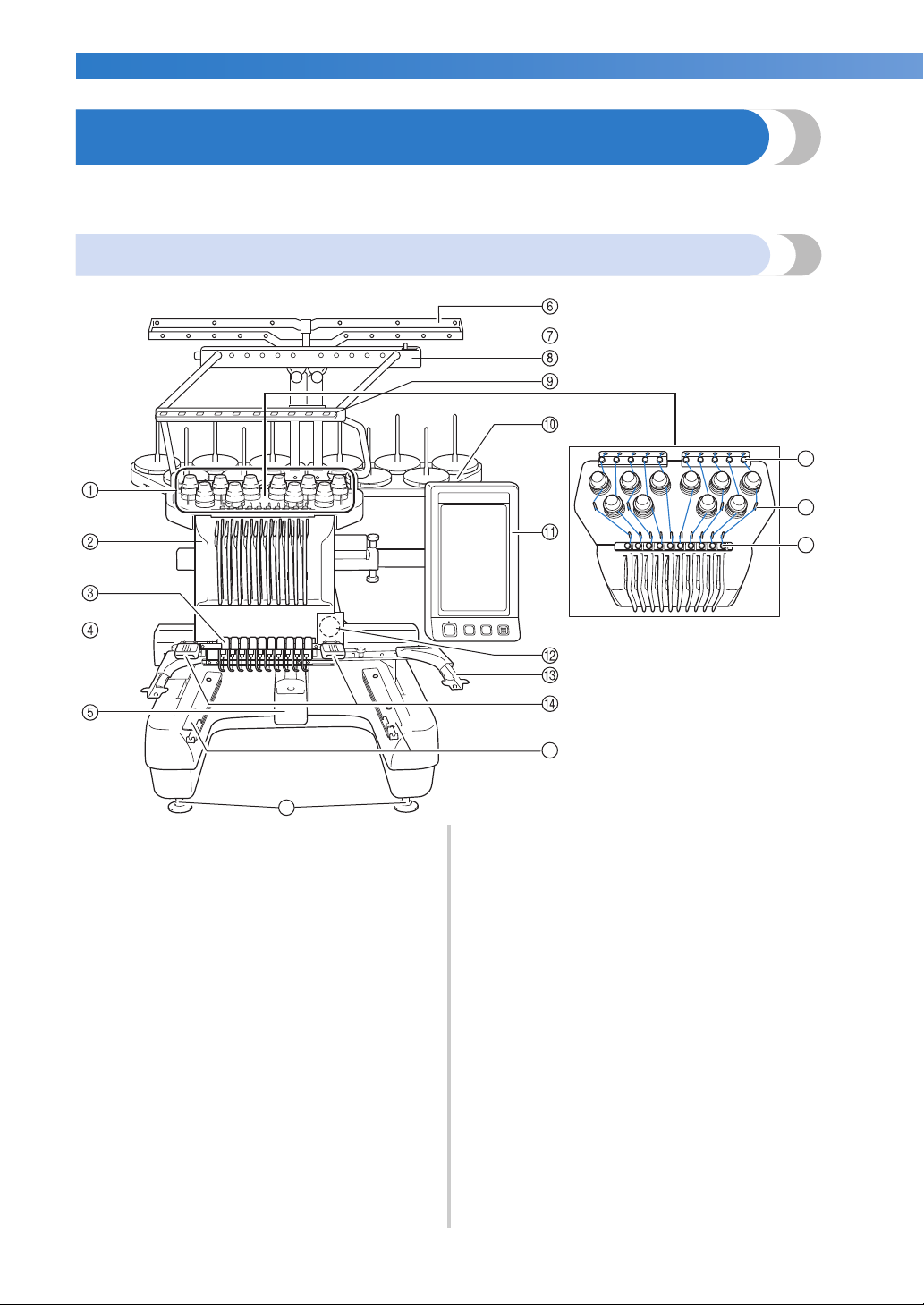
Front view
16
17
18
19
1 Thread tension knobs
Adjust the tension of the thread.
2 Needle bar case
Moves to the left and right to move the needle to the
embroidering position.
3 Lower thread guide
4 Carriage
Attach the embroidery frame to the carriage. When the
machine is turned on or when the machine is
embroidering, the carriage moves forward, backward,
left and right.
5 Hook cover/Hook
Open the hook cover, and then insert the bobbin case
into the hook.
20
15
6 Thread guide A
7 Thread guide B
8 Thread guide C
9 Thread guide D
0 Spool stand
Put 10 thread spools to embroider.
A Operation panel
B Built-in camera
C Embroidery frame holder
D Sewing light
The brightness of the sewing light can be adjusted in
the settings screen.
E Table brackets
F Upper thread guide
G Thread guide pins
H Middle thread guide
I Feet
Use the feet to adjust the height of the legs.
———————————————————————————————————————————————————————————————————————————————————
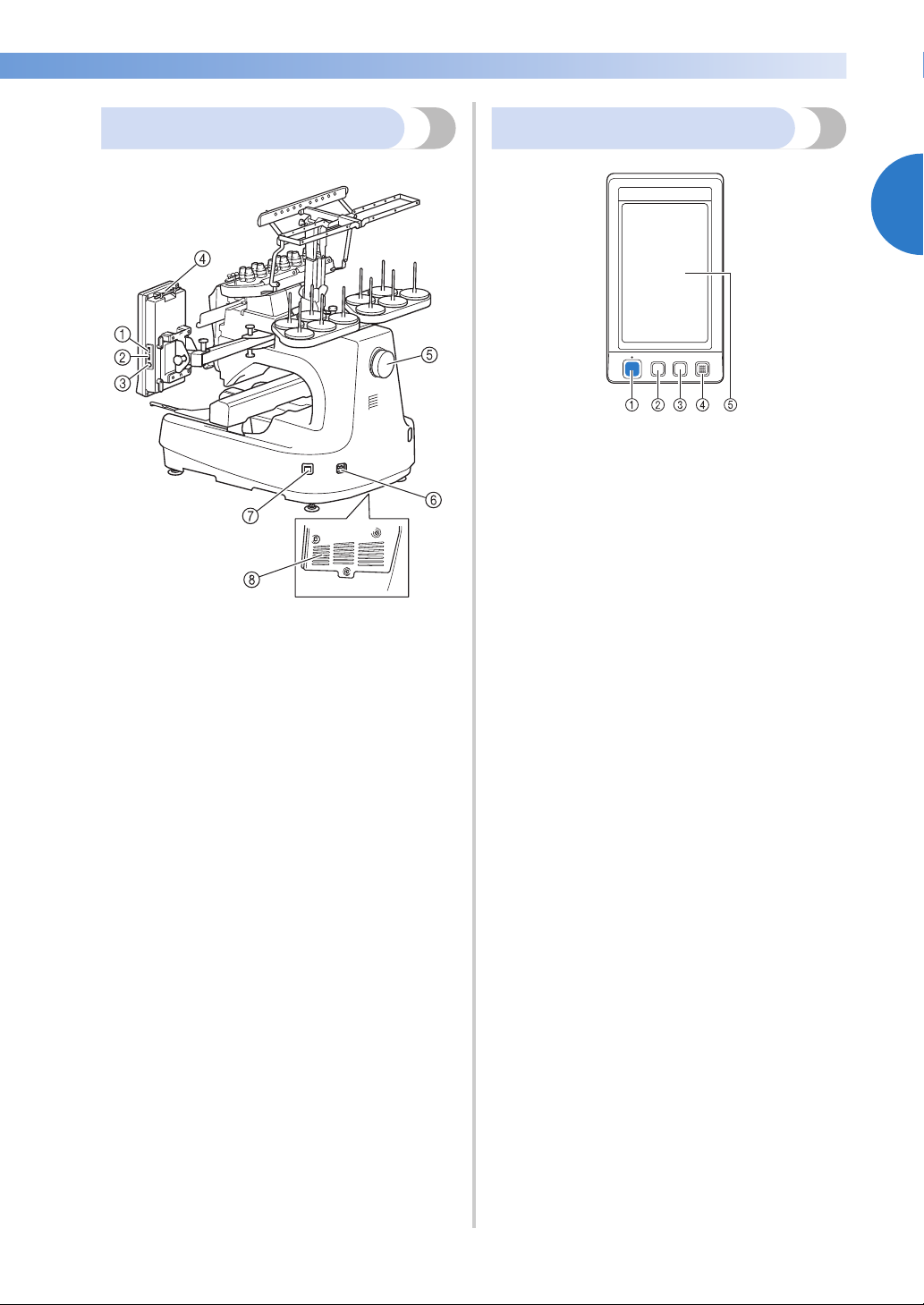
Right-side/rear view
Bottom
1 Primary (top) USB port for media
In order to send patterns from/to USB media, plug the
USB media directly into the USB port.
2 USB port for mouse
3 USB port for computer
In order to import/export patterns between a computer
and the machine, plug the USB cable into the USB
port.
4 Touch pen holder
Use the touch pen holder to hold the touch pen when
not in use.
5 Handwheel
Rotate the handwheel to move the needle up and
down. Be sure to rotate the handwheel toward the
LCD panel (counterclockwise).
6 Power supply plug
Insert the plug on the power supply cord into the
power supply plug.
7 Main power switch
Use the main power switch to turn the machine ON (I)
and OFF (
8 Ventilation slots
{).
Operation panel
1 Start/Stop button
Press the start/stop button to start or stop the machine.
The lighting status and color of the button changes
depending on the operation condition of the machine.
Lit in red : When the machine cannot
Flashing in
green
Lit in green : While the machine is sewing
Off : When the machine is turned
2 Thread trimming button
Press the thread trimming button to trim both the
upper and the bobbin threads.
3 Automatic needle-threading button
Press the automatic needle threading button to thread
the needle.
4 Speaker
5 LCD (touch panel)
Touch the keys that appear on the touch panel to
select and edit patterns and confirm various
information.
start sewing
:
When the machine can start
sewing
off
1
Names of Machine Parts and Their Functions 21
GETTING READY ———————————————————————————————————————————————————————————————————————
Accessories
The accessories listed below are included with this machine. Make sure to use the accessories designed for
this machine.
Included accessories
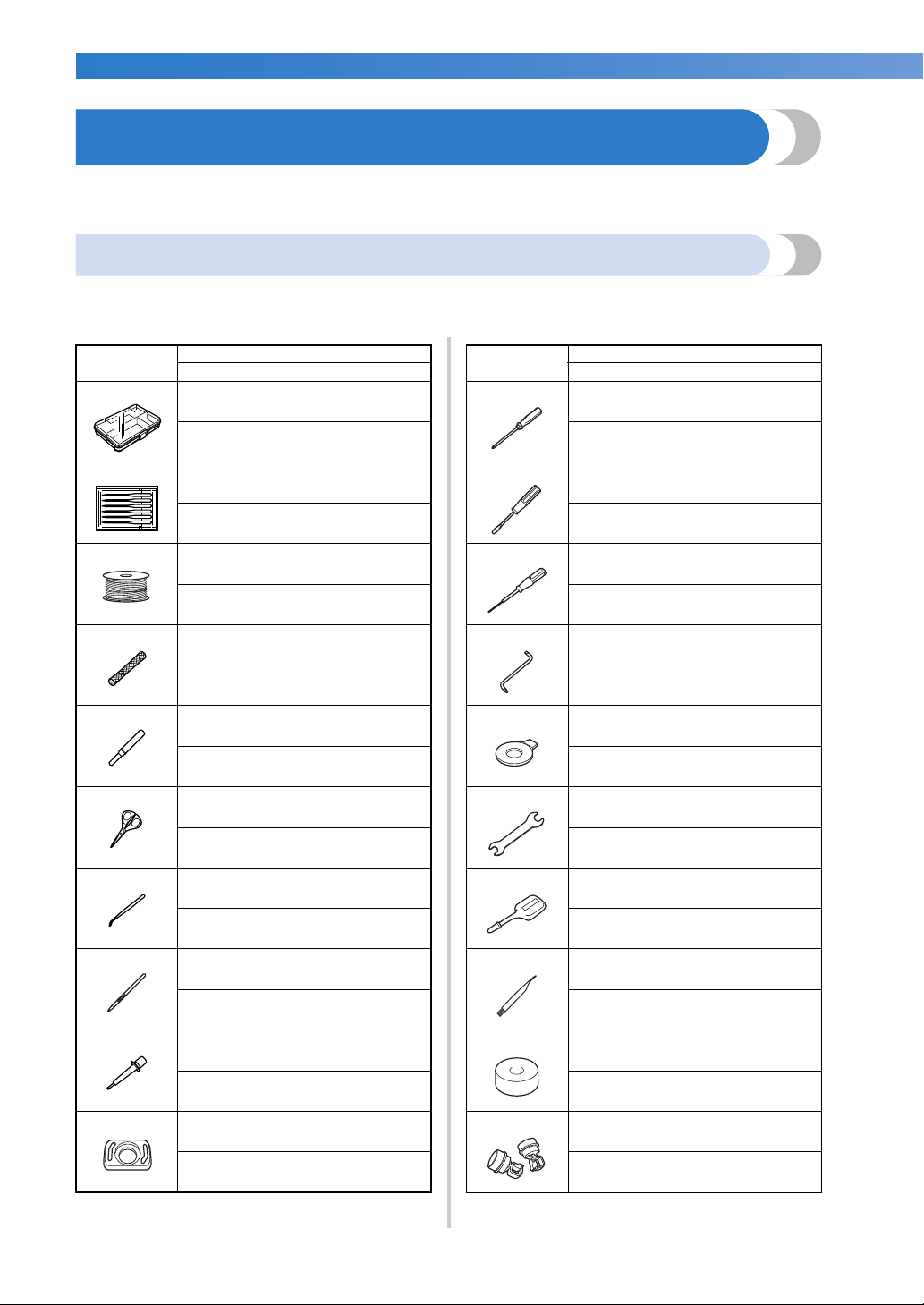
After opening the box, check that the following accessories are included. If any item is missing or damaged,
contact your Brother dealer.
Part Name
Part Code
1.
2.
3.
4.
5.
6.
Accessory case
XC6482-051
Needle set × 2
XC6469-001
Prewound bobbin × 6
XC6368-051
Spool net × 10
S34455-000
Seam ripper
X54243-051
Scissors
XC1807-121
11.
12.
13.
14.
15.
16.
Phillips screwdriver
XC6543-051
Standard screwdriver
X55468-051
Allen screwdriver
XC5159-051
Offset screwdriver
XC6545-051
Disc-shaped screwdriver
XC1074-051
Wrench 13 × 10
XC6159-051
Part Name
Part Code
7.
8.
9.
10.
22
Tweezers
XC6542-051
Touch pen
XA9940-051
Needle changing tool (Threader)
XE8362-001
Needle plate spacer
XC6499-151
17.
18.
19.
20.
Oiler
XZ0206-051
Cleaning brush
X59476-051
Weight
XC5974-151
USB cord clamp × 2
XE8396-002
———————————————————————————————————————————————————————————————————————————————————
Part Name
Part Code
21.
22.
23.
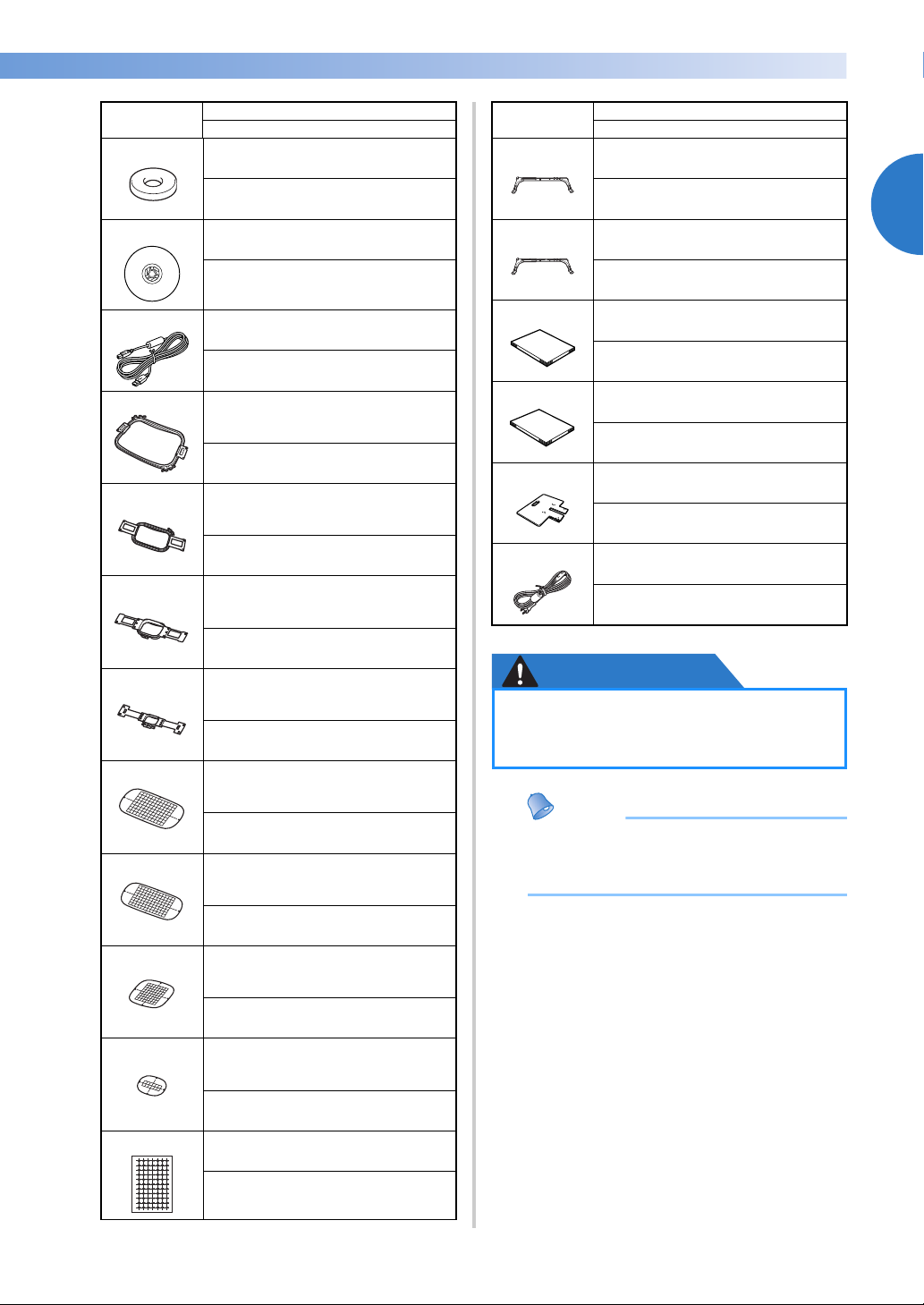
Spool mat × 10
XC7134-051
Spool cap × 10
130012-054
USB cable
XD1851-051
24. Embroidery frame (extra-large)
200 mm (H) × 360 mm (W)
(7-7/8 inches (H) × 14 inches (W))
PRPH360 (USA/CANADA)
PRPH360:XE8421-001 (Other area)
25. Embroidery frame (large)
130 mm (H) × 180 mm (W) (5-1/8
inches (H) × 7-1/8 inches (W))
PRH180 (USA/CANADA)
PRH180: XC6285-052 (Other area)
26. Embroidery frame (medium)
100 mm (H) × 100 mm (W)
(4 inches (H) × 4 inches (W))
PRH100 (USA/CANADA)
PRH100: XC6286-052 (Other area)
27. Embroidery frame (small)
40 mm (H) × 60 mm (W) (1-1/2
inches (H) × 2-3/8 inches (W))
PRH60 (USA/CANADA)
PRH60: XC6287-052 (Other area)
28. Embroidery sheet (extra large)
200 mm (H) × 360 mm (W) (7-7/8
inches (H) × 14 inches (W))
XE7158-001
29. Embroidery sheet (large)
130 mm (H) × 180 mm (W) (5-1/8
inches (H) × 7-1/8 inches (W))
XC5721-051
Part Name
Part Code
33.
Embroidery frame holder A
(with white corner cover)
XE7374-001
34.
Embroidery frame holder B
(with light gray corner cover)
XE7376-001
35.
36.
37.
38.
Operation Manual
This manual
Quick reference guide
XE8349-001
Table
PRWT1 (USA/CANADA)
PRWT1: XE8417-001 (Other area)
Power cord
Visit your authorized Brother dealer.
CAUTION
● Be sure to use the included power cord
for this machine. Using any other
power cord may result in damage.
● The included touch pen can be stored in
the touch pen holder on the back of the
operation panel. Refer to page 21.
1
30. Embroidery sheet (medium)
100 mm (H) × 100 mm (W)
(4 inches (H) × 4 inches (W))
XC5759-051
31. Embroidery sheet (small)
40 mm (H) × 60 mm (W) (1-1/2
inches (H) × 2-3/8 inches (W))
XC5761-051
32.
Embroidery positioning sticker
sheets (3)
SAEPS1 (USA/CANADA)
EPS1:XE5096-001 (Other area)
Accessories 23
GETTING READY ——————————————————————————————————————————————————————————————————————
Part Name
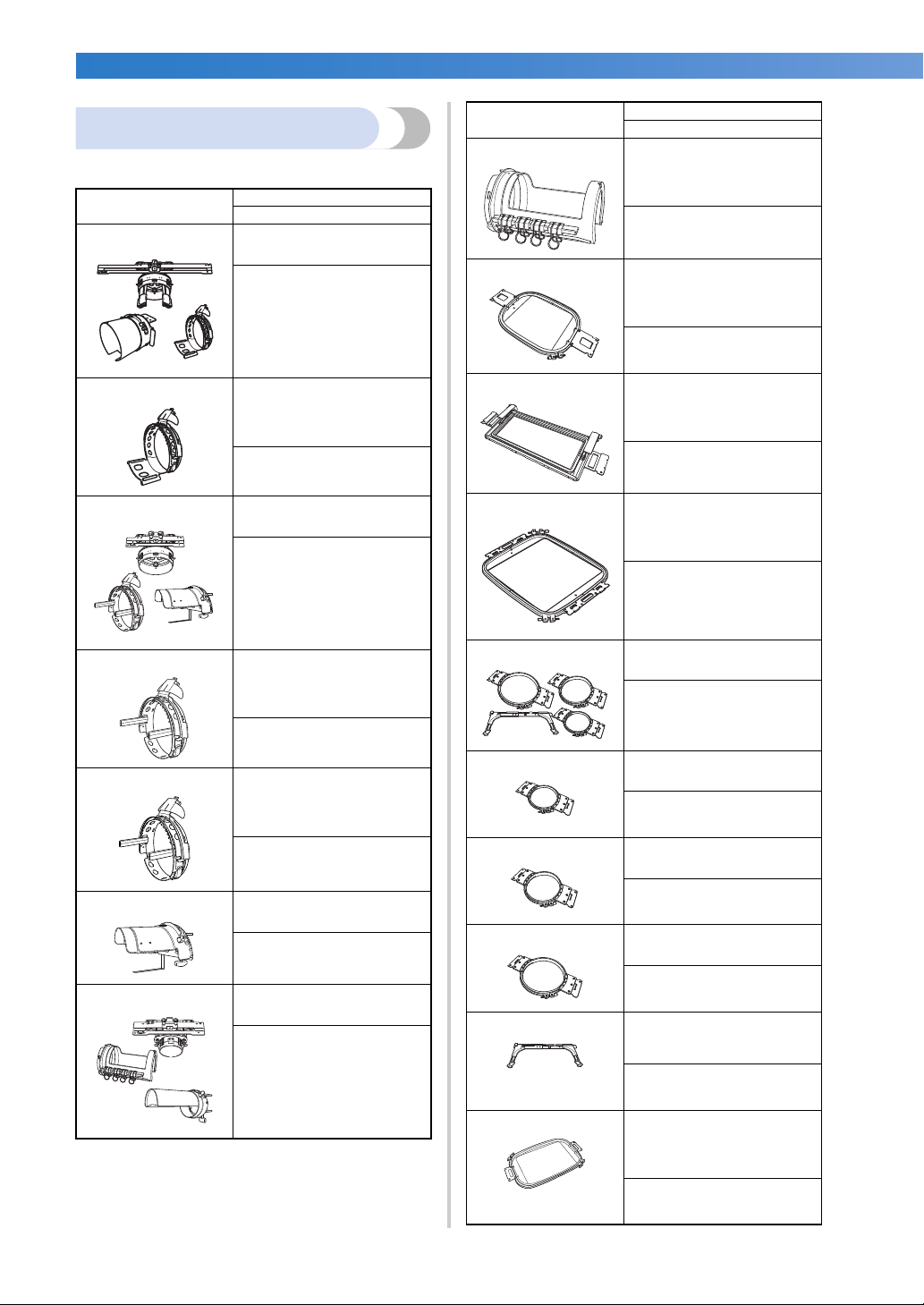
Optional accessories
Part Code
8. Cylinder frame
The following are available as optional accessories.
80 mm (H) × 90 mm (W)
(3 inches (H) × 3-1/2
Part Name
Part Code
1.
Wide cap frame set (Refer
to page 258.)
inches (W))
PRCLH1 (USA/CANADA)
PRCLH1:
XE2170-001 (Other area)
9. Quilt frame
200 mm × 200 mm
PRPCF1 (USA/CANADA)
PRPCF1:
XE8408-001 (Other area)
2. Wide cap frame
60 mm (H) × 360 mm (W)
(2-3/8 inches (H) × 14
inches (W))
PRPCFH4 (USA/CANADA)
PRPCFH4:
XE8424-001 (Other area)
3.
Advanced cap frame 2 set
10. Border frame
11. Jumbo frame
(7-7/8 inches × 7-7/8
inches)
PRPQF200 (USA/CANADA)
PRPQF200:
XE8411-001 (Other area)
100 mm (H) × 300 mm (W)
(4 inches (H) × 11-3/4
inches (W))
PRPBF1 (USA/CANADA)
PRPBF1:
XE8414-001 (Other area)
360 mm (H) × 360 mm (W)
(14 inches (H) × 14 inches
(W))
PRCF3 (USA/CANADA)
PRCF3:
XE2158-001 (Other area)
PRPJF360 (USA/CANADA)
PRPJF360:
XE8405-001 (Other area)
4. Advanced cap frame 2
60 mm (H) × 130 mm (W)
(2-3/8 inches (H) × 5-1/8
inches (W))
PRCFH3 (USA/CANADA)
PRCFH3:
XE2162-001 (Other area)
5. Advanced cap frame
50 mm (H) × 130 mm (W)
(2 inches (H) × 5-1/8
inches (W))
PRCFH2 (USA/CANADA)
PRCFH2:
XC7610-052 (Other area)
6.
7.
Mounting jig
PRCFJ2 (USA/CANADA)
PRCFJ2:
XC7611-052 (Other area)
Cylinder frame set
PRCL1 (USA/CANADA)
PRCL1:
XE2166-001 (Other area)
12.
13.
Round frame set
PRPRFK1 (USA/CANADA)
PRPRFK1:
XE8402-001 (Other area)
Round frame
(∅100 mm (4 inches))
PRPRF100 (USA/CANADA)
PRPRF100:
XE8427-001 (Other area)
14.
Round frame
(∅130 mm (5 inches))
PRPRF130 (USA/CANADA)
PRPRF130:
XE8430-001 (Other area)
15.
Round frame
(∅160 mm) (6 inches))
PRPRF160 (USA/CANADA)
PRPRF160:
XE8433-001 (Other area)
16. Embroidery frame holder C
(with dark gray corner
covers)
PRPARMC (USA/CANADA)
PRPARMC:
XE8436-001 (Other area)
17. Flat frame
200 mm (H) × 300 mm (W)
(7-7/8 inches (H) × 11-3/4
inches (W))
PRF300 (USA/CANADA)
PRF300:
XE2086-001 (Other area)
24
———————————————————————————————————————————————————————————————————————————————————
Part Name
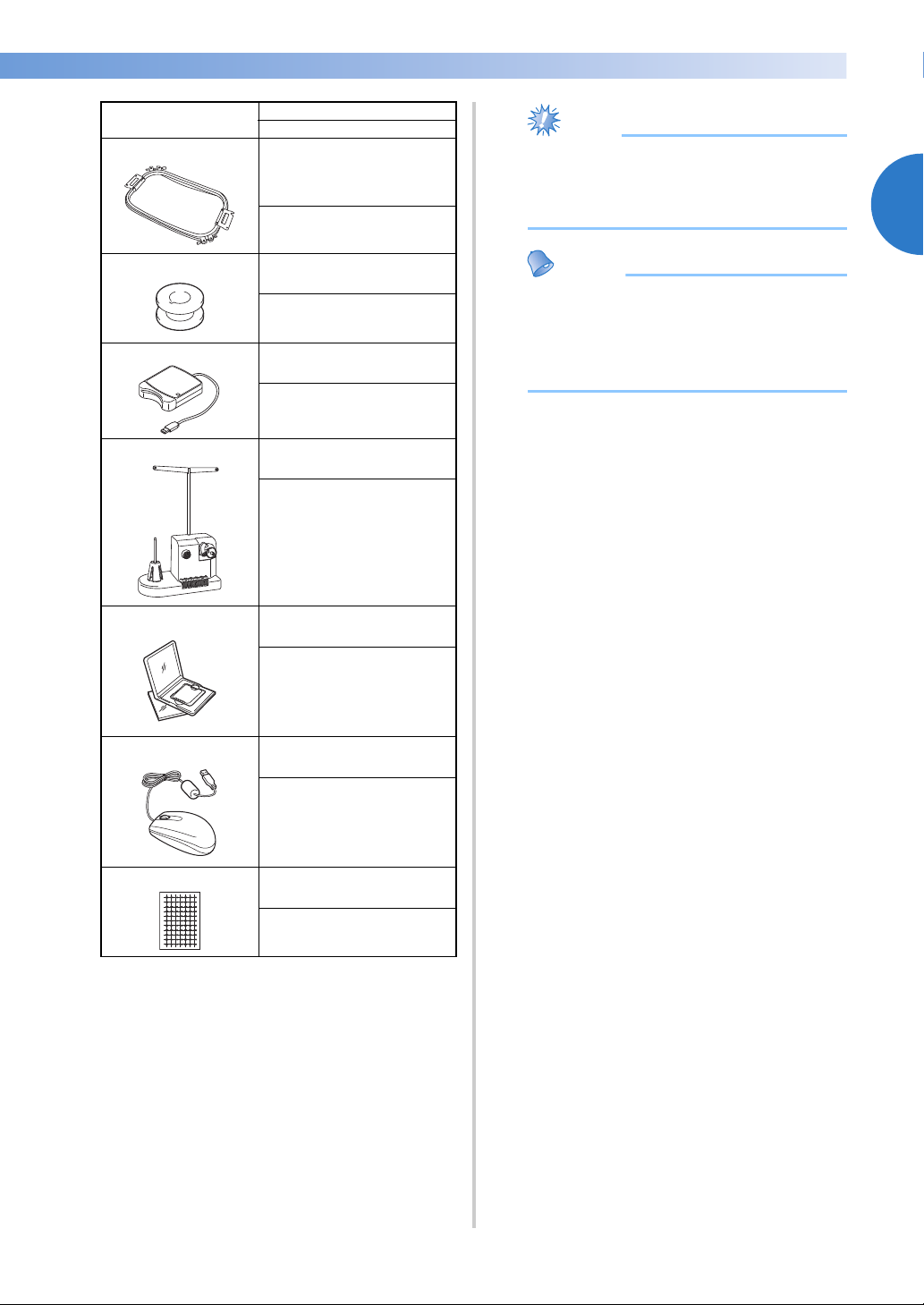
Part Code
18. Embroidery frame (extra-
19.
20.
large) 200 mm (H) × 300
mm (W) (7-7/8 inches (H)
× 11-3/4 inches (W))
PRH300 (USA/CANADA)
PRH300:
XC6284-052 (Other area)
Metal bobbin
100376-053
Embroidery card reader
SAECR1
● Visit your nearest Brother dealer for a
complete listing of optional accessories
and embroidery cards available for your
machine.
● Always use accessories recommended for
this machine.
● All specifications are correct at the time of
printing. Please be aware that some
specifications may change without notice.
1
21.
22.
23.
24.
Bobbin winder set
(Refer to page 277.)
PRBW1
Embroidery card
–
USB mouse
XE5334-101
Embroidery positioning
sticker sheets
SAEPS1 (USA/CANADA)
EPS1:
XE5096-001 (Other area)
Accessories 25
GETTING READY ——————————————————————————————————————————————————————————————————————
Setting Up the Machine
The procedures for setting up the machine are described below. If the machine is not set up correctly, it may
shake or produce loud noises and the embroidery will not be sewn correctly. An optional sewing stand is
also available.
Setup and transporting precautions
CAUTION
● The temperature of the operating environment should be between 5 °C (40 °F) and 40 °C
(104 °F). If the machine is operated in an environment that is either too cold or too hot,
the machine may malfunction.
● Do not use the machine in a location where it will be exposed to direct sunlight, otherwise
the machine may malfunction.
● Set up the machine with it’s four adjustable feet completely in contact with the desk or
table, so that the machine is level.
● Do not put anything under the embroidery machine that could block the ventilation slots
found on the rear underside of the machine, in order to avoid the possibility of the
machine’s motor overheating, resulting in a fire or in damage to the machine.
● The machine weight is approximately 42 kg (92 lb). The transporting or setting up of the
embroidery machine should be performed by two people.
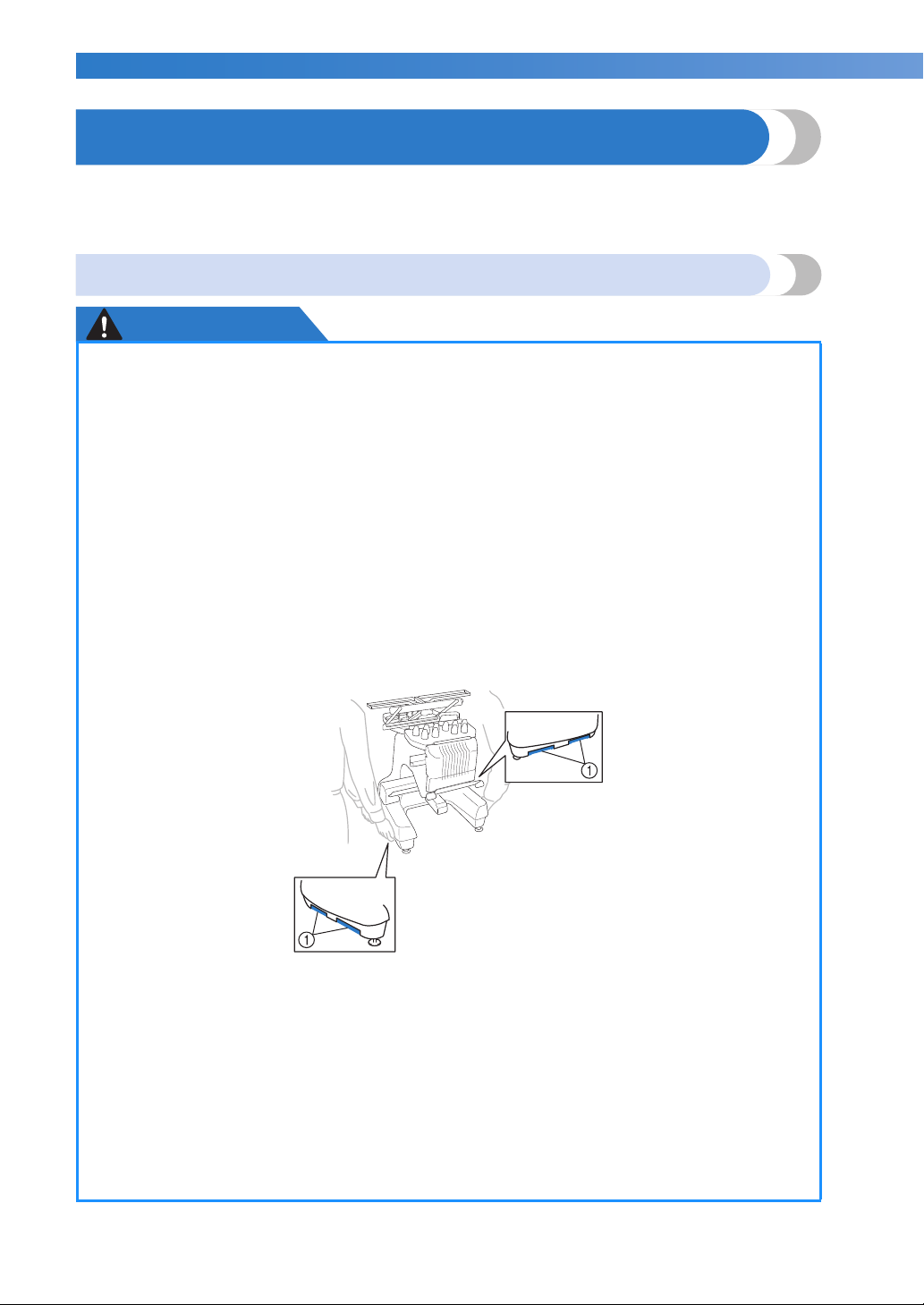
● When transporting the machine, be sure to have two people lift the machine from the
bottom at the indicated slots (1). Lifting the machine from any other area may damage
the machine or result in the machine falling, which could cause injuries.
● When lightning occurs, turn off the machine and unplug the power supply cord. Lightning
may cause the machine to malfunction.
● Do not plug in the power supply cord until setup of the machine is completed, otherwise
injuries may result if the start/stop button is accidentally pressed and the machine starts
sewing.
● When lubricating the machine, wear protective eyeglasses and gloves to prevent the oil or
grease from getting into your eyes or on your skin. Do not put the oil or grease into your
mouth. Keep the oil and grease out of the reach of children.
● While attaching or detaching an embroidery frame or other included accessory or while
maintaining the machine, be careful not to hit the machine with your body or any other
part of it.
26
———————————————————————————————————————————————————————————————————————————————————
Setup location
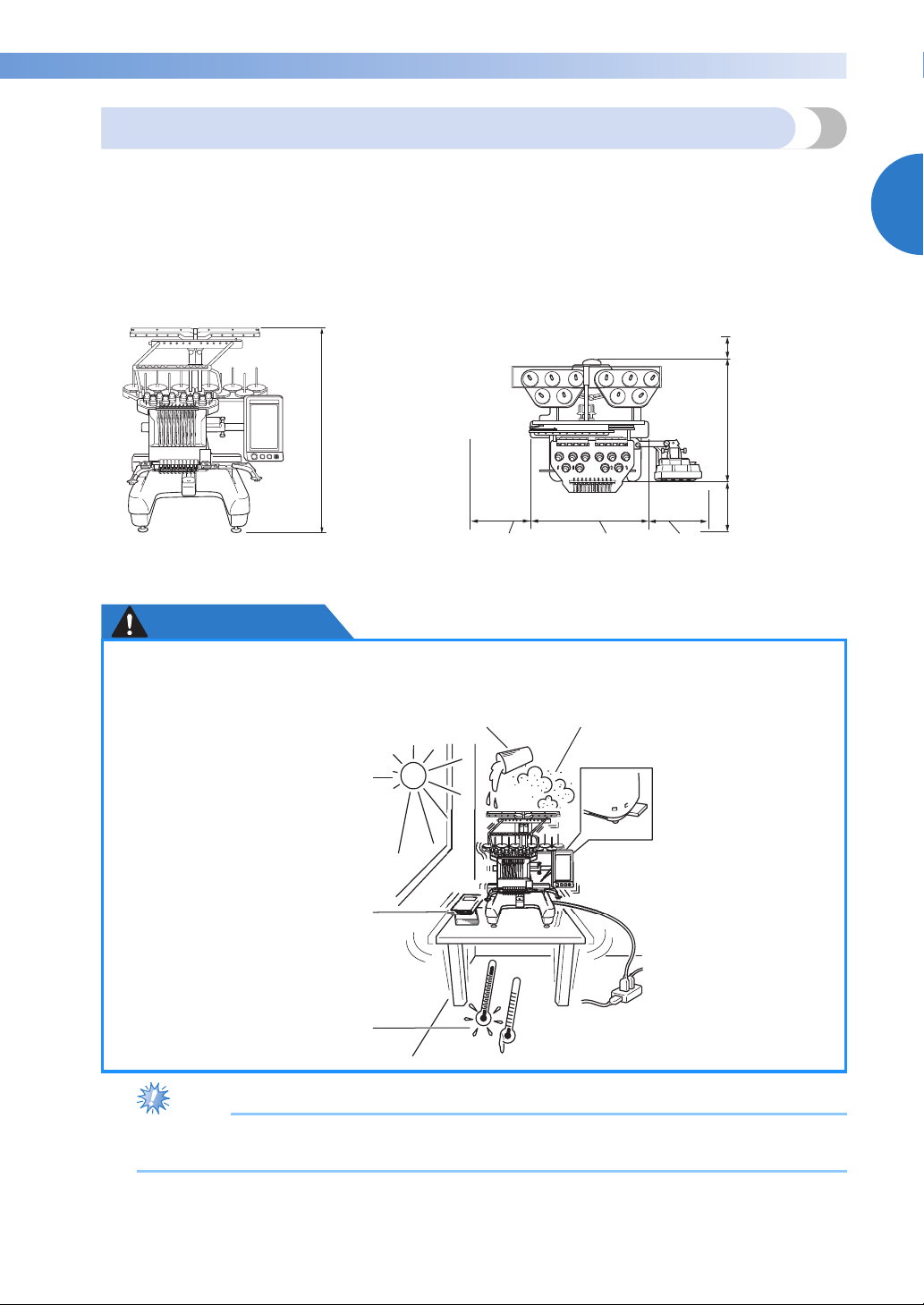
Set up the machine in a location that meets the following requirements.
• Position the machine a minimum of 50 mm (2 inches) away from the wall
• Allow sufficient space around the machine
• Place no objects within the moving range of the embroidery frame
• Set-up machine near an electrical outlet
• Use a level and stable surface, such as a desk or stand.
• Use a surface that can support the weight of the machine (about 42 kg (92 lb))
• Allow open space around the ventilation slots found on the rear underside of the machine
Minimum of
50 mm
(2 inches)
1
785 mm
(30-3/4 inches)
More than
210 mm
(8-1/64 inches)
560 mm
(22-13/32
inches)
220 mm
(8-21/32 inches)
589 mm
(23-3/16 inches)
More than
350 mm
(13-7/8 inches)
CAUTION
● In order to prevent malfunctions or damage, do not set up the machine in a location
exposed to the following conditions.
Liquids, such as water Extreme dust
Direct sunlight
Blocked ventilation slots
Insufficient space
An unstable surface
Objects within the moving range of
the embroidery frame
Connection to extension
cords or multiple
Extremely high or extremely low
temperatures. The operating
environment should be between
5 °C (40 °F) and 40 °C (104°F).
adapters
● For your safety: Since the machine weighs approximately 42kg (92 lb), do not set it up on an
unstable table or desk.
Setting Up the Machine 27
GETTING READY ——————————————————————————————————————————————————————————————————————
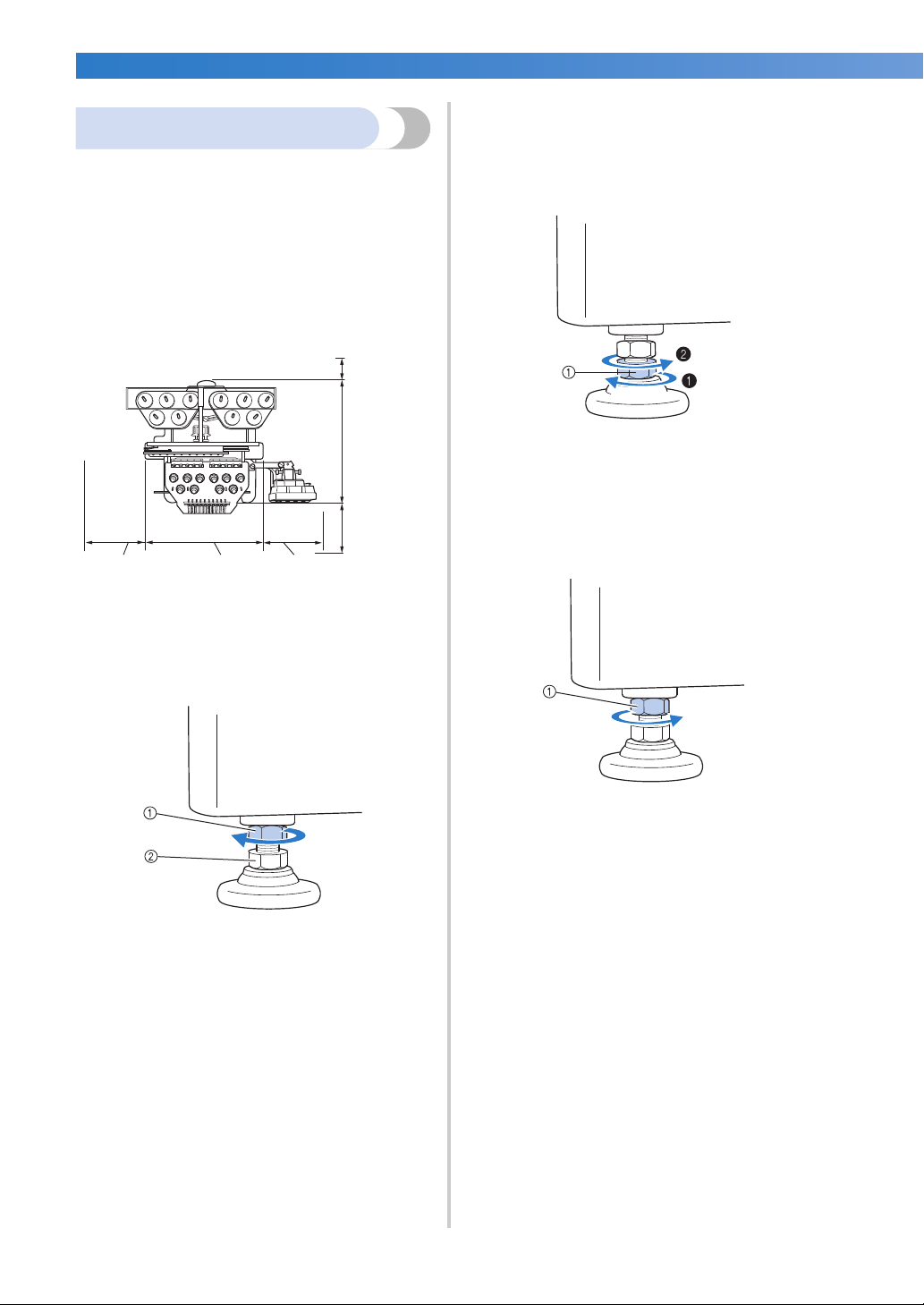
Use the included wrench to turn the
4
Setting up the machine
adjustable foot nut on the foot.
Turning the nut in direction 1 lengthens the
When setting up the machine, adjust the legs so
that the machine is steady.
leg; turning the nut in direction 2 shortens
the leg.
Make sure that all packing tape affixed to the
1
machine is peeled off and that all packing
material is removed.
Set up the machine while making sure that
2
there is sufficient space around it.
Minimum of
50 mm
(2 inches)
More than
210 mm
(8-1/64 inches)
Adjust the legs so that the machine is steady.
3
Use the included wrench to loosen the lock
560 mm
(22-13/32
inches)
220 mm
(8-21/32
inches)
nut on the leg that you wish to adjust.
1 Lock nut
2 Adjustable foot nut
X The foot can be turned.
589 mm
(23-3/16
inches)
More than
350 mm
(13-7/8
inches)
1 Adjustable foot nut
• Adjust all four legs so that they securely
contact the desk or table, and the machine
is level.
After adjusting the legs to the desired length,
5
use the included wrench to tighten the nuts.
1 Lock nut
Press down on each corner of the
6
embroidery machine to check that it is
stable.
If it is still unstable, perform steps
5 again to adjust the legs.
3 through
28
Loading…
Найди любой мануал:
Например: Sony VGN-FW460J/T
Вы можете бесплатно скачать Руководство по эксплуатации для Brother XL-6452.
Также вы сможете прочесть онлайн этот документ без скачивания.
Скачать Руководство по эксплуатации для Brother XL-6452
Тип файла
PDF
Размер
26.38 Mb
Кол-во страниц
318
Просмотров
4917
Читать онлайн Руководство по эксплуатации для Brother XL-6452 (Страница 1)

Другие Бытовая техника Brother XL-6452
Топ Brother Бытовая техника
Ранее вы смотрели
Эта страница полезна для вас? Поделитесь ссылкой:
Brother XL-6452 Instruction Manual
Brother XL-6452 Specification
The Brother XL-6452 Sewing Machine is a versatile and user-friendly device tailored for both novice and experienced sewers. It features a robust design that ensures durability while maintaining a lightweight profile for easy portability. The machine offers 25 built-in stitch functions, which include essential utility stitches, decorative stitches, and a range of stretch stitches suitable for various fabrics. It is equipped with an automatic needle threader, significantly reducing setup time and enhancing user convenience. The drop-in bobbin system simplifies threading and bobbin replacement, while the clear bobbin cover allows for easy monitoring of thread supply.
The adjustable stitch length and width provide customization options, allowing for precise control over stitch appearance and fabric handling. The free arm capability facilitates effortless sewing of cuffs, sleeves, and other cylindrical items. A reverse sewing lever is incorporated for reinforcing stitches, ensuring durability in completed projects. The Brother XL-6452 also includes a four-step buttonhole feature, enabling the creation of buttonholes with ease and precision. Its powerful motor ensures smooth operation across a range of fabric types, from lightweight materials to heavier fabrics, without compromising stitch quality.
Additional features include a built-in light to illuminate the sewing area, aiding visibility and accuracy during sewing tasks. The machine comes with several accessory feet, including a zipper foot, buttonhole foot, and button sewing foot, expanding its functionality further. The Brother XL-6452 ensures an intuitive user experience with its straightforward controls and comprehensive instruction manual, making it an excellent choice for various sewing projects. Its combination of functionality, ease of use, and reliability positions it as a valuable tool for sewing enthusiasts.
To thread the Brother XL-6452, first raise the presser foot and turn the handwheel to raise the needle to its highest position. Place a spool of thread on the spool pin, and pass the thread through the thread guide. Follow the threading path indicated on the machine, ensuring the thread is properly seated in the tension discs. Finally, thread the needle from front to back.
If your Brother XL-6452 is skipping stitches, check if the needle is bent or dull and replace it if necessary. Ensure the needle is inserted correctly and securely. Also, verify that the thread is threaded properly and that the tension is set correctly for the fabric you are using.
The tension dial on the Brother XL-6452 is located on the front of the machine. Turn the dial to a higher number to increase tension or to a lower number to decrease it. Test on a scrap piece of fabric to find the correct tension setting for your project.
Thread bunching, or «bird nesting,» can occur if the machine is not threaded correctly. Re-thread the machine, ensuring the thread is seated in the tension discs. Also, check the bobbin to ensure it is wound evenly and placed correctly in the bobbin case.
Regular maintenance for the Brother XL-6452 includes cleaning the lint and debris from the bobbin area and feed dogs. Oil the machine following the user manual’s instructions, if applicable. Always unplug the machine before performing maintenance.
To change the needle, turn off the machine and raise the needle to its highest position. Loosen the needle clamp screw and remove the old needle. Insert the new needle with the flat side facing the back, and tighten the clamp screw securely.
The Brother XL-6452 can handle medium to heavy fabrics. Use a heavier needle and adjust the presser foot pressure if needed. Test on a scrap piece first to ensure the settings are correct for your fabric.
Unusual noises may indicate a need for cleaning or that something is improperly set. Turn off the machine and check for any obstructions or tangled threads in the bobbin area. Ensure all parts are properly lubricated and re-thread the machine.
To wind the bobbin, place an empty bobbin on the bobbin winder spindle and a spool of thread on the spool pin. Pull the thread through the bobbin winding tension disc and wrap it around the bobbin a few times. Push the bobbin winder to the right, then hold the thread end and start the machine. Cut the thread once the bobbin is full.
If the Brother XL-6452 won’t start, ensure it is properly plugged in and that the power switch is on. Check if the foot pedal is connected correctly. If the machine still doesn’t work, inspect the power cord for damage and consider consulting a professional technician.
Brother XL-6452 Sewing Machine PDF User Guides and Manuals for Free Download: Found (3) Manuals for Brother XL-6452 Device Model (Manual , Operation & User’s Manual)
The Brother XL-6452 is a versatile sewing machine that caters to beginners and experienced sewists alike. With its user-friendly design and a multitude of features, this machine promises to elevate any sewing project, whether it’s garments, home decor, or craft projects. As a well-regarded model from Brother, it upholds the company’s reputation for quality and functionality.
One of the standout features of the Brother XL-6452 is its extensive selection of built-in stitches. Offering 35 stitch options, users can choose from utility, decorative, and stretch stitches, making this machine suitable for a variety of sewing tasks. The ease of selection enables users to quickly find the right stitch for their needs, whether they are sewing hems or adding embellishments. This flexibility expands the creative possibilities, allowing sewists to explore their artistry freely.
Additionally, the Brother XL-6452 comes equipped with a one-step buttonhole function. This feature simplifies the process of creating buttonholes, a task that can be daunting for many beginners. The machine automatically adjusts the size and shape of the buttonhole, ensuring precision and consistency. This attention to detail adds to the overall user experience, making it easier to achieve professional results.
Comfort and convenience are at the forefront of the Brother XL-6452’s design. Some notable features include:
- Automatic Needle Threader: Eliminating the frustration of threading the needle manually.
- Drop-in Bobbin System: Simplifies bobbin changes and reduces the chances of tangles.
- Adjustable Stitch Length and Width: Provides customization options for different sewing projects.
- Free Arm Capability: Makes it easy to sew cuffs and hem areas of garments with precision.
Another appealing aspect of the Brother XL-6452 is its compact and lightweight design. This makes it portable, allowing users to take it to sewing classes, craft fairs, or family gatherings. Its durability ensures that it can withstand regular use without significant wear and tear, a quality assurance that many sewists appreciate.
Another noteworthy feature is the manual and included instructional DVD that guide users through the machine’s capabilities. This is particularly beneficial for beginners who may feel intimidated by the complexities of sewing machines. The documentation is clear and easy to follow, which helps new users rapidly gain confidence in their sewing skills.
In terms of performance, the Brother XL-6452 shines by providing smooth and consistent stitching. It handles various fabric types gracefully, from lightweight cotton to heavier denim, making it an all-around reliable choice. The machine operates quietly, ensuring that the sewing experience is not disrupted by excessive noise.
Overall, the Brother XL-6452 offers exceptional value for its price point. With its blend of features, ease of use, and solid performance, it’s a fantastic option for anyone looking to dive into the world of sewing. Whether you’re a newbie or a seasoned crafter, this machine is designed to adapt to your evolving needs.
To sum up, the Brother XL-6452 is an impressive sewing machine that ticks all the right boxes for a wide range of users. Its functionality, user-friendly features, and reliable performance make it a worthy investment for anyone wanting to enhance their sewing skills.