
Brother ArtCity 190
Operation Manual
Product Code: 888-X64/X74/X84/X67/X77/X87
Sewing Machine
English
888—X64/X74/X84/X67/X77/X87
Printed in Vietnam
Be sure to read this document before using the machine.
We recommend that you keep this document nearby for future reference.
Please visit us at http://support.brother.com where you can get product
support and answers to frequently asked questions (FAQs).
Black
View the manual for the Brother ArtCity 190 here, for free. This manual comes under the category sewing machines and has been rated by 1 people with an average of a 9.7.
This manual is available in the following languages: English. Do you have a question about the Brother ArtCity 190 or do you need help?
Ask your question here
Index
- IMPORTANT SAFETY INSTRUCTIONS
- CONTENTS
- 1 KNOWING YOUR SEWING MACHINE
- 2 SEWING BASICS
- 3 BUILT-IN STITCHES
- 4 SEWING BUTTONHOLES
- 5 USING ATTACHMENTS AND APPLICATIONS
- 6 APPENDIX
- INDEX
Product Images (2)


Brother ArtCity 190 specifications
Below you will find the product specifications and the manual specifications of the Brother ArtCity 190.
The Brother ArtCity 190 is a sewing machine designed for domestic use. It is manufactured by Brother, a well-known and reputable brand in the sewing industry. The machine is designed to provide users with a range of features and functions that make sewing tasks more efficient and convenient.
The Brother ArtCity 190 offers a variety of stitches, allowing users to create different designs and patterns. It has a built-in needle threader, making it easy to thread the needle quickly and accurately. The machine also has a drop-in bobbin system, which simplifies the process of changing the bobbin.
With its adjustable stitch width and length, the Brother ArtCity 190 gives users more control over their sewing projects. It has a reverse stitch function, allowing users to reinforce seams easily. The machine also has a free arm, which is useful when working on sleeves, cuffs, and other cylindrical items.
The Brother ArtCity 190 comes with a range of accessories, including a variety of presser feet, bobbins, and needles. It has a hardcover case for storage and transportation, ensuring the machine is protected when not in use.
While specific specifications of the Brother ArtCity 190 may vary, it is important to note that Brother is known for producing reliable and durable sewing machines. The machine is designed to be user-friendly, making it suitable for both beginners and more experienced sewers.
Overall, the Brother ArtCity 190 is a sewing machine that offers a range of features and functions to enhance the sewing experience. Its quality construction and reputable brand make it a popular choice among sewing enthusiasts.
General
Frequently Asked Questions
Can’t find the answer to your question in the manual? You may find the answer to your question in the FAQs about the Brother ArtCity 190 below.
What size needle should I use?
Which size of needle you can best use depends on the thickness of the fabric you use. With a thick fabric you should use a thick needle. The packaging of your needle states for which substances your needle is suitable.
Why does the needle break while sewing?
There can be several causes for needle breakage:
— Not using the right needle for the right fabric
— The needle is set too low
— The fabric is not properly guided
— The bobbin case is not inserted correctly
How long does a sewing needle last?
Generally, a sewing needle lasts about 7 to 9 hours.
Is the manual of the Brother ArtCity 190 available in English?
Yes, the manual of the Brother ArtCity 190 is available in English .
Is your question not listed? Ask your question here
Перейти к контенту
Швейные машинки Brother
- Размер инструкции: 1.76 Мб
- Формат файла: pdf
Если вы потеряли инструкцию от швейной машинки Brother ArtCity 190, можете скачать файл для просмотра на компьютере или печати.
Инструкция для швейной машинки Brother ArtCity 190 на русском языке. В руководстве описаны возможности и полезные функции, а также правила эксплуатации. Перед использованием внимательно ознакомьтесь с инструкцией.
Чтобы не читать всю инструкцию вы можете выполнить поиск по содержимому внутри инструкции и быстро найти необходимую информацию. Рекомендации по использованию помогут увеличить срок службы швейной машинки Brother ArtCity 190. Если у вас появилась проблема, то найдите раздел с описанием неисправностей и способами их решения. В нем указаны типичные поломки и способы их решения.
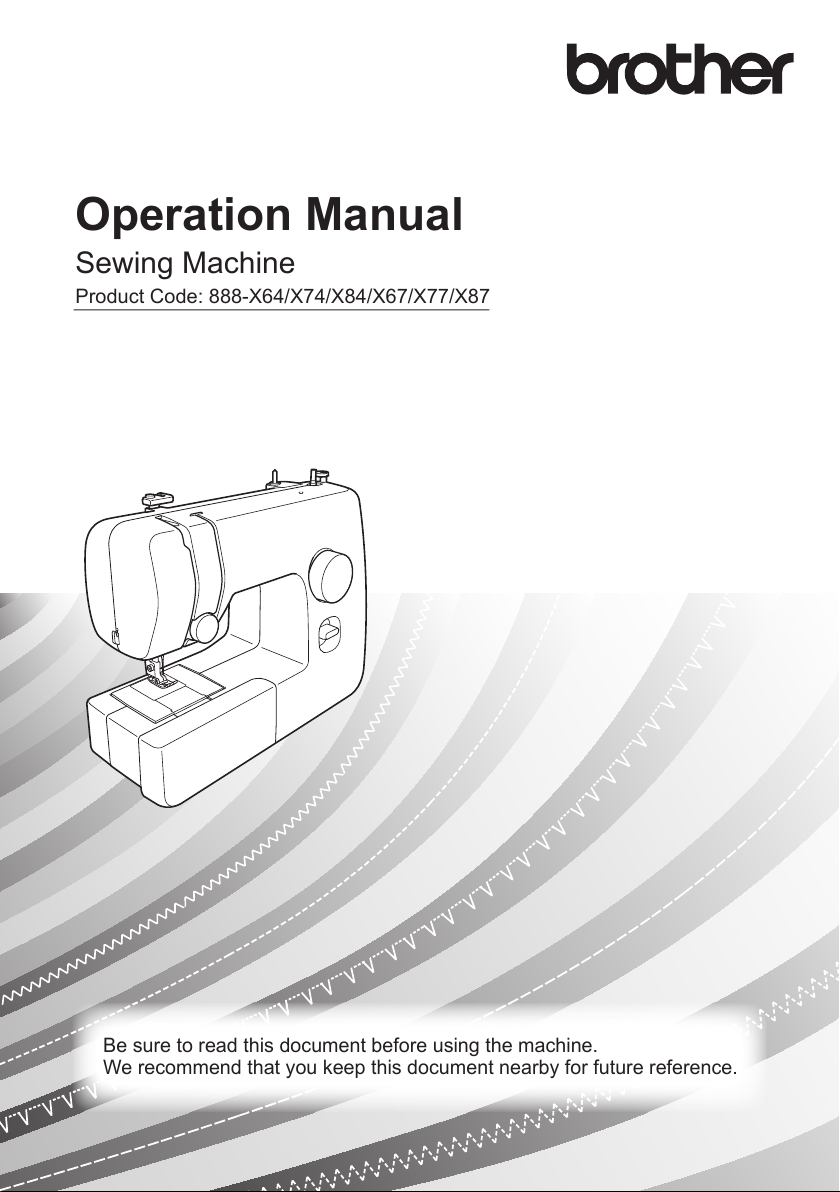
Operation Manual
Product Code: 888-X64/X74/X84/X67/X77/X87
Sewing Machine
Be sure to read this document before using the machine.
We recommend that you keep this document nearby for future reference.
———————————————————————————————————————————————————————————————————————————————————————————————————————————————————————————————————————————————————————————————————————————————————————————————————————————————————————————————————————————————————————————————————————
IMPORTANT SAFETY
INSTRUCTIONS
Please read these safety instructions
before attempting to use the machine.
DANGER
— To reduce the risk of electric shock:
1 Always unplug the machine from
the electrical outlet immediately after
using, when cleaning, when making
any user servicing adjustments
mentioned in this manual, or if you are
leaving the machine unattended.
WARNING
— To reduce the risk of burns, fire,
electric shock, or injury to persons.
2 Always unplug the machine from
the electrical outlet when making any
adjustments mentioned in the
instruction manual:
• To unplug the machine, switch the
machine to the symbol “O” position
to turn it off, then grasp the plug and
pull it out of the electrical outlet. Do
not pull on the cord.
• Plug the machine directly into the
electrical outlet. Do not use an
extension cord.
• Always unplug your machine if the
power is cut.
3 Electrical Hazards:
• This machine should be connected to
an AC power source within the range
indicated on the rating label. Do not
connect it to a DC power source or
inverter. If you are not sure what kind
of power source you have, contact a
qualified electrician.
• This machine is approved for use in
the country of purchase only.
4 Never operate this machine if it has
a damaged cord or plug, if it is not
working properly, if it has been
dropped or damaged, or water is spilled
on the unit. Return the machine to the
nearest authorized Brother dealer or
service center for examination, repair,
electrical or mechanical adjustment.
• While the machine is stored or in use
if you notice anything unusual, such
as an odor, heat, discoloration or
deformation, stop using the machine
and immediately unplug the power
cord.
• When transporting the machine, be
sure to carry it by its handle. Lifting
the machine by any other part may
damage the machine or result in the
machine falling, which could cause
injuries.
• When lifting the machine, be careful
not to make any sudden or careless
movements, otherwise you may
injure your back or knees.
5 Always keep your work area clear:
• Never operate the machine with any
air openings blocked. Keep
ventilation openings of the machine
and foot control free from the build
up of lint, dust, and loose cloth.
• Do not store objects on the foot
controller.
• Do not use extension cords. Plug the
machine directly into the electrical
outlet.
• Never drop or insert any object into
any opening.
• Do not operate where aerosol (spray)
products are being used or where
oxygen is being administered.
1

——————————————————————————————————————————————————————————————————————————————————————————————————————————————————————————————————————————————————————————————————————————————————————————————————————————————————————————————————————————————————————————————————————————————
• Do not use the machine near a heat
source, such as a stove or iron;
otherwise, the machine, power cord
or garment being sewn may ignite,
resulting in fire or an electric shock.
• Do not place this machine on an
unstable surface, such as an unsteady
or slanted table, otherwise the
machine may fall, resulting in
injuries.
6 Special care is required when
sewing:
• Always pay close attention to the
needle. Do not use bent or damaged
needles.
• Keep fingers away from all moving
parts. Special care is required around
the machine needle.
• Do not turn on the machine while
pressing down the foot controller.
The machine may start unexpectedly
and cause personal injury or damage
to the machine.
• Switch the machine to the symbol
“O” position to turn it off when
making any adjustments in the needle
area.
• Do not use a damaged or incorrect
needle plate, as it could cause the
needle to break.
• Do not push or pull the fabric when
sewing, and follow careful instruction
when freehand stitching so that you
do not deflect the needle and cause it
to break.
7 This machine is not a toy:
• Your close attention is necessary
when the machine is used by or near
children.
• The plastic bag that this machine was
supplied in should be kept out of the
reach of children or disposed of.
Never allow children to play with the
bag due to the danger of suffocation.
• Do not use outdoors.
8 For a longer service life:
• When storing this machine, avoid
direct sunlight and high humidity
locations. Do not use or store the
machine near a space heater, iron,
halogen lamp, or other hot objects.
• Use only neutral soaps or detergents
to clean the case. Benzene, thinner,
and scouring powders can damage
the case and machine, and should
never be used.
• Always consult the operation manual
when replacing or installing any
assemblies, the presser feet, needle,
or other parts to assure correct
installation.
9 For repair or adjustment:
• If the light unit (light-emitting diode)
is damaged, it must be replaced by
authorized Brother Service Center.
• In the event a malfunction occurs or
adjustment is required, first follow the
troubleshooting table in the back of
the operation manual to inspect and
adjust the machine yourself. If the
problem persists, please consult your
local authorized Brother Service
Center.
Use this machine only for its intended
use as described in this manual.
Use accessories recommended by the
manufacturer as contained in this manual.
The contents of this manual and
specifications of this product are
subject to change without notice.
For additional product information,
visit our web site at www.brother.com
2

———————————————————————————————————————————————————————————————————————————————————————————————————————————————————————————————————————————————————————————————————————————————————————————————————————————————————————————————————————————————————————————————————————
SAVE THESE
INSTRUCTIONS
This machine is intended
for household use.
FOR USERS IN COUNTRIES
EXCEPT EUROPEAN
COUNTRIES
This appliance is not intended
for use by persons (including
children) with reduced physical,
sensory or mental capabilities,
or lack of experience and
knowledge, unless they have
been given supervision or
instruction concerning use of
the appliance by a person
responsible for their safety.
Children should be supervised
to ensure that they do not play
with the appliance.
FOR USERS IN EUROPEAN
COUNTRIES
This appliance can be used by
children aged from 8 years and
above and persons with reduced
physical, sensory or mental
capabilities or lack of
experience and knowledge if
they have been given
supervision or instruction
concerning use of the appliance
in a safe way and understand
the hazards involved. Children
shall not play with the
appliance. Cleaning and user
maintenance shall not be made
by children without supervision.
FOR USERS IN THE UK,
EIRE, MALTA AND
CYPRUS ONLY
IMPORTANT
• In the event of replacing the plug
fuse, use a fuse approved by ASTA to
BS 1362, i.e. carrying the mark,
rating as marked on plug.
• Always replace the fuse cover. Never
use plugs with the fuse cover omitted.
• If the available electrical outlet is not
suitable for the plug supplied with this
equipment, you should contact your
authorized Brother Service Center to
obtain the correct lead.
3

——————————————————————————————————————————————————————————————————————————————————————————————————————————————————————————————————————————————————————————————————————————————————————————————————————————————————————————————————————————————————————————————————————————————
CONTENTS
IMPORTANT SAFETY INSTRUCTIONS ………. 1
1. KNOWING YOUR SEWING
MACHINE …………………………….5
ACCESSORIES ………………………………………… 5
Optional accessories …………………………………… 5
THE MAIN PARTS …………………………………… 6
Flat bed attachment …………………………………….. 6
USING YOUR SEWING MACHINE ……………. 7
Connecting plugs ………………………………………… 7
Main power and sewing light switch ……………… 8
Foot controller ……………………………………………. 8
Checking the needle ……………………………………. 8
Replacing the needle …………………………………… 8
Changing the presser foot …………………………… 10
THE CONTROLS …………………………………… 11
Pattern selection dial …………………………………. 11
Patterns and stitch names …………………………… 11
Reverse sewing lever …………………………………. 12
THREADING THE MACHINE ………………….. 13
Winding the bobbin …………………………………..13
Lower threading ……………………………………….. 15
Lower threading (for models equipped with a
quick-set bobbin) ………………………………………. 16
Upper threading ……………………………………….. 17
Using the needle threader (for models equipped
with a needle threader) ………………………………. 19
Drawing up the lower thread ………………………. 21
FABRIC, THREAD, AND NEEDLE
COMBINATIONS ………………………………….. 22
2. SEWING BASICS ………………….. 23
Please read before sewing ………………………….. 23
Starting sewing …………………………………………. 23
Trial sewing ……………………………………………… 24
Changing the sewing direction ……………………. 24
Sewing thick fabrics …………………………………… 24
Sewing thin fabrics ……………………………………. 25
Sewing stretch fabrics ………………………………… 25
Stitching cylindrical pieces …………………………. 25
Sewing with a twin needle (Option) ……………… 25
Thread tension ………………………………………….. 27
3. BUILT-IN STITCHES …………….. 29
Straight stitching …………………………………………29
Zigzag stitching ………………………………………….29
Blind hem stitching …………………………………….30
Overedge stitching ……………………………………..31
Elastic stitching ………………………………………….31
Double action stitching ……………………………….32
4. SEWING BUTTONHOLES …….. 33
Making a buttonhole …………………………………..33
Adjusting buttonholes …………………………………34
5. USING ATTACHMENTS AND
APPLICATIONS ………………….. 35
Zipper insertion ………………………………………….35
Gathering ………………………………………………….36
Appliqués ………………………………………………….36
USING OPTIONAL ACCESSORIES …………… 37
Sewing buttons …………………………………………..37
Darning …………………………………………………….38
Using the blind stitch foot ……………………………39
6. APPENDIX ………………………….. 40
MAINTENANCE …………………………………….. 40
Restrictions on oiling …………………………………..40
Precautions on storing the machine ……………….40
Cleaning …………………………………………………..40
TROUBLESHOOTING ……………………………. 42
INDEX …………………………………………………. 45
4
KNOWING YOUR SEWING MACHINE —————————————————————————————————————————————————————————————————————————————————————————————————————————————————————————————————————————————————————————————————————————————————
1 KNOWING YOUR SEWING MACHINE
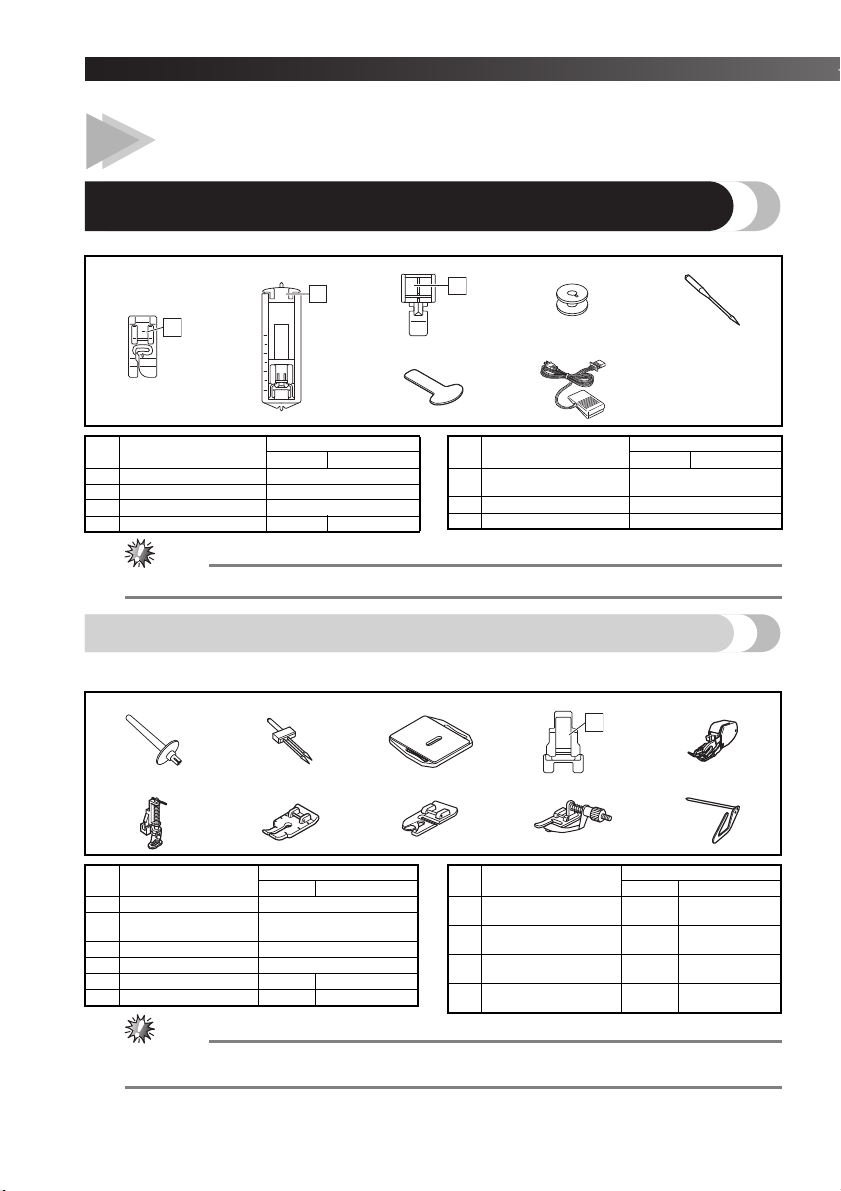
ACCESSORIES
We have designed these accessories to help you easily perform most sewing tasks.
1. 2. 3. 4. 5.
I
A
A
6. 7.
I
No. Part Name
1
Zigzag foot “J” (on machine)
2 Buttonhole foot “A” X59369-321
3 Zipper foot “I” XE9369-001
4
Bobbin (One is on machine)
Part Code
Americas Others
XC4901-121
SA156
SFB: XA5539-151
No. Part Name
Needle set
5
(90/14 needle)
6 Screwdriver XF3557-001
7 Foot controller See page 6
Part Code
Americas Others
3-piece set: XE5328-001
2-piece set: XE7064-001
● The included accessories vary depending on the machine model.
Optional accessories
The following are available as optional accessories to be purchased separately. Depending on the model you
purchased, the following accessory may be included with your machine.
1. 2. 3. 4. 5.
6. 7. 8. 9. 10.
No. Part Name
1 Extra spool pin XG3488-001
Twin needle
2
(2.0/75 needle)
3 Darning Plate XC6063-021
4 Button sewing foot “M” XE2137-001
5 Walking Foot SA107
6 Quilting Foot SA129
Americas
Part Code
X57521-021
F034N: XC2165-002
F005N: XC1948-052
Others
No. Part Name
7 1/4-inch Quilting Foot SA125
8 Narrow Hemmer Foot SA127
9 Blind Stitch Foot SA134
10 Quilting guide SA132
Americas
Part Code
Others
F001N:
XC1944-052
F003N:
XC1945-052
F018N:
XC1976-052
F016N:
XC2215-052
● The quilting guide can be inserted into the holes at the back of the walking foot or the black plastic hole
at the top of sewing ankle.
5
——————————————————————————————————————————————————————————————————————————————————————————————————————————————————————————————————————————————————————————————————————————————————————————————————————————————————————————————————————————————————————————————————————————————
1
2
3
4
7
8
9
0
A
6
C
B
H
G
K
D
5
I
E
F
J
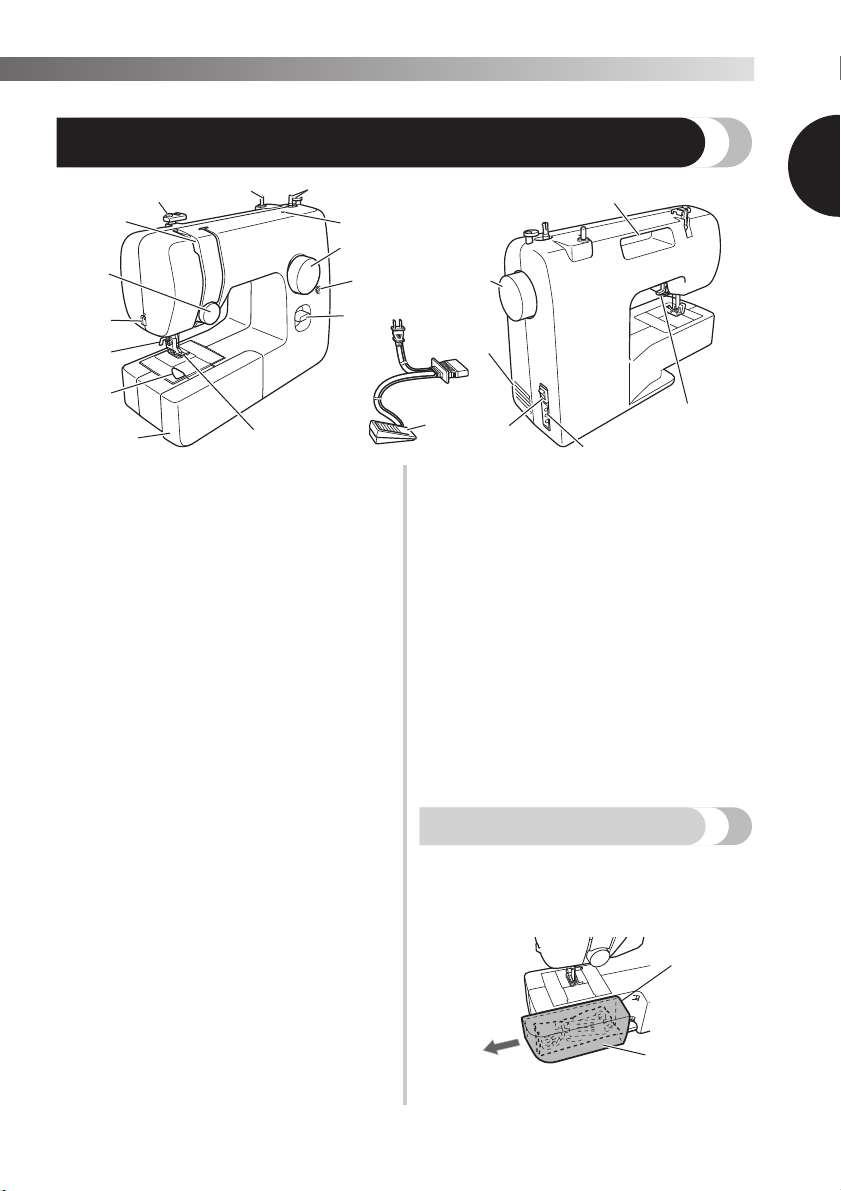
THE MAIN PARTS
1
1 Bobbin winder (Page 13)
This winds the thread onto the bobbin for use as the
lower thread.
2 Spool pin (Page 13, 17)
This holds the spool of thread.
3 Thread guide (Page 13, 17)
This is used when winding the thread onto the
bobbin and then threading the machine.
4 Thread take-up lever (Page 18)
5 Hole for extra spool pin (Page 26)
This holds a second spool of thread for sewing with
the twin needle.
6 Upper tension-control dial (Page 27)
This controls the tension of the upper thread.
7 Thread cutter (Page 24)
Pass the threads through the thread cutter to cut them.
8 Needle threader (Page 19)
(This is only available on certain models.)
9 Quick-set bobbin (Page 16, 21)
(This is only available on certain models.)
0 Flat bed attachment with accessory compartment
(Page 6)
A Presser foot (Page 10)
B Reverse sewing lever (Page 12)
Push this lever to stitch in the reverse direction.
C Buttonhole fine-adjustment screw (Page 34)
D Pattern selection dial (Page 11)
Rotate the dial in either direction to choose the
stitch you want.
E Handwheel
Used to manually raise and lower the needle.
F Air vent
The air vent allows the air surrounding the motor to
circulate.
Do not cover the air vent while the machine is
being used.
G Main power and sewing light switch (Page 
You can turn the main power and sewing light
switch on and off.
H Foot controller jack / socket (Page 7)
Plug in the foot controller plug and connect the
machine to the power supply.
I Presser foot lever (Page 17)
Used to raise and lower the presser foot.
J Handle
Carry the machine by its handle when transporting.
K Foot controller (Page
You can use this to control the sewing speed, and to
start and stop sewing.
Foot Controller:
Model KD-1902 for 110-120V area
KD-1902 for 110-127V area (Brazil only)
Model KD-2902 for 220-240V area
The foot controller part code differs depending on the
country or region. Contact your Brother dealer or the
nearest authorized Brother Service Center.
Flat bed attachment
The accessories can be stored in a compartment inside
the flat bed attachment.
Slide the flat bed attachment to the left to
1
open it.
1 Flat bed attachment
2 Storage compartment
2
1
6
KNOWING YOUR SEWING MACHINE —————————————————————————————————————————————————————————————————————————————————————————————————————————————————————————————————————————————————————————————————————————————————
USING YOUR SEWING MACHINE
WARNING
● Use only regular household electricity for the power source. Using other power sources may
result in fire, electric shock, or damage to the machine.
● Make sure that the plugs on the power cord are firmly inserted into the electrical outlet and
the power supply jack on the machine. Otherwise, a fire or electric shock may result.
● Do not insert the plug on the power cord into an electrical outlet that is in poor condition.
● Turn off the main power and remove the plug in the following circumstances:
• When you are away from the machine
• After using the machine
• When the power fails during use
• When the machine does not operate correctly due to a bad connection or a disconnection
• During electrical storms
CAUTION
● Use only the power cord included with this machine.
● Do not use extension cords or multi-plug adapters with many other appliances plugged in to
them. Fire or electric shock may result.
● Do not touch the plug with wet hands. Electric shock may result.
●
When unplugging the machine, always turn off the main power first. Always grasp the plug to
remove it from the outlet. Pulling on the cord may damage the cord, or lead to fire or electric shock.
●
Do not allow the power cord to be cut, damaged, modified, forcefully bent, pulled, twisted, or
bundled. Do not place heavy objects on the cord. Do not subject the cord to heat. These
things may damage the cord and cause fire or electric shock. If the cord or plug is damaged,
take the machine to your authorized Brother Service Center for repairs before continuing use.
● Unplug the power cord if the machine is not to be used for a long period of time. Otherwise
a fire may result.
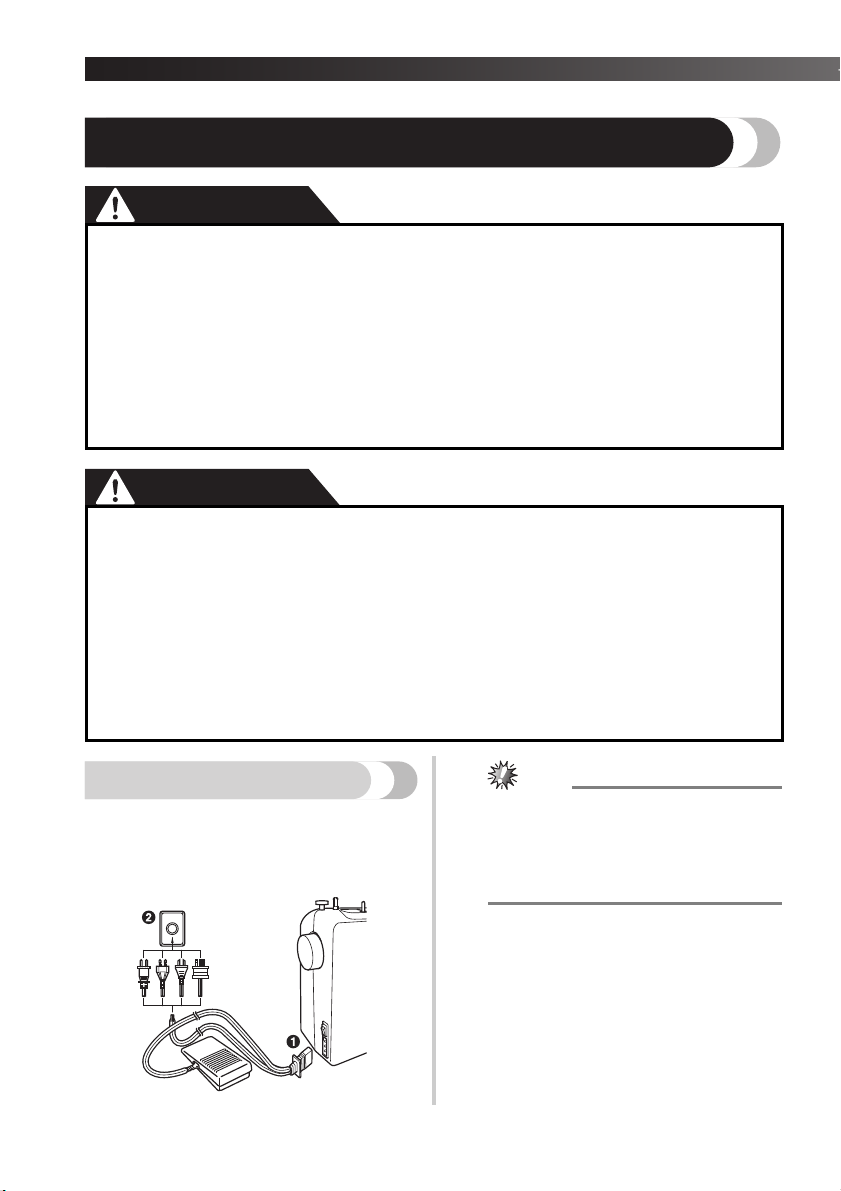
Connecting plugs
Connect the foot controller plug to the
1
machine.
Connect the power supply plug to a wall
2
outlet.
7
● If a power outage occurs while the sewing
machine is being operated, turn off the main
power and unplug the power supply cord.
When restarting the sewing machine, follow
the necessary procedure to correctly operate
the machine.
——————————————————————————————————————————————————————————————————————————————————————————————————————————————————————————————————————————————————————————————————————————————————————————————————————————————————————————————————————————————————————————————————————————————
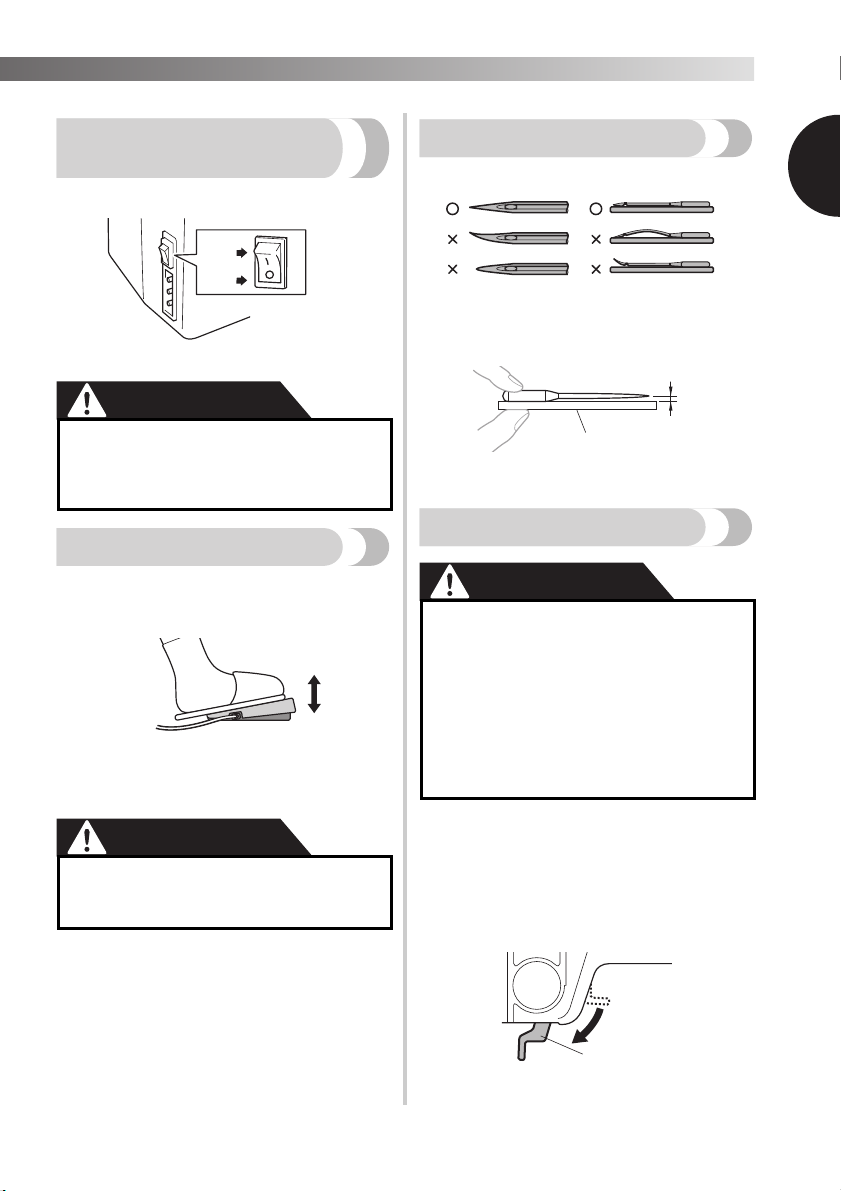
Main power and sewing
light switch
This switch turns the main power and sewing light on or
off.
1 Turn on (toward the ‘I’ mark)
2 Turn off (toward the ‘O’ mark)
CAUTION
●
Do not turn on the machine while pressing
down the foot controller. The machine
may start unexpectedly and cause
personal injury or damage to the machine.
Foot controller
When you press the foot controller down lightly, the
machine will run at a low speed. When you press harder,
the machine’s speed will increase. When you take your
foot off the foot controller, the machine will stop.
1 Slower
2 Faster
You should make sure that nothing is placed on the foot
controller when the machine is not in use.
● Do not allow pieces of cloth and dust to
build up on the foot controller. Doing so
could cause a fire or an electric shock.
Checking the needle
The sewing needle must always be straight and sharp
for smooth sewing.
■ Checking the needle correctly
Put the flat side of the needle on a flat surface.
Check the needle from the top and the sides.
Dispose of any bent needles safely.
1 Parallel space
2 Level surface (bobbin cover, glass, etc.)
Replacing the needle
● Always turn off the machine before you
change the needle. Otherwise, injuries
may occur if the foot controller is
accidentally pressed and the machine
starts sewing.
● Only use sewing machine needles for
home use. Other needles may bend or
break and cause injury.
● Never sew with a bent needle. A bent
needle will easily break and cause injury.
Turn off the machine.
1
Raise the needle by turning the
2
handwheel toward you
(counterclockwise) so that the mark on
the wheel points up.
Lower the presser foot lever.
3
1
1 Presser foot lever
1
8
KNOWING YOUR SEWING MACHINE —————————————————————————————————————————————————————————————————————————————————————————————————————————————————————————————————————————————————————————————————————————————————
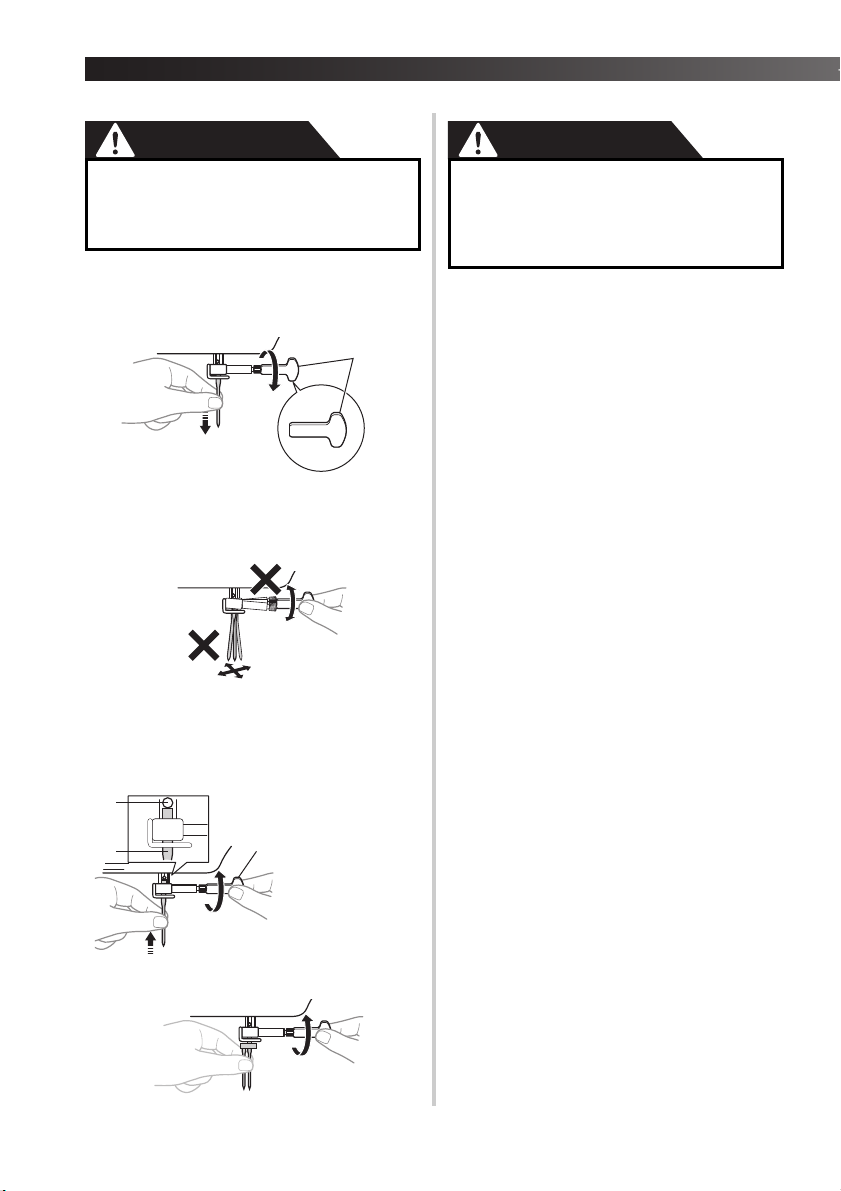
● Before replacing the needle, place fabric
or paper under the presser foot to
prevent the needle from falling into the
hole in the needle plate.
Hold the needle with your left hand, and
4
then use a screwdriver to turn the needle
clamp screw counterclockwise to remove
the needle.
1 Use a screwdriver
• Do not use excessive force when loosening
or tightening the needle clamp screw,
otherwise certain parts of the sewing
machine may be damaged.
With the flat side of the needle toward the
5
back of the machine, insert the needle
until it touches the needle stopper. Next,
tighten the needle clamp using a
screwdriver.
● Make sure you insert the needle until it
touches the stopper, and securely tighten
the needle clamp screw with a
screwdriver, otherwise the needle may
break or the machine may be damaged.
Install the twin needle in the same way.
9
1 Use a screwdriver
2 Needle stopper
3 Needle
——————————————————————————————————————————————————————————————————————————————————————————————————————————————————————————————————————————————————————————————————————————————————————————————————————————————————————————————————————————————————————————————————————————————
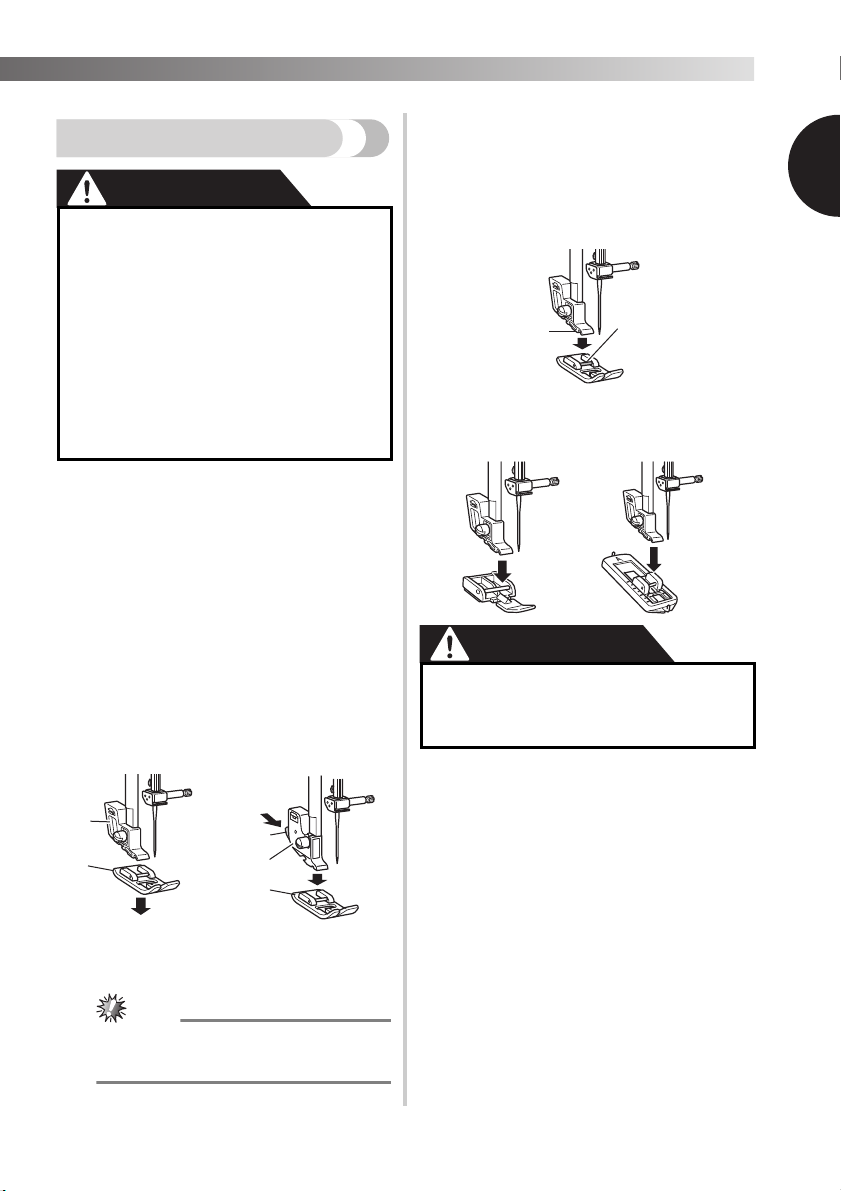
Put a different presser foot on the needle
4
Changing the presser foot
CAUTION
●
Always turn off the machine before you
change the presser foot. If you leave the
power on and step on the controller, the
machine will start and you may be injured.
● Always use the correct presser foot for
the stitch pattern you have chosen. If
you use the wrong presser foot, the
needle may strike the presser foot and
bend or break, and may cause injury.
● Only use presser feet that have been
designed to be used with this machine.
Using any other presser foot may cause
accident or injury.
You will have to change the presser foot depending on
what you want to sew and how.
Turn off the machine.
1
Raise the presser foot lever.
Raise the needle by turning the
2
handwheel toward you
(counterclockwise) so that the mark on
the wheel points up.
plate so that the bar on the presser foot is
in line with the slot on the shank.
Lower the presser foot lever and fix the
5
presser foot onto the shank. If the presser
foot is in the correct place, the bar should
snap in.
1 Shank
2 Bar
■ Presser foot installation orientation
1
3
Remove the presser
foot by pulling it
vertically downward.
1 Presser foot holder
2 Presser foot
Press the black
|
button at the back of
|
the presser foot
|
holder to release the
|
presser foot.
|
|
|
|
or
1
|
|
2
|
3
|
|
|
1 Black button
|
2 Presser foot holder
|
3 Presser foot
● Depending on the type of presser foot
holder, the method of releasing the presser
foot will vary.
● If the presser foot is not installed with
the correct orientation, the needle may
strike the presser foot, which may bend
or break the needle and cause injury.
10
KNOWING YOUR SEWING MACHINE —————————————————————————————————————————————————————————————————————————————————————————————————————————————————————————————————————————————————————————————————————————————————
THE CONTROLS
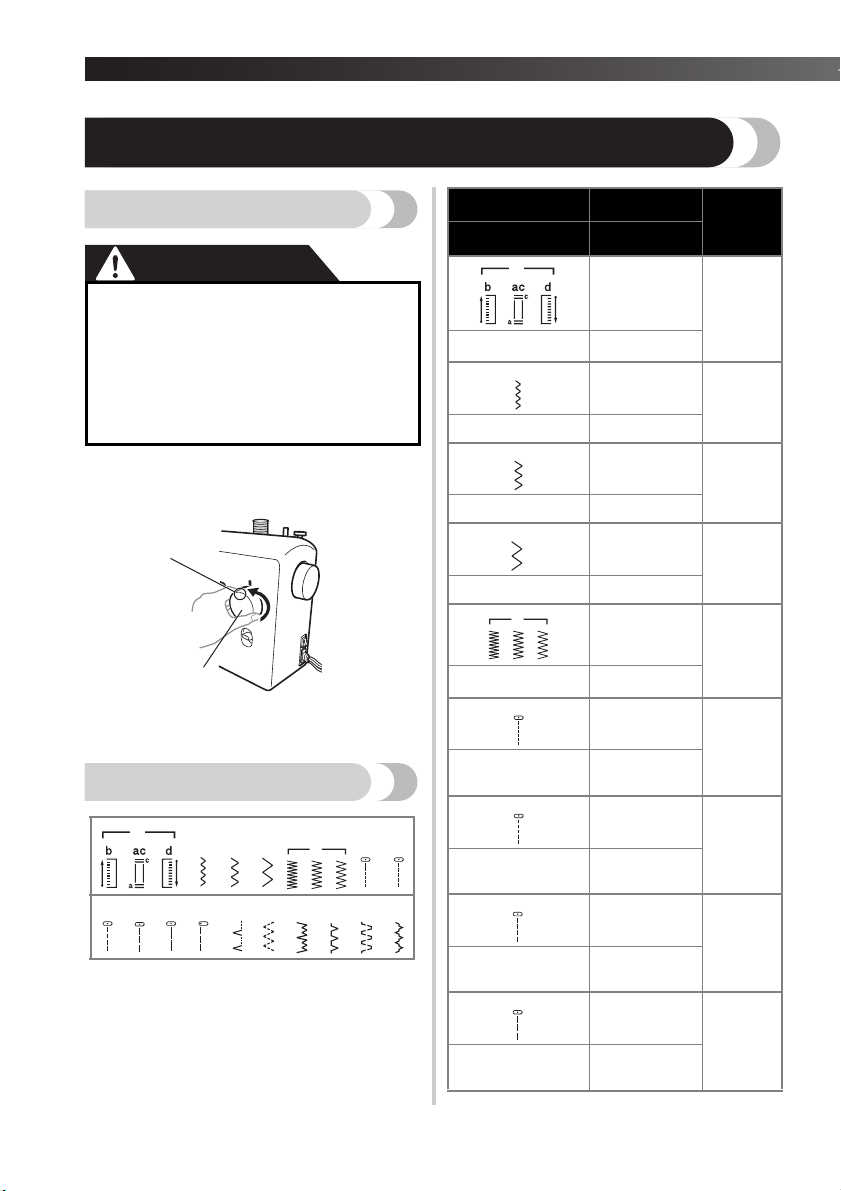
Pattern selection dial
CAUTION
When you use the pattern selection dial
●
to choose a pattern, raise the needle by
turning the handwheel toward you
(counterclockwise) so that the mark on
the wheel points up. If the needle is in
the down position when you turn the
pattern selection dial, the needle, presser
foot or fabric may be damaged.
To choose a stitch, simply turn the pattern selection dial
in either direction.
1 Pattern selection dial
2 Chosen pattern number
Patterns and stitch names
Pattern
Stitch Name
Preset Length
(mm (inch))
Preset Width
(mm (inch))
0.5 (1/32)
4-STEP AUTOMATIC
BUTTONHOLE
5 (3/16)
0.7 (1/32)
ZIGZAG STITCH 1.8 (1/8)
1.5 (1/16)
ZIGZAG STITCH 3.3 (3/16)
4
2 (1/16)
ZIGZAG STITCH 5 (3/16)
0.5 (1/32)
ZIGZAG (SATIN)
STITCH
6
STRAIGHT STITCH
(Center Needle
Position)
5 (3/16)
1.6 (1/16)
Reference
Page
33
29, 36, 37,
39
29, 36, 37,
39
29, 36, 37,
39
29, 36
29, 38
—
1
8
*1 : Stitch nos. 15-17 are only available on certain
models.
2
12
11
5
*1
*1
STRAIGHT STITCH
(Center Needle
*1
Position)
STRAIGHT STITCH
(Center Needle
Position)
1.8 (1/8)
29, 38
—
2 (1/16)
29, 38
—
3 (1/8)
29, 35, 36,
STRAIGHT STITCH
(Center Needle
Position)
11
—
38, 39
——————————————————————————————————————————————————————————————————————————————————————————————————————————————————————————————————————————————————————————————————————————————————————————————————————————————————————————————————————————————————————————————————————————————
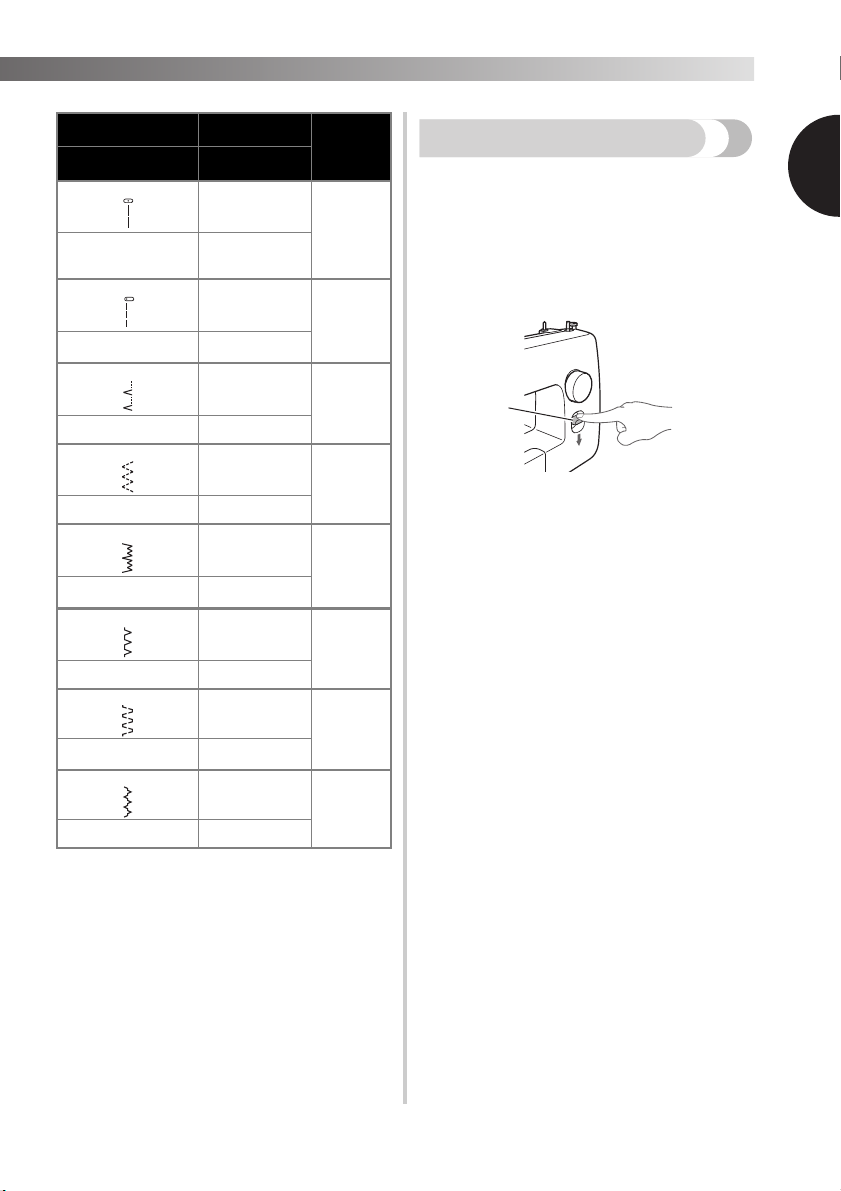
Pattern
Stitch Name
STRAIGHT STITCH
(Center Needle
Position)
STRAIGHT STITCH
(Left Needle Position)
12
BLIND HEM STITCH 5 (3/16)
ELASTIC STITCH 5 (3/16)
STRETCH BLIND
HEM STITCH
15
OVEREDGE STITCH 5 (3/16)
Preset Length
(mm (inch))
Preset Width
(mm (inch))
4 (3/16)
—
2.5 (3/32)
—
2 (1/16)
1 (1/16)
2 (1/16)
5 (3/16)
2 (1/16)
Reference
Page
29, 38
29, 36, 38
30, 39
31
30, 39
31
Reverse sewing lever
You can use reverse sewing for back tacking and
reinforcing seams.
To sew in reverse, push the reverse sewing lever in as
far as possible and hold it in that position while you
lightly push the foot controller. To sew forward, release
the reverse sewing lever. The machine will then sew
forward.
The length of reverse stitches is fixed at 2 mm (1/16
inch).
1
1 Reverse sewing lever
1
1.2 (1/16)
DOUBLE ACTION
STITCH
BRIDGING STITCH 5 (3/16)
5 (3/16)
1.2 (1/16)
32
32
12
KNOWING YOUR SEWING MACHINE —————————————————————————————————————————————————————————————————————————————————————————————————————————————————————————————————————————————————————————————————————————————————
1 Pull the thread
in completely.
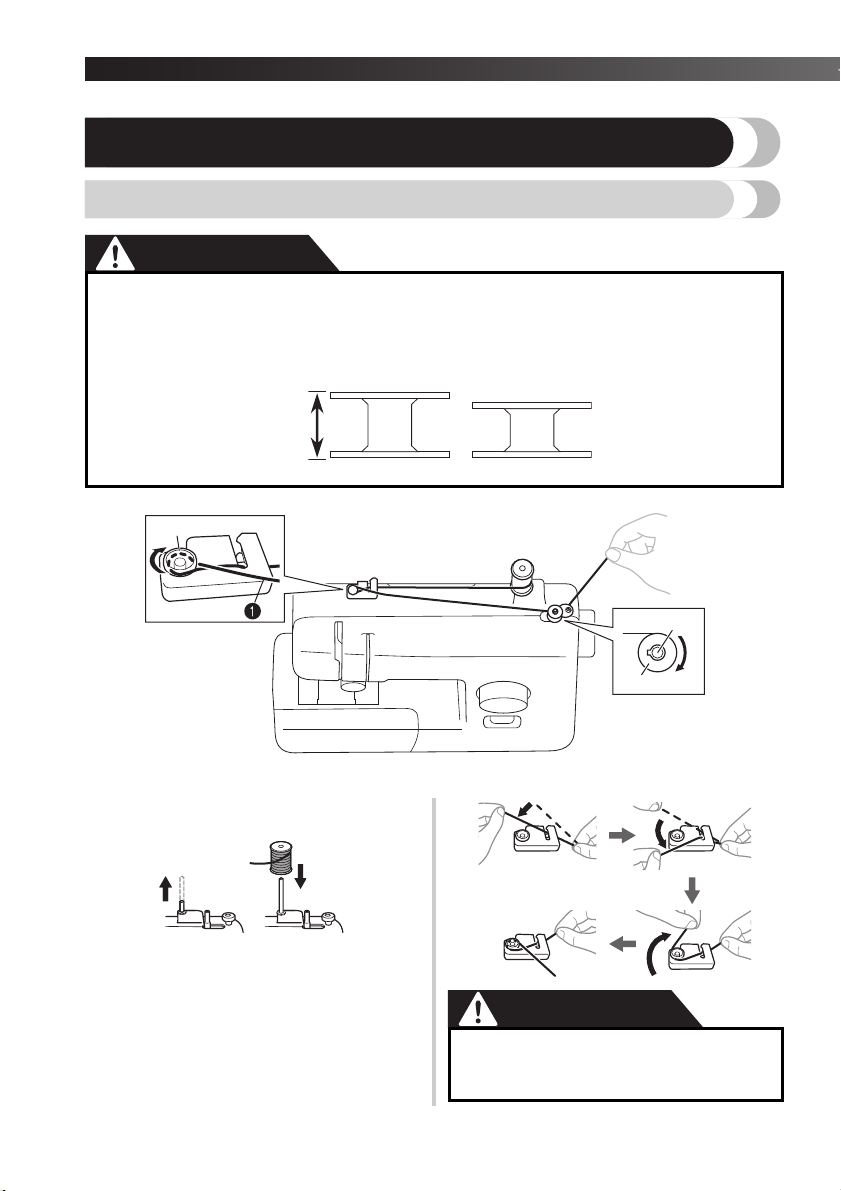
THREADING THE MACHINE
Winding the bobbin
● We designed the bobbin that comes with this machine. If you use bobbins from other models,
the machine will not work properly. Only use the bobbin that comes with this machine or
bobbins of the same type (part code: SA156, SFB: XA5539-151). Using other bobbins may
cause damage to the machine. SA156 is Class 15 type bobbin.
Actual size
11.5 mm
(7/16 inch)
This model Other models
1 Pre-tension disk 2 Bobbin winder shaft 3 Bobbin
Pull up the spool pin and put a spool of
1
thread on this pin.
While holding the thread from the spool
2
with your right hand, pass the thread
toward you, in the groove on the thread
guide. Then, pass the thread around the
pre-tension disk and pull the thread in
completely.
13
CAUTION
● If the spool of thread is in the wrong
place, or is set incorrectly, the thread
may tangle on the spool pin.
——————————————————————————————————————————————————————————————————————————————————————————————————————————————————————————————————————————————————————————————————————————————————————————————————————————————————————————————————————————————————————————————————————————————
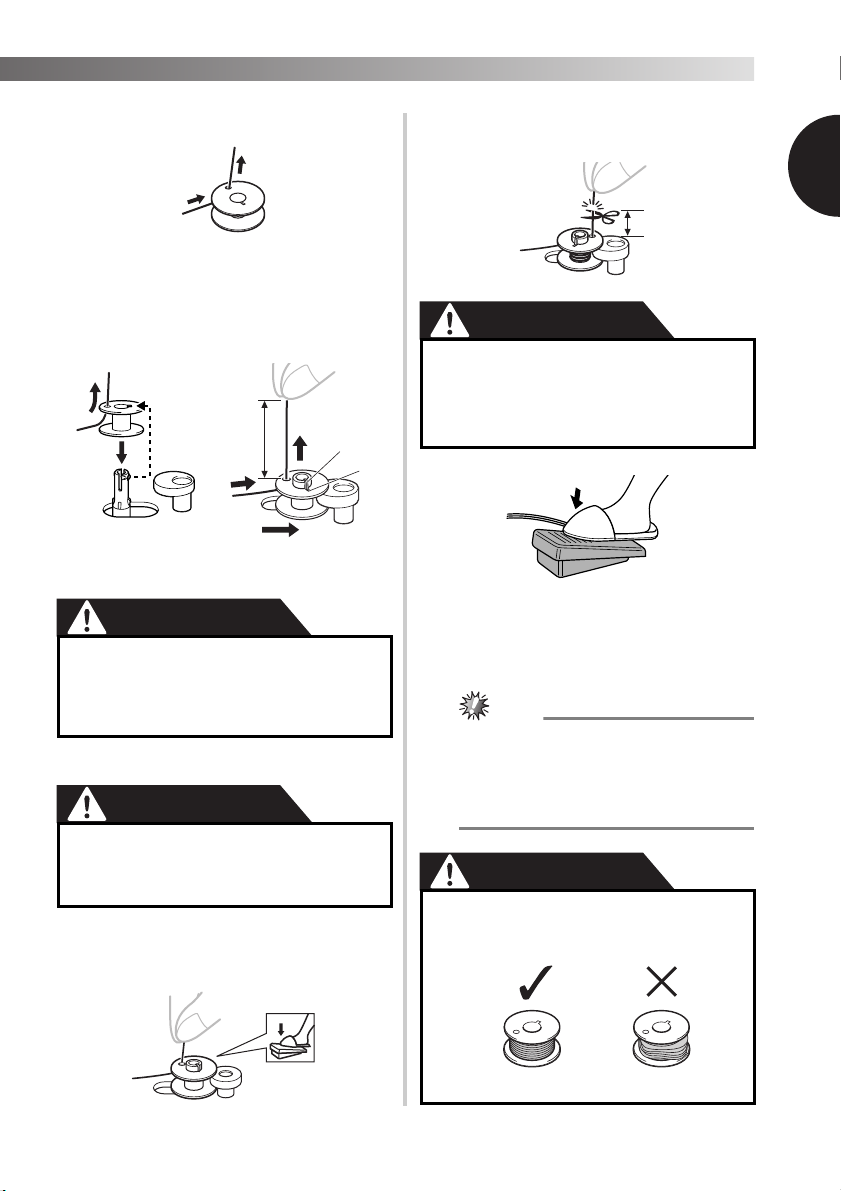
Pass the end of the thread through the hole
3
on the bobbin from the inside of the bobbin.
Put the bobbin onto the bobbin winder
4
shaft and slide the bobbin winder shaft to
the right. Turn the bobbin clockwise, by
hand, until the projection slides into the
notch of the bobbin.
• Make sure to pull out 7 to 10 cm (3-4 inches)
of thread from the hole on the bobbin.
1 Projection
2 Notch
3 7-10 cm (3 – 4 inches)
● Pull the thread taut and hold the end of
the thread straight up. If the thread is too
short, not pulled taut or held at an angle,
injuries may occur when the thread is
wound around the bobbin.
Turn on the machine.
5
CAUTION
●
Do not turn on the machine while pressing
down the foot controller. The machine
may start unexpectedly and cause
personal injury or damage to the machine.
While holding the end of the thread,
6
gently press the foot controller to wind
the thread around the bobbin a few times.
Then stop the machine.
Trim the excess thread above the bobbin.
7
• Leave 1 cm (1/2 inch) of thread from the hole
on the bobbin.
1
1 1 cm (1/2 inch)
●
Make sure you follow the instructions
carefully. If you do not cut the excess thread
completely before winding the bobbin, when
the thread runs low it may tangle around the
bobbin and cause the needle to break.
Press the foot controller to start.
8
When the bobbin seems full and begins
9
spinning slowly, take your foot off the foot
controller.
Cut the thread, slide the bobbin winder
0
shaft to the left and remove the bobbin.
●
When the sewing machine is started or the
handwheel is turned after winding the thread
around the bobbin, the machine will make a
clicking sound; this is not a malfunction.
● The needle bar does not move when you
slide the bobbin winder shaft to the right.
● Not winding the bobbin properly may
cause the thread tension to loosen, and
may break the needle.
1
1 Wound evenly
2 Wound poorly
14
Loading…
|
Код: 86572 Извините, товара сейчас нет в наличии
Бесплатная доставка Извините, товара сейчас нет в наличии Сравнить Новости интернет-магазина «Лаукар»:26.02.2025 17.02.2025 10.02.2025 Дополнительная информация в категории Швейная машина:Швейные машины — словарь терминов Таблица Авторизованных сервисных центров по брендам. Описание Инструкция Отзывы (0) В интернет-магазине бытовой техники «Лаукар» Вы можете скачать инструкцию к товару Швейная машина Brother ArtCity 190 совершенно бесплатно. Все инструкции, представленные на сайте интернет-магазина бытовой техники «Лаукар», предоставляются производителем товара. Для того чтобы скачать инструкцию, Вам необходимо нажать на ссылку «скачать инструкцию», расположенную ниже, а в случае, если ссылки нет, Скачать инструкцию Смотреть инструкцию 
Фирма-производитель оставляет за собой право на внесение изменений в конструкцию, дизайн и комплектацию товара: Швейная машина Brother ArtCity 190. Пожалуйста, сверяйте информацию о товаре с информацией на |
ArtCity 190
Часто задаваемые вопросы и устранение неполадок |
- Контакты
Базовые операции и шитье [видеоинструкции]
Видеоинструкции для базовых операций и шитья.
Нажмите на изображение, чтобы просмотреть видеоинструкции.
* Данный видеоролик транслируется с YouTube. (Будет открыто новое окно).
| 1 | 2 |
|---|---|
| Подготовка швейной машины к работе | Намотка нижней шпульки/Заправка нижней нити |
| 3 | 4 |
|---|---|
| Заправка верхней нити | Приступим к шитью |
| 5 | 6 |
|---|---|
| Шитьё в обратном направлении | Регулировка натяжения нитей |
| 7 | 8 |
|---|---|
| Сатиновый стежок | Вымётывание петель |
| 9 | 10 |
|---|---|
| Вставка молний | Замена иглы |
| 11 |
|---|
| Уход и техническое обслуживание |
- Изделие или его компоненты, показанные в этом видео, могут отличаться от имеющейся у вас модели.
- Содержимое видео может быть изменено без предварительного уведомления.
- Чтобы изменить настройки субтитров, отображаемых при просмотре видео на YouTube, нажмите (Субтитры).
Связанные модели
ArtCity 190, ArtCity140S, ArtCity170S, artwork 20, artwork 22N, artwork 31SE, e15, e20, G20, HQ19, HQ22, JS25, JS27, JX14, LS200S, LS2225S, LS2325S, LS250s, LS300S, LS3125S, LS350s, LS5555, LS7555, LX1400S, LX1700S, LX500, LX700, M14, ModerN14, ModerN17, OKINAWA, R214, RS100S, RS200S, SAPPORO, TOKYO, X10, X8
Отзывы о материалах
Чтобы помочь нам улучшить поддержку пользователей, просим вас поделиться своим мнением, ответив на вопросы ниже.