
Start Here•Démarrez ici•Hier beginnen•
Hier beginnen•Para empezar•
Guia de Instalação•Inizia qui•Установка•
Встановлення
Printed in XXXXXX XX.XX-XX XXX
3
1
Perfection V10
Perfection V100 Photo
Perfection V350 Photo
4
1
2
2
1
2
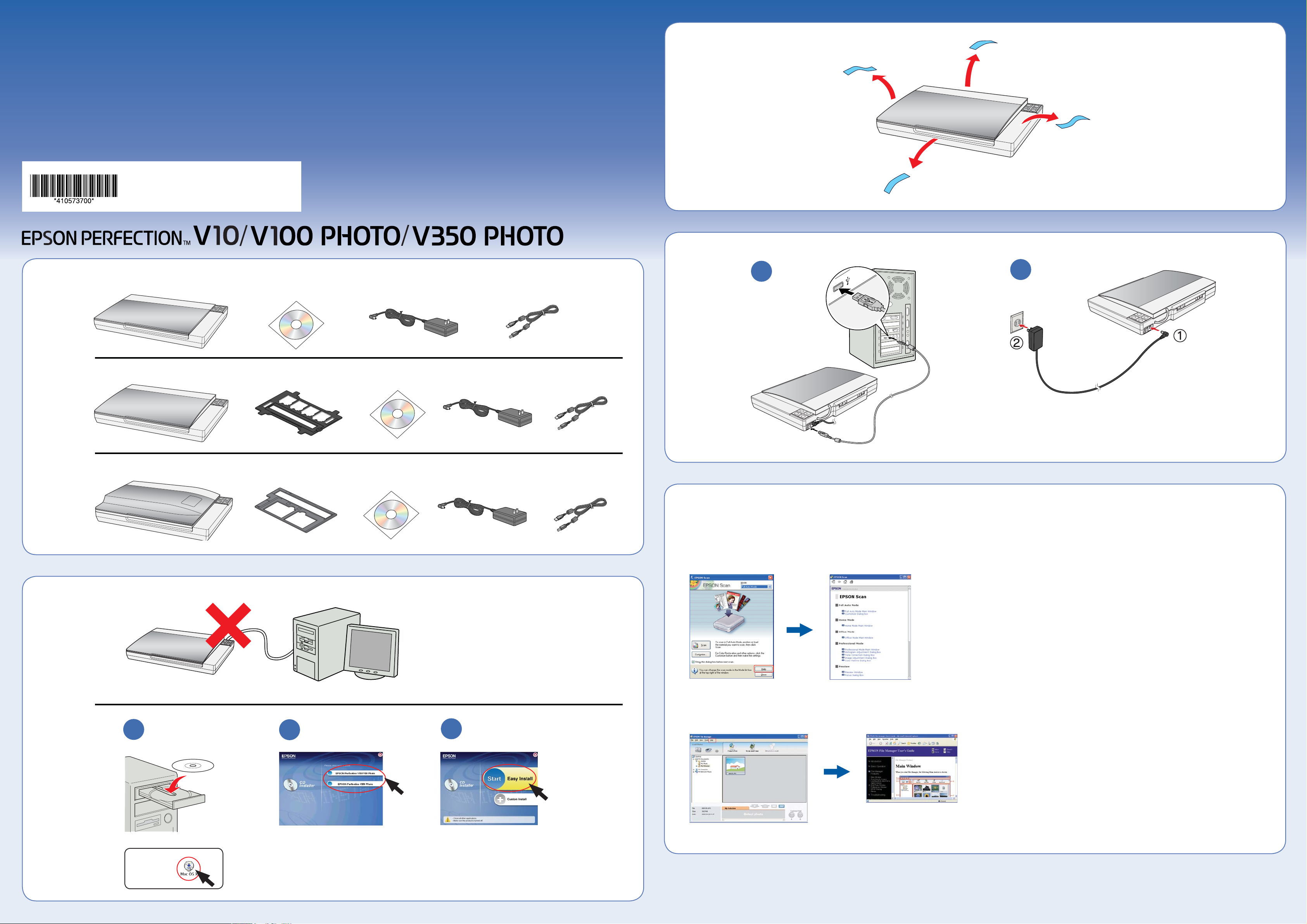
Do not connect the USB cable yet.
Ne raccordez pas encore le câble USB.
Schließen Sie das USB-Kabel noch nicht an.
Sluit de USB-kabel nog niet aan.
No conecte todavía el cable USB.
Não ligue ainda o cabo USB.
Non collegare adesso il cavo USB.
Не подключайте USB кабель.
Не підключайте USB кабель.
3
Help•Aide•Hilfe•Help•Ayuda•Ajuda•Guida•Справка•
Довідка
EPSON Scan
Open the Help menu and select EPSON File Manager User’s Guide.
Ouvrez le menu Aide et sélectionnez Guide d’utilisation de EPSON File
EPSON File Manager
Manager.
Öffnen Sie das Menü Hilfe und wählen Sie EPSON File Manager
Benutzerhandbuch aus.
Open het menu Help en selecteer Gebruikershandleiding EPSON File Manager.
Abra el menú Ayuda y seleccione Manual de usuario de EPSON File Manager.
Abra o menu Ajuda e seleccione Guia do Utilizador do EPSON File Manager.
Aprire il menu della Guida e selezionare Guida utente di EPSON File Manager.
Откройте меню Help (Справка) и выберите EPSON File Manager User’s
Guide (Справка EPSON File Manager).
Відкрийте меню Help (Довідка) і виберіть EPSON File Manager User’s Guide
(Посібник користувача Диспетчера файлів EPSON).
Mac OS X
Maschinenlärminformations-Verordnung 3. GPSGV: Der höchste Schalldruckpegel beträgt 70 dB(A) oder weniger gemäss EN ISO 7779.
EPSON® is a registered trademark and Exceed Your Vision is a trademark of Seiko Epson Corporation. General Notice: Other product names used herein are for identification
purposes only and may be trademarks of their respective owners. Epson disclaims any and all rights in those marks. © 2006 Seiko Epson Corporation. All rights reserved.
Try scanning a photo•Numérisation d’une photo•Ein Foto
Do more•Autres possibilités•Weitere Funktionen•
scannen•Foto scannen•Escanee una foto de prueba•
Tente digitalizar uma fotografia.•Scansione di una foto•
Сканирование фотографий•Спробуйте відсканувати
фотографію
1
4 5 6
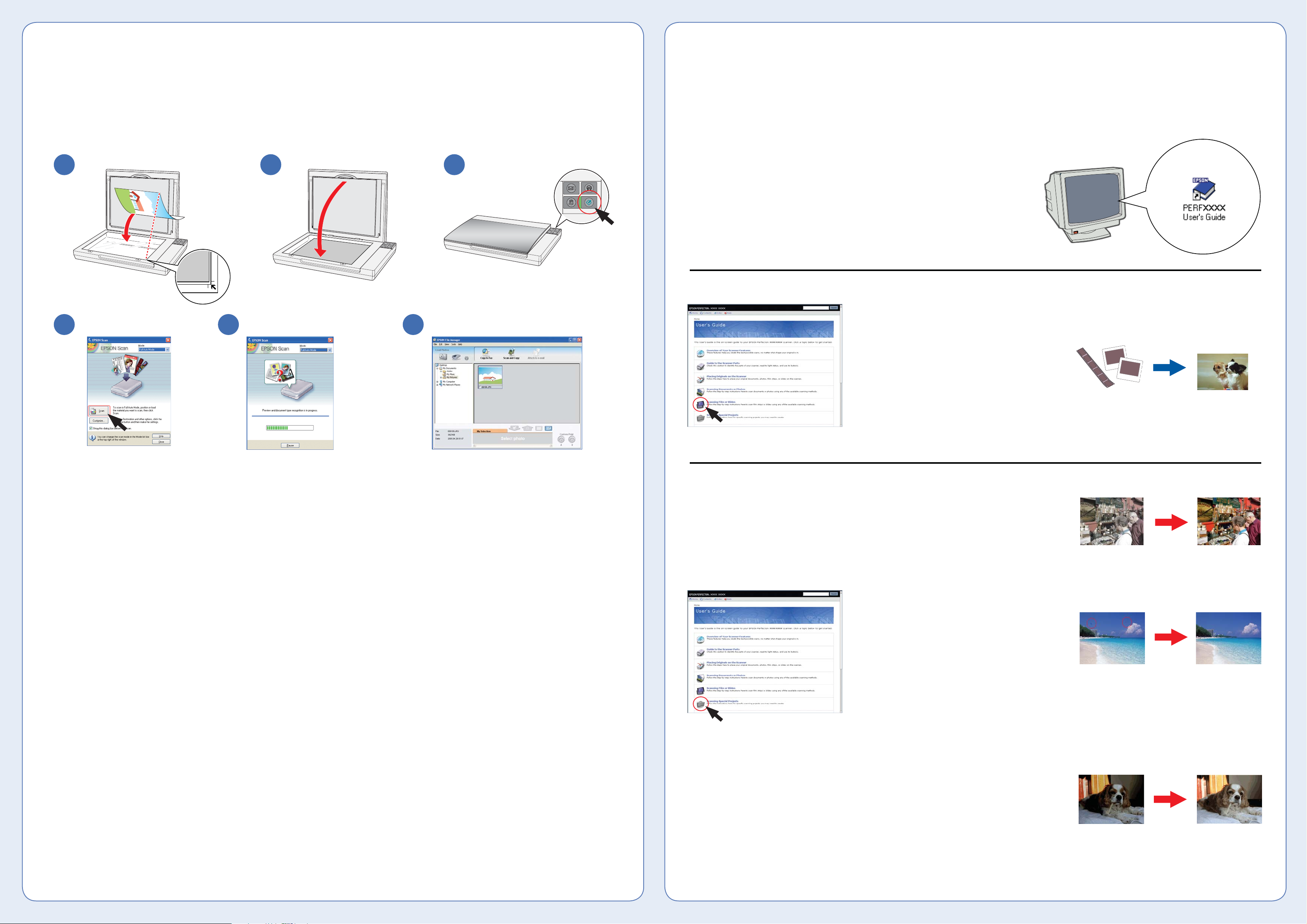
EPSON Scan opens and scans your photo
in Full Auto Mode. Wait for your scan to
finish or click Pause to change settings.
EPSON Scan ouvre et numérise la photo
en Mode auto. Attendez la fin de la
numérisation ou cliquez sur Pause pour
modifier les paramètres.
EPSON Scan wird gestartet und scannt das
Foto im Vollautomatischen Modus. Warten
Sie, bis der Scanvorgang beendet ist, oder
klicken Sie auf Pause, um Einstellungen zu
ändern.
EPSON Scan wordt geopend en de foto
wordt gescand in de volautomatische
modus. Wacht tot de scan klaar is of klik op
Pauze om instellingen aan te passen.
EPSON Scan se abre y escanea su foto en
el Modo Automático. Espere a que termine
el escaneado o haga clic en Pausa para
cambiar los ajustes.
O EPSON Scan abre e digitaliza a fotografia
no Modo automático. Aguarde que a
digitalização termine ou faça clique em
Pausa para alterar definições.
EPSON Scan si apre e digitalizza la foto
nel Modo Automatico. Attendere che la
scansione termini o fare clic su Pausa per
modificare le impostazioni.
Запустится приложение EPSON Scan
и фотография будет отсканирована в
Автоматическом режиме. Дождитесь
завершения сканирования или щелкните
кнопку Pause (Пауза), чтобы изменить
настройки.
Відкриється програма EPSON Scan, і
фотографія буде відсканована в повному
автоматичному режимі. Дочекайтеся
завершення сканування або натисніть
на кнопку Pause (Пауза), щоб змінити
параметри.
2 3
EPSON File Manager opens and displays your
scanned photo.
View the on-screen User’s Guide for instructions on
using EPSON File Manager.
EPSON File Manager ouvre et affiche la photo
numérisée.
Affichez le Guide d’utilisation à l’écran pour obtenir
des instructions relatives à l’utilisation de EPSON File
Manager.
EPSON File Manager wird gestartet und zeigt das
gescannte Foto an.
Im Bildschirm-Benutzerhandbuch finden Sie
Anweisungen zum Arbeiten mit EPSON File Manager.
EPSON File Manager wordt geopend en de gescande
foto wordt weergegeven.
Raadpleeg de online-gebruikershandleiding voor
instructies voor het gebruik van EPSON File Manager.
EPSON File Manager se abre y muestra su foto
escaneada.
Consulte las instrucciones de uso de EPSON File
Manager en el Manual de usuario en pantalla.
O EPSON File Manager abre e apresenta a fotografia
digitalizada.
Para obter instruções sobre como utilizar o EPSON
File Manager, consulte o Guia do Utilizador
apresentado no ecrã.
EPSON File Manager si apre e visualizza la foto
acquisita.
Per istruzioni sull’uso di EPSON File Manager,
visualizzare la Guida utente in linea.
Приложение EPSON File Manager запустится и
отобразит отсканированную фотографию.
Подробнее об использовании приложения EPSON
File Manager см. в интерактивном Руководстве
пользователя.
EPSON File Manager відкриє та відобразить
відскановану фотографію.
З указівками щодо використання EPSON File
Manager можна ознайомитися в електронному
Посібнику користувача.
Meer mogelijkheden•Haga más•Utilizar outras funções•
Operazioni avanzate•Другие возможности•
Додаткові можливості
View the on-screen User’s Guide for instructions on using these features:
Affichez le Guide d’utilisation à l’écran pour obtenir des instructions relatives à l’utilisation
des fonctions suivantes :
Im Bildschirm-Benutzerhandbuch finden Sie Anweisungen zur Verwendung der
nachstehenden Funktionen:
Raadpleeg de online-gebruikershandleiding voor instructies voor het gebruik van deze
functies:
Consulte las instrucciones de uso de estas funciones en el Manual de usuario en pantalla:
Para obter instruções sobre como utilizar as funções seguintes, consulte o Guia do
Utilizador apresentado no ecrã.
Per istruzioni sull’uso di tali funzioni, visualizzare la Guida utente in linea:
Обратитесь к интерактивному Руководству пользователя для получения подробной
информации о следующих функциях.
В електронному Посібнику користувача можна ознайомитися зі вказівками щодо
використання наступних функцій.
Perfection V100 Photo and V350 Photo
Scan film or slides
Perfection V100 Photo et V350 Photo
Numérisation de films ou de diapositives
Perfection V100 Photo und V350 Photo
Film oder Dias scannen
Perfection V100 Photo en V350 Photo
Films of dia’s scannen
Perfection V100 Photo y V350 Photo
Escanee películas o diapositivas
Perfection V100 Photo e V350 Photo
Digitalizar películas ou diapositivos
Perfection V100 Photo e V350 Photo
Scansione di pellicola o diapositive
Сканирование пленок и слайдов с
помощью Perfection V100 Photo и V350 Photo
Сканування фотоплівок і слайдів
Perfection V100 Photo і V350 Photo
Restore color
Restauration de la couleur
Farben wiederherstellen
Kleuren opfrissen
Recupere el color
Restaurar a cor
Ripristino del colore
Восстановление цветов
Відновлення кольорів
Remove dust from originals
Suppression de la poussière présente sur les
originaux
Staub von Vorlagen entfernen
Stof verwijderen van originelen
Elimine el polvo de los originales
Remover o pó dos originais
Rimozione di polvere dagli originali
Удаление царапин с изображения
Видалення пилу з вихідних зображень
Fix photos that are too dark because of
backlighting
Correction des photos trop foncées en raison
du rétroéclairage
Fotos reparieren, die aufgrund von Gegenlicht
zu dunkel sind
Foto’s corrigeren die te donker zijn als gevolg
van tegenlicht
Arregle fotos demasiado oscuras por el
claroscuro
Corrigir fotografias demasiado escuras devido
ao efeito de contraluz
Correzione di foto troppo scure a causa di
retroilluminazione
Исправление темных фотографий, снятых
против света.
Виправлення фотографій, які виглядають
темними через задню підсвітку
Downloads
Downloads
Product Setup
Epson Software updater (v4.6.7.0)
v.4.6.7.0
11-Apr-2024
5.67 MB
.exe
Additional Information:
Epson Software Updater allows you to update Epson software as well as download 3rd party applications. Please Note: To use this updater, your Epson product must be turned on and connected to a computer with Internet access.
Download
Other Software
Event Manager (v3.11.74)
v.3.11.74
16-Mar-2023
21.85 MB
.exe
Additional Information:
Event Manager launches File Manager or PageManager for EPSON automatically when you press the B&W Start or Color Start button on the control panel in Scan mode. You can select an application to be launched when pressing the B&W Start or Color Start button.
This latest version includes
— Bug Fix
Download
Русский
- Bedienungsanleitung Epson Perfection V10
- Epson Perfection V10 User Manual
- Manual Usuario Epson Perfection V10
- Mode d’emploi Epson Perfection V10
- Istruzioni Epson Perfection V10
- инструкция Epson Perfection V10
- Epson Perfection V10の取扱説明書
- Handleiding Epson Perfection V10
- Manual de uso Epson Perfection V10
Вам нужна инструкция? Мы поможем Вам ее найти и сэкономить Ваше время.
- 2 stron
- 0.59 mb
Изделие Epson Perfection V10, а также другие, которыми Вы пользуетесь ежедневно, наверняка вы получили в комплекте с инструкцией обслуживания. Из опыта наших пользователей мы знаем, что большинство из Вас не уделили этому особого внимания. Большая часть инструкций, сразу же после покупки попадает в корзину для мусора вместе с коробкой — это ошибка. Ознакомьтесь с информацией, касающейся инструкции Epson Perfection V10, которая поможет Вам в будущем сэкономить нервы и избежать головной боли.
Важная подсказка — не забывайте хотя бы раз прочитать инструкцию Epson Perfection V10
Если вы не хотите каждый раз читать информационные брошюры, касающиеся, тех или Epson Perfection V10 иных изделий, достаточно, прочитать их раз — сразу же после покупки устройства. Вы получите основное знания, касающиеся поддержания изделия Epson Perfection V10 в хорошем эксплуатационном состоянии, так, чтобы без проблем достигнуть его планируемого цикла работы. Затем инструкцию можно отложить на полку и вернуться к ней только в случае, если вы не уверены, правильно ли проводится техобслуживание изделия. Правильный уход является необходимым элементом Вашего удовольствия Epson Perfection V10.
Раз в году пересмотрите шкафчик, в котором держите инструкции для всех устройств, — выбросите те, которыми вы уже не пользуетесься. Это поможет Вам сохранять порядок в своей домашней базе инструкций обслуживания.
Summary of Contents for Epson Perfection V10
Что находится в инструкции Epson Perfection V10? Почему стоит ее прочитать?
- Гарантия и подробности, касающиеся техобслуживания изделия
Хорошей идеей будет прикрепить чек к странице инструкции. Если что-то плохое случится во время использования Epson Perfection V10, у вас будет комплект документов, необходимый для гарантийного ремонта. В этой части инструкции вы найдете информацию об авторизованных сервисных центрахEpson Perfection V10 а также, как самостоятельно правильно ухаживать за оборудованием — так, чтобы не потерять гарантийных прав. - Указания по монтажу и Setup
Не терять нервов и времени на самостоятельную попытку установки и первого запуска изделия. Воспользуйтесь рекомендациями производителя Epson Perfection V10 чтобы правильно запустить изделие, без лишнего риска повреждения оборудования. - Информация, касающаяся дополнительных запчастей (входящих в комплект а также являющихся опцией)
Пересматривая эту часть документа вы сможете проверить, доставлен ли ваш Epson Perfection V10 с полним комплектом аксессуаров. Вы также сможете узнать, какие дополнительные запчасти или аксессуары для Epson Perfection V10 Вы сможете найти и докупить к своему устройству. - Troubleshooting
Самые частые проблемы, касающиеся Epson Perfection V10 и методы их решения. Это очень полезная часть руководства по обслуживанию — она позволит Вам сэкономить много времени на поиск решений. 90% проблем с Epson Perfection V10 повторяется у многих пользователей. - Требования, касающиеся питания и энергетический класс
Информация, касающаяся количества потребляемой энергии, а также рекомендации, касающиеся установки и питания Epson Perfection V10. Прочитайте, чтобы оптимально пользоваться Epson Perfection V10 и не использовать большего количества ресурсов, нежели это необходимо для правильной работы изделия. - Специальные функции Epson Perfection V10
Здесь вы можешь узнать, как персонализировать изделие Epson Perfection V10. Вы узнаете, какие дополнительные функции могут помочь Вам удобно использовать продукт Epson Perfection V10 а также, какие функции Вашего устройства оптимальны для выполнения конкретной деятельности.
Как видите в инструкции вы найдете информацию, которая реально поможет Вам в использовании Вашего изделия. Стоит с ней ознакомиться, чтобы избежать разочарований, возникающих из более короткого, нежели предусматривалось, периода исправности изделия Epson Perfection V10. Если все же вы не хотите копить инструкции в своем доме, наш сайт поможет Вам в этом — вы должны найти у нас руководство по обслуживанию большинства из своих устройств, а также Epson Perfection V10.
Комментарии (0)
A good user manual
The rules should oblige the seller to give the purchaser an operating instrucion of Epson Perfection V10, along with an item. The lack of an instruction or false information given to customer shall constitute grounds to apply for a complaint because of nonconformity of goods with the contract. In accordance with the law, a customer can receive an instruction in non-paper form; lately graphic and electronic forms of the manuals, as well as instructional videos have been majorly used. A necessary precondition for this is the unmistakable, legible character of an instruction.
What is an instruction?
The term originates from the Latin word „instructio”, which means organizing. Therefore, in an instruction of Epson Perfection V10 one could find a process description. An instruction’s purpose is to teach, to ease the start-up and an item’s use or performance of certain activities. An instruction is a compilation of information about an item/a service, it is a clue.
Unfortunately, only a few customers devote their time to read an instruction of Epson Perfection V10. A good user manual introduces us to a number of additional functionalities of the purchased item, and also helps us to avoid the formation of most of the defects.
What should a perfect user manual contain?
First and foremost, an user manual of Epson Perfection V10 should contain:
— informations concerning technical data of Epson Perfection V10
— name of the manufacturer and a year of construction of the Epson Perfection V10 item
— rules of operation, control and maintenance of the Epson Perfection V10 item
— safety signs and mark certificates which confirm compatibility with appropriate standards
Why don’t we read the manuals?
Usually it results from the lack of time and certainty about functionalities of purchased items. Unfortunately, networking and start-up of Epson Perfection V10 alone are not enough. An instruction contains a number of clues concerning respective functionalities, safety rules, maintenance methods (what means should be used), eventual defects of Epson Perfection V10, and methods of problem resolution. Eventually, when one still can’t find the answer to his problems, he will be directed to the Epson service. Lately animated manuals and instructional videos are quite popular among customers. These kinds of user manuals are effective; they assure that a customer will familiarize himself with the whole material, and won’t skip complicated, technical information of Epson Perfection V10.
Why one should read the manuals?
It is mostly in the manuals where we will find the details concerning construction and possibility of the Epson Perfection V10 item, and its use of respective accessory, as well as information concerning all the functions and facilities.
After a successful purchase of an item one should find a moment and get to know with every part of an instruction. Currently the manuals are carefully prearranged and translated, so they could be fully understood by its users. The manuals will serve as an informational aid.