
Windows & Mac DSD / WAV Editing Software
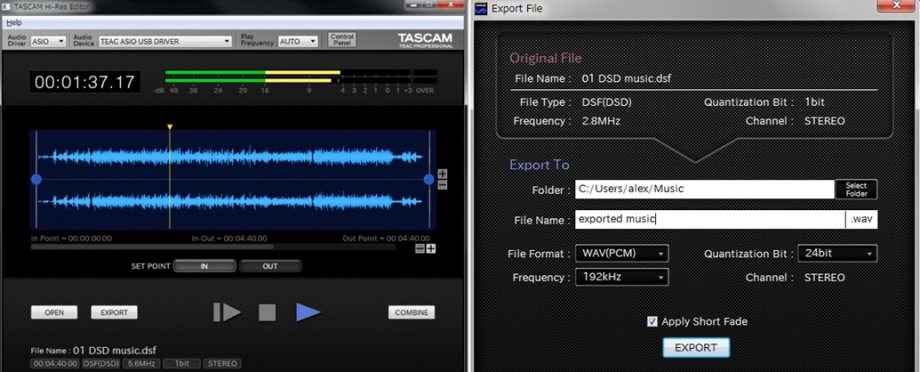
TASCAM Hi-Res Editor is a new, free application for Windows and Macintosh computers, that plays and edits up to 11.2MHz DSD or 384kHz WAV files. The software allows playback and export of DSD files without converting to PCM audio. This app is available now as a free download for Windows and Mac. Ideal for users of TASCAM’s hi-resolution recorders like the DA-3000, TASCAM’s Hi-Res Editor is one of the only ways to edit native DSD master recordings.
Where to Download
The TASCAM Hi-Res Editor is now available for download free of charge.
Download
Editing high-resolution DSD/PCM files possible
Editing high-resolution DSD (DSF/DSDIFF) and PCM (WAV) files with up to 2 channels (mono/stereo) is possible. DSD formats of 2.8–11.2 MHz and PCM formats of 44.1–384 kHz and 16/24/32-bit are supported. As for the DSD files, import and editing of the file are possible as DSD formats. In addition to converting between DSD and PCM formats and different sampling frequencies, basic editing functions such as trimming and joining files. These editing functions are all available on the Home Screen, and the simple, easy-to-understand operation screen enables intuitive use.
Conversion of audio file formats and sampling frequencies, for example, possible
PCM files can be converted to DSD formats and DSD files can be converted to PCM formats. Sampling frequencies can also be converted as desired.
*Quantization bit depth can also be converted for PCM files.
*Press the EXPORT button on the SCREEN to access the file conversion function screen.
Combine function allows two files
Two audio files can be combined into one file if they have the same file format and sampling frequency/quantization bit rate.
*Press the COMBINE button on the Home Screen to open the file combination function screen.
With waveform display possible, intervals set with in/out points can be changed and saved
The waveform for the loaded audio file is shown on screen, and the time and level axes can be zoomed. Markers at the top of the screen can be moved directly while viewing the waveform to set trim in/out (start/end) points for the file to be saved. When saving, the desired file format and sampling frequency, for example, can be used. In addition, short fades can be added to in/out points when saving intervals.
Splitting a DSD audio file that was recorded without track divisions into individual tracks
When making long recordings with a DA-3000SD, it is possible to use the track incrementation function to split the file at the desired points to create separate files for each track. If a recording was made without splitting it into tracks, however, TASCAM Hi-Res Editor can split a file into multiple tracks without using a DAW.
Combining long recordings that were split into multiple files due to size limits
In 5.6MHz DSD recording mode, a file can reach the large size of 1 GB in 11 minutes. This can result in the maximum size for a single file being exceeded when recording orchestras and other long performances. When recording with a DA-3000SD, a new file will automatically be created if the file size exceeds 2 GB. Using TASCAM Hi-Res Editor, files split this way can be combined into a single file.
Converting an audio file recorded as DSD to PCM
After recording at high-resolution 5.6MHz DSD using a DA-3000SD, this application can downconvert the resolution or convert to a PCM file format to suit other playback requirements. This allows recording of high-resolution master files that can be used to archive audio without needing to worry about how the file will be used after recording.
Upconversion of PCM files and conversion to DSD for playback
By converting a PCM file recorded using a TASCAM DR series linear PCM recorder to a higher sampling frequency or DSD format, playback at higher resolution than that used for recording is possible with a device that supports it.
Audio from vinyl records can be split into files by track.
PCM audio files recorded for archiving using a turntable, which has USB digital output, can be split into tracks with TASCAM Hi-Res Editor. Furthermore, by converting audio to DSD, tracks from records can be played back on the TEAC player, which support DSD.
Features at a Glance
- Editing high-resolution DSD/PCM files possible
- DSD formats of 2.8–11.2 MHz and PCM formats of 44.1–384 kHz and 16/24/32-bit are supported.
- 2-channel audio sources supported (mono/stereo)
- Import and editing are possible as DSD formats
- Windows supported (using the Windows standard audio driver or ASIO 2.1)
- Mac supported (11.2MHz DSD/DSF is not played back natively, but converted during playback to another supported sampling frequency.)
- Setting fade-in/out points possible using waveform display
- Conversion of audio file formats from DSD to PCM and PCM to DSD possible
- Conversion of frequencies and PCM recording quantization bit depths possible
- Combine function allows two files to be joined
- 2 Mono file to 2ch Poly file and 2ch Poly file to 2 Mono file conversion functions (from V1.10)
- Editing with just a computer possible
- Free download from the TASCAM website
LEARN
Support for Your TASCAM Hi-Res Editor
Download manuals,
get tutorials, updates and more
LEARN MORE
- Browse by type >
- Portable Handheld / Field Recorder
- Browse by type >
- Installation Products
Spec Description
| Supported formats | |
| DSD | DSF (.dsf), DSDIFF (.dff) |
| PCM | WAV (.wav), BWF (.wav) |
| File mode | Stereo, Mono |
| Sampling frequency | |
| DSD | 2.8M / 5.6M / 11.2M Hz *Mac version : 11.2MHz DSD/DSF is not played back natively, but converted during playback to another supported sampling frequency. |
| PCM | 44.1k / 48k / 88.2k / 96k / 176.4k / 192k / 352.8k / 384k Hz |
| Quantization bit rate | |
| DSD | 1-bit |
| PCM | 16 / 24 / 32-bit (float) |
Computer System Requirements
Windows
| CPU/Clock | Intel Core i-Series or later recommended |
| Memory | 2G or more memory |
| Disk space | At least 150 MB necessary |
| Display | 1024 × 768 (XGA) or larger (1280 × 800 recommended) True Color (32-bit) recommended |
| Audio driver | Windows standard driver (WASAPI), ASIO2.1 |
Mac
| CPU/Clock | Intel Core i Series / Apple Silicon(M1 — M4) |
| Memory | 2G or more memory |
| Disk space | At least 150 MB necessary |
| Display | 1024 × 768 (XGA) or larger (1280 × 800 recommended) True Color (32-bit) recommended |
| Audio driver | Mac standard driver (Core Audio) |
Information
| Latest version info | |
| Windows | V1.10 |
| Mac | V1.10 |
V1.10
- Two mono files can now be converted into a stereo file with the left and right channels
respectively.
Select «Mono to Stereo» from the pull-down menu on the Combine screen. - One stereo file can now be converted into two mono files, one for the left channel and
one for the right channel.
Select “DUAL MONO” from the Channel pull-down menu on the Export screen.

Notices About Products
Documents
Firmware / Software
Compatible OS
FAQs
We have received reports that customers who have installed the TASCAM Hi-Res Editor on 64-bit versions of Windows are experiencing problems opening other programs. This issue has been fixed in versions 1.01 and later of the software. For customers using 64-bit versions of Windows, please wait for the release of the latest firmware version. For those customers who have experienced problems after installing the TASCAM Hi-Res Editor, we advise that a DLL file recovery be performed to restore the program to normal.
Software
| Software name | OS |
| TASCAM Hi-Res Editor | Windows 7 64-bit Windows 8 64-bit Windows 8.1 64-bit |
How to perform a recovery the DLL file
— Open the Microsoft website page below: http://www.microsoft.com/en-US/download/details.aspx?id=40784
— click ‘Download’
— on the program selection page, select and download ’vcredist_x64.exe’
— After downloading, open the program
Компания Tascam (подразделение японской Teac) выпустила бесплатный аудиоредактор Hi-Res Editor, позволяющий проигрывать и работать с файлами DSD 2,8 МГц – 11,2 МГц или с WAV до 384 кГц/32 бит. Программа воспроизводит и экспортирует DSD-файлы без конвертации в PCM. Для проигрывания аудио в формате DSD нужно использовать внешний ЦАП, например, Teac UD-501 или портативный плеер Teac HA-P90SD с поддержкой DSD. Если используется устройство с поддержкой PCM или внутренняя звуковая карта компьютера, то редактор автоматически конвертирует поток.
С помощью Hi-Res Editor можно делить DSD- и WAV-файлы на несколько отдельных треков или, наоборот, объединить две записи в одну. Также доступна конвертация из DSD в PCM и обратно. Программа использует стандартные аудио драйвера или ASIO 2.1.
Сейчас для бесплатного скачивания с официального сайта доступна версия программы для Windows, вскоре обещают добавить и Mac-версию.
- About
- Blog
- Projects
- Help
-
Donate
Donate icon
An illustration of a heart shape - Contact
- Jobs
- Volunteer
- People
Item Preview
There Is No Preview Available For This Item
This item does not appear to have any files that can be experienced on Archive.org.
Please download files in this item to interact with them on your computer.
Show all files
software
TASCAM Hi Res Editor V 1.03
This editor app supports the highest-resolution DSD (DSF/DSDIFF) and PCM
(WAV) available. DSD formats of 2.8–11.2 MHz and PCM formats of
44.1–384 kHz and 16/24/32-bit are supported. Native editing of DSD files
is supported without conversion to PCM. (although conversion is also
available.)
Features at a glance
- Edits high-resolution DSD and PCM files
- DSD: supports up to 2.8M to 11.2 MHz
- PCM: supports up to 44.1k to 384 kHz at 16/24/32-bit
- Mono and stereo audio files supported
- Edit native DSD files without conversion to PCM
- Runs on Windows (using the Windows standard audio driver or ASIO 2.1)
- Runs on Mac (using the Mac standard audio driver or Core Audio)
*11.2MHz DSD/DSF is not played back natively, but converted during playback to another supported sampling frequency. - Convert audio files from DSD to PCM or PCM to DSD
- Convert PCM sampling frequencies and bit depths
- Combine function allows two files to be joined
- Edit high-res audio with the computer’s built-in audio
- Addeddate
- 2023-07-04 20:30:28
- Identifier
- tascam-hi-res-editor-v-1.03
- Scanner
- Internet Archive HTML5 Uploader 1.7.0
comment
Reviews
There are no reviews yet. Be the first one to
write a review.
105
Views
2
Favorites
DOWNLOAD OPTIONS
Uploaded by
OTTER1377
on
SIMILAR ITEMS (based on metadata)
Продам профессиональный USB-аудиоинтерфейс TASCAM SERIES 208i.
Это высококачественная профессиональная внешняя звуковая карта.
Карта новая, в оригинальной коробке, идеальном состоянии и полной комплектации. В использовании не была. Приобреталась для себя осенью 2021г. у официального представителя и потом бережно хранилась на полке. Распаковывалась только для проверки и фотографии.
Причина продажи: распродажа всей системы ((
Внешняя звуковая карта TASCAM SERIES 208i — это аудиоинтерфейс для профессионального использования, домашней записи и для живых репетиций и выступлений. За счет современного дизайна и удобства TASCAM устанавливает новый стандарт для аудиоинтерфейсов среднего класса. TASCAM 208i оснащен четырьмя микрофонными предусилителями TASCAM Ultra-HDDA (High Definition Discrete Amplifier), которые позволяют добиваться естественного звучания с низким уровнем шума. Запись звука обеспечивается с частотой дискредитации до 192 192 кГц и 24-битной разрядностью. Спереди находятся 4 комби-входа XLR-1/4 «(mic/line/instrument), фантомное питание, + 48 В, два выхода на наушники. Сзади восемь 1 / 4» TRS выходов, набор 5-контактных DIN MIDI-входов/выходов и USB 2.0 Type-B. Если этого недостаточно, то SERIES 208i предлагает дополнительный оптический вход S / MUX (ADAT), за счет которого возможно расширение до 16 каналов. Кроме того, использование BNC-кабеля обеспечивает правильную синхронизацию с другими устройствами. Звуковая карта TASCAM SERIES 208i оснащена встроенным DSP-процессором с эффектами реверберации, компрессором, инверсией фазы и четырехканальным эквалайзером.
ОСОБЕННОСТИ:
— DSP-процессор с рядом дополнительных эффектов гарантирует почти нулевой уровень задержки сигнала;
— встроенные микрофоны TASCAM Ultra-HDDA (High Definition Discrete Amplifier) транслируют чистый звук без лишних искажений;
— четыре комбинированных входа (mic/line/instrument), восемь оптических входов и два аналоговых выхода;
— устройство совместимо с PC (Windows 10, 8, 7), Mac и iOS;
— включает в себя ПО от IK Multimedia с эффектами AmpliTube и ПО T-RackS;
— поставляется с Cubase LE для Windows и Mac и Steinberg Cubasis LE для iPad.
— Входы/выходы: 20 входов / 8 выходов
— Частота сэмплирования: 44.1, 48, 88.2, 96, 176.4 и 192 кГц
— Частота дискредитации: 16 / 24-bit
— Рабочая температура: от + 5 до + 35°C
— Минимальные системные требования: Win 7, 8.1, 10
— Размеры (ШхГхВ): 296х160х65 мм
— Вес: 1,5 кг
МИКРОФОННЫЙ ВХОД: комбинированный разъем 3 pin female XLR-1/4″ jack
— Номинальный уровень входного сигнала: -64 дБА (максимальное положение), -6 дБА (минимальное положение)
— Максимальный уровень входного сигнала: + 10 дБн
— Диапазон коэффициентов усиления: 58 дБА сопр. 1,5 кОм
ИНСТРУМЕНТАЛЬНЫЙ ВХОД: разъем 1/4″ (6.3mm) TS jack
— Номинальный уровень входного сигнала: -64 дБА (максимальное положение), -6 дБА (минимальное положение)
— Максимальный уровень входного сигнала: + 10 дБн
— Диапазон коэффициентов усиления: 58 дБА сопр. 1 кОм
ЛИНЕЙНЫЙ ВХОД: разъем 1/4″ (6.3mm) TS jack
— Номинальный уровень входного сигнала: -54 дБА (максимальное положение), +4 дБА (минимальное положение)
— Максимальный уровень входного сигнала: + 24 дБн
— Диапазон коэффициентов усиления: 58 дБА сопр. 10 кОм
ОПТИЧЕСКИЙ ВХОД: разъем optical cable разъем 1/4″ TRS jack
— Номинальный уровень входного сигнала: +4 дБА
— Максимальный уровень входного сигнала: +20 дБА сопр. 230 кОм
ВЫХОД НА НАУШНИКИ: разъем 1/4″ Stereo jack
— Максимальная выходная мощность: 45 мВт + 45 мВт
РАЗЪЕМ 4-PIN, USB B type: формат: USB2.0 HIGH SPEED (480Mbps)
РАЗЪЕМ 5-PIN, DIN: формат Standard MIDI
— Входное напряжение: 2-5 В
— Входной импеданс: 75 оМ ± 10%
— Выходное напряжение: 2 В
— Выходной импеданс: 75 оМ ± 10%
— Частота дискретизации: 44.1, 48, 88.2, 96,176.4, 192 кГц
- OVERVIEW
- FEATURES
- SPECIFICATIONS
- DOWNLOADS
- FAQs
- GALLERY
Editing Software
This two-channel waveform editing software is capable of converting and editing high-resolution DSD and PCM files with support for up to 11.2MHz DSD and 384kHz PCM formats.
Editing Software
TEAC Hi-Res Editor
FEATURES
Read the features
-
SPECIFICATIONS
- Spec description
- Supported OS’
-
DOWNLOADS
- Manuals
- Firmware/Software
-
FAQs
- NOTICES ABOUT PRODUCTS
-
GALLERY
- GALLERY