
-
-
Установка и Соединение
[Телевизор] — Как подключить Яндекс.Станцию к LG TV?
- Обратите Внимание: на данный момент подключение Яндекс.Станции возможно только ктелевизорам LG, функционирующим на Операционной Системе WebOS5.0 и выше.Яндекс.Станция – это популярная умная колонка с интегрированным голосовымпомощником «Али…
-
-
-
Эксплуатация
Как обновить программное обеспечение телевизора LG?
- <br/> Необходимо ли обновить ПО ТВ?- В случае если на Ваш телевизор вышло Обновление ПО — данную процедуру можновыполнить в Автоматическом (через проводную/беспроводную сеть Интернет) или вРучном режиме (скачать обновление на …
-
-
-
Исправление проблем
Общие советы по устранению проблем с пультом LG Magic Remote
- Show Script[# ]Общие советы по устранению проблем с пультом LG Magic Remote * Попробуйте выполнить эти действия, если ваш пульт Magic Remote не работает должным образом. * Сначала проверьте, загорается ли кнопка питания при нажатии. Если кн…
-
-
-
Исправление проблем
Тёмное или тусклое изображение на телевизоре LG
- Изображение темное Проблема:Если экран кажется тусклым даже после регулировки яркости, цветности инасыщенности цвета — причиной может быть установленный режим «ЭкономииЭнергии» или режим «Эко» в меню настроек Изображения. Как исправить:ТВ б…
-
-
-
Исправление проблем
Совместное использование экрана / дублирование экрана — с устройства на телевизор LG
- Телевизоры LG оснащены инновационными функциями, которые упрощают совместноеиспользование экрана и отображение контента между внешними устройствами, такимикак ПК, планшет, смартфон и другими. Существует несколько способов подключения,и все …
-
-
-
Исправление проблем
[Звук телевизора LG] Звук не работает даже при переключении каналов
- Если вы уменьшите общую громкость телевизора до минимального уровня (0) илиотключите звук, из телевизора не доносится звук.Увеличьте громкость телевизора и посмотрите, изменится ли громкостьсоответствующим образом.Если вы используете приста…
-
Узнай больше
Displayed below is the user manual for 49NANO866NA by LG which is a product in the TVs category.
This manual has pages.
LED TV*
Safety and Reference
OWNER’S MANUAL
Please read this manual carefully before operating your set and retain it for
future reference.
www.lg.com
Copyright © 2020 LG Electronics Inc. All Rights Reserved.
* LG LED TV applies LCD screen with LED backlights.
*MFL71520703*
(2003-REV01)
ENGLISH_index
2
Warning! Safety
instructions
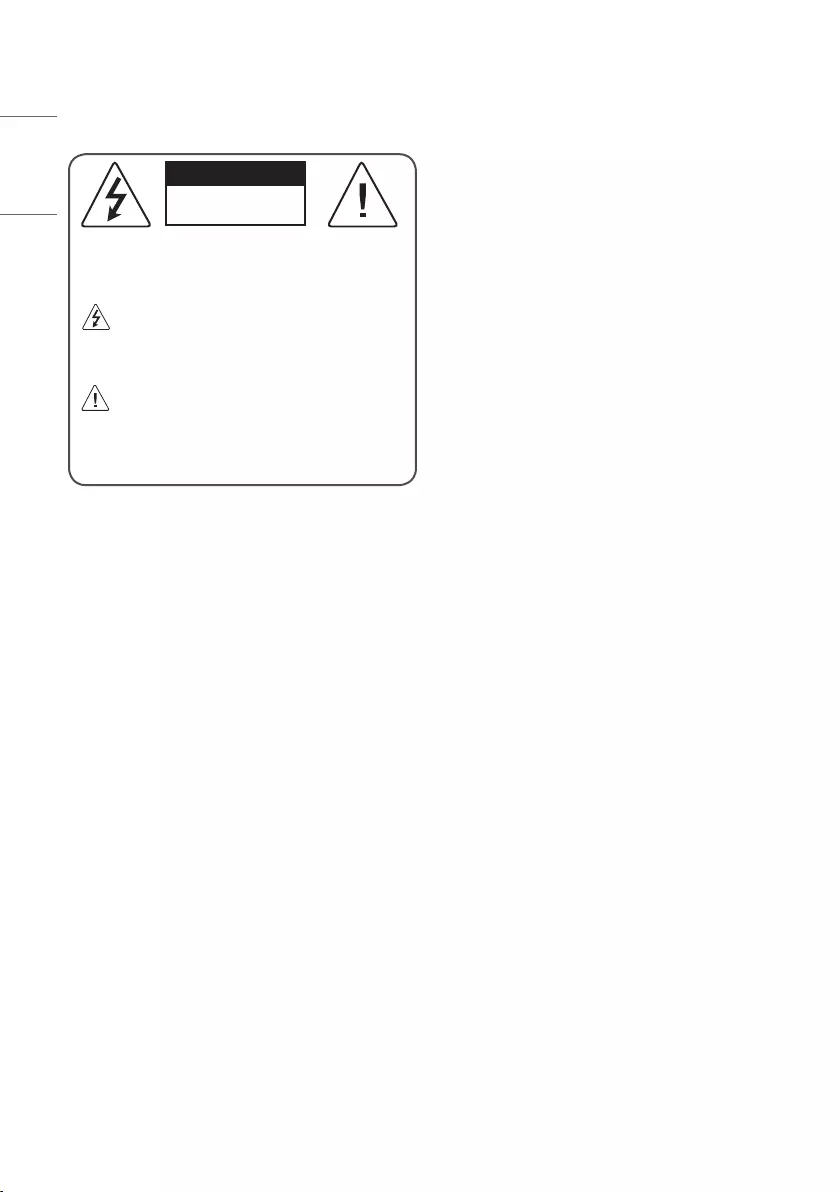
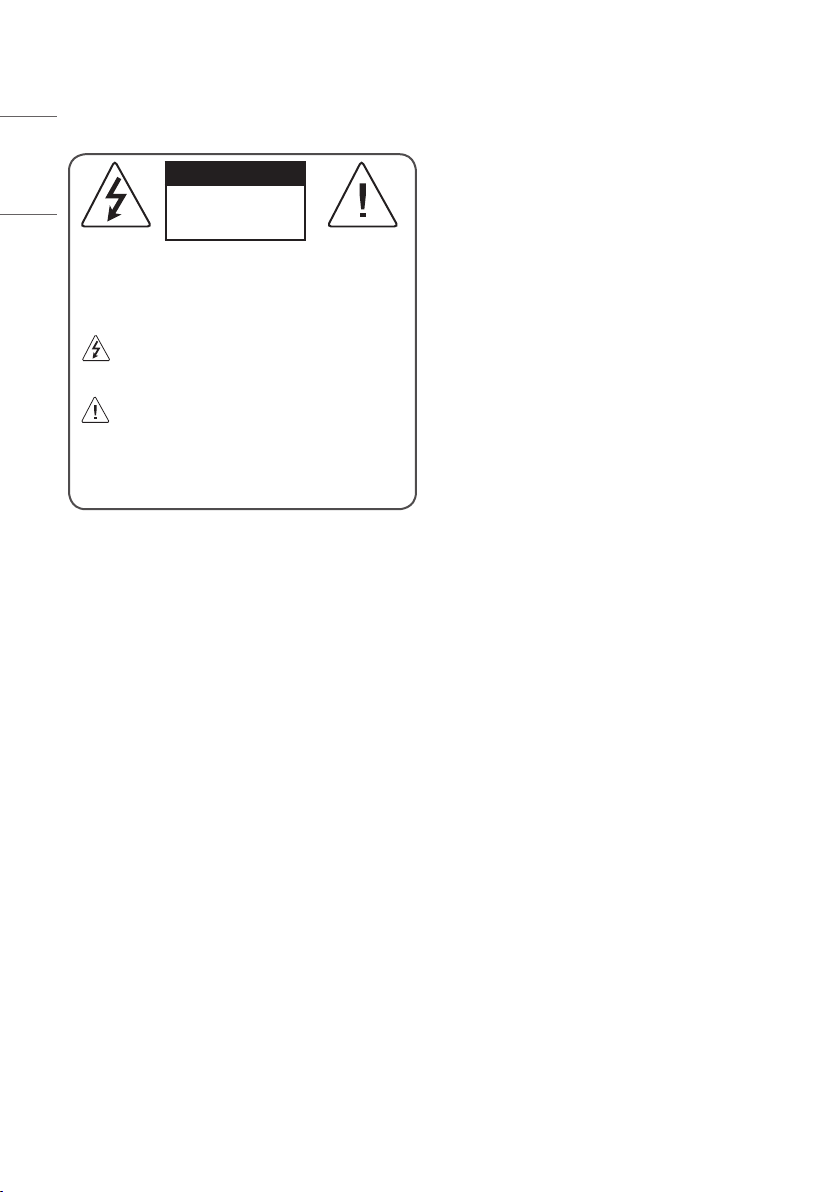
CAUTION
RISK OF ELECTRIC SHOCK
DO NOT OPEN
CAUTION : TO REDUCE THE RISK OF ELECTRIC SHOCK, DO NOT
REMOVE COVER (OR BACK). NO USER-SERVICEABLE PARTS INSIDE.
REFER TO QUALIFIED SERVICE PERSONNEL.
This symbol is intended to alert the user to the presence of
uninsulated “dangerous voltage” within the product’s
enclosure that may be of sufficient magnitude to constitute a risk
of electric shock to persons.
This symbol is intended to alert the user to the presence of
important operating and maintenance (servicing)
instructions in the literature accompanying the appliance.
WARNING : TO REDUCE THE RISK OF FIRE AND ELECTRIC SHOCK, DO
NOT EXPOSE THIS PRODUCT TO RAIN OR MOISTURE.
•TO PREVENT THE SPREAD OF FIRE, KEEP CANDLES OR OTHER ITEMS
WITH OPEN FLAMES AWAY FROM THIS PRODUCT AT ALL TIMES.
•Do not place the TV and/or remote control in the following
environments:
—Keep the product away from direct sunlight.
—An area with high humidity such as a bathroom
—Near any heat source such as stoves and other devices that
produce heat.
—Near kitchen counters or humidifiers where they can easily be
exposed to steam or oil.
—An area exposed to rain or wind.
—Do not expose to dripping or splashing and do not place objects
filled with liquids, such as vases, cups, etc. on or over the
apparatus (e.g., on shelves above the unit).
—Near flammable objects such as gasoline or candles, or expose
the TV to direct air conditioning.
—Do not install in excessively dusty places.
Otherwise, this may result in fire, electric shock, combustion/
explosion, malfunction or product deformation.
•Ventilation
—Install your TV where there is proper ventilation. Do not install in
a confined space such as a bookcase.
—Do not install the product on a carpet or cushion.
—Do not block or cover the product with cloth or other materials
while unit is plugged in.
•Take care not to touch the ventilation openings. When watching
the TV for a long period, the ventilation openings may become hot.
•Protect the power cord from physical or mechanical abuse, such as
being twisted, kinked, pinched, closed in a door, or walked upon.
Pay particular attention to plugs, wall outlets, and the point where
the cord exits the device.
•Do not move the TV whilst the Power cord is plugged in.
•Do not use a damaged or loosely fitting power cord.
•Be sure do grasp the plug when unplugging the power cord. Do not
pull on the power cord to unplug the TV.
•Do not connect too many devices to the same AC power outlet as
this could result in fire or electric shock.
•Disconnecting the Device from the Main Power
—The power plug is the disconnecting device. In case of an
emergency, the power plug must remain readily accessible.
•Do not let your children climb or cling onto the TV. Otherwise, the
TV may fall over, which may cause serious injury.
•Outdoor Antenna Grounding (Can differ by country):
—If an outdoor antenna is installed, follow the precautions below.
An outdoor antenna system should not be located in the vicinity
of overhead power lines or other electric light or power circuits,
or where it can come in contact with such power lines or circuits
as death or serious injury can occur.

ENGLISH_index
3
•Grounding (Except for devices which are not grounded.)
—TV with a three-prong grounded AC plug must be connected to
a three-prong grounded AC outlet. Ensure that you connect the
earth ground wire to prevent possible electric shock.
•Never touch this apparatus or antenna during a lightning storm.
You may be electrocuted.
•Make sure the power cord is connected securely to the TV and wall
socket if not secured damage to the Plug and socket may occur and
in extreme cases a fire may break out.
•Do not insert metallic or inflammable objects into the product. If a
foreign object is dropped into the product, unplug the power cord
and contact the customer service.
•Do not touch the end of the power cord while it is plugged in. You
may be electrocuted.
•If any of the following occur, unplug the product
immediately and contact your local customer service.
—The product has been damaged.
—If water or another substance enters the product (like an AC
adapter, power cord, or TV).
—If you smell smoke or other odors coming from the TV
—When lightning storms or when unused for long periods of time.
Even the TV is turned off by remote control or button, AC power
source is connected to the unit if not unplugged in.
•Do not use high voltage electrical equipment near the TV (e.g., a
bug zapper). This may result in product malfunction.
•Do not attempt to modify this product in any way without written
authorization from LG Electronics. Accidental fire or electric shock
can occur. Contact your local customer service for service or repair.
Unauthorized modification could void the user’s authority to
operate this product.
•Use only an authorized attachments / accessories approved by
LG Electronics. Otherwise, this may result in fire, electric shock,
malfunction, or product damage.
•Never disassemble the AC adapter or power cord. This may result in
fire or electric shock.
•Handle the adapter carefully to avoid dropping or striking it. An
impact could damage the adapter.
•To reduce the risk of fire or electrical shock, do not touch the TV
with wet hands. If the power cord prongs are wet or covered with
dust, dry the power plug completely or wipe dust off.
•Batteries
—Store the accessories (battery, etc.) in a safe location out of the
reach of children.
—Do not short circuit, disassemble, or allow the batteries to
overheat. Do not dispose of batteries in a fire. Batteries should
not be exposed to excessive heat.
—Caution : Risk of fire or explosion if the battery is replaced by an
incorrect type.
•Moving
—When moving, make sure the product is turned off, unplugged,
and all cables have been removed. It may take 2 or more people
to carry larger TVs. Do not press or put stress on the front panel
of the TV. Otherwise, this may result in product damage, fire
hazard or injury.
•Keep the packing anti-moisture material or vinyl packing out of the
reach of children.
•Do not allow an impact shock, any objects to fall into the product,
and do not drop anything onto the screen.
•Do not press strongly upon the panel with a hand or a sharp
object such as a nail, pencil, or pen, or make a scratch on it. It may
causedamage to screen.
•Cleaning
—When cleaning, unplug the power cord and wipe gently with a
soft/dry cloth. Do not spray water or other liquids directly on the
TV. Do not clean your TV with chemicals including glass cleaner,
any type of air freshener, insecticide, lubricants, wax (car,
industrial), abrasive, thinner, benzene, alcohol etc., which can
damage the product and/or its panel. Otherwise, this may result
in electric shock or product damage.
ENGLISH_index
4
Preparing
•If the TV is turned on for the first time after it was shipped from the
factory, initialization of the TV may take a few minutes.
•Image shown may differ from your TV.
•Your TV’s OSD (On Screen Display) may differ slightly from that
shown in this manual.
•The available menus and options may differ from the input source
or product model that you are using.
•New features may be added to this TV in the future.
•The device must be easily accessed to a location outlet near the
access. Some devices are not made by turning on / off button,
turning off the device and unplugging the power cord.
•The items supplied with your product may vary depending on the
model.
•Product specifications or contents of this manual may be changed
without prior notice due to upgrade of product functions.
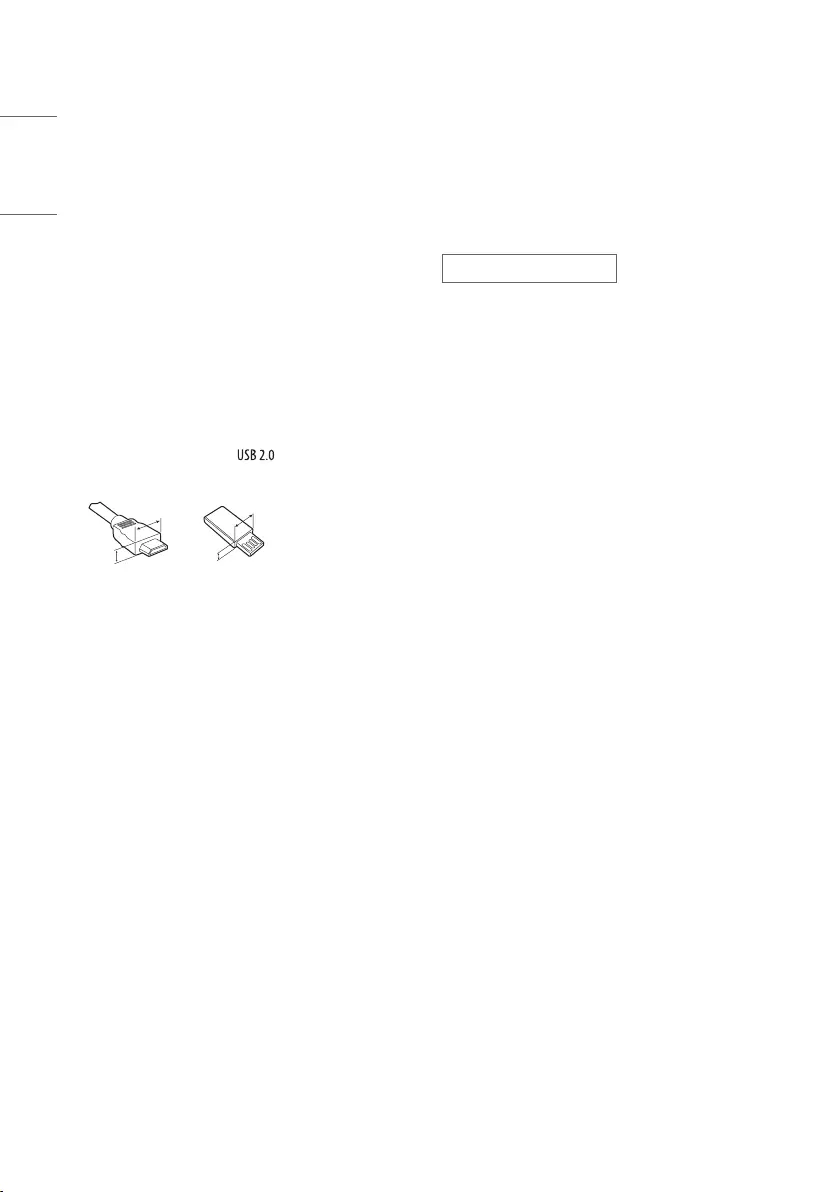
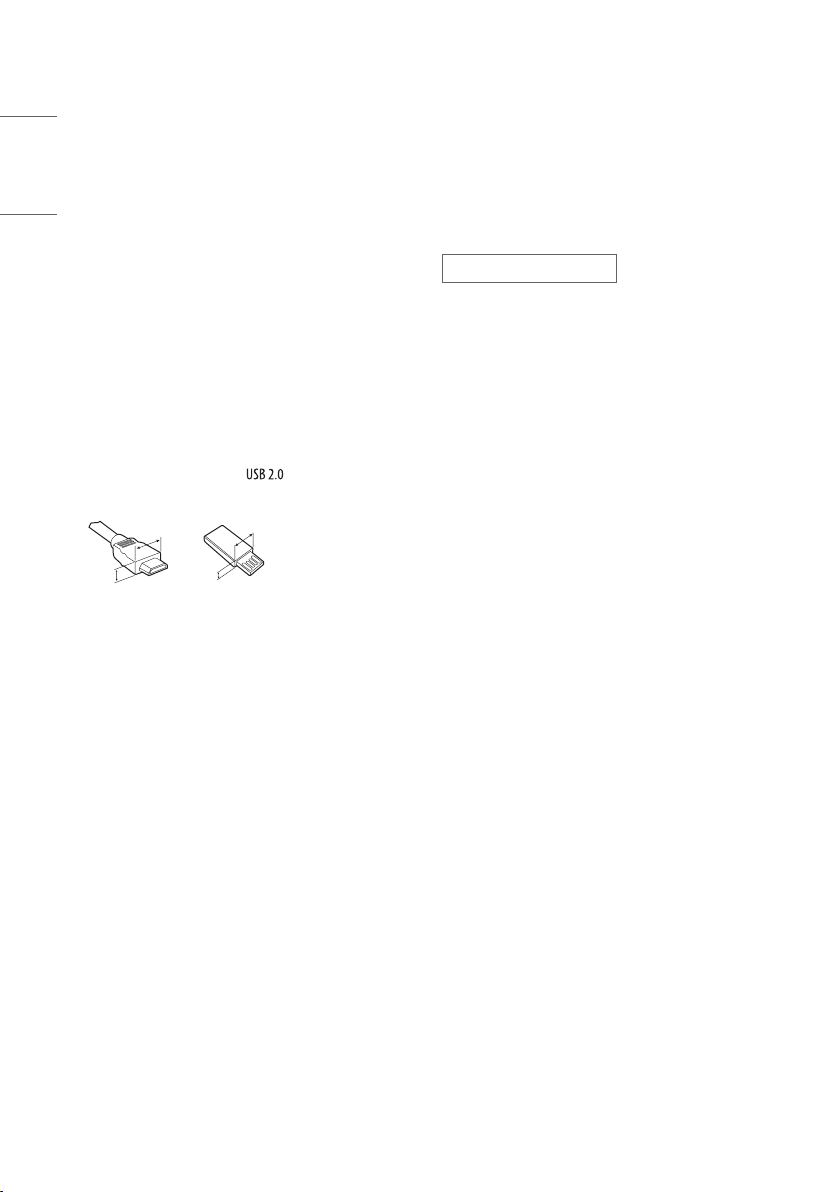
•For an optimal connection, HDMI cables and USB devices should
have bezels less than 10mm thick and 18mm width. Use an
extension cable that supports if the USB cable or USB
memory stick does not fit into your TV’s USB port.
A
B
A
B* A
10mm
* B
18mm
•Use a certified cable with the HDMI logo attached.
•If you do not use a certified HDMI cable, the screen may not display
or a connection error may occur.
•Recommended HDMI Cable Types
—Ultra High Speed HDMI®/™ cable (3 m or less)
Separate Purchase
Separate purchase items can be changed or modified for quality
improvement without any notification. Contact your dealer to buy these
items. These devices only work with certain models.
The model name or design may be changed depending on the upgrade
of product functions, manufacturer’s circumstances or policies.
Magic Remote Control
MR20GA
Check whether your TV model supports Bluetooth in the Wireless
Module Specification to verify whether it can be used with the Magic
Remote.
ENGLISH_index
5
Wall Mounting Bracket
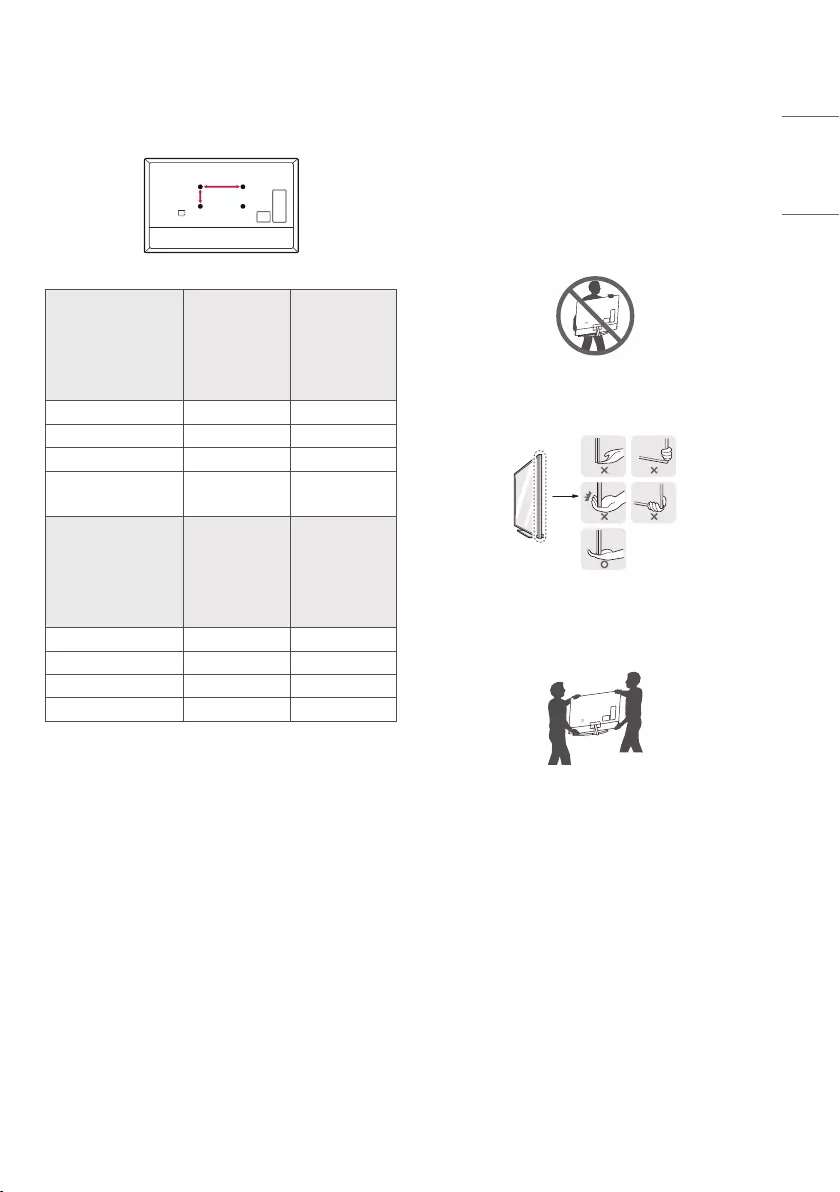
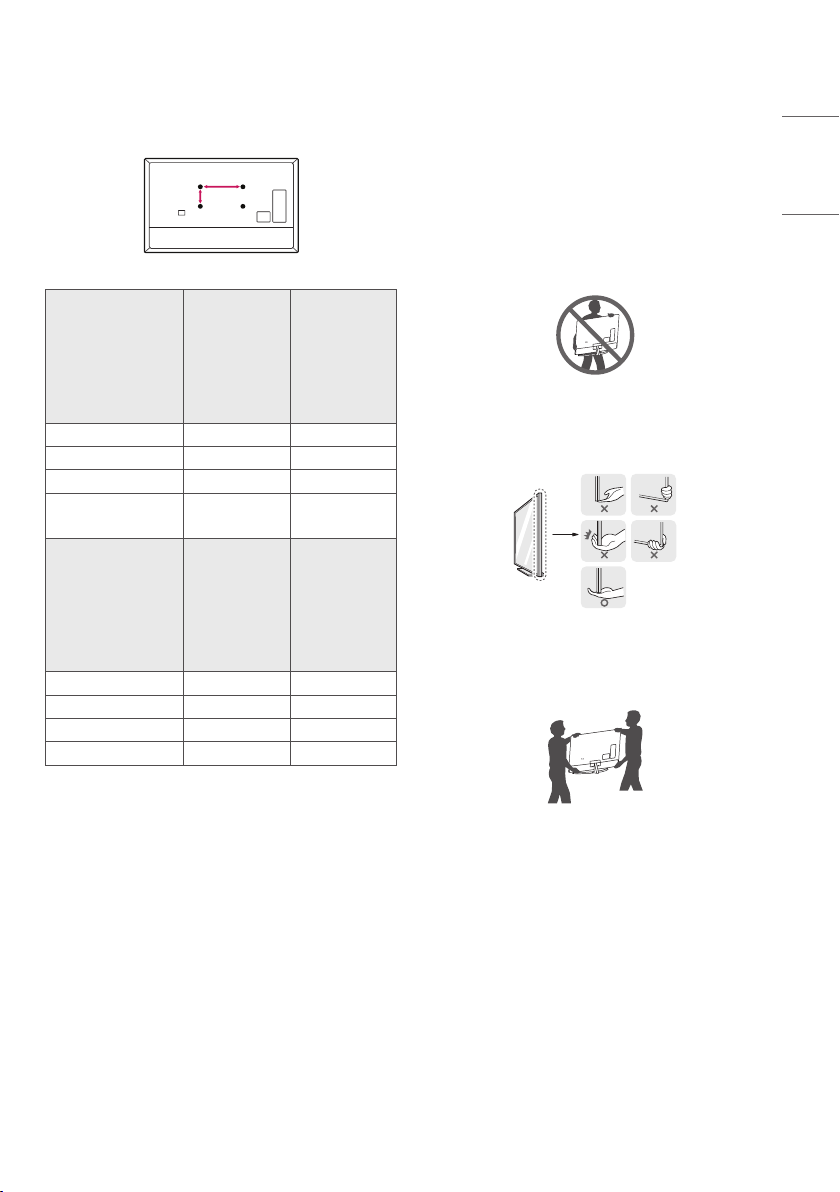
Make sure to use screws and wall mount bracket that meet the VESA
standard. Standard dimensions for the wall mount kits are described in
the following table.
Model
49NANO80*
49NANO81*
49NANO86*
55NANO80*
55NANO81*
55NANO86*
55NANO90*
55NANO91*
VESA (A x B) (mm) 200 x 200 300 x 300
Standard screw M6 M6
Number of screws 4 4
Wall mount bracket LSW240B
MSW240
OLW480B
MSW240
Model
65NANO80*
65NANO81*
65NANO86*
65NANO90*
65NANO91*
75/86NANO90*
75/86NANO91*
VESA (A x B) (mm) 300 x 300 600 x 400
Standard screw M6 M8
Number of screws 4 4
Wall mount bracket OLW480B LSW640B
Lifting and moving the TV
Please note the following advice to prevent the TV from being scratched
or damaged and for safe transportation regardless of its type and size.
•It is recommended to move the TV in the box or packing material
that the TV originally came in.
•Before moving or lifting the TV, disconnect the power cord and all
cables.
•When holding the TV, the screen should face away from you to
avoid damage.
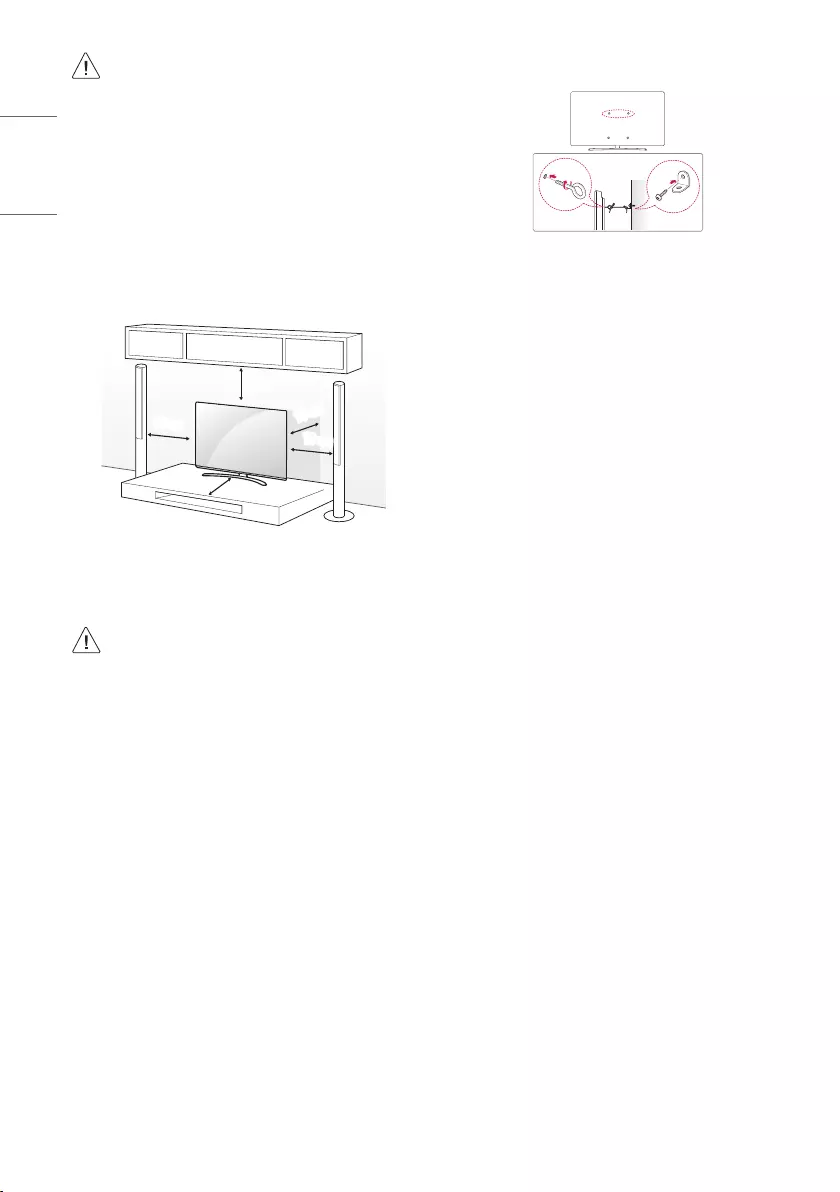
•Hold the top and bottom of the TV frame firmly. Make sure not to
hold the transparent part, speaker, or speaker grill area.
•When transporting a large TV, there should be at least 2 people.
•When transporting the TV by hand, hold the TV as shown in the
following illustration.
•When transporting the TV, do not expose the TV to jolts or excessive
vibration.
•When transporting the TV, keep the TV upright, never turn the TV
on its side or tilt towards the left or right.
•Do not apply excessive pressure to cause flexing / bending of frame
chassis as it may damage screen.
•When handling the TV, be careful not to damage the protruding
buttons.
ENGLISH_index
6
•Avoid touching the screen at all times, as this may result in
damage to the screen.
•When attaching the stand to the TV set, place the screen
facing down on a cushioned table or flat surface to protect
the screen from scratches.
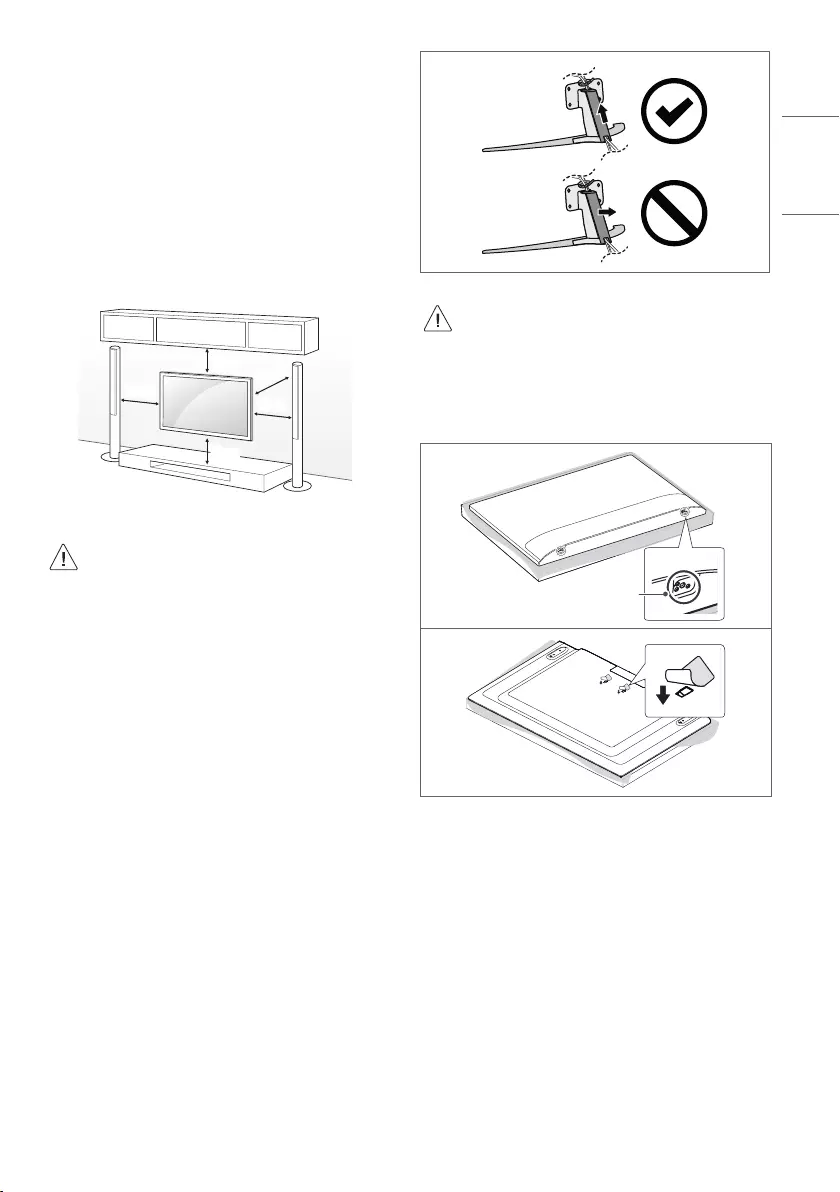
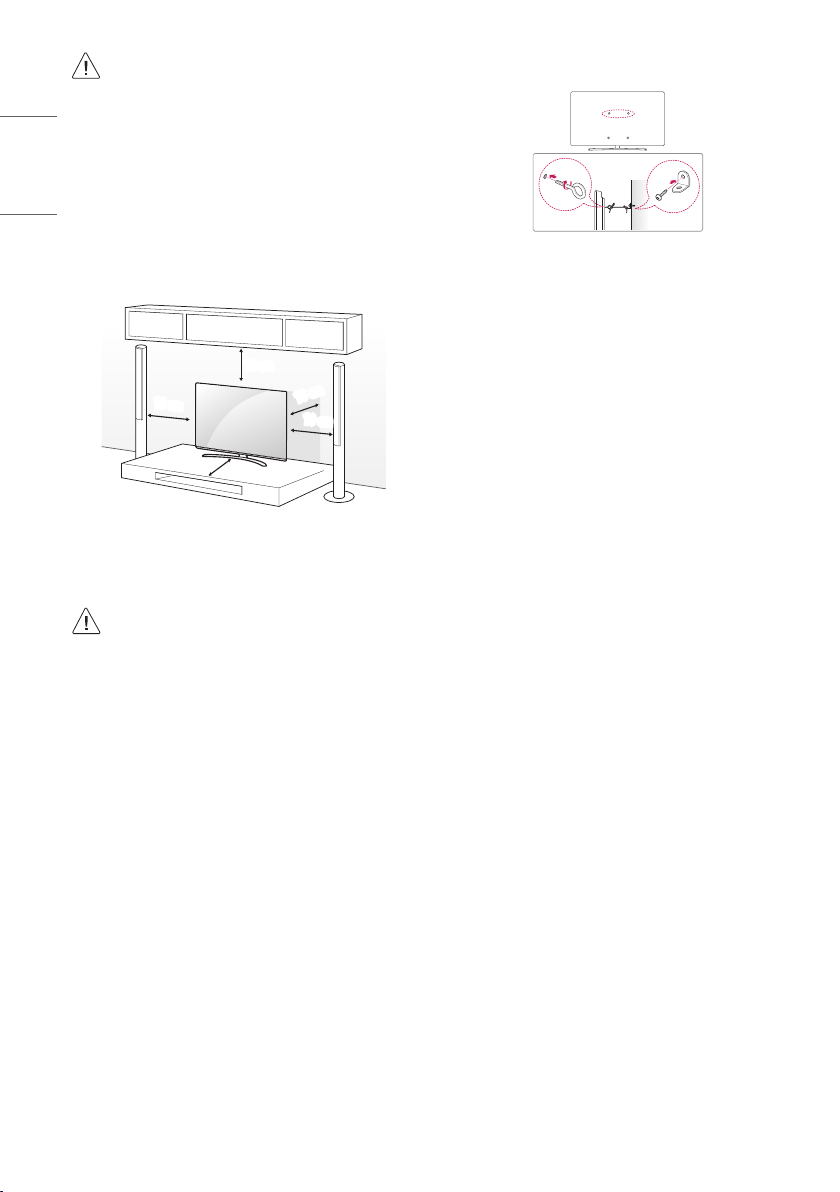
Mounting on a Table
1 Lift and tilt the TV into its upright position on a table.
• Leave a 10cm (minimum) space from the wall for proper
ventilation.
10cm
10cm
10cm
10cm
10cm
(Depending on model)
2 Connect the power cord to a wall outlet.
•Do not apply foreign substances (oils, lubricants, etc.) to
the screw parts when assembling the product. (Doing so
may damage the product.)
•If you install the TV on a stand, you need to take actions
to prevent the product from overturning. Otherwise, the
product may fall over, which may cause injury.
•Do not use any unapproved items to ensure the safety and
product life span.
•Any damage or injuries caused by using unapproved items
are not covered by the warranty.
•Make sure that the screws are inserted correctly and
fastened securely. (If they are not fastened securely
enough, the TV may tilt forward after being installed.)
Do not use too much force and over tighten the screws;
otherwise screw may be damaged and not tighten
correctly.
Securing TV to the Wall
(Depending on model)
1 Insert and tighten the eye-bolts, or TV brackets and bolts on the
back of the TV.
• If there are bolts inserted at the eye-bolts position, remove the
bolts first.
2 Mount the wall brackets with the bolts to the wall. Match the
location of the wall bracket and the eye-bolts on the rear of the TV.
3 Connect the eye-bolts and wall brackets tightly with a sturdy rope.
Make sure to keep the rope horizontal with the flat surface.
•Use a platform or cabinet that is strong and large enough to
support the TV securely.
•Brackets, bolts and ropes are not provided. You can obtain
additional accessories from your local dealer.
ENGLISH_index
7
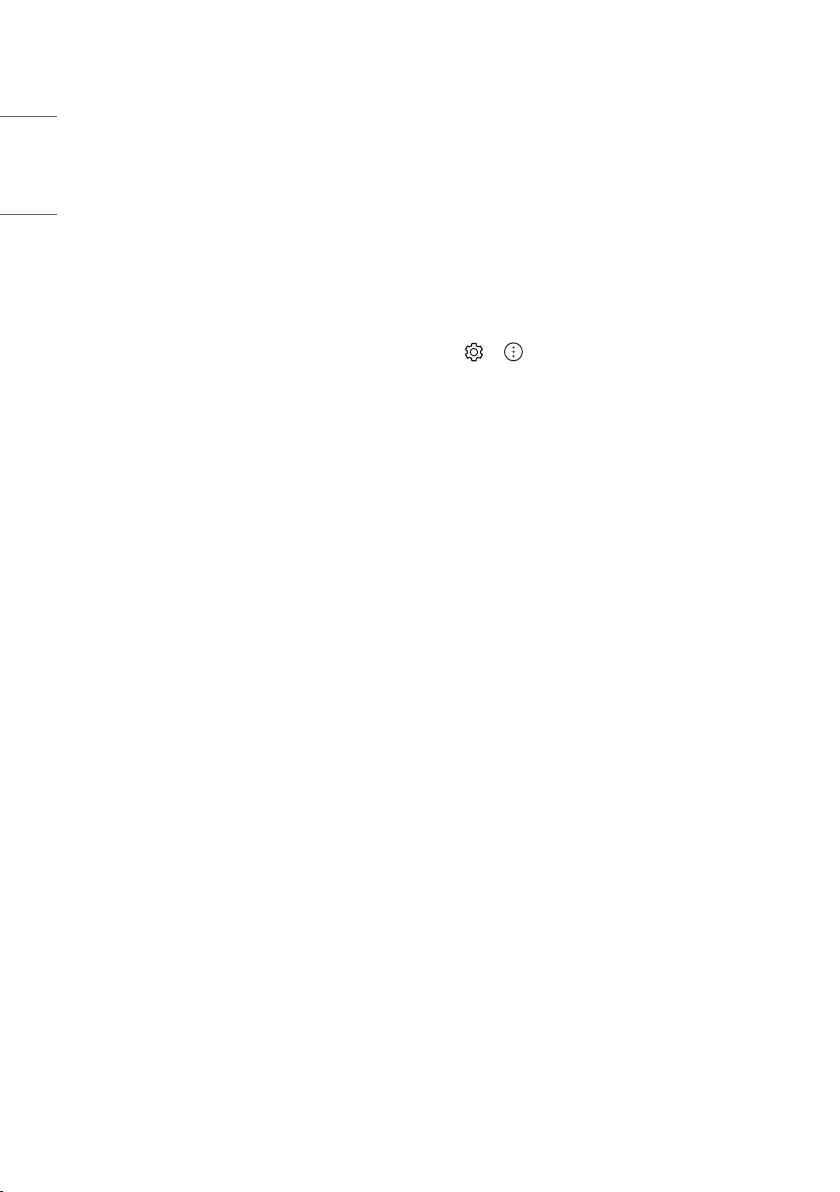
Mounting to the Wall
Attach an optional wall mount bracket at the rear of the TV carefully
and install the wall mount bracket on a solid wall perpendicular to
the floor. When you attach the TV to other building materials, please
contact qualified personnel. LG recommends that wall mounting be
performed by a qualified professional installer. We recommend the use
of LG’s wall mount bracket. LG’s wall mount bracket is easy to move with
cables connected. When you do not use LG’s wall mount bracket, please
use a wall mount bracket where the device is adequately secured to the
wall with enough space to allow connectivity to external devices. It is
advised to connect all the cables before installing fixed wall mounts.
10cm
10cm
10cm
10cm
10cm
(Depending on model)
•Remove the stand before installing the TV on a wall mount
by performing the stand attachment in reverse.
•For more information of screws and wall mount bracket,
refer to the Separate Purchase.
•If you intend to mount the product to a wall, attach VESA
standard mounting interface (optional parts) to the back
of the product. When you install the set to use the wall
mounting bracket (optional parts), fix it carefully so as
not to drop.
•When mounting a TV on the wall, make sure not to install
the TV by hanging the power and signal cables on the back
of the TV.
•Do not install this product on a wall if it could be exposed
to oil or oil mist. This may damage the product and cause
it to fall.
(Depending on model)
•Do not use a sharp object when you detached the cable
cover. This could damage the cable or the cabinet. It may
also cause personal harm. (Depending on model)
•When installing the wall mounting bracket, it is recommended to
cover the stand hole using tape, in order to prevent the influx of
dust and insects. (Depending on model)
Stand hole
ENGLISH_index
8
Connections
Connect various external devices to the TV and switch input modes to
select an external device. For more information of external device’s
connection, refer to the manual provided with each device.
Antenna/Cable
Connect the TV to a wall antenna socket with an RF cable (75 Ω).
•Use a signal splitter to use more than 2 TVs.
•If the image quality is poor, install a signal amplifier properly to
improve the image quality.
•If the image quality is poor with an antenna connected, try to
realign the antenna in the correct direction.
•An antenna cable and converter are not supplied.
•For a location that is not supported with ULTRA HD broadcasting,
this TV cannot receive ULTRA HD broadcasts directly.
Satellite dish
Connect the TV to a satellite dish to a satellite socket with a satellite RF
cable (75 Ω). (Depending on model)
CI module
View the encrypted (pay) services in digital TV mode. (Depending on
model)
•Check if the CI module is inserted into the PCMCIA card slot in the
right direction. If the module is not inserted properly, this can
cause damage to the TV and the PCMCIA card slot.
•If the TV does not display any video and audio when CI+ CAM is
connected, please contact to the Terrestrial/Cable/Satellite Service
Operator.
Other connections
Connect your TV to external devices. For the best picture and audio
quality, connect the external device and the TV with the HDMI cable.
Some separate cable is not provided.
HDMI
•When connecting the HDMI cable, the product and external devices
should be turned off and unplugged.
•Supported HDMI Audio format (Depending on model):
True HD (48 kHz),
Dolby Digital / Dolby Digital Plus (32 kHz / 44.1 kHz / 48 kHz),
PCM (32 kHz / 44.1 kHz / 48 kHz / 96 kHz / 192 kHz)
• → → [Picture] → [Additional Settings] → [HDMI Ultra
HD Deep Colour]
(Only NANO80*, NANO81*)
—On : Support 4K @ 50/60 Hz (4:4:4, 4:2:2, 4:2:0)
—Off : Support 4K @ 50/60 Hz (4:2:0)
(Except for NANO80*, NANO81*)
—On : Support 4K @ 50/60 Hz (4:4:4, 4:2:2, 4:2:0),
<3,4 port Only> 4K @ 100/120 Hz (4:4:4, 4:2:2, 4:2:0)
—Off : Support 4K @ 50/60 Hz (4:2:0)
If the device connected to Input Port also supports Ultra HD Deep
Colour, your picture may be clearer. However, if the device doesn’t
support it, it may not work properly. In that case, change the TV’s
[HDMI Ultra HD Deep Colour] setting to off.
USB
Some USB Hubs may not work. If a USB device connected using a USB
Hub is not detected, connect it to the USB port on the TV directly.
ENGLISH_index
9
External Devices
Available external devices are: Blu-ray player, HD receivers, DVD players,
VCRs, audio systems, USB storage devices, PC, gaming devices, and
other external devices.
•The external device connection may differ from the model.
•Connect external devices to the TV regardless of the order of the
TV port.
•If you record a TV program on a Blu-ray/DVD recorder or VCR, make
sure to connect the TV signal input cable to the TV through a DVD
recorder or VCR. For more information of recording, refer to the
manual provided with the connected device.
•Refer to the external equipment’s manual for operating
instructions.
•If you connect a gaming device to the TV, use the cable supplied
with the gaming device.
•In PC mode, there may be noise associated with the resolution,
vertical pattern, contrast or brightness. If noise is present, change
the PC output to another resolution, change the refresh rate to
another rate or adjust the brightness and contrast on the [Picture]
menu until the picture is clear.
•In PC mode, some resolution settings may not work properly
depending on the graphics card.
•If ULTRA HD content is played on your PC, video or audio may
become disrupted intermittently depending on your PC’s
performance. (Depending on model)
•When connecting via a wired LAN, it is recommended to use a CAT
7 cable. (Only when port is provided.)
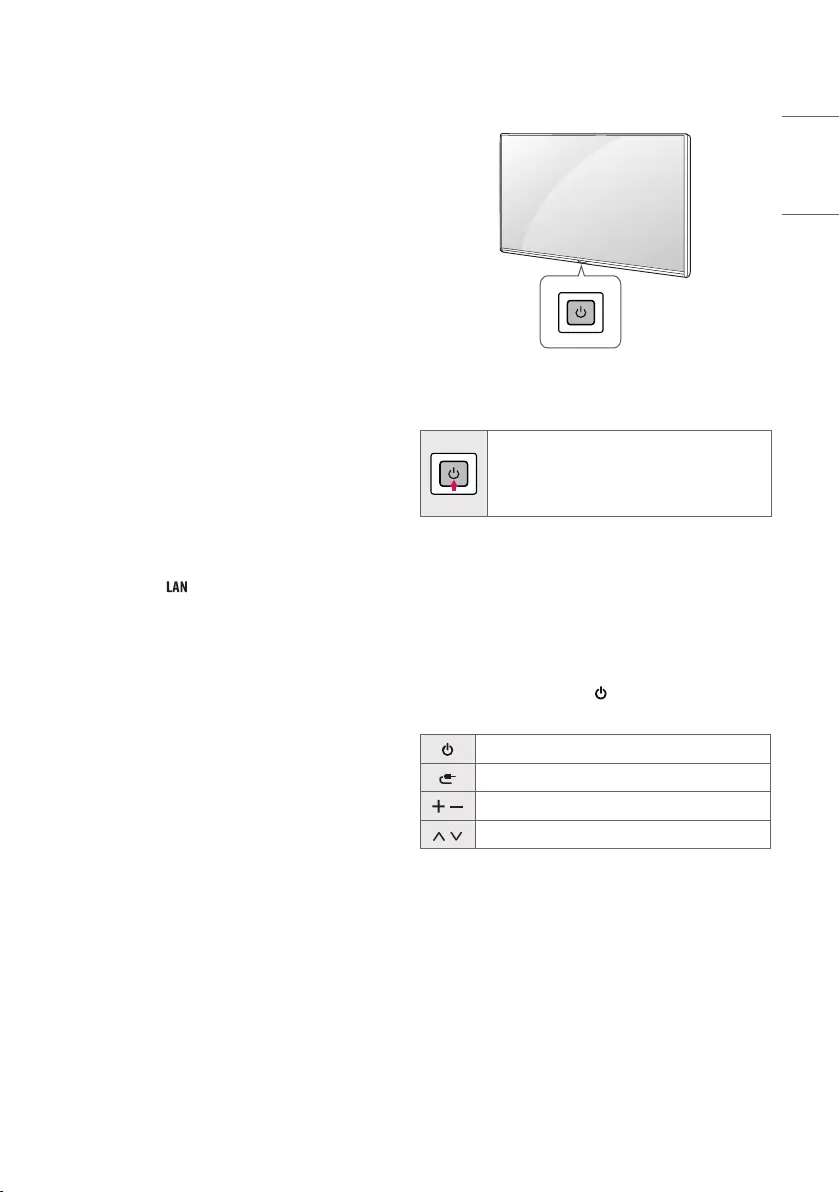
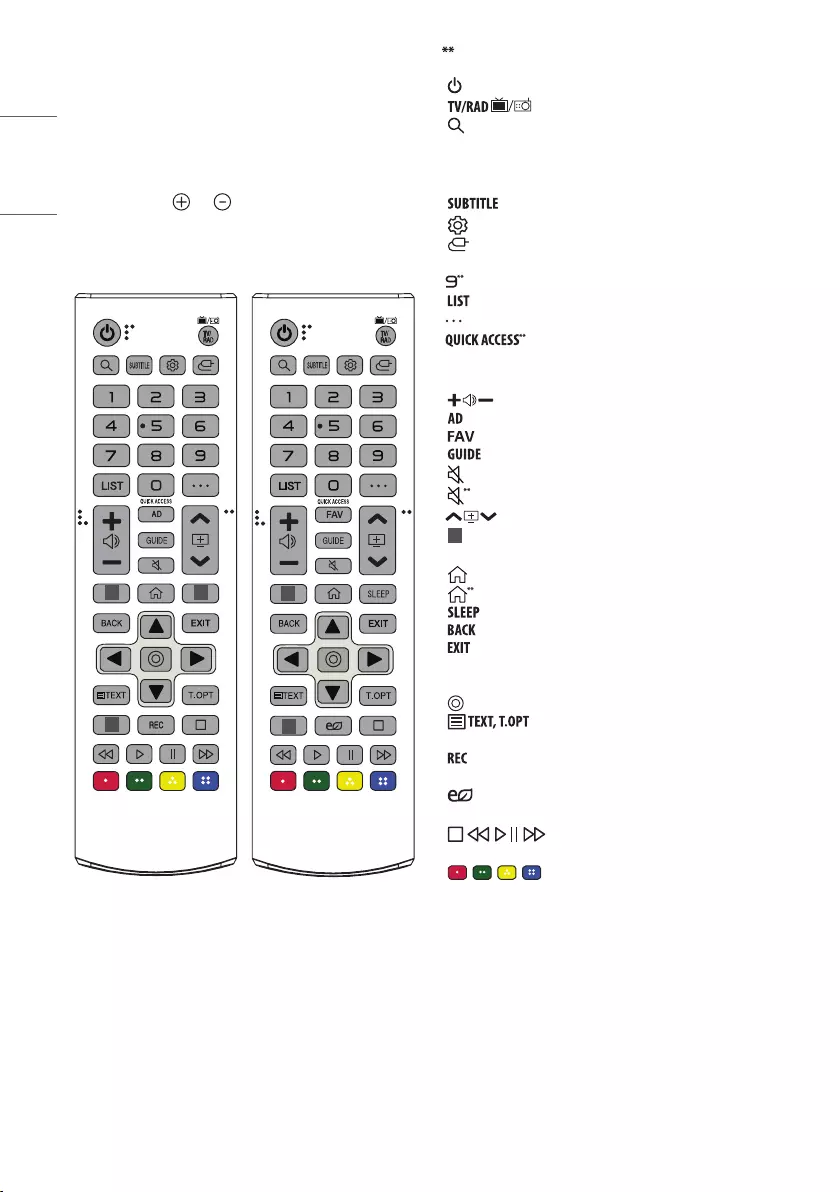
Using Button
You can simply operate the TV functions, using the button.
Basic functions
Power On (Press)
Power Off1 (Press and Hold)
Menu Control (Press2)
Menu Selection (Press and Hold3)
1 All running apps will close, and any recording in progress will stop.
(Depending on country)
2 You can access and adjust the menu by pressing the button when
TV is on.
3 You can use the function when you access menu control.
Adjusting the menu
When the TV is turned on, press the button one time. You can adjust
the Menu items using the button.
Turns the power off.
Changes the input source.
Adjusts the volume level.
Scrolls through the saved programmes.
ENGLISH_index
10
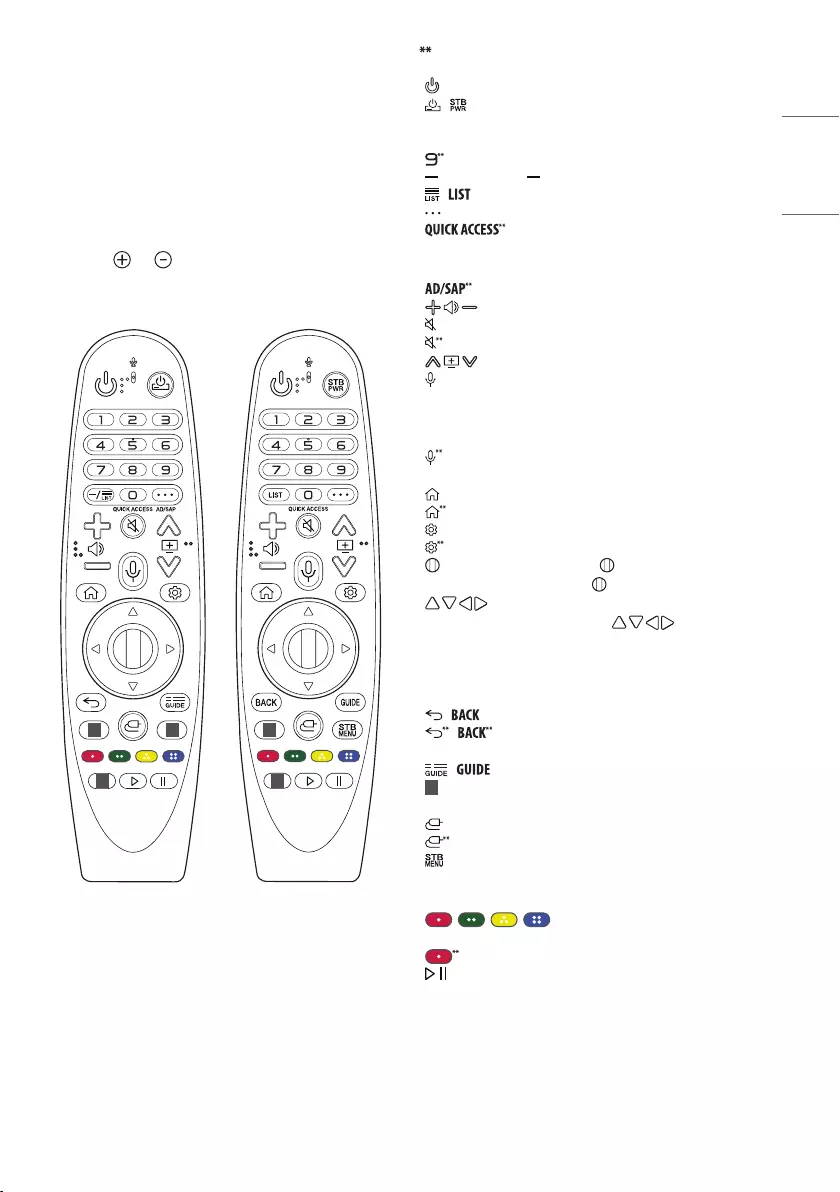
Using Remote Control
(Depending on model)
The descriptions in this manual are based on the buttons on the remote
control. Please read this manual carefully and use the TV correctly.
To replace batteries, open the battery cover, replace batteries (1.5
V AAA) matching the and ends to the label inside the
compartment, and close the battery cover.
Make sure to point the remote control toward the remote control sensor
on the TV.
1 1
1
1
1
(Some buttons and services may not be provided depending on models
or regions.)
To use the button, press and hold for more than 1 second.
(POWER) Turns the TV on or off.
Selects Radio, TV and DTV programme.
(SEARCH) Check for recommended content. (Some
recommended services may not be available in some countries.)
Search for content such as TV programmes, movies and other videos,
or perform a web search by entering text in the search bar.
Recalls your preferred subtitle in digital mode.
(Q. Settings) Accesses the Quick Settings.
(INPUT) Changes the input source.
Number buttons Enters numbers.
Accesses the [Quick Help].
Accesses the saved programmes list.
(MORE ACTIONS) Displays more remote control functions.
Edits QUICK ACCESS.
—QUICK ACCESS is a feature that allows you to enter a specified app
or Live TV directly by pressing and holding the number buttons.
Adjusts the volume level.
Audio descriptions function will be enabled.
Accesses your favorite channel list.
Shows programme guide.
(MUTE) Mutes all sounds.
(MUTE) Accesses the [Accessibility] menu.
Scrolls through the saved programmes.
1 Streaming Service buttons Connects to the Video Streaming
Service.
(HOME) Accesses Home menu.
(HOME) Shows the previous history.
Set the sleep timer.
Returns to the previous level.
Clears on-screen displays and returns to TV viewing.
Navigation buttons (up/down/left/right) Scrolls through menus
or options.
(OK) Selects menus or options and confirms your input.
(Teletext buttons) These buttons are used for
teletext.
Starts to record and displays record menu. (Only Time
MachineReady supported model)
(Energy Saving) Adjusts the brightness of the screen to
reduce energy.
(Control buttons) Control buttons for media
contents.
, , , These access special functions in some menus.
ENGLISH_index
11
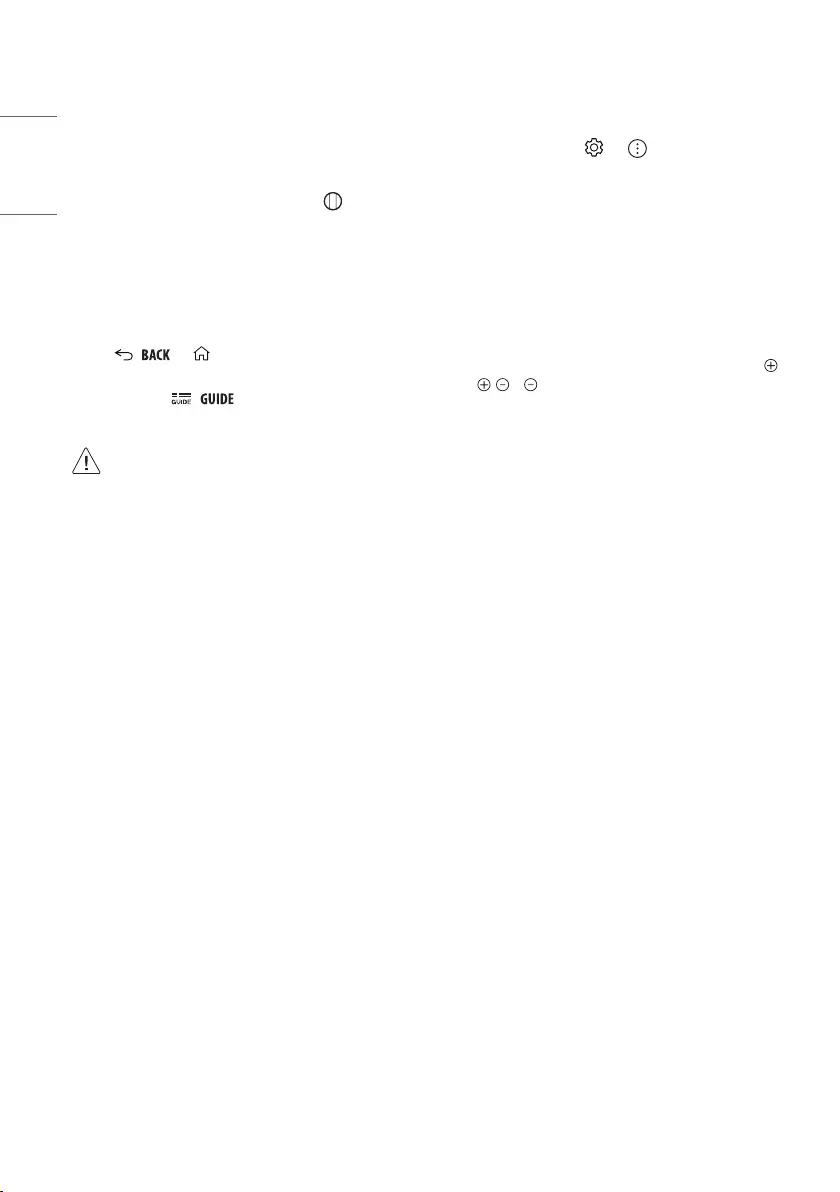
Using Magic Remote
Control
(Depending on model)
The descriptions in this manual are based on the buttons on the remote
control. Please read this manual carefully and use the TV correctly.
When the message [Magic Remote battery is low. Please change the
battery.] is displayed, replace the battery.
To replace batteries, open the battery cover, replace batteries (1.5VAA)
matching the and ends to the label inside the compartment,
and close the battery cover. Be sure to point the magic remote toward
the remote control sensor on the TV.
1
1
1
1
1
(Some buttons and services may not be provided depending on models
or regions.)
To use the button, press and hold for more than 1 second.
(POWER) Turns the TV on or off.
/ You can turn your set-top box on or off by adding the set-
top box to the universal remote control for your TV.
Number buttons Enters numbers.
Accesses the [Quick Help].
(DASH) Inserts a between numbers such as 2-1 and 2-2.
/ Accesses the saved programmes list.
(MORE ACTIONS) Displays more remote control functions.
Edits QUICK ACCESS
—QUICK ACCESS is a feature that allows you to enter a specified app
or Live TV directly by pressing and holding the number buttons.
Audio descriptions function will be enabled.
Adjusts the volume level.
(MUTE) Mutes all sounds.
(MUTE) Accesses the [Accessibility] menu.
Scrolls through the saved programmes.
(Voice recognition) Network connection is required to use the
voice recognition function.
Check for recommended content. (Some recommended services may
not be available in some countries.)
(Voice recognition) Speak while pressing and holding the
button to use the voice recognition feature.
(HOME) Accesses the Home menu.
(HOME) Shows the previous history.
(Q. Settings) Accesses the Quick Settings.
(Q. Settings) Displays the [All Settings] menu.
Wheel (OK) Press the center of button to select a menu. You
can change programmes by using button.
(up/down/left/right) Press the up, down, left or right
button to scroll the menu. If you press buttons while
the pointer is in use, the pointer will disappear from the screen and
Magic Remote will operate like a general remote control. To display
the pointer on the screen again, shake Magic Remote to the left and
right.
/ Returns to the previous level.
/ Clears on-screen displays and returns to last input
viewing.
/ Shows programme guide.
1 Streaming Service buttons Connects to the Video Streaming
Service.
(INPUT) Changes the input source.
(INPUT) Accesses the [Home Dashboard].
Displays the set-top box Home menu.
—When you are not watching via a set-top box: the display changes
to the set-top box screen.
, , , These access special functions in some
menus.
Runs the record function.
, (Control buttons) Controls media contents.
ENGLISH_index
12
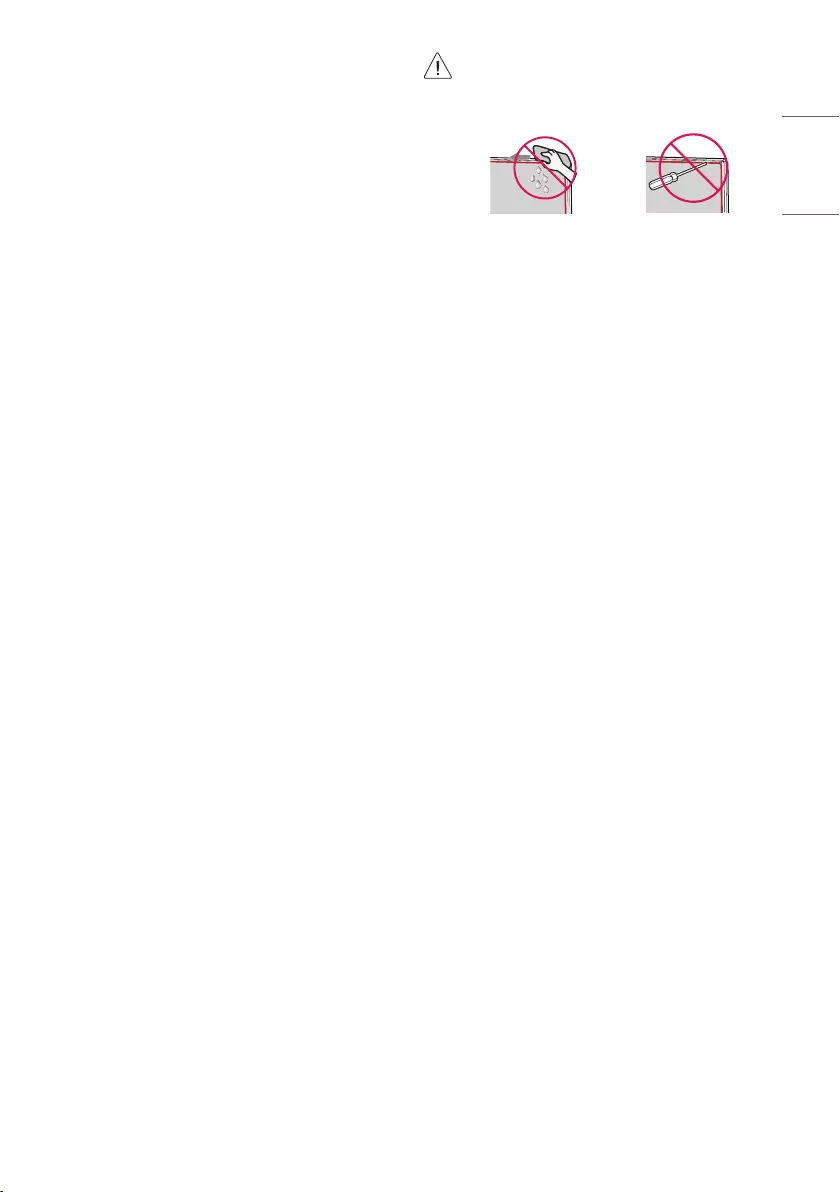
Registering Magic Remote Control
How to register the Magic Remote Control
To use the Magic Remote, first pair it with your TV.
1 Put batteries into the Magic Remote and turn the TV on.
2 Point the Magic Remote at your TV and press the Wheel (OK)
on the remote control.
* If the TV fails to register the Magic Remote, try again after turning the
TV off and back on.
How to deregister the Magic Remote
Control
Press the / and (HOME) buttons at the same time, for five
seconds, to unpair the Magic Remote with your TV.
* Press and hold the / button for more than 5 seconds to
disconnect and re-register the Magic Remote at the same time.
•Do not mix new batteries with old batteries. This may
cause the batteries to overheat and leak.
•Failure to match the correct polarities of the battery may
cause the battery to burst or leak, resulting in fire, personal
injury, or ambient pollution.
•This apparatus uses batteries. In your community there
might be regulations that require you to dispose of these
batteries properly due to environmental considerations.
Please contact your local authorities for disposal or
recycling information.
•Batteries inside or inside the product shall not be exposed
to excessive heat such as sunshine, fire or the like.
User Guide
For more information about this TV, read the USER GUIDE embedded in
the product.
•To open the USER GUIDE → → [Support] → [User
Guide]
Troubleshooting
Cannot control the TV with the remote control.
•Check the remote control sensor on the product and try again.
•Check if there is any obstacle between the product and the remote
control.
•Check if the batteries are still working and properly installed (
to , to ).
No image display and no sound is produced.
•Check if the product is turned on.
•Check if the power cord is connected to a wall outlet.
•Check if there is a problem in the wall outlet by connecting other
products.
The TV turns off suddenly.
•Check the power control settings. The power supply may be
interrupted.
•Check if the auto-off function is activated on the settings related
time.
•If there is no signal while the TV is on, the TV will turn off
automatically after 15 minutes of inactivity.
When connecting to the PC (HDMI), no signal is detected.
•Turn the TV off/on using the remote control.
•Reconnect the HDMI cable.
•Restart the PC with the TV on.
ENGLISH_index
13
Abnormal Display
•If the product feels cold to the touch, there may be a small “flicker”
when it is turned on. This is normal, there is nothing wrong with
product.
•This panel is an advanced product that contains millions of pixels.
You may see tiny black dots and/or brightly coloured dots (red, blue
or green) at a size of 1 ppm on the panel. This does not indicate a
malfunction and does not affect the performance and reliability of
the product. This phenomenon also occurs in third-party products
and is not subject to exchange or refund.
•You may find different brightness and colour of the panel
depending on your viewing position(left/right/top/down).
This phenomenon occurs due to the characteristic of the panel.
It is not related with the product performance, and it is not
malfunction.
•Displaying a still image for a prolonged period of time may cause
image sticking. Avoid displaying a fixed image on the TV screen for
a long period of time.
Generated Sound
•“Cracking” noise: A cracking noise that occurs when watching or
turning off the TV is generated by plastic thermal contraction due
to temperature and humidity. This noise is common for products
where thermal deformation is required.
•Electrical circuit humming/panel buzzing: A low level noise is
generated from a high-speed switching circuit, which supplies a
large amount of current to operate a product. It varies depending
on the product. This generated sound does not affect the
performance and reliability of the product.
•When cleaning the product, be careful not to allow any
liquid or foreign objects to enter the gap between the
upper, left or right side of the panel and the guide panel.
(Depending on model)
•Make sure to wring any excess water or cleaner from the
cloth.
•Do not spray water or cleaner directly onto the TV screen.
•Make sure to spray just enough of water or cleaner onto a
dry cloth to wipe the screen.
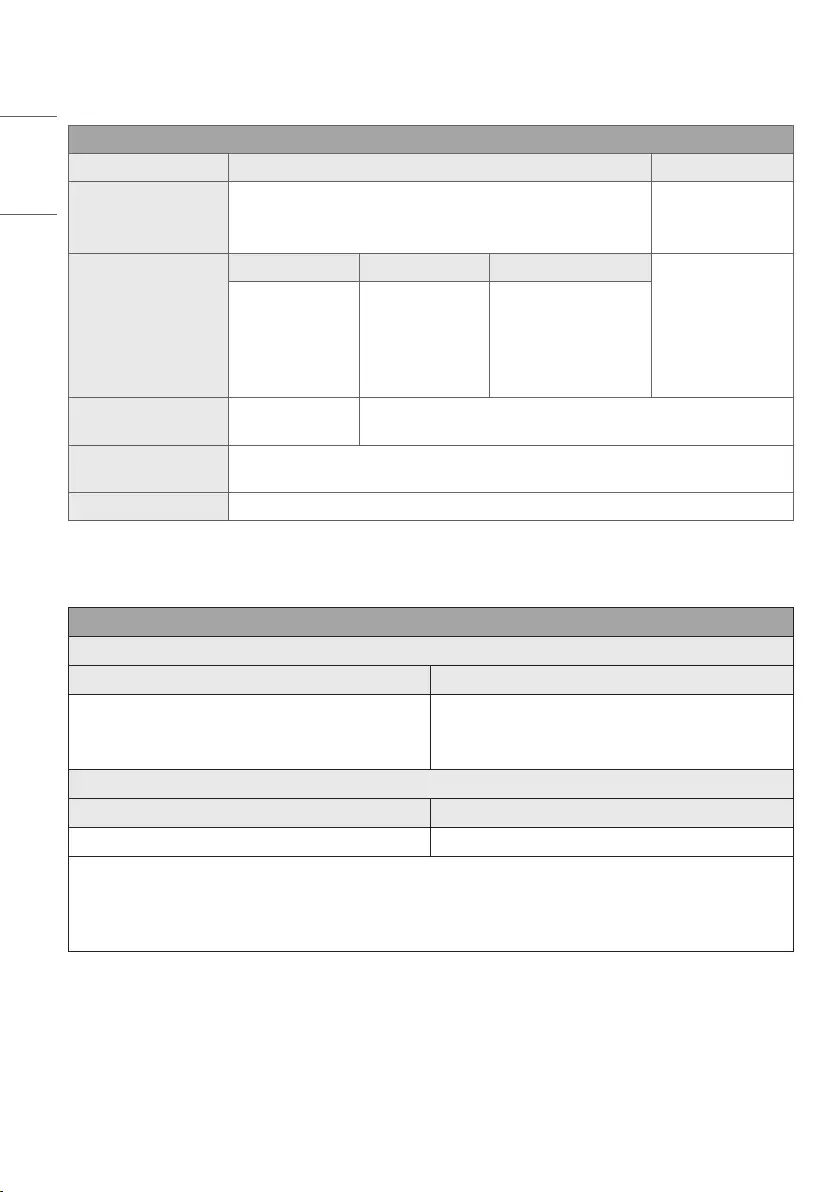
ENGLISH_index
14
Specifications
(Depending on country)
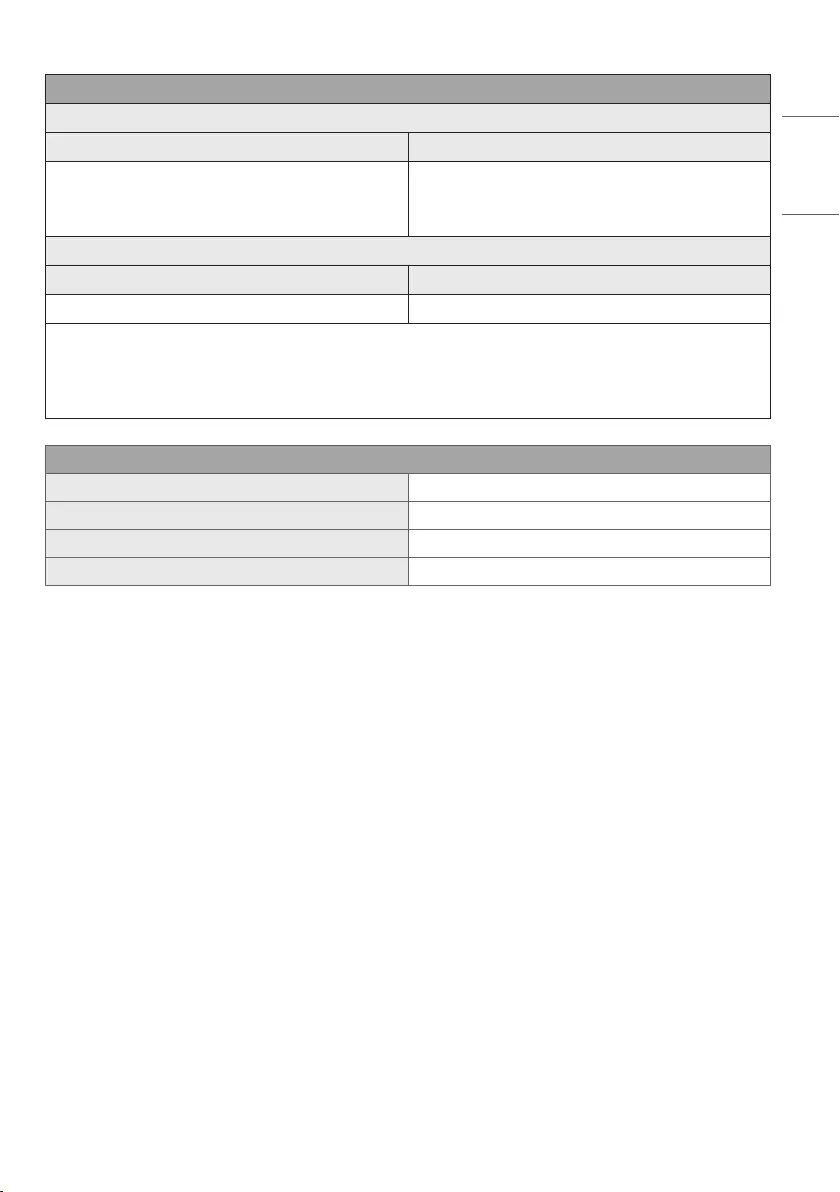
Broadcasting Specifications
Digital TV Analogue TV
Television system
DVB-S/S2
DVB-T/T2
DVB-C
PAL/SECAM B/G/I/D/K
SECAM L
Channel coverage
(Band)
DVB-S/S21DVB-C1DVB-T/T21
46 ~ 862 MHz
950~2150 MHz 46 ~ 890 MHz
VHF III : 174 ~ 230 MHz
UHF IV : 470 ~ 606 MHz
UHF V : 606 ~ 862 MHz
S Band II : 230 ~ 300 MHz
S Band III : 300 ~ 470 MHz
Maximum number of
storable programmes 6000 3000
External antenna
impedance 75 Ω
CI Module (W x H x D) 100.0mm x 55.0mm x 5.0mm
1 Only DVB-T2/C/S2 support model only.
(Only NANO80*, NANO81*)
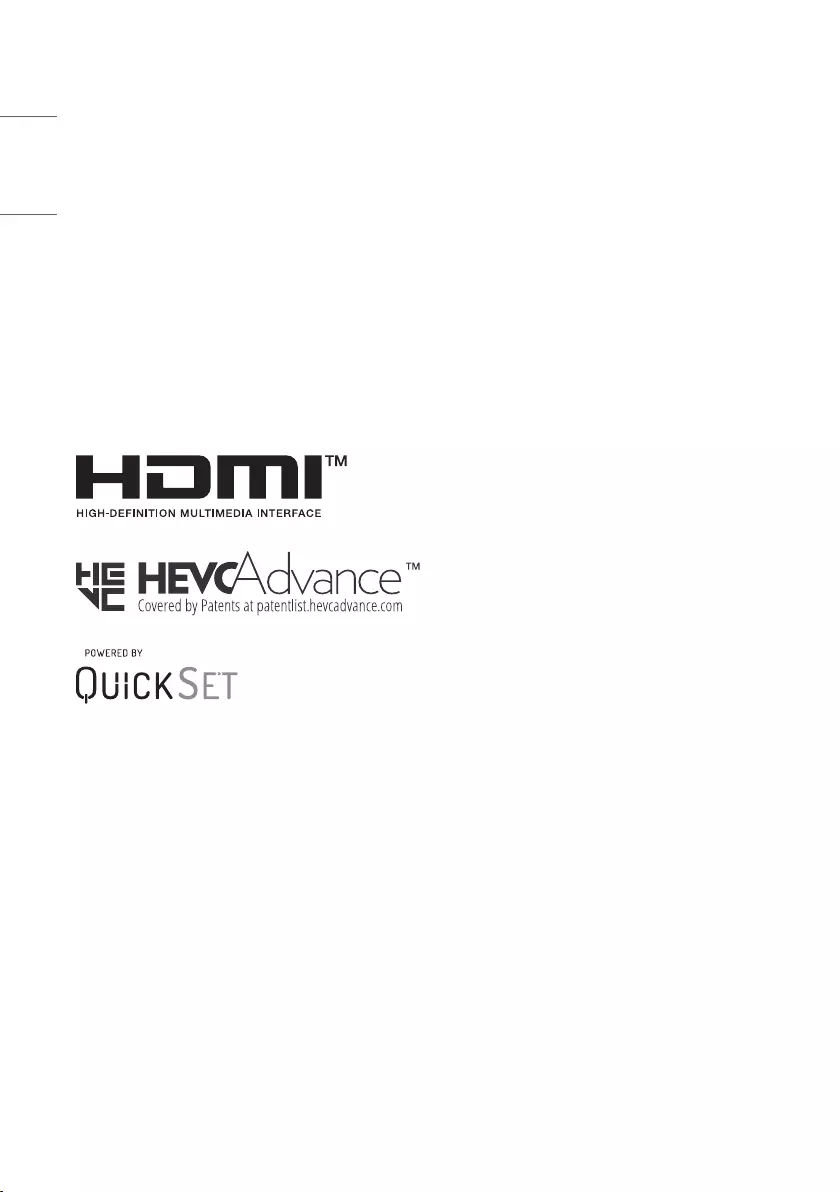
Wireless module(LGSBWAC02)Specifications
Wireless LAN (IEEE 802.11a/b/g/n/ac)
Frequency range Output Power (Max.)
2400 to 2483.5 MHz
5150 to 5725 MHz
5725 to 5850 MHz
17 dBm
19 dBm
10.5 dBm
Bluetooth
Frequency range Output power(Max.)
2400 to 2483.5 MHz 8.5 dBm
As band channels can vary per country, the user cannot change or adjust the operating frequency. This product is configured for the regional
frequency table.
For consideration of the user, this device should be installed and operated with a minimum distance of 20cm between the device and the body.
* IEEE 802.11ac is not available in all countries.
ENGLISH_index
15
(Except for NANO80*, NANO81*)
Wireless module(LGSBWAC92)Specifications
Wireless LAN (IEEE 802.11a/b/g/n/ac)
Frequency range Output Power (Max.)
2400 to 2483.5 MHz
5150 to 5725 MHz
5725 to 5850 MHz
18 dBm
18 dBm
12 dBm
Bluetooth
Frequency range Output power(Max.)
2400 to 2483.5 MHz 8 dBm
As band channels can vary per country, the user cannot change or adjust the operating frequency. This product is configured for the regional
frequency table.
For consideration of the user, this device should be installed and operated with a minimum distance of 20cm between the device and the body.
* IEEE 802.11ac is not available in all countries.
Environment condition
Operating Temperature 0°C to 40°C
Operating Humidity Less than 80%
Storage Temperature -20°C to 60°C
Storage Humidity Less than 85%
•For information of the power supply and power consumption, refer to the label attached to the product.
—The typical power consumption is measured in accordance with IEC 62087 or each country’s energy regulations.
* On some models, the label is inside the external device connection terminal cover.
* Depending on the model or country, the typical power consumption may not be on label.
ENGLISH_index
16
Open Source Software
Notice Information
To obtain the source code under GPL, LGPL, MPL, and other open
source licenses, that is contained in this product, please visit
http://
opensource.lge.com
.
In addition to the source code, all referred license terms, warranty
disclaimers and copyright notices are available for download.
LG Electronics will also provide open source code to you on CD-ROM
for a charge covering the cost of performing such distribution (such
as the cost of media, shipping, and handling) upon email request to
opensource@lge.com
.
This offer is valid for a period of three years after our last shipment of
this product. This offer is valid to anyone in receipt of this information.
Licenses
(Magic Remote supported models only)
The model and serial number of the product are located
on the back and on one side of the product. Record them
below in case you ever need service.
Model
Serial No.
Перейти к контенту

Русские электронные инструкции по эксплуатации
Постоянно обновляемый большой каталог документации по эксплуатации и использованию современных устройств и оборудования на русском языке. Бесплатное скачивание файлов.
Поиск:
Главная
♥ В закладки
Просмотр инструкции в pdf
Инструкция по эксплуатации телевизора Smart TV LG NanoCell 49NANO866NA.
Скачать инструкцию к телевизору Smart TV LG NanoCell 49NANO866NA (7,76 МБ)
Инструкции по эксплуатации телевизоров Smart TV LG
« Инструкция к телевизору Smart TV Hi 65USY151X
» Инструкция к телевизору Smart TV Telefunken TF-LED55S03T2SU
Вам также может быть интересно

Инструкция к стиральной машине LG FH495BDS6

Инструкция к телевизору LG 24LB457U

Инструкция к холодильнику LG GC-M247CABV

Инструкция к телевизору Smart TV LG NanoCell 65NANO956NA

Инструкция к микроволновой печи LG MS2595DIS

Инструкция к стиральной машине LG F2J3TS2W

Инструкция к холодильнику LG GA-B499TGKZ

Инструкция к телевизору LG 55UN68006LA
Добавить комментарий
Имя *
Email *
Сайт
Комментарий
Сохранить моё имя, email и адрес сайта в этом браузере для последующих моих комментариев.
- Добавить инструкцию
- Заказать инструкцию
- Политика конфиденциальности
HANDBOK
Säkerhet och referens
LED TV*
* LG LED TV gäller LCD-skärm med LED bakgrundsbelysning.
Läs den här handboken noggrant innan du använder produkten och spara den
för framtida bruk.
www.lg.com
Copyright © 2020 LG Electronics Inc. Med ensamrätt.
Varning!
Säkerhetsföreskrifter
SVENSKA
VARNING
RISK FÖR ELEKTRISKA
STÖTAR
FÅR EJ ÖPPNAS
VARNING: DU MINSKAR RISKEN FÖR ELEKTRISKA STÖTAR GENOM
ATT INTE AVLÄGSNA HÖLJET (ELLER BAKSIDAN). PRODUKTEN
INNEHÅLLER INGA DELAR SOM ANVÄNDAREN SJÄLV KAN UTFÖRA
SERVICE PÅ. KONTAKTA KVALIFICERAD SERVICEPERSONAL.
Den här symbolen används för att uppmärksamma
användaren på oisolerad farlig spänning i produkten som
kan vara tillräckligt stark för att utgöra risk för elstötar.
Den här symbolen används för att uppmärksamma
användaren på viktiga drifts- och underhållsinstruktioner
(service) i dokumentationen som medföljer apparaten.
VARNING: MINSKA RISKEN FÖR BRAND OCH ELEKTRISKA STÖTAR
GENOM ATT INTE UTSÄTTA PRODUKTEN FÖR REGN ELLER FUKT.
• FÖR ATT FÖRHINDRA ATT EN BRAND BRYTER UT, HÅLL LJUS ELLER
ANDRA ARTIKLAR MED ÖPPEN FLAMMA BORT FRÅN DENNA
PRODUKT DYGNET RUNT.
• Placera inte TV:n och fjärrkontrollen i följande
omgivningar:
— Utsätt inte produkten för direkt solljus.
— En plats med hög fuktighet, t.ex. ett badrum
— I närheten av en värmekälla, t.ex. en spis, och andra apparater
som genererar värme.
— Nära diskbänkar eller luftfuktare där de lätt kan utsättas för ånga
eller olja.
— En plats med regn och vind.
— Produkten får inte utsättas för någon typ av vätska (droppar eller
stänk). Placera inte föremål med innehåll i flytande form, t.ex.
vaser och koppar, på eller över apparaten (t.ex. på hyllor ovanför
enheten).
— Nära brandfarliga föremål som bensin eller ljus, eller utsätt TV:n
för direkt luftkonditionering.
— Installera inte på alltför dammiga platser.
Annars finns risk för brand, elektriska stötar, förbränning/
explosion, tekniska fel och deformation av produkten.
• Ventilation
— Installera din TV där det finns ordentlig ventilation. Installera ej i
ett avgränsat utrymme så som en bokhylla.
— Installera inte produkten på en matta eller en dyna.
— Varken blockera eller täck över produkten med en filt eller annat
material medan den fortfarande är inkopplad.
• Se till att du inte rör ventilationsöppningarna. När du tittar på TV
länge kan ventilationsöppningarna bli varma.
• Skydda nätsladden från fysisk eller mekanisk felanvändning, t.ex.
överdriven böjning, knutar, dörrkläm eller att du går på den. Var
extra uppmärksam på kontakter, vägguttag och där kabeln går ut
från apparaten.
• Flytta inte på TV:n när nätsladden är inkopplad.
• Använd inte en skadad eller löst sittande nätsladd.
• Se till att du greppar tag i kontakten när du kopplar ur nätsladden.
Dra inte i nätsladden för att koppla ur TV:n.
• Anslut inte för många enheter till samma vägguttag då detta kan
leda till brand eller elektriska stötar.
• Koppla bort enheten från strömförsörjningen
— Nätkontakten används för bortkoppling. Nätkontakten måste
vara lättillgänglig ifall nödlägen skulle uppstå.
• Låt inte barn klättra eller hänga på TV:n. Då kan TV:n ramla och
detta kan orsaka allvarliga skador.
• Jordning av utomhusantenn (kan skilja mellan olika länder):
— Följ försiktighetsåtgärderna nedan om utomhusantenn används.
En utomhusantenn bör inte placeras i där den kan komma i
kontakt med kraftledningar eller andra elektriska ljus- och
strömkretsar, då det kan leda till dödsfall eller allvarliga skador.
2

• Jordning (Gäller jordade apparater.)
— TV med trestifts jordat nätkontakt måste anslutas till trestifts
jordat vägguttag. Se till att du ansluter jordledaren för att
förhindra eventuell elektrisk stöt.
• Rör aldrig denna apparat eller antenn under åskväder. Då kan du få
elektriska stötar.
• Se till att nätsladden är ordentligt ansluten till TV:n och
vägguttaget, om inte kan skador på kontakten och uttaget inträffa
och i extrema fall kan en brand bryta ut.
• För inte in metalliska eller brännbara föremål i produkten. Koppla
ur nätsladden och kontakta kundservice om ett främmande
föremål tappas i produkten.
• Rör inte vid nätsladdens ände när den är inkopplad. Du kan få
livshotande elstötar.
• Koppla ur produkten omedelbart och kontakta din lokala
kundservice om något av följande inträffar.
— Produkten har skadats.
— Om vatten eller annat ämne kommer in i produkten (som
nätadapter nätsladd eller TV).
— Om du känner lukten av rök eller andra lukter som kommer
från TV:n
— Vid åskväder eller när den ej använts under en lång period.
Även om TV:n är avstängd med fjärrkontroll eller knapp, är
strömkällan ansluten till enheten om enheten inte kopplas ur.
• Använd inte elektrisk högspänningsutrustning nära TV:n (t.ex. en
elektrisk flugsmälla). Då kan produkten fungera sämre.
• Försök inte att modifiera produkten på något sätt utan skriftligt
tillstånd från LG Electronics. Det kan leda till oavsiktlig brand
eller elektrisk stöt. Kontakta din lokala kundtjänst för service eller
reparation. Obehörig modifiering kan ogiltigförklara användarens
behörighet att använda denna produkt.
• Använd endast auktoriserade tillbehör godkända av LG Electronics.
Annars finns risk för brand, elektriska stötar, tekniska fel eller
produktskada.
• Montera aldrig isär nätadaptern eller strömsladden. Det kan orsaka
brand och elektriska stötar.
• Hantera adaptern försiktigt för att undvika att den tappas eller får
utstå slag. Ett slag kan skada adaptern.
• För att minska risken för brand eller elektrisk stöt, rör inte TV:n
med våta händer. Om kontaktens stift är våta eller täckta av damm
måste du torka eller damma av kontakten.
• Batterier
— Förvara tillbehören (batteri osv) på ett säkert ställe utom
räckhåll för barn.
— Varken kortslut, demontera eller låt batterierna överhettas.
Kassera inte batterierna i eld. Batterier ska inte utsättas för
extrema temperaturer.
— Varning : Risk för brand eller explosion om ett batteri av fel typ
sätts i.
• Transport
— Vid transport, kontrollera att produkten är avstängd, urkopplad
och att alla kablar har tagits bort. Två eller fler personer kan
behövas för att bära större TV-apparater. Utsätt inte TV:ns
framsida för tryck eller påfrestningar. Detta kan annars leda till
produktskador, brandfara eller personskador.
• Förvara torkmedel, plast och annat förpackningsmaterial utom
räckhåll för barn.
• Låt inte något falla på produkten och släpp inte något på skärmen.
• Tryck eller skrapa inte på panelen med handen eller med vassa
föremål som naglar, pennor eller liknande, eller orsaka repor. Det
kan skada skärmen.
• Rengöring
— Vid rengöring, koppla loss nätsladden och torka av försiktigt
med en mjuk och torr trasa. Spruta inte vatten eller andra
vätskor direkt på TV:n. Använd aldrig rengöringsmedel för
glas, doftspray, insektsmedel, smörjmedel, vax (avsett för bil
och industri), slipmedel, lösningsmedel, bensen, alkohol eller
liknande som kan skada produkterna och dess paneler. Det kan
leda till elektriska stötar eller produktskador.
SVENSKA
3
Förberedelser
Köpa separat
• Det kan ta några minuter att initiera TV:n den allra första gången
SVENSKA
du slår på den.
• Illustrationen kan skilja sig från vad som syns på TV:n.
• TV-apparatens skärmvisningar (OSD, On Screen Display) kan se lite
annorlunda ut jämfört med vad som visas i användarhandboken.
• Tillgängliga menyer och alternativ kan skilja sig åt beroende på
vilken ingångskälla eller produktmodell du använder.
• I framtiden kommer den här TV:n att förses med nya funktioner.
• TV:n måste anslutas till ett närliggande och lättåtkomligt uttag.
Vissa produkter har ingen på/av-knapp, utan stängs istället av
genom att nätsladden kopplas ur.
• Vilka föremål som medföljer din produkt kan variera beroende på
modell.
• Produktspecifikationer och innehåll i den här användarhandboken
kan ändras utan föregående meddelande på grund av
uppgradering av produktens funktioner.
• För bästa möjliga anslutning bör HDMI-kablar och USB-enheter
inte vara större än 10mm tjocka och 18mm breda. Använd en
förlängningskabel med stöd för om USB-kabeln eller USBminnet inte passar i TV:ns USB-port.
B
A
• Använd en certifierad kabel med HDMI-logotypen på.
• Om du inte använder en certifierad HDMI-kabel kan det hända att
skärmen inte visas eller att det uppstår anslutningsfel.
• Rekommenderade HDMI-kabeltyper
— HDMI®/™-kabel med ultrahög hastighet (3 m eller mindre)
B
A
Tillbehör som köps separat kan ändras eller justeras för
kvalitetsförbättring utan tidigare varsel. Dessa tillbehör finns att köpa
hos din återförsäljare. Dessa enheter fungerar bara med vissa modeller.
Modellnamnet och -designen kan ändras på grund av uppgraderingar
av produktfunktioner, tillverkaren eller på grund av olika regler.
Magic-fjärrkontroll
MR20GA
Kontrollera om din TV-modell har stöd för Bluetooth i den trådlösa
modulspecifikation för att bekräfta om den kan användas med Magicfjärrkontrollen.
* A < 10mm
* B < 18mm
4
Väggmonteringsfäste
Se till att använda skruvar och väggmonteringsfästen som uppfyller
VESA-standarden. Standardmått för väggmonteringsutrustningen
anges i tabellen nedan.
55NANO79*
43/50NANO79*
Modell
VESA (A x B) (mm) 200 x 200 300 x 300
Standardskruv M6 M6
Antal skruvar 4 4
Väggmonteringsfäste
Modell
VESA (A x B) (mm) 300 x 300 600 x 400
Standardskruv M6 M8
Antal skruvar 4 4
Väggmonteringsfäste OLW480B LSW640B
49NANO80*
49NANO81*
49NANO86*
LSW240B
MSW240
65NANO79*
65NANO80*
65NANO81*
65NANO86*
65NANO90*
65NANO91*
55NANO80*
55NANO81*
55NANO86*
55NANO90*
55NANO91*
OLW480B
MSW240
75NANO79*
75/86NANO90*
75/86NANO91*
Lyfta och flytta TV:n
Innan du lyfter eller flyttar TV:n bör du läsa följande så att den inte
repas eller skadas, samt som en garanti för säker transport oavsett
TV-apparatens typ eller storlek.
• Vi rekommenderar att TV:n är kvar i kartongen eller
förpackningsmaterialet när du flyttar den.
• Koppla bort strömsladden och alla kablar innan du flyttar eller
lyfter TV:n.
• Se till att skärmen är vänd bort från dig när du håller TV:n för att
skydda den mot skador.
• Håll den övre och undre delen av ramen i ett fast grepp. Se
till att inte hålla i den transparenta delen, högtalarna eller
högtalargallren.
• Det krävs minst 2 personer för att flytta en större TV.
• Om du ska bära TV:n ska den hållas på samma sätt som bilden
visar.
SVENSKA
• Utsätt inte TV:n för stötar eller stora vibrationer vid transport.
• Håll TV:n upprätt när du lyfter den och se till att inte vända den på
sidan eller luta den åt vänster eller höger.
• Var försiktig så att du inte trycker för hårt när du bär bildskärmen,
då kan den bli böjd och skadas.
• Var försiktig så att du inte skadar de utskjutande knapparna när
du flyttar tv:n.
5
• Undvik att röra vid skärmen eftersom det kan skada den.
• När du monterar foten på tv:n bör du lägga bildskärmen
med skärmen nedåt på ett täckt bord eller en plan yta så
SVENSKA
att skärmen inte riskerar att repas.
Placera TV:n på ett bord
Fästa TV:n på väggen
1 Lyft upp TV:n i upprätt position på ett bord.
• Lämna ett utrymme på (minst) 10cm mellan bildskärmen och
väggen för god ventilation.
10cm
10cm
10cm
(Beroende på modell)
2 Anslut strömsladden till ett eluttag.
• Applicera inte främmande ämnen (oljor, smörjmedel etc.)
på skruvdelarna när du monterar produkten. (Det kan
skada produkten.)
• Om du installerar TV:n på ett stativ måste montera den
på ett säkert sätt så att den inte kan välta. Om produkten
välter kan det orsaka allvarliga skador.
• Använd inte några ej godkända produkter eftersom det
kan ha negativ inverkan på säkerheten och produktens
livslängd.
• Alla skador eller personskador som orsakats av användning
av ej godkända produkter täcks inte av garantin.
• Kontrollera att skruvarna har dragits åt ordentligt. (Om
de inte skruvas i tillräckligt kan det hända att tv:n tippar
framåt.) Dra inte åt skruvarna alltför hårt eftersom de kan
skadas och inte fästa ordentligt.
10cm
10cm
(Beroende på modell)
1 Sätt i och skruva åt skruvöglorna eller vinkeljärnen och skruvarna på
baksidan av TV:n.
• Om det redan sitter skruvar där skruvöglorna ska sättas fast tar du
bort dem först.
2 Fäst vinkeljärnen med skruvarna på väggen. Passa in vinkeljärnen på
väggen mot skruvöglorna på baksidan av TV:n.
3 Fäst ihop skruvöglorna och vinkeljärnen ordentligt med ett stadigt
rep. Se till att repet är horisontellt mot den plana ytan.
• Använd en hållare eller ett skåp som är stark/t och stor/t nog att
klara TV:ns vikt på ett säkert sätt.
• Vinkeljärn, skruvar och rep medföljer inte. Du kan köpa ytterligare
tillbehör från din lokala återförsäljare.
6
Loading…