
Специалист техподдержки, PHP-программист, разработчик WordPress
Компания Tenda, работающая на рынке компьютерного сетевого оборудования с 1998 года, в России известна мало. Но за 20-летнюю историю она сумела зарекомендовать себя как надежный бренд с демократичными ценами. Пользователю предлагаются роутеры, точки доступа, комбинированные девайсы.
К последнему классу относится Tenda N300— роутеры с точкой доступа.
Содержание
- Модели N300 и N301 – в чем разница
- Особенности и технические характеристики
- Как подключить
- Настройка роутера
- Проверка настроек компьютера
- Настраиваем интернет
- Настраиваем wi-fi
- Как включить режим повторителя
- Перенаправление портов
- Меняем пароль
- Прошивка
- Отзывы
Модели N300 и N301 – в чем разница
Компания Tenda постоянно обновляет и расширяет ассортимент оборудования. Так, наряду с версией N300 в продаже появилась версия N301 – слегка модифицированный вариант N300. Изменения незначительны. И технические характеристики, и настройка у этих моделей совпадают. В новой версии немного изменился дизайн и оформление меню. В остальном Tenda N301 – это все та же старая добрая Tenda N300.
Все, что сказано ниже, относится сразу к двум моделям.
Особенности и технические характеристики
Несмотря на то, что роутер китайский, Tenda N300,по своим характеристикам способна потягаться с продукцией более именитых брендов. При этом стоит от 800 руб.
Пользователь получает:
- Поддержку беспроводных протоколов 802.11 b, g, n, а также нового 802.3, что позволит подключить любой планшет, смартфон, ноутбук, начиная от самых древних (большинство современной техники понимает 802.11n).
- Четыре (в некоторый редакциях три) гнезда для подключения пользовательских устройств посредством сетевого кабеля. Скорость передачи данных до 100 Мбит.
- Одно гнездо для подключения интернета. Скорость также до 100 Мбит.
- Две антенны позволят настроить устойчивый прием/передачу Wi-Fi сигнала в радиусе действия маршрутизатора (по заявлениям разработчиков — это более 150 м от места установки устройства).
- Отключаемый Wps позволит обнаружить новое устройство и автоматически настроить его для корректной работы.
Кроме этого:
- автоматический выбор канала приема/передачи;
- возможность отключения точки Wi-Fi или перевода ее в скрытый режим (все устройства пользователя подключены, а посторонние сеть просто не найдут);
- защита сети по протоколам WEP, WPA-PSK, WPA2-PSK.
N 300 имеет встроенные:
- DHCP-сервер; дает возможность получить компьютеру все необходимые настройки автоматически.
- перенаправление портов (полезная функция для пользователей торрент сетей)
- фильтрацию по MAC, IP, URL — списки доступа и запрета на определенные действия
- возможность ведения системного журнала;
- подключение по любому протоколу, используемому провайдером интернета;
- функцию подмены MAC — после её настройки совсем не обязательно сообщать техподдержке об установке роутера.
Технические характеристики (кликните, чтобы развернуть)

Физические характеристики Tenda N300: 133 мм в длину, 65 в ширину. Высота с поднятыми антеннами — 245 мм. Для питания понадобится одна розетка 220v.
Оценим роутер по основным потребительским характеристикам.
Удобство и простота настройки
9
Итого
8.4
8,4 балла из 10 возможных — отличная оценка для недорогого девайса китайского производства.
По ссылке – описание и настройка более ранней модели той же марки – Tenda F9.
Как подключить
Хоть по характеристикам и заметно, что роутер Tenda N300 оптимизирован под работу с беспроводной сетью, для первоначальных настроек всё-таки понадобится компьютер, имеющий стандартное подключение — посредством кабеля.
Кабель от провайдера вынимается из компьютера и вставляется в гнездо «Wan» на роутере. Кабелем из комплекта соединяются одно из гнёзд «Lan» и освободившееся гнездо на компьютере.
Какой из четырех разъёмов использовать, роли не играет. Они равноценны.
Правда, пользователи отмечали, что в поиске, после включения питания роутера появляется «Тенда» – одноименная незащищенная Wi-Fi сетка. Настраивать можно и через неё.
Настройка роутера
Первоначальная настройка роутера Tenda производится через его web-интерфейс. Для этого подходит любой браузер, который есть на компьютере пользователя.
Проверка настроек компьютера
Иногда, особенно если к гнезду ранее был подключен кабель провайдера, рекомендуется проверить настройки сетевой платы.
Для этого в панель управления ОС переходим в раздел «Сеть и интернет»

Вот так это выглядит в Win7.

А в Win10 можно сразу из панели управления перейти к нужному пункту

В открывшемся окне нужно выбрать нужный адаптер (проводная или беспроводная сеть) и затем открыть его свойства:
Проверить, и если надо, выставить так, как указано на картинке.

Настраиваем интернет
После этого можно возвращаться в браузер и настроить роутер. Tenda N300, как и конкуренты, разделяет окно настроек на две части. В верхнем меню — основные разделы, слева дополнительное, а в центре управление, включение, отключение, изменение параметров, настройка характеристик.
В новой вкладке/окне вводится адрес домашней страницы устройства: http://192.168.0.1. Логин, как правило, уже введён, пароль — admin. На главной странице приведен минимум настроек, но обычно их хватает для базовой настройки устройства. Нужно выбрать тип подключения, MAC- адрес, настройку безопасности. Wi-Fi лучше сделать в отдельном меню.

На главной странице роутер показывает все часто используемые варианты подключения. Но если у пользователя какой-то экзотический способ, его можно будет выбрать в разделе «Основные настройки». После выбора типа подключения нужно ввести имя, пароль пользователя, согласиться с изменениями. Статус роутера должен показать, что интернет доступен.
Имя, тип, пароль для подключения есть в бумагах, которые выдал провайдер.
Настраиваем wi-fi
Чтобы иметь возможность подключаться к новому маршрутизатору не только по кабелю, а, например, с телефона, нужно настроить Wi-Fi. Делается это на отдельной странице, которая называется «Беспроводной режим». Здесь несколько страниц, список которых представлен слева. На первой открывшейся нужно включить сеть (обычно включена сразу), чуть ниже установить имя сети SSID. То, что введено здесь, будет видно беспроводным устройствам пользователя. Остальное можно не трогать.

Теперь делают так, чтобы сеть не была доступна посторонним. Настройка этого находится на странице «Защита беспроводной сети».
Здесь нужно:
- выбрать SSID (скорее всего одна);
- версия (или тип) шифрования — WPA2-PSK;
- шифрование (алгоритм) — выставить любое;
- в поле пароль Wi-Fi — ввести пароль будущей сети. Его рекомендуют делать не менее пяти символов и чтобы он состоял из букв и цифр.

Ниже есть предупреждение, что на время настройки нужно выключить WPS. Это возможность роутера самостоятельно настроить подключение нового гаджета. Но посредством функции могут и взломать домашнюю сеть. Рекомендуется отключить и включать только на время новой настройки.
Как включить режим повторителя
Tenda N300 может работать и как репитер — усилитель сигнала. Настраивается это на той же странице, где и беспроводная сеть. Только режим работы надо переключить из «Точка доступа» в «Мост WDS»
Единственное отличие — основной будет SSID сеть, которую планируется усилить/расширить. Домашняя сеть станет гостевой.
Перенаправление портов
После установки роутера пользователь может заметить, что некоторые возможности интернета стали недоступны или перешли в ограниченный режим.
Если ранее к домашнему компьютеру можно было подключаться с работы, теперь такой возможности нет.
Объясняется это просто — маршрутизатор позволяет домашним компьютерам соединяться с любым ресурсом сети, но блокирует обратное соединение в целях безопасности.
На N 300 это решается в разделе Переадресация».

Путем настройки здесь можно указать, что определенные запросы из интернета нужно пропускать, отправляя их на определенную машину.
В каждой графе:
- в ячейке начальный-конечный указываются порты (для известных служб можно выбирать из списка ниже). Их можно продублировать.
- номер машины в домашней сети (первые три серии цифр уже введены)
- протокол соединения — в большинстве ситуаций ТСР;
- и пара флажков для включения или удаления правила.
После настройки доступ восстанавливается
Для доступа с работы, кроме настройки, нужно обзавестись постоянным IP.
Меняем пароль
В целях безопасности рекомендуется сменить пароль доступа к настройкам маршрутизатора. Делается это в разделе «Системные инструменты». Слева выбирается раздел изменения пароля.
На странице нужно ввести текущий пароль и два раза ввести новый в соответствующие поля. После нажатия кнопки «Ок» пароль будет изменён.
Прошивка
Хоть производитель постоянно выкладывает новые версии прошивок для своего оборудования — меняют ее, только если старая не устраивает по каким-то причинам. Например, у версий, купленных в заграничных интернет-магазинах, нет поддержки русского языка.
Само обновление состоит из двух этапов – скачать и обновить.
Этап первый — скачиваем прошивку:
- На официальном сайте — tendacn.com в разделе «Для дома», выбрать ссылку «маршрутизаторы».
- По картинкам найти модель своего роутера.
На странице нет N300, но есть N301 — это не важно, 301 — обновление.
- Нажатием на картинку войти в раздел.
- В верхней части страницы появится дополнительное меню — выбрать раздел «поддержка».
- Скачать файл прошивки.
- Распаковать архив.
Этап второй — обновляем ПО роутера.
План будет включать английские названия — для случая покупки маршрутизатора в зарубежных магазинах.
- Перейти в раздел «Tools», слева выбрать «Upgrade».
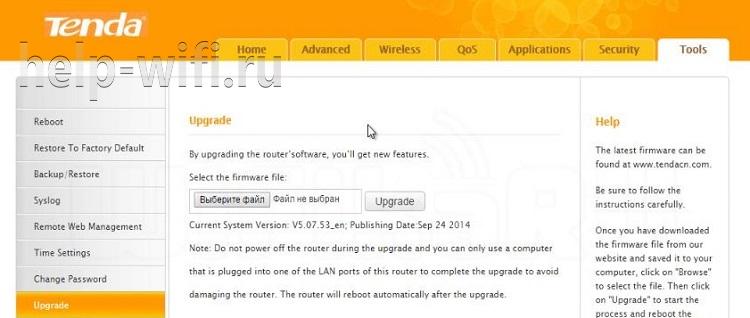
- В единственном поле на странице нажатием на кнопку указать положение распакованного!!! файла.
- Нажать кнопку «Upgrade».
- Дождаться завершения процесса.
- Получить русский интерфейс.
В качестве дополнительных плюшек прошивка включает в себя расширенный набор возможных подключений к интернету.
Хоть Tenda N300 и выпущен в Китае, по своим характеристикам он не уступает продуктам других именитых брендов, но при этом стоит значительно дешевле. Так как, кроме компьютера, у всех членов семьи есть мобильный, несложная настройка позволит выходить в интернет и с телефона.
Отзывы
Отзывы о Tenda N300 положительные. Пользователи отмечают низкую цену, радиус действия до 30 метров с учетом стен, возможность подключения 3G модема с помощью USB разъема, удобный и понятный интерфейс. «Бюджетный и быстрый – что еще нужно для домашнего роутера», – пишут владельцы девайса на сайте Отзовик.
Все способы:
- Настраиваем маршрутизатор Tenda
- Как зайти в настройки роутера
- Быстрая настройка
- Ручная настройка
- Дополнительные возможности
- Вопросы и ответы: 20
Продукция китайской компании Tenda относительно недавно начала массовую экспансию на международные рынки. Поэтому, по сравнению с другими популярными брендами, она не так хорошо известна отечественному потребителю. Но благодаря сочетанию доступной цены и высокой степени инновационности, она становится все более популярной. Маршрутизаторы Tenda уже нередко встречаются в домашних сетях и сетях малых офисов. В связи с этим и вопрос о том, как их настраивать, приобретает все большую актуальность.
Настраиваем маршрутизатор Tenda
Простота настройки — еще один конек продукции Tenda. Единственным неудобством в этом процессе можно назвать лишь то, что не у всех моделей роутеров имеется интерфейс на русском языке. Поэтому дальнейшие пояснения будут производиться на примере роутера Tenda AC10U, где русскоязычный интерфейс присутствует.
Как зайти в настройки роутера
Процедура подключения к веб-интерфейсу роутера Tenda ничем не отличается от того, как это делается в устройствах от других производителей. Предварительно нужно выбрать место для маршрутизатора и соединить его через порт WAN с кабелем от провайдера, а через один из портов LAN — с компьютером. После этого:
- Проверить, чтобы настройки сетевого подключения на компьютере были выставлены на автоматическое получение IP-адреса.

- Открыть браузер и ввести адрес роутера. По умолчанию это 192.168.0.1.

- В окне авторизации ввести пароль
admin. Логин по умолчанию — тожеadmin. Он уже обычно прописан в верхней строке.
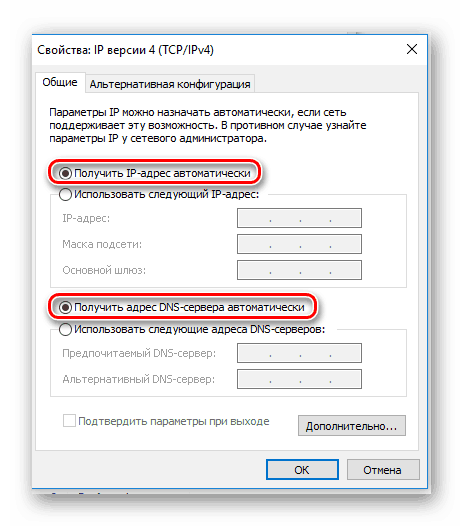
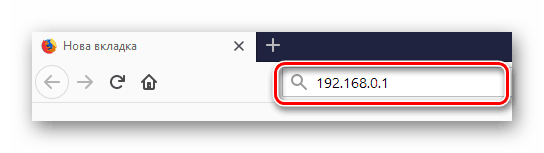
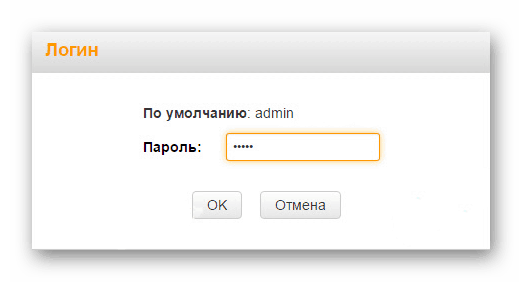
После этого произойдет перенаправление на страницу настроек маршрутизатора.
Быстрая настройка
После того как юзер подключится к конфигурации роутера, автоматически открывается мастер быстрой настройки. Пользоваться им очень просто. Вначале рекомендуется проверить доступность русского языка:
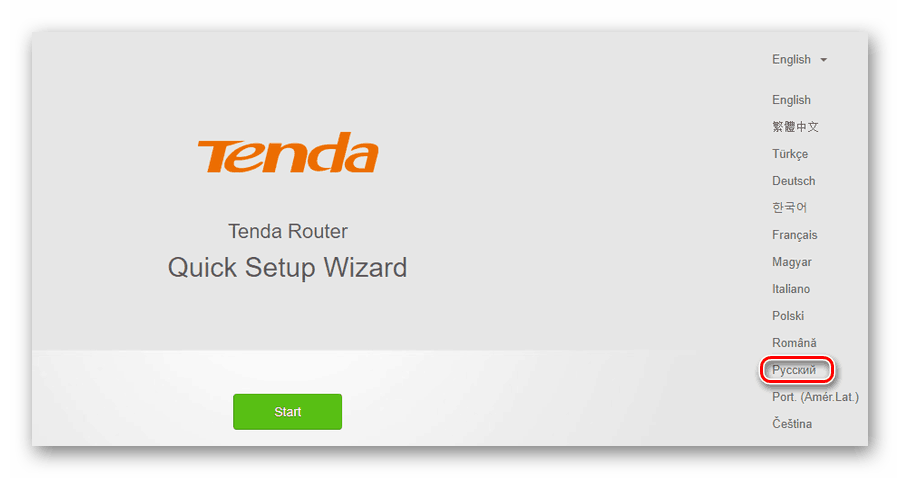
Если этот вопрос не актуален — данный шаг можно пропустить. Затем:
- Нажав на кнопку «Старт», запустить мастер.

- Выбрать тип подключения к интернету согласно договору с провайдером.

- В зависимости от выбранного типа подключения, сделать следующее:

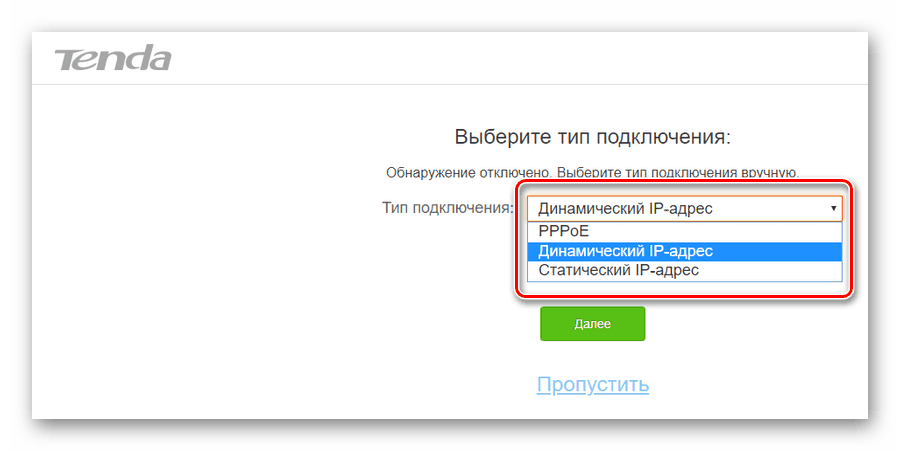
Далее будет необходимо настроить основные параметры Wi-Fi соединения. В этом же окне устанавливается пароль администратора для доступа к веб-интерфейсу роутера.
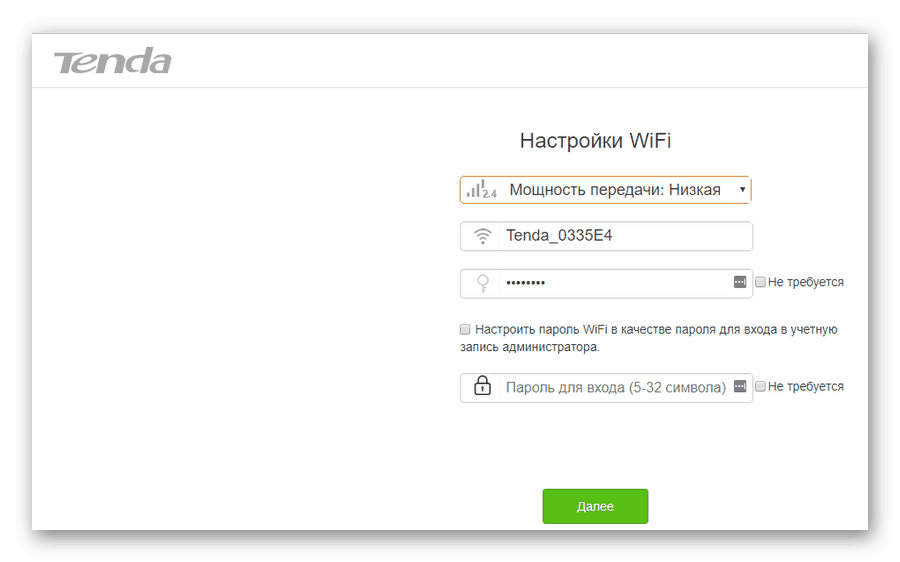
В верхнем поле пользователю предоставляется возможность отрегулировать радиус покрытия беспроводной сети, установив передатчик Wi-Fi на низкую или высокую мощность. Далее идут стандартные параметры имени сети и пароля для подключения к ней. Если отметить галочкой пункт «Не требуется», сеть будет открытой для доступа любого желающего, поэтому стоит серьезно подумать, прежде чем активировать этот параметр.
В последней строке устанавливается пароль администратора, с помощью которого в дальнейшем можно будет подключаться к конфигурации роутера. Там также имеется пункт, предлагающий установить для Wi-Fi и для администратора единый пароль, и отметка «Не требуется», позволяющая оставить доступ к веб-интерфейсу свободным. Целесообразность таких настроек, как и в предыдущем случае, весьма сомнительна и юзер должен осознавать все возможные последствия, прежде чем воспользоваться ими.
После установки параметров беспроводной сети перед пользователем откроется финальное окно мастера быстрой настройки.
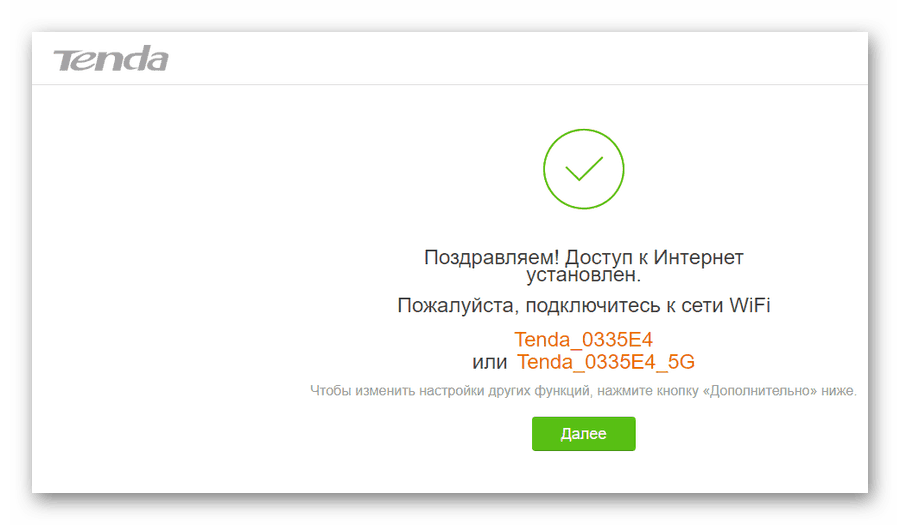
Нажатием на кнопку «Далее», осуществляется переход к установке дополнительных параметров.
Ручная настройка
Зайти в режим ручной настройки роутера Tenda можно, лишь запустив мастер быстрой настройки и на этапе выбора типа подключения щелкнув по ссылке «Пропустить».
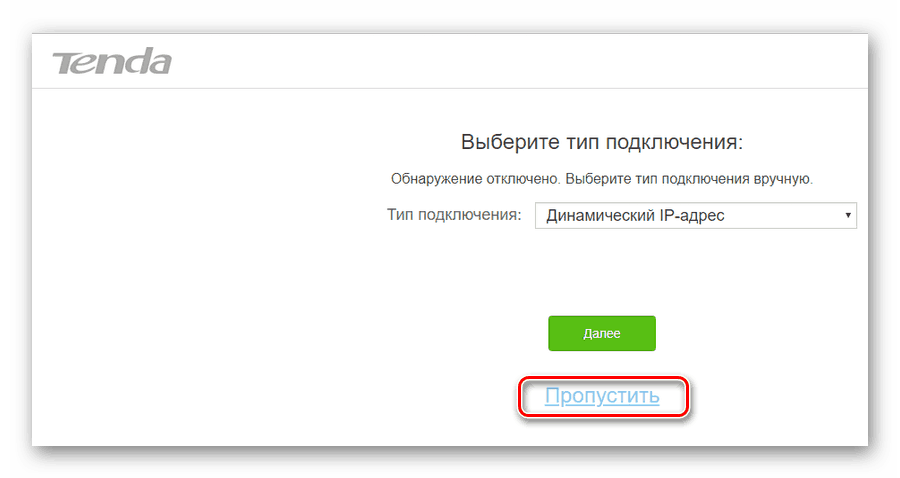
После этого откроется окно настройки беспроводной сети и установки пароля администратора, которое уже было описано выше. Нажав на кнопку «Далее», пользователь попадает на главную страницу конфигурации роутера:
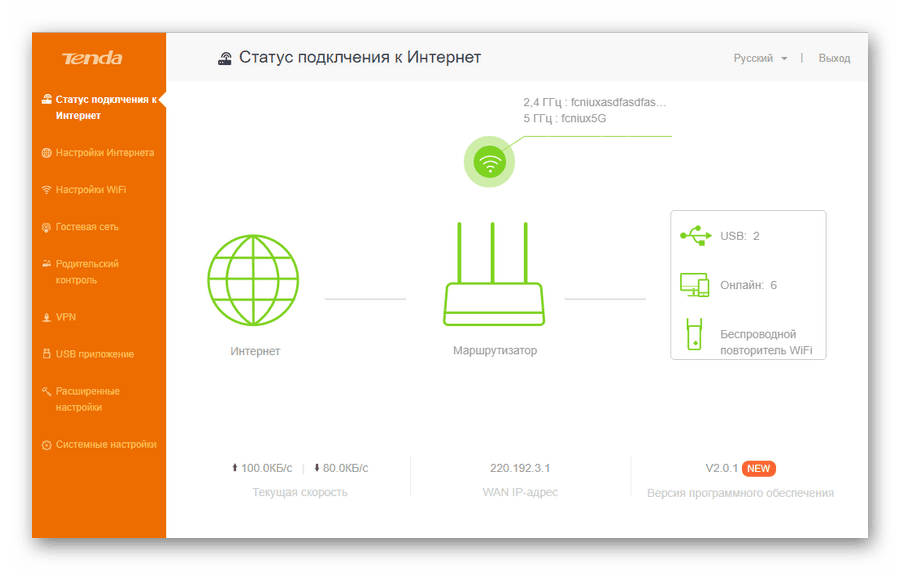
Если говорить о ручной настройке интернет-соединения, то для юзера в ней мало смысла, так как зайдя в соответствующий раздел, можно увидеть точно такие же окна, какие появляются и во время работы мастера быстрой настройки:
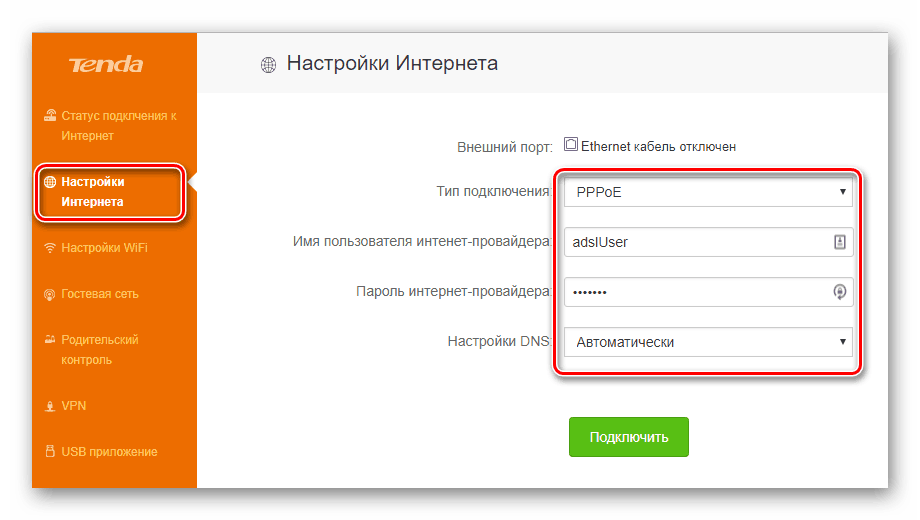
Раздел, посвященный настройкам Wi-Fi соединения, имеет более богатое меню:
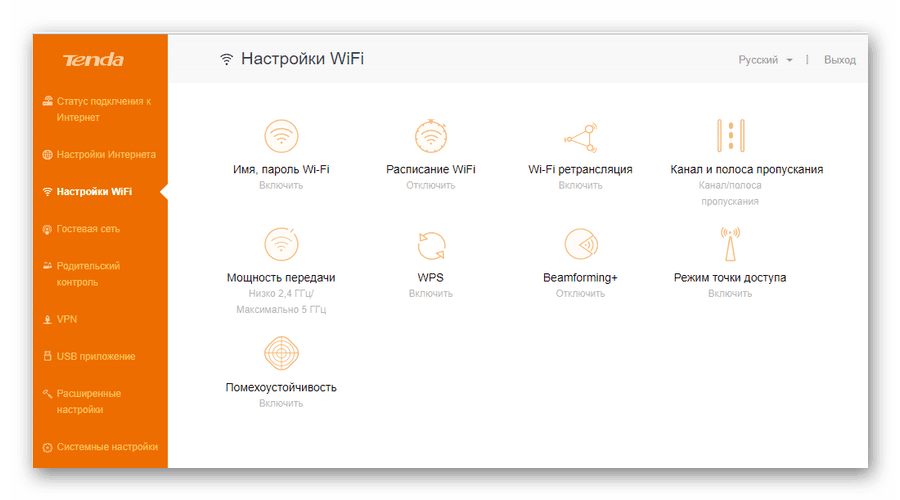
Помимо стандартных параметров, которые доступны в мастере быстрой настройки, там можно установить:
В расширенных настройках беспроводной сети присутствуют и другие интересные функции, набор которых может отличаться в зависимости от модели маршрутизатора. Все пункты меню снабжены подробными объяснениями, что делает настройку беспроводной сети максимально простой.
Дополнительные возможности
Кроме базовых функций, обеспечивающих доступ во всемирную сеть и раздачу Wi-Fi, в роутерах Тенда существует множество дополнительных возможностей, которые делают работу в сети более безопасной и комфортной. Остановимся подробнее на некоторых из них.
- Гостевая сеть. Активацией данной функции предоставляется доступ в интернет посетителям офиса, клиентам и любым посторонним людям. Этот доступ будет ограниченным и гости не смогут подключаться к ЛВС офиса. Кроме того, позволяется установить ограничения на период действия и скорость интернет-подключения гостевой сети.

- Родительский контроль. Тем, кто хочет контролировать время нахождения ребенка за компьютером, достаточно в веб-интерфейсе роутера перейти в соответствующий раздел и нажать на кнопку «Добавить». Затем в открывшемся окне ввести МАС-адрес устройства, с которого ребенок выходит в сеть, и установить требуемые ограничения. Они задаются в режиме черного или белого списка по времени суток и дню недели. Кроме того, существует возможность включить запрет на посещение отдельных веб-ресурсов, вписав их имена в соответствующем поле.

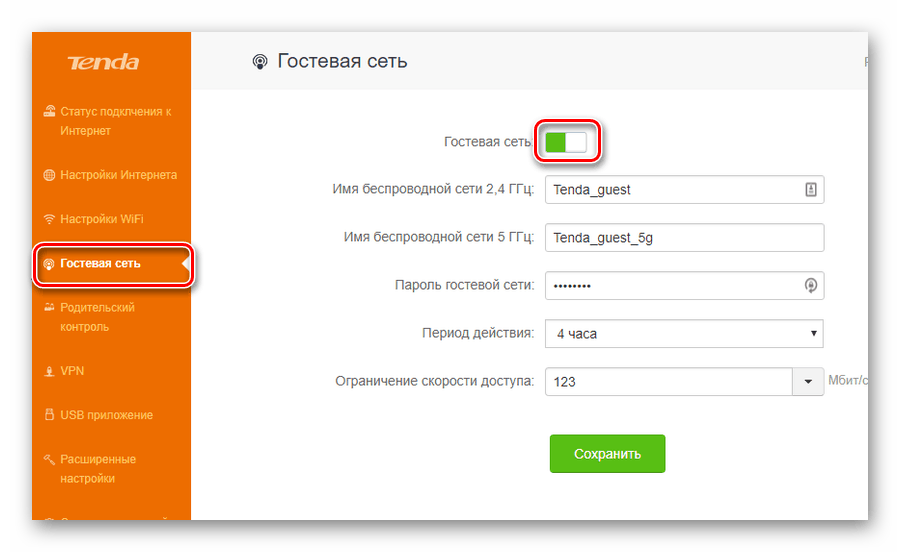
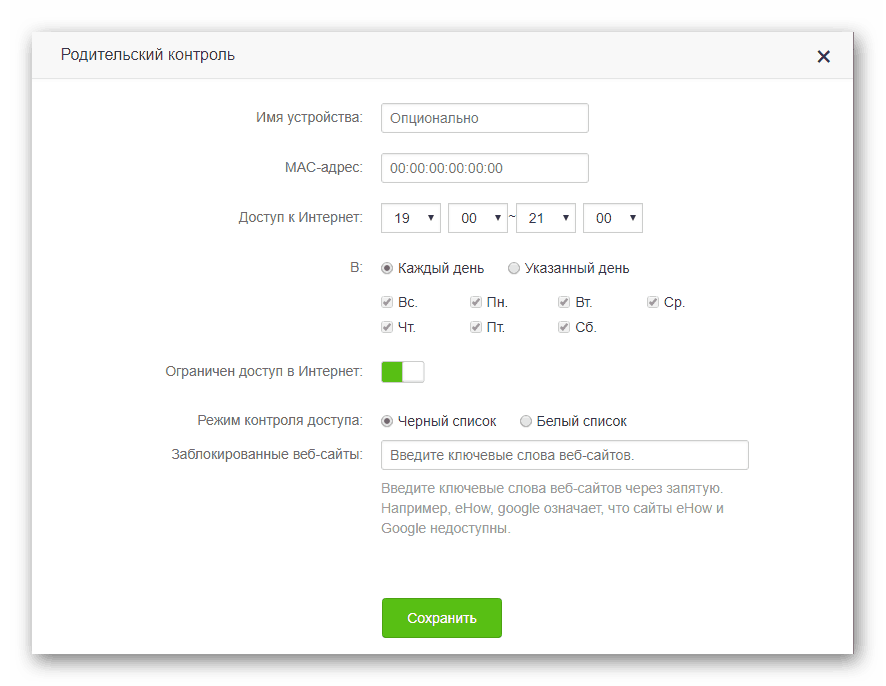
Описанными выше функциями перечень дополнительных возможностей, предоставляемых роутером Тенда, не ограничивается. Перейдя в раздел «Расширенные настройки», можно осуществить еще целый ряд интересных настроек. Они предельно просты и не требуют дополнительных пояснений. Более подробно можно остановиться разве что на функции Tenda App, которая является своеобразной фишкой компании.

Активировав данную функцию, можно скачать ссылку на установку мобильного приложения Tenda App через предоставленный QR-кодом. После установки этого мобильного приложения, открывается доступ к управлению роутером со своего смартфона или планшета, обойдясь таким образом без компьютера или ноутбука.
На этом обзор настройки роутера Tenda завершается. При этом следует отметить, что веб-интерфейс устройств Tenda F, FH, Tenda N несколько отличается от описанного выше. Но в целом он еще проще и пользователю, ознакомившемуся с данной статьей не составит труда произвести настройку и этих устройств.
Наша группа в TelegramПолезные советы и помощь
[pdf]
Installation Guide Guide
Manuale Tenda A9 extender universal wireless 300Mbps Segshop Installation Guide iotivedo it schede tecniche |||
…
lang: score:33 filesize: 7.17 M page_count: 0 document date: 0000-00-00
[pdf]
User Manual Specifications Accessories
Dudu Manual de utilizare Fisa tehnica Range Extender wireless Tenda A9 spy shop ro media custom upload |||
Copyright Statement 2016 Shenzhen Tenda Technology Co., Ltd. All rights reserved. Tenda is a regis … …………………………….. 43 Get to Know Your Extender Get to Know Your Extender Tenda A9 is a wireless extender designed for large houses. It provides full WiFi coverage to 200m2 houses …
lang:en score:28 filesize: 2.68 M page_count: 47 document date: 2016-08-18
[pdf]
User Manual
BiDi Shutter FULL IT 0 2 ifenoglio Nice 5 apr 2022 — NOTA! Questo manuale contiene importanti istruzioni e avvertenze per la sicurezza personale Leggere attentamente tutte le parti di questo nice bidi shutter full manual it niceforyou sites default files upload manuals 1 04 MB Download Instruction Manuals IS0815A00IT |||
Nice BiDi-Shutter Interfaccia bidirezionale per motore tubolare 1 AVVERTENZE E MISURE PRECAUZIONAL … one qui sotto. Eseguire la calibratura manuale solo quando quella automatica non fun ziona Tabella A9 — Calibrazione manuale 01. Tenere premuto il tasto di programmazione fig. 1 . Esempio 02. Rila…
lang:it score:28 filesize: 1.04 M page_count: 11 document date: 2022-02-25
[pdf]
User Manual Specifications Guide Accessories
ttt lhx TENDA W311P manual microdatafi myqnapcloud Tenda |||
Tenda Wireless Network Adapter User Guide Tenda Wireless Network Adapter User Guide Copyright Stat … normal when you close or finish the current configuration and connection . Q9: How to exit the UI A9: Right click the system tray icon and click Exit on the appearing dialog. Q10: Now that the Ten…
lang:en score:27 filesize: 3.93 M page_count: 69 document date: 2011-09-08
[pdf]
User Manual Specifications Guide Accessories
Tenda Wireless Network Adapter User Guide DMA 3 Chapter 1 Product Overview Thank you for choosing this wireless adapter! The adapter supports IEEE standards and is able to quickly process file transfer video multi media other applications that require higher bandwidth All photos product specifications mentioned in manual are references only Upgrades of software hardware may occur reserves the TENDA UH150 online dmasrl ar
Tenda Wireless Network Adapter User Guide Tenda Wireless Network Adapter User Guide Copyright Stat … rmal when you close or finish the current configuration and connection . Q9: How do I exit from UI A9: Right click the system tray icon and click Exit on the appearing dialog. Q10: Now that the Ten…
lang:en score:27 filesize: 3.44 M page_count: 81 document date: 2013-08-07
[pdf]
Specifications Guide Accessories
Web User Guide for Mobile of Dual Band Wi Fi 6 Router Tenda en línea RX12L Pro Argentina static tenda cn tdeweb |||
v1.0 111111111111111111111111111111111111111111111111111111111111 111111111111111111111111111111 C … s, reset the router by referring to Q3 and try again. Q9: The networking fails. What should I do A9: Try the following solutions: — Ensure that the new router is reset. If not, restore the router …
lang:en score:26 filesize: 3.19 M page_count: 117 document date: 2024-03-22
[pdf]
Specifications Guide Accessories
Web User Guide for Mobile of Dual Band Wi Fi 6 Router Tenda TX12L Pro down tendacn uploadfile |||
v1.0 111111111111111111111111111111111111111111111111111111111111 111111111111111111111111111111 C … s, reset the router by referring to Q3 and try again. Q9: The networking fails. What should I do A9: Try the following solutions: — Ensure that the new router is reset. If not, restore the router …
lang:en score:26 filesize: 3.19 M page_count: 117 document date: 2024-03-22
[pdf]
User Manual Installation Guide Guide Label
A9V1 0 TDE01安装指南 可编辑 02 user Users Manual SHENZHEN TENDA TECHNOLOGY CO LTD A9 Wireless N300 Universal Range Extender V7TA9 a9
Install Guide Wireless N300 Universal Range Extender Model: A9 LED Red Solid: The device is starting Blinking Slowly: The device is negotiating with a router/AP Detecting signal with auto-extending feature hasn t developed yet Blinking quickly: The device is performing WPS negotiation to a route…
lang:en score:25 filesize: 5.65 M page_count: 1 document date: 2016-07-13
[pdf]
User Manual
A9V3 0 TDE01安装指南曲 10047868 User Manual SHENZHEN TENDA TECHNOLOGY CO LTD Wireless N300 Universal Range Extender V7TA9V3 a9v3
…
lang:en score:25 filesize: 5.14 M page_count: 1 document date: 2021-05-17
[pdf]
Specifications Guide Accessories
AC10V1 0 AC10UV1 TDE01说明书 Tenda Scheda tecnica 1 AC7 AC7V1 User Guide melchioni ready media assets files reference |||
AC1200 Smart Dual-Band WiFi RouterAC7 User Guide Copyright Statement 2018 Shenzhen Tenda Technolo … e Internet Status page shows online devices of the router, and gets you to know using WiFi extender A9 to extend your router s WiFi coverage. 4.2.1 Online device Click Online to find detailed informat…
lang:en score:25 filesize: 5.5 M page_count: 146 document date: 2018-06-30
[pdf]
Installation Guide Guide
A9V1 0 V3 Quick Installation Guide Tenda en línea A9 V1 Argentina static tenda cn tdeweb |||
…
lang:en score:24 filesize: 5.3 M page_count: 2 document date: 2024-10-09
[pdf]
User Manual Specifications Guide Accessories
ttt lhx Manual de utilizare Adaptor wireless Tenda W311MI spy shop ro media custom upload |||
Tenda Wireless Network Adapter User Guide Tenda Wireless Network Adapter User Guide Copyright Stat … normal when you close or finish the current configuration and connection . Q9: How to exit the UI A9: Right click the system tray icon and click Exit on the appearing dialog. Q10: Now that the Ten…
lang:en score:24 filesize: 3.77 M page_count: 69 document date: 2011-09-08
[pdf]
User Manual Specifications Guide Accessories
ttt lhx Manual de utilizare Adaptor wireless Tenda W311M spy shop ro media custom upload |||
Tenda Wireless Network Adapter User Guide Tenda Wireless Network Adapter User Guide Copyright Stat … normal when you close or finish the current configuration and connection . Q9: How to exit the UI A9: Right click the system tray icon and click Exit on the appearing dialog. Q10: Now that the Ten…
lang:en score:24 filesize: 3.77 M page_count: 69 document date: 2011-09-08
[pdf]
Decleration of Conformity
DC A9 ftp eltrox pl CERTYFIKATY TENDA |||
SHENZHEN TENDA TECHNOLOGY CO., LTD. Declaration of Conformity No. TBX17A9 SHENZHEN TENDA TECHNOLOGY CO., LTD., registered at Tower E3, No. 1001, Zhongshanyuan Road, Nanshan District, Shenzhen, China. Declares under our sole responsibility that the product: Product Name: Wireless N300 Universal Ran…
lang:en score:23 filesize: 521.11 K page_count: 12 document date: 2017-07-19
[pdf]
User Manual
Tenda A9 Manual Created Date 9 15 2017 2 58 05 PM a9 manual tenda co hu
…
lang:en score:23 filesize: 79.68 K page_count: 1 document date: 2017-09-15
[pdf]
Wzmacniacz sygnaÅu WiFi Tenda A9 Sklep internetowy stylem pl wzmacniacz sygnalu wifi tenda a9 34636 upload files product |||
Wzmacniacz sygnalu WiFi Tenda A9 Indeks: 34636 Producent: Tenda Kod producenta: TENSIA45819 Cena: 84.64 zl Opis Wzmacniacz sygnalu WiFi Tenda A9 Producent: Tenda Konstrukcja Kolor produktu: Szary, Bialy Moc Czstotliwo wejciowa AC: 50 — 60 Hz Napicie wejciowe AC: 100 — 240 V Waga i rozmiary Glboko pr…
lang:pl score:23 filesize: 42.99 K page_count: 2 document date: 2022-08-03
[pdf]
Specifications Accessories
Dudu tenda a9 trovaprezzi it manuali |||
Questo manuale d istruzione fornito da trovaprezzi.it. Scopri tutte le offerte per Tenda A9 o cerca il tuo prodotto tra le migliori offerte di Wireless e Bluetooth Copyright Statement 2016 Shenzhen Tenda Technology Co., Ltd. All rights reserved. Tenda is a registered trademark legally held by Sh…
lang:en score:23 filesize: 2.73 M page_count: 47 document date: 2016-08-18
[pdf]
Specifications Guide Accessories
AC10V1 0 AC10UV1 TDE01说明书 Tenda AC7V1 User Guide AC1200 Smart Dual Band WiFi Router ZBM זד בי אם מערכות אבטחה ותקשורת zbm co il 2021 05 |||
AC1200 Smart Dual-Band WiFi RouterAC7 User Guide Copyright Statement 2018 Shenzhen Tenda Technolo … e Internet Status page shows online devices of the router, and gets you to know using WiFi extender A9 to extend your router s WiFi coverage. 4.2.1 Online device Click Online to find detailed informat…
lang:en score:22 filesize: 6.45 M page_count: 146 document date: 2018-06-30
[pdf]
User Manual Troubleshooting Guide Reference Guide Warranty Diagram
PowerPoint Presentation Paul Poisson Technical Updates for Pool Professionals April 2021 Totally Troubleshooting Guides Quick Reference Manuals A error in the installation manual The TP Link router models below totallyhayward techservices attachments 6 OmniPL Controller Update controller should never be disassembled Doing so may disconnect wire Wi Fi antenna radio If you need to splice or extend communication cable do from exposed end of extension used OmniHub HLX485100 HLX485200 will not work with uses a 4 conductor ColorLogic 80 Connectors There is part number available replacement COLORLOGIC connectors come five pack |||
Technical Updates for Pool Professionals See below for this month s updates. And visit our Support C … to be rebooted for it to reconnect. The TP-Link router models below: Archer C8 Archer C9 Archer A9 Archer VR900 and All Tenda brand routers. Note: This does not apply to OmniLogic and OmniHub. …
lang:en score:22 filesize: 901.09 K page_count: 9 document date: 2021-04-14
[pdf]
Decleration of Conformity
SHENZHEN TENDA TECHNOLOGY CO LTD yue Tenda cz Declaration of Conformity registered at Tower E3 No 1001 Zhongshanyuan Road Nanshan District Shenzhen China A9 CE DECLARATION tenda sites Upload
SHENZHEN TENDA TECHNOLOGY CO., LTD. Declaration of Conformity SHENZHEN TENDA TECHNOLOGY CO., LTD., r … le responsibility that the product: Product Name: Wireless N300 Universal Range Extender Model No.: A9 To which this declaration relates is in conformity with the following normative Eupopean and Inte…
lang:en score:22 filesize: 568.35 K page_count: 12 document date: 2016-12-28
[pdf]
User Manual Specifications Guide Accessories
lhx ttt Tenda W311MI Wi Fi dongle USB 2 0 150 MBit s Manual 001005037ML01 asset conrad media10 add 160267 c1 en |||
Tenda Wireless Network Adapter User Guide Tenda Wireless Network Adapter User Guide Copyright Stat … normal when you close or finish the current configuration and connection . Q9: How to exit the UI A9: Right click the system tray icon and click Exit on the appearing dialog. Q10: Now that the Ten…
lang:en score:22 filesize: 3.76 M page_count: 69 document date: 2013-12-12
[pdf]
Guide
Dudu ΙΙ Επεκτείνετε το Ασύρματο Δίκτυο WiFi A9 User Guide GR antoniadis gr images Οδηγίες χρήσης Tenda Range Extender Wi Fi Repeater 300Mbps Wps Antoniadis Electro Αντωνιάδης Ηλεκτρονικά |||
WiFi WiFi WiFi , . 1: Web UI WiFi 2: WPS WiFi WiFi 1: Web UI WiFi Web UI Features WiFi Web UI Features WiFi . 2: WPS WiFi 1 A9 WiFi W…
lang:i-klingon score:22 filesize: 349.35 K page_count: 4 document date: 2019-12-09
[pdf]
User Manual Specifications Guide Accessories Diagram
P1002P UG Tenda cz Copyright Statement Disclaimer Untitled Tips After the cable connection you need to configure your set top box for specific application Please refer manual guide of The whole ➢ Two AV1000 Gigabit Powerline adapters Adapter 1 and 2 More than four Ethernet cables connecting Internet or PC etc Network schematic diagram is like figure below 12 To a Switch 13 14 Step 4 Verify Connection Observe status LED indicators on verify hardware Power © 2015 Shenzhen Technology Co Ltd All rights reserved registered trademark legally held by Other brand product a71xtuser 9438 tenda sites Upload maplin s3 eu west amazonaws
1 Copyright Statement 2015 Shenzhen Tenda Technology Co., Ltd. All rights reserved. Tenda is a re … mpossible. Q9: Would it be dangerous to use the Powerline adapter in a lightning and storm weather A9: No. The adapter s internal thunder-/lightning-proof facility protects PC or other devices connec…
lang:en score:22 filesize: 3.98 M page_count: 48 document date: 2015-01-27
[pdf]
Decleration of Conformity
Certificat de conformitate Range Extender wireless Tenda A9 spy shop ro media custom upload |||
SHENZHEN TENDA TECHNOLOGY CO., LTD. Declaration of Conformity No. TBX17A9 SHENZHEN TENDA TECHNOLOGY CO., LTD., registered at Tower E3, No. 1001, Zhongshanyuan Road, Nanshan District, Shenzhen, China. Declares under our sole responsibility that the product: Product Name: Wireless N300 Universal Ran…
lang:en score:21 filesize: 431.23 K page_count: 12 document date: 2017-07-19
[pdf]
User Manual Specifications Guide Accessories
lhx ttt Manual W311MI N150 Tenda Wi Fi 4 ▻ адаптер USB купить в GEEK MD geek md index route product lang ru id 2391 |||
Tenda Wireless Network Adapter User Guide Tenda Wireless Network Adapter User Guide Copyright Stat … normal when you close or finish the current configuration and connection . Q9: How to exit the UI A9: Right click the system tray icon and click Exit on the appearing dialog. Q10: Now that the Ten…
lang:en score:21 filesize: 1.13 M page_count: 69 document date: 2022-06-22
[pdf]
Specifications Guide Accessories
AX3000 Dual Band Gigabit Wi Fi 6 Router User Guide Tenda Jan 5 2024 — Disclaimer Pictures images and product specifications herein are for references only To improve internal design operational function or reliability TX2L Pro down tendacn uploadfile TX2LPro |||
v1.0 111111111111111111111111111111111111111111111111111111111111 111111111111111111111111111111 C … ils. Document Version: V1.0 Q9: If the device is disconnected from the router. What should I do A9: Try the following solutions: If the Wi-Fi-enabled device goes offline, the wired device can acc…
lang:en score:21 filesize: 3.94 M page_count: 178 document date: 2024-01-05
[pdf]
User Manual
Administrator Manuale d Uso ZACO Robot Gentile Cliente Grazie per aver acquistato l aspirapolvere robot A9s! Ti sei unito a milioni di persone ehe usano i fare le pulizie il A9s User Manual IT zacorobot eu 2021 01
ZACO-A9s Aspirapolvere Robot Manuale d Uso Z C 0 vP1_es1rtaurlet:ewriowrwi i.nzafcoormroabzoiot.neiu, 1 /A ltaliano Z/ CO Gentile Cliente, Grazie per aver acquistato l aspirapolvere robot ZACO A9s Ti sei unito a milioni di persone ehe usano i robot per fare le pulizie — il modo piu intelligen…
lang:it score:21 filesize: 3.77 M page_count: 25 document date: 2021-01-18
[pdf]
Accessories
Informacije o proizvodu EN TENDA A9 N300 range extender informacije en tenda a9 5 days ago — Support extending WiFi signal with WPS button 49 Page 6 2 Get to Know Your Extender 6673e87ed0e2b api tehnoteka rs 2024 06 |||
https://tehnoteka.rs Informacije o proizvodu EN TENDA A9 N300 range extender Tehnoteka je online destinacija za uporeivanje cena i karakteristika bele tehnike, potrosacke elektronike i IT ureaja kod trgovinskih lanaca i internet prodavnica u Srbiji. Nasa stranica vam omoguava da istrazite najnovij…
lang:en score:21 filesize: 2.85 M page_count: 49 document date: 2024-06-20
[pdf]
User Manual Specifications Accessories
lhx 1 belongs to Shenzhen Tenda Technology Co Ltd No part of this publication can be reproduced transmitted transcribed stored in a retrieval system or translated into any language form by means without the prior written permission If you would manual overload it products 5370 att Av1000 Manual Pdf AV1000 WiFi Powerline Extender Kit GfK Etilize |||
— 1 — Copyright Statement is the registered trademark of Shenzhen Tenda Technology Co., Ltd. All t … mePlugAVcompliant powerline devices. Q9: Will the powerline network get disconnected upon blackout A9: Yes. The powerline network delivers data over electric wiring via electricity. Without presence …
lang:en score:21 filesize: 1.43 M page_count: 45 document date: 2014-06-18
[pdf]
Tenda A9 N300 Uniwersalny Wzmacniacz WLAN Z Dwoma Antenami 300 Mbit s WPA WPA2 KompatybilnoÅÄ Ze Wszystkimi Popularnymi Routerami BiaÅy Sklep internetowy stylem pl tenda a9 n300 uniwersalny wzmacniacz wlan z dwoma antenami mbit wpa wpa2 kompatybilnosc ze wszystkimi popularnymi routeram upload files product routerami bialy 466607 |||
Tenda A9 N300 Uniwersalny Wzmacniacz WLAN Z Dwoma Antenami 300 Mbit/s, WPA, WPA2, Kompatybilno Ze Wszystkimi Popularnymi Routerami WLAN , Bialy Indeks: 466607 Producent: Tenda Kod producenta: A9 Cena: 65.19 zl Opis Tenda A9 N300 Uniwersalny Wzmacniacz WLAN Z Dwoma Antenami 300 Mbit/s, WPA, WPA2, K…
lang:pl score:20 filesize: 94.82 K page_count: 2 document date: 2024-08-01
[pdf]
User Manual
Wi Fi 6 Router Manual utilizare Tenda TX2L Pro RX2L v1 0 și TX12L RX12L română down tendacn uploadfile ro |||
v1.0 111111111111111111111111111111111111111111111111111111111111 Manual utilizare TX12L Pro RX12L P … viteza reelei este restabilit. Q9: Dac dispozitivul este deconectat de la ruter, ce trebuie s fac A9: ncercai urmtoarele soluii: Dac dispozitivul compatibil Wi-Fi este offline, atunci verificai dac…
lang:it score:20 filesize: 6.35 M page_count: 162 document date: 2024-10-25
[pdf]
IS0815A01IT niceforyou sites default files upload manuals |||
BiDi-Shutter Interfaccia bidirezionale da incasso per motore tubolare IT — Istruzioni e avvertenze p … sso a 240s. Per eseguire la calibrazione automatica, procedere come descritto di seguito. Tabella A9 — BiDi-Shutter — Calibrazione automatica N Descrizione 1. Tenere premuto il pulsante di progra…
lang:it score:20 filesize: 926.55 K page_count: 16 document date: 2024-06-17
[pdf]
User Manual Specifications Guide Accessories
AC10V1 0 AC10UV1 TDE01说明书 Tenda Manual de utilizare Router wireless Dual Band AC7 spy shop ro media custom upload |||
AC1200 Smart Dual-Band WiFi RouterAC7 User Guide Copyright Statement 2018 Shenzhen Tenda Technolo … e Internet Status page shows online devices of the router, and gets you to know using WiFi extender A9 to extend your router s WiFi coverage. 4.2.1 Online device Click Online to find detailed informat…
lang:en score:20 filesize: 5.24 M page_count: 146 document date: 2021-06-17
[pdf]
User Manual
BiDi Awning FULL IT 0 2 ifenoglio 24 apr 2022 — NOTA! Questo manuale contiene importanti istruzioni e avvertenze per la sicurezza personale Leggere attentamente tutte le parti di questo nice bidi awning full manual it niceforyou sites default files upload manuals |||
Nice BiDi-Awning Interfaccia da esterno bidirezionale per motore tubolare 1 AVVERTENZE E MISURE PR … critto di seguito. Eseguire la calibrazione manuale solo quando l automatica non funziona. Tabella A9 — Calibrazione manuale 01. Premere il pulsante di programmazione del telecomando precedentemente …
lang:it score:20 filesize: 1.24 M page_count: 11 document date: 2022-02-25
[pdf]
User Manual Specifications Guide Accessories
A15V1 0 TDE01说明书 Tenda User Manual A9 N300 Universal Range Extender Broadband Wi Fi Booster Hotspot Plug and Play works with all broadband providers UK Computers Accessories B12W CejlCS m media amazon images I |||
AC750 Dual Band WiFi Repeater A15 User Guide 1 Q1. Copyright Statement 2018 Shenzhen Tenda Technology Co., Ltd. All rights reserved. is a registered trademark legally held by Shenzhen Tenda Technology Co., Ltd. Other brand and product names mentioned herein are trademarks or registered trademark…
lang:en score:19 filesize: 2.21 M page_count: 45 document date: 2021-12-06
[pdf]
Product Photos
Microsoft Word External photos CNAS07 Photos SHENZHEN TENDA TECHNOLOGY CO LTD A9V3 Wireless N300 Universal Range Extender V7TA9V3 a9v3
…
lang:en score:19 filesize: 475.63 K page_count: 4 document date: 2021-05-11
[pdf]
User Manual Instructions
untitled IS0110A01MM niceforyou sites default files upload manuals
Era Mat MHT-USA Tubular motor EN — Instructions and warnings for installation and use IT — Istruzion … impact force which the motor will apply in the box closure phase 4 adjustable thresholds . Table A9 1. 2. 3. 4. 5. RDC level programming Press the s and n keys of the transmitter memorised in mod…
lang:en score:19 filesize: 801.32 K page_count: 51 document date: 2012-10-30
[pdf]
User Manual Installation Guide Specifications Guide Accessories
ttt lhx Chapter 3 How to use the Windows Built in Wireless Configuration Tenda Network Adapter User Guide cz 2 1 Hardware Installation Install USB network adapter PCI Connection 4 6 Help Click help button open user manual 5 Two set up types are provided one is driver 10 Page 13 only other and This chapter explains users who don t install configuration program how connect wireless 7 Product Maintenance Please keep product away from water humid environment guarantee its normal performance Introduction Thank you for choosing this adapter! The supports IEEE standards able quickly process file transfer video multi media applications that require higher bandwidth insert into port of your computer Insert slot W322U UG W311U W326U 0bbf7849 a89c 41a4 a8e9 8206f45a17e1 W311M W311MI W522U tenda sites Upload cdn cnetcontent 0b bf 80
Tenda Wireless Network Adapter User Guide Tenda Wireless Network Adapter User Guide Copyright Stat … normal when you close or finish the current configuration and connection . Q9: How to exit the UI A9: Right click the system tray icon and click Exit on the appearing dialog. Q10: Now that the Ten…
lang:en score:19 filesize: 3.93 M page_count: 69 document date: 2011-09-08
[pdf]
SAR Rating
Microsoft Word FCC RF Exposure Info WIFI待报告更新 User SHENZHEN TENDA TECHNOLOGY CO LTD A9 Wireless N300 Universal Range Extender V7TA9 a9
FCC RF EXPOSURE REPORT FCC ID: V7TA9 Project No. Equipment Model Applicant Address : 1606C194 : Wireless N300 Universal Range Extender : A9 : SHENZHEN TENDA TECHNOLOGY CO.,LTD. : 6-8 Floor, Tower E3, No. 1001, Zhongshanyuan Road, Nanshan District, Shenzhen, China. 518052 According: : FCC Guidelin…
lang:en score:19 filesize: 73.67 K page_count: 4 document date: 2016-07-20
[pdf]
User Manual Instructions
untitled 89 055R01 niceforyou sites default files upload manuals
Neo Mat MHT Neo Mat LHT Tubular motor EN — Instructions and warnings for installation and use IT — I … nate the unsightly slack areas of the canvas when the awning is open. For further details see table A9. FTC: to motorise awnings that are kept taut through an automatic hooking mechanism, e.g. statio…
lang:en score:19 filesize: 1.25 M page_count: 88 document date: 2012-02-21
[pdf]
Product Photos Teardown
Microsoft Word internal photos CNAS07 Internal Photos SHENZHEN TENDA TECHNOLOGY CO LTD A9V3 Wireless N300 Universal Range Extender V7TA9V3 a9v3
…
lang:en score:19 filesize: 747.62 K page_count: 4 document date: 2021-05-11
[pdf]
IS0813A01IT niceforyou sites default files upload manuals |||
BiDi-Awning Interfaccia bidirezionale esterna per motore tubolare IT — Istruzioni e avvertenze per l … sso a 240s. Per eseguire la calibrazione automatica, procedere come descritto di seguito. Tabella A9 — BiDi-Awning — Calibrazione automatica N Descrizione 1. Premere il pulsante di programmazione…
lang:it score:19 filesize: 1.19 M page_count: 16 document date: 2024-06-17
[pdf]
User Manual Instructions
Nice Neomat H 89 027 rev0 Stefano User Manual S p A 433A08 Receiver PML433A08 433a08
tubular motor neomat H Instructions and warnings for the fitter Istruzioni ed avvertenze per l insta … on, these will not be erased. If you wish to erase all including the transmitter codes see table A9. Table A8 1. 2. Erasing the RDC torque reduction function fig. 11 Press and hold down key …
lang:en score:19 filesize: 2.1 M page_count: 40 document date: 2003-02-03
[pdf]
Datasheet
A9 Datasheet 修改 en línea A9V3 0 Tenda Argentina static tenda cn tdeweb |||
…
lang:en score:19 filesize: 9.09 M page_count: 3 document date: 2021-06-23
[pdf]
User Manual
Administrator User Manual Thank you for purchasing ZACO A9s robot vacuum cleaner! Robot will not execute scheduled cleaning after manual charge For more detailed information E1c4rjl7I2S images eu ssl amazon I
ZACO-A9s Vacuuming Mopping Robot User Manual 0 lMHrul, DfafflM liifii M llllfflf lti Mt#I Z CO For more information, visit www.zacorobot.eu 1 / A English Z/ CO Dear Customer, Thank you for purchasing ZACO A9s robot vacuum cleaner You ve joined the millions of people who clean with rob…
lang:en score:19 filesize: 23.49 M page_count: 156 document date: 2019-08-14
[pdf]
User Manual Specifications Guide Accessories
User Download CIDistribution Product Details 1044800035 content etilize Manual |||
AC1900 Enhanced Smart Dual-Band Gigabit WiFi Router Model: AC18 User Guide 1 Copyright Statement … sed by other devices. Q9: What should I do if I forget the login password of the router — 116 — A9: You can reset the router and set the login password again. To reset the router, power on the rou…
lang:en score:19 filesize: 5.8 M page_count: 125 document date: 2016-11-21
[pdf]
Microsoft Word RDG210409037 00A WIFI Report txt CNAS07 Test SHENZHEN TENDA TECHNOLOGY CO LTD A9V3 Wireless N300 Universal Range Extender V7TA9V3 a9v3
…
lang:en score:19 filesize: 4.06 M page_count: 63 document date: 2021-05-17
[pdf]
Confidentiality Request Letter
Microsoft Word FCC Long Term Confidential Authorization Form dg06139 SHENZHEN TENDA TECHNOLOGY CO LTD A9V3 Wireless N300 Universal Range Extender V7TA9V3 a9v3
…
lang:en score:19 filesize: 56.96 K page_count: 1 document date: 2021-05-17
[pdf]
Product Photos
Microsoft Word Test Setup photos WIFI CNAS07 setup photo SHENZHEN TENDA TECHNOLOGY CO LTD A9V3 Wireless N300 Universal Range Extender V7TA9V3 a9v3
…
lang:en score:19 filesize: 309.8 K page_count: 2 document date: 2021-05-11
[pdf]
Specifications Accessories
Dudu Copyright Statement 1 Get to Know Your Extender Ⅰ Tenda A9 is a wireless extender designed for large houses It provides full WiFi coverage UG aic eshop gr Powerlines Extenders |||
Copyright Statement 2016 Shenzhen Tenda Technology Co., Ltd. All rights reserved. Tenda is a regis … …………………………….. 43 Get to Know Your Extender Get to Know Your Extender Tenda A9 is a wireless extender designed for large houses. It provides full WiFi coverage to 200m2 houses …
lang:en score:18 filesize: 2.72 M page_count: 47 document date: 2016-08-18

Package contents
- Wireless extender x 1
- GPL x 1
- Quick installation guide x 1
This quick installation guide instructs how to configure and install the device. For product or function details, please go to www.tendacn.com to download the user guide.
LED indicator description
- Power/Signal LED indicator
- Red
- Solid on: The extender is starting.
- Blinking: – The extender completes startup.
- Extending your existing WiFi network.
- Fails to extend to your existing WiFi network.
- Green
- Extended successfully, and the connection quality is good.
- Orange
- Extended successfully, but the extender is a little far away from your router/modem. Relocate it closer to the router/modem.
- Off
- The extender is not powered on.
Buttons description
- WPS button
- An alternative method used to extend or re-extend your existing WiFi network. See Option 2 for detailed instructions.
- Reset button
- Hold down this button using a paper clip. Release it when the O LED indicator lights red.
OPTION 1
Extend your WiFi network using web UI
Power on the extender
Plug the extender into a power outlet near the router/modem in the same room. Wait until the O LED indicator blinks red.
Extend your Wifi network
Prerequisites
- For smart phone/Pad (Recommended): Disable its Mobile Data (if any) function.
- For desktop computer: An installed wireless adapter is required.
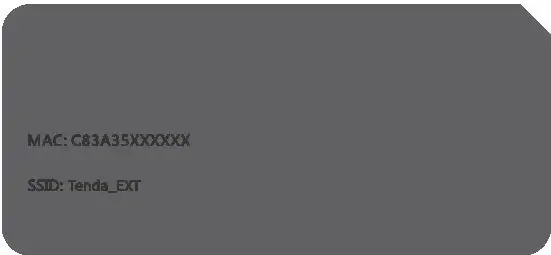
- Connect yourWiFi-enabled device to the extender’s default SSID named Tenda_EXT. By default, it has no password.

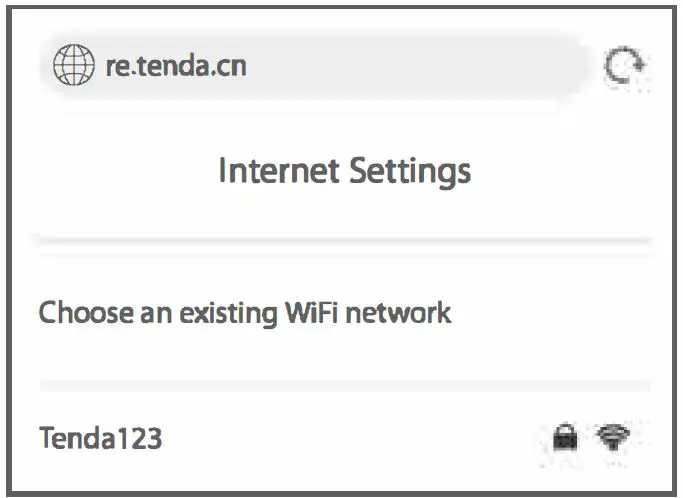
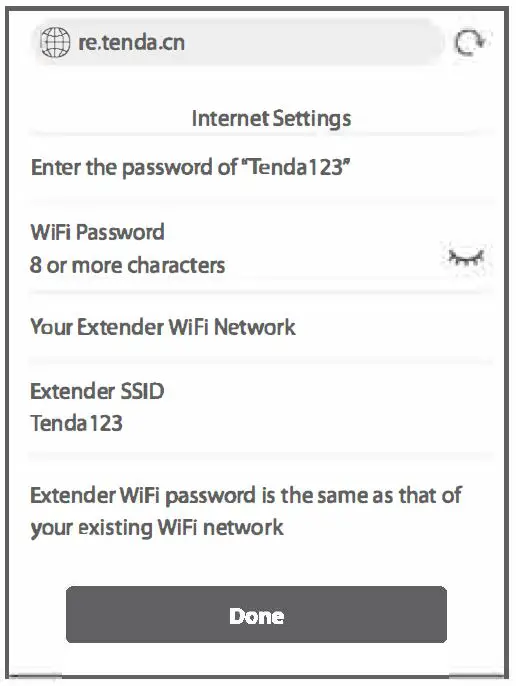
- After connecting to the extender’s SSID, you will be directed to the quick setup page. If not, start a web browser, and access re.tenda.cn or 192.168.0.254 in the address bar.
- Choose an existing WiFi network for extending.
- lf the WiFi network you chose is encrypted, enter its WIFI Password. Customize the Extender 5510. By default, the extender SSID is the same as your existing WiFi network.
- TapDone.
Wait until the Extended successfully page appears.

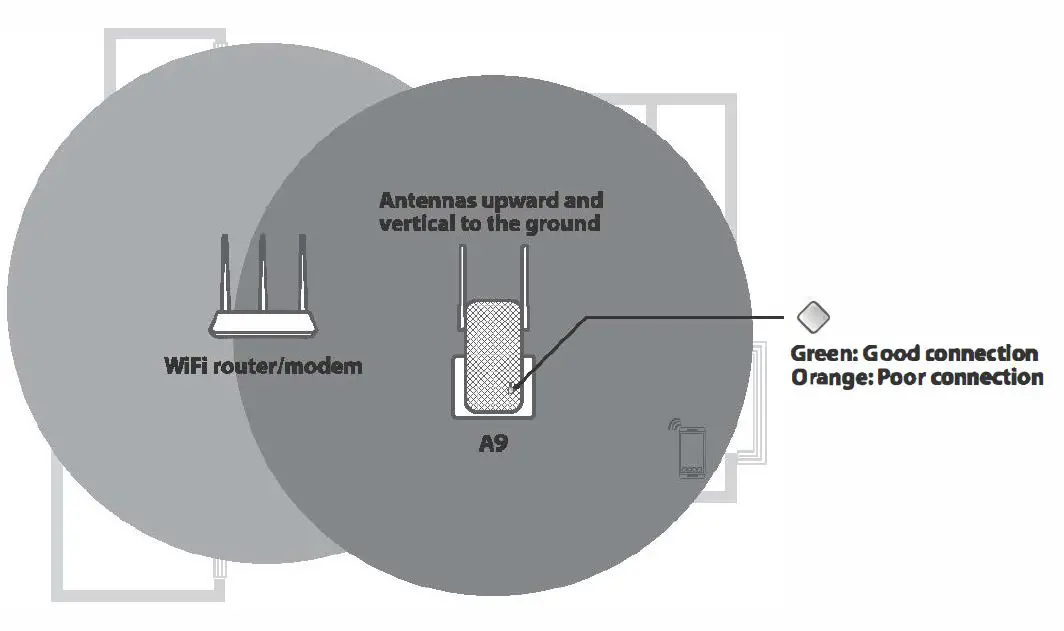
Relocate the extender
To get better connection, follow the on-screen instructions or steps below to relocate your extender.
- Plug the extender into an outlet halfway between the router/modem and the WiFi dead zone.
The location you choose must be within the range of your existing WiFi network. - Wait until the O LED indicator lights solid green. If not, relocate the extender closer to your router/modem.
Done.
To connect your WiFi-enabled devices to the extender, use the following information: Extender 55ID: 55ID you set In step 4.
Extender password: Your existing WiFi network password.
OPTION 1
Extend your WiFi network using WPS button
You can use Option 2 if your router/modem has a WPS button, which may be indicated by ,,Otherwise, use Option 1.
Power on the extender
Plug the extender into a power outlet near the router/modem in the same room. Wait until the O LED indicator blinks red.
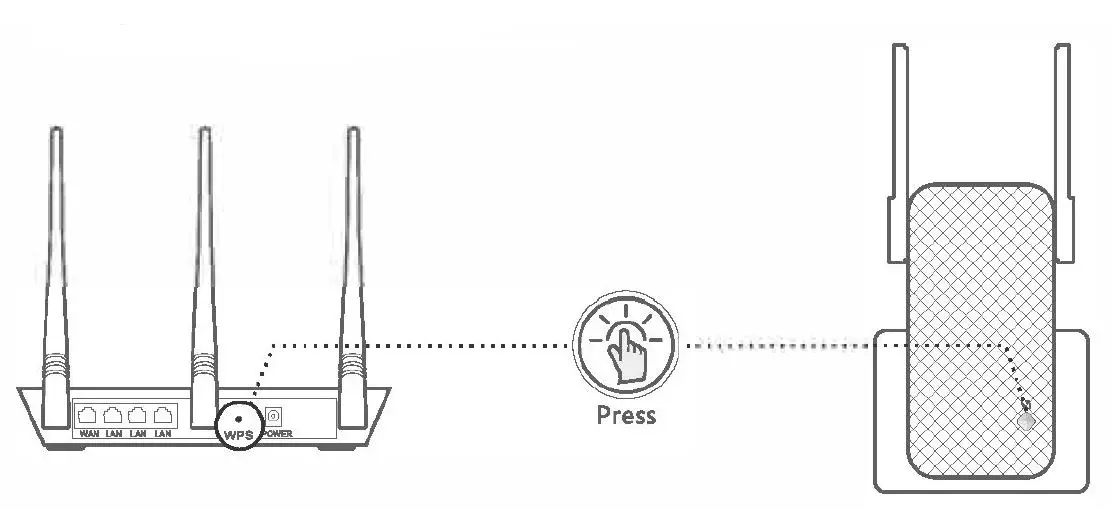
Extend your WiFi network
- Press the WPS button on the router/modem. Within 2 minutes, press the WPS button on the extender.
- Wait until the O LED indicator on the extender lights solid green or orange. If not, use Option 1.
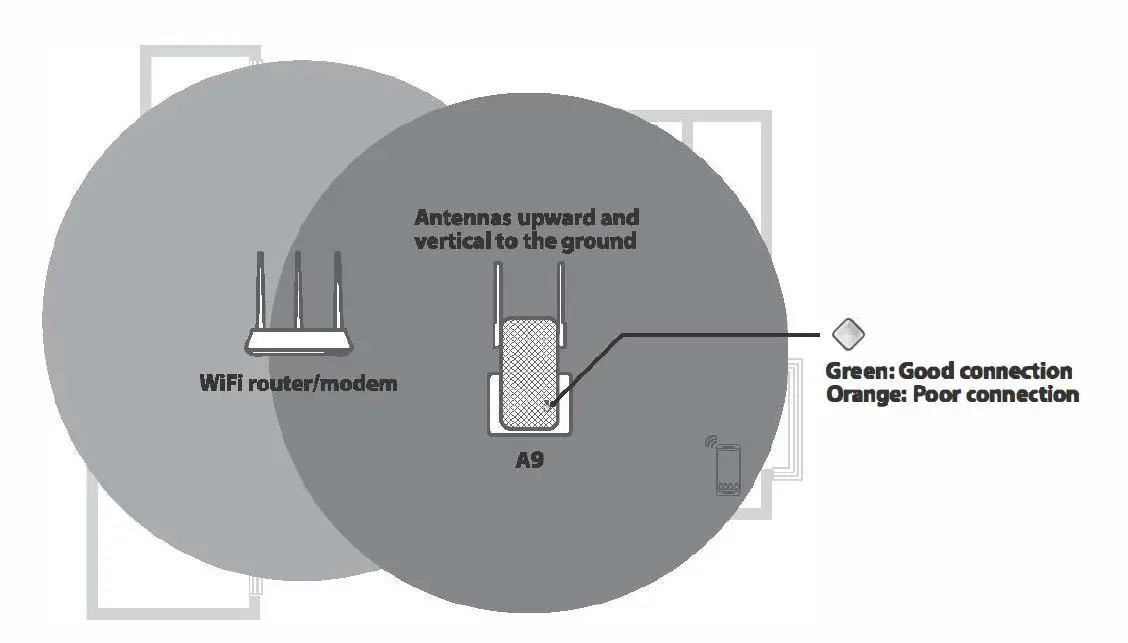
Relocate the extender
- Plug the extender into an outlet halfway between the router/modem and the WiFi dead zone.
The location you choose must be within the range of your existing WI Fl network. - Wait until the O LED indicator lights solid green. If not, relocate the extender closer to your router/modem.
Done.
To connect your WiFi-enabled devices to the extender, use the following information: Extender SSID: Your existing WiFi name (55ID).
Extender password: Your existing WiFi network password.
FAQ
Q1. I cannot log in to the web UI of the extender. What should I do?
A1. Try the following solutions:
Before extending:
- If a mobile WiFi-enabled device is used:
- Ensure that it has connected to the extender’s WiFi network named Tenda_EXT, and the Mobile Data (if any) function is disabled.
- If a laptop, or a desktop computer installed with a wireless adapter ls used:
- Ensure that it has connected to the extender’s WiFi network named Tenda_EXT, and its wireless network connection has been set to Obtain an IP address automatkally.
- Ensure that you enter re.tenda.cn or 192.168.0.254 in the address bar (not searching bar).
- If the problem persists, reset the extender, and try extending again.
After extending:
If you set your extender SSID the same as your existing WiFi name, you may connect to your existing WiFi network. In this case, relocate your extender to a proper position, stay nearby your extender. Dlsable the WLAN on the device you use then enable it, and try connecting again.
Q2. How to reset the extender?
A2. With your extender powered on, press the RST button at the bottom of the extender using a paper clip. Release it when the LED indicator lights red. The extender is restored to the factory settings.
Q3. How to set up a login password for the management of my extender?
A3. Connect the yourWiFi-enabled device to the extender wifi network, log in to its web Ul,and perform as follows:
- For smart phone/Pad:
Tap ;;;;; on the homepage, tap Set Login Password, then follow the on-screen instructions for setup. - For laptop, or a desktop computer installed with a wireless adapter: Navigate to Administration, and follow the on-screen Instructions for setup.
Q4. The extender c;annot find the WiFi network of my router/modem, What should I do?
A4. Try the following solutions:
- Ensure that theWiFi network of your router/modem is enabled and can be detected by your WlFl-enabled device.
- Change the channel of your router/modem, and try again.
- Change the encryption type of the router/modem to WPA-PSK or WPA2-PSK, and try again.
FCC Statement
This equipment has been tested and found to comply with the limits for a Class B digital device, pursuant to Part 15 of the FCC Rules. These limits are designed to provide reasonable protection against harmful interference in a residential installation. This equipment generates, uses and can radiate radio frequency energy and, if not installed and used in accordance with the instructions, may cause harmful interference to radio communications. However, there is no guarantee that interference will not occur in a particular installation. If this equipment does cause harmful interference to radio or television reception, which can be determined by turning the equipment off and on, the user Is encouraged to try to correct the Interference by one or more of the following measures:
- Reorient or relocate the receiving antenna.
- Increase the separation between the equipment and receiver.
- Connect the equipment into an outlet on a circuit different from that to which the receiver is connected.
- Consult the dealer or an experienced radio/TV technician for help.
Operation is subject to the following two conditions:
- this device may not cause harmful interference
- this device must accept any interference received, including interference that may cause undesired operation.
Radiation Exposure Statement
This device complies with FCC radiation exposure limits set forth for an uncontrolled environment and it also complies with Part 15 of the FCC RF Rules.
This equipment should be installed and operated with minimum distance 20cm between the device and your body.
Caution:
Any changes or modifications not expressly approved by the party responsible for compliance could void the user’s authority to operate this equipment.
This transmitter must not be co-located or operating in conjunction with any other antenna or transmitter. Operating frequency: 2412-2462MHz
NOTE:
- The manufacturer is not responsible for any radio or TV interference caused by unauthorized modifications to this equipment.|
- To avoid unnecessary radiation interference, it is recommended to use a shielded RJ45 cable.
RECYCLING
This product bears the selective sorting symbol for Waste electrical and electronic equipment (WEEE). This means that this product must be handled pursuant to European directive 2012/19/EU in order to be recycled or dismantled to minimize its impact on the environment.
User has the choice to give his product to a competent recycling organization or to the retailer when he buys a new electrical or electronic equipment.
CE MarkWamlng
This Is a Class B product. In a domestic environment. this product may cause radio Interference, In which case the user may be required to take adequate measures.
This equipment should be installed and operated with minimum distance 20cm between the device and your body.
The mains plug Is used as disconnect device, the disconnect device shall remain readily operable.
NOTE:
- The manufacturer is not responsible for any radio or TV interference caused by unauthorized modifications to this equipment.
- To avoid unnecessary radiation interference, It Is recommended to use a shielded RJ45 cable.
Declaration of Conformity
Hereby, SHENZHEN TENDA TECHNOLOGY CO., LTD. declares that the radio equipment type A9 Is In compliance with Directive 2014/53/EU.
The full text of the EU declaration of conformity is available at the following internet address:
http://www.tendacn.com/en/service/download-cata-101.html
Operating Frequency: 2.4 GHz: EU/2412-2472MHz (CH1-CH13)
EIRP Power (Max.): 2.4 GHz 19.95dBm Software Version: V02.03.01.125
For PWGGABLE EQUIPMENT, the socket-outlet shall be Installed near the equipment and shall be easily accessible
- Operating temperature: 0°C – 40″C
- Operating humidity: (10 – 90)% RH, non-condensing
technical support
Shenzhen Tenda Technology Co., Ltd.
6-8 Floor, Tower E3, N0.1001, Zhongshanyuan Road, Nanshan District, Shenzhen, China. 518052
USA hotline: 1-800-570-5892 Hong Kong hotline: 00852-81931998
Toll Free: 7 x 24 hours
Canada hotline: 1-888-998-8966
Toll Free: Mon – Fri 9 am – 6 pm PST
Copyright
Global hotline: +86 755-2765 7180 (China TI me Zone)
Website: www.tendacn.com
E-mail: [email protected]
e 2021 Shenzhen Tenda Technology Co., Ltd. All rights reserved.
“Rmc/8 is a registered trademark legally held by Shenzhen Tenda Technology Co., Ltd. Other brand and
product names mentioned herein are trademarks or registered trademarks of their respective holders.
Specifications are subject to change without notice.
Highlight all
Match case
Current View
Current View
Enter the password to open this PDF file:
File name:
—
File size:
—
Title:
—
Author:
—
Subject:
—
Keywords:
—
Creation Date:
—
Modification Date:
—
Creator:
—
PDF Producer:
—
PDF Version:
—
Page Count:
—
Preparing document for printing…
0%