
TENS
– устройство для снятия
болевых ощущений
СВЕДЕНИЯ
ОБ УСТРОЙСТВЕ /АКСЕССУАРАХ
Об
устройстве:
Изделие
TENS
от компании MQ
представляет собой
устройство, питаемое от батарей с двумя
регулируемыми выходными каналами. TENS
генерирует
электрические
импульсы.
Для настройки и изменения
амплитуды, длительности и модуляции
этих импульсов можно использовать
органы управления устройством. Органы
управления устройством TENS
– просты в использовании; защитная
крышка предотвращает возможность их
ненамеренного изменения.
1
Коннектор проводов
2
Выключатель каналов On/Off
и регулятор интенсивности
3
Индикатор Вкл/Выкл (On/Off)
4
Регулятор ширины импульса
5
Переключатель режима
6 Регулятор
частоты импульсов
7
Таймер
8
Батарея
9
Батарейный отсек
10
Батарейная лента
11
Крышка A
12
Крышка B
13
Вилки электродов
14
Вилки
проводов (одинаковы для
обоих каналов)
КОМПЛЕКТ
ПОСТАВКИ
Системные
компоненты
В
комплект поставки устройства
MQ
TENS
входит следующее
оборудование:
1
Собственно устройство
2
Чехол
3
Провода
4
Электроды на матерчатой
основе,
40 x 40 мм
5
Руководство пользователя
6 Инструкция
по использованию
электродов
на матерчатой основе
7
9-вольтовая батарея
ВВЕДЕНИЕ
Что
такое боль?
Боль
является собственной системой раннего
предупреждения тела. Ощущение боли
важно, поскольку указывает на ненормальное
состояние тела и служит нам предупреждением
о возможных более серьезных повреждениях
в дальнейшем. Впрочем, продолжительные,
устойчивые болевые ощущения – известные,
как хронические – после постановки
диагноза уже не являются столь полезными.
Устройство TENS
было разработано для снятия или
притупления определенного типа
хронических и острых болевых ощущений.
Как
работает устройство TENS?
TENS
предназначено для бесконтактного и не
медикаментозного лечения боли.
Устройство
TENS посылает
через кожу успокаивающие электрические
импульсы, воздействующие на нерв (или
нервы) в области, подвергаемой лечению.
В большинстве случаев, такая стимуляция
значительно снижает или полностью
устраняет болевые ощущения, поскольку
блокирует болевые сигналы, посылаемые
в мозг. Сообщается, что TENS-стимуляция
повышает высвобождение эндофринов в
кровотоке, что приводит к дальнейшему
снижению боли.
Достоинства
устройств TENS
в управлении болевыми ощущениями
клинически доказаны в использовании
многими пациентами. Для максимального
эффекта при использовании TENS,
рекомендуем тщательно ознакомиться с
данной инструкцией, а также следовать
рекомендациям вашего врача.
ПОКАЗАНИЯ
/ ПРОТИВОПОКАЗАНИЯ
Перед
использованием устройства TENS
просим ознакомиться со следующими
инструкциями.
В
США продажа данного устройства
осуществляется на основании медицинского
заключения лечащего врача.
Показания
Под
TENS
(Transcutaneous
Electrical Nerve
Stimulation)
подразумевается Чрескожная
Электростимуляция Нервов. Такая
стимуляция может предписываться врачами
для подавления симптоматических или
хронических (долгосрочных) болевых
ощущений, а также облегчения
посттравматических и послеоперационных
болей.
Противопоказания
Перед
использованием проконсультируйтесь
с врачом!
Пациенты
с имплантированными электронными
устройствами (типа кардиостимулятора)
или металлическими имплантатами, могут
использовать TENS-метод
лишь после консультации с врачом.
Не
допускается размещение электродов,
посылающих электрические импульсы, в
расположенный на шее нерв сонной
артерии.
Не
допускается размещение электродов,
посылающих электрические импульсы, в
церебральную область на голове.
Не
допускается использование TENS
до того, как симптомы боли будут
диагностированы и будет выяснена их
причина.
ПРЕДУПРЕЖДЕНИЯ
/ ПРЕВЕНТИВНЫЕ МЕРЫ
Предупреждения
-
Устройства
TENS должны
храниться вне досягаемости детьми. -
Безопасность
использования устройств TENS
в период беременности или родов не
проверена. -
Метод
TENS не
эффективен для лечения болей,
обусловленных расстройствами центральной
нервной системы (головные боли). -
В
случаях, если использование TENS
не приносит ожидаемых результатов или
вызывает дискомфорт, его следует
прекратить до заключения врача. -
Не
пытайтесь изменять настройки устройства,
при использовании его во время управления
автомобилем, или иным механическим
устройством. -
Перед
подключением или отключением электродов,
устройство TENS
необходимо выключить. -
Устройство
TENS может
вызывать помехи в работе электронного
оборудования (ЭКГ-систем /сигнализаторов). -
Никогда
не размещайте электроды на глазах, во
рту, в теле. -
TENS-устройства
не обладают лечебными свойствами. -
TENS
– метод воздействия на симптомы и
всего лишь подавляют болевые ощущения,
которые, как уже сказано, служат защитным
и предупреждающим механизмом тела.
Превентивные
меры / Отрицательные реакции
-
Длительное
использование может вызывать раздражение
кожи в местах размещения электродов. -
Эффективность
воздействия во многом зависит от того,
насколько опытен персонал, выполняющий
процедуру, в работе с пациентами,
страдающими от боли. -
Возможные
отрицательные реакции включают в себя
раздражение кожи и ожоги, причиняемые
электродами.
РАБОТА
УСТРОЙСТВА
Защитная
крышка:
Органы
управления шириной импульсов, их
частотой, выбором режима и модуляции
защищены крышкой. Чтобы открыть крышку
A 11,
поднимите ее крышку с передней стороны
устройства.
Интенсивность:
Регуляторы
интенсивности 2 расположены на
верхней части устройства и используются
для установки интенсивности стимуляции.
Они же используются для включения и
выключения устройства.
Режим:
Переключатель
режимов 5
используется для установки типа
воздействия. Устройство может работать
в трех режимах: пакетной стимуляции
[Burst] (B),
непрерывной [Continuous]
(C) и
модулированной стимуляции [Modulated]
(M).
Ширина
импульса
(μs):
Регулятор
4 позволяет определить ширину
импульса (= длительность каждого
импульса) для обоих каналов.
РАБОТА
УСТРОЙСТВА
Частота
импульсов
(Hz):
Регулятор
частоты импульсов 6 позволяет
определить число импульсов в секунду
для обоих каналов.
Таймер:
С
помощью органа управления таймером 7,
можно определить длительность TENS
— процедуры. Возможна установка трех
значений: 15, 30 минут и C
(непрерывно). Используйте этот
переключатель для установки нужного
значения.
Сброс
таймера:
Чтобы
перезапустить процедуру или сбросить
значение таймера, просто установите
регулятор интенсивности 2
в положение OFF,
а затем – снова в положение ON.
РАБОТА
УСТРОЙСТВА
Функции
режимов:
В
Пакетном режиме (B)
за секунду на электроды передаются два
пакета. В этом режиме частота импульсов
устанавливается 100Hz
за секунду, а ширина импульса —
регулируется. В Непрерывном режиме (C)
импульсы передаются непрерывно с
соответствующими значениями выбранной
интенсивности, частоты импульсов и их
ширины. В режиме модуляции (M),
ширина импульса, установленная
пользователем, снижается на 60%. Такая
пониженная ширина импульса поддерживается
в течение 2 секунд перед возвратом к
исходному значению, установленному
пользователем, которое, затем,
поддерживается в течение 3.5 секунд.
Затем цикл повторяется. Интенсивность
и частота импульсов регулируются
пользователем.
ПОДКЛЮЧЕНИЕ
ПРОВОДОВ ЭЛЕКТРОДОВ
Провода,
поставляемые с TENS-устройством,
подключаются к гнездам на верхней
панели устройства 1.
Вставляйте штырек в гнездо, держась за
изолятор. Во время процедуры можно
использовать один или оба провода.
После подключения проводов к устройству,
подключите к каждому проводу электрод
2.
Провода, поставляемые с TENS-устройством,
соответствуют требованиям FDA
Compliance
Standards.
Обратите
внимание:
Будьте
внимательны при подключении и отключении
проводов. Вы можете повредить провод,
если будете извлекать его из гнезда,
держась за него, а не за изолятор.
Осторожно:
Никогда
не включайте провод в сеть переменного
тока.
Гнезда
для подключения электродных проводов
левого и правого каналов (1)
Штырек
провода (одинаковы для обоих каналов)
Штырек
электрода (2)
ВЫБОР,
ИСПОЛЬЗОВАНИЕ И УХОД ЗА ЭЛЕКТРОДАМИ
Ваш
врач должен решить: какой тип электродов
наиболее подходит для ваших процедур.
Для достижения оптимальных результатов
стимуляции и во избежание раздражения
кожи, следуйте процедурам, описанным
в инструкции, поставляемой с электродами.
Пакет электродов включает в себя
рекомендации и информацию по уходу и
правильному хранению электродов.
Применение
электродов
Перед
подключением или отключением электродов,
следует убедиться в том, что устройство
MQ
TENS
выключено.
Установка
электродов
Ознакомьтесь
с инструкцией по электродам MQ
TENS,
включенной в поставку.
Чтобы
обеспечить продолжительную эффективность
терапии с помощью устройства EMS,
следует систематически менять электроды.
При выполнении процедуры, кожа должна
быть чистой.
Работа
с электродами
После
применения, электроды следует поместить
обратно в пакет из защитной фольги,
чтобы обеспечить их длительную и
эффективную эксплуатацию. При ухудшении
клеящих свойств электрода (после их
многократного использования) можно
воспользоваться контактным гелем,
который можно удалять после каждого
использования. Менять электроды
необходимо, максимум, после 30 сеансов.
Исходя
из соображений гигиены, каждый пациент
должен пользоваться собственным набором
электродов.
УСТАНОВКА
ЭЛЕКТРОДОВ
Синдром
плеча-предплечья
Синдром
поясницы-позвоночника
Боли
в суставах
Боли
в локтевом суставе
УСТАНОВКА
ЭЛЕКТРОДОВ
Нарушение
кровообращения
“фантомные
боли”
Синдром
затылочного напряжения
(головные боли)
Растяжения
связок, вывихи
Растяжения
мышц
Менструальные
боли
Ушибы,
мышечные боли
ДОСТУПНЫЕ
РАЗМЕРЫ ЭЛЕКТРОДОВ
Размер:
Материал:
резина
Число/пакет:
Арт.No.:
РЕКОМЕНДАЦИИ
ПО УХОДУ
ЗА КОЖЕЙ
Эффективный
уход за
кожей особенно
важен для
обеспечения комфортного
использования устройства
MQ
TENS.
-
Всегда
тщательно мойте
с мылом
кожу в
областях тела,
на которых
будут устанавливаться
электроды. Столь
же тщательно
смывайте остатки
мыла и
протирайте кожу
насухо перед
установкой электрода. -
Для
эффективного контакта электрода с
кожей, при необходимости, перед
процедурой следует сбрить лишний
волосяной покров. -
Подготовить
кожу к процедуре можно с помощью
рекомендованных врачом средств для
ухода за кожей. После применения таких
средств, перед размещением электродов,
следует позволить коже высохнуть.
Таким образом, вы снизите риск раздражения
кожи и продлите срок службы электродов. -
Избегайте
чрезмерного натяжения кожи при креплении
электродов. -
Для
предотвращения такого натяжения,
поместите электрод на кожу, а затем
осторожно перетяните его на нужное
место. -
Снимая
электроды, всегда тяните их в направлении
роста волос. -
Иногда
полезным может оказаться использование
крема для кожи в области воздействия
перед снятием электродов.
ПОДКЛЮЧЕНИЕ
УСТРОЙСТВА TENS
1.
Подготовка кожи
Подготовьте
кожу, как рекомендуется в инструкции,
поставляемой с электродами. Установите
электроды в областях, рекомендованных
вашим врачом.
2.
Подключение проводов к электродам
Подключите
провода к электродам перед установкой
последних на кожу.
Внимание:
Убедитесь, что регуляторы
интенсивности 2 для обоих каналов 1 и 2
установлены в положение “OFF”.
3.
Установка электродов на кожу
Прикрепите
электроды на кожу способом, рекомендованным
вашим врачом.
4.
Подключение проводов к устройству TENS
Включите
провод в гнездо соответствующего
канала, вставив его до упора (см.
“Подключение электродных проводов”).
5.
Выбор параметров процедуры
Убедитесь
в том, что установленные на устройстве
значения соответствуют рекомендованным
вашим врачом.
6.
Установка
интенсивности
каналов
Регулятор
интенсивности 2 находится на верхней
стороне устройства. Поверните регулятор
для канала 1 или 2 по часовой стрелке.
При
включении устройства загорается
соответствующий индикатор. Медленно
поворачивайте регулятор по часовой
стрелке, пока не достигните нужного
значения интенсивности, рекомендованного
вашим врачом. При использовании обоих
каналов выполите эту процедуру для
каждого канала.
СВЕДЕНИЯ
ОБ ИСПОЛЬЗОВАНИИ БАТАРЕИ И АККУМУЛЯТОРА
Замена
батареи /
аккумулятора
-
Извлеките
использованную батарею из устройства. -
Вставьте
новую батарею в батарейный отсек.
Убедитесь в соблюдении правильной
полярности.
Устройство
предназначено для работы с 9-вольтовой
батареей. Возможна и работа с аккумулятором.
Помните, что щелочные батареи имеют
большую емкость и срок жизни, чем их
аналоги — аккумуляторы. Никогда
не используйте поврежденных батарей.
Перед
использованием аккумулятора впервые,
его следует зарядить. Чтобы обеспечить
аккумулятору долгую жизнь, хранить его
необходимо полностью заряженным. Не
допускайте полного разряда аккумулятора,
так как это может привести к выходу его
из строя. Зарядку аккумулятора следует
выполнять в соответствии с инструкцией,
поставляемой производителем. (Аккумуляторы
и зарядные устройства можно приобрести
в специализированных магазинах.)
Утилизация
отслужившего устройства
Когда
вы видите этот символ – перечеркнутую
урну на колесах – это означает, что
изделие соответствует правилам,
определенным в директиве European
Directive
2002/96/EC.
Все
электрические и электронные устройства
должны утилизироваться отдельно от
бытовых отходов с помощью специально
предназначенных для этих целей
муниципальных и правительственных
служб.
Правильная
утилизация отслужившего свой срок
устройства помогает устранить негативное
воздействие на окружающую среду и
здоровье людей.
Подробную
информацию об утилизации устройства
можно получить в муниципальных службах
и по месту приобретения устройства.
Обслуживание
и уход за устройством
-
Если
устройство не используется, выключайте
его. -
Перед
переносом в место длительного хранения,
из стимулятора MQ
TENS
следует извлечь батареи. Храните
устройство в сухом, прохладном месте
в поставляемом чехле. -
Чистить
устройство MQ
TENS
можно аккуратно протирая его ветошью,
смоченной в мыльном растворе. Никогда
не погружайте устройство в воду или
иную жидкость полностью. Для очистки
может использоваться изопропиловый
спирт. Не применяйте для очистки
растворители и бытовые моющие средства. -
Извлекать
электроды следует держа их за кончики.
Не повреждайте их, никогда не извлекайте,
тяня за провода. -
При
загрязнении электродных проводов,
протрите их влажной ветошью, как описано
выше.
СПЕЦИФИКАЦИЯ
УСТРОЙСТВА
ТЕХНИЧЕСКИЕ
ХАРАКТЕРИСТИКИ
|
Канал |
Сдвоенный, |
|
Режимы |
Непрерывный, |
|
Интенсивность |
Регулируемая |
|
Частота |
2Hz |
|
Ширина |
50μs |
|
Таймер |
Непрерывно, |
|
Пакетный |
Пакет |
|
Форма |
Ассиметричный, |
|
Напряжение |
0-100 |
|
Источник |
9-вольтовая |
|
Потребляемый |
30 |
|
Габариты |
95 |
|
Вес |
115 |
ПАРАМЕТРЫ
ПРОИЗВОДИТЕЛЬНОСТИ
|
Режим |
Интенсивность |
Частота Ширина |
Частота |
Время |
|
Непрервыный |
Регулируемая 0-80 |
Регулируемая 50-300 |
Регулируемая 2-150 |
Не |
|
Пакет |
Регулируемая 0-80 |
Регулируемая 50-300 |
100 2 |
Не |
|
Модуляция |
Регулируемая 0-80 |
скорректирован вниз затем |
Регулируемая 2-150 |
5.5 Общее |
ДОПОЛНИТЕЛЬНЫЕ
СВЕДЕНИЯ
Сертификат
N° 0120
Классификация
Метка
V Вольт
mA
Миллиампер
mW
Милливатт
Hz
Герц
Μs Микросекунда
kOhm
КилоОм
mm
Миллиметр
g
Грамм
BF
Body floating
P
Мощность
Общее.
Согласно
положению DIN VDE 750/219, устройство должно
быть помечено символом.
Символ
означает, что пользователь обязан
ознакомиться с инструкцией по эксплуатации
и
использовать устройство лишь в целях,
для которых он предназначен и способом,
определенным
производителем.
—
Постоянный ток
УСТРАНЕНИЕ
НЕПОЛАДОК / УХОД И ОБСЛУЖИВАНИЕ
Если
устройство TENS
работает некорректно
1
Убедитесь в том, что батарея вставлена
правильно. При необходимости – замените
батарею. При установке батареи
соблюдайте полярность.
2 Если
индикатор ON/OFF
мигает, а стимуляции не происходит,
проверьте: правильно ли подключены
провода и электроды. Если кажется, что
устройство работает, а стимуляции все
же не происходит, возможно, следует
заменить электроды или провода.
3 Если
батарея заряжена, а устройство не
работает, установите оба регулятора
интенсивности 2 в положение OFF
(против часовой стрелки), а затем медленно
верните их в положение ON.
Уход
и обслуживание
При
обнаружении каких-либо иных проблем,
никогда не пытайтесь устранить их
самостоятельно.
Обращайтесь,
пожалуйста, на наш сайт:
e-mail:
info@
Tel.
+39 02 90.39.00.38
Fax
+39 02 90.39.02.79
КЛИНИЧЕСКИЕ
РЕКОМЕНДАЦИИ
Рекомендации
для установки параметров
MQ
TENSПараметры:
……………………………………
Частота
импульсов
(Hz):
……………………………………
Ширина
импульса
(μs):
……………………………………
Модуляция:
O B O N O M
Длительность
процедуры:
……………………….. минут
Число
сеансов в день:
……………………………………
Интенсивность:
……………………………………
Заполняется
вашим лечащим врачом!
Размещение
электродов
Заполняется вашим лечащим
врачом!
What is Pain? What is its Purpose?
Pain is a warning system and the body’s method of telling us that something is wrong. Pain is essential; without it, abnormal conditions may go undetected, causing damage or injury to vital parts of our bodies.
Even though pain is a necessary warning signal of trauma or malfunction in the body, nature may have gone too far in its design. Aside from its value in diagnosis, long-lasting persistent pain serves no useful purpose. Pain doesn’t begin until a coded message travels to the brain where it’s decoded, analyzed, and then reacted to.
The pain message goes from the injured area along the small nerves leading to the spinal cord. Here the signal is switched to different nerves that travel up the spinal cord to the brain. The pain message is then interpreted, referred back, and the pain is felt.
How the TENS 7000 Relieves Pain
Transcutaneous Electrical Nerve Stimulation (TENS) Units help with chronic pain by sending tiny electrical pulses through the skin to nerves to modify your pain perception. It helps with pain by reducing or eliminating the pain, allowing for regular activity. The strategy it uses is known as «pain gating.» The TENS unit blocks pain signals from reaching the brain, which prevents the sensation known as pain.
Another side effect and effective technique for pain relief is the release of endorphins. The TENS 7000 causes the body to release endorphins, known as the «feel-good» chemical. This is the body’s natural reaction to pain. The TENS unit causes the body to twitch, making it release endorphins.
Understanding the Construction of the TENS 7000
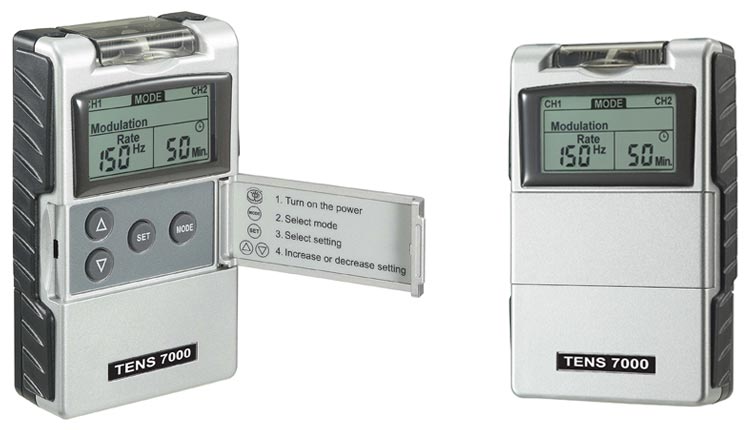
The TENS 7000 is one of the more straightforward to use TENS units on the market. But to anyone new to TENS therapy, these devices can look daunting. Below, we’ve diagrammed the TENS 7000 to point out the buttons and what they do.
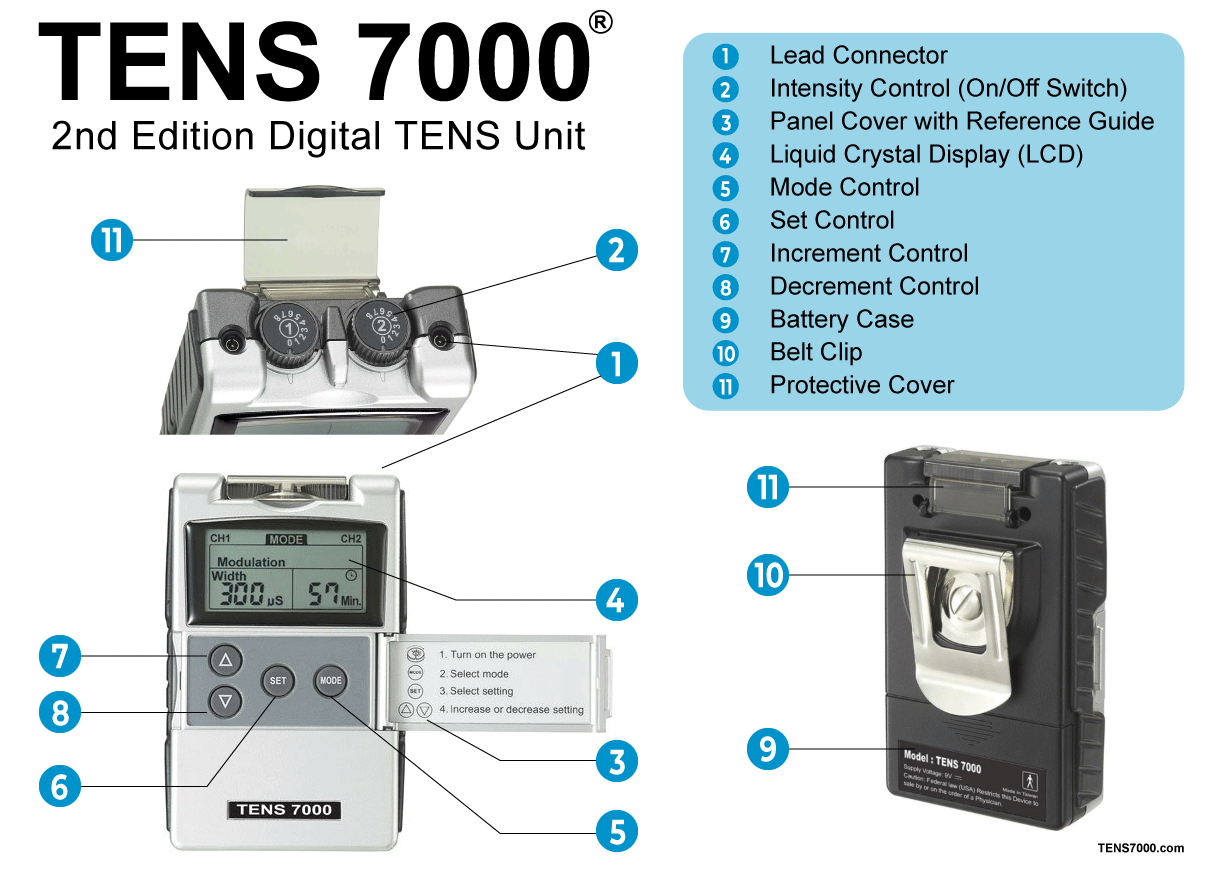
- Lead Connector: These connect the lead wires to the TENS unit to send electric pulses to the electrodes attached to the skin.
- Intensity Control (On/Off Switch): This acts as both the power switch and controls how intense the electrical pulse is. The TENS 7000 has a range of 0-100 mA with eight levels of intensity, level one being lowest and level eight being highest. The TENS 7000 features dual-channel control for two levels of treatment simultaneously.
- Panel Cover: This is a unique feature of the TENS 7000 that helps protect the buttons from accidentally being pushed as well as a short instruction guide for quick set up.
- Liquid Crystal Display: This is where the settings are displayed, including the selected mode, frequency, intensity, and treatment timing.
- Mode Control: Allows you to switch between the five programmed modes, including burst, normal, modulation, SD1, and SD2.
- Set Control: Lets you select between the settings to get the optimal pain treatment.
- Increment Control: Let’s you increase the settings of the TENS 7000, including pulse width, pulse rate, and timer.
- Decrement Control: Let’s you decrease the settings of the TENS 7000 including pulse width, pulse rate, and timer.
- Battery Case: Protects the battery
- Belt clip: Makes the TENS 7000 mobile and able to clip onto clothing for hands-free mobility pain management.
- Protective Cover: Keeps the intensity levels from accidentally being changes to prevent harmful shocking.
TENS 7000 Technical Specifications
- Compliance Meter: Stores 60 records up to 999 hours. This means you can go back to other settings that worked well with your pain treatment.
- Power Source: 9-volt battery
- Modes: Burst, Modulation, Constant, MRW, SD1 and SD2
- Channels: Dual channel for use with two or four electrodes
- Timer: Variable 5 — 60 minutes or continuous.
- Auto shutoff
- Output: 0-100 mA
- Pulse Rate: 2 — 150 Hz, adjustable
TENS 7000 Accessories
The TENS 7000 comes with a few accessories, some depending on which TENS Unit Kit you select. Below, we’ve highlighted the accessories available for the TENS 7000:
Lead Wires
These are the wires that connect the TENS 7000 to the electrodes to transfer the electrical pulse and stimulate the nerves.
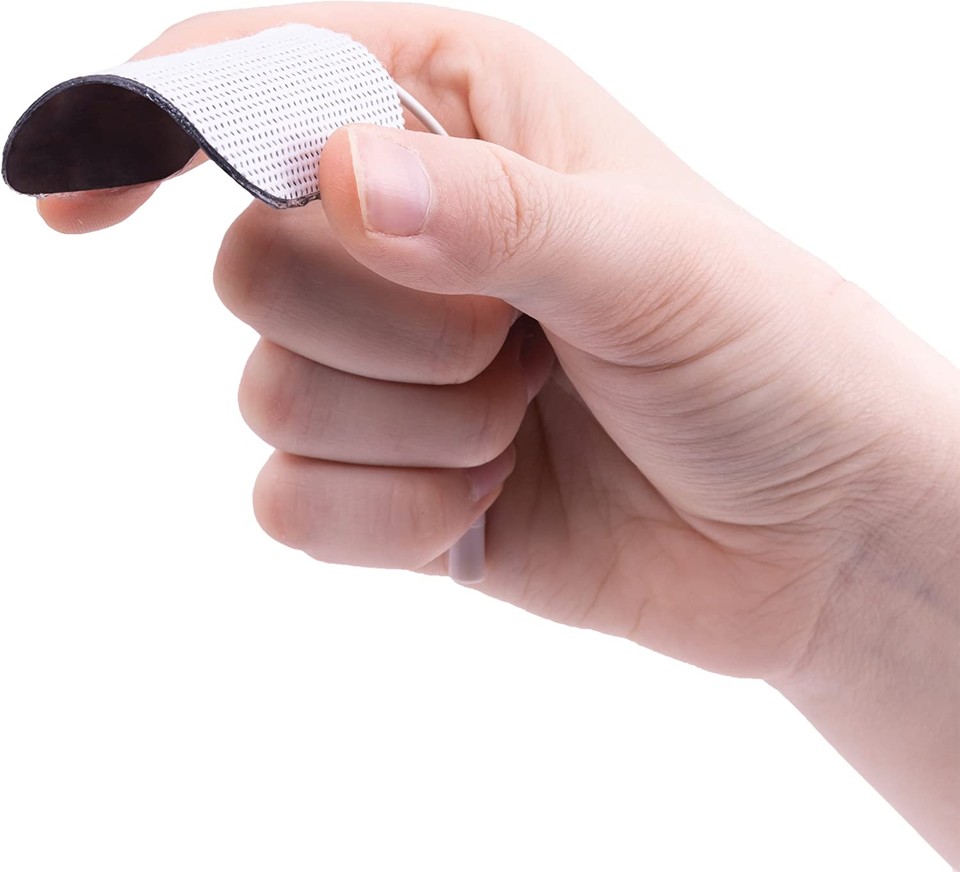
Electrodes (TENS Unit Pads)
These are pads that attach to the lead wires and go directly on the skin. They are reusable but should be replaced once their stick has worn off. It’s essential to replace them because once the stick has worn off, then the electrical current will no longer be transferred to your skin.
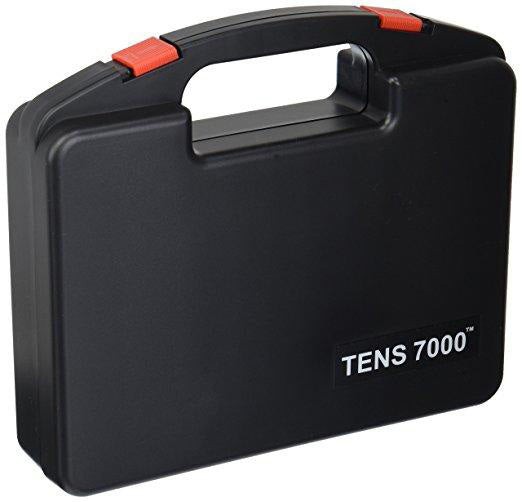
TENS 7000 Carrying Case
This is our specially designed TENS Unit carrying case that holds your TENS 7000, electrodes, lead wires, and TENS 7000 instruction manual. It’s been designed to make your TENS unit even more portable and easily stored.
Customizing Your TENS 7000 Pain Treatment
No pain is the same. It varies not just with the type of pain experienced, but with the person. Pain relief customizability is what makes the TENS 7000 a highly recommended TENS unit. In many patients, the reduction or elimination of pain lasts longer than the actual period of stimulation (sometimes as much as three or four times longer). We’ve broken down the five programmed modes on the TENS 7000 as well as the other customization features for more personal pain treatment.
Pulse Duration
This is the length of the pulse that’s put out by the TENS Unit. Wider pulse duration settings will deliver stronger stimulation for any given intensity setting. By using a combination of intensity and pulse duration, it’s felt that various pulse widths are capable of stimulating different groups of nerve fibers.
Pulse Rate
This is the rate at which separate pulses are sent from the TENS Unit. The Pulse Rate (hertz or pulses per second) chosen depends significantly upon the type of electrode placement. When using continuous and dermatome electrode placements, a quick pulse rate (higher than 80Hz), is ideal. The user should not perceive individual pulses but have the sensation of steady, continuous stimulation.
Timer
In most cases, pain relief should occur instantly after reaching the correct pain treatment levels. In some cases, pain relief can take as long as 30 minutes. The TENS 7000 allows you to customize your treatment length up to 60 minutes (most TENS units don’t allow for custom treatment time and turn off after 30 minutes).
Five TENS Therapy Treatment Modes
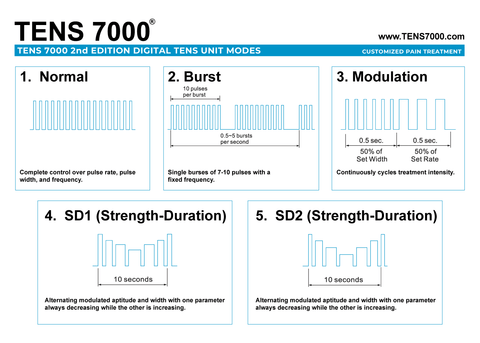
Normal Mode
Normal Mode or Conventional TENS offers the user complete control over all the various treatment settings, including the pulse rate, pulse width, and frequency. Normal mode is best for users looking for full control over their TENS therapy pain treatment.
Burst Mode
Burst Mode is analogous to the Low Rate TENS technique except the low-frequency individual pulses are replaced by single «bursts» of 7-10 individual pulses. It is a combination of Conventional TENS and Low Rate TENS. In Burst Mode, the treatment frequency is fixed by the instrument and is not adjustable with the Frequency Rate control.
Modulation Mode
Modulated Mode attempts to prevent nerve accommodation by continuously cycling the treatment intensity. When using Modulated Mode, increase the intensity only when the unit is at the maximum intensity of the modulation cycle. If the intensity is increased during a low-intensity period of the modulation cycle, the user should increase the intensity slowly until the modulation cycle reaches the maximum level. This will ensure a true maximum intensity output.
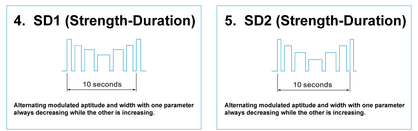
Strength-Duration Modulation
Strength-Duration Modulation (SD1 and SD2) consists of alternating modulated aptitude and width so that one parameter is always decreasing while the other is increasing and vice versa. This amplitude decreases from the amplitude control setting and returns to that setting. The width decreases from the width control setting and returns to that setting.
When it comes to the pain treatment settings on your TENS 7000, we recommend speaking with your doctor or physical therapist for the best practices specifically for you. No pain is precisely the same making customized treatment highly recommended for optimal pain relief.
Electrode Placement
The placement of electrodes is critical when it comes to getting optimal pain relief. It may take some time at first to find the correct electrode placement to target the pain point. Contiguous placement is the most common electrode placement technique — it involves placing electrodes alongside the area of the localized pain to direct the flow of current through and around the area of pain.
When using a single channel application, it involves placing each pad on either side of the pain site if the pain is localized on a limb and deep within the tissue. TENS Unit pad placement on the posterior and anterior aspects of the affected limp will allow the current to flow entirely through the limp and thus through the endogenous pain site.
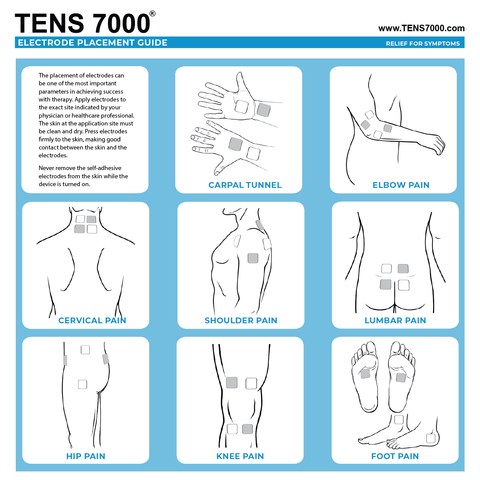
When using two channels, the user can direct the current flow to cross through the pain site. Another option is to use what’s called the «bracket» method. The bracket method allows the current to flow on either side of the painful area, generally through the nerve branches that feed into the pain site.
Once you’ve found a placement that effectively treats your pain, mark down the electrode sites and TENS Unit settings to easily pick treatment back up in the future.
Applying and Removing Electrodes
To get the best pain treatment from your TENS 7000, it’s essential to apply, remove, and care for your electrodes properly. We’ve included simple and easy steps for using and caring for TENS 7000 electrodes.
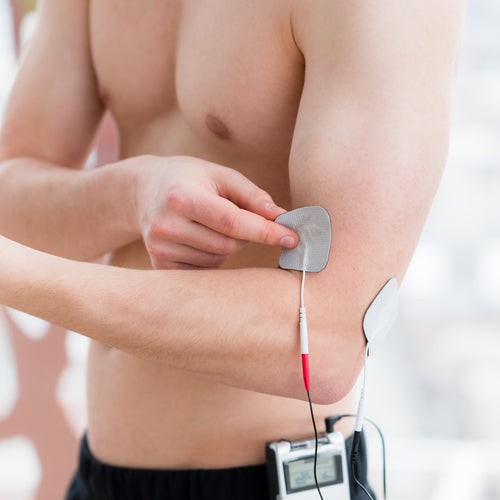
Application
- Clean and dry the skin at the target area thoroughly with soap and water before the application of electrodes.
- Insert the lead wire into the pin connector on the pre-wired electrodes
- Remove the electrodes from the protective liner and apply the electrodes firmly to the treatment site. Make sure the unit is turned off before using the electrodes
Removal
- Turn off the unit before removing the electrodes.
- Lift at the edge of the electrodes and peel; don’t pull on the lead wires because it may damage the electrodes.
- Place the electrodes on the liner and remove the lead wire by twisting and pulling at the same time.
Care and Storage
- Between uses, store the electrodes in the resealable bag in a cool, dry place.
- It may be helpful to improve the repeated application by spreading a few drops of cold water over the adhesive and turn the surface up to air dry. Oversaturation with water will reduce the adhesive properties.
Getting the Best Out of TENS 7000
To get the best out of TENS 7000, be sure to make sure the settings are correct, your electrode placements are in the target area and placed correctly, and you’ve made sure your TENS unit is well taken care of. To get more information on the TENS unit, how to use it, and best practices, we’ve included links below:

About the Author
Brandon Landgraf is the Digital Marketing Manager for Carex Health Brands. He finds passion and fulfillment in creating content that enhances, improves, and enlivens others’ quality of life. All of his written work is formulated to not only offer essential advice and tips but back it with proven studies and experts. His mission is to connect with readers and provide steps to make their lives better.
You can connect with him on LinkedIn here.

About TENS 7000
Pain sucks. It affects millions of people each year with adverse physical and mental side effects. TENS 7000 provides tools to combat pain and let people live life on their terms, pain-free. Our TENS 7000 TENS Unit is one of the top-rated over-the-counter TENS units, having sold over two million since 2008. Stop letting aches and pain hold you back — live life on your terms.
×
Сейчас вы находитесь в городе Москва
Выберите город, в который Вы хотите осуществить доставку
Быстрая доставка из США и Европы
Гарантия качества. У нас вы найдете только оригинальные товары TENS 7000
Огромный выбор уникальных товаров бренда
Лучший ассортимент TENS 7000 от эксклюзивных поставщиков
По возрастанию цены
По убыванию цены
По популярности
Показать ещё
В данном разделе представлен широкий ассортимент товаров бренда TENS 7000. Мы предлагаем только качественную оригинальную продукцию, которая отличается надежностью и долговечностью. Указанные цены наверняка порадуют вас, а удобные способы оплаты и доставка в любой город России сделают процесс покупки максимально комфортным. Откройте для себя мир товаров от TENS 7000 прямо сейчас и оцените все преимущества сотрудничества с нашим интернет-магазином!
Есть вопросы?
Закажите обратный звонок, мы перезвоним и проконсультируем.
TENS 7000 may look like one of those old portable radios – but does that matter? Not one jot.
TENS units are designed to relieve pain – they’re not fashion accessories. If you were to base your judgment on its appearance and stopped reading now, you’d be dismissing one of the finest TENS units out there.
It’s been around for years, this little silver device – and it’s still here. That tells you it’s doing something right. In fact, it’s doing a lot right.
The only slight downside I can find with this machine is that it’s not rechargeable.
However:
It more than makes up for that, with its impressive set of features and straightforward operation.
In this TENS 7000 review, I’m going to explain what this machine can offer you, and tell you why I rate the device so highly.
TENS 7000
Dual channel TENS machine with: 5 modes, 8 intensity levels, adjustable pulse width and pulse rate, comes with hard shell carrying case, use up to 4 pads
CHECK PRICE ON AMAZON
Programs and modes
Within TENS 7000’s settings there are 5 modes to choose from:
- Burst
- Normal
- Modulation
- SD1
- SD2
(The instruction manual does a great job in explaining what each mode does and how it works.)
Along with the modes are 3 other settings you can adjust:
- Intensity
- Pulse width
- Frequency
The combination of the 5 modes and other settings gives you a huge amount of options and flexibility for your TENS therapy.
Most other machines don’t offer half as much control. If you can’t find anything that suits you within their presets, you’re stuffed.
CLICK TO COMPARE: this device against others
TENS 7000 on the other hand, empowers you – the user – by allowing you to tweak the controls until you find the settings best suited to your particular pain and requirements.
Another nice feature is the timing function:
Where you can choose exactly how long your session is going to last for. This is handy, especially when you compare it to some other devices in the same price range, which have an auto shut off, after 15 minutes.
With TENS 7000 you can do more.
Here’s how it’s explained in the instruction manual:
Adjustable, from 1 to 60 minutes or Continuous. Adjustable in 1 minute each step from 1 to 15 minutes and minutes each from 15 to 60 minutes.
What we can see from these features is the machine really allows you to tailor everything to your needs. It won’t restrict you, where other similarly priced devices with limited options will.
Channels
Like the majority of machines, TENS 7000 is dual channel and can be used with either two or four pads at a time.
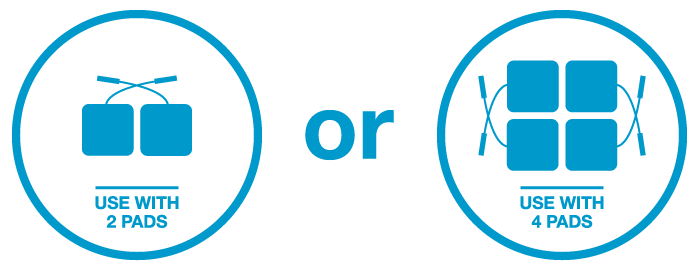
With this device, you have the means to treat two areas or both sides of the body at once.
Intensity levels
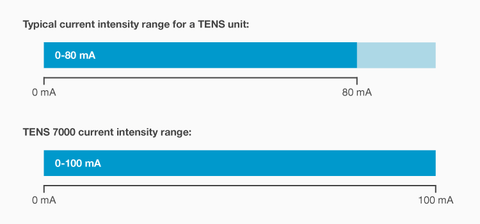
Without getting overly technically here, the device has an intensity range of 0-100 mA, which is perfect.
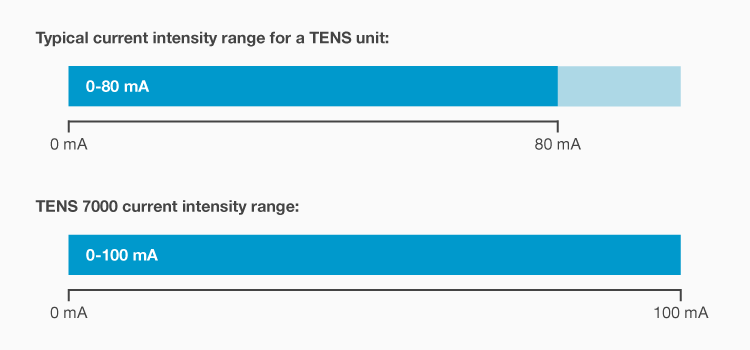
Tim Watson, the expert behind electrotherapy.org explains TENS machine output intensities here:
The current intensity (strength) will typically be in the range of 0-80 mA, though some machines may provide outputs up to 100 mA. Although this is a small current, it is sufficient because the primary target for the therapy is the sensory nerves, and so long as sufficient current is passed through the tissues to depolarise these nerves, the modality can be effective.
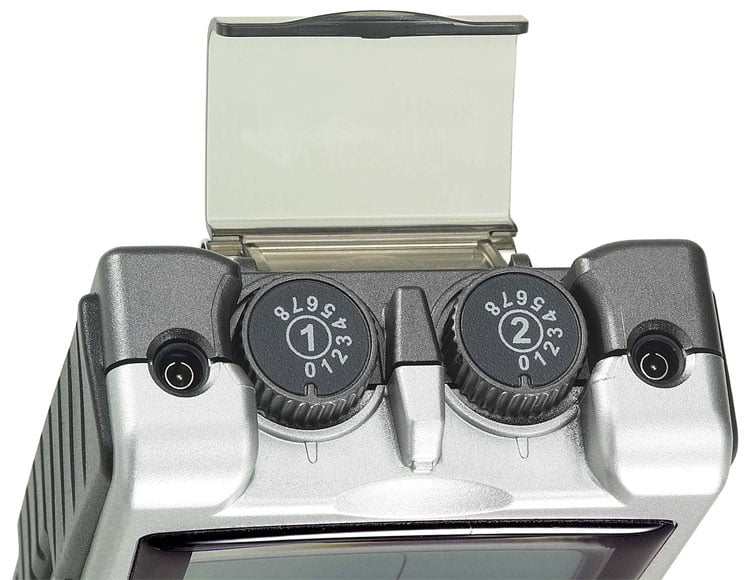
The intensity controls have eight levels to choose from.
One of the things I like best about TENS 7000 is the two protective covers, one of which is on top of the device. It covers the two dials that are used to adjust the intensity, (one for each channel).

When I reviewed the truMedic PL-009 I pointed out a design flaw, where the intensity controls (positioned on the side of the unit) can be knocked very easily:
In a flash you can accidentally send the intensity from the lowest setting to the highest. A nasty surprise, to say the least.
Because of the protective cover on top, you’ll never have that problem with this machine.
Ease of use / Operating the device
While TENS 7000 has a number of settings that can be adjusted and customized, it remains easy to use. This, in part is thanks to the excellent instruction manual that comes with the device.
The instructions cover everything – and more, with tips on how to best prepare your skin, applying the electrodes, and caring for your machine.
And the control buttons are clear and easy to understand, with only 6 in total (if you include the intensity controls, which double up as the On / Off switch).
While the four buttons on the front of the device aren’t the biggest, you shouldn’t have any trouble with them as they’re well laid out and have adequate spacing between them.
RELATED: TENS 3000 review
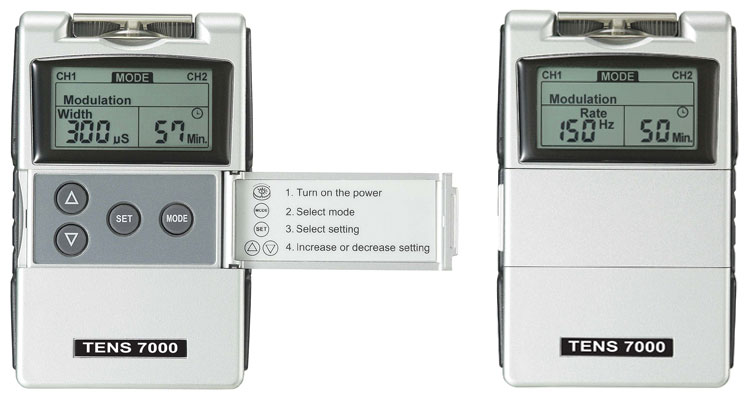
To ensure you know how long of your treatment is remaining, there’s a countdown timer on the device’s LCD screen. You’ll also see the selected mode and pulse width or pulse frequency being displayed.
The screen isn’t enormous, however, it does the job it needs to, with clarity.
Everything has been well thought out and considered with this TENS unit.
I mentioned earlier, there is a protective cover for the intensity dials.
Well, guess what?
There’s also one on the front to cover the four buttons! This serves the same purpose and prevents accidental adjustment, helping to avoid any unexpected surprises.
Battery
Unlike most other over the counter (OTC) TENS units, this machine is powered by a single 9V battery. This is the type of battery you may find in your smoke alarm, wall clock, walkie-talkies.
It’s not possible to charge the unit itself – but here, I’m going to go slightly against what I’ve said in previous reviews.
My opinion (in general):
Is that if you’re thinking about purchasing a TENS unit – and then want to buy a battery charger and rechargeable batteries – on top, you’d be as well going for a rechargeable device from the off.
However:
When it comes to TENS 7000, I believe the unit is that good – investing in a charger and batteries – makes total sense.
You may even be able to find this for close to $20, here for example is one of the battery and charger options on Amazon.
It only ships with one battery, which is certainly something that needs to be taken into consideration.
The low battery indicator on the screen will let you know when it’s running out – but always better to be prepared and organized.
It’s difficult to state exactly how much use you’ll get out of a single battery, without running long tests.
I’ve researched this online and seen reports of users getting around 10 or 12 hours out of each battery, which is quite impressive.
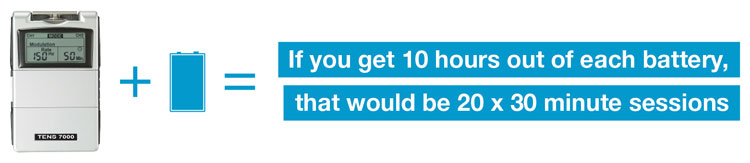
Based on the conservative estimate of 10 hours use per battery, we can do a couple of sums:
If you were to use the machine for half an hour a day, that would give you 20 treatments per battery.
Say you didn’t want to go down the rechargeable route, you could opt for this box of 12, found on Amazon. You may be able to get around 240 sessions out of those batteries, not bad hey?
I, personally, would go for rechargeables but there are two feasible solutions there.
Size and portability
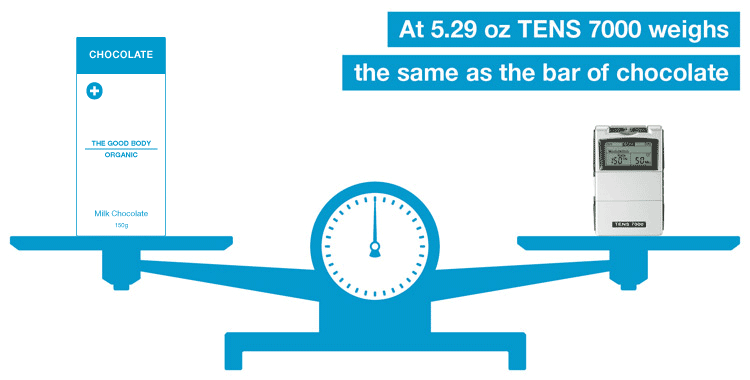
The approximate dimensions of TENS 7000 are: 3.98 in (H) x 2.4 in (W) x 0.96 in (D).
If we compare this to an iPhone 5, it’s about the same width, quite a bit deeper but roughly an inch smaller on the height measurement.
At 5.29 oz it weighs a fraction more than that iPhone 5 (3.95 oz). At that size and weight, it’s quite clearly a portable device.
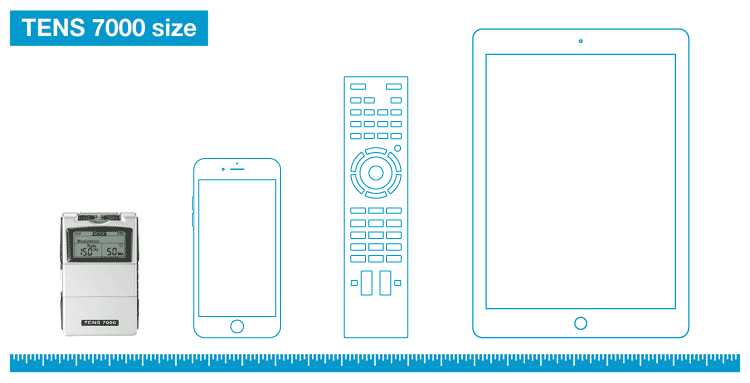
When considering portability:
You should also take into account that the machine ships with a made to measure hard carrying case.
This is quite rare with TENS units so it’s somewhat of a bonus.
It’s perfect for popping in the car or even into a suitcase when you go away on vacation. The hard shell offers a good level of protection, in case of any accidental drops (or incidents with the under 5s!)
Included accessories
What’s inside the box, you ask?
There’s enough for you to get started straight away.
I’ve already mentioned the 9V battery and carrying case, along with those (and the unit, of course) are: 2 x lead wires and 4 x electrodes (pads).
This is fantastic and you may like to give the device a whirl first – but it really is prudent to plan ahead.
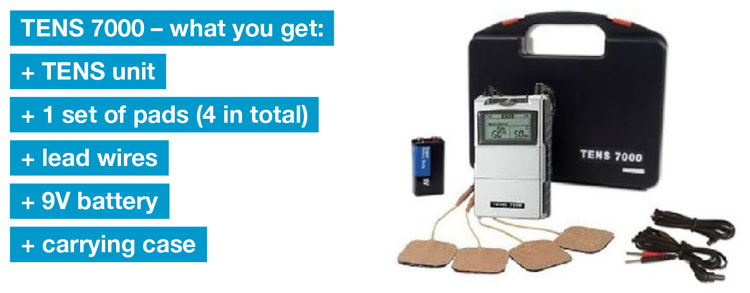
Earlier, I detailed some solutions for the battery. Now, it’s worth looking into the pads:
The four that ship with the machine are fine to get you up and running, however, they’re not going to last forever, unfortunately!
But let’s turn that on its head:
You’ll be able to get replacements that are higher quality.
Because they’re a standard pin type connection you’re spoiled for choice, you could purchase and use almost any of those.
Warranty
TENS 7000 has a one year manufacturers warranty, this covers parts and labor for the machine.
It’s about the industry standard, most TENS unit brands back their devices with a year’s warranty.
One year is favorable when compared to truMedic’s 90 day warranty for their PL-009 machine. And it’s also worth noting (at the time of reviewing), this machine is available for more than $10 less than that truMedic device.
Consumer reviews / Pros and cons
- Powerful – high output strength (range of 0-100 mA) with 8 adjustable levels of intensity
- Timer can be set to a custom length or put on continuous
- Has pre-programmed modes but within those the user can adjust the pulse-width, wavelength and intensity
- Controls are covered by plastic covers – means you can’t knock them by accident
- Battery life good when compared to other similarly priced units
- Solid construction and well built
- Comes with carrying case (unlike similar priced models) – small, lightweight and genuinely portable
- Instruction manual goes above and beyond – explains everything, including: the components, setting it up, the modes and what they do, maintenance and storage of the device
I’ve struggled to put together anything that’s really negative about this product. If we’re being really picky, we could say:
- Unit itself not rechargeable
- Pads supplied with the machine aren’t as good as some replacement electrodes
Price
Personally, I don’t think you’ll find a better value TENS unit than TENS 7000.
It blows the competition out of the water – when you look at its capabilities.
While originally researching this device, I discovered more than one listing on Amazon – and they were different prices!
When I checked again more recently (23 November, 2015), the two listings were slightly different. One was listing the standard TENS 7000 package, whereas the other was offering a bundled version with 40 pads.
So if you are comparing the two directly, check exactly what the seller is including in the package, as they can update their listing at any time.
I also noticed that Walmart doesn’t seem to have this product in stock anymore. I remember it was listed there for around $60 in mid 2015.
Some other stores appear to be selling it for a competitive price but have shipping to add, which in some cases, can put an extra $10 onto the purchase price. Something to be aware of.
Going forward with the unit:
Your only costs will be replacement (or rechargeable) batteries and electrodes. As battery life should be decent (discussed here) and it takes standard fit electrodes, running costs shouldn’t be too bad at all.
Compare this to something like Omron’s PM3030, where you can only use their own brand pads – you’re going to spending far less, especially if you plan to use the device regularly.
Summary
All things considered, TENS 7000 is a fantastic piece of kit, it makes other machines in its price range look like toys.
Thanks to its fantastically detailed instruction manual, the novice can benefit from this device, as well as the seasoned pro.
The best thing about it:
You can customize and fine-tune the settings, until you find the optimum combination for your particular pain. Not all machines offer this, and certainly not those in the same price range.
You’ll get out what you put into using this device.
Spend the time experimenting with it and understanding how it works, and you’ll never look back.
That’s not to say it’s complicated to use or get started with, after all, it has the 5 pre-set modes that you choose from. It just gives you the means to go into those modes and customize them, until you’re completely happy.
If, however, you’re overwhelmed by electronic devices, and would rather have something that’s more automated with less controls and things to set, check out the Omron PM3030.
Features — 8.5
Ease of use — 7
Value for money — 9
8.2
TENS machines should perform, they’re not here to look good – but to make you feel good. TENS 7000 may look a little dated – but don’t be fooled, this is a powerful piece of kit, suited to people who are serious about their TENS sessions.
Need to Return Your Purchase? It’s Easy — Caputron Offers 90 Day Hassle Free Returns
Our return policy is simple. If you are not 100% satisfied
with your purchase from Caputron you can return your item(s) within 90 days of purchase. If 90 days have gone by
since your purchase, unfortunately we can’t offer you a refund or exchange.
Returned devices must be in a like-new and undamaged condition. Products returned damaged may not qualify for a
refund.
Opened or used accessories such as electrodes, gel, saline, head straps, or other consumables are not eligible for a
refund.
Shipping
———
Orders are generally dispatched within 1-3 days after receipt of payment, though some exceptions may apply, and
are shipped via UPS, DHL and USPS with tracking (when applicable) and drop-off without signature. If you prefer
delivery by a different method, please contact us. Delivery with signature is available for an additional fee.
Once your order is shipped you will receive an email or sms message when applicable (additional carrier rates may
apply) with any tracking information available — you can check order status by logging into your account.
International Customers Please Note: Any additional fees required by customs will be the responsibility of the buyer.
We cannot control customs processing times in international countries.
It is not uncommon for USPS First Class/Flat
Rate parcels, or packages of any type, to get caught up in customs for weeks at a time. We highly recommend using
UPS or DHL for international orders as they provide faster customs processing times and accurate tracking updates.
We are not responsible for any added time due to customs. We will not be liable for, nor will any adjustment,
refund, or credit of any kind be given as a result of any delay, misdelivery, or non-delivery. Items returned to us
that were deemed undeliverable and are not damaged in any way are subject to partial refund for the cost of the
merchandise minus the cost of shipping.
At the discretion of both Caputron and the buyer, redelivery may be
attempted for additional shipping costs determined prior to reshipment.
* When offered, free shipping is eligible only for the contiguous United States and does not apply to items that need
to be shipped freight or for certain research items.