
«Метеостанция» в кавычках, потому что прогнозировать ОНО не умеет: показывает температуру\ влажность дома и
за городом
на улице, максимальные и минимальные значения за 24 часа и тенденцию увеличения или уменьшения этих параметров. Своих денег стоит!… на этом можно было и закончить описание
-но я же коротко не умею 
Покупал в принципе для различных целей использования (позже подумал и заказал еще одну), но обе не с Али а Озона (там тогда дешевле получалось). На момент первой покупки стоимость комплекта была смешные 734 руб. Сейчас заметно выше, но цена плавающая, можно попытаться поймать более выгодный момент.
Зачем позже заказывал вторую? — устройство поддерживает несколько выносных датчиков, а стоимость только одного такого датчика отдельно получается дороже всего купленного комплекта(!) Решил пусть будет две базы 
Итак, что нам там обещают?
Технические характеристики
1. Частота передачи 868 МГц.
2. Диапазон температур в помещении: -4 ° F ~ 158 ° F (-20 ° C ~ 70 ° C).
3. Диапазон наружных температур: -4F ~ 158F (-20C ~ 70C).
4. Диапазон влажности: 10% ~ 99%
5. Точность температуры: ±2,0 ° F (±1,1 ° C).
6. Точность влажности: ± 2% от 30% до 80%; ± 3% ниже 30% и выше 80

Достаем из коробки. Комплект упакован в «пупырку»: База с измерением температуры/влажности, внешний датчик и инструкция (русского нет)
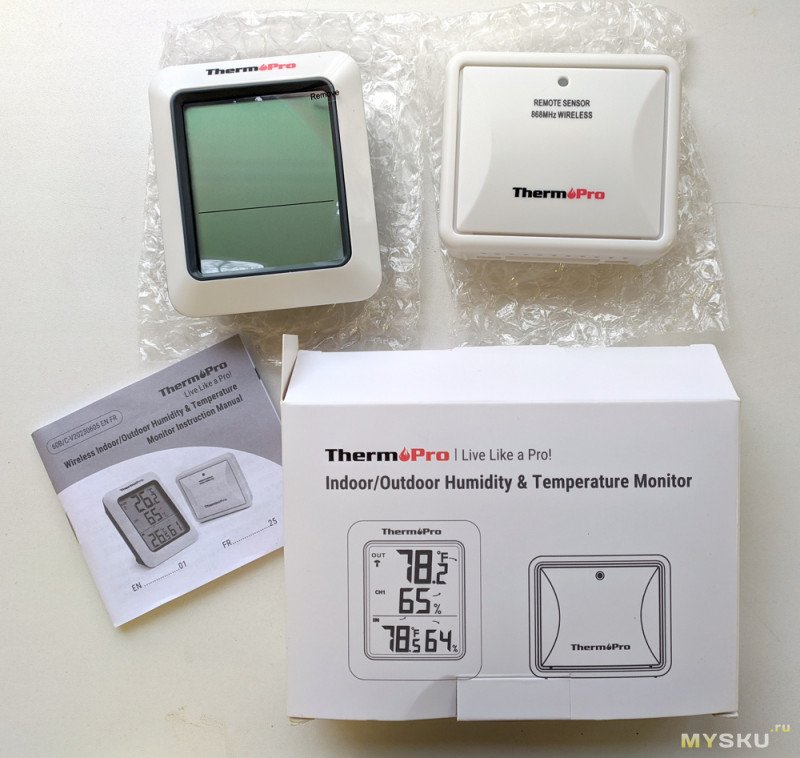
Внешний датчик.
В верхней части светодиод, который кратковременно загорается во время передачи данных на базу.

Обратная сторона-лючок под батарейки ААА. Фиксируется необычно, подвижной скобой в нижней части.

Под крышкой, кроме места под батарейки, еще пара кнопок: ТХ (при нажатии посылается сигнал на базу, для синхронизации), RESET и переключатель выбора канала (1-2-3)

В нижней части отверстия для датчиков


Начинка… с другой стороны платы ничего нет, кроме площадок под контакты кнопок. Вытаскивать проблематично (надо выпаивать контакты батареи), поэтому фото нет

корпус имеет силиконовую прокладку для герметизации

Базовая часть

Задняя часть. Кнопок немного.
Первая это выбор канала/включение опроса каналов по очереди/принудительное включение синхронизации (удержанием кнопки).
Следующая кнопка переключение стандарта отображения температуры С или F.
Третья кнопка отображение Максимальных/минимальных значений в течении 24 часов и сброс памяти (удержанием)

нижняя часть имеет выдвигающуюся ножку-подставку.

место под батарейки

Начинка.


Включение. Первоначально запускается в таком виде: Символ слева вверху-идет ожидание передачи от внешнего датчика, пару-тройку раз получает и входит в рабочий режим.


Передача от внешнего датчика происходит примерно каждые 50-55 секунд (примерно потому, что у меня получалось разное время при тестировании). Внутреннее обновление и внешнее происходят не одновременно.
Имеется индикация разряда батареи. При разборке внешнего датчика (фотографировал содержимое) на базе оставались последние полученные показания, сброса не произошло, несколько пропусков приема не обнуляют показания.
Расстояние уверенной работы внешнего датчика не менее 40-45 метров (из теплицы уверенно принимает база расположенная в доме). Второй датчик была мысль установить в парилку, что бы не бегать смотреть, когда же она нагреется до нужной температуры
Внутренний и внешний датчики показывают одинаково (если стабильная среда без всякого рода сквозняков)

Разница с эталонным датчиком температуры (в свое время мною проверялся) на уровне погрешности -0.1 градуса.

Получил второй комплект, запустил одновременно — забавно, оба показывают с обоих датчиков. Теперь можно в разных помещениях установить базы и наблюдать из любого места за показаниями внешних датчиков

Один датчик положил в парилку (греется еще), второй в другом помещении- циклически переключаются показания между датчиками

Как по мне, главный недостаток устройства- маловат нижний предел температуры (-20 для России -смешно) и довольно мелкое обозначение номера канала/датчика, при циклической работе с расстояния бывает сложно понять какая именно датчик отображается в текущий момент, все остальное в принципе весьма неплохо.
Если Вам неинтересна влажность, возможно более интересным будет иной вариант, сразу с двумя внешними датчиками и сигнализацией температуры при выходе из заданного диапазона (по этой же цене) —
https://aliexpress.ru/item/1005001506717137.html

Всем удачи и хорошего настроения!☕
Контакты
Удиви меня
















Рейтинг магазина PosudaOk
на основе 963 оценок покупателей и данных службы качества Маркета
Читайте отзывы с Яндекс.Маркета о магазине PosudaOk — нам можно доверять!
Достоинства: Отличная организация. Доставили в срок и с документами все отлично! Рекомендую.
Недостатки: Нет
Достоинства: Видно на сайте, что в наличии, что нет. Четкая работа курьера.
Комментарий: Все четко, без неожиданостей.
Пользователь скрыл свои данные
Достоинства: Хороший ассортимент и низкие цены
Достоинства: Приятные цены, есть вещи, которых нет в другом месте
Недостатки: Маленький ассортимент
Комментарий: Долго не могла дождаться информации по своему заказу, пришлось звонить. Оператор сообщила, что заказ «наверное передадут в службу доставки завтра», хотя на тот момент он уже неделю как должен был быть в пункте выдачи! Потом только перезвонил другой оператор и сообщил, что одна из позиций отсутствует. Можно это было сделать раньше…
Достоинства: Качество товара соответствует описанию (хрустальное стекло)
Хорошая упаковка.
Недостатки: Нет
Комментарий: Быстро доставили из Москвы, хорошо упаковано, качество бокалов отличное, как и в описании. Заказ ПС-59649 Спасибо!
Электротермометр TP-50 Цифровой термометр для измерения температуры и влажности
- 1
- 2
- 3
- 4
- 5
Особенности термометра для измерения температуры воздуха TP-50:
|
Что такое электронный цифровой термометр психрометр?
Электронный комнатный термометр — психрометр измеряет и отображает температуру воздуха в комнате и влажность. Цифровой термометр запоминает и отображает максимальную и минимальную температуры и влажность воздуха в комнате за цикл работы от одной батареи и отображает их.
Как работает электротермометр для измерения температуры воздуха Therm Pro TP-50?
Для включения цифрового термометра вставьте батарею типа ААА в разъем. Экран электротермометра заработает и термометр начнет измерять влажность и температуру воздуха.
Что в комплекте электронного термометра TP-50:
|
ManualsPro
Therm Pro
Therm Pro TP962 Truly Wireless Cooking Thermometer User Guide
- June 12, 2024
- Therm Pro

Therm Pro TP962 Truly Wireless Cooking Thermometer

Introduction
Congratulations on your purchase of the enhanced version of the Smart, Truly
Wireless Bluetooth-connected Cooking Thermometer : TempSpike II. You will
nowbe able to remotely monitor the internalmeat temperature and ambient
temperature for two pieces of meat simultaneously and how much time is left to
be done for each piece of the meat from your smart device.
Features
-
Booster : Receives the temperature signal from the probes and booster and transmits it to the smart device. It also serves as a power source to charge the probes.
-
Probe : Inserted into meat and measures the meat internal temperature and ambient temperature simultaneously, IP67 waterproof.
-
Notch : When the probe is inserted into meat for measuring the meat’s internal temperature, the probe must be inserted deep enough so that the meat will cover this notch.
-
S button : Serves four functions:
- Press once to turn on the Booster.
- When the Booster is ON, press the S button to rotate between internal meat temperature, ambient temperature, or turn on auto rotate between the two temperatures on the LCD Display.
- When the Booster sounds an alarm, press the S button to silence the alarm.
- Press and hold for 3 seconds to pair the booster and the probe.
NOTE : Please note that the booster and the probe are pre-paired via
Bluetooth at our manufacturing facility. Generally, you will not need to pair
them.
-
% : button Press to turn on/off the backlight.
-
LCD Display : Shows the temperatures measured by the probes and battery power levels.
- When the icon shows, the booster alarm function is turned on;
- When the icon shows, the booster alarm function is turned off.
- The booster alarm ON/OFF can be set in the TempSpike APP Settings.
-
Auto Off : When both probes are placed in the Booster for charging, the Booster will be automaticallv turned off after 5 minutes and the display will only show the charging status.
- When both probes are fully charged, the display will be turn off as we.
-
Magnet : Two strong built-in magnets allow you to attach the booster onto your grill, oven, smoker or any other metal surfaces.
-
USB – C Charging Port : Can be connected to any USB charger via a charging cable enclosed to charge the booster.
Components
- 1 x Probe with Black Handle (Black Probe)
- 1 x Probe with White Handle (White Probe)
- 1 x Booster
- 1 x Cover
- 1 x USB-C Charging Cable
- 1 x Quick Start Guide
Usage
Follow the simple steps below to set up your TempSpike II and help you Cook
Like a Pro!
-
Step 1 : Download and install the “TempSpike” App. Scan the QR code above, or search for “TempSpike on the Apple Store for iOS devices or on the Google Play Store for Android devices. Download the App and install it on your smart device.
-
Step 2: Enable Bluetooth on your smart device under the Settings section. If your smart device already has Bluetooth enabled, you can skip this step.
-
Step 3: Fully charge the booster and the probes
- Connect the USB charging cable provided to any USB charger to charge the booster.
- The LCD display on the booster shows the battery charging status for the booster and the probes.
-
Step 4: Pair the probe to the booster The booster and the probes are pre-paired via Bluetooth at our manufacturing facility.
- Removing the probe from the booster, you will see the temperature measured by this probe appear on the LCD display.
- Remove the probe from the booster.
- Press and hold the S button until you see the temperature reading show on the LCD display, which indicates that this probe is paired with the booster. Once they are paired, you do not need to pair them again for future uses.
Please note that one booster can only pair with one black probe and one white
probe, which means you cannot pair one booster with two black probes or two
white probes.
-
Step 5: Pair the booster to your smart device
- Turn on the booster by pressing S button or take any probe from the booster.
- Launch the TempSpike App and press Add Device. A list of devices will appear and select TempSpike Il from the list. The App will jump to the device list page which shows the real time temperatures measured by the probes. Now your TempSpike Il is ready for use. You don’t need to pair them again for future uses.
-
Step 6: Start cooking
- Insert one probe or both probes into the meat deeply enough so that the notch on the probe is fully covered by the meat.
- Set your desired meat temperature or select the meat type and doneness you desire within the TempSpike App and/or set the highest/lowest ambient temperatures you prefer for each probe.
- Once the target temperature reaches your target temperature, an alarm will sound from the App and/or the booster.
Caution
- There are sophisticated and delicate electronics within the probes. To avoid extremely high heat which could damage the electronics, please ensure to always insert the probe deeply enough into the meat so that the notch on the probe is fully covered by the meat.
- Do NOT use TempSpike in the microwave.
- The connection range between the probes and the booster usually can go as far as 160 feet or 50 meters in an open area, it can be dramatically reduced to as short as 10 feet(3 meters) when the probes are inserted into the meat and then the metal cooking appliance is closed. Therefore, we strongly suggest placing the booster as close as possible to the probes when it is inserted in the meat, such as resting directly outside the cooking appliance and always pay attention whether the connection between the probes and the booster is lost. When this occurs, please move the booster closer to the probes.
- Always wear glove to remove the probes from the meat when you finish cooking.
- Use a kitchen towel or rag to wipe and clean the probes after each use. You may rinse the probes and use dishwasher to wash it as well.
- After cleaning the probes, always place the probes in the booster for charging and storage.
WARNING : FOR ARTIFICIAL CARDIAC PACEMAKER USERS Please be aware that a
magnet installed inside the booster may impact the functionality of your
artificial cardiac pacemaker. If you have a pacemaker, we recommend always
staying up to 1 foot or 0.3 meter away from the booster.
FCC Statement of Compliance
This device complies with Part 15 of the FCC rules. Operation is subject to
the following two conditions:
- This device may not cause harmful interference,
- This device must accept any interference received, including interference that may cause undesired operation.
Warning: Changes or modifications to this unit not expressly approved by
the party responsible for compliance could void the user’s authority to
operate the equipment.
NOTE: This equipment has been tested and found to comply with the limits
for a Class B digital device, pursuant to Part 15 of the FCC rules. These
limits are designed to provide reasonable protection against harmful
interference in a residential installation. This equipment generates, uses and
can radiate radio frequency energy and, if not installed and used in
accordance with the instructions, may cause harmful interference to radio
communications. However, there is no guarantee that interference will not
occur in a particular installation. If this equipment does cause harmful
interference to radio or television reception, which can be determined by
turning the equipment off and on, the user is encouraged to try to correct the
interference by one of more of the following measures:
- Reorient or relocate the receiving antenna.
- Increase the separation between the equipment and the receiver.
- Connect the equipment into an outlet on a circuit different from that to which the receiver is connected.
- Consult the dealer or an experienced radio/TV technician for help.
Declaration of Conformity
Hereby, the manufacturer declares that this product with the basic
requirements and applicable regulations of the Radio Equipment Directive
2014/53/EU, the EMC Directive 2014/30/EU. The complete declaration of
conformity can be found at:
https://itronicsmall.com/eu-declarationof-conformity/complies
Disposal of the Electronic Appliance
This electronic appliance should not be disposed of with normal household
waste. Dispose of the unit at an approved facility or at your local recycling
center. Please observe the current rules and regulations when disposing of the
appliance. Contact your local council if in doubt.
Limited One-Year Warranty
TempSpike warrants this product to be free of defects in parts, materials
and workmanship for a period of one year, from date of purchase. Should any
repairs or servicing under this warranty be required, contact Customer Service
by phone or email for instructions on how to pack and ship the product to
TempSpike. This warranty gives you specific legal rights and you may also have
other rights which vary from state to state.
Customer Service
Call or Text: 1-877-515-7797 (USA &
Canada only) -09-33-975-129-576 (FR) 49-215-493-19011 (DE) 39-052-317-15570
(IT) 34-910-601-787 (ES) 44-808-164-1683 (UK) 61-180-057-7492 (AU) Email:
service@buythermopro.com Hours Weekdays
8:00AM- 8:00PM EST (USA & Canada only)
According to the operating system of your mobile, scan the following QR code
to download and install.
- Android
- iOS
Read User Manual Online (PDF format)
Read User Manual Online (PDF format) >>
Download This Manual (PDF format)
Download this manual >>