
[pdf]
User Manual Specifications Guide SAR Rating
User Guide MERCUSYS Specifications are subject to change without notice is a registered trademark of TECHNOLOGIES CO LTD Other brands and product names 1910080046 MU6H UG REV1 0 020190816061305 static mercusys manual
User Guide AC650 High Gain Wireless Dual Band USB Adapter MU6H REV1.0.0 1910080046 COPYRIGHT TRADEMARK Specifications are subject to change without notice. is a registered trademark of MERCUSYS TECHNOLOGIES CO., LTD. Other brands and product names are trademarks or registered trademarks of t…
lang:en score:53 filesize: 919.5 K page_count: 12 document date: 2019-08-15
[pdf]
User Manual
PowerPoint 프레젠테이션 MU6H EU V1 데이터시트20220519023656 static mercusys manual |||
AC650 USB : MU6H 5 GHz 433 Mbps, 2.4 GHz 200 Mbps — Windows 10/8.1/8/7/XP 32/64bit AC650 USB : MU6H AC650 USB : MU6H Wi-Fi AC12G USB 2.0 W x D x H 2.28 0.66 6.83 57.8 16.8 173.4 mm 1x 5dBi AC650 USB : MU6H IEEE 802…
lang:tl score:49 filesize: 346.58 K page_count: 3 document date: 2022-05-19
[pdf]
User Manual Decleration of Conformity
Statements of PSTI Compliance Mercusys MU6H docx Sarah static mercusys manual |||
MERCUSYS TECHNOLOGIES CO., LTD. 3rd Floor, Building R1-B, No. 23, Gaoxin 4th Road, South Hi-Tech Par … South Hi-Tech Park, Nanshan, Shenzhen, P.R. China Product Type: Wi-Fi 5 USB Adapter Product Model: MU6H Product Version: V1 We, MERCUSYS TECHNOLOGIES CO., LTD. hereby declare that the device complie…
lang:en score:47 filesize: 211.44 K page_count: 1 document date: 2024-03-21
[pdf]
User Manual Installation Guide Specifications Datasheet Dimension Guide
AC650 High Gain Wireless Dual Band USB Adapter MU6H EU 1 0 datasheet20190815084750 static mercusys manual
AC650 High Gain Wireless Dual Band USB Adapter Model: MU6H Highlights 433 Mbps on 5 GHz, 200 Mbps on 2.4 GHz Internal Driver — Smart Easy-Install High-Gain Antenna- Boost Wireless Range Compatible with Windows 10/8.1/8/7/XP 32/64bit Datasheet AC650 High Gain Wireless Dual Band USB Adapter Mod…
lang:en score:45 filesize: 356.14 K page_count: 3 document date: 2019-08-14
[pdf]
Specifications Guide Accessories SAR Rating
User Guide TP Link Mercusys MU6H AC650 High Gain Wireless Dual Band Wi Fi USB Adapter 650Mbps Speed 5dBi Antenna Computers Accessories 91Xu7GuiZKL m media amazon images I |||
User Guide AC650 High Gain Wireless Dual Band USB Adapter MU6H REV1.0.1 1910080048 COPYRIGHT TRADEMARK Specifications are subject to change without notice. is a registered trademark of MERCUSYS TECHNOLOGIES CO., LTD. Other brands and product names are trademarks or registered trademarks of t…
lang:en score:43 filesize: 917.82 K page_count: 12 document date: 2022-07-05
[pdf]
User Manual Specifications Guide SAR Rating
User Guide MERCUSYS CE Mark Warning This is a class B product In domestic environment this may cause radio interference in which case the user be required to take adequate measures 1910080048 MU6H UG REV1 0 120191108061654 static mercusys manual The Quick Installation can found where you find guide or inside package of router Speed Coverage Disclaimer *Maximum wireless signal rates are physical derived from IEEE Standard 802 11 specifications Actual data throughput and coverage not mk0myithubcomau1pyuy kinstacdn 2020 05 Raru AC650 High Gain Wireless Dual Band USB Adapter 1 COPYRIGHT TRADEMARK Specifications subject change without notice registered trademark
User Guide AC650 High Gain Wireless Dual Band USB Adapter MU6H REV1.0.1 1910080048 COPYRIGHT TRADEMARK Specifications are subject to change without notice. is a registered trademark of MERCUSYS TECHNOLOGIES CO., LTD. Other brands and product names are trademarks or registered trademarks of t…
lang:en score:42 filesize: 955.83 K page_count: 12 document date: 2019-10-16
[pdf]
User Manual Specifications Guide SAR Rating
Manual MU6H Mercusys AC650 Wi Fi 5 ▻ адаптер USB купить в GEEK MD geek md index route product lang ru id 1242 |||
User Guide AC650 High Gain Wireless Dual Band USB Adapter MU6H REV1.0.1 1910080048 COPYRIGHT TRADEMARK Specifications are subject to change without notice. is a registered trademark of MERCUSYS TECHNOLOGIES CO., LTD. Other brands and product names are trademarks or registered trademarks of t…
lang:en score:42 filesize: 154.14 K page_count: 12 document date: 2022-06-06
[pdf]
User Manual Datasheet
MU6H MERCUSYS MU6H_(EU)1 0-datasheet20191018063555_RU20210217180201 static mercusys manual Windows 10 8 1 7 XP (32 64 Схема подключения Интерфейс usb 2 0 Физические Характеристики 57 × 16 173 4 мм Антенна
MU6H AC650 Wi-Fi USB- MU6H AC650 Wi-Fi USB- 433 / 5 , 200 / 2,4 Windows 10/8.1/8/7/XP 32/64 MU6H AC650 Wi-Fi USB- Wi-Fi AC12G 180 9 0 USB 2.0 57,8 16,8 173,4 1 5 MU6H AC650 Wi-Fi USB- Wi-Fi IEEE 802.11b/g…
lang:i-klingon score:41 filesize: 2.55 M page_count: 3 document date: 2021-02-17
[pdf]
Karta sieciowa Mercusys MU6H Sklep internetowy stylem pl karta mercusys mu6h 42931 upload files product |||
Karta sieciowa Mercusys MU6H Indeks: 42931 Producent: MERCUSYS Kod producenta: MU6H Cena: 59.04 zl Opis Mercusys MU6H wzmacniacz sygnalu Wi-Fi Producent: MERCUSYS Szczegly Techniczne WLAN prdko przesylania danych: 433 Mbit/s, 200 Zakres czstotliwoci: 2400 — 5725 Mhz Diody LED: Tak Kolor produktu: C…
lang:tl score:40 filesize: 55.26 K page_count: 2 document date: 2022-08-03
[pdf]
Specifications Guide SAR Rating
User Guide mu6h_ug wifi-stock file
User Guide AC650 High Gain Wireless Dual Band USB Adapter MU6H REV1.0.1 1910080048 COPYRIGHT TRADEMARK Specifications are subject to change without notice. is a registered trademark of MERCUSYS TECHNOLOGIES CO., LTD. Other brands and product names are trademarks or registered trademarks of t…
lang:en score:39 filesize: 930.35 K page_count: 12 document date: 2021-03-07
[pdf]
User Manual Installation Guide Specifications Datasheet Dimension Guide
AC650 High Gain Wireless Dual Band USB Adapter Model MU6H Datasheet Highlights 433 Mbps on 5 GHz 200 2 4 EU 1 0 datasheet20191018063555 static mercusys manual Internal Driver Smart Easy Install Antenna Boost Range Compatible with Windows 10 8 7 XP 32 64bit
AC650 High Gain Wireless Dual Band USB Adapter Model: MU6H Highlights 433 Mbps on 5 GHz, 200 Mbps on 2.4 GHz Internal Driver — Smart Easy-Install High-Gain Antenna- Boost Wireless Range Compatible with Windows 10/8.1/8/7/XP 32/64bit Datasheet AC650 High Gain Wireless Dual Band USB Adapter Mod…
lang:en score:37 filesize: 356.4 K page_count: 3 document date: 2019-10-17
[pdf]
User Manual
Sarah Statements of PSTI Compliance Mercusys20241122055156 static mercusys manual |||
MERCUSYS TECHNOLOGIES CO., LTD. 3rd Floor, Building R1-B, No. 23, Gaoxin 4th Road, South Hi-Tech Par … V1 31/12/2027 or later* PCI-E Adapter MA86XE V1, V2 31/12/2027 or later* Wi-Fi 5 USB Adapter MU6H V1, V1.2 31/12/2027 or later* PCI-E Adapter MA80XE V1 31/12/2027 or later* Wi-Fi 4 USB Ada…
lang:en score:37 filesize: 542.22 K page_count: 3 document date: 2024-11-22
[pdf]
Installation Guide Specifications Datasheet Dimension Guide
Datasheet MERCUSYS AC650 High Gain Wireless Dual Band USB Adapter MU6H The source for WiFi products at best prices in Europe wifi stock mu6h eu1 0 ds file |||
AC650 High Gain Wireless Dual Band USB Adapter Model: MU6H Highlights 433 Mbps on 5 GHz, 200 Mbps on 2.4 GHz Internal Driver — Smart Easy-Install High-Gain Antenna- Boost Wireless Range Compatible with Windows 10/8.1/8/7/XP 32/64bit Datasheet AC650 High Gain Wireless Dual Band USB Adapter Mod…
lang:en score:36 filesize: 260.48 K page_count: 3 document date: 2021-03-07
[pdf]
User Manual Installation Guide Specifications Guide
Quick Installation Guide wifi stock No part of the specifications may be reproduced in any form or by means used to make derivative such as translation transformation 7107500108 MU6H 22languages QIG V120191030091723 static mercusys manual Wireless Adapter Specifications are subject change without notice is a registered trademark MERCUSYS TECHNOLOGIES CO LTD Other brands and product names trademarks
Quick Installation Guide Wireless Adapter Specifications are subject to change without notice. is a registered trademark of MERCUSYS TECHNOLOGIES CO., LTD. Other brands and product names are trademarks or registered trademarks of their respective holders. No part of the specifications may be r…
lang:en score:36 filesize: 2.44 M page_count: 59 document date: 2019-06-04
[pdf]
User Manual
Sarah PSTI STATEMENT OF COMPLIANCE Statements of Compliance Mercusys20250121074501 static mercusys manual |||
MERCUSYS TECHNOLOGIES CO., LTD. 3rd Floor, Building R1-B, No. 23, Gaoxin 4th Road, South Hi-Tech Par … Adapter MA86XE V1 17/5/2027 PCI-E Adapter MA86XE V2 31/12/2028 or later* Wi-Fi 5 USB Adapter MU6H V1, V1.20 31/12/2028 or later* PCI-E Adapter MA80XE V1, V2 31/12/2028 or later* Wi-Fi 4 US…
lang:en score:36 filesize: 547.14 K page_count: 3 document date: 2025-01-21
[pdf]
Guide
Bireysel Katalog TP Link Türkiye MERCUSYS Product Guide 2025 static tp link upload soho 202502 20250203 |||
Reliable Internet Access for All PRODUCT GUIDE Simple, Stable, Smooth, Smart BRAND STORY Founded i … Signals 1 Adjustable high-gain antenna Supported System Supported operating system: Windows 11/10 MU6H AC650 High-Gain Wireless Dual-Band USB Adapter Dual-Band Wi-Fi 433 Mbps 5 GHz 200 Mbps 2.4…
lang:en score:35 filesize: 34.39 M page_count: 60 document date: 2024-10-12
[pdf]
Installation Guide Specifications Guide
Quick Installation Guide Wireless Adapter wifi stock MERCUSYS AC650 High Gain Dual Band USB MU6H The source for WiFi products at best prices in Europe 2020 04 16 — Specifications are subject to change without notice is a registered trademark of TECHNOLOGIES CO LTD Other brands mu6h qig file |||
Quick Installation Guide Wireless Adapter Specifications are subject to change without notice. is a registered trademark of MERCUSYS TECHNOLOGIES CO., LTD. Other brands and product names are trademarks or registered trademarks of their respective holders. No part of the specifications may be r…
lang:en score:31 filesize: 2.44 M page_count: 59 document date: 2021-03-07
[pdf]
Herkes için güvenilir internet erişimi MERCUSYS Katalog static tp link upload soho 2024 202403 20240327 |||
RN REHBER Herkes iin gvenilir internet eriimi. Basit, Kararli, Sorunsuz, Akilli MARKA HKAYES 2001 … anabilir Yksek Performansli Anten Uyumlu letim Sistemleri Uyumlu iletim sistemleri: Windows 10, 11 MU6H AC650 Yksek Performansli Kablosuz ift Bantli USB Adaptr ift Bant Wi-Fi 433 Mbps 5 GHz 200 M…
lang:id score:21 filesize: 20.79 M page_count: 56 document date: 2024-01-25
[pdf]
User Manual Guide Accessories Price List
Laptop Direct ComX Computers price list guide laptop direct laptopdirect comx computers computer laptops notebook notebooks system systems prices pricelist hardware software LaptopDirect co za airpods manual filetype site squarespace cdn website Google Search pricelists ved 2ahUKEwiA5o6sj56AAxUvMDQIHRq0CXE4FBAWegQIAhAB |||
Product categories Laptop Direct ComX Computers LaptopDirect.co.za ComX-Computers.co.za sales lap … X1850 DWA-X1850 ED-EW-7822UMX ED-EW7612UANV2 ED-EW7811UN ED-EW7811UTC ED-EW7822ULC ED-EW7833UAC MER-MU6H MER-MW150US MER-MW300UH MER-MW300UM MINIAP NA-AUSBAC51 NA-AUSBAC53N Laptop Direct ComX Compu…
lang:en score:17 filesize: 7.37 M page_count: 2083 document date: 2023-07-20
[pdf]
Patrick MSY Technology The Name You an Trust More than 23 PARTS Gamdias AEOLUS M2 1204R RGB Case Fan w Remote Controller Box 4 Pack 120mm External Blu Ray Combo Asus SBC 06D2X U USB2 0 DVD RW ASUS 08D2S LG GP60NB50 Internal Dual Layer Rewiter Blue SATA OEM DRW 24D5MT R Rewriter Edimax Bluetooth v5 Trend Micro 2017 without CD Internet Security 3 Users 1 Year Coolermaster MasterGel Pro Regular 5ml APPLE AirPods cdn msy au Parts
MSY Technology The Name You Can Trust — More than 23 years in computer industry. Direct-To-End-User … Band AC58BT Dual Band Wireless Network Card / Adapter USB Simplecom AC600 NW602 USB Mercusys AC650 MU6H High Gain Wireless USB Rotanium AC1200 USB-AC1201 USB EDIMAX AC600 EW-7811UTC / EW-7811DAC /…
lang:en score:10 filesize: 831.93 K page_count: 3 document date: 2021-04-08
[pdf]
User Manual Accessories Price List
ComX Computers price list computer computers laptop laptops notebook notebooks system systems prices pricelist hardware software www x co za R 203 Esquire Salt Pepper Manual Grinder P935 This Stainless Steel grinder 455 Philips Hair Clipper 3000 Cordless 13L set Retail Box 454 SonicGear EarPump TWS 2 Black Bluetooth earphone Ergonomic In Ear design 1 095 Polaroid PBS1616 Boom Series Ch Hifi Audio System Fm Soundbar Subwoofer Instruction remote 302 Airphone 3 2019 audio headphone 8 hours battery life Ultra bass 40mm speaker size 5mm stereo jack built in Aux Input comx q files |||
Product categories ADSL / Fibre / LTE Batteries Chargers Cables connectors Cell Phones / Smart … NA-JUE303 NET-ARCHER-T2U NET-ARCHER-T2U-NANO NET-ARCHER-T3U NET-ARCHER-T4U NET-ARCHER-T9UH NET-MER-MU6H NET-MER-MW300UH 30 June, 2021 https://www.comx-computers.co.za https://www.laptopdirect.co.za …
lang:en score:10 filesize: 4.66 M page_count: 1444 document date: 2021-06-30
[pdf]
Muhammad Afzal TYPE APPROVED ISM Supported Device SRD RFIDs Nov 15 2024 — Audi FPK Gen 2 Robert Bosch car Multimedia GmbH 9 371 2020 986 VSD DRY PRO TH Type Konica Minolta INC 384 2023 2147 11 Dev and pta gov pk assets media |||
S No. Type of Equipement 1 WAP 2 WAP 3 WAP 4 WAP 5 WAP 6 WAP 7 WAP 8 WAP 9 WAP 1 … K2/16P/4GUHK 24075RP89G 24075RP89G MDY-14-EN 24076RP19G 24076RP19G 24076RP19G MT7920 ME10 Halo H32G MU6H MR60X ME60X ME30 MA30H Halo H60X 24075RP89G TL-WA1801 TL-WA1201 TL-WA3001 EAP610GP-Desktop EAP6…
lang:en score:9 filesize: 1.92 M page_count: 41 document date: 2024-10-11
Wi-Fi адаптер MERCUSYS MU6H USB 2.0
- Стандарт передачи данных: Wi-Fi
- Интерфейс: USB 2.0
- Диапазоны Wi-Fi: 2.4ГГц / 5ГГц
- Стандарты Wi-Fi: 802.11b, 802.11g, 802.11n, 802.11ac
- Класс WiFi: AC650
- Антенны: внешняя, несъемная, 1шт
Появились вопросы о товаре?
- Стандарт передачи данных: Wi-Fi
- Интерфейс: USB 2.0
- Диапазоны Wi-Fi: 2.4ГГц / 5ГГц
- Стандарты Wi-Fi: 802.11b, 802.11g, 802.11n, 802.11ac
- Класс WiFi: AC650
- Антенны: внешняя, несъемная, 1шт
Появились вопросы о товаре?
Мы используем файлы cookie. Подробнее
Мы используем файлы cookie для вашего удобства пользования сайтом и повышения качества рекомендаций. Подробнее
ManualsPro
MERCUSYS
MERCUSYS MU6H AC650 High Gain Wireless Dual Band Wi-Fi USB Adapter User Manual
- June 15, 2024
- MERCUSYS
Table of Contents
- MERCUSYS MU6H AC650 High Gain Wireless Dual Band Wi-Fi USB Adapter
- Product Information
- Product Usage Instructions
- Safety Information
- Explanation of the symbols
- Conventions
- Introduction
- Installation Guide
- Uninstall Driver
- Specifications
- CE Mark Warning
- References
- Read User Manual Online (PDF format)
- Download This Manual (PDF format)
MERCUSYS MU6H AC650 High Gain Wireless Dual Band Wi-Fi USB Adapter
Product Information
- Specifications
- Operating Frequency (maximum transmitted power):
- 2400 MHz – 2483.5 MHz (20dBm)
- 5150 MHz – 5250 MHz (23dBm)
- 5250 MHz – 5350 MHz (20dBm)
- 5470 MHz – 5725 MHz (20dBm)
- Product Overview
- The AC650 High Gain Wireless Dual Band USB Adapter MU6H receives Wi-Fi signals on two separate bands. It supports 256-QAM technology, which increases the 2.4 GHz data rate from 150 Mbps to 200 Mbps for 33% faster performance. You can choose the 2.4 GHz band for surfing and social media, and the 5 GHz band for up to 433 Mbps for HD streaming and lag-free gaming.
- With its high gain antenna, the adapter can reach your router from a farther distance with more precise directional range, prov ding faster and more stable wireless connections.
- Features
- Dual Band 2.4GHz and 5GHz Support
- 5 dBi High Gain Antenna
- Interoperable with other wireless (802.11b/g/n, 802.11a/n/ac) products
- Supports WPA/WPA2 data security, IEEE802.1x authentication, WEP encryption
- Provides USB 2.0 Interface
- Supports Infrastructure mode
- Easy to Install
- Supports Windows 10/8.1/8/7/XP (32/64 bit)
Product Usage Instructions
- Step 1: Installation
- Ensure that your computer meets the system requirements mentioned above.
- Insert the AC650 High Gain Wireless Dual Band USB Adapter MU6H into an available USB port on your computer.
- Wait for the computer to detect the adapter and install the necessary drivers. This may take a few moments.
- Step 2: Connection Setup
- Make sure your router is turned on and functioning properly.
- Access the wireless network settings on your computer.
- Select the network name (SSID) of your router from the available networks list.
- If prompted, enter the password for your router’s network.
- Click “Connect” to establish a connection with your router.
- Step 3: Configuration
- After successfully connecting to your router, you may need to configure additional settings for optimal performance:
- Open your web browser and enter the IP address of your router in the address bar. The default IP address is usually printed on the router or provided in the router’s user manual.
- Enter the administrator username and password when prompted. If you haven’t changed these credentials before, refer to the router’s user manual for the default login information.
- Navigate to the wireless settings section of your router’s configuration page.
- Adjust the wireless channel, signal strength, and other relevant settings according to your preferences.
- Save the changes and restart your router if necessary.
- FAQ
- Q: Is this adapter compatible with Mac computers?
- A: No, this adapter is only compatible with Windows operating systems (Windows 10/8.1/8/7/XP).
- Q: Can I use this adapter with older Wi-Fi standards?
- A: Yes, this adapter can interoperate with other wireless products that support 802.11b/g/n and 802.11a/n/ac standards.
- Q: What is the range of the high gain antenna?
- A: The high gain antenna provides a more extended range compared to standard adapters, allowing for better signal reception from your router.
- Q: How do I ensure a secure connection?
- A: This adapter supports WPA/WPA2 data security, IEEE802.1x authentication, and WEP encryption. You can enable these security features in your router’s configuration settings.
Safety Information
- Keep the device away from water, fire, humidity or hot environments.
- Do not attempt to disassemble, repair, or modify the device.
- Do not use damaged charger or USB cable to charge the device.
- Do not use the device where wireless devices are not allowed.
- This USB Adapter can be powered only by computers that comply with Limited Power Source(LPS).
Please read and follow the above safety information when operating the device.
We cannot guarantee that no accidents or damage will occur due to improper use
of the device. Please use this product with care and operate at your own risk.
Explanation of the symbols
Explanation of the symbols on the product label
| Symbol | Explanation |
|---|
| RECYCLING This product bears the selective sorting symbol for Waste
electrical and electronic equipment (WEEE). This means that this product must
be handled pursuant to European directive 2012/19/EU in order to be recycled
or dismantled to minimize its impact on the environment. User has the choice
to give his product to a competent recycling organization or to the retailer
when he buys a new electrical or electronic equipment.
Conventions
- The Adapter or MU6H, or device mentioned in this User Guide stands for MU6H AC650
- High Gain Wireless Dual Band USB Adapter without any explanations.
- Note: Features of the adapter may vary by model and driver version. All images, steps, and descriptions in this guide are only examples and may not reflect your actual adapter experience.
More Info
- Specifications and the latest software can be found at the product page at the official website http://www.mercusys.com.
- The Quick Installation Guide can be found where you find this guide or inside the package of the router.
Speed/Coverage Disclaimer
- Maximum wireless signal rates are the physical rates derived from IEEE Standard 802.11 specifications.
- Actual wireless data throughput and wireless coverage are not guaranteed and will vary as a result of 1) environmental factors, including building materials, physical objects, and obstacles, 2) network conditions, including local interference, volume and density of traffic, product location, network complexity, and network overhead, and 3) AP limitations,
- including rated performance, location, connection quality, and AP condition.
- Use of 256-QAM requires your APs to also support 256-QAM.
- To ensure compatibility, you may need to update the adapter’s drivers after an OS update. You can find our latest drivers in the download center at http://www.mercusys.com.
Introduction
Product Overview
- MU6H receives Wi-Fi signals on two separate bands. Supporting 256-QAM technology increases 2.4 GHz data rate from 150 Mbps to 200 Mbps for 33% faster performance.
- Choose the 2.4 GHz for surfing and social media, and 5 GHz for up to 433 Mbps for HD streaming and lag-free gaming.
- With a high gain antenna, the adapter reaches your router from farther with more precise directional range, sustaining faster and more stable wireless connections.
Features
- Dual Band 2.4GHz and 5GHz Support
- 5 dBi High Gain Antenna
- Interoperate with other wireless (802.11b/g/n, 802.11a/n/ac) products
- Supports WPA/WPA2 data security, IEEE802.1x authentication, WEP encryption
- Provides USB 2.0 Interface
- Supports Infrastructure mode
- Easy to Install
- Supports Windows 10/8.1/8/7/XP (32/64 bit)
LED Status
- You can check the adapter’s working status by following the LED Explanation table.
| Status | Indication |
|---|---|
| Off | The driver is not installed. |
The adapter is not detected.
Blinking| The driver has been installed successfully.
The adapter is working properly.
Installation Guide
Hardware Connection
- Before you start using your adapter, insert the adapter into a USB port on your computer directly.
Note: In Windows XP, a Found New Hardware Wizard window will appear when
the adapter is detected. Please click Cancel.
Driver Installation
The following instructions take Windows 10 as an example. The steps may vary
slightly from other versions of Windows.
- Go to My Computer or This PC.
- Double click the Mercusys disk then run SetupInstall.exe to install driver.
- Note:
- If you cannot find the Mercusys disk, download the driver at www.mercusys.com/support.
- In some operating systems, the driver installation will pop up automatically. Otherwise, run the application manually.
- Wait until the installation completed.
- Chapter 3 Connect to a Wireless Network
- With both the hardware and software successfully installed into your computer, you can quickly connect to a wireless network via Windows wireless utility.
- Follow the instructions in the appropriate section below to use your computer system’s built-in wireless utility: Windows10/8.1/8/7, Windows XP.
Windows 10/8.1/8/7
- Click the wireless icon on the taskbar. Select the wireless network you want to join and then click Connect. Enter your Wi-Fi password when prompted.
- When Connected displays next to the network name (SSID) on the screen, it indicates a successful network connection.
Windows XP
- Right-click on the wireless icon in your taskbar (lower-right corner). Select View Available Wireless Networks.
- Select the network you want to join and click Connect. Then enter your Wi-Fi password when prompted.
Uninstall Driver
You can remove the driver from Windows Control Panel.
- Start Control Panel, go to Programs and Features, click Uninstall a program.
- Find and uninstall the Mercusys program MERCUSYS Wireless USB Adapter.
- Follow the on-screen instructions to complete the uninstallation.
- Restart your computer.
Specifications
Appendix: Specifications
Normal
Interface| USB 2.0
Standards| IEEE 802.11b/g/n 2.4 GHz, IEEE 802.11a/n/ac 5 GHz
Antenna| 1 External High Gain 5dBi Antenna
LED| Status
Security| WEP, WPA/WPA2, WPA-PSK/ WPA2-PSK, 802.1x
Dimensions| 2.28 × 0.66 × 6.83 in (57.8 × 16.8 × 173.4 mm)
Operating System| Windows 10/8.1/8/7/XP(32/64 bit)
Signal Rate| Up to 433 Mbps on 5 GHz Up to 200 Mbps on 2.4 GHz
Safety & Emissions| CE, ROHS
Environmental and Physical
Operating Temperature| 0℃~40℃ (32℉~104℉)
Storage Temperature| -40℃~70℃ (-40℉~158℉)
Working Humidity| 10% – 90% RH, Non-condensing
Storage Humidity| 5% – 90% RH, Non-condensing
AC650 High Gain Wireless Dual Band USB Adapter MU6H
- REV1.0.1 1910080048
COPYRIGHT & TRADEMARK
Specifications are subject to change without notice. is a registered trademark
of MERCUSYS TECHNOLOGIES CO., LTD. Other brands and product names are
trademarks or registered trademarks of their respective holders. No part of
the specifications may be reproduced in any form or by any means or used to
make any derivative such as translation, transformation, or adaptation without
permission from MERCUSYS TECHNOLOGIES CO., LIMITED. Copyright © 2019 MERCUSYS
TECHNOLOGIES CO., LIMITED. All rights reserved. http://www.mercusys.com.
CE Mark Warning
This is a class B product. In a domestic environment, this product may cause
radio interference, in which case the user may be required to take adequate
measures.
OPERATING FREQUENCY (the maximum transmitted power)
- 2400 MHz -2483.5 MHz(20dBm)
- 5150 MHz -5250 MHz(23dBm)
- 5250 MHz -5350 MHz (20dBm)
- 5470 MHz -5725 MHz (20dBm)
RF Exposure Information
- This device meets the EU requirements (2014/53/EU Article 3.1a) on the limitation of exposure of the general public to electromagnetic fields by way of health protection.
- This device has been tested and meets the ICNIRP exposure guidelines and the European Standard
- EN 62209-2. SAR is measured with this device at a separation of 0.5 cm to the body, while transmitting at the highest certified output power level in all frequency bands of this device.
- Carry this device at least 0.5 cm away from your body to ensure exposure levels remain at or below the as-tested levels.
EU declaration of conformity
- MERCUSYS hereby declares that the device is in compliance with the essential requirements and other relevant provisions of directives 2014/53/EU, 2011/65/EU and (EU)2015/863.
- The original EU declaration of conformity may be found at http://www.mercusys.com/en/ce.
National Restrictions
- Attention: This device may only be used indoors in all EU member states and EFTA countries.
| AT| BE| BG| CH| CY| CZ| DE| DK
—|—|—|—|—|—|—|—|—
EE| EL| ES| FI| FR| HR| HU| IE
IS| IT| LI| LT| LU| LV| MT| NL
NO| PL| PT| RO| SE| SI| SK| UK
References
- Welcome to MERCUSYS
- Regulatory Compliance — Welcome to MERCUSYS
- Support-Welcome to MERCUSYS
Read User Manual Online (PDF format)
Read User Manual Online (PDF format) >>
Download This Manual (PDF format)
Download this manual >>
Mercusys MU6H Adapter PDF User Guides and Manuals for Free Download: Found (2) Manuals for Mercusys MU6H Device Model (Operation & User’s Manual, Quick Installation Manual)
The Mercusys MU6H is an entry-level wireless USB adapter that aims to provide reliable and fast internet connectivity for users seeking an easy upgrade for their desktop or laptop systems. With its compact and portable design, MU6H is a suitable choice for those who require seamless internet access on-the-go or within their home network. In this review, we will explore the key features, performance, and overall value that the MU6H brings to the table.
One of the standout features of the Mercusys MU6H is its dual-band capability. It supports both 2.4GHz and 5GHz frequencies, allowing users to switch between bands based on their specific needs. The 2.4GHz band is ideal for basic internet usage, such as browsing and streaming, while the 5GHz band is perfect for high-bandwidth applications like online gaming and HD video streaming. This versatility ensures that users can enjoy a smooth online experience, regardless of their activities.
In addition to its dual-band feature, the MU6H boasts impressive wireless speeds, with a maximum throughput of 600Mbps. This makes it suitable for multiple devices connected simultaneously, providing the necessary bandwidth for households with multiple users. Furthermore, the MU6H is equipped with MU-MIMO technology, which helps to improve overall network efficiency and reduces congestion, making it an excellent option for busy households.
Setup and installation of the Mercusys MU6H is straightforward, even for users who may not be technically inclined. The device comes with a user-friendly installation CD, ensuring a quick setup process. For users who prefer a more hands-on approach, a plug-and-play option is also available, requiring no additional software. This ease of installation is particularly appealing to those who want to quickly enhance their internet experience without dealing with complicated configurations.
Another notable aspect of the MU6H is its compatibility with various operating systems. Whether you are using Windows, macOS, or Linux, this device can seamlessly integrate with your system, making it a versatile option for anyone. Additionally, the compact design of the adapter means that it will not obstruct other ports on your device, making it a convenient accessory for your computing needs.
Here are some pros and cons associated with the Mercusys MU6H:
- Pros:
- Dual-band support provides flexibility for different online activities.
- High speeds up to 600Mbps cater to multiple users effectively.
- MU-MIMO technology enhances overall network performance.
- Easy installation with user-friendly options.
- Compatible with various operating systems.
- Cons:
- Performance may vary depending on your router’s quality.
- Limited range compared to more expensive models.
In conclusion, the Mercusys MU6H is an excellent choice for users looking to enhance their internet connectivity without breaking the bank. Its dual-band capability, impressive speeds, and ease of installation make it a strong contender in the market. While it may not offer the highest range or performance compared to premium models, its value for money is undeniable. If you’re in need of an affordable and reliable wireless USB adapter, the MU6H is certainly worth considering.
Для работы проектов iXBT.com нужны файлы cookie и сервисы аналитики.
Продолжая посещать сайты проектов вы соглашаетесь с нашей
Политикой в отношении файлов cookie
Wi-Fi адаптер Mercusys MU6H с внешней, большой антенной. Работает в двух диапазонах на частоте 2.5 ГГц и 5 ГГц. С его настройкой и подключением сможет разобраться даже неопытный пользователь ПК. Максимальная скорость на частоте 5 ГГц 433. Поддерживает все популярные версии Windows.
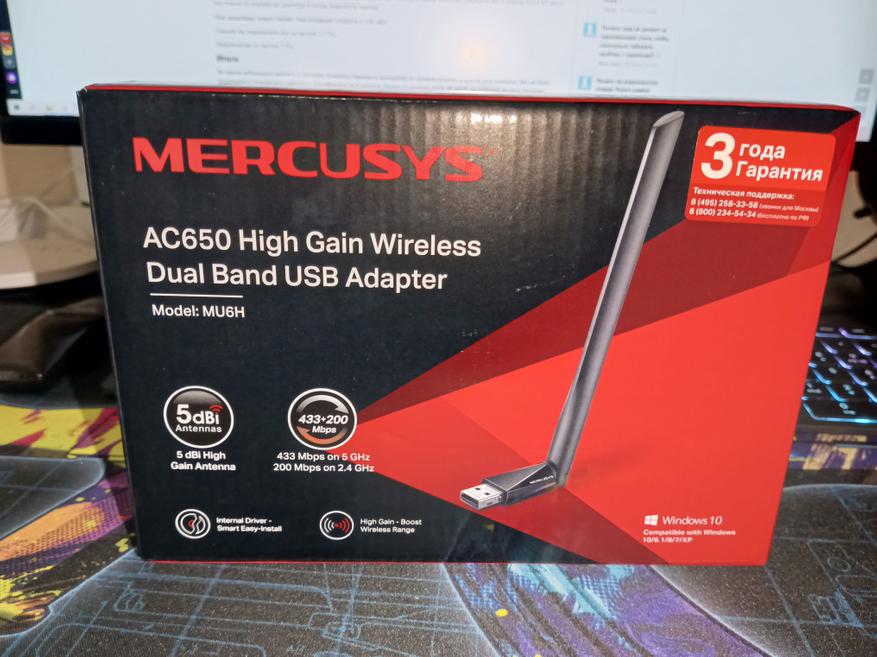
| Название | Mercusys MU6H |
|---|---|
| Стандарт | Wi-Fi5 (802.11ac), 4 (802.11n) |
| Класс | Wi-FiAC650 |
| Диапазон частот | 2.4 / 5 ГГц |
| Интерфейс подключения | USB |
| Защита беспроводной сети | WEP, WPA, WPA2, WPA-PSK |
| Вид антенны | несъемная |
| Тип антенны | внешняя |
| Одновременная работа | в двух диапазонах |
Wi fi адаптер упакован в картонную коробку, небольшого размера.
Внутри находиться сам адаптер и руководство пользователя.
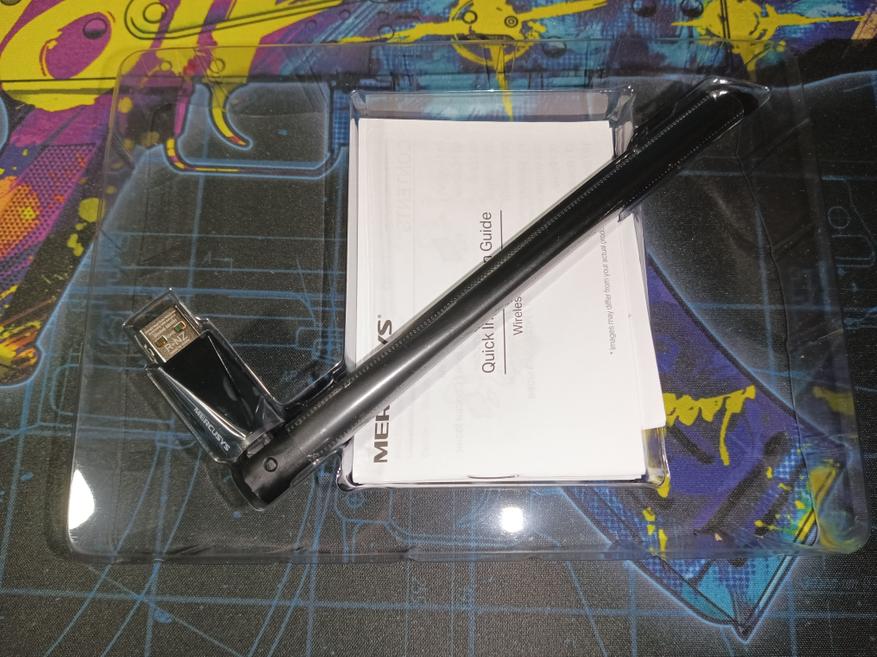
Адаптер имеет внешнюю антенну, черного цвета. Антенна не снимается и не вращается по кругу. Всего три положения как можно выставить антенну: ровно, под углом 45 и 90 градусов.
Wi-Fi адаптер Mercusys MU6H был установлен на стационарный компьютер. В одной комнате с Wi-Fi роутером, ASUS RT-AX55. Расстояние от роутера, до адаптера 4 метра, видимость прямая.
Мой провайдер предоставляет максимальную скорость по тарифу в 100 Mbps.
Сначала мы подключили его на частоте 2.4 Ггц.

Подключение на частоте 5 Ггц.

В настройках роутера показывает состояние соединения.
- Tx — 390 Mbps
- Rx — 433 Mbps

Во время небольшого ремонта в комнате, пришлось перенести компьютер от сетевой розетки, в другой угол комнаты. Там не было возможности подключить кабелем и потребовался wi-fi адаптер. Дома установлен роутер ASUS RT-AX55, он работает на двух частотах, поэтому и было принято купить двухдиапазонный wi-fi адаптер.
На windows 10 настраивать ничего не нужно. При подключении, он определяется как флеш карта, на которой находятся драйвера. Вам просто нужно их установить и можно пользоваться. Ради интереса подключал его к ноутбуку, где установлен windows 11, работает так же как и на 10 версии.
Данным wi-fi адаптером пользую уже три месяца, так как стол решили оставить на новом месте. Соединение работает стабильно, при скачивании большого объема с торрентов, скорость не падает. Иногда может пропасть интернет соединение, секунд на 10, но это бывает раз в две неделю, а то и реже. Причем независимо на какой частоте, он подключен.
Результаты скорости, на частоте 2.4 ГГц приятно удивили. В среднем 70 Мbps из 100 Мbps. На частоте 5 ГГц, значения приближенные к максимальной скорости провайдера. К примеру мой смартфон Infinix NOTE 12 2023, выдает всего 20-25 Мbps, на частоте 2.4 ГГц.
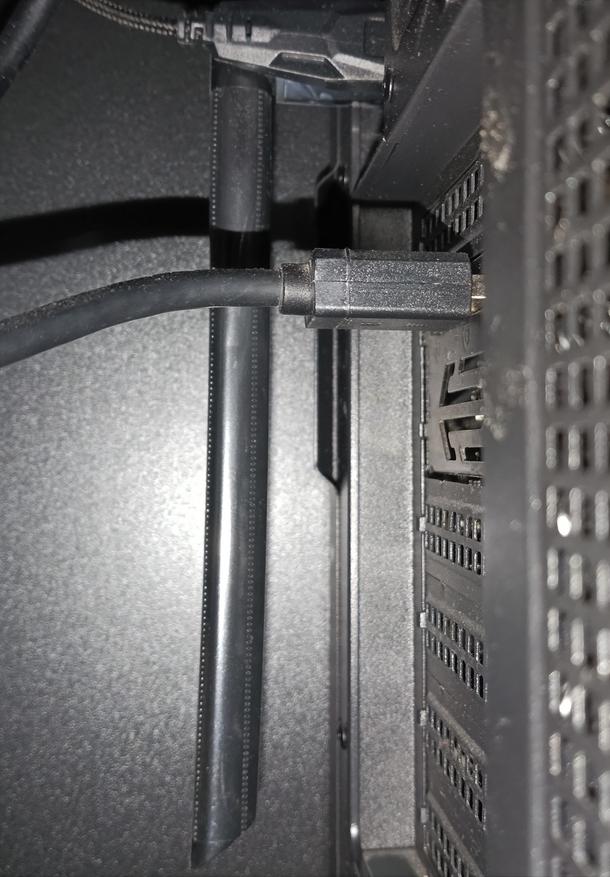
Сразу хочу отметить, что антенна тут не вращается. Поэтому в компьютере устанавливать с задней стороны материнской платы, лучше антенной вниз. Можно поставить и вверх, но будет торчать из-за корпуса и есть шанс зацепить её и повредить USB разъём или сам адаптер.
В принципе за свои деньги, неплохой wi-fi адаптер. На нем иногда играю в онлайн игры и проблем не наблюдаю.
- Недорогой
- Работает стабильно
- Поддержка двух диапазонов
- Продаетя во многих магазинах
- Работает с коробки на windows 10/11
- Не требует дополнительной настройки
- Нельзя повернуть антенну
- Иногда пропадает соединение
Сейчас на главной
Новости
Публикации

Компания Aful уже зарекомендовала себя на рынке аудио как производитель высококачественных внутриканальных наушников. Примечательно, что со своей первой моделью Performer 8 они сразу вышли за рамки…

Представьте себе: где-то глубоко под нашими ногами, на сотнях и тысячах километров вглубь планеты, медленно перетекают потоки раскаленной породы. Кажется, что эти процессы бесконечно далеки от…

Взгляните на птиц вокруг. Тончайший, как игла, клюв колибри, зависающей у цветка. Мощный, крючковатый «нож» орла, разрывающего добычу. Причудливый, почти комичный, радужный клюв тукана. Кажется,…

Марс. Одно слово — а сколько образов в голове! Красная пыль под ногами астронавтов, купола городов, новое начало для человечества… Научная фантастика десятилетиями рисовала нам…

Задумывались ли вы, почему в век цифровых технологий мы до сих пор пользуемся шариковыми ручками? Казалось бы, этот простой предмет должен был кануть в Лету вместе с перьевыми ручками и…

Редкий автомобиль вызывает столь полярные мнения, как
восточногерманский Trabant. Для одних — неуклюжий, дымящий «картонный ящик» на колесах, символ дефицита и технологической отсталости…