
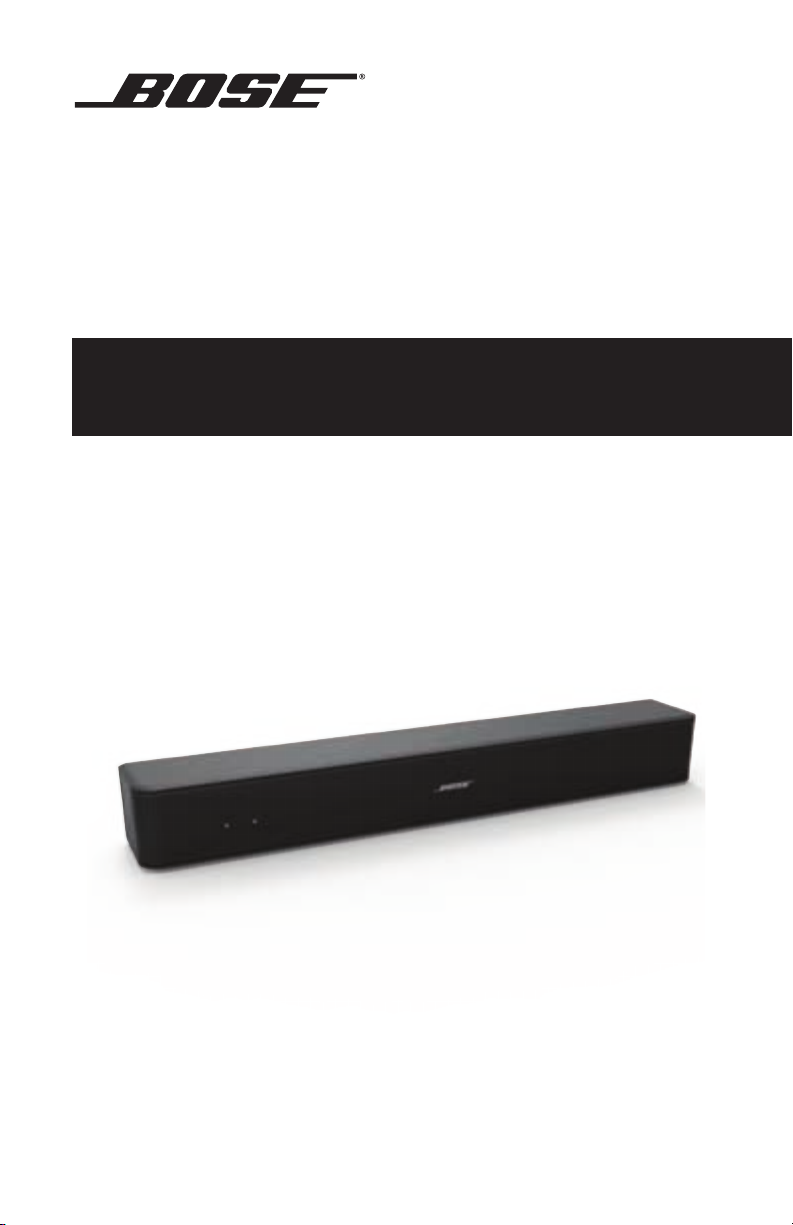
Bose® Solo 5
TV Sound System
Owner’s Guide • Brugervejledning • Bedienungsanleitung
Gebruikershandleiding • Guía del usuario • Käyttöohje
Notice d’utilisation • Manuale di istruzioni • Felhasználói útmutató
Brukerveiledning • Podręcznik użytkownika
Manual do proprietário • Bruksanvisning
Belangrijke veiligheidsinstructies
Lees deze gebruikershandleiding zorgvuldig door en bewaar deze voor
toekomstig gebruik.
De bliksemschicht met pijlpunt in een gelijkzijdige driehoek waarschuwt de gebruiker voor de
aanwezigheid van niet-geïsoleerde gevaarlijke spanning in de behuizing van het systeem,
die zo hoog kan zijn dat er een risico van elektrische schokken bestaat.
Het uitroepteken in een gelijkzijdige driehoek, als afgebeeld op het systeem, is bedoeld om
de gebruiker attent te maken op belangrijke instructies voor gebruik en onderhoud in deze
gebruikershandleiding.
WAARSCHUWINGEN:
• Om het risico op brand en elektrische schokken te verlagen, mag dit product niet aan regen
of vocht worden blootgesteld.
• Stel dit apparaat niet bloot aan druipende of spattende vloeistoffen en plaats geen met
vloeistof gevulde voorwerpen, zoals vazen, op of bij het apparaat. Evenals bij andere
elektronische producten dient u op te passen dat er geen vloeistof in het product
terechtkomt. Blootstelling aan vloeistoffen kan leiden tot een defect en/of brandgevaar.
• Plaats geen open vlam, zoals een brandende kaars, op of bij het product.
• Alleen vervangen door een AA (IEC LR06)-alkalinebatterij (of -batterijen).
LET OP: Er mogen geen wijzigingen aan het product worden aangebracht door
WAARSCHUWING: Dit product bevat magnetisch materiaal. Neem contact op met uw arts
OPMERKINGEN:
• Wanneer de netstekker of aansluiting van een apparaat als stroomonderbreker wordt gebruikt,
dient deze stroomonderbreker steeds goed bereikbaar te zijn.
• Dit product moet binnenshuis worden gebruikt. Het is niet ontworpen of getest voor gebruik
buitenshuis, in recreatievoertuigen of op boten.
• Dit product mag alleen worden gebruikt met de bijgeleverde voeding.
onbevoegden. Dergelijke wijzigingen kunnen de veiligheid, de naleving van
voorschriften en de werking van het systeem in gevaar brengen en kunnen ertoe
leiden dat de garantie vervalt.
als u vragen hebt over de invloed die dit kan hebben op de werking van
uw implanteerbare medische hulpmiddel.
Bose Corporation verklaart hierbij dat dit product voldoet aan de essentiële vereisten en
andere relevante bepalingen van richtlijn 1999/5/EG en alle andere vereisten van de
toepasselijke EU-richtlijnen. De volledige conformiteitsverklaring kunt u vinden op
www.Bose.com/compliance
Gooi gebruikte batterijen op de juiste wijze weg, volgens de plaatselijke voorschriften.
Niet verbranden.
Belangrijke veiligheidsinstructies
1. Lees deze instructies door.
2. Bewaar deze instructies.
3. Neem alle waarschuwingen in acht.
4. Volg alle instructies.
5. Gebruik dit apparaat niet in de buurt van water.
6. Alleen met een droge doek reinigen.
7. De ventilatieopeningen niet blokkeren. Installeer het apparaat volgens de instructies van de
fabrikant.
8. Niet installeren in de buurt van warmtebronnen, zoals radiatoren, verwarmingsroosters, kachels
of andere apparaten (waaronder versterkers) die warmte produceren.
9. Zorg dat er niet op de voeding of het netsnoer wordt gelopen en dat het netsnoer niet wordt
afgekneld, met name bij stekkers, stopcontacten en het punt waar deze uit het apparaat komen.
10. Gebruik uitsluitend aansluitstukken/accessoires die door de fabrikant worden gespecificeerd.
11.
Gebruik het apparaat uitsluitend in combinatie met het verrijdbare plateau, de standaard, de
beugel of de tafel die door de fabrikant worden gespecificeerd of samen met het apparaat
worden verkocht. Als u een verrijdbaar plateau gebruikt, wees dan voorzichtig wanneer u het
apparaat en het plateau verplaatst, zodat deze niet omvallen en letsel veroorzaken.
2 — Dutch

Belangrijke veiligheidsinstructies
12. Verwijder de stekker van dit apparaat uit het stopcontact bij onweer of als het langere tijd niet
wordt gebruikt.
13. Laat onderhoud over aan bevoegde onderhoudsmedewerkers. Reparatie is vereist als het
apparaat is beschadigd, zoals wanneer de voeding of het netsnoer is beschadigd, wanneer
er vloeistof is gemorst of voorwerpen in het apparaat zijn gevallen, wanneer het apparaat is
blootgesteld aan regen of vocht, niet normaal werkt of is gevallen.
Dit symbool betekent dat het product niet mag worden weggegooid als huishoudelijk
afval en naar een geschikt inzamelpunt voor recycling moet worden gebracht. Het op de
juiste wijze afvoeren en recyclen helpt natuurlijke hulpbronnen, de menselijke
gezondheid en het milieu te beschermen. Voor meer informatie over het afvoeren en
recyclen van dit product neemt u contact op met de gemeente waar u woont,
de afvalverwerkingsservice, of de winkel waar u dit product hebt gekocht.
Opmerking: Dit apparaat is getest en voldoet aan de normen voor een digitaal apparaat van klasse
B, volgens deel 15 van de FCC-voorschriften. Deze normen zijn bedoeld om redelijke
bescherming te bieden tegen schadelijke storing bij installatie in een woonomgeving.
Dit apparaat genereert en gebruikt radiofrequente energie en kan deze uitstralen en
het kan, als het niet wordt geïnstalleerd en gebruikt volgens de instructies, schadelijke
storing veroorzaken aan radiocommunicatie. Er is echter geen garantie dat er geen
storing zal optreden bij een bepaalde installatie. Als dit apparaat schadelijke storing
veroorzaakt aan de ontvangst van radio of tv, hetgeen kan worden bepaald door het
apparaat aan en uit te zetten, wordt geadviseerd te trachten de storing te verhelpen
door een of meer van de volgende maatregelen:
• Richt de ontvangstantenne opnieuw of verplaats deze.
• Vergroot de afstand tussen de apparatuur en de ontvanger.
• Sluit de apparatuur aan op een stopcontact van een andere groep dan de groep
waarop de ontvanger is aangesloten.
• Voor hulp neemt u contact op met de dealer of een ervaren radio- of tv-technicus.
Veranderingen of aanpassingen die niet uitdrukkelijk zijn goedgekeurd door Bose Corporation
kunnen leiden tot het vervallen van de bevoegdheid van de gebruiker om dit apparaat te gebruiken.
Dit apparaat voldoet aan deel 15 van de FCC-voorschriften en aan de RSS-norm(en) van Industry
Canada voor van vergunning vrijgestelde apparatuur. Op het gebruik zijn de volgende twee
voorwaarden van toepassing: (1) Dit apparaat mag geen schadelijke storing veroorzaken, en (2) dit
apparaat moet bestand zijn tegen alle externe storing, waaronder storing die een ongewenste
werking tot gevolg kan hebben.
Dit digitale apparaat van klasse B voldoet aan de Canadese ICES-003-norm.
CAN ICES-3 (B) / NMB-3 (B)
Dit apparaat voldoet aan de stralingslimieten van de FCC en Industry Canada voor blootstelling
van de bevolking aan RF-straling. Het mag niet worden geplaatst bij of samen worden gebruikt met
andere antennes of zenders.
Dit apparaat voldoet aan de normen van de FCC en IC voor blootstelling aan straling als vastgesteld
voor een niet-gereguleerde omgeving. Dit apparaat moet worden geïnstalleerd en gebruikt met een
minimale afstand van 20 cm tussen de zender en uw lichaam.
Management Regulation for Low-power Radio-frequency Devices (Voorschrift voor het beheer van
radiofrequente apparaten met laag vermogen)
Artikel XII
Volgens de “Management Regulation for Low-power Radio-frequency Devices” mogen bedrijven,
ondernemingen of gebruikers zonder toestemming van de NCC de oorspronkelijke eigenschappen
en werking van goedgekeurde radiofrequente apparaten met laag vermogen niet wijzigen en
evenmin de frequentie daarvan wijzigen of het zendvermogen verhogen.
Artikel XIV
Radiofrequente apparaten met laag vermogen mogen de veiligheid van vliegtuigen niet beïnvloeden
en wettelijke communicaties niet verstoren. Als een dergelijke storing wordt vastgesteld, moet de
gebruiker onmiddellijk stoppen met het gebruik van het apparaat tot dit niet langer storing
veroorzaakt. Onder de genoemde wettelijke communicaties wordt verstaan radiocommunicatie
gebruikt in overeenstemming met de telecommunicatiewet.
Radiofrequente apparaten met laag vermogen moeten bestand zijn tegen storing van wettelijke
communicaties of apparaten die ISM-radiogolven uitstralen.
Dutch — 3
Wettelijk verplichte informatie
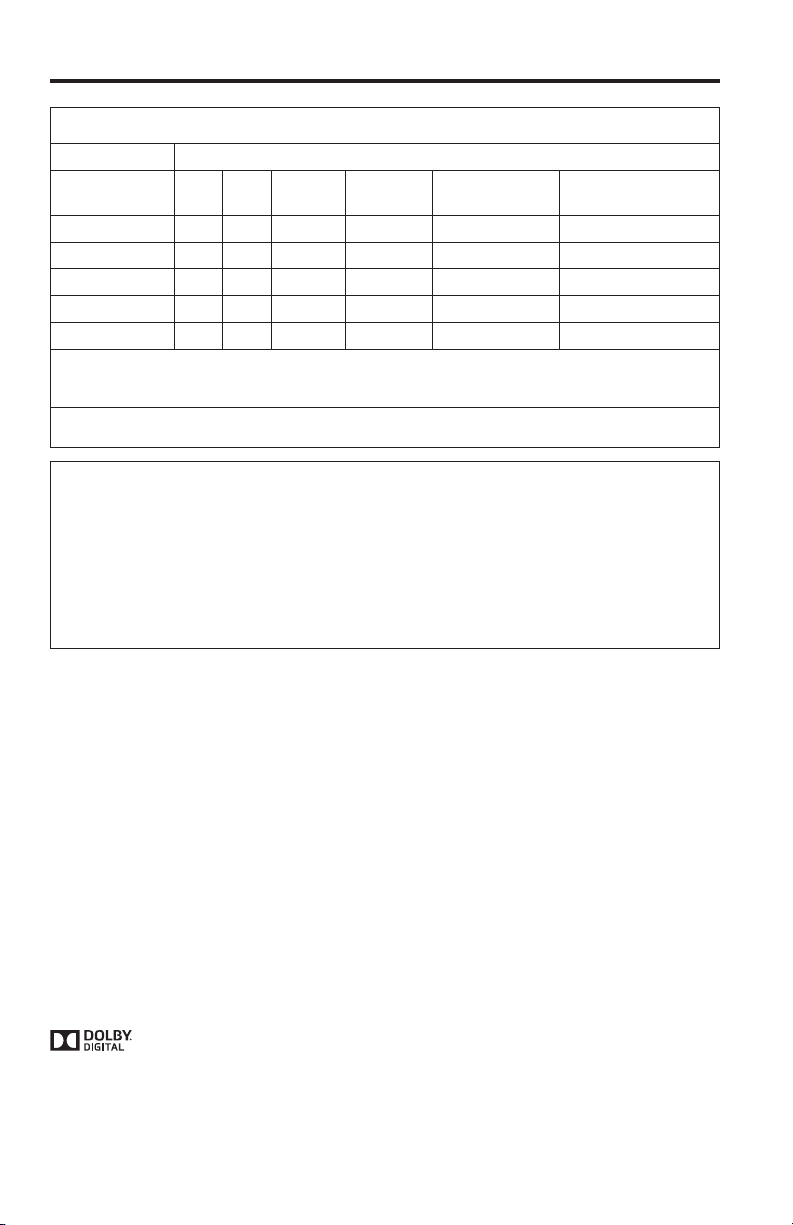
Namen van en gehalte aan giftige of gevaarlijke stoffen of elementen
Giftige of gevaarlijke stoffen en elementen
Lood
Kwik
Naam onderdeel
PCB’s
Metalen onderdelen
Plastic onderdelen
Luidsprekers
Kabels
Deze tabel is opgesteld in overeenstemming met de bepalingen van SJ/T 11364.
O: Geeft aan dat het gehalte aan de genoemde gevaarlijke stof in alle homogene materialen van dit onderdeel onder de
maximaal toegelaten waarden in GB/T 26572 ligt.
X: Geeft aan dat de genoemde gevaarlijke stof in minstens één van de voor dit onderdeel gebruikte homogene materialen boven
de maximaal toegelaten waarden in GB/T 26572 ligt.
(Pb)
X O O O O O
X
O O O O O O
X O O O O O
X O O O O O
Cadmium
(Hg)
O O O O O
(Cd)
Zeswaardig
chroom
(Cr(VI))
Polybroombifenyl
(PBB)
Polybroomdifenylether
(PBDE)
Vul het volgende in en bewaar deze informatie voor uw administratie:
De serienummers kunt u vinden aan de onderkant van de soundbar en op de verpakking van de
afstandsbediening.
Serienummer van de afstandsbediening: ________________________________________________
Serienummer van de soundbar: ________________________________________________________
Aankoopdatum: ______________________________________________________________________
Wij adviseren om het aankoopbewijs bij deze gebruikershandleiding te bewaren.
Fabricagedatum: Het eerste vet gedrukte cijfer in het serienummer geeft het fabricagejaar aan.
“5” is 2005 of 2015.
Importeur in China: Bose Electronics (Shanghai) Company Limited, Part C, Plan 9, No. 353 North
Riying Road, China (Shanghai) Pilot Free Trade Zone
Importeur in de EU: Bose GP, Castleblayney Road, Carrickmacross, Ierland
Importeur in Taiwan: Bose Taiwan Branch, Room 905, 9F, Worldwide House, 131 Min Sheng East
Rd, Section 3, Taipei, Taiwan, 105
Het Bluetooth®-woordmerk en de logo’s zijn gedeponeerde handelsmerken die eigendom zijn van
Bluetooth SIG, Inc. en het gebruik van dergelijke merken door Bose Corporation gebeurt onder licentie.
™
Blu-ray Disc
en Blu-ray™ zijn handelsmerken van de Blu-ray Disc Association.
Vervaardigd onder licentie van Dolby Laboratories. Dolby en het dubbele-D-symbool
zijn handelsmerken van Dolby Laboratories.
De termen HDMI en HDMI High-Definition Multimedia Interface, en het HDMI-logo, zijn
handelsmerken of gedeponeerde handelsmerken van HDMI Licensing LLC in de Verenigde Staten
en in andere landen.
©2015 Bose Corporation. Niets in deze uitgave mag worden gereproduceerd, gewijzigd,
gedistribueerd of op andere wijze gebruikt zonder voorafgaande schriftelijke toestemming.
4 — Dutch

Inhoud
Inleiding
Over uw geluidsysteem voor tv’s …………………………………………………………………………… 7
Eigenschappen van het systeem …………………………………………………………………… 7
Uitpakken ………………………………………………………………………………………………………………. 8
De soundbar plaatsen ……………………………………………………………………………………………. 9
Voorbeeld van plaatsing van de soundbar …………………………………………………….. 9
De soundbar aan de muur bevestigen…………………………………………………………………… 9
Het systeem installeren
Kabelopties ……………………………………………………………………………………………………………. 10
De tv aansluiten …………………………………………………………………………………………………….. 10
De soundbar aansluiten ………………………………………………………………………………………… 11
Optie 1: Optische kabel (bij voorkeur) …………………………………………………………….. 11
Optie 2: Coaxkabel ………………………………………………………………………………………….. 12
Op het lichtnet aansluiten …………………………………………………………………………………….. 13
Montagering …………………………………………………………………………………………………… 13
De luidsprekers van de tv uitzetten ………………………………………………………………………. 14
De soundbar inschakelen ………………………………………………………………………………………. 14
Controleren of de luidsprekers van de tv uitstaan …………………………………………. 14
Gebruik van het systeem
Knoppen op de afstandsbediening ……………………………………………………………………….. 15
De universele afstandsbediening programmeren ……………………………………………….. 16
De aan-uitknop aanpassen …………………………………………………………………………….. 17
Uw kabel-/satellietdecoder en tv opnieuw synchroniseren ………………………………….. 17
Tussen bronnen schakelen ……………………………………………………………………………………. 17
Functieknoppen …………………………………………………………………………………………………….. 17
Het volume aanpassen ………………………………………………………………………………………….. 18
Het volume van de lage tonen bijstellen ………………………………………………………………. 18
Het volume van de lage tonen terugzetten op de fabrieksinstelling …………….. 18
Spraakmodus ………………………………………………………………………………………………………… 19
Automatisch ontwaken …………………………………………………………………………………………. 19
Een afstandsbediening van een andere fabrikant dan Bose programmeren………… 19
Dutch — 5

Inhoud
Bluetooth
Een Bluetooth®-apparaat koppelen ………………………………………………………………………. 20
Verbinding maken met een gekoppeld Bluetooth
Schakelen tussen verbonden apparaten ………………………………………………………………. 21
De Bluetooth
®
®
-apparaat ……………………………….. 21
®
-koppellijst van de soundbarwissen ……………………………………………… 21
Informatie over het systeem krijgen
Indicatorlampjes op de soundbar………………………………………………………………………….. 22
Statusindicatorlampje …………………………………………………………………………………… 22
Bluetooth®-indicatorlampje …………………………………………………………………………… 22
Alternatieve installatiemethode
Geen geluid van een bron of bronnen die op uw tv zijn aangesloten ……………. 23
Geen optische of coaxiale aansluiting op uw tv …………………………………………….. 23
Verzorging en onderhoud
Problemen oplossen ……………………………………………………………………………………………… 29
Het geluid bijstellen voor wandmontage ………………………………………………………. 30
De batterijen van de afstandsbediening vervangen …………………………………………….. 31
Schoonmaken ……………………………………………………………………………………………………….. 32
Klantenservice ………………………………………………………………………………………………………. 32
Beperkte garantie ………………………………………………………………………………………………….. 32
Technische informatie …………………………………………………………………………………………… 32
6 — Dutch

Inleiding
Over uw geluidsysteem voor tv’s
Uw geluidsysteem voor tv’s biedt een helder, ruimtelijk geluid uit één
compacte soundbar.
Eigenschappen van het systeem
• De Videostage®- en TrueSpace®-technologie zorgen ervoor dat een enkele
soundbar de ervaring biedt van een hometheatersysteem met vijf luidsprekers.
• De gestroomlijnde en elegant vormgegeven soundbar past gemakkelijk vóór uw tv.
• Aansluiting met slechts één audiokabel voor gemakkelijke installatie.
• Met de programmeerbare universele afstandsbediening zet u uw tv, kabel-/
satellietdecoder en systeem aan/uit met één druk op de knop.
• Muziek streamen vanaf Bluetooth
• In de koppellijst kunnen maximaal acht Bluetooth-apparaten worden
opgeslagen.
• Er kunnen maximaal twee Bluetooth-apparaten worden verbonden om
gemakkelijk tussen apparaten te kunnen schakelen.
• Montagering om de voeding achter uw aan de muur gemonteerde tv te verbergen.
• De soundbar kan aan de muur worden gemonteerd (kit afzonderlijk verkrijgbaar).
®
-apparaten.
Dutch — 7
Inleiding
Uitpakken
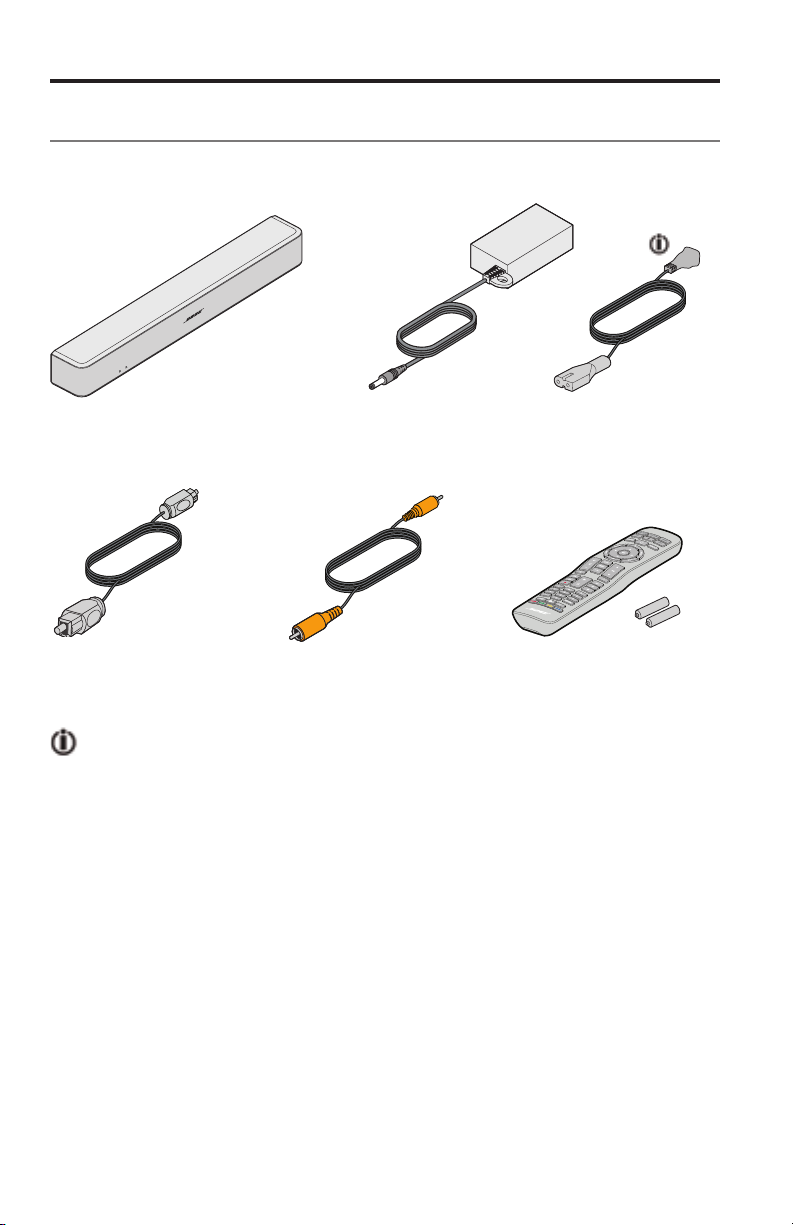
Pak de doos voorzichtig uit en controleer of de volgende onderdelen aanwezig zijn:
Soundbar Voeding en snoer
Optische kabel Coaxkabel
(alleen Europa)
Universele
afstandsbediening
(batterijen bijgeleverd)
Kan worden geleverd met meerdere netsnoeren. Het juiste netsnoer voor uw
regio wordt bijgeleverd.
Opmerking: Als een deel van het systeem beschadigd is, mag u dit niet
gebruiken. Neem contact op met uw erkende Bose
Bose-klantenservice. Zie het blad met contactgegevens in de doos.
8 — Dutch
®
-dealer of de
Inleiding
De soundbar plaatsen
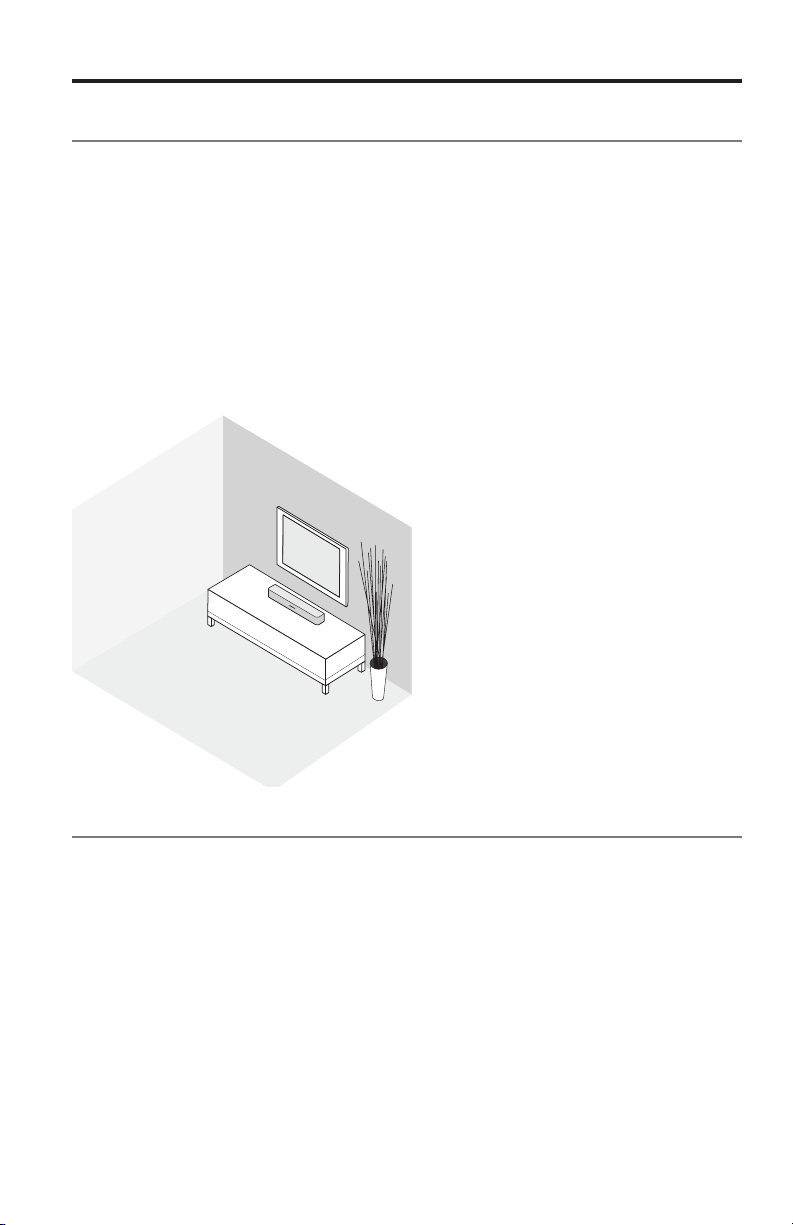
• Plaats de soundbar op zijn pootjes vóór uw tv.
• Plaats de tv niet op de soundbar.
• Zorg dat er een stopcontact in de buurt is.
Draadloze storing voorkomen:
• Houd andere draadloze apparatuur uit de buurt van de soundbar.
• Plaats de soundbar niet in of in de buurt van metalen kasten, andere audio-/
videocomponenten en directe warmtebronnen.
Voorbeeld van plaatsing van de soundbar
De soundbar aan de muur bevestigen
U kunt de soundbar aan een muur monteren. Als u de WB-120 Wall Mount Kit
(wandmontagekit) wilt kopen, neem dan contact op met uw plaatselijke Bose
dealer of ga naar www.Bose.com
Nadat u de soundbar aan de muur hebt gemonteerd en hebt geïnstalleerd, stelt u
het geluid bij voor betere lage tonen (zie pagina 30).
LET OP: Gebruik geen ander montagemateriaal voor de luidsprekers.
®
—
Dutch — 9
Het systeem installeren
Kabelopties
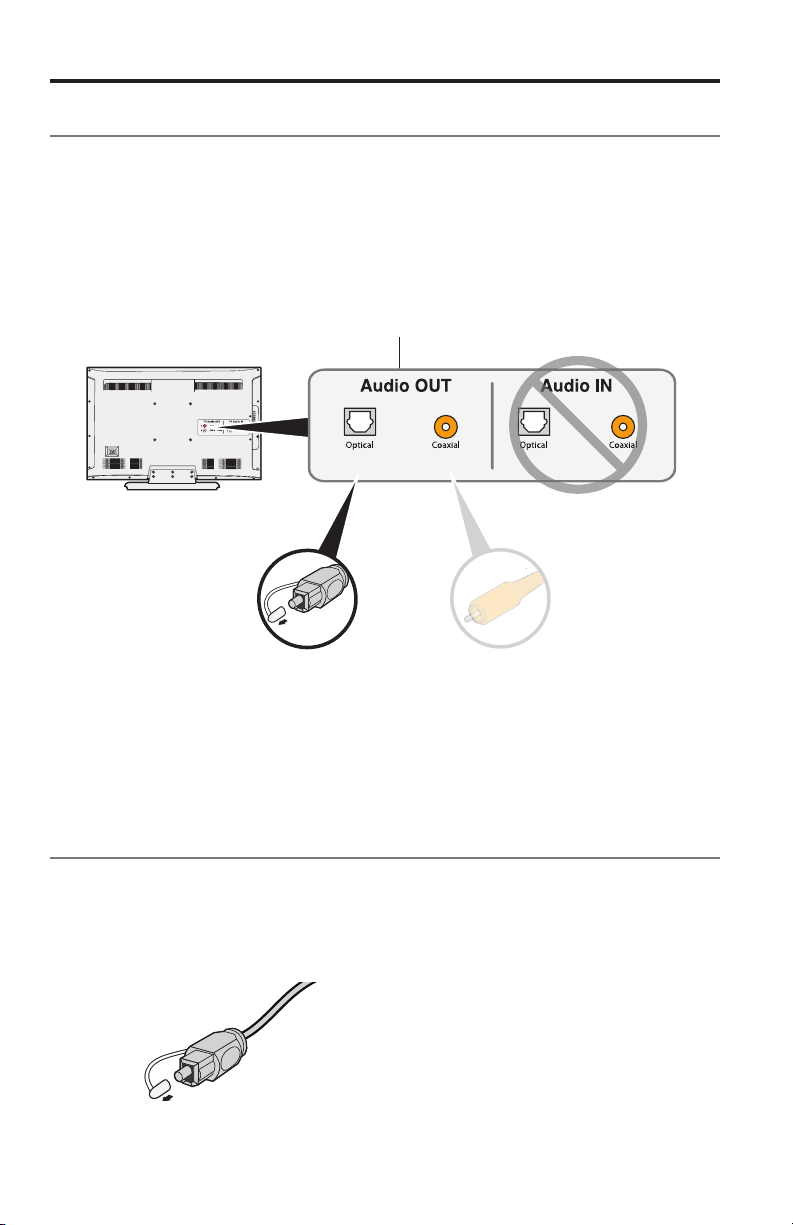
Sluit de tv op de soundbar aan met een van de twee digitale kabelopties.
De optische kabel verdient de voorkeur voor aansluiting op uw systeem.
Opmerking: Als uw tv geen optische of coaxiale aansluiting heeft, raadpleeg dan
1. Ga naar het aansluitpaneel Audio OUT (digitaal) aan de achterkant van de tv.
Opmerking: U moet de audiokabel aansluiten via het aansluitpaneel Audio OUT.
2. Kies een audiokabel.
“Alternatieve installatiemethode” op pagina 24.
Het aansluitpaneel van uw tv kan er anders uitzien dan afgebeeld.
Let op de vorm of kleur (coaxiaal) van de aansluiting.
Optie 1:
Optische kabel (digitale audio)
Voorkeursmethode voor
aansluiting.
Optie 2:
Coaxkabel (digitale audio)
Gebruik deze methode als
er geen optische uitgang
beschikbaar is.
De tv aansluiten
Sluit één uiteinde van de audiokabel aan op de juiste aansluiting Audio OUT
(digitaal) op de tv.
LET OP: Als u een optische kabel gebruikt, verwijder dan de beschermdopjes van
10 — Dutch
beide uiteinden. Als u de stekker er verkeerd insteekt, kan dit leiden tot
schade aan de stekker en/of de aansluiting.
AUX Optical Coaxial
Power
TV Input
Het systeem installeren
De soundbar aansluiten
Nadat u de audiokabel op uw tv hebt aangesloten, sluit u het andere uiteinde op de
soundbar aan. Gebruik slechts één audiokabel.
Voor instructies voor het aansluiten van een coaxkabel raadpleegt u pagina 12.
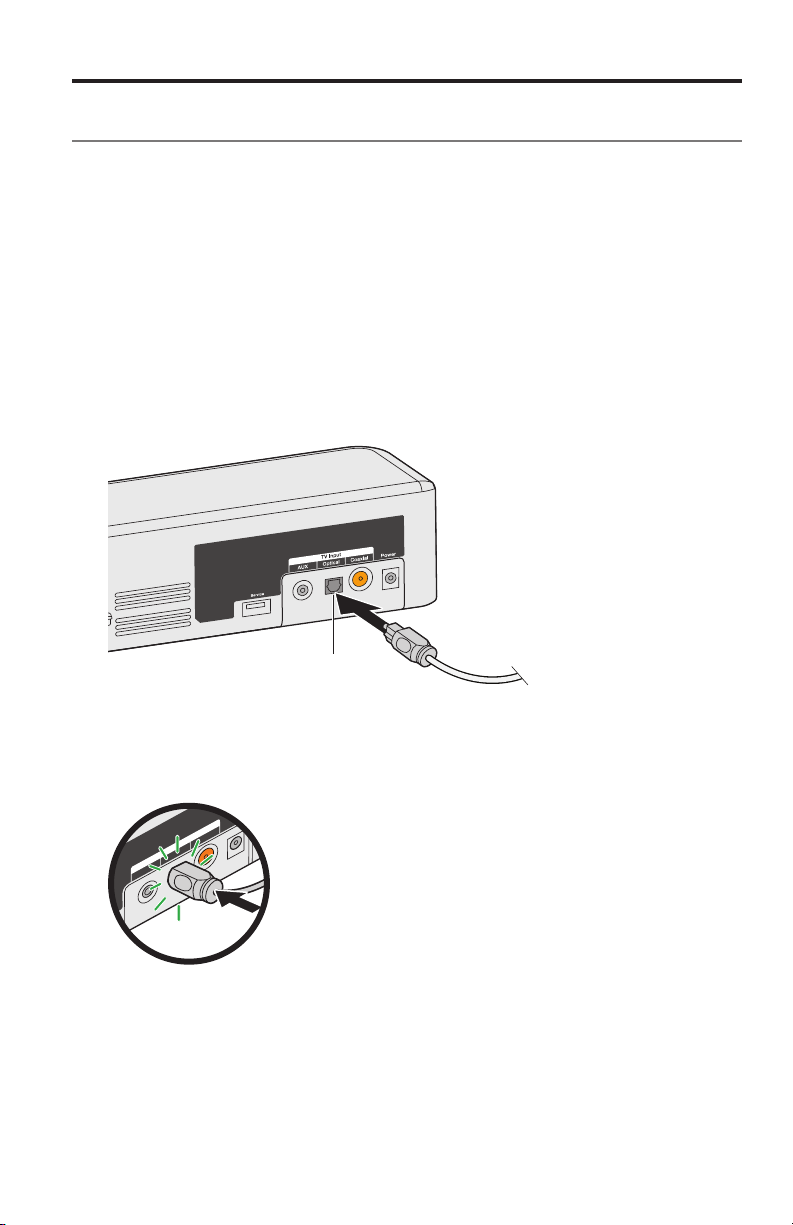
Optie 1: Optische kabel (bij voorkeur)
LET OP: Zorg dat u het beschermdopje van beide uiteinden van de optische kabel
1. Houd de stekker van de optische kabel met het Bose-logo omlaag gericht.
2. Lijn de stekker uit met de aansluiting Optical op de soundbar en steek de
hebt verwijderd. Als u de stekker er verkeerd insteekt, kan dit leiden tot
schade aan de stekker en/of de aansluiting.
stekker er voorzichtig in.
Scharnierend
klepje
Opmerking: De connector is voorzien van een scharnierend klepje dat naar
binnen draait bij het insteken van de stekker.
3. Duw de stekker stevig in de aansluiting totdat u een klik hoort of voelt.
Dutch — 11
Loading…
Owner’s Guide

BOSE® SOLO 5
TV SOUND SYSTEM
Please read and keep all safety and use instructions.
Bose Corporation hereby declares that this product is in compliance with the
essential requirements and other relevant provisions of Directive 2014/53/EU
and all other applicable EU directive requirements. The complete declaration
of conformity can be found at: www.Bose.com/compliance
Important Safety Instructions
- Read these instructions.
- Keep these instructions.
- Heed all warnings.
- Follow all instructions.
- Do not use this apparatus near water.
- Clean only with a dry cloth.
- Do not block any ventilation openings. Install in accordance with the manufacturer’s instructions.
- Do not install near any heat sources such as radiators, heat registers, stoves, or other apparatus (including amplifiers) that produce heat.
- Protect the power cord from being walked on or pinched, particularly at plugs, convenience receptacles, and the point where they exit from the apparatus.
- Only use attachments/accessories specified by the manufacturer.
- Use only with the cart, stand, tripod, bracket, or table specified by the manufacturer, or sold with the apparatus. When a cart is used, use caution when moving the cart/apparatus combination to avoid injury from tip-over.
- Unplug this apparatus during lightning storms or when unused for long periods of time.
- Refer all servicing to qualified personnel. Servicing is required when the apparatus has been damaged in any way, such as power-supply cord or plug is damaged, liquid has been spilled or objects have fallen into the apparatus, the apparatus has been exposed to rain or moisture, does not operate normally, or has been dropped.
WARNINGS/CAUTIONS
- To reduce the risk of fire or electric shock, do not expose this product to rain or moisture.
- Do NOT expose this apparatus to dripping or splashing, and do not place objects filled with liquids, such as vases, on or near the apparatus.
- Keep the product away from fire and heat sources. Do not place naked flame sources, such as lighted candles, on or near the product.
- Do NOT make unauthorized alterations to the product.
- Do NOT use a power inverter with this product.
- Do NOT use in vehicles or boats.
- The speaker wire and interconnect cables included with this system are not approved for in-wall installation. Please check your local building codes for the correct type of wire and cable required for in-wall installation.
- Use this product only with the power supply provided.
- Where the mains plug or appliance coupler is used as the disconnect device, the disconnect device shall remain readily operable.
- The batteries provided with this product may present a risk of fire or chemical burn if mishandled.
- Do NOT expose products containing batteries to excessive heat (e.g. from storage in direct sunlight, fire or the like).
- Only use the mounting hardware supplied with this product.
- Do NOT mount on surfaces that are not sturdy, or that have hazards concealed behind them, such as electrical wiring or plumbing. If you are not sure about installing the bracket, contact a qualified professional installer. Ensure the bracket is installed according to local building code.
- Due to ventilation requirements, Bose does not recommend placing the product in a confined space such as in a wall cavity or in an enclosed cabinet.
NOTE: This equipment has been tested and found to comply with the limits
for a Class B digital device, pursuant to Part 15 of the FCC Rules. These
limits are designed to provide reasonable protection against harmful
interference in a residential installation. This equipment generates, uses,
and can radiate radio frequency energy and, if not installed and used in
accordance with the instructions, may cause harmful interference to radio
communications. However, there is no guarantee that interference will not
occur in a particular installation. If this equipment does cause harmful
interference to radio or television reception, which can be determined by
turning the equipment off and on, the user is encouraged to try to correct the
interference by one or more of the following measures:
- Reorient or relocate the receiving antenna.
- Increase the separation between the equipment and receiver.
- Connect the equipment into an outlet on a circuit different from that to which the receiver is connected.
- Consult the dealer or an experienced radio/TV technician for help.
Changes or modifications not expressly approved by Bose Corporation could void
the user’s authority to operate this equipment.
This device complies with part 15 of the FCC Rules and ISED Canada license-
exempt RSS standard(s). Operation is subject to the following two conditions:
(1) This device may not cause harmful interference, and (2) this device must
accept any interference received, including interference
that may cause undesired operation.
This Class B digital apparatus complies with Canadian ICES-003.
CAN ICES-3 (B) / NMB-3 (B)
This device complies with FCC and ISED Canada RF radiation exposure limits set
forth for general population. It must not be co-located or be operating in
conjunction with any other antennas or transmitters.
This equipment complies with FCC/IC radiation exposure limits set forth for an
uncontrolled environment.
This equipment should be installed and operated with minimum distance 20cm
between the radiator and your body.
Model: 418775
About your TV sound system
Your TV sound system provides clear, spacious sound from one compact soundbar.
System features
- Videostage® and TrueSpace® technologies deliver many of the benefits of a five- speaker home theater in a single soundbar.
- Sleek and elegantly designed soundbar fits easily in front of your TV.
- Connects with just one audio cable for easy setup.
- Programmable universal remote powers on/off your TV, cable/satellite box and
- system with the press of a single button.
- Stream music from Bluetooth® devices.
- Stores up to eight Bluetooth devices in its pairing list.
- Connects up to two Bluetooth devices for easy switching between devices.
- Mounting ring to hide the power supply behind your mounted TV.
- Soundbar can be mounted on the wall (kit available separately).
Unpacking
Carefully unpack the carton and confirm that the following parts are included:

*May ship with multiple power cords. The appropriate power cord for your region is
supplied.
Note: If part of the system is damaged, do not use it. Contact your
authorized Bose®
dealer or Bose customer service. Refer to the contact sheet in the carton.
Placing the soundbar
- Stand the soundbar on its feet in front of your TV.
- Do not place your TV on the soundbar.
- Make sure there is an AC (mains) power outlet nearby.
To avoid wireless interference:
- Keep other wireless equipment away from the soundbar.
- Place the soundbar outside of and away from metal cabinets, other audio/video components and direct heat sources.
Sample soundbar placement

Wall mounting the soundbar
You can mount the soundbar on a wall. To purchase the WB-120 Wall Mount Kit,
contact your local Bose® dealer or visit www.Bose.com
After wall mounting and setting up the soundbar, adjust the audio for better
bass sound
CAUTION: Do not use any other hardware to mount the soundbar.
Cable options
Connect your TV to the soundbar using one of the two digital cable options.
The optical cable is the preferred method for connection.
Note: If your TV does not have an optical or coaxial connector, see
“Alternate Setup”
on page 27.
- On the back of your TV, locate the Audio OUT (digital) connector panel.
Note: You must connect the audio cable through your Audio OUT
connector panel.

2. Choose an audio cable.
Connecting your TV
Insert one end of the audio cable into the correct Audio OUT (digital)
connector on
your TV.
CAUTION: If using an optical cable, remove the protective caps from both
ends.
Inserting the plug in the wrong orientation can damage the plug and/or the
connector.
Connecting the soundbar
After connecting the audio cable to your TV, connect the other end to your
soundbar.
Use only one audio cable. For instructions on connecting a coaxial cable, see
page 16.
Option 1: Optical cable (preferred)
CAUTION: Ensure you have removed the protective cap from both ends of the
optical
cable. Inserting the plug in the wrong orientation can damage the plug and/or
the connector.
- Hold the optical cable’s plug with the Bose logo facing down.
- Align the plug with the Optical connector on the soundbar and insert the plug
carefully.

Note: The connector has a hinged door that swings inward when inserting
the plug.
3. Firmly push the plug into the connector until you hear or feel a click.
Option 2: Coaxial cable
Insert the other end of the coaxial cable into the Coaxial connector on the
soundbar.

Connecting to power
- Plug the power supply into the Power connector.
- Plug one end of the power cord into the power supply.
- Plug the other end into a live AC power (mains) outlet.
The soundbar emits a tone.

Mounting ring
To hide the power supply behind your mounted TV, use the mounting ring. Attach
the mounting ring to your TV’s wall mount using zip ties or bread ties (not
provided).
Turning off your TV speakers
To avoid hearing distorted sound, turn off your TV speakers. Refer to your
TV’s owner’s guide for more information.
Powering on your soundbar
- Power on your TV.
- If you are using a cable/satellite box or other secondary source, power on the source.
- Press the Power button ( ) on the remote control. The status indicator glows green.
- Check if sound is coming from the soundbar.

Note: If you do not hear sound coming from the soundbar, see
“Troubleshooting” on page 33.
Confirming your TV speakers are off
- Press the Mute button ( ) on the soundbar’s remote control.
- Check that no sound is coming from your TV.
Note: If you hear sound coming from your TV, see “Troubleshooting” on
page 33.
Remote control buttons
Use the remote to control sources connected to your system, adjust the system
volume, change channels, use playback functions, enable cable/satellite box
functions and navigate source menus.

Programming the universal remote
You can program the universal remote to control your source, such as a TV, DVD
/Blu-ray Disc™ player, cable/satellite box, game system or DVR, by entering
the code for your source’s brand. There may be several codes for your source.
You may need to perform this procedure multiple times to locate the correct
code.
solo_5_PDF_remote_codes [pdf]


Customizing the power button
You can customize ( power button ) on your remote to power on/off your
soundbar,
TV and cable/satellite box simultaneously.
- Program your remote to control your TV and cable/satellite box (see page 20).
- Press CBL-SAT and TV simultaneously and hold for 10 seconds.
Both buttons flash three times.
Resyncing your cable/satellite box and TV
After customizing the power button, your cable/satellite box and TV may become
out of sync and not power on/off simultaneously. Use the following steps to
resync your soundbar.
- Press the source POWER button for the source that is out of sync.
- Press Source Power to power on/off the source.
- Press Power. Your sources power on/off simultaneously.
Switching between sources
You can switch from one source to another by pressing the appropriate source
button
on the remote.
Note: Before you begin, ensure you have correctly programmed your
sources.
-
Press the button for the source you want to control.
The source button glows. -
Press Source Power Button.
The source powers on. -
Press TV Input and select the correct input on your TV.
Function buttons
The red, green, yellow and blue buttons on the remote control correspond with
the
color-coded function buttons on your cable/satellite box or teletext
functions.
- Cable/satellite box functions: refer to your cable/satellite box’s owner’s guide.
- Teletext functions: correspond with color-coded page numbers, headings or shortcuts on a teletext display.
Adjusting the volume
On the remote control:
Press to increase the volume.
Press to decrease the volume.
Press to mute or unmute the audio.
Note: If you hear sound coming from your TV, see “Troubleshooting” on
page 33.
Adjusting the bass level
-
Press the Bass button ( BASS ).
The status indicator blinks white three times. -
On the remote control:
• Press + to increase the bass.
• Press – to decrease the bass. -
Press the Bass button ( BASS ).
The status indicator blinks white three times and the soundbar saves your
settings.
Note: For optimal sound quality for dialogue-only programs, such as news
and talk
shows, see “Dialogue mode.”
Resetting the bass level
On the remote control, press and hold BASS for five seconds to reset the
bass level to
original factory settings.
The status indicator blinks white three times and remains solid white. The
soundbar
returns to original factory settings.
Dialogue mode
Dialogue mode provides optimal sound quality for dialogue-only programs, such
as
news and talk shows, by decreasing the soundbar’s bass settings.
Press the dialogue button ( ) to toggle between dialogue mode and your default
audio
settings.
The status indicator glows amber when dialogue mode is enabled.
Auto-wake
You can set the soundbar to power on whenever a sound signal is received.
Note: The soundbar powers off after 60 minutes of inactivity.
Press and hold POWER Button on the remote for five seconds until you hear
a tone to toggle between auto-wake and default power settings.
The status indicator glows dim amber when the soundbar is off and auto-wake
is enabled.
Programming a non-Bose remote control
You can program a non-Bose remote control, such as your cable/satellite box
remote,
to control the soundbar. Refer to your non-Bose remote control’s owner’s guide
or
cable/satellite website for instructions.
Once programmed, the non-Bose remote performs basic functions such as power
on/off and volume.
Pairing a Bluetooth® device
Bluetooth® wireless technology enables you to stream music from Bluetooth
smartphones, tablets, computers or other audio devices to the soundbar.
Before you can stream music from a Bluetooth device, you must pair your device
with
the soundbar.
-
On the remote control, press the Bluetooth button until the Bluetooth indicator
blinks blue. Make sure the Bluetooth indicator blinks blue before you pair
your device. -
On your Bluetooth device, turn on the Bluetooth feature.
Tip: The Bluetooth feature is usually found in Settings. A gear icon (
Gear ) often
represents Settings on the Home screen.
3. Select Bose Solo 5 system from your device list. Once paired, the Bose
Solo 5 system appears connected in the device list.
4. On your Bluetooth device, play music to stream to your soundbar.
If you cannot pair your device
You may need to clear the soundbar’s Bluetooth pairing list (see page 25).
After you
clear the list, try pairing again. See “Troubleshooting” on page 33 for more
information.
Connecting to a paired Bluetooth® device
You can stream audio from a Bluetooth device to the soundbar.
Note: If there are multiple devices stored in the soundbar’s pairing
list, it may take
a minute or two for the paired device to connect. The soundbar’s Bluetooth
indicator shows connection status (see page 26).
-
On the remote control, press .
The soundbar connects to the last two devices that streamed to your soundbar. -
Once connected, on the Bluetooth device, play music.
If you cannot stream audio from a paired device
The soundbar may have lost connection to your device. Check the soundbar’s
Bluetooth indicator. If the paired device is out of range of the soundbar,
move your device within range.
Switching between connected devices
The soundbar supports multi-point connectivity, which allows you to seamlessly
switch
playing music between connected devices.
The last two devices that streamed to the soundbar remain connected. During
playback, you can pause audio on the streaming device, and then play music
from another connected device.
- Pause music from the streaming device.
- On another connected device, play music.
- Repeat steps 1 and 2 to switch between connected devices.
Clearing the soundbar’s Bluetooth® pairing list
When you pair a Bluetooth® device to the soundbar, the connection is stored in
the
soundbar’s pairing list. You may need to clear the pairing list if you cannot
connect to a
device. Once you clear the list, you need to pair the device again.
- Press and hold for 10 seconds, until the Bluetooth indicator blinks blue.
- On your mobile device, delete Bose Solo 5 system from the Bluetooth menu.
The soundbar emits a tone and is ready to pair to a device (see page 24).
Soundbar indicators
The status and Bluetooth® indicators on the front of the soundbar provide
information
on soundbar activity.
Status indicator

Bluetooth indicator

You may need to use an alternate setup method for the following reasons:
• No sound from a source(s) connected to your TV.
• No optical or coaxial connector on your TV.
No sound from a source(s) connected to your TV
Some TVs do not deliver sound from connected sources to the soundbar. Use an
alternate setup method to directly connect your source(s) to the soundbar.

No optical or coaxial connector on your TV
Some TVs do not have optical or coaxial connectors. Use an alternate setup
method to
connect your TV to the soundbar.

Connecting a source to the soundbar
If you do not get sound from a source, such as a DVD/Blu-ray Disc™ player,
cable/
satellite box, game system or DVR, connected to your TV, connect it to the
soundbar.
Use only one audio cable.
CAUTION: If using an optical cable, remove the protective caps from both
ends. Inserting the plug in the wrong orientation can damage the plug and/or
the connector.
- On the back of your source, locate the Audio OUT (digital) connector panel.

2. Choose an audio cable.
3. If you have not already, disconnect your TV from the soundbar.
4. Connect the audio cable from your cable/satellite box’s Audio OUT
(digital)
connector panel to the soundbar.
Note: Do not disconnect your source’s video cable, such as an HDMI™
cable, from
your TV.
Connecting a source’s analog connector to the soundbar
If your source does not have an optical or coaxial connector, and only has
analog
connectors (red and white), use a 3.5 mm to RCA stereo cable (not provided) to
connect to the soundbar.
- If you have not already, disconnect your TV from the soundbar.
- Insert the RCA analog cable into the Audio OUT RCA (red and white) connectors on your source.
- Insert the stereo plug into the soundbar’s AUX connector.

Connecting two sources to the soundbar
If you do not get sound from any source, such as a DVD/Blu-ray Disc™ player,
cable/satellite box, game system or DVR, connected to your TV, connect it to
the
soundbar. Use only one audio cable for each source.
-
On the back of each source, locate the Audio OUT (digital) connector panel.
-
Choose a separate audio cable for each source using either Option 1 or Option 2
(see page 31).
Note: You MUST use either Option 1 or Option 2. Do not use the coaxial
cable and
optical cable at the same time. -
If you have not already, disconnect your TV from the soundbar.
-
Separately connect the chosen audio cable from each source’s Audio OUT (digital) connector panel to the soundbar.
Note: Do not disconnect your source’s video cable, such as an HDMI™
cable, from
your TV.
Option 1
This figure shows two source connections using an optical cable and 3.5 mm to
RCA
stereo cable (not provided).
CAUTION: If using an optical cable, remove the protective caps from both
ends.
Inserting the plug in the wrong orientation can damage the plug and/or the
connector.

Option 2
This figure shows two source connections using a coaxial cable and 3.5 mm to
RCA
stereo cable (not provided).

Using two sources connected to the soundbar
Power off sources when not in use. In order for one source to deliver audio to
the soundbar, your other source must be off.
Connecting a TV headphones connector to the soundbar
If your TV only has a headphones connector, use a 3.5 mm stereo cable (not
provided)
to connect it to the soundbar.
-
Insert the stereo plug into the TV headphones connector.
-
Insert the other end of the cable into the AUX connector on your soundbar.
-
Ensure your TV speakers are on. Refer to your TV’s owner’s guide for
more information. -
To ensure optimal volume control from your soundbar,
• Set your TV’s volume to 75 percent of maximum.
• Next, set the volume level of your soundbar using the remote control.

Troubleshooting


Adjusting the audio for wall mounting
After wall mounting the soundbar, adjust the audio for better bass sound.
Press and hold for five seconds.
Tip: If you remove the soundbar from the wall, repeat to return the
soundbar to default
audio settings.
Replacing the remote batteries
Replace both batteries when the remote control stops operating or its range
seems
reduced. Use Alkaline batteries.
- Slide open the battery compartment cover on the back of the remote.
- Remove both batteries.
- Dispose of the batteries according to the regulations in your area.
- Insert two AA (IEC-LR6) 1.5V batteries or the equivalent. Match the + and – symbols on the batteries with the + and – markings inside the compartment.
- Slide the battery compartment cover back into place.

Cleaning
- Clean the surface of the system with a soft, dry cloth.
- Do not use any sprays near the system. Do not use any solvents, chemicals or cleaning solutions containing alcohol, ammonia or abrasives.
- Do not allow liquids to spill into any openings.
Customer service
For additional help, contact Bose Customer Service. Refer to the contact sheet
in
the carton.
Limited warranty
Your system is covered by a limited warranty. Visit our website at
global.Bose.com/warranty for details of the limited warranty.
To register your product, visit global.Bose.com/register for instructions.
Failure to
register will not affect your limited warranty rights.
Technical Information
Input rating
Input: 20VDC, 30W MAX.
798493_og_bose-solo-5-tv-sound-system_ml [multilingual]798493_og_bose-solo-5-tv-sound-system_en [english]
Bose-solo-5-manualDownload
Questions about your Manual ? Post in the comments!
Read User Manual Online (PDF format)
Read User Manual Online (PDF format) >>
Download This Manual (PDF format)
Download this manual >>
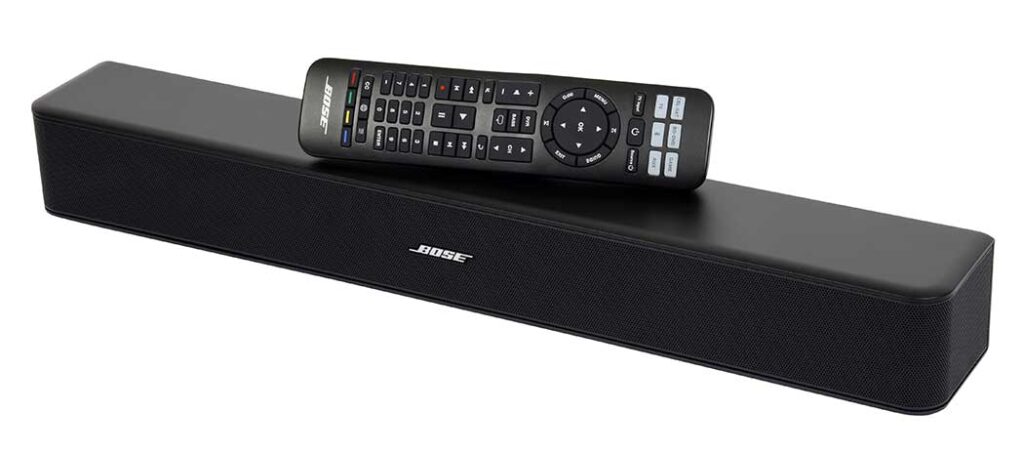
BOSE® SOLO 5 TV SOUND SYSTEM
Please read and keep all safety and use instructions.
Bose Corporation hereby declares that this product is in compliance with the essential requirements and other relevant provisions of Directive 2014/53/EU and all other applicable EU directive requirements. The complete declaration of conformity can be found at: www.Bose.com/compliance
Important Safety Instructions
- Read these instructions.
- Keep these instructions.
- Heed all warnings.
- Follow all instructions.
- Do not use this apparatus near water.
- Clean only with a dry cloth.
- Do not block any ventilation openings. Install in accordance with the manufacturer’s instructions.
- Do not install near any heat sources such as radiators, heat registers, stoves, or other apparatus (including amplifiers) that produce heat.
- Protect the power cord from being walked on or pinched, particularly at plugs, convenience receptacles, and the point where they exit from the apparatus.
- Only use attachments/accessories specified by the manufacturer.
- Use only with the cart, stand, tripod, bracket, or table specified by the manufacturer, or sold with the apparatus. When a cart is used, use caution when moving the cart/apparatus combination to avoid injury from tip-over.
- Unplug this apparatus during lightning storms or when unused for long periods of time.
- Refer all servicing to qualified personnel. Servicing is required when the apparatus has been damaged in any way, such as power-supply cord or plug is damaged, liquid has been spilled or objects have fallen into the apparatus, the apparatus has been exposed to rain or moisture, does not operate normally, or has been dropped.
WARNINGS/CAUTIONS
- To reduce the risk of fire or electric shock, do not expose this product to rain or moisture.
- Do NOT expose this apparatus to dripping or splashing, and do not place objects filled with liquids, such as vases, on or near the apparatus.
- Keep the product away from fire and heat sources. Do not place naked flame sources, such as lighted candles, on or near the product.
- Do NOT make unauthorized alterations to the product.
- Do NOT use a power inverter with this product.
- Do NOT use in vehicles or boats.
- The speaker wire and interconnect cables included with this system are not approved for in-wall installation. Please check your local building codes for the correct type of wire and cable required for in-wall installation.
- Use this product only with the power supply provided.
- Where the mains plug or appliance coupler is used as the disconnect device, the disconnect device shall remain readily operable.
- The batteries provided with this product may present a risk of fire or chemical burn if mishandled.
- Do NOT expose products containing batteries to excessive heat (e.g. from storage in direct sunlight, fire or the like).
- Only use the mounting hardware supplied with this product.
- Do NOT mount on surfaces that are not sturdy, or that have hazards concealed behind them, such as electrical wiring or plumbing. If you are not sure about installing the bracket, contact a qualified professional installer. Ensure the bracket is installed according to local building code.
- Due to ventilation requirements, Bose does not recommend placing the product in a confined space such as in a wall cavity or in an enclosed cabinet.
NOTE: This equipment has been tested and found to comply with the limits for a Class B digital device, pursuant to Part 15 of the FCC Rules. These limits are designed to provide reasonable protection against harmful interference in a residential installation. This equipment generates, uses, and can radiate radio frequency energy and, if not installed and used in accordance with the instructions, may cause harmful interference to radio communications. However, there is no guarantee that interference will not occur in a particular installation. If this equipment does cause harmful interference to radio or television reception, which can be determined by turning the equipment off and on, the user is encouraged to try to correct the interference by one or more of the following measures:
- Reorient or relocate the receiving antenna.
- Increase the separation between the equipment and receiver.
- Connect the equipment into an outlet on a circuit different from that to which the receiver is connected.
- Consult the dealer or an experienced radio/TV technician for help.
Changes or modifications not expressly approved by Bose Corporation could void the user’s authority to operate this equipment.
This device complies with part 15 of the FCC Rules and ISED Canada license-exempt RSS standard(s). Operation is subject to the following two conditions: (1) This device may not cause harmful interference, and (2) this device must
accept any interference received, including interference
that may cause undesired operation.
This Class B digital apparatus complies with Canadian ICES-003.
CAN ICES-3 (B) / NMB-3 (B)
This device complies with FCC and ISED Canada RF radiation exposure limits set forth for general population. It must not be co-located or be operating in conjunction with any other antennas or transmitters.
This equipment complies with FCC/IC radiation exposure limits set forth for an uncontrolled environment.
This equipment should be installed and operated with minimum distance 20cm between the radiator and your body.
Model: 418775
About your TV sound system
Your TV sound system provides clear, spacious sound from one compact soundbar.
System features
- Videostage® and TrueSpace® technologies deliver many of the benefits of a five- speaker home theater in a single soundbar.
- Sleek and elegantly designed soundbar fits easily in front of your TV.
- Connects with just one audio cable for easy setup.
- Programmable universal remote powers on/off your TV, cable/satellite box and
- system with the press of a single button.
- Stream music from Bluetooth® devices.
- Stores up to eight Bluetooth devices in its pairing list.
- Connects up to two Bluetooth devices for easy switching between devices.
- Mounting ring to hide the power supply behind your mounted TV.
- Soundbar can be mounted on the wall (kit available separately).
Unpacking
Carefully unpack the carton and confirm that the following parts are included:
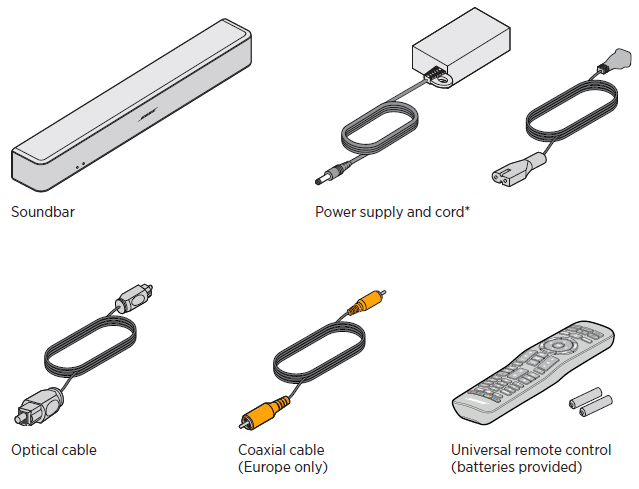
*May ship with multiple power cords. The appropriate power cord for your region is
supplied.
Note: If part of the system is damaged, do not use it. Contact your authorized Bose®
dealer or Bose customer service. Refer to the contact sheet in the carton.
Owners Guide
Brugervejledning
Bedienungsanleitung
Gebruikershandleiding
Gua del usuario
Kyttohje
Notice dutilisation
Manuale di istruzioni
Kezelsi tmutat
Brukerveiledning
Podrcznik uytkownika
Manual do Proprietrio
Bruksanvisning
BOSE SOLO 5 TV SOUND SYSTEM
2 — E N G L I S H
I M P O R TA N T S A F E T Y I N S T R U C T I O N S
Please read and keep all safety and use instructions. Bose Corporation hereby declares that this product is in compliance with the essential requirements and other relevant provisions of Directive 2014/53/EU and all other applicable EU directive requirements. The complete declaration of conformity can be found at: www.Bose.com/compliance
Important Safety Instructions 1. Read these instructions.
2. Keep these instructions.
3. Heed all warnings.
4. Follow all instructions.
5. Do not use this apparatus near water.
6. Clean only with a dry cloth.
7. Do not block any ventilation openings. Install in accordance with the manufacturers instructions.
8. Do not install near any heat sources such as radiators, heat registers, stoves, or other apparatus (including amplifiers) that produce heat.
9. Protect the power cord from being walked on or pinched, particularly at plugs, convenience receptacles, and the point where they exit from the apparatus.
10. Only use attachments/accessories specified by the manufacturer.
11. Use only with the cart, stand, tripod, bracket, or table specified by the manufacturer, or sold with the apparatus. When a cart is used, use caution when moving the cart/apparatus combination to avoid injury from tip-over.
12. Unplug this apparatus during lightning storms or when unused for long periods of time.
13. Refer all servicing to qualified personnel. Servicing is required when the apparatus has been damaged in any way, such as power-supply cord or plug is damaged, liquid has been spilled or objects have fallen into the apparatus, the apparatus has been exposed to rain or moisture, does not operate normally, or has been dropped.
E N G L I S H — 3
I M P O R TA N T S A F E T Y I N S T R U C T I O N S
WARNINGS/CAUTIONS
This symbol on the product means there is uninsulated, dangerous voltage within the product enclosure that may present a risk of electrical shock.
This symbol on the product means there are important operating and maintenance instructions in this guide.
Contains small parts which may be a choking hazard. Not suitable for children under age 3.
This product contains magnetic material. Consult your physician on whether this might affect your implantable medical device.
To reduce the risk of fire or electric shock, do not expose this product to rain or moisture.
Do NOT expose this apparatus to dripping or splashing, and do not place objects filled with liquids, such as vases, on or near the apparatus.
Keep the product away from fire and heat sources. Do not place naked flame sources, such as lighted candles, on or near the product.
Do NOT make unauthorized alterations to the product.
Do NOT use a power inverter with this product.
Do NOT use in vehicles or boats.
The speaker wire and interconnect cables included with this system are not approved for in-wall installation. Please check your local building codes for the correct type of wire and cable required for in-wall installation.
Use this product only with the power supply provided.
Where the mains plug or appliance coupler is used as the disconnect device, the disconnect device shall remain readily operable.
The batteries provided with this product may present a risk of fire or chemical burn if mishandled.
Do NOT expose products containing batteries to excessive heat (e.g. from storage in direct sunlight, fire or the like).
Only use the mounting hardware supplied with this product.
Do NOT mount on surfaces that are not sturdy, or that have hazards concealed behind them, such as electrical wiring or plumbing. If you are not sure about installing the bracket, contact a qualified professional installer. Ensure the bracket is installed according to local building code.
Due to ventilation requirements, Bose does not recommend placing the product in a confined space such as in a wall cavity or in an enclosed cabinet.
4 — E N G L I S H
R E G U L ATO R Y A N D L E G A L I N F O R M AT I O N
NOTE:This equipment has been tested and found to comply with the limits for a Class B digital device, pursuant to Part 15 of the FCC Rules. These limits are designed to provide reasonable protection against harmful interference in a residential installation. This equipment generates, uses, and can radiate radio frequency energy and, if not installed and used in accordance with the instructions, may cause harmful interference to radio communications. However, there is no guarantee that interference will not occur in a particular installation. If this equipment does cause harmful interference to radio or television reception, which can be determined by turning the equipment off and on, the user is encouraged to try to correct the interference by one or more of the following measures:
Reorient or relocate the receiving antenna. Increase the separation between the equipment and receiver. Connect the equipment into an outlet on a circuit different from that to which the receiver is connected. Consult the dealer or an experienced radio/TV technician for help.
Changes or modifications not expressly approved by Bose Corporation could void the users authority to operate this equipment.
This device complies with part 15 of the FCC Rules and ISED Canada license-exempt RSS standard(s). Operation is subject to the following two conditions: (1) This device may not cause harmful interference, and (2) this device must accept any interference received, including interference that may cause undesired operation.
This Class B digital apparatus complies with Canadian ICES-003.
CAN ICES-3(B)/NMB-3(B)
This device complies with FCC and ISED Canada RF radiation exposure limits set forth for general population. It must not be co-located or be operating in conjunction with any other antennas or transmitters.
This equipment complies with FCC/IC radiation exposure limits set forth for an uncontrolled environment. This equipment should be installed and operated with minimum distance 20cm between the radiator and your body.
Model: 418775
For Europe:
Frequency band of operation 2400 to 2483.5 MHz.
Maximum transmit power less than 20 dBm EIRP.
Maximum transmit power is below regulatory limits such that SAR testing is not necessary and exempt per applicable regulations.
This symbol means the product must not be discarded as household waste, and should be delivered to an appropriate collection facility for recycling. Proper disposal and recycling helps protect natural resources, human health and the environment. For more information on disposal and recycling of this product, contact your local municipality, disposal service, or the shop where you bought this product.
Management Regulation for Low-power Radio-frequency Devices Article XII According to Management Regulation for Low-power Radio-frequency Devices without permission granted by the NCC, any company, enterprise, or user is not allowed to change frequency, enhance transmitting power or alter original characteristic as well as performance to an approved low power radio-frequency devices.
Article XIV The low power radio-frequency devices shall not influence aircraft security and interfere legal communications; If found, the user shall cease operating immediately until no interference is achieved. The said legal communications means radio communications operated in compliance with the Telecommunications Act.
The low power radio-frequency devices must be susceptible with the interference from legal communications or ISM radio wave radiated devices.
E N G L I S H — 5
R E G U L ATO R Y A N D L E G A L I N F O R M AT I O N
Product Power State Table The product, in accordance with the Ecodesign Requirements for Energy Related Products Directive 2009/125/EC, is in compliance with the following norm(s) or document(s): Regulation (EC) No. 1275/2008, as amended by Regulation (EU) No. 801/2013.
Required Power State Information Power Modes
Standby Networked Standby
Power consumption in specified power mode, at 230V/50Hz input
0.5 W N/A*
Time after which equipment is automatically switched into mode
< 2.5 hours N/A*
Power consumption in networked standby if all wired network ports are connected and all wireless network ports are activated, at 230V/50Hz input
N/A N/A*
Network port deactivation/activation procedures. Deactivating all networks will enable standby mode.
Bluetooth: Deactivate by clearing the pairing list by pressing and holding the Bluetooth button for 10 seconds. Activate by pairing with a Bluetooth source.
*product does not utilize a networked standby mode for a Bluetooth connection and does not have the ability to be configured to a network via Wi-Fi or Ethernet
External Power Supply Technical Information The external power supply provided with the product, in accordance with the Ecodesign Requirements for Energy Related Products Directive 2009/125/EC, is in compliance with the following norms(s) or documents(s): Commission Regulation (EU) 2019/1782.
Manufacturer Bose Products B.V.
Commercial registration number 36037901
Address Gorslaan 60
1441 RG Purmerend
The Netherlands
Model identifier DT20V-1.8C-DC
Input voltage 100V-240V
Input AC frequency 50Hz/60Hz
Output voltage 20V DC
Output current 1.8A
Output power 36W
Average active efficiency 89.0%
Efficiency at low load (10%) 88.3%
No-load power consumption 0.08W
Please dispose of used batteries properly, following local regulations. Do not incinerate.
6 — E N G L I S H
R E G U L ATO R Y A N D L E G A L I N F O R M AT I O N
China Restriction of Hazardous Substances Table
Names and Contents of Toxic or Hazardous Substances or Elements Toxic or Hazardous Substances and Elements
Part Name Lead (Pb)
Mercury (Hg)
Cadmium (Cd)
Hexavalent (CR(VI))
Polybrominated Biphenyl
(PBB)
Polybrominated diphenylether
(PBDE) PCBs X O O O O O
Metal Parts X O O O O O
Plastic Parts O O O O O O
Speakers X O O O O O
Cables X O O O O O
This table is prepared in accordance with the provisions of SJ/T 11364.
O: Indicates that this toxic or hazardous substance contained in all of the homogeneous materials for this part is below the limit requirement of GB/T 26572.
X: Indicates that this toxic or hazardous substance contained in at least one of the homogeneous materials used for this part is above the limit requirement of GB/T 26572.
Taiwan Restriction of Hazardous Substances Table Equipment name: Bose Solo, Type designation: 410376
Restricted substances and its chemical symbols
Unit Lead (Pb) Mercury (Hg) Cadmium (Cd) Hexavalent
chromium (Cr+6) Polybrominated biphenyls (PBB)
Polybrominated diphenyl ethers (PBDE)
PCBs — Metal Parts — Plastic Parts Speakers — Cables — Note 1: indicates that the percentage content of the restricted substance does not exceed the percentage of reference value
of presence.
Note 2: The indicates that the restricted substance corresponds to the exemption.
E N G L I S H — 7
R E G U L ATO R Y A N D L E G A L I N F O R M AT I O N
Please complete and retain for your records The serial and model numbers are located on the bottom of the soundbar and on the packaging for the remote control.
Serial number: ______________________________________________________________________
Model number: ______________________________________________________________________
Please keep your receipt with your owners guide. Now is a good time to register your Bose product. You can easily do this by going to global.Bose.com/register
Date of Manufacture: The eighth digit in the serial number indicates the year of manufacture; 0 is 2010 or 2020.
China Importer: Bose Electronics (Shanghai) Company Limited, Part C, Plant 9, No. 353 North Riying Road, China (Shanghai) Pilot Free Trade Zone
EU Importer: Bose Products B.V., Gorslaan 60, 1441 RG Purmerend, The Netherlands
Taiwan Importer: Bose Taiwan Branch, 9F-A1, No. 10, Section 3, Minsheng East Road, Taipei City 104, Taiwan Phone Number: +886-2-2514 7676
Mexico Importer: Bose de Mxico, S. de R.L. de C.V., Paseo de las Palmas 405-204, Lomas de Chapultepec, 11000 Mxico, D.F. Phone Number: +5255 (5202) 3545
The CMIIT ID is located on the back panel product label.
California: Contains lithium ion battery with Perchlorate Material — special handling may apply. See www.dtsc.ca.gov/hazardouswaste/perchlorate
8 — E N G L I S H
R E G U L ATO R Y A N D L E G A L I N F O R M AT I O N
The Bluetooth word mark and logos are registered trademarks owned by Bluetooth SIG, Inc. and any use of such marks by Bose Corporation is under license.
Blu-ray Disc and Blu-ray are trademarks of the Blu-ray Disc Association.
Manufactured under license from Dolby Laboratories. Dolby, Dolby Audio, and the double-D symbol are trademarks of Dolby Laboratories Licensing Corporation.
Bose Corporation Headquarters: 1-877-230-5639
2020 Bose Corporation. No part of this work may be reproduced, modified, distributed, or otherwise used without prior written permission.
E N G L I S H — 9
C O N T E N T S
Introduction About your TV sound system …………………………………………………………………………… 11
System features ……………………………………………………………………………………………. 11
Unpacking …………………………………………………………………………………………………………….. 12
Setting up the System Placing the soundbar …………………………………………………………………………………………. 13
Sample soundbar placement …………………………………………………………………….. 13
Wall mounting the soundbar …………………………………………………………………………….. 13
Cable options ………………………………………………………………………………………………………. 14
Connecting your TV ……………………………………………………………………………………………. 14
Connecting the soundbar ………………………………………………………………………………….. 15
Option 1: Optical cable (preferred) …………………………………………………………… 15
Option 2: Coaxial cable ………………………………………………………………………………. 16
Connecting to power ………………………………………………………………………………………….. 17
Mounting ring ……………………………………………………………………………………………….. 17
Turning off your TV speakers ……………………………………………………………………………. 18
Powering on your soundbar ……………………………………………………………………………… 18
Confirming your TV speakers are off ……………………………………………………….. 18
Using the System Remote control buttons …………………………………………………………………………………….. 19
Programming the universal remote …………………………………………………………………. 20
Customizing the power button …………………………………………………………………. 21
Resyncing your cable/satellite box and TV ……………………………………………………. 21
Switching between sources ………………………………………………………………………………. 22
Function buttons …………………………………………………………………………………………………. 22
Adjusting the volume …………………………………………………………………………………………. 22
Adjusting the bass level …………………………………………………………………………………….. 22
Resetting the bass level ……………………………………………………………………………… 23
Dialogue mode …………………………………………………………………………………………………….. 23
Auto-wake ……………………………………………………………………………………………………………. 23
Programming a non-Bose remote control ……………………………………………………… 23
1 0 — E N G L I S H
C O N T E N T S
Bluetooth Pairing a Bluetooth device……………………………………………………………………………….. 24
Connecting to a paired Bluetooth device ……………………………………………………… 25
Switching between connected devices…………………………………………………………… 25
Clearing the soundbars Bluetooth pairing list …………………………………………….. 25
Getting System Information Soundbar indicators …………………………………………………………………………………………… 26
Status indicator ……………………………………………………………………………………………. 26
Bluetooth indicator…………………………………………………………………………………….. 26
Alternate Setup No sound from a source(s) connected to your TV ……………………………………….. 27
No optical or coaxial connector on your TV ………………………………………………….. 27
Connect Bose Products Connect to a Bose Home Speaker or Soundbar …………………………………………… 33
Compatible products ………………………………………………………………………………….. 33
Connect using the Bose Music app ………………………………………………………….. 33
Reconnect to a Bose Home Speaker or Soundbar ……………………………………….. 34
Care and Maintenance Troubleshooting ………………………………………………………………………………………………….. 35
Adjusting the audio for wall mounting…………………………………………………….. 37
Replacing the remote batteries ………………………………………………………………………… 37
Cleaning ………………………………………………………………………………………………………………… 38
Customer service ………………………………………………………………………………………………… 38
Limited warranty …………………………………………………………………………………………………. 38
Technical Information …………………………………………………………………………………………. 38
E N G L I S H — 1 1
I N T R O D U C T I O N
About your TV sound system Your TV sound system provides clear, spacious sound from one compact soundbar.
System features Videostage and TrueSpace technologies deliver many of the benefits of a
five-speaker home theater in a single soundbar.
Sleek and elegantly designed soundbar fits easily in front of your TV.
Connects with just one audio cable for easy setup.
Programmable universal remote powers on/off your TV, cable/satellite box and system with the press of a single button.
Stream music from Bluetooth devices.
Stores up to eight Bluetooth devices in its pairing list.
Connects up to two Bluetooth devices for easy switching between devices.
Mounting ring to hide the power supply behind your mounted TV.
Soundbar can be mounted on the wall (kit available separately).
1 2 — E N G L I S H
I N T R O D U C T I O N
Unpacking Carefully unpack the carton and confirm that the following parts are included:
Soundbar Power supply and cord*
Optical cable Coaxial cable
(Europe only) Universal remote control (batteries provided)
*May ship with multiple power cords. The appropriate power cord for your region is supplied.
Note: If part of the system is damaged, do not use it. Contact your authorized Bose dealer or Bose customer service. Refer to the contact sheet in the carton.
E N G L I S H — 1 3
S E T T I N G U P T H E S YS T E M
Placing the soundbar Stand the soundbar on its feet in front of your TV.
Do not place your TV on the soundbar.
Make sure there is an AC (mains) power outlet nearby.
To avoid wireless interference:
Keep other wireless equipment away from the soundbar.
Place the soundbar outside of and away from metal cabinets, other audio/video components and direct heat sources.
Sample soundbar placement
Wall mounting the soundbar You can mount the soundbar on a wall. To purchase the WB-120 Wall Mount Kit, contact your local Bose dealer or visit www.Bose.com
After wall mounting and setting up the soundbar, adjust the audio for better bass sound (see page 37).
CAUTION: Do not use any other hardware to mount the soundbar.
1 4 — E N G L I S H
S E T T I N G U P T H E SYS T E M
Cable options Connect your TV to the soundbar using one of the two digital cable options. The optical cable is the preferred method for connection.
Note: If your TV does not have an optical or coaxial connector, see Alternate Setup on page 27.
1. On the back of your TV, locate the Audio OUT (digital) connector panel.
Note: You must connect the audio cable through your Audio OUT connector panel.
Option 1: Optical cable (digital audio) Preferred method for connection.
Option 2: Coaxial cable (digital audio) Use if no optical output is available.
Your TV’s connector panel may not appear as shown. Look for the shape or color (coaxial) of the connector.
2. Choose an audio cable.
Connecting your TV Insert one end of the audio cable into the correct Audio OUT (digital) connector on your TV.
CAUTION: If using an optical cable, remove the protective caps from both ends. Inserting the plug in the wrong orientation can damage the plug and/or the connector.
E N G L I S H — 1 5
S E T T I N G U P T H E SYS T E M
Connecting the soundbar After connecting the audio cable to your TV, connect the other end to your soundbar. Use only one audio cable.
For instructions on connecting a coaxial cable, see page 16.
Option 1: Optical cable (preferred) CAUTION: Ensure you have removed the protective cap from both ends of the optical
cable. Inserting the plug in the wrong orientation can damage the plug and/or the connector.
1. Hold the optical cables plug with the Bose logo facing down.
2. Align the plug with the Optical connector on the soundbar and insert the plug carefully.
Hinged door
Note: The connector has a hinged door that swings inward when inserting the plug.
3. Firmly push the plug into the connector until you hear or feel a click.
AUX
Optic al
Coaxial
Power
TV In put
1 6 — E N G L I S H
S E T T I N G U P T H E SYS T E M
Option 2: Coaxial cable Insert the other end of the coaxial cable into the Coaxial connector on the soundbar.
E N G L I S H — 1 7
S E T T I N G U P T H E SYS T E M
Connecting to power 1. Plug the power supply into the Power connector.
1
2
3
Mounting ring
2. Plug one end of the power cord into the power supply.
3. Plug the other end into a live AC power (mains) outlet.
The soundbar emits a tone.
Mounting ring To hide the power supply behind your mounted TV, use the mounting ring. Attach the mounting ring to your TVs wall mount using zip ties or bread ties (not provided).
1 8 — E N G L I S H
S E T T I N G U P T H E SYS T E M
Turning off your TV speakers To avoid hearing distorted sound, turn off your TV speakers.
Refer to your TVs owners guide for more information.
Powering on your soundbar 1. Power on your TV.
2. If you are using a cable/satellite box or other secondary source, power on the source.
3. Press the Power button ( ) on the remote control.
The status indicator glows green.
Status indicator
4. Check if sound is coming from the soundbar.
Note: If you do not hear sound coming from the soundbar, see Troubleshooting on page 35.
Confirming your TV speakers are off 1. Press the Mute button ( ) on the soundbars remote control.
2. Check that no sound is coming from your TV.
Note: If you hear sound coming from your TV, see Troubleshooting on page 35.
E N G L I S H — 1 9
U S I N G T H E S YS T E M
Remote control buttons Use the remote to control sources connected to your system, adjust the system volume, change channels, use playback functions, enable cable/satellite box functions and navigate source menus.
Navigation pad
Source selection
Lists recorded DVR programs
Displays the Internet TV home page
Closed captioning
Selects a source connected to your TV
Function buttons (see page 22)
Bass controls
Playback controls
Powers on/off the soundbar
Powers on/off a selected source
Previous channel, chapter or track
Teletext mode
Volume controls Dialogue mode
controls the Bluetooth feature
2 0 — E N G L I S H
U S I N G T H E SYS T E M
Programming the universal remote You can program the universal remote to control your source, such as a TV, DVD/Blu-ray Disc player, cable/satellite box, game system or DVR, by entering the code for your sources brand. There may be several codes for your source. You may need to perform this procedure multiple times to locate the correct code.
Locate your sources code
1. Power on your source.
2. Locate the code for your sources brand in the Universal Remote Device Codes book (provided).
Enter your sources code
1. On the remote control, press and hold the appropriate source button until all six source buttons glow, then release.
For example, to program your TV, press and hold until all six source buttons glow, then release.
The appropriate source button continues to glow.
2. On the number keypad, enter the code for your sources brand and press on the volume button.
Test your sources code
1. Test your source for basic functions. Follow the instructions for your source:
TV: press the channel buttons. Press . The settings menu appears. Press and to navigate.
Cable/satellite box: press . The programming guide appears. Press and to navigate.
DVD or Blu-ray Disc player: press . The settings menu appears. Press and to navigate.
Game system: press and to navigate through your menu.
E N G L I S H — 2 1
U S I N G T H E S YS T E M
2. Based on your sources response to basic functions:
Remote responds accurately: press to exit programming and save your settings.
Remote does not respond or does not respond accurately:
If your source button glows: press on the volume button to move to the next code. Repeat steps 1 — 2 in Test your sources code. You may need to repeat this procedure 30 or more times. If all six buttons blink three times, you have cycled through all codes for your source.
If your source button is off: your remote exited programming mode. Repeat steps 1 — 2 in Enter your sources code and steps 1 — 2 in Test your sources code.
Tip: After you exit programming mode, press the appropriate source button to use your source.
Note: Your source may not be compatible with universal remote controls or may not accept IR (infrared) signals. Refer to your sources owners guide for more information.
Customizing the power button You can customize (power button) on your remote to power on/off your soundbar, TV and cable/satellite box simultaneously.
1. Program your remote to control your TV and cable/satellite box (see page 20).
2. Press and simultaneously and hold for 10 seconds.
Both buttons flash three times.
Resyncing your cable/satellite box and TV After customizing the power button, your cable/satellite box and TV may become out of sync and not power on/off simultaneously. Use the following steps to resync your soundbar.
1. Press the source button for the source that is out of sync.
2. Press to power on/off the source.
3. Press . Your sources power on/off simultaneously.
2 2 — E N G L I S H
U S I N G T H E SYS T E M
Switching between sources You can switch from one source to another by pressing the appropriate source button on the remote.
Note: Before you begin, ensure you have correctly programmed your sources.
1. Press the button for the source you want to control.
The source button glows.
2. Press .
The source powers on.
3. Press and select the correct input on your TV.
Function buttons The red, green, yellow and blue buttons on the remote control correspond with the color-coded function buttons on your cable/satellite box or teletext functions.
Cable/satellite box functions: refer to your cable/satellite boxs owners guide.
Teletext functions: correspond with color-coded page numbers, headings or shortcuts on a teletext display.
Adjusting the volume On the remote control:
Press to increase the volume.
Press to decrease the volume.
Press to mute or unmute the audio.
Note: If you hear sound coming from your TV, see Troubleshooting on page 35.
Adjusting the bass level 1. Press the Bass button ( ).
The status indicator blinks white three times.
2. On the remote control:
Press to increase the bass.
Press to decrease the bass.
E N G L I S H — 2 3
U S I N G T H E S YS T E M
3. Press the Bass button ( ).
The status indicator blinks white three times and the soundbar saves your settings.
Note: For optimal sound quality for dialogue-only programs, such as news and talk shows, see Dialogue mode.
Resetting the bass level On the remote control, press and hold for five seconds to reset the bass level to original factory settings.
The status indicator blinks white three times and remains solid white. The soundbar returns to original factory settings.
Dialogue mode Dialogue mode provides optimal sound quality for dialogue-only programs, such as news and talk shows, by decreasing the soundbars bass settings.
Press the dialogue button ( ) to toggle between dialogue mode and your default audio settings.
The status indicator glows amber when dialogue mode is enabled.
Auto-wake You can set the soundbar to power on whenever a sound signal is received.
Note: The soundbar powers off after 60 minutes of inactivity.
Press and hold on the remote for five seconds until you hear a tone to toggle between auto-wake and default power settings.
The status indicator glows dim amber when the soundbar is off and auto-wake is enabled.
Programming a non-Bose remote control You can program a non-Bose remote control, such as your cable/satellite box remote, to control the soundbar. Refer to your non-Bose remote controls owners guide or cable/satellite website for instructions.
Once programmed, the non-Bose remote performs basic functions such as power on/off and volume.
2 4 — E N G L I S H
BLUETOOTH
Pairing a Bluetooth device Bluetooth wireless technology enables you to stream music from Bluetooth smartphones, tablets, computers or other audio devices to the soundbar.
Before you can stream music from a Bluetooth device, you must pair your device with the soundbar.
1. On the remote control, press and hold the Bluetooth button until the Bluetooth indicator blinks blue.
Make sure the Bluetooth indicator blinks blue before you pair your device.
2. On your Bluetooth device, turn on the Bluetooth feature.
Tip: The Bluetooth feature is usually found in Settings. A gear icon ( ) often represents Settings on the Home screen.
3. Select Bose Solo 5 system from your device list.
Once paired, the Bose Solo 5 system appears connected in the device list.
4. On your Bluetooth device, play music to stream to your soundbar.
If you cannot pair your device
You may need to clear the soundbars Bluetooth pairing list (see page 25). After you clear the list, try pairing again.
See Troubleshooting on page 35 for more information.
E N G L I S H — 2 5
BLUETOOTH
Connecting to a paired Bluetooth device You can stream audio from a Bluetooth device to the soundbar.
Note: If there are multiple devices stored in the soundbars pairing list, it may take a minute or two for the paired device to connect. The soundbars Bluetooth indicator shows connection status (see page 26).
1. On the remote control, press .
The soundbar connects to the last two devices that streamed to your soundbar.
2. Once connected, on the Bluetooth device, play music.
If you cannot stream audio from a paired device The soundbar may have lost connection to your device. Check the soundbars Bluetooth indicator. If the paired device is out of range of the soundbar, move your device within range.
Switching between connected devices The soundbar supports multi-point connectivity, which allows you to seamlessly switch playing music between connected devices.
The last two devices that streamed to the soundbar remain connected. During playback, you can pause audio on the streaming device, and then play music from another connected device.
1. Pause music from the streaming device.
2. On another connected device, play music.
3. Repeat steps 1 and 2 to switch between connected devices.
Clearing the soundbars Bluetooth pairing list When you pair a Bluetooth device to the soundbar, the connection is stored in the soundbars pairing list. You may need to clear the pairing list if you cannot connect to a device. Once you clear the list, you need to pair the device again.
1. Press and hold for 10 seconds, until the Bluetooth indicator blinks blue.
2. On your mobile device, delete Bose Solo 5 system from the Bluetooth menu.
The soundbar emits a tone and is ready to pair to a device (see page 24).
2 6 — E N G L I S H
G E T T I N G SYS T E M I N F O R M AT I O N
Soundbar indicators The status and Bluetooth indicators on the front of the soundbar provide information on soundbar activity.
Status indicator
Bluetooth indicator
Status indicator
Indicator activity System state Off Soundbar off (standby)
Green Solid: Soundbar is on
Blinking: Soundbar is muted
Amber Dim: Standby, auto-wake is enabled
Solid: Dialogue mode
Blinking: Dialogue mode, Soundbar is muted
Red System error: Call Bose Customer Service. Refer to the contact sheet in the carton.
Bluetooth indicator
Indicator activity System state Blue Blinking: ready to pair
White Blinking: Connecting
Solid: Connected
E N G L I S H — 2 7
A LT E R N AT E S E T U P
You may need to use an alternate setup method for the following reasons:
No sound from a source(s) connected to your TV.
No optical or coaxial connector on your TV.
No sound from a source(s) connected to your TV Some TVs do not deliver sound from connected sources to the soundbar. Use an alternate setup method to directly connect your source(s) to the soundbar.
Problem What to do No sound from a source connected to your TV Connect your source to the soundbar using
one of the two cable options. (See page 28.)
No sound from two sources connected to your TV
Connect your sources to the soundbar using Option 1 or Option 2. (See page 30.)
No optical or coaxial connector on your TV Some TVs do not have optical or coaxial connectors. Use an alternate setup method to connect your TV to the soundbar.
Problem What to do TV only has an analog connector Connect your TV using a 3.5 mm to RCA stereo
cable (not provided). (See page 29.)
TV only has a headphones connector Connect your TV using a 3.5 mm stereo cable (not provided). (See page 32.)
TV has no audio outputs Use the audio outputs on another source, such as a cable/satellite box to connect to the soundbar. (See page 28.)
2 8 — E N G L I S H
A LT E R N AT E S E T U P
Connecting a source to the soundbar
If you do not get sound from a source, such as a DVD/Blu-ray Disc player, cable/ satellite box, game system or DVR, connected to your TV, connect it to the soundbar. Use only one audio cable.
CAUTION: If using an optical cable, remove the protective caps from both ends. Inserting the plug in the wrong orientation can damage the plug and/or the connector.
1. On the back of your source, locate the Audio OUT (digital) connector panel.
Soundbar connector panel
Audio OUT Source connector panel
2. Choose an audio cable.
3. If you have not already, disconnect your TV from the soundbar.
4. Connect the audio cable from your cable/satellite boxs Audio OUT (digital) connector panel to the soundbar.
Note: Do not disconnect your sources video cable, such as an HDMI cable, from your TV.
E N G L I S H — 2 9
A LT E R N AT E S E T U P
Connecting a sources analog connector to the soundbar
If your source does not have an optical or coaxial connector, and only has analog connectors (red and white), use a 3.5 mm to RCA stereo cable (not provided) to connect to the soundbar.
1. If you have not already, disconnect your TV from the soundbar.
2. Insert the RCA analog cable into the Audio OUT RCA (red and white) connectors on your source.
3. Insert the stereo plug into the soundbars AUX connector.
3.5 mm to RCA stereo cable (not provided)
Soundbar connector panel
Audio OUT Source connector panel
3 0 — E N G L I S H
A LT E R N AT E S E T U P
Connecting two sources to the soundbar
If you do not get sound from any source, such as a DVD/Blu-ray Disc player, cable/satellite box, game system or DVR, connected to your TV, connect it to the soundbar. Use only one audio cable for each source.
1. On the back of each source, locate the Audio OUT (digital) connector panel.
2. Choose a separate audio cable for each source using either Option 1 or Option 2 (see page 31).
Note: You MUST use either Option 1 or Option 2. Do not use the coaxial cable and optical cable at the same time.
3. If you have not already, disconnect your TV from the soundbar.
4. Separately connect the chosen audio cable from each sources Audio OUT (digital) connector panel to the soundbar.
Note: Do not disconnect your sources video cable, such as an HDMI cable, from your TV.
Option 1
This figure shows two source connections using an optical cable and 3.5 mm to RCA stereo cable (not provided).
CAUTION: If using an optical cable, remove the protective caps from both ends. Inserting the plug in the wrong orientation can damage the plug and/or the connector.
3.5 mm to RCA stereo cable (not provided)
Audio OUT Source 2Audio OUT Source 1
Soundbar connector panel
E N G L I S H — 3 1
A LT E R N AT E S E T U P
Option 2
This figure shows two source connections using a coaxial cable and 3.5 mm to RCA stereo cable (not provided).
Audio OUT Source 2
Audio OUT Source 1
Soundbar connector panel
3.5 mm to RCA stereo cable (not provided)
Using two sources connected to the soundbar Power off sources when not in use. In order for one source to deliver audio to the sound- bar, your other source must be off.
3 2 — E N G L I S H
A LT E R N AT E S E T U P
Connecting a TV headphones connector to the soundbar
If your TV only has a headphones connector, use a 3.5 mm stereo cable (not provided) to connect it to the soundbar.
1. Insert the stereo plug into the TV headphones connector.
2. Insert the other end of the cable into the AUX connector on your soundbar.
3. Ensure your TV speakers are on. Refer to your TVs owners guide for more information.
4. To ensure optimal volume control from your soundbar,
Set your TVs volume to 75 percent of maximum.
Next, set the volume level of your soundbar using the remote control.
3.5 mm stereo cable (not provided)
Soundbar connector panel
Audio OUT TV headphones connector panel (or other variable audio output)
E N G L I S H — 3 3
C O N N E C T B O S E P R O D U C T S
Connect to a Bose Home Speaker or Soundbar With Bose SimpleSync technology, you can connect your Bose Solo 5 TV sound system to a Bose Home Speaker or Bose Soundbar to listen to the same song in two different rooms at the same time.
Note: SimpleSync technology has a Bluetooth range of 30 ft (9 m). Walls and construction materials can affect reception.
-
Contents
-
Table of Contents
-
Troubleshooting
-
Bookmarks
-
Dansk
-
Opsætning Af Systemet
-
-
Eksempel På Placering Af Soundbar
-
-
Montering Af Soundbar På Væggen
-
-
Mulighed 1: Optisk Kabel (Foretrækkes)
-
Mulighed 2: Koaksialt Kabel
-
-
Deaktivering Af Dine Tv-Højttalere
-
Sådan Tændes Din Soundbar
-
Kontrollér, at Tv’ets Højttalere er Slukket
-
-
-
Anvendelse Af Systemet
-
Programmering Af Universalfjernbetjening
-
Tilpasning Af Tænd/Sluk-Knappen
-
-
Gensynkronisering Af Din Kabel-/Satellitmodtager Og Dit Tv
-
Sådan Skifter du Mellem Kilder
-
-
Nulstilling Af Basniveauet
-
-
Programmering Af Fjernbetjening, der Ikke er Fra Bose
-
Parring Af en Bluetooth -Enhed
-
Forbindelse Til en Parret Bluetooth -Enhed
-
Skift Mellem Tilsluttede Enheder
-
Rydning Af Soundbarens Bluetooth®-Parringsliste
-
Sådan Får du Systemoplysninger
-
Alternativ Opsætning
-
Ingen Lyd Fra en Eller Flere Kilder, der er Sluttet Til Dit Tv
-
Intet Optisk Eller Koaksialt Stik På Dit Tv
-
-
Pleje Og Vedligeholdelse
-
-
Justering Af Lyden Ved Vægmontering
-
-
Udskiftning Af Fjernbetjeningens Batterier
-
-
Deutsch
-
Einrichten des Systems
-
-
Beispiel für die Soundbar-Aufstellung
-
-
-
Option 1: Optisches Kabel (Bevorzugt)
-
-
Anschluss an das Stromnetz
-
Ausschalten der TV-Lautsprecher
-
-
Überprüfen, ob die TV-Lautsprecher Ausgeschaltet sind
-
-
-
Verwenden des Systems
-
Programmieren der Universalfernbedienung
-
Erneutes Synchronisieren der Kabel-/Satellitenanlage und des Fernsehgeräts
-
Umschalten zwischen Quellen
-
Einstellen der Lautstärke
-
-
Zurücksetzen des Basspegels
-
-
Programmieren einer nicht von Bose Stammenden Fernbedienung
-
Abstimmen mit einem Bluetooth -Gerät
-
Verbinden mit einem Abgestimmten Bluetooth -Gerät
-
Umschalten zwischen Verbundenen Geräten
-
Abrufen der Systeminformationen
-
Alternatives Setup
-
Kein Ton aus Quellen, die an das Fernsehgerät Angeschlossen sind
-
Kein Optischer oder Koaxialer Anschluss am Fernsehgerät
-
-
Pflege und Wartung
-
-
Anpassen des Tons bei Wandmontage
-
-
Austauschen der Fernbedienungsbatterien
-
-
Dutch
-
Over Je Geluidssysteem Voor Tv’s
-
Eigenschappen Van Het Systeem
-
-
Het Systeem Installeren
-
-
Voorbeeld Van Plaatsing Van de Soundbar
-
-
De Soundbar Aan de Wand Bevestigen
-
-
Optie 1: Optische Kabel (Voorkeur)
-
-
Op Het Lichtnet Aansluiten
-
De Luidsprekers Van de Tv Uitzetten
-
-
Controleren of de Luidsprekers Van de Tv Uitstaan
-
-
-
Gebruik Van Het Systeem
-
Knoppen Op de Afstandsbediening
-
De Universele Afstandsbediening Programmeren
-
Je Kabel-/Satellietdecoder en Tv Opnieuw Synchroniseren
-
Het Volume Van de Lage Tonen Bijstellen
-
Het Volume Van de Lage Tonen Terugzetten Op de Fabrieksinstelling
-
-
Een Afstandsbediening Van Een andere Fabrikant Dan Bose Programmeren
-
Een Bluetooth -Apparaat Koppelen
-
Verbinding Maken Met Een Gekoppeld Bluetooth -Apparaat
-
Schakelen Tussen Verbonden Apparaten
-
De Bluetooth -Koppellijst Van de Soundbar Wissen
-
-
Informatie over Het Systeem Krijgen
-
Alternatieve Installatiemethode
-
Geen Geluid Van Een Bron of Bronnen die Op Je Tv Zijn Aangesloten
-
Geen Optische of Coaxiale Aansluiting Op Je Tv
-
-
Het Geluid Bijstellen Voor Wandbevestiging
-
-
De Batterijen Van de Afstandsbediening Vervangen
-
-
-
Español
-
Acerca del Sistema de Audio para Televisor
-
Características del Sistema
-
-
Instalación del Sistema
-
Instalar la Barra de Sonido
-
Colocación de la Barra de Sonido de Muestra
-
-
Montar la Barra de Sonido en la Pared
-
Conectar la Barra de Sonido
-
Opción 1: Cable Óptico (Preferido)
-
-
Conexión a la Fuente de Alimentación
-
Apagar Los Altavoces del Televisor
-
Encender la Barra de Sonido
-
Confirmar que Los Altavoces del Televisor Estén Apagados
-
-
-
Uso del Sistema
-
Botones del Control Remoto
-
Programar el Control Remoto Universal
-
Personalizar el Botón de Encendido
-
-
Resincronizar el Sistema de Cable/Satélite y el Televisor
-
Cambiar de una Fuente a Otra
-
Ajustar el Nivel de Los Bajos
-
Restablecer el Nivel de Los Bajos
-
-
Programar un Control Remoto que no Sea de Bose
-
Emparejar un Dispositivo Bluetooth
-
Conectar a un Dispositivo Bluetooth Emparejado
-
Cambiar entre Dispositivos Conectados
-
Borrar la Lista de Dispositivos Emparejados con Bluetooth
-
-
Obtener Información del Sistema
-
Indicadores de la Barra de Sonido
-
-
Configuración Alternativa
-
No Hay Sonido Proveniente de las Fuentes Conectadas al Televisor
-
No Hay un Conector Óptico O Coaxial en el Televisor
-
-
Cuidado y Mantenimiento
-
-
Ajustar el Audio para el Montaje en la Pared
-
-
Reemplazar las Baterías del Control Remoto
-
Servicio de Atención al Cliente
-
-
-
Suomi
-
Tietoja TV-Äänijärjestelmästä
-
Järjestelmän Ominaisuudet
-
-
Järjestelmän Asetusten Määrittäminen
-
-
Soundbarin Sijoitusesimerkki
-
-
Soundbarin Kiinnittäminen Seinään
-
-
Vaihtoehto 1: Optinen Kaapeli (Suositus)
-
Vaihtoehto 2: Koaksiaalikaapeli
-
-
Television Kaiuttimien Mykistäminen
-
Virran Kytkeminen Soundbariin
-
Sen Varmistaminen, Että Television Kaiuttimet on Mykistetty
-
-
-
Järjestelmän Käyttäminen
-
Yleiskaukosäätimen Ohjelmoiminen
-
Virtapainikkeen Mukauttaminen
-
-
Kaapeli- Tai Satelliittivastaanottimen Ja Television Synkronoiminen Uudelleen
-
Lähteiden Välillä Vaihtaminen
-
Äänenvoimakkuuden Säätäminen
-
Matalien Äänien Säätäminen
-
Matalien Äänien Palauttaminen
-
-
Muun Kuin Bose-Kaukosäätimen Ohjelmoiminen
-
Bluetooth -Laiteparin Muodostaminen
-
Yhdistäminen Laitepariksi Muodostettuun Bluetooth -Laitteeseen
-
Vaihtaminen Yhdistettyjen Laitteiden Välillä
-
Soundbarin Bluetooth®-Laitepariluettelon Tyhjentäminen
-
-
Järjestelmätietojen Tarkastelu
-
Vaihtoehtoiset Asetukset
-
Televisioon Liitetyistä Lähdelaitteista Ei Kuulu Ääntä
-
Televisiossa Ei Ole Optista Tai Digitaalista Liitäntää
-
-
Hoito Ja Kunnossapito
-
-
Äänen Säätäminen Seinäasennuksessa
-
-
Kaukosäätimen Paristojen Vaihtaminen
-
-
Owner’s Guide
Brugervejledning
Bedienungsanleitung
Gebruikershandleiding
Guía del usuario
Käyttöohje
Notice d’utilisation
Manuale di istruzioni
Kezelési útmutató
Brukerveiledning
Podręcznik użytkownika
Manual do Proprietário
Bruksanvisning
BOSE
SOLO 5
®
TV SOUND SYSTEM