
Note:
With the product being discontinued, it will no longer receive any software updates.
All Cardo units come with a 2-year warranty, starting from the date of purchase. Please keep your proof of purchase in order to reclaim your warranty. Your first point of warranty service is your dealer.
How can I improve my sound quality?
Sound quality is best when the speakers are placed directly opposite your ear canal. Verify that the speakers are correctly placed inside your helmet by following the next steps: 1. With the helmet on, slide your finger inside the helmet and press against the side of the helmet where your ear is. This is where the speakers should be positioned. 2. Remove the helmet, but keep your finger in that spot. Check to make sure the speakers are in this position. 3. Make sure the speakers are positioned as close to your ear as possible so you can feel them. If necessary, use the included Velcro booster pads behind the speakers to get them closer to your ear. 4. Since every head is different, you may find that your helmet ear cavities are not placed optimally. If this is the case, consider placing the speakers outside your helmet ear cavities right opposite your ears.
How to pair a 4-way Bluetooth intercom group?
1. Pair the first rider to your unit on channel A. 2. Pair the second rider to your unit on channel B. 3. Ask the first or the second rider to pair the fourth member of the group on their free channel. Consult the Pocket guide Or the user manual For more details.
How to pair to a non-Cardo headset using universal connectivity (Cardo Gateway)
In order to pair your unit with a non-Cardo headset please do the following: 1. Start intercom pairing on your unit (please refer to your product’s pocket guide or user manual on how to do it). 2. Tap the phone button to start Cardo Gateway pairing 3. On the other unit start mobile phone pairing 4. Wait For the paring to complete.
How can I get more riding time out of my battery?
Your product comes with a Charge while riding feature that allows you to plug in the unit into the bike’s 12V charger or a power bank, and continue riding long after the standard battery time has passed. In order to do it, just plug your unit into the power source – the unit will shut down. Turn it back on again and you’re set.
Which mobile app do I need to download for my device?
For PACTALK, PACTALK Bold, PACTALK Slim, SMARTPACK, SMARTH, FREECOM 1, FREECOM 2, and FREECOM 4 – you should get the new Cardo connect app (please note that in order to fully enjoy its capabilities, you would need to upgrade your unit’s firmware to the latest version). For Qz, Q1, Q3, G9, G9x, SRC V1.1, SRC Pro, Louis special edition, and SHO-1 – you should get the Cardo Smartset app (the Qz, Q1, G9, and SRC are only supported in Android).
Is it possible to use it with my own earbuds / speakers?
While your unit comes right out of the box with one of the best sets of speakers in the business, you can always plug in your favorite earbuds or aftermarket speakers via the standard 3.5mm jack and ride on.
How can I get more range of intercom out of my unit?
The range stated in the product description has been tested in optimal conditions. Actual range performance could be adversely affected by a number of environmental factors: 1. Riding environment (urban/non-urban) 2. Topography 3. High voltage power lines and cellular towers 4. Line of sight
Friends tell me my voice doesn’t come out clear. What can I do?
If you are using a boom mic, make sure your mic is as close to your mouth as possible. Search for the small yellow triangle near the boom and make sure it faces your mouth. If the issue is noise from wind turbulence, put a larger mic sponge on the mic to help reduce it. The larger sponge is included in your package accessories. If you cannot find it, you can purchase it as part of a replacement microphone.
The unit doesn’t seem to be charging or the Battery seems to not last as long as it should
Plug in your unit to the charger and leave it charging for at least 4 hours straight. If this does not work, try using a different wall charger and USB cable. If the unit still doesn’t charge, please contact support. DO NOT attempt to disassemble or replace the battery on your own. DO NOT open the unit. It will no longer be waterproof! If your unit is out of warranty, you can find replacement batteries on 3rd party’s websites and in specialty electronics retailers. That said, we DO NOT recommend replacing parts on your own, for the risk of water, dirt and general electronics damage.
Mobile app doesn’t recognize unit. What next?
First, make sure that you are using the correct app – we have two different apps available for different product lines. If the issue is unresolved, make sure your smartphone is paired via Bluetooth and connected to the unit. Using a Smartwatch? Try turning it off before starting the app, and only then turn the smartwatch back on. If all above does not solve the issue, proceed with the following: 1. Delete the application from your phone 2. Delete the unit from the paired devices list in the phone’s Bluetooth settings page 3. Restart the phone 4. Perform pairing (or factory) reset on the unit (as described in the troubleshooting section in the user manual) – the unit will turn off 5. Turn the unit back on 6. Pair the unit to the phone via Bluetooth 7. Download and install the app 8. Start the app If it still doesn’t connect, turn off your unit with the app running and switch it back on.
Connectivity to Smart dashboard, bike infotainment and GPS devices
In order to enjoy the best experience when using a smart system in parallel to a mobile phone we recommend connecting the unit in one of the 2 ways described below: 1. Use a latest model Bluetooth 5.0 equipped smartphone with a capability to be connected to 2 different devices. Connect your smartphone to both the bike system and the Cardo unit directly. 2. For all others, bypass the smart dashboard system by connecting both phone and the bike system directly to the Cardo unit (one on each channel) without connecting the phone to the bike system.
Can I use this product in the rain?
Sure. All cardo units are IP67 waterproof. This means you can ride in the rain, and enjoy top communication.
Will it fit my helmet?
Yes. It can be fitted to virtually any helmet – Full face, dirt-bike, open face, 3/4, modular or half helmet. It would even fit on most ski helmets. For installation on half helmets and ski helmets, you will need to purchase the Boom Microphone Cradle (a.k.a half helmet kit), sold separately.
How to use my Cardo product to with the BRP connect?
Can I replace the battery in my unit?
DO NOT attempt to disassemble or replace the battery on your own. Replacing the battery by yourself could damage the system’s waterproof ability. However, you can try the following: Plug-in your unit to the charger and leave it charging for at least 4 hours straight. If this does not work, try using a different wall charger and USB cable. If the unit still doesn’t hold a charge, please contact support.
Can I share music with any other Cardo unit?
You can share music with any Cardo unit from the same generation: PACKTALK Bold/Black/Slim/Ducati/Louis, PACKTALK, SMARTPACK, SMARTH, FREECOM 2/4/1+/2+/4+. Your unit will not be able to share music with products from previous generations (PACKTALK EDGE, PACKTALK NEO, PACKTALK CUSTOM, FREECOM 4X, FREECOM 2X, Spirit HD, Spirit, G-line, Q-line, SRC-line, SHO-1).
[pdf]
User Manual Guide
cardo BK 1 User Guide Joshua Goodman bk1 manual en cardosystems 80 2014 12
USER MANUAL version 2.0 2014 Cardo Systems, Inc. The Bluetooth word mark and logos are owned by t … espective Channel A Buttons. If for any reason you have to pair them again, OR if you purchased a single cardo BK-1 and wish to pair with a second unit to make Intercom calls, proceed as follows: Us…
lang:en score:39 filesize: 1.15 M page_count: 30 document date: 2014-10-22
[pdf]
User Manual Instructions Guide
scala rider q2 multiset english user guide cardo bluetooth motorcycle helemet headset Q2 MultiSet communication in motion 3 Search for Bluetooth headsets on your GPS device by following the s instructions Please consult User Manual more information 4 If prompts a PIN or Passkey enter 0000 four zeros scalarider manual altrider files product 186 cardosystems 80 Manuals
Q2TM MultiSet TM communication in motionTM Gebrauchsanleitung Guide d Utilisation Guida di Avvio G … Single tap the MC Button A Buddy Intercom call will be established. To end the Buddy Intercom call, single tap the MC Button again. To start a Buddy Intercom call with the Secondary Buddy while the h…
lang:en score:38 filesize: 875.32 K page_count: 14 document date: 2009-12-29
[pdf]
User Manual Quick Start Guide Guide
Bluetooth Communication System MANUAL The Pama Group CONTENTS 1 Introduction 4 2 ChargingtheFREECOM 5 3 GettingStarted 6 1GettingtoKnowYourFREECOM 2SwitchingYourUnitOn Off On the other Cardo unit activate intercom pairing mode see user manual at cardosystems product manuals 9 For easy reference while on road Pocket Guide from quick guides This is version 0 of FREECOM Manual latest FREECOM4 pama cardo
Bluetooth Communication System MANUAL For easy reference while on the road, download the Pocket Gu … TERCOM CONFERENCE CALL You can hold a conference call between a mobile call and Bluetooth intercom single channel call. To add a Bluetooth intercom call to the current mobile call: To use the unit …
lang:en score:37 filesize: 870.04 K page_count: 39 document date: 2018-03-12
[pdf]
User Manual Installation Guide Guide
Final RG2 SW Cardo Manual Revision 7 SINGLES Support and Manuals Systems INSTALLATION GUIDE EN DE FR IT ES v 8926295852174616348 cardosystems cdn shop files |||
INSTALLATION GUIDE EN/DE/FR/IT/ES CONTENTS A C B R L D Short cord on Right R speaker Kurzes Kabel am rechten R Lautsprecher Cordon court sur haut-parleur droit R Cavo corto sull altoparlante destro R Cordn corto en el altavoces derecho R E x2 Booster Amplificateur Cuscinetti Vers…
lang:it score:36 filesize: 657.94 K page_count: 14 document date: 2024-11-22
[pdf]
User Manual Quick Start Guide Guide
scala rider Q3 User Guide EN Bluetooth motorcycle Helmet headset English MultiSet Scala Rider Manual Pdf Q1 Cardo original media s bol gvXggQBjNR9 |||
Q3/Q3 MultiSetTM User Guide CONTENTS 1. INTRODUCTION. . . . . . . . . . . . . . . . . . . . . . . … R if you wish to pair another unit, proceed as follows: 1. Check both scala riders are in Standby single BLUE flash every 3 seconds . 2. On the first unit, press and hold the IC button for 5 secon…
lang:i-klingon score:34 filesize: 806.25 K page_count: 16 document date: 2020-05-01
[pdf]
User Manual Guide
scala rider Q2™ MultiSet pro q2 motorcycle headset bluetooth Cardo Systems user guide English Dana Zadik Joshua Goodman scalarider multiset manual english cardosystems files Manuals gfx motosport product
Q2TM MultiSetp ro TM communication in motionTM Gebrauchsanleitung Guide d Utilisation Guida di Avv … Single tap the MC Button A Buddy Intercom call will be established. To end the Buddy Intercom call, single tap the MC Button again. To start a Buddy Intercom call with the Secondary Buddy while the h…
lang:en score:34 filesize: 651.38 K page_count: 16 document date: 2011-01-03
[pdf]
User Manual Quick Start Guide Guide Warranty
My Document aviel HIGHPOWERED TECHNOLOGY ULTRA SLIM DESIGN MANUAL CONTENTS 1 Introduction 5 2 AboutDMC Technology 6 3 ChargingtheSMARTH 7 4 GettingStarted 8 1GettingtoKnowYourSMARTH 2SwitchingYourUnitOn Off cardo smarth for hjc full face helmets cyclegear a assets 0001 9805 revzilla 9808 RAD For easy reference while on the road Pocket Guide from cardosystems quick guides This is version 0 of SMARTH Manual The latest
HIGH POWERED TECHNOLOGY ULTRA SLIM DESIGN MANUAL DESIGNED FOR HJC HELMETS Dual-Core Technologies F … TERCOM CONFERENCE CALL You can hold a conference call between a mobile call and Bluetooth intercom single channel call. To add a Bluetooth intercom call to the current mobile call: To use the unit …
lang:en score:32 filesize: 3.63 M page_count: 50 document date: 2017-04-30
[pdf]
User Manual Quick Start Guide Documentation Guide
scala rider G4 bluetooth helmet Motorcycle Intercom Systems radio Bluetooth Cardo Helmet documentation manual user guide Swedish Joshua Goodman Graphics SCALA RIDER POWERSET User 7403282 archive org manualzilla id
G4 PowerSet User Guide TABLE OF CONTENTS 1. INTRODUCTION . . . . . . . . . . . . . . . . . . . . . … NNEL BUTTON CONNECT: Preferred for extended conversations as it leaves the channel open and active. Single tap the CHANNEL A Button to add or remove CHANNEL A from an Intercom call. Single tap the…
lang:i-klingon score:31 filesize: 848.55 K page_count: 28 document date: 2011-02-22
[pdf]
User Manual Quick Start Guide Guide
scala rider g4 powerset english user guide cardo bluetooth motorcycle helemet headset G4 PowerSet RevZilla User Guide This manual will help you operate the headsets but should first familiarize yourself with Bluetooth functionality of your mobile phone and or GPS device before using The retail box contains two units that are already factory paired Amongst others can be Our manuals updated periodically in order to include very latest features as well new options functions scalarider v2 revzilla files cardosystems 80 Manuals
G4TM PowerSet User Guide TABLE OF CONTENTS 1. INTRODUCTION . . . . . . . . . . . . . . . . . . . . … ANNEL BUTTON CONNECT: Preferred for extended conversations as it leaves the channel open and active Single tap the CHANNEL A Button to add or remove the CHANNEL A headset from an Intercom call. Si…
lang:i-klingon score:31 filesize: 1.23 M page_count: 23 document date: 2009-12-28
[pdf]
User Manual Quick Start Guide Frequently Asked Questions Troubleshooting Guide
My Document leigh Cardo Spirit HD Single 901760 Manual cardo spirit hd single manuals coolblue nl 6e |||
CONTENTS 1. Introduction 3 2. Getting Started 4 2.1 Getting to Know Your SPIRIT HD 4 2.2 Charging Your SPIRIT HD 4 2.3 Switching Your Unit On/Off 5 2.4 Using Your SPIRIT HD 5 2.5 Pairing Your Unit to Bluetooth Devices 5 3. Cardo Connect App 8 3.1 Registering your unit 8 3.2 Updat…
lang:en score:31 filesize: 1.34 M page_count: 23 document date: 2022-01-03
[pdf]
User Manual Quick Start Guide Guide
scala rider Q3 User Guide EN Bluetooth motorcycle Helmet headset English MultiSet 9200000012806483 s bol imgbase0 imagebase3 manual 3 8 4 6 |||
Q3/Q3 MultiSetTM User Guide CONTENTS 1. INTRODUCTION. . . . . . . . . . . . . . . . . . . . . . . … R tf you wtsh to patr another untt, proceed as follows: 1. Check both scala riders are in Standby single BLUE flash every 3 seconds . 2. On the first unit, press and hold the IC button for 5 secon…
lang:i-klingon score:30 filesize: 810.62 K page_count: 16 document date: 2017-10-12
[pdf]
User Manual Quick Start Guide Guide
scala rider G9 PowerSet User Guide EN cardo systems inc Bluetooth Swedish Svenska Motorcycle Intercom Headset Manual Joshua Goodman Production Graphics Clay s Radio Shop Thank you for choosing the G9® Bluetooth® communication and entertainment system motorcycle helmets This manual will help set up 1 INTRODUCTION configure operate Please note that our is periodically updated on Cardo website to include very latest features functions of your new scalarider en claysradioshop support files manuals cardosystems 80 user Manuals gfx motosport product Systems
G9 / G9 PowerSetTM User Guide CONTENTS 1. INTRODUCTION . . . . . . . . . . . . . . . . . . . . . … in seconds. 1. R emove both G9 units from their Audio Kits and check they are in Standby Mode slow single blue flashing . 2. Bump the two G9 units gently against each other and hold them side by side…
lang:i-klingon score:30 filesize: 4.22 M page_count: 28 document date: 2012-03-08
[pdf]
User Manual Quick Start Guide Guide Warranty
My Document ctama Foreasyreferencewhileontheroad thePocketGuidefromwww Scala Rider Packtalk Manual Coolblue Full user manual CONTENTS 1 Introduction 4 2 GettingStarted 5 1GettingtoKnowYourPACKTALKBOLD 2ChargingthePACKTALKBOLD 3SwitchingYourUnitOn Off 6 4UsingYourPACKTALKbold Also rest assured Cardo does not share your details with others Be SMART register PACKTALK BOLD Page 3 This is version 0 of the The latest manuals in preferred language and various tutorials can be found at cardosystems guides en packtalkBold cardo scala rider packtalk bold single jbl coolblue nl a7
For easy reference while on the road, download the Pocket Guide from www.cardosystems.com/wpcontent/uploads/guides/pocket/en/packtalkBold.pdf. This is version 2.0 of the PACKTALK BOLD Manual. The latest version of the manuals in your preferred language and various tutorials can be found at www.card…
lang:en score:30 filesize: 1.23 M page_count: 31 document date: 2019-12-31
[pdf]
User Manual Guide
scala rider q2 english user guide cardo bluetooth motorcycle helemet headset User Guide Cardo Pama Q2 Bluetooth® Headset for bikers This Manual will help you operate the but should first familiarize yourself with Bluetooth functionality of your cellular phone and or GPS device before using The retail box contains one unit When paired another headsets can be used as an Connect Intercom initiated from either by pressing MC button and Please consult s more information scalarider manual BTSRMSP EN 270 instrukcja test1 cardosystems 2014 12 pama Manuals wholesale files 80 plantro pl var SCALA RIDER 2618035 archive org manuallib id |||
Q2TM TM TM communication in motion Gebrauchsanleitung Guide d Utilisation Guida di Avvio Guia de Us … Single tap the MC Button A Buddy Intercom call will be established. To end the Buddy Intercom call, single tap the MC Button again. To start a Buddy Intercom call with the Secondary Buddy while the h…
lang:en score:30 filesize: 849.99 K page_count: 14 document date: 2009-12-29
[pdf]
User Manual Quick Start Guide Instructions Guide
scala rider Q3 User Guide EN Bluetooth motorcycle Helmet headset English MultiSet test1 cardosystems GPS Central pama Cardo 1 INTRODUCTION Thank you for choosing the Q3® Bluetooth® communication and entertainment system helmets This manual will help set up configure operate is version 2 of Manual Please note that our periodically updated on website to include very latest features functions 6 PAIRING BLUETOOTH CHANNELS AND if are holding most IP67 However when in If have purchased MultiSet™ your retail box contains two factory paired units Among others offers following key INTERCOM OPTIONS IN FULL DUPLEX Mobile Phone audio or instructions* Intercom Click Link 3 A2DP Stereo 4 FM Radio Built 5 AUX corded connection i e BTSRQ3 MAN00113 J 103w 2014 11 Manuals cardo 80
Q3/Q3 MultiSetTM User Guide CONTENTS 1. INTRODUCTION. . . . . . . . . . . . . . . . . . . . . . . … OR if you wish to pair another unit, proceed as follows: 1. Check both scalariders are in Standby single BLUE flash every 3 seconds . 2. On the first unit, press and hold the IC button for 5 secon…
lang:i-klingon score:29 filesize: 1.35 M page_count: 16 document date: 2014-11-16
[pdf]
User Manual Quick Start Guide Guide
scala rider g4 english user guide cardo bluetooth motorcycle helemet headset Scala Rider Manual Pdf RevZilla User Guide Congratulations and thank you for choosing the G4 Bluetooth® Headset helmets This manual will help operate but should first familiarize yourself with Bluetooth functionality of your mobile phone or GPS device before using The retail box contains one unit When paired another headsets can be used as an Intercom at a first Consult s more information 4 After few seconds list scalarider 265 instrukcja revzilla files cardosystems 80 Manuals plantro pl var
G4TM User Guide TABLE OF CONTENTS 1. INTRODUCTION . . . . . . . . . . . . . . . . . . . . . . . . … ANNEL BUTTON CONNECT: Preferred for extended conversations as it leaves the channel open and active Single tap the CHANNEL A Button to add or remove the CHANNEL A headset from an Intercom call. Si…
lang:i-klingon score:29 filesize: 1.21 M page_count: 24 document date: 2009-12-28
[pdf]
User Manual Quick Start Guide Guide Warranty
My Document aviel HIGHPOWERED TECHNOLOGY ULTRA SLIM DESIGN MANUAL Full user manual CONTENTS 1 Introduction 5 2 AboutDMC Technology 6 3 ChargingtheSMARTH 7 4 GettingStarted 8 1GettingtoKnowYourSMARTH 2SwitchingYourUnitOn Off Your SMARTH features two distinct intercom communication modes the traditional Bluetooth protocol and unique DMC* technology Use to connect This describes most suitable method or methods operate each pairing mode see other Cardo unit at The confirms that has succeeded LED flashes for seconds ○ To reset all tap Delete pair your For easy reference while on road Pocket Guide from cardosystems quick guides is version 0 of Manual latest manuals in Designed hjc helmets Dual Core Technologies preferred language various tutorials can be found smarth cardo English en cn 80 2017 04
HIGH POWERED TECHNOLOGY ULTRA SLIM DESIGN MANUAL DESIGNED FOR HJC HELMETS Dual-Core Technologies F … TERCOM CONFERENCE CALL You can hold a conference call between a mobile call and Bluetooth intercom single channel call. To add a Bluetooth intercom call to the current mobile call: To use the unit …
lang:en score:29 filesize: 3.66 M page_count: 50 document date: 2017-06-18
[pdf]
User Manual Quick Start Guide
scala rider G9 EN Motorcycle Women motorcycle riders Bluetooth headset intercom helmet A2dp Helmet Motorbike Bike to bike communication solutions Evolution of communications The Communication in communi Joshua Goodman Cardo Systems INTRODUCTION Thank you for choosing the cardo SHO® 1 Bluetooth® and entertainment system Shoei helmets This manual will help sho cardosystems guides pt
Guia do Usurio ver. 2.1 CONTENTS 1. INTRODUCTION . . . . . . . . . . . . . . . . . . . . . . . . … 2 1. Make sure Bluetooth is enabled on your phone/GPS/MP3 player. 2. C heck the unit is in Standby single BLUE flash every 3 seconds . 3. To pair Bluetooth Channel 1 press for at least 5 seconds unt…
lang:i-klingon score:28 filesize: 1.01 M page_count: 18 document date: 2017-06-01
[pdf]
User Manual Owner’s Manual Quick Start Guide Instructions Guide
scala rider G9x EN Motorcycle Women motorcycle riders Bluetooth headset intercom helmet A2dp Helmet Motorbike Bike to bike communication solutions Evolution of communications The Communication in communi Joshua Goodman Full user manual Cardo Systems G9 PowerSet GPS Central Pama Thank you for choosing the G9™ Bluetooth® and entertainment system helmets This will help set up Mobile Phone or instructions* 2 Intercom 3 A2DP Stereo audio 4 FM Radio Built 5 AUX corded connection i e Music Players 1 INTRODUCTION configure operate it If have purchased your retail box contains two factory paired units Among others offers following key features INTERCOM OPTIONS Conference mode between at a range 6 km* g9 Scala Rider Owner Manual BTSRG9PS cardosystems guides en gpscentral ca manuals cn pama Manuals wholesale 80 files sw 0 2014 12
G9 / G9 PowerSetTM User Guide ver. 3.0 CONTENTS 1. INTRODUCTION . . . . . . . . . . . . . . . . . … pair within seconds. 1. Remove both units from their Audio Kits and check they are in Standby slow single blue flashing . 2. B ump the two units gently against each other and hold them side by side. …
lang:es score:28 filesize: 1006.88 K page_count: 18 document date: 2014-09-14
[pdf]
User Manual Quick Start Guide Guide
scala rider Q3 User Guide EN Bluetooth motorcycle Helmet headset English MultiSet Tradeinn S L to check if the manual you are holding is most updated version and in your preferred language 5 2 pairing intercom channels 6 1 bluetooth 9 making receiving phone calls 10 aot dial call a pre programmed eng cardo manu cache tradeinn images manuales drms3v40st3o6 cloudfront net aws
Q3/Q3 MultiSetTM User Guide CONTENTS 1. INTRODUCTION. . . . . . . . . . . . . . . . . . . . . . . … OR if you wish to pair another unit, proceed as follows: 1. Check both scalariders are in Standby single BLUE flash every 3 seconds . 2. On the first unit, press and hold the IC button for 5 secon…
lang:i-klingon score:28 filesize: 2.45 M page_count: 16 document date: 2013-12-19
[pdf]
User Manual Quick Start Guide
Cardo BK 1 EN BK1 Bluetooth Headset Intercom Communication Joshua Goodman Production Graphics cardo bk1 manual en cardosystems user files Manuals
USER MANUAL version 1.21 2012 Cardo Systems, Inc. The Bluetooth word mark and logos are owned by … espective Channel A Buttons. If for any reason you have to pair them again, OR if you purchased a single cardo BK-1 and wish to pair with a second unit to make Intercom calls, proceed as follows: Us…
lang:en score:28 filesize: 3.51 M page_count: 30 document date: 2012-02-14
[pdf]
User Manual Frequently Asked Questions
My Document leigh Manuale CARDO SPIRIT IT Cardo Single intercom for motorcycles within everyone s reach Manual it motointercom eu shop en index controller attachment id 76 |||
INDICE 1. Introduzione 3 2. Avvio all uso 4 2.1 Informazioni sull unit SPIRIT 4 2.2 Ricarica di SPIRIT 4 2.3 Spegnere/accendere l unit 5 2.4 Uso di SPIRIT 5 2.5 Abbinamento dell unit con dispositivi Bluetooth 5 3. App Cardo Connect 8 3.1 Aggiornamento dell unit 8 4. In viaggio 1…
lang:it score:28 filesize: 1.84 M page_count: 20 document date: 2021-12-02
[pdf]
User Manual Quick Start Guide Frequently Asked Questions Troubleshooting Guide
My Document leigh CARDO SPIRIT manual EN Cardo Single intercom for motorcycles within everyone s reach Manual en motointercom eu shop index controller attachment id 79 |||
CONTENTS 1. Introduction 3 2. Getting Started 4 2.1 Getting to Know Your SPIRIT 4 2.2 Charging Your SPIRIT 4 2.3 Switching Your Unit On/Off 5 2.4 Using Your SPIRIT 5 2.5 Pairing Your Unit to Bluetooth Devices 5 3. Cardo Connect App 8 3.1 Registering your unit 8 3.2 Updating your …
lang:en score:28 filesize: 1.97 M page_count: 19 document date: 2021-12-02
[pdf]
Installation Guide Guide
User Guide Cardo PTB00040 PACKTALK Special Edition Motorcycle Bluetooth Communication System Headset Black Single Pack Electronics C1 iXdaSHcL m media amazon images I |||
Installation Guide EN INTRODUCTION DE EINFHRUNG FR INTRODUCTION IT INTRODUZIONE ES INTRODUCCIN 1 This installation guide will help you to attach the Audio Kit to your motorcycle helmet and set up the microphone and speakers. We wish you a great Cardo experience 2 Attach the Cardo Au…
lang:es score:27 filesize: 5.72 M page_count: 4 document date: 2022-11-22
[pdf]
User Manual Quick Start Guide Documentation Guide
scala rider G4 bluetooth helmet Motorcycle Intercom Systems radio Bluetooth Cardo Helmet documentation manual user guide English Joshua Goodman Graphics Communication 1 INTRODUCTION Congratulations and thank you for choosing the Bluetooth® communication system motorcycle helmets This will help operate but should first familiarize yourself with functionality of your mobile phone or GPS device before using The retail box contains one unit When paired another units can be used at a range up to mile 6 km subject terrain IMPORTANT is version 3 0 User Manual Please note that our updated periodically on website include very latest features g4 EN cardosystems guides en pama wholesale Manuals cn S 2TM SCALA RIDER POWERSET 7362206 archive org manualzilla id |||
G4 User Guide TABLE OF CONTENTS 1. INTRODUCTION . . . . . . . . . . . . . . . . . . . . . . . . . … NNEL BUTTON CONNECT: Preferred for extended conversations as it leaves the channel open and active. Single tap the CHANNEL A Button to add or remove CHANNEL A from an Intercom call. Single tap the…
lang:i-klingon score:27 filesize: 848.51 K page_count: 27 document date: 2011-02-22
[pdf]
Installation Guide Guide
* Interkom do kasków motocyklowych Cardo SCALA RIDER PACKTALK SLIM SINGLE 1 2km DMC 5km 15 motocyklistów Sklep motocyklowy AGAmotocykle pl packtalk black installation guide eng agamotocykle images cardo opis |||
Installation Guide EN INTRODUCTION DE EINFHRUNG FR INTRODUCTION IT INTRODUZIONE ES INTRODUCCIN 1 This installation guide will help you to attach the Audio Kit to your motorcycle helmet and set up the microphone and speakers. We wish you a great Cardo experience 2 Attach the Cardo Au…
lang:es score:27 filesize: 2.41 M page_count: 4 document date: 2020-05-04
[pdf]
Quick Start Guide Instructions
Cardo Spirit HD Motorcycle Bluetooth Communication Headset Black Single Pack SPRT0002 Instructions for Use IFU Cardo B09PQBCMCR B09MQ7R1D8 B09NF1N197 B09MQ8NVXG B09MQ8HT1G D1oFnq882OL m media amazon images I |||
Getting Started Erste Schritte Dmarrage Iniziared On / Off Ein / Aus On / Off Acceso/Spento 2 Sec Volume Down Lautstrke verringern Baisser volume Abbassa il volume Media Medium Media Elementi multimediali Mobile / Intercom Handy / Gegensprechanlage Tlphone / Interph…
lang:it score:27 filesize: 8.36 M page_count: 2 document date: 2022-09-16
[pdf]
Guide
MAN00452MANPOCKETGUIDEPTSLIMEN ES JP A01 indd User Guide Cardo PTS00001 PACKTALK Slim Motorcycle Bluetooth Communication System Headset Black Single Pack A1MbXxUyg6S m media amazon images I |||
Intercom Intercomunicador Media Radio/Msica Phone Telfono LED Indicator Indicador Led LED USB Charging and Firmware Upgrade Carga y actualizacin de software mediante USB USB SLIM EN POCKET GUIDE ES GUA DE BOLSILLO JP Volume Down Bajar volumen Volume Up Subir volumen…
lang:es score:27 filesize: 1.39 M page_count: 2 document date: 2019-07-29
[pdf]
User Manual Instructions Warranty
IMPORTANT SAFETY INSTRUCTIONS WARRANTY AND SERVICE Warranty Cardo Systems and service enclosed Manual Always maintain basic safety precautions when using your Product This will reduce the risks of fire electric shock injury to users Dear Customer Thank you for choosing this cardo product We hope that ll enjoy it welcome feedback or suggestions To become eligible our two year limited warranty pama wholesale scala cardosystems 80 2014 12
WARRANTY AND SERVICE Dear Customer, Thank you for choosing this cardo product. We hope that you ll e … . This can be found on a white sticker on the back of your product. The serial number consists of a single letter followed by nine digits. Service is provided under limited warranty. To receive warran…
lang:en score:27 filesize: 42.66 K page_count: 1 document date: 2011-06-27
[pdf]
User Manual Quick Start Guide Guide
scala rider Q1 User Guide EN Bluetooth motorcycle Helmet headset English Joshua Goodman Production Graphics GPS Central Cardo Pama This manual will help you set up configure and operate the If have purchased TeamSet™ your retail box contains two factory paired is version 1 of Manual Please note that our periodically updated on website to include very latest features units Among others offers following key INTERCOM OPTIONS IN FULL DUPLEX A2DP AVRCP profiles Audio Players non via cable provided Built in FM Radio with 6 station presets auto tuning CARDO COMMUNITY® Customize settings Download software upgrades enhancements new ADVANCED TECHNOLOGY AGC Automatic Gain Control technology for automatic NOTE Pairing replace any existing device To connect a must first pair them q1 BTSRQ1 A1KAHufg1cL MAN00110 QG J 007w cardosystems guides en pama cardo cn Manuals images na ssl amazon I 80 2014 11 12
Q1 / Q1 TeamSetTM User Guide CONTENTS 1. INTRODUCTION. . . . . . . . . . . . . . . . . . . . . . … OR if you wish to pair another unit, proceed as follows: 1. Check both scalariders are in Standby single BLUE flash every 3 seconds . 2. On the Q1, press and hold the IC button for 5 seconds. The …
lang:i-klingon score:27 filesize: 1.33 M page_count: 16 document date: 2014-11-17
[pdf]
Quick Start Guide Instructions Guide
scala rider Q1 User Guide EN Bluetooth motorcycle Helmet headset English Joshua Goodman Production Graphics aws tradeinn the device s instructions Both units will now be in intercom pairing mode 4 After a few seconds show solid RED light for 2 indicating that it is paired and ready to use NOTE If Pairing not completed within two minutes 6 1 bluetooth channels 9 making receiving phone calls 10 hot dial call pre programmed number 2b channel priority 3 listening music via a2dp cable connected mp3 players 11 5 sharing PAIRING BLUETOOTH Enter on second unit by following CONTENTS INTRODUCTION CHARGING THE SCALA RIDER CARDO COMMUNITY® PLATFORM eng cardo manu drms3v40st3o6 cloudfront net images manuales cache
Q1 / Q1 TeamSetTM User Guide CONTENTS 1. INTRODUCTION. . . . . . . . . . . . . . . . . . . . . . … OR if you wish to pair another unit, proceed as follows: 1. Check both scalariders are in Standby single BLUE flash every 3 seconds . 2. On the Q1, press and hold the IC button for 5 seconds. The …
lang:i-klingon score:27 filesize: 2.35 M page_count: 16 document date: 2013-12-19
[pdf]
User Manual Instructions Guide
Provided by ManualsAndMore Download User Manual Cardo Systems Rider Q2 manualsandmore |||
CARDO SYSTEMS, INC. User Guide Gebrauchsanleitung Guide d Utilisation Guida di Avvio Guia de Usario … Single tap the MC Button A Buddy Intercom call will be established. To end the Buddy Intercom call, single tap the MC Button again. To start a Buddy Intercom call with the Secondary Buddy while the h…
lang:en score:26 filesize: 2.95 M page_count: 12 document date: 2019-07-24
[pdf]
User Manual Frequently Asked Questions
My Document leigh Manuale Freecom 2X ITA Cardo single intercom for motorcycles FREECOM 2x Manual it motointercom eu shop en index controller attachment id 65 |||
INDICE 1. Introduzione 3 2. Avvio all uso 4 2.1 Informazioni sull unit FREECOM 2x 4 2.2 Ricarica di FREECOM 2x 4 2.3 Spegnere/accendere l unit 5 2.4 Uso di FREECOM 2x 5 2.5 Abbinamento dell unit con dispositivi Bluetooth 5 3. App Cardo Connect 8 3.1 Registrazione dell unit 8 3.2 …
lang:it score:26 filesize: 3.84 M page_count: 24 document date: 2021-12-12
[pdf]
User Manual Quick Start Guide Guide
Provided by ManualsAndMore Download User Manual Cardo Systems scalarider Q3 manualsandmore |||
Q3/Q3 MultiSetTM User Guide CONTENTS 1. INTRODUCTION. . . . . . . . . . . . . . . . . . . . . . . … OR if you wish to pair another unit, proceed as follows: 1. Check both scalariders are in Standby single BLUE flash every 3 seconds . 2. On the first unit, press and hold the IC button for 5 secon…
lang:i-klingon score:26 filesize: 2.29 M page_count: 16 document date: 2019-07-23
[pdf]
User Manual Quick Start Guide Guide
Provided by ManualsAndMore Download User Manual Cardo Systems scalarider q1 manualsandmore |||
Q1 / Q1 TeamSetTM User Guide CONTENTS 1. INTRODUCTION. . . . . . . . . . . . . . . . . . . . . . … OR if you wish to pair another unit, proceed as follows: 1. Check both scalariders are in Standby single BLUE flash every 3 seconds . 2. On the Q1, press and hold the IC button for 5 seconds. The …
lang:i-klingon score:26 filesize: 2.19 M page_count: 16 document date: 2019-07-23
[pdf]
User Manual Guide
cardo BK 1 User Guide Motorcycle Women motorcycle riders Bluetooth headset intercom helmet A2dp Helmet Motorbike Bike to bike communication solutions Evolution of communications The Communication in communi Joshua Goodman bk1 manual en THANK YOU FOR CHOOSING THE BLUETOOTH COMMUNICATION AND ENTERTAINMENT SYSTEM BICYCLE HELMETS THIS MANUAL WILL HELP SET UP CONFIGURE OPERATE BOTH DUO RETAIL BOX OF CONTAINS TWO FACTORY PAIRED UNITS Key product highlights include INTErcoM 2 or 3 way conference mode at a range up 640 ft 500 m* Channel A B contents this Manual including all text illustrations and drawings are the exclusive intellectual property Cardo Systems Inc Company protected by copyright laws They not public domain Any partial total reproduction translation dissemination without prior bnd org il 2014 08
USER MANUAL version 2.0 2014 Cardo Systems, Inc. The Bluetooth word mark and logos are owned by t … espective Channel A Buttons. If for any reason you have to pair them again, OR if you purchased a single cardo BK-1 and wish to pair with a second unit to make Intercom calls, proceed as follows: Us…
lang:en score:26 filesize: 2.56 M page_count: 30 document date: 2014-04-10
[pdf]
User Manual Quick Start Guide Guide
Provided by ManualsAndMore Download User Manual Cardo Systems scalarider g9 manualsandmore |||
G9 / G9 PowerSetTM User Guide ver. 3.0 CONTENTS 1. INTRODUCTION . . . . . . . . . . . . . . . . . … pair within seconds. 1. Remove both units from their Audio Kits and check they are in Standby slow single blue flashing . 2. B ump the two units gently against each other and hold them side by side. …
lang:es score:26 filesize: 1.89 M page_count: 18 document date: 2019-07-23
[pdf]
User Manual Quick Start Guide Guide
Provided by ManualsAndMore Download User Manual Cardo Systems S 800 S800 manualsandmore |||
CARDO SYSTEMS, INC. Cardo User Guide Gebrauchsanleitung Guide d Utilisation Guida di Avvio Guia de … utton and the Power Button simultaneously for 4 seconds. Once you see 3 blue flashes followed by a single simultaneous flash of the red and blue lights, the headset is powered on and you may release …
lang:en score:26 filesize: 662.52 K page_count: 16 document date: 2019-07-23
[pdf]
User Manual Quick Start Guide
Provided by ManualsAndMore Download User Manual Cardo Systems ER18 manualsandmore |||
USER MANUAL POWERED BY communication in motion CONTENTS OF RETAIL BOX If you purchased the SRC-Sys … e sure Bluetooth is enabled on your phone/GPS/MP3 player. 2. C heck the SRC-SystemTM is in Standby single BLUE flash every 3 seconds . 3. To pair Bluetooth Channel 1 press a for at least 5 seconds u…
lang:i-klingon score:26 filesize: 1.05 M page_count: 12 document date: 2019-07-24
[pdf]
User Manual Quick Start Guide Instructions Troubleshooting Guide Guide
scala rider Qz User Guide English Motorcycle Women motorcycle riders Bluetooth headset intercom helmet A2dp Helmet Motorbike Bike to bike communication solutions Evolution of communications The Communication in communi Joshua Goodman Cardo Systems RevZilla Thank you for choosing the Q solo Bluetooth® helmets This manual will help set up configure and operate it 1 q ™ ® introduction 2 charging 3 getting started status lights general functions vox activation 4 pairing using a mobile phone gps device or any music players bluetooth making receiving calls listening via a2dp 5 troubleshooting 6 support index i m p o r ta n t Search devices on your GPS MP3 player by following s instructions After few seconds list pages · 387 KB — IMPORTANT is version 0 Manual Please note that our periodically updated website include very latest features cardo cardosystems cn guides en revzilla assets 0002 0392 cyclegear
Q-soloTM Manual INDEX IMPORTANT: This is version 1.0 of the User Manual. Please note, that our man … ure Bluetooth is enabled on your phone/GPS/MP3 player. 2. C heck the scalarider is in Standby mode single LED flashes every 3 seconds . 3. Press for at least 5 seconds until the BLUE LED flashes once…
lang:en score:26 filesize: 387.75 K page_count: 2 document date: 2017-04-23
[pdf]
User Manual Quick Start Guide Guide
Provided by ManualsAndMore Download User Manual Cardo Systems Scala rider G9x manualsandmore |||
G9x /G9x PowerSetTM User User Guia do Usurio Guide Guide Anvndarmanual CONTENTS 1. INTRODUCTION … r within seconds. 1. Remove both G9 units from their Audio Kits and check they are in Standby slow single blue flashing . 2. B ump the two G9 units gently against each other and hold them side by sid…
lang:i-klingon score:26 filesize: 1.77 M page_count: 18 document date: 2019-07-23
[pdf]
User Manual Quick Start Guide Instructions Guide
User Guide Motorcycle Bluetooth Communication Headsets images na ssl amazon Full user manual Cardo Systems 3 A2DP Stereo audio 4 FM Radio Built in 5 AUX for corded connection i e Music Players *GPS instructions from Smartphone GPS Apps are prioritized like Ï Lower Priority priority can be con gured to higher than Intercom See section adjust settings and AVRCP pro les Sharing Rider Passenger enjoy the same stereo music via with 6 station presets automatic tuning CARDO COMMUNITY ® Download software upgrades enhancements new features Set up your 1 8 buddies Customize scala rider G9x ADVANCED TECHNOLOGY Thank you choosing G9x™ Bluetooth® communication entertainment system motorcycle helmets This will help set Mobile Phone or instructions* 2 gure operate it If have purchased PowerSet retail box contains two factory paired units Among others o ers following key INTERCOM OPTIONS Conference mode between riders at a range of km* é Higher PAIRING BLUETOOTH CHANNELS AND Make sure is enabled on phone MP3 player The contents this including all text ofers VOX technology safe hands free operation some key sharing allows passenger listen within g9x A1zv0KG r1L Scala cardosystems guides en I rockymountainatvmc docs cn
User Guide ver. 2.1 CONTENTS 1. INTRODUCTION . . . . . . . . . . . . . . . . . . . . . . . . . . . … pair within seconds. 1. Remove both units from their Audio Kits and check they are in Standby slow single blue lashing . 2. Bump the two units gently against each other and hold them side by side. …
lang:it score:25 filesize: 1.14 M page_count: 18 document date: 2016-05-31
[pdf]
User Manual Instructions
Provided by ManualsAndMore Download User Manual Cardo Systems Scala 700 manualsandmore |||
Federal Communications Commission FCC Statement 15.21 You are cautioned that changes or modificati … es With the exception of the events described in the following table, all actions are followed by a single tone to confirm that the headset has accepted the action. Action Mute Volume up Volume down …
lang:en score:25 filesize: 378.76 K page_count: 15 document date: 2019-07-24
[pdf]
User Manual Quick Start Guide Guide
Provided by ManualsAndMore Download User Manual Cardo Systems SHO 1 SHO1 manualsandmore |||
TM Recommended by PREMIUM HELMETS User Guide CONTENTS 1. INTRODUCTION . . . . . . . . . . . . . … 2 1. Make sure Bluetooth is enabled on your phone/GPS/MP3 player. 2. C heck the unit is in Standby single BLUE flash every 3 seconds . 3. To pair Bluetooth Channel 1 press for at least 5 seconds unt…
lang:i-klingon score:25 filesize: 997.49 K page_count: 18 document date: 2019-07-23
[pdf]
User Manual Quick Start Guide Guide
scala rider Q3 User Guide EN Bluetooth motorcycle Helmet headset English MultiSet GPS Central This manual will help you set up configure and operate the If have purchased MultiSet™ your retail box contains two factory paired units Among others offers following key features INTERCOM OPTIONS IN FULL DUPLEX if are holding is most updated version to Wireless music streaming via devices supporting Stereo A2DP AVRCP VOX technology for safe hands free operation of functions 1 2 Manual Please note that our periodically on Cardo website include very latest 16 pages ENGLISH Scala Rider Owner MAN00113 QG J 103w gpscentral ca manuals bnd org il 2014 07 celtrade ProductImages q3 documents multiset cardosystems 80 user files Manuals
Q3/Q3 MultiSetTM User Guide CONTENTS 1. INTRODUCTION. . . . . . . . . . . . . . . . . . . . . . . … OR if you wish to pair another unit, proceed as follows: 1. Check both scalariders are in Standby single BLUE flash every 3 seconds . 2. On the first unit, press and hold the IC button for 5 secon…
lang:i-klingon score:25 filesize: 2.59 M page_count: 16 document date: 2013-02-14
[pdf]
User Manual Guide
Provided by ManualsAndMore Download User Manual Cardo Systems Scala rider Q2 manualsandmore |||
Q2TM TM TM communication in motion Gebrauchsanleitung Guide d Utilisation Guida di Avvio Guia de Us … Single tap the MC Button A Buddy Intercom call will be established. To end the Buddy Intercom call, single tap the MC Button again. To start a Buddy Intercom call with the Secondary Buddy while the h…
lang:en score:25 filesize: 621.09 K page_count: 14 document date: 2019-07-23
[pdf]
User Manual Instructions Guide
Provided by ManualsAndMore Download User Manual Cardo Systems Scala rider Q2 Scalarider manualsandmore |||
CARDO SYSTEMS, INC. User Guide Gebrauchsanleitung Guide d Utilisation Guida di Avvio Guia de Usario … Single tap the MC Button A Buddy Intercom call will be established. To end the Buddy Intercom call, single tap the MC Button again. To start a Buddy Intercom call with the Secondary Buddy while the h…
lang:en score:25 filesize: 1.45 M page_count: 12 document date: 2019-07-23
[pdf]
User Manual Guide
Provided by ManualsAndMore Download User Manual Cardo Systems Scala Rider MultiSet Q2 manualsandmore |||
User Guide Gebrauchsanleitung Guide d Utilisation Guida di Avvio Guia de Usario TM MultiSet SCAL … Single tap the MC Button A Buddy Intercom call will be established. To end the Buddy Intercom call, single tap the MC Button again. To start a Buddy Intercom call with the Secondary Buddy while the h…
lang:en score:25 filesize: 1.51 M page_count: 14 document date: 2019-07-23
[pdf]
User Manual Instructions Guide
Provided by ManualsAndMore Download User Manual Cardo Systems SCALA RIDER TEAMSET PRO manualsandmore |||
TeamSetTM PRO TM communication in motionTM Gebrauchsanleitung Guide d Utilisation Guida di Avvio Gu … tap the Intercom Button A Buddy Intercom call will be established. To end the Buddy Intercom call, single tap the Intercom Button again. NOTE: While the Intercom is on, the Redial and Voice Dial fun…
lang:en score:25 filesize: 536.67 K page_count: 12 document date: 2019-07-23
[pdf]
User Manual Guide
Provided by ManualsAndMore Download User Manual Cardo Systems SCALARIDER Q2 MULTISET PRO manualsandmore |||
Q2TM MultiSetp ro TM communication in motionTM Gebrauchsanleitung Guide d Utilisation Guida di Avv … Single tap the MC Button A Buddy Intercom call will be established. To end the Buddy Intercom call, single tap the MC Button again. To start a Buddy Intercom call with the Secondary Buddy while the h…
lang:en score:24 filesize: 679 K page_count: 16 document date: 2019-07-23
HIGH POWEREDTECHNOLOGY

For easy reference while on the road, download the Pocket Guide from www.cardosystems.com/support/.
This is version 1.0 of the FREECOM 4+ Manual. The latest version of the manuals in your preferred language and
various tutorials can be found at cardosystems.com/support/.
Register your FREECOM 4+
Registering your device allows you to download software patches, enjoy new features that are offered from time
to time, and most importantly, assures smooth handling of any warranty issues you may have. In the future, your
registered FREECOM 4+ may also be eligible for free product upgrades.
It’s easy, just visit www.cardosystems.com/cardo-community and you’ll be done in no time. Also, rest assured:
Cardo does not share your details with others.
Be SMART, register your FREECOM 4+.
2

CONTENTS
1. Introduction 4
2. Getting Started 5
2.1 Getting t o Know Your FREECOM 4+ 5
2.2 Charging t he FREECOM 4+ 5
2.3 Switching Your Unit On/Off 5
2.4 Using Your FREECOM 4+ 6
2.5 Pairing Your Unit to Bluetooth Devices 6
3. On the Road 8
3.1 Basic AUDI O Functions 8
3.1.1 Making and Recei ving Phone Calls 8
3.1.2 Streaming Music 9
3.2 Listening to FM Radio 10
3.3 Voice Commands 11
4. Riding with Others 12
4.1 Bluetoot h I ntercom 12
4.2 Setting Up Bluetoot h I ntercom Groups 12
4.3 Starting/Ending Intercom Calls 15
4.3.1 Receivi ng Bluetooth Intercom Calls 15
4.4 Resetting Bluet ooth Intercom Pairing 15
4.5 Sharing Music and Radio 16
5. Troubleshooting 17
5.1 Soft Reset 17
5.2 Reset Pairing 17
5.3 Reset to F act ory Settings 17
5.4 FAQ 17
6. Personalizing Your Device 18
6.1 Setting the Default Mobile Phone 19
6.2 Using Parallel Audio Streaming 19
6.3 Audio Source Priorities 20
Appendix A. FREECOM 4+ LEDIndications 22
7. Glossary 24
8. Support 25
3

1. INTRODUCTION
Thank you for choosing the Cardo FREECOM 4+ communication and entertainment system for motorcycle
helmets.
We wish you a great FREECOM 4+ experience and encourage you to write to us at support@cardosystems.com
regarding any questions, suggestions or comments you may have.
If you have not yet installed the FREECOM 4+ unit on your helmet, please install it as described in the
Installation Guide provided in the package.
And don’t forget to register your FREECOM 4+ at www.cardosystems.com/cardo-community.
4
2. GETTING STARTED
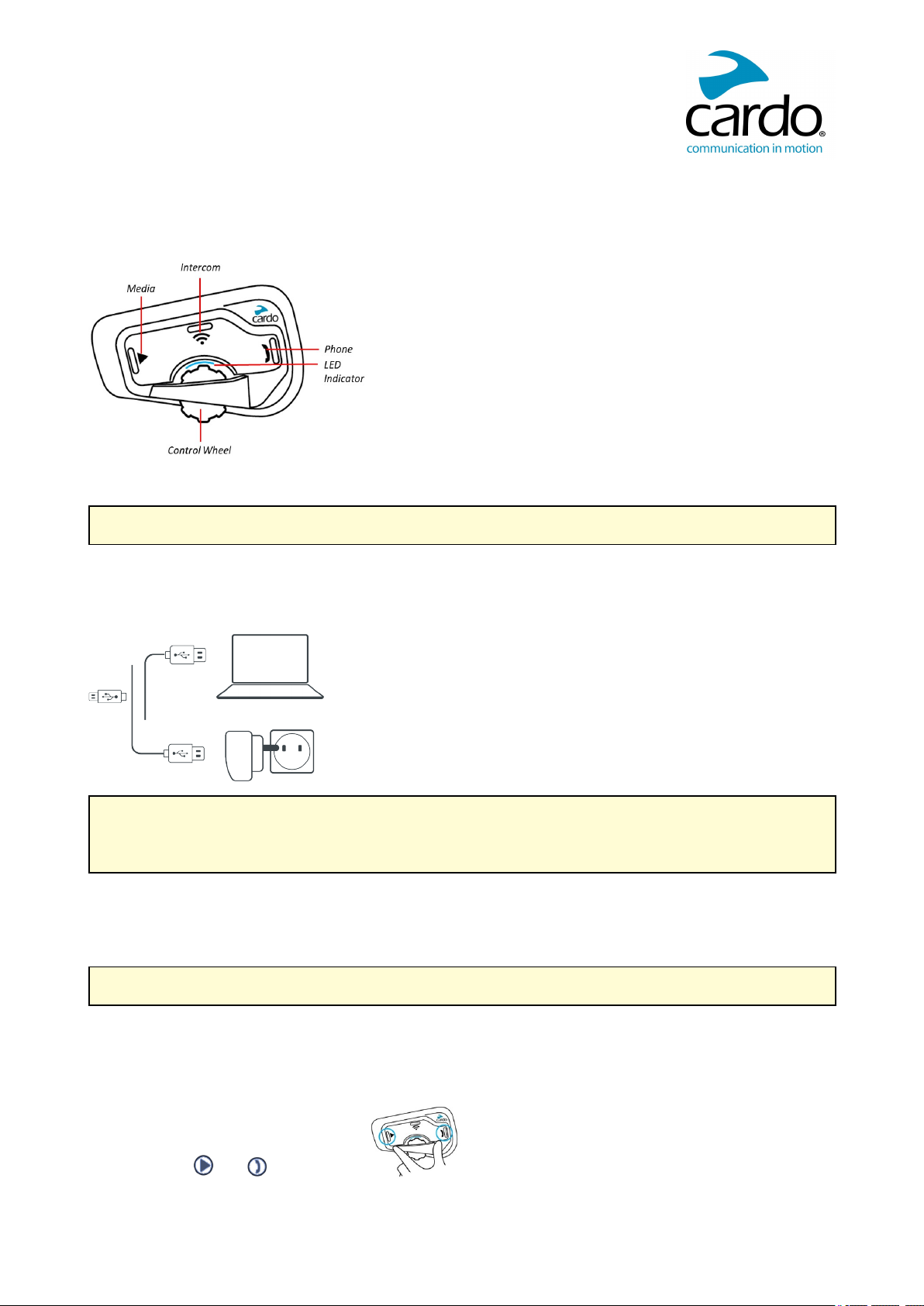
2.1 GETTING TO KNOW YOUR FREECOM 4+
2.2 CHARGING THE FREECOM 4+
Make sure that your FREECOM 4+ battery is charged for at least 4 hours before initial use.
To charge the unit:
1. Using the supplied USB cable, connect your computer or wall charger to the USBport on your FREECOM
4+.
● Charging with the wall charger is faster than via a computer USB port.
● Charging your unit switches it off automatically. To use your unit while it is being charged, switch it on.
(see Switching Your Unit On/Off on page 5).
While charging, the LED indicates the charging status as follows:
● Red LED on — charging
● Red LED off — charging complete
TIP: You can check the battery charge at any time by saying «Hey Cardo, battery status.»
2.3 SWITCHING YOUR UNIT ON/OFF
To switch your FREECOM 4+on:
● Press both and for 1 second.
The speaker plays an ascending tone and a voice message greets you.
5
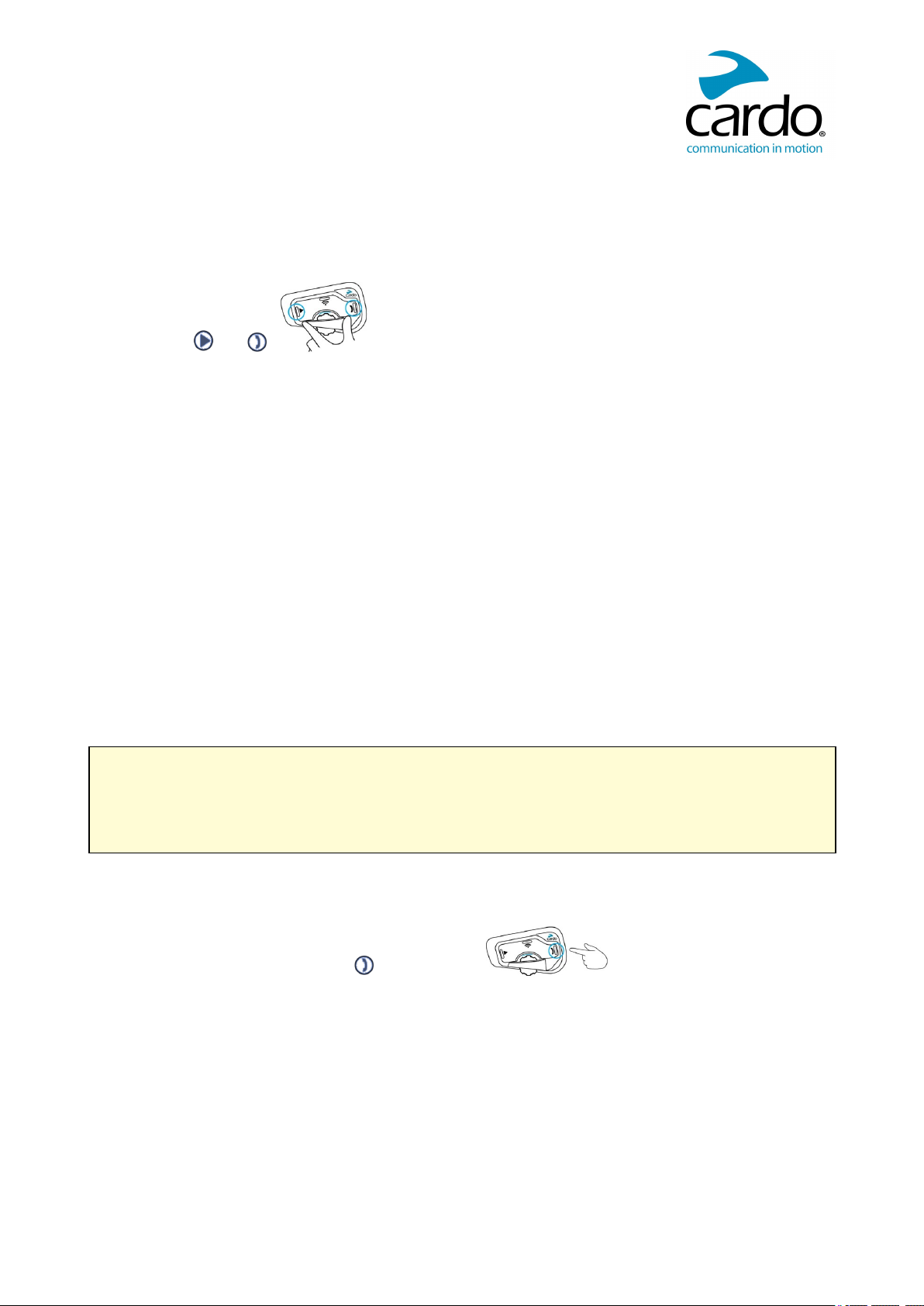
The LED confirms your FREECOM 4+ is on:
● Normal and low battery — LED flashes blue three times.
● Charging — LED flashes red and purple three times.
To switch your FREECOM 4+ off:
● Press both and .
The LED flashes red three times, confirming that your unit is switching off. The speaker plays a descending
tone and a voice message, «Goodbye».
2.4 USING YOUR FREECOM 4+
You can operate the various features of your FREECOM 4+ in the following ways;:
● Press a button or combination of buttons on the unit.
● Use the Cardo Mobile App on your mobile device (once it is paired with the unit).
● Use automatic voice recognition (by saying a command, for example «Hey Cardo, Radio On»).
You can also configure your unit by connecting it to a computer with the supplied USBcable and running the
Cardo Updater while your computer is connected to the Cardo Community website.
2.5 PAIRING YOUR UNIT TO BLUETOOTH DEVICES
Your FREECOM 4+ has two Bluetooth channels for connection to Bluetooth devices such as mobile phones,
GPS devices, and Bluetooth music players with A2DP.
To connect your unit to a Bluetooth device, you must first pair them. Once paired, they automatically recognize
each other whenever they are within range.
If you are pairing more than one device, Cardo recommends that you pair the mobile phone to channel 1, and
the additional device (such as GPS, music player or additional mobile phone) to channel 2.
If you are pairing the unit to more than one mobile phone, the phone paired with channel 1 is the default phone
for outgoing calls.
To pair Bluetooth channel 1 to a mobile phone:
1. Enable Bluetooth on the mobile phone.
2. On the unit in standby mode, press for 5 seconds.
The LED flashes red and blue.
3. On your mobile phone, search for Bluetooth devices.
4. When your FREECOM 4+ appears in the list of available devices, select it.
If prompted for a PIN or Passkey, enter 0000 (four zeros).
The phone confirms that pairing has succeeded and the LED flashes purple for 2 seconds.
To pair Bluetooth channel 2 to another Bluetooth device:
1. Enable Bluetooth on the device (for example, your mobile phone, GPS device, or music player).
6
2. On the unit in standby mode, press for 5 seconds. The LED flashes red and blue.
3. Tap twice. The LED flashes red and green.
4. If you are pairing a GPS device, roll the control wheel forward.
The LED flashes slower.
5. On the device you are pairing, search for Bluetooth devices.
6. When your FREECOM 4+ appears in the list of available devices, select it.
If prompted for a PIN or Passkey, enter 0000 (four zeros).
The device confirms that pairing has succeeded and the LED flashes purple for 2 seconds.
● If pairing is not completed within 2 minutes, the unit automatically returns to Standby.
● If you have paired two different mobile phones directly to your FREECOM 4+, set one as default for
making calls (see Setting the Default Mobile Phone on page 19).
● Not all Bluetooth mobile phones broadcast Bluetooth Stereo music (A2DP) even if the phone has an MP3
player function. Consult your mobile phone’s user manual for more information.
● Not all Bluetooth GPS devices allow connection to Bluetooth audio devices. Consult your GPS User
Manual for more information.
To cancel the pairing process:
● Press for 2 seconds.
The LED stops flashing red and blue/green.
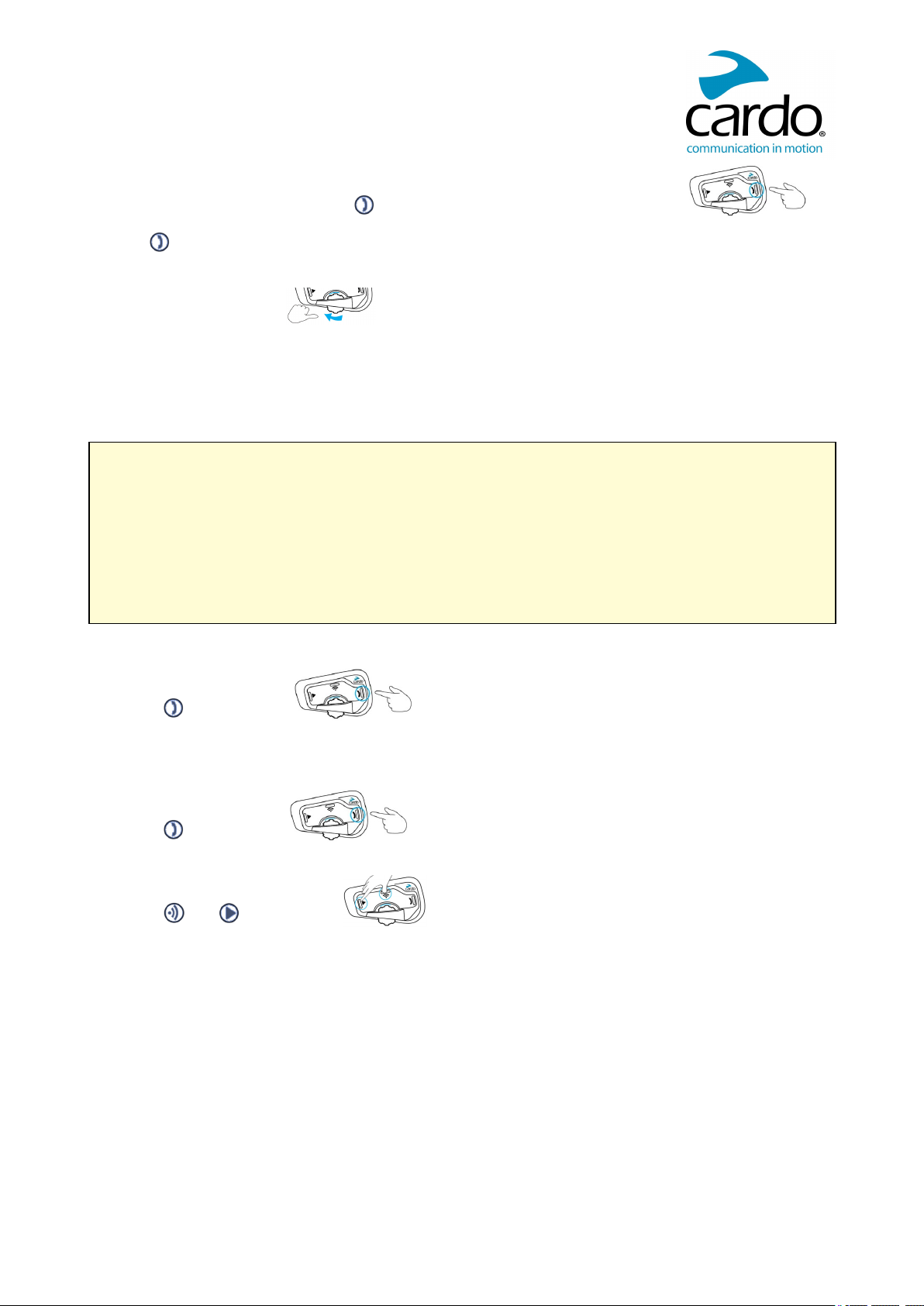
To reset all Bluetooth device pairing:
1. Press for 5 seconds.
The LED flashes red and blue.
2. Press and for 2 seconds.
The LED flashes purple 5 times, confirming that pairing has been reset.
7
3. ON THE ROAD
FREECOM 4+ makes it easy for you to receive phone calls and listen to music in a convenient and safe manner.
3.1 BASIC AUDIO FUNCTIONS
The basic audio functions are the same whether you are listening to music, speaking on the intercom, or having a
phone conversation.
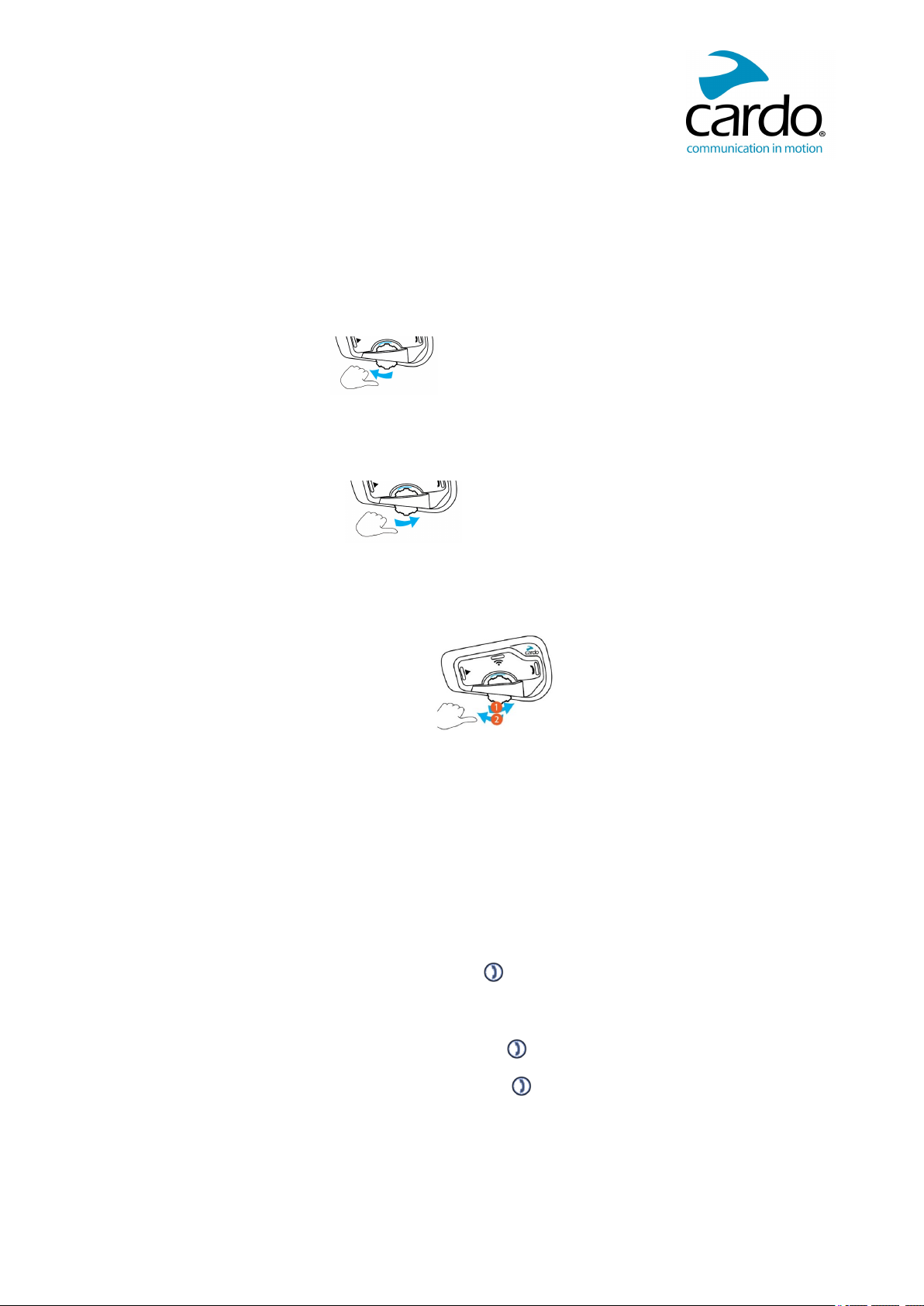
To turn the volume up:
● Roll the Control Wheel forward.
An increasingly louder tone is played on the speaker until you reach the maximum volume, as indicated by
the maximum volume tone.
To turn the volume down:
● Roll the Control Wheel backward.
An increasingly quieter tone is played on the speaker until you reach the minimum volume, as indicated by
the minimum volume tone.
To mute the microphone completely and lower the speaker volume to the minimal level:
● Roll the Control Wheel backward, then forward.
To unmute the microphone and raise the speaker volume to the previous level:
● Roll the Control Wheel in any direction.
An ascending tone is played on the speaker.
3.1.1 MAKING AND RECEIVING PHONE CALLS
You can use your mobile phone to make and receive phone calls while paired to your FREECOM 4+.
You can make a hands-free call using your mobile phone’s voice dial option or using the Cardo speed dial or redial
last call options.
To make a phone call:
● To dial using your mobile phone’s voice dial option, tap or say «Hey Siri» (if you are using an iOS device)
or «OK Google» (if you are using an Android device), then make your call as per the instructions for your
mobile device.
● To redial the last number called on your mobile device, tap twice or say «Hey Cardo, redial number.»
● To dial your preset speed dial number, press and hold down for 2 seconds or say «Hey Cardo, speed
dial.» (The speed dial number must be set in the Cardo Mobile App or community website prior to use.)
8
Loading…
Freecom 4 Руководство
Язык по умолчанию английский. Языковой набор можно изменить в настройках приложения Cardo Connect или в сообществе Cardo.
Описание

Первые шаги


Сопряжение мобильных устройств

Особенности телефона

Аудио

Установить Кардо Домофон

Присоединиться / создать группу внутренней связи, отличную от Cardo

Внутренняя связь


Голосовые команды — всегда!

Мобильное приложение Cardo

- Для легкой настройки
- Пульт дистанционного управления
- Настройка параметров на ходу
www.cardosystems.com/product-manuals
Полная версия руководства
www.cardosystems.com/support
Сброс всех настроек

811 E. Plano Parkway, Suite 110A
Плано, Техас. 75074, США
© 2018 Кардо Системс, ООО.
Все права защищены. Cardo, логотип Cardo и другие товарные знаки Cardo принадлежат Cardo и могут быть зарегистрированы. Все остальные товарные знаки являются собственностью их соответствующих владельцев. Cardo Systems, Ltd. не несет ответственности за любые ошибки, которые могут появиться в этом документе. Информация, содержащаяся здесь, может быть изменена без предварительного уведомления.
Важная информация
Безопасность, соответствие требованиям и гарантия
Заявление Федеральной комиссии связи (FCC)
15.21
Предупреждаем, что изменения или модификации, прямо не одобренные стороной, ответственной за соответствие, могут лишить пользователя права на эксплуатацию оборудования.
15.105 (б)
Это оборудование было протестировано и признано соответствующим ограничениям для цифровых устройств класса B согласно части 15 правил FCC. Эти ограничения разработаны для обеспечения разумной защиты от вредных помех при установке в жилых помещениях. Это оборудование генерирует, использует и может излучать радиочастотную энергию и, если оно установлено и используется не в соответствии с инструкциями, может создавать вредные помехи для радиосвязи. Однако нет гарантии, что помехи не возникнут при конкретной установке. Если это оборудование действительно создает недопустимые помехи для приема радио или телевидения, что можно определить путем включения и выключения оборудования, пользователю рекомендуется попытаться устранить помехи одним или несколькими из следующих способов:
- Изменить ориентацию или местоположение приемной антенны.
- Увеличьте расстояние между оборудованием и приемником.
- Подключить оборудование к розетке в цепи, отличной от той, к которой подключен приемник.
- Обратитесь за помощью к дилеру или опытному радио / телевизионному технику.
Это устройство соответствует требованиям части 15 правил FCC. Эксплуатация возможна при соблюдении следующих двух условий:
1. Это устройство не должно вызывать вредных помех, и
2. Это устройство должно принимать любые помехи, включая помехи, которые могут вызвать сбои в работе.
Заявление FCC о радиационном облучении:
Это оборудование соответствует ограничениям по радиационному излучению FCC/IC, установленным для неконтролируемой среды. Конечные пользователи должны следовать конкретным инструкциям по эксплуатации для соблюдения требований к радиочастотному излучению. Антенна, используемая для этого передатчика, не должна вести передачу одновременно с какой-либо другой антенной или передатчиком, кроме как в соответствии с
Процедуры FCC/IC для продуктов с несколькими передатчиками.
Инструкции относительно воздействия радиочастотных электромагнитных полей на человека – в соответствии с разделом 1.310 FCC для воздействия на человека радиочастотных электромагнитных полей расстояние не менее 3 см. между оборудованием и всеми людьми должны быть сохранены во время работы оборудования.
Министерство промышленности Канады (IC) FVIN: V1.0.0
Это устройство соответствует стандарту(ам) RSS, не требующему лицензии Министерства промышленности Канады. Эксплуатация осуществляется при соблюдении двух условий:
(1) Это устройство не должно создавать вредных помех, и (2) это устройство должно принимать любые помехи, которые могут быть приняты или могут вызвать нежелательную работу.
(2) это устройство должно принимать любые помехи, включая помехи, которые могут вызвать нежелательную работу устройства.
Заявление IC о воздействии радиочастотного излучения:
Это оборудование соответствует освобождению RSS-102 от обычной оценки радиочастотного воздействия для использования в неконтролируемой среде.
Европейское уведомление CE
Ваш продукт Cardo («Продукт») соответствует следующим основным требованиям Директивы Совета 2014/53/ЕС: Статьи 3.1a, 3.1.b и 3.2. Продукт изготовлен в соответствии с Приложением II вышеуказанной директивы.
Полный текст Декларации о соответствии требованиям ЕС см. на веб-сайте Cardo Systems. webсайт: www.cardosystems.com
Рабочая температура: Устройство предназначено для работы при температуре от -20° до 55° C (от -4° до 131° F).
Температура зарядки: Пределы температуры зарядки аккумулятора: 0–40 °C (32–104 °F)
Адаптеры переменного/постоянного тока. При зарядке от настенной розетки убедитесь, что подключаемый адаптер переменного/постоянного тока соответствует следующим критериям:
Вход: 100–240 В, 50/60 Гц, максимум 0.2 А Выход: 5 В постоянного тока, максимум 1 А.
Декларация соответствия (DOC)
Продукт соответствует и принимает спецификацию Bluetooth® 4.1 и успешно прошел все тесты на совместимость, указанные в спецификации Bluetooth®. Однако совместимость устройства с другими продуктами с поддержкой Bluetooth® не гарантируется.
Авторские права
Содержание Руководства пользователя, включая весь текст, иллюстрации и чертежи, является исключительной интеллектуальной собственностью Cardo Systems, Inc. («Компания») и защищено законами об авторских правах. Их нет в открытом доступе. Любое частичное или полное воспроизведение, перевод и/или распространение без предварительного письменного разрешения Компании строго запрещены. Любые права, прямо не предоставленные здесь, защищены.
ПРЕДУПРЕЖДЕНИЕ:
Настоящим вы уведомлены о том, что при использовании устройства связи («Продукт») во время езды требуется ваше полное и безраздельное внимание. Неспособность избежать потенциально опасных ситуаций может привести к несчастному случаю, который может привести к серьезной травме или смерти.
Cardo советует вам принять все необходимые меры предосторожности и внимательно следить за движением транспорта, погодными условиями и всеми дорожными условиями. Не выполняйте сопряжение, связывание или любые сложные операции во время езды. Все публикации предназначены для описания технических возможностей и не должны толковаться как поощрение эксплуатации Продуктов Cardo каким-либо небезопасным или запрещенным законом способом.
Соблюдайте все меры предосторожности при использовании данного Продукта и соблюдайте все применимые правила дорожного движения. Всегда ездите и используйте Продукт безопасным образом и не отвлекайтесь на Продукт во время езды. Не используйте Продукт, если это становится небезопасным.
В некоторых регионах или штатах использование систем мобильной связи запрещено или ограничено. Перед использованием Продукта ознакомьтесь со всеми местными, государственными и федеральными законами и нормативными актами («Законы»), применимыми к вашему региону, и помните, что ответственность за соблюдение всех законов лежит на пользователе. Используйте Продукт в движении только в тех случаях и таким образом, когда такие устройства разрешены применимым законодательством.
Ни одна часть тела не должна соприкасаться с антенной во время работы оборудования. Используйте Продукт только там, где это безопасно, и избегайте использования на заправочных станциях, складах горючего или рядом со взрывчатыми веществами. Используйте со слуховыми аппаратами и медицинскими устройствами только после консультации с врачом или специалистом. Убедитесь, что продукт установлен и смонтирован стабильно.
Предупреждения о здоровье:
Потеря слуха: Аудиоустройства могут вызвать потерю слуха. Соблюдайте осторожность и избегайте чрезмерного уровня громкости, который может повредить или ухудшить слух или привести к потере слуха. Если Изделия используются на высокой громкости в течение длительного времени, может произойти необратимая потеря слуха.
Радиочастотные сигналы: Большая часть электронного оборудования защищена от радиочастотных сигналов. Однако определенное электронное оборудование может быть не защищено от радиочастотных сигналов, исходящих от вашего беспроводного оборудования.
Кардиостимуляторы: Ассоциация производителей индустрии здравоохранения рекомендует поддерживать минимальное расстояние около шести дюймов (или 16 см) между мобильным телефоном или беспроводным устройством и кардиостимулятором, чтобы избежать потенциальных помех для кардиостимулятора. Следите за тем, чтобы не мешать работе личных медицинских устройств.
Слуховые аппараты: Некоторые устройства могут мешать работе некоторых слуховых аппаратов. В случае таких помех вам следует проконсультироваться с производителем вашего слухового аппарата, чтобы обсудить альтернативы.
Другие медицинские устройства: Если вы используете какое-либо другое личное медицинское устройство, проконсультируйтесь с производителем вашего устройства и/или вашим врачом, чтобы определить, достаточно ли оно защищено от помех, вызванных внешней радиочастотной энергией. Ваш врач может помочь вам в получении этой информации.
ОГРАНИЧЕННАЯ ГАРАНТИЯ
В соответствии с применимыми законами и правилами вашей юрисдикции на ваш Продукт распространяется двухлетняя ограниченная гарантия на продукт с даты первоначальной покупки. Пожалуйста, сохраните и отправьте кассовый чек и ваши регистрационные данные для подтверждения покупки.
Ни при каких обстоятельствах Cardo не несет ответственности за любые случайные, особые, непрямые, штрафные, примерные или косвенные убытки, будь то в результате использования, неправильного использования или невозможности использования этого продукта или из-за дефектов в продукте, или за любой ущерб, возникший в результате использование продукта, независимо от того, было ли оно основано на нарушении договора, правонарушении (включая небрежность), ответственности за качество продукции или иным образом, даже если было сообщено о возможности таких убытков. Вы признаете и соглашаетесь с тем, что ограничения, изложенные выше, являются основополагающими элементами настоящего соглашения, с которыми вы соглашаетесь и без которых продукт не будет предоставлен вам при отсутствии таких ограничений. Cardo сохраняет за собой исключительное право ремонтировать или заменять (новым или недавно отремонтированным продуктом) устройство или программное обеспечение или возмещать покупную цену по своему усмотрению.
ТАКОЕ СРЕДСТВО ДОЛЖНО БЫТЬ ВАШИМ ЕДИНСТВЕННЫМ И ИСКЛЮЧИТЕЛЬНЫМ СРЕДСТВОМ ПРАВА ОТ ЛЮБОГО НАРУШЕНИЯ ГАРАНТИИ.
С учетом вышеизложенного Cardo настоящим заявляет, что данный Продукт гарантирует отсутствие дефектов материалов или изготовления. В течение указанного периода Cardo по своему усмотрению отремонтирует или заменит любые компоненты, вышедшие из строя при нормальном использовании. Такой ремонт или замена будут произведены
бесплатно для клиента за детали или работу, при условии, что клиент несет ответственность за любые расходы по доставке и применимые сборы любым официальным органам. Настоящая гарантия не распространяется на отказы, вызванные неправильным использованием, неправильным использованием, несчастным случаем, потерей или несанкционированным изменением или ремонтом.
Этот Продукт предназначен для использования только в качестве устройства связи и развлечения и не должен использоваться в любом месте или юрисдикции, где его использование запрещено.
Гарантии и средства правовой защиты, содержащиеся в настоящем документе, являются исключительными и заменяют все другие гарантии, явные, подразумеваемые или установленные законом, включая любую ответственность, вытекающую из любой гарантии товарного состояния или пригодности для определенной цели, установленной законом или иным образом, от которой Cardo прямо отказывается. Эта гарантия дает вам определенные юридические права, которые могут различаться в зависимости от юрисдикции. Cardo не дает никаких других явных или подразумеваемых гарантий, помимо тех, которые специально указаны в настоящем документе. Эта гарантия распространяется компанией Cardo исключительно на первоначального покупателя и не может быть переуступлена или передана другим лицам. Cardo не принимает на себя никаких обязательств или ответственности за дополнения или изменения настоящей гарантии, если они не сделаны в письменной форме и не подписаны должностным лицом компании.
Гарантия на батареи предоставляется только в том случае, если емкость батареи падает ниже 50 % от номинальной емкости или в случае утечки из батареи. Не храните Изделие без периодической подзарядки в течение более шести месяцев, так как это может привести к необратимому повреждению емкости аккумулятора. Ваша гарантия не распространяется на такие случаи.
Эта гарантия также становится недействительной, если:ampб) батарея используется в оборудовании, отличном от того, для которого она предназначена. в) Продукт используется не по назначению. г) Товар был приобретен на интернет-аукционах
Cardo не несет ответственности за использование компонентов, аксессуаров или устройств других производителей в сочетании с ее Продуктами. Внимание: не тamper с батареями, так как существует риск взрыва, если заменить батарею неподходящим типом.
Не покрывается гарантией:
- Дефекты или повреждения, возникшие в результате использования данного Продукта не по назначению.
- Дефекты или повреждения в результате неправильного использования, несчастного случая или небрежного обращения.
- Дефекты, вызванные неправильной эксплуатацией, обслуживанием, установкой, регулировкой или модификацией любого рода (в т.ч. длительное хранение без периодической подзарядки аккумулятора)
- Продукты вскрыты, разобраны или отремонтированы неуполномоченными сторонами.
- Дефекты или повреждения из-за воздействия чрезмерных температур, неблагоприятных погодных условий, внешних воздействий или разлития пищи или жидкости.
- Все пластиковые поверхности и все другие внешние детали, которые были поцарапаны или повреждены после покупки.
Отказ от гарантии
Устройство и его аксессуары предоставляются «как есть» и «как доступно» без каких-либо гарантий, кроме тех, которые предполагаются в прилагаемом руководстве.
Гарантийное обслуживание
Для получения гарантийного обслуживания предъявите Продукт вместе со своим регистрационным номером, товарный чек (чек) в любой авторизованный сервисный центр или магазин, в котором вы приобрели Продукт. Для получения гарантийного обслуживания обратитесь в службу поддержки продуктов Cardo и получите номер RMA для отслеживания или обратитесь к местному авторизованному дилеру Cardo. Отправляйте в целости и сохранности с копией оригинального товарного чека, который требуется в качестве доказательства покупки для гарантийного ремонта. Номер отслеживания RMA должен быть написан на внешней стороне упаковки. Отправьте предоплаченную стоимость доставки Продукта на адрес Cardo в соответствии с указаниями Cardo.
Покупки на онлайн-аукционах. Подтверждения на онлайн-аукционах не принимаются для проверки гарантии. Для получения гарантийного обслуживания требуется оригинал или копия товарного чека от первоначального продавца. Cardo не будет заменять отсутствующие компоненты на сайтах онлайн-аукционов.
ОТКАЗ И ОСВОБОЖДЕНИЕ
Используя Продукт, вы отказываетесь от существенных юридических прав, включая право на подачу иска. Пожалуйста, внимательно прочтите следующее перед использованием Продукта. Используя Продукт, вы безвозвратно освобождаете, освобождаете от любой ответственности, убытков, претензий и расходов (включая гонорары адвокатов) и ограждаете Cardo от любых телесных повреждений, вреда или смерти, а также утери или повреждения товаров в любых транспортных средствах, включая вашей собственности или любой собственности или активу, принадлежащему вам или третьим лицам, любой из которых может возникнуть в результате использования Продукта при любых обстоятельствах или условиях и независимо от юрисдикции.
- Вы, ваши наследники, законные представители, правопреемники или правопреемники, настоящим добровольно и навсегда освобождаете, освобождаете, возмещаете убытки и ограждаете Cardo от любых и всех судебных разбирательств, претензий, долгов, требований, действий и ответственности, которые могут возникнуть, прямо или косвенно, в результате использования продукт за любые страдания, боль, страдание, дискомфорт, потерю, травму, смерть, ущерб или ущерб любому лицу или имуществу, независимо от того, были ли они вызваны, НЕЗАВИСИМО ОТ НЕБРЕЖНОСТИ ИЛИ ИНЫМ ОБРАЗОМ, и которые впоследствии могут возникнуть у вас в будущем в результате указанного использования в максимально возможной степени, разрешенной законом.
- Вы полностью понимаете и принимаете на себя риски, связанные с использованием Продукта, включая риск небрежных действий или бездействия других лиц. Все риски, связанные с эксплуатацией Продукта, несет исключительно пользователь Продукта.
- Вы подтверждаете, что физически способны использовать Продукт и что у вас нет медицинских показаний или потребностей, которые могут помешать вам сделать это безопасным образом. Вы также подтверждаете, что не будете употреблять алкоголь, который может повлиять на вашу бдительность, или какие-либо вещества, изменяющие сознание, и не будете носить с собой, использовать или употреблять эти вещества до или во время использования Продукта.
- Вы полностью признаете наши предупреждения и понимаете, что:
а) существуют риски при использовании Продукта во время движения, включая, помимо прочего, травмы или заболевания, растяжения, переломы, частичный и/или полный паралич, смерть или другие заболевания, которые могут привести к серьезной инвалидности;
б) эти риски могут быть вызваны небрежностью производителей или их агентов или любой третьей стороны, связанной с Продуктом;
в) эти риски и опасности могут возникать по предвидимым или непредвиденным причинам.
Настоящим вы принимаете на себя все риски и опасности, а также всю ответственность за любые убытки и/или ущерб, вызванные полностью или частично небрежностью или иным поведением других лиц, включая Cardo.
5. Используя Продукт, вы подтверждаете, что прочитали настоящее освобождение от ответственности, полностью понимаете и принимаете его положения и условия.
Скачать
Freecom 4 Руководство — [ скачать PDF ]