
IT/RU
CDP130-IR-1A
GUIDA DELL’UTILIZZATORE
Conservare tutto il materiale informativo per riferimenti futuri.
Avvertenze sulla sicurezza
Prima di provare ad usare il piano digitale, accertarsi di
leggere le “Precauzioni riguardanti la sicurezza” a parte.
CDP-130
Italiano
Questo marchio di riciclaggio indica che la confezione è
conforme alla legislazione tedesca sulla protezione dell’ambiente.
MA1310-A Printed in China
C
CDP130_ir_Cover1-4.fm 1 ページ 2013年10月17日 木曜日 午後12時40分

Ру
сс
кий
RU-1
Внимание!
Прежде чем приступать к эксплуатации данного изделия, ознакомьтесь со следующей важной информацией.
•
Прежде чем приступать к эксплуатации адаптера переменного тока AD-A12150LW для подачи питания на изделие,
проверить адаптер на предмет повреждений. Сетевой шнур тщательно проверить на предмет разрывов, порезов,
оголения провода, других серьезных повреждений. Если адаптер серьезно поврежден, не давать его детям.
•
Изделие не предназначено для детей в возрасте до 3 лет.
•
Применять только адаптер «CASIO» AD-A12150LW.
•
Адаптер переменного тока — не игрушка!
•
Перед протиранием изделия отсоединять от него адаптер переменного тока.
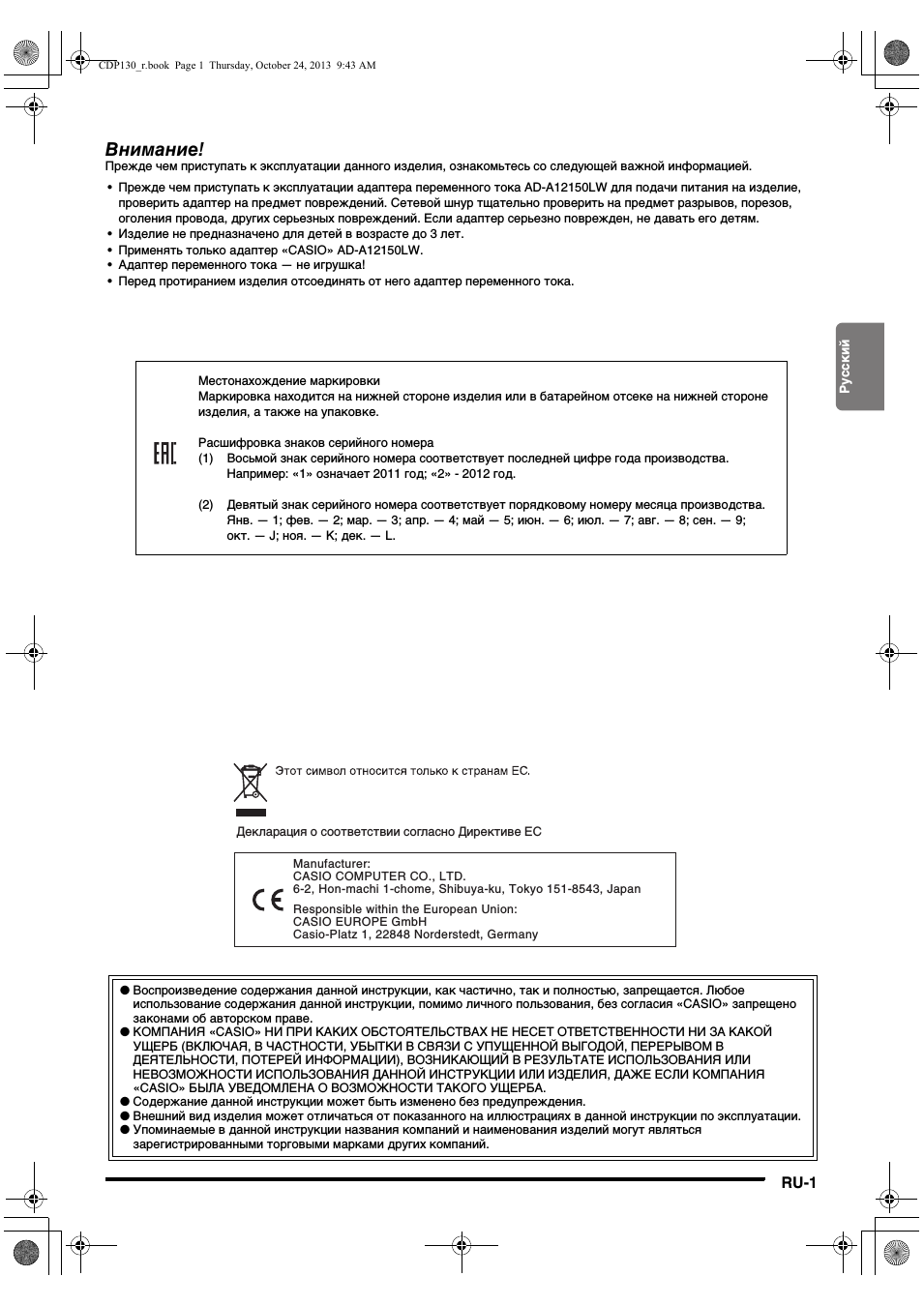
Местонахождение маркировки
Маркировка находится на нижней стороне изделия или в батарейном отсеке на нижней стороне
изделия, а также на упаковке.
Расшифровка знаков серийного номера
(1) Восьмой знак серийного номера соответствует последней цифре года производства.
Например: «1» означает 2011 год; «2» — 2012 год.
(2) Девятый знак серийного номера соответствует порядковому номеру месяца производства.
Янв. — 1; фев. — 2; мар. — 3; апр. — 4; май — 5; июн. — 6; июл. — 7; авг. — 8; сен. — 9;
окт. — J; ноя. — K; дек. — L.
Manufacturer:
CASIO COMPUTER CO., LTD.
6-2, Hon-machi 1-chome, Shibuya-ku, Tokyo 151-8543, Japan
Responsible within the European Union:
CASIO EUROPE GmbH
Casio-Platz 1, 22848 Norderstedt, Germany
● Воспроизведение содержания данной инструкции, как частично, так и полностью, запрещается. Любое
использование содержания данной инструкции, помимо личного пользования, без согласия «CASIO» запрещено
законами об авторском праве.
● КОМПАНИЯ «CASIO» НИ ПРИ КАКИХ ОБСТОЯТЕЛЬСТВАХ НЕ НЕСЕТ ОТВЕТСТВЕННОСТИ НИ ЗА КАКОЙ
УЩЕРБ (ВКЛЮЧАЯ, В ЧАСТНОСТИ, УБЫТКИ В СВЯЗИ С УПУЩЕННОЙ ВЫГОДОЙ, ПЕРЕРЫВОМ В
ДЕЯТЕЛЬНОСТИ, ПОТЕРЕЙ ИНФОРМАЦИИ), ВОЗНИКАЮЩИЙ В РЕЗУЛЬТАТЕ ИСПОЛЬЗОВАНИЯ ИЛИ
НЕВОЗМОЖНОСТИ ИСПОЛЬЗОВАНИЯ ДАННОЙ ИНСТРУКЦИИ ИЛИ ИЗДЕЛИЯ, ДАЖЕ ЕСЛИ КОМПАНИЯ
«CASIO» БЫЛА УВЕДОМЛЕНА О ВОЗМОЖНОСТИ ТАКОГО УЩЕРБА.
● Содержание данной инструкции может быть изменено без предупреждения.
● Внешний вид изделия может отличаться от показанного на иллюстрациях в данной инструкции по эксплуатации.
● Упоминаемые в данной инструкции названия компаний и наименования изделий могут являться
зарегистрированными торговыми марками других компаний.
Декларация о соответствии согласно Директиве ЕС
CDP130_r.book Page 1 Thursday, October 24, 2013 9:43 AM
RU-2
Содержание
Общие указания ………………… RU-3
Подготовка к игре …………….. RU-4
Подготовка пюпитра ……………………………….RU-4
Подключение педального блока ……………..RU-4
Источник питания…………………………………… RU-4
Игра на цифровом пианино.. RU-5
Включение инструмента и игра на нем …….RU-5
Подключение наушников ………………………..RU-5
Применение демпферной педали…………….RU-6
Изменение чувствительности клавиш к
характеру касания (динамическая
чувствительность клавиатуры)………………..RU-6
Выбор и воспроизведение тембра …………..RU-7
Воспроизведение демонстрационных
композиций …………………………………………….RU-7
Наложение двух тембров ………………………..RU-8
Применение функции «Зал» ……………………RU-8
Применение реверберации ……………………..RU-8
Применение хоруса ………………………………… RU-9
Изменение звуковысотности
(транспонирование, настройка) ……………….RU-9
Работа с метрономом ……………………………RU-10
Подключение внешних
устройств ………………………… RU-11
Подключение к компьютеру ………………….RU-11
Параметры MIDI ……………………………………RU-12
Выведение звука с клавиатуры на
аудиоаппаратуру …………………………………..RU-12
Справочная информация… RU-13
Поиск и устранение неисправностей ……..RU-13
Технические характеристики…………………RU-14
Правила безопасности…………………………..RU-15
MIDI Implementation Chart
Прилагаемые принадлежности
●Пюпитр
●Педаль
●Брошюры
•
Правила безопасности
•
Другие принадлежности (гарантия и т. д.)
Состав прилагаемых принадлежностей может быть изменен без
предупреждения.
Принадлежности, приобретаемые
дополнительно
•
Информацию о принадлежностях к изделию,
которые продаются отдельно, можно
получить из каталога продукции «CASIO»,
имеющегося в магазинах, и на сайте
«CASIO» по адресу:
http://world.casio.com/.
CDP130_r.book Page 2 Thursday, October 24, 2013 9:43 AM
Ру
сс
кий
RU-3
Общие указания
•
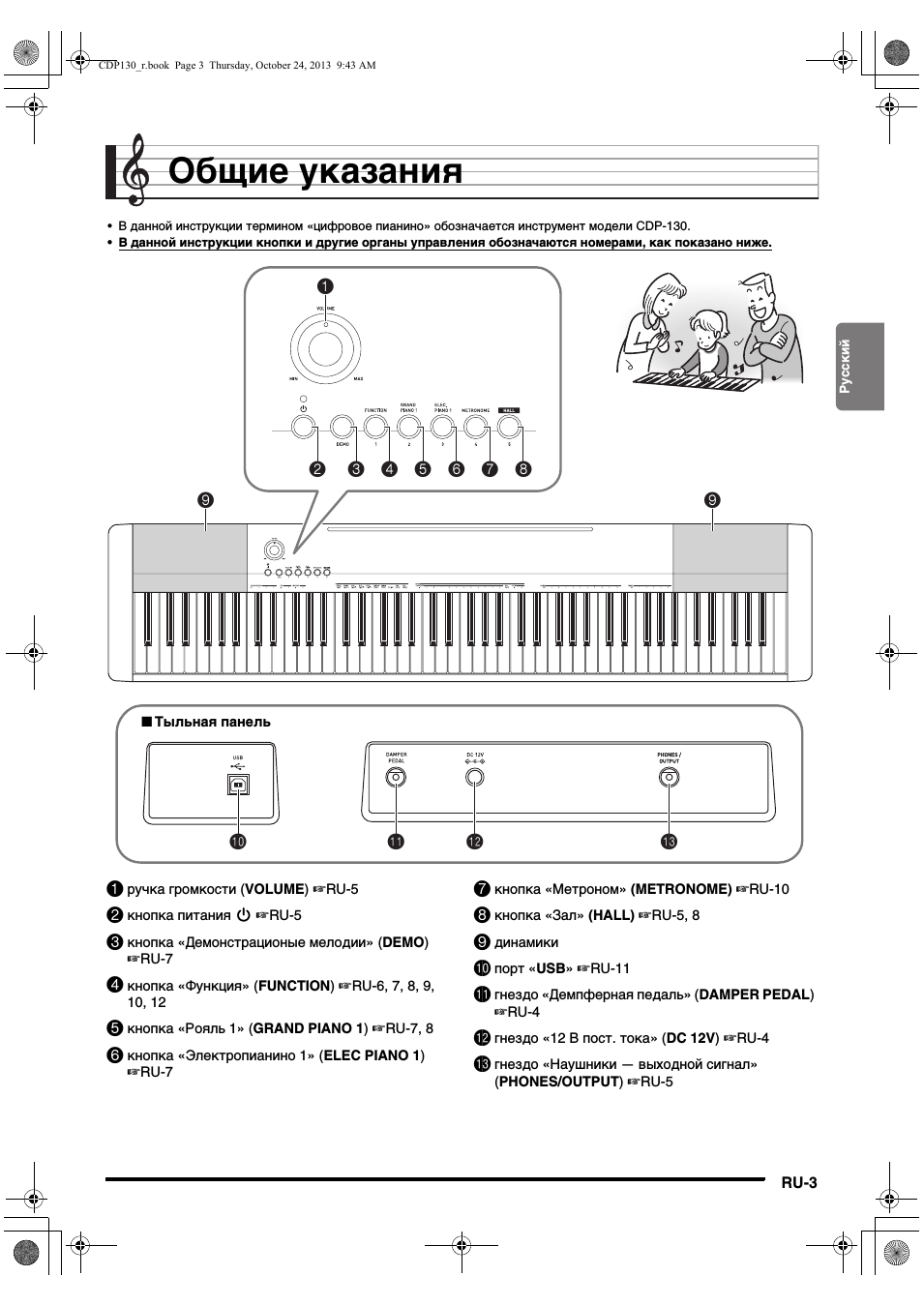
В данной инструкции термином «цифровое пианино» обозначается инструмент модели CDP-130.
•
В данной инструкции кнопки и другие органы управления обозначаются номерами, как показано ниже.
1
3
2
4 5 6 7 8
9
9
bn
bk
bl
bm
■ Тыльная панель
1
ручка громкости (VOLUME)
☞RU-5
2
кнопка питания P
☞RU-5
3
кнопка «Демонстрационые мелодии» (DEMO)
☞RU-7
4
кнопка «Функция» (FUNCTION)
☞RU-6, 7, 8, 9,
10
, 12
5
кнопка «Рояль 1» (GRAND PIANO 1)
☞RU-7, 8
6
кнопка «Электропианино 1» (ELEC PIANO 1)
☞RU-7
7
кнопка «Метроном» (METRONOME)
☞RU-10
8
кнопка «Зал» (HALL)
☞RU-5, 8
9
динамики
bk
порт «USB»
☞RU-11
bl
гнездо «Демпферная педаль» (DAMPER PEDAL)
☞RU-4
bm
гнездо «12 В пост. тока» (DC 12V)
☞RU-4
bn
гнездо «Наушники — выходной сигнал»
(PHONES/OUTPUT)
☞RU-5
CDP130_r.book Page 3 Thursday, October 24, 2013 9:43 AM
RU-4
Подготовка к игре
Данное цифровое пианино работает от обычной бытовой
электросети. На время неиспользования цифрового
пианино обязательно его выключайте.
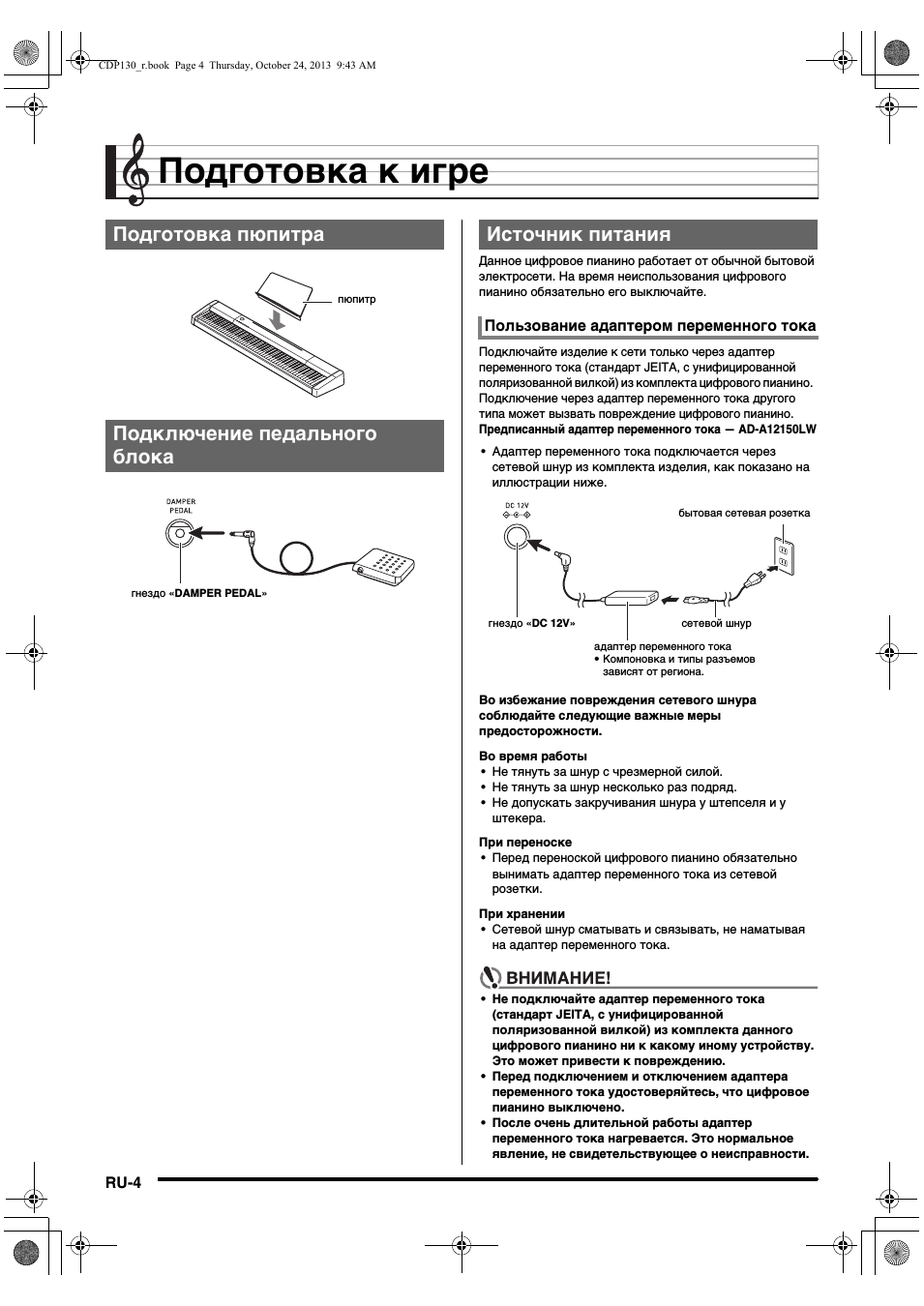
Подключайте изделие к сети только через адаптер
переменного тока (стандарт JEITA, с унифицированной
поляризованной вилкой) из комплекта цифрового пианино.
Подключение через адаптер переменного тока другого
типа может вызвать повреждение цифрового пианино.
Предписанный адаптер переменного тока — AD-A12150LW
•
Адаптер переменного тока подключается через
сетевой шнур из комплекта изделия, как показано на
иллюстрации ниже.
Во избежание повреждения сетевого шнура
соблюдайте следующие важные меры
предосторожности.
Во время работы
•
Не тянуть за шнур с чрезмерной силой.
•
Не тянуть за шнур несколько раз подряд.
•
Не допускать закручивания шнура у штепселя и у
штекера.
При переноске
•
Перед переноской цифрового пианино обязательно
вынимать адаптер переменного тока из сетевой
розетки.
При хранении
•
Сетевой шнур сматывать и связывать, не наматывая
на адаптер переменного тока.
•
Не подключайте адаптер переменного тока
(стандарт JEITA, с унифицированной
поляризованной вилкой) из комплекта данного
цифрового пианино ни к какому иному устройству.
Это может привести к повреждению.
•
Перед подключением и отключением адаптера
переменного тока удостоверяйтесь, что цифровое
пианино выключено.
•
После очень длительной работы адаптер
переменного тока нагревается. Это нормальное
явление, не свидетельствующее о неисправности.
Подготовка пюпитра
Подключение педального
блока
пюпитр
гнездо «DAMPER PEDAL»
Источник питания
Пользование адаптером переменного тока
бытовая сетевая розетка
адаптер переменного тока
• Компоновка и типы разъемов
зависят от региона.
гнездо «DC 12V»
сетевой шнур
CDP130_r.book Page 4 Thursday, October 24, 2013 9:43 AM
Ру
сс
кий
RU-5
Игра на цифровом пианино
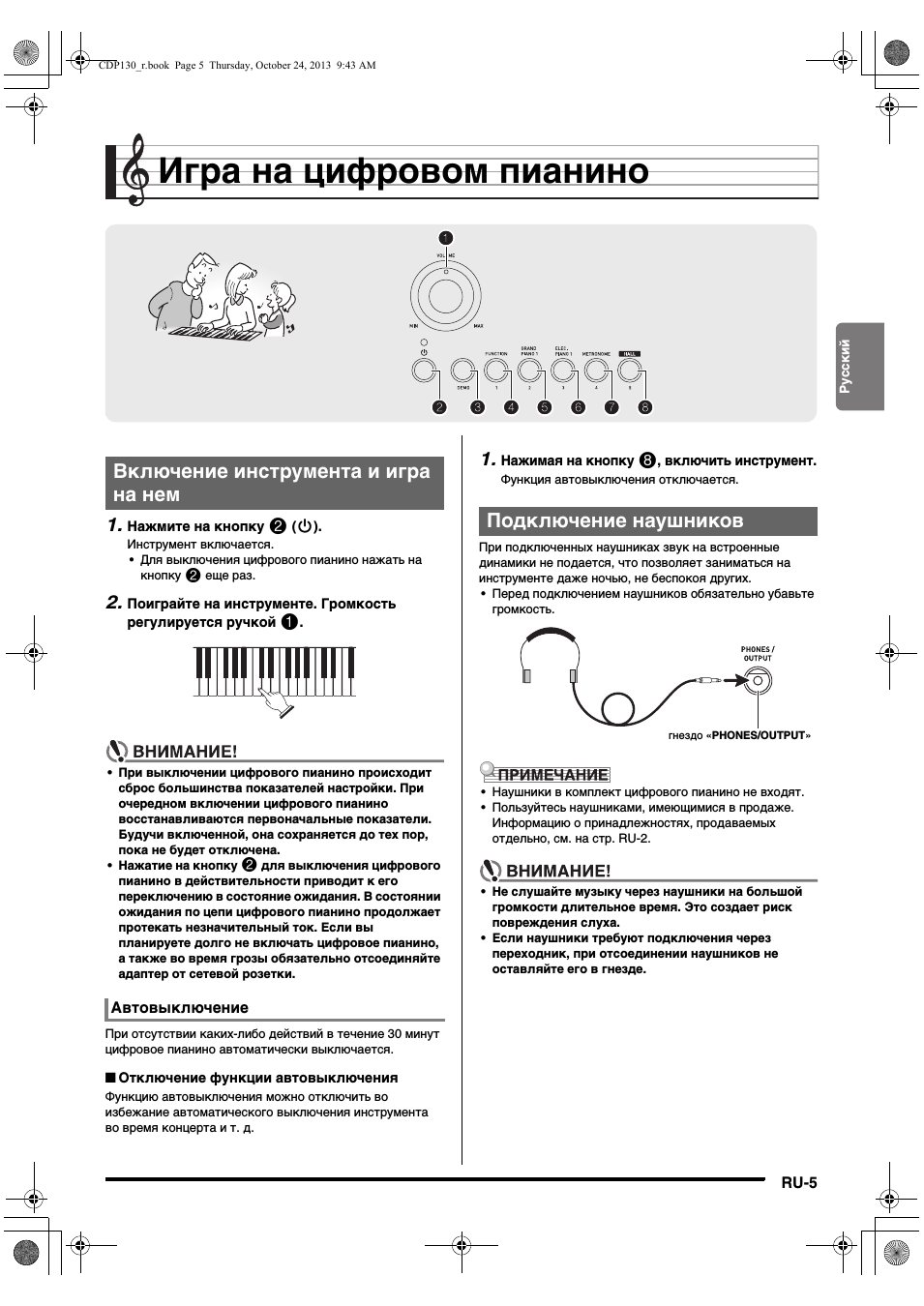
1.
Нажмите на кнопку
2
(P).
Инструмент включается.
•
Для выключения цифрового пианино нажать на
кнопку
2
еще раз.
2.
Поиграйте на инструменте. Громкость
регулируется ручкой
1
.
•
При выключении цифрового пианино происходит
сброс большинства показателей настройки. При
очередном включении цифрового пианино
восстанавливаются первоначальные показатели.
Будучи включенной, она сохраняется до тех пор,
пока не будет отключена.
•
Нажатие на кнопку
2
для выключения цифрового
пианино в действительности приводит к его
переключению в состояние ожидания. В состоянии
ожидания по цепи цифрового пианино продолжает
протекать незначительный ток. Если вы
планируете долго не включать цифровое пианино,
а также во время грозы обязательно отсоединяйте
адаптер от сетевой розетки.
При отсутствии каких-либо действий в течение 30 минут
цифровое пианино автоматически выключается.
■ Отключение функции автовыключения
Функцию автовыключения можно отключить во
избежание автоматического выключения инструмента
во время концерта и т. д.
1.
Нажимая на кнопку
8
, включить инструмент.
Функция автовыключения отключается.
При подключенных наушниках звук на встроенные
динамики не подается, что позволяет заниматься на
инструменте даже ночью, не беспокоя других.
•
Перед подключением наушников обязательно убавьте
громкость.
•
Наушники в комплект цифрового пианино не входят.
•
Пользуйтесь наушниками, имеющимися в продаже.
Информацию о принадлежностях, продаваемых
отдельно, см. на стр. RU-2.
•
Не слушайте музыку через наушники на большой
громкости длительное время. Это создает риск
повреждения слуха.
•
Если наушники требуют подключения через
переходник, при отсоединении наушников не
оставляйте его в гнезде.
2
2
4
4
8
8
3
3
5
5 6
6 7
7
1
1
Включение инструмента и игра
на нем
Автовыключение
Подключение наушников
гнездо «PHONES/OUTPUT»
CDP130_r.book Page 5 Thursday, October 24, 2013 9:43 AM
Игра на цифровом пианино
RU-6
Подключение к гнезду «DAMPER PEDAL» педали
позволяет использовать ее как «правую» педаль (стр.
RU-4).
Нажатие на «правую» педаль во время исполнения
увеличивает длительность извлекаемых звуков.
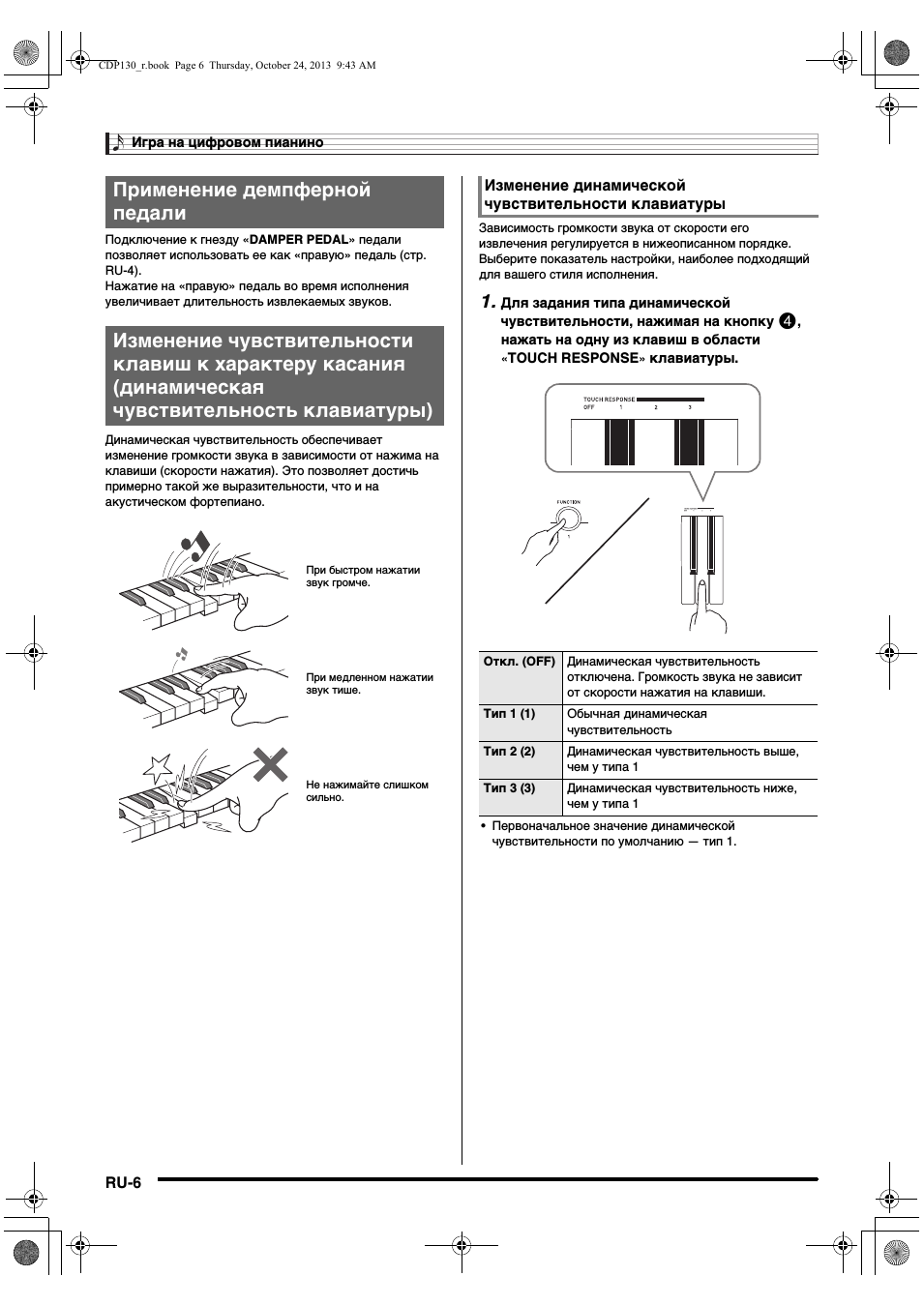
Динамическая чувствительность обеспечивает
изменение громкости звука в зависимости от нажима на
клавиши (скорости нажатия). Это позволяет достичь
примерно такой же выразительности, что и на
акустическом фортепиано.
Зависимость громкости звука от скорости его
извлечения регулируется в нижеописанном порядке.
Выберите показатель настройки, наиболее подходящий
для вашего стиля исполнения.
1.
Для задания типа динамической
чувствительности, нажимая на кнопку
4
,
нажать на одну из клавиш в области
«
TOUCH RESPONSE
»
клавиатуры.
•
Первоначальное значение динамической
чувствительности по умолчанию — тип 1.
Применение демпферной
педали
Изменение чувствительности
клавиш к характеру касания
(динамическая
чувствительность клавиатуры)
При быстром нажатии
звук громче.
При медленном нажатии
звук тише.
Не нажимайте слишком
сильно.
Изменение динамической
чувствительности клавиатуры
Откл. (OFF)
Динамическая чувствительность
отключена. Громкость звука не зависит
от скорости нажатия на клавиши.
Тип 1 (1)
Обычная динамическая
чувствительность
Тип 2 (2)
Динамическая чувствительность выше,
чем у типа 1
Тип 3 (3)
Динамическая чувствительность ниже,
чем у типа 1
CDP130_r.book Page 6 Thursday, October 24, 2013 9:43 AM
Ру
сс
кий
Игра на цифровом пианино
RU-7
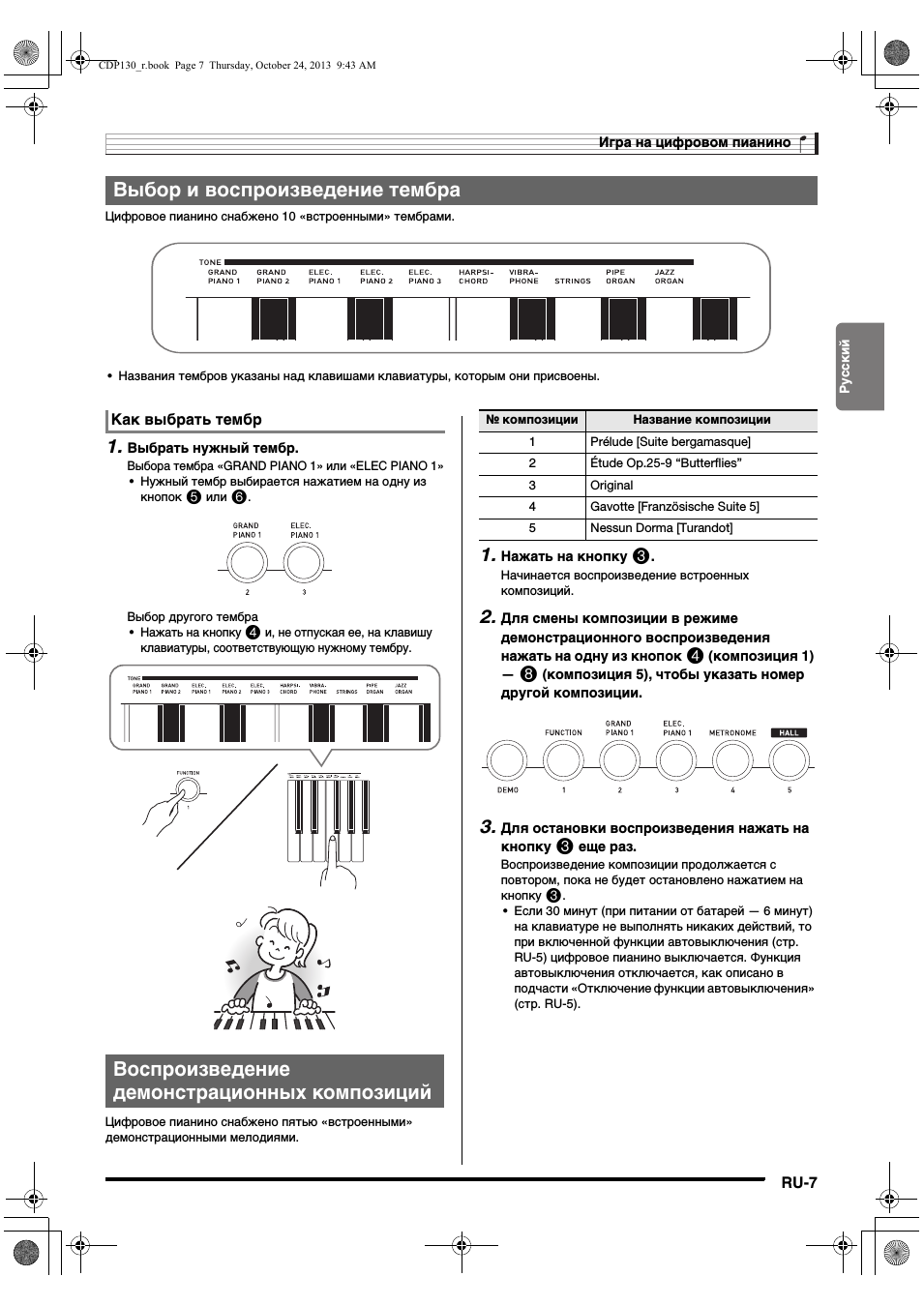
Цифровое пианино снабжено 10 «встроенными» тембрами.
•
Названия тембров указаны над клавишами клавиатуры, которым они присвоены.
Выбор и воспроизведение тембра
1.
Выбрать нужный тембр.
Выбора тембра «GRAND PIANO 1» или «ELEC PIANO 1»
•
Нужный тембр выбирается нажатием на одну из
кнопок
5
или
6
.
Выбор другого тембра
•
Нажать на кнопку
4
и, не отпуская ее, на клавишу
клавиатуры, соответствующую нужному тембру.
Цифровое пианино снабжено пятью «встроенными»
демонстрационными мелодиями.
1.
Нажать на кнопку
3
.
Начинается воспроизведение встроенных
композиций.
2.
Для смены композиции в режиме
демонстрационного воспроизведения
нажать на одну из кнопок
4
(композиция 1)
—
8
(композиция 5), чтобы указать номер
другой композиции.
3.
Для остановки воспроизведения нажать на
кнопку
3
еще раз.
Воспроизведение композиции продолжается с
повтором, пока не будет остановлено нажатием на
кнопку
3
.
•
Если 30 минут (при питании от батарей — 6 минут)
на клавиатуре не выполнять никаких действий, то
при включенной функции автовыключения (стр.
RU-5) цифровое пианино выключается. Функция
автовыключения отключается, как описано в
подчасти «Отключение функции автовыключения»
(стр. RU-5).
Как выбрать тембр
Воспроизведение
демонстрационных композиций
№ композиции
Название композиции
1
Prélude [Suite bergamasque]
2
Étude Op.25-9 “Butterflies”
3
Original
4
Gavotte [Französische Suite 5]
5
Nessun Dorma [Turandot]
CDP130_r.book Page 7 Thursday, October 24, 2013 9:43 AM
Игра на цифровом пианино
RU-8
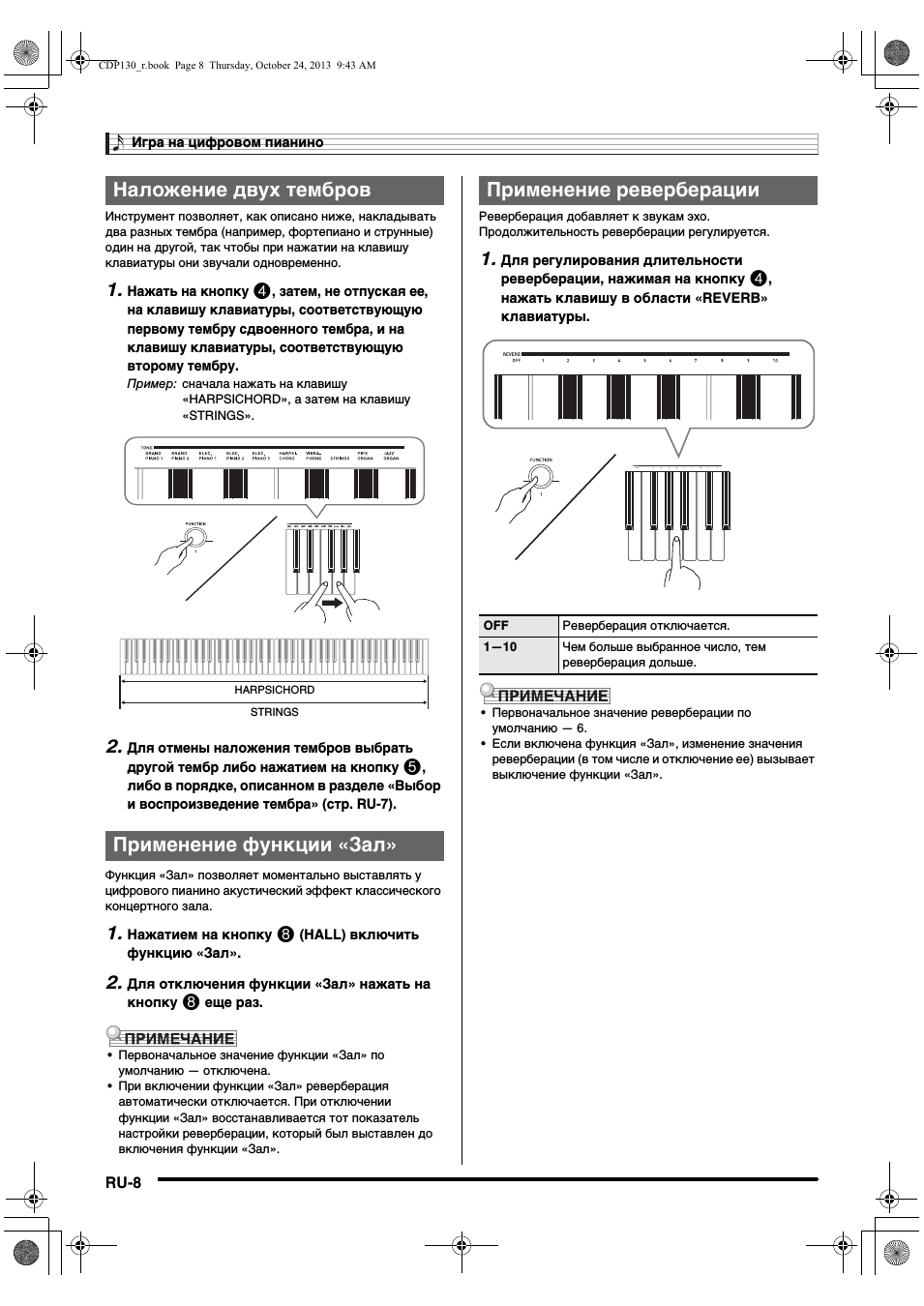
Инструмент позволяет, как описано ниже, накладывать
два разных тембра (например, фортепиано и струнные)
один на другой, так чтобы при нажатии на клавишу
клавиатуры они звучали одновременно.
1.
Нажать на кнопку
4
, затем, не отпуская ее,
на клавишу клавиатуры, соответствующую
первому тембру сдвоенного тембра, и на
клавишу клавиатуры, соответствующую
второму тембру.
Пример: сначала нажать на клавишу
«HARPSICHORD», а затем на клавишу
«STRINGS».
2.
Для отмены наложения тембров выбрать
другой тембр либо нажатием на кнопку
5
,
либо в порядке, описанном в разделе «Выбор
и воспроизведение тембра» (стр. RU-7).
Функция «Зал» позволяет моментально выставлять у
цифрового пианино акустический эффект классического
концертного зала.
1.
Нажатием на кнопку
8
(HALL) включить
функцию «Зал».
2.
Для отключения функции «Зал» нажать на
кнопку
8
еще раз.
•
Первоначальное значение функции «Зал» по
умолчанию — отключена.
•
При включении функции «Зал» реверберация
автоматически отключается. При отключении
функции «Зал» восстанавливается тот показатель
настройки реверберации, который был выставлен до
включения функции «Зал».
Реверберация добавляет к звукам эхо.
Продолжительность реверберации регулируется.
1.
Для регулирования длительности
реверберации, нажимая на кнопку
4
,
нажать клавишу в области «REVERB»
клавиатуры.
•
Первоначальное значение реверберации по
умолчанию — 6.
•
Если включена функция «Зал», изменение значения
реверберации (в том числе и отключение ее) вызывает
выключение функции «Зал».
Наложение двух тембров
Применение функции «Зал»
HARPSICHORD
STRINGS
Применение реверберации
OFF
Реверберация отключается.
1—10
Чем больше выбранное число, тем
реверберация дольше.
CDP130_r.book Page 8 Thursday, October 24, 2013 9:43 AM
Ру
сс
кий
Игра на цифровом пианино
RU-9
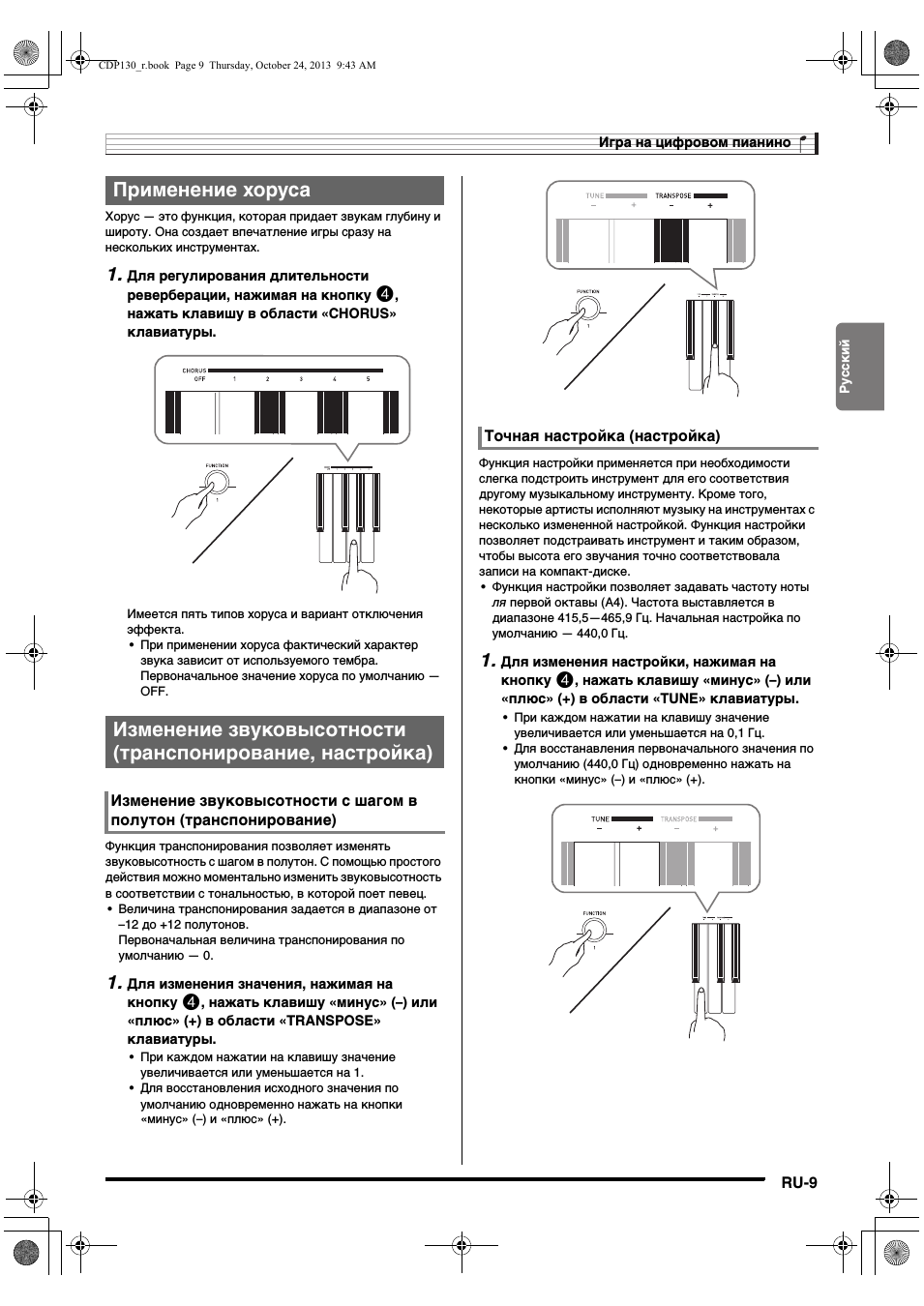
Хорус — это функция, которая придает звукам глубину и
широту. Она создает впечатление игры сразу на
нескольких инструментах.
1.
Для регулирования длительности
реверберации, нажимая на кнопку
4
,
нажать клавишу в области «CHORUS»
клавиатуры.
Имеется пять типов хоруса и вариант отключения
эффекта.
•
При применении хоруса фактический характер
звука зависит от используемого тембра.
Первоначальное значение хоруса по умолчанию —
OFF.
Функция транспонирования позволяет изменять
звуковысотность с шагом в полутон. С помощью простого
действия можно моментально изменить звуковысотность
в соответствии с тональностью, в которой поет певец.
•
Величина транспонирования задается в диапазоне от
–12 до +12 полутонов.
Первоначальная величина транспонирования по
умолчанию — 0.
1.
Для изменения значения, нажимая на
кнопку
4
, нажать клавишу «минус» (–) или
«плюс» (+) в области «TRANSPOSE»
клавиатуры.
•
При каждом нажатии на клавишу значение
увеличивается или уменьшается на 1.
•
Для восстановления исходного значения по
умолчанию одновременно нажать на кнопки
«минус» (–) и «плюс» (+).
Функция настройки применяется при необходимости
слегка подстроить инструмент для его соответствия
другому музыкальному инструменту. Кроме того,
некоторые артисты исполняют музыку на инструментах с
несколько измененной настройкой. Функция настройки
позволяет подстраивать инструмент и таким образом,
чтобы высота его звучания точно соответствовала
записи на компакт-диске.
•
Функция настройки позволяет задавать частоту ноты
ля первой октавы (A4). Частота выставляется в
диапазоне 415,5—465,9 Гц. Начальная настройка по
умолчанию — 440,0 Гц.
1.
Для изменения настройки, нажимая на
кнопку
4
, нажать клавишу «минус» (–) или
«плюс» (+) в области «TUNE» клавиатуры.
•
При каждом нажатии на клавишу значение
увеличивается или уменьшается на 0,1 Гц.
•
Для восстанавления первоначального значения по
умолчанию (440,0 Гц) одновременно нажать на
кнопки «минус» (–) и «плюс» (+).
Применение хоруса
Изменение звуковысотности
(транспонирование, настройка)
Изменение звуковысотности с шагом в
полутон (транспонирование)
Точная настройка (настройка)
CDP130_r.book Page 9 Thursday, October 24, 2013 9:43 AM
21:50
цифровое пианино Casio CDP — реальный обзор
05:06
Цифровое пианино Сasio CDP-s100 — обзор / сравнение с CDP-130
05:28
Цифровое пианино CASIO CDP-130
04:11
Обзор цифрового пианино Casio CDP130 от Pianino.by
05:40
Casio CDP-130 Digital Piano — Overview & Demo
05:56
Цифровое пианино Сasio CDP-130
03:46
Beethoven Fur Elise — Casio CDP-130 (Piano Cover by Jun Jung)
04:54
CASIO CDP 130 — Frédéric Chopin — Fantasie Impromptu — Op.66
Нажмите на кнопку для помощи
CDP-130
EN/ES
USER’S GUIDE
Please keep all information for future reference.
Safety Precautions
Before trying to use the Digital Piano, be sure to read
the separate “Safety Precautions”.
GUÍA DEL USUARIO
Guarde toda la información para futuras consultas.
Precauciones de seguridad
Antes de intentar usar el piano digital, asegúrese de
leer las “Precauciones de seguridad” separadas.
EnglishEspañol
CDP130-ES-1A
TO REDUCE THE RISK OF FIRE OR ELECTRIC SHOCK, REFER SERVICING TO QUALIFIED SERVICE PERSONNEL.
IMPORTANT SAFETY INSTRUCTIONS
1. Read these instructions.
2. Keep these instructions.
3. Heed all warnings.
4. Follow all instructions.
5. Do not use this apparatus near water.
6. Clean only with dry cloth.
7. Do not block any ventilation openings. Install in accordance with the manufacturer’s instructions.
8. Do not install near any heat sources such as radiators, heat registers, stoves, or other apparatus (including amplifiers) that
produce heat.
9. Do not defeat the safety purpose of the polarized or grounding-type plug. A polarized plug has two blades with one wider
than the other. A grounding type plug has two blades and a third grounding prong. The wide blade or the third prong are
provided for your safety. If the provided plug does not fit into your outlet, consult an electrician for replacement of the
obsolete outlet.
10.Protect the power cord from being walked on or pinched particularly at plugs, convenience receptacles, and the point where
they exit from the apparatus.
11.Only use attachments/accessories specified by the man
12.Use only with the cart, stand, tripod, bracket, or table specified by the manufacturer, or sold with the
apparatus. When a cart is used, use caution when moving the cart/apparatus combination to avoid injury
from tip-over.
13.Unplug this apparatus during lightning storms or when unused for long periods of time.
14.Refer all servicing to qualified service personnel. Servicing is required when the apparatus has been
damaged in any way, such as power-supply cord or plug is damaged, liquid has been spilled or objects
have fallen into the apparatus, the apparatus has been exposed to rain or moisture, does not operate normally, or has been
dropped.
The apparatus shall not be exposed to dripping or splashing and that no objects filled with liquids, such as
placed on the apparatus.
The power indicator being unlit does not mean the apparatus is completely disconnected from the MAINS.
When you need to have the apparatus completely disconnected from the MAINS, you must unplug the power cord. For that
purpose, locate the apparatus in a way that secures easy access to the power cord.
1 — 16
1 — 16
ufacturer.
Mode 3
**
1
*
X
0 — 127
0 — 127
9nH v = 1 — 127
O
X
O
OO
9nH v = 0, 8nH v =
X
vases, shall be
2
*
Bank select
Modulation
Data entry
OOOOO
(MSB only)
O
Volume
Pan
Expression
Declaration of Conformity
Model Number: CDP-130
Trade Name: CASIO COMPUTER CO., LTD.
Responsible party: CASIO AMERICA, INC.
Address: 570 MT. PLEASANT AVENUE, DOVER, NEW JERSEY 07801
Telephone number: 973-361-5400
This device complies with Part 15 of the FCC Rules, Operation is subject to the following two conditions:
(1) This device may not cause harmful interference, and (2) this device must accept any interference received, including
interference that may cause undesired operation.
This equipment has been tested and found to comply with the limits for a Class B digital device, pursuant to Part 15 of the FCC
Rules. These limits are designed to provide reasonable protection against harmful interference in a residential installation. This
equipment generates, uses and can radiate radio frequency energy and, if not installed and used in accordance with the
instructions, may cause harmful interference to radio communications. However, there is no guarantee that interference will not
occur in a particular installation. If this equipment does cause harmful interference to radio or television reception, which can be
determined by turning the equipment off and on, the user is encouraged to try to correct the interference by one or more of the
following measures:
• Reorient or relocate the receiving antenna.
• Increase the separation between the equipment and receiver.
• Connect the equipment into an outlet on a circuit different from that to which the receiver is connected.
• Consult the dealer or an experienced radio/TV technician for help.
Model: CDP-130 Version : 1.0
Function Transmitted Recognized Remarks
1
1 — 16
NOTICE
Default
Changed
Basic
Channel
X
Mode 3
Default
Messages
Altered
Mode
0 — 127
Tr ue voice
Note
Number
9nH v = 0
X
9nH v = 1 — 127
O
Note ON
Note OFF
Velocity
X
X
Key’s
Ch’s
After
Touch
OXOOO
7
0, 3216, 38
Pitch Bender
FCC WARNING
Changes or modifications not expressly approved by the party responsible for compliance could void the user’s authority to
operate the equipment.
10
X
11
Control
Change
Important!
Please note the following important information before using this product.
• Before using the AD-A12150LW Adaptor to power the product, be sure to check the AC Adaptor for any damage first. Carefully
check the power cord for breakage, cuts, exposed wire and other serious damage. Never let children use an AC adaptor that is
seriously damaged.
• The product is not intended for children under 3 years.
• Use only CASIO AD-A12150LW adaptor.
• The AC adaptor is not a toy.
• Be sure to disconnect the AC adaptor before cleaning the product.
English
Declaration of Conformity According to EU Directive
Manufacturer:
CASIO COMPUTER CO., LTD.
6-2, Hon-machi 1-chome, Shibuya-ku, Tokyo 151-8543, Japan
This mark applies in EU countries only.
● Any reproduction of the contents of this manual, either in part or its entirety, is prohibited. Except for your own, personal
use, any other use of the contents of this manual without the consent of CASIO is prohibited under copyright laws.
● IN NO EVENT SHALL CASIO BE LIABLE FOR ANY DAMAGES WHATSOEVER (INCLUDING, WITHOUT LIMITATION,
DAMAGES FOR LOSS OF PROFITS, BUSINESS INTERRUPTION, LOSS OF INFORMATION) ARISING OUT OF THE
USE OF OR INABILITY TO USE THIS MANUAL OR PRODUCT, EVEN IF CASIO HAS BEEN ADVISED OF THE
POSSIBILITY OF SUCH DAMAGES.
● The contents of this manual are subject to change without notice.
● The actual appearance of the product may be different from that shown in the illustrations in this User’s Guide.
● Company and product names used in this manual may be registered trademarks of others.
Responsible within the European Union:
CASIO EUROPE GmbH
Casio-Platz 1, 22848 Norderstedt, Germany
EN-1
Contents
General Guide ………………………EN-3
Getting Ready to Play …………..EN-4
Preparing the Music Stand …………………………EN-4
Connecting a Pedal Unit…………………………….EN-4
Power Supply ………………………………………….. EN-4
Playing the Digital Piano……….EN-5
Turning on Power and Playing ……………………EN-5
Using Headphones…………………………………… EN-5
Using a Damper Pedal ………………………………EN-6
Changing Keyboard Response to
Touch Pressure (Touch Response)……………..EN-6
Selecting and Playing a Tone……………………..EN-7
Playing Demo Songs…………………………………EN-7
Layering Two Tones………………………………….EN-8
Using Hall ………………………………………………..EN-8
Using Reverb……………………………………………EN-8
Using Chorus……………………………………………EN-9
Changing the Pitch (Transpose, Tuning)……… EN-9
Using the Metronome ………………………………EN-10
Connecting External
Devices ………………………………EN-11
Connecting to a Computer ………………………. EN-11
MIDI Settings…………………………………………. EN-12
Outputting Keyboard Notes to
Audio Equipment ……………………………………. EN-12
Reference …………………………..EN-13
Troubleshooting………………………………………EN-13
Specifications …………………………………………EN-14
Operating Precautions……………………………..EN-15
MIDI Implementation Chart
Included Accessories
● Music Stand
● Pedal
● Leaflets
• Safety Precautions
• Other (Warranty, etc.)
Items included as accessories are subject to change without notice.
Separately Available Accessories
• You can get information about accessories that
are separately for this product from the CASIO
catalog available from your retailer, and from the
CASIO website at the following URL.
http://world.casio.com/
EN-2
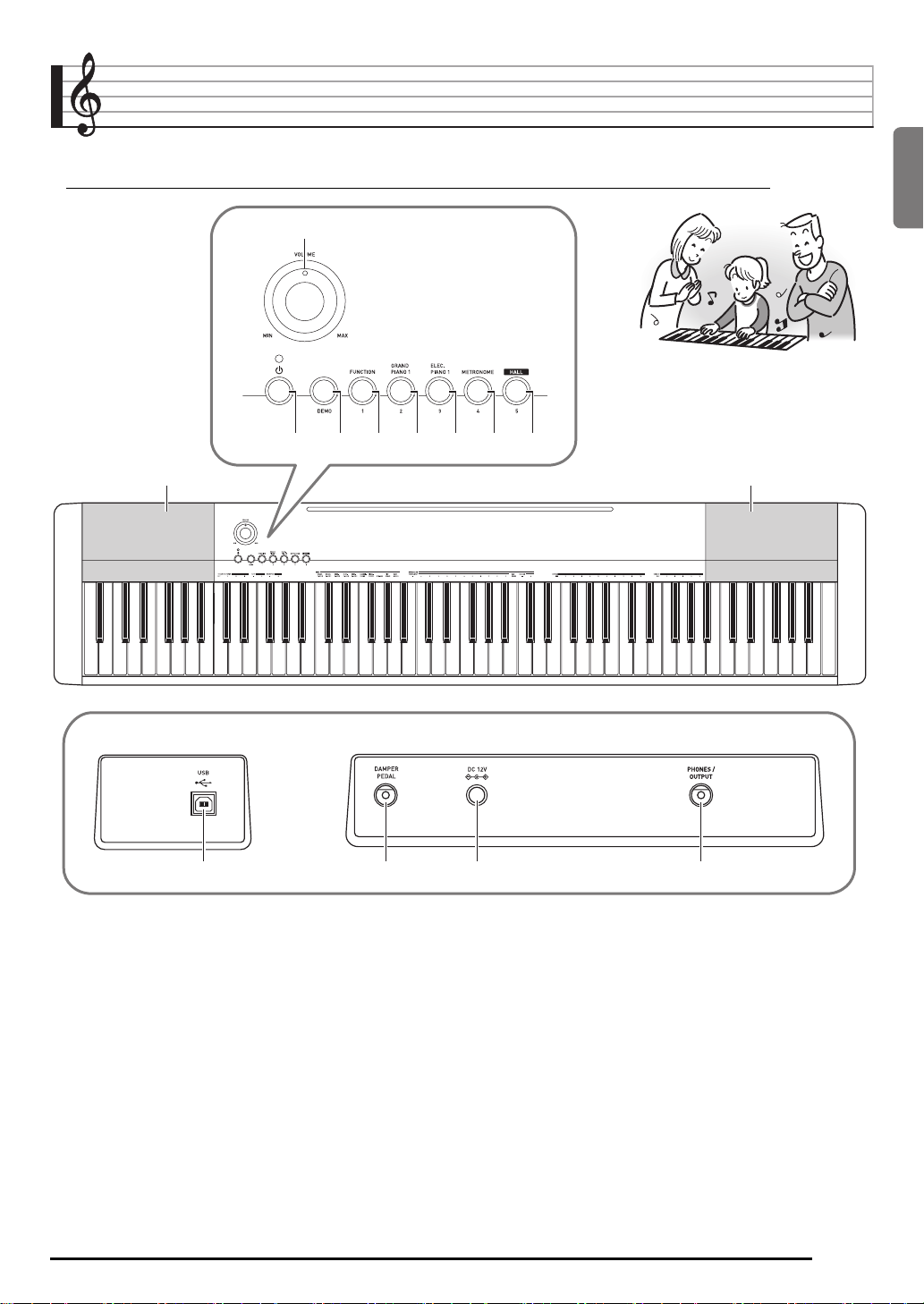
General Guide
• In this manual, the term “Digital Piano” refers to the CDP-130.
• In this manual, buttons and other controllers are identified using the numbers shown below.
1
32 45678
99
English
■ Back
bk
VOLUME knob ☞EN-5
1
P (POWER) button ☞EN-5
2
DEMO button ☞EN-7
3
FUNCTION button ☞EN-6, 7, 8, 9, 10, 12
4
GRAND PIANO 1 button ☞EN-7, 8
5
ELEC PIANO 1 button ☞EN-7
6
METRONOME button ☞EN-10
7
bl bm
HALL button ☞EN-5, 8
8
Speakers
9
USB port ☞EN-11
bk
DAMPER PEDAL jack ☞EN-4
bl
DC 12V terminal ☞EN-4
bm
PHONES/OUTPUT jack ☞EN-5
bn
bn
EN-3
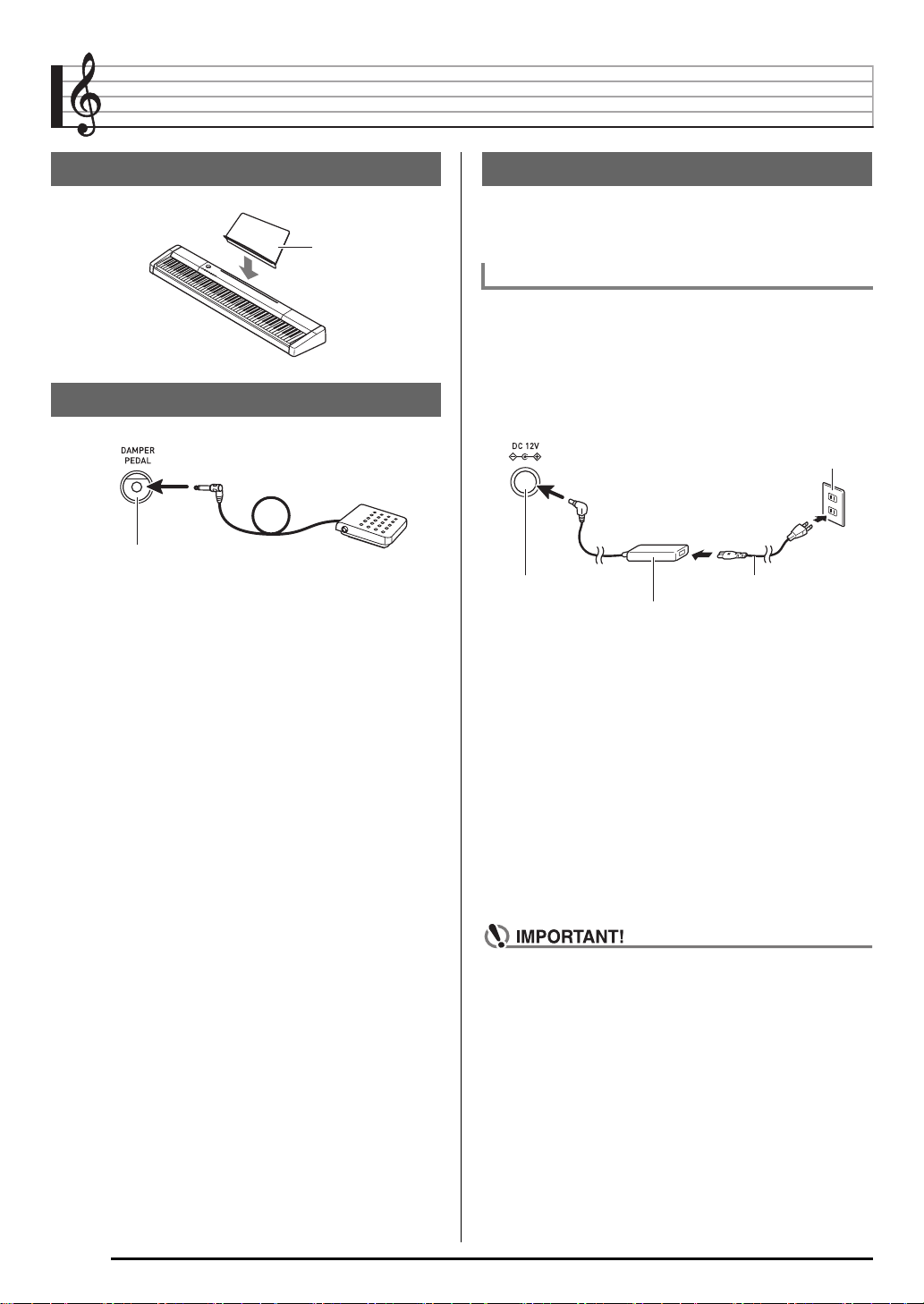
Getting Ready to Play
Preparing the Music Stand
Music stand
Connecting a Pedal Unit
DAMPER PEDAL jack
Power Supply
Your Digital Piano runs on standard household power. Be
sure to turn off power whenever you are not using the Digital
Piano.
Using the AC Adaptor
Use only the AC adaptor (JEITA Standard, with unified
polarity plug) that comes with this Digital Piano. Use of a
different type of AC adaptor can cause malfunction of the
Digital Piano.
Specified AC Adaptor: AD-A12150LW
• Use the supplied power cord to connect the AC adaptor as
shown in the illustration below.
Household power outlet
DC 12V terminal Power cord
AC adaptor
• Configuration and type depends on
your geographic location.
Note the following important precautions to avoid
damage to the power cord.
During Use
• Never pull on the cord with excessive force.
• Never repeatedly pull on the cord.
• Never twist the cord at the base of the plug or connector.
During Movement
• Before moving the Digital Piano, be sure to unplug the AC
adaptor from the power outlet.
During Storage
• Loop and bundle the power cord, but never wind it around
the AC adaptor.
EN-4
• Never connect the AC adaptor (JEITA Standard, with
unified polarity plug) that comes with this Digital Piano
to any other device besides this Digital Piano. Doing so
creates the risk of malfunction.
• Make sure the Digital Piano is turned off before
plugging in or unplugging the AC adaptor.
• The AC adaptor will become warm to the touch after
very long use. This is normal and does not indicate
malfunction.
Loading…
Casio CDP-130
GUÍA DEL USUARIO
USER’S GUIDE
Guarde toda la información para futuras consultas.
Please keep all information for future reference.
Precauciones de seguridad
Antes de intentar usar el piano digital, asegúrese de
leer las “Precauciones de seguridad” separadas.
Safety Precautions
Before trying to use the Digital Piano, be sure to read
the separate “Safety Precautions”.
CDP130-ES-1A
EN/ES
EnglishEspañol
This recycle mark indicates that the packaging conforms to
the environmental protection legislation in Germany.
Esta marca de reciclaje indica que el empaquetado se
ajusta a la legislación de protección ambiental en Alemania.
MA1310-A Printed in China
C
CDP130_es_Cover1-4.fm 1 ページ 2013年10月10日 木曜日 午後4時17分
Manual
View the manual for the Casio CDP-130 here, for free. This user manual comes under the category piano’s and has been rated by 6 people with an average of a 8.6. This manual is available in the following languages: English. Do you have a question about the Casio CDP-130?
Ask your question here
Product Images (5)

Casio CDP-130 specifications
Below you will find the product specifications and the manual specifications of the Casio CDP-130.
Headphone connectivity
6.3 mm
General
| Brand | Casio |
| Model | CDP-130 | CDP-130BK |
| Product | piano |
| EAN | 4971850361985 |
| Language | English |
| Filetype | Manual (PDF) |
Ports & interfaces
| Headphone connectivity | 6.3 mm |
| USB port | No |
| USB connector type | USB Type-B |
| Headphone outputs | 1 |
Technical details
| Built-in speaker(s) | Yes |
| Number of speakers | 2 |
| Sound effects | Chorus, Reverberation |
| Pedal jack | Yes |
| Reverberation effects quantity | 10 |
| Chorus effects quantity | 5 |
| Adjustable tone range (octaves) | -12 — 12 |
| Maximum polyphony (notes) | 48 |
| Tones quantity | 10 |
| Metronome tempo range | 30 — 255 bpm |
| Output impedance | 3 Ω |
| Output voltage | 1.5 V |
| Amplifier output power | 16 W |
Keyboard
Design
Performance
| Demo songs quantity | 5 |
| Metronome | Yes |
Power
| Power source type | — |
| Power consumption (min) | 18 W |
Weight & dimensions
| Width | 1322 mm |
| Depth | 286 mm |
| Height | 129 mm |
| Weight | 10800 g |
| Stand width | 1332 mm |
| Stand depth | 373.2 mm |
| Stand height | 753.3 mm |
Packaging content
| Manual | Yes |
| Matching stand included | No |
| Switch pedal included | Yes |
show more
Frequently asked questions
Can’t find the answer to your question in the manual? You may find the answer to your question in the FAQs about the Casio CDP-130 below.
What is the weight of the Casio CDP-130?
The Casio CDP-130 has a weight of 10800 g.
What is the height of the Casio CDP-130?
The Casio CDP-130 has a height of 129 mm.
What is the width of the Casio CDP-130?
The Casio CDP-130 has a width of 1322 mm.
What is the depth of the Casio CDP-130?
The Casio CDP-130 has a depth of 286 mm.
What type of USB connection does the Casio CDP-130 have?
The Casio CDP-130 has a USB Type-B connection.
Is the manual of the Casio CDP-130 available in English?
Yes, the manual of the Casio CDP-130 is available in English .
Is your question not listed? Ask your question here
Casio CDP-130
GUÍA DEL USUARIO
USER’S GUIDE
Guarde toda la información para futuras consultas.
Please keep all information for future reference.
Precauciones de seguridad
Antes de intentar usar el piano digital, asegúrese de
leer las “Precauciones de seguridad” separadas.
Safety Precautions
Before trying to use the Digital Piano, be sure to read
the separate “Safety Precautions”.
CDP130-ES-1A
EN/ES
EnglishEspañol
This recycle mark indicates that the packaging conforms to
the environmental protection legislation in Germany.
Esta marca de reciclaje indica que el empaquetado se
ajusta a la legislación de protección ambiental en Alemania.
MA1310-A Printed in China
C
CDP130_es_Cover1-4.fm 1 ページ 2013年10月10日 木曜日 午後4時17分
Manual
View the manual for the Casio CDP-130 here, for free. This manual comes under the category piano’s and has been rated by 6 people with an average of a 8.6.
This manual is available in the following languages: English. Do you have a question about the Casio CDP-130 or do you need help?
Ask your question here
Product Images (5)

Casio CDP-130 specifications
Below you will find the product specifications and the manual specifications of the Casio CDP-130.
The Casio CDP-130 is a digital piano that offers a range of features for musicians of all levels. With its 88 keys, the piano provides the full range of notes found on a traditional piano. It also includes built-in speakers, allowing for immediate sound production without the need for external amplification.
The piano offers various sound effects, such as chorus and reverberation, which can be adjusted to suit a player’s preferences. It provides a total of 10 reverberation effects and 5 chorus effects, allowing for diverse sound customization options.
The CDP-130 includes a pedal jack, enabling the attachment of a pedal accessory for enhanced control over sustain and expression.
In terms of polyphony, the piano offers a maximum of 48 notes, allowing for the simultaneous sounding of multiple notes and chords. With 10 available tones, users can select from a variety of sounds to suit different musical styles and genres.
The headphone connectivity of the piano uses a 6.3 mm jack, providing compatibility with a wide range of headphones and ensuring a private playing experience.
When it comes to output, the Casio CDP-130 has an output impedance of 3 Ω and an output voltage of 1.5 V. The piano’s built-in amplifier offers an output power of 16 W, providing sufficient volume for home practice or small performances.
Overall, the Casio CDP-130 is a versatile digital piano that offers a range of features to enhance the playing experience. Its diverse sound effects, headphone connectivity, and pedal jack make it suitable for both beginners and more advanced musicians.
Headphone connectivity
6.3 mm
General
| Brand | Casio |
| Model | CDP-130 | CDP-130BK |
| Product | piano |
| EAN | 4971850361985 |
| Language | English |
| Filetype | User manual (PDF) |
Ports & interfaces
| Headphone connectivity | 6.3 mm |
| USB port | No |
| USB connector type | USB Type-B |
| Headphone outputs | 1 |
Technical details
| Built-in speaker(s) | Yes |
| Number of speakers | 2 |
| Sound effects | Chorus, Reverberation |
| Pedal jack | Yes |
| Reverberation effects quantity | 10 |
| Chorus effects quantity | 5 |
| Adjustable tone range (octaves) | -12 — 12 |
| Maximum polyphony (notes) | 48 |
| Tones quantity | 10 |
| Metronome tempo range | 30 — 255 bpm |
| Output impedance | 3 Ω |
| Output voltage | 1.5 V |
| Amplifier output power | 16 W |
Keyboard
Design
Performance
| Demo songs quantity | 5 |
| Metronome | Yes |
Power
| Power source type | — |
| Power consumption (min) | 18 W |
Weight & dimensions
| Width | 1322 mm |
| Depth | 286 mm |
| Height | 129 mm |
| Weight | 10800 g |
| Stand width | 1332 mm |
| Stand depth | 373.2 mm |
| Stand height | 753.3 mm |
Packaging content
| Manual | Yes |
| Matching stand included | No |
| Switch pedal included | Yes |
show more
Frequently Asked Questions
Can’t find the answer to your question in the manual? You may find the answer to your question in the FAQs about the Casio CDP-130 below.
How many different sound effects does the Casio CDP-130 offer?
The Casio CDP-130 has 10 different sound effects, including 5 chorus effects and 10 reverberation effects. This allows the user to add depth and variety to their music, enhancing their playing experience.
How do I adjust the volume on my Casio CDP-130 piano?
The volume control on the Casio CDP-130 piano is located on the left side of the instrument. You can rotate the knob clockwise to increase the volume or counterclockwise to decrease it according to your preference.
Can I connect headphones to my Casio CDP-130 for silent practice?
Yes, the Casio CDP-130 has a headphone jack on the front panel. Simply plug in your headphones and you can enjoy practicing silently without disturbing others.
How do I change the touch sensitivity of the keys on my Casio CDP-130?
To modify the touch sensitivity, press and hold the Function button (Fn) located on the left side of the keyboard, and then press the key corresponding to «Touch» on the numerical keypad. From there, you can select your desired touch sensitivity level.
Is it possible to transpose the keys on my Casio CDP-130?
Absolutely! You can transpose the keys on your Casio CDP-130 by pressing and holding the Function button (Fn) and then pressing the key labeled «Transpose» on the numerical keypad. Use the «+» and «-» buttons to adjust the transposition up or down in semitone increments.
How can I record my performances on the Casio CDP-130?
The Casio CDP-130 allows you to record your performances using its built-in recording function. Simply press the Function button (Fn) and then press the key labeled «Rec» on the numerical keypad to start recording. Press the same key again to stop the recording.
Is the Casio CDP-130 equipped with headphone connectivity?
Yes, the Casio CDP-130 has headphone connectivity with a 6.3 mm jack. This allows the user to play and practice privately without disturbing others.
Does the Casio CDP-130 have built-in speakers?
Yes, the Casio CDP-130 has built-in speakers, providing a convenient option for playing and practicing without the need for external speakers.
How many speakers does the Casio CDP-130 have?
The Casio CDP-130 has 2 speakers, which helps to produce a more immersive and balanced sound experience for the user.
How many keys does the Casio CDP-130 have?
The Casio CDP-130 has 88 keys, which is the standard number of keys for a full-size piano. This allows for a wide range of musical expression and versatility.
What is the weight of the Casio CDP-130?
The Casio CDP-130 has a weight of 10800 g.
What is the height of the Casio CDP-130?
The Casio CDP-130 has a height of 129 mm.
What is the width of the Casio CDP-130?
The Casio CDP-130 has a width of 1322 mm.
What is the depth of the Casio CDP-130?
The Casio CDP-130 has a depth of 286 mm.
What type of USB connection does the Casio CDP-130 have?
The Casio CDP-130 has a USB Type-B connection.
Is the manual of the Casio CDP-130 available in English?
Yes, the manual of the Casio CDP-130 is available in English .
Is your question not listed? Ask your question here