
Перезвоните мне
Для жителей Москвы и Московской области, Санкт-Петербурга и Ленинградской области
Отправляя заявку онлайн, вы получаете скидку 10% на ремонт
Ваше имя
Тект ошибки
Ваш телефон
Тект ошибки
Чтобы мы могли с вами связаться
Нажимая на кнопку, я даю согласие на обработку своих персональных данных
Ваша заявка отправлена!
В течение 15 минут менеджер свяжется с Вами.
Manuals.eu
- Manuals.eu
- Electrolux
- Home & Kitchen
- Refrigerators
- ERZ36700X8
- Manual
×
1
2
3
4
5
6
7
8
9
10
11
12
13
14
15
16
17
18
19
20
⟨
⟩
Copyright © Manuals.eu
Agreement
Privacy Policy
Contact us
User manual
Fri dge-Freezer
ERZ36700

We were thinking o f y ou
when we made this product
8184109-00/0

Welcome to the world of Electrolux
Thank you for choosing a first class product from Electrolux, which hopefully will
provide you with lots of pleasure in the future. The Electrolux ambition is to offer
a wide variety of quality products that make your life more comfortable. You find
some examples on the cover in this manual. Please take a few minutes to study
this manual so that you can take advantage of the benefits of your new machine.
We promise that it will provide a superior User Experience delivering
Ease-of-Mind. Good luck!
3
The following symbols are used in this manual:
Important information concerning your personal safety and
information on h ow to avoid damaging the appliance
General information and tips
Environmental information
Scrapping old appliances
he symbol on the product or on its packaging indicates that this product
may not be treated as h ousehold waste. Instead it shall be handed over
to the applicable collection point for the recycling of electrical and electronic
equipment. By ensuring this product is disposed of correctly, you will help
prevent potential negative consequences for the environment and human
health, which could otherwise be caused by inappropriate waste handling of
this product. For more detailed information about recycling of this product,
please contact your local city office, your household waste disposal service or
the shop where you purchased the product.
4
Safety instructions
Your new fridge/freezer may have other
functions compared to your previous
one.
Carefully read these instructions
learn how the appliance works
how to care for it. Keep the
booklet. It will come in handy if
later sell the cabinet or give it
somebody else.
These warnings are provided in the
interests of your safety. Ensure that
you understand them all before
installing or using the appliance. Your
safety is of paramount importance. If
you are unsure about any of the
meanings or warnings contact the
Customer Care Department.
For the User
· The refrigerator is intended for the
storage of foodstuffs and for the
production of ice for normal household
consumption in accordance with these
instructions.
· Do not keep explosive gases or
liquids in the refrigerator or freezer
compartment. They may explode and
cause injury and material damage.
· Do not let sharp objects come into
contact with the refrigerating system
on the back of and inside the cabinet.
If the refrigerating system is punctured,
the cabinet will be damaged and
foodstuff inside may spoil.
· Do not keep carbonised drinks or
bottles in the freezer compartment.
The glass bottles may break.
· The cabinet is heavy. The edges
and projecting parts of the cabinet
may be sharp. Be careful when moving
the cabinet and always use gloves.
to
and
instruction
you
to
Child Safety
· Pay attention so that small children
do not gain access to the operating
controls or the inside of the cabinet.
WARNING
Keep ventilation openings, in the
appliance enclosure or in the built-in
structure, clear of obstruction.
WARNING
Do not use mechanical devices or
other means to accelerate the
defrosting process, other than those
recommended by the manufacturer.
WARNING
Do not damage the refrigerant circuit.
WARNING
Do not use electrical appliance inside
the food storage compartments of the
appliance, unless they are of the type
recommended by the manufacturer.
5

Contents
Scrapping old cabinets 4………..
Safety instructions 5……………
Contents 6…………………..
USE 6………………………
DISPLAY 7…………………..
First switch on 8……………….
Switching off 8………………..
Functions Menu 9……………..
Setting the Clock 9…………….
Select /Switch off /Switch on
each compartment 9………..
Switch off of one compartment 9….
Ambient Temperature Function 9…..
Child Lock Function 10………….
Shopping Function 10…………..
Eco mode Function 10………….
Chill Mode Function 10………….
Use of the fridge compartment 11….
Temperature regulation 11……….
The «Natura-fresh» zone 11………
Holiday Function 12…………….
Use of the freezer compartment 12…
Temperature regulation 12……….
Freezing fresh food 13…………..
Storage of frozen food 13………..
Excessive temperature alarm 13…..
Door open acoustic alarm 14……..
Cabinet interior 14……………..
HINT and TIPS 16……………..
Saving energy 16………………
Food Storage 16………………
Protect the environment 17………
MAINTENANCE and CLEANING 17..
Removing the ventilation grille 17….
Cleaning 17………………….
Defrosting the freezer 18…………
Defrosting the fridge 19………….
To change the lamp 19………….
Change of carbon filter 19……….
When the appliance is not in use 19..
SOMETHING NOT WORKING 20….
TECNICAL SPICIFICATION 22…….
INSTALLATION 23……………..
Mains Cable 23……………….
Unpacking 23…………………
Remove the transport supports 23…
Cleaning 24………………….
Installation of carbon filter 24……..
Installing the cabinet 24…………
Door Reversal 25………………
Electrical connection 25…………
Guarantee/Customer Service 27…..
European Guarantee 28…………
www.electrolux.com 29…………
6
USE
Position and clean the cabinet as
explained in the section «Installation».
Check that the drain hose at the rear
of the cabinet discharges into the drip
tray.
Before in sertin g th e power plu g in to th e
outlet and switching on the cabinet for
the first time, leave it standing upright
for about 4 hours. Otherwise the
compressor may su stain damage. Th i s
time will allow the oil sufficient time to
return to the compressor .
DISPLAY
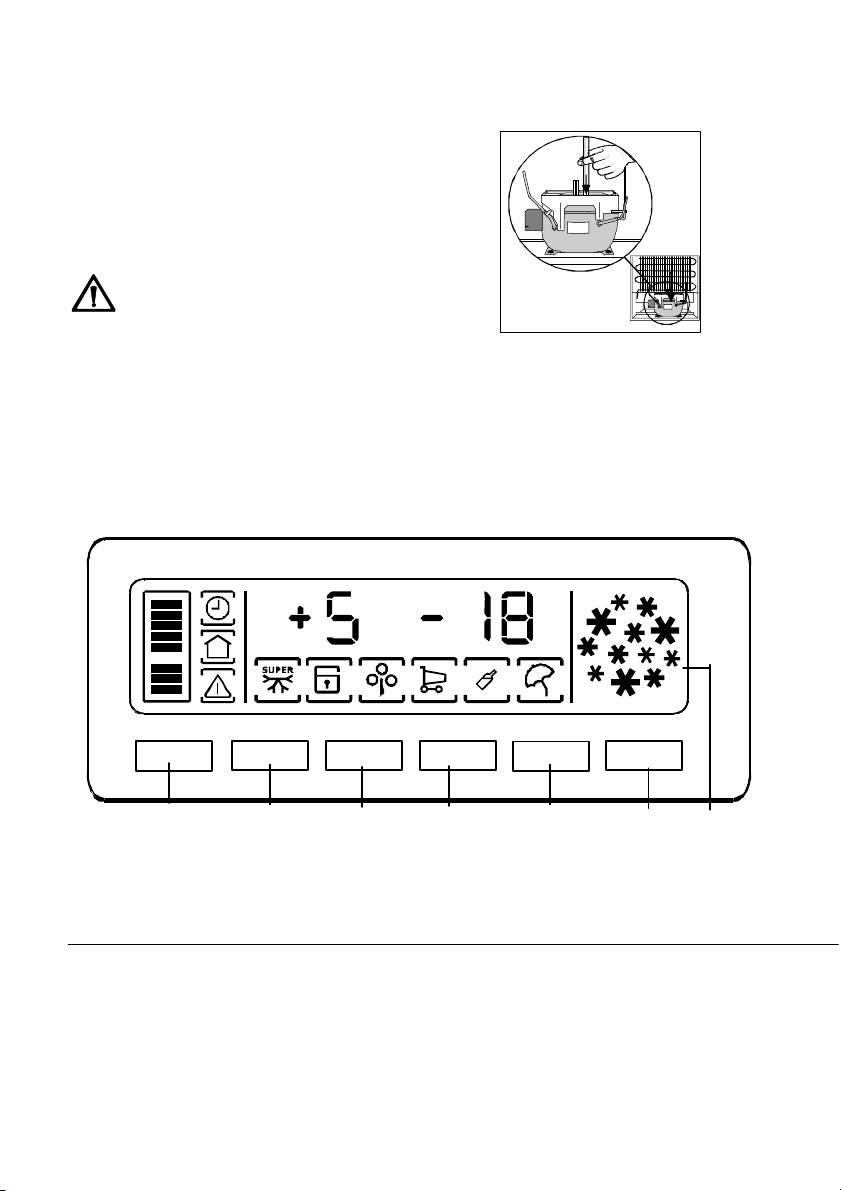
On/Off Function
A
A — Appliance button ON/OFF
B — Function button
C — Temperature regulation button
7
BCC
+
—
D — MODE-button
E — Confirmation button
F — Temperature and function indicator
Mode Ok
D
E
F
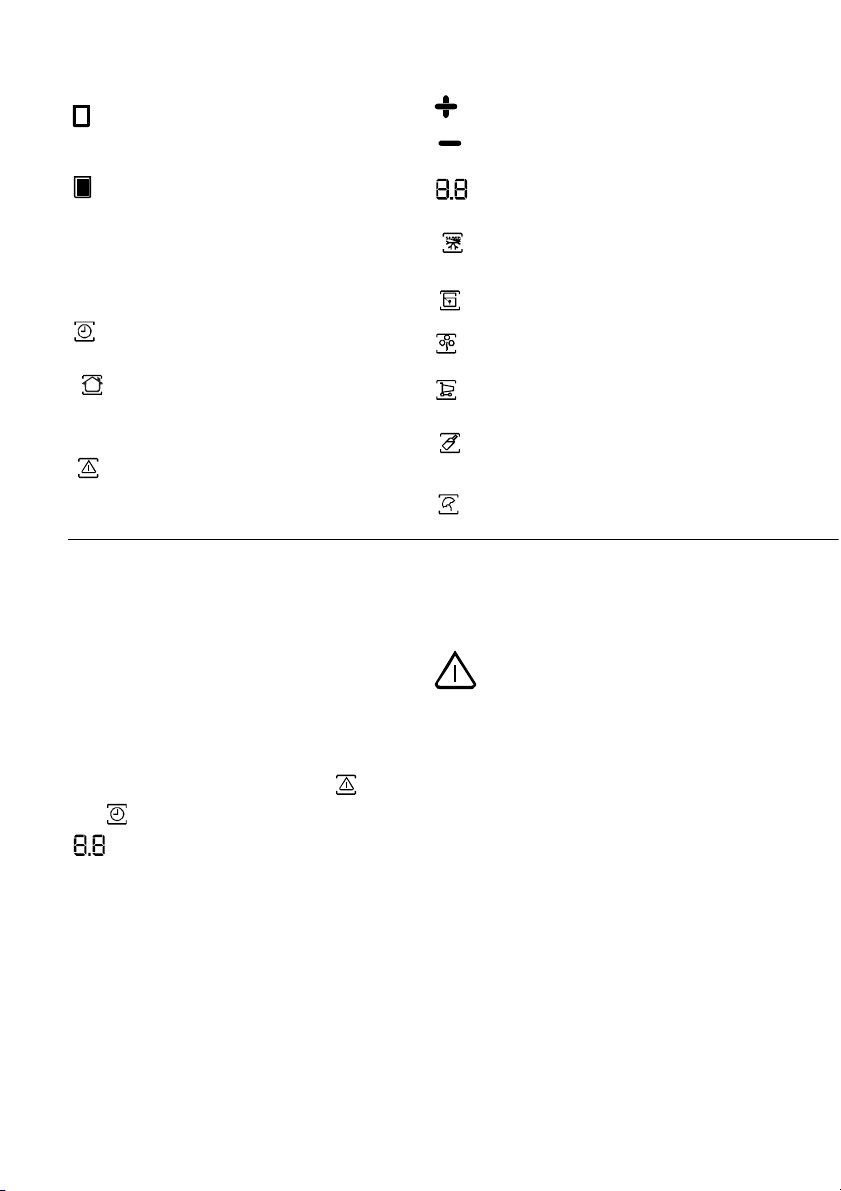
If on the indicated compartment
is on;
If on the indicated temperature is
that of the relative compartment
Flashes the operations corresponds to the relative compart
ment
If on the Clock function is on
If on the temperature indicated is
the ambient temperature
Excessive temperature alarm and
Door open acoustic alarm
Indicator (if foreseen)
PositiveTemperature indicator
NegativeTemperature indicator
Temperature indicator
If on theAction Freeze function
is on
If on the Child Lock funktion is on
If on the Eco Mode function is on
If on the Shopping function is on
If on the Quick Chill mode function
is on
If on the Holiday function is on
First switch on
After plugging the plug into the power
outlet, if the display is not illuminated,
press key (A), appliance on.
As soon as the appliance is turned on,
it is in alarm condition, the temperature
flashes and you will hear a buzzer.
Press key (E) and the buzzer will go off
(also see the section on «excessive
temperature alarm») the icons
and still flashes and on the indicator
will appear the warmest
temperature reached.
For a correct storage of the food select
the Eco mode function that guarantee
the following temperatures are set:
+5°C in the fridge
-18°C in the freezer
· Wait until the inside compartment
temperature reach -18°C, before intro-
ducing the goods in the freezer compartment.
· To select a different temperature
see «Temperature regulation».
Important
If the door remains ajar for some
minutes, the internal lighting will turn
off electronically; after this, the lighting
function will be reset by closing and
opening the door itself.
Switching off
The appliance is shut off by pressing
key (A) for more than 1 second. After
this, a countdown of the temperature
from -3 -2 -1 will be shown.
8
Functions Menu
By activating the key D the functions
menu is operating. Each function
could be confirmed by pressing button
E. If there is no confirmation after
some seconds the display will go out
from the menu and return in normal
condi-tion.
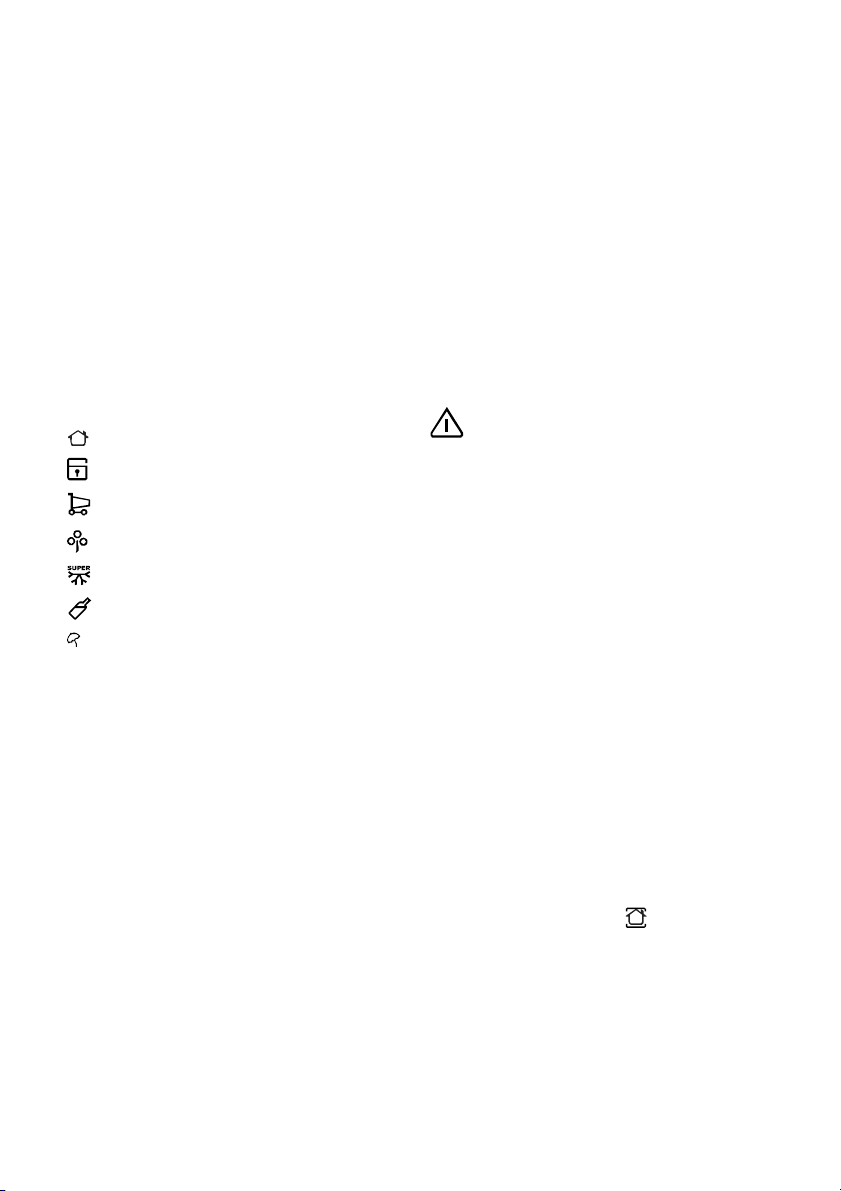
The following functions are indicated:
•Select/Switchoff/Switchonfridge
compartment
• Select/Switch off/Switch on freezer
compartment
Ambient Temperature
Child Lock function
Shopping function
Eco Mode function
Action Freeze function
Quick Chill function
Holiday function
is possible to change it.
Youconfirmthechoiceofthetemperature either by pressing the key E,
(you will hear the buzzer) or by waiting
for some seconds (you will not hear
the buzzer).
Then the indicator shows again the
inside compartment temperature.
The newly selected-temperature must
be reached after 24 hours.
After a long period out of use it is not
necessary to set again the temperature
because it remains stored.
Attention!
During the stability period by the first
starting the temperature displayed can
not correspond to the setting temperature. During this time it is possible
that the temperature displayed is
different than the setting temperature.
Switch off of one compartment
Setting the Clock
The Clock function is activated by
pressing key +/- (C/C). Set the hours’
first, confirm by pressing key E, then
the minutes, confirm by pressing key
E. Note! You must make new time
setting after power failure.
Select /Switch off /Switch on
each compartment
The temperature may be regulated by
pressing the key (B) to select the
compartment and than the key
(C/C) to set the desired temperature.
By pressing the key B the current temperature setting flashes on the indicator and by pressing the key B again it
9
To switch off one compartment press
the key (D) until the compartment is
selected and then press the key (A),
the count down will follow.
Ambient Temperature Function
The ambient temperature function is
activated by pressing key D (several
times if necessary) until the corres-
ponding icon appears
In this condition the selected temperature is the ambient temperature.
You must confirm the choice by
pressing key E within few seconds.
You will hear the buzzer and the icon
remains lighted.
.

It is possible to de-activate the function
atanytimebypressingkeyDuntilthe
corres po nding icon will flash and then
key E.
Child Lock Function
The Child Lock function is activated by
pressing key D (sever al times if necessary) until the corresponding icon
appears
You must confirm the choice by pressing key E within few seconds. Y o u will
hear the buzzer and the icon remains
lighted.
In this condition any possible operation
through the keys does not cause any
change as long as this function is
activated.
It is possible to de-activate the function
atanytimebypressingkeyDuntilthe
corresponding icon will flash and then
key E.
.
Shopping Function
If you need to insert a large amount of
warm food, for example after doing the
grocer y shopping, we suggest activating the Shopping function to chill the
products more rapidly and to avoid
cwarmin g th e oth er food wh ich i s
already in th e refrigerator.
The Shopping function is activated by
pressing key D (several times if necessary) until the corresponding icon
appears
choice by pressing key E within few
seconds. You will hear the buzzer and
the icon remains lighted.
The Shopping function shuts off automatically after approximately 6 hours.
It is possible to de-activate the function
You m ust c onf i r m t h e
atanytimebypressingkeyDuntilthe
corresponding icon will flash and then
key E.
Eco mode Function
The Eco Mode function is activated by
pressing key D (several times if necessary) until the corresponding icon
appears
at +5°C and — 18°C).
You must confirm the choice by pressing key E within few seconds. You will
hear the buzzer and the icon remains
lighted.
In this condition the ch osen temperatures are automatically set (+ 5°C and
— 18°C), in the best conditions for
storing food.
It is possible to de-activate the function
at any time by changing the selected
temperature in one of the compartment.
(or setting the temperature
Chill Mode Function
The Quick Chill function permits the
rapid coolin g of can s an d bottles
takin g forced cold air i n to th em.
Put the drinks on the Quick Chill shelf
an d open th e air lever till th e maximum.
The Quick Chill function is activated by
pressing key D (several times if
necessary) until the corresponding icon
appears
When the cooling is finished de-activate the function by pressing key D
until the corresponding icon will flash,
then key E and dispose the air lever to
the minimum .
.
10
Loading…
Перейти к контенту
Холодильники Electrolux
- Размер инструкции: 730.59 kB
- Формат файла: pdf
Если вы потеряли инструкцию от холодильника Electrolux ERZ 36700 W8 (X8), можете скачать файл для просмотра на компьютере или печати.
Инструкция для холодильника Electrolux ERZ 36700 W8 (X8) на русском языке. В руководстве описаны возможности и полезные функции, а также правила эксплуатации. Перед использованием внимательно ознакомьтесь с инструкцией.
Чтобы не читать всю инструкцию вы можете выполнить поиск по содержимому внутри инструкции и быстро найти необходимую информацию. Рекомендации по использованию помогут увеличить срок службы холодильника Electrolux ERZ 36700 W8 (X8). Если у вас появилась проблема, то найдите раздел с описанием неисправностей и способами их решения. В нем указаны типичные поломки и способы их решения.
Хорошее руководство по эксплуатации
Законодательство обязывает продавца передать покупателю, вместе с товаром, руководство по эксплуатации Electrolux ERZ 36700 X. Отсутствие инструкции либо неправильная информация, переданная потребителю, составляют основание для рекламации в связи с несоответствием устройства с договором. В законодательстве допускается предоставлении руководства в другой, чем бумажная форме, что, в последнее время, часто используется, предоставляя графическую или электронную форму инструкции Electrolux ERZ 36700 X или обучающее видео для пользователей. Условием остается четкая и понятная форма.
Что такое руководство?
Слово происходит от латинского «instructio», тоесть привести в порядок. Следовательно в инструкции Electrolux ERZ 36700 X можно найти описание этапов поведения. Цель инструкции заключается в облегчении запуска, использования оборудования либо выполнения определенной деятельности. Инструкция является набором информации о предмете/услуге, подсказкой.
К сожалению немного пользователей находит время для чтения инструкций Electrolux ERZ 36700 X, и хорошая инструкция позволяет не только узнать ряд дополнительных функций приобретенного устройства, но и позволяет избежать возникновения большинства поломок.
Из чего должно состоять идеальное руководство по эксплуатации?
Прежде всего в инструкции Electrolux ERZ 36700 X должна находится:
— информация относительно технических данных устройства Electrolux ERZ 36700 X
— название производителя и год производства оборудования Electrolux ERZ 36700 X
— правила обслуживания, настройки и ухода за оборудованием Electrolux ERZ 36700 X
— знаки безопасности и сертификаты, подтверждающие соответствие стандартам
Почему мы не читаем инструкций?
Как правило из-за нехватки времени и уверенности в отдельных функциональностях приобретенных устройств. К сожалению само подсоединение и запуск Electrolux ERZ 36700 X это слишком мало. Инструкция заключает ряд отдельных указаний, касающихся функциональности, принципов безопасности, способов ухода (даже то, какие средства стоит использовать), возможных поломок Electrolux ERZ 36700 X и способов решения проблем, возникающих во время использования. И наконец то, в инструкции можно найти адресные данные сайта Electrolux, в случае отсутствия эффективности предлагаемых решений. Сейчас очень большой популярностью пользуются инструкции в форме интересных анимаций или видео материалов, которое лучше, чем брошюра воспринимаются пользователем. Такой вид инструкции позволяет пользователю просмотреть весь фильм, не пропуская спецификацию и сложные технические описания Electrolux ERZ 36700 X, как это часто бывает в случае бумажной версии.
Почему стоит читать инструкции?
Прежде всего здесь мы найдем ответы касательно конструкции, возможностей устройства Electrolux ERZ 36700 X, использования отдельных аксессуаров и ряд информации, позволяющей вполне использовать все функции и упрощения.
После удачной покупки оборудования/устройства стоит посвятить несколько минут для ознакомления с каждой частью инструкции Electrolux ERZ 36700 X. Сейчас их старательно готовят или переводят, чтобы они были не только понятными для пользователя, но и чтобы выполняли свою основную информационно-поддерживающую функцию.