
Hotpoint-ariston
Loading…
F
- F48 1012.1/HA
- F48 1012.1 IX
- F48 1012.1 IX/HA2
- F48 1012 C.1/HA
- F48 1012 C.1 IX2
- F48 1012 C.1 IX/HA2
- F481012G1IX
- F48 1012 G.1 IX/HA
- F48 1012 GC.1 IX/HA
- F481012GP1IX
- F48 1012 GP.1 IX/HA
- F48 1012 P.1 IX
- F48 1012 P.1 IX/HA
- F48 101 GP.1 IX/HA
- F48 101 P.1 IX2
- F48 101 P.1 IX/HA2
- F48L 1012.1/HA
- F48L 1012.1 IX2
- F48L 1012.1 IX/HA2
- F48L 1012 G.1 IX/HA
- F48L 101 GP.1 IX/HA
- F48L 101 P.1 IX/HA
- F48R 1012.1/HA
- F48R 1012.1 IX2
- F48R 1012.1 IX/HA2
- F48R 1012 G.1 IX/HA
- F48R 101 GP.1 IX/HA
- F48R 101 P.1 IX/HA
- F532C1IX
- F53C.1 IX2
- F73C1WH
- F86.1/HA
- F89GP1IX
- F 997 GP.1 IX F/HA
- F99 C IX
- F 99 GP.1 IX F/HA
- FA2 530 H BL HA
- FA2 530 H IX HA4
- FA2 540 H IX HA11
- FA2 540 P BL HA
- FA2 540 P IX HA3
- FA2 544 C IX HA10
- FA2 544 JC BL HA2
- FA2 544 JC IX HA12
- FA2 544 JH IX HA11
- FA2 840 P IX HA
- FA2 841 C IX HA9
- FA2 841 JH BL HA2
- FA2 841 JH IX HA13
- FA2 844 C IX HA4
- FA2 844 H BL HA3
- FA2 844 H IX HA11
- FA2 844 JH IX HA2
- FA2 844 P IX HA7
- FA3 230 H BL HA10
- FA3 230 H IX
- FA3 230 H IX HA2
- FA3 530 H BL HA
- FA3 530 H IX HA8
- FA3 530 H WH HA
- FA3 540 H BL HA11
- FA3 540 H IX HA20
- FA3 540 JH BL HA2
- FA3 540 JH IX HA7
- FA3 540 P IX HA6
- FA3 544 C IX
- FA3 544 C IX HA22
- FA3 840 H IX HA18
- FA3 840 P IX HA8
- FA3 841 C IX HA4
- FA3 841 H BL HA15
- FA3 841 H IX HA17
- FA3 841 H WH
- FA3 841 H WH HA2
- FA3S 844 IX HA6
- FA3S 844 P IX HA
- FA4 541 JH IX HA7
- FA4 834 H IX HA6
- FA4 841 JC BL HA
- FA4 841 JC IX HA10
- FA4 841 JH BLG HA
- FA4 841 JP IX HA7
- FA4 841 P IX HA5
- FA4 844 H IX HA15
- FA4S 544 IX HA3
- FA4S 8419 P IX HA
- FA4S 841 JBLG HA
- FA4S 841 J IX HA14
- FA4S 841 P IX HA5
- FA4S 842 J IX HA7
- FA4S 844 P IX HA7
- FA 5534 IX8
- FA 55Y4 IX8
- FA5 834 H IX
- FA5 834 H IX HA17
- FA5 841 JH BLG HA2
- FA5 841 JH BL HA4
- FA5 841 JH IX HA20
- FA5 841 JH WHG HA2
- FA5 841 JH WH HA3
Loading…
Loading…
Nothing found
FA2 841 JH IX HA
Daily Reference Guide
8 pgs9.75 Mb0
Daily Reference Guide [bg]
8 pgs9.7 Mb0
Daily Reference Guide [cs]
8 pgs9.76 Mb0
Daily Reference Guide [es]
8 pgs9.75 Mb0
Daily Reference Guide [fr]
8 pgs9.76 Mb0
Daily Reference Guide [hu]
8 pgs9.76 Mb0
Daily Reference Guide [it]
8 pgs9.75 Mb0
Daily Reference Guide [kk]
8 pgs9.82 Mb0
Daily Reference Guide [pt]
8 pgs9.75 Mb0
Daily Reference Guide [sk]
8 pgs9.76 Mb0
Daily Reference Guide [uk]
8 pgs9.73 Mb0
Extended Technical Drawing
2 pgs116.79 Kb0
User Manual [ru]
8 pgs2.63 Mb0
Table of contents
Loading…
…
Hotpoint-ariston User Manual [ru]
Specifications and Main Features
Frequently Asked Questions
User Manual
Loading…
+ 5 hidden pages
You need points to download manuals.
1 point = 1 manual.
You can buy points or you can get point for every manual you upload.
Buy points
Upload your manuals
EN
Quick guideCONTROL PANEL DESCRIPTION1. SELECTION KNOB
For switching the oven on by selecting
a function.
Turn to the position to switch the
oven off.
2. LIGHT
With the oven switched on, press to
turn the oven compartment lamp on or
off.
3. SETTING THE TIME
For accessing the cooking time settings,
delayed start and timer. For displaying
the time when the oven is off.
4. DISPLAY5. ADJUSTMENT BUTTONS
For changing the cooking time settings.
6. THERMOSTAT KNOB
Turn to select the temperature you
require when activating manual
functions. For automatic functions use
.
Please note: All knobs are push-activated
knobs. Push down on the centre of the
knob to release it from its seating.
1 32 4 5
6
SLIDING RUNNERS AND SHELF GUIDES
Before using the oven remove the protective tape [a] and
then remove the protective foil [b] from the sliding runners.
REMOVING THE SLIDING RUNNERS [c]
Pull the lower part of the sliding runner to uncouple the
lower hooks (1) and pull the the sliding runners upwards,
removing them from the upper hooks (2).
REFITTING THE SLIDING RUNNERS [d]
Hook the upper hooks on the shelf guides (1) then press the
lower part of the sliding runners against the shelf guides, until
the lower hooks are clicking (2).
1
2
1
2
[c] [d]
REMOVING AND REFITTING THE SHELF GUIDES
1. To remove the shelf guides, firmly grip the external part of
the guide, and pull it towards you to extract the support and
the two internal pins from the lodging.
2. To reposition the shelf guides, position them near the
cavity and initially insert the two pins into their lodgings.
Next, position the external part near its lodging, insert the
support, and firmly press towards the wall of the cavity to
make sure the shelf guide is properly secured.
FIRST TIME USE1. SETTING THE TIME
You will need to set the time when you switch on the
appliance for the first time: press until the icon and
the two digits for the hour start flashing on the display.
Use or to set the hour and press to confirm. The two
digits for the minutes will start flashing. Use or to set
the minutes and press to confirm.
Please note: When the
icon is flashing, for example following
lengthy power outages, you will need to reset the time.
2. HEAT THE OVEN
A new oven may release odours that have been left behind
during manufacturing: this is completely normal.
Before starting to cook food, we therefore recommend
heating the oven with it empty in order to remove any
possible odours.
Remove any protective cardboard or transparent film from
the oven and remove any accessories from inside it.
Heat the oven to 250 ° C for about one hour. The oven must
be empty during this time.
Please note: It is advisable to air the room after using the appliance
for the first time.
THANK YOU FOR BUYING A HOTPOINT—
ARISTON PRODUCT
In order to receive a more complete
assistance, please register your product on
www . hotpoint . eu/register
Before using the appliance carefully read the Safety
Instruction.
Код: 110349
Извините, товара сейчас нет в наличии
Бесплатная доставка
по Красноярску
Извините, товара сейчас нет в наличии
Услуги:
Новости интернет-магазина «Лаукар»:
Дополнительная информация в категории Духовой шкаф:
В интернет-магазине бытовой техники «Лаукар» Вы можете скачать инструкцию к товару Духовой шкаф Hotpoint-Ariston FA2 841 JH IX HA совершенно бесплатно.
Все инструкции, представленные на сайте интернет-магазина бытовой техники «Лаукар», предоставляются производителем товара.
Перед началом использования товара рекомендуем Вам ознакомиться с инструкцией по применению.
Для того чтобы скачать инструкцию, Вам необходимо нажать на ссылку «скачать инструкцию», расположенную ниже, а в случае, если ссылки нет,
Вы можете попробовать обратиться к данной странице позднее,
возможно специалисты интернет-магазина бытовой техники «Лаукар» еще не успели загрузить для скачивания инструкцию к товару:
Духовой шкаф Hotpoint-Ariston FA2 841 JH IX HA.

Фирма-производитель оставляет за собой право на внесение изменений в конструкцию, дизайн и комплектацию товара: Духовой шкаф Hotpoint-Ariston FA2 841 JH IX HA. Пожалуйста, сверяйте информацию о товаре с информацией на
официальном сайте компании производителя.
Table of Contents
- Hotpoint FA2 841 JH IX HA Stainless steel Oven
- PRODUCT DESCRIPTION
- Overview
- CONTROL PANEL
- Accessories
- FUNCTIONS
- USING THE APPLIANCE FOR THE FIRST TIME
- DAILY USE
- COOKING TABLE
- MAINTENANCE AND CLEANING
- TROUBLESHOOTING
- USEFUL TIPS
- FAQ’s
- Read User Manual Online (PDF format)
- Download This Manual (PDF format)
Hotpoint FA2 841 JH IX HA Stainless steel Oven

THANK YOU FOR PURCHASING A HOTPOINT PRODUCT. To receive more
comprehensive assistance, register the appliance at
www.hotpoint.eu/register.You can download
the Safety Instructions and the Use and Care Guide by visiting our website
www.docs.hotpoint.eu, and following the
instructions on the back of this booklet.
Before using the appliance carefully read the Health and Safety guide.
PRODUCT DESCRIPTION
Overview

- Control panel
- Fan
- Lamp
- Shelf guides (the level is indicated on the wall of the cooking compartment)
- Door
- Upper heating element/grill
- Circular heating element (not visible)
- Identification plate(do not remove)
- Bottom heating element (not visible)
CONTROL PANEL

-
SELECTION KNOB
For switching the oven on by selecting a function. Turn the position to
switch the oven off. -
LIGHT
With the oven switched on, press to turn the oven compartment lamp on or off. -
SETTING THE TIME
For accessing the cooking time settings, delayed start, and timer. For
displaying the time when the oven is off. -
DISPLAY
-
ADJUSTMENT BUTTONS
For changing the cooking time settings. -
THERMOSTAT KNOB
Turn to select the temperature you require when activating manual functions.
Automatic functions use.
Please note: All knobs are push-activated knobs. Push down on the center
of the knob to release it from its seating.
Accessories

The number of accessories may vary depending on which model is purchased.
Other accessories can be purchased separately from the After-sales Service.
INSERTING THE WIRE SHELF AND OTHER ACCESSORIES
- Insert the wire shelf onto the level you require by holding it tilted slightly upwards and resting the raised rear side (pointing upwards) down first. Next, slide it horizontally along the shelf guide as far as possible.
- The other accessories, such as the drip tray and the baking tray, are inserted horizontally by sliding them along the shelf guides.
FUNCTIONS
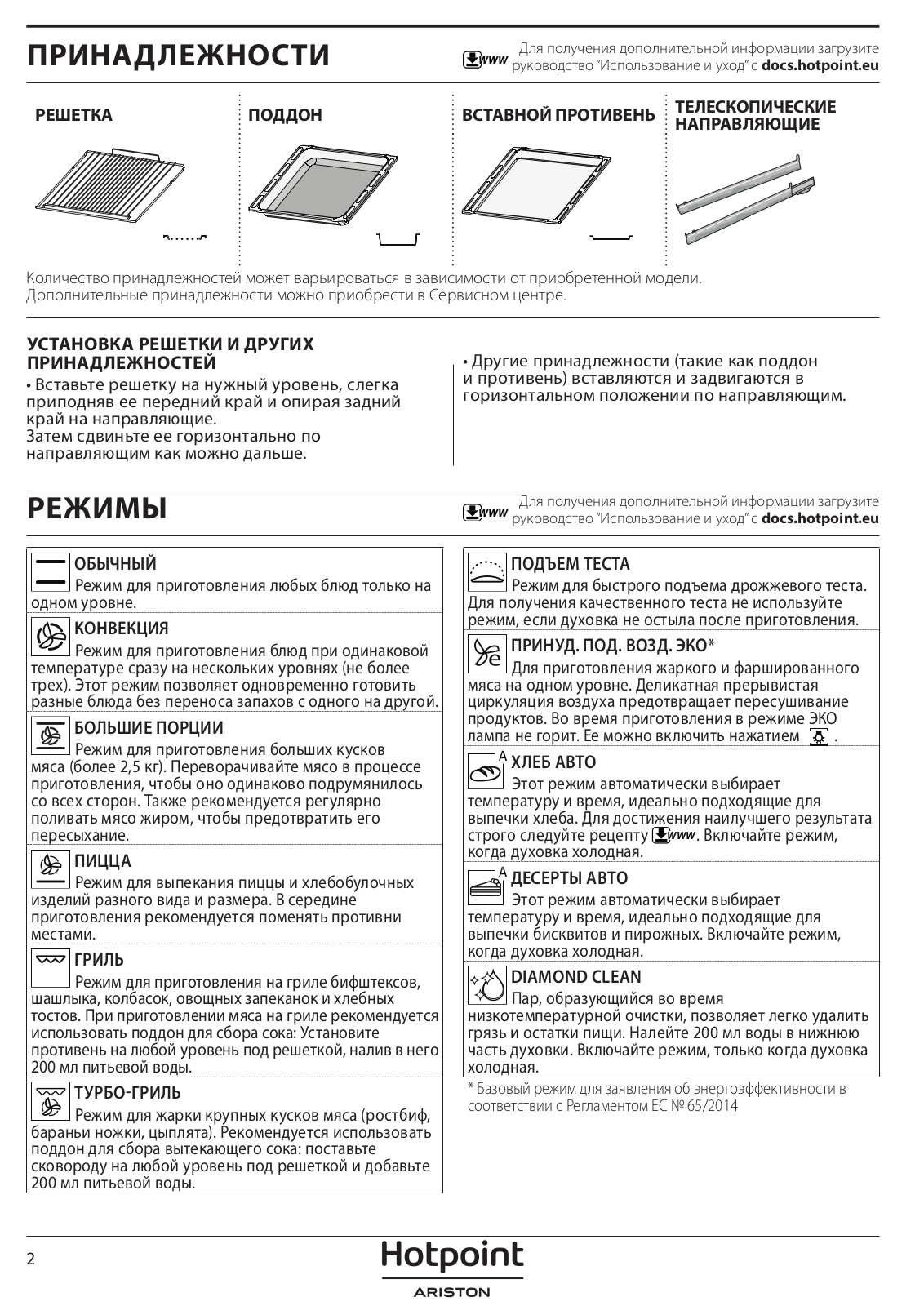
Download the Use and Care Guide from
www.docs.hotpoint.eu for more information
CONVECTION
For cooking any kind of dish on one shelf only.
FORCED AIR
For cooking different foods that require the same cooking temperature on
several shelves (maximum three) at the same time. This function can be used to
cook different foods without odors being transferred from one food to another.
MAXI COOKING
For cooking large joints of meat (above 2.5 kg). We recommend turning the meat
over during cooking to ensure that both sides brown evenly. We also recommend
basting the joint every so often to prevent it from drying out excessively.
PIZZA
For baking different types and sizes of pizza and bread. It is a good idea to
swap the position of the baking plates halfway through cooking.
GRILL
For grilling steaks, kebabs, and sausages, cooking vegetables au gratin or
toasting bread. When grilling meat, we recommend using a drip tray to collect
the cooking juices: Position the tray on any of the levels below the wire
shelf and add 200 ml of drinking water.
TURBO GRILL
For roasting large joints of meat (legs, roast beef, chicken). We recommend
using a drip tray to collect the cooking juices: position the pan on any of
the levels below the wire shelf and add 200 ml of drinking water.
RISING
For helping the sweet or savory dough to rise effectively. To maintain the
quality of proof, do not activate the function if the oven is still hot
following a cooking cycle.
ECO FORCED AIR
For cooking roasts and stuffed roasting joints on a single shelf. Food is
prevented from drying out excessively by gentle, intermittent air circulation.
When this ECO MODE function is in use, the light will remain switched off
during cooking but can be switched on again by pressing it.
BREAD AUTO
This function automatically selects the ideal temperature and baking time for
bread. For best results, carefully follow the recipe. Activate the function
when the oven is cold.
PASTRY AUTO
This function automatically selects the ideal temperature and baking time for
cakes. Activate the function when the oven is cold.
DIAMOND CLEAN
The action of steam released during this special low-temperature cleaning
cycle allows dirt and food residues to be removed with ease. Pour 200 ml of
drinking water on the bottom of the oven and only activate the function when
the oven is cold.
A function used as a reference for the energy efficiency declaration in
accordance with Regulation (EU) No. 65 / 2014
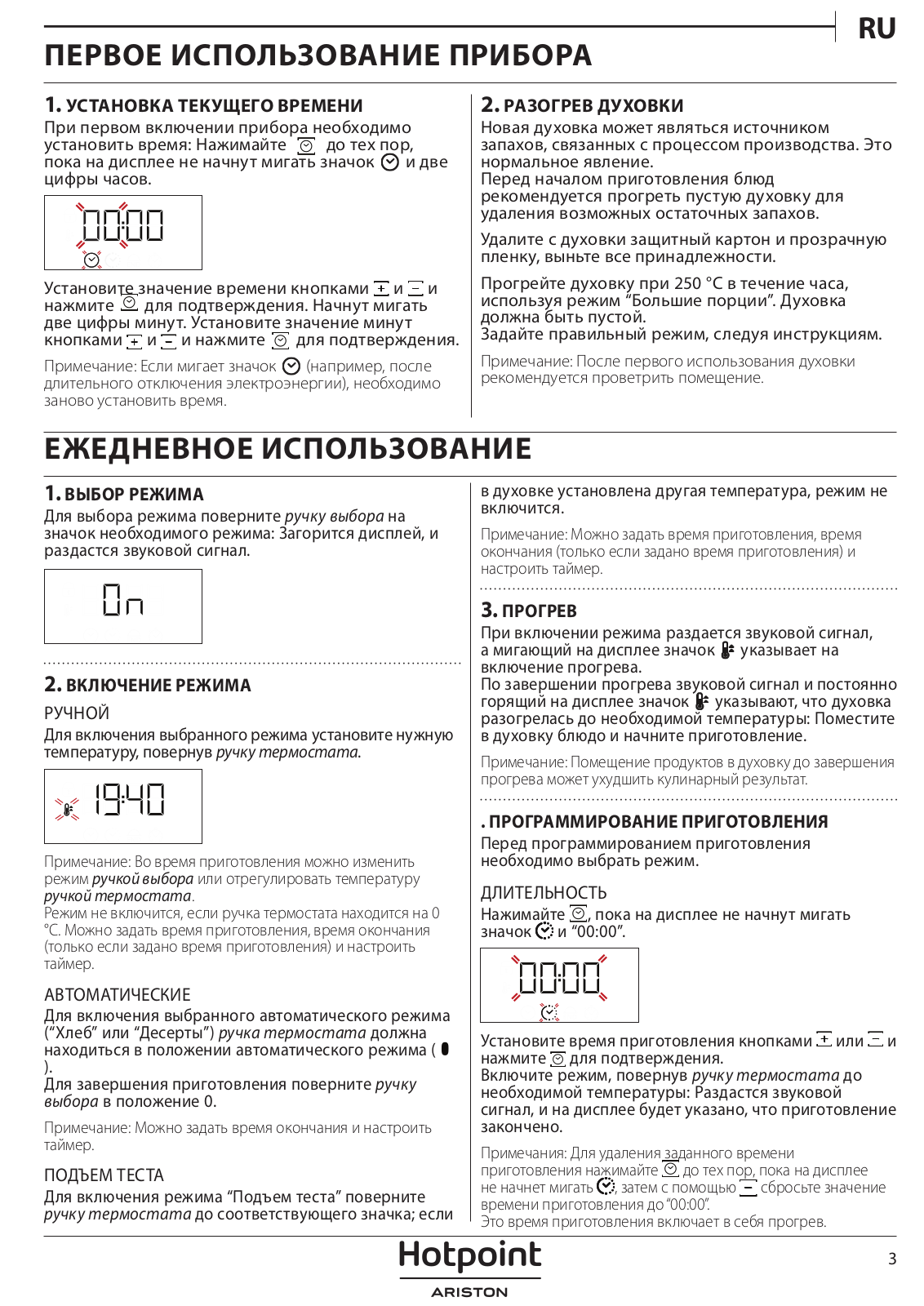
USING THE APPLIANCE FOR THE FIRST TIME
SETTING THE TIME
You will need to set the time when you switch on the appliance for the first
time: press until the icon and the two digits for the hour start flashing on
the display. Use it to set the hour and press to confirm. The two digits for
the minutes will start flashing. Use set the minutes and press to confirm.
Please note: When the icon is flashing, for example following lengthy
power outages, you will need to reset the time.
REHEAT THE OVEN
A new oven may release odors that have been left behind during manufacturing:
this is completely normal. Before starting to cook food, we, therefore,
recommend heating the oven with it empty in order to remove any possible
odors. Remove any protective cardboard or transparent film from the oven and
remove any accessories from inside it. Heat the oven to 250 ° C for about one
hour, preferably using the “ Maxi Cooking ” function. The oven must be
empty during this time. Follow the instructions for setting the function
correctly.
Please note: It is advisable to air the room after using the appliance
for the first time.
DAILY USE
-
SELECT A FUNCTION To select a function, turn the selection knob to the symbol for the function you require: the display will light up and an audible signal will sound.
-
ACTIVATE A FUNCTION
-
MANUAL: To start the function you have selected, turn the thermostat knob to set the temperature you require. Please note: During cooking, you can change the function by turning the selection knob or adjusting the temperature by turning the thermostat knob. The function will not start if the thermostat knob is at 0 °C. You can set the cooking time, cooking end time ( only if you set a cooking time ), and a timer.
-
AUTOMATIC: To start the automatic function you have selected (“ Bread ” or “ Dessert ”), keep the thermostat knob in position for automatic functions ( ). To finish cooking, turn the selection knob to position 0.
Please note: You can set the cooking end time and timer. -
RISING: To start the “ Rising ” function, turn the thermostat knob to the relevant symbol; if the oven is set to a different temperature, the function will not start.
Please note: You can set the cooking time, cooking end time ( only if
you set a cooking time ), and a timer.
-
-
PREHEATING
Once the function starts, an audible signal and a flashing icon on the display
indicate that the preheating phase has been activated. At the end of this
phase, an audible signal and the fixed icon on the display will indicate that
the oven has reached the set temperature: at this point, place the food inside
and proceed with cooking. -
Please note: Placing the food in the oven before preheating has finished may have an adverse effect on the final cooking result.
PROGRAMMING COOKING
You will need to select a function before you can start programming cooking.
DURATION
Keep pressing until the icon and “ 00:00 ” start flashing on the display.
Use it to set the cooking time you require, then press to confirm. Activate
the function by turning the thermostat knob to the temperature you require: an
audible signal will sound and the display will indicate that cooking is
complete.
Notes: To cancel the cooking time you have set, keep pressing until the
icon starts flashing on the display, then use it to reset the cooking time to
“ 00:00 ”. This cooking time includes a preheating phase.
PROGRAMMING THE END COOKING TIME/DELAYED START
After a cooking time has been set, starting the function can be delayed by
programming its end time: press until the icon and the current time start
flashing on the display. Use or to set the time you want cooking to end and
press to confirm. Activate the function by turning the thermostat knob to the
temperature you require: the function will remain paused until it starts
automatically after the period of time that has been calculated in order for
cooking to finish at the time you have set.
Please note: To cancel the setting, switch the oven off by turning the
selection knob to position “ 0 ”.
END OF COOKING
An audible signal will sound and the display will indicate that the function
has finished.
Turn the selection knob to select a different function or to position “ 0
” to switch the oven off.
Please note: If the timer is active, the display will show “ END ”
alternately with the remaining time.
SETTING THE TIMER
This option does not interrupt or program cooking but allows you to use the
display as a timer, either during while a function is active or when the oven
is off. Keep pressing until the icon and “ 00:00 ” start flashing on the
display.
Use it to set the time you require and press to confirm. An audible signal
will sound once the timer has finished counting down the selected time.
Notes: To cancel the timer, keep pressing until the icon starts flashing,
then use it to reset the time to “ 00:00 ”.
DIAMOND CLEAN FUNCTION
To activate the “ Diamond Clean ” cleaning function, pour 200 ml of
drinking water into the bottom of the oven, then turn the selection knob and
the thermostat knob to the icon.
Please note: The position of the icon does not correspond to the
temperature reached during the cleaning cycle. The function will activate
automatically: the display shows the time remaining to the end, alternating
with “ DC ”.

Please note: It is only possible to program the end time of this
function. The duration is automatically set to 35 minutes.
COOKING TABLE


The time indicated does not include the preheating phase: we recommend
placing the food in the oven and setting the cooking time only after the
required temperature has been reached.
- Turn food halfway through cooking.
- Turn food two-thirds of the way through cooking (if necessary).
- Estimated length of time: dishes can be removed from the oven at different times depending on personal preference.
Download the Use and Care Guide from
www.docs.hotpoint.eu for the table of tested
recipes, compiled for the certification authorities in accordance with the
standards IEC and IEC 60350-1.

MAINTENANCE AND CLEANING
Do not use steam cleaning equipment. Use protective gloves during all
operations. Carry out the required operations with the oven cold.
Disconnect the appliance from the power supply. Do not use wire wool,
abrasive scourers, or abrasive/corrosive cleaning agents, as these could
damage the surfaces of the appliance.
EXTERIOR SURFACES
-
Clean the surfaces with a damp microfibre cloth.
If they are very dirty, add a few drops of pH-neutral detergent. Finish off
with a dry cloth. -
Do not use corrosive or abrasive detergents. If any of these products inadvertently comes into contact with the surfaces of the appliance, clean immediately with a damp microfibre cloth.
INTERIOR SURFACES
- After every use, leave the oven to cool and then clean it, preferably while it is still warm, to remove any deposits or stains caused by food residues To dry any condensation that has formed as a result of cooking foods with high water content, let the oven to cool completely and then wipe it with a cloth or sponge.
REMOVING AND REFITTING THE DOOR
- To remove the door, open it fully and lower the catches until they are in the unlock position.
- Close the door as much as you can. Take a firm hold of the door with both hands – do not hold it by the handle. Simply remove the door by continuing to close it while pulling it upwards ( a ) at the same time until it is released from its seating ( b ).

Put the door to one side, resting it on a soft surface.
- Refit the door by moving it towards the oven, aligning the hooks of the hinges with their seating, and securing the upper part onto its seating.
- Lower the door and then open it fully. Lower the catches into their original position: make sure that you lower them down completely.
- Try closing the door and checking to make sure that it lines up with the control panel. If it does not, repeat the steps above.

CLICK TO CLEAN – CLEANING THE GLASS
- After removing the door and resting it on a soft surface with the handle downwards, simultaneously press the two retaining clips and remove the upper edge of the door by pulling it towards you.
- Lift and firmly hold the inner glass with both hands, remove it and place it on a soft surface before cleaning it.
- To correctly reposition the inner glass, make sure that the “ R ” is visible in the left-hand corner and the clear surface ( not printed ) is facing up. First, insert the long side of the glass indicated by “ R ” into the supportive seats, then lower it into position.
- Refit the upper edge: a click will indicate the correct positioning. Make sure the seal is secure before refitting the door.


TROUBLESHOOTING
| Problem | Possible cause | Solution |
|---|---|---|
| The oven does not work | Power cut Disconnection from the mains | Check for the |
presence of mains electrical power and whether the oven is connected to the
electricity supply.
Turn off the oven and restart it to see if the fault persists
The display shows the letter “ F ” followed by a number| Software problem|
Contact your nearest After-sales Service Centre and state the letter or number
that follows the letter “ F ”
USEFUL TIPS
HOW TO READ THE COOKING TABLE
The table lists the best function, accessories, and levels to use to cook
different types of food. Cooking times start from the moment food is placed in
the oven, excluding preheating ( where required ). Cooking
temperatures and times are approximate and depend on the amount of food and
the type of accessory used. Use the lowest recommended settings, to begin
with, and, if the food is not cooked enough, then switch to higher settings.
Use the accessories supplied and preferably dark-colored metal cake tins and
baking trays. You can also use Pyrex or stoneware pans and accessories, but
bear in mind that cooking times will be slightly longer.
COOKING DIFFERENT FOODS AT THE SAME TIME
Using the “Forced Air” function, you can cook different foods which require
the same cooking temperature at the same time ( for example fish and
vegetables ), using different shelves. Remove the food which requires a
shorter cooking time and leave the food which requires a longer cooking time
in the oven.
BREAD AUTO FUNCTION
For best results you should carefully follow the instructions, using the
recipe for mixing 1000 g of dough: 600 g of flour, 360 g of water, 11 g of
salt, and 25 g of fresh yeast ( or two packets of yeast powder ). For
optimal rising, allow about 90 minutes at room temperature or 60 minutes in
the oven using the “ Proving ” function. Put the dough into the ( cold
) oven, pour 100 ccs of cold drinking water onto the bottom of the oven, and
activate the “ Bread Auto ” function. After cooking, leave the dough
to stand on a wire shelf until completely cooled.
PRODUCT FICHE
The product fiche with energy data of this appliance can be downloaded from
the website www.docs.hotpoint.eu
HOW TO OBTAIN THE USE AND CARE GUIDE
Download the Use and Care Guide from our website
www.docs.hotpoint.eu ( you can use this QR
Code ), specifying the product’s commercial code. Alternatively, contact our
Client After-sales Service
CONTACTING OUR AFTER-SALES SERVICE
You can find our contact details in the warranty manual. When contacting our
Client After-sales Service, please state the codes provided on your product’s
identification plate.

FAQ’s
How long does a Hotpoint oven last?
Average lifespan: about 13-15 years To maintain your stove and oven, be sure
to clean them regularly.
Is Hotpoint a good brand for ovens?
Yes, the Hotpoint FA2 841 JH IX HA stainless steel oven is reliable, they give
also with warranty with full confidence exchange if the oven is technically
faulted within the warranty you can exchange it for a new one!
What energy rating is a Hotpoint oven?
This Hotpoint built-in oven offers 66 liters of cooking capacity alongside an
A+ energy rating. Taking care of your family with delicious home-cooked meals
has never been more rewarding than with Hotpoint’s oven collection.
Why is the Hotpoint oven not heating up?
The issue here could be with your heating element, faulty wiring, or the
selector switch. If the fan is running and the light is on this does indicate
failed oven elements. You’ll need a technician with electrical qualifications
to help fix all these problems.
How long does it take for a Hotpoint oven to heat up?
There’s no trick to heating your oven faster, but you can realign your
expectations and prepare for a longer preheat. From now on, allot 25-30
minutes for your oven to preheat. If you plan on starting your baking at 6 PM,
set yourself a reminder to start your ovens preheating at 5:35 PM.
How long does it take for a Hotpoint oven to clean?
A 35-minute self-cleaning steam program loosens fat and food residue from the
special coating on the sides of the oven, which can be simply wiped away after
the cycle has ended.
How good are Hotpoint products?
Hotpoint laundry appliances are great for families and laundry connoisseurs
that want a high-performance machine at a budget-friendly price. The appliance
manufacturer has been building appliances since the early 1900s, and time has
given way to innovation and elevated their machines’ performance.
Is it a Hotpoint oven fan?
Fan-Assisted Electric Ovens. Hotpoint’s fan-assisted electric ovens are
designed to cut down on cooking time by dispersing air evenly and
effortlessly, cooking meals in a perfectly heated environment.
Are Hotpoint ovens electric or gas?
Hotpoint offers a range of built-in ovens and double ovens; you can find a
wide variety of electric ovens; however, there are also gas and even steam
ovens available.
Why is my Hotpoint oven not turning off?
If the heating element has shorted out, the oven will not turn off. Often, if
the bake element has shorted out, it will be visibly damaged. Inspect the
heating element for holes or blisters. To determine if the bake element has
shorted out, use a multimeter to test the element for continuity.
Why is my Hotpoint oven overheating?
You Need a New Oven Thermostat! If your Hotpoint electric cooker is
overheating you may need to replace the thermostat.
How do I know when my Hotpoint oven is preheated?
Hang an oven thermometer in the center of the middle rack and preheat the oven
to 350˚F (176.67˚C). Allow the oven to preheat for at least 20 minutes and
take a temperature reading. This will tell you if the oven is even reaching
the desired temperature from the beginning.
What are Hotpoint brand values?
Founded on the philosophy of Customer Value and Service. The company’s success
is dependent on building and maintaining customer loyalty. Through strong
supplier partnerships, we expect to provide customers with quality products
featuring the latest technology, while offering unparalleled after-sales
service.
Is a Hotpoint oven a convection oven?
Hotpoint® 30″ Free-Standing Self-Clean Electric Convection Oven.
Why does my Hotpoint oven keep beeping?
When the oven beeps, it is to alert the user that the food is complete. Some
models will continue to beep as a reminder to take the food out of the oven.
Convection ovens also sometimes include a temperature gauge that will cause
the oven to beep when it’s at 75% of the original cooking time.
Download this PDF Link:Hotpoint FA2 841 JH IX HA Stainless steel Oven User
Guide
Read User Manual Online (PDF format)
Read User Manual Online (PDF format) >>
Download This Manual (PDF format)
Download this manual >>

RU
1
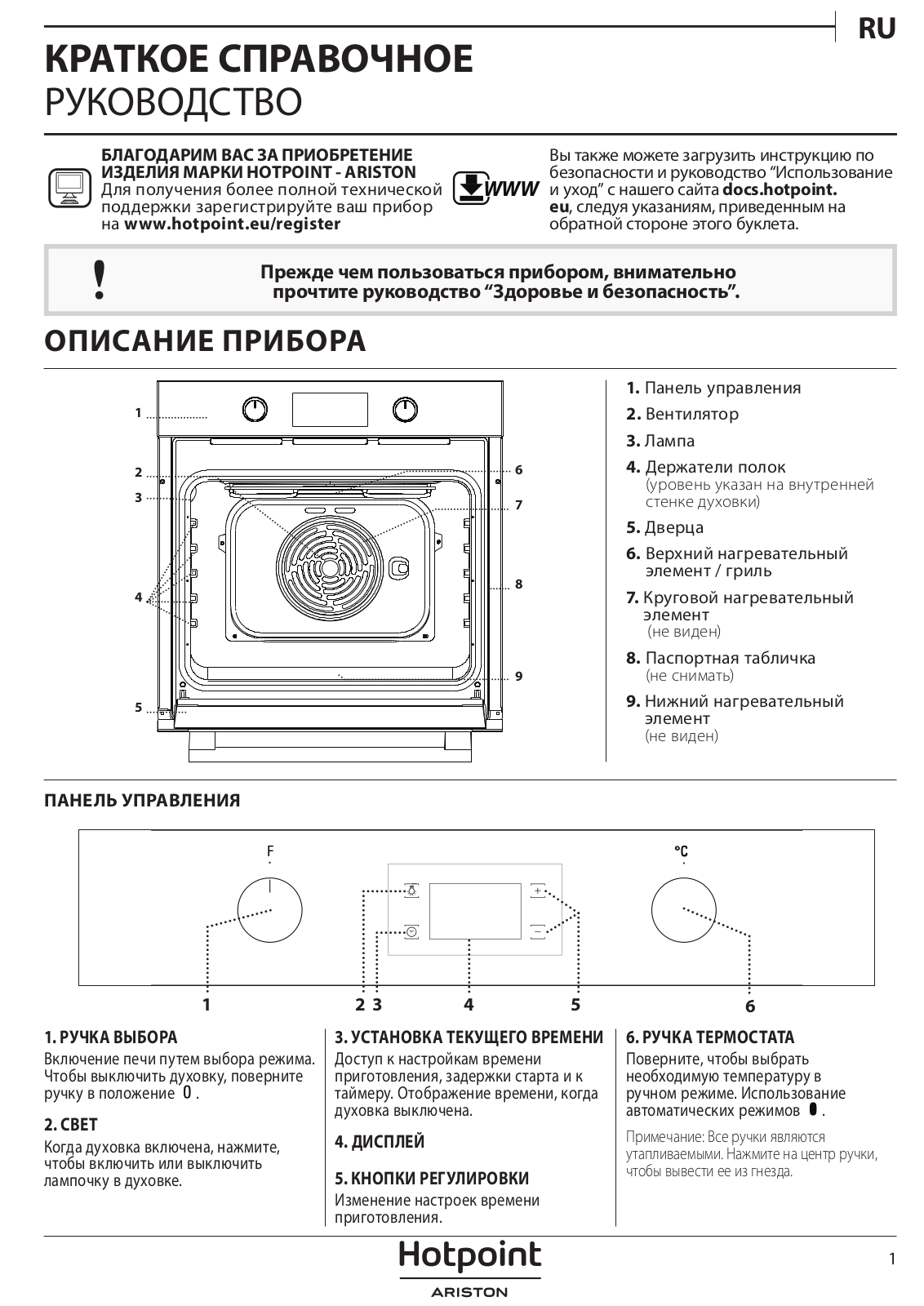
ОПИСАНИЕ ПРИБОРА
КРАТКОЕ СПРАВОЧНОЕ
РУКОВОДСТВО
ПАНЕЛЬ УПРАВЛЕНИЯ
Прежде чем пользоваться прибором, внимательно
прочтите руководство “Здоровье и безопасность”.
1.
Панель управления
2.
Вентилятор
3.
Лампа
4.
Держатели полок
(уровень указан на внутренней
стенке духовки)
5.
Дверца
6.
Верхний нагревательный
элемент / гриль
7.
Круговой нагревательный
элемент
(не виден)
8.
Паспортная табличка
(не снимать)
9.
Нижний нагревательный
элемент
(не виден)
1. РУЧКА ВЫБОРА
Включение печи путем выбора режима.
Чтобы выключить духовку, поверните
ручку в положение .
2. СВЕТ
Когда духовка включена, нажмите,
чтобы включить или выключить
лампочку в духовке.
3. УСТАНОВКА ТЕКУЩЕГО ВРЕМЕНИ
Доступ к настройкам времени
приготовления, задержки старта и к
таймеру. Отображение времени, когда
духовка выключена.
4. ДИСПЛЕЙ
5. КНОПКИ РЕГУЛИРОВКИ
Изменение настроек времени
приготовления.
6. РУЧКА ТЕРМОСТАТА
Поверните, чтобы выбрать
необходимую температуру в
ручном режиме. Использование
автоматических режимов .
Примечание: Все ручки являются
утапливаемыми. Нажмите на центр ручки,
чтобы вывести ее из гнезда.
1
2
3
4
5
8
9
7
6
БЛАГОДАРИМ ВАС ЗА ПРИОБРЕТЕНИЕ
ИЗДЕЛИЯ МАРКИ HOTPOINT — ARISTON
Для получения более полной технической
поддержки зарегистрируйте ваш прибор
на
www.hotpoint.eu/register
WWW
Вы также можете загрузить инструкцию по
безопасности и руководство “Использование
и уход” с нашего сайта
docs.hotpoint.
eu
, следуя указаниям, приведенным на
обратной стороне этого буклета.
1
3
2
4
5
6