
hp deskjet
3650
ordering information
c8974a hp deskjet 3650 colour inkjet
printer, hp no. 27 black print cartridge
(10 ml), hp no. 28 tri-colour print
cartridge (8 ml), power supply and
power cord, printer software on CD-ROM
(for Microsoft
®
Windows®and Macintosh
systems), reference guide, set-up poster
cables
c6518a hp USB cable, 2 m
supplies
c8727ae hp no. 27 black inkjet print
cartridge (10 ml)
c6658ae hp no. 58 photo inkjet print
cartridge (17 ml)
c8728ae hp no. 28 tri-colour inkjet print
cartridge (8 ml)
media
c5977b/c1825a hp bright white inkjet
paper, A4 (250/500 sheets)
q1981a/c3837a hp premium high-gloss
film, white, A4 (20/50 sheets)
c1853a hp premium heavyweight paper,
matt, A4 (100 sheets)
51634z hp premium paper, A4 (200 sheets)
c6040a/c7040a hp premium photo paper,
glossy, A4 (15/50 sheets)
c6832a hp premium plus photo paper,
glossy, A4 (20 sheets)
c6951a hp premium plus photo paper,
matt, A4 (20 sheets)
q1786a hp premium plus photo paper,
glossy, A4 (50 sheets)
c7029a hp premium plus transparency
film, A4 (50 sheets)
q1991a/q1992a hp premium photo
paper, glossy, 10 x 15 cm
(20/60 sheets)
chp210 hp printing paper, A4
(500 sheets)
c1847a/c7897a hp photo paper, glossy,
A4 (20/50 sheets)
c6984a hp photo-quality paper, semi-
glossy, two-sided, A4 (25 sheets)
c6045a hp photo greeting cards, white,
half-fold, A4 (10 sets)
c6042a hp matt greeting cards, white,
quarter-fold, A4 (20 sets)
c6829a hp textured greeting cards,
cream, half-fold, A4 (20 serts)
c6050a hp iron-on transfers,
A4 (12 sheets)
c6818a hp brochure and flyer paper,
A4 (50 sheets)
q2525a hp brochure and flyer paper,
glossy, tri-fold, A4 (50 sheets)
http://www.hp.com/uk/colour
http://www.hp.com
For more information, please call your local HP sales office or representative: Austria: 0800 242 242, Algeria: (0)61 56 45 43, Bahrain: 800 728,
Belgium: (078) 15 20 30 (0.0496 EUR/min), Bulgaria: (+359) 2960 1940, Croatia: (+385 1) 60 60 200, Czech Republic: (00 420 2) 261 108 108
(Prague), Denmark: 45991700 or 70101125, Egypt: 532 5222, Estonia: (+372) 6505 263, Finland: (+358) 0205350 or 0205 350, France: (1) 69 82
6060, Germany: 0180 532 6222 (12 Cent/min), Greece: (01) 678 96 00, Hungary: (+36) 1 382-1111, Iceland: (354) 570 1000, Ireland: + 353 1
6158200, Israel: (972) 9 8304848, Italy: (02) 92121, Kazakhstan: +7 (3272) 980 824, Latvia: (371) 800 80 12, Lithuania: (+370) 5210 3333,
Luxembourg: (+352) 263 160 34, Middle East: 00971 4 883 4427, Morocco (African Region): +212 22 40 47 47, Netherlands: (020) 5476666,
Norway: 22 735600, Poland: infolinia: 0-800 122 622, Portugal: (808) 206 001, Romania: (+401) 205 3300, Russia: +7 (095) 797 35 00, Saudi
Arabia: 800 124 4646, Serbia/Montenegro: +381 11 334 21 02, Slovakia: +421-2-50222111, Slovenia: +3861 2307 420, South Africa: 0800 118
883, Spain: (91) 6311600, Sweden: (08) 444 2000, Switzerland: 0848 88 44 66, Tunisia: 71 891 222, Turkey : +90 (216) 579 71 71, UAE: 8004910,
UK: 08705 474747, Ukraine: +380 44 490 61 20.
The information contained in this
document is subject to change without
notice. Energy Star is a U.S. registered
mark of the United States Environmental
Protection Agency. All other products
mentioned herein may be trademarks
of their respective companies.
Microsoft, Windows and MS Windows
are U.S. registered trademarks of
Microsoft Corporation. Pentium is a U.S.
registered trademark of Intel Corporation.
© Copyright Hewlett-Packard 2003
Printed in the EU 06/03
5981-7321EEE
technical specifications
print technology HP Thermal Inkjet
print head nozzles 416 black ink nozzles, 18 kHz maximum firing frequency
300 colour ink nozzles, 21 kHz maximum firing frequency
300 photo ink nozzles (optional), 21 kHz maximum firing frequency.
print speed document type draft fast normal normal best
(up to # pages per minute) Black text A4 17 10 8 0.9
Mixed text/colour graphics A4 12 7 4 0.8
10 x 15 cm colour photo (photo paper) 0.6 0.3
Approximate figures. Exact print speed will vary depending on the system configuration, software program and document complexity.
print quality Black: up to 1200-rendered dpi
Colour: up to 4800 x 1200-optimised dpi and 1200-input dpi
colour technology HP Photoret III precision technology (HP Photoret IV enabled with optional photo cartridge)
operating systems compatibility Microsoft®Windows®98, Me, 2000 Professional, XP; Mac OS 9.1 or greater, OS X 10.1 or greater
minimum system requirements Windows®: CD-ROM drive or internet access, 40 MB of hard disk space to install printer, 175 MB of hard
disk space for HP Photo and Imaging software; Microsoft
®
Windows XP, Pentium®233 MHz, 128 MB RAM;
Windows 2000 Professional, Pentium 133 MHz, 64 MB RAM; Windows 98 and Me, Pentium 150 MHz,
32 MB RAM
Macintosh: CD-ROM drive or internet access, 40 MB of hard disk space to install printer, 175 MB of hard disk
space for HP Photo and Imaging software, G3 processor or greater, Mac OS 9.1 or greater, 64 MB RAM;
OS X 10.1 or greater, 128 MB RAM
memory 364 KB
printer languages Lightweight Imaging Device Interface Language (LIDIL)
duty cycle Up to 1,000 pages per month
recommended media weight A4: 65 to 90 g/m2, envelopes: 70 -90 g/m2, cards: up to 200 g/m2, photo paper: up to 280 g/m
2
recommended media Plain paper
media sizes Standard: A4, A5, A6, B5, C6, DL; custom: 77 x 127 mm to 215 x 355 mm
media handling/input Sheets: 100, envelopes: 10, cards: 30, transparencies: 30, labels/A4 sheets: 20
media handling/output 50
paper input trays 100-sheet input tray
duplex printing Manual (driver support provided)
power requirements Input voltage 100 to 240 VAC (± 10%), 50/60 Hz (± 3Hz). External
power consumption 25 watts maximum (average printing), 5.4 watts minimum non-printing, 2.4 watts maximum when off
interface and connectivity USB – compatible with USB 2.0 specifications
software included HP Photo and Imaging software
dimensions (w x d x h) Out of package: 439 x 207 x 144 mm, packaged: 476 x 194 x 266 mm
weight Out of package: 2.3 kg, packaged: 3.2 kg
operating environment Environmental ranges: operating temperature: 10 to 35°C, recommended operating temperature: 15 to 35° C,
operating humidity: 15 to 80% RH, non-condensing, recommended operating humidity: 20 to 80% RH,
non-condensing, storage temperature: -40 to 60° C, noise level per ISO 9296 sound power LwAd: 5.0 B(A)
best mode, sound pressure LpAm: 36 dB(A) best mode
Energy Star
®
Yes
supplies life Black and white: c8727ae hp no. 27 black inkjet print cartridge (10 ml) 220 pages*
Colour: c8728ae hp no. 28 tri-colour inkjet print cartridge (8 ml) 190 pages*
* Based on 5% coverage for black and white and 15% for colour, in normal mode.
warranty 1 year limited warranty
Просмотр
Доступно к просмотру 101 страница. Рекомендуем вам скачать файл инструкции, поскольку онлайн просмотр документа может сильно отличаться от оригинала.
-
?oeiaianoai iieuciaaoaey
Aey iieo?aiey ioaaoa ia eioa?ano?uee aii?in auaa?eoa iaei ec ?acaaeia:
l     Oaaaiieaiey
l     Niaoeaeuiua ooieoee
l     Ia?aei ?aaiou
l     Niaaeiaiea
l     Ia?aou
l     Oaoie?aneia ianeo?eaaiea
l     Ono?aiaiea iaiieaaie
l     Oaoie?aneea oa?aeoa?enoeee
-
Oaaaiieaiey
l     Oaaaiieaiey e iiaoaa??aaiea i?aa nianoaaiiinoe
l     Oa?ieiu e iaicia?aiey
-
Oaaaiieaiey e iiaoaa??aaiea i?aa nianoaaiiinoe
Oaaaiieaiey eiiiaiee Hewlett-Packard
Naaaaiey, niaa??aueany a ianoiyuai aieoiaioa, iiaoo auou eciaiaiu aac oaaaiieaiey.
Hewlett-Packard (HP) ia aaao ieeaeeo aa?aioee a ioiioaiee niaa??aiey ianoiyuae aieoiaioaoee,
aee??ay (ii ia ia?aie?eaaynu yoei) iia?acoiaaaaiua aa?aioee eiiia??aneie i?eaiaiinoe e
niioaaonoaey ii?aaaeaiiie oaee.
Eiiiaiey Hewlett-Packard ia ianao ioaaonoaaiiinoe ie ca eaeea ioeaee, a oae?a ca neo?aeiua eee
einaaiiua oauoee, aicieeoea a nayce n iinoaaeie, yenieoaoaoeae eee eniieuciaaieai ianoiyuae
aieoiaioaoee.
Ana i?aaa caueuaiu. Aini?iecaaaaiea, aaaioaoey e ia?aaia ianoiyuae aieoiaioaoee aac
i?aaaa?eoaeuiiai ienuiaiiiai ?ac?aoaiey eiiiaiee Hewlett Packard cai?auaiu, ca enee??aieai
neo?aaa, aiioneaaiuo caeiiiaaoaeunoaii ia aaoi?neii i?aaa.
I?aaa nianoaaiiinoe
Microsoft, MS, MS-DOS, Windows e O? yaey?ony ca?aaeno?e?iaaiiuie oi?aiauie ia?eaie
ei?ii?aoee Microsoft.
TrueType yaeyaony oi?aiaie ia?eie NOA ei?ii?aoee Apple Computer.
Adobe e Acrobat yaey?ony oi?aiauie ia?eaie ei?ii?aoee Adobe Systems Incorporated.
(c) Eiiiaiey Hewlett-Packard, 2003 a.
- 1
- 2
- 3
- 4
- 101
Report abuse
Libble takes abuse of its services very seriously. We’re committed to dealing with such abuse according to the laws in your country of residence. When you submit a report, we’ll investigate it and take the appropriate action. We’ll get back to you only if we require additional details or have more information to share.
Product:
Get your user manual by e-mail
Enter your email address to receive the manual of HP Deskjet 3650 in the language / languages: English as an attachment in your email.
The manual is 1,29 mb in size.
You will receive the manual in your email within minutes. If you have not received an email, then probably have entered the wrong email address or your mailbox is too full. In addition, it may be that your ISP may have a maximum size for emails to receive.
The manual is sent by email. Check your email
If you have not received an email with the manual within fifteen minutes, it may be that you have a entered a wrong email address or that your ISP has set a maximum size to receive email that is smaller than the size of the manual.
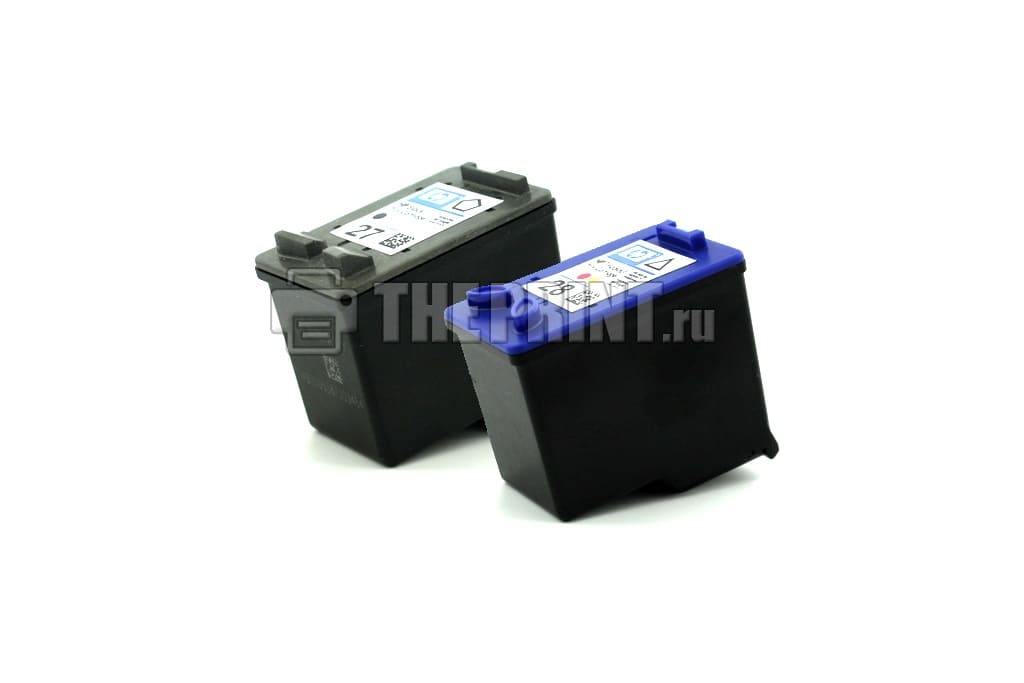
Рисунок 1.
HP DeskJet-3650 относится к бюджетному классу принтера и МФУ, со встроенными печатающими головками (далее ПГ) в картридже. Когда пользователи приобретают печатающие устройства по относительно низкой цене, после израсходования чернил, узнают о стоимости новых расходных материалов и думают как сэкономить на печати. Одним из способов не тратить лишние деньги, является заправка картриджей HP 3650 в домашних условиях.
Чернила подходящие для принтера HP DeskJet-3650 в нашем интернет магазине
В принтере находятся два картриджа, черный HP 27 и цветной картридж HP 28. На их примере мы покажем как заправить принтер HP DeskJet-3650 самостоятельно. Для успешного результата заправки, необходимо убедиться в работоспособности картриджей. Самые распространенные проблемы, это засохла печатающая головка или вышла из строя электроника. В первом случае, надо прочистить ПГ специальной промывочной жидкостью, а во втором случае нужно покупать новый.
Заправка картриджа HP DeskJet-3650 своими руками не сложный процесс, ниже мы покажем как это возможно сделать. В черном картридже лучше вставлять иглу в центральное отверстие. В цветном, для начала, надо определить расположение цветов. Возможны несколько вариантов, один из них представлен на рисунке 2.
Определить расположение цветов можно различными способами:
- Под наклейкой внимательно посмотреть на губку в заправочных отверстиях и увидеть следы чернил.
- Сделать отпечаток ПГ на листе (Цвет посередине отпечатка всегда находится вверху, а цвета слева и права отпечатка находятся соответственно отпечатка в картридже. (Рисунок 2)).
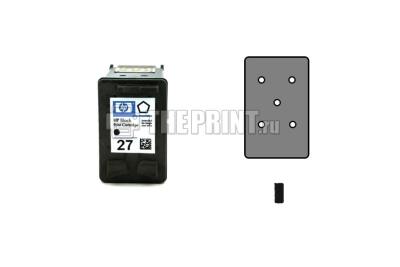
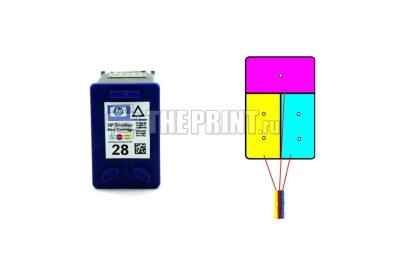
Рисунок 2.
- Приступаем к заправке картриджей HP 3650, набираем в шприцы краску, лучше взять 4 шприца и заправить их чернилами (Black, Magenta, Yellow, Cyan), можно использовать 10 или как в нашем случае 20 мл. шприцы.
- Аккуратно снимаем сверху наклейки, если ранее этого не сделали.
- Вставляем иглу шприца внутрь заправочного отверстия. Вводить глубоко не нужно, достаточно 10-15 мм. (Рисунок 3)
- Медленно вводите чернила до тех пор, пока чернила не появится в заправочном отверстии, нужно примерно 10 мл. для черного и 9 мл. (по 3 мл. в каждый цвет) для цветного, далее излишние чернила откачать обратно в шприц, всегда лучше не долить чернила, чем перелить. (Рисунок 3.)
- Заправляем все цвета и очищаем сухой салфеткой поверхности от чернил.
- Наклейте этикетки на место (При необходимости возможно использовать скотч).
- Делаем отпечаток печатающих головок на листе, они должны быть четкими. (Рисунок 2.)
- Устанавливаем заправленные картриджи в принтер, делаем прочистку ПГ.
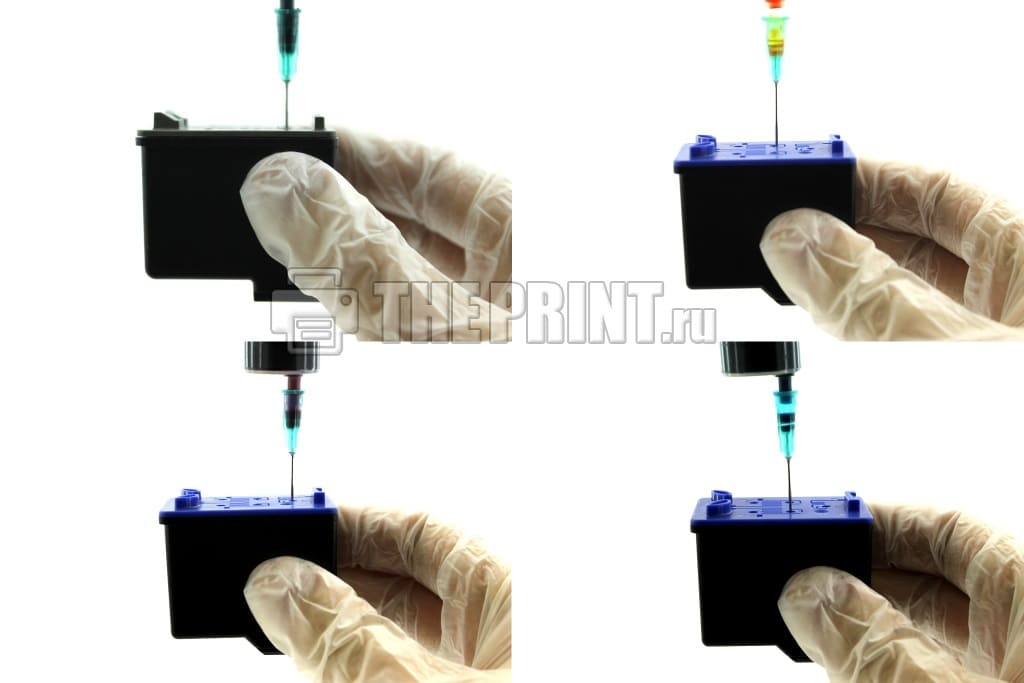
Рисунок 3.
ВАЖНО!
- Обратите внимание на контакты (Рисунок 4), они должны быть сухие, если Вы установите в принтер расходный материал с мокрыми контактами, у Вас сгорит электроника.
- Если Вы заправляете первый раз, то нужно отменить слежение за расходными материалами, для этого нажмите и удерживайте кнопку «Отмена» (Красный крестик или треугольник) на принтере в течение 15 секунд. После отмены слежения, у Вас печатающее устройство будет сигнализировать что чернила закончились, но печатать будет.
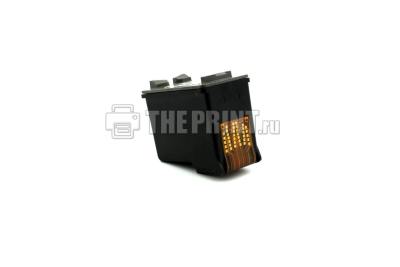
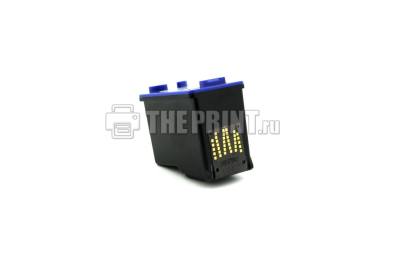
Рисунок 4.
Вспомогательные товары для заправки картриджа HP DeskJet-3650
Перейдя по ссылке, Вы можете посмотреть полный список чернил для принтера HP DeskJet-3650 на нашем сайте.
Скачать файл PDF «HP Deskjet 3650 Инструкция по эксплуатации» (95 Kb)
Популярность:
1585 просмотры
Подсчет страниц:
2 страницы
Тип файла:
Размер файла:
95 Kb
Google Ads: