
Данная лицензия не предназначена для продажи этого Руководства и Вы не становитесь владельцем этого Руководства после приобретения любого продукта, загрузки и/или использования. Nikon сохраняет за собой право владения данным Руководством и, следовательно, всеми копиями и все соответствующие права, относящиеся к интеллектуальной собственности, и сохраняет за собой все права, которые явно не предоставлены Вам в рамках данного Соглашения. Данное Соглашение представляет собой полное и эксклюзивное соглашение, устное и письменное, между Вами и Nikon.
1. РУКОВОДСТВО
Руководство предназначено для клиентов, которые приобрели наши продукты. Мы можем не иметь возможности ответить на запрос физических лиц, которые не приобрели наши продукты. Пожалуйста, имейте в виду, что данное руководство и контактная информация, указанные здесь, могут быть изменены без уведомления.
Данное Руководство защищено Законом об авторском праве Японии и международными законами об авторском праве и международными договорами. Вам необходимо воспроизвести на каждой копии уведомление об авторском праве Nikon и любую другую информацию о праве собственности, которые присутствовали на оригинале.
2. ОГРАНИЧЕНИЯ
Кроме случаев, когда в данном Соглашении указано иное, нельзя делать или передавать копии данного Руководства другим или передавать в электронной форме Руководство с одного компьютера на другой по сети. НЕЛЬЗЯ ИЗМЕНЯТЬ ИЛИ УДАЛЯТЬ ЛЮБЫЕ УВЕДОМЛЕНИЯ ОБ АВТОРСКОМ ПРАВЕ, ТОРГОВОЙ МАРКЕ ИЛИ ДРУГИЕ ЗАЩИТНЫЕ УВЕДОМЛЕНИЯ, СОДЕРЖАЩИЕСЯ В ДАННОМ РУКОВОДСТВЕ. НЕЛЬЗЯ ПРИСВАИВАТЬ ИЛИ ИНЫМ ОБРАЗОМ ИЗБАВЛЯТЬСЯ, МОДИФИЦИРОВАТЬ, НАСТРАИВАТЬ, ПЕРЕВОДИТЬ, АРЕНДОВАТЬ, БРАТЬ В НАЕМ, ЗАНИМАТЬ, ПЕРЕПРОДАВАТЬ, РАСПРОСТРАНЯТЬ, ПЕРЕДАВАТЬ ПО СЕТИ ИЛИ СОЗДАВАТЬ ИЛИ ИМЕТЬ СОЗДАННЫЕ ПРОИЗВОДСТВЕННЫЕ РАБОТЫ, ОСНОВАННЫЕ НА ДАННОМ РУКОВОДСТВЕ ИЛИ ЛЮБОЙ ЧАСТИ ТАКОВОГО.
3. ОГРАНИЧЕННАЯ ГАРАНТИЯ И ОТКАЗ
В НАИБОЛЬШЕЙ СТЕПЕНИ, РАЗРЕШЕННОЙ В СИЛУ ДЕЙСТВУЮЩЕГО ЗАКОНОДАТЕЛЬСТВА, ДАННОЕ РУКОВОДСТВО ПРЕДОСТАВЛЕНО НА ОСНОВЕ ПРИНЦИПА «КАК ЕСТЬ», БЕЗ ГАРАНТИИ В ЛЮБОЙ ФОРМЕ, И КОМПАНИЯ NIKON, ЕЕ СОТРУДНИКИ, РАСПРОСТРАНИТЕЛИ, ДИЛЕРЫ И АГЕНТЫ ПРЯМО НЕ ПРИЗНАЮТ ЛЮБУЮ ГАРАНТИЮ В ЛЮБОЙ ФОРМЕ, ВЫРАЖЕННУЮ ИЛИ ПОДРАЗУМЕВАЕМУЮ, ВКЛЮЧАЯ, НО НЕ ОГРАНИЧИВАЯСЬ, ЛЮБОЙ ПОДРАЗУМЕВАЕМОЙ ГАРАНТИЕЙ ПРИГОДНОСТИ ДЛЯ ТОРГОВЛИ, ПРИГОДНОСТИ ДЛЯ ОПРЕДЕЛЕННОГО НАЗНАЧЕНИЯ ИЛИ ОТСУТСТВИЯ НАРУШЕНИЙ. В НАИБОЛЬШЕЙ СТЕПЕНИ, РАЗРЕШЕННОЙ В СИЛУ ДЕЙСТВУЮЩЕГО ЗАКОНОДАТЕЛЬСТВА, КОМПАНИЯ NIKON, ЕЕ СОТРУДНИКИ, РАСПРОСТРАНИТЕЛИ, ДИЛЕРЫ И АГЕНТЫ НЕ ГАРАНТИРУЮТ ИСПОЛНЕНИЕ ИЛИ РЕЗУЛЬТАТЫ, КОТОРЫЕ ВЫ МОЖЕТЕ ПОЛУЧИТЬ ИЗ ДАННОГО РУКОВОДСТВА, ИЛИ ЧТО ДАННОЕ РУКОВОДСТВО БУДЕТ СООТВЕТСТВОВАТЬ ВАШИМ ТРЕБОВАНИЯМ ИЛИ ЧТО РАБОТА РУКОВОДСТВА БУДЕТ БЕСПЕРЕБОЙНОЙ, БЕЗОШИБОЧНОЙ ИЛИ НЕ БУДЕТ СОДЕРЖАТЬ ВИРУСОВ. В НАИБОЛЬШЕЙ СТЕПЕНИ, РАЗРЕШЕННОЙ В СИЛУ ДЕЙСТВУЮЩЕГО ЗАКОНОДАТЕЛЬСТВА, НИ КОМПАНИЯ NIKON, НИ ЕЕ СОТРУДНИКИ, РАСПРОСТРАНИТЕЛИ, ДИЛЕРЫ И АГЕНТЫ НЕ ДОЛЖНЫ НЕСТИ ПЕРЕД ВАМИ ОТВЕТСТВЕННОСТЬ ЗА ЛЮБЫЕ КОСВЕННЫЕ, ПОСЛЕДУЮЩИЕ ИЛИ НЕПРЕДНАМЕРЕННЫЕ УБЫТКИ, ПОТЕРИ ИЛИ ИЗДЕРЖКИ ЛЮБОГО ТИПА, БУДЬ ТО ПОТЕРЯ ПРИБЫЛИ, ПЕРЕРЫВ В ДЕЯТЕЛЬНОСТИ ИЛИ ИНЫМ СПОСОБОМ ВОЗНИКАЮЩИЙ ИЛИ ЯВЛЯЮЩИЙСЯ СЛЕДСТВИЕМ ДАННОГО РУКОВОДСТВА, ВЫЗВАННЫЙ КАКИМ-ЛИБО СПОСОБОМ, ДАЖЕ ЕСЛИ КОМПАНИЯ NIKON, ЕЕ СОТРУДНИКИ, РАСПРОСТРАНИТЕЛИ, ДИЛЕРЫ ИЛИ АГЕНТЫ УВЕДОМЛЕНЫ О ВОЗМОЖНОСТИ ВОЗНИКНОВЕНИЯ ТАКИХ УБЫТКОВ, ПОТЕРЬ ИЛИ ИЗДЕРЖЕК. ЭТОТ ОТКАЗ СОСТАВЛЯЕТ СУЩЕСТВЕННУЮ ЧАСТЬ ДАННОГО СОГЛАШЕНИЯ, И НЕИСПОЛЬЗОВАНИЕ ДАННОГО РУКОВОДСТВА УПОЛНОМОЧЕНО, КРОМЕ СЛУЧАЕВ В РАМКАХ ДАННОГО ОТКАЗА.
4. ОБЩИЕ СВЕДЕНИЯ
Данное соглашение регулируется и должно истолковываться в соответствии с законами Японии независимо от его принципов коллизионного права. В случае возникновения спора в рамках или в связи с данным соглашением Вы, таким образом, даете согласие на персональную юрисдикцию Японии и отказываетесь от любого возражения, что такая дискуссия вызывает затруднение. Далее Вы соглашаетесь на получение судебных извещений в любом действии, возникающем из данного Соглашения по обычной почте или другими коммерчески оправданными способами доставки расписки в получении. Если любое положение данного Соглашения должно быть определено недействительным по какой-либо причине, то оставшиеся положения не должны быть признаны недействительными и должны остаться в силе без изменений. Данное Соглашение устанавливает в дальнейшем целое соглашение и понимание между Вами и компанией Nikon, и замещает собой и заменяет любые другие соглашения, относящиеся к сути дела данного Соглашения. Неуспех любой стороны в настаивании на строгом исполнении любого правила или положения данного соглашения, или выполнение любой опции, права или защиты прав, содержащихся в данном документе, не должны толковаться в качестве отказа от любого применения такого правила, положения, опции, права или защиты прав в будущем, и такое правило, положение, опция, право или защита прав должны продолжиться и сохранить полную юридическую силу и действие. Заголовки разделов данного Соглашения вставлены только для удобства и не должны составлять часть данного документа или влиять каким-либо образом на значение или толкование данного Соглашения. Кроме случаев, когда иначе явно указано в данном документе, положения раздела 3 и раздела 4 вместе с любыми положениями, которые с помощью своих прямо выраженных условий относятся к периодам после прекращения срока действия данного Соглашения, должны оставаться в силе после прекращения действия данного Соглашения по какой-либо причине.
Руководства для продуктов Nikon/ 2018/02/15/ Вер. 2.0.0
Данное руководство не может быть воспроизведено в любой форме
целиком или частично (за исключением краткого цитирования в
статьях или обзорах) без письменного разрешения компании NIKON.
Отпечатано в России
CT3A01(1D)
6MN1411D-01
Сертификат соответствия: РОСС JP.АЯ46.B06061
Срок действия: с 16.07.2012 г. по 15.07.2015 г.
Орган по сертификации: РОСС RU.0001.10АЯ46 «РОСТЕСТ-МОСКВА»
ЦИФРОВАЯ ФОТОКАМЕРА
Подробное руководство пользователя

Основные функции COOLPIX L820
Фотокамера сделает все сама
G
(простой авто режим) …………………………………….. A 36
При наведении фотокамеры на выбранный объект она сама выбирает подходящие настройки.
Это упрощает съемку в условиях, обычно требующих сложной настройки (например, съемка
при освещении сзади или ночью).
Чтобы быстро сделать снимок, достаточно нажать спусковую кнопку затвора.
Простота записи видеороликов
d
Видеоролики HD1080p ……………………………….. A 88
Простым нажатием кнопки выполняется запись видеоролика высокого разрешения 1080p.
Для показа видеоролика в семье или друзьям подключите фотокамеру к телевизору.
Стереофоническое звучание позволит им погрузиться в атмосферу ваших приключений.
Добавление специальных эффектов, позволяющих снимать уникальные кадры
Режим специальных эффектов …………………………… A 47
Осветляйте, затемняйте или смягчайте фотоснимки или же сохраняйте специфический цвет в
изображении, изменив все прочие цвета на черно-белые.


ii
Вв
ед
ен
ие
Введение
Прочтите это в первую очередь
Благодарим вас за приобретение цифровой фотокамеры Nikon COOLPIX L820. Прежде чем
начать пользоваться фотокамерой, ознакомьтесь с содержанием раздела «Меры
предосторожности» (
A ix) и с информацией, содержащейся в этом руководстве. После
прочтения этого руководства держите его под рукой и обращайтесь к нему для ознакомления
с преимуществами новой камеры.

iii
Вв
ед
ен
ие
Об этом руководстве
Чтобы сразу начать пользоваться фотокамерой, см. раздел «Основы съемки и просмотра» (
A 13).
Чтобы узнать о частях фотокамеры, а также об информации, отображаемой на мониторе, см.
раздел «Основные элементы фотокамеры» (
A 1).

iv
Вв
ед
ен
ие
Дополнительная информация
• Символы и условные обозначения
Для облегчения поиска информации в этом руководстве используются следующие символы
и условные обозначения.
• В настоящем руководстве карты памяти SD, SDHC и SDXC собирательно именуются «картами памяти».
• Настройка, устанавливаемая при покупке, называется «настройкой по умолчанию».
• Названия пунктов меню, отображаемых на мониторе фотокамеры, а также названия кнопок
и сообщения, отображаемые на мониторе компьютера, выделяются жирным шрифтом.
• В этом руководстве примеры отображения на мониторе могут не включать изображения,
чтобы индикация на мониторе была более понятной.
• В этом руководстве иллюстрации и информация, отображаемая на мониторе, могут
отличаться от фактического отображения.
Значок
Описание
B
Этим символом обозначаются меры предосторожности и сведения, с которыми
необходимо ознакомиться до использования фотокамеры.
C
Этим символом обозначаются примечания и сведения, с которыми необходимо
ознакомиться до использования фотокамеры.
A/E/F
Этими символами обозначаются страницы, содержащие соответствующие сведения.
E: «Раздел справочной информации», F: «Технические примечания и алфавитный указатель».

v
Вв
ед
ен
ие
Информация и меры предосторожности
Концепция «постоянного совершенствования»
В рамках развиваемой компанией Nikon концепции «постоянного совершенствования»
пользователям предоставляется регулярно обновляемая информация о поддержке выпущенных
изделий и учебные материалы на следующих веб-сайтах:
• Для пользователей в США: http://www.nikonusa.com/
• Для пользователей в Европе и Африке: http://www.europe-nikon.com/support/
• Для пользователей в странах Азии, Океании и Ближнего Востока: http://www.nikon-asia.com/
Посетите один из этих веб-сайтов для получения последних сведений об изделиях, советов, ответов на
часто задаваемые вопросы и общих рекомендаций по фотосъемке и обработке цифровых
изображений. Дополнительные сведения можно получить у региональных представителей компании
Nikon. Контактные сведения можно узнать, посетив указанный ниже веб-сайт.
http://imaging.nikon.com/
Используйте только фирменные электронные принадлежности Nikon
Фотокамеры Nikon COOLPIX отвечают самым современным стандартам и имеют сложную электронную
схему. Только фирменные электронные принадлежности Nikon (включая зарядные устройства,
батареи и сетевые блоки питания), прошедшие специальную сертификацию Nikon для использования
с цифровой фотокамерой Nikon, разработаны и проверены на соответствие эксплуатационным
требованиям и требованиям безопасности этой электронной схемы.
И
СПОЛЬЗОВАНИЕ ЭЛЕКТРОННЫХ ПРИНАДЛЕЖНОСТЕЙ ДРУГИХ ПРОИЗВОДИТЕЛЕЙ (НЕ
N
IKON)
МОЖЕТ ПРИВЕСТИ К ПОВРЕЖДЕНИЮ ФОТОКАМЕРЫ И АННУЛИРОВАНИЮ ГАРАНТИИ
N
IKON.
Для получения сведений о фирменных принадлежностях Nikon обратитесь к местному официальному
торговому представителю компании Nikon.

vi
Вв
ед
ен
ие
Перед съемкой важных событий
Перед съемкой важных событий, например свадьбы, или перед тем как взять фотокамеру в
путешествие, сделайте пробный снимок, чтобы убедиться в правильности работы фотокамеры.
Компания Nikon не несет ответственности за убытки или упущенную выгоду, возникшие в результате
неправильной работы изделия.
О руководствах
• Никакая часть руководств, включенных в комплект поставки данного продукта, не может быть
воспроизведена, передана, переписана, сохранена в системе резервного копирования или переведена на
любой язык в любой форме любыми средствами без предварительного письменного разрешения Nikon.
• Компания Nikon сохраняет за собой право изменять любые характеристики аппаратного и программного
обеспечения, описанного в данных руководствах, в любое время и без предварительного уведомления.
• Компания Nikon не несет ответственности за какой бы то ни было ущерб, вызванный применением
данного изделия.
• Были приложены все усилия для того, чтобы обеспечить точность и полноту приведенной в руководствах
информации. Компания Nikon будет благодарна за любую информацию о замеченных ошибках и
упущениях, переданную в ближайшее представительство компании (адрес сообщается отдельно).

vii
Вв
ед
ен
ие
Уведомление о запрещении копирования или воспроизведения
Необходимо помнить, что даже простое обладание материалом, скопированным или
воспроизведенным цифровым способом с помощью сканера, цифровой фотокамеры или другого
устройства, может преследоваться по закону.
• Материалы, копирование или воспроизведение которых запрещено законом
Не копируйте и не воспроизводите денежные банкноты, монеты, ценные бумаги, государственные ценные
бумаги и ценные бумаги органов местного самоуправления, даже если такие копии и репродукции
отмечены штампом «образец». Запрещено копирование и воспроизведение денежных банкнот, монет и
ценных бумаг других государств. Запрещено копирование и воспроизведение негашеных почтовых марок и
почтовых открыток, выпущенных государством, без письменного разрешения государственных органов.
Запрещено копирование и воспроизведение печатей государственных учреждений и документов,
заверенных в соответствии с законодательством.
• Предупреждения относительно копирования и воспроизведения
Копии и репродукции ценных бумаг, выпущенных частными компаниями (акции, векселя, чеки,
подарочные сертификаты и т. д.), сезонных билетов или купонов помечаются предупреждениями
согласно требованиям государственных органов, кроме минимального числа копий, необходимого
для использования компанией в деловых целях. Не копируйте и не воспроизводите государственные
паспорта; лицензии, выпущенные государственными учреждениями и частными компаниями;
удостоверения личности и такие документы, как пропуска или талоны на питание.
• Уведомления о соблюдении авторских прав
Копирование или воспроизведение книг, музыкальных произведений, произведений живописи,
гравюр, печатной продукции, географических карт, чертежей, фильмов и фотографий с
зарегистрированным авторским правом охраняется государственным и международным
законодательством об авторском праве. Не используйте изделие для изготовления незаконных копий,
нарушающих законодательство об авторском праве.

viii
Вв
ед
ен
ие
Утилизация устройств хранения данных
Обратите внимание на то, что при удалении изображений или форматировании устройств хранения
данных, таких как карты памяти или внутренняя память фотокамеры, исходные данные изображений
уничтожаются не полностью. В некоторых случаях файлы, удаленные с отслуживших свой срок
устройств хранения данных, можно восстановить с помощью имеющихся в продаже программных
средств. Ответственность за обеспечение конфиденциальности любой подобной информации лежит
исключительно на пользователе.
Прежде чем избавиться от неиспользуемых устройств хранения данных или передать право
собственности на них другому лицу, следует стереть всю информацию с помощью имеющегося в
продаже специального программного обеспечения или отформатировать устройство, а затем
заполнить его изображениями, не содержащими личной информации (например, видами ясного
неба). Не забудьте также заменить изображения, выбранные для функции
Выбрать снимок
параметра
Экран приветствия (A 96). При физическом уничтожении устройств хранения данных
соблюдайте меры предосторожности, чтобы не нанести ущерба здоровью или имуществу.
06:05
Фотоаппарат Nikon Coolpix L820
03:47
Обзор фотоаппарата Nikon L820
05:28
Видеообзор Nikon CoolPix L820
20:07
обзор фотоаппарата Nikon Coolpix L820 спустя 4 года эксплутации
05:03
Тест фото видео Nikon Coolpix L820
05:34
краткий обзор Nikon COOLPIX L820
03:55
Видео-обзор фотоаппарата Nikon Coolpix L820
Нажмите на кнопку для помощи
DIGITAL CAMERA
Reference Manual
Feature Highlights of the COOLPIX L820
Let your camera take over
G (Easy Auto) Mode…………………………………………. A 36
When you aim the camera at your subject, the camera selects the appropriate settings for you.
It’s easy to take pictures in situations that normally require difficult settings, such as when
shooting with backlighting or shooting at night.
Simply press the shutter-release button to capture beautiful shots quickly and easily.
It’s easy to record beautiful movies
d HD1080p Movies ………………………………………. A 88
With just the press of a button you’ll be recording beautiful 1080p high-resolution movies.
When you’re ready to share your movies with friends or family, connect the camera to your
TV. Stereo sound will make them feel a part of your adventures.
Add special effects to capture truly unique shots
Special Effects Mode…………………………………………. A 47
Brighten, darken, or soften your pictures, or keep a specific color in the image and change
the other colors to black and white.
Introduction
Parts of the Camera
The Basics of Shooting and Playback
Shooting Features
Playback Features
Recording and Playing Back Movies
General Camera Setup
Reference Section
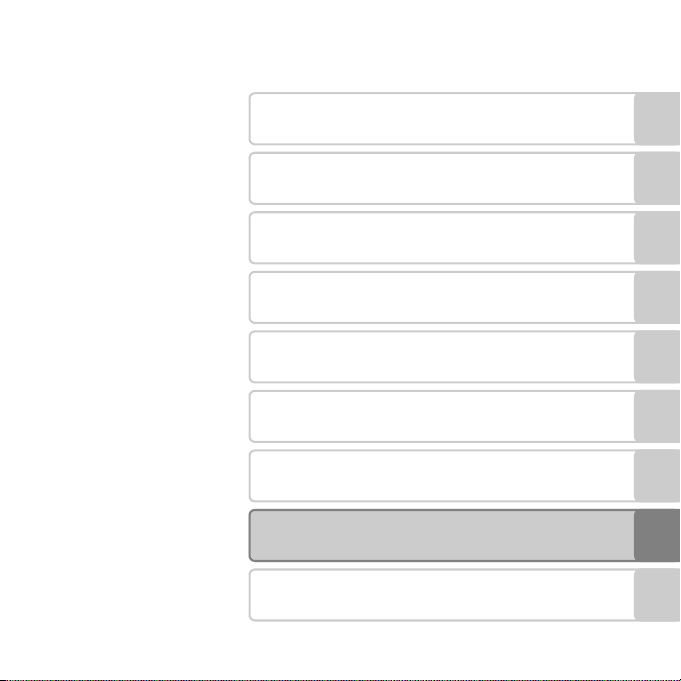
Technical Notes and Index
i
Introduction
Read This First
Thank you for purchasing the Nikon COOLPIX L820 digital camera. Before using the camera,
please read the information in “For Your Safety” (A ix) and familiarize yourself with the
information provided in this manual. After reading, please keep this manual handy and refer
Introduction
to it to enhance your enjoyment of your new camera.
ii

About This Manual
If you want to start using the camera right away, see “The Basics of Shooting and Playback”
(A 13).
To learn about the parts of the camera and information that is displayed in the monitor, see
“Parts of the Camera” (A 1).
Introduction
iii
Other Information
• Symbols and Conventions
To make it easier to find the information you need, the following symbols and conventions
are used in this manual:
Icon Description
B
Introduction
C
A/E/F
This icon indicates cautions and information that should be read before using
the camera.
This icon indicates notes and information that should be read before using the
camera.
These icons indicate other pages containing relevant information;
E: “Reference Section”, F: “Technical Notes and Index.”
• SD, SDHC, and SDXC memory cards are referred to as “memory cards” in this manual.
• The setting at the time of purchase is referred to as the “default setting.”
• The names of menu items displayed in the camera monitor, and the names of buttons or
messages displayed on a computer monitor appear in bold.
• In this manual, images are sometimes omitted from monitor display samples so that
monitor indicators can be more clearly shown.
• Illustrations and monitor content shown in this manual may differ from the actual product.
iv

Information and Precautions
Life-Long Learning
As part of Nikon’s “Life-Long Learning” commitment to ongoing product support and education,
continually updated information is available online at the following sites:
• For users in the U.S.A.: http://www.nikonusa.com/
• For users in Europe and Africa: http://www.europe-nikon.com/support/
• For users in Asia, Oceania, and the Middle East: http://www.nikon-asia.com/
Visit these sites to keep up-to-date with the latest product information, tips, answers to frequently
asked questions (FAQs), and general advice on digital imaging and photography. Additional
information may be available from the Nikon representative in your area. Visit the site below for
contact information:
http://imaging.nikon.com/
Use Only Nikon Brand Electronic Accessories
Nikon COOLPIX cameras are designed to the highest standards and include complex electronic
circuitry. Only Nikon brand electronic accessories (including battery chargers, batteries, and AC
adapters) certified by Nikon specifically for use with this Nikon digital camera are engineered and
proven to operate within the operational and safety requirements of this electronic circuitry.
THE USE OF NON-NIKON ELECTRONIC ACCESSORIES COULD DAMAGE THE CAMERA AND MAY
VOID YOUR
For more information about Nikon brand accessories, contact a local authorized Nikon dealer.
NIKON WARRANTY.
Introduction
v

Before Taking Important Pictures
Before taking pictures on important occasions (such as at weddings or before taking the camera on
a trip), take a test shot to ensure that the camera is functioning normally. Nikon will not be held liable
for damages or lost profits that may result from product malfunction.
About the Manuals
• No part of the manuals included with this product may be reproduced, transmitted, transcribed,
Introduction
stored in a retrieval system, or translated into any language in any form, by any means, without
Nikon’s prior written permission.
• Nikon reserves the right to change the specifications of the hardware and software described in
these manuals at any time and without prior notice.
• Nikon will not be held liable for any damages resulting from the use of this product.
• While every effort was made to ensure that the information in these manuals is accurate and
complete, we would appreciate it were you to bring any errors or omissions to the attention of the
Nikon representative in your area (address provided separately).
vi

Notice Concerning Prohibition of Copying or Reproduction
Note that simply being in possession of material that was digitally copied or reproduced by means
of a scanner, digital camera or other device may be punishable by law.
• Items prohibited by law from being copied or reproduced
Do not copy or reproduce paper money, coins, securities, government bonds or local government
bonds, even if such copies or reproductions are stamped “Sample.” The copying or reproduction of
paper money, coins, or securities which are circulated in a foreign country is prohibited. Unless the
prior permission of the government was obtained, the copying or reproduction of unused postage
stamps or post cards issued by the government is prohibited.
The copying or reproduction of stamps issued by the government and of certified documents
stipulated by law is prohibited.
• Cautions on certain copies and reproductions
The government has issued cautions on copies or reproductions of securities issued by private
companies (shares, bills, checks, gift certificates, etc.), commuter passes, or coupon tickets, except
when a minimum of necessary copies are to be provided for business use by a company. Also, do
not copy or reproduce passports issued by the government, licenses issued by public agencies and
private groups, ID cards and tickets, such as passes and meal coupons.
• Comply with copyright notices
The copying or reproduction of copyrighted creative works such as books, music, paintings,
woodcut prints, maps, drawings, mov ies, and photographs is governed by national and international
copyright laws. Do not use this product for the purpose of making illegal copies or to infringe
copyright laws.
Introduction
vii

Disposing of Data Storage Devices
Please note that deleting images or formatting data storage devices such as memory cards or
built-in camera memory does not completely erase the original image data. Deleted files can
sometimes be recovered from discarded storage devices using commercially available software,
potentially resulting in the malicious use of personal image data. Ensuring the privacy of such data is
the user’s responsibility.
Before discarding a data storage device or transferring ownership to another person, erase all data
Introduction
using commercial deletion software, or format the device and then completely refill it with images
containing no private information (for example, pictures of empty sky). Be sure to also replace any
pictures selected for the Select an image option in the Welcome screen setting (A 96). Care
should be taken to avoid injury or damage to property when physically destroying data storage
devices.
viii
For Your Safety
To prevent damage to your Nikon product or injury to yourself or to others, read
the following safety precautions in their entirety before using this equipment.
Keep these safety instructions where all those who use the product will read them.
This icon marks warnings, information that should be read before using this Nikon
product, to prevent possible injury.
WARNINGS
Turn off in the event of
malfunction
Should you notice smoke or an
unusual smell coming from the
camera or AC adapter, unplug the AC
adapter and remove the batteries
immediately, taking care to avoid
burns. Continued operation could
result in injury. After removing or
disconnecting the power source, take
the equipment to a Nikon-authorized
service representative for inspection.
Do not disassemble
Touching the internal parts of the
camera or AC adapter could result in
injury. Repairs should be performed
only by qualified technicians. Should
the camera or AC adapter break open
as the result of a fall or other accident,
take the product to a Nikon-authorized
service representative for inspection,
after unplugging the product and/or
removing the batteries.
Do not use the camera or AC
adapter in the presence of
flammable gas
Do not use electronic equipment in
the presence of flammable gas, as this
could result in explosion or fire.
Handle the camera strap with
care
Never place the strap around the neck
of an infant or child.
Introduction
ix
Keep out of reach of children
Particular care should be taken to
prevent infants from putting the
batteries or other small parts into their
mouths.
Introduction
Do not remain in contact with
the camera, battery charger,
or AC adapter for extended
periods while the devices are
on or in use
Parts of the devices become hot.
Leaving the devices in direct contact
with the skin for extended periods may
result in low-temperature burns.
Observe caution when
handling batteries
Batteries may leak or explode if
improperly handled. Observe the
following precautions when handling
batteries for use in this product:
• Before replacing the batteries, turn
the product off. If you are using an
AC adapter, be sure it is unplugged.
• Use only the batteries approved for
use in this product (A 14). Do not
combine old and new batteries or
batteries of different makes or types.
• When charging Nikon EN-MH2
rechargeable Ni-MH batteries, use
only the specified charger and
charge the batteries four at a time.
When replacing the batteries with
EN-MH2-B2 batteries (available
separately), purchase two sets (total
of four batteries).
• The EN-MH2 rechargeable batteries
are for use with Nikon digital
cameras only, and are compatible
with COOLPIX L820.
• Insert batteries in the correct
orientation.
• Do not short or disassemble
batteries or attempt to remove or
break battery insulation or casing.
• Do not expose batteries to flame or
to excessive heat.
• Do not immerse in or expose to
water.
• Do not transport or store with metal
objects such as necklaces or
hairpins.
• Batteries are prone to leakage when
fully discharged. To avoid damage
to the product, be sure to remove
the batteries when no charge
remains.
x
• Discontinue use immediately should
you notice any change in the
batteries, such as discoloration or
deformation.
• If liquid from damaged batteries
comes in contact with clothing or
skin, rinse immediately with plenty
of water.
Observe the following
precautions when handling
the Battery Chargers
(available separately)
• Keep dry. Failure to observe this
precaution could result in fire or
electric shock.
• Dust on or near the metal parts of
the plug should be removed with a
dry cloth. Continued use could
result in fire.
• Do not handle the power cable or
go near the battery charger during
lightning storms. Failure to observe
this precaution could result in
electric shock.
• Do not damage, modify, forcibly tug
or bend the power cable, place it
under heavy objects, or expose it to
heat or flame. Should the insulation
be damaged and the wires become
exposed, take it to a Nikon-
authorized service representative for
inspection. Failure to observe these
precautions could result in fire or
electric shock.
• Do not handle the plug or battery
charger with wet hands. Failure to
observe this precaution could result
in electric shock.
• Do not use with travel converters or
adapters designed to convert from
one voltage to another or with DCto-AC inverters. Failure to observe
this precaution could damage the
product or result in overheating or
fire.
Use appropriate cables
When connecting cables to the input
and output jacks, use only the cables
provided or sold by Nikon for the
purpose, to maintain compliance with
product regulations.
Handle moving parts with care
Be careful that your fingers or other
objects are not pinched by the lens
cover or other moving parts.
Introduction
xi
CD-ROMs
The CD-ROMs included with this device
should not be played back on audio CD
equipment. Playing CD-ROMs on an
audio CD player could cause hearing
loss or damage the equipment.
Introduction
Observe caution when using
the flash
Using the flash close to your subject’s
eyes could cause temporary visual
impairment. Particular care should be
observed if photographing infants,
when the flash should be no less than
1 m (3 ft 4 in.) from the subject.
Do not operate the flash with
the flash window touching a
person or object
Failure to observe this precaution
could result in burns or fire.
Avoid contact with liquid
crystal
Should the monitor break, care should
be taken to avoid injury caused by
broken glass and to prevent liquid
crystal from the monitor touching the
skin or entering the eyes or mouth.
xii
Turn the power off when
using inside an airplane or the
hospital
Turn the power off while inside the
airplane during take off or landing.
Follow the instructions of the hospital
when using while in a hospital. The
electromagnetic waves given out by
this camera may disrupt the electronic
systems of the airplane or the
instruments of the hospital. Remove
the Eye-Fi card, which can be the
cause of the disruption, beforehand if
inserted in the camera.
3D Images
Do not continuously view 3D images
recorded with this device for extended
periods, whether on a television,
monitor, or other display.
In the case of children whose visual
systems are still maturing, consult a
pediatrician or ophthalmologist prior
to use and follow their instructions.
Prolonged viewing of 3D images may
cause eye strain, nausea, or discomfort.
Cease use should any of these
symptoms occur and consult a
physician if necessary.
Notices
Notice for Customers in the
U.S.A.
Federal Communications
Commission (FCC) Radio
Frequency Interference Statement
This equipment has been tested and
found to comply with the limits for a
Class B digital device, pursuant to Part 15
of the FCC rules. These limits are
designed to provide reasonable
protection against harmful interference
in a residential installation. This
equipment generates, uses, and can
radiate radio frequency energy and, if
not installed and used in accordance
with the instructions, may cause harmful
interference to radio communications.
However, there is no guarantee that
interference will not occur in a particular
installation. If this equipment does cause
harmful interference to radio or
television reception, which can be
determined by turning the equipment
off and on, the user is encouraged to try
to correct the interference by one or
more of the following measures:
• Reorient or relocate the receiving
antenna.
• Increase the separation between the
equipment and receiver.
• Connect the equipment into an
outlet on a circuit different from that
to which the receiver is connected.
• Consult the dealer or an
experienced radio/television
technician for help.
CAUTIONS
Modifications
The FCC requires the user to be
notified that any changes or
modifications made to this device that
are not expressly approved by Nikon
Corporation may void the user’s
authority to operate the equipment.
Introduction
xiii
Interface Cables
Use the interface cables sold or
provided by Nikon for your equipment.
Using other interface cables may
exceed the limits of Class B Part 15 of
the FCC rules.
Introduction
Notice for customers in the State of
California
WARNING
Handling the cord on this product will
expose you to lead, a chemical known
to the State of California to cause birth
defects or other reproductive harm.
Wash hands after handling.
Nikon Inc.,
1300 Walt Whitman Road Melville,
New York 11747-3064 USA
Tel: 631-547-4200
Notice for customers in Canada
CAUTION
This Class B digital apparatus complies
with Canadian ICES-003.
ATTENTION
Cet appareil numérique de la classe B
est conforme à la norme NMB-003 du
Canada.
xiv
Symbol for Separate Collection in
European Countries
This symbol indicates that
this product is to be
collected separately.
The following apply only to
users in European countries:
• This product is designated for
separate collection at an
appropriate collection point. Do not
dispose of as household waste.
• For more information, contact the
retailer or the local authorities in
charge of waste management.
This symbol on the batteries
indicates that the batteries
are to be collected separately.
The following apply only to
users in European countries:
• All batteries, whether marked with
this symbol or not, are designated
for separate collection at an
appropriate collection point. Do not
dispose of as household waste.
• For more information, contact the
retailer or the local authorities in
charge of waste management.

Table of Contents
Introduction …………………………………………… ii
Read This First ………………………………………………. ii
About This Manual ………………………………………….. iii
Information and Precautions ……………………….. v
For Your Safety ……………………………………………. ix
WARNINGS …………………………………………………………. ix
Notices……………………………………………………….. xiii
Parts of the Camera ………………………………. 1
The Camera Body…………………………………………. 2
Attaching the Camera Strap and Lens Cap
Raising and Lowering the Flash ………………….. 5
Using Menus (d Button) ………………………… 6
The Monitor ………………………………………………….. 8
Shooting Mode …………………………………………………. 8
Playback Mode ……………………………………………….. 10
… 4
The Basics of Shooting and Playback
Preparation 1 Insert the Batteries …………… 14
Applicable Batteries ………………………………………. 14
Preparation 2 Insert a Memory Card ………. 16
Internal Memory and Memory Cards ……… 17
Preparation 3 Set the Display Language,
Date, and Time…………………………………………… 18
Step 1 Turn the Camera On……………………… 22
Turning the Camera On and Off ………………. 23
Step 2 Select a Shooting Mode……………….. 24
Available Shooting Modes………………………….. 25
Step 3 Frame a Picture ……………………………… 26
Using the Zoom ……………………………………………… 27
Step 4 Focus and Shoot……………………………. 28
The Shutter-release Button ………………………… 29
Step 5 Play Back Images …………………………… 30
Step 6 Delete Images………………………………… 32
… 13
Introduction
xv

Shooting Features……………………………….. 35
G (Easy Auto) Mode ………………………………… 36
Scene Mode
(Shooting Suited to Scenes)…………………….. 37
To View a Description of Each Scene …….. 38
Characteristics of Each Scene ……………………. 38
Special Effects Mode
Introduction
(Applying Effects When Shooting) …………. 47
Smart Portrait Mode
(Capturing Smiling Faces)………………………… 49
Using Skin Softening…………………………………….. 51
A (Auto) Mode ………………………………………… 52
Features That Can Be Set Using the Multi
Selector……………………………………………………….. 53
Available Features………………………………………….. 53
Using the Flash (Flash Modes) ………………….. 54
Using the Self-timer………………………………………. 57
Using Macro Mode………………………………………… 59
Adjusting Brightness
(Exposure Compensation)………………………….. 61
Default Settings………………………………………………. 62
Features That Can Be Set by Pressing the
d Button (Shooting Menu) …………………. 64
Available Shooting Menus …………………………. 65
Features That Cannot Be Used
Simultaneously ………………………………………….. 66
Focusing……………………………………………………… 68
Using Face Detection …………………………………… 68
Focus Lock………………………………………………………… 70
Playback Features……………………………….. 73
Playback Zoom ………………………………………….. 74
Thumbnail Display, Calendar Display …….. 75
Features That Can Be Set by Pressing the
d Button (Playback Menu) ………………….. 76
Connecting the Camera to a TV, Computer,
or Printer …………………………………………………….. 78
Using ViewNX 2 …………………………………………. 80
Installing ViewNX 2………………………………………… 80
Transferring Images to the Computer……. 83
Viewing Images ………………………………………………. 85
Recording and Playing Back Movies… 87
Recording Movies ……………………………………… 88
Features That Can Be Set by Pressing the
d Button (Movie Menu) …………………………. 91
Playing Back Movies………………………………….. 92
General Camera Setup……………………….. 95
Features That Can Be Set by Pressing the
d Button (Setup Menu) ……………………….. 96
xvi

Reference Section …………………………… E1
Using Easy Panorama
(Shooting and Playback) ……………………… E2
Shooting with Easy Panorama …………….. E2
Viewing Images Captured with Easy
Panorama…………………………………………………….. E5
Viewing and Deleting Images Captured
Continuously (Sequence)…………………….. E6
Viewing Images in a Sequence …………… E6
Deleting Images in a Sequence ………….. E8
Editing Still Images……………………………….. E9
Editing Features ………………………………………… E9
Quick Retouch:
Enhancing Contrast and Saturation
D-Lighting:
Enhancing Brightness and Contrast
Skin Softening:
Softening Skin Tones ……………………………. E13
Filter Effects:
Applying Digital Filter Effects ……………. E14
Small Picture:
Reducing the Size of an Image…………. E16
Crop: Creating a Cropped Copy ………. E17
Editing Movies …………………………………….. E19
Connecting the Camera to a TV
(Viewing Images on a TV)…………………… E21
Connecting the Camera to a Printer
(Direct Print)…………………………………………. E23
Connecting the Camera to a Printer
Printing Individual Images………………….. E26
Printing Multiple Images …………………….. E28
… E11
… E12
… E24
The Shooting Menu
(for A (Auto) Mode)………………………….. E31
Image Mode
(Image Size and Quality) ……………………… E31
White Balance (Adjusting Hue)…………. E33
Continuous Shooting …………………………… E36
ISO Sensitivity…………………………………………… E38
Color Options…………………………………………… E39
The Smart Portrait Menu……………………. E40
Skin Softening………………………………………….. E40
Smile Timer……………………………………………….. E41
Blink Proof …………………………………………………. E41
The Playback Menu …………………………….. E42
Print Order
(Creating a DPOF Print Order) …………… E42
Slide Show ………………………………………………… E45
Protect………………………………………………………… E46
Rotate Image……………………………………………. E49
Copy (Copy Between Internal Memory
and Memory Card)…………………………………. E50
Sequence Display Options …………………. E52
Choose Key Picture ……………………………….. E52
The Movie Menu …………………………………. E53
Movie Options…………………………………………. E53
Autofocus Mode …………………………………….. E58
Wind Noise Reduction …………………………. E58
Introduction
xvii

The Setup Menu ………………………………….. E59
Welcome Screen…………………………………….. E59
Time Zone and Date …………………………….. E60
Monitor Settings …………………………………….. E63
Print Date
(Imprinting Date and Time) ……………….. E65
Introduction
Vibration Reduction………………………………. E67
Motion Detection…………………………………… E68
AF Assist …………………………………………………….. E69
Sound Settings ……………………………………….. E70
Auto Off……………………………………………………… E71
Format Memory/Format Card…………… E72
Language ………………………………………………….. E73
TV Settings………………………………………………… E74
Blink Warning…………………………………………… E75
Eye-Fi Upload…………………………………………… E77
Reset All……………………………………………………… E78
Battery Type……………………………………………… E82
Firmware Version……………………………………. E82
File and Folder Names ……………………….. E83
Optional Accessories ………………………….. E85
Error Messages…………………………………….. E86
Technical Notes and Index ……………… F1
Caring for the Product……………………………. F2
The Camera …………………………………………………… F2
Batteries………………………………………………………….. F3
Memory Cards ……………………………………………… F5
Cleaning and Storage…………………………….. F6
Cleaning …………………………………………………………. F6
Storage……………………………………………………………. F7
Troubleshooting …………………………………….. F8
Specifications ……………………………………….. F16
Approved Memory Cards……………………… F20
Supported Standards……………………………… F21
Index………………………………………………………. F23
xviii

Parts of the Camera
If you want to start using the camera right away, see “The Basics of Shooting and
Playback” (A 13).
This chapter describes the parts of the camera and explains information that is displayed in
the monitor.
The Camera Body…………………………………………….2
Attaching the Camera Strap and Lens Cap ……………………………………4
Raising and Lowering the Flash ………………………………………………………5
Using Menus (d Button)……………………………….6
The Monitor…………………………………………………….8
Shooting Mode ………………………………………………………………………………….8
Playback Mode ……………………………………………………………………………….. 10
Parts of the Camera
1
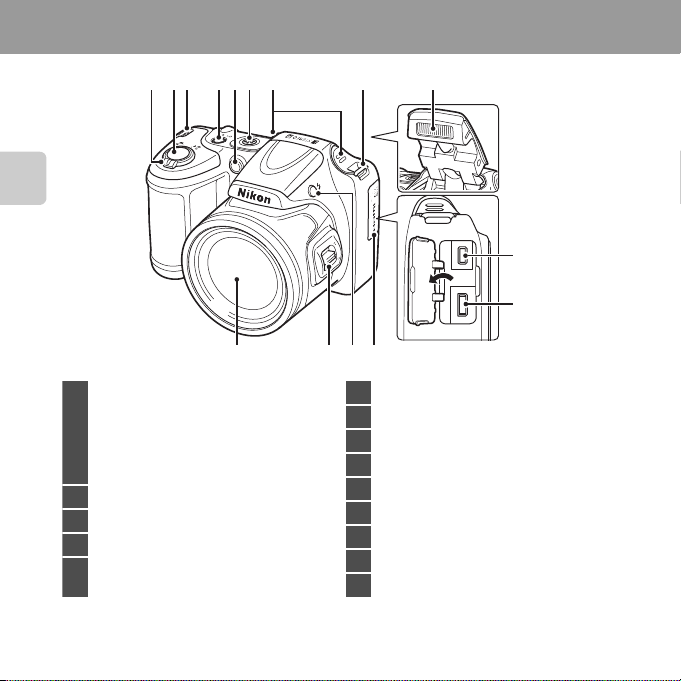
The Camera Body
1
Zoom control……………………………………………….. 27
f : Wide-angle………………………………………. 27
g : Telephoto…………………………………………. 27
h : Thumbnail playback …………………….. 75
i : Playback zoom……………………………….. 74
j : Help…………………………………………………….. 38
2 Shutter-release button……………………………… 28
3 Eyelet for camera strap ……………………………….. 4
4 Power switch/power-on lamp ………………. 22
5
Self-timer lamp…………………………………………….. 57
AF-assist illuminator…………………………………… 96
6 Speaker…………………………………………………………….93
7 Built-in microphone (stereo)……………………88
8 Flash …………………………………………………………….. 5, 54
9 USB/audio/video output connector…….78
10 HDMI micro connector (Type D) ……………78
11 Connector cover………………………………………….. 78
12 m (flash pop-up) button……………………….5, 54
13 Side zoom control ……………………………………….27
14 Lens
Parts of the Camera
765843321
9
10
1314
12 11
2
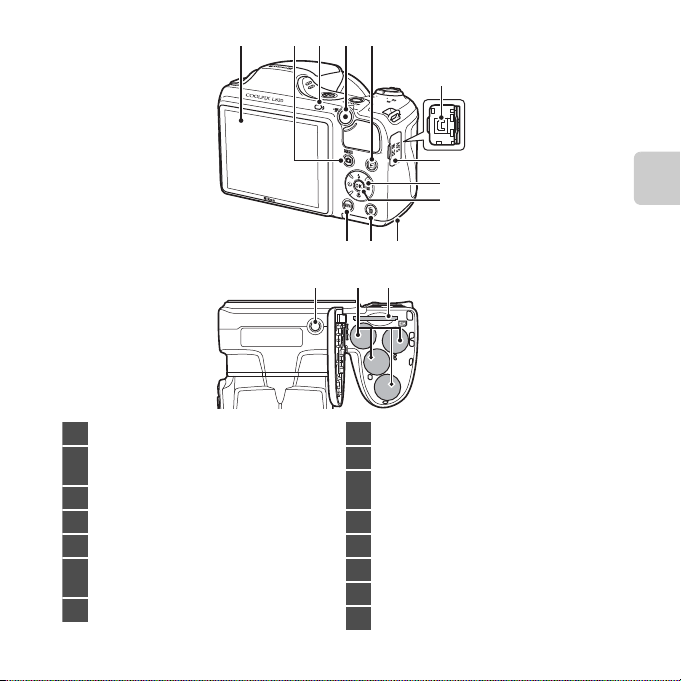
5
1 Monitor ……………………………………………………………… 8
2
A (shooting mode) button
………………………………………………………..36, 37, 49, 52
3 Flash lamp……………………………………………………… 56
4 b (e movie-record) button ………………… 88
5 c (playback) button………………………………… 30
6
DC input connector (for AC adapter available
separately from Nikon)
………………….15, E85
7 DC input connector cover ………………………. 15
8 Multi selector
9 k (apply selection) button
10
Battery-chamber/
memory card slot cover…………………….. 14, 16
11 l (delete) button ………………………………………..32
12 d button ……………………………… 64, 76, 91, 96
13 Tripod socket …………………………………………..F18
14 Battery chamber …………………………………………..14
15 Memory card slot …………………………………………16
1
432
6
7
8
9
Parts of the Camera
11 1012
13 14 15
3
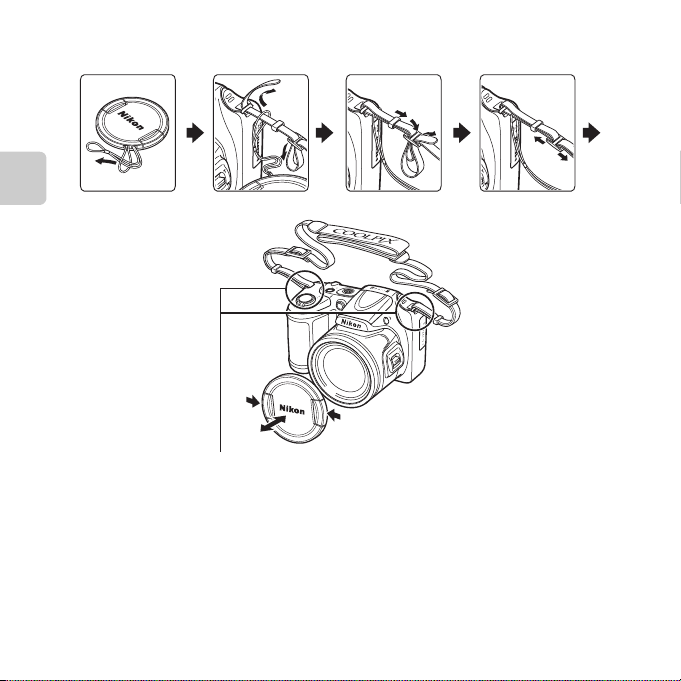
Attaching the Camera Strap and Lens Cap
Attach them at two places.
B Lens Cap
• Remove the lens cap before you take a picture.
• At times when you are not taking pictures such as when the power is off or while you are carrying
the camera, attach the lens cap to the camera to protect the lens.
Attach the Lens Cap LC-CP28 to the camera strap, and then attach the strap to the camera.
Parts of the Camera
4
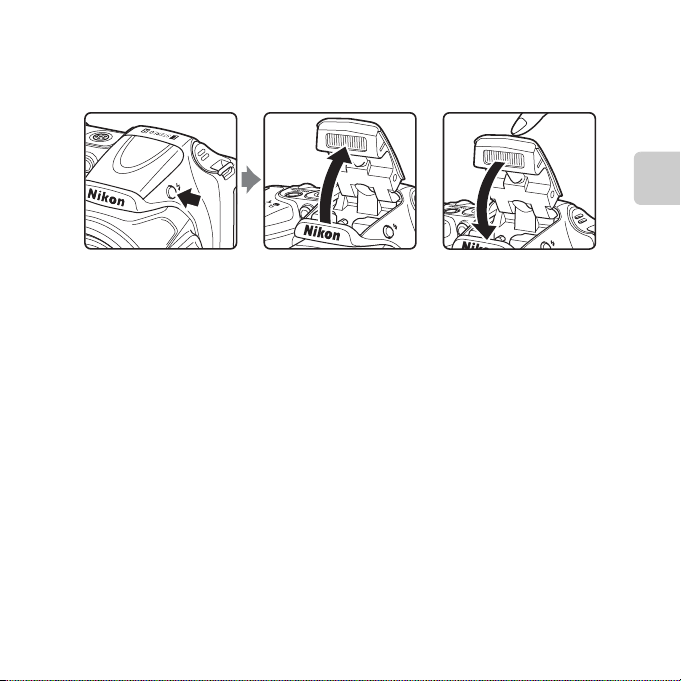
Raising and Lowering the Flash
Press the m (flash pop-up) button to raise the flash.
• Flash settings ➝ “Using the Flash (Flash Modes)” (A 54)
• Push the flash down gently to lower the flash until it clicks into place when not in use.
Parts of the Camera
5
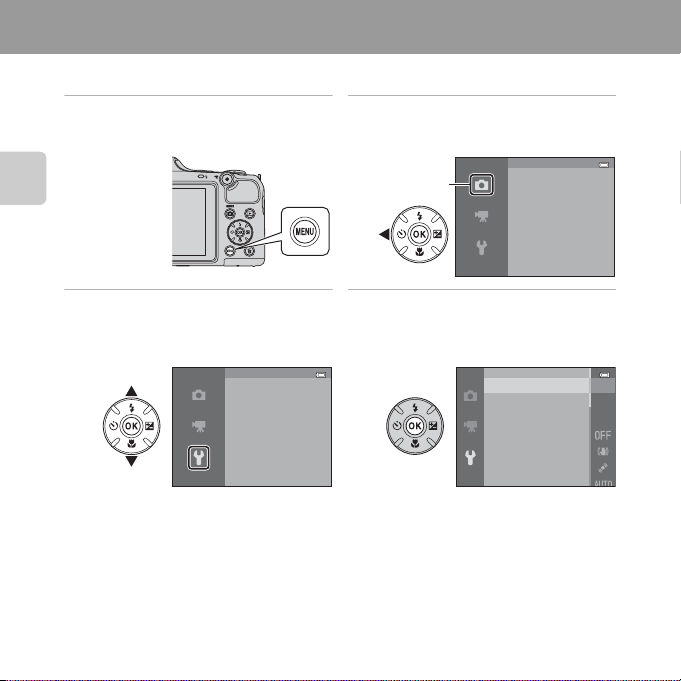
Using Menus (d Button)
You can use the multi selector and the k button to navigate the menus.
1 Press the d button.
• The menu is displayed.
Parts of the Camera
3 Press H or I to select the
desired menu icon.
6
Set up
Welcome screen
Time zone and date
Monitor settings
Print date
Vibration reduction
Motion detection
2 Press the multi selector J.
• The menu icon is displayed in yellow.
Shooting menu
Image mode
White balance
Continuous
ISO sensitivity
Color options
4 Press the k button.
• You can now select items within the
menu.
Welcome screen
Time zone and date
Monitor settings
Print date
Vibration reduction
Motion detection
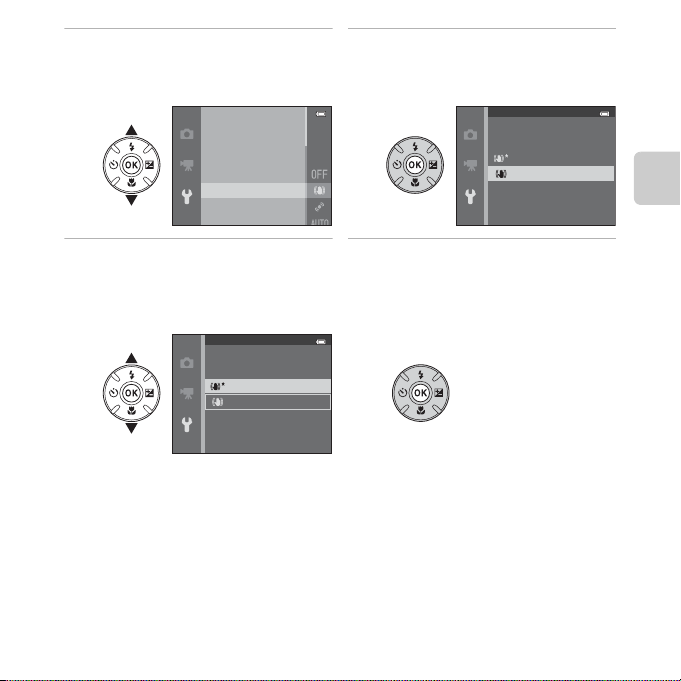
5 Press H or I to select an item
C Notes About Setting Menu Items
• Certain menu items cannot be set depending on the current shooting mode or the state of the
camera. Unavailable items are displayed in gray and cannot be selected.
• When a menu is displayed, you can switch to shooting mode by pressing the shutter-release
button, the A (shooting mode) button, or the b (e movie-record) button.
in the menu.
Welcome screen
Time zone and date
Monitor settings
Print date
Vibration reduction
Motion detection
6 Press the k button.
• The settings for the item you selected
are displayed.
Vibration reduction
On (hybrid)
On
O
Parts of the Camera
7 Press H or I to select a
setting.
Vibration reduction
On (hybrid)
On
O
8 Press the k button.
• The setting you selected is applied.
• When you are finished using the menu,
press the d button.
7
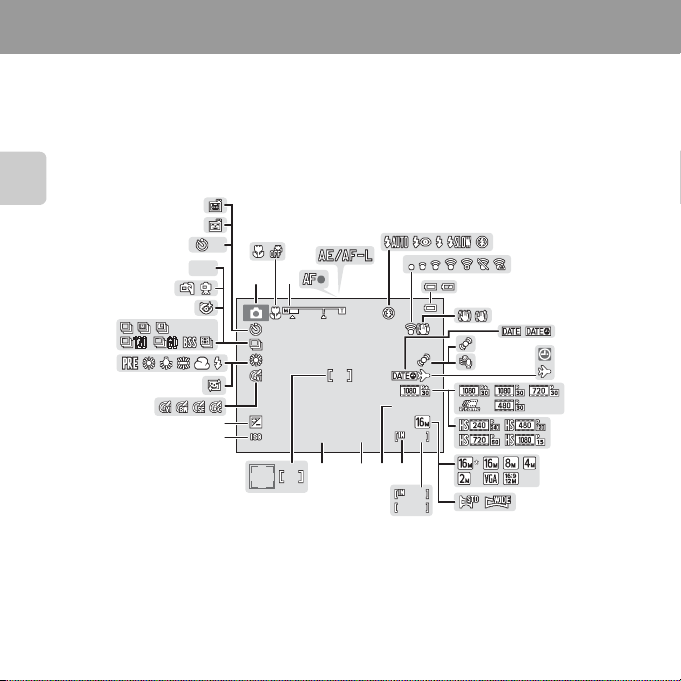
The Monitor
• The information that is displayed in the monitor during shooting and playback changes
depending on the camera’s settings and state of use.
By default, information is displayed when you turn on the camera and also when you
operate the camera, and disappears after a few seconds (Monitor settings (A 96) >
Photo info > Auto info).
Shooting Mode
28
33
37
35
34
32
36
HDR
10
123
5
4
6
7
8
10
9
11
12
29
+1.0
27
26
1/250
2425
F3.0
21
19
29m 0s
999
202223
999
9999
18
Parts of the Camera
31
30
10
13
14
15
16
17
8
Parts of the Camera
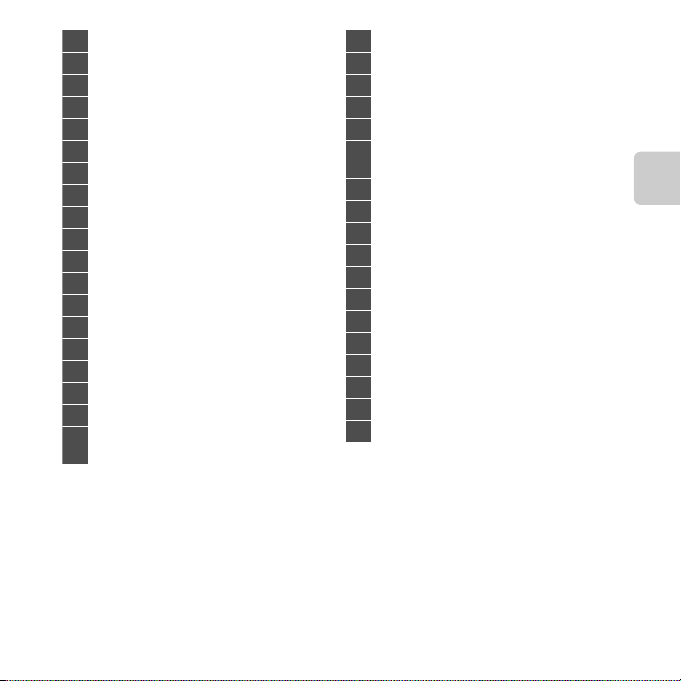
1 Shooting mode………………… 36, 37, 47, 49, 52
2 Macro mode …………………………………………………. 59
3 Zoom indicator…………………………………….. 27, 59
4 Focus indicator…………………………………………….. 28
5 AE/AF-L indicator………………………………………… 45
6 Flash mode……………………………………………………. 54
7 Eye-Fi indicator ……………………………………………. 97
8 Battery level indicator ……………………………….. 22
9 Vibration reduction icon …………………………..96
10 Print date ……………………………………………………….. 96
11 Motion detection icon ……………………………… 96
12 Wind noise reduction ……………………………….. 91
13 “Date not set” indicator………..21, 96, E86
14 Travel destination indicator ……………………. 96
15 Movie options (normal speed movies) … 91
16 Movie options (HS movies) …………………….. 91
17 Image mode ……………………………………65, E31
18 Easy panorama…………………………………………….. 43
19
Number of exposures remaining
(still images) …………………………………….22, E32
20 Internal memory indicator ……………………….22
21 Movie recording time…………………. 88, E55
22 Aperture value ………………………………………………29
23 Shutter speed………………………………………………..29
24 Focus area………………………………………………………. 28
25
Focus area (face detection,
pet detection) ……………………………………………….28
26 ISO sensitivity………………………………………………… 65
27 Exposure compensation value……………….61
28 Color options…………………………………………………65
29 Skin softening……………………………………………….. 65
30 White balance ……………………………………………….65
31 Continuous shooting mode ……………. 44, 65
32 Blink proof icon …………………………………………….65
33 Hand-held, tripod ………………………………… 39, 40
34 Backlighting (HDR) ………………………………………42
35 Self-timer indicator …………………………………….. 57
36 Smile timer ……………………………………………………..65
37 Pet portrait auto release ……………………………44
9
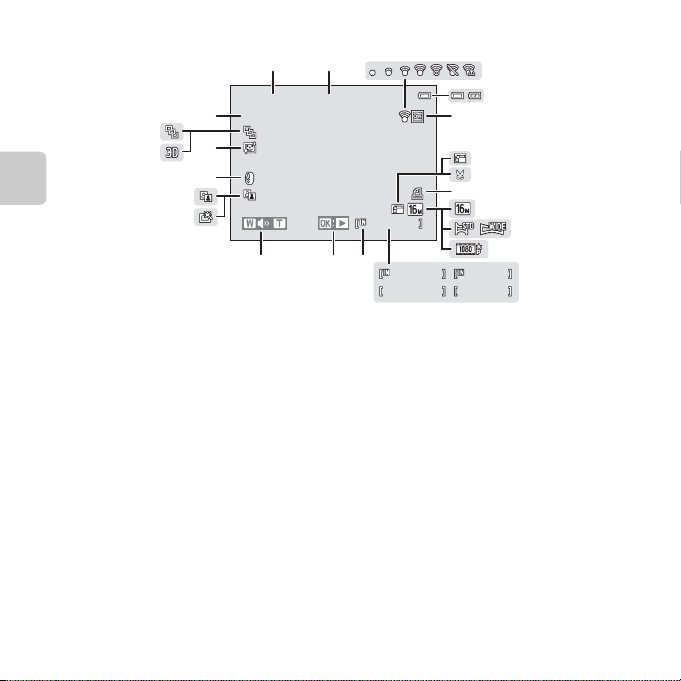
Playback Mode
1 m 0 s1m 0s9 99 / 9 9 9999/ 999
1 m 0 s1m 0s
9 99 9 / 99 9 99999/9999
9 99 9 . JP G9999.JPG
9 99 / 9 9 9999/ 999
1 5/ 0 5 /2 0 13 12 : 0015/05/2013 12:00
19
22
9
10
13
ba
1 2
5
15
12
6
14
18
8
4
3
7
16
17
20
21
11
Parts of the Camera
10
Loading…
Появились вопросы в использовании гаджета? Эта страница посвящена инструкции к фотоаппарату Nikon Coolpix L820. Перед использованием устройства советуем внимательно ознакомиться с руководством пользователя. В нём вы найдете основные характеристики, описание функций фотоаппарата Coolpix L820, меры предосторожности и условия эксплуатации. Мы надеемся, что после прочтения содержимого файла, вы сможете в полном объеме использовать фотокамеру и узнайте как делать красивые фотографии на Nikon Coolpix L820. Количество эффективных мегапикселей: 16.00.
| Бренд: | Nikon |
| Год выпуска: | 2013 |
| Количество эффективных мегапикселей: | 16.00 |
| Максимальное разрешение фотоснимка: | 4608 x 3456 |
| Тип файла: |
На нашем сайте предусмотрен просмотр инструкции к Coolpix L820 в режиме ОНЛАЙН. Для того, что бы воспользоваться этим удобством, подтвердите что вы не робот, сделав отметку в форме ниже, и нажмите кнопку «Посмотреть». После этого наш сайт запустит режим поиска файла и представит его вам. Так же вы можете скачать инструкцию для фотоаппарата.
-
Инструкции по эксплуатации
20
Языки:
Nikon COOLPIX L820 инструкция по эксплуатации
(240 страниц)
- Языки:Русский
-
Тип:
PDF -
Размер:
11.69 MB -
Описание:
Цифровой фотоаппарат
Просмотр
Nikon COOLPIX L820 инструкция по эксплуатации
(240 страниц)
- Языки:Русский
-
Тип:
PDF -
Размер:
11.68 MB
Просмотр
Nikon COOLPIX L820 инструкция по эксплуатации
(240 страниц)
- Языки:Вьетнамский
-
Тип:
PDF -
Размер:
11.59 MB
Просмотр
Nikon COOLPIX L820 инструкция по эксплуатации
(240 страниц)
- Языки:Турецкий
-
Тип:
PDF -
Размер:
16.82 MB
Просмотр
Nikon COOLPIX L820 инструкция по эксплуатации
(240 страниц)
- Языки:Словенский
-
Тип:
PDF -
Размер:
11.22 MB
Просмотр
Nikon COOLPIX L820 инструкция по эксплуатации
(240 страниц)
- Языки:Португальский
-
Тип:
PDF -
Размер:
11.49 MB -
Описание:
Brasil
Просмотр
Nikon COOLPIX L820 инструкция по эксплуатации
(240 страниц)
- Языки:Нидерландский
-
Тип:
PDF -
Размер:
11.2 MB
Просмотр
Nikon COOLPIX L820 инструкция по эксплуатации
(240 страниц)
- Языки:Литовский
-
Тип:
PDF -
Размер:
11.21 MB
Просмотр
Nikon COOLPIX L820 инструкция по эксплуатации
(240 страниц)
- Языки:Корейский
-
Тип:
PDF -
Размер:
11.98 MB
Просмотр
Nikon COOLPIX L820 инструкция по эксплуатации
(240 страниц)
- Языки:Исландский
-
Тип:
PDF -
Размер:
11.16 MB
Просмотр
Nikon COOLPIX L820 инструкция по эксплуатации
(240 страниц)
- Языки:Венгерский
-
Тип:
PDF -
Размер:
11.26 MB
Просмотр
Nikon COOLPIX L820 инструкция по эксплуатации
(240 страниц)
- Языки:Французский
-
Тип:
PDF -
Размер:
11.67 MB
Просмотр
Nikon COOLPIX L820 инструкция по эксплуатации
(240 страниц)
- Языки:Финский
-
Тип:
PDF -
Размер:
11.17 MB
Просмотр
Nikon COOLPIX L820 инструкция по эксплуатации
(240 страниц)
- Языки:Эстонский
-
Тип:
PDF -
Размер:
11.12 MB
Просмотр
Nikon COOLPIX L820 инструкция по эксплуатации
(240 страниц)
- Языки:Португальский
-
Тип:
PDF -
Размер:
11.23 MB
Просмотр
Nikon COOLPIX L820 инструкция по эксплуатации
(240 страниц)
- Языки:Японский
-
Тип:
PDF -
Размер:
17.4 MB
Просмотр
Nikon COOLPIX L820 инструкция по эксплуатации
(240 страниц)
- Языки:Итальянский
-
Тип:
PDF -
Размер:
11.29 MB
Просмотр
Nikon COOLPIX L820 инструкция по эксплуатации
(240 страниц)
- Языки:Немецкий
-
Тип:
PDF -
Размер:
11.23 MB
Просмотр
Nikon COOLPIX L820 инструкция по эксплуатации
(240 страниц)
- Языки:Испанский
-
Тип:
PDF -
Размер:
11.23 MB
Просмотр
Nikon COOLPIX L820 инструкция по эксплуатации
(236 страниц)
- Языки:Арабский
-
Тип:
PDF -
Размер:
12.92 MB
Просмотр
На NoDevice можно скачать инструкцию по эксплуатации для Nikon COOLPIX L820. Руководство пользователя необходимо для ознакомления с правилами установки и эксплуатации Nikon COOLPIX L820. Инструкции по использованию помогут правильно настроить Nikon COOLPIX L820, исправить ошибки и выявить неполадки.