

Chevrolet Cruze Owner Manual — 2013 — CRC — 6/11/12
2013 Chevrolet Cruze Owner Manual M
In Brief . . . . . . . . . .. . . . . . . . . . .. . . 1-1
Instrument Panel . . . . . . . . . . . . . . 1-2
Initial Drive Information . . . . . . . .1-4
Vehicle Features. . . . . . . . . . . . .1-14
Performance and
Maintenance . . . . . . . . . . . . . . . . 1-18
Keys, Doors, and
Windows . . . . . . . . . . . . . . . . . . . . 2-1
Keys and Locks . . . . . . . . . . . . . . .2-1
Doors . . . . . . . . . . . . . . . . . . . . . . . . 2-12
Vehicle Security. . . . . . . . . . . . . . 2-14
Exterior Mirrors . . . . . . . . . . . . . . . 2-16
Interior Mirrors . . . . . . . . . . . . … .2-17
Windows . . . . . . . . . . . . . . . . . . . . . 2-18
Roof . . . . . . . . . . . . . .. . . . . . . . . . . . 2-20
Seats and Restraints . . . . . . . . . 3-1
Head Restraints . . . . . . . . . . . . . . . 3-2
Front Seats . . . . . . . .. . . . . . . . .. . . 3-3
Rear Seats . . . . . . . . . . . . . . . . . . . . 3-6
Safety Belts . . . . . . . . . . . . . . . . . . . . 3-8
Airbag System . . . . . . . . . . . . . . ..3-17
Child Restraints . . . . . . . . . . . . . . 3-30
Storage . . . . . . . . . . . . . .. . . . . . . . . 4-1
Storage Compartments . . . . . . . . 4-1
Additional Storage Features . . . 4-2
Instruments and Controls . . . . 5-1
Controls . . . . . . . . . . . . . . . . . . . . . . . 5-2
Warning Lights, Gauges, and
Indicators . . . . . . . . . . . . . . . . . . . . 5-7
Information Displays . . . . . . . .. . 5-22
Vehicle Messages.. . . . . . . . . . . 5-26
Vehicle Personalization.. . . . . . 5-32
Lighting . . . . . . . . . . . .. . . . . . . . . . . 6-1
Exterior Lighting . . . . . . . . . . . . . . . 6-1
Interior Lighting . . . . . . .. . . . . . .. . 6-5
Lighting Features . . . . . . . . . . . . . . 6-6
Infotainment System . . . . . . . . . 7-1
Introduction . . . . . . . . . .. . . . . . . . . . 7-1
Radio . . . . . . . . . . … . . . . . . . . . . . ..7-7
Audio Players . . . . . . . . . . . . . . . . 7-14
Phone . . . . . . . . . .. . . . . . . . . .. . . . 7-18
Trademarks and License
Agreements . . . . . . . . . .. . . . . . . 7-30
Climate Controls . . . . . . . . . . . . . 8-1
Climate Control Systems . . . . . . 8-1
Air Vents.. . . . . . . . . . . . . . . . . . . . . . 8-6
Maintenance . . . . . . . . . . . … . . . . . 8-7
Driving and Operating . . . . . . . . 9-1
Driving Information . . . . . . . . . . . . . 9-2
Starting and Operating . . . . . . . 9-14
Engine Exhaust . . . . . . . . . . . . . . 9-25
Automatic Transmission . . . . . .9-26
Manual Transmission . . . . . . . . . 9-30
Brakes . . . . . . . . . . . . . . . . . . . . . . . 9-32
Ride Control Systems . . . . . . . .9-34
Cruise Control . . . . . . . .. . . . . . . . 9-37
Object Detection Systems . . . . 9-39
Fuel . . . . . . . . . . . . . . . . . . . . . . . . . . 9-46
Towing . . . . . . . . . . . . . . . . . . . . . . . 9-50
Conversions and Add-Ons . . . 9-56
Vehicle Care . . . . . .. . . . . . . . .. . 10-1
General Information . . . . . . . . . .10-2
Vehicle Checks.. . . . . . . . . . . . . . 10-4
Headlamp Aiming . . . . . . . . . . . 10-28
Bulb Replacement . . . . . . . . . . 10-28
Electrical System . . . . . . . . . . . . 10-33
Wheels and Tires . . . . . . . . . . . 10-39

Chevrolet Cruze Owner Manual — 2013 — CRC — 6/11/12
2013 Chevrolet Cruze Owner Manual M
Jump Starting . . . . . . . . . . . . . . . 10-78
Towing . . . . . . . .. . . . . . . . . . . . . . 10-80
Appearance Care . . . . . . . . . . .10-83
Service and Maintenance . . . 11-1
General Information . . . . . . . . . . 11-1
Maintenance Schedule . . . . . . .11-2
Special Application
Services . . . . . . . . . . . . . . . . . . . . 11-8
Additional Maintenance
and Care . . . . . . . . .. . . . . . . . . . . 11-9
Recommended Fluids . . . . . . . 11-12
Maintenance Records . . . . . . . 11-15
Technical Data . . . . . . ……… 12-1
Vehicle Identification.. . . . . . . . 12-1
Vehicle Data. . . . . . . . . . . . . . . . . . 12-2
Customer Information . . . . . . . 13-1
Customer Information . . . . . . . . 13-1
Reporting Safety Defects . . . . 13-12
Vehicle Data Recording and
Privacy . . .. . . . . . . . . . . . . . . . . 13-13
OnStar . . . . . . . . . . . . . . .. . . . . . . . 14-1
OnStar Overview.. . . . . . . . . . . . 14-1
OnStar Services . . . . . . . .. . . . . . 14-2
OnStar Additional
Information . . . . . . . . . . . . … . . . 14-5
Index . . . . . . . . . . . . . . . . . . . . . i-1
Chevrolet Cruze Owner Manual — 2013 — CRC — 6/11/12
Introduction iii
The names, logos, emblems,
slogans, vehicle model names, and
vehicle body designs appearing in
this manual including, but not limited
to, GM, the GM logo, CHEVROLET,
the CHEVROLET Emblem, and
CRUZE are trademarks and/or
service marks of General Motors
LLC, its subsidiaries, affiliates,
or licensors.
Litho in U.S.A.
Part No. 22771025 A First Printing
This manual describes features that
may or may not be on your specific
vehicle either because they are
options that you did not purchase or
due to changes subsequent to the
printing of this owner manual.
Please refer to the purchase
documentation relating to your
specific vehicle to confirm each of
the features found on your vehicle.
For vehicles first sold in Canada,
substitute the name “General
Motors of Canada Limited” for
Chevrolet Motor Division wherever it
appears in this manual.
Keep this manual in the vehicle for
quick reference.
©
2012 General Motors LLC. All Rights Reserved.
Canadian Vehicle Owners
Propriétaires Canadiens
A French language copy of this
manual can be obtained from your
dealer or from:
On peut obtenir un exemplaire de
ce guide en français auprès du
concessionnaire ou à l’adresse
suivante:
Helm, Incorporated
Attention: Customer Service
47911 Halyard Drive
Plymouth, MI 48170
Chevrolet Cruze Owner Manual — 2013 — CRC — 6/11/12
iv Introduction
Using this Manual
To quickly locate information about
the vehicle, use the Index in the
back of the manual. It is an
alphabetical list of what is in the
manual and the page number where
it can be found.
Danger, Warnings, and
Cautions
Warning messages found on vehicle
labels and in this manual describe
hazards and what to do to avoid or
reduce them.
Danger indicates a hazard with a
high level of risk which will result in
serious injury or death.
Warning or Caution indicates a
hazard that could result in injury or
death.
WARNING
{
These mean there is something
that could hurt you or other
people.
Notice: This means there is
something that could result in
property or vehicle damage. This
would not be covered by the
vehicle’s warranty.
A circle with a slash through it is a
safety symbol which means “Do
Not,” “Do not do this,” or “Do not let
this happen.”
Symbols
The vehicle has components and
labels that use symbols instead of
text. Symbols are shown along with
the text describing the operation or
information relating to a specific
component, control, message,
gauge, or indicator.
M : This symbol is shown when
you need to see your owner manual
for additional instructions or
information.
* : This symbol is shown when
you need to see a service manual
for additional instructions or
information.

Chevrolet Cruze Owner Manual — 2013 — CRC — 6/11/12
Introduction v
Vehicle Symbol Chart
Here are some additional symbols
that may be found on the vehicle
and what they mean. For more
information on the symbol, refer to
the Index.
9 : Airbag Readiness Light
# : Air Conditioning
! : Antilock Brake System (ABS)
% : Audio Steering Wheel Controls
or OnStar®
$ : Brake System Warning Light
» : Charging System
I : Cruise Control
B : Engine Coolant Temperature
O : Exterior Lamps
# : Fog Lamps
. : Fuel Gauge
+ : Fuses
3 : Headlamp High/Low-Beam
Changer
j : LATCH System Child
Restraints
* : Malfunction Indicator Lamp
: : Oil Pressure
} : Power
/ : Remote Vehicle Start
> : Safety Belt Reminders
7 : Tire Pressure Monitor
d : Traction Control/StabiliTrak®
M : Windshield Washer Fluid

Chevrolet Cruze Owner Manual — 2013 — CRC — 6/11/12
vi Introduction
2 NOTES

Chevrolet Cruze Owner Manual — 2013 — CRC — 6/11/12
In Brief 1-1
In Brief
Instrument Panel
Instrument Panel Overview . . . . 1-2
Initial Drive Information
Initial Drive Information . . . . . . . . 1-4
Remote Keyless Entry (RKE)
System . . . . . . .. . . . . . . . . . . . . . . 1-4
Remote Vehicle Start . . . . . . . . . 1-5
Door Locks . . . . . . . . . . . . . . . . . . . 1-5
Seat Adjustment . . . . . . . . . . . . . . 1-6
Heated Seats . . . . . . . . . . . . . . . . . 1-8
Head Restraint Adjustment . . . . 1-8
Safety Belts . . . . . . .. . . . . . . . . . . . 1-8
Passenger Sensing System . . . 1-9
Mirror Adjustment . . . . . . . . . . . . . 1-9
Steering Wheel
Adjustment . . . . . . . . . . . . . . . . . 1-10
Interior Lighting . . . . . . . . . . . . . . 1-10
Exterior Lighting . . . . . . . . . . . . . 1-11
Windshield Wiper/Washer …. 1-12
Climate Controls . . . . . .. . . . . . . 1-13
Transmission . . . . . . . . . . . . . . . . 1-14
Vehicle Features
Radio(s) . . . . . .. . . . . . . . . . . . . . . 1-14
Satellite Radio . . . . . . . . . . . . . . . 1-15
Portable Audio Devices . . . . . . 1-15
Bluetooth
®
. . . . . . . . . . . . . . . . . . . 1-16
Steering Wheel Controls . . . . . 1-16
Cruise Control . . . . . . . . . . . . . . . 1-17
Navigation System . . . . . . . .. . . 1-17
Driver Information
Center (DIC) . . . . . . . . . . . . . . . 1-17
Ultrasonic Parking Assist . . . . 1-18
Power Outlets . . . . . . . . . . . . . . . 1-18
Performance and Maintenance
Traction Control
System (TCS) . . . . . . . . . . . . . . 1-18
StabiliTrak
Tire Pressure Monitor . . . . . . . . 1-19
Tire Sealant and
Compressor Kit . . . . . . . . . . . .. 1-19
Engine Oil Life System . . . . . . 1-20
Driving for Better Fuel
Economy …. . . . . . . . . . . . . . . . 1-20
Roadside Assistance
Program . . . . . . . . . . …. . . . . . . 1-20
OnStar
®
System . . . . . . . . . 1-19
®
. . . . . . . . . . . . . . . . . . . . . 1-21
Chevrolet Cruze Owner Manual — 2013 — CRC — 6/11/12
1-2 In Brief
Instrument Panel
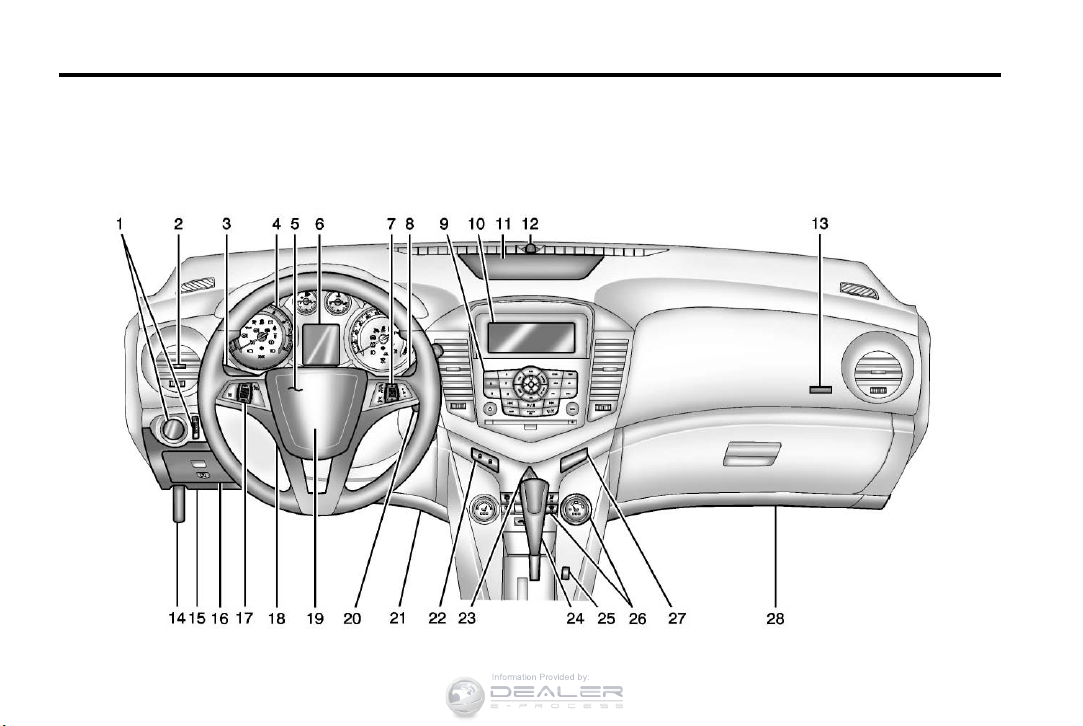
Instrument Panel Overview
Chevrolet Cruze Owner Manual — 2013 — CRC — 6/11/12
In Brief 1-3
1. Exterior Lamp Controls on
page 6‑1.
Front Fog Lamps on page 6‑4 (If
Equipped).
Instrument Panel Illumination
Control on page 6‑5.
2. Air Vents on page 8‑6.
3. Headlamp High/Low-Beam
Changer on page 6‑2.
Turn and Lane-Change Lever.
See Turn and Lane-Change
Signals on page 6‑4.
Driver Information Center (DIC)
Buttons. See Driver Information
Center (DIC) on page 5‑22.
4. Instrument Cluster on page 5‑8.
5. Horn on page 5‑3.
6. Driver Information Center (DIC)
on page 5‑22.
7. Steering Wheel Controls on
page 5‑2.
8. Windshield Wiper/Washer on
page 5‑3.
9. Infotainment on page 7‑1.
Satellite Radio on page 7‑10 (If
Equipped).
10. Infotainment Display Screen.
11. Instrument Panel Storage on
page 4‑1.
12. Light Sensor. See Automatic
Headlamp System on
page 6‑3.
13. Passenger Airbag. See Where
Are the Airbags? on page 3‑19.
14. Hood Release. See Hood on
page 10‑4.
15. Data Link Connector (DLC)
(Out of View). See Malfunction
Indicator Lamp on page 5‑13.
16. Instrument Panel Fuse Block
on page 10‑38.
17. Cruise Control on page 9‑37.
18. Steering Wheel Adjustment on
page 5‑2.
19. Driver Airbag. See Where Are
the Airbags? on page 3‑19.
20. Ignition Switch or Keyless
Ignition Button (If Equipped).
See Ignition Positions (Key
Access) on page 9‑14 or
Ignition Positions (Keyless
Access) on page 9‑17.
21. Driver Knee Airbag. See Where
Are the Airbags? on page 3‑19.
22. Power Door Locks on
page 2‑11.
23. Hazard Warning Flashers on
page 6‑4.
24. Shift Lever. See Automatic
Transmission on page 9‑26 or
Manual Transmission on
page 9‑30.
25. Traction Control System (TCS)
on page 9‑34.
®
StabiliTrak
System on
page 9‑35.
Chevrolet Cruze Owner Manual — 2013 — CRC — 6/11/12
1-4 In Brief
26. Climate Control Systems on
page 8‑1 (If Equipped).
Automatic Climate Control
System on page 8‑3 (If
Equipped).
Heated Front Seats on
page 3‑5 (If Equipped).
27. Passenger Airbag Status
Indicator on page 5‑12.
28. Passenger Knee Airbag. See
Where Are the Airbags? on
page 3‑19.
Initial Drive
Information
This section provides a brief
overview about some of the
important features that may or may
not be on your specific vehicle.
For more detailed information, refer
to each of the features which can be
found later in this owner manual.
Remote Keyless Entry
(RKE) System
The Remote Keyless Entry (RKE)
transmitter may work up to 60 m
(195 ft) away from the vehicle.
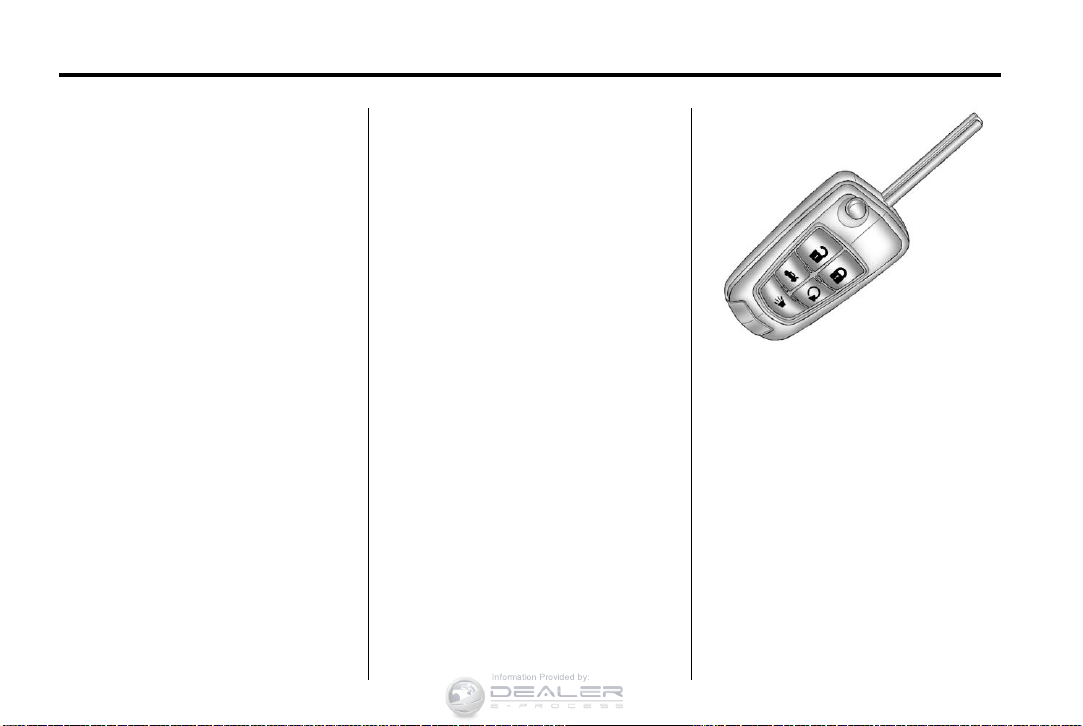
RKE Transmitter with Remote
Start Shown
Press the key release button to
extend the key blade. The key can
be used for the ignition and all
locks.
Press
K to unlock the driver door or
all doors.
Q to lock all doors.
Press
Lock and unlock feedback can be
personalized. See Vehicle
Personalization on page 5‑32.
Chevrolet Cruze Owner Manual — 2013 — CRC — 6/11/12
In Brief 1-5
Press and hold V briefly to open
the trunk.
Press and hold
vehicle locator.
Press and hold
three seconds to sound the panic
alarm.
7 again to cancel the panic
Press
alarm.
See Keys on page 2‑1 and Remote
Keyless Entry (RKE) System
Operation on page 2‑3.
7 briefly to initiate
7 for at least
Remote Vehicle Start
For vehicles with this feature, the
engine can be started from outside
the vehicle.
Starting the Vehicle
1. Aim the RKE transmitter at the
vehicle.
2. Press and release
Q.
3. Immediately after completing
Step 2, press and hold
least two seconds or until the
turn signal lamps flash.
When the engine starts, the parking
lamps will turn on and remain on as
long as the engine is running. The
doors will be locked and the climate
control system may come on.
The engine will continue to run for
10 minutes. Repeat the steps for a
10-minute time extension. Remote
start can be extended only once.
/ for at
Canceling a Remote Start
To cancel a remote start, do one of
the following:
.
Aim the RKE transmitter at the
vehicle and press and hold
until the parking lamps turn off.
.
Turn on the hazard warning
flashers.
.
Turn the vehicle on and then off.
See Remote Vehicle Start on
page 2‑9.
/
Door Locks
To lock or unlock the vehicle from
outside, use the Remote Keyless
Entry (RKE) transmitter or the key.
From inside the vehicle, use the
power door lock switch.
See Door Locks on page 2‑10.
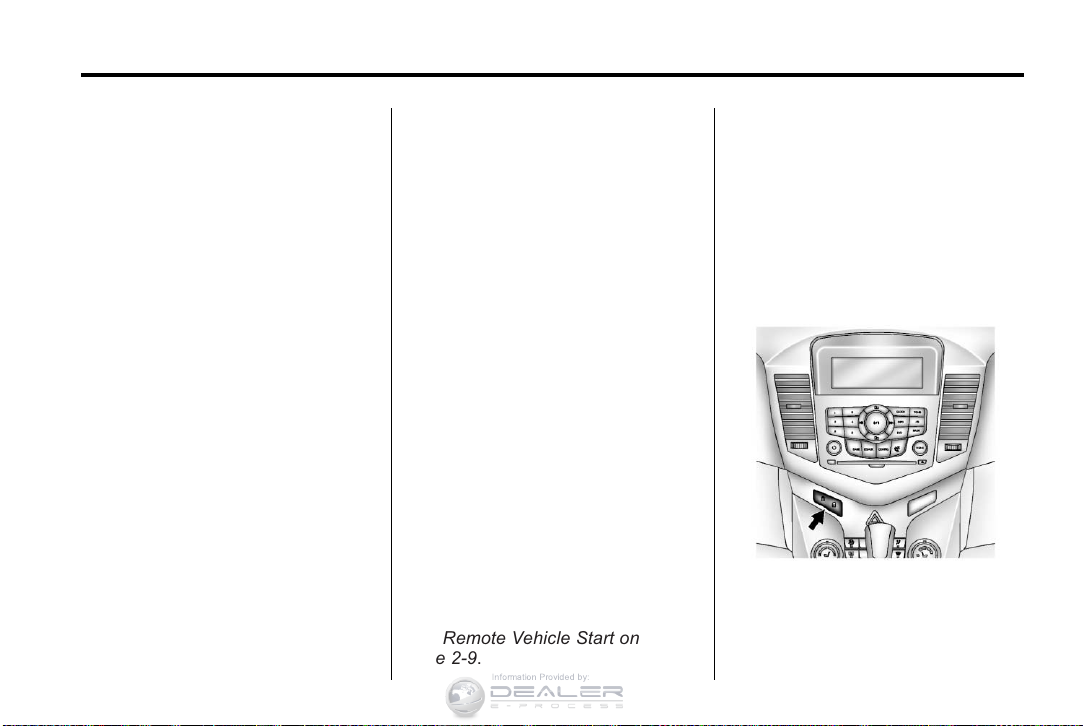
Power Door Locks
K : Press to unlock the doors.
Q : Press to lock the doors.
See Power Door Locks on
page 2‑11.
Chevrolet Cruze Owner Manual — 2013 — CRC — 6/11/12
1-6 In Brief
Safety Locks
The rear door safety locks prevent
passengers from opening the rear
doors from inside the vehicle.
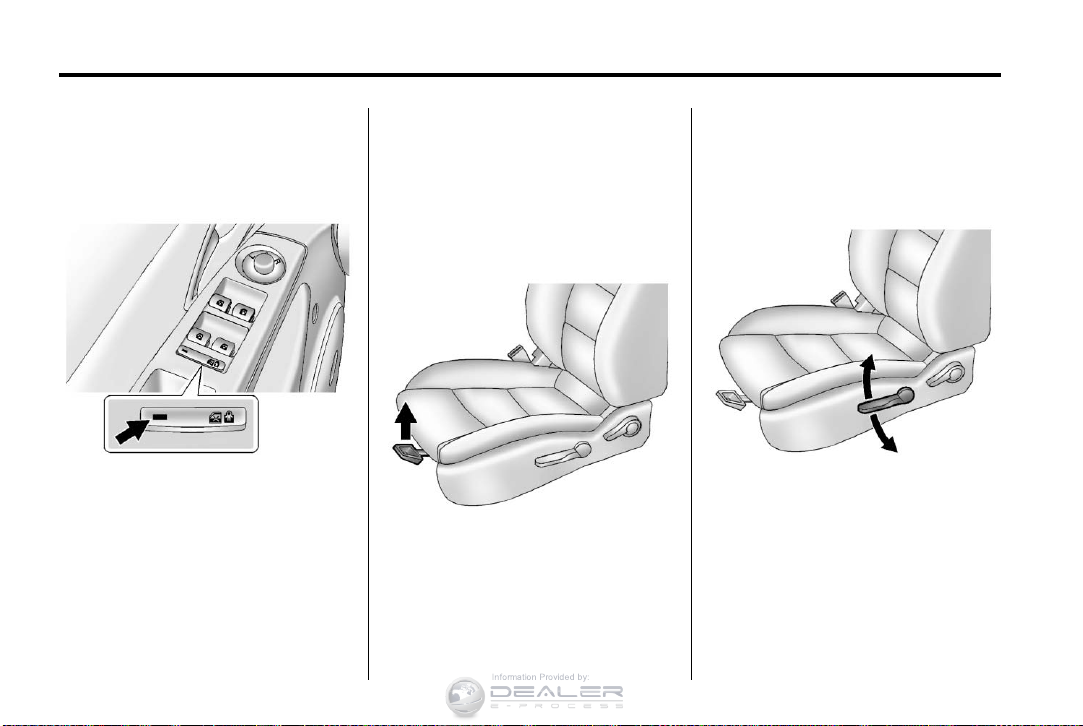
Press o { to activate the safety
locks. The indicator light comes on
when activated.
The rear door power windows are
also disabled. See Power Windows
on page 2‑18.
o { again to deactivate the
Press
safety locks and power windows.
If the indicator light flashes, the
feature may not be working properly.
See Safety Locks on page 2‑12.
Seat Adjustment
Manual Front Seats
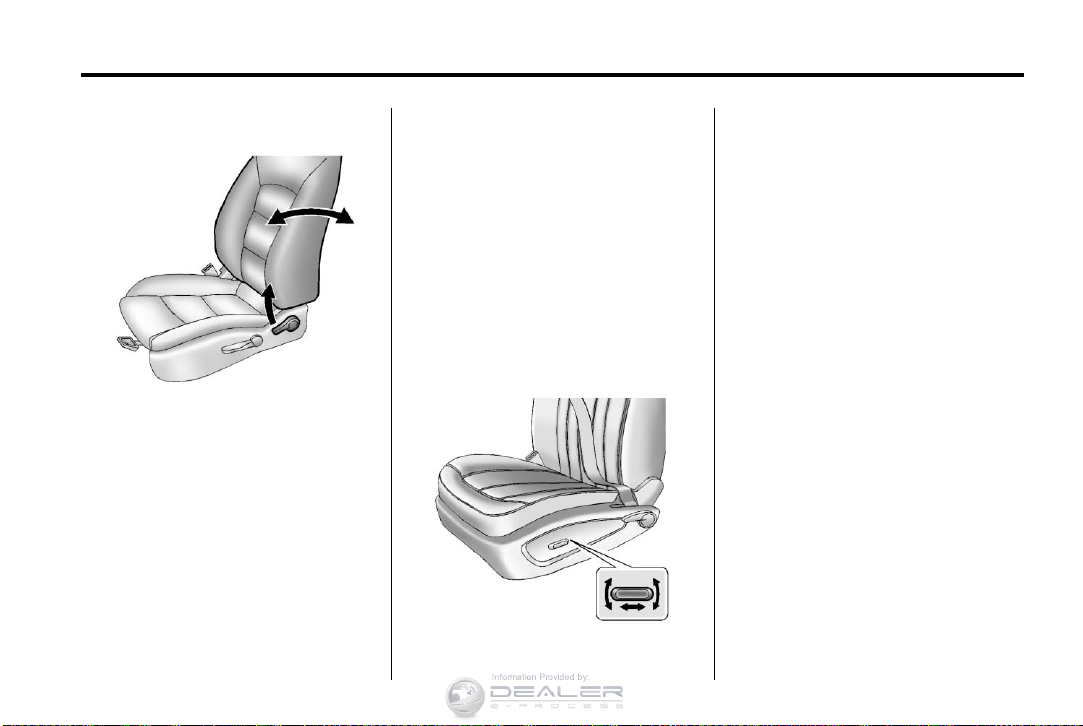
To adjust a manual seat:
1. Pull the handle at the front of
the seat.
2. Slide the seat to the desired
position and release the handle.
3. Try to move the seat back and
forth to be sure it is locked in
place.
Seat Height Adjuster
If available, move the lever up or
down to manually raise or lower
the seat.
See Seat Adjustment on page 3‑3.
Chevrolet Cruze Owner Manual — 2013 — CRC — 6/11/12
In Brief 1-7
Reclining Seatbacks
To recline the seatback:
1. Lift the lever.
2. Move the seatback to the
desired position, then release
the lever to lock the seatback in
place.
3. Push and pull on the seatback to
make sure it is locked.
To return the seatback to an upright
position:
1. Lift the lever fully without
applying pressure to the
seatback, and the seatback
returns to the upright position.
2. Push and pull on the seatback to
make sure it is locked.
See Reclining Seatbacks on
page 3‑4.
Power Driver Seat
To adjust a power driver seat,
if equipped:
.
Move the seat forward or
rearward by sliding the control
forward or rearward.
.
Raise or lower the front part of
the seat cushion by moving the
front of the control up or down.
.
Raise or lower the entire seat by
moving the rear of the control up
or down.
See Power Seat Adjustment on
page 3‑4.
Rear Seats
The rear seatbacks can be folded.
For detailed instructions, see Rear
Seats on page 3‑6.
Chevrolet Cruze Owner Manual — 2013 — CRC — 6/11/12
1-8 In Brief
Heated Seats
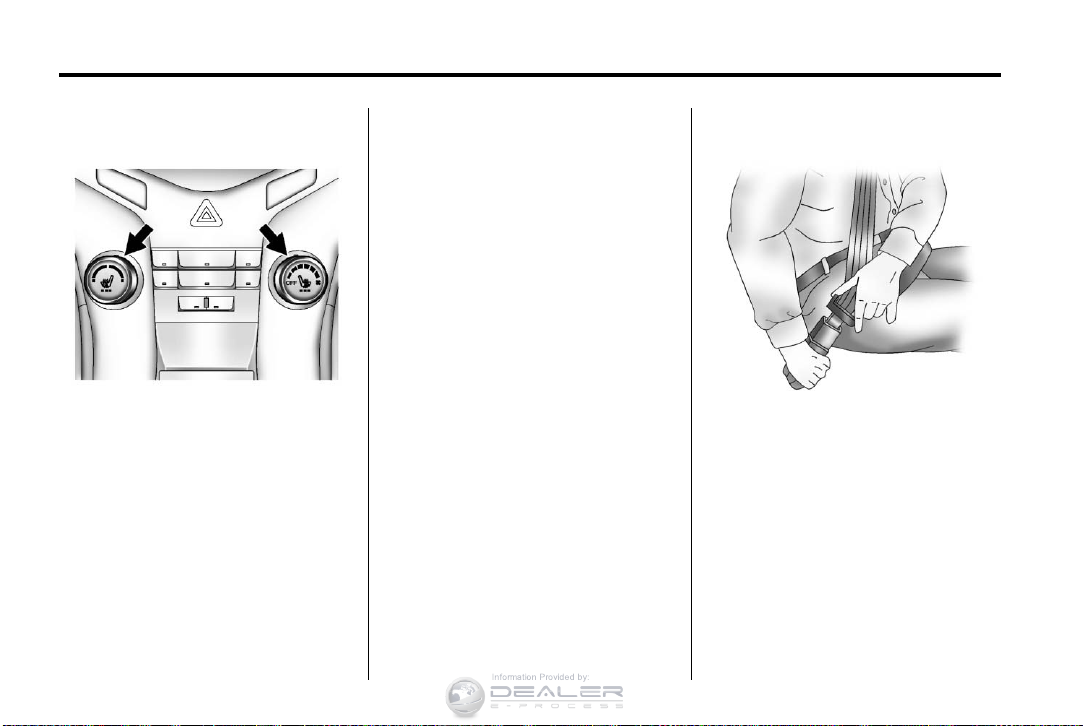
If available, the controls are on the
center stack. The engine must be
running to operate the heated seats.
Press
L or M to heat the driver or
passenger seat cushion and
seatback.
Press the control once for the
highest setting. With each press of
the control, the heated seat will
change to the next lower setting,
and then the off setting. Three lights
indicate the highest setting and one
light the lowest.
See Heated Front Seats on
page 3‑5.
Head Restraint
Adjustment
Do not drive until the head restraints
for all occupants are installed and
adjusted properly.
To achieve a comfortable seating
position, change the seatback
recline angle as little as necessary
while keeping the seat and the head
restraint height in the proper
position.
See Head Restraints on page 3‑2
and Seat Adjustment on page 3‑3.
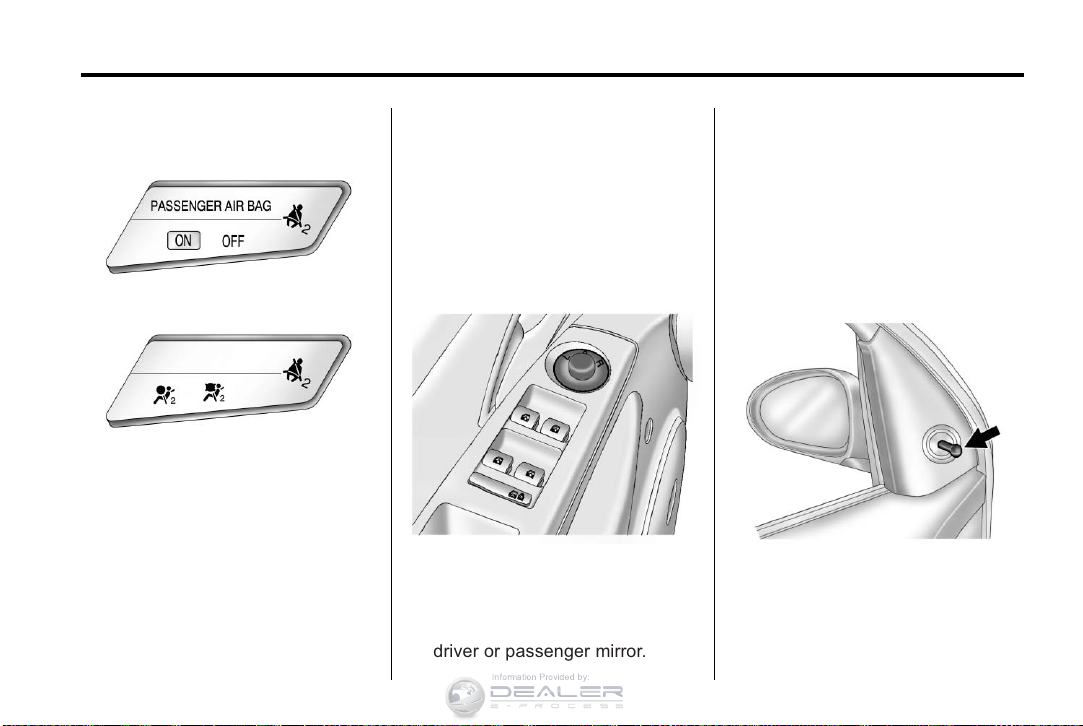
Safety Belts
Refer to the following sections for
important information on how to use
safety belts properly:
.
Safety Belts on page 3‑8.
.
How to Wear Safety Belts
Properly on page 3‑10.
.
Lap-Shoulder Belt on page 3‑11.
.
Lower Anchors and Tethers for
Children (LATCH System) on
page 3‑38.
Chevrolet Cruze Owner Manual — 2013 — CRC — 6/11/12
In Brief 1-9
Passenger Sensing
System
United States
Canada
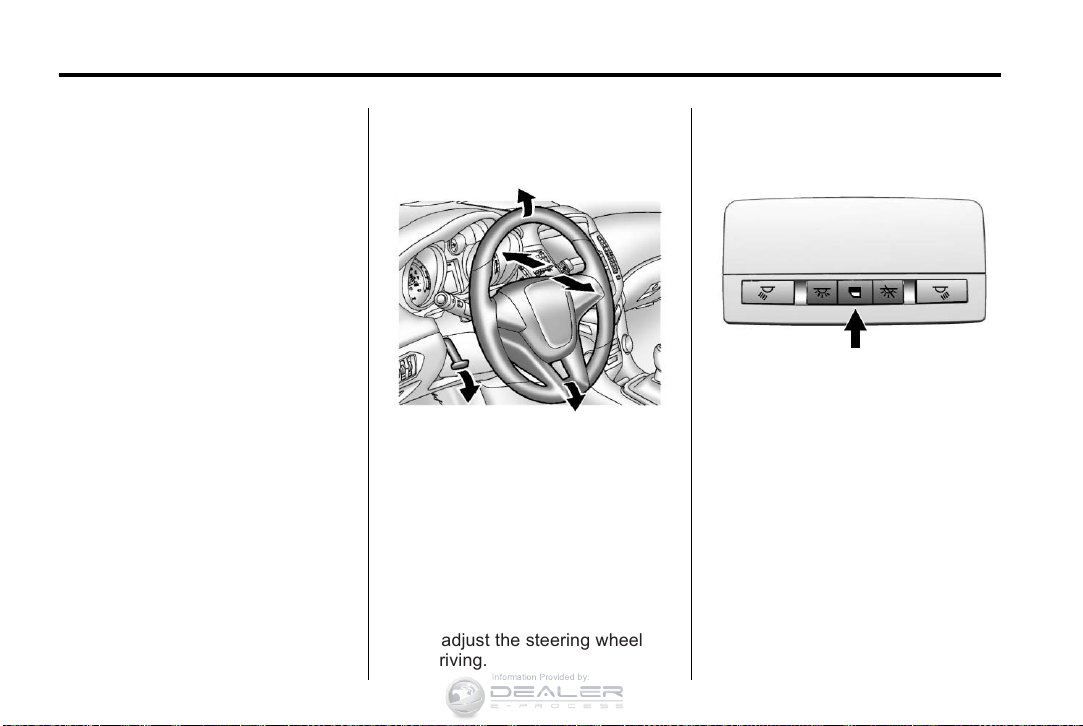
The passenger sensing system
turns off the front outboard
passenger frontal airbag and knee
airbag under certain conditions. No
other airbag is affected by the
passenger sensing system. See
Passenger Sensing System on
page 3‑24 for important information.
The passenger airbag status
indicator will be visible on the
instrument panel when the vehicle is
started. See Passenger Airbag
Status Indicator on page 5‑12.
Mirror Adjustment
Exterior
Controls for the outside power
mirrors are on the driver door.
1. Turn the selector switch to L
(Left) or R (Right) to choose the
driver or passenger mirror.
2. Move the control to adjust the
mirror.
3. Turn the selector switch to
the O position to deselect the
mirror.
See Power Mirrors on page 2‑16.
If the vehicle has heated mirrors,
see Heated Mirrors on page 2‑17.
Vehicles with a manual mirror
adjustment have controls next to
each mirror.
See Manual Mirrors on page 2‑16.
Chevrolet Cruze Owner Manual — 2013 — CRC — 6/11/12
1-10 In Brief
Interior Mirror
Adjustment
Hold the rearview mirror in the
center and move it to view the area
behind the vehicle.
Manual Rearview Mirror
For vehicles with a manual rearview
mirror, push the tab forward for
daytime use and pull it for nighttime
use to avoid glare from the
headlamps from behind. See
Manual Rearview Mirror on
page 2‑17.
Automatic Dimming Rearview
Mirror
For vehicles with an automatic
dimming rearview mirror, the mirror
will automatically reduce the glare of
headlamps from behind. The
dimming feature and indicator light
come on each time the vehicle is
started. See Automatic Dimming
Rearview Mirror on page 2‑17.
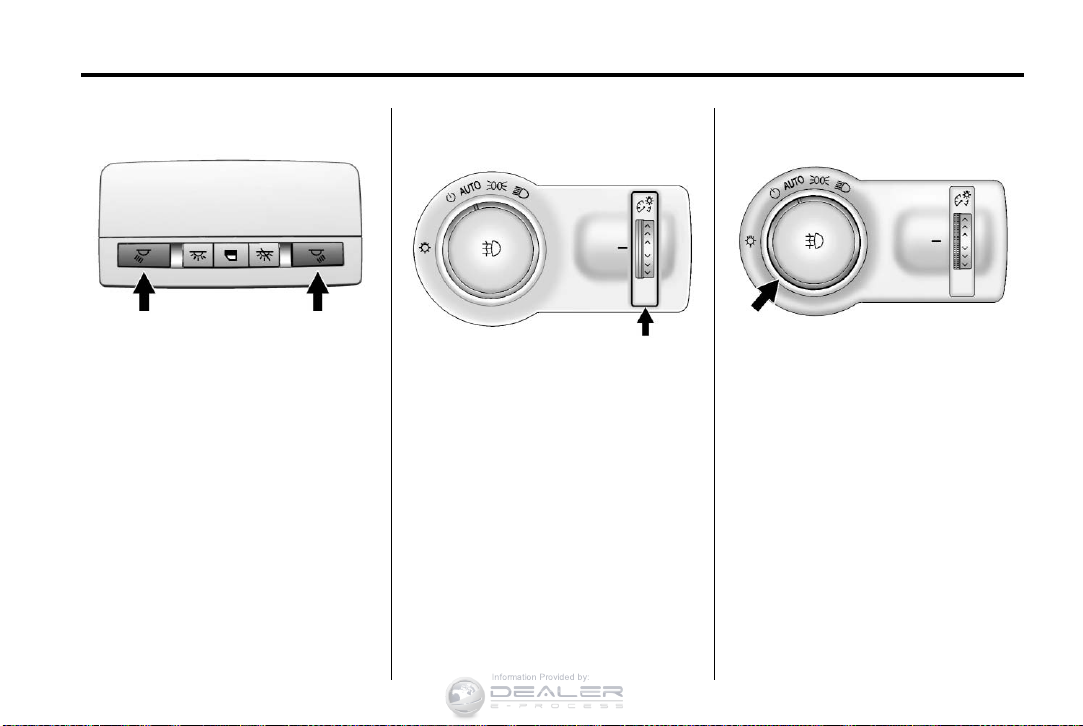
Steering Wheel
Adjustment
To adjust the steering wheel:
1. Pull the lever down.
2. Move the steering wheel up
or down.
3. Pull or push the steering wheel
closer or away from you.
4. Push the lever up to lock the
steering wheel in place.
Do not adjust the steering wheel
while driving.
Interior Lighting
Dome Lamps
The dome lamp controls are located
in the headliner.
* : Press to turn the lamps off,
even when a door is open.
I : Press to turn the lamps on
automatically when a door is
opened.
+ : Press to turn on the dome
lamps.
Chevrolet Cruze Owner Manual — 2013 — CRC — 6/11/12
In Brief 1-11
Reading Lamps
The reading lamps are located in
the overhead console.
m or n : Press the button near
each lamp to turn it on or off.
Instrument Panel Illumination
Control
This feature controls the brightness
of the instrument panel controls and
infotainment display screen. The
thumbwheel is located to the left of
the steering column on the
instrument panel.
D : Turn the thumbwheel up or
down and hold, to brighten or dim
the instrument panel controls and
infotainment display screen.
Exterior Lighting
The exterior lamp control is to the
left of the steering column on the
instrument panel.
O : Briefly turn to this position to
turn the automatic lamp control off
or on again.
AUTO: Turns the headlamps on
automatically at normal brightness,
together with the parking lamps,
taillamps, license plate lamps,
sidemarker lamps, and instrument
panel lights.
; : Turns on the parking lamps,
taillamps, license plate lamps,
sidemarker lamps, and instrument
panel lights.
Chevrolet Cruze Owner Manual — 2013 — CRC — 6/11/12
1-12 In Brief
5 : Turns on the headlamps,
parking lamps, taillamps, license
plate lamps, sidemarker lamps, and
instrument panel lights. A warning
chime sounds if the driver door is
opened when the ignition switch is
off and the headlamps are on.
# : For vehicles with fog lamps,
press to turn the lamps on or off.
See:
.
Exterior Lamp Controls on
page 6‑1
.
Daytime Running Lamps (DRL)
on page 6‑2
.
Front Fog Lamps on page 6‑4
Windshield Wiper/Washer
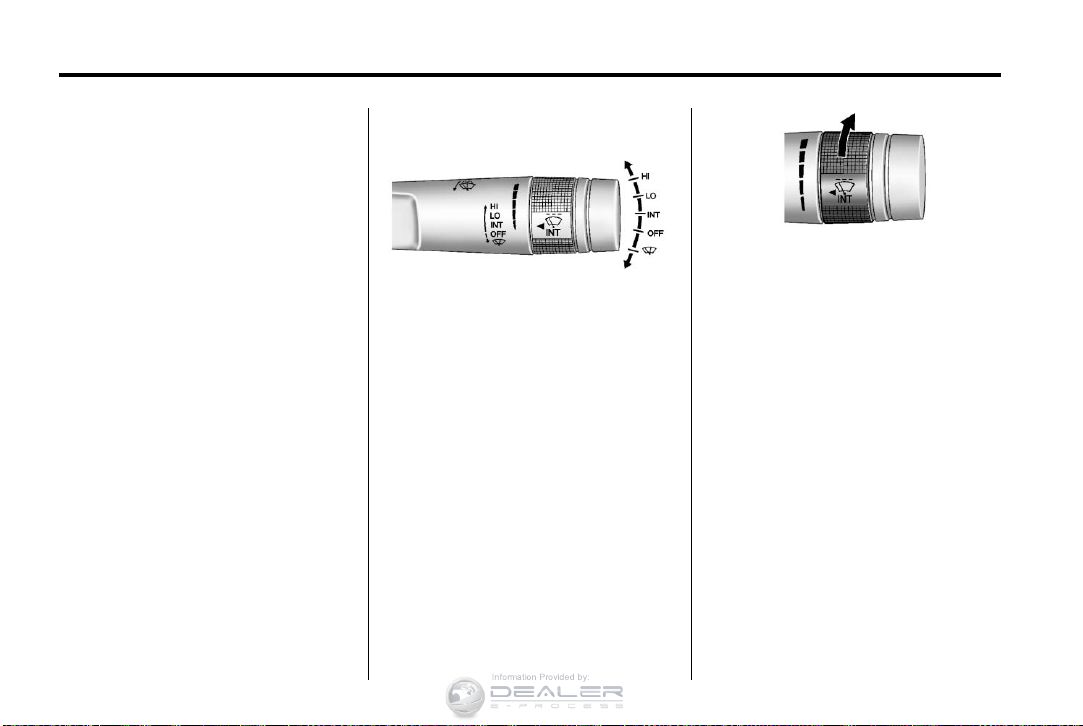
The windshield wiper/washer lever
is on the right side of the steering
column. With the ignition in ACC/
ACCESSORY or ON/RUN, move
the windshield wiper lever to select
the wiper speed.
HI: Use for fast wipes.
LO: Use for slow wipes.
INT: Move the lever up to INT for
intermittent wipes, then turn the
3 INT band up for more frequent
wipes or down for less frequent
wipes.
OFF: Use to turn the wipers off.
8 : For a single wipe, briefly move
the wiper lever down. For several
wipes, hold the wiper lever down.
n L : Pull the windshield wiper
lever toward you to spray windshield
washer fluid and activate the wipers.
See Windshield Wiper/Washer on
page 5‑3.
Chevrolet Cruze Owner Manual — 2013 — CRC — 6/11/12
In Brief 1-13
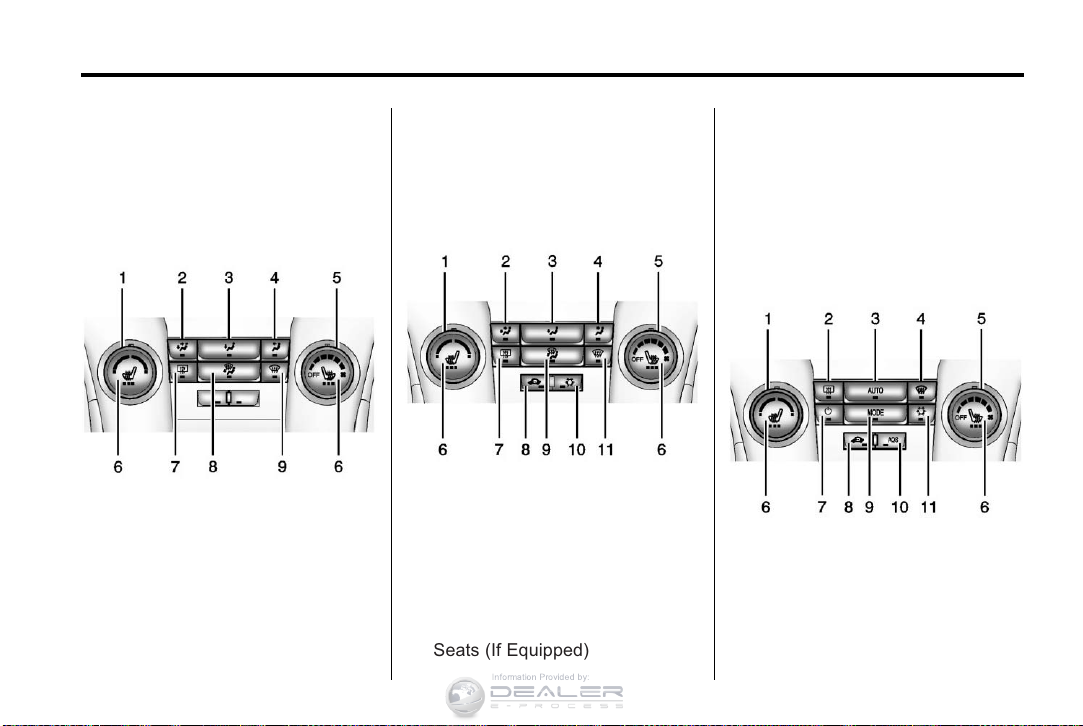
Climate Controls
The heating, cooling, defrosting, and
ventilation for the vehicle can be
controlled with these systems.
Vehicles without Air Conditioning
1. Temperature Control
2. Bi-level Air Mode
3. Floor Air Mode
4. Vent Air Mode
5. Fan Control
6. Driver and Passenger Heated
Seats (If Equipped)
7. Rear Window Defogger
8. Defog
9. Defrost
Vehicles with Air Conditioning
1. Temperature Control
2. Bi-level Air Mode
3. Floor Air Mode
4. Vent Air Mode
5. Fan Control
6. Driver and Passenger Heated
Seats (If Equipped)
7. Rear Window Defogger
8. Recirculation
9. Defog
10. Air Conditioning
11. Defrost
Automatic Climate Control System
1. Temperature Control
2. Rear Window Defogger
3. AUTO (Automatic Operation)
4. Defrost
5. Fan Control
Chevrolet Cruze Owner Manual — 2013 — CRC — 6/11/12
1-14 In Brief
6. Driver and Passenger Heated
Seats (If Equipped)
7. Power
8. Recirculation
9. MODE (Air Delivery Mode)
10. AQS (Air Quality Sensor)
11. Air Conditioning
See Climate Control Systems on
page 8‑1 or Automatic Climate
Control System on page 8‑3 (If
Equipped).
Transmission
Manual Mode
Driver Shift Control (DSC) allows
the automatic transmission to be
shifted similar to a manual
transmission.
Electronic Range Select (ERS)
allows for the selection of a range of
gears.
See Manual Mode on page 9‑28.
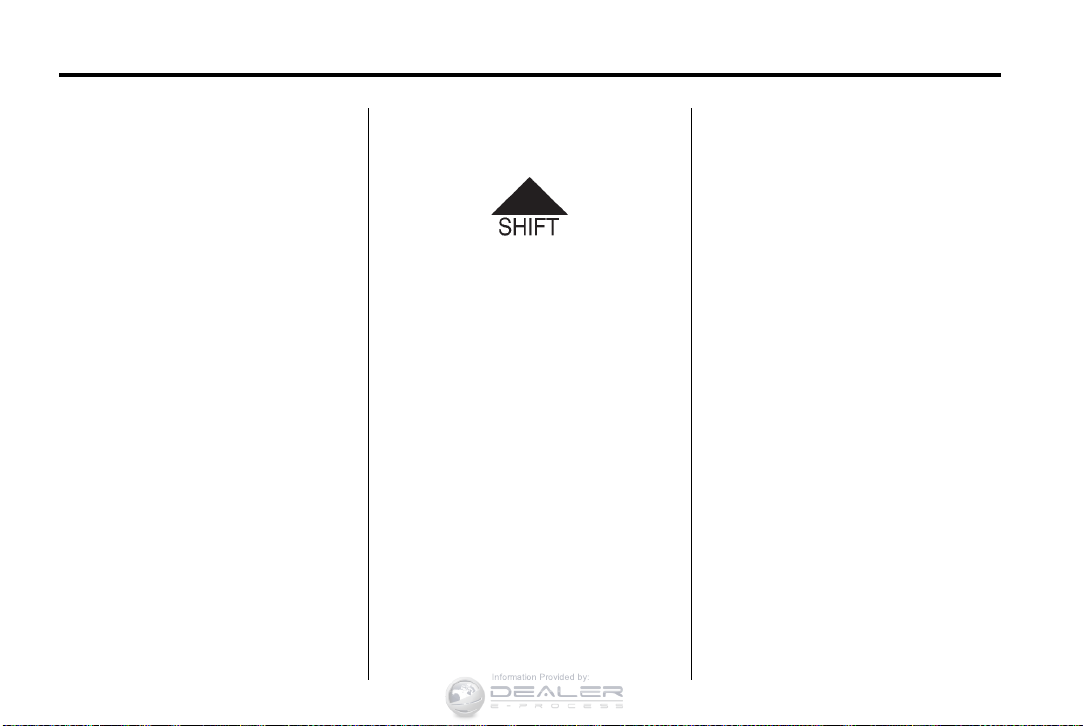
Up‐Shift Light
If the vehicle has a manual
transmission, it will have an up-shift
light that indicates when to shift to
the next higher gear for the best fuel
economy.
See Manual Transmission on
page 9‑30.
Vehicle Features
Radio(s)
: Press to turn the system on
O
and off. Turn to increase or
decrease the volume.
BAND: Press to choose between
FM, AM, or SiriusXM®, if equipped.
MENU/SEL: Turn to select radio
stations. Press to select a menu.
g : Press to seek the previous
station or track.
l : Press to seek the next station
or track.
Buttons 1 to 6: Press to save and
select favorite stations.
INFO: Press to show available
information about the current station
or track.
For more information about these
and other radio features, see
Operation on page 7‑4.

Chevrolet Cruze Owner Manual — 2013 — CRC — 6/11/12
In Brief 1-15
Storing a Favorite Station
Stations from all bands can be
stored in the favorite lists in any
order. Up to six stations can be
stored in each favorite page and the
number of available favorite pages
can be set.
To store the station to a position in
the list, press the corresponding
numeric button 1 to 6 until a beep is
heard.
For more information, see “Storing a
Station as a Favorite” in AM-FM
Radio on page 7‑7.
Setting the Clock
Adjusting the Time or Date
To set the time and date for the
radio with navigation:
1. Press
2. Select Set Time or Set Date.
3. Turn the MENU/SEL knob to
4. Press the MENU/SEL knob to
H.
adjust the highlighted number.
select the next number.
5. To save the settings, press the
BACK on the radio faceplate.
Setting the 12/24 Hour Format
To set the 12/24 hour format for the
radio with navigation:
1. Press
2. Highlight 12/24 Hour Format.
3. Press the MENU/SEL knob to
4. To save the settings, press the
For detailed instructions on setting
the clock for the vehicle’s specific
audio system. See Clock on
page 5‑4.
H.
select the 12 hour or 24 hour
display format.
BACK on the radio faceplate.
Satellite Radio
Vehicles with a SiriusXM® satellite
radio tuner and a valid SiriusXM
satellite radio subscription can
receive SiriusXM programming.
SiriusXM Satellite Radio
Service
SiriusXM is a satellite radio service
based in the 48 contiguous United
States and 10 Canadian provinces.
SiriusXM satellite radio has a wide
variety of programming and
commercial-free music, coast to
coast, and in digital-quality sound.
A fee is required to receive the
SiriusXM service.
Refer to:
.
www.siriusxm.com or call
1-866-635-2349 (U.S.).
.
www.xmradio.ca or call
1-877-209-0079 (Canada).
See Satellite Radio on page 7‑10.
Portable Audio Devices
Some vehicles have a 3.5 mm
(1/8 in) auxiliary input and a USB
port in the center console bin.
External devices such as iPods®,
laptop computers, MP3 players, CD
Chevrolet Cruze Owner Manual — 2013 — CRC — 6/11/12
1-16 In Brief
changers, and USB drives may be
connected, depending on the audio
system.
See Auxiliary Devices on page 7‑16.
Bluetooth
The Bluetooth® system allows
users with a Bluetooth-enabled
mobile phone to make and receive
hands-free calls using the vehicle
audio system and controls.
The Bluetooth-enabled mobile
phone must be paired with the
in-vehicle Bluetooth system before it
can be used in the vehicle. Not all
phones will support all functions.
See Bluetooth (Overview) on
page 7‑18 or Bluetooth
(Infotainment Controls) on
page 7‑20 or Bluetooth (Voice
Recognition) on page 7‑24.
®
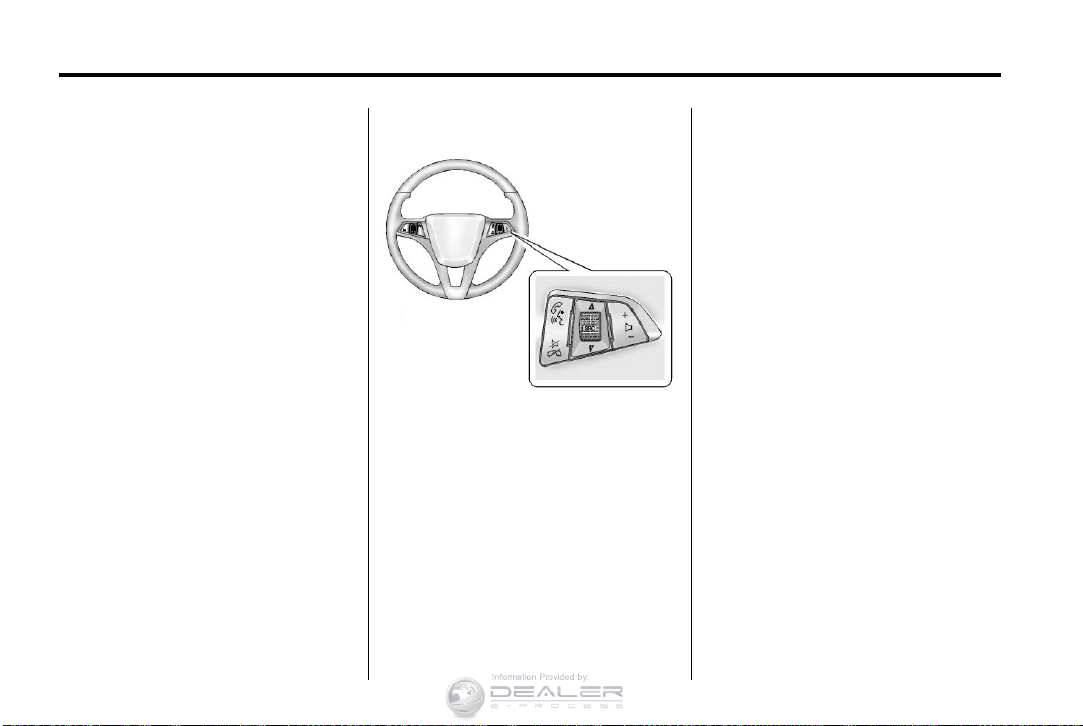
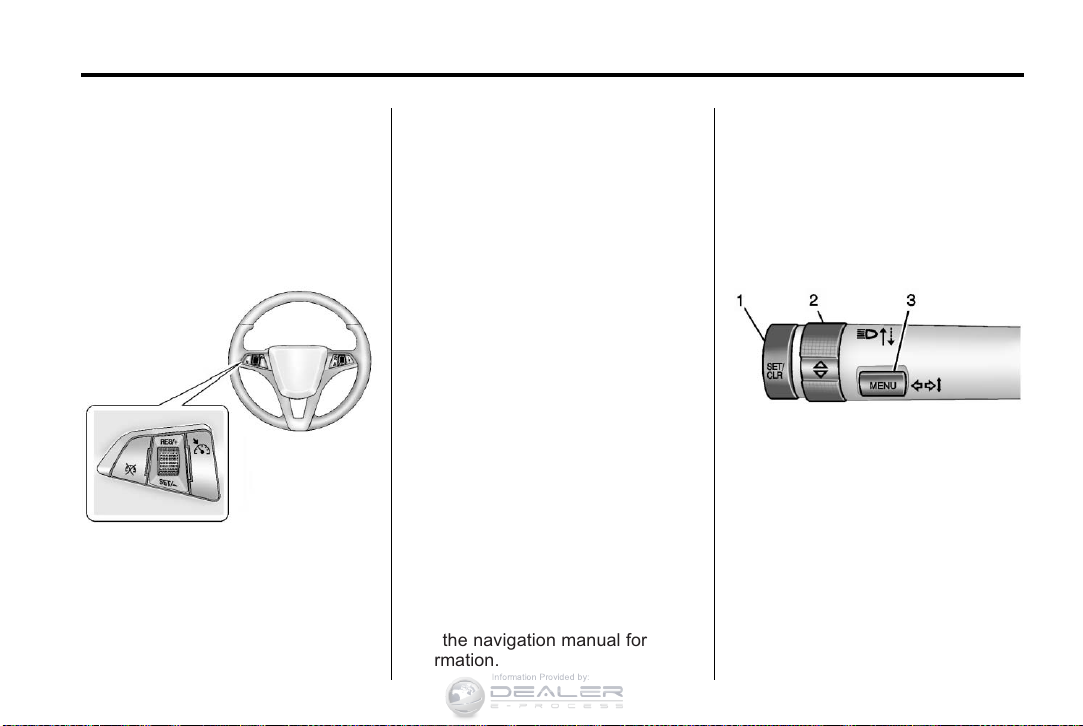
Steering Wheel Controls
For vehicles with audio steering
wheel controls, some audio controls
can be adjusted at the steering
wheel.
b / g : For vehicles with a
Bluetooth, OnStar, or navigation
system, press to interact with those
systems. See Bluetooth (Overview)
on page 7‑18 or Bluetooth
(Infotainment Controls) on
page 7‑20 or Bluetooth (Voice
Recognition) on page 7‑24, OnStar
Overview on page 14‑1, or the
infotainment manual.
$ / i : Press to silence the
vehicle speakers only. Press again
to turn the sound on. For vehicles
with OnStar or Bluetooth systems,
press to reject an incoming call,
or to end a current call.
_ SRC ^ : Press to select a source
or turn to change favorite stations.
_ or ^ to select AM, FM, CD,
Press
or MP3 track.
_ or ^ to select the next or
Turn
previous saved favorite radio
stations.
Chevrolet Cruze Owner Manual — 2013 — CRC — 6/11/12
In Brief 1-17
+ x −: Press + to increase the
volume. Press − to decrease the
volume.
For more information, see Steering
Wheel Controls on page 5‑2.
Cruise Control
For vehicles with cruise control:
1 : Press to turn the cruise control
system on and off.
RES/+: Move the thumbwheel up to
resume a previously set speed or to
accelerate.
SET/−: Move the thumbwheel down
to set a speed or to make the
vehicle decelerate.
* : Press to disengage cruise
control without erasing the set
speed from memory.
See Cruise Control on page 9‑37.
Navigation System
If the vehicle has a navigation
system, there is a separate
navigation manual that includes
information on the radio, audio
players, and navigation system.
The navigation system provides
detailed maps of most major
freeways and roads. After a
destination has been set, the
system provides turn-by-turn
instructions for reaching the
destination. In addition, the system
can help locate a variety of points of
interest (POIs), such as banks,
airports, restaurants, and more.
See the navigation manual for more
information.
Driver Information
Center (DIC)
The DIC display is in the center of
the instrument cluster. It shows the
status of many vehicle systems. The
controls for the DIC are on the turn
signal lever.
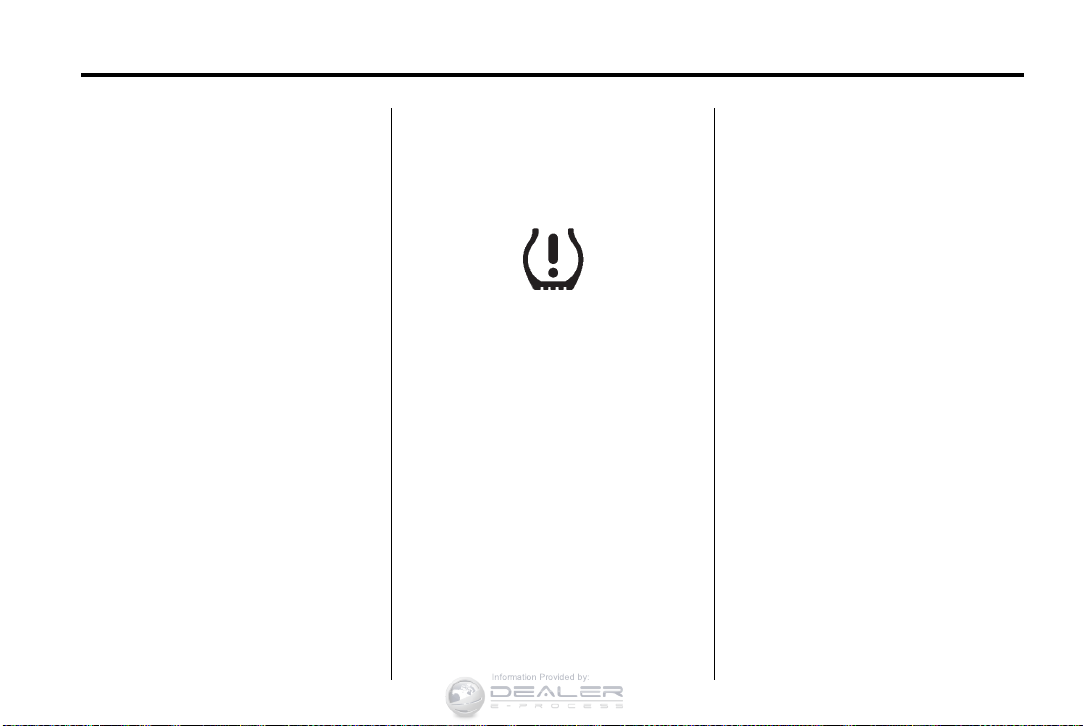
1. SET/CLR: Press to set, or press
and hold to clear, the menu item
displayed.
w / x : Use the thumbwheel to
2.
scroll through the items in
each menu.
3. MENU: Press to display the DIC
menus. This button is also used
to return to or exit the last
screen displayed on the DIC.
See Driver Information Center (DIC)
on page 5‑22.

Chevrolet Cruze Owner Manual — 2013 — CRC — 6/11/12
1-18 In Brief
Ultrasonic Parking Assist
If available, this system uses
sensors on the rear bumper to
assist with parking and avoiding
objects while in R (Reverse).
It operates at speeds less than
8 km/h (5 mph). URPA uses audible
beeps to provide distance and
system information.
Keep the sensors on the vehicle’s
rear bumper clean to ensure proper
operation.
See Ultrasonic Parking Assist on
page 9‑39.
Power Outlets
The accessory power outlets can be
used to plug in electrical equipment,
such as a cell phone or MP3 player.
There is one accessory power outlet
located on the center floor console
and one on the rear of the center
floor console. These outlets are
powered when the key is in ON/
RUN or ACC/ACCESSORY, or until
the driver door is opened within
10 minutes of turning off the vehicle.
See Retained Accessory Power
(RAP) on page 9‑22.
See Power Outlets on page 5‑5.
Performance and
Maintenance
Traction Control
System (TCS)
The traction control system limits
wheel spin. The system is on when
the vehicle is started.
.
To turn off traction control, press
and release
console.
instrument cluster.
.
Press and release g again to
turn traction control back on.
For more information, see Traction
Control System (TCS) on
page 9‑34.
g on the center
i illuminates in the
Chevrolet Cruze Owner Manual — 2013 — CRC — 6/11/12
In Brief 1-19
StabiliTrak®System
The StabiliTrak system assists with
directional control of the vehicle in
difficult driving conditions. The
system is on when the vehicle is
started.
.
To turn off both Traction
Control and StabiliTrak, press
and hold
illuminate in the instrument
cluster.
.
Press g again to turn on both
systems.
For more information, see
StabiliTrak
g until g and i
®
System on page 9‑35.
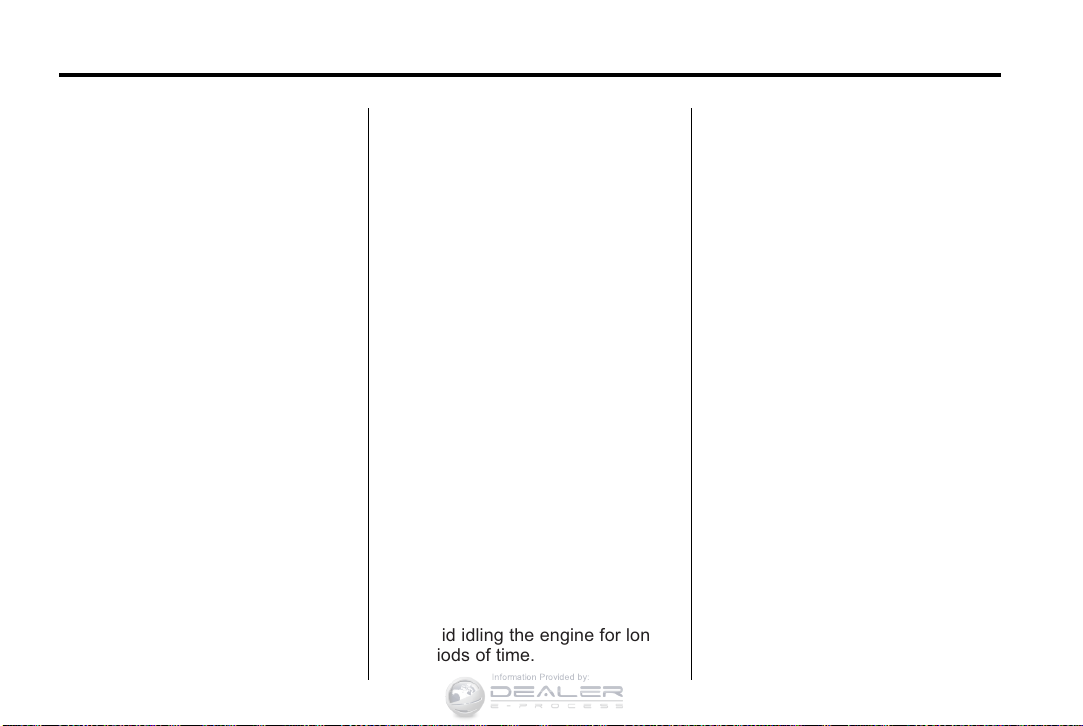
Tire Pressure Monitor
This vehicle may have a Tire
Pressure Monitor System (TPMS).
The low tire pressure warning light
alerts to a significant loss in
pressure of one of the vehicle’s
tires. If the warning light comes on,
stop as soon as possible and inflate
the tires to the recommended
pressure shown on the Tire and
Loading Information label. See
Vehicle Load Limits on page 9‑10.
The warning light will remain on until
the tire pressure is corrected.
The low tire pressure warning light
may come on in cool weather when
the vehicle is first started, and then
turn off as the vehicle is driven.
This may be an early indicator that
the tire pressures are getting low
and the tires need to be inflated to
the proper pressure.
The TPMS does not replace normal
monthly tire maintenance. Maintain
the correct tire pressures.
See Tire Pressure Monitor System
on page 10‑48.
Tire Sealant and
Compressor Kit
This vehicle may come with a spare
tire and tire changing equipment or
a tire sealant and compressor kit.
The kit can be used to temporarily
seal small punctures in the tread
area of the tire. See Tire Sealant
and Compressor Kit on page 10‑62.
If the vehicle came with a spare tire
and tire changing equipment, see If
a Tire Goes Flat on page 10‑60.
Chevrolet Cruze Owner Manual — 2013 — CRC — 6/11/12
1-20 In Brief
Engine Oil Life System
The engine oil life system calculates
engine oil life based on vehicle use
and displays the CHANGE ENGINE
OIL SOON DIC message or Code
82 DIC message when it is
necessary to change the engine oil
and filter.
Remember, the Oil Life display must
be reset after each oil change. It will
not reset itself. Also, be careful not
to reset the Oil Life display
accidentally at any time other than
when the oil has just been changed.
It cannot be reset accurately until
the next oil change. To reset the
engine oil life system press the SET
button while the Oil Life display is
active.
Resetting the Oil Life System
1. Using the DIC MENU button and
thumbwheel, scroll until you
reach REMAINING OIL LIFE on
the DIC (
: % for Canada).
2. Press the SET button to reset
the oil life at 100%. When
prompted, use the thumbwheel
to highlight YES or NO. Press
the SET/CLEAR button to
confirm.
Be careful not to reset the oil life
display accidentally at any time
other than after the oil is changed.
It cannot be reset accurately.
See Engine Oil Life System on
page 10‑12.
Driving for Better Fuel
Economy
Driving habits can affect fuel
mileage. Here are some driving tips
to get the best fuel economy
possible.
.
Avoid fast starts and accelerate
smoothly.
.
Brake gradually and avoid
abrupt stops.
.
Avoid idling the engine for long
periods of time.
.
When road and weather
conditions are appropriate, use
cruise control.
.
Always follow posted speed
limits or drive more slowly when
conditions require.
.
Keep vehicle tires properly
inflated.
.
Combine several trips into a
single trip.
.
Replace the vehicle’s tires with
the same TPC Spec number
molded into the tire’s sidewall
near the size.
.
Follow recommended scheduled
maintenance.
Roadside Assistance
Program
U.S.: 1-800-243-8872
TTY Users (U.S. Only):
1-888-889-2438
Canada: 1-800-268-6800

Chevrolet Cruze Owner Manual — 2013 — CRC — 6/11/12
As the owner of a new Chevrolet,
you are automatically enrolled in the
Roadside Assistance program.
See Roadside Assistance Program
on page 13‑5.
Roadside Assistance and OnStar
If the vehicle has an active OnStar
subscription, contact OnStar and the
vehicle’s current GPS location will
be sent to an OnStar advisor to
assess the situation, contact
Roadside Assistance, and relay the
exact location to send help.
OnStar
®
If equipped, this vehicle has a
comprehensive, in-vehicle system
that can connect to a live Advisor
for Emergency, Security, Navigation,
Connection, and Diagnostic
Services. See OnStar Overview on
page 14‑1.
In Brief 1-21

Chevrolet Cruze Owner Manual — 2013 — CRC — 6/11/12
1-22 In Brief
2 NOTES

Chevrolet Cruze Owner Manual — 2013 — CRC — 6/11/12
Keys, Doors, and Windows 2-1
Keys, Doors, and
Windows
Keys and Locks
Keys . . . . . . .. . . . . . . . . . .. . . . . . . . 2-1
Remote Keyless Entry (RKE)
System . . . . . . .. . . . . . . . . . . . . . . 2-3
Remote Keyless Entry (RKE)
System Operation . . . . . . . . . . . 2-3
Remote Vehicle Start . . . . . . . . . 2-9
Door Locks . . . . . . . . . . . . . . . . . . 2-10
Power Door Locks . . . . . . . . . . . 2-11
Automatic Door Locks . . . . . . . 2-11
Safety Locks . . . . . . . . ….. . . . . 2-12
Doors
Trunk . . . . . . . . .. . . . . . . . .. . . . . . 2-12
Vehicle Security
Vehicle Security . . . . . . . . …… 2-14
Vehicle Alarm System . . . . . . . 2-14
Immobilizer . . . . . . . . . . . . . . . . . . 2-14
Immobilizer Operation . . . . . . . 2-15
Exterior Mirrors
Convex Mirrors . . . . . . . . . . . . . . 2-16
Manual Mirrors . . . . . . . . . . . . . .. 2-16
Power Mirrors . . . . . . . . . . . ….. 2-16
Folding Mirrors . . . . . . . . . . . . . . . 2-17
Heated Mirrors . . . . . . . . … . . . . 2-17
Interior Mirrors
Manual Rearview Mirror . . . . . . 2-17
Automatic Dimming Rearview
Mirror . . . . . . . . . . . . . . . . . . . . . . . 2-17
Windows
Windows . . . . . . . . . . . . . . . …… 2-18
Power Windows . . . . . . . . . . . . . 2-18
Sun Visors . . . . . . . . . … . . . . . . . 2-20
Roof
Sunroof . . . . . . . . . . . . . . . . . . . . .. 2-20
Keys and Locks
Keys
WARNING
{
Leaving children in a vehicle with
the ignition key is dangerous and
children or others could be
seriously injured or killed. They
could operate the power windows
or other controls or make the
vehicle move. The windows will
function with the keys in the
ignition, and children or others
could be caught in the path of a
closing window. Do not leave
children in a vehicle with the
ignition key.
Chevrolet Cruze Owner Manual — 2013 — CRC — 6/11/12
2-2 Keys, Doors, and Windows
WARNING
{
Leaving children in a vehicle with
a Remote Keyless Entry (RKE)
transmitter is dangerous and
children or others could be
seriously injured or killed. They
could operate the power windows
or other controls or make the
vehicle move. The windows will
function with the RKE transmitter
in the vehicle, and children or
others could be caught in the path
of a closing window. Do not leave
children in a vehicle with an RKE
transmitter.
The key that is part of the Remote
Keyless Entry (RKE) transmitter can
be used for the ignition and all locks
if the vehicle is a key access
vehicle. If the vehicle has the
keyless ignition, the key can be
used for the locks.
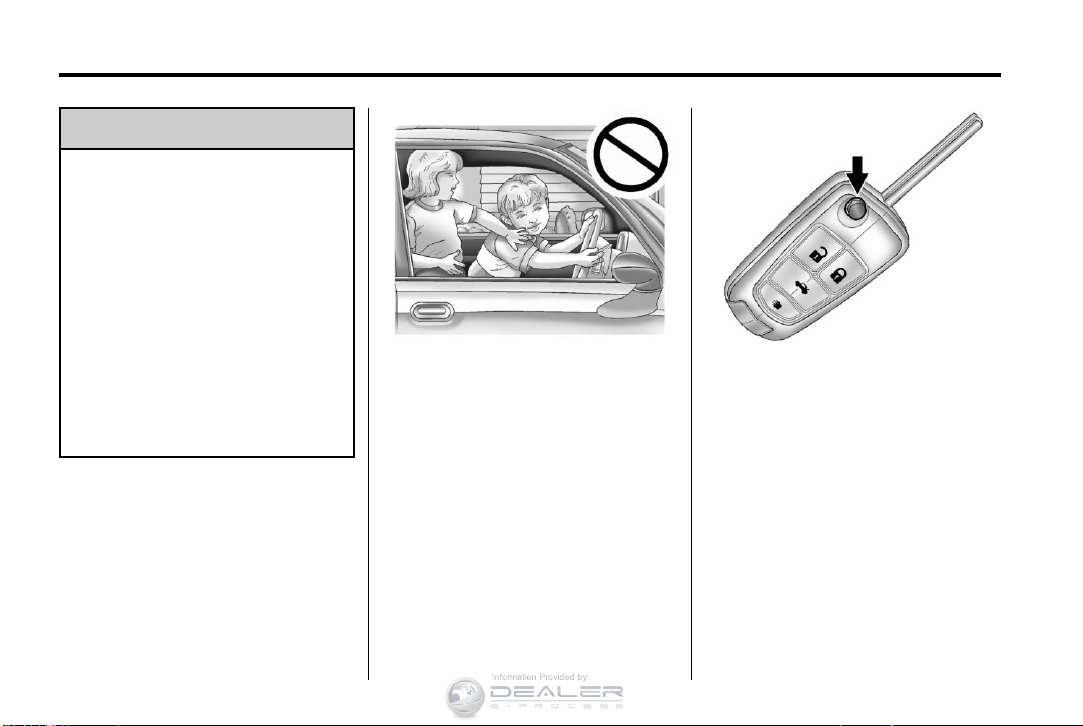
Press the button on the RKE
transmitter to extend the key. Press
the button and the key blade to
retract the key.
If it becomes difficult to turn the key,
inspect the key blade for debris.
Periodically clean with a brush
or pick.
See your dealer if a new key is
needed.
If locked out of the vehicle, see
Roadside Assistance Program on
page 13‑5.
Loading…
Chevrolet Cruze 2013 Getting To Know Your Manual
Getting To Know Your Manual
20 pages
en
394 pages
en
Chevrolet Cruze 2013 Specification
The Chevrolet Cruze 2013 is a compact sedan that exemplifies a blend of efficiency, comfort, and advanced features. It is powered by a choice of two engines: a 1.8-liter four-cylinder producing 138 horsepower and 125 lb-ft of torque, and a turbocharged 1.4-liter four-cylinder generating the same horsepower but with a higher torque of 148 lb-ft. Both engines offer a six-speed manual or six-speed automatic transmission, enhancing driving flexibility and fuel efficiency. The Cruze’s fuel economy stands out, with the turbocharged version achieving an estimated 26 mpg in the city and 38 mpg on the highway.
The vehicle’s exterior design is characterized by a sleek, aerodynamic profile with a prominent dual-port grille, sculpted fenders, and available 17-inch alloy wheels. Inside, the Cruze offers a spacious cabin with high-quality materials and ergonomic design. The front seats provide ample support and adjustability, while the rear seats offer adequate legroom for passengers. The trunk space is generous for a compact car, offering 15 cubic feet of cargo capacity.
In terms of technology, the 2013 Cruze comes equipped with the Chevrolet MyLink infotainment system, featuring a 7-inch touchscreen display, Bluetooth connectivity, and smartphone integration. Safety is a strong focus, with standard features including ten airbags, antilock brakes, stability control, and traction control. Higher trims offer additional safety technologies such as rear park assist and a rearview camera.
The Cruze’s suspension system is finely tuned to balance comfort and handling, making it suitable for both city commutes and long-distance travel. Overall, the Chevrolet Cruze 2013 stands out in the compact sedan market for its reliable performance, advanced technology, and commitment to safety.
Chevrolet Cruze 2013 F.A.Q.
The recommended engine oil for a Chevrolet Cruze 2013 is SAE 5W-30 full synthetic oil. Always check your owner’s manual for specific requirements.
To reset the oil life indicator, turn the ignition to the «On» position without starting the engine, press the «Menu» button to scroll to «Vehicle Information,» then press the «Set/Clr» button to select «Oil Life.» Press and hold the «Set/Clr» button until the system resets to 100%.
The recommended tire pressure for a Chevrolet Cruze 2013 is typically 35 PSI for both the front and rear tires. Always refer to the sticker on the driver’s side door jamb for the most accurate information.
If your Chevrolet Cruze 2013 is having starting issues, check the battery for charge and connections, inspect the starter motor, and ensure that the fuel system is delivering fuel. If problems persist, consult a professional mechanic.
To replace the cabin air filter, open the glove box, remove the retaining tabs to lower the glove box door, locate the filter cover, remove it, and replace the old filter with a new one. Reassemble in reverse order.
Common causes of overheating include a malfunctioning thermostat, low coolant levels, a faulty water pump, or a clogged radiator. It is important to diagnose and address these issues promptly to avoid engine damage.
To improve fuel efficiency, ensure your tires are properly inflated, perform regular maintenance like oil changes and air filter replacements, drive at steady speeds, and reduce excess weight in the vehicle.
It is recommended to change the transmission fluid every 45,000 to 60,000 miles. However, always refer to your owner’s manual for the most accurate maintenance intervals for your specific model.
If the check engine light turns on, check for any obvious issues like a loose gas cap, then use an OBD-II scanner to read any error codes. Address any issues identified by the codes, and seek professional help if needed.
To program a new key fob, insert the original key into the ignition and turn to the «On» position. Then, insert the new key and turn it to «On» within 10 seconds. The security light will turn off to indicate successful programming. Consult your owner’s manual for detailed instructions.
Chevrolet Cruze Owner Manual — 2013 — crc — 10/16/12
In Brief . . . . . . . . . . . . . . . . . . . . . . . . 1-1
Instrument Panel . . . . . . . . . . . . . . 1-2
Initial Drive Information . . . . . . . . 1-4
Vehicle Features . . . . . . . . . . . . . 1-14
Performance and
Maintenance . . . . . . . . . . . . . . . . 1-18
Keys, Doors, and
Windows . . . . . . . . . . . . . . . . . . . . 2-1
Keys and Locks . . . . . . . . . . . . . . . 2-1
Doors . . . . . . . . . . . . . . . . . . . . . . . . 2-12
Vehicle Security. . . . . . . . . . . . . . 2-14
Exterior Mirrors . . . . . . . . . . . . . . . 2-15
Interior Mirrors . . . . . . . . . . . . . . . . 2-17
Windows . . . . . . . . . . . . . . . . . . . . . 2-17
Roof . . . . . . . . . . . . . . . . . . . . . . . . . . 2-20
Seats and Restraints . . . . . . . . . 3-1
Head Restraints . . . . . . . . . . . . . . . 3-2
Front Seats . . . . . . . . . . . . . . . . . . . . 3-3
Rear Seats . . . . . . . . . . . . . . . . . . . . 3-6
Safety Belts . . . . . . . . . . . . . . . . . . . . 3-8
Airbag System . . . . . . . . . . . . . . . . 3-17
Child Restraints . . . . . . . . . . . . . . 3-31
Storage . . . . . . . . . . . . . . . . . . . . . . . 4-1
Storage Compartments . . . . . . . . 4-1
Additional Storage Features . . . 4-2
Instruments and Controls . . . . 5-1
Controls . . . . . . . . . . . . . . . . . . . . . . . 5-2
Warning Lights, Gauges, and
Indicators . . . . . . . . . . . . . . . . . . . . 5-7
Information Displays . . . . . . . . . . 5-22
Vehicle Messages . . . . . . . . . . . . 5-26
Vehicle Personalization . . . . . . . 5-32
Lighting . . . . . . . . . . . . . . . . . . . . . . . 6-1
Exterior Lighting . . . . . . . . . . . . . . . 6-1
Interior Lighting . . . . . . . . . . . . . . . . 6-5
Lighting Features . . . . . . . . . . . . . . 6-6
Infotainment System . . . . . . . . . 7-1
Introduction . . . . . . . . . . . . . . . . . . . . 7-1
Radio . . . . . . . . . . . . . . . . . . . . . . . . . . 7-7
Audio Players . . . . . . . . . . . . . . . . 7-14
Phone . . . . . . . . . . . . . . . . . . . . . . . . 7-18
Trademarks and License
Agreements . . . . . . . . . . . . . . . . . 7-30
Climate Controls . . . . . . . . . . . . . 8-1
Climate Control Systems . . . . . . 8-1
Air Vents . . . . . . . . . . . . . . . . . . . . . . . 8-6
Maintenance . . . . . . . . . . . . . . . . . . . 8-7
Driving and Operating . . . . . . . . 9-1
Driving Information . . . . . . . . . . . . . 9-2
Starting and Operating . . . . . . . 9-14
Engine Exhaust . . . . . . . . . . . . . . 9-25
Automatic Transmission . . . . . . 9-26
Manual Transmission . . . . . . . . . 9-30
Brakes . . . . . . . . . . . . . . . . . . . . . . . 9-32
Ride Control Systems . . . . . . . . 9-34
Cruise Control . . . . . . . . . . . . . . . . 9-36
Object Detection Systems . . . . 9-39
Fuel . . . . . . . . . . . . . . . . . . . . . . . . . . 9-46
Towing . . . . . . . . . . . . . . . . . . . . . . . 9-50
Conversions and Add-Ons . . . 9-56
Vehicle Care . . . . . . . . . . . . . . . . . 10-1
General Information . . . . . . . . . . 10-2
Vehicle Checks . . . . . . . . . . . . . . . 10-3
Headlamp Aiming . . . . . . . . . . . 10-26
Bulb Replacement . . . . . . . . . . 10-27
Electrical System . . . . . . . . . . . . 10-32
Wheels and Tires . . . . . . . . . . . 10-38
Общие сведения об автомобиле
Автомобиль Chevrolet Cruze — продукт совместной работы компаний Suzuki и General Motors, который пришел на смену не связанных между собой моделей Chevrolet…
Технические характеристики автомобилей
Число мест, включая место водителя 5 Снаряженная масса с МКП (АКП), кг 1285(1310) 1290(1315) Габаритные размеры, мм См. рис. 1.1 Колесная база автомобиля, мм…
Подкапотное пространство автомобиля
Рис. 1.2. Подкапотное пространство автомобиля (вид сверху с установленным декоративным кожухом): 1 — сервисный клапан; 2 — пробка бачка гидроусилителя рулевого…
Паспортные данные автомобиля
Идентификационный номер (VIN) автомобиля (рис. 1.6), модель двигателя, название завода-изготовителя, год выпуска и информация о сертификации указаны на…
Ключи автомобиля
Для того чтобы заблокировать замки всех дверей автомобиля, нажмите на кнопку А. Для разблокирования замков нажмите на кнопку В. Для отпирания замка крышки…
Органы управления автомобилем
Расположение органов управления автомобилем показано на рис. 1.7. Для удобства пользования на ручки, кнопки и контрольно-измерительные приборы, расположенные…
Комбинация приборов
Расположение приборов, сигнальных и контрольных ламп в комбинации приборов показано на рис. 1.8. Рис. 1.8. Комбинация приборов 1 — тахометр электронного типа…
Замки дверей и стеклоподъемники
Замки Замки всех дверей отпирают одним ключом, которым также включают зажигание. Двери открывают, потянув на себя наружную… …или внутреннюю ручку. Передние…
Крышка багажника
Замок крышки багажника оснащен электроприводом. Для того чтобы открыть крышку багажника, разблокируйте центральный замок и нажмите на клавишу открывания…
Ремни безопасности
Ремни безопасности — эффективное средство защиты водителя и пассажиров от тяжелых травм при дорожно-транспортных происшествиях. Во время движения обязательно…
Регулировка положения передних сидений
Для обеспечения наиболее удобной посадки людей разного роста и телосложения положение сидений водителя и переднего пассажира можно изменить в продольном…
Заднее сиденье
Заднее сиденье оборудовано подголовниками, которые можно регулировать по высоте таким же образом, что и подголовники передних сидений. Для удобства боковых…
Использование детских сидений
Согласно требованиям Правил дорожного движения детей до 12 лет необходимо перевозить в специальных детских сиденьях. Информация о типах детских сидений и…
Регулировка положения рулевого колеса
На автомобиль установлена рулевая колонка, регулируемая по углу наклона. Перед поездкой отрегулируйте положение рулевого колеса так, чтобы было удобно…
Корректор угла наклона фар
Корректор угла наклона фар А оборудован электроприводом и позволяет плавно изменить угол наклона фар в соответствии с загрузкой автомобиля. Это позволяет…
Зеркала заднего вида
На автомобиль устанавливают наружные зеркала заднего вида с ручной регулировкой положения или с электроприводом. Внутреннее зеркало также регулируемое….
Освещение салона
Для индивидуального освещения мест водителя и переднего пассажира в передней части обивки крыши установлен комбинированный плафон, включающий в себя два…
Противосолнечные козырьки
Противосолнечные козырьки предназначены для защиты глаз водителя и переднего пассажира от ослепления лучами солнца. Для защиты от солнца возьмитесь за край…
Вещевые ящики салона
В салоне предусмотрены ящики для мелких предметов в панели приборов… …справа со стороны переднего пассажира… …и слева со стороны водителя. Для доступа…
Открывание капота
Для получения доступа в моторный отсек потяните на себя рукоятку привода его замка. Приподнимите капот… …и через образовавшуюся щель отожмите лапку…
Управление коробкой передач
На автомобиле может быть установлена пятиступенчатая механическая или шестиступенчатая автоматическая коробка передач. Механической коробкой передач управляйте…
Обкатка автомобиля
Автомобили Chevrolet Cruze отличаются высоким качеством изготовления и применяемых материалов, поэтому они сразу готовы к полноценной эксплуатации и не требуют…
Подготовка автомобиля к выезду
Перед выездом проверьте техническое состояние автомобиля. Вы затратите не более десяти минут, зато будете уверены в исправности систем и агрегатов автомобиля….
Заправка автомобиля бензином
Заправляйте автомобиль неэтилированным бензином с октановым числом не менее 92. Примечание: Наконечники заправочных пистолетов колонок для этилированного…
Пользование домкратом
При пользовании домкратом на мягком грунте подкладывайте псд основание домкрата брус или доску. 1. Включите I передачу в механической коробке передач или…
Буксировка автомобиля
Предупреждение: Двигатели автомобилей, оборудованных каталитическим нейтрализатором отработавших газов, нельзя пускать буксировкой или толканием, так как это…
Особенности конструкции колесных дисков
На автомобили устанавливают колесные диски двух типов: стальные штампованные или легкосплавные литые. Стальные колесные диски изготавливают из двух частей….
Особенности конструкции шин
Шина — сложное, высокотехнологичное изделие. От конструкции и качества установленных на автомобиль шин во многом зависят комфорт и безопасность дорожного…
Классификация шин
В зависимости от рекомендуемых условий эксплуатации различают следующие классы шин. 1. Летние шины — предназначены для эксплуатации в летний период…
Маркировка шин
Обозначение шины нанесено на ее боковину (например, 205/60 R16 95Н) и расшифровывается следующим образом: 205 — ширина шины, мм; 60 — отношение высоты к ширине…
Советы по выбору шин
Первый параметр, с которым нужно определиться, — это типоразмер шины. В сервисной книжке указан типоразмер, который оптимально подходит вашему автомобилю….
Ремонт бескамерной шины
Бескамерная шина обладает большой «живучестью». Она способна сохранять герметичность даже при сквозном повреждении. С инородным телом, застрявшим в протекторе,…
Советы по эксплуатации колес
Замена колес При замене колеса не следует менять направление вращения шины, даже если рисунок ее протектора ненаправленный, поскольку повторная приработка шины…
Случайные новости Шевроле
Find the 2013 Chevy Cruze Owners Manual below. The 2013 Chevrolet Cruze is just the right vehicle for comfy rides in all the terrains.
| Manufacturer | Chevrolet |
| Model | Cruze |
| Year | 2013 |
Do not let the small size of the 2013 Chevy Cruze Manual trick you; it really comes with a big bang. The smartest, buttery smooth Chevy, is undoubtedly an ideal pick over other sedans like Honda Civic or Toyota Corolla. It keeps the safety and comfort of the buyers as its priority with really cool features. It is one of the most recommended small family cars. Chevrolet Cruze Manual gives buyers a pleasant and quiet ride and is a good pick for daily users. It is super adjustable so the low drivers can also opt this. The trunk of the car is also roomy, which is 15.4 cubic feet. The backseat has room for three and one needs not to worry about the cargo space or seating. It sets a new design for GM Compact cars.
The 2013 Chevy Cruze Owners Manual is an excellent example of the quote, “Do not judge a book by its cover.” It has a simple and sober look from the outside nothing extraordinary. It resembles the blunted Malibu from a distance. There is an RS Appearance Package that one can get added to add a unique outer look for both the front and rear parts of the car. It is available for LT and LTZ models. 2013 Chevrolet Cruze includes the addition of extended rocker moldings, fog lamps etc. for outside and chrome accent rings, ice-blue backlights for better ambiance and many more new cool stuff for the inside as well. It has a three-box layout that is the traditional sedan layout and has a low beltline. The electric power steering is telescopic easing it for drivers.
On the contrary, the inside of the car is the real fancy-pants with little to no resemblance to the previous GM Compact Cars. It is composed of a classy two-tone combination, rich material and elegant feel. It has an exquisite multi-tiered instrument panel.
2013 Chevrolet Cruze Manual: Is It Worth Buying?
It has a fine detailing and trim with a full wraparound dash. The climate control dials and audio knobs are all covered with rubber for a better grip. The 2013 Chevrolet Cruze Manual is the Top Safety Pick according to the Insurance Institute for Highway Safety (IIHS) and gained five stars as a federal performer. Moreover, it has been equipped with even more safety equipment than the previous models.
Chevy Cruze 2013 has a pair of four-cylinder mills with an upgrade in the engine. The 1.4 liter turbocharged four is a good pair for the six-speed manual/automatic that is available in some LT and all the LTZ models. The EPA ratings are a satisfactory 42 mpg for the highway. The gear ratios make the acceleration in the manual-transmission a little slower. The base LS models have rear drum brakes while all the others have four-wheel disc brakes. The LT models are for more comfortable rides while sports suspension results in better handling on 2LT and LTZ models.
Putting a few bucks in would get you the Technology Package that provides with the rearview camera system. Another Enhanced Safety Package comprises the Red Cross-Traffic Alert, Side Blind Zone Alert and rear park assist. The 2013 Chevy Cruze Owners Manual also provides the feature of voice-commands and touch-screen controls by connecting the smartphones. For the music lovers, do not worry about making playlists for driving and listening to your favorite songs uninterruptedly. Cruze 2013 gives Gracenote to grab the playlist automatically using the information and applications like Pandora and Stitcher stream music using the data connection of the smartphone connected to the Chevy along with a six-speaker sound system.