
Продолжение проекта Huawei Multi-Tool
Приложение, основанное на работе с режимами fastboot и adb смартфонов Huawei и Honor. Позволяет выполнять множество действий с любым устройством на процессоре Kirin и Qualcomm. Если Вы новичок в девайсах Huawei, утилита поможет открыть загрузчик, поставить TWRP, получить рут и прочее без знания командной строки. Для продвинутых — это доступная и мощная утилита вместо командной строки. Возможности утилиты растут с каждым днём.
Кратко о зарождении проекта Multi-Tool: Изначально llibell (inside!out) работал один, все началось с перевода и адаптации утилиты от VirusPlus (honor 6/6plus Multi-Tool в Honor 7 Multi-tool, это было в конце 2015. Тогда не планировалось выкладывать утилиту на XDA, утилита появилась на русском языке. Когда VirusPlus предложил объединить усилия и две утилиты объединить в одну она была выложена с кривым переводом. Так появилась Honor Multi-Tool. C переводом помогли ребята с XDA. Так появилась поддержка 2х версий, русской и английской. В дальнейшем люди с форума 4PDA, стали просить сделать утилиту под их модели. Одному человеку не имея аппарат на руках очень сложно адаптировать под другую модель. Нужно иметь несколько людей готовых помочь. А еще лучше готовых работать над утилитой самостоятельно. Крайне важно начать разработку и адаптацию, когда модель еще новая. Благодаря этим людям мы можем представить такой проект, как HUAWEI Multi-Tool — объединяющий множество смартфонов Huawei и Honor.
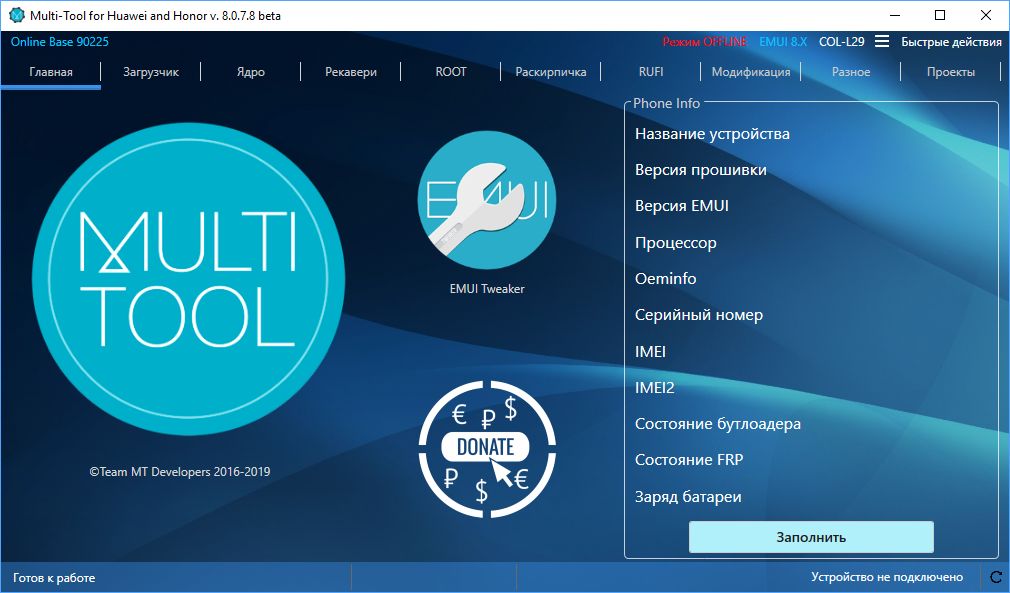

Функционал утилиты делится на БАЗОВЫЙ и РАСШИРЕННЫЙ. Базовый имеют все поддерживаемые устройства. Расширенный, только те, полная поддержка которых заявлена. Расширенный отмечен оранжевым цветом.
Возможности
- Автообновление до актуальной версии (обновляет себя).
- Смену языка утилиты (Rus / Eng/ CN).
- Установка пользовательских Recovery/eRecovery/Recovery_Ramdisk (TWRP).
- Установка пользовательских Boot/Ramdisk.
- Ассистент установки пользовательских SuperSu (Root)
- Перезагрузка в режим Recovery | eRecovery | Fastboot & Rescue mode
- Прошивка образов из прошивки Boot, cust, recovery, system, userdata.
- Разблокировка / Блокировка загрузчика (с сохранением кода локально и в облаке Team MT)
- Раскирпичивание (Unbrick)
- Установка всех драйверов для устройств Huawei
- Установка Huawei HiSuite
- Установка Huawei Update Extractor
- Установка DC Unlocker
- Установка HCU
- Включение скрытых/отключенных функций EMUI без Root (EMUI Tweaker)
- Удаление и/или отключение системных приложений
- Установка TWRP из онлайн базы
- Установка SuperSu/Magisk из онлайн базы
- Установка сток Recovery/eRecovery/Recovery_Ramdisk и boot.img из онлайн базы
- Установка сток Boot/Ramdisk образов из онлайн базы
- Установка любых прошивок (RUFI).
Разработчик
llibell by Team MT
Операционная система
Windows 7sp1/8.x/10x (Windows XP нет)
MAC OS — через Parallels.
Требования
Интерфейс
Русский, английский
Поддержка
Группа в Телеграм — Ответим на ваши вопросы, пишите об ошибках и присылайте свои предложения.
Форумы
Скачать
Приложение основанное на работе с режимами fastboot и adb смартфонов Huawei и Honor. Позволяет выполнять множество действий с любым устройством на процессоре Kirin и Qualcomm. Если Вы новичок в девайсах Huawei, утилита поможет открыть загрузчик, поставить TWRP, получить рут и прочее без знания командной строки. Для продвинутых — это доступная и мощная утилита вместо командной строки. Возможности утилиты растут с каждым днём.
Разработчик: pro-teammt.ru
Язык интерфейса: Русский + Английский
Лекарство: Не требуется (Freeware)
Системные требования: Windows Vista/7/8.1/10 (Windows XP нет), MAC OS — через Parallels.
Screenshot:
Original by Dymonyxx
Дополнительная информация:
Функционал утилиты делится на БАЗОВЫЙ и РАСШИРЕННЫЙ.
БАЗОВЫЙ имеют все устройства Huawei/Honor за некоторым исключением.
РАСШИРЕННЫЙ, только те, полная поддержка которых заявлена, отмечен оранжевым цветом ниже.
Возможности:
•Автообновление до актуальной версии (обновляет себя)
• Смену языка утилиты (Rus / Eng)
• Установка TWRP
• Установка сток recovery.img, recovery2.img и boot.img из онлайн базы
• Установка ROOT
• Перезагрузка в режим Recovery | eRecovery | Fastboot & Rescue mode
• Прошивка пользовательских BOOT.img, Recovery.img, eRecovery.img
• Прошивка образов из прошивки Boot, cust, recovery, system
• Разблокировка / Блокировка загрузчика (с сохранением кода локально и в облаке Team MT)
• Раскирпичивание (Unbrick)
• Установка всех драйверов для устройств Huawei
• Включение скрытых/отключенных функций EMUI без Root.
Поддерживаемые модели:
Honor 4C (CHM)
Honor 4X (CHE2)
Honor 5С (NEM)
Honor 5X (KIW)
Honor 6 (H60) — Поддержка остановлена
Honor 6X (BLN)
Honor 7 (PLK)
Honor 7X (BND)
Honor 8 (FRD)
Honor 8 Lite, Huawei P8 Lite 2017 (PRA)
Honor P8 Pro (DUK)
Honor 9 (STF)
Huawei Mate 7 (MT7) — Поддержка остановлена
Huawei Mate 8 (NXT)
Huawei Mate 9 (MHA)
Huawei GT3 (NMO)
Huawei Nova (CAZ)
Huawei GR5 2017 (BLL)
Huawei Nova (CAN)
Huawei P8 Lite (ALE)
Huawei P9 Lite (VNS)
Huawei P10 Lite (WAS)
Huawei P9 (EVA)
Huawei P10 (VTR) — Скоро
Huawei P10 Plus(VKY) — Скоро
СКАЧАТЬ:
Huawei Multi-Tool is an excellent tool developed by Team MT for solving many operations in your Huawei / Honor smartphone or tablet. If you install all drivers for your Huawei / Honor device, install custom recovery TWRP, flush boot, custom, recovery, system, user data images, unlock and lock Huawei bootloader, install Huawei HiSuite, install TWRP, install TWRP from, install SuperSu , enable/disable hidden EMUI features without Root, install Huawei Update Extractor, install recovery.img
We provide Huawei MultiTool For download, if you did not get this software yet.
1 For this operation, the FRP feature must be disabled (enable OEM unlocking in the developer menu) Phone Finder should be disabled for models in the Chinese market.
2 To unlock the bootloader, you must obtain an unlock key. This can be obtained for a fee via DC-Unlocker or HCU client
3 To save the previously obtained key to our cloud, connect the device, click the «Use your key» button, fill in the «Your unlock key» field and click «Save»
4 Warning. When the bootloader is unlocked/relocked, the device is automatically reset to factory settings. In this case. You will lose all applications and all data (downloads, photos, etc.) from the internal storage! In this case, the SD card is not affected. Remember to back up your data via the «Backup» application.
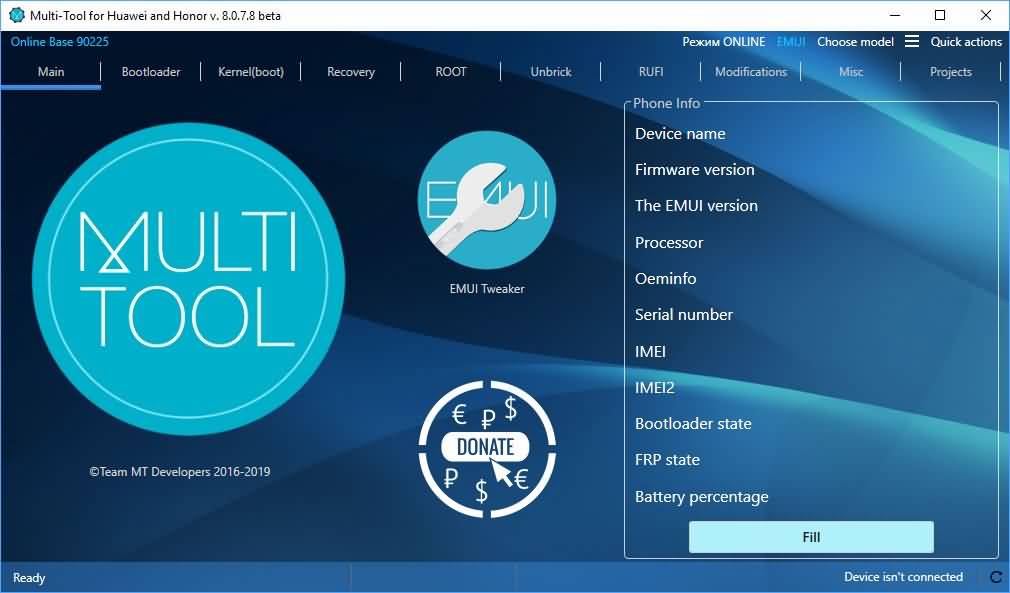

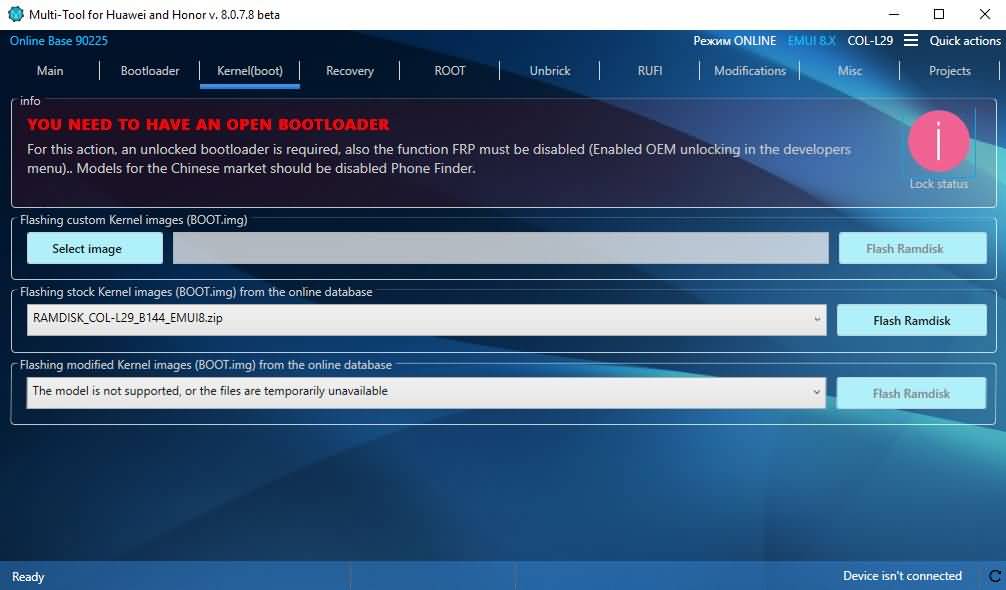
For this operation, the bootloader needs to be unlocked and the FRP feature must also be disabled (enable OEM unlock in the developer menu). Phone Finder should be disabled for China market models.
Flashing custom kernel image (BOOT.img).
Flashes the stock kernel image (BOOT.img) from the online database.
Flashing modified kernel image (BOOT.img) from the online database.
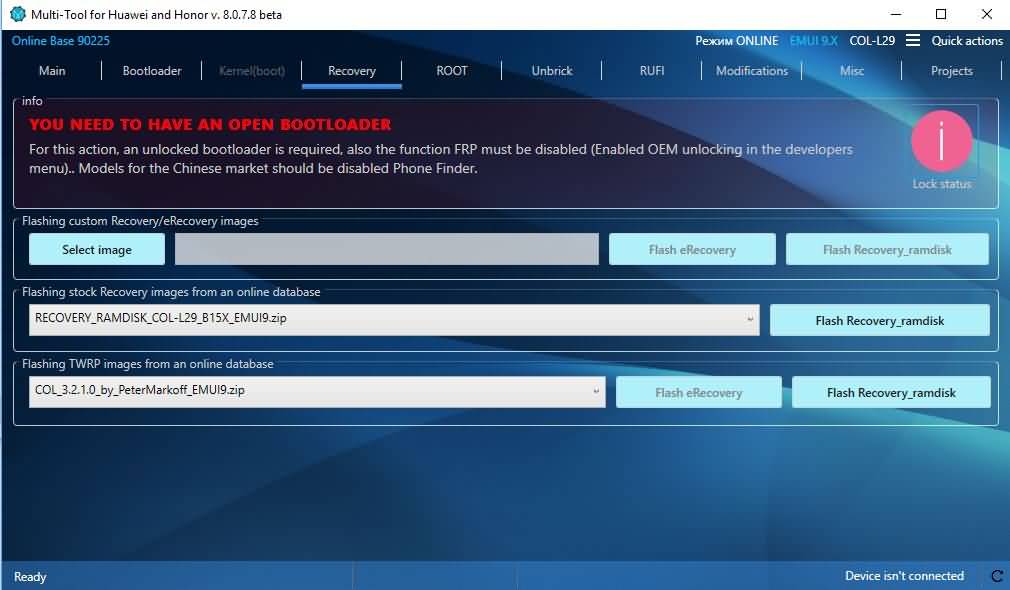
For this operation, the bootloader needs to be unlocked and the FRP feature must be disabled (enable OEM unlock in the developer menu). Phone Finder should be disabled for China market models.
Blinking custom recovery/eRecovery images.
Blink inventory recovery/images from the online database.
Flashes stock eRecovery images from the online database.
Flashes TWRP images from the online database.
For this operation, you must have TWRP and make a backup copy of the SYSTEM and BOOT sections before installing ROOT.
Reboot to recovery mode.
Reboot to eRecovery mode.
Install a custom Supersu.
Install Supersu from the online database.
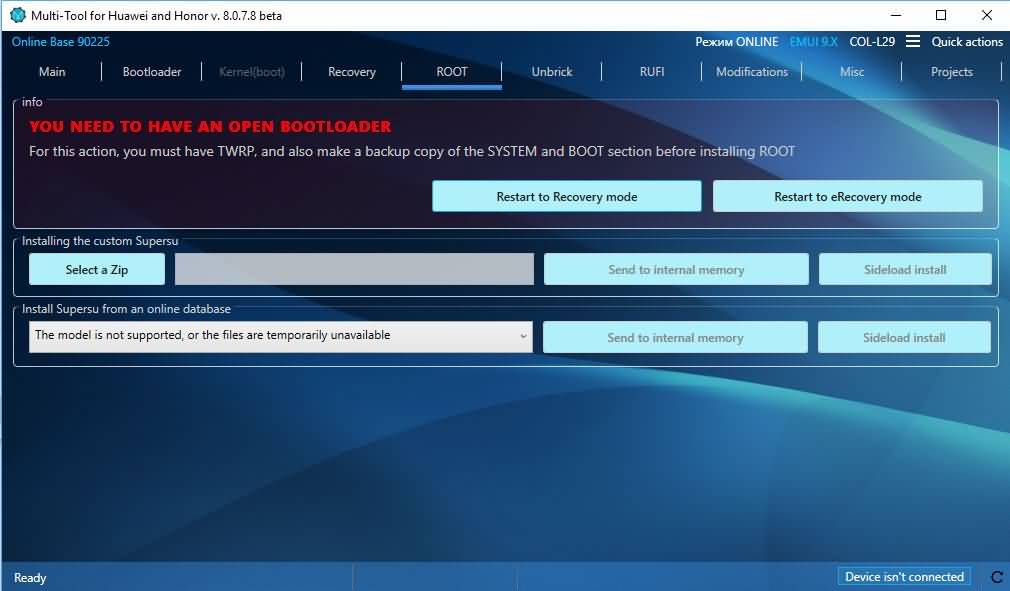
For this operation, you must have TWRP and make a backup copy of the SYSTEM and BOOT sections before installing ROOT.
Reboot to recovery mode.
Reboot to eRecovery mode.
Install a custom Supersu.
Install Supersu from the online database.
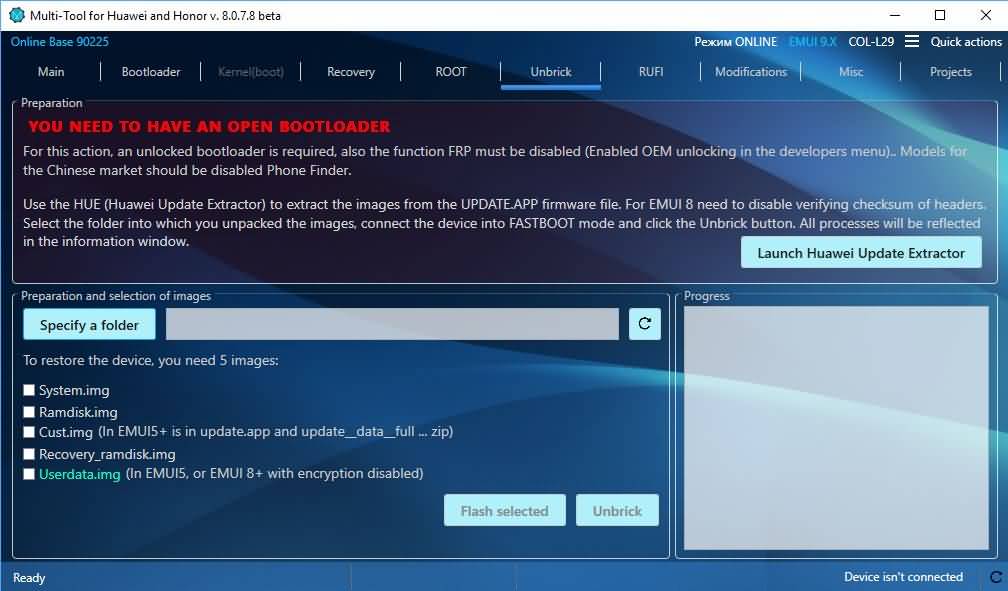
An installed TWRP with ADB support and an SD card or readable memory are required to properly install the firmware! Connect the device or click the Update button until the installation menu is activated. If the device information is incorrect — manually enter the data before activating the installation menu or use another source of FCD recovery.
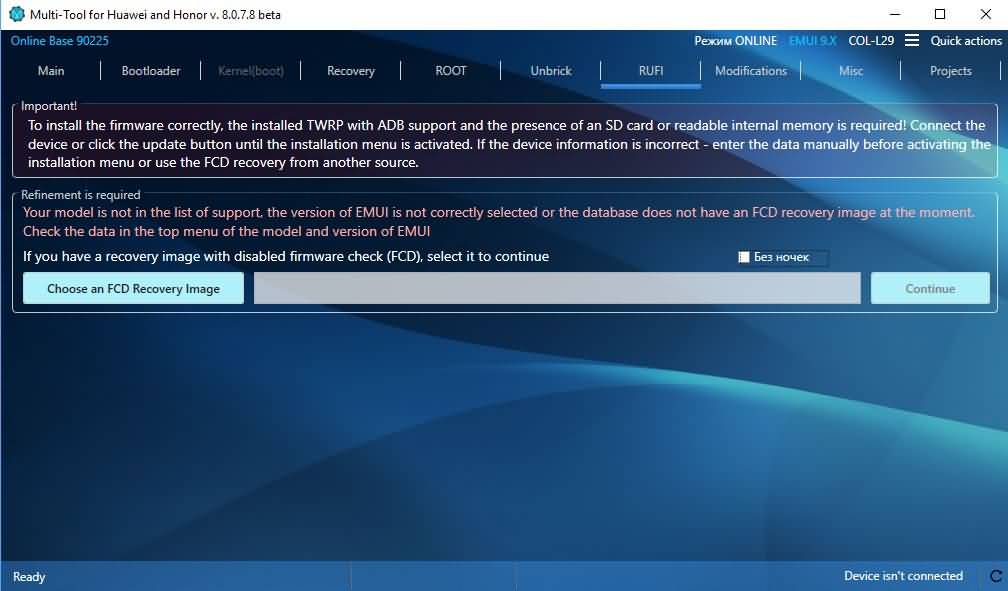
Refinement required.
Your model is not in the supported list. EMUI version is not selected correctly or the FCD recovery image is temporarily unavailable in the database. Check the data in the EMUI Model and Version top menu
If you have a recovery image with firmware checking (FCD) disabled, select it to continue.
EMUI Trimmer
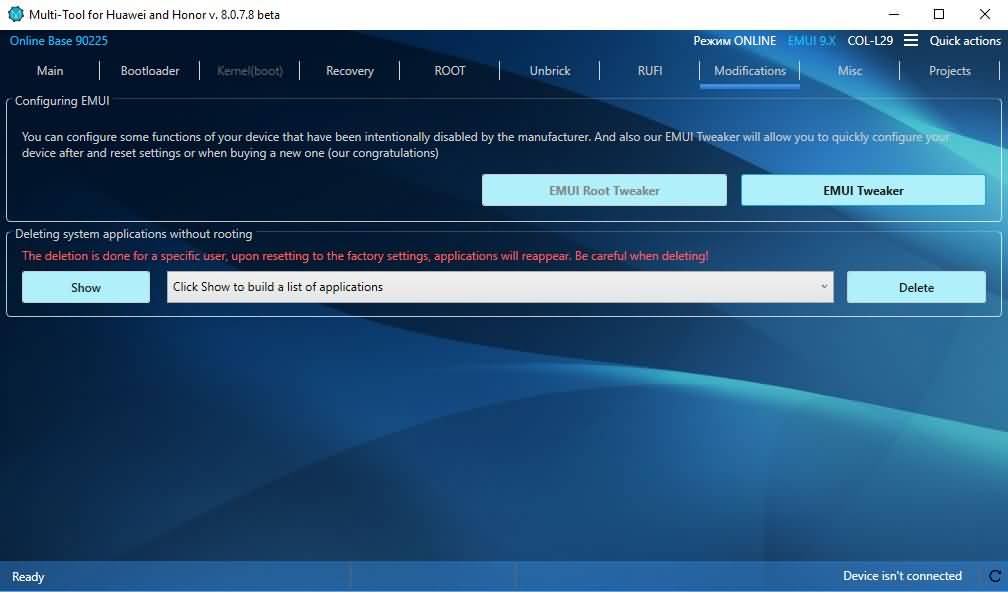
Configure EMUI: You can configure certain features of your device that are intentionally disabled by the manufacturer. And our EMUI Tweaker will allow you to quickly configure your device after resetting settings or when you buy a new one (our congratulations)
Disable/enable system applications without rooting
Disabling applications is performed for the current user. Some applications can be enabled in the Applications menu. Disable applications with care!
Remove system applications without rooting
Uninstall applications for the current user, all deleted applications can be returned through the same menu. Be careful when uninstalling applications.
How to find the application package name.
Install EMUI Tweaker directly
Install EMUI Tweaker via Google Play
After installation, select Application Manager in the Applications menu. Use Search.
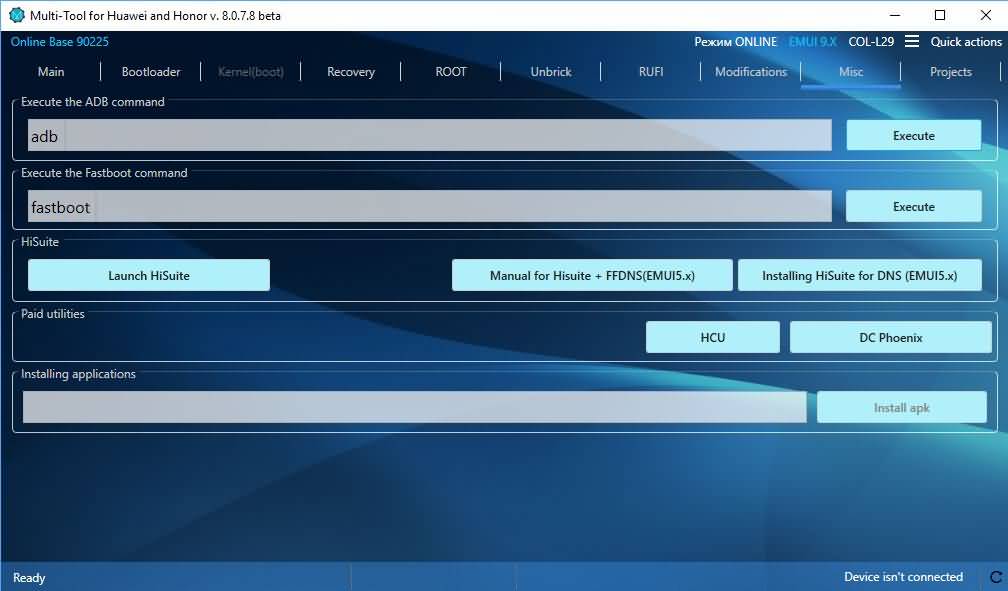
Execute the ADB command
Execute Fastboot command
Hisuite
Start Hisuite
Manual for Hisuite + FFDNS(EMUI5.x).
Install DNS for HiSuite (EMUI5.x).
Paid utilities.
HCU
DC Phoenix
Install the application.
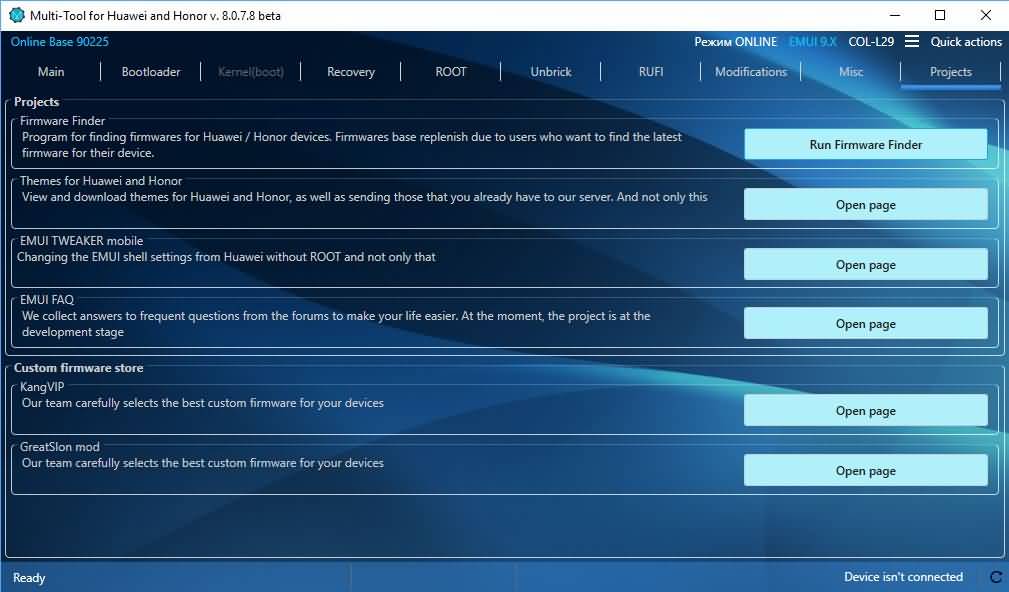
Firmware Finder: A program for finding firmware for Huawei / Honor devices. The firmware library will be replenished due to users who want to find the latest firmware for their devices.
Huawei and Honor themes: View and download Huawei and Honor themes, as well as send the themes you already have to our server.
EMUI TWEAKER mobile: Change EMUI shell settings from Huawei without ROOT.
EMUI FAQ: We collect answers to frequently asked questions from the forum to make your life easier. Currently, the project is in development stage
Custom firmware storage.
KangVIP: Our team handpicks the best custom firmware for your device
GreatSlon mod: Our team handpicks the best custom firmware for your device.
Extended Geographic Definition of Numbers: Patch for extending information about the location of incoming numbers.
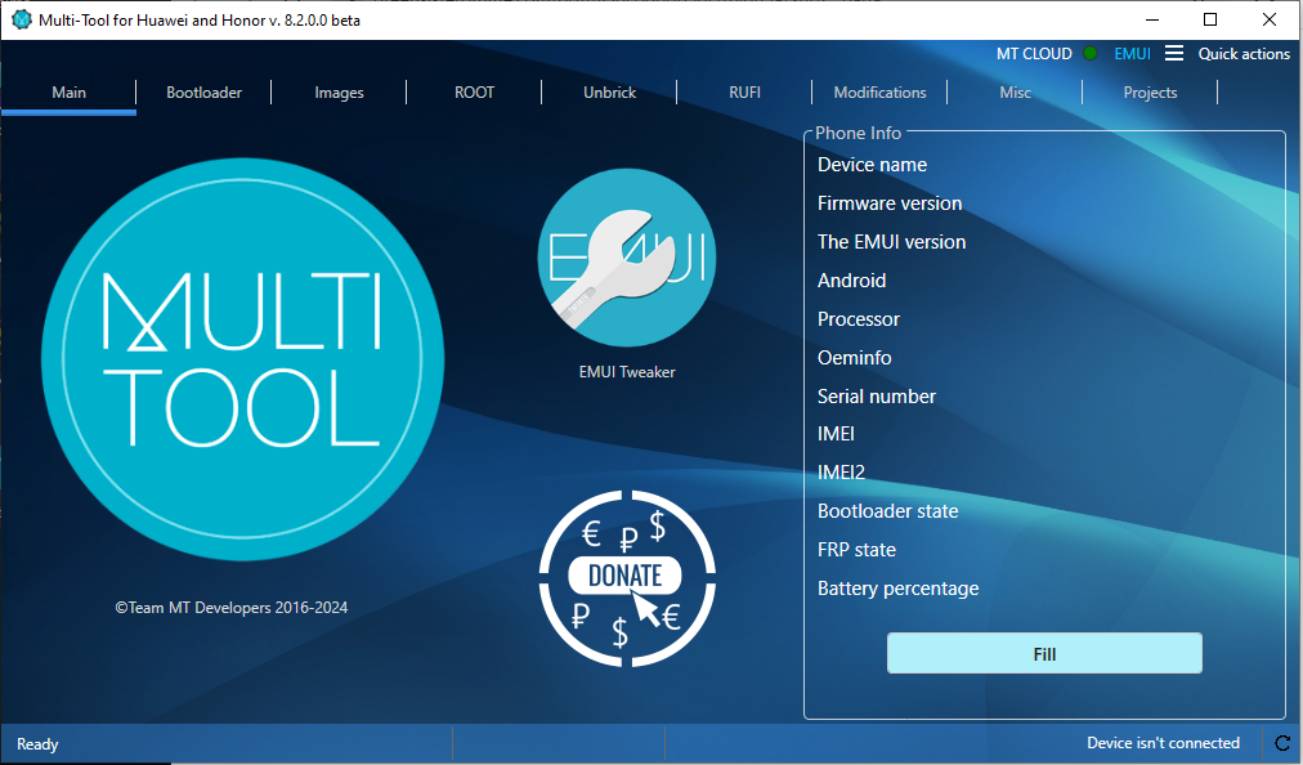
The Multi-Tool for Huawei and Honor v 8.2.0.0 beta, now available for free download, features features to optimize device functionality. In its most recent update, extended support attributes such as the online database version and model menu were removed, while flashing kernel and recovery images were combined into one section for easier management. Furthermore, server availability indication has been enhanced to create an efficient user experience.
Multi-tool for huawei and honor
What is the Multi-Tool for Huawei and Honor?
The Multi-Tool for Huawei and Honor is an intuitive utility designed to assist users in efficiently managing various aspects of their Huawei and Honor smartphones. It comes equipped with many features to unlock phones, update firmware and perform other essential tasks efficiently.
One of the critical advantages of Multi-Tool is its device unlocking capabilities, enabling users to gain entry to their phones if they forget their password or experience lock-related issues. Furthermore, Fastboot mode operations can also be managed effectively using this critical mode.
Purpose of using the Multi-Tool
Users of Huawei and Honor phones can use the Multi-Tool for various tasks, including unlocking devices, flashing firmware updates and troubleshooting issues that arise with them. Its user-friendly interface and comprehensive functions make it an invaluable asset in optimizing device performance.
What are the Functions of the Multi-Tool for Huawei and Honor?
The Multi-Tool for Huawei and Honor is packed with functions designed to address the various needs of users seeking to optimize device performance and customization options. From unlocking devices to flashing firmware updates, this comprehensive solution for Huawei and Honor smartphone users serves as an indispensable aid.
One of the primary functions of the Multi-Tool is device unlocking, enabling users to quickly bypass locks and gain access to their devices even if they forget passwords or experience lock issues.
The Multi-Tool provides essential assistance with Fastboot mode operations, enabling users to boot their devices into this mode and execute commands for troubleshooting, customization or firmware flashing purposes.
Read More:
- Movisur Tool New Samsung
- UMT QcFire Tool V9.9
- ST MTK Tool V1.1.3 Released 2024
- FRPFILE iPad WiFi Remove FMI iCloud & MDM Tool
Features of Multi-Tool for Huawei and Honor
Version 8.2.0.0
- Removed extended support attributes: Online database version, model menu, online database image fields, etc.
- I moved the flashing kernel and recovery images to one section.
- Reworked server availability indication (connection to server needed to load saved unlock key).
How to Use the Latest Version (v. 8.2.0.0 beta) of Multi-Tool?
- First, download the tool.
- Open the tool by going to the download option.
- A setup will open in front of you. Click next to continue.
- Now, an installation page will open in front of you; click on Install to continue the installation.
- After some time, the tool will be installed on your PC.
- After the installation is complete, Click on Finish to close the setup.
- Go to the desktop of your PC and open the tool.
- The tool will open in front of you.
How do you download the latest version (v. 8.2.0.0 beta) of Multi-Tool?
- Visit the gsmatoz tools website of the tool.
- Click on the (download link) to initiate the download.
- Once the download is complete, locate the downloaded file on your device.
- Tap on the file to begin the installation process.
- Follow the on-screen instructions to complete the installation.
Multi-Tool for Huawei and Honor
Download Link:
Программа позволяет в деталях настроить, разблокировать загрузчик, получить ROOT права и предоставляет другие возможности. База образов online.
Приложение дает возможность взаимодействия со смартфоном в режиме Fastboot и режиме ADB. Благодаря утилите могут быть использованы образы и дополнительные файлы для устройств в онлайн базе, которые находятся в списке расширенной поддержки. Для остальных устройств брендов Huawei и Honor с процессором Kirin и Qualcomm может использоваться ручная установка образов recovery и ядер, и кроме того может использоваться раскирпичка. Приложение позволяет использовать сторонние утилиты, чтобы распаковать прошивки, получить коды разблокировки и восстановления девайса. Для всех их доступны своевременные обновления.
Новичкам-владельцам мобильных устройств Huawei программа будет полезной в открытии загрузчика, установке TWRP, получения рут и прочем, при этом командную строку знать не обязательно.
Для продвинутых адептов предоставляется возможность сэкономить время и ощутить, насколько удобна графическая оболочка над командной строкой. Разработчики работают над возможностями данного сервиса ежедневно и стараются сделать функционал шире.
Утилита предоставляет базовые и расширенные возможности.
Пользователь может
• Автообновлять аппарат до актуальной версии (самообновление)
• Работать в оффлайн режиме
• Менять язык программы между русским и английским
• Устанавливать TWRP
• Устанавливать TWRP, используя онлайн базу
• Устанавливать сток recovery.img, recovery2.img и boot.img, используя онлайн базу
• Устанавливать ROOT
• Устанавливать ROOT, используя онлайн базу
• Перезагружаться в режим Recovery, eRecovery, Fastboot&Rescue mode
• Прошивать пользовательских BOOT.img, Recovery.img, eRecovery.img
• Прошивать образы из прошивки Boot, cust, recovery, system
• Разблокировать, блокировать загрузчик, сохраняя локально и в облаке Team MT код
• Раскирпичивать (Unbrick)
• Устанавливать все драйвера для устройств Huawei
• Включать скрытые/отключенные функции EMUI без Root.
• Выключать и включать приложения, в том числе системные, без Root.
• Удалять приложения, в том числе системные для актуального пользователя, без Root (вернуть можно только через сброс к заводским настройкам)
• Вручную вводить команды ADB и Fasboot.
• Устанавливать файлы прошивки, не дожидаясь, когда они станут доступными – RUFI.
Поддержка операционных систем:
• Windows 7sp1, 8, 8.1, 10 (Windows XP/Vista – не поддерживаются)
• MAC OS – с помощью Parallels.
• Требуется: установленный пакет .NET версии 4.6.1 или новее
• Интернет-подключение
Русскоязычная локализация: Да
Multi-Tool for HUAWEI and HONOR версия 8.0.9.2 :
Скачать
( 2,58 МБ ) (удалите .7z в расширении)