
- 1 Наушники Redmi Buds 3 Youth Edition
- 2 Redmi Buds 3 Молодежная версия
- 3 Руководство по применению продукта
- 3.1 Носите наушники
- 3.2 Заряжать
- 3.3 Загрузитесь
- 3.4 Неисправность
- 4 Связь
- 5 Функция
- 6 Режим низкой задержки
- 7 Продукт
- 8 Функция
- 9 Технические характеристики
- 10 Меры предосторожности
- Популярные вопросы
- Руководство по эксплуатации
Наушники Redmi Buds 3 Youth Edition

Redmi Buds 3 Молодежная версия
Redmi Buds 3 Youth Edition — это пара беспроводных наушников с многофункциональной сенсорной панелью для удобного управления. В комплекте идет зарядный кейс, который позволяет заряжать наушники в любом месте. Наушники оснащены микрофоном для звонков и регулируемыми насадками, которые обеспечивают комфортную и надежную посадку в ушном канале.
Руководство по применению продукта
Носите наушники
Осторожно вставьте наушник в ушной канал и отрегулируйте его для максимального комфорта. Во время звонка направьте основной микрофон гарнитуры к рту для улучшения качества звука. На наушниках уже установлены средние (M) и большие (L) амбушюры. Если они не подходят, замените их на более удобные по размеру.
Заряжать
Перед использованием обязательно снимите изоляционную пленку с контактов для зарядки наушников и полностью зарядите как наушники, так и зарядное устройство. Подключите зарядный кабель для одновременной зарядки гарнитуры и зарядного устройства. Если зарядное устройство не полностью заряжено, белый индикатор будет гореть, а после завершения зарядки индикатор погаснет.
Загрузитесь
Убедитесь, что зарядное устройство заряжено и наушники находятся в нем. Откройте крышку зарядного устройства, выньте наушники — они автоматически включатся.
Неисправность
Убедитесь, что зарядное устройство имеет заряд. Поместите наушники в зарядный чехол — белый индикатор загорится, наушники автоматически отключатся и начнут зарядку, а после полного заряда автоматически выключатся. Когда наушники не находятся в зарядном устройстве, они переходят в режим сопряжения. Если в течение 10 минут они не будут подключены к устройству, гарнитура автоматически отключится.
Связь
После открытия крышки наушники автоматически перейдут в режим ожидания подключения. Откройте настройки Bluetooth на мобильном телефоне и выберите «Redmi Buds 3 Youth Edition» для подключения наушников.
Функция
Многофункциональная сенсорная область позволяет легко переключаться между режимом одного и двух ушей. После успешного подключения левого и правого наушников гарнитура работает в бинауральном режиме. Если вы поместите один наушник в зарядный чехол и закроете крышку, другой наушник перейдет в режим одного уха. При извлечении наушника из чехла, он автоматически вернется в бинауральный режим. Когда гарнитура находится в зарядном устройстве, откройте его, и она автоматически подключится к последним использованным настройкам Bluetooth. Если устройство не подключено, гарнитура перейдет в режим ожидания. Когда Bluetooth-соединение будет потеряно или гарнитура выйдет за пределы диапазона, она автоматически перейдет в режим ожидания. Если гарнитура не подключена к устройству в течение 5 минут, она автоматически выключится.
Режим низкой задержки
Когда гарнитура подключена к мобильному телефону (но не в режиме звонка), нажмите и удерживайте левую и правую многофункциональные сенсорные области наушников, чтобы активировать режим с низкой задержкой. Чтобы выключить режим с низкой задержкой, снова нажмите и удерживайте обе сенсорные области или поместите наушники в зарядный чехол.
Перед использованием внимательно прочитайте это руководство и сохраните его для дальнейшего использования.
Продукт


Носить наушники
-
Осторожно вставьте наушник в ушной канал и отрегулируйте его для наиболее комфортного ношения.
-
Во время звонка направьте основной микрофон гарнитуры к рту для улучшения качества звука.
Совет: На наушниках уже установлены средние (M) и большие (L) амбушюры. Если они не подходят по размеру, вы можете заменить их на более удобные.

Заряжать

- Перед включением и использованием обязательно снимите изоляционную пленку с контактов для зарядки левого и правого наушников. Полностью зарядите как наушники, так и зарядное устройство.
- Подключите зарядный кабель для одновременной зарядки наушников и зарядного устройства.
- Если зарядное устройство не полностью заряжено, белый индикатор зарядки будет светиться, и он погаснет, как только зарядка завершится.
Загрузитесь
- Убедитесь, что зарядный футляр заряжен, а наушники находятся внутри.
- Откройте крышку футляра и извлеките наушники.
- Наушники автоматически включатся и будут готовы к использованию.
Неисправность
- Зарядка наушников:
- Убедитесь, что зарядный футляр заряжен.
- Поместите наушники в футляр. Загорится белый индикатор, указывающий на начало зарядки.
- Наушники автоматически отключатся и начнут заряжаться.
- После полной зарядки зарядка автоматически прекратится.
- Режим сопряжения:
- Наушники переходят в режим сопряжения, когда они извлечены из зарядного футляра.
- Если в течение 10 минут подключение к устройству не произошло, гарнитура автоматически отключится для экономии энергии.
Связь
Первое подключение
После открытия крышки зарядного футляра левый и правый наушники автоматически перейдут в режим ожидания подключения. Откройте настройки Bluetooth на вашем мобильном телефоне, найдите устройство «Redmi Buds 3 Youth Edition» и выберите его для подключения.

Подключите другие устройства
Чтобы подключить наушники к новому устройству, отключите Bluetooth на текущем подключенном телефоне или выполните перезагрузку наушников. Это позволит им войти в режим сопряжения для подключения к другому устройству.
Сброс наушников
Если гарнитура не подключается или не работает корректно, выполните сброс, следуя этим шагам:
- Убедитесь, что зарядный футляр заряжен.
- Откройте крышку футляра и поместите оба наушника внутрь.
- Нажмите и удерживайте сенсорные области левого и правого наушников одновременно в течение 5 секунд или более, затем отпустите.
- После успешного сброса белые индикаторы на обоих наушниках мигнут три раза синхронно.
Это действие очистит историю соединений между наушниками, а также между наушниками и телефоном.
Функция завершенаview
Кончик: В холодную погоду на открытом воздухе, если кожа рук становится сухой, сенсорное управление наушниками может работать некорректно.

Ответить / повесить звонок
Чтобы ответить на входящий звонок, дважды нажмите на сенсорную область левого или правого наушника. Чтобы отклонить или завершить вызов, трижды нажмите на сенсорную область.
Воспроизвести / приостановить звук
Для приостановки воспроизведения звука нажмите и удерживайте сенсорную область левого или правого наушника. Чтобы возобновить воспроизведение, снова нажмите и удерживайте сенсорную область.
Перейти к следующей песне
В режиме воспроизведения музыки дважды нажмите на сенсорную область гарнитуры, чтобы перейти к следующей песне.
Ответь на второй звонок
Если во время разговора по мобильному телефону поступает новый входящий звонок, дважды нажмите на сенсорную область левого или правого наушника, чтобы поставить текущий вызов на удержание и ответить на новый. После ответа на второй звонок дважды нажмите на сенсорную область, чтобы переключаться между двумя вызовами. Чтобы завершить текущий звонок и вернуться к удержанному, трижды нажмите на сенсорную область левого или правого наушника.
Свободное переключение между одним ухом и двумя ушами
После успешного подключения левого и правого наушников они работают в бинауральном режиме.
Если один из наушников поместить обратно в зарядный футляр и закрыть крышку, второй наушник автоматически переключится в монорежим (режим одного уха). Когда вы достанете наушник из футляра, бинауральный режим восстановится автоматически.
Автоматически подключаться
Если гарнитура находится в зарядном футляре, при открытии крышки она автоматически попытается подключиться к последнему устройству, с которым была сопряжена по Bluetooth. Если подключение не будет установлено, гарнитура перейдет в режим ожидания для поиска доступных устройств.
Соединение прервано
Если устройство отключает Bluetooth или выходит за пределы зоны действия гарнитуры, гарнитура автоматически переходит в режим ожидания. Если в течение 5 минут подключение к какому-либо устройству не происходит, гарнитура автоматически выключается.
Режим низкой задержки
Гарнитура подключена к мобильному телефону (не в режиме вызова). Чтобы включить режим с низкой задержкой, одновременно нажмите и удерживайте сенсорные области на левой и правой гарнитуре. Чтобы выключить режим с низкой задержкой, снова нажмите и удерживайте сенсорные области на обеих гарнитурах или поместите их в зарядный футляр.
Технические характеристики
| Параметр | Наушники-вкладыши | Зарядный футляр |
|---|---|---|
| Модель | М2110Е1 | — |
| Тип устройства | Наушники-вкладыши | Зарядный футляр |
| Размеры | 24.5 × 16.7 × 24.6 мм | 60 × 46 × 23.7 мм |
| Радиус действия | 10 м (при отсутствии препятствий) | — |
| Вход | 5 В 50 мА | 5 В 300 мА |
| Выход | — | 5 В 150 мА |
| Время зарядки | прибл. 1.5 часа | — |
| Беспроводное подключение | Bluetooth 5.2 | — |
| Bluetooth Профили | — | BLE / HFP / HSP / A2DP / AVRCP |
| Тип батареи | — | Литий-полимерная |
Меры предосторожности
Примечание
- Перед первым использованием полностью зарядите устройство.
- Если устройство не использовалось более двух недель, перед использованием рекомендуется зарядить его.
- Используйте только сертифицированные зарядные устройства от проверенных производителей.
- Если наушники не используются длительное время, функция сопряжения будет отключена. Если устройство не может обнаружить наушники, убедитесь, что они находятся в режиме сопряжения. В случае проблем с сопряжением попробуйте перезагрузить наушники или устройство, очистите историю сопряжения и повторите попытку.
Из-за особенностей Bluetooth-соединения в условиях электромагнитных помех на частоте 2,4 ГГц могут возникать кратковременные разрывы связи или отсутствие звука.
Внимание
-
Не разбирайте, не ремонтируйте и не модифицируйте устройство по любым причинам, так как это может вызвать возгорание или полное повреждение изделия.
-
Не подвергайте устройство воздействию экстремальных температур (ниже 0°C или выше 45°C).
-
При эксплуатации убедитесь, что световой поток устройства не попадает в глаза детям или животным.
-
Не чистите устройство с помощью спирта или других летучих жидкостей.
-
Избегайте контакта с жидкостями.
-
Чрезмерно громкий звук в наушниках может вызвать потерю слуха.
СЕ: Tiinlab заявляет, что тип радиооборудования Mi True Wireless Earphones соответствует Директиве 2014/53/EU. Полный текст декларации соответствия ЕС доступен по следующему адресу: http://www.mi.com/global/service/support/declaration.html.
Это устройство соответствует Части 15 Правил FCC.
Эксплуатация осуществляется при соблюдении следующих двух условий:
-
Это устройство не должно создавать вредных помех и обязано принимать любые полученные помехи, включая те, которые могут повлиять на его работу.
Любые изменения или модификации устройства, не одобренные стороной, ответственной за соответствие, могут привести к утрате права пользователя на эксплуатацию устройства.
Оборудование прошло тестирование и признано соответствующим ограничениям для цифровых устройств класса B в соответствии с Частью 15 Правил FCC. Эти ограничения обеспечивают адекватную защиту от вредных помех в жилых помещениях.
Устройство генерирует, использует и может излучать радиочастотную энергию, и если оно не установлено или не используется в соответствии с инструкциями, оно может вызвать помехи для радиосигналов. Однако невозможно гарантировать, что помехи не возникнут в конкретной установке.
Если оборудование вызывает помехи при приеме радио- или телевизионных сигналов, которые можно определить путем включения и выключения устройства, пользователю рекомендуется попытаться устранить помехи с помощью одного или нескольких из следующих методов:
- Переориентируйте или переместите антенну приема.
- Увеличьте расстояние между устройством и приемником.
- Подключите устройство к розетке, отличной от той, к которой подключен приемник.
- Обратитесь за помощью к дилеру или квалифицированному радио-/телевизионному технику.
Информация о WEEE
Продукты, отмеченные этим символом, являются отходами электрического и электронного оборудования (WEEE согласно директиве 2012/19/EU) и не должны смешиваться с несортированными бытовыми отходами. Чтобы защитить здоровье людей и окружающую среду, необходимо сдавать отработанное оборудование в специализированные пункты сбора, предназначенные для переработки отходов электрического и электронного оборудования. Эти пункты назначаются правительством или местными органами власти. Правильная утилизация и переработка таких отходов помогут предотвратить негативные последствия для окружающей среды и здоровья. Для получения информации о ближайших пунктах сбора и условиях их работы, пожалуйста, обратитесь к установщику или местным властям.
Меры предосторожности
Не подвергайте батареи или аккумуляторные батареи воздействию чрезмерного тепла, например солнечного света, огня и т. п.
Популярные вопросы
1. Как правильно носить наушники для комфортного использования? Чтобы носить наушники комфортно, аккуратно вставьте их в ушной канал и отрегулируйте положение для наилучшего состояния. Во время звонков поверните основной микрофон гарнитуры ко рту для улучшения качества звука. На наушниках уже установлены средние (M) и большие (L) амбушюры, но при необходимости можно заменить их на более подходящие по размеру.
2. Как зарядить наушники и зарядное устройство? Перед использованием снимите изоляционную пленку с контактов для зарядки наушников. Подключите зарядный кабель, чтобы одновременно зарядить и наушники, и зарядное устройство. Если зарядка не завершена, белый индикатор будет гореть. После полной зарядки индикатор погаснет, сигнализируя о завершении процесса.
3. Как наушники включаются и подключаются к устройствам? Чтобы включить наушники, убедитесь, что зарядное устройство заряжено, и наушники находятся в зарядном устройстве. Откройте крышку зарядного устройства, выньте наушники — они автоматически включатся и перейдут в режим ожидания подключения. Для подключения откройте Bluetooth на мобильном устройстве и выберите «Redmi Buds 3 Youth Edition» из списка.
4. Что делать, если наушники не подключаются к устройству? Если наушники не подключаются, убедитесь, что они находятся в зарядном устройстве и оно заряжено. Если наушники не подключаются в течение 10 минут, они автоматически перейдут в режим ожидания. Чтобы снова подключить их, откройте крышку зарядного устройства, и наушники автоматически войдут в состояние ожидания подключения.
5. Как включить и выключить режим с низкой задержкой? Для активации режима с низкой задержкой удерживайте одновременно левую и правую многофункциональные сенсорные области наушников. Когда режим активирован, вы получите улучшенную синхронизацию аудио и видео, что удобно для игр или просмотра видео. Для его отключения снова удерживайте сенсорные области или положите наушники в зарядное устройство.
Table of Contents
- xiaomi Redmi Buds 3 M2104E1 TWS Wireless Earbuds
- Product Information
- Product features and Overview
- Product Usage Instructions
- Connection and Reset
- Product Function Overview
- Multi-function Touch Area
- Product Overview
- Using
- Connection
- Reset Earbuds
- Function Overview
- Specifications
- Earbuds
- Charging Case
- Important Safety Information
- EU DECLARATION OF CONFORMITY
- Manufactured
- References
- Read User Manual Online (PDF format)
- Download This Manual (PDF format)
xiaomi Redmi Buds 3 M2104E1 TWS Wireless Earbuds
Product Information
The Redmi Buds 3 are wireless earbuds that come with a charging case. The
earbuds feature a multi-function touch area that allows you to answer calls,
play/pause music, and skip tracks. The earbuds also have a primary microphone
for clearer call quality.
Product features and Overview
The Redmi Buds 3 come with the following components:
- Charging case
- Earbuds
- Charging cable
The earbuds feature the following
- Multi-function touch area
- Primary microphone
- Secondary microphone
- Charging contact points
Product Usage Instructions
Wearing
Gently place the earbud into your ear canal, then adjust it to a comfortable
position. During calls, make sure to point the primary microphone towards your
mouth for clearer calls.
Charging
Before use, please remove the protective film from the contact points on both
earbuds and fully charge the charging case and the buds. Connect the charging
cable to the charging case and keep the earbuds inside the case to charge
simultaneously. When the charging case is not fully charged, its indicator is
white. When it is fully charged, its indicator is off.
Turning On
When the buds are in the charging case, open the lid to automatically turn
them on. When putting the earbuds into the charging case while they are turned
off, the earbuds will be automatically turned on.
Connection and Reset
First-time connection: Both earbuds will enter the awaiting connection
mode when the charging case’s lid is opened. After enabling the phone’s
Bluetooth, search for and tap ‘Redmi Buds 3’ to connect the earbuds to the
phone. Note: If the earbuds cannot be connected, place them back into the
charging case, close the lid and repeat the above operation.
Reset Earbuds: If the earbuds cannot connect properly, please follow the
below steps to reset them. Open the lid of the charging case and place both
earbuds in the case. Press and hold the charging case button for 10 seconds,
and the charging case’s indicator will blink white for 3 seconds and turn off,
indicating the earbuds have been reset successfully (the connection records
between the left and right earbuds, and the earbuds and the phone have been
cleared).
Product Function Overview
Multi-function Touch Area
- Answer/End calls: Double tap the left/right earbud’s multi-function touch area to answer a call; and tap the left/right earbud’s multi-function touch area three times to decline or hang up the call.
- Play/Pause Music: Method 1: Remove the earbuds to pause the music and wear the earbuds to start playing the music. Method 2: Press and hold the left/right earbud’s multi-function touch area to pause/play the audio. After manually pausing the music, the music will not play automatically when you remove and wear the earbuds again.
- Play next track/previous track: When playing audio, double tap the earbud’s multi-function touch area to play the next track; and then tap the earbud’s multi-function touch area three times to play the previous track.
- Answer a Second Call: Double tap the left/right earbud’s multi-function touch area to put the ongoing call on hold and answer the incoming call, and tap the left/right earbud’s multi-function touch area three times to hang up the current call and answer the call on hold.
Read this manual carefully before use, and retain it for future reference.
Illustrations of product, accessories, and user interface in the user manual
are for reference purposes only. The actual product and functions may vary due
to product enhancements.
Product Overview

Using
Wearing

- Gently place the earbud into your ear canal, then adjust it to a comfortable position.
- During calls, make sure to point the primary microphone towards your mouth for clearer calls.
Charging

- Before use, please remove the protective film from the contact points on both earbuds and fully charge the charging case and the buds.
- Connect the charging cable to the charging case and keep the earbuds inside the case to charge simultaneously.
- When the charging case is not fully charged, its indicator is white. When it is fully charged, its indicator is off.
Turning On
- When the buds are in the charging case, open the lid to automatically turn them on.
- When putting the earbuds into the charging case while they are turned off, the earbuds will be automatically turned on.
Connection
First time connection
Both earbuds will enter the awaiting connection mode when the charging case’s
lid is opened. After enabling the phone’s Bluetooth, search for and tap ‘Redmi
Buds 3’ to connect the earbuds to the phone.
Note: If the earbuds cannot be connected, place them back into the
charging case, close the lid and repeat the above operation.
Reset Earbuds
If the earbuds cannot connect properly, please follow the below steps to reset
them. Open the lid of the charging case and place both earbuds in the case.
Press and hold the charging case button for 10 seconds, and the charging
case’s indicator will blink white for 3 seconds and turn off, indicating the
earbuds have been reset successfully (the connection records between the left
and right earbuds, and the earbuds and the phone have been cleared).
Function Overview
Answer/End calls
- Double tap the left/right earbud’s multi-function touch area to answer a call; and tap the left/right earbud’s multi-function touch area three times to decline or hang up the call.
Play/Pause Music
- Method 1: Remove the earbuds to pause the music and wear the earbuds to start playing the music.
- Method 2: Press and hold the left/right earbud’s multi-function touch area to pause/play the audio.
After manually pausing the music, the music will not play automatically when
you remove and wear the earbuds again.
Play next track/previous track
When playing audio, double tap the earbud’s multi-function touch area to play
the next track; and then tap the earbud’s multi-function touch area three
times to play the previous track.
Answer a Second Call
Double tap the left/right earbud’s multi-function touch area to put the
ongoing call on hold and answer the incoming call, and tap the left/right
earbud’s multi-function touch area three times to hang up the current call and
answer the call on hold.
Switch between single/dual bud mode
When both buds are connected successfully, they are in dual-bud mode. If place
one of the buds back into the charging case and close its lid, the other bud
will automatically enter the single-bud mode. When removing the second bud
from the charging case, the dual-bud mode will automatically be restored
again.
Fast Pairing
Place the earbuds into the charging case and close its lid. Make the sure the
Mi/Redmi phone’s Bluetooth is enabled and hold it close to the charging case,
then open the case’s lid and follow the on-screen instructions to connect the
phone to the earbuds.
_ Note: _To use the feature to quickly connect, please update your
Mi/Redmi phone to the latest stable version. Then open Additional settings in
your phone’s Bluetooth settings to enable Pair compatible devices. This
feature is currently only supported by some Mi/Redmi phones.
Automatic connection
When the earbuds are in the charging case, opening the lid of the charging
case will automatically connect the earbuds to the most recently used
Bluetooth device. If the earbuds are not connected to any device, they will
automatically enter the awaiting connection state.
Wearing detection
The built-in optical sensor can detect the earbud’s wearing state in real-
time, it can detect when the earbud is in the ear. For example, if the device
the earbuds are connected to is paused, wearing the earbuds will start the
music, and removing the earbuds will pause the music.
Note: Once the weather is cold outdoors and your hands become dry, the
buds may not function when touching them.
Specifications
- Name: Wireless Earphones
- Model: M2104E1
- Frequency Band: 2402–2480 MHz
- Max RF Output Power: < 20 mW
Earbuds
- Dimensions: 40.7 × 16.9 × 18.7 mm
- Net Weight (per earbud): Approx. 4.47 g
- Wireless Range: 10 m (in an obstacle-free environment)
- Cell Capacity (per earbud): 35 mAh
- Input: 5 V=70 mA
- Cell Type: Lithium-ion polymer cell
- Wireless Connectivity: Bluetooth 5.2
Charging Case
- Model: M2104E1
- Dimensions: 49.6 × 49.6 × 24.5 mm
- Battery Capacity: 310 mAh
- Input: 5 V=500 mA
- Output: 5 V=150 mA
- Battery Type: Lithium-ion polymer battery
- Storage Temperature: 0 °C to 45 °C
- Operating Temperature: 5 °C to 40 °C
- Service Life: 1 year
Important Safety Information
- Do not attempt to disassemble, repair or modify the product, as this may cause fire or even completely damage the product.
- Keep the product’s indicator away from the eyes of children and animals while the product is in use.
- Do not use this product during thunderstorms. Thunderstorms may cause the product to malfunction and increase the risk of electric shocks.
- Do not disassemble, puncture or crush the product nor expose it to fire.
- Please stop using the product immediately and seek medical assistance if the contact area on your skin shows signs of redness or swelling.
- To prevent possible hearing loss, do not use high volume for long periods of time.
- This product is not a toy and may contain small parts. Please keep them out of the reach of children.
- Disposal of a battery into fire or a hot oven or water or other liquids or mechanically crushing or cutting of a battery, that can result in an explosion.
- Leaving a battery in an extremely high temperature surrounding environment that can result in an explosion or the leakage of flammable liquid or gas.
- A battery subjected to extremely low air pressure that may result in an explosion or the leakage of flammable liquid or gas.
- Product information and certification marks are located in the Charging Case.
- Do not put the battery in trash that is disposed of in landfills. When disposing of the battery, comply with local laws or regulations.
- Replacement of a battery with an incorrect type that can defeat a safeguard (such as catching fire, explosion, leakage of corrosive electrolyte etc).
- The symbol indicates DC voltage.
- This device is equipped with a built-in battery that can not be removed or replaced. Do not disassemble or modify the battery by yourself.
- Only use certified chargers supplied by qualified manufacturers.
EU DECLARATION OF CONFORMITY
Hereby, Dongguan Yingsheng Electronic Technology Co., Ltd. declares that the
radio equipment type M2104E1 is in compliance with Directive 2014/53/EU. The
full text of the EU declaration of conformity is available at the following
internet address: http://www.mi.com/global/service/support/declaration.html
WEEE Information
All products bearing this symbol are waste electrical and electronic equipment
(WEEE as in directive 2012/19/EU) which should not be mixed with unsorted
household waste. Instead, you should protect human health and the environment
by handing over your waste equipment to a designated collection point for the
recycling of waste electrical and electronic equipment, appointed by the
government or local authorities. Correct disposal and recycling will help
prevent potential negative consequences to the environment and human health.
Please contact the installer or local authorities for more information about
the location as well as terms and conditions of such collection points.
Hereby, Dongguan Yingsheng Electronic Technology Co., Ltd. declares that the
radio equipment type M2104E1 is in compliance with Radio Equipment Regulations
2017. The full text of the UKCA declaration of conformity is available at the
following internet address:
https://www.mi.com/uk/service/support/declaration.html
Compiles With IMDA Standards DB106135
75323/SDPPI/2021 9003
Manufactured
- Manufactured for: Xiaomi Communications Co., Ltd.
- Manufactured by: Dongguan Yingsheng Electronic Technology Co., Ltd. ( a Mi Ecosystem company)
- Address: Suite 204, 4th Block, No. 86 Hongtu Road, Nancheng District,Dongguan, Guangdong, China.
- User Manual Version: V1.0
- For further information, please go to: www.mi.com
- Importer: Beryko s.r.o. Na Roudné 1162/76, 301 00 Plzeň www.beryko.cz
References
- Beryko.cz
- Xiaomi United States | Xiaomi Official Website
Read User Manual Online (PDF format)
Read User Manual Online (PDF format) >>
Download This Manual (PDF format)
Download this manual >>
View the manual for the Xiaomi Redmi Buds 3 here, for free. This manual comes under the category earphones and has been rated by 3 people with an average of a 8.4.
This manual is available in the following languages: English. Do you have a question about the Xiaomi Redmi Buds 3 or do you need help?
Ask your question here
Xiaomi Redmi Buds 3 specifications
Below you will find the product specifications and the manual specifications of the Xiaomi Redmi Buds 3.
The Xiaomi Redmi Buds 3 is a binaural earphone that is suitable for music and calls. The earphone is controlled through touch and is easy to plug and play with. It uses the True Wireless Stereo (TWS) connectivity technology with Bluetooth 5.2 for easy and fast pairing with your device. The ear coupling is intraaural, which means it is designed to fit comfortably inside the ear. The driver type of the earphone is dynamic, allowing for a good quality sound output.
Made with premium materials, the Xiaomi Redmi Buds 3 Earphone has a sleek and trendy design that complements most outfits. It is lightweight and easy to carry around, making it convenient for use while travelling.
The Xiaomi Redmi Buds 3 Earphone has a long battery life and is capable of delivering over 20 hours of playtime with the charging case. The earphone has a range of up to 10 meters, ensuring a strong and stable connection between the earphone and your device.
In summary, the Xiaomi Redmi Buds 3 Earphone is a durable and reliable earphone that provides a high-quality sound output. It is convenient, lightweight and comes with a long battery life, making it suitable for everyday use.
Connectivity technology
True Wireless Stereo (TWS)
General
| Brand | Xiaomi |
| Model | Redmi Buds 3 | BHR5174GL |
| Product | earphone |
| EAN | 6934177746338 |
| Language | English |
| Filetype | User manual (PDF) |
Performance
| Product type | Headset |
| Wearing style | In-ear |
| Recommended usage | Calls/Music |
| Headset type | Binaural |
| Product color | White |
| Operating keys | Multi-key |
| Control type | Touch |
| Plug and Play | Yes |
Ports & interfaces
| Connectivity technology | True Wireless Stereo (TWS) |
| Bluetooth | Yes |
| Bluetooth version | 5.2 |
| Wireless range | 10 m |
Headphones
| Ear coupling | Intraaural |
| Acoustic system | Semi-closed |
| Driver type | Dynamic |
Microphone
| Microphone type | Built-in |
| Number of microphones | 2 |
Battery
| Battery operated | Yes |
| Battery type | Built-in battery |
| Battery technology | Lithium Polymer (LiPo) |
| Input voltage (earpieces) | 5 V |
| Input voltage (charging case) | 5 V |
| Right earpiece battery capacity | 35 mAh |
| Left earpiece battery capacity | 35 mAh |
| Battery capacity (charging case) | 310 mAh |
| Charging source | USB |
| Continuous audio playback time | 5, 20 h |
| Continuous audio playback time (with charging case) | 20 h |
Weight & dimensions
| Height | 18.7 mm |
| Width | 40.7 mm |
| Depth | 16.9 mm |
| Right earpiece weight | 4.5 g |
| Left earpiece weight | 4.5 g |
| Charging case dimensions (W x D x H) | 49.6 x 49.6 x 24.4 mm |
Packaging data
Packaging content
| Charging case type | Wired |
| Charging case connector type | USB Type-C |
| Cables included | USB Type-C |
| Warranty card | Yes |
| Quick start guide | Yes |
| Charging case | Yes |
Logistics data
| Harmonized System (HS) code | 85183000 |
Supplier features
show more
Frequently Asked Questions
Can’t find the answer to your question in the manual? You may find the answer to your question in the FAQs about the Xiaomi Redmi Buds 3 below.
How do I connect the Xiaomi Redmi Buds 3 earphone to my phone for the first time?
To connect the Xiaomi Redmi Buds 3 earphone to your phone for the first time, follow these steps:
1. Open the lid of the charging case to activate the earbuds. Both earbuds will enter the awaiting connection mode.
2. Enable the Bluetooth function on your phone.
3. Search for the device named «Redmi Buds 3» in the list of available Bluetooth devices on your phone.
4. Tap on «Redmi Buds 3» to initiate the connection between the earbuds and your phone.
5. Once the connection is established, you will be able to use the Xiaomi Redmi Buds 3 earphone with your phone.
If the earbuds do not connect properly, you can try resetting them by following these steps:
1. Place both earbuds back into the charging case.
2. Press and hold the button on the charging case for 10 seconds.
3. The charging case’s indicator will blink white for 3 seconds and then turn off, indicating that the earbuds have been successfully reset.
4. After resetting, repeat the connection process mentioned above.
Please note that these instructions are specific to the Xiaomi Redmi Buds 3 earphone and may vary for other models.
What should I do if the Xiaomi Redmi Buds 3 earphone doesn’t connect to my phone during the first time connection process?
If the Xiaomi Redmi Buds 3 earphone doesn’t connect to your phone during the first time connection process, you can try the following troubleshooting steps:
1. Make sure the earbuds are in the awaiting connection mode. Open the lid of the charging case to activate the earbuds.
2. Enable the Bluetooth function on your phone and ensure it is in discoverable mode.
3. Search for the device named «Redmi Buds 3» in the list of available Bluetooth devices on your phone.
4. If the earbuds still don’t connect, try resetting them. Open the lid of the charging case and place both earbuds inside. Press and hold the button on the charging case for 10 seconds. The charging case’s indicator will blink white for 3 seconds and then turn off, indicating that the earbuds have been successfully reset.
5. After resetting, repeat the connection process mentioned earlier.
If the issue persists, you may need to check if your phone’s Bluetooth is functioning properly or consult the user manual for further troubleshooting steps.
Please note that these steps are specific to the Xiaomi Redmi Buds 3 earphone and may vary for other models.
How can I reset the Xiaomi Redmi Buds 3 earphone if it is not connecting properly?
To reset the Xiaomi Redmi Buds 3 earphone if it is not connecting properly, follow these steps:
1. Open the lid of the charging case and place both earbuds inside.
2. Press and hold the button on the charging case for 10 seconds.
3. The charging case’s indicator will blink white for 3 seconds and then turn off, indicating that the earbuds have been reset successfully.
4. After resetting, you can try connecting the earbuds to your phone again following the first time connection process mentioned in the manual.
If the earbuds still do not connect properly after resetting, you may need to check if your phone’s Bluetooth is functioning properly or consult the user manual for further troubleshooting steps.
Please note that these instructions are specific to the Xiaomi Redmi Buds 3 earphone and may vary for other models.
What does it mean if the indicator lights on the charging case of the Xiaomi Redmi Buds 3 earphone blink white for 3 seconds and then turn off?
If the indicator lights on the charging case of the Xiaomi Redmi Buds 3 earphone blink white for 3 seconds and then turn off, it indicates the charging case is fully charged. This means that the charging case has reached its maximum battery capacity and is ready to be used.
When the charging case is not fully charged, its indicator light remains white. However, once it is fully charged, the indicator light will turn off to indicate that the charging process is complete.
It is important to note that this information is based on the available manual for the Xiaomi Redmi Buds 3 earphone. If you encounter any other issues or have further questions, please consult the user manual or contact the manufacturer for assistance.
If the Xiaomi Redmi Buds 3 earphone cannot be connected, what troubleshooting steps should I follow?
If the Xiaomi Redmi Buds 3 earphone cannot be connected, you can follow these troubleshooting steps:
1. Ensure that the earbuds are charged. Place them in the charging case and make sure the charging indicators on the case light up.
2. Check if the Bluetooth function on your phone is enabled. Enable Bluetooth in your phone’s settings.
3. Put the earbuds in the awaiting connection mode. Open the lid of the charging case to activate the earbuds.
4. On your phone, search for available Bluetooth devices. Look for the device named «Redmi Buds 3» in the list.
5. Tap on «Redmi Buds 3» to initiate the connection process. Follow any on-screen prompts that may appear.
6. If the connection fails, try resetting the earbuds. Place them back into the charging case and press and hold the button on the case for 10 seconds. The indicator lights on the case will blink white for 3 seconds and then turn off, indicating a successful reset.
7. After resetting, repeat the connection process mentioned earlier.
If the issue persists, you may need to consult the user manual or contact the manufacturer for further assistance.
Please note that these troubleshooting steps are specific to the Xiaomi Redmi Buds 3 earphone and may vary for other models.
Are the Xiaomi Redmi Buds 3 compatible with both calls and music?
Yes, the Xiaomi Redmi Buds 3 are recommended for usage with both calls and music. This makes them versatile for different audio experiences.
Does the Xiaomi Redmi Buds 3 have a touch control feature?
Yes, the Xiaomi Redmi Buds 3 have touch controls. This allows for convenient and easy navigation of music playback or call management.
Is the Xiaomi Redmi Buds 3 a wireless earphone?
Yes, the Xiaomi Redmi Buds 3 are true wireless stereo (TWS) earphones. This means there are no wires connecting the earpieces, providing freedom of movement.
How many microphones does the Xiaomi Redmi Buds 3 have?
The Xiaomi Redmi Buds 3 come with 2 microphones. This allows for improved call quality and noise reduction during phone conversations.
What is the Bluetooth version supported by the Xiaomi Redmi Buds 3?
The Xiaomi Redmi Buds 3 support Bluetooth version 5.2. This represents a newer and more advanced version of Bluetooth, offering faster and more stable connectivity compared to older versions.
What is the height of the Xiaomi Redmi Buds 3?
The Xiaomi Redmi Buds 3 has a height of 18.7 mm.
What is the width of the Xiaomi Redmi Buds 3?
The Xiaomi Redmi Buds 3 has a width of 40.7 mm.
What is bluetooth?
Bluetooth is a way of exchanging data wirelessly between electronic devices via radio waves. The distance between the two devices that exchange data can in most cases be no more than ten metres.
What is the depth of the Xiaomi Redmi Buds 3?
The Xiaomi Redmi Buds 3 has a depth of 16.9 mm.
When is my volume too loud?
A volume above 80 decibels can be harmful to hearing. When the volume exceeds 120 decibels, direct damage can even occur. The chance of hearing damage depends on the listening frequency and duration.
What is noise cancelling?
Noise cancelling ensures that ambient noise is reduced.
Can I make hands-free calls with my earphone?
The newer earphones generally have a small microphone built in which allows for calling.
Is the manual of the Xiaomi Redmi Buds 3 available in English?
Yes, the manual of the Xiaomi Redmi Buds 3 is available in English .
Is your question not listed? Ask your question here
instructions are essential for the proper use and maintenance of any electronic device. The Xiaomi TWSEJ01ZM Redmi Buds 3 Pro Wireless Earphones User Manual provides detailed instructions on how to use and care for these earphones. This manual is a comprehensive guide that covers everything from product overview to how to connect the earbuds to different devices. Users will learn how to charge the earbuds and the charging case, check the battery level, and how to wear the earbuds properly. The manual also explains how to connect the earbuds to a new device, use quick pairing to connect to a Mi phone, and how to restore factory settings. Additionally, it provides information on the functions of the earbuds during calls and music playback, as well as their noise cancellation capabilities. The manual also includes important warnings and precautions that users should follow to avoid any potential hazards. By reading this manual carefully and following the instructions provided, users can enjoy the full benefits of their Xiaomi TWSEJ01ZM Redmi Buds 3 Pro Wireless Earphones.
Xiaomi TWSEJ01ZM Redmi Buds 3 Pro Wireless Earphones User Manual


Xiaomi TWSEJ01ZM Redmi Buds 3 Pro Wireless Earphones User Manual
Read this manual carefully before use, and retain it for future reference.
Product Overview

How to Use
Charging
- Charging the earbuds
When the earbuds are placed in the charging case, they will automatically start charging. - Charging the charging case
Use the included type-C charging cable to charge the charging case, or place it on a compatible wireless charger with the indicator facing upwards. The indicator is white
while charging, and turns off when charging is completed.
Note: Please use a power adapter that meets the local certification requirements, or a wireless charger that supports charging at 5 W or higher.

The center of the wireless charger must be aligned with the center of the charging case in order to charge, which is about 8 mm above the Redmi logo on the back of the charging case. The charging case’s indicator will be lit while charging.
Note: Illustrations of the product, accessories, and user interface in the user manual are for reference purposes only. The actual product and functions may vary due to product
enhancements.
Checking the battery level
- Checking the battery level of the earbuds
After connecting the earbuds to a phone, you can check the earbuds’ battery level on the phone’s status bar.
Note: Only the battery level of the earbud with the lowest battery level of the two is displayed on the phone’s status bar. This feature is not supported by some phones. - Checking the battery level of the charging case
When the lid of the charging case is closed, press the function button or open the lid of the charging case to check the battery level:
1. When the charging case’s indicator is white for about 5 seconds, it indicates the battery level is sufficient.
2. When the charging case’s indicator light is blinking white, it indicates its battery level is low and it should be charged immediately. - Checking the battery level with a Mi phone
After successfully connecting to a phone, place the earbuds into the charging case and close its lid. Ensure the Mi phone is unlocked and its Bluetooth is enabled, and hold it close to the charging case, then open the case’s lid. A popup to check the battery levels of the earbuds and the charging case will appear on the phone.
Note: To use the feature to quickly check the battery level, the phone’s system needs to be updated to the latest stable version. Currently, only some Mi phones support this feature.
Turning on the earbuds
Opening the charging case will automatically turn on the earbuds.
Sleep mode
Place the earbuds back into the charging case and close the lid, then the earbuds will disconnect and enter sleep mode automatically.
Wearing the earbuds
Take the earbuds out of the charging case, and insert them into your ears according to the left (L) and right (R) marks.
Note: After using the earbuds, place them back into the charging case. This will extend their service life and helps to avoid losing or misplacing them.
How to Connect
Connecting to a new device
- Place the earbuds into the charging case, then press and hold the function button for about two seconds. The charging case’s indicator light will start blinking white to indicate that the earbuds are awaiting a connection.
2. Enable the device’s Bluetooth, then search for and connect to the «Redmi Buds 3 Pro».
If a passcode is requested, enter «0000».
Using quick pairing to connect to a Mi phone
Place the earbuds into the charging case and close its lid. Ensure the Mi phone is unlocked and its Bluetooth is enabled, and hold it close to the charging case, then open the case’s lid and follow the instructions on the phone to connect to the earbuds.
Note: To use the feature to quickly connect, the phone’s system needs to be updated to the latest stable version. Currently, only some Mi phones support this feature.
Connecting to two devices
The earbuds can be connected to two different Bluetooth devices simultaneously. After connecting the earbuds to the first device, put them in the charging case and open the lid.
Press and hold the function button on the charging case for two seconds, then the indicator will start blinking white, and the earbuds are ready to be paired with a second device.
Disconnecting
When a device’s Bluetooth is disabled, or if the earbuds are out of range, the earbuds will automatically enter awaiting connection mode. If the earbuds remain disconnected from the device for 10 minutes, they will enter sleep mode. Wearing the earbuds again will wake them up and they will enter awaiting connection mode.
Automatic connection
When the earbuds are in the charging case, opening the lid of the charging case will automatically connect the earbuds to the most recently used Bluetooth device. If no
connection history is detected, or if the earbuds cannot successfully connect to any Bluetooth device, the earbuds will automatically enter the awaiting connection mode.
Note: If the earbuds cannot automatically connect to a device, you will need to manually connect the earbuds to the desired device via the device’s Bluetooth settings.
Restoring factory settings
- Place the earbuds into the charging case.
- Press and hold the function button for at least ten seconds until the indicator turns white, then release the button.
- The factory settings of the earbuds have been restored, the connection history has been cleared, the charging case’s indicator blinks white, and the earbuds are in pairing
mode again.
Note: Due to the technical characteristics of Bluetooth, there may be occasional intermittent loss of connection or sound in areas with dense electromagnetic signal interference at 2.4 GHz.
Functions
- During calls
Gently tap either earbud twice: Answer call Gently tap either earbud three times: Reject/End call - Music
Gently tap either earbud twice: Play/Pause
Gently tap either earbud three times: Next song
Take out either earbud: Pause music - Noise cancellation
Press and hold either earbud to switch between:
Enable noise cancellation <> Transparency mode
To prevent possible hearing loss, do not use this product at high volume for long periods of time.
Specifications
| Name | Wireless Earphones |
| Model | TWSEJ01ZM |
| HVIN | TWSEJ01ZM-L TWSEJ01ZM-R |
| Charging Port | Type-C |
| Net Weight | Approx. 55 g |
| Impedance | 32 Ω |
| Earbud Input | 5.25 V=120 mA Max. (per earbud) |
| Earbud Battery Capacity/Energy | 35 mAh/0.13 Wh (per earbud) |
| Charging Case Battery Capacity/Energy | 470 mAh/1.78 Wh |
| Charging Case Input | Wired Input: 5 V=500 mA Max. Wireless Input: Supports wireless chargers of 5 W or higher |
| Wireless Connectivity | Bluetooth 5.2 |
| Bluetooth Profiles | Bluetooth® Low Energy/HFP/A2DP/AVRCP |
| Operating Range | 10 m (in an obstacle-free environment) |
| Bluetooth Operation Frequency | 2400–2483.5 MHz(for EU) |
| Maximum Output Power for BT | ≤13 dBm (for EU) |
| Maximum Output Power for for BLE | ≤13 dBm (for EU) |
| Wireless Charging Operating Frequency | 110–148KHz |
| Operating Temperature | 5°C to 40°C |
| Charging Time (Charging Case) | Approx. 2.5 hours (by charging cable) |
The Bluetooth® word mark and logos are registered trademarks owned by Bluetooth SIG, Inc. and any use of such marks by Xiaomi inc. is under license. Other trademarks and trade names are those of their respective owners.
The Qi logo is a registered trademark of the Wireless Power Consortium.
Warning
- Do not attempt to disassemble, repair or modify the product, as this may cause fire or even completely damage the product.
- Do not expose the product to environments with a temperature that is too low or too high (below 0°C or above 45°C).
- Keep the product’s indicator away from the eyes of children and animals while the product is in use.
- Do not use this product during thunderstorms. Thunderstorms may cause the product to malfunction and increase the risk of electric shocks.
- Do not clean this product with alcohol or other volatile liquids.
- Avoid any contact with liquids.
- Do not disassemble, puncture or crush the product nor expose it to fire.
- Stop using the product immediately if there is any swelling.
- To prevent possible hearing loss, do not use high volume for long periods of time.
- Do not use the earbuds while driving, and comply with the relevant regulations in your region or country.
- These earbuds and their accessories may contain small parts. Please keep them out of the reach of children.
- Disposal of a battery into fire or a hot oven, or mechanically crushing or cutting of a battery, that can result in an explosion.
- Leaving a battery in an extremely high temperature surrounding environment that can result in an explosion or the leakage of flammable liquid or gas.
- A battery subjected to extremely low air pressure that may result in an explosion or the leakage of flammable liquid or gas.
- Product information and certification marks are located in the Charging Case.
- Do not put the battery in trash that is disposed of in landfills. When disposing of the battery, comply with local laws or regulations.
- Replacement of a battery with an incorrect type that can defeat a safeguard (such as catching fire, explosion, leakage of corrosive electrolyte etc).
- This equipment complies with RF radiation exposure limits set forth for an uncontrolled environment.
The symbol indicates DC voltage
EU Declaration of Conformity
Hereby, Zimi Corporation declares that the radio equipment type TWSEJ01ZM is in compliance with Directive 2014/53/EU. The full text of the EU declaration of conformity is available at the following internet address: http://www.mi.com/global/service/support/declaration.html
WEEE Information
All products bearing this symbol are waste electrical and electronic equipment (WEEE as in directive 2012/19/EU) which should not be mixed with unsorted household waste. Instead, you should protect human health and the environment by handing over your waste equipment to a designated collection point for the recycling of waste electrical and electronic equipment, appointed by the government or local authorities. Correct disposal and recycling will help prevent potential negative consequences to the environment and human health.
Please contact the installer or local authorities for more information about the location as well as terms and conditions of such collection points.
Please take attention that changes or modification not expressly approved by the party responsible for compliance could void the user’s authority to operate the equipment.
This device complies with part 15 of the FCC Rules. Operation is subject to the following two conditions:
- This device may not cause harmful interference, and
- this device must accept any interference received, including interference that may cause undesired operation. Caution: Changes or modifications to this unit not expressly approved by the party responsible for compliance could void the user’s authority to operate the equipment.
NOTE: This equipment has been tested and found to comply with the limits for a Class B digital device, pursuant to part 15 of the FCC Rules. These limits are designed to provide reasonable protection against harmful interference in a residential installation. This equipment generates, uses and can radiate radio frequency energy and, if not installed and used in accordance with the instructions, may cause harmful interference to radio communications. However, there is no guarantee that interference will not occur in a particular installation. If this equipment does cause harmful interference to radio or television reception, which can be determined by turning the equipment off and on, the
user is encouraged to try to correct the interference by one or more of the following measures:
- Reorient or relocate the receiving antenna.
- Increase the separation between the equipment and receiver.
- Connect the equipment into an outlet on a circuit different from that to which the receiver is connected.
- Consult the dealer or an experienced radio/TV technician for help.
This device complies with Industry Canada licence-exempt RSS standard(s). Operation is subject to the following two conditions:
- this device may not cause interference, and
- this device must accept any interference, including interference that may cause undesired operation of the device.
FCC ID: 2AMIN-TWSEJ01ZM
IC:26993-TWSEJ01ZM
CAN ICES-3(B)/NMB-3(B)
UK declaration of conformity
Hereby, Zimi Corporation declares that the radio equipment type TWSEJ01ZM is in compliance with Radio Equipment Regulations 2017.
The full text of the UK declaration of conformity is available at the following internet address: https://www.mi.com/uk/service/support/declaration.html
Anti-counterfeit Label Instructions
The Redmi Buds 3 Pro have an anti-counterfeit label on the outer packaging. You can check the authenticity of the product by scratching the anti-counterfeit coating and entering the anti-counterfeit code.
Website: www.mi.com/verify

Manufactured for: Xiaomi Communications Co., Ltd.
Manufactured by: Zimi Corporation
Address: A913, No. 159 Chengjiang Road, Jiangyin, Jiangsu, China
For further information, please go to www.mi.com
Importer:
Beryko s.r.o.
Na Roudné 1162/76, 301 00 Plzeň
www.beryko.cz
FAQS
Why are the earbuds not charging?
Make sure the earbuds and charging case are fully charged, and that the earbuds are placed in the charging case with the correct polarity.
Why does the earbud’s battery level not show up on my phone?
Make sure the earbud is connected to your phone correctly. If it still doesn’t show up, try restarting your phone. If it still doesn’t work, please contact customer service.
Why is the earbud’s battery level low?
The earbud’s battery may be low due to frequent use or long standby time. Please charge it with a power adapter or wireless charger.
Why can’t I connect my earbuds to my phone?
Please check if you have enabled Bluetooth on your phone, and that the Bluetooth connection is available. If you still can’t connect, please try to restart your phone and reconnect again. If you still can’t connect, please contact customer service.
Are they loud
It’s loud enough, depends on the source! Better whith noise reduction set “on”!
Compatible with android?
Yes, works perfect on my Samsung s21.
Do you have color black of this product ?I don’t like this color.
Black color ones will be available in Jan 2022 due to current port congestion.
How can I update these earbuds to have the low-latency mode?
If the phone you are using it on isn’t a Xiaomi, you aren’t able to get the full features.
Can i have it in color black?
Sorry Black color will be in late in about 4 weeks — it is delayed by slow process in port.
allow wireless charging?
Yes! wireless charging indeed. And USB-C charging too.
How is the latency? Does the product have a low-latency gaming mode?
Have no clue. They don’t work
Where is the low latency gaming mode?
Nope they are broken already
Can it really connect to 2 devices simultaneously?
It can be connected to multiple devices and depending on the one being used it would prioritize that device but you can’t be listening to two devices simultaneously
Are these vented to relieve ear pressure?
Nope
Do both earbuds work independently from each other or is is one the master/slave?
They can work independently
Can it work L and R individually?
yes it can.
Do these have an app?
Nope they are broken pos
Is there an app compatible with apple iPhone so that I can use the find feature?
Not sure if it’s on apple store but they have one on Google Play: Mi Buds M8 app
Which bluetooth codecs do these buds use?
None they quitn working.
How do I charge the earbuds and the charging case?
To charge the earbuds, place them in the charging case and they will automatically start charging. To charge the charging case, use the included type-C charging cable to charge it, or place it on a compatible wireless charger with the indicator facing upwards.
How do I check the battery level of the earbuds and the charging case?
To check the battery level of the earbuds, connect them to a phone and check the phone’s status bar. To check the battery level of the charging case, press the function button or open the lid of the charging case.
How do I connect the earbuds to a new device?
Place the earbuds into the charging case, then press and hold the function button for about two seconds. The charging case’s indicator light will start blinking white to indicate that the earbuds are awaiting a connection. Enable the device’s Bluetooth, then search for and connect to the «Redmi Buds 3 Pro».
How do I use quick pairing to connect to a Mi phone?
Place the earbuds into the charging case and close its lid. Ensure the Mi phone is unlocked and its Bluetooth is enabled, and hold it close to the charging case, then open the case’s lid and follow the instructions on the phone to connect to the earbuds.
How do I restore factory settings?
Place the earbuds into the charging case, then press and hold the function button for at least ten seconds until the indicator turns white, then release the button.
How do I use the earbuds during calls and music playback?
Gently tap either earbud twice to answer a call or play/pause music. Gently tap either earbud three times to reject/end a call or skip to the next song. Take out either earbud to pause music.
How do I enable noise cancellation or transparency mode?
Press and hold either earbud to switch between noise cancellation and transparency mode.
What precautions should I follow when using the earbuds?
Do not attempt to disassemble, repair or modify the product. Keep the product away from environments with extreme temperatures. Do not use the product during thunderstorms. Avoid contact with liquids. Stop using the product immediately if there is any swelling. Do not use high volume for long periods of time. Do not use the earbuds while driving. Keep the product and its accessories out of the reach of children.
XIAOMI TWSEJ01ZM REDMI BUDS 3 PRO WIRELESS EARPHONES
VIDEO
www.mi.com
Documents / Resources
References
-
Xiaomi United States | Xiaomi Official Website
-
Product Authentication
-
Product Authentication
-
Xiaomi United States | Xiaomi Official Website
Documents — xiaomi – TWSEJ01ZM
| [pdf] User Manual Instructions Accessories Xiaomi TWSEJ01ZM Redmi Buds 3 Pro Wireless Earphones User Manual 2 Enable the device s Bluetooth then search for and connect to 3 Using quick pairing a Mi phone Place earbuds into charging case mi house ru asserts instructions 3863 Redmi Buds 3 Pro User Manual Read this manual carefully before use, and retain it for future refer … Specifications Name Model HVIN Charging Port Net Weight Impedance Earbud Input Wireless Earphones TWSEJ01ZM TWSEJ01ZM-L TWSEJ01ZM-R Type-C Approx. 55 g 32 5.25 V=120 mA Max. per earbud Earbud B… lang:en score:42 filesize: 186.05 K page_count: 13 document date: 2021-10-12 |
|
| [pdf] Guide Redmi Buds 3 Pro Mi STORE SK 1 day ago — 2 toto zariadenie musí prijať akékoľvek rušenie vrátane takého ktoré môže spôsobiť neželanú prevádzku zariadenia FCC ID 2AMIN TWSEJ01ZM mi store sk media wysiwyg user guide xiaomi ||| Redmi Buds 3 Pro Nvod na obsluhu Pred pouzitm vrobku si pozorne prectajte tento nvod a odlozte si ho … ick parametre Nzov Model HVIN Nabjac port Cist hmotnos Impedancia Prkon slchadiel Bezdrtov slchadl TWSEJ01ZM TWSEJ01ZM-L TWSEJ01ZM-R Typ C Priblizne 55 g 32 5,25 V , max. 120 mA na jedno slchadlo … lang:hr score:35 filesize: 249.19 K page_count: 6 document date: 2021-08-27 |
|
| [pdf] User Manual TWS01英文 俄文 说明书 User Manual Zimi Corporation TWSEJ01ZM Wireless Earphones 2AMIN 2AMINTWSEJ01ZM twsej01zm Read this manual carefully before use, and retain it for future reference. Product Overview Indicat … oltage EU Declaration of Conformity Hereby, Zimi Corporation declares that the radio equipment type TWSEJ01ZM is in compliance with Directive 2014/53/EU. The full text of the EU declaration of conform… lang:en score:34 filesize: 2.19 M page_count: 1 document date: 2021-05-14 |
|
| [pdf] User Manual uživatelská příručka Xiaomi cz FCC ID 2AMIN TWSEJ01ZM IC 26993 CAN ICES 3 B NMB Pokyny týkající se štítku na ochranu proti padělkům Vnější obal sluchátek Redmi Buds manual xiaomi redmi buds pro 2021 587×70 v01 user related files CZ UZIVATELSK PRUCKA Ped pouzitm si pecliv pectte tuto prucku a uschovejte ji pro budouc pouzit. P … enou vysokou hlasitost, pedejdete tak mozn ztrt sluchu. SPECIFIKACE Nzev: Wireless Earphones Model: TWSEJ01ZM HVIN: TWSEJ01ZM-L, TWSEJ01ZM-R Nabjec konektor: Type-C Cist hmotnost: Cca 55 g Impedance: … lang:hr score:31 filesize: 488.72 K page_count: 2 document date: 2021-08-11 |
|
| [pdf]
|
|
| [pdf] User Manual Instructions Xiaomi Redmi Buds 3 Pro dwn alza cz manual 112310 ||| Redmi Bud 3 Pro User Manual Uzivatelsk manul Uzvatesk manul Hasznlati utasts Benutzerhandbuch … harging Operating Frequency Operating Temperature Charging Time Charging Case Wireless Earphones TWSEJ01ZM TWSEJ01ZM-L TWSEJ01ZM-R Type-C Approx. 55 g 32 5.25 V=120 mA Max. per earbud 35 mAh/0.1… lang:en score:31 filesize: 489.87 K page_count: 52 document date: 2023-02-28 |
|
| [pdf] User Manual Manual XM619CIN Redmi Buds 3 Pro mibrasil br Custom Content Themes Xiaomi Manuais ||| Sumrio Redmi Buds 3 Pro Manual do Usurio 1. Viso Geral do Produto 2. Instrues de uso 3. Conectando … icas Nome Modelo HVIN Entrada de carregamento Peso Lquido Impedncia Entrada do fone Fones sem fio TWSEJ01ZM TWSEJ01ZM L TWSEJ01ZM — R Tipo C Aproximadamente 55g 32 5.25V / 120 mA mximo por fone Ca… lang:pt score:30 filesize: 1.01 M page_count: 18 document date: 2022-09-08 |
|
| [pdf] User Manual Redmi Buds 3 Pro Wireless Earphones cepport tr 2 Bu cihaz Türkiye altyapısına uygundur ©2021 Xiaomi Communications Co Ltd Tüm hakları saklıdır TWSEJ01ZM redmi buds pro user manual xiaomi Cihazın Bluetooth unu etkinleştirin ardından yu arayın ve bağlanın Parola istenirse 0000 girin Bir Mi telefonuna bağlanmak için hızlı eşleştirmeyi kullanmak Kulaklıkları şarj kutusuna yerleştirin kapağını kapatın ||| Kullanim Kilavuzu Redmi Buds 3 Pro Wireless Earphones Redmi Kablosuz Kulaklik 3 Pro TWSEJ01ZM 1 Bu cihaz Trkiye altyapisina uygundur. 2 2021 Xiaomi Communications Co. Ltd. Tm haklari saklidir. Redmi Buds 3 Pro — TWSEJ01ZM indekiler Balarken 5 rne Genel Baki 6 Nasil Kullanilir 10 Nasil Balanir … lang:id score:29 filesize: 272.42 K page_count: 31 document date: 2022-03-22 |
|
| [pdf] User Manual Accessories RedmiBuds3Pro en Redmi Buds 3 Pro User Manual Read this manual carefully before use and retain it for future reference 2 Enable the device s Bluetooth then search connect to ≤13 dBm EU 110 148KHz 5°C 40°C Approx 5 hours by charging cable The Bluetooth® word mark logos are registered trademarks owned SIG Inc any of such marks Xiaomi beryko cz tmp manuals attachment Redmi Buds 3 Pro User Manual Read this manual carefully before use, and retain it for future refer … Specifications Name Model HVIN Charging Port Net Weight Impedance Earbud Input Wireless Earphones TWSEJ01ZM TWSEJ01ZM-L TWSEJ01ZM-R Type-C Approx. 55 g 32 5.25 V=120 mA Max. per earbud Earbud B… lang:en score:29 filesize: 261.68 K page_count: 13 document date: 2021-09-14 |
|
| [pdf]
|
|
| [pdf]
|
|
| [pdf] User Manual Manual XM619CIN V02 20221121 Redmi Buds 3 Pro Fone Bluetooth Xiaomi XM619 20221122 mibrasil br Custom Content Themes Manuais ||| Sumrio Redmi Buds 3 Pro Manual do Usurio 1. Viso Geral do Produto 2. Instrues de uso 3. Conectando … icas Nome Modelo HVIN Entrada de carregamento Peso Lquido Impedncia Entrada do fone Fones sem fio TWSEJ01ZM TWSEJ01ZM L TWSEJ01ZM — R Tipo C Aproximadamente 55g 32 5.25V / 120 mA mximo por fone Ca… lang:pt score:28 filesize: 959.23 K page_count: 15 document date: 2022-11-21 |
|
| [pdf]
|
|
| [pdf] User Manual Manual XM619CIN V01 20220921 Redmi Buds 3 Pro Xiaomi Brasil 21 set 2022 — Leia cuidadosamente este manual antes do primeiro uso produto e guarde para futuras referências Page 2 1 Visão Geral Produto Como usar o Fone buds v2 mibrasil br Custom Content Themes Manuais ||| Sumrio Redmi Buds 3 Pro Manual do Usurio 1. Viso Geral do Produto 2. Instrues de uso 3. Conectando … icas Nome Modelo HVIN Entrada de carregamento Peso Lquido Impedncia Entrada do fone Fones sem fio TWSEJ01ZM TWSEJ01ZM L TWSEJ01ZM — R Tipo C Aproximadamente 55g 32 5.25V / 120 mA mximo por fone Ca… lang:pt score:27 filesize: 956.27 K page_count: 14 document date: 2022-09-28 |
|
| [pdf]
|
|
| [pdf] Product Photos APPENDIX 1 Bruce Zhan External photo Zimi Corporation TWSEJ01ZM Wireless Earphones 2AMIN 2AMINTWSEJ01ZM twsej01zm SGS-CSTC Standards Technical Services Co., Ltd. Shanghai Branch Page: 1 of 5 External Photos App … rovince, 214431, P.R.C Equipment Under Test EUT : Product Name: Wireless Earphones Model No.: TWSEJ01ZM Page 1 of 5 SGS-CSTC Standards Technical Services Co., Ltd. Shanghai Branch Page: 2 o… lang:it score:27 filesize: 1.33 M page_count: 5 document date: 2021-05-14 |
|
| [pdf] User Manual RedmiBuds3Pro de beryko cz tmp manuals attachment Redmi Buds 3 Pro Benutzerhandbuch Lesen Sie diese Handbuch vor der Verwendung sorgfltig und bewahr … triebsfrequenz fr das kabellose Laden Betriebstemperatur Ladedauer Ladeschale Wireless Earphones TWSEJ01ZM Typ-C Ca. 55 g 32 5,25 V=120 mA maximal pro In-Ear-Kopfhrer 35 mAh/0,13 Wh pro In-Ear-… lang:de score:26 filesize: 249.41 K page_count: 12 document date: 2021-09-14 |
|
| [pdf] User Manual Manual XM619CIN V01 20221004 Redmi Buds 3 Pro Xiaomi Brasil 4 ott 2022 — Carregando os fones Quando estiverem dentro do estojo eles automaticamente iniciarão o carregamento Use cabo de mibrasil br Custom Content Themes Manuais ||| Sumrio Redmi Buds 3 Pro Manual do Usurio 1. Viso Geral do Produto 2. Instrues de uso 3. Conectando … icas Nome Modelo HVIN Entrada de carregamento Peso Lquido Impedncia Entrada do fone Fones sem fio TWSEJ01ZM TWSEJ01ZM L TWSEJ01ZM — R Tipo C Aproximadamente 55g 32 5.25V / 120 mA mximo por fone Ca… lang:pt score:26 filesize: 953.35 K page_count: 13 document date: 2022-10-04 |
|
| [pdf] User Manual Instructions Беспроводные наушники Redmi Buds 3 Pro UM KZ ÐнÑÑÑÑкÑÐ¸Ñ ÐаÑÑники беÑпÑоводнÑе Xiaomi СеÑÑй кÑпиÑÑ Ð½ÐµÐ´Ð¾Ñого в каÑалоге инÑеÑÐ½ÐµÑ Ð¼Ð°Ð³Ð°Ð·Ð¸Ð½Ð° ÐомоÑÐµÑ Ð½Ð¸ÐºÐ° ФоÑо оÑзÑÐ²Ñ Ð¾Ð±Ð·Ð¾ÑÑ Ð¾Ð¿Ð¸Ñание ÐладивоÑÑок 20220623023910 11401472 1 domotekhnika ru product instructions ||| . , . . ype-C . . : … : : : . — , . 6 Redmi Buds 3 Pro TWSEJ01ZM C 55 32 5,25 120 . / 35 /0,13 / 470 A/1,78 … lang:en score:23 filesize: 1.94 M page_count: 2 document date: 2021-09-07 |
|
| [pdf] User Manual 35437 35438 Redmi Buds 3 Pro V1 0 20210701 Pro东南亚俄罗斯版 说明书 Инструкция Xiaomi Credit Asia creditasia uz upload iblock b7b 4lasmk36uc596xl4i79d90qqmi7hks8k ||| 35438 35437 BHR5311GL BHR5310GL Redmi Buds 3 Pro Redmi Buds 3 Pro 6934177752902 6934177752919 TWSEJ01ZM TWSEJ01ZM 2 95mm 70 mm Version: V1.0 1 Read this manual carefully before use, and retain it for future reference. Product Overview Indicator Secondary Microphone Function Bu on Char… lang:en score:22 filesize: 1.23 M page_count: 1 document date: 2022-07-13 |
|
| [pdf] User Manual 35437 35438 Redmi Buds 3 Pro东南亚俄罗斯版 说明书 V1 0 20210630 Pro Xiaomi publicationId 143672 namespaceId 2 binaryId 143663 go buy mi global servicecenter file ||| 35438 35437 BHR5311GL BHR5310GL Redmi Buds 3 Pro Redmi Buds 3 Pro 6934177752902 6934177752919 TWSEJ01ZM TWSEJ01ZM 2 95mm 70 mm Version: V1.0 1 Read this manual carefully before use, and retain it for future reference. Product Overview Indicator Secondary Microphone Function Bu on Char… lang:en score:22 filesize: 9.86 M page_count: 1 document date: 2021-07-01 |
|
| [pdf]
|
|
| [pdf]
|
|
| [pdf] User Manual RedmiBuds3Pro cz Redmi Buds 3 Pro Uživatelská příručka SUNNYSOFT sunnysoft navod pxi 545 redmi buds lite manual filetype Google Search 23 ott 2021 — Primární mikrofon Sluchátko Funkční tlačítko Nabíjecí pouzdro port Indikátor 1 Page Aby bylo možné nabíjet musí být střed bezdrátové 2 Zapněte na svém zařízení funkci Bluetooth poté vyhledejte „ a připojte se k nim Je li vyžadován přístupový kód zadejte „0000 Rychlé párování pro připojení telefonu značky Mi Vložte sluchátka do nabíjecího pouzdra zavřete víčko Ujistěte že je telefon ||| Redmi Buds 3 Pro Uzivatelsk prucka Ped pouzitm si pecliv pectte tuto prucku a uschovejte ji pro bu … Specifikace Nzev Model HVIN Nabjec port Cist hmotnost Impedance Vstup sluchtek Wireless Earphones TWSEJ01ZM TWSEJ01ZM-L TWSEJ01ZM-R Typ-C Piblizn 55 g 32 5,25 V=120 mA Max. kazd sluchtko 6 Kapa… lang:hr score:21 filesize: 273.53 K page_count: 13 document date: 2021-11-03 |
|
| [pdf]
|
|
| [pdf] User Manual Catalog 35437 35438 Redmi Buds 3 Pro东南亚俄罗斯版 说明书 V1 0 20210701 Инструкция по подключению Функции Технические 江苏紫米电子技术有限公司 2021 07 06 丁峰 印刷 上油 骑马订装 裁切 CMYK PANTONE Cool Gray 11 C redmi buds pro black 2146 kazan formulatv ru files catalog ||| 35438 35437 BHR5311GL BHR5310GL Redmi Buds 3 Pro Redmi Buds 3 Pro 6934177752902 6934177752919 TWSEJ01ZM TWSEJ01ZM 2 95mm 70 mm Version: V1.0 1 Read this manual carefully before use, and retain it for future reference. Product Overview Indicator Secondary Microphone Function Bu on Char… lang:en score:19 filesize: 9.83 M page_count: 1 document date: 2021-09-23 |
|
| [pdf] User Manual 35437 35438 Redmi Buds 3 Pro东南亚俄罗斯版 说明书 V1 0 20210701 j8zy99f947ln8sn13k4todcwiqka2weu mi by upload iblock 007 ||| 35438 35437 BHR5311GL BHR5310GL Redmi Buds 3 Pro Redmi Buds 3 Pro 6934177752902 6934177752919 TWSEJ01ZM TWSEJ01ZM 2 95mm 70 mm Version: V1.0 1 Read this manual carefully before use, and retain it for future reference. Product Overview Indicator Secondary Microphone Function Bu on Char… lang:en score:19 filesize: 9.9 M page_count: 1 document date: 2021-07-07 |
|
| [pdf] User Manual Accessories Redmi Buds 3 Pro user manual Speci˜cations WEEE Information Product Overview Functions How 2 Enable the device s Bluetooth then search for and connect to If a passcode is requested enter 0000 Connect Read this carefully before use retain it future reference Charging earbuds When are placed in charging case they will automatically 39 1 panmi au 2021 10 ||| Read this manual carefully before use, and retain it for future reference. Product Overview Indicat … harging Operating Frequency Operating Temperature Charging Time Charging Case Wireless Earphones TWSEJ01ZM Type-C Approx. 55 g 32 5.25 V=120 mA Max. per earbud 35 mAh/0.13 Wh per earbud 470 mA… lang:en score:19 filesize: 1.35 M page_count: 1 document date: 2021-11-10 |
|
| [pdf]
|
|
| [pdf]
|
|
| [pdf] User Manual 34263 34719 Redmi Buds 3 Pro英国北美欧盟版 说明书 V1 0 20210622 Pro英国北美欧盟 1030595 47 2023RedmiBuds3Pro Black BDA aldi onlineshop de resource context bWFzdGVyfGFnYi1kb2N1bWVudHN8NTYzMzY2OHxhcHBsaWNhdGlvbi9wZGZ8YUdNMUwyZ3hPUzh4TVRJNU9EYzVOREl3T1RNeE1DOHhNRE13TlRrMVh6UTNMVEl3TWpOU1pXUnRhVUoxWkhNelVISnZMVUpzWVdOclgwSkVRUzV3WkdZfDljMDI0N2Y5MjVhYzE5N2ZlYTRmNGJkZjBjNmU0Zjc3NjhiNjIzOGI4YjkzOGRjNzVhYmJmZTJiYzVmMTQzN2M attachment true ||| 34263 34719 BHR5194GL BHR5244GL Redmi Buds 3 Pro Redmi Buds 3 Pro 6934177746512 6934177748622 TWSEJ01ZM TWSEJ01ZM 1 Read this manual carefully before use, and retain it for future reference. Product Overview Indicator Secondary Microphone Function Bu on Charging Case Charging Port Primar… lang:en score:17 filesize: 5.37 M page_count: 1 document date: 2021-06-24 |
|
| [pdf]
|
|
| [pdf]
|
|
| [pdf] Decleration of Conformity Ryan G H Yang Buds3ProV3 i01 appmifile webfile globalweb yangliang6 ||| Original Declaration of Conformity EU DECLARATION OF CONFORMITY Apparatus/Equipment Product: Wireless Earphones Model: TWSEJ01ZM SKU No.: BHR5244GL/BHR5194GL Batch or Serial Number: 34719,34263/BYXXXFXXXXXXXX 34719,34263=Product ID, BY=Company code XXX=Factory ID, XXX=Year/Month/Date,XXXXX… lang:en score:15 filesize: 9.5 M page_count: 30 document date: 2022-02-21 |
|
| [pdf]
|
|
| [pdf]
|
Related FCC IDs:
- 2AMIN-TWSEJ01ZM — Zimi Corporation Wireless Earphones [-TWSEJ01ZM]
tags: Redmi Buds 3 Pro Wireless Earphones, TWSEJ01ZM, Xiaomi,
Наушники Xiaomi Redmi Buds 3 M2104E1 – модель, сочетающая в себе стильный дизайн, широкие возможности и удобство использования, благодаря чему станет отличным выбором для повседневного использования. Беспроводные наушники с микрофоном используют как гарнитуру для прослушивания музыки или просмотра фильма.
Подключение Xiaomi Redmi Buds к устройствам отличается простотой и производится при помощи Bluetooth 5.2, обеспечивающего совместимость как с различными смартфонами и планшетами, так и с ПК и другим оборудованием. Питание модели осуществляется от встроенных в наушники и кейс аккумуляторов, благодаря чему автономность может достигать 20 ч. Управление работой может осуществляться как при помощи непосредственно подключенного устройства, так и за счет сенсорных кнопок. Зарядка модели производится при помощи кабеля USB-C. Для поставки наушников используется фирменная упаковка.
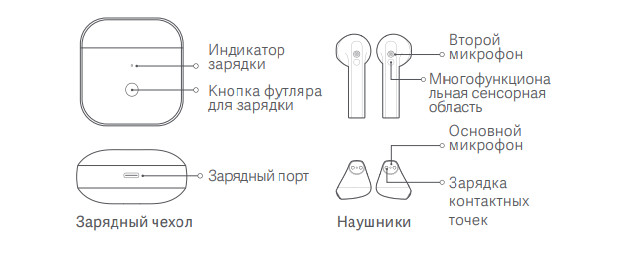
Устройство гарнитуры
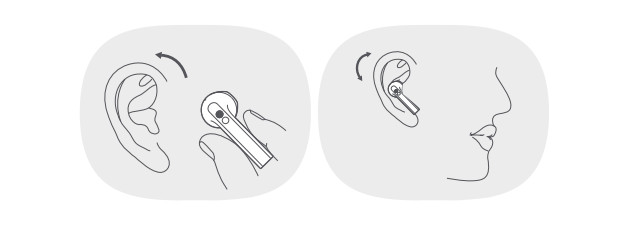
Ношение наушников
- Осторожно вставьте наушник в ушной канал и установите его в удобное положение.
- Во время разговора обязательно направляйте основной микрофон ко рту для более четкого разговора.
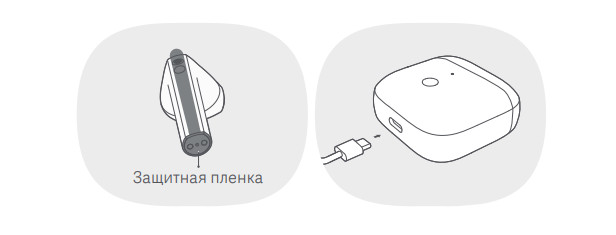
Зарядка
- Прежде чем использовать устройство, снимите защитную пленку с контактных поверхностей наушников, чтобы полностью зарядить их и зарядный чехол.
- Подключите кабель для зарядки, чтобы одновременно заряжать наушники и зарядный чехол.
- Когда чехол для зарядки заряжен не полностью, его индикатор горит белым цветом. Когда он полностью заряжен, его индикатор выключен.
Первое подключение
Оба наушника перейдут в режим ожидания подключения при открытии крышки футляра для зарядки. После включения Bluetoothв телефоне, найдите и коснитесь «Redmi Buds 3», чтобы подключить наушники к телефону.
Примечание: Если вам не удается выполнить сопряжение с наушниками, верните их в чехол и повторите предыдущие действия.
Функции

Принятие и завершение вызовов
Дважды коснитесь многофункциональной сенсорной области левого/правого вставного наушника, чтобы ответить на вызов, и трижды коснитесь многофункциональной сенсорной области левого/правого вставного наушника, чтобы отклонить или прервать вызов.
Воспроизведение музыки/Пауза
- Способ 1: Снимите наушники, чтобы приостановить воспроизведение музыки, и наденьте наушники, чтобы начать воспроизведение музыки
- Способ 2: Нажмите и удерживайте много функциональную сенсорную область левого/правого вставного наушника, чтобы приостановить/воспроизвести звук.
После приостановки музыки вручную, музыка не будет воспроизводиться
автоматически, когда вы снова снимете и наденете наушники.
Проигрывание следующего/предыдущего трека
При воспроизведении звука дважды коснитесь многофункциональной сенсорной области вставного наушника, чтобы воспроизвести следующую дорожку, а затем трижды коснитесь многофункциональной сенсорной области вставного наушника, чтобы воспроизвести предыдущую дорожку.
Принятие второго входящего вызова
Дважды коснитесь многофункциональной сенсорной области левого/правого вставного наушника, чтобы перевести текущий вызов в режим ожидания и ответить на входящий вызов, и трижды коснитесь многофункциональной сенсорной области левого/правого вставного наушника, чтобы прервать текущий вызов и ответить на вызов в режиме ожидания.
Переключение между одним и двумя наушниками
Когда оба наушника подключены успешно, они находятся в режиме двойного наушника. Поместите один из наушников обратно в чехол для зарядки и закройте его крышку, другой наушник автоматически перейдет в режим использования одного наушника. Извлеките наушник из чехла для зарядки, режим двух наушников автоматически восстановится снова.
Быстрое сопряжение
Поместите наушники в футляр для зарядки и закройте его крышку. Убедитесь, что в телефоне Mi/Redmi включен Bluetooth, и поднесите его близко к футлярe для зарядки, затем откройте крышку футляра и следуйте инструкциям на экране, чтобы подключить телефон к наушникам.
Примечание: Чтобы использовать эту функцию для быстрого подключения, обновите свой телефон Mi/Redmi до последней стабильной версии. Затем откройте Дополнительные настройки в настройках Bluetoothвашего телефона, чтобы включить Сопряжение совместимых устройств. В настоящее время эту функцию поддерживают только некоторые телефоны Mi/Redmi.
Автоматическое подключение
Когда наушники находятся в футляре для зарядки, открыв крышку футляра для зарядки, вы автоматически подключите наушники к последнему используемому устройству Bluetooth. Если наушники не подключены к какому-либо устройству, они автоматически перейдут в состояние ожидания подключения.
Обнаружение ношения
Встроенный оптический датчик может определять состояние ношения наушников в режиме реального времени, он может определять, когда наушник находится в ухе. Например, если
устройство, к которому подключены наушники, приостановлено, надевание наушников запустит музыку, а снятие наушников приостановит воспроизведение музыки.
Примечание: Если на улице холодная погода и ваши руки становятся сухими, наушники могут перестать функционировать при прикосновении к ним.
Сброс настроек наушников
Если наушники не могут правильно подключиться, выполните следующие шаги для сброса: если наушники не могут правильно подключиться, выполните следующие
шаги для сброса их настроек. Откройте крышку футляра для зарядки и поместите наушники в футляр. Нажмите и удерживайте кнопку футляра для зарядки в течение 10 секунд, и индикатор футляра для зарядки будет мигать белым в течение 3 секунд и выключится, указывая на то, что настройки наушников были сброшены успешно (соединение происходит между левым и правым наушниками, а также наушники и телефон будут очищены).
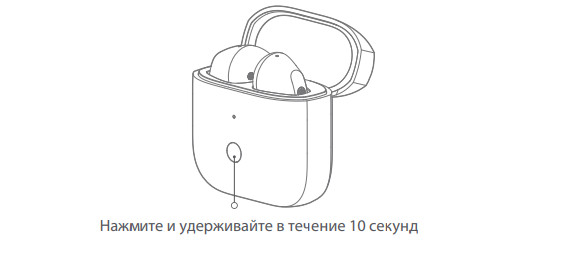
Редми Почки 3
Внимательно прочтите это руководство перед использованием и сохраните его для дальнейшего использования. Иллюстрации продуктов, аксессуаров и пользовательских интерфейсов в руководстве пользователя приведены только для справки. Фактический продукт и функции могут отличаться из-за усовершенствований продукта.
Продукт закончилсяview
Параметры модели на фото:
- Осторожно вставьте наушник в ушной канал и установите удобное положение.
- Во время разговора обязательно направляйте основной микрофон ко рту для более четкого разговора.

Зарядка
Включение
- Когда наушники находятся в зарядном футляре, откройте крышку, чтобы они автоматически включились.
- Если положить наушники в зарядный футляр, когда они выключены, они автоматически включатся.
Подключения
Первое подключение
Оба наушника перейдут в режим ожидания подключения при открытии крышки зарядного чехла. После включения Bluetooth на телефоне найдите и коснитесь «Redmi Buds 3», чтобы подключить наушники к телефону.
Примечание: Если наушники не удается подключить, поместите их обратно в чехол для зарядки, закройте крышку и повторите описанную выше операцию.
Сбросить наушники
Если наушники не могут правильно подключиться, выполните следующие действия, чтобы сбросить их. Откройте крышку зарядного кейса и поместите оба наушника в кейс. Нажмите и удерживайте кнопку зарядного футляра в течение 10 секунд, и индикатор зарядного футляра будет мигать белым в течение 3 секунд и погаснет, указывая на то, что наушники были успешно сброшены (запись соединения между левым и правым наушниками, а также между наушниками и телефоном). были очищены).

Функция завершенаview

Ответ / завершение звонка
Дважды коснитесь многофункциональной сенсорной области левого/правого наушника, чтобы ответить на вызов, и трижды коснитесь многофункциональной сенсорной области левого/правого наушника, чтобы отклонить или завершить вызов.
Воспроизвести / приостановить музыку
- Метод 1: Снимите наушники, чтобы поставить музыку на паузу, и наденьте наушники, чтобы начать воспроизведение музыки.*
Метод 2: Нажмите и удерживайте многофункциональную сенсорную область левого / правого наушника, чтобы приостановить / воспроизвести звук. - После ручной приостановки музыки музыка не будет воспроизводиться автоматически, когда вы снова наденете и снимете наушники.
Воспроизведение следующей дорожки/предыдущей дорожки
Во время воспроизведения аудио дважды коснитесь многофункциональной сенсорной области наушника, чтобы воспроизвести следующий трек; а затем коснитесь многофункциональной сенсорной области наушника три раза, чтобы воспроизвести предыдущую дорожку.
Ответить на второй звонок
Дважды коснитесь многофункциональной сенсорной области левого/правого наушника, чтобы поставить текущий вызов на удержание и ответить на входящий вызов, и трижды коснитесь многофункциональной сенсорной области левого/правого наушника, чтобы завершить текущий вызов и ответить на входящий вызов. держать.
Переключение между режимом одиночного / двойного бутона
Когда оба бутона соединены успешно, они находятся в режиме двойных бутонов. Если поместить одну из бутонов обратно в зарядный футляр и закрыть ее крышкой, другая бутончик автоматически перейдет в режим одной бутоны. При извлечении второго бутона из зарядного футляра режим двойного бутона снова автоматически восстанавливается.
Быстрое сопряжение
Поместите наушники в зарядный кейс и закройте его крышку. Убедитесь, что Bluetooth на телефоне Mi/Redmi включен, и поднесите его к чехлу для зарядки, затем откройте крышку чехла и следуйте инструкциям на экране, чтобы подключить телефон к наушникам.
Примечание: Чтобы использовать функцию быстрого подключения, обновите свой телефон Mi/Redmi до последней стабильной версии. Затем откройте «Дополнительные настройки» в настройках Bluetooth вашего телефона, чтобы включить сопряжение совместимых устройств. В настоящее время эта функция поддерживается только некоторыми телефонами Mi/Redmi.
Автоматическое подключение
Когда наушники находятся в зарядном футляре, при открытии крышки зарядного футляра наушники автоматически подключаются к последнему использовавшемуся Bluetooth-устройству. Если наушники не подключены ни к одному устройству, они автоматически перейдут в состояние ожидания подключения.
Обнаружение ношения
Встроенный оптический датчик может определять состояние ношения наушника в режиме реального времени, он может определять, когда наушник находится в ухе. Для бывшегоampНапример, если устройство, к которому подключены наушники, поставлено на паузу, надевание наушников запустит музыку, а снятие наушников приостановит воспроизведение музыки.
Примечание: Если на улице холодно и ваши руки станут сухими, бутоны могут перестать функционировать при прикосновении к ним.
Характеристики
- Имя: Беспроводные наушники
- Модель: M2104E1
- Частотный диапазон: 2402-2480 МГц
- Максимальная выходная мощность RF: <20 мВт
- Наушники
- Габаритные размеры: 40.7 × × 16.9 18.7 мм
- Вес нетто (на наушник): Прибл. 4.47 g
- Дальность беспроводной связи: 10 м (при отсутствии препятствий)
- Емкость ячейки (на наушник): 35 мАч
- Входной сигнал: 5 В = 70 мА
- Тип клетки: Литий-ионный полимерный элемент
- Беспроводное подключение: Bluetooth 5.2
- Зарядное устройство
- Модель: M2104E1
- Габаритные размеры: 49.6 × × 49.6 24.5 мм
- Емкость батареи: 310 мАч
- Входной сигнал: 5 В = 500 мА
- Вывод: 5 В = 150 мА
- Элементы питания: полимерный аккумулятор Литий-ионный
- Температура хранения: 0 ° C до 45 ° C
- Рабочая температура: 5 ° C до 40 ° C
- Срок службы: 1 год
Важная информация по безопасности
- Не пытайтесь разбирать, ремонтировать или модифицировать продукт, так как это может вызвать пожар или даже полностью повредить продукт.
- Держите индикатор продукта подальше от глаз детей и животных во время использования продукта.
- Не используйте этот продукт во время грозы. Гроза может вызвать неисправность продукта и повысить риск поражения электрическим током.
- Не разбирайте, не прокалывайте и не раздавливайте изделие, а также не подвергайте его воздействию огня.
- Немедленно прекратите использование продукта и обратитесь за медицинской помощью, если на участке контакта на коже появятся признаки покраснения или отека.
- Чтобы предотвратить возможную потерю слуха, не используйте большую громкость в течение длительного времени.
- Этот продукт не является игрушкой и может содержать мелкие детали. Пожалуйста, храните их в недоступном для детей месте. Бросание батареи в огонь, горячую печь, воду или другие жидкости
- или механическое сдавливание или раздавливание батареи может привести к взрыву.
- Оставление аккумулятора в окружающей среде с очень высокой температурой, что может привести к взрыву или утечке воспламеняющейся жидкости или газа.
- Батарея, находящаяся под воздействием чрезвычайно низкого давления воздуха, может привести к взрыву или утечке воспламеняющейся жидкости или газа.
- Информация о продукте и сертификационные знаки находятся в зарядном футляре.
- Не выбрасывайте аккумулятор в мусор, выбрасываемый на свалки. При утилизации батареи соблюдайте местные законы и правила.
- Замена батареи на батарею неправильного типа, которая может нарушить меры безопасности (например, возгорание, взрыв, утечка коррозионного электролита и т. Д.).
- = Символ указывает на постоянный токtage.
- Это устройство оснащено встроенной батареей, которую нельзя извлечь или заменить. Не разбирайте и не модифицируйте батарею самостоятельно.
- Используйте только сертифицированные зарядные устройства, поставляемые квалифицированными производителями.
ДЕКЛАРАЦИЯ СООТВЕТСТВИЯ ЕС
Компания Dongguan Yingsheng Electronic Technology Co., Ltd. заявляет, что радиооборудование типа M2104E1 соответствует Директиве 2014/53 / EU. Полный текст декларации соответствия ЕС доступен по следующему адресу в Интернете: http://www.mi.com/global/service/support/declaration.html
Информация о WEEE
Все продукты, отмеченные этим символом, являются отходами электрического и электронного оборудования (WEEE согласно директиве 2012/19 / EU), которые нельзя смешивать с несортированными бытовыми отходами. Вместо этого вам следует защищать здоровье человека и окружающую среду, передавая свое использованное оборудование в специальный пункт сбора отходов электрического и электронного оборудования, назначенный правительством или местными властями. Правильная утилизация и переработка помогут предотвратить возможные негативные последствия для окружающей среды и здоровья человека. Пожалуйста, свяжитесь с установщиком или местными властями для получения дополнительной информации о местонахождении, а также об условиях использования таких пунктов сбора.
Настоящим компания Dongguan Yingsheng Electronic Technology Co., Ltd. заявляет, что радиооборудование типа M2104E1 соответствует Регламенту радиооборудования 2017 года. Полный текст декларации соответствия UKCA доступен по следующему адресу в Интернете: https://www.mi.com/uk/service/support/declaration.html
Компилируется со стандартами IMDA DB106135
75323 / SDPPI / 2021 9003 CIDF15000056
- Изготовлено для: Сяоми Коммуникейшнс Ко., Лтд.
- Изготовлены по: Dongguan Yingsheng Electronic Technology Co., Ltd. (компания Mi Ecosystem)
- Адрес: Люкс 204, 4-й блок, № 86 Хунту-роуд, район Наньчэн, Дунгуань, провинция Гуандун, Китай
- Версия руководства пользователя: V1.0 Для получения дополнительной информации см. www.mi.com
- Импортер: Beryko sro Na Roudné 1162/76, 301 00 Плзень www.beryko.cz
Часто задаваемые вопросы
Являются ли Redmi Buds 3 водонепроницаемыми?
Наушники Redmi Buds 3 были тщательно созданы, чтобы превзойти стандарты IP54* по пыле- и водонепроницаемости (5-й уровень пыленепроницаемости и 4-й уровень водонепроницаемости), защищая их от пролитой жидкости и пота.
Как долго следует заряжать Redmi Buds 3?
1.5 часа для зарядки наушников и 2.5 часа для зарядки кейса.
Поддерживает ли Redmi Buds 3 быструю зарядку?
В зарядном чехле должно оставаться не менее 20 % заряда батареи, чтобы можно было выполнить 10-минутную быструю зарядку.
Есть ли у Redmi Buds 3 возможность беспроводной зарядки?
Кроме того, чехол для зарядки поддерживает беспроводную зарядку Qi, что делает зарядку очень простой.
Сколько времени можно использовать наушники после зарядки?
Большинство беспроводных наушников работают от пяти до шести часов без подзарядки, однако некоторые дорогие наушники рассчитаны на целый день.
Насколько долговечны наушники Redmi?
Наушники обеспечивают 4 часа прослушивания музыки при полной зарядке зарядным чехлом.
Как долго нужно заряжать наушники Redmi?
При зарядке индикатор мигает красным; при полной зарядке становится белым. Имейте в виду, что полная зарядка занимает около часа.
Могу ли я использовать Redmi Buds 3 Pro для принятия душа?
Благодаря сертификации IP54 Redmi Buds 3 устойчивы к брызгам (например, дождю), поту и пыли. Однако их нельзя носить в душе или погружать в воду.
Каков срок службы Redmi Buds 3?
Даже наушники среднего или высокого класса борются с этой ситуацией, но Buds 3 Lite хорошо сработали для меня во время голосовых чатов и чатов Zoom. Общее время автономной работы Redmi Buds 3 Lite заявлено как 18 часов, а каждый наушник работает примерно 6 часов. При полной зарядке наушники можно зарядить от кейса примерно три раза.
Как узнать, полностью ли заряжены мои Redmi Buds 3?
Индикация зарядного чехла отображается белым цветом, когда он не полностью заряжен. Индикация устанавливается на o, когда он полностью заряжен. первая встреча При открытии крышки зарядного кейса оба наушника перейдут в режим ожидания подключения.
Как определить, что батарея Redmi Buds 3 разряжена?
Проверка времени автономной работы наушников Вы можете проверить время работы наушников в строке состояния телефона после сопряжения их с устройством.
Как Redmi Buds 3 отвечают на звонки?
Ответ на вызов/завершение вызова Чтобы ответить на вызов, дважды нажмите на многофункциональную сенсорную область левого/правого наушника. Чтобы отклонить или завершить вызов, коснитесь многофункциональной сенсорной области левого/правого наушника три раза. Воспроизведение и остановка музыки Чтобы приостановить или воспроизвести звук, нажмите и удерживайте многофункциональную сенсорную область на левом или правом наушнике.
Как проверить аккумулятор Redmi Buds 3?
Когда появится всплывающее окно, просто откройте чехол для зарядки рядом со смартфоном и коснитесь экрана.
Загрузите эту ссылку в формате PDF: Руководство пользователя Redmi Buds 3
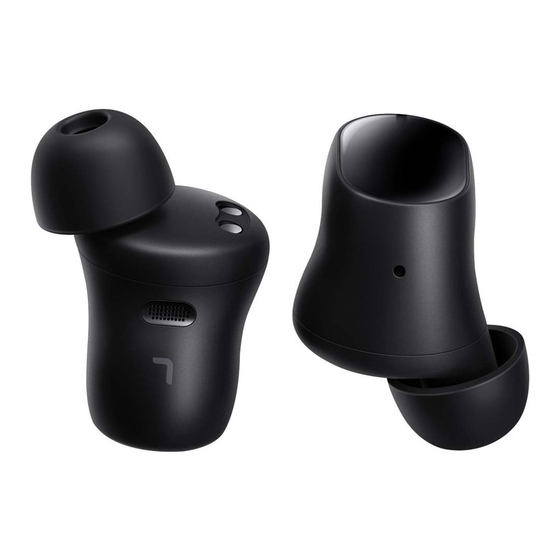
Read this manual carefully before use, and retain it for future reference.
Product Overview
Charging Case
Earbud
How to Use
Charging
- Charging the earbuds
When the earbuds are placed in the charging case, they will automatically start charging. - Charging the charging case
Use the included type-C charging cable to charge the charging case, or place it on a compatible wireless charger with the indicator facing upwards. The indicator is white while charging, and turns off when charging is completed.
Note: Please use a power adapter that meets the local certification requirements, or a wireless charger that supports charging at 5 W or higher.Type-C Wired Charging
Type-C Wireless Charging
This logo is for location indication only.
The center of the wireless charger must be aligned with the center of the charging case in order to charge, which is about 8 mm above the Redmi logo on the back of the charging case. The charging case’s indicator will be lit while charging.
Note: Illustrations of the product, accessories, and user interface in the user manual are for reference purposes only. The actual product and functions may vary due to product enhancements.
Checking the battery level
- Checking the battery level of the earbuds
After connecting the earbuds to a phone, you can check the earbuds’ battery level on the phone’s status bar.
Note: Only the battery level of the earbud with the lowest battery level of the two is displayed on the phone’s status bar. This feature is not supported by some phones. - Checking the battery level of the charging case
When the lid of the charging case is closed, press the function button or open the lid of the charging case to check the battery level:- When the charging case’s indicator is white for about 5 seconds, it indicates the battery level is sufficient.
- When the charging case’s indicator light is blinking white, it indicates its battery level is low and it should be charged immediately.
- Checking the battery level with a Mi phone
After successfully connecting to a phone, place the earbuds into the charging case and close its lid. Ensure the Mi phone is unlocked and its Bluetooth is enabled, and hold it close to the charging case, then open the case’s lid. A popup to check the battery levels of the earbuds and the charging case will appear on the phone.
Note: To use the feature to quickly check the battery level, the phone’s system needs to be updated to the latest stable version. Currently, only some Mi phones support this feature.
Turning on the earbuds
Opening the charging case will automatically turn on the earbuds.
Sleep mode
Place the earbuds back into the charging case and close the lid, then the earbuds will disconnect and enter sleep mode automatically.
Wearing the earbuds
Take the earbuds out of the charging case, and insert them into your ears according to the left (L) and right (R) marks.
Note: After using the earbuds, place them back into the charging case. This will extend their service life and helps to avoid losing or misplacing them.
How to Connect
Connecting to a new device
- Place the earbuds into the charging case, then press and hold the function button for about two seconds. The charging case’s indicator light will start blinking white to indicate that the earbuds are awaiting a connection.
- Enable the device’s Bluetooth, then search for and connect to the «Redmi Buds 3 Pro». If a passcode is requested, enter «0000».
Using quick pairing to connect to a Mi phone
Place the earbuds into the charging case and close its lid. Ensure the Mi phone is unlocked and its Bluetooth is enabled, and hold it close to the charging case, then open the case’s lid and follow the instructions on the phone to connect to the earbuds.
Note: To use the feature to quickly connect, the phone’s system needs to be updated to the latest stable version. Currently, only some Mi phones support this feature.
Connecting to two devices
The earbuds can be connected to two different Bluetooth devices simultaneously. After connecting the earbuds to the first device, put them in the charging case and open the lid. Press and hold the function button on the charging case for two seconds, then the indicator will start blinking white, and the earbuds are ready to be paired with a second device.
Disconnecting
When a device’s Bluetooth is disabled, or if the earbuds are out of range, the earbuds will automatically enter awaiting connection mode. If the earbuds remain disconnected from the device for 10 minutes, they will enter sleep mode. Wearing the earbuds again will wake them up and they will enter awaiting connection mode.
Automatic connection
When the earbuds are in the charging case, opening the lid of the charging case will automatically connect the earbuds to the most recently used Bluetooth device. If no connection history is detected, or if the earbuds cannot successfully connect to any Bluetooth device, the earbuds will automatically enter the awaiting connection mode. Note: If the earbuds cannot automatically connect to a device, you will need to manually connect the earbuds to the desired device via the device’s Bluetooth settings.
Restoring factory settings
- Place the earbuds into the charging case.
- Press and hold the function button for at least ten seconds until the indicator turns white, then release the button.
- The factory settings of the earbuds have been restored, the connection history has been cleared, the charging case’s indicator blinks white, and the earbuds are in pairing mode again.
Note: Due to the technical characteristics of Bluetooth, there may be occasional intermittent loss of connection or sound in areas with dense electromagnetic signal interference at 2.4 GHz.
Functions
- During calls
Gently tap either earbud twice: Answer call
Gently tap either earbud three times: Reject/End call - Music
Gently tap either earbud twice: Play/Pause
Gently tap either earbud three times: Next song
Take out either earbud: Pause music - Noise cancellation
Press and hold either earbud to switch between:
Enable noise cancellation <> Transparency mode
To prevent possible hearing loss, do not use this product at high volume for long periods of time.
Specifications
| Name | Wireless Earphones |
| Model | TWSEJ01ZM |
| HVIN | TWSEJ01ZM-L TWSEJ01ZM-R |
| Charging Port | Type-C |
| Net Weight | Approx. 55 g |
| Impedance | 32 Ω |
| Earbud Input | 5.25 V=120 mA Max. (per earbud) |
| Earbud Battery Capacity/Energy | 35 mAh/0.13 Wh (per earbud) |
| Charging Case Battery Capacity/Energy | 470 mAh/1.78 Wh |
| Charging Case Input | Wired Input: 5 V=500 mA Max. Wireless Input: Supports wireless chargers of 5 W or higher |
| Wireless Connectivity | Bluetooth 5.2 |
| Bluetooth Profiles | Bluetooth® Low Energy/HFP/A2DP/AVRCP |
| Operating Range | 10 m (in an obstacle-free environment) |
| Bluetooth Operation Frequency | 2400–2483.5 MHz(for EU) |
| Maximum Output Power for BT | ≤13 dBm (for EU) |
| Maximum Output Power for for BLE | ≤13 dBm (for EU) |
| Wireless Charging Operating Frequency | 110–148KHz |
| Operating Temperature | 5°C to 40°C |
| Charging Time (Charging Case) | Approx. 2.5 hours (by charging cable) |
The Bluetooth® word mark and logos are registered trademarks owned by Bluetooth SIG, Inc. and any use of such marks by Xiaomi inc. is under license. Other trademarks and trade names are those of their respective owners.
The Qi logo is a registered trademark of the Wireless Power Consortium.
Warning
- Do not attempt to disassemble, repair or modify the product, as this may cause fire or even completely damage the product.
- Do not expose the product to environments with a temperature that is too low or too high (below 0°C or above 45°C).
- Keep the product’s indicator away from the eyes of children and animals while the product is in use.
- Do not use this product during thunderstorms. Thunderstorms may cause the product to malfunction and increase the risk of electric shocks.
- Do not clean this product with alcohol or other volatile liquids.
- Avoid any contact with liquids.
- Do not disassemble, puncture or crush the product nor expose it to fire.
- Stop using the product immediately if there is any swelling.
- To prevent possible hearing loss, do not use high volume for long periods of time. Do not use the earbuds while driving, and comply with the relevant regulations in your region or country.
- These earbuds and their accessories may contain small parts. Please keep them out of the reach of children.
- Disposal of a battery into fire or a hot oven, or mechanically crushing or cutting of a battery, that can result in an explosion.
- Leaving a battery in an extremely high temperature surrounding environment that can result in an explosion or the leakage of flammable liquid or gas.
- A battery subjected to extremely low air pressure that may result in an explosion or the leakage of flammable liquid or gas.
- Product information and certification marks are located in the Charging Case.
- Do not put the battery in trash that is disposed of in landfills. When disposing of the battery, comply with local laws or regulations.
- Replacement of a battery with an incorrect type that can defeat a safeguard (such as catching fire, explosion, leakage of corrosive electrolyte etc).
- This equipment complies with RF radiation exposure limits set forth for an uncontrolled environment.
The symbol indicates DC voltage
EU Declaration of Conformity
Hereby, Zimi Corporation declares that the radio equipment type TWSEJ01ZM is in compliance with Directive 2014/53/EU. The full text of the EU declaration of conformity is available at the following internet address: http://www.mi.com/global/service/support/declaration.html
WEEE Information
All products bearing this symbol are waste electrical and electronic equipment (WEEE as in directive 2012/19/EU) which should not be mixed with unsorted household waste. Instead, you should protect human health and the environment by handing over your waste equipment to a designated collection point for the recycling of waste electrical and electronic equipment, appointed by the government or local authorities. Correct disposal and recycling will help prevent potential negative consequences to the environment and human health. Please contact the installer or local authorities for more information about the location as well as terms and conditions of such collection points.
Please take attention that changes or modification not expressly approved by the party responsible for compliance could void the user’s authority to operate the equipment. This device complies with part 15 of the FCC Rules. Operation is subject to the following two conditions: (1) This device may not cause harmful interference, and (2) this device must accept any interference received, including interference that may cause undesired operation. Caution: Changes or modifications to this unit not expressly approved by the party responsible for compliance could void the user’s authority to operate the equipment.
NOTE: This equipment has been tested and found to comply with the limits for a Class B digital device, pursuant to part 15 of the FCC Rules. These limits are designed to provide reasonable protection against harmful interference in a residential installation. This equipment generates, uses and can radiate radio frequency energy and, if not installed and used in accordance with the instructions, may cause harmful interference to radio communications. However, there is no guarantee that interference will not occur in a particular installation. If this equipment does cause harmful interference to radio or television reception, which can be determined by turning the equipment off and on, the user is encouraged to try to correct the interference by one or more of the following measures: —Reorient or relocate the receiving antenna. —Increase the separation between the equipment and receiver. —Connect the equipment into an outlet on a circuit different from that to which the receiver is connected. —Consult the dealer or an experienced radio/TV technician for help.
This device complies with Industry Canada licence-exempt RSS standard(s). Operation is subject to the following two conditions:
(1) this device may not cause interference, and
(2) this device must accept any interference, including interference that may cause undesired operation of the device.
FCC ID: 2AMIN-TWSEJ01ZM
IC:26993-TWSEJ01ZM
CAN ICES-3(B)/NMB-3(B)
UK declaration of conformity
Hereby, Zimi Corporation declares that the radio equipment type TWSEJ01ZM is in compliance with Radio Equipment Regulations 2017. The full text of the UK declaration of conformity is available at the following internet address:
https://www.mi.com/uk/service/support/declaration.html
Anti-counterfeit Label Instructions
The Redmi Buds 3 Pro have an anti-counterfeit label on the outer packaging. You can check the authenticity of the product by scratching the anti-counterfeit coating and entering the anti-counterfeit code.
Website: www.mi.com/verify
Anti-counterfeit Label
Scratched-off Coating
Manufactured for: Xiaomi Communications Co., Ltd.
Manufactured by: Zimi Corporation
Address: A913, No. 159 Chengjiang Road, Jiangyin, Jiangsu, China
For further information, please go to www.mi.com
Importer:
Beryko s.r.o.
Na Roudné 1162/76, 301 00 Plzeň www.beryko.cz
Here you can download full pdf version of manual, it may contain additional safety instructions, warranty information, FCC rules, etc.
Время на прочтение: 5 минут(ы)

Xiaomi Buds 3 – это беспроводные наушники, которые отлично подходят для использования с смартфонами и другими устройствами. Они предлагают высокое качество звука, удобное управление и долгое время работы. Подключение наушников к устройству – простая задача, если вы знаете несколько простых шагов.
Первым делом убедитесь, что наушники полностью заряжены. Затем откройте настройки Bluetooth на вашем устройстве. Найдите раздел “Bluetooth” и включите его. Откройте крышку зарядного футляра наушников.
На самых первых наушниках, вы можете увидеть светодиодный индикатор, который мигает синим цветом. Это означает, что наушники в режиме подключения. Поискайте в списке доступных устройств имя “Xiaomi Buds 3” или что-то похожее. Выберите его и дождитесь завершения процесса пары.
Поздравляю! Вы успешно подключили наушники Xiaomi Buds 3 к вашему устройству. Теперь вы можете наслаждаться качественным звуком без проводов и замечательным комфортом во время прослушивания музыки или просмотра контента.

Чтобы подключить беспроводные наушники Xiaomi Buds 3 к устройству, выполните следующие шаги:
-
Шаг 1: Зарядка наушников
Убедитесь, что наушники полностью заряжены перед подключением к устройству. Подключите кабель для зарядки к кейсу наушников и вставьте его в розетку. Подождите, пока индикатор заряда на кейсе не перестанет мигать.
-
Шаг 2: Включение режима паринга
Откройте кейс наушников и выньте их. Обычно наушники автоматически активируют режим паринга после извлечения из кейса. Если это не произошло, нажмите и удерживайте кнопку на устройстве до появления индикатора связи.
-
Шаг 3: Подключение к устройству
Откройте настройки Bluetooth на вашем устройстве. В списке устройств найдите «Xiaomi Buds 3» и нажмите на него, чтобы установить соединение.
-
Шаг 4: Проверка соединения
После установки соединения у вас должен появиться звуковой сигнал или индикаторные лампы на наушниках будут мигать. Это означает, что Xiaomi Buds 3 успешно подключены к вашему устройству.
Теперь вы можете наслаждаться музыкой и проводить звонки через свои Xiaomi Buds 3!
Шаг 1: Проверьте совместимость гарнитуры и устройства
Перед тем, как начать процесс подключения гарнитуры Xiaomi Buds 3, необходимо убедиться, что ваше устройство совместимо с этой моделью.
Список совместимых устройств приведен в таблице ниже:
| Модель устройства | Совместимость |
|---|---|
| Xiaomi Mi 11 | Да |
| Xiaomi Mi 10 | Да |
| Xiaomi Redmi Note 10 | Да |
| Xiaomi Redmi 9 | Да |
| iPhone 12 | Да |
| Samsung Galaxy S21 | Да |
| Google Pixel 5 | Да |
| OnePlus 9 | Да |
Если ваше устройство присутствует в этом списке, вы можете быть уверены, что оно совместимо с гарнитурой Xiaomi Buds 3.
В случае, если ваша модель отсутствует в списке, рекомендуется обратиться к официальным источникам информации или к производителю гарнитуры для уточнения совместимости с вашим устройством.
Шаг 2: Зарядите гарнитуру

Перед началом использования Xiaomi Buds 3 рекомендуется полностью зарядить их, чтобы обеспечить длительную работу без перебоев.
- Откройте крышку зарядного кейса и проверьте уровень заряда батареи гарнитуры. Если они не заряжены, поместите их обратно в кейс.
- Подключите зарядный кейс к источнику питания с помощью кабеля USB.
- Дождитесь, пока индикаторы на зарядном кейсе начнут мигать, что означает, что гарнитура заряжается.
- Оставьте гарнитуру в зарядном кейсе, чтобы они полностью зарядились. Обычно это занимает около 1-2 часов.
- Проверьте уровень заряда гарнитуры, убедившись, что индикаторы на зарядном кейсе перестали мигать или загорелись постоянно.
После полной зарядки гарнитуры Xiaomi Buds 3 они готовы к использованию. Обратите внимание, что зарядный кейс также имеет собственную батарею, поэтому время работы на одной зарядке может варьироваться.

Перед тем как подключить Xiaomi Buds 3 к устройству, необходимо включить режим подключения на самой гарнитуре. Для этого выполните следующие действия:
- Убедитесь, что гарнитура находится в режиме ожидания подключения. Обычно, когда вы достаете гарнитуру из коробки, она автоматически включается в режим ожидания. Если гарнитура не включена, нажмите и удерживайте кнопку включения/выключения на гарнитуре, пока она не загорится или не начнет мигать.
- Войдите в режим подключения гарнитуры. Для этого, на устройстве, с которым вы хотите подключить гарнитуру, откройте меню настроек Bluetooth. Найдите в списке устройств доступных для подключения “Xiaomi Buds 3” и нажмите на него.
- Подтвердите подключение. Возможно, вам будет предложено ввести пароль или код доступа для гарнитуры. Если такое случится, следуйте инструкциям на экране, чтобы завершить процесс подключения.
После выполнения этих шагов ваша Xiaomi Buds 3 должна успешно подключиться к устройству и готова к использованию. Убедитесь, что настройки звука на вашем устройстве настроены правильно, чтобы получить наилучшее качество звука от гарнитуры.
Шаг 4: Подключите гарнитуру к устройству

- Включите беспроводные наушники Xiaomi Buds 3, нажав и удерживая кнопку на корпусе наушников.
- На вашем устройстве (телефон, планшет или компьютер) откройте настройки Bluetooth.
- В списке доступных устройств Bluetooth найдите и выберите наушники Xiaomi Buds 3.
- Подтвердите запрос на подключение, если требуется пароль или код доступа, введите его.
- После успешного подключения наушники готовы к использованию.
После подключения наушников к устройству, они автоматически будут подключаться при последующих включениях наушников и устройства Bluetooth. Если вы решите подключить наушники к другому устройству, повторите процесс снова.
Примечание: Если устройство не видит наушники, убедитесь, что наушники находятся в режиме поиска и что Bluetooth на устройстве включен. Если проблема все еще не устранена, попробуйте перезагрузить устройство.
Шаг 5: Настройте звук и контроль функций гарнитуры

Когда вы успешно подключили Xiaomi Buds 3 к вашему устройству, вы можете настроить звук и контролировать функции гарнитуры через специальное приложение Xiaomi Wear.
1. Загрузите и установите приложение Xiaomi Wear
Перейдите в официальный магазин приложений вашего устройства (App Store для iOS или Google Play для Android) и найдите приложение Xiaomi Wear. Загрузите и установите приложение на свое устройство.
2. Откройте приложение Xiaomi Wear

После установки откройте приложение Xiaomi Wear на своем устройстве.
3. Перейдите в настройки Xiaomi Buds 3
В приложении Xiaomi Wear найдите раздел “Настройки” или “Устройства” и выберите свою гарнитуру Xiaomi Buds 3. Обычно гарнитуры автоматически подключаются к приложению после установки.
4. Настройте звук и функции
В разделе настроек гарнитуры вы можете настроить звук, выбрав предпочтительные настройки эквалайзера или выбрать заранее установленные звуковые режимы, например, режим рок или режим вокала. Также вы можете настроить функции гарнитуры, такие как управление воспроизведением музыки, пропуск треков или отключение шумоподавления.
5. Сохраните настройки

После того, как вы настроите звук и функции гарнитуры, не забудьте сохранить настройки, чтобы они применились к вашей Xiaomi Buds 3.
6. Наслаждайтесь музыкой с новыми настройками
Теперь у вас есть возможность наслаждаться музыкой с вашими новыми настройками звука и функций гарнитуры Xiaomi Buds 3. Испытайте их на практике и наслаждайтесь качеством звука и удобством управления!
Вопрос-ответ:
Как переключаться между устройствами Bluetooth, подключенными к наушникам Xiaomi Buds 3?
Переключение между устройствами Bluetooth, подключенными к наушникам Xiaomi Buds 3, осуществляется автоматически. Если вы, например, слушаете музыку на своем смартфоне и вдруг начинаете воспроизводить аудио на своем компьютере, наушники автоматически переключатся на новое устройство и начнут воспроизводить звук с компьютера. Для успешного переключения между устройствами важно, чтобы Bluetooth был включен на обоих устройствах и они были в зоне действия наушников.
Нажмите для оценки статьи!
На чтение 4 мин Просмотров 1.3к. Опубликовано 14.03.2023
Наушники Xiaomi Buds 3 – это беспроводные Bluetooth-наушники, которые предлагают качественный звук и удобство использования. В этой статье мы расскажем, как подключить и настроить наушники Xiaomi Buds 3.
Содержание
- Как подключить наушники Xiaomi Buds 3
- Проверьте, что наушники заряжены
- Включите наушники
- Включите Bluetooth на устройстве
- Найдите наушники в списке доступных устройств Bluetooth
- Подключите наушники к устройству
- Настройте наушники
- Наслаждайтесь качественным звуком
- Используйте функции управления наушниками
- Подключите наушники к нескольким устройствам
- Используйте режим шумоподавления
- Используйте приложение Xiaomi Wear для дополнительных настроек
- Как правильно использовать наушники Xiaomi Buds 3
- Выводы
Как подключить наушники Xiaomi Buds 3
-
Проверьте, что наушники заряжены
Перед тем, как начать подключать наушники Xiaomi Buds 3, убедитесь, что они заряжены. Для этого можно использовать зарядное устройство, которое поставляется в комплекте с наушниками.
-
Включите наушники
Чтобы включить наушники Xiaomi Buds 3, достаточно нажать на кнопку на корпусе наушников. При этом вы услышите звуковой сигнал, который означает, что наушники включены.
-
Включите Bluetooth на устройстве
Для того чтобы подключить наушники Xiaomi Buds 3 к устройству, нужно включить Bluetooth на устройстве, с которого вы хотите использовать наушники. Это может быть смартфон, планшет или компьютер.
-
Найдите наушники в списке доступных устройств Bluetooth
Как только Bluetooth включен на вашем устройстве, наушники Xiaomi Buds 3 должны появиться в списке доступных устройств Bluetooth. Если наушники не появились, попробуйте нажать кнопку на корпусе наушников еще раз, чтобы включить их в режим поиска.
-
Подключите наушники к устройству
Чтобы подключить наушники Xiaomi Buds 3 к устройству, нужно нажать на имя наушников в списке доступных устройств Bluetooth на вашем устройстве. Как только наушники подключатся, вы услышите звуковой сигнал, который означает, что наушники готовы к использованию.
-
Настройте наушники
После того как вы подключили наушники Xiaomi Buds 3 к устройству, вы можете настроить их в соответствии с вашими потребностями. Например, вы можете изменить уровень громкости, настроить функции управления и выбрать режим шумоподавления.
-
Наслаждайтесь качественным звуком
Как только наушники Xiaomi Buds 3 настроены и готовы к использованию, вы можете наслаждаться качественным звуком. Эти наушники имеют отличную звукопередачу и позволяют наслаждаться музыкой в любых условиях — дома, в офисе или на улице.
-
Используйте функции управления наушниками
Xiaomi Buds 3 имеют функции управления, которые позволяют вам контролировать воспроизведение музыки, отвечать на звонки, изменять уровень громкости и многое другое. Например, двойное касание на поверхности наушника может пропустить трек или ответить на звонок, а тройное касание может активировать голосового помощника на вашем устройстве.
-
Подключите наушники к нескольким устройствам
Xiaomi Buds 3 поддерживают функцию множественного подключения, что означает, что вы можете подключить их к нескольким устройствам одновременно. Например, вы можете подключить их к своему смартфону и компьютеру одновременно и быстро переключаться между ними, когда вам это нужно.
-
Используйте режим шумоподавления
Xiaomi Buds 3 имеют режим шумоподавления, который позволяет вам изолироваться от окружающего шума и наслаждаться музыкой без помех. Чтобы включить режим шумоподавления, нажмите и удерживайте наушник, пока не услышите звуковой сигнал.
-
Используйте приложение Xiaomi Wear для дополнительных настроек
Для дополнительных настроек наушников Xiaomi Buds 3 вы можете использовать приложение Xiaomi Wear. В нем вы можете настроить функции управления наушниками, изменить настройки шумоподавления и выбрать другие настройки, которые соответствуют вашим потребностям.
Как правильно использовать наушники Xiaomi Buds 3
Помимо подключения и настройки, существуют ряд советов по использованию наушников Xiaomi Buds 3, которые помогут вам максимально наслаждаться качеством звука и продлить срок их службы:
- Не стоит использовать наушники в условиях низких температур или влажности, так как это может повлиять на работу устройства и снизить качество звука.
- Храните наушники в чехле, который идет в комплекте, чтобы защитить их от царапин и повреждений.
- Регулярно чистите наушники с помощью мягкой ткани и избегайте использования абразивных средств, чтобы избежать повреждения поверхности.
- Не перегружайте наушники и не допускайте их попадания в воду, так как это может повредить устройство и ухудшить качество звука.
Выводы
Кроме того, Xiaomi Buds 3 имеют отличный дизайн и удобную форму, которые обеспечивают комфортное ношение в течение длительного времени. Их легкий вес и удобные амбушюры из мягкого силикона делают их идеальным выбором для тех, кто ищет качественные наушники для спорта или ежедневного использования.
Кроме того, наушники Xiaomi Buds 3 имеют высокую степень совместимости с устройствами, работающими на операционных системах Android и iOS. Это означает, что вы можете подключить их к любому совместимому устройству и наслаждаться качественным звуком без каких-либо проблем.
В целом, наушники Xiaomi Buds 3 — это отличный выбор для всех, кто ищет высококачественные беспроводные наушники с большим количеством функций и простым использованием. Подключение и настройка этих наушников происходят легко и быстро, что делает их идеальным выбором для тех, кто ищет удобство и качество.