
Раздел: Бытовая, кухонная техника, электроника и оборудование
Тип: Пылесос
Инструкция к Пылесосу Xiaomi Mi Vacuum Cleaner G10

For further information, please go to www.mi.com
Manufactured for: Xiaomi Communications Co., Ltd.
Manufactured by: Dreame (Tianjin) Information Technology Co., Ltd. (a Mi Ecosystem company)
Address: Room 2112-1-1, South District, Finance and Trade Center, No.6975 Yazhou Road, Dongjiang Bonded Port Area, Tianjin Pilot Free Trade Zone, Tianjin, China
Para más información, visite la página web www.mi.com.
Mi Vacuum Cleaner G10 User Manual
· 01
Fabricado para: Xiaomi Communications Co., Ltd.
Fabricado por: Dreame (Tianjin) Information Technology Co., Ltd. (una compañía de Mi Ecosystem)
Dirección: Room 2112-1-1, South District, Finance and Trade Center, No.6975 Yazhou Road, Dongjiang Bonded Port Area, Tianjin Pilot Free Trade Zone, Tianjin, China
Manual de usuario de Mi Vacuum Cleaner G10
· 29
Per ulteriori informazioni, visitare il sito www.mi.com
Fabbricato per: Xiaomi Communications Co., Ltd.
Fabbricato da: Dreame (Tianjin) Information Technology Co., Ltd. (una società Mi Ecosystem)
Indirizzo: Room 2112-1-1, South District, Finance and Trade Center, No.6975 Yazhou Road, Dongjiang Bonded Port Area, Tianjin Pilot Free Trade Zone, Tianjin, Cina
Manuale utente Mi Vacuum Cleaner G10
· 57
Pour en savoir plus, rendez-vous sur le site www.mi.com.
Fabriqué pour: Xiaomi Communications Co., Ltd.
Manuel d’utilisation de MiVacuumCleanerG10
· 85
Fabricant: Dreame (Tianjin) Information Technology Co., Ltd. (une société MiEcosystem)
Adresse: Room 2112-1-1, South District, Finance and Trade Center, No.6975 Yazhou Road, Dongjiang Bonded Port Area, Tianjin Pilot Free Trade Zone, Tianjin, Chine
Für weitere Informationen besuchen Sie bitte www.mi.com.
Mi Handstaubsauger G10 Benutzerhandbuch
· 113
Hergestellt für: Xiaomi Communications Co., Ltd.
Hersteller: Dreame (Tianjin) Information Technology Co., Ltd. (ein Unternehmen von Mi Ecosystem)
Adresse: Room 2112-1-1, South District, Finance and Trade Center, No.6975 Yazhou Road, Dongjiang Bonded Port Area, Tianjin Pilot Free Trade Zone, Tianjin, China
Руководство пользователя Пылесоса MiG10
· 141
Дополнительную информацию см. на веб-сайте www.mi.com.
Изготовлено для: Сяоми Техкоммуникации Ко., Лтд.(Китай)
Изготовитель: Dreame (Tianjin) Information Technology Co., Ltd. (компания MiEcosystem)
Mi ハンディクリーナー G10 取扱説明書
· 169
Адрес: Room 2112-1-1, South District, Finance and Trade Center, No.6975 Yazhou Road, Dongiang Bonded Port Area, Tianjin Pilot Free Trade Zone, Tianjin, China (Тяньцзинь, Китай)
詳細については、www.mi.com をご覧ください。
販売元:Xiaomi Communications Co., Ltd.
Mi 무선청소기 G10 사용 설명서
· 197
製造元:Dreame (Tianjin) Information Technology Co., Ltd. (Mi Ecosystem 企業)
所在地:Room 2112—1—1, South District, Finance and Trade Center, No.6975 Yazhou Road, Dongjiang Bonded Port Area, Tianjin Pilot Free Trade Zone, Tianjin, China
A/S 가 필요하시면 구매처나 현지 공식 A/S 센터로 연락하거나 www.mi.com/kr/ 에 방문하여 확인하십시오 .
Instrukcja obsługi odkurzacza Mi G10
· 225
의뢰업체 : Xiaomi Communications Co., Ltd.
제조업체 : Dreame (Tianjin) Information Technology Co., Ltd. (Mi 에코시스템 컴퍼니 )
주소 : Room 2112—1—1, South District, Finance and Trade Center, No.6975 Yazhou Road, Dongjiang Bonded Port Area, Tianjin Pilot Free Trade Zone, Tianjin, China
Mi G10
· 253
Więcej informacji: www.mi.com
Wyprodukowano dla: Xiaomi Communications Co., Ltd.
Producent: Dreame (Tianjin) Information Technology Co., Ltd. (spółka Mi Ecosystem)
Gebruikershandleiding Mi Stofzuiger G10
· 281
Adres: Room 2112-1-1, South District, Finance and Trade Center, No.6975 Yazhou Road, Dongjiang Bonded Port Area, Tianjin Pilot Free Trade Zone, Tianjin, Chiny
www.mi.com
Xiaomi Communications Co., Ltd :
.
(Mi Ecosystem ) Dreame (Tianjin) Information Technology Co., Ltd :
.
,Room 2112-1-1, South District, Finance and Trade Center, No.6975 Yazhou Road, Dongiang Bonded Port Area, Tianjin Pilot Free Trade Zone :
Ga voor meer informatie naar www.mi.com
Geproduceerd voor: Xiaomi Communications Co., Ltd.
Geproduceerd door: Dreame (Tianjin) Information Technology Co., Ltd. (een Mi Ecosystem-bedrijf)
Adres: Room 2112-1-1, South District, Finance and Trade Center, No.6975 Yazhou Road, Dongjiang Bonded Port Area, Tianjin Pilot Free Trade Zone, Tianjin, China
Made in China

Safety Instructions
This product is for household use only. Read this manual carefully before use, and retain it for future
reference.
This appliance can be used by children aged from 8 years and above and persons with reduced physical,
sensory or mental capabilities or lack of experience and knowledge if they have been given supervision or
instruction concerning use of the appliance in a safe way and understand the hazards involved. Children
shall not play with the appliance. Cleaning and user maintenance shall not be made by children without
supervision.
The appliance is only to be used with the power supply unit provided with the appliance.
The vacuum cleaner is not a toy. Children may not play with or operate this product. Please exercise caution
when using the vacuum cleaner near children. Do not allow children to clean or maintain the vacuum cleaner
unless supervised by a parent or guardian.
Only use the vacuum cleaner on dry indoor surfaces. Do not install, charge, or use this product outdoors,
such as in bathrooms, or near a pool.
Do not touch the plug or any part of the vacuum cleaner with wet hands.
To reduce the risk of fire, explosion, or personal injury, check to make sure the lithium-ion battery and
charger are undamaged before use. Do not use the vacuum cleaner if either the battery or charger is
damaged.
The smart high torque brush bar, mini electric brush, battery, extension rod, and the vacuum cleaner
are electrically conductive and should not be immersed in water or other liquid. Make sure all parts are
thoroughly dry after you carry out cleaning on them.
To prevent injury caused by moving parts, turn off the vacuum cleaner before cleaning the smart high torque
brush bar and mini electric brush. The smart high torque brush bar, dust compartment, and filter must all be
properly installed before using the vacuum cleaner.
1

Safety Instructions
Only use the BLJ24W308080P-V battery charger provided with the appliance.
The dust compartment cover, pre-filter, cyclone assembly, and HEPA filter must all be properly installed prior
Only use the P2046-7S1P-BC/P2046—7S1P-BCA battery pack provided with the appliance.
to using the vacuum cleaner.
If the charger or battery becomes damaged, it must be replaced with a genuine component purchased from
Make sure the vacuum cleaner is unplugged when not used for extended periods as well as prior to
the manufacturer or after-sales service department.
performing any maintenance or repairs.
Do not use the vacuum cleaner to pick up flammable or combustible liquids, such as gasoline, bleach,
Please be extra careful when using the vacuum cleaner to clean stairs.
ammonia, or drain cleaners; nor other liquids like water.
Fire Hazard Warning: Do not apply any type of fragrance to the vacuum cleaner‘s filter. These types of
Do not use the vacuum cleaner to pick up drywall particles, ashes like fireplace ash, or smoking or burning
products are known to contain flammable chemicals which may cause the vacuum cleaner to catch fire.
materials such as coal, cigarette butts or matches.
When Battery is not in use, keep it away from all metal objects, such as paper clips, coins, keys, nails, or
Do not use the vacuum cleaner to pick up sharp or hard objects, such as glass, nails, screws, or coins, which
screws. Shorting the battery terminals together increases the risk of fire or burns.
may damage the product.
Under abusive conditions, liquid may be ejected from the battery. Avoid contact with liquid, as it may cause
Keep hair, loose clothing, fingers, and other parts of the body away from the vacuum cleaner’s openings and
irritation or burns. If contact occurs, flush with water. If liquid contacts eyes, seek medical help.
moving parts. Do not point the suction opening, extension rod, or other accessories at your eyes or ears or
DO NOT expose the battery and appliance to fire as it may cause explosion.
put them in your mouth.
DO NOT expose or submerge the battery and appliance in any water, salt water, or other liquids.
Do not put any object into the vacuum cleaner‘s openings, nor use the vacuum cleaner with any opening
Please strictly follow the instructions in this user manualwhen using the vacuum cleaner. Users are
blocked. Keep free of dust, lint, hair, or other items which may reduce airflow.
responsible for any loss or damage that may arise from improper use of the vacuum cleaner.
Do not rest the vacuum cleaner against a chair, table, or other unstable surfaces, as this may cause damage
to the product or personal injury. If the vacuum cleaner malfunctions because of being knocked over or
We Dreame (Tianjin) Information Technology Co., Ltd., hereby, declare that this equipment is in compliance
damaged, please contact the authorized service department. Never attempt to disassemble the vacuum
with the applicable Directives and European Norms, and amendments. The full text of the EU declaration of
cleaner on your own.
conformity is available at the following internet address:
Only use the original charger to charge the product in environments with an ambient temperature of 0°C to
http://www.mi.com/global/service/support/declaration.html
40°C. Otherwise, the battery may damage.
For detailed e—manual, please go to www.mi.com/global/service/userguide
2 3
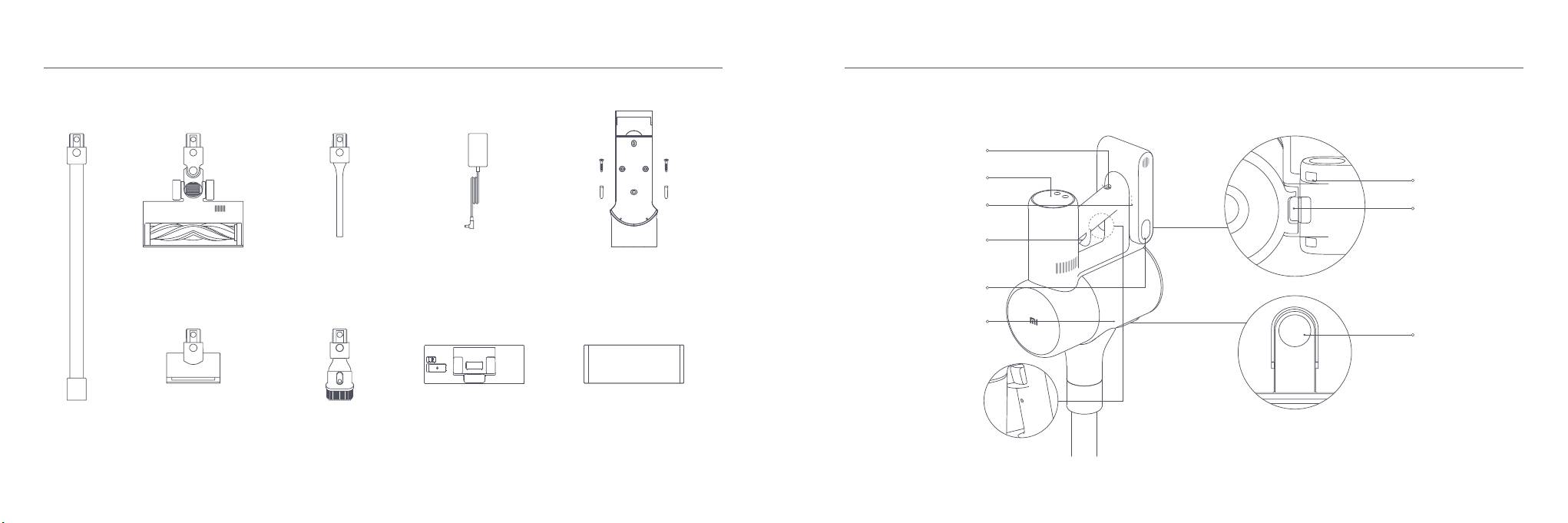
Product Overview Product Overview
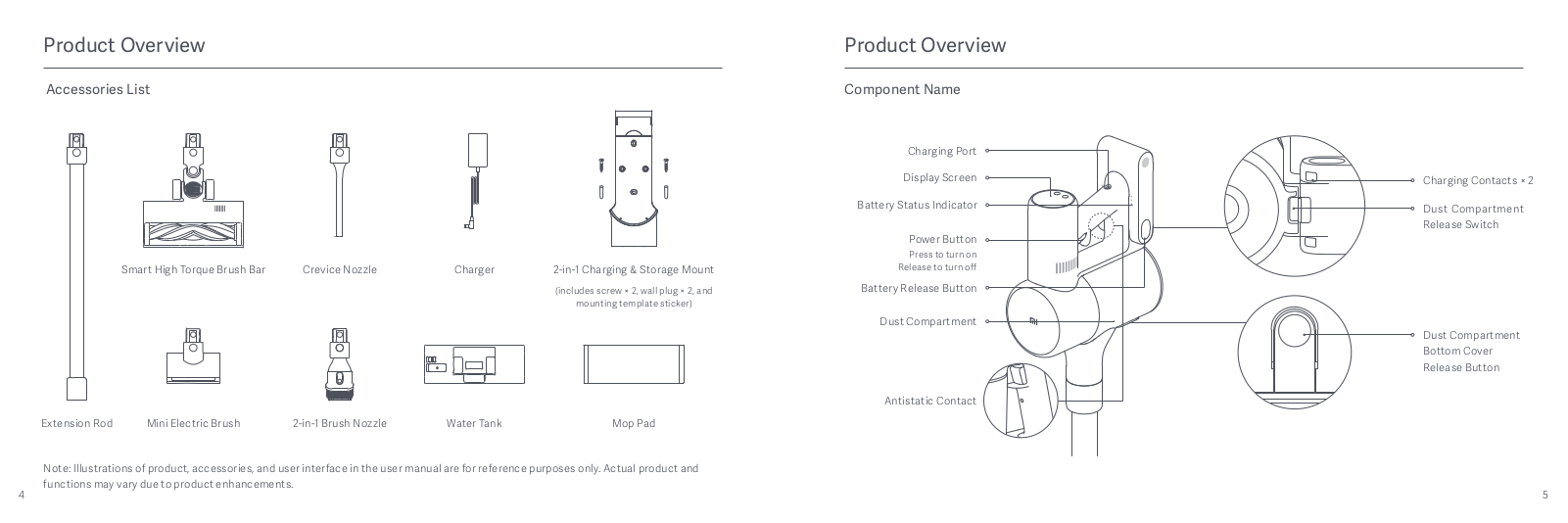
Accessories List Component Name
Charging Port
Display Screen
Charging Contacts × 2
Battery Status Indicator
Dust Compartment
Release Switch
Power Button
Press to turn on
Smart High Torque Brush Bar
Crevice Nozzle
Charger
2-in-1 Charging & Storage Mount
Release to turn off
(includes screw × 2, wall plug × 2, and
Battery Release Button
mounting template sticker)
Dust Compartment
Dust Compartment
Bottom Cover
Release Button
Antistatic Contact
Mini Electric BrushExtension Rod 2-in-1 Brush Nozzle
Water Tank
Mop Pad
Note: Illustrations of product, accessories, and user interface in the user manual are for reference purposes only. Actual product and
functions may vary due to product enhancements.
4 5

Product Overview
How to Install
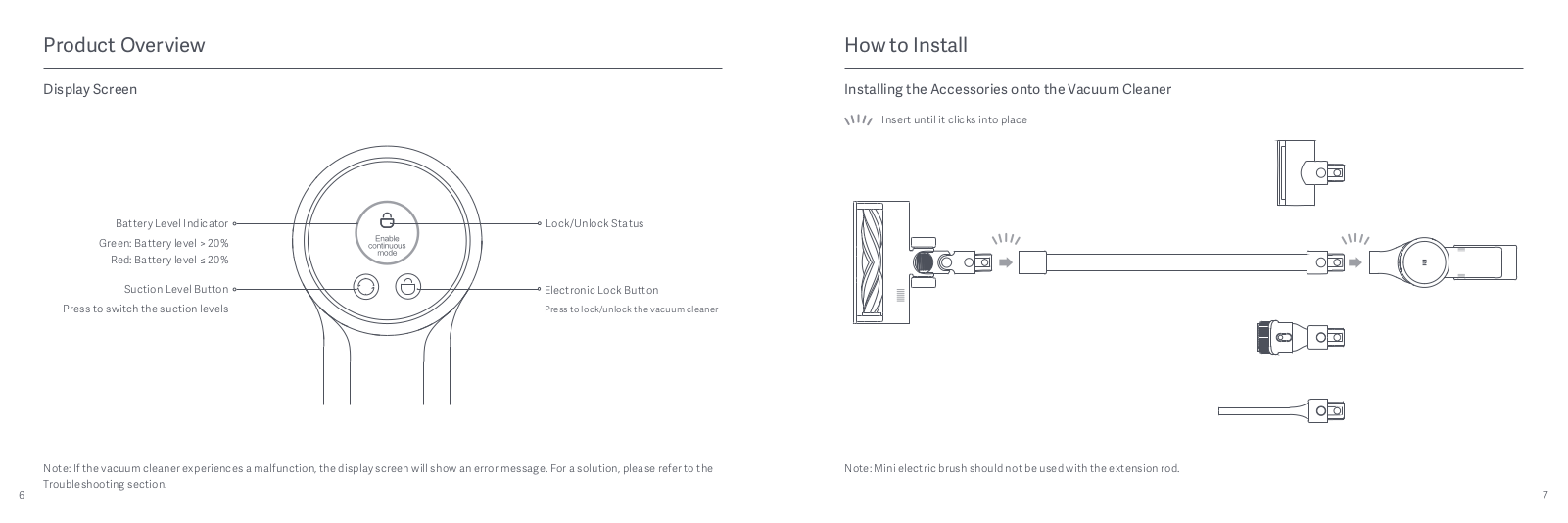
Display Screen
Installing the Accessories onto the Vacuum Cleaner
Insert until it clicks into place
Battery Level Indicator
Lock/Unlock Status
Green: Battery level > 20%
Red: Battery level ≤ 20%
Suction Level Button
Electronic Lock Button
Press to switch the suction levels
Press to lock/unlock the vacuum cleaner
Note: If the vacuum cleaner experiences a malfunction, the display screen will show an error message. For a solution, please refer to the
Note: Mini electric brush should not be used with the extension rod.
Troubleshooting section.
6 7

How to Install
Charging
Installing the 2-in—1 Charging & Storage Mount
Battery Status Indicator
Notes:
Fully charge the vacuum cleaner before using it for the first time.
1. The 2-in-1 charging & storage mount should be installed in a
3. Use a power drill with an 8 mm drill bit to drill a hole into each
Off
Blinking On
This will take about 4 hours.
cool, dry place with an electrical outlet nearby. Prior to installing,
hole marker on the mounting template sticker, then insert a wall
Low battery
The vacuum cleaner cannot be used while charging.
ensure that there are not any wires or pipes in the space directly
plug into each hole.
Vacuuming at the highest suction level for a prolonged period will
behind where the mount will be installed.
4. Align the mounting holes on the 2-in—1 charging & storage mount
Half battery
2. The bottom of the mounting template sticker should be level
to the holes on the wall, then attach the mount to the wall using
Nearly full
cause the battery to heat up, which may increase the charging
time. Before charging the vacuum cleaner, it is better to cool it
and at least 1.03 m from the ground, and its top should have at
the included screws.
Fully charged
down for 30 minutes.
least 30 cm of clearance above it.
Once the vacuum cleaner is fully charged, the indicator will turn off after 5
minutes, and the vacuum cleaner will then enter the energy-saving mode.
Extended Dock
30 cm
Display Screen
You can simultaneously charge the replaceable
The number on the display screen represents the current battery
battery* when charging the vacuum cleaner on the
level in a percentage during charging. When the number turns into
1
2-in-1 charging & storage mount.
100, the battery is fully charged.
Extended Dock Charging Plate
Charging
Port
Battery Status
Charging
Indicator
Contacts × 2
103 cm
Mounting Template
Screw Wall Plug
Sticker
2
8 9
* The replaceable battery is not included and purchased separately.
Recommended Height: At least 1.03 meters from the ground
Charging the vacuum cleaner with the charger
Charging the vacuum cleaner on the charging mount

How to Use
Setting Language
Working Modes
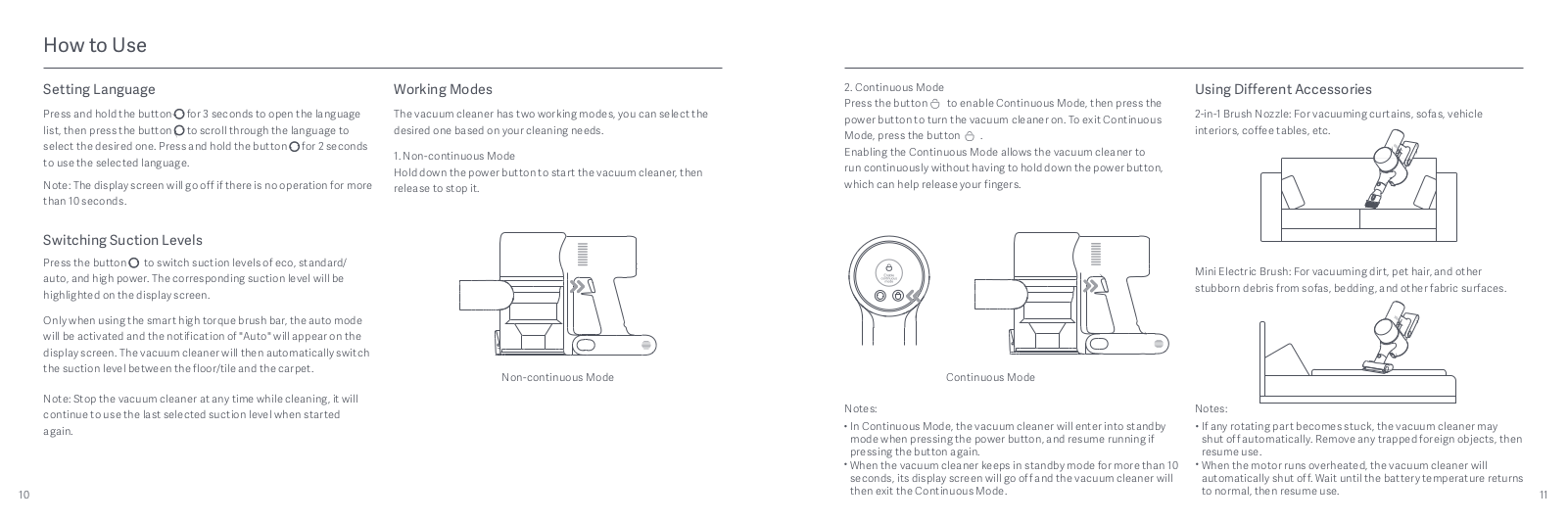
2. Continuous Mode
Using Different Accessories
Press the button to enable Continuous Mode, then press the
Press and hold the button for 3 seconds to open the language
The vacuum cleaner has two working modes, you can select the
power button to turn the vacuum cleaner on. To exit Continuous
2-in-1 Brush Nozzle: For vacuuming curtains, sofas, vehicle
list, then press the button to scroll through the language to
desired one based on your cleaning needs.
Mode, press the button .
interiors, coffee tables, etc.
select the desired one. Press and hold the button for 2 seconds
Enabling the Continuous Mode allows the vacuum cleaner to
to use the selected language.
1. Non-continuous Mode
Hold down the power button to start the vacuum cleaner, then
run continuously without having to hold down the power button,
Note: The display screen will go off if there is no operation for more
release to stop it.
which can help release your fingers.
than 10 seconds.
Switching Suction Levels
Press the button to switch suction levels of eco, standard/
auto, and high power. The corresponding suction level will be
Mini Electric Brush: For vacuuming dirt, pet hair, and other
highlighted on the display screen.
stubborn debris from sofas, bedding, and other fabric surfaces.
Only when using the smart high torque brush bar, the auto mode
will be activated and the notification of «Auto» will appear on the
display screen. The vacuum cleaner will then automatically switch
the suction level between the floor/tile and the carpet.
Non-continuous Mode
Continuous Mode
Note: Stop the vacuum cleaner at any time while cleaning, it will
continue to use the last selected suction level when started
Notes:
Notes:
again.
In Continuous Mode, the vacuum cleaner will enter into standby
If any rotating part becomes stuck, the vacuum cleaner may
mode when pressing the power button, and resume running if
shut off automatically. Remove any trapped foreign objects, then
pressing the button again.
resume use.
When the vacuum cleaner keeps in standby mode for more than 10
When the motor runs overheated, the vacuum cleaner will
seconds, its display screen will go off and the vacuum cleaner will
automatically shut off. Wait until the battery temperature returns
10 11
then exit the Continuous Mode.
to normal, then resume use.

How to Use How to Use Care & Maintenance
Using Different Accessories
Using the Mopping Function
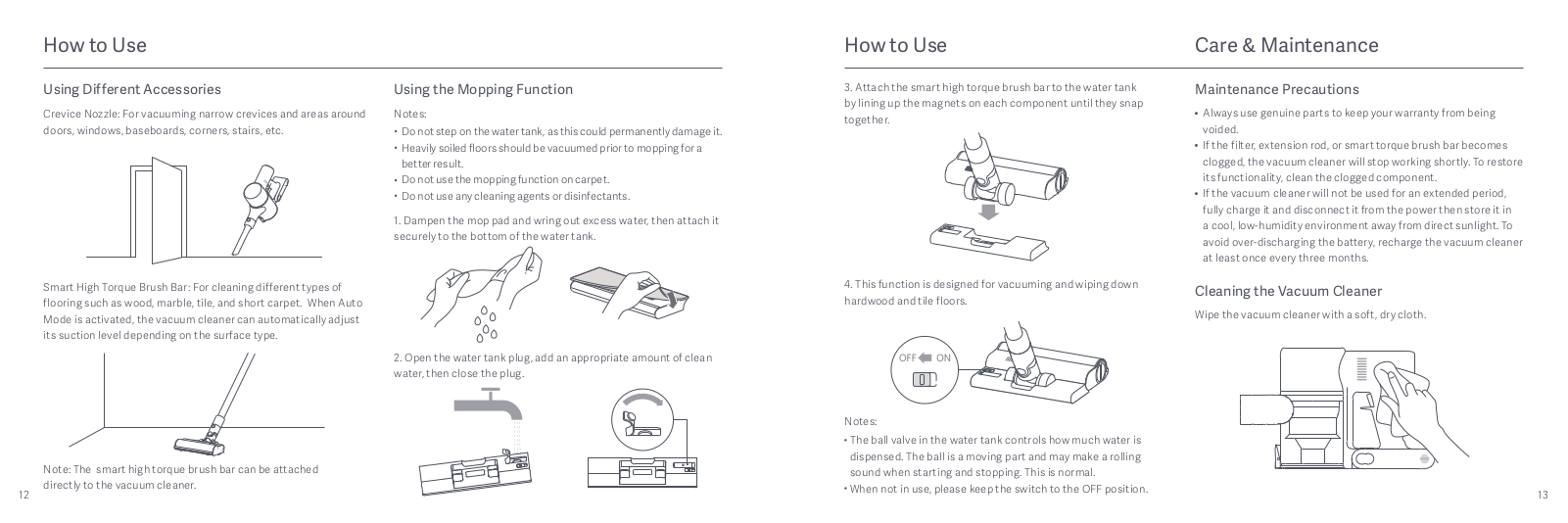
3. Attach the smart high torque brush bar to the water tank
Maintenance Precautions
by lining up the magnets on each component until they snap
Crevice Nozzle: For vacuuming narrow crevices and areas around
Notes:
together.
Always use genuine parts to keep your warranty from being
doors, windows, baseboards, corners, stairs, etc.
Do not step on the water tank, as this could permanently damage it.
voided.
Heavily soiled floors should be vacuumed prior to mopping for a
If the filter, extension rod, or smart torque brush bar becomes
better result.
clogged, the vacuum cleaner will stop working shortly. To restore
Do not use the mopping function on carpet.
its functionality, clean the clogged component.
Do not use any cleaning agents or disinfectants.
If the vacuum cleaner will not be used for an extended period,
fully charge it and disconnect it from the power then store it in
1. Dampen the mop pad and wring out excess water, then attach it
a cool, low—humidity environment away from direct sunlight. To
securely to the bottom of the water tank.
avoid over-discharging the battery, recharge the vacuum cleaner
at least once every three months.
Smart High Torque Brush Bar: For cleaning different types of
4. This function is designed for vacuuming and wiping down
Cleaning the Vacuum Cleaner
flooring such as wood, marble, tile, and short carpet. When Auto
hardwood and tile floors.
Mode is activated, the vacuum cleaner can automatically adjust
Wipe the vacuum cleaner with a soft, dry cloth.
its suction level depending on the surface type.
2. Open the water tank plug, add an appropriate amount of clean
water, then close the plug.
Notes:
The ball valve in the water tank controls how much water is
dispensed. The ball is a moving part and may make a rolling
Note: The smart high torque brush bar can be attached
sound when starting and stopping. This is normal.
directly to the vacuum cleaner.
12 13
When not in use, please keep the switch to the OFF position.

Care & Maintenance
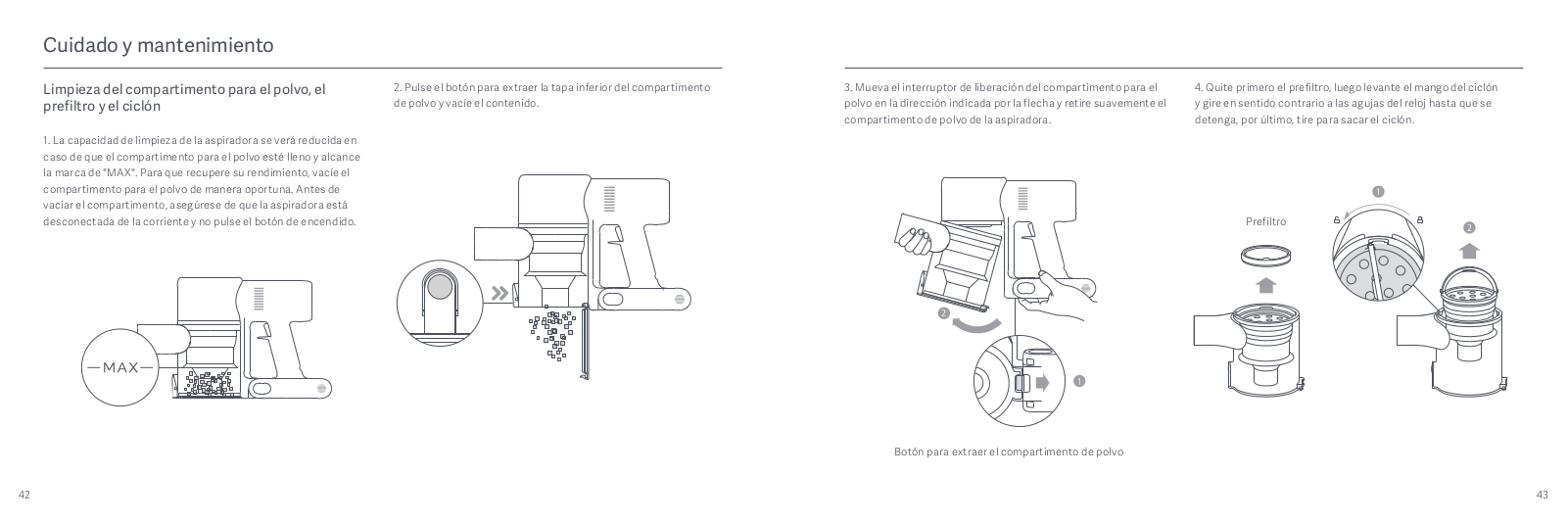
Cleaning the Dust Compartment, Pre-filter, and
2. Press the dust compartment bottom cover release button, then
3. Push the dust compartment release switch in the direction
4. Remove the pre-filter first, then lift the handle of the cyclone
Cyclone Assembly
empty the contents.
indicated by the arrow, then gently remove the dust compartment
assembly and turn to counterclockwise until it stops, then pull to
from the vacuum cleaner.
lift out the cyclone assembly.
1. The vacuum cleaner’s cleaning ability will be reduced if the dust
compartment is filled to the «MAX» mark. To regain performance,
empty the dust compartment in a timely manner. Before emptying
the compartment, make sure the vacuum cleaner is disconnected
1
from the power, and do not press its power button.
Pre-filter
2
2
1
Dust Compartment Release Switch
14 15

Care & Maintenance
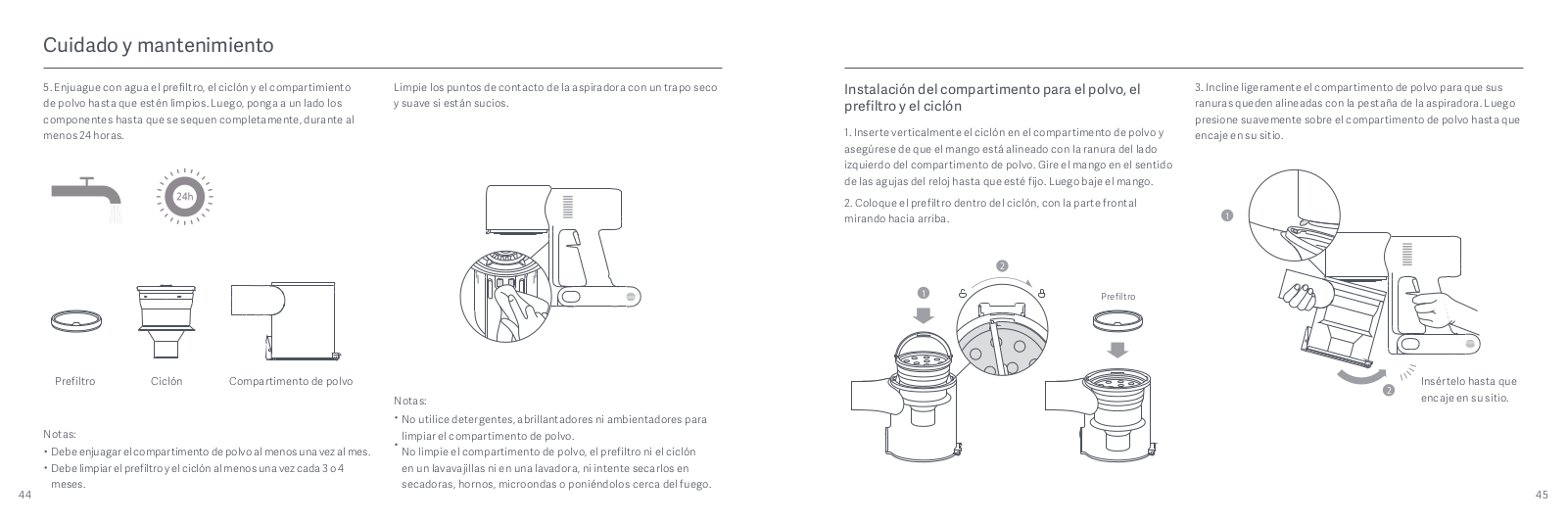
5. Rinse the pre-filter, cyclone assembly, and dust compartment
Wipe the contact points of the vacuum cleaner with a soft dry
Installing the Dust Compartment, Pre-filter, and
3. Slightly tilt the dust compartment so its slot aligns with the clip
with water until they are clean, then set each component aside to
cloth if they are dirty.
Cyclone Assembly
on the vacuum cleaner. Then gently push the dust compartment
thoroughly dry for at least 24 hours.
until it clicks into place.
1. Insert the cyclone assembly vertically into the dust
compartment, and make sure that the handle of the cyclone
assembly line up with the slot on the left side of the dust
compartment. Turn the handle clockwise until it locks, then flip
the handle down.
1
2. Place the pre—filter with its front side facing up into the cyclone
assembly.
2
1
Pre-filter
Insert until it clicks
Pre-filter Cyclone Assembly Dust Compartment
2
Notes:
into place
Do not use detergents, polishes, or air fresheners to clean the
Notes:
dust compartment.
The dust compartment should be rinsed out at least once a
Do not clean the dust compartment, pre—filter, or cyclone
month.
assembly in a dishwasher or washing machine, nor attempt to
The pre-filter and cyclone assembly should be cleaned once
dry any component in a tumble dryer, oven, microwave, or near
16 17
every 3 to 4 months.
an open fire.

Care & Maintenance
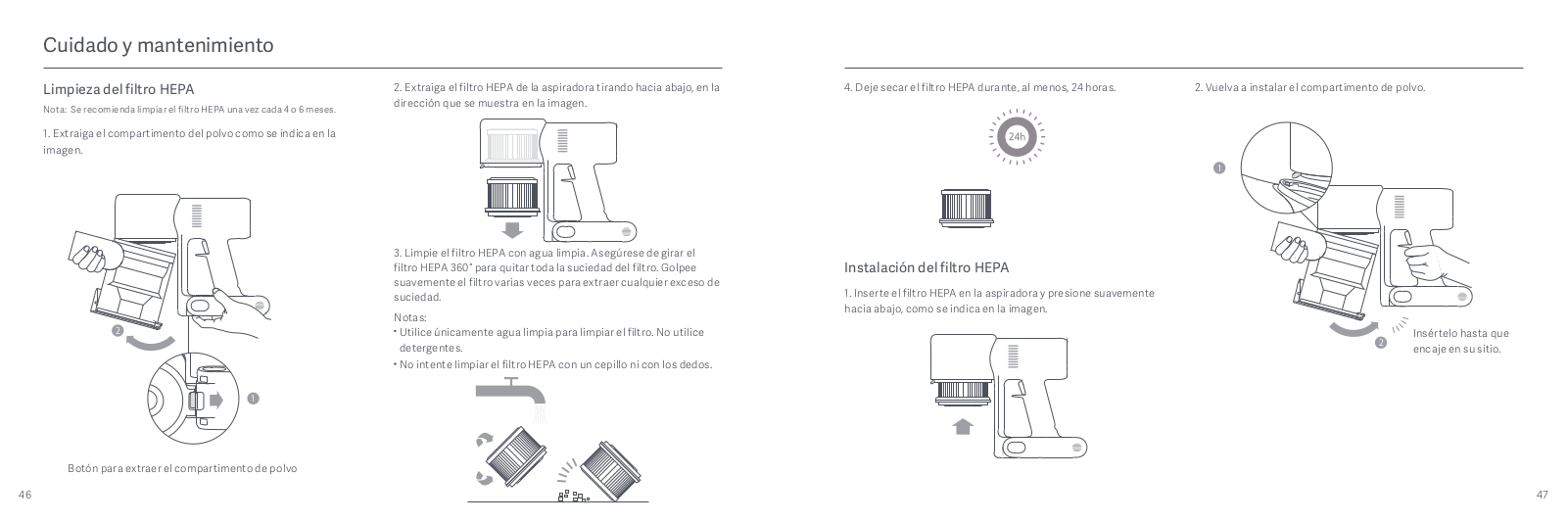
Cleaning the HEPA Filter
2. Remove the HEPA filter from the vacuum cleaner by pulling it
4. Allow the HEPA filter to thoroughly dry for at least 24 hours. 2. Reinstall the dust compartment.
Note: It is recommended to clean the HEPA filter once every 4
down in the direction shown in the figure.
to 6 months.
1. Remove the dust compartment as shown in the figure.
1
3. Clean the HEPA filter with clean water. Make sure you rotate the
Installing the HEPA Filter
HEPA filter 360° to thoroughly remove all dust caught in the filter.
Lightly tap the filter several times to remove any excess dirt.
1. Insert the HEPA filter into the vacuum cleaner and gently press
down, as illustrated.
Notes:
2
Only use clean water to clean the filter. Do not use detergent.
Insert until it
Do not attempt to clean the HEPA filter with a brush or finger.
2
clicks into place
1
Dust Compartment Release Switch
18 19

Care & Maintenance
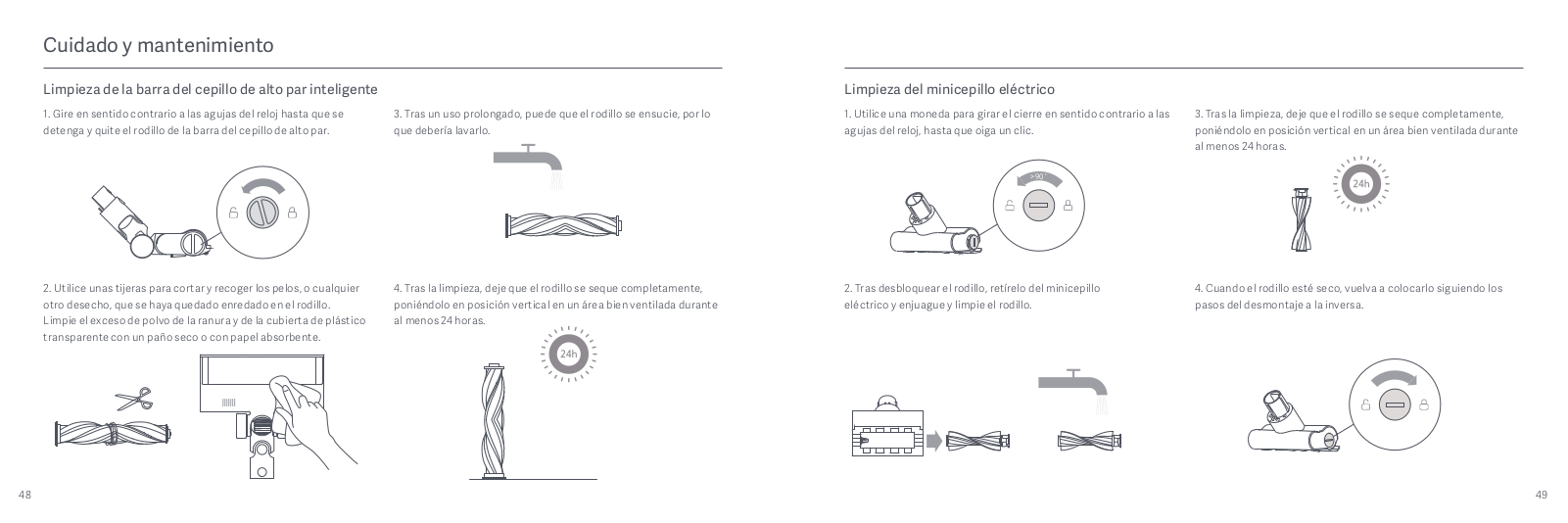
Cleaning the Smart High Torque Brush Bar
Cleaning the Mini Electric Brush
1. Turn the lock counterclockwise until it stops, then remove
3. After extended use, the roller brush may become dirty and
1. Use a coin to turn the lock counterclockwise until you hear a
3. After washing, allow the roller brush to dry thoroughly by
the roller brush from the smart high torque brush bar.
should be washed.
click.
standing it upright in a well-ventilated area for at least 24 hours.
>90°
2. Use scissors to cut and pick out any hair or other debris tangled
4. After washing, allow the roller brush to dry thoroughly by
2. After unlocking the roller brush, remove it from the mini
4. Once the roller brush is dry, reinstall it by following the
around the roller brush. Wipe away excess dust from the slot and
standing it upright in a well-ventilated area for at least 24 hours.
electric brush, then rinse and clean the roller brush.
disassembly steps in reverse.
clear plastic cover using a dry cloth or paper towel.
20 21

Care & Maintenance
Cleaning the Water Tank and Mop Pad
3. Remove the mop pad from the water tank.
Water Dispenser Filter Battery Pack
Notes:
The water dispenser filter should be replaced if the water tank
The vacuum cleaner contains a removable rechargeable
When the vacuum cleaner is charging or not in use, remove the
dispenses water too slowly or becomes clogged.
lithium-ion battery pack which has a limited number of recharge
water tank and drain any remaining water to prevent mildew or
To ensure optimal mopping effectiveness, it is recommended
cycles. After extended use, the battery pack may no longer hold a
lingering odor.
to replace water dispenser filters once every 3 to 6 months
charge. If this happens, it means the battery pack has reached the
A worn or damaged mop pad that no longer sticks to the water
depending on water quality and frequency of use.
end of its life cycle and needs to be replaced.
tank should be replaced to ensure optimal cleaning performance.
1. Press down the battery pack release button and slide the battery
4. Clean and dry the mop pad.1. Slide the water tank down to detach it from the smart high torque
1. Use your fingers to slide out old water dispenser filters on the
pack to the right, as illustrated, to remove it.
brush bar.
left and right sides of each slot.
2. Install the new battery pack.
2. Insert the new water dispenser filters and check to ensure they
are installed correctly.
2. Empty the water tank.
22 23

Specifications
Specifications
Vacuum Cleaner
Rechargeable Lithium-ion Battery Pack
Model MJSCXCQPT
Rated Voltage
25.2 V
Battery Model
Nominal CapacityP2046-7S1P-BC/P2046—7S1P-BCA
3000 mAh
Charging Voltage
30.8 V
Nominal Capacity 3000 mAh
Nominal Voltage Rated Capacity
25.2 V 2800 mAh
Rated Power
450 W
Dust Compartment Capacity Max. 0.6 L
Energy
70.56 Wh
Charging Time
Approx. 4 hours
Net Weight 4.2 kg
Item Dimensions
1286 × 214 × 256 mm
The lithium-on battery pack contains substances that are hazardous to the environment. Before disposing of the vacuum cleaner, please
first remove the battery pack, then discard, or recycle it in accordance with local laws and regulations of the country or region it is used in.
Smart High Torque Brush Bar
Mini Electric Brush
Model
G10—01 Model 1C-02
WEEE Information
Rated Power
40 W Rated Power
20 W
All products bearing this symbol are waste electrical and electronic equipment (WEEE as in directive 2012/19/EU) which should
not be mixed with unsorted household waste. Instead, you should protect human health and the environment by handing over
Rated Voltage
25.2 V 25.2 V
Rated Voltage
your waste equipment to a designated collection point for the recycling of waste electrical and electronic equipment, appointed
by the government or local authorities. Correct disposal and recycling will help prevent potential negative consequences to the
environment and human health. Please contact the installer or local authorities for more information about the location as well
Charger
as terms and conditions of such collection points.
Manufactured by
Zhongshan Baolijin Electronic Co., Ltd. Average Active Efficiency
87.5%
Model
BLJ24W308080P-V
Efficiency at Low Load (10%)
77.9%
Input
100–240 V~ 50/60 Hz 0.8 A
No-load Power Consumption
0.10 W
Output
30.8 V 0.8 A 24.6 W
24 25

FAQ
Error Possible Cause Solution
Error Possible Cause Solution
It is out of battery or has low battery.
Fully charge the vacuum cleaner, then
The charger is not connected to the vacuum
Make sure the charger is plugged in
resume use.
cleaner.
correctly.
It enters into overheat protection mode
Wait until the vacuum cleaner cools down,
The battery is fully charged and went into sleep
The vacuum cleaner does not work.
triggered by a blockage.
then reactivate it.
The battery indicator does not
The vacuum cleaner can be used normally.
mode.
light up while charging.
Its suction opening or airway passage is blocked.
Clear any blockages from suction opening
If the problem still persists after ruling out the above two possibilities, please contact after-
or airway passage.
sales service for help.
The dust compartment is full and/or the filter
Empty the dust compartment and clean
Wait until the battery temperature
is clogged.
the filter.
The battery charges slowly.
The battery temperature is too low or too high.
normalizes, then resume use.
The suction power reduces.
The smart high torque brush bar and/or the
Clear any blockages from the smart high
The water dispenser filter is clogged.
Clean or replace the water dispenser filter.
extension rod are blocked.
torque brush bar and/or the extension rod.
The water tank does not dispense
water, or dispenses water slowly.
The main suction opening or the extension rod is
Clear any blockages in the main suction
The mop pad is dirty.
Clean or replace the mop pad.
The motor makes a strange noise.
blocked.
opening or the extension rod.
The first indicator is red after
Battery pack is damaged.
Please contact after-sales service to
turning on the vacuum cleaner.
arrange maintenance.
The first indicator blinks red when
The charger is incompatible.
Only use the original charger to charge the
charging the vacuum cleaner.
vacuum cleaner.
26 27

Troubleshooting
Instrucciones de seguridad
If the vacuum cleaner is not working properly, the screen display will show an error message. Please refer to the troubleshooting table
Este producto es exclusivo para uso doméstico. Lea detenidamente este manual antes de usar el
below to find your solution based on the error message.
producto y consérvelo para futuras consultas.
Error Icon Error Message
Solution
Este aparato puede ser utilizado por niños de 8 años en adelante y por personas con capacidades
sensoriales, mentales o físicas reducidas o con falta de experiencia, siempre y cuando estén bajo la
Clear any blockages from the dust compartment, extension rod, and/or smart high
supervisión de un adulto, se les hayan proporcionado instrucciones sobre el uso del producto y se les haya
Airway Blocked
torque brush bar.
advertido de los riesgos implícitos. Los niños no deben jugar con el aparato. La limpieza y el mantenimiento
por parte del usuario no deben realizarse por niños sin supervisión de un adulto.
El aparato sólo debe utilizarse con la fuente de alimentación suministrada con él.
Low Battery
Recharge soon.
La aspiradora no es un juguete. No deje que los niños jueguen con el producto ni lo utilicen. Tenga
especial cuidado al utilizar la aspiradora cerca de niños. No deje que los niños limpien ni realicen tareas de
Refer to «Cleaning the smart high torque brush bar» under the Care & Maintenance
Roller Brush Stuck
mantenimiento en la aspiradora, a menos que estén supervisados por un adulto o tutor.
section for directions on how to clean out hair and other debris caught in the roller brush.
Utilice la aspiradora únicamente sobre superficies secas de interior. No monte, cargue ni utilice el producto
en exteriores, cuartos de baño o cerca de piscinas.
Battery Depleted
Recharge soon.
No toque el enchufe ni ninguna otra parte de la aspiradora con las manos mojadas.
Para reducir los riesgos de incendio, explosión o lesión personal, compruebe que la batería de iones de litio y
el cargador no presenten daños antes de usar el producto. No utilice la aspiradora si la batería o el cargador
Battery Overheated
Wait until the battery temperature normalizes before resuming use.
presenta algún daño.
La barra del cepillo de alto par inteligente el minicepillo eléctrico, la batería, la varilla de extensión y la
aspiradora son conductores eléctricos, por lo que no se deben sumergir en agua ni en ningún líquido.
Error
Please contact after-sales service to arrange maintenance.
Asegúrese de que todas las piezas están completamente secas después de limpiarlas.
Para evitar lesiones provocadas por piezas móviles, apague la aspiradora antes de limpiar la barra del cepillo
Filter Not Installed
Ensure that the HEPA filter and pre-filter are installed correctly.
de alto par inteligente y el minicepillo eléctrico. La barra del cepillo de alto par inteligente, el compartimento
para el polvo y el filtro deben estar bien instalados antes de usar la aspiradora.
Utilice únicamente el cargador original (modelo: BLJ24W308080P-V) que viene con este producto.
28 29

Instrucciones de seguridad
Utilice únicamente el tipo de batería aprobado (modelo P2046—7S1P-BC/P2046—7S1P-BCA). No hacerlo, podría
La tapa del compartimento para el polvo, el prefiltro, el ciclón y el filtro HEPA deben estar bien instalados
provocar que la batería de ion de litio se incendie.
antes de usar la aspiradora.
Si se daña el cargador o la batería, deberá reemplazarlos por un recambio original del fabricante o del
Asegúrese de que la aspiradora esté desconectada cuando no se utilice durante períodos prolongados, así
departamento del servicio posventa.
como antes de realizar cualquier tipo de mantenimiento o reparación.
No utilice la aspiradora para recoger líquidos inflamables o combustibles, como gasolina, lejía, amoniaco o
Tenga especial cuidado al usar la aspiradora para limpiar escaleras.
limpiadores de desagüe; ni otros líquidos, como el agua.
Advertencia sobre peligros de incendio: No aplique ningún tipo de fragancia al filtro de la aspiradora. Se
No utilice la aspiradora para recoger partículas de yeso, cenizas (como las de la chimenea) o materiales
sabe que estos tipos de productos contienen productos químicos inflamables que pueden hacer que la
humeantes o combustibles (como carbón, colillas de cigarrillos o cerillas).
aspiradora se incendie.
No utilice la aspiradora para recoger objetos afilados o duros, como vidrio, clavos, tornillos o monedas, que
Cuando la batería no esté en uso, manténgala alejada de objetos metálicos como sujetapapeles, monedas,
puedan dañar el producto.
llaves, clavos o tornillos. Cortocircuitar los terminales de la batería aumenta los riesgos de incendio o de
Mantenga el cabello, la ropa suelta, los dedos y todas las partes del cuerpo lejos de las aberturas y las partes
sufrir quemaduras.
móviles de la aspiradora. No apunte la abertura de succión, la varilla de extensión ni ningún otro accesorio a
En condiciones extremas, el líquido podría ser expulsado de la batería. Evite el contacto con líquidos, ya que
sus ojos u oídos, ni se los ponga en la boca.
podría provocar irritaciones o quemaduras. Si se produce un contacto, enjuague con agua. Si el líquido entra
No meta ningún objeto en las aberturas de la aspiradora, ni utilice la aspiradora en caso de que tenga alguna
en contacto con los ojos, busque ayuda médica.
abertura bloqueada. Mantenga el producto libre de polvo, pelusas, pelos y otros elementos, ya que podrían
NO exponga la batería ni el aparato al fuego, ya que podría provocar una explosión.
reducir el flujo de aire.
NO exponga ni sumerja la batería ni el aparato en agua, agua salada ni otros líquidos.
No apoye la aspiradora en sillas, mesas ni en superficies poco estables ya que se podría dañar el producto
Utilice este producto según las instrucciones del Manual del usuario. Los usuarios son responsables de
o provocar lesiones personales. Si la aspiradora no funciona correctamente debido a que se ha caído o
cualquier pérdida o daño que surja por el uso incorrecto de este producto.
dañado, póngase en contacto con el departamento de servicio técnico autorizado. No intente desmontar la
aspiradora por su cuenta.
Nosotros, Dreame (Tianjin) Information Technology Co., Ltd., por la presente, declaramos que el equipo
Deberá seguir rigurosamente todas las instrucciones del manual de usuario relacionadas con la recarga del
cumple con las Directivas y Normas Europeas aplicables y las enmiendas. Encontrará el texto completo de la
producto. Cargar la aspiradora de una forma incorrecta, fuera del rango de temperatura indicado, podría
declaración de conformidad de la UE en esta dirección de Internet:
dañar la batería.
http://www.mi.com/global/service/support/declaration.html
Utilice únicamente el cargador original para cargar el producto en entornos con una temperatura ambiente
Para un manual electrónico detallado, vaya a www.mi.com/global/service/userguide
de entre 0 y 40°C. De lo contrario, la batería podría sufrir daños.
30 31

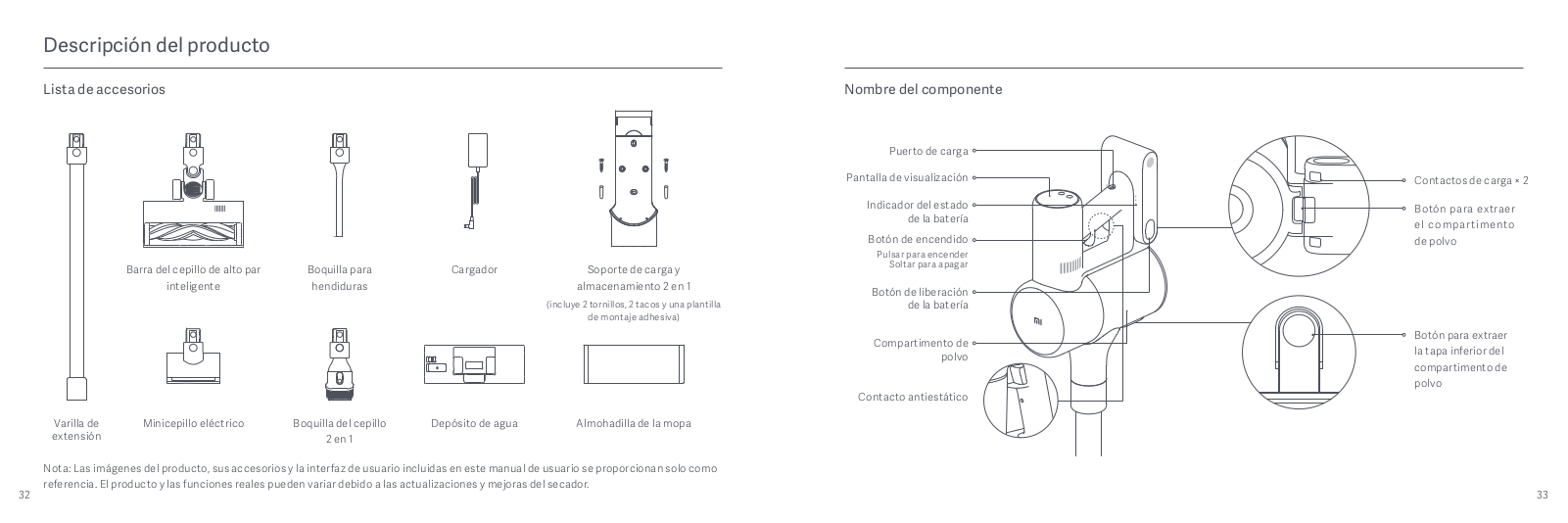
Descripción del producto
Lista de accesorios Nombre del componente
Puerto de carga
Pantalla de visualización
Contactos de carga × 2
Indicador del estado
Botón para extraer
de la batería
el compartimento
Botón de encendido
de polvo
Pulsar para encender
Barra del cepillo de alto par
Boquilla para
Cargador
Soporte de carga y
Soltar para apagar
inteligente
hendiduras
almacenamiento 2 en 1
Botón de liberación
(incluye 2 tornillos, 2 tacos y una plantilla
de la batería
de montaje adhesiva)
Botón para extraer
Compartimento de
polvo
la tapa inferior del
compartimento de
polvo
Contacto antiestático
Minicepillo eléctricoVarilla de
Boquilla del cepillo
Depósito de agua
Almohadilla de la mopa
extensión
2 en 1
Nota: Las imágenes del producto, sus accesorios y la interfaz de usuario incluidas en este manual de usuario se proporcionan solo como
referencia. El producto y las funciones reales pueden variar debido a las actualizaciones y mejoras del secador.
32 33

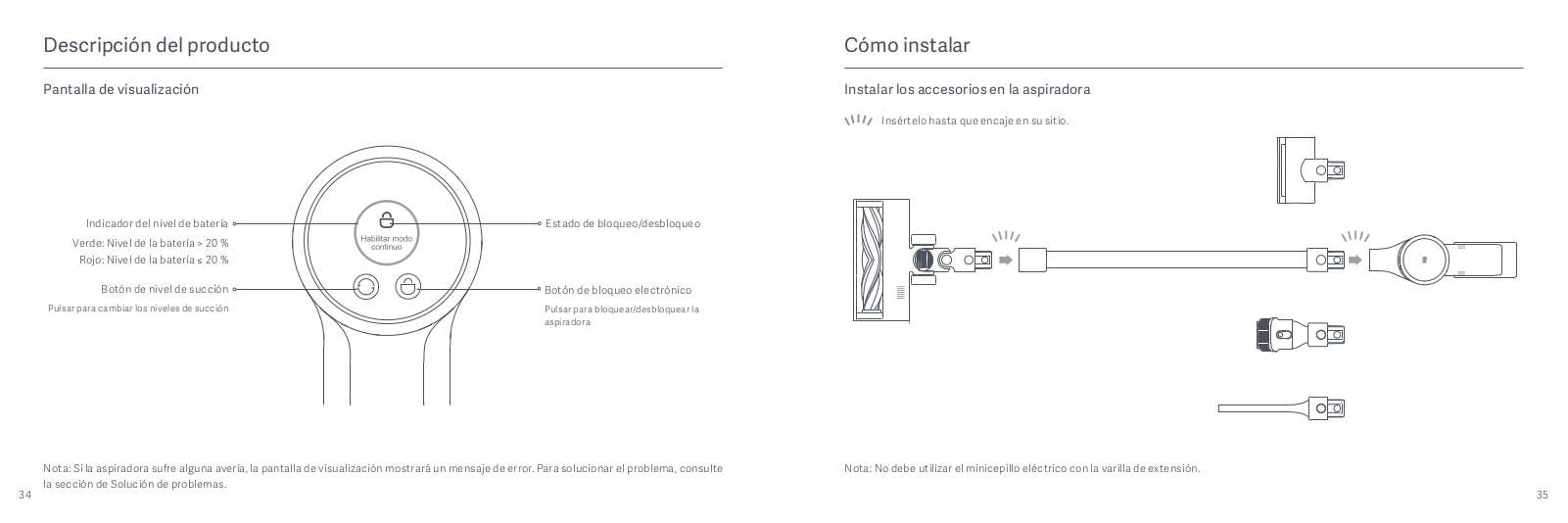
Descripción del producto
Cómo instalar
Pantalla de visualización
Instalar los accesorios en la aspiradora
Insértelo hasta que encaje en su sitio.
Indicador del nivel de batería
Estado de bloqueo/desbloqueo
Verde: Nivel de la batería > 20%
Rojo: Nivel de la batería ≤ 20%
Botón de nivel de succión
Botón de bloqueo electrónico
Pulsar para cambiar los niveles de succión
Pulsar para bloquear/desbloquear la
aspiradora
Nota: Si la aspiradora sufre alguna avería, la pantalla de visualización mostrará un mensaje de error. Para solucionar el problema, consulte
Nota: No debe utilizar el minicepillo eléctrico con la varilla de extensión.
la sección de Solución de problemas.
34 35

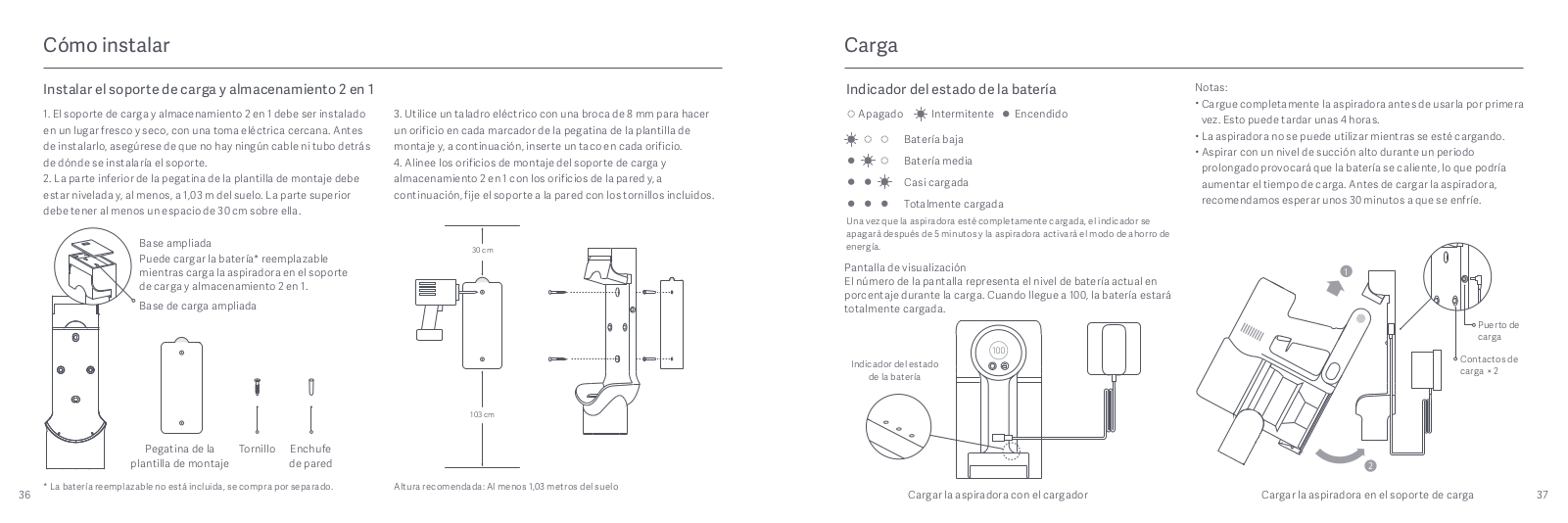
Cómo instalar
Carga
Instalar el soporte de carga y almacenamiento 2 en 1
Indicador del estado de la batería
Notas:
Cargue completamente la aspiradora antes de usarla por primera
1. El soporte de carga y almacenamiento 2 en 1 debe ser instalado
3. Utilice un taladro eléctrico con una broca de 8mm para hacer
Apagado Intermitente Encendido
vez. Esto puede tardar unas 4 horas.
en un lugar fresco y seco, con una toma eléctrica cercana. Antes
un orificio en cada marcador de la pegatina de la plantilla de
de instalarlo, asegúrese de que no hay ningún cable ni tubo detrás
montaje y, a continuación, inserte un taco en cada orificio.
Batería baja
La aspiradora no se puede utilizar mientras se esté cargando.
Aspirar con un nivel de succión alto durante un periodo
de dónde se instalaría el soporte.
4. Alinee los orificios de montaje del soporte de carga y
Batería media
prolongado provocará que la batería se caliente, lo que podría
2. La parte inferior de la pegatina de la plantilla de montaje debe
almacenamiento 2 en 1 con los orificios de la pared y, a
Casi cargada
aumentar el tiempo de carga. Antes de cargar la aspiradora,
estar nivelada y, al menos, a 1,03m del suelo. La parte superior
continuación, fije el soporte a la pared con los tornillos incluidos.
Totalmente cargada
recomendamos esperar unos 30 minutos a que se enfríe.
debe tener al menos un espacio de 30cm sobre ella.
Una vez que la aspiradora esté completamente cargada, el indicador se
apagará después de 5 minutos y la aspiradora activará el modo de ahorro de
Base ampliada
30 cm
energía.
Puede cargar la batería* reemplazable
mientras carga la aspiradora en el soporte
Pantalla de visualización
1
de carga y almacenamiento 2 en 1.
El número de la pantalla representa el nivel de batería actual en
porcentaje durante la carga. Cuando llegue a 100, la batería estará
Base de carga ampliada
totalmente cargada.
Puerto de
carga
Indicador del estado
Contactos de
de la batería
carga × 2
103 cm
Pegatina de la
Tornillo Enchufe
plantilla de montaje
de pared
2
* La batería reemplazable no está incluida, se compra por separado.
Altura recomendada: Al menos 1,03 metros del suelo
36 37
Cargar la aspiradora con el cargador Cargar la aspiradora en el soporte de carga
Оглавление
Аннотация для Пылесоса Xiaomi Mi Vacuum Cleaner G10 в формате PDF
Топ 10 инструкций
Другие инструкции
Mi
Loading…
R
- Redmi 9
- Redmi Note 6 Pro
- Robot Vacuum Brush
- Robot Vacuum-Mop
- Robot Vacuum-Mop 2 Pro+
- Robot Vacuum-Mop Brush Replacement
- Robot Vacuum-Mop Essential
- Robot Vacuum-Mop P2
- Router 4A
- RTCGQ01LM
- RunMi 90 Points Special Edition
S
- S5002
- SCWXCQ01RR
- SDZS01RR
- SKV4109GL
- Smart Antibacterial Humidifier
- Smart Band 46
- Smart Band 53
- Smart Band 6
- Smart Compact Projector
- Smart Home Hub2
- Smart Kettle Pro
- Smart LED Bulb
- Smart LED Bulb Essential
- Smart LED Ceiling Light2
- Smart LED Desk Lamp Pro
- Smart Space Heater S2
- Smart Standing Fan 1C
- Smart Standing Fan Pro
- Sports
- Sports Bluetooth Earphones
- STYTJ02YM
- SXJ01ZM
T
- T26
- TDSEJ02JY
- Temperature and Humidity Monitor 22
- Temperature and Humidity Sensor
- True Wireless Earbuds6
- True Wireless Earbuds Basic 22
- True Wireless Earbuds Basic S
- True Wireless Earphones3
- True Wireless Earphones 22
- True Wireless Earphones 2 Basic3
- True Wireless Earphones 2S2
- True Wireless Earphones Lite2
- True Wireless Kopfhörer
- TV Stick2
- TWSEJ02LM
- TWSEJ06WM
V
- Vacuum Cleaner
- Vacuum Cleaner G10
- Vacuum Cleaner G9
- Vacuum Cleaner Light4
- Vacuum Cleaner mini
- VXN4305GL
W
- Watch
- Watch Lite2
- Wireless Charging Stand
- WPC01ZM
- WXKG01LM
- WXSMSBMW022
X
- XM300002
- XMSH07HM2
- XMTZC04HM
- XMYX02YM
- XPrint
- x Wiha 8-in-1 Precision Screwdriver
Y
- YDLYEJ02LM
- YDXJ01FM
- YKFJ01FM
- YLDP03YL
Z
- ZHF4009GL
- ZHF4020GL
- ZNCZ04LM
Loading…
Loading…
Nothing found
Vacuum Cleaner G10
User Manual
156 pgs41.49 Mb0
Table of contents
Loading…
…
Mi User Manual
Specifications and Main Features
Frequently Asked Questions
User Manual



Loading…
+ 126 hidden pages
You need points to download manuals.
1 point = 1 manual.
You can buy points or you can get point for every manual you upload.
Buy points
Upload your manuals
Xiaomi Vacuum Cleaner G10
Safety Instructions
This product is for household use only. Read this manual carefully before use, and retain it for future reference.
This appliance can be used by children aged from 8 years and above and persons with reduced physical, sensory or mental capabilities or lack of experience and knowledge if they have been given supervision or instruction concerning use of the appliance in a safe way and understand the hazards involved. Children shall not play with the appliance. Cleaning and user maintenance shall not be made by children without supervision.
The vacuum cleaner is not a toy. Children may not play with or operate this product. Please exercise caution when using the vacuum cleaner near children. Do not allow children to clean or maintain the vacuum cleaner unless supervised by a parent or guardian.
Only use the vacuum cleaner on dry indoor surfaces. Do not install, charge, or use this product outdoors, such as in bathrooms, or near a pool.
Do not touch the plug or any part of the vacuum cleaner with wet hands.
To reduce the risk of fire, explosion, or personal injury, check to make sure the lithium-ion battery and charger are undamaged before use. Do not use the vacuum cleaner if either the battery or charger is damaged.
The smart high torque brush bar, mini electric brush, battery, extension rod, and the vacuum cleaner
are electrically conductive and should not be immersed in water or other liquid. Make sure all parts are thoroughly dry after you carry out cleaning on them.
To prevent injury caused by moving parts, turn off the vacuum cleaner before cleaning the smart high torque brush bar and mini electric brush. The smart high torque brush bar, dust compartment, and filter must all be properly installed before using the vacuum cleaner.
Only use the BLJ24W308080P-V battery charger provided with the appliance.
Only use the P2046-7S1P-BC battery pack provided with the appliance.
If the charger or battery becomes damaged, it must be replaced with a genuine component purchased from the manufacturer or after-sales service department.
Do not use the vacuum cleaner to pick up flammable or combustible liquids, such as gasoline, bleach, ammonia, or drain cleaners; nor other liquids like water.
Do not use the vacuum cleaner to pick up drywall particles, ashes like fireplace ash, or smoking or burning materials such as coal, cigarette butts or matches.
Do not use the vacuum cleaner to pick up sharp or hard objects, such as glass, nails, screws, or coins, which may damage the product.
Keep hair, loose clothing, fingers, and other parts of the body away from the vacuum cleaner’s openings and moving parts. Do not point the suction opening, extension rod, or other accessories at your eyes or ears or put them in your mouth.
Do not put any object into the vacuum cleaner’s openings, nor use the vacuum cleaner with any opening blocked. Keep free of dust, lint, hair, or other items which may reduce airflow.
Do not rest the vacuum cleaner against a chair, table, or other unstable surfaces, as this may cause damage to the product or personal injury. If the vacuum cleaner malfunctions because of being knocked over or damaged, please contact the authorized service department. Never attempt to disassemble the vacuum cleaner on your own.
Only use the original charger to charge the product in environments with an ambient temperature of 0°C to 40°C. Otherwise, the battery may damage.
The dust compartment cover, pre-filter, cyclone assembly, and HEPA filter must all be properly installed prior to using the vacuum cleaner.
Make sure the vacuum cleaner is unplugged when not used for extended periods as well as prior to performing any maintenance or repairs.
Please be extra careful when using the vacuum cleaner to clean stairs.
Fire Hazard Warning: Do not apply any type of fragrance to the vacuum cleaner’s filter. These types of products are known to contain flammable chemicals which may cause the vacuum cleaner to catch fire. When Battery is not in use, keep it away from all metal objects, such as paper clips, coins, keys, nails, or screws. Shorting the battery terminals together increases the risk of fire or burns.
Under abusive conditions, liquid may be ejected from the battery. Avoid contact with liquid, as it may cause irritation or burns. If contact occurs, flush with water. If liquid contacts eyes, seek medical help.
DO NOT expose the battery and appliance to fire as it may cause explosion.
DO NOT expose or submerge the battery and appliance in any water, salt water, or other liquids.
Please strictly follow the instructions in this user manual when using the vacuum cleaner. Users are responsible for any loss or damage that may arise from improper use of the vacuum cleaner.
We Dreame Technology (Tianjin) Limited, hereby, declare that this equipment is in compliance with the applicable Directives and European Norms, and amendments. The full text of the EU declaration of conformity is available at the following internet address:
http://www.mi.com/global/service/support/declaration.html
Product Overview
Accessories List


Note: Illustrations of product, accessories, and user interface in the user manual are for reference purposes only. Actual product and functions may vary due to product enhancements.
Component Name


Display Screen


Note: If the vacuum cleaner experiences a malfunction, the display screen will show an error message. For a solution, please refer to the Troubleshooting section.
How to Install
Installing the Accessories onto the Vacuum Cleaner


Note: Mini electric brush should not be used with the extension rod.
Installing the 2-in-1 Charging & Storage Mount
- The 2-in-1 charging & storage mount should be installed in a cool, dry place with an electrical outlet nearby. Prior to installing, ensure that there are not any wires or pipes in the space directly behind where the mount will be installed.
- The bottom of the mounting template sticker should be level and at least 1.03 m from the ground, and its top should have at least 30 cm of clearance above it.

Note* The replaceable battery is not included and purchased separately.
- Use a power drill with an 8 mm drill bit to drill a hole into each hole marker on the mounting template sticker, then insert a wall plug into each hole.
- Align the mounting holes on the 2-in-1 charging & storage mount to the holes on the wall, then attach the mount to the wall using the included screws.

Note: Recommended Height: At least 1.03 meters from the ground


Charging
Once the vacuum cleaner is fully charged, the indicator will turn off after 5 minutes, and the vacuum cleaner will then enter the energy-saving mode.
Display Screen
The number on the display screen represents the current battery level in a percentage during charging. When the number turns into 100, the battery is fully charged.

Notes:
- Fully charge the vacuum cleaner before using it for the first time. This will take about 4 hours.
- The vacuum cleaner cannot be used while charging.
- Vacuuming at the highest suction level for a prolonged period will cause the battery to heat up, which may increase the charging time. Before charging the vacuum cleaner, it is better to cool it down for 30 minutes.


How to Use
Setting Language
Press and hold the button for 3 seconds to open the language list, then press the button to scroll through the language to select the desired one. Press and hold the button for 2 seconds to use the selected language.
Note: The display screen will go off if there is no operation for more than 10 seconds.
Switching Suction Levels
Press the button to switch suction levels of eco, standard/auto, and high power. The corresponding suction level will be highlighted on the display screen.
Only when using the smart high torque brush bar, the auto mode will be activated and the notification of «Auto» will appear on the display screen. The vacuum cleaner will then automatically switch the suction level between the floor/tile and the carpet.
Note: Stop the vacuum cleaner at any time while cleaning, it will continue to use the last selected suction level when started again.
Working Modes
The vacuum cleaner has two working modes, you can select the desired one based on your cleaning needs.
- Non-continuous Mode
Hold down the power button to start the vacuum cleaner, then release to stop it. - Continuous Mode
Press the button to enable Continuous Mode, then press the power button to turn the vacuum cleaner on. To exit Continuous Mode, press the button .
Enabling the Continuous Mode allows the vacuum cleaner to run continuously without having to hold down the power button, which can help release your fingers.

Notes:
- In Continuous Mode, the vacuum cleaner will enter into standby mode when pressing the power button, and resume running if pressing the button again.
- When the vacuum cleaner keeps in standby mode for more than 10 seconds, its display screen will go off and the vacuum cleaner will then exit the Continuous Mode.
Using Different Accessories
2-in-1 Brush Nozzle: For vacuuming curtains, sofas, vehicle interiors, coffee tables, etc.

Mini Electric Brush: For vacuuming dirt, pet hair, and other stubborn debris from sofas, bedding, and other fabric surfaces.
Notes:
- If any rotating part becomes stuck, the vacuum cleaner may shut off automatically. Remove any trapped foreign objects, then resume use.
- When the motor runs overheated, the vacuum cleaner will automatically shut off. Wait until the battery temperature returns to normal, then resume use.
Crevice Nozzle: For vacuuming narrow crevices and areas around doors, windows, baseboards, corners, stairs, etc.

Smart High Torque Brush Bar: For cleaning different types of flooring such as wood, marble, tile, and short carpet. When Auto Mode is activated, the vacuum cleaner can automatically adjust its suction level depending on the surface type.

Note: The smart high torque brush bar can be attached directly to the vacuum cleaner.
Using the Mopping Function
Notes:
- Do not step on the water tank, as this could permanently damage it.
- Heavily soiled floors should be vacuumed prior to mopping for a better result.
- Do not use the mopping function on carpet.
- Do not use any cleaning agents or disinfectants.
- Dampen the mop pad and wring out excess water, then attach it securely to the bottom of the water tank.

- Open the water tank plug, add an appropriate amount of clean water, then close the plug.

- Attach the smart high torque brush bar to the water tank by lining up the magnets on each component until they snap together.
- This function is designed for vacuuming and wiping down hardwood and tile floors.


Notes:
- The ball valve in the water tank controls how much water is dispensed. The ball is a moving part and may make a rolling sound when starting and stopping. This is normal.
- When not in use, please keep the switch to the OFF position.
Care & Maintenance
Maintenance Precautions
- Always use genuine parts to keep your warranty from being voided.
- If the filter, extension rod, or smart torque brush bar becomes clogged, the vacuum cleaner will stop working shortly. To restore its functionality, clean the clogged component.
- If the vacuum cleaner will not be used for an extended period, fully charge it and disconnect it from the power then store it in a cool, low-humidity environment away from direct sunlight. To avoid over-discharging the battery, recharge the vacuum cleaner at least once every three months.
Cleaning the Vacuum Cleaner
Wipe the vacuum cleaner with a soft, dry cloth.

Cleaning the Dust Compartment, Pre-filter, and Cyclone Assembly
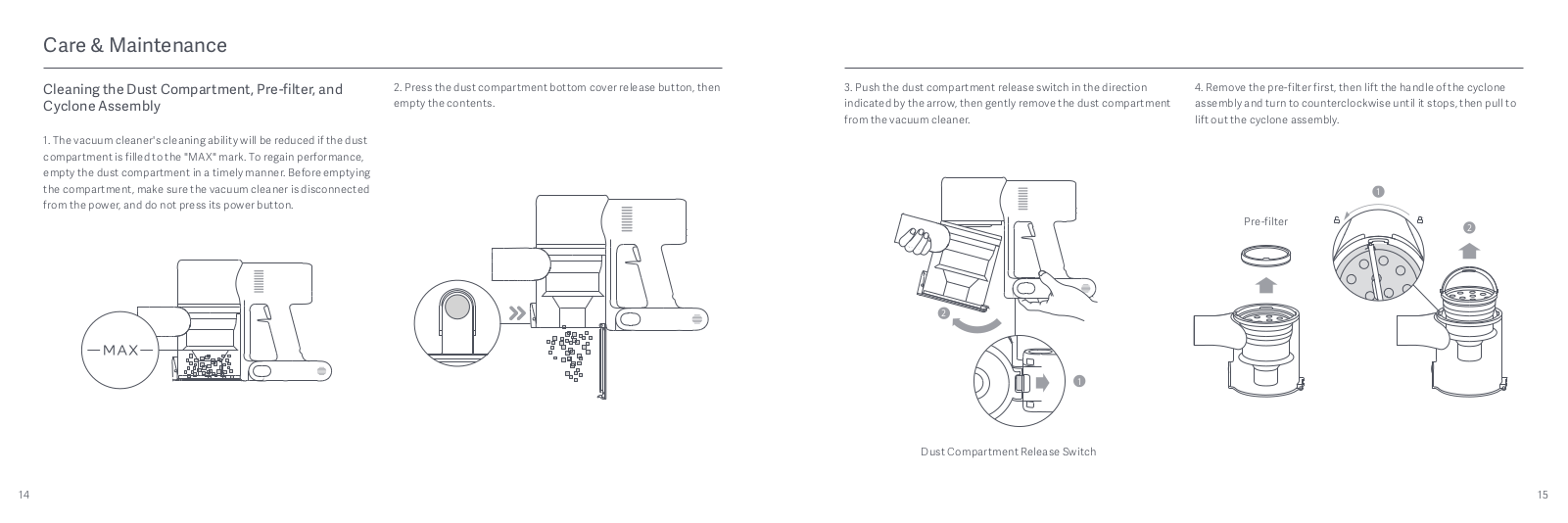
- The vacuum cleaner’s cleaning ability will be reduced if the dust compartment is filled to the «MAX» mark. To regain performance, empty the dust compartment in a timely manner. Before emptying the compartment, make sure the vacuum cleaner is disconnected from the power, and do not press its power button.
- Press the dust compartment bottom cover release button, then empty the contents.

- Push the dust compartment release switch in the direction indicated by the arrow, then gently remove the dust compartment from the vacuum cleaner.
- Remove the pre-filter first, then lift the handle of the cyclone assembly and turn to counterclockwise until it stops, then pull to lift out the cyclone assembly.

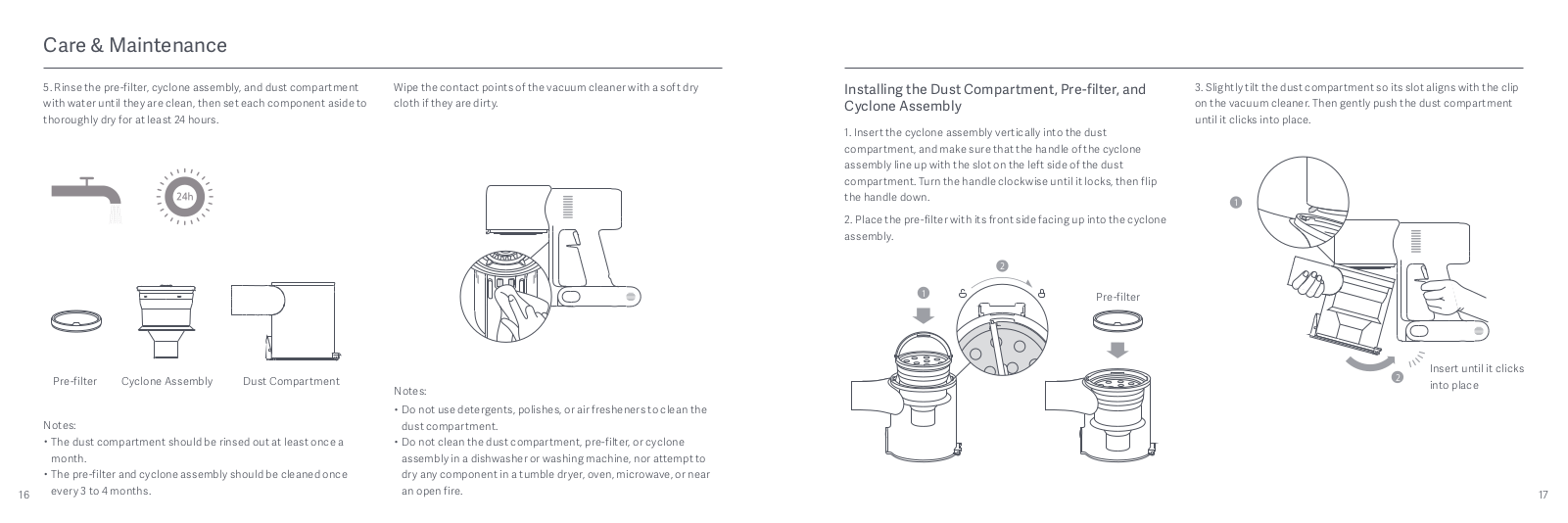
- Rinse the pre-filter, cyclone assembly, and dust compartment with water until they are clean, then set each component aside to thoroughly dry for at least 24 hours.


Notes:
- The dust compartment should be rinsed out at least once a month.
- The pre-filter and cyclone assembly should be cleaned once every 3 to 4 months.
Wipe the contact points of the vacuum cleaner with a soft dry cloth if they are dirty.
Notes:
- Do not use detergents, polishes, or air fresheners to clean the dust compartment.
- Do not clean the dust compartment, pre-filter, or cyclone assembly in a dishwasher or washing machine, nor attempt to dry any component in a tumble dryer, oven, microwave, or near an open fire.
- Insert the cyclone assembly vertically into the dust compartment, and make sure that the handle of the cyclone assembly line up with the slot on the left side of the dust compartment. Turn the handle clockwise until it locks, then flip the handle down.
- Place the pre-filter with its front side facing up into the cyclone assembly.

- Slightly tilt the dust compartment so its slot aligns with the clip on the vacuum cleaner. Then gently push the dust compartment until it clicks into place.


Cleaning the HEPA Filter
Note: It is recommended to clean the HEPA filter once every 4 to 6 months.
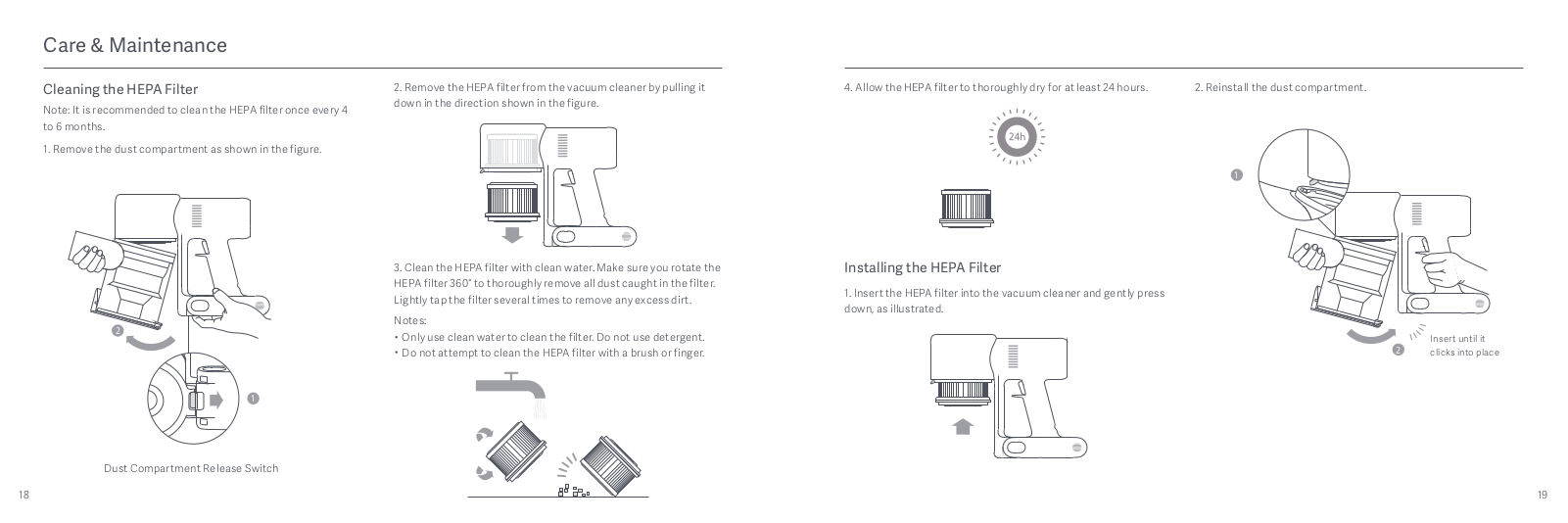
- Remove the dust compartment as shown in the figure.
- Remove the HEPA filter from the vacuum cleaner by pulling it down in the direction shown in the figure.
- Clean the HEPA filter with clean water. Make sure you rotate the HEPA filter 360° to thoroughly remove all dust caught in the filter. Lightly tap the filter several times to remove any excess dirt.
Notes:- Only use clean water to clean the filter. Do not use detergent.
- Do not attempt to clean the HEPA filter with a brush or finger.

- Allow the HEPA filter to thoroughly dry for at least 24 hours.

Installing the HEPA Filter
- Insert the HEPA filter into the vacuum cleaner and gently press down, as illustrated.
- Reinstall the dust compartment.


Cleaning the Smart High Torque Brush Bar
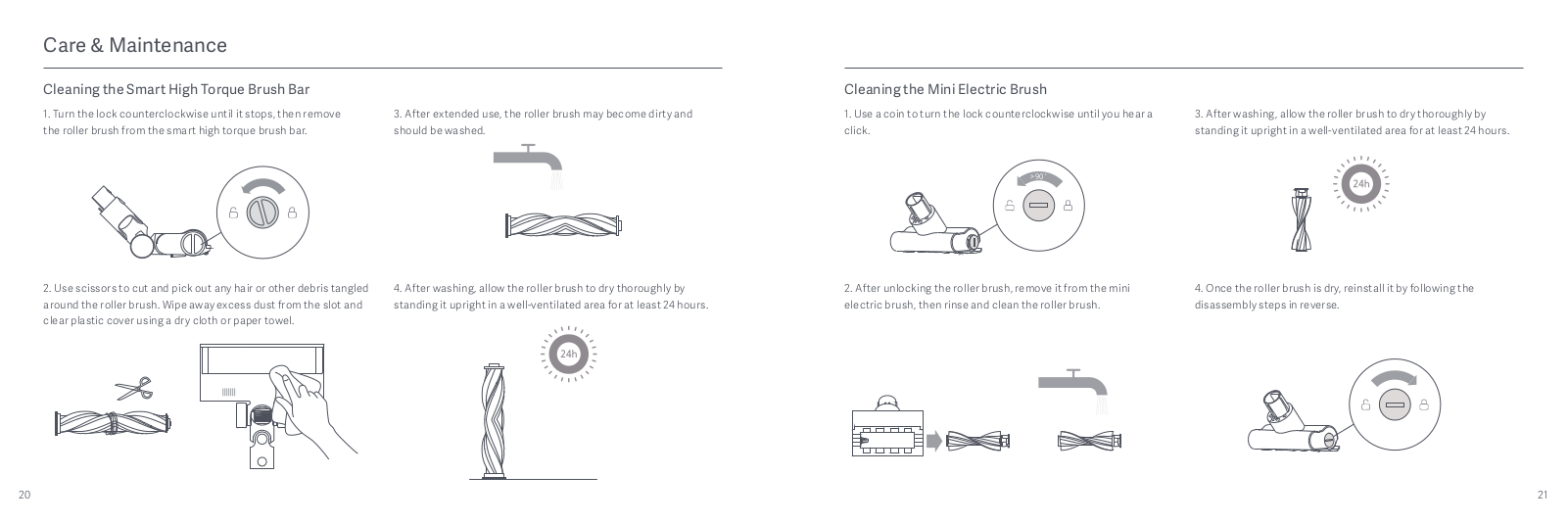
- Turn the lock counterclockwise until it stops, then remove the roller brush from the smart high torque brush bar.

- Use scissors to cut and pick out any hair or other debris tangled around the roller brush. Wipe away excess dust from the slot and clear plastic cover using a dry cloth or paper towel.

- After extended use, the roller brush may become dirty and should be washed.
- After washing, allow the roller brush to dry thoroughly by standing it upright in a well-ventilated area for at least 24 hours.


Cleaning the Mini Electric Brush
- Use a coin to turn the lock counterclockwise until you hear a click.

- After unlocking the roller brush, remove it from the mini electric brush, then rinse and clean the roller brush.

- After washing, allow the roller brush to dry thoroughly by standing it upright in a well-ventilated area for at least 24 hours.
- Once the roller brush is dry, reinstall it by following the disassembly steps in reverse.


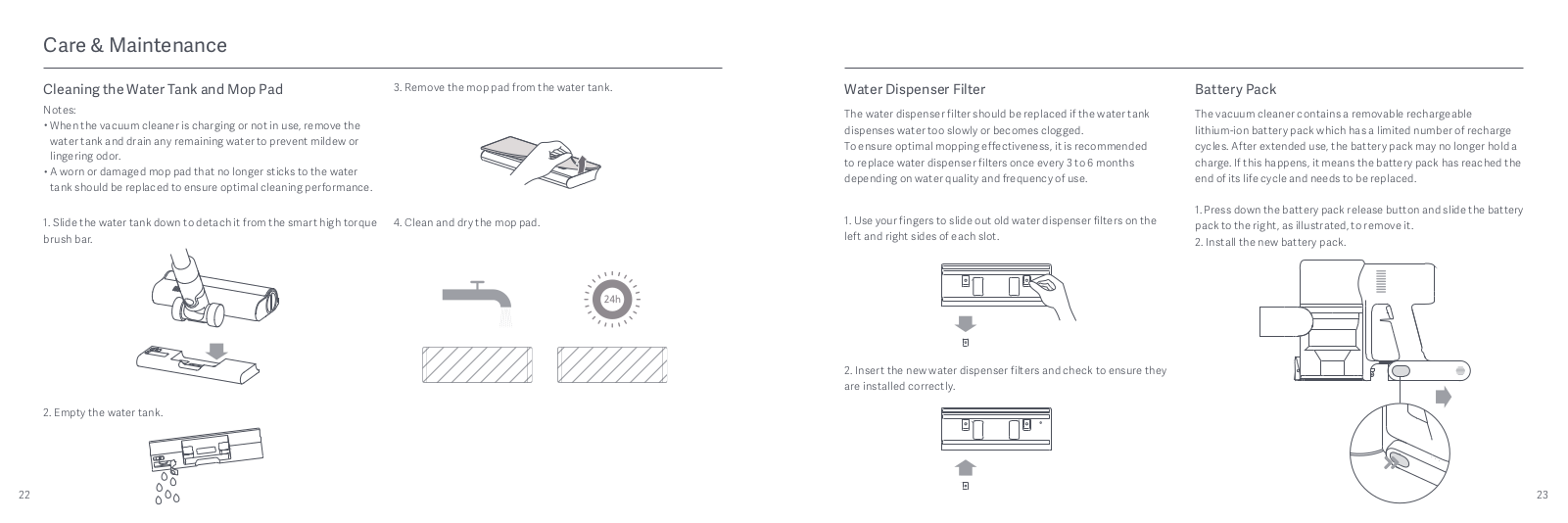
Cleaning the Water Tank and Mop Pad
Notes:
- When the vacuum cleaner is charging or not in use, remove the water tank and drain any remaining water to prevent mildew or lingering odor.
- A worn or damaged mop pad that no longer sticks to the water tank should be replaced to ensure optimal cleaning performance.
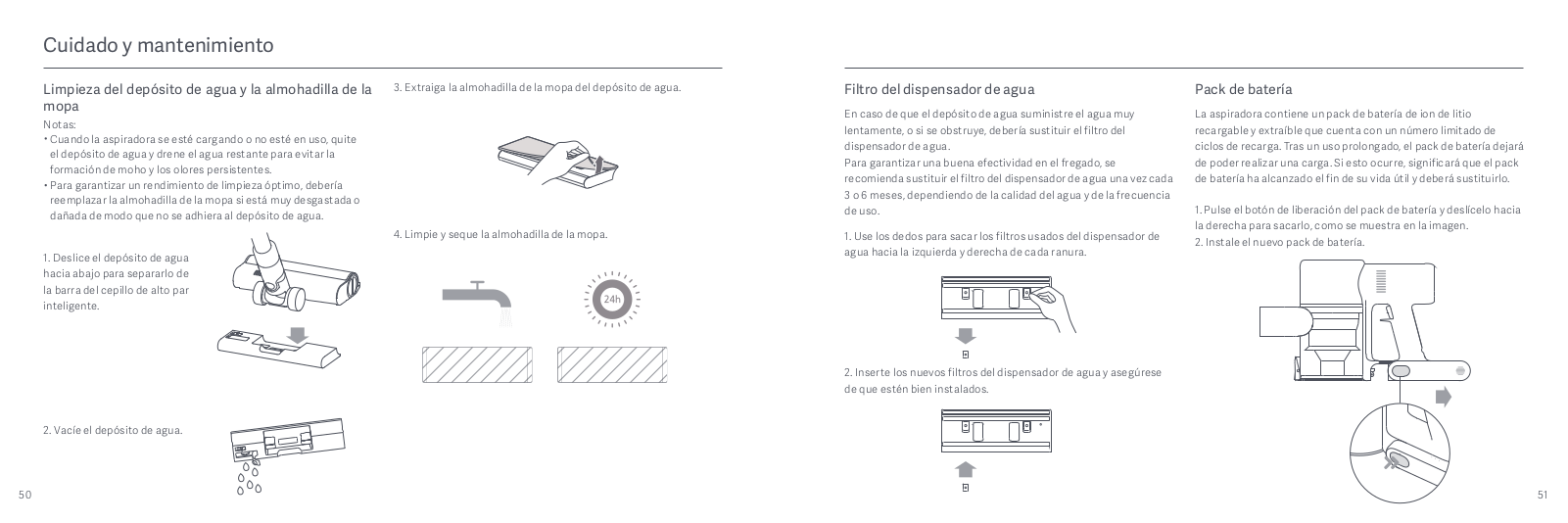
- Slide the water tank down to detach it from the smart high torque 4. Clean and dry the mop pad. brush bar.
- Empty the water tank.
- Remove the mop pad from the water tank.
- Clean and dry the mop pad.


Water Dispenser Filter
The water dispenser filter should be replaced if the water tank dispenses water too slowly or becomes clogged.
To ensure optimal mopping effectiveness, it is recommended to replace water dispenser filters once every 3 to 6 months depending on water quality and frequency of use.
- Use your fingers to slide out old water dispenser filters on the left and right sides of each slot.
- Insert the new water dispenser filters and check to ensure they are installed correctly.
Battery Pack
The vacuum cleaner contains a removable rechargeable lithium-ion battery pack which has a limited number of recharge cycles. After extended use, the battery pack may no longer hold a charge. If this happens, it means the battery pack has reached the end of its life cycle and needs to be replaced.
- Press down the battery pack release button and slide the battery pack to the right, as illustrated, to remove it.
- Install the new battery pack.
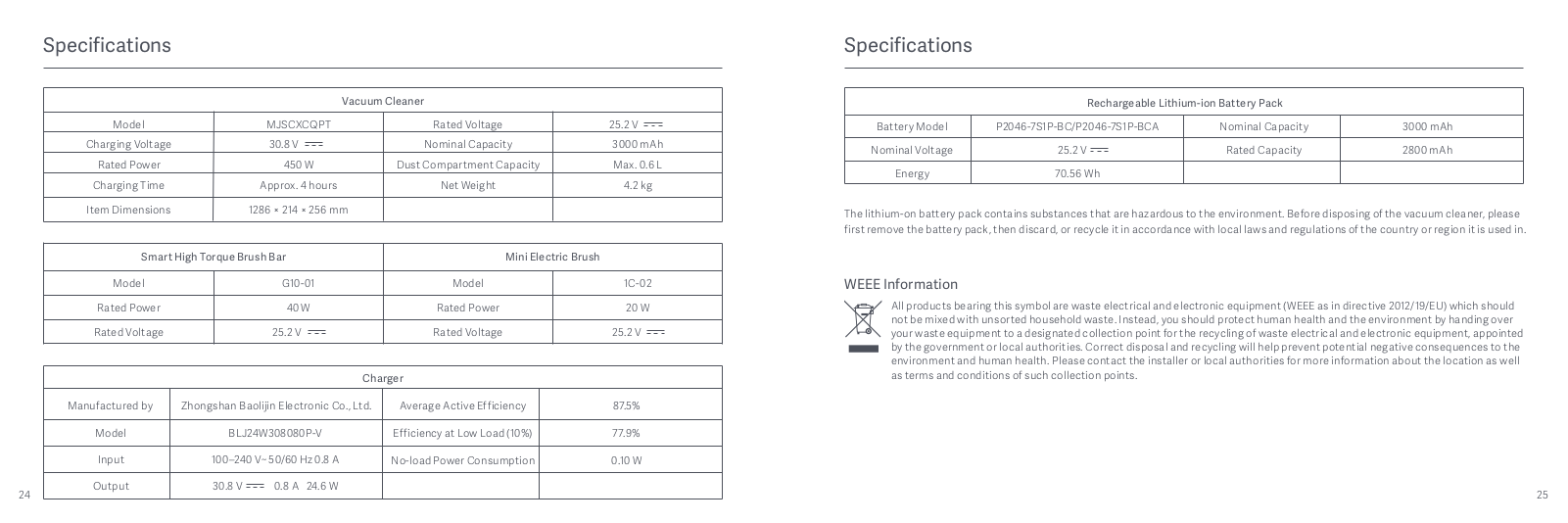
Specifications
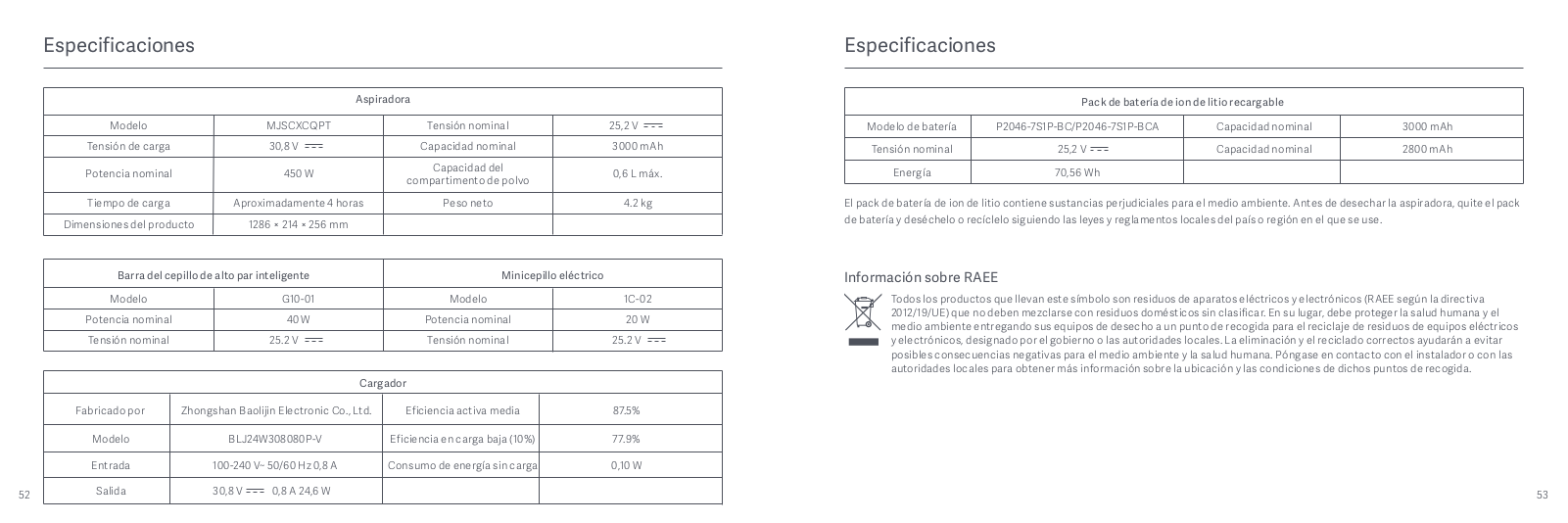
| Vacuum Cleaner | |||
|
Model |
MJSCXCQPT |
Rated Voltage |
25.2 V |
|
Charging Voltage |
30.8 V |
Nominal Capacity |
3000 mAh |
|
Rated Power |
450 W |
Dust Compartment Capacity |
Max. 0.6 L |
|
Charging Time |
Approx. 4 hours |
Net Weight |
4.2 kg |
|
Item Dimensions |
1286 × 214 × 256 mm |
|
Smart High Torque Brush Bar |
Mini Electric Brush |
||
|
Model |
G10-01 |
Model |
1C-02 |
|
Rated Power |
40 W |
Rated Power |
20 W |
|
Rated Voltage |
25.2 V |
Rated Voltage |
25.2 V |
| Charger | |||
|
Manufactured by |
Zhongshan Baolijin Electronic Co., Ltd. |
Average Active Efficiency |
87.5% |
| Model | BLJ24W308080P-V | Efficiency at Low Load (10%) | 77.9% |
| Input | 100–240 V~ 50/60 Hz 0.8 A | No-load Power Consumption | 0.10 W |
| Output | 30.8 V 0.8 A 24.6 W |
| Rechargeable Lithium-ion Battery Pack 7INR19/66 | |||
| Battery Model | P2046-7S1P-BC | Nominal Capacity | 3000 mAh |
| Nominal Voltage | 25.2 V | Rated Capacity | 2800 mAh |
| Energy | 70.56 Wh |
The lithium-on battery pack contains substances that are hazardous to the environment. Before disposing of the vacuum cleaner, please first remove the battery pack, then discard, or recycle it in accordance with local laws and regulations of the country or region it is used in.
WEEE Information
All products bearing this symbol are waste electrical and electronic equipment (WEEE as in directive 2012/19/EU) which should not be mixed with unsorted household waste. Instead, you should protect human health and the environment by handing over your waste equipment to a designated collection point for the recycling of waste electrical and electronic equipment, appointed by the government or local authorities. Correct disposal and recycling will help prevent potential negative consequences to the environment and human health. Please contact the installer or local authorities for more information about the location as well as terms and conditions of such collection points.
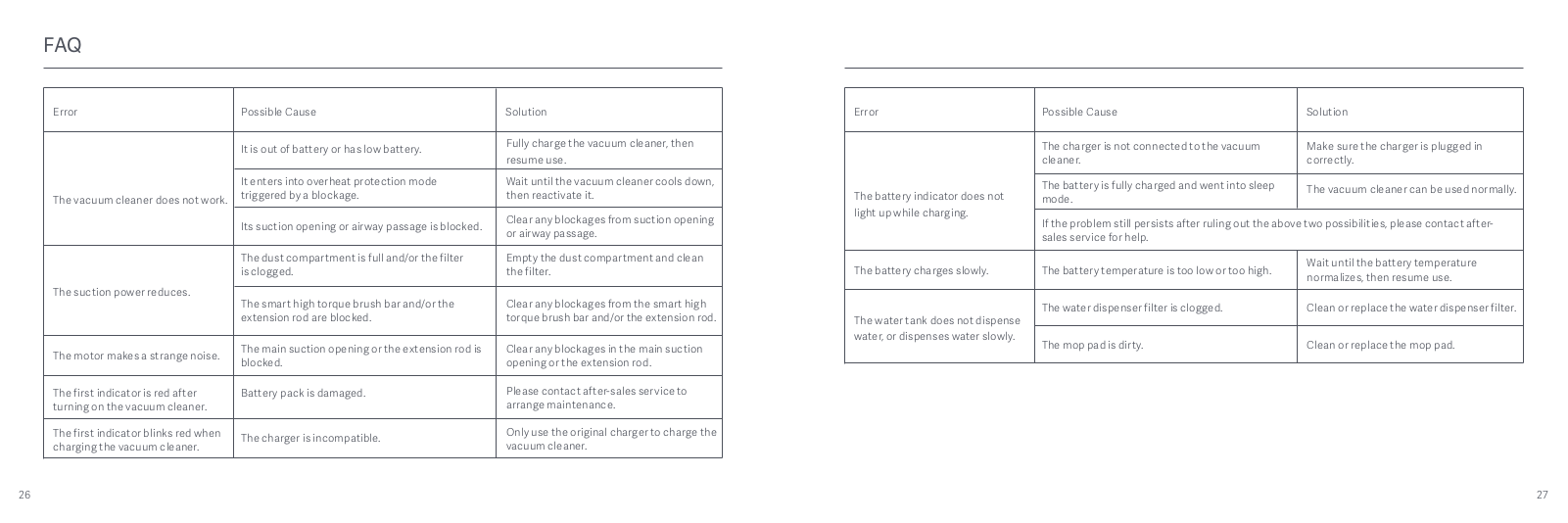
FAQ
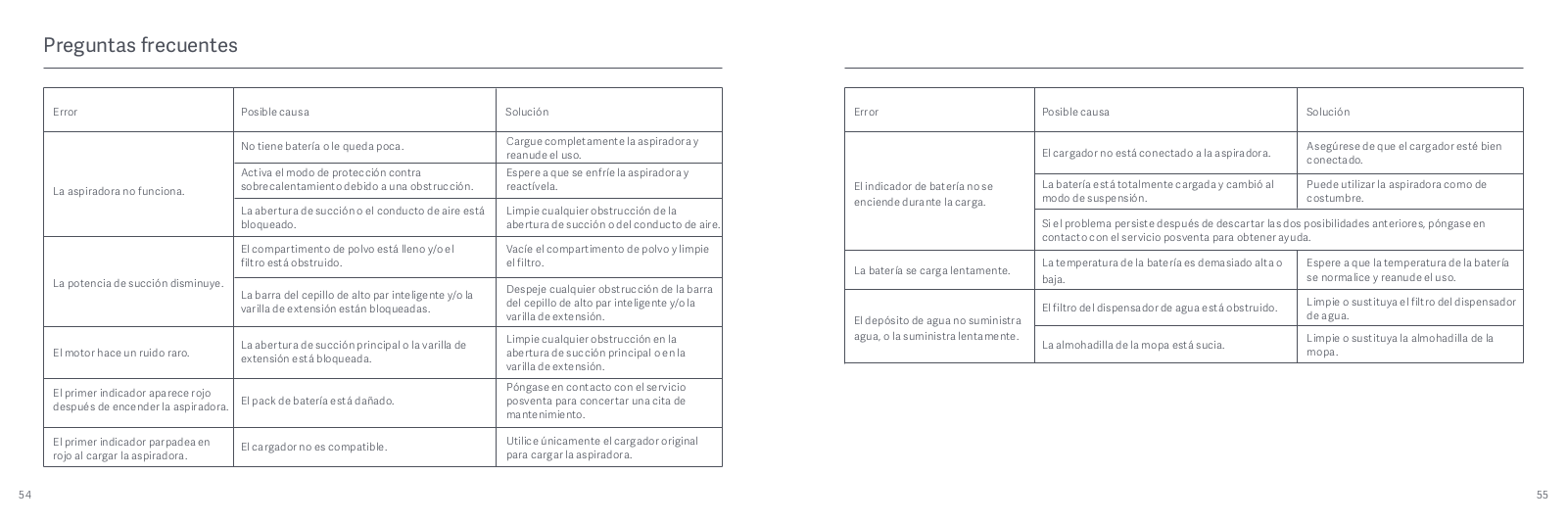
| Error | Possible Cause | Solution |
| The vacuum cleaner does not work. | It is out of battery or has low battery. | Fully charge the vacuum cleaner, then resume use. |
| It enters into overheat protection mode triggered by a blockage. | Wait until the vacuum cleaner cools down, then reactivate it. | |
| Its suction opening or airway passage is blocked. | Clear any blockages from suction opening or airway passage. | |
| The suction power reduces. | The dust compartment is full and/or the filter is clogged. | Empty the dust compartment and clean the filter. |
| The smart high torque brush bar and/or the extension rod are blocked. | Clear any blockages from the smart high torque brush bar and/or the extension rod. | |
| The motor makes a strange noise. | The main suction opening or the extension rod is blocked. | Clear any blockages in the main suction opening or the extension rod. |
|
The first indicator is red after turning on the vacuum cleaner. |
Battery pack is damaged. | Please contact after-sales service to arrange maintenance. |
| The first indicator blinks red when charging the vacuum cleaner. | The charger is incompatible. | Only use the original charger to charge the vacuum cleaner. |
| Error | Possible Cause | Solution |
| The battery indicator does not light up while charging. | The charger is not connected to the vacuum cleaner. | Make sure the charger is plugged in correctly. |
| The battery is fully charged and went into sleep mode. | The vacuum cleaner can be used normally. | |
| If the problem still persists after ruling out the above two possibilities, please contact after- sales service for help. | ||
| The battery charges slowly. | The battery temperature is too low or too high. | Wait until the battery temperature normalizes, then resume use. |
| The water tank does not dispense water, or dispenses water slowly. | The water dispenser filter is clogged. | Clean or replace the water dispenser filter. |
| The mop pad is dirty. | Clean or replace the mop pad. |
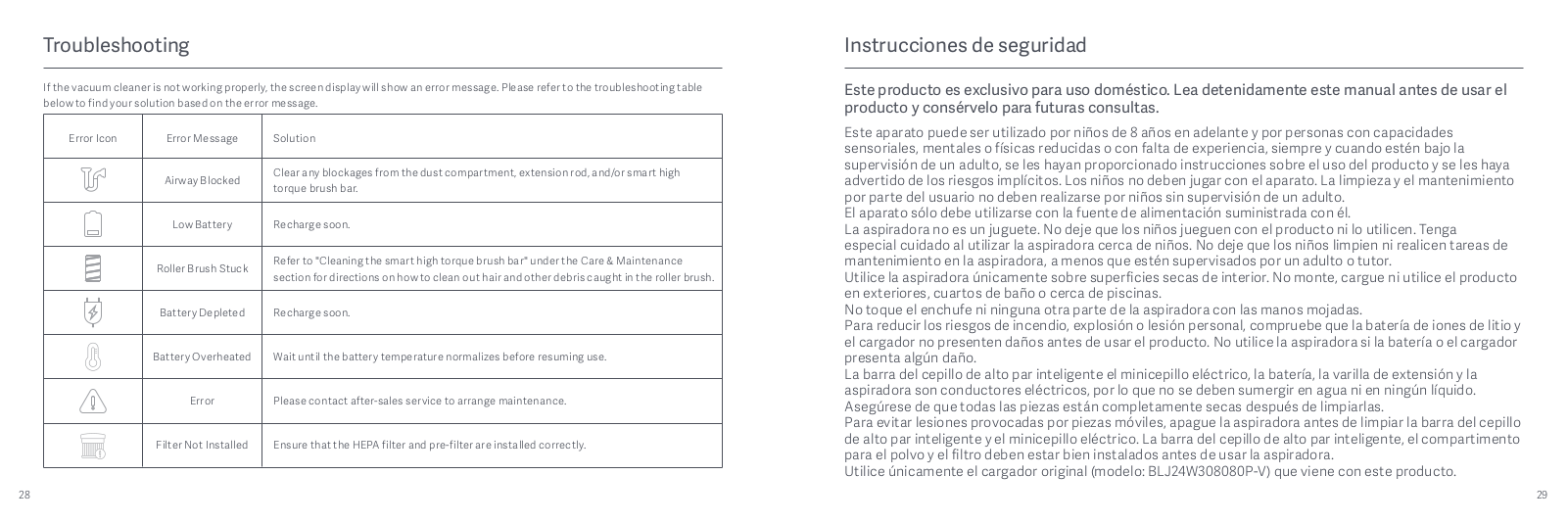
Troubleshooting
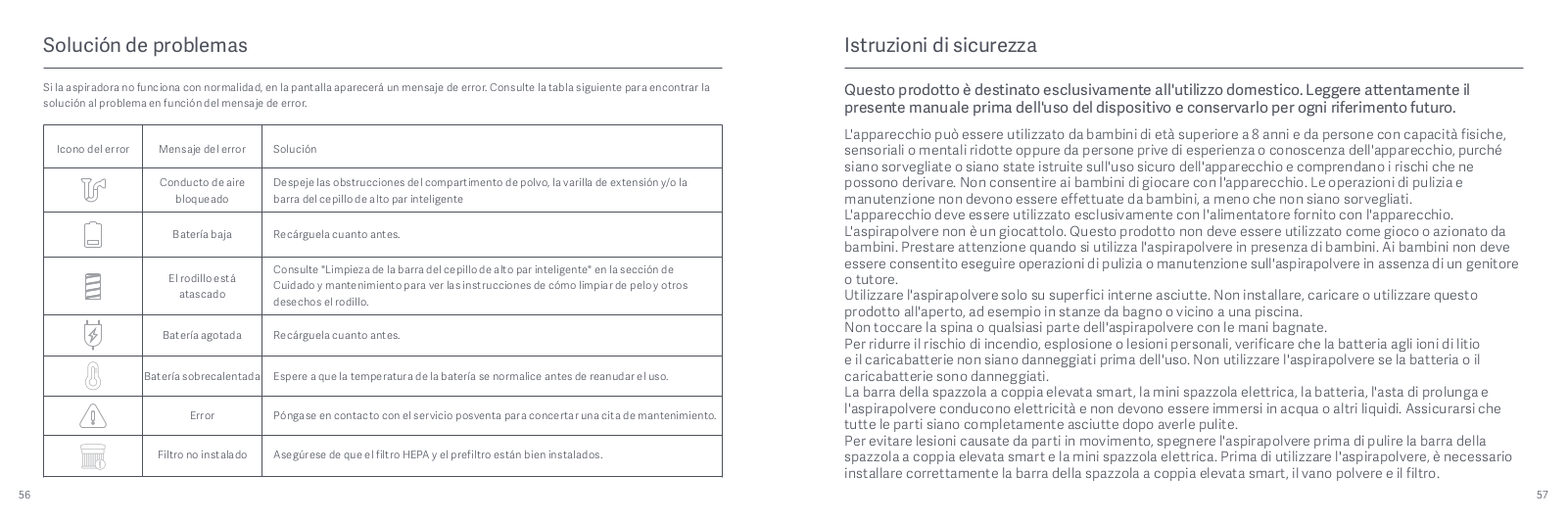
If the vacuum cleaner is not working properly, the screen display will show an error message. Please refer to the troubleshooting table below to find your solution based on the error message.
| Error Message | Solution |
| Airway Blocked | Clear any blockages from the dust compartment, extension rod, and/or smart high torque brush bar. |
| Low Battery | Recharge soon. |
| Roller Brush Stuck | Refer to «Cleaning the smart high torque brush bar» under the Care & Maintenance section for directions on how to clean out hair and other debris caught in the roller brush. |
| Battery Depleted | Recharge soon. |
| Battery Overheated | Wait until the battery temperature normalizes before resuming use. |
| Error | Please contact after-sales service to arrange maintenance. |
| Filter Not Installed | Ensure that the HEPA filter and pre-filter are installed correctly. |
Documents / Resources
tags: Vacuum Cleaner G10, Xiaomi,
|
Код: 136588 Извините, товара сейчас нет в наличии
Бесплатная доставка Извините, товара сейчас нет в наличии Сравнить Новости интернет-магазина «Лаукар»:26.02.2025 17.02.2025 10.02.2025 Дополнительная информация в категории Пылесос беспроводной:Таблица Авторизованных сервисных центров по брендам. Описание Инструкция Отзывы (0) В интернет-магазине бытовой техники «Лаукар» Вы можете скачать инструкцию к товару Пылесос беспроводной Xiaomi Mi Handheld Vacuum Cleaner Pro G10 совершенно бесплатно. Все инструкции, представленные на сайте интернет-магазина бытовой техники «Лаукар», предоставляются производителем товара. Для того чтобы скачать инструкцию, Вам необходимо нажать на ссылку «скачать инструкцию», расположенную ниже, а в случае, если ссылки нет, Скачать инструкцию Смотреть инструкцию 
Фирма-производитель оставляет за собой право на внесение изменений в конструкцию, дизайн и комплектацию товара: Пылесос беспроводной Xiaomi Mi Handheld Vacuum Cleaner Pro G10. Пожалуйста, сверяйте информацию о товаре с информацией на |
Table of Contents
- Mi Vacuum Cleaner G10
- User Manual
- Safety Instructions
- Product Overview
- Accessories List
- Component Name
- Display Screen
- How to Install
- Installing the Accessories onto the Vacuum Cleaner
- Installing the 2-in-1 Charging & Storage Mount
- Charging
- Battery Status Indicator
- Display Screen
- How to Use
- Setting Language
- Switching Suction Levels
- Working Modes
- Using Different Accessories
- Using the Mopping Function
- Care & Maintenance
- Maintenance Precautions
- Cleaning the Vacuum Cleaner
- Cleaning the Dust Compartment, Pre-filter, and Cyclone Assembly
- Notes:
- Notes:
- Installing the Dust Compartment, Pre-filter, and Cyclone Assembly
- Cleaning the HEPA Filter
- Installing the HEPA Filter
- Cleaning the Smart High Torque Brush Bar
- Cleaning the Mini Electric Brush
- Cleaning the Water Tank and Mop Pad
- Water Dispenser Filter
- Battery Pack
- Specifications
- WEEE Information
- FAQ
- Troubleshooting
- Downloads
- Read User Manual Online (PDF format)
- Download This Manual (PDF format)
Mi Vacuum Cleaner G10
User Manual
Safety Instructions
This product is for household use only. Read this manual carefully before
use, and retain it for future
reference.
This appliance can be used by children aged from 8 years and above and persons
with reduced physical, sensory or mental capabilities or lack of experience
and knowledge if they have been given supervision or instruction concerning
use of the appliance in a safe way and understand the hazards involved.
Children shall not play with the appliance. Cleaning and user maintenance
shall not be made by children without supervision.
The appliance is only to be used with the power supply unit provided with the
appliance.
The vacuum cleaner is not a toy. Children may not play with or operate this
product. Please exercise caution when using the vacuum cleaner near children.
Do not allow children to clean or maintain the vacuum cleaner unless
supervised by a parent or guardian.
Only use the vacuum cleaner on dry indoor surfaces. Do not install, charge, or
use this product outdoors, such as in bathrooms, or near a pool.
Do not touch the plug or any part of the vacuum cleaner with wet hands.
To reduce the risk of fire, explosion, or personal injury, check to make sure
the lithium-ion battery and charger are undamaged before use. Do not use the
vacuum cleaner if either the battery or charger is damaged.
The smart high torque brush bar, mini electric brush, battery, extension rod,
and the vacuum cleaner are electrically conductive and should not be immersed
in water or other liquid. Make sure all parts are thoroughly dry after you
carry out cleaning on them.
To prevent injury caused by moving parts, turn off the vacuum cleaner before
cleaning the smart high torque
brush bar and mini electric brush. The smart high torque brush bar, dust
compartment, and filter must all be
properly installed before using the vacuum cleaner.
Only use the BLJ24W308080P-V battery charger provided with the appliance.
Only use the P2046-7S1P-BC/P2046-7S1P-BCA battery pack provided with the
appliance.
If the charger or battery becomes damaged, it must be replaced with a genuine
component purchased from the manufacturer or after-sales service department.
Do not use the vacuum cleaner to pick up flammable or combustible liquids,
such as gasoline, bleach, ammonia, or drain cleaners; nor other liquids like
water.
Do not use the vacuum cleaner to pick up drywall particles, ashes like
fireplace ash, or smoking or burning materials such as coal, cigarette butts
or matches.
Do not use the vacuum cleaner to pick up sharp or hard objects, such as glass,
nails, screws, or coins, which may damage the product.
Keep hair, loose clothing, fingers, and other parts of the body away from the
vacuum cleaner’s openings and moving parts. Do not point the suction opening,
extension rod, or other accessories at your eyes or ears or put them in your
mouth.
Do not put any object into the vacuum cleaner’s openings, nor use the vacuum
cleaner with any opening blocked. Keep free of dust, lint, hair, or other
items which may reduce airflow.
Do not rest the vacuum cleaner against a chair, table, or other unstable
surfaces, as this may cause damage to the product or personal injury. If the
vacuum cleaner malfunctions because of being knocked over or damaged, please
contact the authorized service department. Never attempt to disassemble the
vacuum cleaner on your own.
Only use the original charger to charge the product in environments with an
ambient temperature of 0°C to 40°C. Otherwise, the battery may damage.
The dust compartment cover, pre-filter, cyclone assembly, and HEPA filter must
all be properly installed prior
to using the vacuum cleaner.
Make sure the vacuum cleaner is unplugged when not used for extended periods
as well as prior to performing any maintenance or repairs.
Please be extra careful when using the vacuum cleaner to clean stairs.
Fire Hazard Warning: Do not apply any type of fragrance to the vacuum
cleaner’s filter. These types of products are known to contain flammable
chemicals which may cause the vacuum cleaner to catch fire.
When Battery is not in use, keep it away from all metal objects, such as paper
clips, coins, keys, nails, or screws. Shorting the battery terminals together
increases the risk of fire or burns.
Under abusive conditions, liquid may be ejected from the battery. Avoid
contact with liquid, as it may cause irritation or burns. If contact occurs,
flush with water. If liquid contacts eyes, seek medical help.
DO NOT expose the battery and appliance to fire as it may cause explosion.
DO NOT expose or submerge the battery and appliance in any water, salt water,
or other liquids.
Please strictly follow the instructions in this user manualwhen using the
vacuum cleaner. Users are responsible for any loss or damage that may arise
from improper use of the vacuum cleaner.
We Dreame (Tianjin) Information Technology Co., Ltd., hereby, declare that
this equipment is in compliance
with the applicable Directives and European Norms, and amendments. The full
text of the EU declaration of
conformity is available at the following internet address:
http://www.mi.com/global/service/support/declaration.html
For detailed e-manual, please go to
www.mi.com/global/service/userguide
Product Overview
Accessories List

Note: Illustrations of product, accessories, and user interface in the
user manual are for reference purposes only. Actual product and functions may
vary due to product enhancements.
Component Name

Display Screen

Note: If the vacuum cleaner experiences a malfunction, the display screen
will show an error message. For a solution, please refer to the
Troubleshooting section.
How to Install
Installing the Accessories onto the Vacuum Cleaner

Note: Mini electric brush should not be used with the extension rod.
Installing the 2-in-1 Charging & Storage Mount
1. The 2-in-1 charging & storage mount should be installed in a cool, dry
place with an electrical outlet nearby. Prior to installing, ensure that there
are not any wires or pipes in the space directly behind where the mount will
be installed.
2. The bottom of the mounting template sticker should be level and at least
1.03 m from the ground, and its top should have at least 30 cm of clearance
above it.

* The replaceable battery is not included and purchased separately.
3. Use a power drill with an 8 mm drill bit to drill a hole into each hole
marker on the mounting template sticker, then insert a wall plug into each
hole.
4. Align the mounting holes on the 2-in-1 charging & storage mount to the
holes on the wall, then attach the mount to the wall using the included
screws.

Recommended Height: At least 1.03 meters from the ground
Charging
Battery Status Indicator
Once the vacuum cleaner is fully charged, the indicator will turn off after 5
minutes, and the vacuum cleaner will then enter the energy-saving mode.
Display Screen
The number on the display screen represents the current battery level in a
percentage during charging. When the number turns into 100, the battery is
fully charged.

Notes:
- Fully charge the vacuum cleaner before using it for the first time.
- This will take about 4 hours.
- The vacuum cleaner cannot be used while charging.
- Vacuuming at the highest suction level for a prolonged period will cause the battery to heat up, which may increase the charging time. Before charging the vacuum cleaner, it is better to cool it down for 30 minutes.

Charging the vacuum cleaner on the charging mount
How to Use
Setting Language
Press and hold the button O for 3 seconds to open the language list, then
press the button O to scroll through the language to select the desired one.
Press and hold the button O for 2 seconds to use the selected language.
Note: The display screen will go off if there is no operation for more
than 10 seconds.
Switching Suction Levels
Press the button to switch suction levels of eco, standard/ auto, and high
power. The corresponding suction level will be highlighted on the display
screen.
Only when using the smart high torque brush bar, the auto mode will be
activated and the notification of “Auto” will appear on the display screen.
The vacuum cleaner will then automatically switch the suction level between
the floor/tile and the carpet.
Note: Stop the vacuum cleaner at any time while cleaning, it will
continue to use the last selected suction level when started again.
Working Modes
The vacuum cleaner has two working modes, you can select the desired one based
on your cleaning needs.
1. Non-continuous Mode
Hold down the power button to start the vacuum cleaner, then release to stop
it.
2. Continuous Mode
Press the button to enable Continuous Mode, then press the power button to
turn the vacuum cleaner on. To exit Continuous Mode, press the button .
Enabling the Continuous Mode allows the vacuum cleaner to run continuously
without having to hold down the power button, which can help release your
fingers.

Notes:
- In Continuous Mode, the vacuum cleaner will enter into standby mode when pressing the power button, and resume running if pressing the button again.
- When the vacuum cleaner keeps in standby mode for more than 10 seconds, its display screen will go off and the vacuum cleaner will then exit the Continuous Mode.
Using Different Accessories
2-in-1 Brush Nozzle: For vacuuming curtains, sofas, vehicle interiors,
coffee tables, etc.

Mini Electric Brush: For vacuuming dirt, pet hair, and other stubborn
debris from sofas, bedding, and other fabric surfaces.

Notes:
- If any rotating part becomes stuck, the vacuum cleaner may shut off automatically. Remove any trapped foreign objects, then resume use.
- When the motor runs overheated, the vacuum cleaner will automatically shut off. Wait until the battery temperature returns to normal, then resume use.
Crevice Nozzle: For vacuuming narrow crevices and areas around doors,
windows, baseboards, corners, stairs, etc.

Smart High Torque Brush Bar: For cleaning different types of flooring
such as wood, marble, tile, and short carpet. When Auto Mode is activated, the
vacuum cleaner can automatically adjust its suction level depending on the
surface type.

Note: The smart high torque brush bar can be attached directly to the
vacuum cleaner.
Using the Mopping Function
Notes:
- Do not step on the water tank, as this could permanently damage it.
- Heavily soiled floors should be vacuumed prior to mopping for a better result.
- Do not use the mopping function on carpet.
- Do not use any cleaning agents or disinfectants.
1. Dampen the mop pad and wring out excess water, then attach it securely to
the bottom of the water tank.

2. Open the water tank plug, add an appropriate amount of clean water, then
close the plug.

3. Attach the smart high torque brush bar to the water tank by lining up the
magnets on each component until they snap together.
4. This function is designed for vacuuming and wiping down hardwood and tile
floors.

Notes:
- The ball valve in the water tank controls how much water is dispensed. The ball is a moving part and may make a rolling sound when starting and stopping. This is normal.
- When not in use, please keep the switch to the OFF position.
Care & Maintenance
Maintenance Precautions
- Always use genuine parts to keep your warranty from being voided.
- If the filter, extension rod, or smart torque brush bar becomes clogged, the vacuum cleaner will stop working shortly. To restore its functionality, clean the clogged component.
- If the vacuum cleaner will not be used for an extended period, fully charge it and disconnect it from the power then store it in a cool, low-humidity environment away from direct sunlight. To avoid over-discharging the battery, recharge the vacuum cleaner at least once every three months.
Cleaning the Vacuum Cleaner
Wipe the vacuum cleaner with a soft, dry cloth.

Cleaning the Dust Compartment, Pre-filter, and Cyclone Assembly
1. The vacuum cleaner’s cleaning ability will be reduced if the dust
compartment is filled to the “MAX” mark. To regain performance, empty the dust
compartment in a timely manner. Before emptying the compartment, make sure the
vacuum cleaner is disconnected from the power, and do not press its power
button.

2. Press the dust compartment bottom cover release button, then empty the
contents.

3. Push the dust compartment release switch in the direction indicated by the
arrow, then gently remove the dust compartment from the vacuum cleaner.

Dust Compartment Release Switch
4. Remove the pre-filter first, then lift the handle of the cyclone assembly
and turn to counterclockwise until it stops, then pull to lift out the cyclone
assembly.

5. Rinse the pre-filter, cyclone assembly, and dust compartment with water
until they are clean, then set each component aside to thoroughly dry for at
least 24 hours.

Notes:
- The dust compartment should be rinsed out at least once a month.
- The pre-filter and cyclone assembly should be cleaned once every 3 to 4 months.
Wipe the contact points of the vacuum cleaner with a soft dry cloth if they
are dirty.

Notes:
- Do not use detergents, polishes, or air fresheners to clean the dust compartment.
- Do not clean the dust compartment, pre-filter, or cyclone assembly in a dishwasher or washing machine, nor attempt to dry any component in a tumble dryer, oven, microwave, or near an open fire.
Installing the Dust Compartment, Pre-filter, and Cyclone Assembly
1. Insert the cyclone assembly vertically into the dust compartment, and make
sure that the handle of the cyclone assembly line up with the slot on the left
side of the dust compartment. Turn the handle clockwise until it locks, then
flip the handle down.
2. Place the pre-filter with its front side facing up into the cyclone
assembly.

3. Slightly tilt the dust compartment so its slot aligns with the clip on the
vacuum cleaner. Then gently push the dust compartment until it clicks into
place

Cleaning the HEPA Filter
Note: It is recommended to clean the HEPA filter once every 4 to 6
months.

2. Remove the HEPA filter from the vacuum cleaner by pulling it down in the
direction shown in the figure.
3. Clean the HEPA filter with clean water. Make sure you rotate the HEPA
filter 360° to thoroughly remove all dust caught in the filter. Lightly tap
the filter several times to remove any excess dirt.
Notes:
- Only use clean water to clean the filter. Do not use detergent.
- Do not attempt to clean the HEPA filter with a brush or finger.

4. Allow the HEPA filter to thoroughly dry for at least 24 hours.
Installing the HEPA Filter
1. Insert the HEPA filter into the vacuum cleaner and gently press down, as
illustrated
2. Reinstall the dust compartment.

Cleaning the Smart High Torque Brush Bar
1. Turn the lock counterclockwise until it stops, then remove the roller
brush from the smart high torque brush bar.

2. Use scissors to cut and pick out any hair or other debris tangled around
the roller brush. Wipe away excess dust from the slot and clear plastic cover
using a dry cloth or paper towel.

3. After extended use, the roller brush may become dirty and should be
washed.
4. After washing, allow the roller brush to dry thoroughly by standing it
upright in a well-ventilated area for at least 24 hours.
Cleaning the Mini Electric Brush
1. Use a coin to turn the lock counterclockwise until you hear a click.

2. After unlocking the roller brush, remove it from the mini electric brush,
then rinse and clean the roller brush.

3. After washing, allow the roller brush to dry thoroughly by standing it
upright in a well-ventilated area for at least 24 hours.

4. Once the roller brush is dry, reinstall it by following the disassembly
steps in reverse.
Cleaning the Water Tank and Mop Pad
Notes:
- When the vacuum cleaner is charging or not in use, remove the water tank and drain any remaining water to prevent mildew or lingering odor.
- A worn or damaged mop pad that no longer sticks to the water tank should be replaced to ensure optimal cleaning performance.
1. Slide the water tank down to detach it from the smart high torque brush
bar.
2. Empty the water tank.
3. Remove the mop pad from the water tank.
4. Clean and dry the mop pad.

Water Dispenser Filter
The water dispenser filter should be replaced if the water tank dispenses
water too slowly or becomes clogged.
To ensure optimal mopping effectiveness, it is recommended to replace water
dispenser filters once every 3 to 6 months depending on water quality and
frequency of use.
1. Use your fingers to slide out old water dispenser filters on the left and
right sides of each slot.
2. Insert the new water dispenser filters and check to ensure they are
installed correctly.
Battery Pack
The vacuum cleaner contains a removable rechargeable lithium-ion battery pack
which has a limited number of recharge cycles. After extended use, the battery
pack may no longer hold a charge. If this happens, it means the battery pack
has reached the end of its life cycle and needs to be replaced.
1. Press down the battery pack release button and slide the battery pack to
the right, as illustrated, to remove it.
2. Install the new battery pack.

Specifications


The lithium-on battery pack contains substances that are hazardous to the
environment. Before disposing of the vacuum cleaner, please first remove the
battery pack, then discard, or recycle it in accordance with local laws and
regulations of the country or region it is used in.
WEEE Information
All products bearing this symbol are waste electrical and electronic equipment
(WEEE as in directive 2012/19/EU) which should not be mixed with unsorted
household waste. Instead, you should protect human health and the environment
by handing over your waste equipment to a designated collection point for the
recycling of waste electrical and electronic equipment, appointed by the
government or local authorities. Correct disposal and recycling will help
prevent potential negative consequences to the environment and human health.
Please contact the installer or local authorities for more information about
the location as well as terms and conditions of such collection points.
FAQ


Troubleshooting
If the vacuum cleaner is not working properly, the screen display will show an
error message. Please refer to the troubleshooting table below to find your
solution based on the error message.

Downloads
Mi Vacuum Cleaner G10 Manual – Download [optimized]
Mi Vacuum Cleaner G10 Manual – Download
Read User Manual Online (PDF format)
Read User Manual Online (PDF format) >>
Download This Manual (PDF format)
Download this manual >>