
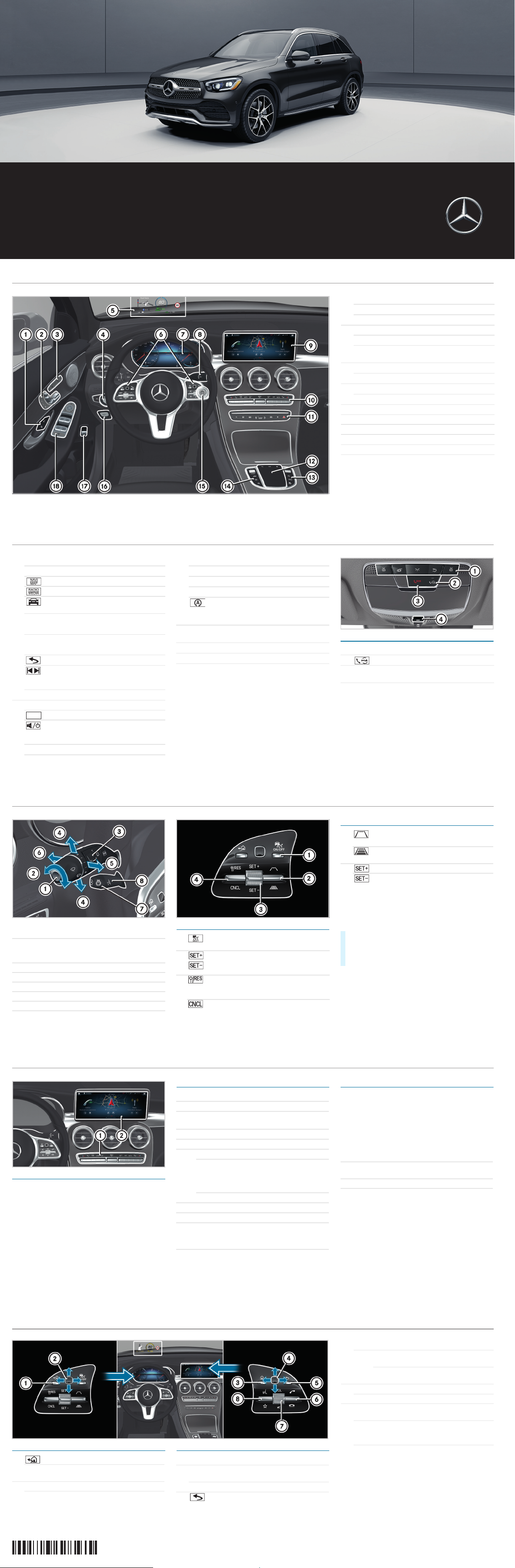
1 Door handle
&
Locks the vehicle centrally
%
Unlocks the vehicle centrally
2 Seat functions
Adjusts the seat electrically
r
Memory function and presets
45=
3
c
Switches the seat heater on/off
s
Switches the seat ventilation on/off
4
a
Light switch
Q
Rear fog lamp
5 Head-up Display
6 Multifunction steering wheel control panels
7 Multifunction display
8 DIRECT SELECT lever
9 Media display of the MBUX multimedia system
a Climate control system control panel
Cockpit overview
$ WARNING Make sure that you read the entire Operator’s Manual. Otherwise, you may not recognize dangers.
Overhead control panel
* Not available in all countries
b MBUX Main functions
%
Calls up telephone
Calls up navigation
Calls up radio or media
Calls up vehicle functions (e.g.
assistance systems)
ß
Favorites button
i Press and hold: adds a favorite
£
Hazard warning lights
c MBUX multimedia system touchpad
Back button
Press: audio control menu
Swipe: next/previous track or radio
station
ò
Displays Home screen
d Buttons on the right of the touchpad
Adjusts the volume
Press briefly: mute function
Press and hold: switches off the MBUX
multimedia system
c
Active Parking Assist
å
ESP® OFF
e Buttons on the left of the touchpad
w DYNAMIC SELECT
É Vehicle level
x
Manual gearshifting
ECO start/stop function
i
The ECO start/stop function cannot
be permanently deactivated.
f Start/stop button for starting/stopping the
engine
g
!
Electric parking brake
h
p
Opens or closes the trunk lid
j Door control panel with controls for power
windows, exterior mirror settings and the
override feature for the rear side windows
i If the front passenger mirror is selected
and you engage reverse gear, the front
passenger mirror moves into the stored
parking position.
1 Buttons for interior lighting and reading lights
2 Button for Mercedes me connect*
3
G
SOS button*
(Mercedes-Benz emergency call system)
4
3
Opens/closes the sliding sunroof
Roller sunblind
Cockpit overview
Note that your vehicle may not be equipped with all features described.
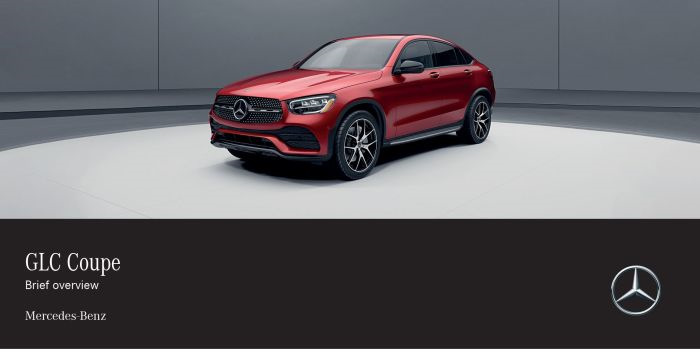
GLC
Brief overview
Mercedes-Benz
P253104313-Einzel.fm Seite 1 Montag, 15. April 2019 7:56 07
Active Distance Assist DISTRONIC
Changing the speed/distance
Active Distance Assist DISTRONIC maintains a
constant speed which has been stored.
The lowest speed that can be set is 12 mph
(20 km/h).
You can change the set speed:
Using rocker switch 2, you can change the
specified minimum distance to the vehicle in front.
The specified minimum distance depends on the
currently driven speed.
1 Wipes the windshield once
Wipes with washer fluid
2 Sets windshield wipers
Off, normal/frequent interval, slow/fast
continuous wiping
3 Rear window wiper
4 Turn signal, left/right
5 Headlamp flasher
6 Adaptive Highbeam Assist Plus
7 Switches the steering wheel heating on/off
8 Adjusts the steering wheel
1 Activates or deactivates Active Distance
Assist DISTRONIC
3 Active Distance Assist
Activates DISTRONIC /limiter with current
speed
4 Activates with the stored speed/pulls
away with Active Distance Assist
DISTRONIC
Deactivates Active Distance Assist
DISTRONIC/limiter
2 Reduces the specified minimum
distance
Increases the specified minimum
distance
3 Increases the speed
Decreases the speed
X
1 mph increment (1 km/h): Briefly press rocker
switch 3 up or down.
X
5mph increment (10km/h): Press rocker
switch 3 up or down past the point of resistance.
Controls on the steering wheel and Active Distance Assist DISTRONIC
$ WARNING Make sure that you read the entire Operator’s Manual. Otherwise, you may not recognize dangers.
P253104313-Einzel.fm Seite 4 Montag, 15. April 2019 7:56 07
Operating possibilities
You can adjust climate control using the buttons on
climate control panel 1.
If you change any settings, media display 2 briefly
shows the current settings of the climate control
system.
Air conditioning control panel General notes
Optimum operation of the climate control system is
only achieved when the side windows and the roof
are closed.
To prevent the windows from fogging up, please
observe the following information:
w Sets the temperature
_ Sets the air distribution
H Sets the air flow, switches automatic
climate control off completely
à Sets climate control to automatic mode
¬ Defrosts the windshield
! Calls up the air conditioning menu
If you press and hold the ! button for
approximately 4 seconds, automatic
climate control will be reset to the basic
settings.
Residual heat with the engine off
¤ Defrosts the rear window
0 Synchronized operation
g Air-recirculation mode
The air in the interior is recirculated; the
windows may fog up more quickly.
¿ Cooling with air dehumidification
¿
Switch on the cooling function.
In warm weather, the air inside the vehicle
will be cooled. This function also dries the air
inside the vehicle.
H
As far as possible, do not switch off climate
control
g Switch on air-recirculation mode only briefly
¬
If necessary, briefly switch on the windshield
defroster function
Climate control
Note that your vehicle may not be equipped with all of the features described.
P253104313-Einzel.fm Seite 5 Montag, 15. April 2019 7:56 07
Order no. P253 1043 13 Part no. 253 584 43 09 Edition A-2020
Operating the multifunction display Operating the MBUX multimedia system
1 Back/Home button
i Press and hold: shows the standard display
(speedometer, trip meter and rev counter)
2 Touch Control for the multifunction display
Press: confirms your selection
3
ò
Home screen
4 Touch Control for the MBUX multimedia
system
Press: confirms your selection
5 Back button
Ends a dialog with the Voice Control
System
6
6
Accepts a telephone call
~
Rejects a telephone call
Ends a call
Ends a dialog with the Voice Control
System
7
H
Adjusts the volume
Press: switches sound on or off
8
?
Starts a dialog with the Voice Control
System
i Press and hold: activates the voice control
system of the mobile end device currently
connected
ß
Displays favorites
Buttons on the multifunction steering wheel
P253104313-Einzel.fm Seite 6 Montag, 15. April 2019 7:56 07
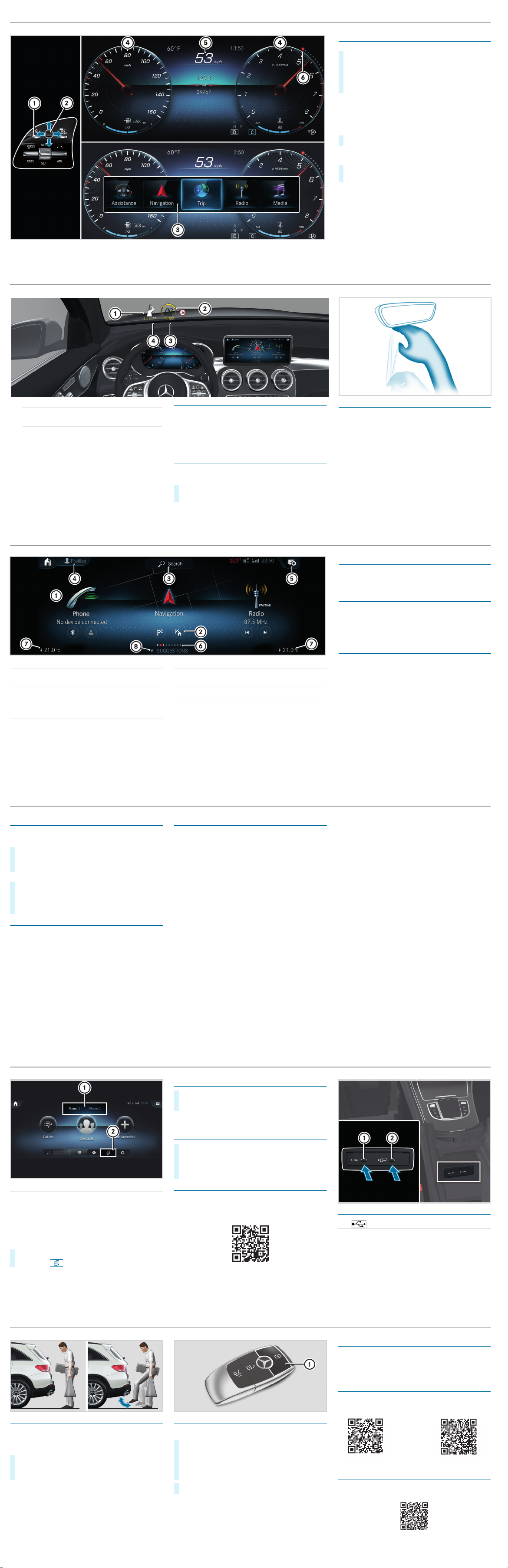
1 Main applications
2 Quick-access (e.g. direct destination entry or
navigating home)
3 Global search
(search for functions in the system, e.g. Music
or Navigation, as well as those external to the
system, e.g. Internet)
4 Creates, modifies and switches profiles
You can, for example, store the seat and
steering wheel position, multifunction display
contents, ambient lighting settings, favorites
and personalized suggestions.
5 Calls up the notification center
6 Number of applications and the currently
selected display area
7 Calls up the air conditioning menu
8 Calls up favorites/suggestions and themes
Favorites
Almost every function can be stored as a favorite.
Quick-access occurs using favorites button
ß on
the steering wheel or on the touchpad.
Suggestions
The system learns the habits of the driver. Using
artificial intelligence, for example, places which are
visited regularly, numbers which are called regularly
or favorite music styles are stored as suggestions in
the profile and can be called up more quickly.
Themes
Via a set of themes pre-configured ex-factory, a
number of settings, e.g. display content, music
stations, drive program, ambient lighting, can be
stored simultaneously.
You can create new themes yourself.
MBUX multimedia system Home screen
$ WARNING Make sure that you read the entire Operator’s Manual. Otherwise, you may not recognize dangers.
Starting a dialog
For the dialog with the Voice Control System, you
can use complete sentences as voice commands.
Help functions
• Optimum operation:
Say the «Help Voice Control System» voice
command.
• Help for the current function:
Say the «Help» voice command during the dialog.
• Help for a specific system:
Say the voice command for the desired system,
e.g. «Help telephone».
You can change the language via the system
language settings. If the Voice Control System does
not support the set system language, English is
selected.
Selected examples
Navigation voice commands
• «Navigate to 25 Woodward Avenue, Detroit»
Starts route guidance to an address. The order of
the road, town or building number is irrelevant.
• «Navigate to John Doe»
Starts route guidance to a contact from your
address book.
• «Show alternative routes»
The navigation shows alternative routes for route
guidance.
• «Navigate to nearest gas station»
Starts route guidance to the nearest gas station.
Telephone voice commands
• «Call John Doe»
The telephone number of a stored contact is
dialed.
• «Read out new text messages»
All new text messages will be read out.
• «Call my father on his cell number.»
The telephone number of the contact «Father cell»
will be called.
Media/radio voice commands
• «Switch to station Z100»
If you are listening to the radio, you can say the
name of a station to which you would like to
listen.
• «Play Bob Dylan»
The system searches through the names of all
available albums, tracks, artists, music genres
and playlists. If the result is unambiguous,
playback starts immediately.
Vehicle voice commands
• «Open the Assistance menu»
• «Temperature to 72 °F (22 °C)»
• «When is the next service due?»
• «Front passenger reading light on»
• «Ambient lighting to blue»
•»Head-up Display on/off»
Online voice commands
i
To us e this fe ature , you m ust have a conn ectio n
to the Internet.
• «What will the weather be like tomorrow in
Nashville?»
• «Is it raining at my destination?»
X
Activation with a keyword: Say «Hi Mercedes»
and combine it with a voice command or a
question.
or
X
Activation using the rocker switch on the
multifunction steering wheel: Press up
?
and after the acoustic signal say a voice
command or a question.
Voice Control System (for infotainment, navigation and vehicle functions)
Note that your vehicle may not be equipped with all features described.
Adjusting the multifunction display
Content 4 can be freely selected.
The index points 6 show the selected display
content.
Operating the menu bar
Content 5 can be set using menu bar 3.
i If you press and hold button 1, the standard
display of the multifunction display is shown.
X
Swipe Touch Control 2 to the left or right to
wipe.
The selected area will be highlighted.
X
Swipe Touch Control 2 up or down in order to
select the desired display content.
X
To call up the menu bar: press button 1.
X
To select content: swipe Touch Control 2 to
the left or right and press to confirm the menu.
Multifunction display
$ WARNING Make sure that you read the entire Operator’s Manual. Otherwise, you may not recognize dangers.
P253104313-Einzel.fm Seite 7 Montag, 15. April 2019 7:56 07
Head-up Display
The Head-up Display projects the following into the
field of vision
of the driver:
• Information from the navigation system
• Information from the driving assistance systems
• Some warning messages
Switching the Head-up Display on/off
Multimedia system:
+ ò * Settings * Quick Access
1 Navigation messages
2 Current speed
3 Detected instructions and traffic signs
4 Speed set in the driving assistance system
(e.g. Active Distance Assist DISTRONIC)
X
Select HUD.
The Head-up Display is activated.
MBUX Interior Assistant
The MBUX Interior Assistant recognizes certain
hand movements and gestures made between the
Media Display and the center console, including
those made on the touchpad. For example, you can
switch the reading light on/off by using the back of
the hand to briefly touch the rear view mirror.
Further control functions:
• Operation of functions by moving the hand closer
to the touchscreen or touchpad, e.g. adjusting
seat settings.
• Calling up a previously stored favorite with a hand
movement.
Head-up Display and MBUX Interior Assistant
Note that your vehicle may not be equipped with all of the features described.
P253104313-Einzel.fm Seite 8 Montag, 15. April 2019 7:56 07
Connecting a mobile phone
Requirements:
Bluetooth
®
is switched on on the mobile phone and
the device is visible for other devices (see the
manufacturer’s operating instructions).
Searching for a mobile phone
If your mobile phone is not found, try searching on
the mobile phone itself.
Authorizing a mobile phone
Further information
Detailed information on Bluetooth® connections
with your mobile phone can be found at:
www.mercedes-benz.com/connect
Connecting external media sources
Depending on the vehicle equipment, there are
further USB ports in the stowage compartment in
the front center console or in the rear folding
compartment.
1 Changing mobile phones
2 Device manager
X
On the MBUX multimedia system, select ò *
Phone
* .
X
Select Connect New Device.
X
Select the desired mobile phone.
X
A code is displayed in the multimedia system and
on the mobile phone.
X
If the codes match: confirm the code on the
mobile phone.
1 USB connection (type C)
2
ç
USB connection for Apple CarPlay™ or
Android Auto™
Bluetooth® connection and external media sources
$ WARNING Make sure that you read the entire Operator’s Manual. Otherwise, you may not recognize dangers.
P253104313-Einzel.fm Seite 11 Montag, 15. April 2019 7:56 07
HANDS-FREE ACCESS
If you carry the KEYLESS-GO key on your person,
you will be detected by a sensor.
Do not touch the bumper and maintain a distance of
around 12 in (30 cm).
i The kicking movement must be towards the
vehicle and back again, and it must not be
carried out too slowly.
Deactivating the KEYLESS-GO key function
If you wish to reduce the energy consumption of the
key, you can deactivate the KEYLESS-GO function.
Further information
Further information about Mercedes-Benz vehicles
and about Daimler AG can be found on the following
website:
http://www.mbusa.com
Mercedes-Benz Guides app
The Mercedes-Benz Guides app contains the
complete Operator’s Manual and is available
free-of-charge in the familiar app stores.
Registering in the Mercedes me portal
Register in the Mercedes me portal in order to be
able to use the full scope of your vehicle’s functions.
X
To open or close: kick into the center of the
sensor detection range under the bumper with
your foot.
X
To deactivate: press twice in succession on
button 1.
The battery check lamp of the key
lights up twice briefly and once for a longer
period.
X
To activate: press any button on the key.
Operator’s Manuals
How-To Videos
Further information on your vehicle
Note that your vehicle may not be equipped with all of the features described.
P253104313-Einzel.fm Seite 12 Montag, 15. April 2019 7:56 07
Owner Manual
The owner manual of the Mercedes-Benz GLC is an essential resource for GLC owners, providing in-depth information about the vehicle’s features, technology, and maintenance. The manual includes details on how to operate the infotainment system, protocols for connecting devices via Bluetooth, and instructions for using safety features such as lane-keeping assist and adaptive cruise control. With comprehensive troubleshooting guides, it helps drivers address common issues effectively and understand their vehicle’s capabilities.
Model Overview
The Mercedes-Benz GLC is a luxury compact SUV that blends performance, comfort, and high-tech features. Launched in 2015, it is built on the platform of the C-Class sedan but offers a higher driving position and more space. The GLC is designed to cater to a range of preferences, from everyday commuting to spirited driving experiences. With a distinctive design, spacious interior, and a commitment to safety, the GLC has positioned itself as a benchmark in the SUV segment, appealing to both families and adventure-seekers alike.
Trims
The Mercedes-Benz GLC comes in various trims to suit different tastes and budgets. The base model, GLC 300 4MATIC, features a robust turbocharged engine and an array of standard technologies including LED headlights, a power liftgate, and a panoramic sunroof. For those seeking increased performance, the AMG GLC 43 and AMG GLC 63 trims offer sportier design elements and enhanced powertrains. Additionally, there are plug-in hybrid variants that provide eco-friendly options without compromising on performance. Each trim offers a mix of premium materials and cutting-edge technology, ensuring a luxurious driving experience.
Known Problems
As with any vehicle, the Mercedes-Benz GLC has its share of known issues that owners should be aware of. Some drivers have reported electrical problems, particularly concerning the vehicle’s infotainment system and dashboard gauges. A few owners have experienced problems with engine performance, including excessive oil consumption and occasional stalling. Additionally, some GLCs have faced issues with the air conditioning system, where it may fail to provide adequate cooling. Regular maintenance and timely diagnostic checks can help mitigate many of these concerns and ensure the longevity of the vehicle.
Maintenance Tips
Maintaining your Mercedes-Benz GLC is crucial for both performance and longevity. Regular oil changes using high-quality synthetic oil are essential for engine health. Keep an eye on tire pressure and tread depth, as maintaining proper tire condition affects handling and fuel efficiency. The brake system should also be regularly inspected, as wear and tear can significantly impact safety. It’s advisable to follow the recommended service intervals outlined in the owner manual for tasks like checking fluid levels, changing air filters, and inspecting the battery. Keeping your GLC clean, both inside and out, not only enhances its appearance but also prevents long-term wear on materials.
FAQs
Q: What type of fuel should I use for my Mercedes-Benz GLC?
A: The GLC is designed to perform best with premium unleaded gasoline. Using lower-grade fuels may affect engine performance and efficiency.
Q: How often should I service my GLC?
A: The schedule for service depends on driving habits; however, a general recommendation is every 10,000 miles or once a year, whichever comes first.
Q: Can I tow with my GLC?
A: Yes, with the appropriate towing package, the GLC can tow trailers up to a rated capacity, making it versatile for both transport and leisure purposes.
Q: Does the GLC come with a warranty?
A: Yes, Mercedes-Benz offers a 4-year/50,000-mile limited warranty for new vehicles, which includes roadside assistance.
Mercedes-Benz GLC PDF owner manual
On this page you can find the owners manuals for the GLC model sorted by year.
The manuals are free to download and are available in PDF format. Is is recommended to check the owners manual
corresponding to the correct year of your Mercedes-Benz GLC to solve the problems or
to get insights about the car.
A passionate guy about car models, makes, and manuals.
29 февраля 2020
Не очень нравится пользоваться интерактивным руководством по эксплуатации, тем более, что оно требует постоянного наличия интернета. После долгих поисков в и-нете нашел Руководство по эксплуатации в PDF формате. Правда все на английском языке. Для меня английский — не является большой проблемой, и как по мне, так пользоваться руководством оффлайн гораздо удобнее. Возможно кому-то тоже не нравится онлайн интерактив, поэтому ниже выкладываю ссылки на PDF:
yadi.sk/i/tOiXNlpsu7BxAg
yadi.sk/d/3Cs8VPfGD3XRMQ

yadi.sk/i/W-NgnlPujW4HjQ
yadi.sk/i/H3_srLMTz-eNcQ
Цена вопроса: 0 ₽
Пробег: 693 км
Войдите или зарегистрируйтесь, чтобы писать комментарии, задавать вопросы и участвовать в обсуждении.
Mercedes-Benz GLC (2023)
GLC
Owner’s Manual+
F254 0192 02
View the manual for the Mercedes-Benz GLC (2023) here, for free. This user manual comes under the category cars and has been rated by 8 people with an average of a 8.3. This manual is available in the following languages: English. Do you have a question about the Mercedes-Benz GLC (2023)?
Ask your question here
Product Images (2)


Mercedes-Benz GLC (2023) specifications
Below you will find the product specifications and the manual specifications of the Mercedes-Benz GLC (2023).
The Mercedes-Benz GLC (2023) is a midsize luxury SUV equipped with advanced technological features and a sleek exterior. Its aerodynamic design and numerous customization options make it an attractive option for those seeking a stylish and versatile vehicle.
Under the hood, the GLC (2023) packs a punch with its turbocharged four-cylinder engine, delivering smooth and efficient performance. It also features nine-speed automatic transmission, allowing for seamless gear shifting while driving.
The GLC’s (2023) interior is designed with comfort and convenience in mind, boasting a spacious cabin with premium materials and various storage compartments. It includes a user-friendly infotainment system with a large touchscreen display, as well as advanced safety features such as automatic emergency braking and adaptive cruise control.
In terms of size, the GLC (2023) boasts an impressive cargo capacity, with folding rear seats providing ample space for storage. It also has a towing capacity of up to 3,500 pounds, making it suitable for hauling heavy loads.
Overall, the Mercedes-Benz GLC (2023) is a desirable SUV that combines luxury with practicality, catering to a wide range of drivers.
General
| Brand | Mercedes-Benz |
| Model | GLC (2023) |
| Product | car |
| Language | English |
| Filetype | User manual (PDF), Warranty information (PDF) |
Frequently asked questions
Can’t find the answer to your question in the manual? You may find the answer to your question in the FAQs about the Mercedes-Benz GLC (2023) below.
When does my Mercedes-Benz need maintenance?
Regular maintenance is necessary for every car. How often the car needs maintenance and what exactly needs to be done can be found in the maintenance instructions.
For major periodic service, this should generally be done every 2 years or after 30,000 kilometres.
One or more doors won’t open from the inside. Now what?
The lock is most likely set to the child safety lock so it cannot be opened from the inside. How to unset the child safety lock differs per brand and type.
My car radio does not turn on, now what?
If your car radio does not turn on, it will not receive any power. Check that the red wire is connected to the contact power supply and the yellow wire to the constant power supply.
How do I convert miles into kilometres?
1 mile equals 1.609344 kilometers and 1 kilometer equals 0.62137119 miles.
Where can I find the VIN number of my Mercedes-Benz?
The location of the VIN number of the car differs per brand and type of car.
The code may be stamped on the frame of the car or mounted on a plate. It is best to consult the manual of the Mercedes-Benz GLC (2023)for the exact location of the VIN number.
When should I change the brake fluid of my Mercedes-Benz?
It is recommended to change the brake fluid every two years.
What is the difference between E10 and E5 petrol?
E10 petrol consists of up to ten per cent ethanol while E5 petrol will contain less than five per cent ethanol. As a result, the percentage of E10 petrol is lower than that of E5 petrol, making it less bad for the environment.
What is a VIN number?
The VIN number of a car is an identification number unique to each car. The abbreviation VIN therefore stands for Vehicle Identification Number.
Is the manual of the Mercedes-Benz GLC (2023) available in English?
Yes, the manual of the Mercedes-Benz GLC (2023) is available in English .
Is your question not listed? Ask your question here
Skip Navigation
Back
Search
-
Quick Links
- Mercedes Electric
- Build Your Own
- Special Offers
- View Inventory
- Mercedes Owners
- Certified Pre-Owned
-
Vehicles -
Electric -
Shopping -
Owners
EN
EN
FR
FR
-
My Account -
Find a Retailer -
Search
Find a Retailer
English
Français
Back
Models
-
All Vehicles
-
Compare Vehicles
-
Special Offers
-
Certified Pre-Owned Program
-
Future Vehicles
-
Brands
-
Vans
-
Mercedes-AMG
-
Mercedes Electric
-
Mercedes-Maybach
Back
Electric
-
DISCOVER ELECTRIC
-
Mercedes-Benz Electric
-
Explore the Lineup
-
Charging Your Vehicle
-
EV Charging Tools
-
EV Incentives
-
Electric FAQs
-
Shop Electric
-
New Inventory
-
Certified Pre-Owned
-
Special Offers
-
Build Your Own
Charge up in Luxury
Progressive mobility built on industry-leading technology. Discover the ease and convenience of charging your all-electric Mercedes-Benz.
Learn More About Charging
Back
Shopping
-
INVENTORY
-
New Vehicles
-
Pre-Owned Vehicles
-
Special Offers
-
Build Your Deal
-
Finance
-
Financial Services
-
TOOLS
-
Build Your Own
-
Compare Vehicles
-
Request a Quote
-
Schedule a Test Drive
Unrivaled appeal. Attractive price.
Luxury driving is within reach. Explore special offers on your next Mercedes-Benz.
View Offers
Back
Owners
-
Service & Manuals
-
Owners Support
-
Maintenance Support
-
Owners Manuals
-
Service & Warranty Manuals
-
Schedule Service
-
Updating your Vehicle
-
Accessories
-
Wheels and Tires
-
Warranty
-
Recall Information
-
OWNERSHIP ON-THE-Go
-
Mercedes-Benz App
-
Visit Mercedes-Benz Store
Back
My Account
Log In or Register
Even if you don’t own a Mercedes-Benz, you can register for an account to save builds, track inventory and more.
-
Explore Account Details
- View Account
- Saved Vehicles
- Deals In Progress
Mercedes-Benz App
The Mercedes-Benz app is the ultimate resource, putting control of your vehicle in the palm of your hand.
Learn More
Back
Search
-
Quick Links
- Mercedes Electric
- Build Your Own
- Special Offers
- View Inventory
- Mercedes Owners
- Certified Pre-Owned