

Operation Manual
CONTENTS
USAGE AND SAFETY PRECAUTIONS ••••••••••••••••••••••••• 2
Introduction ••••••••••••••••••••••••••••••••••••••••••••••• 3
Naming of Parts •••••••••••••••••••••••••••••••••••••••••••• 4
Front Panel ••••••••••••••••••••••••••••••••••••••••••••••• 4
Rear Panel
Preparations ••••••••••••••••••••••••••••••••••••••••••••••• 4
Inserting the Batteries ••••••••••••••••••••••••••••••••••••••• 4
Getting Connected
Quick Guide (Let’s Play) •••••••••••••••••••••••••••••••••••• 6
Amp Simulator Settings •••••••••••••••••••••••••••••••••••• 8
Setting Up the Playback Equipment •••••••••••••••••••••••••••• 8
Selecting the Amp Simulator Type
Listening to Patches (Play Mode Operation) ••••••••••••••••••• 9
Panel Display in Play Mode ••••••••••••••••••••••••••••••••••• 9
Selecting a Patch
Using the Bypass (Mute) and Tuner Function
Playing With Rhythm Accompaniment
Using the Sampler Function
Using the Easy Edit Function
Reserving the Next Patch (DIRECT LOAD)
Fixing the Bank (BANK HOLD)
••••••••••••••••••••••••••••••••••••••••••••••• 4
••••••••••••••••••••••••••••••••••••••••• 5
••••••••••••••••••••••••••••• 8
•••••••••••••••••••••••••••••••••••••••••• 9
••••••••••••••••••••• 10
•••••••••••••••••••••••••• 11
•••••••••••••••••••••••••••••••••• 12
••••••••••••••••••••••••••••••••• 13
••••••••••••••••••••••• 14
•••••••••••••••••••••••••••••••• 14
Altering the Sound of a Patch (Edit Mode Operation) •••••••••• 15
Patch Configuration •••••••••••••••••••••••••••••••••••••••• 15
Basic Edit Mode Steps
Storing and Copying Patches
••••••••••••••••••••••••••••••••••••• 15
•••••••••••••••••••••••••••••••• 16
Effect Types and Parameters ••••••••••••••••••••••••••••••• 17
COMP•DIST (compressor/distortion) module ••••••••••••••••••••• 17
ZNR/EQ (Zoom Noise Reduction/Equalizer) module
MOD (modulation) module
REV (Reverb) module
TOTAL module
PEDAL module
••••••••••••••••••••••••••••••••••••••••••• 20
••••••••••••••••••••••••••••••••••••••••••• 20
••••••••••••••••••••••••••••••••••• 18
••••••••••••••••••••••••••••••••••••••• 19
••••••••••••••••• 17
Using the Jam Play Function ••••••••••••••••••••••••••••••• 21
Controlling an Effect With the Pedal ••••••••••••••••••••••••• 22
All Initialize/Factory Recall ••••••••••••••••••••••••••••••••• 23
Adjusting the Expression Pedal •••••••••••••••••••••••••••• 23
Troubleshooting
GFX-707 Specifications
USAGE AND SAFETY PRECAUTIONS
USAGE AND SAFETY PRECAUTIONS
USAGE AND SAFETY PRECAUTIONS
In this manual, symbols are used to highlight warnings
and cautions for you to read so that accidents can be
prevented. The meanings of these symbols are as
follows:
Warning
Caution
Please observe the following safety tips and precautions to ensure
hazard-free use of the GFX-707.
• Power requirements
Warning
• Environment
Caution
This symbol indicates explanations
about extremely dangerous matters. If
users ignore this symbol and handle the
device the wrong way, serious injury or
death could result.
This symbol indicates explanations
about dangerous matters. If users
ignore this symbol and handle the
device the wrong way, bodily injury and
damage to the equipment could result.
Since power consumption of this unit is fairly high, we
recommend the use of an AC adapter whenever possible.
When powering the unit from a battery, use only an alkaline
type.
[AC adapter operation]
• Be sure to use only an AC adapter which supplies 9 V
DC, 300 mA and is equipped with a «center minus» plug
(Zoom AD-0006). The use of an adapter other than the
specified type may damage the unit and pose a safety
hazard.
• Connect the AC adapter only to an AC outlet that supplies
the rated voltage required by the adapter.
• When disconnecting the AC adapter from the AC outlet,
always grasp the adapter itself and do not pull at the
cable.
• When not using the unit for an extended period,
disconnect the AC adapter from the AC outlet.
[Battery operation]
• Use four conventional IEC R6 (size AA) batteries
(alkaline).
• The GFX-707 cannot be used for recharging.
Pay close attention to the labelling of the battery to make
sure you choose the correct type.
• When not using the unit for an extended period, remove
the batteries from the unit.
• If battery leakage has occurred, wipe the battery
compartment and the battery terminals carefully to
remove all remnants of battery fluid.
• While using the unit, the battery compartment cover
should be closed.
Avoid using your GFX-707 in environments where it will be
exposed to:
• Extreme temperature
• High humidity or moisture
• Excessive dust or sand
• Excessive vibration or shock
• Handling
Since the GFX-707 is a precision electronic device, avoid
applying excessive force to the switches and buttons. Also
Caution
take care not to drop the unit, and do not subject it to shock
or excessive pressure.
• Alterations
Never open the case of the GFX-707 or attempt to modify
the product in any way since this can result in damage to the
Caution
unit.
• Connecting cables and input and output
jacks
You should always turn off the power to the GFX-707 and
all other equipment before connecting or disconnecting any
Caution
cables. Also make sure to disconnect all cables and the AC
adapter before moving the GFX-707.
Usage Precautions
• Electrical interference
For safety considerations, the GFX-707 has been designed to
provide maximum protection against the emission of
electromagnetic radiation from inside the device, and protection
from external interference. However, equipment that is very
susceptible to interference or that emits powerful electromagnetic
waves should not be placed near the GFX-707, as the possibility of
interference cannot be ruled out entirely.
With any type of digital control device, the GFX-707 included,
electromagnetic interference can cause malfunctioning and can
corrupt or destroy data. Care should be taken to minimize the risk
of damage.
• Cleaning
Use a soft, dry cloth to clean the GFX-707. If necessary, slightly
moisten the cloth. Do not use abrasive cleanser, wax, or solvents
(such as paint thinner or cleaning alcohol), since these may dull
the finish or damage the surface.
Please keep this manual in a convenient place for future
reference.
2
ZOOM GFX-707

Introduction
Thank you for selecting the ZOOM GFX-707 (hereafter simply called the «GFX-707«). The
GFX-707 is a sophisticated multi-effect device with the following features and functions:
• Large variety of built-in effects
Four separate effect modules (single/combined effects) can be used at the same time, together with
ZNR (Zoom Noise Reduction) and the built-in amp simulator. Effects include analog distortion,
various modulation effects such as chorus and flanger, and reverberation effects such as reverb and
delay. In total, you have a choice of 48 types of effects.
• 60 immediately usable patches
A combination of effect modules and parameter settings stored in memory is called a «patch». The
GFX-707 has room for 30 patches that are read-only and 30 that can be freely modified by the user.
So you have a total of 60 patches readily available. Patches are organized in banks (A — F, 0 — 5),
each with five patches. It is even possible to assign a distinctive name of up to 6 characters to each
patch.
• Designed for use on stage
The GFX-707 will operate continuously for up to 14 hours on one set of alkaline batteries. The large
display showing patch names is easy to read at a distance, and the built-in expression pedal is great
for enhancing any performance. For extended use, the unit can also be powered by an AC adapter.
Introduction
• Rotary knobs allow speedy parameter editing
When editing a patch, the three knobs on the top panel let you change parameters with a quick and
direct feel. Even during a performance, fine-tuning an effect is no problem at all. The edited patch
can be stored for later use.
• A first in this class: built-in rhythm section
A high quality PCM sound source creates realistic rhythm patterns that are handy for practicing or
for small jam sessions. You can choose from as many as 45 rhythm patterns.
• 6-second sampler
Another advantage is the integrated sampler with a recording duration of up to six seconds. It even
allows half-speed playback without altering the pitch. This feature comes in handy when copying
phrases.
• Jam Play
With a simple foot switch operation, you can record and play a phrase of up to 2 seconds during a
gig. This is great for creating scratch effects such as used by DJs, doing reverse playback or
producing other special effects.
• Integrated amp simulator
Simulates the cabinet sound of a guitar amplifier for a dynamic sound also when sending the line
output to a mixer or recorder.
Please take the time to read this manual carefully, in order to get the most out of your GFX707 and to ensure optimum performance and reliability.
ZOOM GFX-707
3
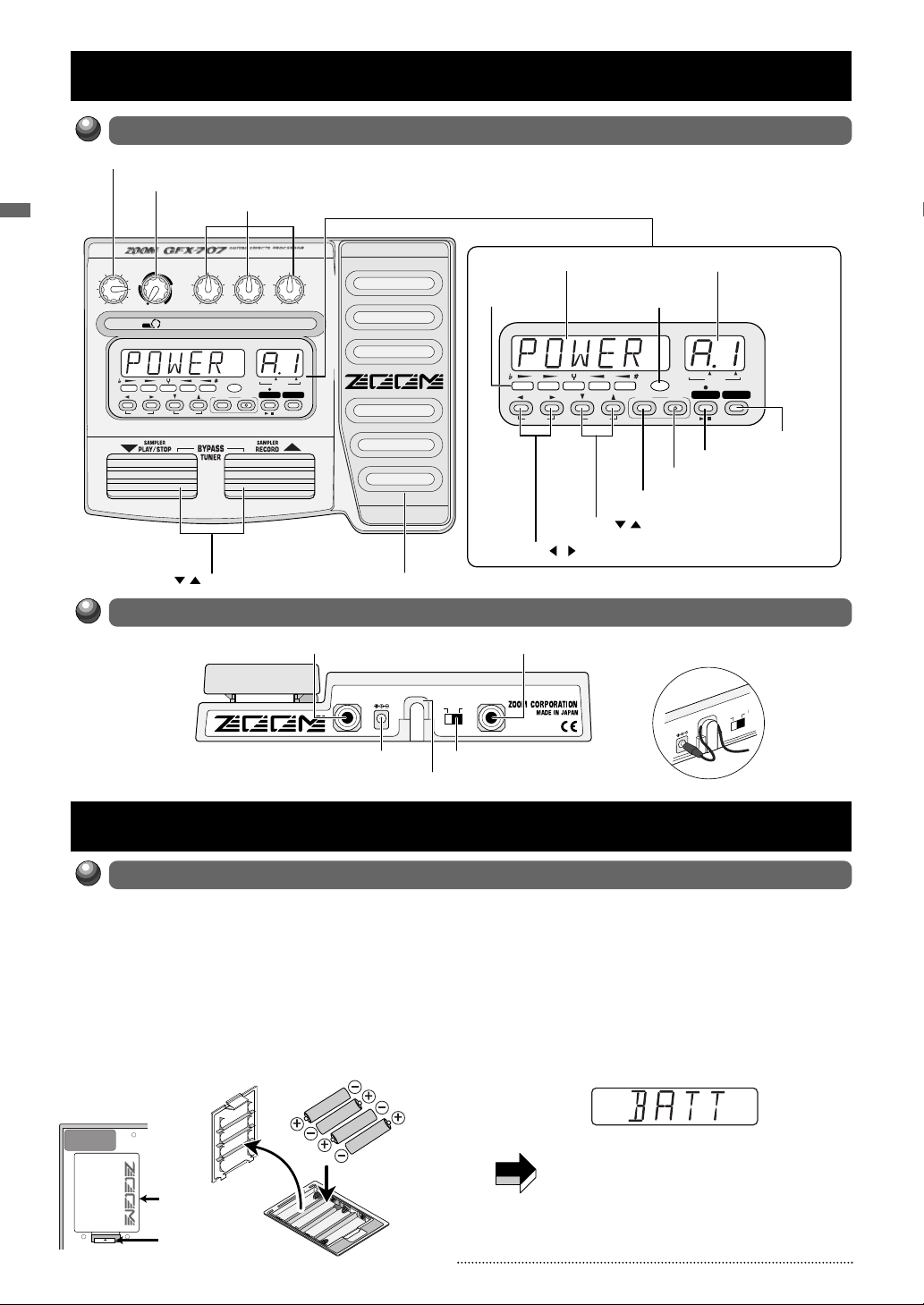
Naming of Parts /Preparations
DC9V
POWER
IN)
OU
(PH
300mA
OFFON
Battery
compartment
cover
Adjacent batteries
are inserted with
opposite polarity.
Battery
compartment
cover
Tab
GFX-707 rear
Four IEC R6 (size AA) batteries
Naming of Parts
Front Panel
OUTPUT knob
AMP SIM (simulator) knob
PARM (Parameter) knob 1 — 3
OUTPUT AMP SIM
PATCH NAME BANK PATCH
COMP-DIST
MODULE
(
ON/OFF
OFF
ZNR/EQ
)
COMP•DIST/PARM1
MOD REV TOTAL
TYPE
(BANK)
(
)
GROUP
MOD/PARM2 REV/PARM3
PEDAL
EDIT
STORE
(CANCEL)
/ foot switches
Rear Panel
BOTH EDITED
(
)
VALUE
RHYTHM SAMPLER
/
INPUT/AUX IN jack
INPUT
(AUX IN)
DC 9V (AC adapter) jack
Expression pedal
DC9V
300mA
Cable hook
Display
Module LEDs
PATCH NAME BANK PATCH
COMP-DIST
ZNR/EQ
MODULE
(
)
ON/OFF
TYPE(BANK) / keys
MODULE / keys
OUTPUT/PHONES jack
OUTPUT
(PHONES)
POWER
OFFON
POWER switch
Pedal status LED
MOD REV TOTAL
TYPE
(BANK)
(
)
GROUP
EDIT (CANCEL) key
BANK/PATCH indicator
BOTH EDITED
(
)
VALUE
PEDAL
EDIT
(CANCEL)
STORE
RHYTHM SAMPLER
/
SAMPLER key
RHYTHM key
STORE key
How to use the cable hook
Preparations
Inserting the Batteries
The GFX-707 can be powered either by alkaline batteries or by an AC adapter. To use the unit
on batteries, insert them as follows.
1 Turn the unit over and open the battery
compartment cover.
2 Insert four new IEC R6 (size AA) alkaline
batteries into the battery compartment.
OPEN
4
3 Close the battery compartment cover.
If the indication «BATT» appears on the display
during battery-powered operation, the batteries
are exhausted. Replace all four batteries with
fresh ones.
PATCH NAME
• If the unit is not to be powered from batteries
for an extended period, remove the batteries
from the battery compartment. Otherwise
battery fluid may leak and cause damage to
the unit.
• An AC adapter is not supplied with the unit.
ZOOM GFX-707
Getting Connected
POWER
OUTPUT
(PHONES)
OFFON
Two guitar amplifiers
Stereo Y cable
DC9V
INPUT
(AUX IN)
300mA
Monaural cable
Guitar
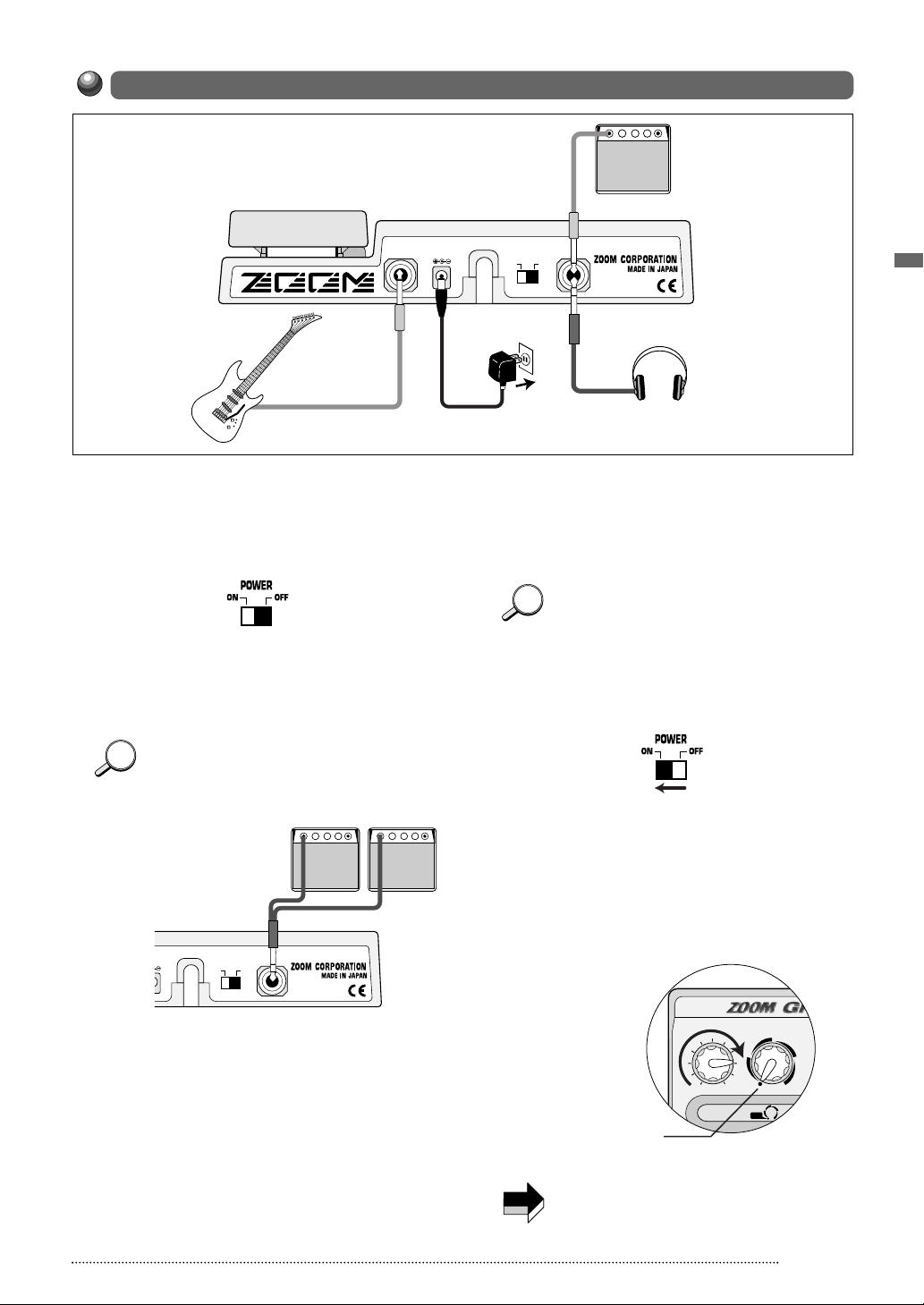
1 Use a monaural cable to connect the guitar
to the INPUT jack of the GFX-707.
At this time, the amplifier power switch and the
power switch of the GFX-707 should be OFF.
2 Use a monaural cable to connect the
OUTPUT jack of the GFX-707 to the input
of the amplifier.
By using two amplifiers, you can get great
stereo sound from stereo effects. Use a stereo
Y cable to connect the OUTPUT jack to the
two amplifiers.
Monaural cable
POWER
OFFON
AC adapter
OUTPUT
(PHONES)
Guitar amplifier
Headphones
5 When using an AC adapter, plug the output
cable from the adapter into the DC 9V jack
on the GFX-707 and plug the adapter into
an AC outlet.
To guard against inadvertently disconnecting
the AC adapter cable, wind the cable once
around the hook on the rear panel of the GFX-
707.
6 Turn on power in the order GFX-707 →
amplifier (playback equipment).
7 Adjust the volume of the amplifier and the
GFX-707 to a suitable position while
playing the instrument.
The OUTPUT knob of the GFX-707 should be
set to about the 3 o’clock position, and the AMP
SIM knob should be set to the OFF position.
Preparations
3 To monitor the sound with headphones,
connect the headphones to the OUTPUT
jack.
4 Verify that the amplifier is turned off and
that the volume control is turned to
minimum. Also verify that the power switch
of the GFX-707 is set to OFF.
ZOOM GFX-707
When the GFX-707 is in the bypass state (all
effects are temporarily turned off; see page
10), the output level will be the same as the
input level if the OUTPUT knob is turned fully
clockwise.
5
STORE
EDIT
(CANCEL)
MODULE
(
ON/OFF
)
TYPE
(BANK)
COMP•DIST
ZNR/EQ MOD REV TOTAL
RHYTHM S
(
GROUP
)
OUTPUT AMP SIM
COMP•DIST/PARM1
MOD/PARM2 REV
PEDAL
OFF
/
PATCH NAME BANK PA
(
VALUE
)
BOTH EDI
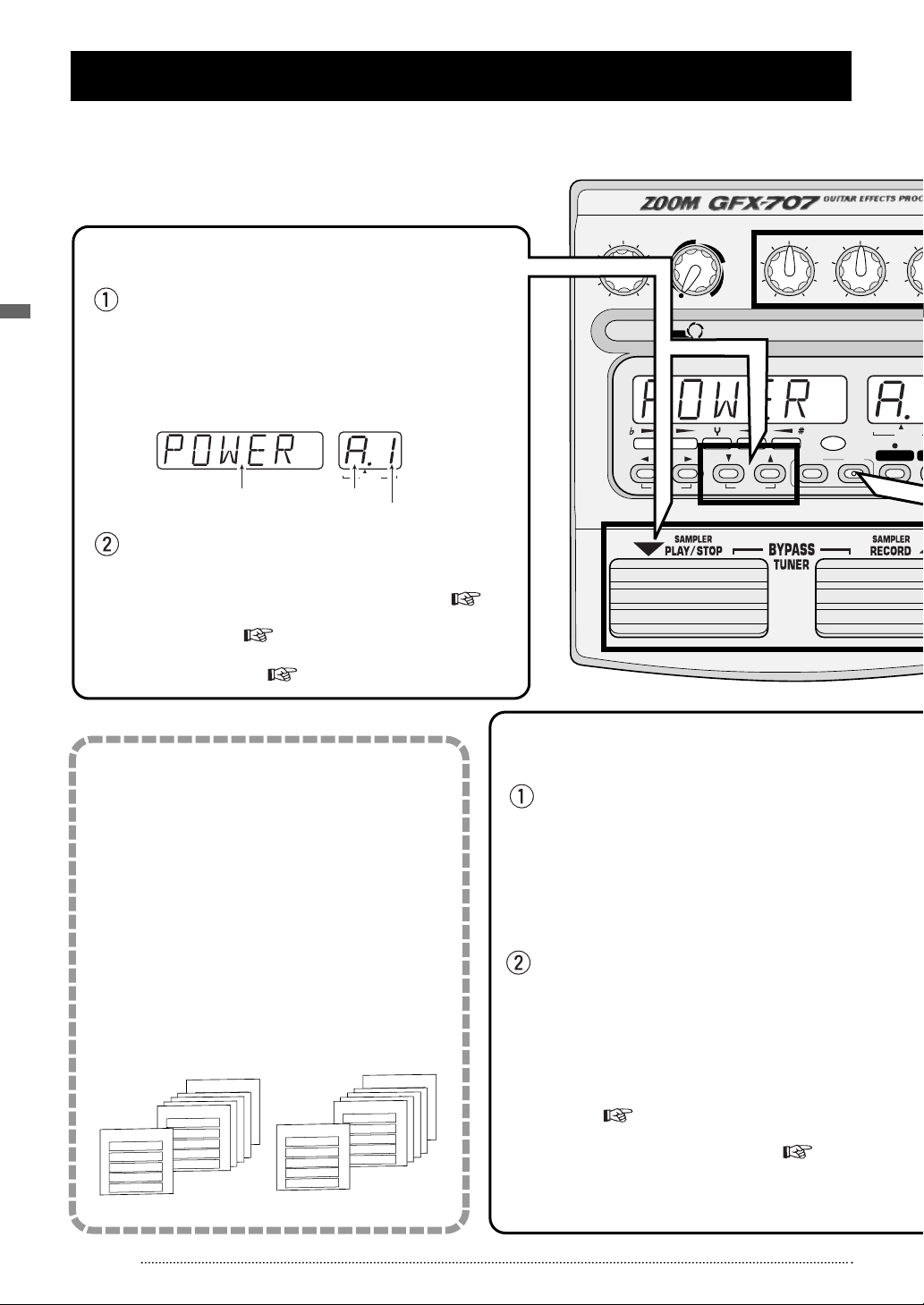
To select a patch in play mode, press one of the
▲/▼ foot switches.
The name of the currently selected patch appears on the
display. The bank and patch number can be checked
using the BANK/PATCH indicator.
To directly switch the bank, use the TYPE(BANK)
▼/▲ keys.
• For a detailed explanation of patch switching, p. 9
• To fix the bank, p. 14
• To reserve a patch, p. 14
Altering an effect with the pedal
Selecting the effect sound (patch)
A collection of effect modules, each with
distinct parameter settings, is called a patch.
The GFX-707 has memory capacity for 60
patches which are immediately available for
use. These are divided into two groups of 30
patches each. The PRESET group comprises
read-only patches that cannot be changed by
the user. The USER group contains read-andwrite patches that can be freely overwritten by
the user.
Each patch is given a patch name of up to 6
characters, and patches are organized in
banks (A — F, 0 — 5) and patch numbers (1 — 5).
[ Patches, groups and banks ]
To alter an effect in real time, move the
expression pedal while playing your
instrument with the GFX-707 in play mode.
The aspect of the patch that is changed by the
expression pedal can be programmed for each
patch. To get a feel for this, select various patches
and try out the pedal to see what it does.
Push the expression pedal fully down
The expression pedal also incorporates a pushdown switch that allows on/off control of a preset
effect. The effect that is switched by the push-down
switch can be programmed for each patch.
• To set the effect to be altered by the expression
pedal, p. 22
• To readjust the expression pedal, p. 23
1
2
PRESET group
USER group
BANK F
PATCH 1
PATCH 2
PATCH 3
PATCH 4
PATCH 5
BANK A
PATCH 1
PATCH 2
PATCH 3
PATCH 4
PATCH 5
BANK A
PATCH 1
PATCH 2
PATCH 3
PATCH 4
PATCH 5
BANK A
PATCH 1
PATCH 2
PATCH 3
PATCH 4
PATCH 5
BANK b
PATCH 1
PATCH 2
PATCH 3
PATCH 4
PATCH 5
BANK A
PATCH 1
PATCH 2
PATCH 3
PATCH 4
PATCH 5
BANK 5
PATCH 1
PATCH 2
PATCH 3
PATCH 4
PATCH 5
BANK A
PATCH 1
PATCH 2
PATCH 3
PATCH 4
PATCH 5
BANK A
PATCH 1
PATCH 2
PATCH 3
PATCH 4
PATCH 5
BANK A
PATCH 1
PATCH 2
PATCH 3
PATCH 4
PATCH 5
BANK 1
PATCH 1
PATCH 2
PATCH 3
PATCH 4
PATCH 5
BANK 0
PATCH 1
PATCH 2
PATCH 3
PATCH 4
PATCH 5
PATCH NAME BANK PATCH
(
VALUE
)
BOTH EDITED
Bank
Patch name
Patch number
Quick Guide (Let’s Play)
Immediately after being turned on, the GFX-707 is in the so-called «play mode». The Quick Guide explains the basic
steps in play mode. This will let you use the unit right away.
Quick Guide (Let’s Play)
6
ZOOM GFX-707
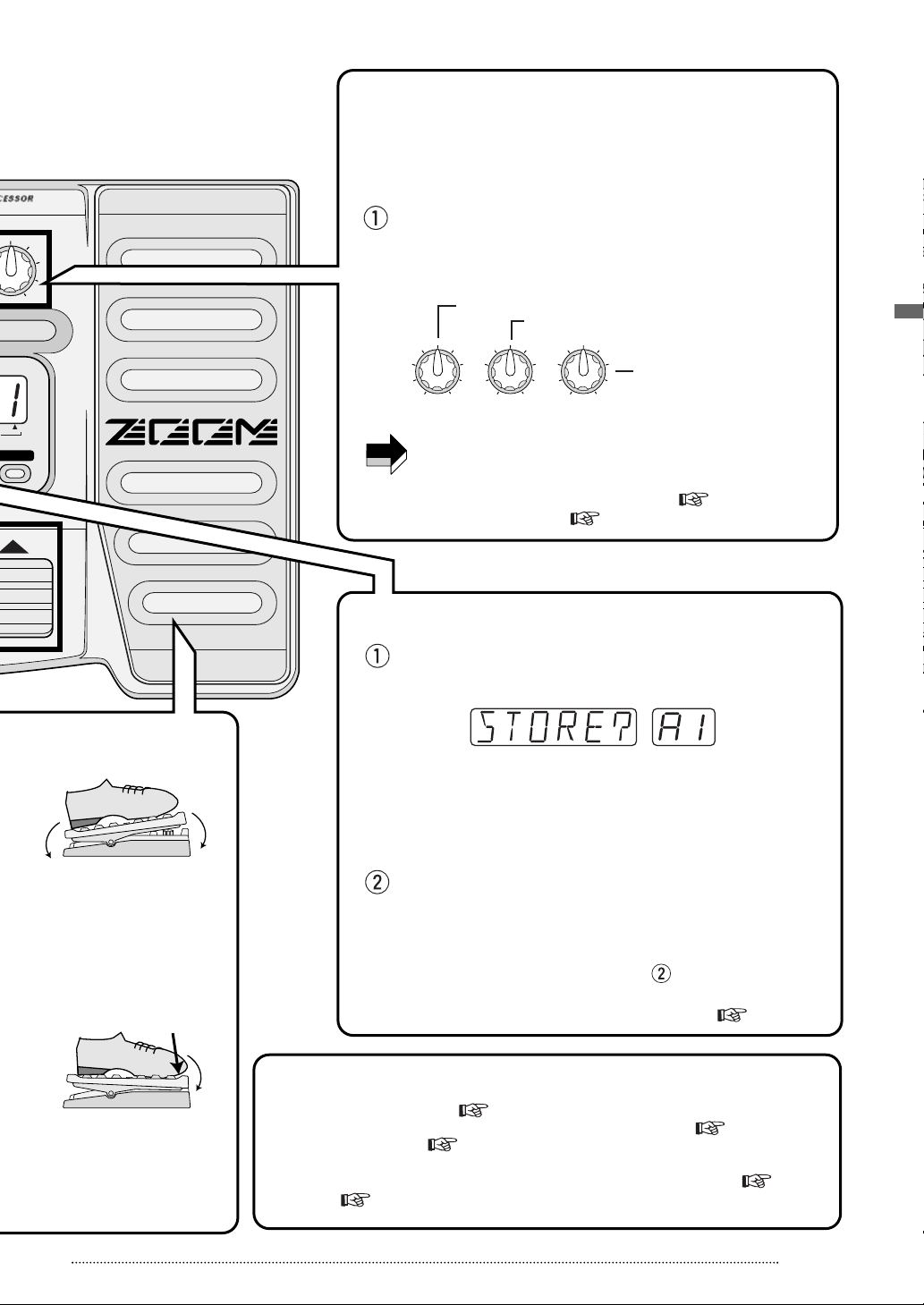
V/PARM3
The GFX-707 incorporates a function called «Easy Edit» that
allows adjusting effect parameters during play. This is done
with three knobs on the front panel. You can vary the patch
sound with the ease of a compact effect device.
In play mode, select the patch whose sound you want
to alter, and operate the parameter knob 1 — 3.
The types of parameters assigned to the knobs are as follows.
The actual parameter that is adjusted depends on the
patch.
• For a detailed explanation of Easy Edit, p. 13
• For full-fledged editing, p. 15
Adjusting an effect (Easy Edit function)
Press the STORE key.
The GFX-707 goes into store standby mode.
If the store location is not specified, the original bank/patch
number is selected. If a patch from the PRESET group was
edited, the store location «A1» will be selected. If required, use
the TYPE(BANK) ▼/▲ keys and the ▼/▲ foot switches to
specify the patch.
Confirm the store action by pressing the STORE key
once more.
The patch is stored and the unit automatically reverts to play
mode. To cancel the store action, press the EDIT (CANCEL)
key instead of the STORE key in step .
• For a detailed explanation of storing a patch, p. 16
Storing the adjusted effect sound (patch)
3
4
Using other handy functions
5
Move back and forth
Push down all the way
• Using the Amp Simulator, p. 8
• Using the auto tuner, p. 10
• Practicing with the built-in rhythm
pattern, p. 11
• Practicing while listening to a CD
or other source, p. 12
• Using hold delay, reverse playback,
and scratch playback , p. 21
Depth of distortion and compressor effects
Depth of chorus and flanger intensity
For some effects, echo amount
Reverb and echo amount
NOTE
PARM1 knob
[COMP•DIST] [MOD] [REV]
PARM2 knob PARM3 knob
Quick Guide (Let’s Play)
ZOOM GFX-707
7
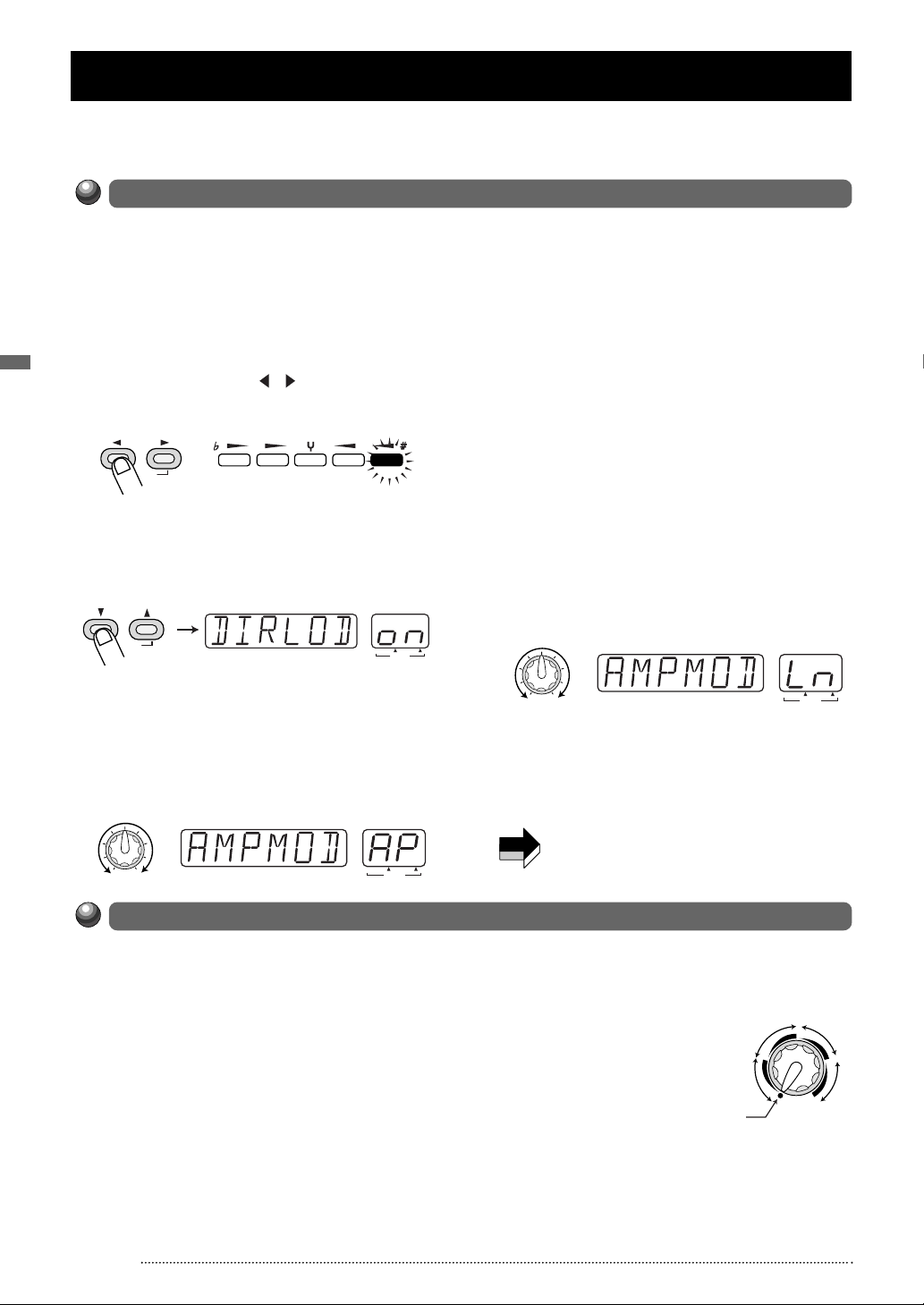
Amp Simulator Settings
The GFX-707 incorporates an amp simulator that recreates the sound of a guitar amplifier or speaker enclosure. This
section explains how to set up the amp simulator.
Setting Up the Playback Equipment
To get the best out of the amp simulator, the playback equipment must be set up correctly.
Proceed as described below. After power-up, the GFX-707 is always set up for use with a guitar
amplifier. When a guitar amplifier is used exclusively, the following steps are not necessary.
Amp Simulator Settings
1 In play mode, press the EDIT (CANCEL)
key.
2 Press the MODULE / keys repeatedly,
until the TOTAL module LED is lit.
MODULE
(
ON/OFF
)
COMP•DIST
ZNR/EQ
MOD REV TOTAL
3 Press the TYPE (BANK) ▼/▲ keys
repeatedly, until the indication «DIRLOD»
appears on the display.
TYPE (BANK)
(
GROUP
PATCH NAME
)
BANK PATCH
BOTH EDITED
(
)
VALUE
4 Turn parameter knob 3.
As soon as you turn parameter knob 3, the
display indication changes to «AMPMOD» (amp
simulator mode). This is the parameter for
selecting the type of amp simulator.
PATCH NAME BANK PATCH
BOTH EDITED
(
)
PARM3 knob
VALUE
5 Continue to use parameter knob 3 to
select one of the following settings.
Choose the setting that best matches your
setup.
• GFX-707 is connected to a guitar amplifier
AP
• GFX-707 is connected to line level equipment
such as a mixer, or used with headphones
Ln
When «AP» is selected, the amp simulator can
be used to simulate cabinet sound also when
using the guitar amplifier at low levels. When
«Ln» is selected, characteristics are optimized
for recording.
BOTH EDITED
(
)
PARM3 knob
VALUE
6 Press the EDIT (CANCEL) key once more.
The unit returns to the play mode. The AMPMOD
parameter setting applies to all patches.
The AMPMOD parameter is reset to «AP»
NOTE
when the GFX-707 is turned off.
Selecting the Amp Simulator Type
Use the AMP SIM knob to select one of the following amp simulator types. When the knob is
operated, the name of the currently selected type is shown on the display, and the indication
A or b appears on the BANK/PATCH indicator.
• OFF
Amp simulator is turned off.
• COMBO A, b
This is a combo type amplifier simulation. The
«b» position will result in a stronger cabinet
sound.
• BRIGHT A, b
This is a combo type amplifier simulation with
a bright sound character. The «b» position will
result in a stronger cabinet sound.
8
• STACK A, b
This is a stack type
amplifier simulation. The
«b» position will result in
a stronger cabinet sound.
• FL STK A, b
This is a triple-decker stack type amplifier
simulation. The «b» position will result in a
stronger cabinet sound.
BRIGHT
COMBO
OFF
STACK
FL STK
AMP SIM
ZOOM GFX-707
Loading…
18
Отдел
технической поддержки фирмы «GUITAR
COLLEGE»
предлагает полный
перевод на русский язык руководства по
эксплуатации популярного гитарного
процессора ZOOM
707II.
По всем вопросам об этом процессоре, о
других моделях ZOOM,
а также вообще о приборах обработки
пишите [mailto:]
gc@guitarcollege.ru
, [subject]
К.Кремнёву.
<Номера
страниц (СТР) = номера страниц мануала
на английском языке>
СТР
1
СОДЕРЖАНИЕ
МЕРЫ БЕЗОПАСНОСТИ
2
Вступление
3
Регуляторы
и функции 4
Верхняя
панель 4
Задняя
панель 4
Подготовка
к работе 6
Установка
батареек и карты SmartMedia 6
Коммутация
7
Беглое
освоение 8
Работа
с патчами 10
Панель
дисплея в режиме PLAY 10
Выбор
патча 10
Включение
тюнера 11
Функция
Easy Edit (лёгкое редактирование)
12
Работа
с сэмплером 13
Функция
ритм-машинки 16
Список
ритм-паттернов 17
Редактирование
параметров патча (режим EDIT)
18
Конфигурация
патча 18
Основные
этапы редактирования 18
Сохранение
и перемещение патчей 20
Другие
функции 21
Функция
Hold Delay (долгая задержка)
21
Изменение
режима вызова патчей 23
Назначение
параметров на педаль экспрессии 23
Регулировка
педали экспрессии 25
Сохранение
ритм-паттернов и сэмплов как часть
патча 26
Назначение
сэмпла на патч 27
Назначение
ритм-паттерна на патч 26
Использование
карты SmartMedia (режим Utility)
28
Основные
действия в режиме Utility
28
Функции
режима Utility
29
Инициализация/Возврат
заводских настроек 32
Типы и параметры эффектов 33
Модуль
BOOSTER (уровень чувствительности)
33
Модуль
ISOLATOR/COMP (компрессор) 33
Модуль
DRIVE (предусилитель и перегрузка) 33
Модуль
EQ (эквалайзер) 34
Модуль
ZNR/D GATE (шумоподавитель/гейт) 35
Модуль
CABINET (акустический кабинет) 35
Модуль
MODULATION (модуляционные эффекты) 35
Модуль
DLY/REV (дилэй/ревербератор) 37
Модуль
TOTAL (общие настройки) 38
Устранение
неполадков 39
Технические
характеристики 39
Список
патчей 40
СТР
2
Меры безопасности
В
настоящем «Руководстве» использованы
следующие символы, предупреждающие об
опасности:
[!Warning]=[!Опасно]
Знак особой опасности. Невнимание
к инструкциям Руководства, помеченным
этим символом, опасно для здоровья и
жизни.
[!Caution]=[!Осторожно]
Предупреждение об осторожном
обращении с прибором. Несоблюдение
пунктов Руководства, помеченных таким
знаком, может привести к увечьям, а
также к повреждению и выходу прибора
из строя.
Пожалуйста,
ознакомьтесь со следующими инструкциями
по технике безопасности в обращении с
707II.
Подключение
электропитания
[!Опасно]
Поскольку потребляемая мощность
устройства сравнительно высока, мы
рекомендуем использовать, где это
возможно, сетевой АС-адаптер. При питании
от батарей используйте только алкалайновые
батареи.
0[Питание от ас-адаптера]
Используйте
только сетевой адаптер переменного
тока (АС-адаптер), выдающий постоянный
ток напряжением 9 вольт (9 V
DC), силой тока 300 миллиампер (300 мА),
с «минусом» внутри выходного
разъёма (Zoom AD-0006).
Использование адаптера с иными
характеристиками приведёт к повреждению
прибора, а также подвергнет
Вас риску.
Перед
подключением адаптера к сети переменного
тока убедитесь, что напряжение
сети (~220 V АС) соответствует характеристикам
адаптера.
Выключая
адаптер из сети, никогда не тяните его
за шнур, а вынимайте сам адаптер.
Если
Вы не используете процессор, выключайте
адаптер из сети.
[Питание
от батареек]
Используйте
4 алкалайновых «пальчиковых»
батарейки (размер АА). Внимательно
посмотрите на маркировку батареек.
707II
не может быть использован для
подзарядки батарей.
Если
Вы не используете процессор в
течение долгого времени, вынимайте
батарейки.
Если
батарейки «потекли», аккуратно
насухо протрите батареечный отсек и
контакты мягкой тряпкой, после чего
тщательно вымойте руки с мылом. Попадание
электролита в глаза опасно!
При
эксплуатации прибора крышка батареечного
отсека должна быть закрыта.
Условия
хранения и эксплуатации
[!Осторожно]
Оберегайте устройство от высоких
температур, сырости и влажности, пыли,
песка, ударов и сильных вибраций. 707II
является сложным электронным
устройством, и требует аккуратного
обращения. Не прилагайте чрезмерных
усилий к регуляторам и кнопкам, не
давите сильно на педаль экспрессии и
ножные переключатели, не роняйте прибор.
Ни
при каких обстоятельствах не открывайте
корпус прибора, это может привести к
его поломке.
Перед
подсоединием кабелей к 707II
и другим устройствам (а также перед
отсоединением кабелей) выключите
питание 707II и других
устройств. Не забудьте отсоединить все
кабели и АС-адаптер от 707II
перед транспортировкой прибора.
Предостережения
по эксплуатации
Электрические
помехи
В
соответствии с требованиями техники
безопасности, в 707II предусмотрена
максимальная защита как от внутреннего,
так и от внешнего электромагнитного
излучения. Однако, поскольку не
существует возможности полностью
избавится от всех помех, не следует
располагать рядом с 707II
устройства, излучающие сильные
электромагнитные поля, а также устройства,
чуствительные к таким излучениям.
Электромагнитные поля
способны нарушить работу и привести к
утере информации любого цифрового
устройства, в том числе 707II.
Уход
за прибором
Для
очистки корпуса 707II используйте
мягкую сухую, или, при необходимости,
слегка увлажнённую ткань. Не используйте
наждачную бумагу, воск, растворитель
или чистящие препараты на спиртовой
основе.
Пожалуйста,
храните настоящее «Руководство»
в доступном месте.
СТР
3
Вступление
Благодарим
за приобретение процессора ZOOM 707II GUITAR
(в
дальнейшем – «707II»).
707II
является цифровым
мультиэффект-процессором
для гитары.
Прибор обладает многосторонними
возможностями:
74
различных эффекта. Огромный
выбор эффектов, среди которых:
разнообразные дисторшн, модуляционные
эффекты (такие, как хорус и флэнджер),
реверберационные эффекты и задержка,
бустер, кабинет-симулятор и другие.
Система Моделирования с Изменяемой
Архитектурой (VAMS, Variable Architecture Modeling
System) оптимизирует внутреннюю конфигурацию
прибора для достижения наилучшего
звучания.
120
патчей с великолепным звучанием.
Комбинации настроек
эффектовых модулей могут быть сохранены
в виде отдельных патчей. 707II содержит
60 пользовательских, редактируемых
патчей, плюс 60 заводских, неизменяемых,
благодаря которым Вы сможете использовать
прибор сразу после первого включения!
33
типа дисторшн и перегрузок различных
типов. Полный комплект эффектов
дисторшн воссоздаёт звучание не только
знаменитых гитарных усилителей, но и
современных педалей дисторшн. Специальные
регуляторы и кнопки обеспечивают
быстрое и удобное управление эффектами.
11
часов работы от батареек. 707II
питается как от АС-адаптера, так и
от батареек. Одного комплекта из четырёх
алкалайновых «пальчиковых» батареек
хватает на 11 часов работы.
Педаль
экспресии. Прибор разработан для
«живой» работы на сцене. Названия
патчей высвечиваются на большом дисплее,
а педаль экспрессии позволяет регулировать
заданные на неё параметры эффекта прямо
во время игры!
3
ручки «быстрой» регулировки
параметров. Вы можете «на ходу»
отрегулировать основные параметры
эффектов с помощью регуляторов, как на
обычных педалях. Все изменения могут
быть сохранены в патче.
Встроенный
сэмплер. Вы можете засэмплировать
гитарную фразу или сигнал с CD-плеера,
который тоже можно подключить к
дополнительному стерео-входу. Записанный
сэмпл (до 6 секунд) хранится в памяти
устройства и может быть проигран в
замедленном темпе без изменения высоты
тона, а также в обратном направлении.
SmartMedia-дисковод.
Патчи и сэмплы можно
сохранять на картах SmartMedia. Хранящаяся
на них информация может быть в любой
момент загружена обратно в 707II. Это
позволит Вам легко составлять и хранить
целые библиотеки сэмплов и патчей. На
карту SmartMedia объёмом 16 МB
поместится до 300 патчей или до 60
сэмплов общим звучанием до 4 минут.
60
ритм-паттернов во встроенной ритм-машинке.
Барабанные ритм-паттерны в различных
стилях прекрасно подходят и для занятий,
и для джемов с друзьями.
Возможность
назначения сэмплов и ритм-паттернов
на патч. В патч заносится не только
конфигурация эффектов и их параметры,
но и выбранный ритм-паттерн или особая
настройка педали экспрессии. Сэмплы
также можно назначать на патчи, а также
управлять их воспроизведением с помощью
педали экспрессии.
Чтобы
извлечь максимум пользы из этого
сложного прибора, пожалуйста, внимательно
ознакомьтесь с «Руководством
пользователя». Рекомендуем сохранить
«Руководство» на будущее.
СТР
4
Соседние файлы в предмете [НЕСОРТИРОВАННОЕ]
- #
- #
- #
- #
- #
- #
- #
- #
- #
- #
- #
- Addeddate
- 2022-04-03 18:18:58
- Identifier
- manuallib-id-2666609
- Identifier-ark
- ark:/13960/s231ffb9sfk
- Ocr
- tesseract 5.0.0-1-g862e
- Ocr_autonomous
- true
- Ocr_detected_lang
- en
- Ocr_detected_lang_conf
- 1.0000
- Ocr_detected_script
- Latin
- Ocr_detected_script_conf
- 1.0000
- Ocr_module_version
- 0.0.15
- Ocr_parameters
- -l eng+Latin
- Ppi
- 300
comment
Reviews
There are no reviews yet. Be the first one to
write a review.
68
Views
DOWNLOAD OPTIONS
Temporarily Unavailable
DAISY
For users with print-disabilities
Temporarily Unavailable
EPUB
Uploaded by
chris85
on
Большой выбор музыкального оборудования со скидками от надежных поставщиков на яндекс маркет — ПРОВЕРИТЬ
Реклама. ООО «ЯНДЕКС», ИНН 7736207543, erid: 5jtCeReNx12oajqr5zKYax3
Производство прекращено.
2 января 2000
Напольный гитарный процессор эффектов Zoom GFX 707 (188$) имеет 30 пресетных и 30 пользовательских пэтчей. В пэтче возможно использование четырех блоков эффектов (в блоке могут быть как одиночные, так и комбинированные эффекты), шумоподавителя и спикосимулятора. Всего в пэтче может быть до девяти эффектов одновременно. Есть 48 типов эффектов, в том числе компрессор, дисторшн, фейзер, фленджер, хорус, линия задержки, тремоло, вибрато, ревербератор, кольцевой модулятор, фильтр, вау, автовау, автопаннер, смещение высоты тона, эквалайзер, имитатор акустической гитары.
Есть регуляторы для изменения параметров эффектов в реальном времени. Встроенная педаль может управлять эффектом «вау», регулировать громкость и другие параметры. Шестисекундный семплер предназначен для записи гитарных фраз или звуков с внешнего источника. Функция Jam Play позволяет записать двухсекундную фразу и использовать педаль для изменения скорости воспроизведения и для реверсирования воспроизведения, по типу диджейских скретчей. Есть встроенная ритм-машинка с 46 паттернами разных стилей, тюнер.
Процессор имеет два педальных переключателя, светодиодный дисплей, моно вход и стерео выход (на джеках). Аналого-цифровые преобразователи 20-разрядные с 64-кратной передискретизацией, цифро-аналоговые преобразователи 20-разрядные со 128-кратной передискретизацией, частота дискретизации 31,25 кГц. Устройство питается от батареек или адаптера (приобретается отдельно). Размеры 235х189х54 мм, масса 740 гр.
Дополнительная информация:
Гранд/Мистерия
Мониторинг цен по объявлениям
Средняя 105.
140 (11.09.2001), 120 (17.10.2001), 50 (19.02.2002), 110 (11.05.2002), 100 (27.09.2003), 100 (14.10.2003), 120 (08.12.2004), 99 (04.01.2005).
Приводятся цены по объявлениям, ранее размещенным на сайте МО в разделе Продажа. Полный список здесь.
Большой выбор музыкального оборудования со скидками от надежных поставщиков на яндекс маркет — ПРОВЕРИТЬ
Реклама. ООО «ЯНДЕКС», ИНН 7736207543, erid: 5jtCeReNx12oajqr5zKYax3